brake AUDI A3 2020 Owner´s Manual
[x] Cancel search | Manufacturer: AUDI, Model Year: 2020, Model line: A3, Model: AUDI A3 2020Pages: 400, PDF Size: 107.47 MB
Page 351 of 400

8V2012721BK
Emergency assistance
> Lift the cargo floor using the plastic handle @)
until the cargo floor engages behind the tabs
@ in both side panels > fig. 263 (upper image).
> Fold the cargo floor back before closing the
luggage compartment lid.
Vehicle tool kit and cargo floor cover
Applies to: vehicles with version 2
The vehicle tool kit, tire mobility kit* and com-
pressor* are stored in the luggage compartment
under the cargo floor cover @) > fig. 262.
> Engage the plastic hook () in the luggage com-
partment seal > fig. 263.
> Fold the cargo floor back before closing the
luggage compartment lid.
Z\ WARNING
Applies to: vehicles with jack
Improper use of the vehicle jack can cause se-
rious personal injuries.
— Never use the screw driver hex head to tight-
en wheel bolts, since the bolts cannot attain
the necessary tightening torque if you use
the
hex head, potentially causing an acci-
dent.
— The factory-supplied jack is intended only
for your vehicle model. Under no circum-
stances
should it be used to lift heavy
vehicles or other loads; you risk injuring
yourself.
— Never start the engine when the vehicle is
raised, which could cause an accident.
— Support the vehicle securely with appropri-
ate stands if work is to be performed under-
neath the vehicle; otherwise, there is a po-
tential risk for injury.
— Never use the jack supplied with your Audi
on another vehicle, particularly on a heavier
one. The jack is only suitable for use on the
vehicle it came with.
G) Tips
The vehicle jack* does not require any mainte-
nance.
Vehicle tool kit/tire mobility kit/
eyes
Applies to: vehicles with plug-in hybrid drive
0) Bb + 3
> i a
Fig. 264 Luggage compartment: side trim panel
The vehicle tool kit, tire mobility kit and the com-
pressor are located in the side trim panel @) and
in the luggage compartment.
G) Tips
The vehicle must not be operated without the
tire repair set.
Tire mobility kit
Applies to: vehicles with tire mobility kit
> Read and follow the important safety precau-
tions in > page 348.
> Set the parking brake.
> Move the selector lever into the "P" position.
> Check if a repair with the tire mobility kit is pos-
sible > page 349.
Using the tire mobility kit
Applies to: vehicles with tire mobility kit
B8K-1475
Fig. 265 Tire: tire damage that cannot be repaired
349
Page 354 of 400
Emergency assistance
Replacing wheels
Before changing a wheel
Observe the following precautions for your own
and your passenger's safety when changing a
wheel.
>» After you experience a tire failure, pull the car
well away from moving traffic and try to reach
level ground before you stop > A\.
> All passengers should leave the car and move
toa safe location (for instance, behind the
guardrail) > A\.
> Engage the parking brake to prevent your vehi-
cle from rolling unintentionally > A\.
> Move selector lever to position P > /\.
> If you are towing a trailer, unhitch the trailer
from your vehicle.
> Take the jack* > page 348 and the spare tire*
=> page 357 out of the luggage compartment.
ZA\ WARNING
You or your passengers could be injured while
changing a wheel if you do not follow these
safety precautions:
— If you have a flat tire, move a safe distance
off the road. Turn off the engine, turn the
emergency flashers on and use other warn-
ing devices to alert other motorists.
— Make sure that passengers wait in a safe
place away from the vehicle and well away
from the road and traffic.
—To help prevent the vehicle from moving
suddenly and possibly slipping off the jack*,
always fully set the parking brake and block
the front and back of the wheel diagonally
opposite the wheel being changed. When
one front wheel is lifted off the ground,
placing the Automatic Transmission in P
(Park) will not prevent the vehicle from mov-
ing.
— Before you change a wheel, be sure the
ground is level and firm. If necessary, use a
sturdy board under the jack”.
— Always store the vehicle tool kit, the jack*
and the replaced tire in the luggage com-
partment > page 60.
352
G) Tips
Obey all laws.
Changing a wheel
When you change a wheel, follow the sequence
described below step-by-step and in exactly that
order.
1. Remove the decorative wheel cover*. For
more details see also > page 353, Decorative
wheel covers or > page 353, Wheels with
wheel bolt caps.
2. Loosen the wheel bolts > page 353.
3. Locate the proper mounting point for the
jack* and align the jack* below that point
=> page 354.
4. Raise the car with the jack* > page 354.
Remove the wheel with the flat tire and then
install the spare > page 355.
6. Tighten all wheel bolts lightly.
Lower the vehicle with the jack*.
8. Use the wheel bolt wrench and firmly tighten
all wheel bolts > page 353.
9. Replace the decorative wheel cover*.
wn
=
ZA WARNING
Always read and follow all WARNINGS and in-
formation > A\ in Raising the vehicle on
page 355 and > page 356.
After changing a wheel
A wheel change is not complete without the do-
ing the following.
> Always store the vehicle tool kit, the jack* and
the replaced tire in the luggage compartment
=> page 60.
> Check the tire pressure on the spare wheel im-
mediately after mounting it.
> As soon as possible, have the tightening tor-
ques on all wheel bolts checked with a torque
wrench. The correct tightening torque is
90 ft lb (120 Nm).
> Have the flat tire replaced as soon as possible.
Page 356 of 400

Emergency assistance
Loosening
> Slide the wheel wrench onto the wheel bolt as
far as it will go.
> Take tight hold of the end of the wrench handle
and turn the wheel bolts counter-clockwise
about one single turn in the direction of arrow
> fig. 270.
Tightening
> Slide the wheel wrench onto the wheel bolt as
far as it will go.
> Take tight hold of the end of the wrench handle
and turn each wheel bolt clockwise until it is
seated.
Z\ WARNING
— Do not use force or hurry when changing a
wheel - you can cause the vehicle to slip off
the jack* and cause serious personal injuries.
— Do not loosen the wheel bolts more than
one turn before you raise the vehicle with
the jack*. - You risk an injury.
@® Tips
— Never use the hexagonal socket in the han-
dle of the screwdriver to loosen or tighten
the wheel bolts.
— If a wheel bolt is very tight, you may find it
easier to loosen by carefully pushing down
on the end of the wheel bolt wrench with
one foot only. As you do so, hold on to the
car to keep your balance and take care not
to slip.
354
Raising the vehicle
Applies to: vehicles with jack
The vehicle must be lifted with the jack first be-
fore the wheel can be removed.
Fe) D 8
<4 = @
oO
Fig. 272 Sill: positioning the vehicle jack
> Engage the parking brake to prevent your vehi-
cle from rolling unintentionally.
> Move the selector lever to position P.
>» Find the marking (imprint) on the sill that is
nearest the wheel that will be changed
=> fig. 271. Behind the marking, there is a lift-
ing point on the sill for the vehicle jack.
> Vehicles with a sill: Note the position of the sill
when positioning the vehicle jack > fig. 272.
>» Place the vehicle jack (vehicle tool kit) on a firm
surface. Use a flat, stable support if necessary.
On a slippery surface such as tile, you should
use a non-slip pad (such as a rubber mat) > A\.
> Turn the vehicle jack located under the lifting
point on the sill to raise the jack until its arm @)
> fig. 272 is located under the designated plas-
tic mount > A\, >@.
> Align the jack so that its arm @) ® fig. 272 en-
gages in the designated lifting point in the door
sill and the movable base (8) lies flat on the
ground. The base (8) must be vertical under the
lifting point @).
Page 358 of 400
Emergency assistance
Removing the wheel
>» Use the hexagonal socket in the screwdriver
handle to completely remove the topmost
wheel bolt and set it aside on a clean surface
> fig. 273.
> Screw the threaded end of the alignment pin
from the tool kit hand-tight into the empty bolt
hole > fig. 274.
> Then remove the other wheel bolts as described
above.
> Take off the wheel leaving the alignment pin in
the bolt hole >@).
Putting on the compact spare wheel
> Lift the spare wheel and carefully slide it over
the alignment pin to guide it in place >@.
> Use the hexagonal socket in the screwdriver
handle to screw in and tighten all wheel bolts
slightly.
> Remove the alignment pin and insert and tight-
en the remaining wheel bolt slightly like the
rest.
> Turn the jack handle counter-clockwise to lower
the vehicle until the jack* is fully released.
> Use the wheel bolt wrench to tighten all wheel
bolts firmly > page 353. Tighten them cross-
wise, from one bolt to the (approximately) op-
posite one, to keep the wheel centered.
@) Note
When removing or installing the wheel, the
rim
could hit the brake rotor and damage the
rotor. Work carefully and have a second per-
son help you.
G) Tips
Never use the hexagonal socket in the handle
of the screwdriver to loosen or tighten the
wheel bolts.
— Pull the reversible blade from the screwdriv:
er before you use the hexagonal socket in
the handle to turn the wheel bolts.
— When mounting tires with unidirectional
tread design make sure the tread pattern is
pointed the right way > page 356.
— The wheel bolts should be clean and easy to
turn. Check for dirt and corrosion on the
356
mating surfaces of both the wheel and the
hub. Remove all dirt from these surfaces be-
fore remounting the wheel.
Tires with unidirectional tread design
Tires with unidirectional tread design must be
mounted with their tread pattern pointed in the
right direction.
Using a spare tire with a tread pattern
intended for use in a specific direction
When using a spare tire with a tread pattern in-
tended for use in a specific direction, please note
the following:
— The direction of rotation is marked by an arrow
on the side of the tire.
— If the spare tire has to be installed in the incor-
rect direction, use the spare tire only tempora-
rily since the tire will not be able to achieve its
optimum performance characteristics with re-
gard to aquaplaning, noise and wear.
— We recommend that you pay particular atten-
tion to this fact during wet weather and that
you
adjust your speed to match road condi-
tions.
— Replace the flat tire with a new one and have it
installed on your vehicle as soon as possible to
restore the handling advantages of a unidirec-
tional tire.
Notes on wheel changing
Please read the information > page 326 if you
are going to use a spare tire which is different
from the tires on your vehicle.
After you change a tire:
— Check the tire pressure on the spare immedi-
ately after installation.
— Have the wheel bolt tightening torque
checked with a torque wrench as soon as pos-
sible by your authorized Audi dealer ora
qualified service station.
— With steel and alloy wheel rims, the wheel
bolts are correctly tightened at a torque of
90 ft lbs (120 Nm).
Page 363 of 400
8V2012721BK
Fuses and bulbs
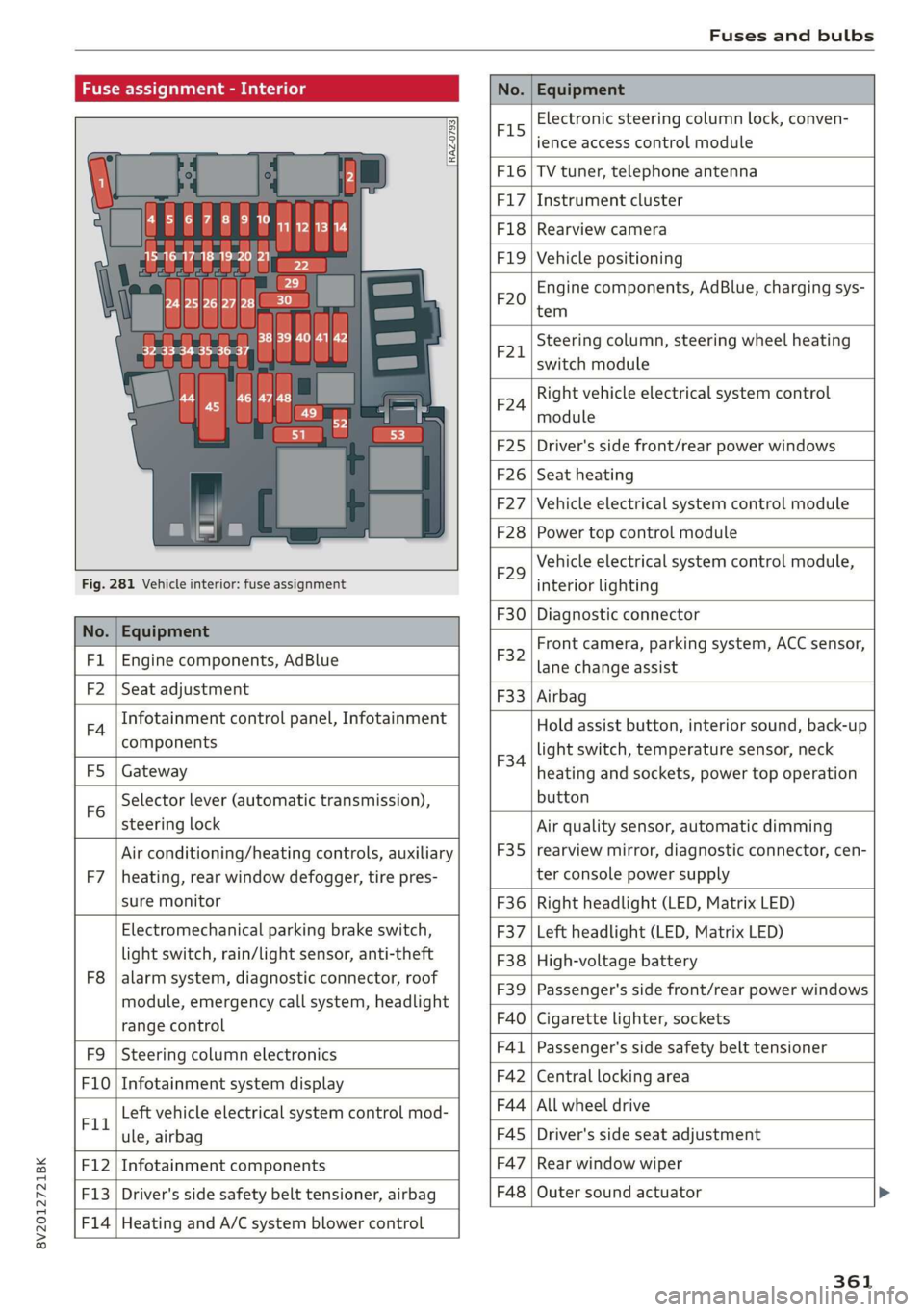
Fuse assignment - Interior
No. Equipment
RAZ-0793,
PO ee
15°16°17-18 19 20 21
PZ ply lip y ips}
ei Hes ole” So}
32°33 34 35 36 37
F15
Electronic steering column lock, conven-
ience access control module
F16 TV tuner, telephone antenna
F17 Instrument cluster
F18 Rearview camera
F1I9 Vehicle positioning
F20
Engine components, AdBlue, charging sys-
tem
F221
Steering column, steering wheel heating
switch module
F24
Right vehicle electrical system control
module
F25 Driver's side front/rear power windows
F26 Seat heating
F27 Vehicle electrical system control module
F28 Power top control module
Fig. 281 Vehicle interior: fuse assignment
F29
Vehicle electrical system control module,
interior lighting
No. Equipment
F30 Diagnostic connector
FL Engine components, AdBlue
F2 Seat adjustment
F32
Front camera, parking system, ACC sensor,
lane change assist
F4
Infotainment control panel, Infotainment
components
F33 Airbag
FS Gateway
Fo
Selector lever (automatic transmission),
steering lock
F34
Hold assist button, interior sound, back-up
light switch, temperature sensor, neck
heating and sockets, power top operation
button
Air conditioning/heating controls, auxiliary F35
Air quality sensor, automatic dimming
rearview mirror, diagnostic connector, cen-
F7 |heating, rear window defogger, tire pres- ter console power supply
sure monitor F36 | Right headlight (LED, Matrix LED)
Electromechanical parking brake switch, F37 | Left headlight (LED, Matrix LED)
light switch, rain/light sensor, anti-theft F38 | High-voltage battery
ae ene eee dent F39 | Passenger's side front/rear power windows
range control F40 | Cigarette lighter, sockets
F9 |Steering column electronics F41 | Passenger's side safety belt tensioner
F10 | Infotainment system display F42 | Central locking area
Tl Left vehicle electrical system control mod- F44 al ee
ule, airbag FAS | Driver's side seat adjustment
F12 | Infotainment components F47 | Rear window wiper
F13 | Driver's side safety belt tensioner, airbag F48 | Outer sound actuator
F14 | Heating and A/C system blower control
361
Page 364 of 400
Fuses and bulbs
No. | Equipment No. | Equipment
Clutch sensor, engine start, high-voltage
F49 3
battery, power electronics
F52 F53 Level control system control module
Rear window defogger
The power seats* are protected via circuit break-
ers that automatically switch on after a few sec-
onds after the overload has been reduced.
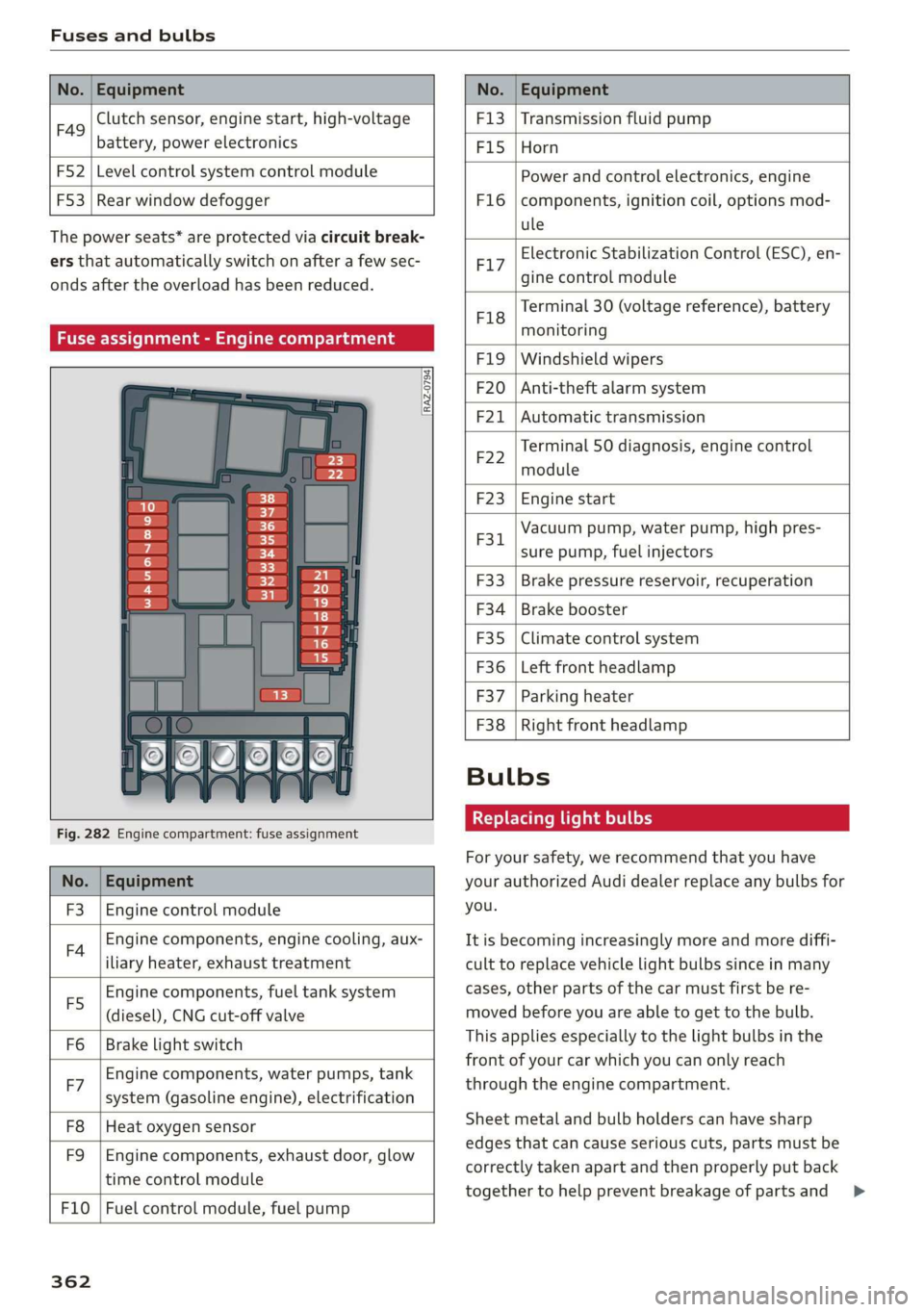
Fuse assignment - Engine compartment
RAZ-0794)
1 0
&
F:}
vi
6
5
4
5}
Fig. 282 Engine compartment: fuse assignment
No. | Equipment
F3 | Engine control module
FA Engine components, engine cooling, aux-
iliary heater, exhaust treatment
Engine components, fuel tank system
(diesel), CNG cut-off valve
Brake light switch
E5
Fo
Engine components, water pumps, tank
F7 ; . ee cae
system (gasoline engine), electrification
F8
F9
Heat oxygen sensor
Engine components, exhaust door, glow
time control module
F10 | Fuel control module, fuel pump
362
F13 | Transmission fluid pump
F15 |Horn
Power and control electronics, engine
components, ignition coil, options mod-
ule
F1l6
Electronic Stabilization Control (ESC), en-
F17
gine control module
Terminal 30 (voltage reference), battery
F18
es
monitoring
FIO F20
F21
Windshield wipers
Anti-theft alarm system
Automatic transmission
Terminal 50 diagnosis, engine control
F22
module
F23 | Engine start
Vacuum pump, water pump, high pres-
F31. 2
sure pump, fuel injectors
F33
F34
F35
F36
F37
Brake pressure reservoir, recuperation
Brake booster
Climate control system
Left front headlamp
Parking heater
F38 | Right front headlamp
Bulbs
Replacing light bulbs
For your safety, we recommend that you have
your authorized Audi dealer replace any bulbs for
you.
It is becoming increasingly more and more diffi-
cult to replace vehicle light bulbs since in many
cases, other parts of the car must first be re-
moved before you are able to get to the bulb.
This applies especially to the light bulbs in the
front of your car which you can only reach
through the engine compartment.
Sheet metal and bulb holders can have sharp
edges that can cause serious cuts, parts must be
correctly taken apart and then properly put back
together to help prevent breakage of parts and >
Page 367 of 400

8V2012721BK
Emergency situations
Jump start
Applies to: vehicles with plug-in hybrid drive
The
term "vehicle battery" refers to the 12 volt
battery in your vehicle.
rr B z
BS 3 & C3
1 = AT
Fig. 283 Engine compartment: connectors for a charger
and jump start cables
The vehicle is equipped with one vehicle battery
and one high-voltage battery.
If the vehicle battery is drained, it can be charged
with a charger or you can jump start the vehicle
using another vehicle's battery in the same way
as a conventional vehicle.
Read the information about charging the vehicle
battery > page 316 and for jump starting the ve-
hicle > page 364.
> Open the hood > page 305.
» Remove the fuse box cover (8) to access the
positive terminal (4) > page 307.
> Clamp the terminal clamps from the charging
device or jump start cable to the positive termi-
nal @) and to the body ground point @).
(@) Note
You must not give a jump start with your vehi-
cle. This could cause significant damage to
the electrical system in your vehicle.
A3 models: jump starting
Applies to: vehicles with conventional drive system
Both jump start cables must be connected in the
correct order.
Fig. 284 Engine compartment: connecting the jump start
cable
The vehicle battery is located on the left front
side of the engine compartment. Open the cover
to access the positive terminal of the vehicle bat-
tery. The procedure for connecting jump start ca-
bles that is described next is designed to help
jump start your vehicle.
Follow the information about the vehicle battery
> page 315.
Preparations
1. Read the following carefully > page 364,
Preparation.
2. Set the parking brake and place the selector
lever in the "P" position.
3. Turn the ignition and electrical equipment off
in both vehicles.
Connecting/disconnecting the jump start
cable
4. Fold the battery cover upward.
5. Clamp the end of the red jump start cable to
the positive terminal @ > fig. 284 on your
vehicle >(@) in Preparation on page 364.
6. Clamp the other end of the red jump start ca-
ble to the positive terminal 2) on the vehicle
battery providing the current.
7. Clamp the black end of the jump start cable
preferably to the ground point, or to the
negative terminal of the vehicle battery @)
on the vehicle providing the current.
365
>
Page 369 of 400
8V2012721BK
Emergency situations
Follow the information about the vehicle battery
=> page 315.
Preparations
1. Read the following carefully > page 364,
Preparation.
2. Set the parking brake and place the selector
lever in the "P" position.
3. Turn the ignition and electrical equipment off
in both vehicles.
Connecting/disconnecting the jump start
cable
4. Open the cover on the positive terminal.
5. Clamp the end of the red jump start cable to
the positive terminal @ > page 365, fig. 284
on your vehicle >@) in Preparation on
page 364.
6. Clamp the other end of the red jump start ca-
ble to the positive terminal (2) on the vehicle
battery providing the current.
7. Clamp the black end of the jump start cable
preferably to the ground point, or to the
negative terminal of the vehicle battery @)
on the vehicle providing the current.
8. Clamp the other end of the black jump start
cable only to the ground point (4) on your ve-
hicle.
9. Route the jump start cables so they cannot
get caught in the moving parts in the engine
compartment.
Starting the engine
10. First start the engine in the vehicle giving the
charge and let it run at idle.
11. Now start the engine in the vehicle with the
drained vehicle battery and wait two to three
minutes until it “runs smoothly”.
12. If the engine does not start, stop the starting
procedure after 10 seconds and then repeat
it after approximately 30 seconds.
13. In the vehicle that is being jump started,
switch the heater fan and rear window de-
froster on to reduce any voltage peaks that
may occur when disconnecting the jumper ca-
bles. The headlights must be switched off.
14. While the engines are running, remove the
cables in reverse order from the way they
were installed, as described in > page 365.
Make sure the cables do not get caught in
moving engine components.
15. Close the cap on the positive terminal.
16. Switch the heater fan and rear window de-
froster off.
ZA\ WARNING
— Never connect the jump start cable directly
to your vehicle battery. Only use the connec-
tions in the engine compartment.
— Do not touch the non-insulated parts of the
terminal clamps. The cable must also not
come into contact with vehicle components
that conduct electricity when it is connected
to the positive vehicle battery terminal. This
can cause a short circuit.
— The plugs on the battery cells must not be
opened.
— Keep ignition sources (such as open flames,
burning cigarettes, etc.) away from the vehi-
cle batteries to reduce the risk of an explo-
sion.
— Route the jump start cables so they cannot
get caught in the moving parts in the other
vehicle's engine compartment.
@) Note
Please note that the connecting process previ-
ously described for the jump start cables is in-
tended for when your vehicle is being jump
started.
(i) Tips
Make sure that the connected jump start ca-
bles have sufficient contact with metal.
Towing with a tow truck
General hints
Your Audi requires special handling for towing.
The following information is to be used by com-
mercial tow truck operators who know how to op-
erate their equipment safely.
— Never tow your Audi. Towing will cause dam-
age to the engine and transmission. >
367
Page 370 of 400
Emergency situations
— Never wrap the safety chains or winch cables
around the brake lines.
— To prevent unnecessary damage, your Audi
must be transported with a flatbed truck.
— To load the vehicle on to the flatbed, use the
towing loop found in the vehicle tools and at-
tach to the front or rear anchorage > page 368
and > page 368.
Z\ WARNING
A vehicle being towed is not safe for passen-
gers. Never allow anyone to ride in a vehicle
being towed, for any reason.
Front towing loop
2
| = z
a
Fig. 287 Right side of front bumper: installing the towing
loop
The threaded opening for the towing loop is lo-
cated behind a cover on the right side of the front
bumper.
> Remove the towing loop from the vehicle tool
kit > page 348.
> Press inward on the upper left area of the cap
with brief, strong pressure to remove it from
the bumper © fig. 287.
> Insert the towing loop in the threaded opening
until it stops, and then tighten it with the
wheel wrench.
> After using, place the towing loop back in the
vehicle tool kit.
ZA WARNING
If the towing loop is not tightened until it
stops when installing, the threads may be
pulled out when towing the vehicle and result
in an accident.
368
G) Tips
Depending on the model, the shape of the
cover can vary.
Rear towing loop
a
2
S| > im a
Fig. 288 Right side of rear bumper: installing the towing
loop
The towing loop threaded opening is located in
the right of the rear bumper cover under a cover.
> Remove the towing loop from the vehicle tool
kit > page 348.
> To remove the cap from the bumper, press in on
the upper area of the cap with brief, strong
pressure and Lift it up from the lower area
> fig. 288.
> Tighten the towing loop in the threaded open-
ing until it stops and then tighten it with a
wheel wrench.
> After using, place the towing loop back in the
vehicle tool kit.
Depending on the model, the shape of the cover
can vary.
ZA\ WARNING
If the towing loop is not tightened until it
stops when installing, the threads may be
pulled out when towing the vehicle and result
in an accident.
@ Tips
Depending on the model, the shape of the
cover can vary.
Page 373 of 400

8V2012721BK
Data privacy
Data privacy
Image recording
Surrounding area monitoring
Applies to: vehicles with surrounding area monitoring
Some vehicle functions require the vehicle’s path
to be detected and evaluated. This is done by
cameras installed permanently on the vehicle
that detect objects in the vehicle's surroundings
(such as obstacles or guard rails). The live images
from the cameras are transmitted to the applica-
ble control module.
The camera images are transmitted to the appli-
cable control module and stored for processing.
The control module analyzes the current camera
image using image evaluation software. This im-
age evaluation software detects anonymized
technical measurements, such as distances to ob-
jects. The control module evaluates these techni-
cal measurements and makes it possible for the
assist systems to control the vehicle, if necessary.
Data memories
Vehicle control modules
5 io. oO Z| x=
+ )
Fig. 292 Driver's side footwell: connection port for the On
Board Diagnostic System (OBD)
Your vehicle is equipped with electronic control
modules for various vehicle systems such as the
airbags. These vehicle control modules store data
while driving normally that is required by an au-
thorized Audi dealer or authorized Audi Service
Facility for diagnosis and repair purposes. Only
certain types of data are recorded for a very short
period of time if a control module has detected a
system event. No noises, conversations, or im-
ages will be recorded in the vehicle.
The data may include information such as the ve-
hicle speed, the direction of travel, and informa-
tion about the brake system, or also the behavior
of the restraint system in the event of an acci-
dent. The stored data can be exported and down-
loaded with special devices, which must be con-
nected directly to the vehicle.
On Board Diagnostic System (OBD)
There is a diagnostic connector socket in the driv-
er's side footwell to read out the various control
modules and the event data recorder. Data re-
garding the function and condition of the elec-
tronic control modules is stored in the event
memory. Only have an authorized Audi dealer or
authorized Audi Service Facility read out and de-
lete the event memory.
ZX WARNING
— Incorrect use of the connection port for the
On Board Diagnostic System can cause mal-
functions, which can then result in accidents
and serious injuries.
— Only allow an authorized Audi dealer or au-
thorized Audi Service Facility to read out the
engine data.
Creu lem eelcel 1g
Event Data Recorder
This vehicle is equipped with an Event Data Re-
corder (EDR). The main purpose of an EDR is to
record, in certain crash or near crash-like situa-
tions,
such as an airbag deployment or hitting a
road obstacle, data that will assist in understand-
ing how a vehicle's system performed. The EDR is
designed to record data related to vehicle dynam-
ics and safety systems for a short period of time,
typically 30 seconds or less. The EDR in this vehi-
cle is designed to record such data as:
— How various systems in your vehicle were oper-
ating;
— Whether or not the driver and passenger safety
belts were buckled/fastened;
— How far (if at all) the driver was depressing the
accelerator and/or brake pedal; and,
— How fast the vehicle was traveling.
371