ignition AUDI A3 CABRIOLET 2015 User Guide
[x] Cancel search | Manufacturer: AUDI, Model Year: 2015, Model line: A3 CABRIOLET, Model: AUDI A3 CABRIOLET 2015Pages: 302, PDF Size: 73.83 MB
Page 33 of 302
M N
" > co ,...., \!) ..,.,
,...., ..,., ,....,
Opening and closing
Central locking
Key set
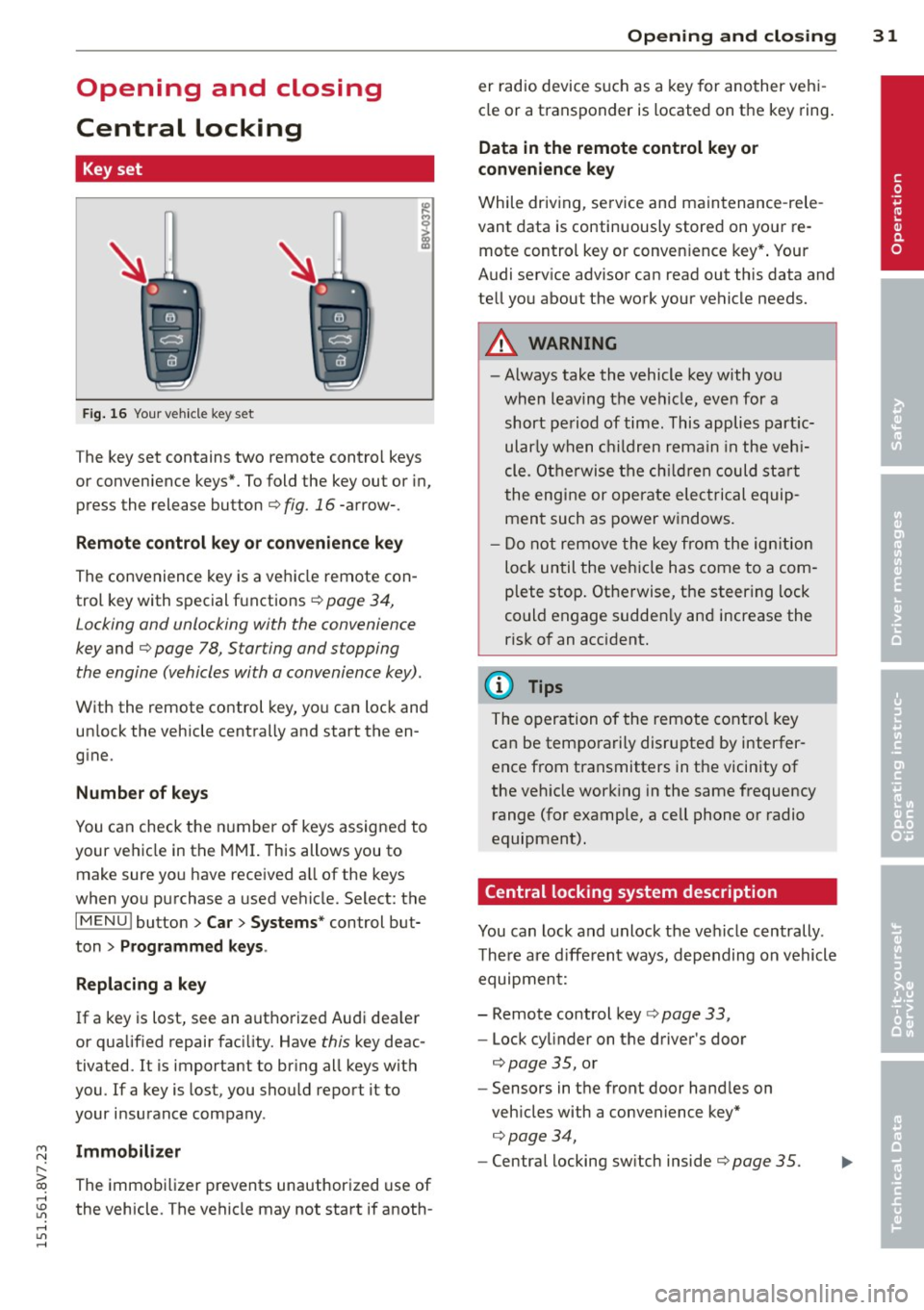
Fig . 16 Your vehicle key set
The key set contains two remote contro l keys
or convenience keys*. To fold the key out or in,
press the release button
q fig. 16 -arrow-.
Remote control key or convenience key
The convenience key is a vehicle remote con
trol key with special functions
q page 34,
Locking and unlocking with the convenience
key and q page 78, Star ting and stopping
the engine (vehicles with a convenience key).
With the remote control key, you can lock and
un lock the vehicle centrally and start the en
gine.
Number of keys
You can check the number of keys assigned to
your vehicle in the MMI. This allows you to
make sure you have received a ll of the keys
when you purchase a used vehicle. Select: the
I MENU I button > Car> Systems* control but
ton
> Programmed keys.
Replacing a key
If a key is lost, see an authorized Audi dea ler
or qualified repair facility. Have this key deac
tivated. It is important to bring all keys with
you.
If a key is lost, you should report it to
your insurance company .
Immobilizer
The immobilizer prevents unauthorized use of
the vehicle . The vehicle may not start if anoth -
Opening and closing 31
er radio device such as a key for another veh i
cle or a transponder is located on the key ring.
Data in the remote control key or
convenience key
While driving , service and maintenance -rele
vant data is continuously stored on your re
mote control key or convenience key*. Your
Audi serv ice advisor can read out this data and
tell you about the work your vehicle needs.
_& WARNING
- Always take the vehicle key with you
when leaving the vehicle, even for a
short period of time. This applies partic
ularly when children remain in the vehi
cle . Otherwise the children could start
the engine or operate electrical equip
ment such as power windows.
- Do not remove the key from the ignition
lock until the vehicle has come to a com
plete stop. Otherwise, the steering lock
could engage sudden ly and increase the
risk of an accident.
{i) Tips
The operation of the remote control key
can be temporarily disrupted by interfer
ence from transmitters in the vicinity of
the veh icle working in the same frequency
range (for example, a cell phone or radio
equipment).
Central locking system description
You can lock and unlock the vehicle centrally .
There are different ways, depending on vehicle
equipment:
- Remote control key
q page 33,
- Lock cylinder on the driver's door
q page 35, or
- Sensors in the front door handles on
veh icles with a convenience key*
q page 34,
- Central locking sw itch inside q page 35.
•
Page 34 of 302
32 Opening and closing
Selective unlocking
The doors and rear lid lock when they close.
You can set in the MMI whether
only the driv
er's door or the entire vehicle should unlock
when unlocking
¢ page 36.
Automatic locking (Auto Lock)
The Auto Lock funct ion locks all doors and the
l uggage compartment lid once the speed has
exceeded approximately 9 mph (15 km/h) .
The car is un locked again once the ignition key
is removed. In addition, the vehicle can be un
l ocked if the opening function in the power
locking system switch is used or one of the
door handles is pulled. The Auto Lock function
can be turned on or off* in the MMI
c::>page36.
In the event of a crash with airbag dep loy
ment, the doors automatically unlock to allow
access to the vehicle.
Anti -theft alarm system*
If the anti-theft alarm system detects a vehi
cle break-in, audio and visual warning signa ls
are triggered .
The anti-theft alarm system turns on auto mat ically when you lock the vehicle.
It deacti
vates when un locking using the remote con
trol key or by touching the sensor on the door
handle (convenience key) .
To switch the alarm off, press them button on
the remote control key or convenience key or
switch the ignition on . The alarm also stops
automatically after a certain amount of time.
Turn signals
The turn signals flash twice when you unlock
the vehicle and once when yo u lock the vehi
cle.
If they do not flash, one of the doors, the lug
gage compartment lid or the hood is not
lock ed or the ignition is still sw itched on (the
latter applies to vehicles with a convenience
key) .
Unintentionally locking yourself out
The following situations prevent you from
locking your remote control key in the vehicle:
- The vehicle does not lock w ith the cent ral
lock ing switc h if the driver's door is open
c::> page 3 5.
-On veh icles with a convenience key* , the lug
gage compartment lid unlocks again after
clos ing if the most recent ly used key is in
the luggage compartment.
Do not lock your veh icle w ith the remote con
trol key or convenience key* until all doors and
the luggage compartment lid are closed. This
helps to prevent from locking yourself out ac
cidentally .
(D Tips
-Do not leave va luab les unattended in the
vehicle. A locked vehicle is not a safe!
- If the LED in the upper edge of the driv
er's door turns on for about 30 seconds
after the vehicle is locked, there is a mal
function in the power locking or the anti
theft alarm system* . Have the problem
corrected by an authorized Audi dea ler or
authorized Audi Service Facility.
Page 41 of 302
M N
" > co ,...., \!) ..,.,
,...., ..,., ,....,
Opening th e windows
"' Press the sw itch to the fir st sto p and hold i t
until the window reaches the desi red posi
tion .
"' Press the switch briefly to the
se cond stop
to automatically open the window .
Clos ing th e windows
"' Pull the swi tch to t he fir st sto p and hold it
until the window reaches the desi red posi
tion .
"' Pull the switch briefly to the
sec on d s top to
automatica lly close the window.
P ow er wi nd ow switch es
@ Sw itch c::> fig. 26 for the window in the
driver's door.
@ Sw itch for the window in the front pas-
senger's door.
© Switch for the left rear w indow.
@ Sw itch for the right rear window.
© Centra l switch for opening or clos ing a ll
side windows at the same time
_& WARNING
- Always remove the ignition key when you
leave your vehicle, even for a short peri
od of time . This applies particularly when
children remain in the vehicle . Otherw ise
the chi ldren could start the engine or op
erate electrical equ ipment such as power
windows. The power windows continue
to function unt il the driver's door or
front passenger's door has been opened .
- Pay carefu l attent ion when closing the
window.
It could cause injury by pinch
ing.
- When locking the veh icle from outs ide,
the vehicle must be unoccupied s ince the
windows can no longer be opened in an eme rgency.
(D Tips
After turning the ignition off you can still
open and close the windows for approxi
mate ly 10 seconds. The powe r windows
are not switc hed off until the dr iver's door
Opening and clo sin g 39
or front passenger's door has been
opened.
· Convenience opening /closing
With the convenience opening/closing func
tion, you can centrally and easily open the
windows from the outside.
Con ven ience opening
"' Press the Iii button on the remote contro l
key until all windows have reached the de
sired position or
"' Hold the key in the driver's door lock unt il all
w indows have reached the desired position.
Convenience clo sing
"' Ho ld the key in the driver's door lock in the
lock posit ion unti l all windows are closed .
Convenienc e closing with the convenience
ke y*
"'Touch the sensor* in one of the door handles
until all windows are closed. Do not p lace
your hand in the door handle when do ing
this.
Adju sting the conv enience opening in the
MM I
"'Select: the I MENU I button >Ca r> Sys tem s*
control button > Vehicle setting s > Central
lo cking
> Long-press to open windows
To enable convenience opening of the win-
dows, the
Front windows and Rear window s
functions must be switched On.
_& WARNING
- Never close the w indows carelessly or in
a n uncontrolled manner, because this in
creases the risk of inju ry.
- For secur ity reasons, the w indows can
only be opened with the remote control
key at a ma ximum d istance of approxi
mate ly 6 fee t (2 meters) from the vehi
cle.
- Always watch the windows while they are
clos ing using the loc k cylinder so that no
one is pinched in the window. C losing
•
Page 43 of 302

....,
N
r--. > co
rl I.O
"' rl
"' rl
Power top
Automatic power top
General information
The power top opens and closes automatical ly . When open, the power top is stored com
pletely in the power top compartment. The
power top can be opened or closed at speeds
up to 30 mph (SO km/h).
Under normal conditions, the power top is
wind and waterproof. In rare cases, small
droplets of water may form under extreme
weather conditions such as torrential or pro longed rain. That is normal and no cause for
concern.
Follow the care instructions to keep the power
top free of leaks and to maintain its appear
ance
c::> page 204, Core and cleaning. Also ob
serve the following:
- Op en and stow the power top only when it is
clean and dry . Sharp-edged dirt particles can
cause damage to the rear window and the
power top. Stowing the power top when it is
damp can create imprints in it, and if it is
left that way for long periods of time, mil
dew and other damage can form.
- Do not leave the power top open for several
weeks or the creases in it may become dis
colored.
- Remove ice and snow before opening the
power top. Do not use any sharp edged ob
jects to remove ice and snow or the power
top could be scratched or damaged. The rear
window may be cleared with a standard ice
scraper.
- Do not open the power top when the tem
perature is below 32 °F (0 °C). The fabric in
the power top loses elasticity in sub-ze ro
temperatures.
_& WARNING
- When positioning the power top, avoid
contact with the supports or other mov
ing parts. Make sure all of the windows
.
Power top 41
are lowered. Otherwise you could pinch
your hands.
- Never drive when the power top is not
locked correctly. The wind from driving
could cause the power top to open. This
can result in injuries and damage to the
vehicle.
Opening and closing the power top
Fig. 27 Center console: power top switch
Requirement: The power top storage com
partment must be lowered
c::> page 43 and
the luggage compartment lid must be closed.
.. Switch the ignition on.
.. To open or close the power top, pull or press
the button @during the entire process.
T he status of the power top is shown in the in
strument cluster display when operating the
power top switch.
You can close the power top when the wind
deflector is installed
~ page 44.
A message will appear in the instrument clus
ter if the power top cannot be opened or
closed
c::> page 43.
A WARNING
- When operating the power top, make
sure the function is not affected by wind
or other factors and that it does not in
terfere with other drivers.
- Never drive when the power top is not
locked correctly. The wind from driving
could cause the power top to open. This
can result in injuries and damage to the
vehicle.
-
Page 51 of 302
....,
N
r--. > co
rl I.O
"' rl
"' rl
Lights and Vision
Exterior Lighting
Switching lights on and off
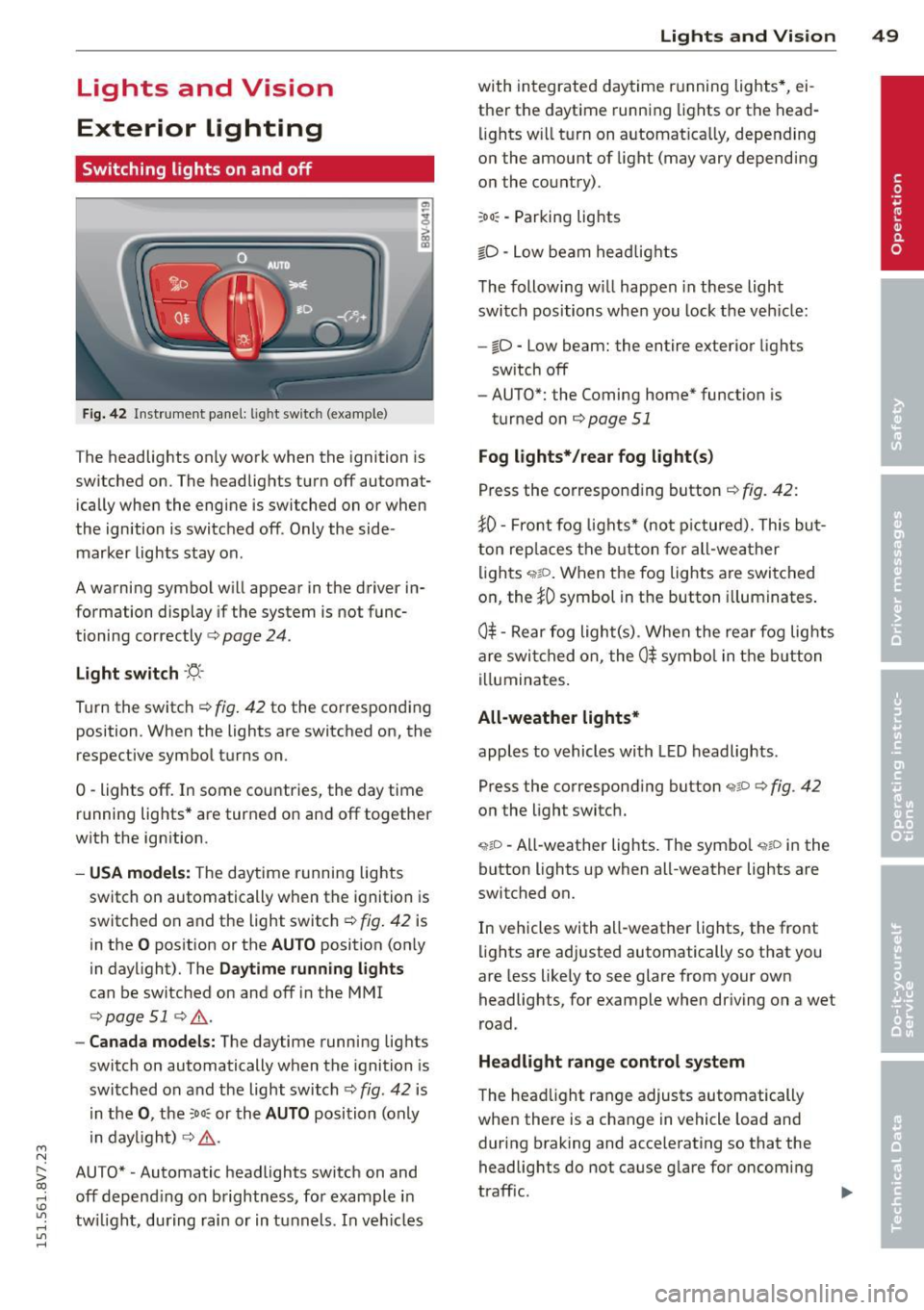
Fig. 42 Instrument panel: lig ht switc h (example)
The headlights only work when the ignition is
switched on. The headlights turn off automat ically when the engine is switched on or when
the ignition is switched off. Only the side marker lights stay on .
A warning symbol will appear in the driver in
formation display if the system is not func
tioning correctly <=>
page 24.
Light switch ·'ti- ·
Turn the switch¢ fig. 42 to the corresponding
position . When the lights are switched on, the
respective symbol turns on.
0 -lights off. In some countries, the day time
running lights* are turned on and off together
with the ign ition.
- USA models: The daytime running lights
switch on automatically when the ignition is
switched on and the light switch¢
fig. 42 is
in the
O position or the AUTO position (on ly
in daylight). The
Daytime running lights
can be switched on and off in the MMI
¢ page 51 ¢ ,& .
-Canada models: The daytime running lights
switch on automatically when the ignition is
switched on and the light switch¢
fig. 42 is
in the
0, the :Do: or the AUTO position (only
in daylight) ¢
,&.
AUTO* • Automatic headlights switch on and
off depend ing on brightness, for example in
tw ilight, during rain or in tunnels. In vehicles Lights
and Vision 49
with integrated daytime running lights*, ei
ther the daytime running lights or the head
li ghts will turn on automat ically, depending
on the amount of light (may vary depending
on the country).
: Do : -Parking lights
iD -Low beam headlights
The following w ill happen in these light
switch positions when you lock the vehicle:
-io -Low beam: the entire exterior lights
sw itch off
- AUTO*: the Coming home* function is
turned on ¢
page 51
Fog lights*/rear fog light(s)
Press the corresponding button¢ fig. 42:
JO· Front fog lights* (not pictured). This but
ton replaces the button for all-weather
lights
q;!D . When the fog lights are switched
on, the
JO symbol in the button illuminates.
0$ -Rear fog light(s) . When the rear fog lights
are switched on, the
0$ symbol in the button
illuminates.
All-weather lights*
apples to vehicles with LED headlights.
Press the corresponding button
<;?P c;, fig. 42
on the light switch.
~io -All-weather lights . The symbol <;;t,;D in the
button lights up when all-weather lights are
switched on.
In vehicles with all-weather lights, the front
lights are adjusted automatically so that you
are less likely to see glare from your own
headlights, for example when driving on a wet
road .
Headlight range control system
The head light range adjusts automatically
when there is a change in vehicle load and
during braking and accelerating so that the
headlights do not cause glare for oncoming
traff ic.
Page 52 of 302
50 Lights an d Vi sion
Audi adapt ive light *
The adaptive light on ly functions when the
light switch is in the AU TO position. You can
deactivate adaptive light in the MMI
r::!.> poge
51 .
When switched on, adapt ive light adjusts to
curves depending on the vehicle speed and
steering wheel ang le . This provides better
lighting throug h the curve . The system oper
ates in a speed r ange from approximately
6 mph (10 km/h) to 68 mph (110 km/h).
Static co rnering light* (vehicles with adaptive
light) -the corn ering light switches on auto
matica lly when the steering wheel is turned at
a certa in angle at speeds up to approximately
44 mph (70 km/h) and when the turn signal is
activated at speeds up to approximately
25 mph (40 km/h). The area to the s ide of the
vehicle is il luminated better when turning .
Speed dependent light distr ibution* -The
speed dependent light distribution adapts the
light in towns and on highways or express
ways. Intersect ions can also be ill uminated on
ve hicl es w ith a navigation system *.
Highwa y light funct ion *
(Vehicles with adaptive light or L ED head
lights) -This function adapts the light ing for
h ighway driving based on vehicle speed .
_&. WARNING
-Automati c headlights* are only intended
to assist the dr iver . T hey do not re lieve
the drive r of responsibility to check the
head lights and to turn them on man ually
according to the current light and visibili
ty conditions. For examp le, fog cannot
be detected by the light sensors. So al
ways switch on the low beam under
these weather conditions and when driv ing in the dark
fD.
- Acc idents could occur if you cannot see
the road ahead of you well and if others
on the road cannot see you . A lways
swit ch you r headlights o n so that yo u can see the road ahead of you and others can
see your vehicle from beh
ind.
- Please observe legal regulations when
using the lighting systems described.
(D Note
The rear fog lights shou ld only be turned
on in accordance with t raffic regu lations,
to prevent glare for traffic behind your ve hicle.
(D Tips
- The light sensor for the automatic head
lights * is in the rea rview mir ror mount.
Therefore, do not place any stickers in
this area o n the windshield .
- Some functions of the exterior lighting
can be adjusted
c> page 51.
-If you tu rn off the ignition whi le the ex
terior lights are on and open the door,
you will hear a warning tone.
- The tail lights do not sw itch on when the
daytime r unning lights switch on.
- In cool or damp weather, the inside of
the headlights, turn signals and tail
lights can fog over due to the tempera
ture difference between the inside and
outside. They w ill clear shortly after
switching them on . This does not affect
the serv ice life of the lighting.
- A message w ill appea r in the i nstrument
cluster if there is a malfunction in the
light senso r
r::!.> page 24.
Emergency flasher
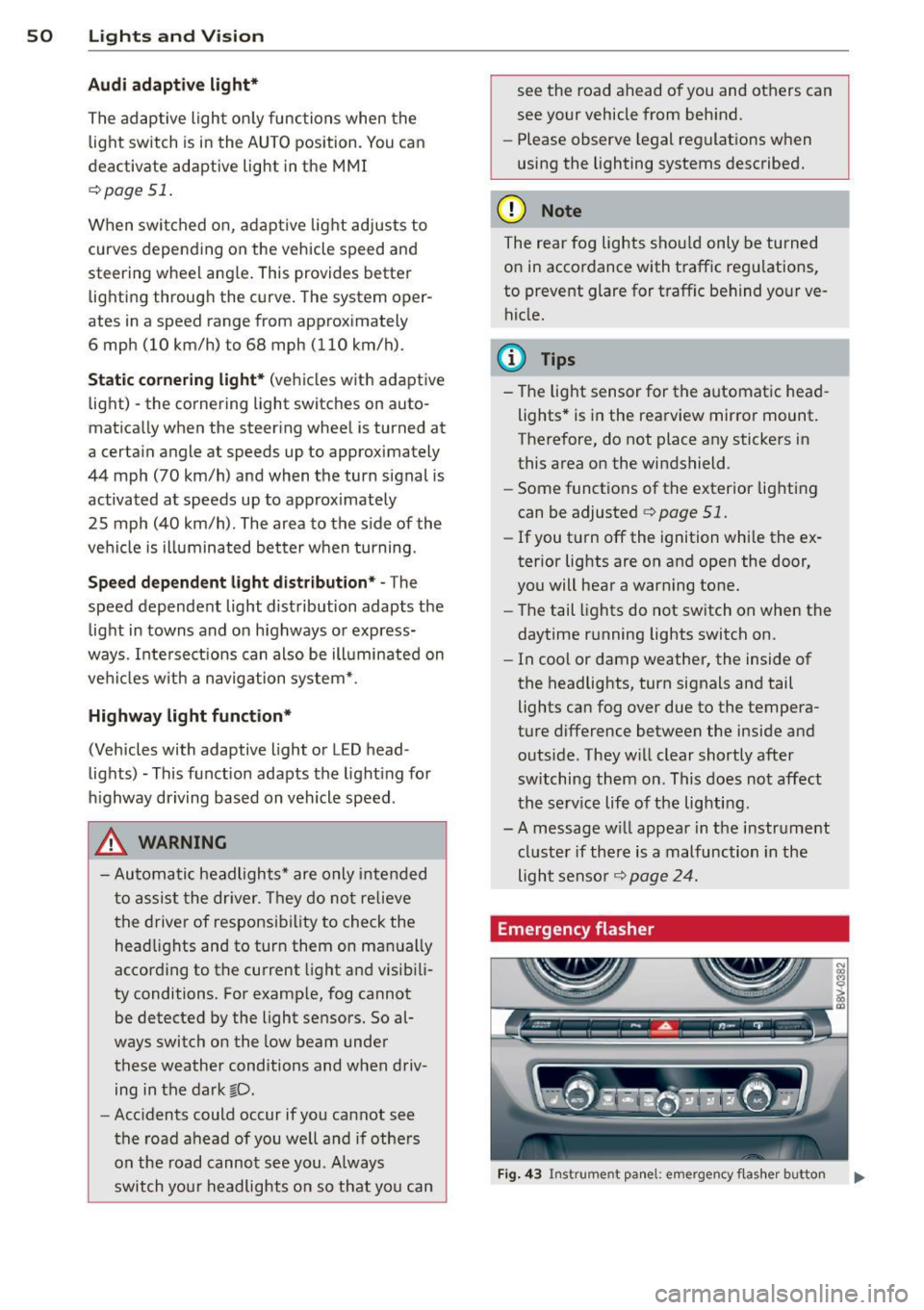
Fig . 4 3 Ins trume nt panel: e mergency f las her button
N
I
Page 55 of 302
....,
N
r--. > co
rl I.O
"' rl
"' rl
Instrument illumination
The brightness of the instrument cluster and
the center console can be adjusted.
"' 5 0
'
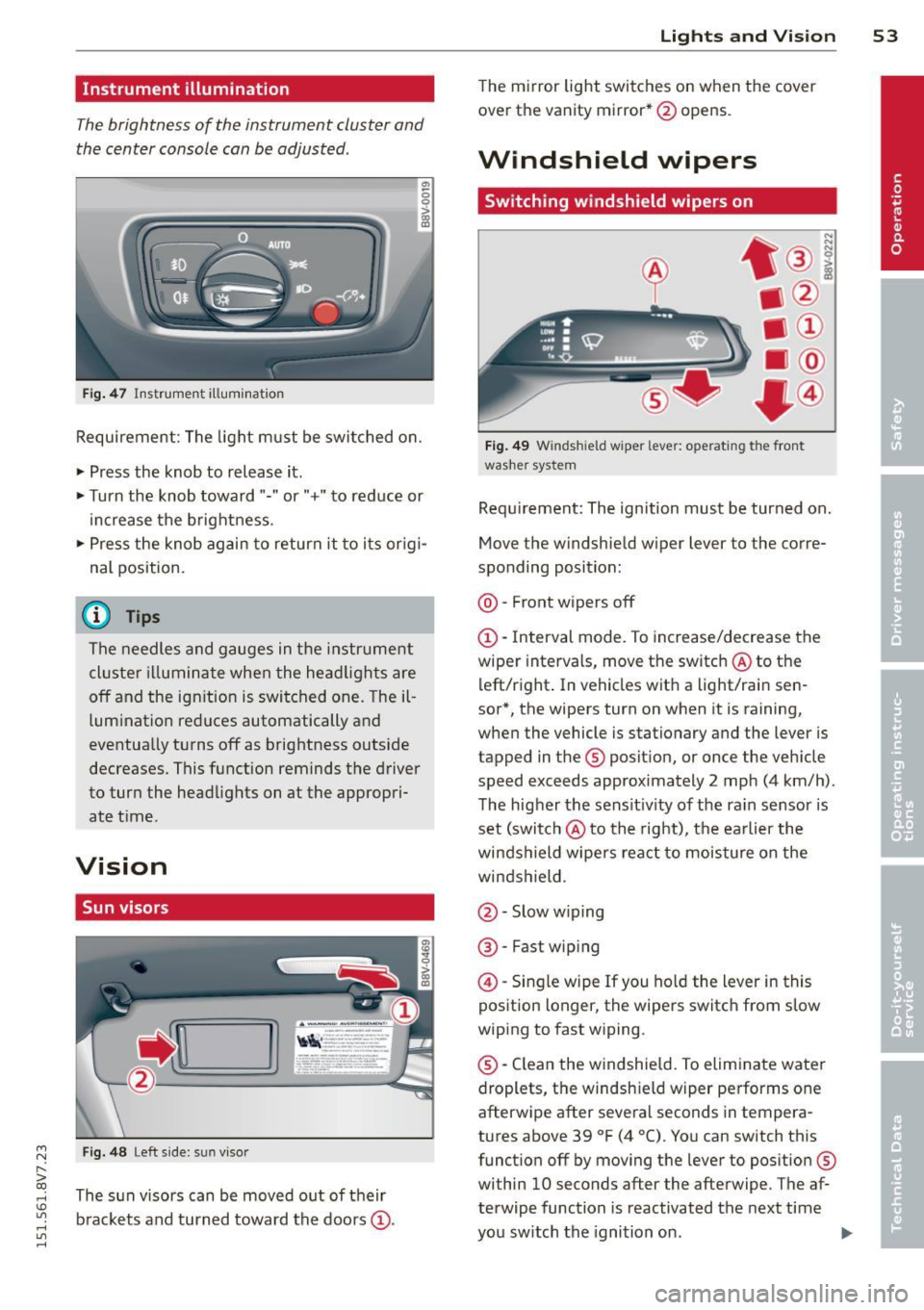
Fig. 47 Instrument illum ination
Requirement: The light must be switched on.
• Press the knob to release it.
• Turn the knob toward"." or"+" to reduce or
increase the brightness .
• Press the knob again to return it to i ts or ig i·
nal position.
(D Tips
The needles and gauges in the instrument
cluste r illuminate when the head lights are
off and the ign ition is switched one. Theil
lumination reduces automatically and
eventua lly turns off as brightness outside
decreases. This function reminds the driver
to turn the headlights on at the appropri·
ate t ime.
Vision
Sun visors
F ig. 48 Left s ide: sun vi sor
The s un visors can be moved out of their
b rackets and turned toward the doors
(D.
Lights and Vision 53
The mirror light switches on when the cover
over the vanity mirror* @opens.
Windshield wipers
Switching windshield wipers on
Fig. 49 Windsh ield wiper lever: operating the front
washer system
Requ irement: The ignition must be turned on.
Move the windshield w iper lever to the corre
sponding position:
@ · Front wipers off
(D-Interval mode. To increase/decrease the
wiper intervals, move the switch @to the
left/right . In vehicles wit h a light/rai n sen
sor*, the wipers turn on when it is raining,
when the vehicle is stationary and the lever is
tapped in the ® position, or once the vehicle
speed exceeds approximately 2 mph (4 km/h).
The higher the sens itiv ity of the ra in sensor is
set (switch @to the right), the earlier the
winds hield wipers react to moisture on the
windshield.
@ · Slow w iping
@ · Fast wip ing
@ -Single wipe If you hold the lever in this
position longer, the wipers switch from slow
wiping to fast wiping.
® -Clean the windshield. To eliminate water
droplets, the windsh ield wiper performs one
afterwipe after several seconds in tempera
tures above 39 °F (4 °(). You can switch this
function off by moving the lever to position ®
within 10 seconds after the afterwipe . The af
terwipe function is reactivated the next time
you switch the ignition on.
II>
Page 56 of 302
54 Lig ht s a nd Vis io n
A WARNING
-The rain sensor is only intended to assist
the driver. The driver is still responsible
for manually switching the w ipers on ac
cording to the v is ibility conditions.
- The windshield may not be treated w ith
water-repe lling windshie ld coat ing
agents. Unfavorable conditions, such as
wetness, darkness or low sun, can result in increased glare. W iper blade chatter is
also possible.
- Properly functioning windshie ld w iper
blades are required for a clear view and
sa fe driving
¢ page 54, Replacing
front windshield wiper blades.
0 Note
- In case of frost, make sure the wind shield wiper blades are not frozen to the
windshield. Sw itching on the windshield
wipers when the blades are frozen to the
windshield can damage the wiper blades.
- Prior to using a car wash, the windshield
wiper system must be switched off (lever
in position 0). This prevents unintention
al sw itching on and damage to the wind
shield wiper system.
- Do not use the wipers to remove ice from
the windows. Using windshield wipers as
ice scrapers destroys the wiper blades.
{D Tips
- The windshield wipers switch off when
the ignition is turned off. You can acti
vate the w indshield wipe rs after the igni
tion is switched back on by moving the
windsh ield wiper leve r to any pos ition.
- Worn or dirty windsh ield wiper blades
result in streaking. Th is can affect the
rain sensor function. Check your w ind
s h ield wiper blades regularly.
- The washer fluid nozzles in the w ind
shield washer system are heated* at low
temperatures when the ignit ion is on.
- When stopping temporarily, such as at a
traff ic light, the speed of the windsh ield wipers automatically reduces by one
lev
el.
- In vehicles with an MMI, you can switch
the rain sensor or off in the
Driver a ssi s
t a nce
menu.
Cleaning windshield wiper blades
Clean the wiper blades when you see wiper
streaks . Use a soft cloth and a glass cleaner .
.,. Place the windshie ld wiper arms in the serv
ice pos it ion
¢ page 54.
.,. Fold the windshield wiper arms away from
the windshield.
A WARNING
Dirty windsh ield wiper blades can impair
v is ion, wh ich increases the r isk of an acci
dent.
(D Note
If you see streaks again after clean ing the
wiper blades, the blades must be replaced
¢ page 54.
Replacing front windshield wiper blades
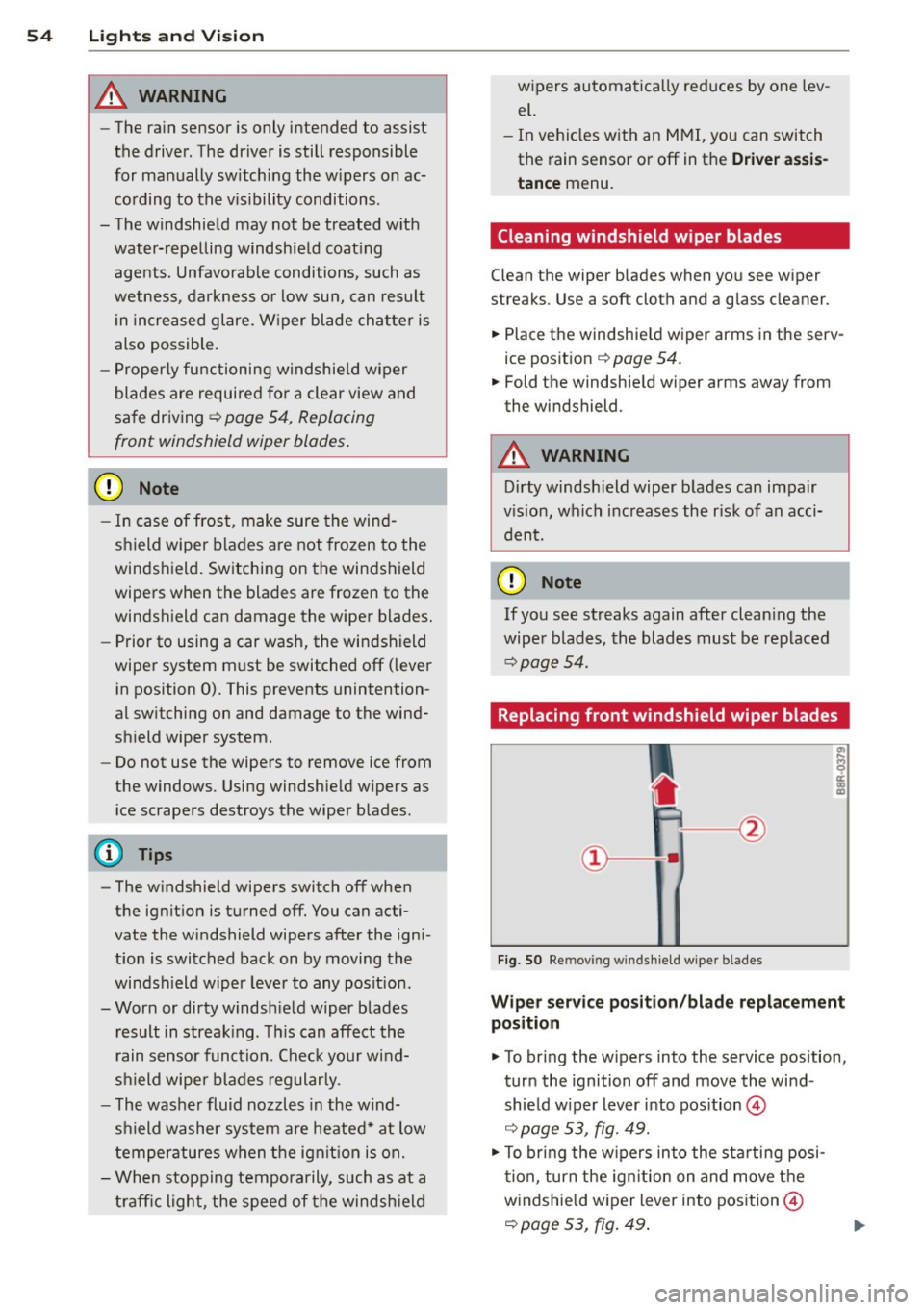
Fig. SO Re mov ing windshie ld wiper blades
W ipe r se rv ic e po sit ion /bl ad e re pl ace ment
pos ition
.,. To bring the w ipers into the service position,
turn the ignition off and move the wind
shield w iper lever into position @
¢ page 53, fig. 49.
.,. To bring the w ipers into the starting posi
tion, turn the ign ition on and move t he
windshield wiper lever into position@
¢ page 53, fig. 49 .
Page 63 of 302
....,
N
r--. > co
rl I.O
"' rl
"' rl
driving or riding. The safety belts and air
bag system can provide the greatest pro
tection possible when the backrests are
in the upright position and the safety
belts are worn correctly. The more a
backrest is reclined, the greater the risk
of inju ry due to an incorrect seating posi
tion and safety belt position .
Power seat adjustment
Applies to vehicles: with power adjustable seats
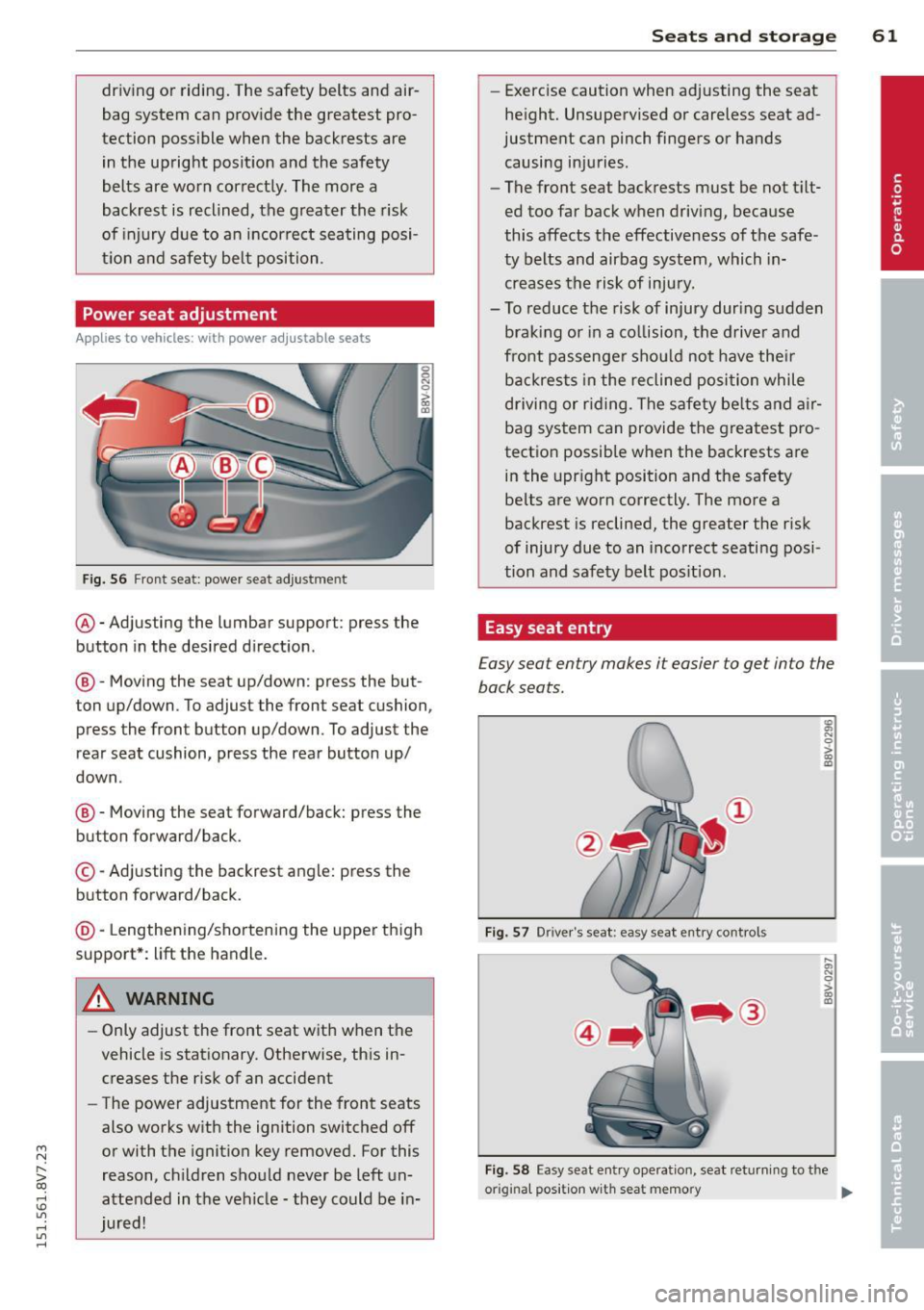
Fig. 56 Fr ont seat: power seat adjustment
@ -Adjusting the lumbar support: press the
button in the desired d irection.
@ -Moving the seat up/down : press the but
ton up/down. To adjust the front seat cushion,
press the front button up/down. To adjust the
rear seat cushion, press the rear button up/
down .
@-Moving the seat forward/back: press the
button forward/back.
© -Adj usting the backrest angle: press the
button forward/back.
@ -Lengthening/shortening the upper thigh
support*: lift the handle.
A WARNING ,-
- Only adjust the front seat w ith when the
vehicle is stationary. Otherwise, this in
creases the r isk of an accident
- The power adjustment for the front seats
also works with the ignition switched off
or with the ignition key removed. For this
reason, ch ildren should never be left un
attended in the vehicle -they co uld be in
jured!
Seats and storage 61
-Exercise caution when adjusting the seat
height. Unsupervised or careless seat ad
justment can pinch fingers or hands
causing injuries.
- The front seat backrests must be not t ilt
ed too far back when driving, because
this affects the effective ness of the safe
ty belts and airbag system, which in
creases the risk of injury.
- To reduce the risk of injury dur ing sudden
braking or in a co llision, the driver and
front passenger shou ld not have their
backrests in the reclined position while
driving or rid ing. The safety be lts and air
bag system can provide the greatest pro
tection possible when the backrests are in the upright position and the safety
be lts are worn correctly. The more a
backrest is reclined, the greater the risk
of injury due to an incorrect seating posi
tion and safety belt position.
Easy seat entry
Easy seat entry makes it easier to get into the
back seats.
Fig. 57 Driver's seat: easy seat entry controls
~ N 0 > m a,
....
l1l 0 > m a,
Fig . 58 Easy seat entry operation, seat returning to the
origina l pos it ion w ith seat memory
Ill>
Page 66 of 302
64 Seats and storage
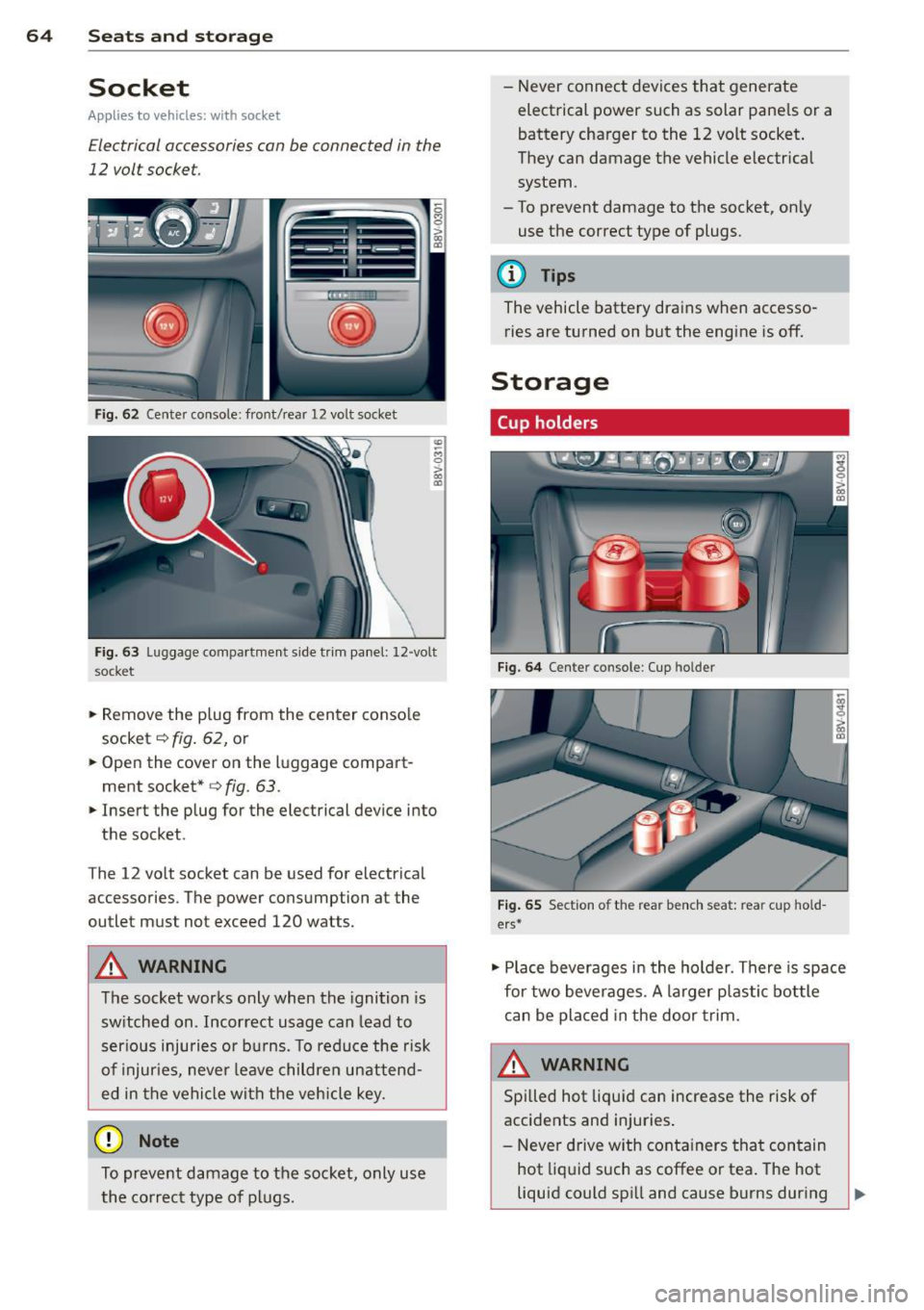
Socket
Applies to vehicles: wit h socket
Electrical accessories can be connected in the
12 volt socket.
F ig . 6 2 Center console: front/rear 1 2 vol t so cket
"' -M
0
> a, (D
F ig. 63 Lu ggage compartme nt s ide tr im panel: 12 -volt
s ocke t
.,. Remove the p lug from the center conso le
socket
c::> fig . 62, or
~ Open the cover on the luggage compart
ment socket*
<=> fig. 63 .
.,. Insert the plug for the electrical device into
the socket .
T he 12 vo lt socket can be used for electrical
accessories. T he power cons umption a t the
outlet mus t not exceed 120 watts.
&_ WARNING
The socket works only when the ignition is
sw itched on . Incor rect usage can lead to
ser ious injuries or bu rns. To reduce the r isk
of injur ies, never leave childre n unattend
ed in the vehicle wi th the vehicle key.
(D Note
To preve nt damage to the socket, only use
the co rrect type o f plugs. - N
ever connec t devices tha t generate
electrical power such as solar pane ls or a
battery charger to the 12 volt socket .
They can damage the vehicle e lectrical
system .
- To prevent damage to the socket, on ly
use the correct type of plugs.
(D Tips
The vehicle battery dra ins when accesso
ries are turned on but the engine is off.
Storage
Cup holders
F ig. 6 4 Center co nso le : C up holde r
Fig. 65 Sect io n of th e re ar ben ch seat: re ar cu p hold
ers *
.,. Place beverages i n the holder . There is space
for two bever ages. A larger p lastic bottle
can be placed in the door trim.
&_ WARNING
Spi lled hot liquid can increase the risk of
accidents and injuries .
- Never d rive w ith conta iners that con tain
hot liq uid such as coffee or tea . The hot
liquid could spi ll and cause burns during