ignition AUDI A3 CABRIOLET 2015 Workshop Manual
[x] Cancel search | Manufacturer: AUDI, Model Year: 2015, Model line: A3 CABRIOLET, Model: AUDI A3 CABRIOLET 2015Pages: 302, PDF Size: 73.83 MB
Page 223 of 302
....,
N
r--. > co
rl I.O
"' rl
"' rl
Adding coolant
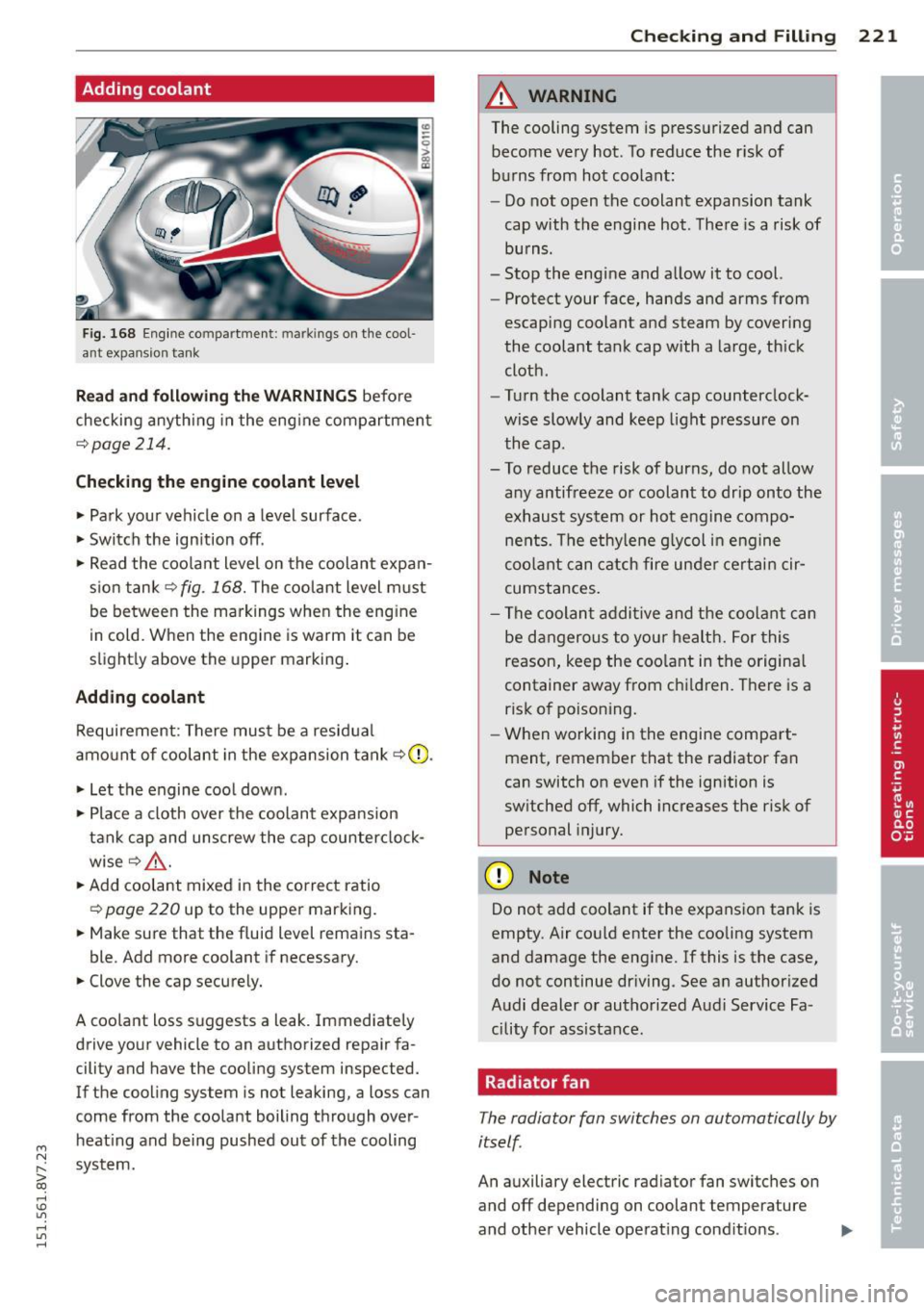
Fig. 168 Eng ine co mpa rtme nt: m ark in gs on the cool
ant expansio n tank
Read and following th e WARNING S before
checking anythi ng in the eng ine compartmen t
c::>page 214.
Checking th e engine coolant leve l
"'Park your vehicle on a level surface .
"' Switch the ign ition off.
"' Read the coo lant level on the coolant expan
s ion tank
c::> fig. 168. The coolant level must
be between the markings whe n the eng ine
in cold. When the eng ine is warm it can be
slight ly above the upper marking .
Adding coolant
Requirement: There must be a residua l
amo unt of coolant in the expansion tank
c::> (D .
"'Let the engine coo l down .
"' Place a cloth over the coolant expa nsion
tank cap and unscrew the cap counter clock
wise <=:>
A.
"'Add coolant mixed in the correct ratio
c::>page 220 up to the upper marking.
"' Make sure that the fluid level remains sta-
ble. Add more coolant if necessary.
"' Clove the cap securely.
A coolant loss suggests a leak. Immediately drive your vehicle to an authorized repair fa
cility and have the cooling system inspected.
If the cooling system is not leaking, a loss can
come from the coolant boiling through over
heat ing and being pushed out of the cooling
system.
Che cking and Fillin g 221
A WARNING
The cooling system is pressurized and can
become very hot. To reduce the r isk of
burns from hot coolant:
- Do not open the coolant expansion tank
cap with the engine hot . The re is a risk of
burns .
- Stop the engine and allow it to cool.
- Protect your face, hands and arms from
escaping coolant and steam by covering
the coolant tank cap with a large, th ick
cloth .
- Tu rn the coolant tank cap counterclock
wise slowly and keep light pressure on
the cap.
- To reduce the risk of burns, do not allow
any antifreeze o r coolant to drip onto the
exhaust system or hot engin e compo
nents . The ethy lene g lycol in eng ine
coo lant can catch fire under certai n cir
cumstances.
- The coolan t addi tive and the coolant can
be dangerous to your health. For this
reason, keep the coo lant in the origina l
container away from ch ildren. There is a
risk of poisoning.
- When working in the engine compart
ment, remember that the radiator fan
can switch on even if the ignition is
sw itched off, which increases the risk of
personal injury.
(D Note
Do not add coolant if the expans ion tank is
empty. Air could enter the cooling system
and damage the eng ine. If this is the case,
do not continue dr iving. See an author ized
Audi dealer or authorized Audi Service Fa
c ility for ass istance.
Radiator fan
The radiator fan switches on automatically by
itself.
An auxiliary electric radiator fan switches on
and off depending on coolant temperature
and other vehicle operat ing condit ions .
IJJ,
Page 224 of 302
222 Checking and Filling
After you switch the engine off, the auxiliary
fan can continue running for up to 10 minutes
- even with the ignition off. It can even switch
on again later by itself
c:> .&. , if
- the temperature of the engine coolant rises
due to the heat build-up from the engine in
the engine compartment, or
- the engine compartment heats up beca use
the vehicle is parked in intense sunlight.
A WARNING
- To reduce the risk of personal injury
nev
er touch the radiator fan.
- The auxiliary electr ic fan is temperature
contro lled and can switch on sudden ly
even when the engine is not running.
- The auxiliary radiator fan switches on au tomatically when the engine coolant
reaches a certain temperature and will
continue to run until the coolant temper
ature drops.
Brake fluid
Checking brake fluid level
N
N
;;;
" 00 co
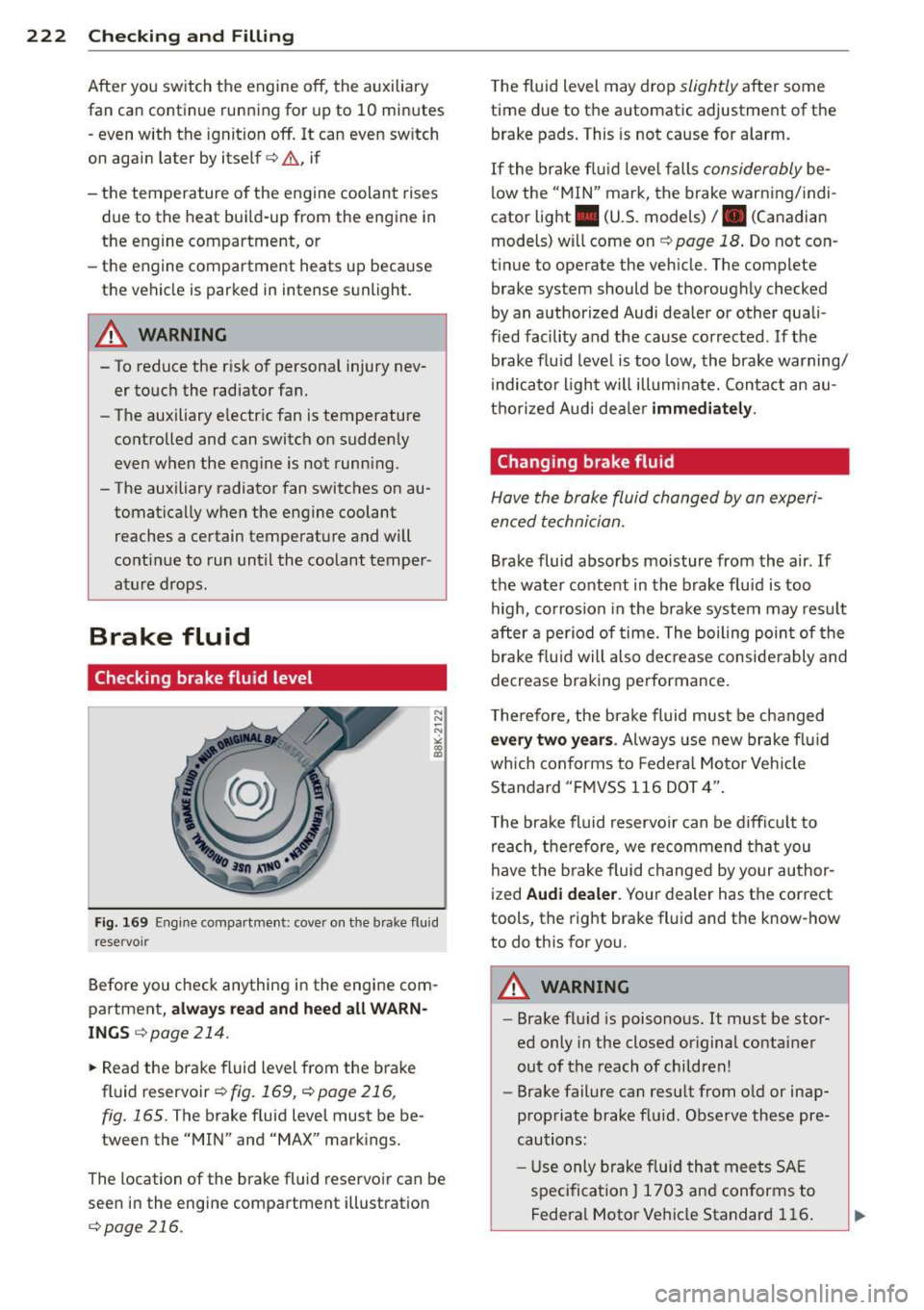
Fig . 169 Engine compartment : cove r on the brake flu id
r eservoir
Before you check anything in the engine com
partment,
always read and heed all WARN ·
INGS c:> page 214.
.. Read the brake fluid level from the brake
fluid reservoir
c:> fig.169, c:>poge216 ,
fig. 165.
The brake f luid level must be be
tween the "MIN" and "MAX" markings.
The location of the brake fluid reservoir can be
seen in the engine compartment illustration
c:> page 216 .
The fluid level may drop slightly after some
time due to the automatic adjustment of the
brake pads . This is not cause for a larm.
If the brake f luid level falls
considerably be
low the "MIN" mark, the brake warning/indi
cator light . (U.S. models)
I. (Canad ian
models) will come on
c:> page 18 . Do not con
tinue to operate the vehicle. The complete brake system should be thoroughly checked
by an authorized Audi dealer or other quali
fied facility and the cause corrected. If the
brake fluid level is too low, the brake warning/
indicator ligh t will illuminate. Contact an au
thorized Audi dea ler
immediately.
Changing brake fluid
Have the broke fluid changed by an experi
enced technician.
Brake fluid absorbs moisture from the air. If
the water content in the brake f luid is too
high, corrosion in the brake system may result
after a period of time. The boiling point of the
brake fluid will also decrease considerably and
decrease braking performance.
T he refo re, the brake fluid must be changed
every two years. Always use new brake fluid
wh ich conforms to Federal Motor Vehicle
Standard "FMVSS 116 DOT 4".
T he brake fluid reservoir can be difficult to
reach, therefore, we recommend that you
have the b rake fluid changed by your author
ized
Audi dealer. Your dealer has the correct
tools, the right brake fluid and the know-how
to do this for you .
A WARNING
---Brake flu id is poisonous. It must be stor
ed only in the closed or iginal container
out of the reach of children!
- Brake failure can resu lt from o ld or inap·
propriate brake flu id. Observe these pre·
cautions:
- Us e only brake fluid that meets SAE
specification
J 1703 and conforms to
Federa l Motor Vehicle Standard 116.
Page 227 of 302
....,
N
r--. > co
rl I.O
"' rl
"' rl
-Do not interchange the positive and neg
ative cables .
- When working on the battery , be sure
not to short-circuit the terminals with
tools or other metal objects. This would cause the battery to heat up very quickly,
which could lead to damage or explosion
and personal injury.
- When a battery is charged, it produces
hydrogen gas which is explosive and
could cause personal injury .
- Always keep the battery well out of the reach of children .
- Before work is done on the electrical sys
tem, disconnect the negative ground ca
ble .
- Before performing any work on the elec
trical system , switch off the engine and
ignition as well as any electrical equip
ment. The negative cable on the battery
must be disconnected. If you are just go
ing to replace a light bulb, then it is
enough to switch off the lights.
- Before disconnecting the battery, switch
off the anti-theft alarm system! Other
wise you will set off the alarm.
- When disconnecting the battery, first
disconnect the negative cable and then
the positive cable.
- Before reconnecting the battery, make
sure all electrical consumers are switch
ed off. Reconnect the positive cable first
and then the negative cable. Never inter
change the cables - this could start a fire!
- Never charge a fro zen or a thawed-out
battery. It could explode! If a battery has
fro zen, then it must be replaced. A dead
battery can freeze over at 32°F (O°C) .
- Make sure the vent hose is always attach
ed to the opening on the side of the bat
tery .
- Never use batteries which are damaged.
There is the danger of an explosion ! Al
ways replace a damaged battery .
A WARNING
California Proposition 65 Warning:
Checking and Filling 225
-Battery posts, terminals and related ac
cessories contain lead and lead com
pounds, chemicals known to the State of
California to cause cancer and reproduc
tive problems . Wash hands after han
dling.
(D Note
- Do not disconnect the vehicle battery
when the ignition is on or when the en gine is running, otherwise, you will dam
age electronic components in the electri
cal system.
- If your vehicle is going to stand for a
long period of time without being driven ,
protect the battery from "freezing", oth
erwise it will be damaged and will then
have to be replaced.
Battery charging
Starting the engine requires a well charged
battery.
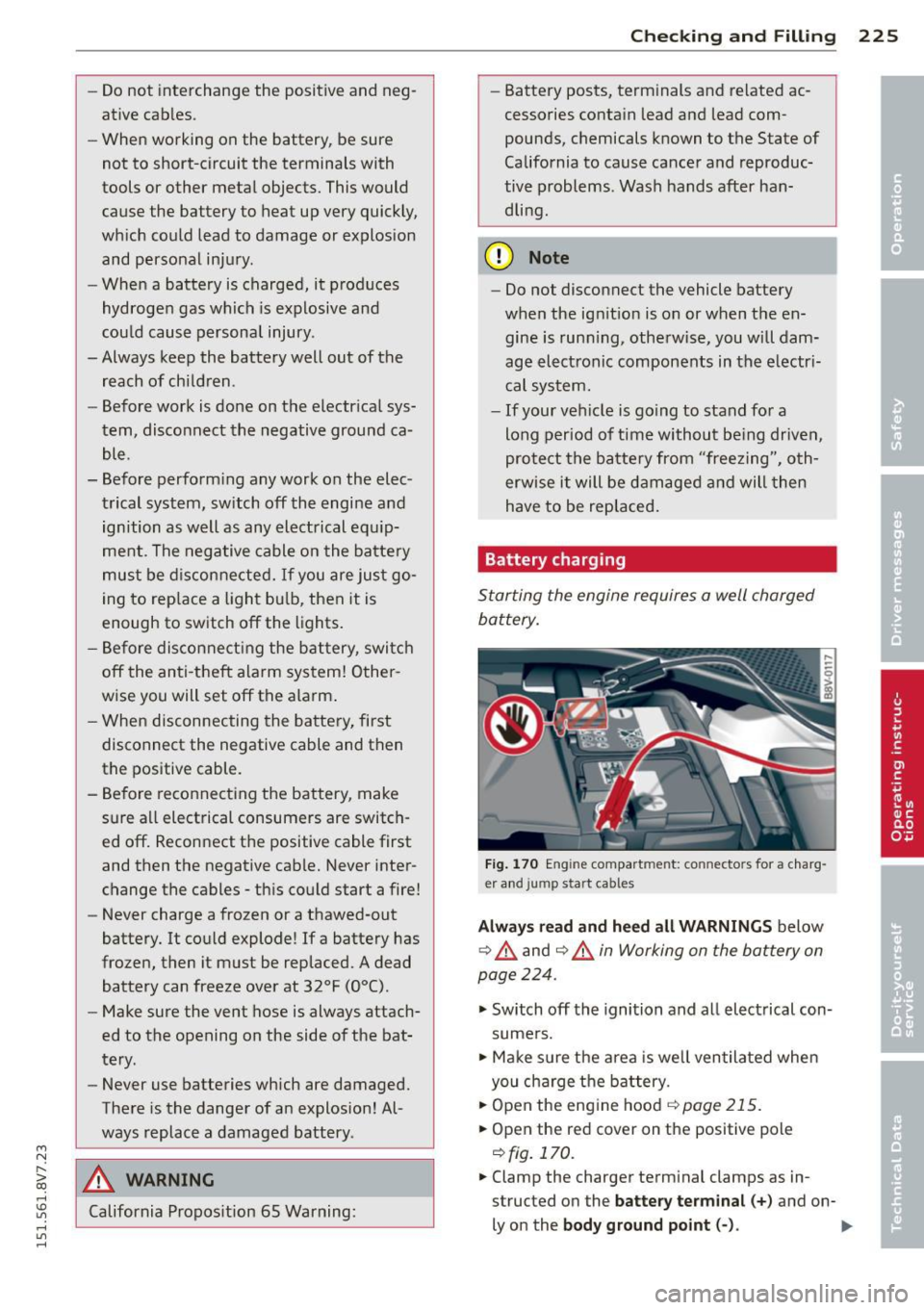
Fig. 170 E ngin e compar tmen t: co nn ecto rs fo r a charg
e r and jump st art ca bles
Always read and heed all WARNINGS below
c:::> ,& and c:::> ,& in Working on the battery on
page
224 .
.,. Switch off the ignition and all electrical con
sumers .
.,. Make sure the area is well ventilated when
you charge the battery.
.,. Open the engine hood
c:::> page 215 .
.,. Open the red cov er on the pos itive pole
c:::> fig. 170.
.,. Clamp the cha rger termin al clamps as in
structed on the
battery terminal(+) and on-
l y on the
body ground point(-) . .,._
Page 261 of 302

M N
" > co ,...., \!) 1.1"1 ,...., 1.1"1 ,....,
reached the level to trigger illumination of the
TPMS low tire pressure telltale.
Your veh icle has also been equ ipped with a
TPMS malfunction indicato r to indica te when
the system is not operating properly . The
TPMS malfunction indicator is combined with
the low tire pressure tellta le . When the sys
tem detects a malfunct ion, the telltale will
flash for approximately one minute and then
remain cont inuous ly illuminated. This se
quence will continue upon subsequent vehicle
start-ups as long as the ma lfunction ex ists .
When the malfunct ion indicator is illuminat
ed, the system may not be able to detect or
sig nal low t ire pressure as intended . TPMS
malfunct ions may occur for a variety of rea
sons, including the installa tio n of replace
ment or a lternate tires or whee ls on the veh i
cle that prevent the TPMS from funct ion ing
properly. Always check the TPMS malfunction
tellta le after replacing one or more tires or
wheels on your veh icle to ensure that the re
placement or alternate tires and wheels allow
the TPMS to continue to function properly.
If the Tire Pressure Monitoring System
indicator appears
Applies to vehicles: with tire pressure monito ring system
The tire pressure indicator in the instrument
cluster informs you if the tire pressure is too
low or if there is a system malfunction .
Fig . 177 In strum ent clus te r: indica tor l igh t w ith mes
sage
Using the ABS sensors, the tire pressure moni
toring system compares the t ire tread circum
ference and vibration characteristics of the in
d iv idual tires . If the pressure changes in one
Tire s an d wheel s 259
or more tires, this is indicated in the instru
ment cluster disp lay with an indicator light
ti] and a message c:::> fig . 177. If only one tire
is affected, the locat ion of that tire will be in
dicated. The message turns off after a few mi
nutes . You can d isplay the message aga in
c:::> page 2 8 .
The tire pressures must be stored in the menu
display again each time the pressures change
(sw itching between partial and full load pres
sure) or after chang ing or replacing a t ire on
your vehicle
c:::> page 260 . The t ire press ure
monitori ng system only monito rs the tire
pressure yo u have stored . Yo u can find the rec
ommended t ire press ures for your vehicle on
the labe l on the driver 's doo r pillar
c:::> page235 .
Tire t read circumference and vib rat ion charac
teristics can change and cause a tire pressu re
warning if :
- I f the tire pressure in one or mo re tires is
t oo low,
- the t ire has structural damage,
-The tire was replaced or the t ire p ressure
changed and it was not stored again
c:::> page 260 .
-The spare tire is installed .
Indicator light s
ti]-Loss of pressure in at least one tire c:::> &.
Check the tires and replace or repair if neces
sary. Check/correct the pressures of all four
tires . Then store the t ire pressures in the MMI
c:::> page 2 60 .
DI (T ire Pressure Monitoring System) T ir e
press ure: S ystem malfunct ion!. If Ill ap
pears afte r switching the ignition on or while
driv ing and the
ti] indicator l ight in the in
str ume nt cluster b links for app rox imately one
minute and then stays on , the re is system
malfunction. Try to s to re the co rrec t ti re pres
s u res
c:::> page 260. If the indicator light does
turn off or tu rns on again after a short period
of time, drive to yo ur authorized Aud i dea ler
or qualified repa ir facility immed iate ly to have
the malfunction corrected. .,..
•
•
•
Page 271 of 302
....,
N
r--. > co
rl I.O
"' rl
"' rl
Fuses and bulbs
Electrical fuses
Replacing fuses
Fuses that have blown will have metal strips
that have burned through.
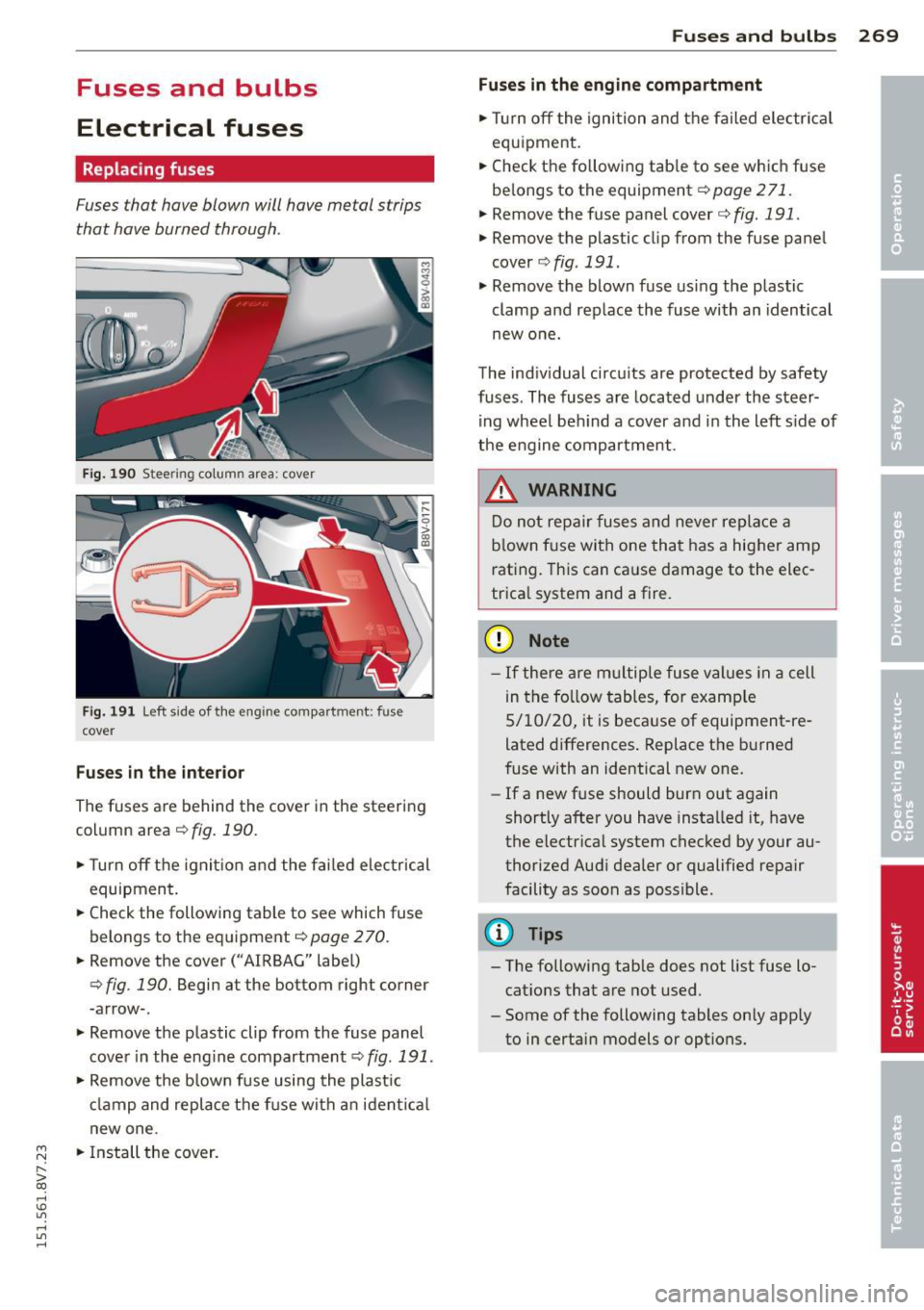
Fig. 190 Steering column area: cover
Fig. 191 Left side of the engine compartment: fuse
cover
Fuses in the interior
The fuses are behind the cover in the steering
column area¢
fig. 190.
•Turnoff the ignition and the fai led e lectrical
equipment.
• Check the following table to see which fuse
belongs to the eq uipment
¢page 270.
• Remove the cover(" AIRBAG" label)
¢ fig . 190. Begin at the bottom right corner
-arrow-.
• Remove the plastic clip from the fuse panel
cover in the eng ine compartment ¢
fig. 191.
• Remove the blown fuse using the plastic
clamp and replace the f use with an ident ica l
new one .
• Install the cover .
Fuses and bulbs 269
Fuses in the engine compartment
•Tu rnoff the ignition and the failed electrical
equipment.
• Check the fo llowing tab le to see which fuse
be longs to the equipment¢
page 271.
• Remove the fuse panel cover¢ fig. 191.
• Remove the plastic clip from the fuse pane l
cover
¢ fig. 191.
• Remove the blown fuse using the plastic
clamp and replace the fuse with an identical
new one.
The indiv idual circuits are protected by safety
fuses. The fuses are located under the steer
ing wheel beh ind a cover and in the left side of
the engine compartment .
_&. WARNING
-
Do not repair fuses and never replace a
blown fuse with one that has a higher amp
rat ing. This can ca use damage to the elec
trica l system and a fire .
(D Note
-If there are multip le fuse values in a cell
in the follo w tables, for example
5/10/20, it is because of equipment-re
lated differences. Replace the burned
fuse with an identical new one.
- If a new fuse should burn out again
shortly after you have insta lled it, have
the electrical system checked by your au
thorized Audi dealer or qualified repair
facility as soon as possible.
(D Tips
- The following table does not list fuse lo
cat ions that are not used.
- Some of the following tables only apply
to in certain models or options.
Page 276 of 302
2 7 4 Emergency situations
@ Tips
The discharged battery must be properly
connected to the vehicle's electrical sys
tem. When jump starting or charging the
battery, never connect the negative
ground cable to the battery negative post
because the batte ry manager system must
be able to detect the battery 's state of
charge. Always connect the negative
ground cab le to the negative ground post
of the battery manager control unit.
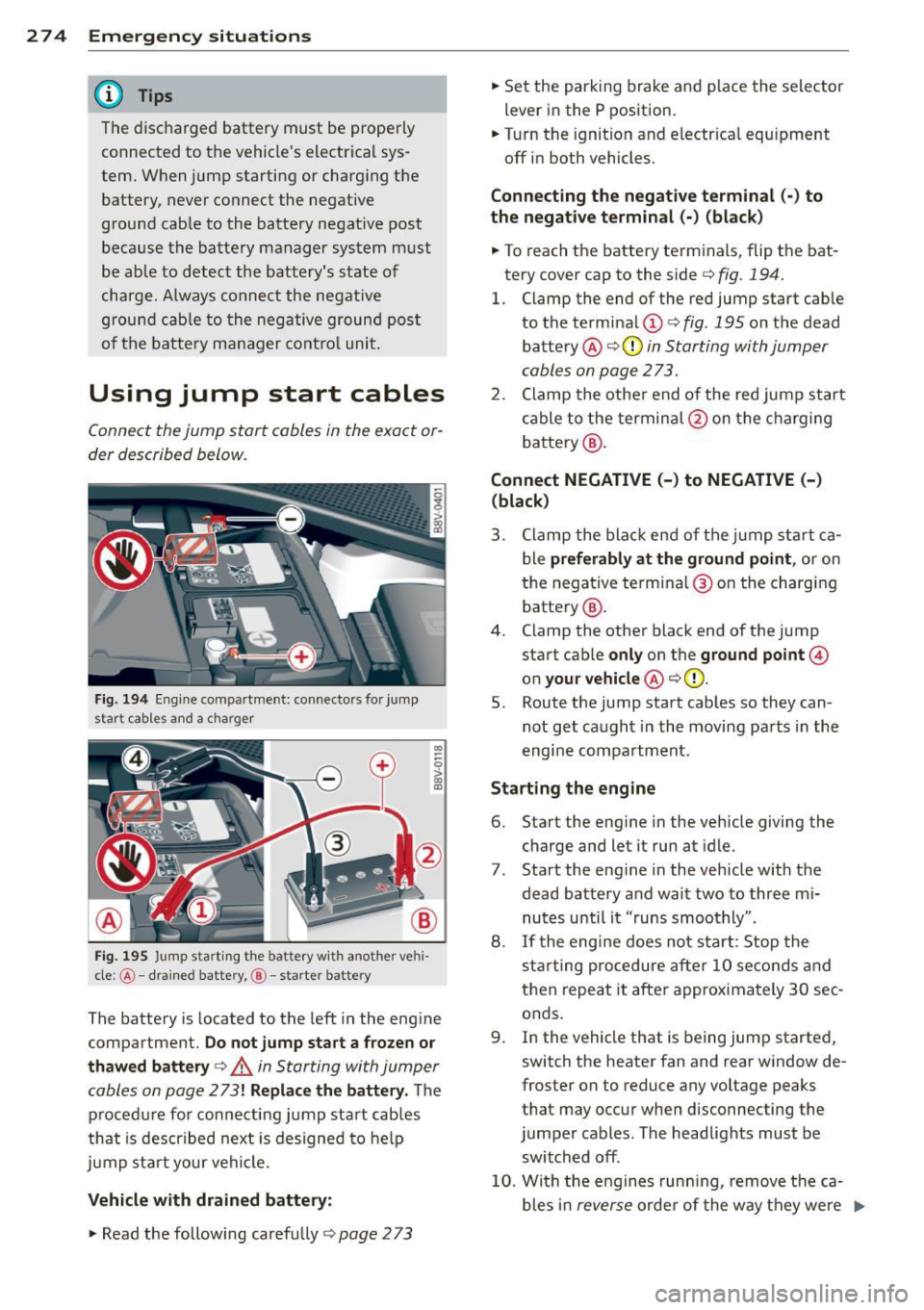
Using jump start cables
Connect the jump start cables in the exact or
der described below.
Fig. 194 Engine compartment: connecto rs fo r jump
start cab les and a charger
Fig. 195 Jump sta rting the battery with another ve hi
cle :@ -drained battery, @-starte r battery
CD
--0 > ~
The battery is located to the left in the engine
compartment.
Do not jump start a frozen or
thawed battery¢
,A in Starting with Jumper
cables on page
273! Replace the battery. The
procedure for connecting jump start cables
that is described next is designed to help
jump start your vehicle.
Vehicle with drained battery:
.. Read the following carefully ¢ page 2 73
.. Set the parking brake and place the selector
lever in the P position.
.. Turn the ignition and electr ical equipment
off in both vehicles.
Connecting the negative terminal(·) to
the negative terminal (-) (black)
.. To reach the battery terminals, flip the bat
tery cover cap to the side¢
fig. 194.
l. Clamp the end of the red jump start cable
to the terminal (!)¢
fig. 195 on the dead
battery @¢0
in Starting with Jumper
cables on page 273.
2. Clamp the other end of the red jump start
cable to the terminal @on the charging
battery @.
Connect NEGATIVE (-) to NEGATIVE (-)
(black)
3. Clamp the black end of the jump start ca
ble
preferably at the ground point, or on
the negative terminal@on the charging
battery @.
4. Clamp the other black end of the jump
start cab le
only on the ground point@
on your vehicle @¢(D.
5. Route the jump start cables so they can
not get caught in the moving parts in the
engine compartment .
Starting the engine
6. Start the engine in the vehicle giving the
charge and let it run at idle.
7 . Start the engine in the vehicle with the
dead battery and wait two to three mi nutes until it "runs smoothly" .
8.
If the engine does not start: Stop the
starting procedure after
10 seconds and
then repeat it after approximately
30 sec
onds .
9 . In the vehicle that is being jump started,
switch the heater fan and rear window de
froster on to reduce any voltage peaks
that may occur when disconnecting the
jumper cables. The headlights must be
switched off .
10. With the engines running, remove the ca
bles in
reverse order of the way they were ..,.
Page 285 of 302
M N
" > co ,...., \!) 1.1'1 ,...., 1.1'1 ,....,
complexity of today's automobi les, have
steadi ly reduced the scope of maintenance
and repairs which can be carried out by vehicle
owners.
Also, s afe ty and en vironm ental con
cerns p lace very strict limits on the nature of
repairs and adjustments to engine and trans
miss io n pa rts which an owner can perform .
Maintenance, adjustments and repairs usua lly
require special tools, testing devices and oth
er equipment avai lab le to specially trained
workshop personnel in order to assure prope r
performance, reliab ility and safety of the vehi
cle and its many systems .
Improper ma intenance, adjustments and re
pa irs can impair the operation and reliability
of your vehicle and even vo id your vehicle war
ranty. The refo re, p roof of servic ing in accord
ance w ith the ma intenance sched ule may be a
condition for upholding a poss ible war ranty
claim made within the warranty period .
Above all, operational safety can be adversely
affected, c rea ting unnecessary risks for you
and your passengers.
I f in doubt about any servicing, have it done
by your authori zed Audi dealer or any othe r
p roperly equipped and q ualified workshop .
We strong ly urge you to give your aut horized
Audi dealer the opportunity to perfo rm all
schedu led maintenance and necessary repairs .
Your dea ler has the facilities, or iginal parts
and trained spec ialists to keep your vehicle
running properly .
Performing limit ed m aintenance you rself
The fo llowing pages describe a limited num
ber of procedu res which can be performed on
your veh icle w ith ordinary too ls, should the
need arise and trained personnel be unavaila
b le. Before performing any of these proce
dures, always thoroughly read all of the app li
cable text and carefully follow the instruc
tions given. Always rigorously obse rve the
WARNINGS provided .
Before you check anything in th e engine
compartment, alway s re ad and heed all
WARNINGS ~&. and
~ page 214 .
Con sumer In formation 283
_& WARNING
- Ser ious personal injury may occur as a re
sult of improperly performed mainte
nance, ad justments or repa irs .
- Always be extremely careful when work
ing on the vehicle . Always follow com
monly accepted safety pract ices and gen
era l common sense. Never r is k personal
inju ry.
- Do not attempt any of the maintenance,
checks or repairs descr ibed o n the fol
lowing pages if you are not fully fam ilia r
with these or othe r procedures with re
spect to the vehicle, or are uncertain how
to p roceed .
- Do not do any work without the proper
too ls and equipment. Have the necessary
wo rk done by your authorized A udi deal
er or another proper ly equipped and
qualified workshop.
- The engine compartment of any motor
veh icle is a potentially hazardous area.
Never reach into th e area around or
touch the rad iator fan. It is temperature
contro lled and can switch on suddenly -
even when the engine is off. The radiato r
fan switches on automat ically when the
coo lant reaches a certain tempera ture
and will cont inue to run until the coo lant
temperature drops .
- Always sw itch o ff the ignition before any
one gets under the vehicle.
- Always support your veh icle with safety
s tands if it is necessary to work under
neath the vehicle. The jack s upplied with
the vehicle is not adequate for this pu r
pose and cou ld collapse causing serio us
personal injury.
- If you m ust wor k underneath the vehicle
with the wheels on the g round, a lways
make sure the vehicle is on leve l ground,
that the wheels are a lways securely
blocked and that the engine cannot be
started.
- Always make sure the transmission se lecto r lever (automatic transmission) is •
•
Page 291 of 302
M N ,....
> co ,...., \!) 1.1'1 ,...., 1.1'1 ,....,
Cockpit (overview) . . . . . . . . . . . . . . . . . . . . 8
Cold tire inflation pressure ............ 235
Coming home ...... ..... .. .... .. .. .. 51
Compartments ............ .... .. .. .. 64
Compass in the mirror ........... .... . 57
Compliance .. .. .............. ... ... 285
Consumer Information . . . . . . . . . . 134, 282
Consumption (fuel) ........ .. .. .. .. .. 27
Contacting NH TSA ............ ... .. . 134
Convenience key Emergency operation . . . . . . . . . . . . . . . . 80
Indicator light ........... .. .. .. .. .. 81
Starting the engine (START ENGINE ST OP
button) .... .. .............. ... .... 78
Stopping the engine (S TART ENGINE
STOP button) . . . . . . . . . . . . . . . . . . . . . . 79
Switching the ignition on .. .. .. .. .. .. 78
unlocking/locking ........ .. .. .. .. .. 34
Convenience opening/closing
Convertible child safety seats
Convertible locking retractor .
. .. .. .. .. 39
176
Activating .. ................. .. .. . 182
Deactivating . . . . . . . . . . . . . . . . . . . . . . 182
Using to secure a child safety seat l80, 182
Coolant
refer to Engine coolant ....... ... .. . 220
Cool ing mode (automatic climate control
system) . .. .. ................. .. .. .. 72
Cooling mode (manual climate control sys-
tem) .. .. .. .. .. ........ ... .. .. .. .. .. 71
Cooling system Adding coolant ........... .... .. .. . 221
Coolant level checking ..... .. .. .. .. . 221
Coolant temperature indicator .. ... ... 12
Indicator light ... .. ...... .. .. .. .. .. 19
Cornering light . ........... .. .. .. .. .. 50
C rash data recorde r (EDR) 188
Cruise control system Changing speed . . . . . . . . . . . . . . . . . . . . 86
Description ............... ... ... ... 85
Preselecting speed . . . . . . . . . . . . . . . . . . 86
Sw itching off . ........... .. .. .. .. .. 86
switch ing on ............. .... .. .. .. 85
Cup holders . . . . . . . . . . . . . . . . . . . . . . . . . 64
Current consumption . . . . . . . . . . . . . 26, 27
Index 289
D
Data recorder . . . . . . . . . . . . . . . . . 188, 194
Date display . . . . . . . . . . . . . . . . . . . . . . . . 10
Daytime running lights ........... .... . 49
Decla rat ion of compliance
Adaptive cruise control . . . . . . . . . . . . . 28S
Audi side assist .... .............. . 285
Cell phone package . . . . . . . . . . . . . . . . 285
Convenience key .... .............. . 285
Electronic immobilizer .......... .. .. 285
Homelink universal remote control . .. 285
Remote control key . . . . . . . . . . . . . . . . 285
Defective light bulb warning
Indicator light ... .. ................ 24
Defrost ing (windshield)
automat ic climate control system . . . . . 73
manual climate control system ........ 71
DEF (instrument cluster) ... .. .... .... . 11
Deluxe automatic climate control
refer to Climate control system (auto-
ma tic) ...... .. .. .. . ............... 72
Determining correct load limit ....... . 245
Digital compass . .. .. . ............ .. . 57
Dimensions . .. .. .. ................. 280
D imming the rearv iew mirror ..... .. .. . 56
Distance ......... .. ..... ........... 27
Door/rear lid warning 26
Door contact sw itch . . . . . . . . . . . . . . . . . . 52
Driver information system .......... .. . 26
CD/radio display .. .. . .. .. .. .... .... . 26
Door/rear lid warning ............... 26
Driver messages . . . . . . . . . . . . . . . . . . . . 13
Efficiency program . . . . . . . . . . . . . . . . . . 28
Ind icator lights .. .... ......... .... . 13
On-board computer ............ .. .. . 27
Outside temperature display . . . . . . . . . . 26
Service interval display . . . . . . . . . . . . . . 13
Using the mu ltifunction steering wheel . 26
Driver seating position ........... .... 127
Drive select
refer to Audi drive select ............ 107
Driving safely 126
Driving through water .. ......... .. .. 197
Driving time
Dust filter 27
refer to Pollutant
filter ............ .. 70
•
•
Page 294 of 302
292 Index
How often should I check my tire pres -
sures? . ..... ... ............. ..... .
241
How safety belt pretensioners work ... . 144
Hydroplaning ................. .... . 248
I
Ignition
Indicator light . . . . . . . . . . . . . . . . . . . . .
21
switching on and off (with button) ..... 78
Ignition key safety interlock . . . . . . . . . . . 76
Ignition lock mechanical . . . . . . . . . . . . . . . . . . . . . . . . 76
Immobili zer . . . . . . . . . . . . . . . . . . . . . . . .
31
Important things to do before driving .. 126
Improperly worn safety belts ....... .. . 144
Indicator lights ...................... 13
Infant seats . . . . . . . . . . . . . . . . . . . . . . . 17 5
Installing child safety seats Safety belts . . . . . . . . . . . . . . . . . . . . . .
180
Installing the upper tether strap on the
anchorage . .. ............. .. .. .. ...
186
Instrument cluster ......... .... .... .. 10
Instruments .... .... ...... .. .. .. .. .. 10
Adjusting the lighting ......... .. .... 53
Interior lighting .............. ..... .. 52
Intermittent (windshield wipers) . . . . . . . 53
]
Jump-starting
Jump start cables 273
274
K
Key
..... .... ................ ..... .. 31
Checking the number ....... ... .... .. 31
Driver messages (mechanical ignition
key) . .. .. .. .. . .......... .. .. .... ..
81
Driver messages (with convenience key) . 81
Key not recognized . . . . . . . . . . . . . . . . . . 80
Key replacement . . . . . . . . . . . . . . . . . . . 31
Replacing the battery ..... .. .. .. .. .. 33
unlocking/locking . . . . . . . . . . .
33, 34, 35
Key recognition
Climate control system . . . . . . . . . . . . . . 70
Kick-down Automatic transmission ... .. .. .....
115
Knee airbags .... .. ............. .... 163
Description . ..... ................ . 163
How they work ... ................ . 164
Important safety instructions ........ 165
L
Lane assist
refer to Active lane assist ........... . 99
LATCH ... .. .. .. .. ............. .. ..
183
Description .. .. .. .. .............. . 184
Installing a child restraint ........ ... 185
Location . . . . . . . . . . . . . . . . . . . . . . . . . 184
Mounting and releasing the anchorage
hook ..... .... .. .. ........... ....
185
Launch Control-Program (automatic t rans-
m1ss1on) ....... .. .. .............. .
116
Leather care/cleaning ............... . 207
Leaving home .................... .. .
51
LED headlights
All-weather lights ................ .. 49
Left hand drive . . . . . . . . . . . . . . . . . . . . . .
52
Lifting jack . .... ............... .... 266
Lifting vehicle . .. .. .. ........... .. .. 277
Light adaptive light . . . . . . . . . . . . . . . . . . . . . . SO
Adjusting automatic headlights ...... .
51
Coming/Leaving home .......... .... . 51
Fog lights/rear fog light(s) .... ...... . 49
Headl ight flasher .... .......... .. .. .
51
Headlights . . . . . . . . . . . . . . . . . . . . 49, 51
Highway light .... ................ .. SO
Low beams . ..... ................ .. 49
Parking light .................... .. . 49
Switching daytime running lights on and
off . .. ... ... .. .. .. ..... ...... .. .. .
52
Travel mode . . . . . . . . . . . . . . . . . . . . . . . 52
Light/rain sensor
Headlights .... .. ................. . 49
Indicator light ... ............. .....
24
Intermittent (windshield wipers) ..... . 53
Lighting
Exterior . . . . . . . . . . . . . . . . . . . . . . . . . . . 49
Interior . . . . . . . . . . . . . . . . . . . . . . . . . . .
52
Lights
Ambient lighting . . . . . . . . . . . . . . . . . . .
52
Headlight range control system ... ... . 49
Interior/reading . . . . . . . . . . . . . . . . . . . .
52
Page 295 of 302
M N ,....
> co ,...., \!) ..,.,
,...., ..,., ,....,
Locking/unlock ing
by remote contro l
.............. .. .. 33
with the central locking switch .. .. .. .. 35
with the convenience key . . . . . . . . . . . . . 34
wi th the door lock ........ .... .. .. .. 35
L ong -term memory .............. .. .. 27
L ow beam
I ndicator light . . . . . . . . . . . . . . . . . . . . . 24
Low beams .. .... ............. .. .. .. 49
L ower universal anchorages (Canada) . .. 183
L uggage compartment .. .... .. .. .. .. .. 65
Cargo net .................. .... ... 68
I ncreasing the size . . . . . . . . . . . . . . . . . . 66
L oading .. .. ................. .. .... 65
Reversible mat .............. ... .. .. 69
Socket ..... .. .............. ... .... 64
Storage hooks . . . . . . . . . . . . . . . . . . . . . 68
Stowing luggage ......... .. .. .. .. . 132
Tie-downs . . . . . . . . . . . . . . . . . . . . . . . . . 67
L uggage compartment lid
Centra l locking . . . . . . . . . . . . . . . . . . . . . 38
Emergency release ................. 261
L umbar support . . . . . . . . . . . . . . . . . 60, 61
M
Maintenance ............... ... ... .. 282
Maintenance intervals
with driver information system .. .. .. .. 13
Mirror Digital compass switching on and
off ... 57
dimming ... ................ ... .... 56
Vanity mirror . . . . . . . . . . . . . . . . . . . . . . 53
Mirror compass ............ .... .. .... 57
Mirrors Adjusting the exterior mirrors . .. ... ... 55
Monitoring the Advanced Airbag System 158
Motor stopping (driver messages with mechani-
cal ignition key) .............. .... .. 81
Multifunction steering wheel ..... . ... .. 27
On-board computer ........... ... ... 27
N
Natural leather care/cleaning .. .. .. .. . 207
Navigation system
CD-ROM player . . . . . . . . . . . . . . . . . . . . . 65
Index 293
New tires and wheels
NHTSA 248
Contacting .. .. .. ................. 134
Number of seats . .. ................. 138
Number of vehicle keys ............... 31
0
Occupant protection .. .. ......... .. .. . 95
Occupant seating posi tions ....... .. .. 127
Octane rating ..... ................ . 210
Odometer ........ .. ................ 11
Oil Indicator light . .. ............. .... . 23
also refer to Engine oil . . . . . . . . 217, 218
Oil change interval
with driver information system . . . . . . . . 13
On-Boa rd-D iagnost ic System (OBD)
System indicator light (MIL) ..... .. .. . 29
On-board computer . . . . . . . . . . . . . . . . . . 26
Operation (multifunction steer ing
wheel) .. .. .. .. .... ... .. ..... ..... . 27
On-Board Diagnostic System (OBD)
Data Link Connector (DLC) ......... .. . 30
On Board Diagnostic System (OBD)
E lectronic speed limiter .............. 30
Open ing .... .. .. .. .. .. ........... .. . 31
Fuel filler door ... .. ........... .... 212
Hood ..... .. .. .. .... ............. 215
Luggage compartment lid . . . . . . . . . . . . 38
Windows ......................... 38
Open ing/closing
with the centra l locking sw itch ... .. .. . 35
with the conven ience key ........ .. .. . 34
with the door lock ................ .. 35
Operate your vehicle economically and
minimize pollution ..... ......... .. .. 198
Other equipment (efficiency program) .. . 29
Outside temperature disp lay . . . . . . . . . . . 11
Overview (cockpit) . . . . . . . . . . . . . . . . . . . . 8
p
Paint damage
206
Paint No ..... ..... .. .............. . 279
Parking aid Cleaning sensors/came ra lenses .... .. 205
•
•
•