instrument cluster AUDI A3 CABRIOLET 2015 User Guide
[x] Cancel search | Manufacturer: AUDI, Model Year: 2015, Model line: A3 CABRIOLET, Model: AUDI A3 CABRIOLET 2015Pages: 302, PDF Size: 73.83 MB
Page 43 of 302

....,
N
r--. > co
rl I.O
"' rl
"' rl
Power top
Automatic power top
General information
The power top opens and closes automatical ly . When open, the power top is stored com
pletely in the power top compartment. The
power top can be opened or closed at speeds
up to 30 mph (SO km/h).
Under normal conditions, the power top is
wind and waterproof. In rare cases, small
droplets of water may form under extreme
weather conditions such as torrential or pro longed rain. That is normal and no cause for
concern.
Follow the care instructions to keep the power
top free of leaks and to maintain its appear
ance
c::> page 204, Core and cleaning. Also ob
serve the following:
- Op en and stow the power top only when it is
clean and dry . Sharp-edged dirt particles can
cause damage to the rear window and the
power top. Stowing the power top when it is
damp can create imprints in it, and if it is
left that way for long periods of time, mil
dew and other damage can form.
- Do not leave the power top open for several
weeks or the creases in it may become dis
colored.
- Remove ice and snow before opening the
power top. Do not use any sharp edged ob
jects to remove ice and snow or the power
top could be scratched or damaged. The rear
window may be cleared with a standard ice
scraper.
- Do not open the power top when the tem
perature is below 32 °F (0 °C). The fabric in
the power top loses elasticity in sub-ze ro
temperatures.
_& WARNING
- When positioning the power top, avoid
contact with the supports or other mov
ing parts. Make sure all of the windows
.
Power top 41
are lowered. Otherwise you could pinch
your hands.
- Never drive when the power top is not
locked correctly. The wind from driving
could cause the power top to open. This
can result in injuries and damage to the
vehicle.
Opening and closing the power top
Fig. 27 Center console: power top switch
Requirement: The power top storage com
partment must be lowered
c::> page 43 and
the luggage compartment lid must be closed.
.. Switch the ignition on.
.. To open or close the power top, pull or press
the button @during the entire process.
T he status of the power top is shown in the in
strument cluster display when operating the
power top switch.
You can close the power top when the wind
deflector is installed
~ page 44.
A message will appear in the instrument clus
ter if the power top cannot be opened or
closed
c::> page 43.
A WARNING
- When operating the power top, make
sure the function is not affected by wind
or other factors and that it does not in
terfere with other drivers.
- Never drive when the power top is not
locked correctly. The wind from driving
could cause the power top to open. This
can result in injuries and damage to the
vehicle.
-
Page 44 of 302
42 Power top
-Make sure no one will be injured by the
power top supports and other moving
components when opening and closing
the top.
- The headroom in the rear is reduced
when opening and closing the power top. Make sure the rear passengers keep
enough distance from the power top to
reduce the risk of injury.
- When operating the power top, visibility
to the rear is limited . Avoid operating the
top while driving in reverse.
(D Note
-To prevent damage to the power top:
- do not store any objects in the power
top storage compartment.
- make sure there is enough space above
the vehicle when opening or closing
the power top.
- To reduce the risk of damage, make sure
there are no sensitive objects in the pow
er top storage compartment's range of motion.
@ Tips
- To prevent the battery from draining un
necessarily, do not open or close the
power top repeatedly when the engine is
switched off.
- A message will appear in the instrument
cluster if there is a malfunction in the
power top c:>
page 43.
-The power top can also be operated
manually temporarily if there is a mal
function c:>
page 45, Power top emer
gency operation.
An authorized Audi
dealer or authorized Audi Service Facility
should diagnose and correct the cause of
the malfunction as soon as possible .
- If the vehicle is parked with the power
top open, the vehicle interior is not pro
tected from damaging weather or unau
thorized access. Lock any items you leave
behind in the luggage compartment.
Close the power top before leaving the
vehicle. - The
side windows automatically lower
slightly when opening or closing the
power top.
Power top convenience opening and
closing
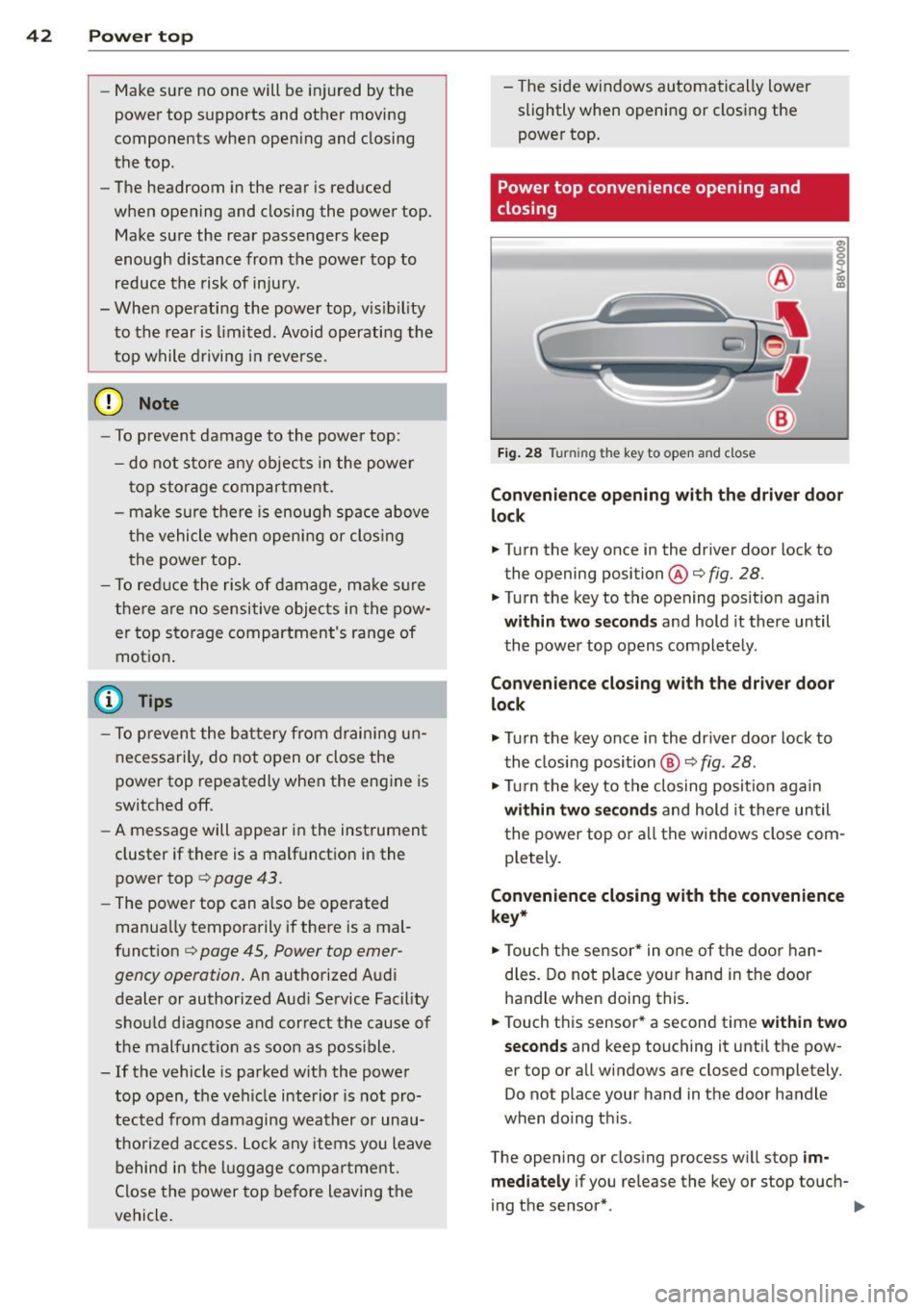
Fig. 28 Tu rnin g the key to open and close
Convenience opening with the driver door
lock
.. Turn the key once in the driver door lock to
the opening position@c:>
fig. 28.
.. Turn the key to the opening position again
within two seconds and hold it there until
the power top opens completely.
Convenience closing with the driver door
lock
.,. Turn the key once in the driver door lock to
the closing position @
c:> fig. 28.
.,. Turn the key to the closing position again
within two seconds and hold it there until
the power top or all the windows close com
pletely .
Convenience closing with the convenience
key*
.. Touch the sensor* in one of the door han
dles. Do not place your hand in the door
handle when doing this.
.. Touch this sensor* a second time
within two
seconds
and keep touching it until the pow
er top or all windows are closed completely .
Do not place your hand in the door handle
when doing this .
The opening or closing process will stop
im
mediately
if you release the key or stop touch-
ing the sensor*. ..,.
Page 55 of 302
....,
N
r--. > co
rl I.O
"' rl
"' rl
Instrument illumination
The brightness of the instrument cluster and
the center console can be adjusted.
"' 5 0
'
Fig. 47 Instrument illum ination
Requirement: The light must be switched on.
• Press the knob to release it.
• Turn the knob toward"." or"+" to reduce or
increase the brightness .
• Press the knob again to return it to i ts or ig i·
nal position.
(D Tips
The needles and gauges in the instrument
cluste r illuminate when the head lights are
off and the ign ition is switched one. Theil
lumination reduces automatically and
eventua lly turns off as brightness outside
decreases. This function reminds the driver
to turn the headlights on at the appropri·
ate t ime.
Vision
Sun visors
F ig. 48 Left s ide: sun vi sor
The s un visors can be moved out of their
b rackets and turned toward the doors
(D.
Lights and Vision 53
The mirror light switches on when the cover
over the vanity mirror* @opens.
Windshield wipers
Switching windshield wipers on
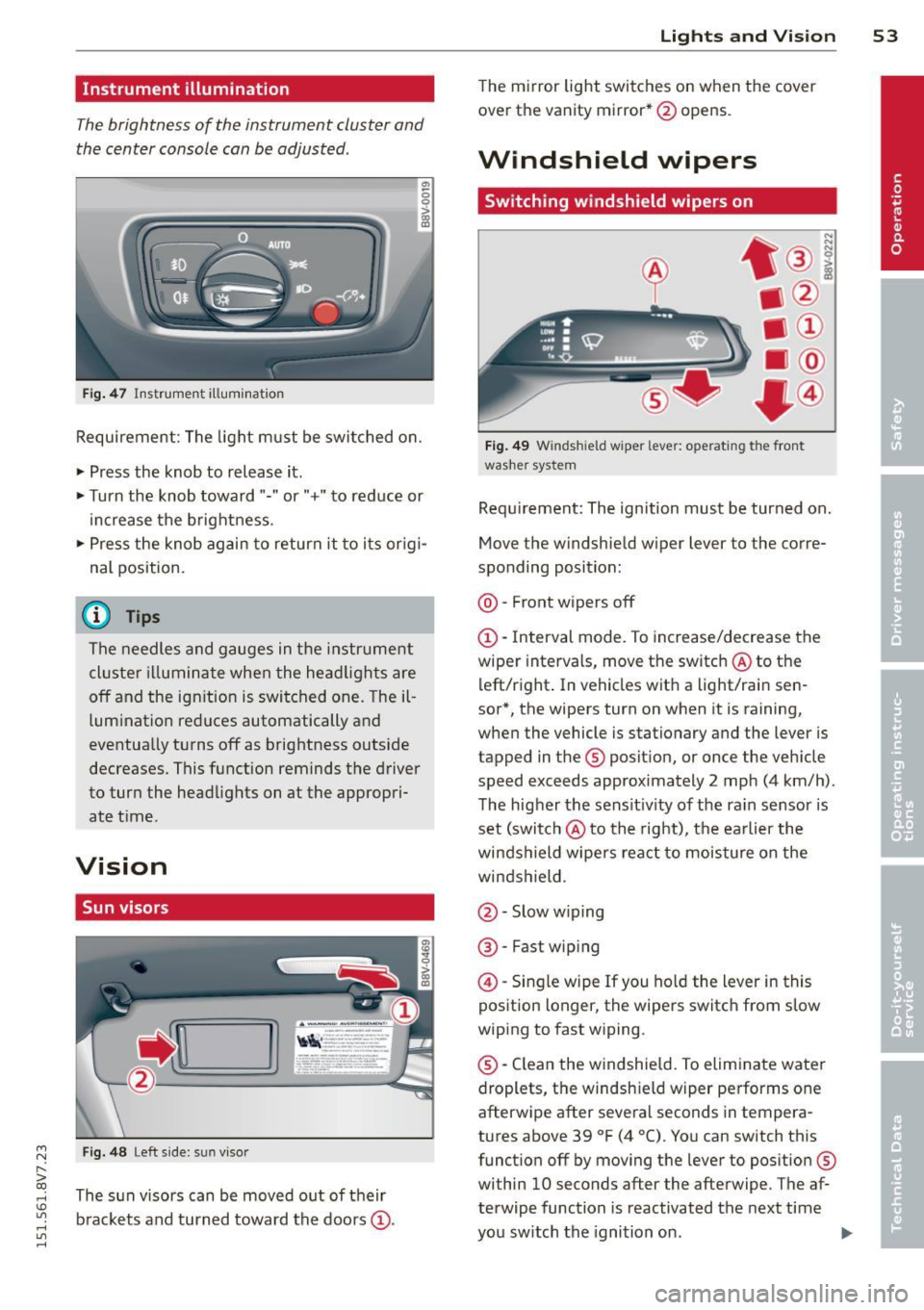
Fig. 49 Windsh ield wiper lever: operating the front
washer system
Requ irement: The ignition must be turned on.
Move the windshield w iper lever to the corre
sponding position:
@ · Front wipers off
(D-Interval mode. To increase/decrease the
wiper intervals, move the switch @to the
left/right . In vehicles wit h a light/rai n sen
sor*, the wipers turn on when it is raining,
when the vehicle is stationary and the lever is
tapped in the ® position, or once the vehicle
speed exceeds approximately 2 mph (4 km/h).
The higher the sens itiv ity of the ra in sensor is
set (switch @to the right), the earlier the
winds hield wipers react to moisture on the
windshield.
@ · Slow w iping
@ · Fast wip ing
@ -Single wipe If you hold the lever in this
position longer, the wipers switch from slow
wiping to fast wiping.
® -Clean the windshield. To eliminate water
droplets, the windsh ield wiper performs one
afterwipe after several seconds in tempera
tures above 39 °F (4 °(). You can switch this
function off by moving the lever to position ®
within 10 seconds after the afterwipe . The af
terwipe function is reactivated the next time
you switch the ignition on.
II>
Page 84 of 302
82 Driving
Electromechanical
parking brake
Operating
The electromechanical parking brake replaces
the hand brake.
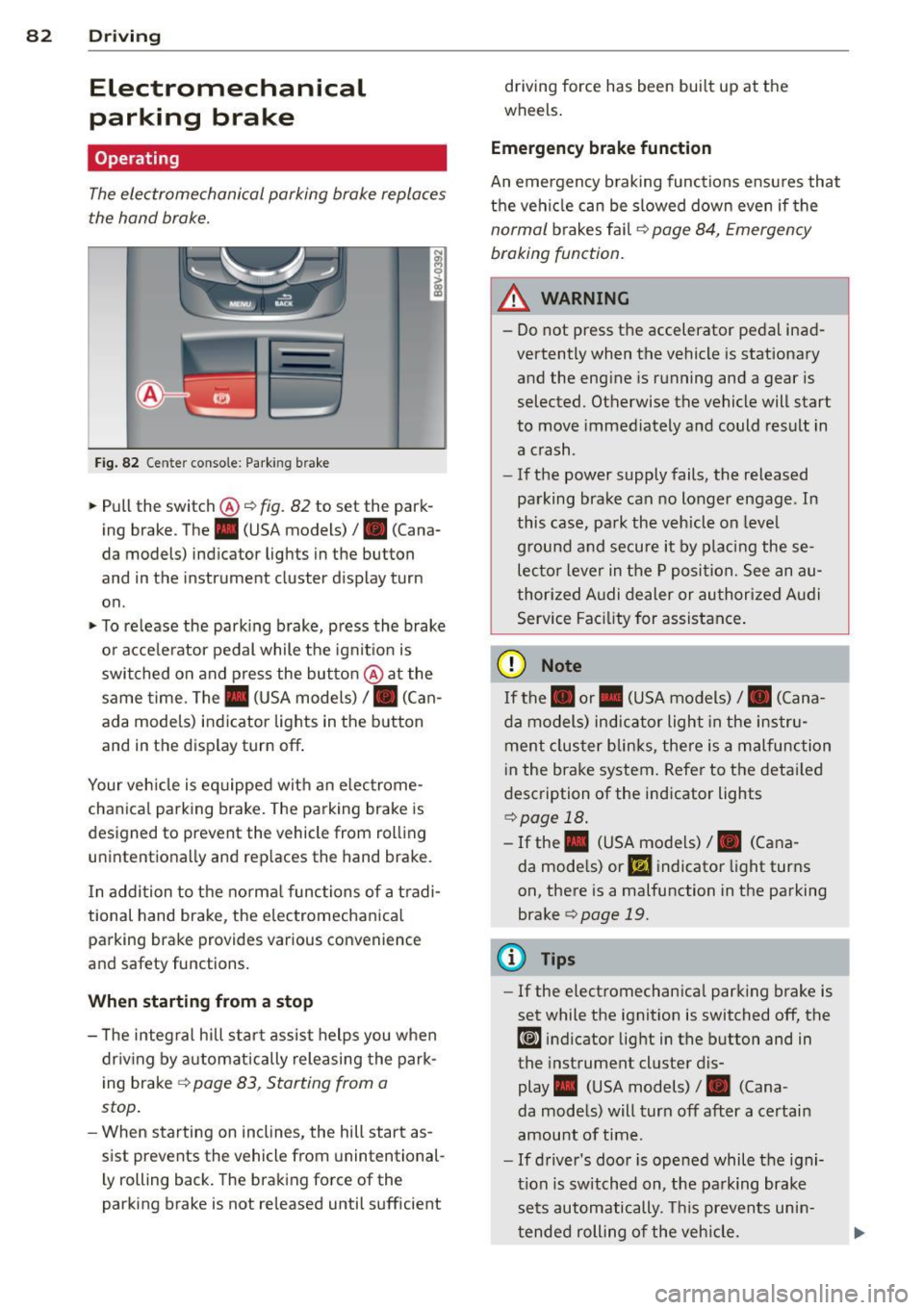
Fig. 82 Ce nter conso le: Park ing brake
~ Pull the switch@~ fig. 82 to set the park
ing brake . The . (USA models)/ . (Cana
da models) indicator lights in the button
and in the instrument cluster display turn
on .
~ To release the parking brake, press the brake
or acce le rator pedal while the ignit ion is
switched on and press the button @at the
same time. The. (USA models)
I. (Can
ada models) indicator lights in the button
and in the display turn off .
Your veh icle is eq uipped with an electrome
chanical parking brake. The parking brake is
designed to prevent the vehicle from rolling unintentionally and replaces the hand brake.
I n addition to the normal functions of a tradi
tional hand brake, the electromechanical parking brake provides various convenience
and safety functions.
When starting from a stop
- T he integral hill start assist helps you when
dr iving by automatically releasing the park
ing brake ~
page 83, Starting from a
stop .
-When starting on inclines, the hill start as
sist prevents the vehicle from unintentional
l y rolling back. The braking force of the
parking brake is not released until sufficient driving force has been built up at the
wheels.
Emergency brake function
An emergency braking functions ensu res that
the vehicle can be slowed down even if the
normal brakes fail~ page 84, Emergency
braking function.
_.&. WARNING
- Do not press the accelerator pedal inad
vertently when the vehicle is stationary
and the engine is running and a gear is
selected. Otherwise the vehicle will start
to move immediately and could result in
a crash .
- If the power supply fails, the released
parking brake can no longer engage . In
this case, park the vehicle on leve l
g round and secure it by placing these
lecto r lever in the P position. See an au
thorized Audi dealer or authorized Audi
Service Facility for assistance.
(D Note
If the. or. (USA models) I. (Cana
da models) indicator light in the instru
ment cluster blinks, there is a malfunction
i n the brake system. Refer to the detai led
description of the indicator lights
~page 18.
- If the . (USA models) I. (Cana-
da models) or
Ill indicator light turns
on, there is a malfunction in the parking
brake
c> page 19.
(D Tips
- If the electromechanica l parking brake is
set while the ignition is switched off, the
¢@'A indicator light in the button and in
the instrument cluster dis-
play . (USA models) /. (Cana-
da models) will turn off after a certain
amount of time.
- If driver's door is opened while the igni
tion is switched on, the park ing brake
sets automatically. This prevents unin
tended rolling of the vehicle.
Page 86 of 302
84 Driving
Emergency braking function
This is used if the conventional brake system
fails or locks up.
... To brake your veh icle in an emergency, pu ll
the @switch ¢
page 82, fig. 82 and hold it
pulled .
... As soon as you releas e the @ switch or ac-
cele rate, the braking p rocess stops.
Pulling and holding the @switch while driv
in g at a speed of about 2 mph (3 km/h) or
h igher in itiates the emergency b rak ing func
tion . The vehi cle is braked at all fou r whee ls
by activat ing the brak ing hydrau lics. The brake
performance is s imilar to heavy bra ki ng. ¢.&.
To help prevent act ivat ing the emergency
b rak ing by mis take, an audib le wa rning tone
(b uzzer) sounds when the @switch is pulled.
E me rgency braking s tops as soo n as the @
switch is released or the accelerator peda l is
p ressed.
&_ WARNING
Emergency braking shou ld only be used in
an emergency, when the normal brake
pedal has failed or the brake pedal is ob
structed . Du ring emergency braking, your
vehicle will brake similar to heavy braking.
ESC and the assoc iated components (ABS,
ASR, EDL) cannot overcome the laws of
physics. In corners and w hen road or
weather conditions are bad, a full brake
application can cause the vehicle to skid or
the rear end to b reak away, which increas
es the risk of an acc ident.
Hill hold
Applies to vehicles: with H ill Hold
Hill hold makes it easier to start on hills .
Requirement: The driver door must be closed
and the engine must be r unning .
The system is act iva ted when the brake pedal
i s pressed wh ile the veh icle is s ta tionary .
To prevent the vehicle from ro ll ing back when
start ing , the bra ke power is he ld for a br ief moment afte
r releasing the brake pedal. D ur
ing t his time, you can easi ly begin to move
you r vehicle .
A WARNING
"---
-The intelligent technology of Hi ll Hold
cannot overcome the limitations im posed by natural physical laws . The in
creased comfort offered by H ill Hold
should not cause you to take safety r is ks.
- Hill Hold cannot hold the vehicle in all
h ill sta rt situations (fo r example, if the
g round is slippery o r icy).
- If you do not beg in moving immediately
after releasing the brake pedal, the vehi
cle could begi n to roll ba ckward unde r
certain ci rc u ms tances. Press the brake
pedal or set the pa rk ing brake immedi
ately.
- If the eng ine "stalls", press the b ra ke
pedal or set the pa rking brake immedi
ately.
- Starting on inclines in stop-and-go t ra f
fic: To help prevent the vehicle from ro ll
in g back when starting, press and ho ld
the brake pedal fo r several seconds when
the vehicle is stationary.
(D Tips
You can find o ut if yo ur vehicle is equ ipped
with Hill Hold by checking at an a uthorized
A udi dealer or qualified repair facility.
Speed warning system
Introduction
The speed warning system helps you to stay
under a specified maximum speed .
The speed warning system war ns you if you
are exceeding the maximum speed that you
have set . You will hear a warning tone when
yo ur speed exceeds the stored value by ap
proximate ly 3 mph (3 km/h). The . (U SA
models)/ . (Canada models) ind icator light
and the message
Speed limit e xceeded! ap
pear in the instrument cluster display at the
same time. The./. indicator light turns ..,.
Page 88 of 302
86 Driving
• To store the speed, p ress the button @. T he
II (USA models) I i'I (Canada models)
turns on in the instrument cluster.
Changing speed
Applies to vehicles: with cru ise control system
• To increase or decrease the speed in incre
ments,
t ap the lever in the 010 direction
c:> page 85, fig. 83.
• To increase or decrease the speed qu ickly,
h o ld the leve r in the 010 direction until
the des ired speed is reached .
Overriding the speed
You can press the acce lerator pedal down to
increase your speed, for example if you want
to pass someone . The speed you saved earlier
will resume as soon as you release the acceler
ator pedal.
I f, however, you exceed your saved speed by 5
mph (10 km/h) for longer than 6 minutes, the
cruise contro l turns off temporari ly. The
Ill
(USA models) I El (Canada models) indicator
light in the instrument cluster turns off and
the stored speed is retained.
Preselecting the speed
Applies to vehicles: with cruise control system
You can preselect your desired speed when
the vehicle is stationary.
• Switch the ignition on.
• Pull the lever into position
(D c:> page 85,
fig. 83.
• To increase or decrease the speed, tap the
lever in the
0 10 d irect io n.
This funct ion makes it possible, for example,
to save the speed you want before driving on
the highway . Once on the highway, activate
the cruise contro l by pull ing the lever towa rd
(D .
Switching off
Applies to vehicles: with cruise control system
Temporary deactivat ion
• Press the brake pedal, or
• Press the leve r into position @(not clicked
into p lace)
~ page 85, fig. 83, or
Switching off completely
• Press the lever into position @(clicked into
place), or
• Switch the ignit ion off.
The speed you stored will be retained if the
c ruise control has been switched off tempora
rily . To resume the stored speed, re lease the
brake pedal and pu ll the lever into position
(D.
The stored speed is erased when the cruise
control is sw itched off complete ly or the igni
t ion is switched off .
,&. WARNING
You should only resume the stored speed if
i t is not too high for ex isting traffic con di
tions . Othe rwise you r is k an acc ident.
(D Tips
- If the bra kes become too heated whi le
dr iving, t he cr uise control sw itches off. If
t his happens w hile d riving downhill, you
can relieve t he b rakes by shifting into a
lower gear.
- W hen the cruise cont rol is activa ted, E SC
sport mode cannot be switched on .
Page 91 of 302
....,
N
r--. > co
rl I.O
"' rl
"' rl
What can adaptive cruise control do?
The adaptive cruise control system uses rada r
and a video camera. The radar is subject to
designated system limits ¢ page 87.
On open roads w ith no traffic, it functions l ike
a cruise control system . Th e stored speed is
maintained . When approaching an object
ahead and the system detects it, the adaptive
cr uise control system automatically brakes to
match that object's speed and then maintains
the stored distance. As soon as the system
does not detect an object ahead, adaptive
cru ise control accelerates up to the stored
speed .
With in the limits of the system, adaptive
cru ise control can brake in stop-and-go traff ic
until the vehicle is stationary and then begin
driving aga in under certa in conditions
¢ page 91, Driving in stop-and-go traffic.
Which functions can be controlled?
When you switch adaptive cruise control on,
you can set the current speed as the "control speed" ¢ page
89, Switching on/off.
When driving, you can stop cruise control
c::> page 91 or change the speed c::> page 90
at any time .
You can also adjust the following settings:
- Dis ta nee
c::> page 92
- Driving program c::>page
93
- Driving mode c::> page 93
l) Speed limit s depend on the country and the speedom
eter .
Audi adaptive cruise control 89
Switching on/off
Applies to vehicles: wit h Aud i adapt ive cr uise contro l
Fig. 88 Oper ating lever: swit c hing on and off
Fig. 89 Instrument cluster: adapt ive cruise control
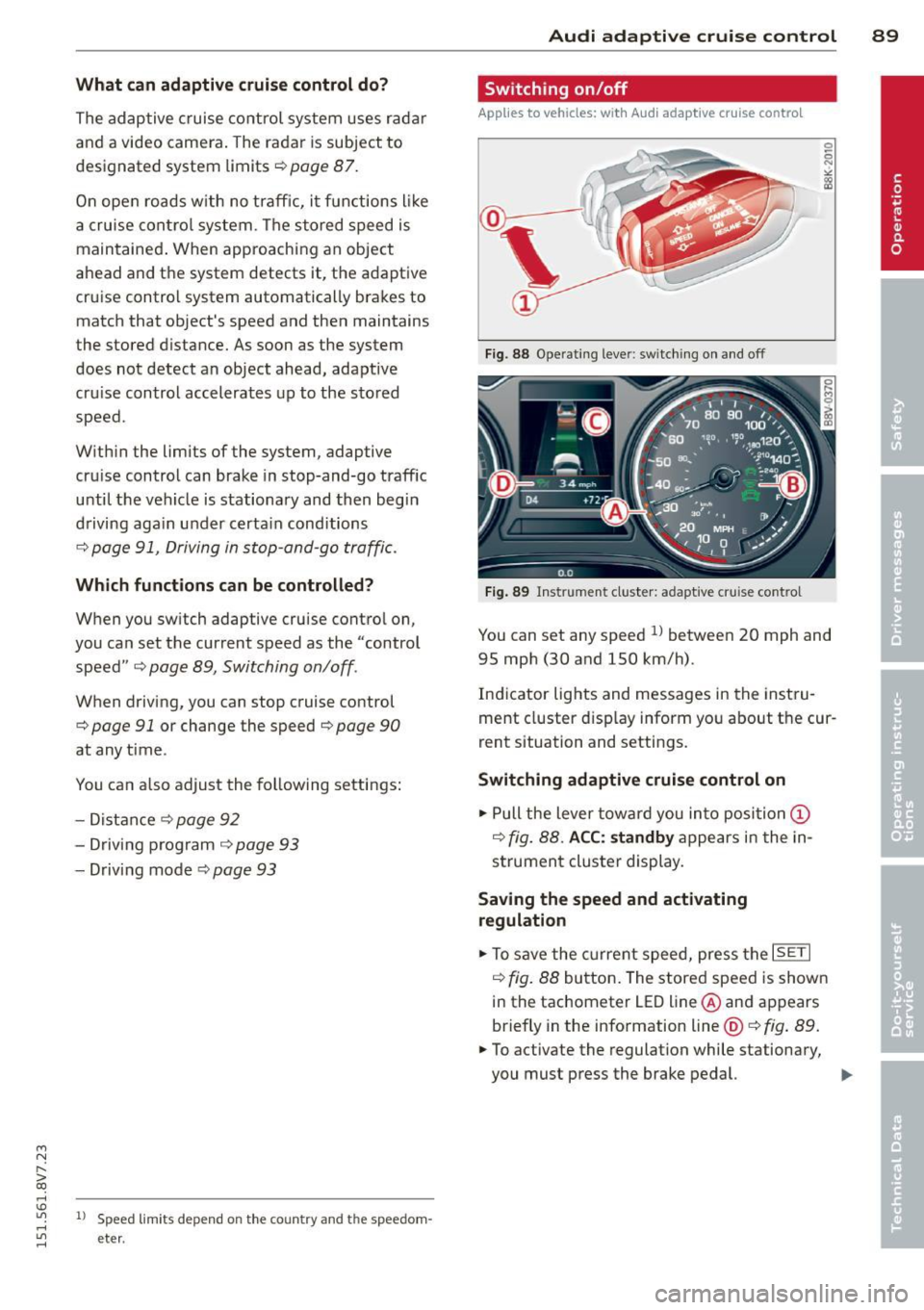
You can set any speed ll between 20 mph and
95 mph (30 and 150 km/h).
Indicator lights and messages in the instru
ment cluster disp lay inform you about the cur
rent situation and settings.
Switching adaptive cruise control on
.,. Pull the lever toward you into posi tion (I)
c::> fig. 88. ACC: standby appears in the in
strument cluster display.
Saving the speed and activating regulation
.,. To save the current speed, press the ISETI
c::> fig. 88 button. The stored speed is shown
in the tachometer LED line@and appears
briefly in the information line @ c::>fig .
89 .
.,. To activate the regulation while stationary,
you must press the brake pedal. ..,.
Page 92 of 302
90 Audi adaptive cruise control
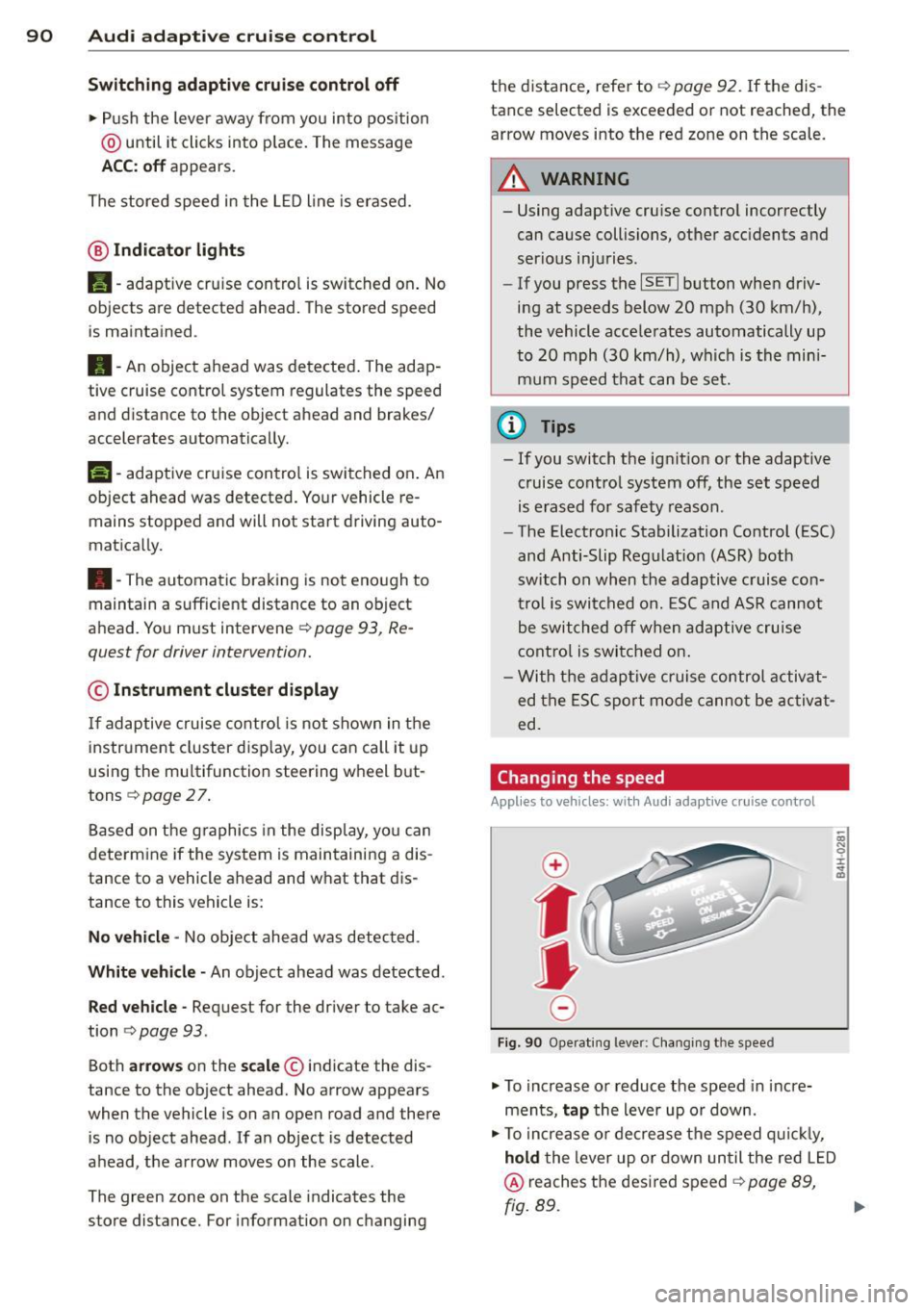
Switching adaptive cruise control off
.,. Push the lever away from you into position
@ until it clicks into p lace. The message
ACC: off appears.
The stored speed in the LED line is erased.
@ Indicator lights
II -adaptive cru ise contro l is switched on . No
objects are detected ahead. The stored speed
is maintained .
•- An object ahead was detected . The adap
tive cruise control system regulates the speed
and distance to the object ahead and brakes/
accelerates automatically.
r •j-adaptive cruise contro l is switched on . An
object ahead was detected. Your vehicle re
mains stopped and will not start driving auto
matica lly.
•- The automatic braking is not enough to
maintain a sufficient distance to an object
ahead. You must intervener:!>
page 93, Re
quest for driver intervention.
© Instrument cluster display
If adaptive cruise control is not shown in the
instrument cluster disp lay, you can call it up
using the mu ltifunction steering wheel but
tons
r:!> page 2 7.
Based on the graphics in the disp lay, yo u can
determine if the system is maintaining a dis
tance to a vehicle ahead and what that dis
tance to this vehicle is:
No vehicle -No object ahead was detected .
White vehicle -An object ahead was detected.
Red vehicle -Request for the driver to take ac
tion
c> page 93 .
Both arrows on the scale© indicate the dis
tance to the object ahead. No arrow appears
when the vehicle is on an open road and there
is no object ahead.
If an object is detected
ahead, the arrow moves on the scale .
The green zone on the scale indicates the
store distance. For information on changing the d
istance, refer to
i=;, page 92. If the dis
tance selected is exceeded or not reached, the
arrow moves into the red zone on the scale.
A WARNING
- Using adaptive cru ise control incorrectly
can cause collisions, other accidents and
serious injuries.
- If you press the
~IS-ET~I button when driv
ing at speeds below 20 mph (30 km/h),
the vehicle accele rates automatically up
to 20 mph (30 km/h), which is the mini
mum speed that can be set.
(D Tips
-If you switch the ignit ion or the adaptive
cruise control system off, the set speed
is erased for safety reason.
- The Electronic Stabilization Control (ESC)
and Anti-Slip Regulat ion (ASR) both
switch on when the adaptive cruise con
trol is switched on. ESC and ASR cannot
be switched
off when adaptive cruise
contro l is switched on.
- With the adaptive cruise control activat
ed the ESC sport mode canno t be activat
ed.
Changing the speed
App lies to vehicles: wi th Aud i ada ptive c ruise con tro l
0
f
• 0
Fig . 90 Ope rating lever: Changing the speed
.,. To increase or reduce the speed in incre
ments,
tap the lever up or down.
.,. To increase or decrease the speed quickly,
hold the lever up or down un til the red LED
@ reaches the desired speed i=;, page 89,
fig. 89.
Page 93 of 302
"" N
r--. > co
rl I.O
After each change, the new stored speed ap
pears briefly in the information line
c::> page 89, fig. 89 @.
Driving in stop-and-go traffic
Appl ies to vehicles: w ith Audi adaptive cruise co ntrol
The adaptive cruise control system assists you
in stop-and-go traffic. If an object that is de
tected ahead stops, your vehicle will brake
and stay at a stop, within the limits of the sys
tem.
St arting with ad apti ve cr uise contro l
1l
If you vehicle brakes to a stop because an ob
ject is detected ahead,
ACC a utom . go ap
pears briefly in the instrument cluster display
Your veh icle is in automatic start mode .
As long as the message
ACC autom. g o is dis
played and the object detected ahead starts
to move, your veh icle w ill cont inue d riving
c::, & -
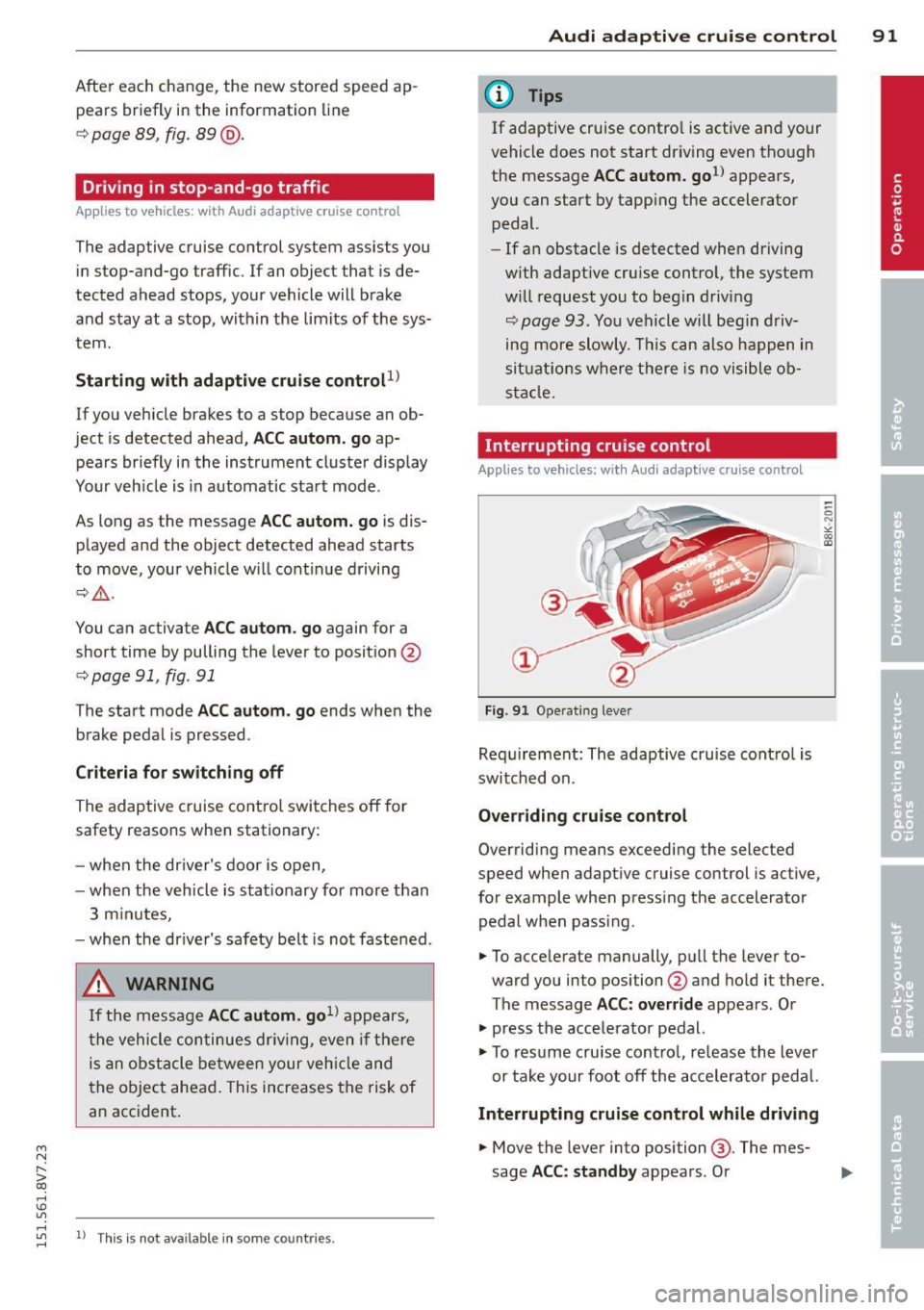
You can activate ACC autom . go again for a
short time by pulling the lever to posit ion @
c::>page91, fig. 91
The start mode ACC autom . go ends when the
brake pedal is pressed.
C rit eria fo r swi tch ing off
The adaptive c ruise co ntrol switches off for
safety reasons when stationary:
- when the dr iver's door is open,
- when the vehicle is stationary fo r more than
3 m inutes,
- when the dr iver's safety belt is not fastened .
A WARNING
If the message ACC autom. go1l appears,
the vehicle continues dr iving, even if there
is an obstacle between your veh icle and
the object ahead . This increases the risk of
an accident.
"' rl
"' 11
This is not available in som e co unt ries. rl
Audi ad apti ve crui se control 91
@ Tips
If adaptive cruise contro l is active and your
vehicle does not start driving even though
the message
ACC autom. go1l appears,
you can start by tapp ing the accelerator
pedal.
- If an obstacle is detected when driving
w ith adaptive cru ise control, the system
w ill request you to beg in driving
c::>page 93. You vehicle will beg in d riv
ing more slowly. This can also happen in
sit uat io ns where t he re is no visible ob
s ta cl e.
Interrupting cruise control
App lies to vehicles: wit h Audi ada ptive c ruise control
Fig . 91 Operating lever
Requ irement: The adaptive cruise cont ro l is
switched on .
Ove rriding cruise control
Overriding means exceeding the selected
speed when adaptive cruise control is act ive,
for example when press ing the accelerator
pedal when pass ing.
.. To acce lerate manually, pu ll the lever to
ward you into position @and hold it there.
The message
ACC: ov errid e appears . Or
.. press the accelerator pedal.
.. To resume cruise contro l, re lease the lever
or take your foot off the accelerator pedal.
Interrupting crui se control while driving
.. Move the lever into position@. The mes
sage
ACC: standby appears . Or
Page 94 of 302
92 Audi adaptive cruise control
• press the brake peda l.
• To resume the stored speed, move the lever
i nto position @.
Interrupting cruise control when stopped
• Push the lever away from you into position
@. The message ACC : standby appears .
• To resume cru ise control, press the brake
pedal and pull the lever toward you into po
sition @.
A WARNING
It is dangerous to activate cruise control
and resume the stored speed when the
current road, traffic or weather conditions
do not permit th is . Th is could result in a
crash .
Setting the distance
Applies to vehicles: wit h Audi adapt ive cru ise co ntrol
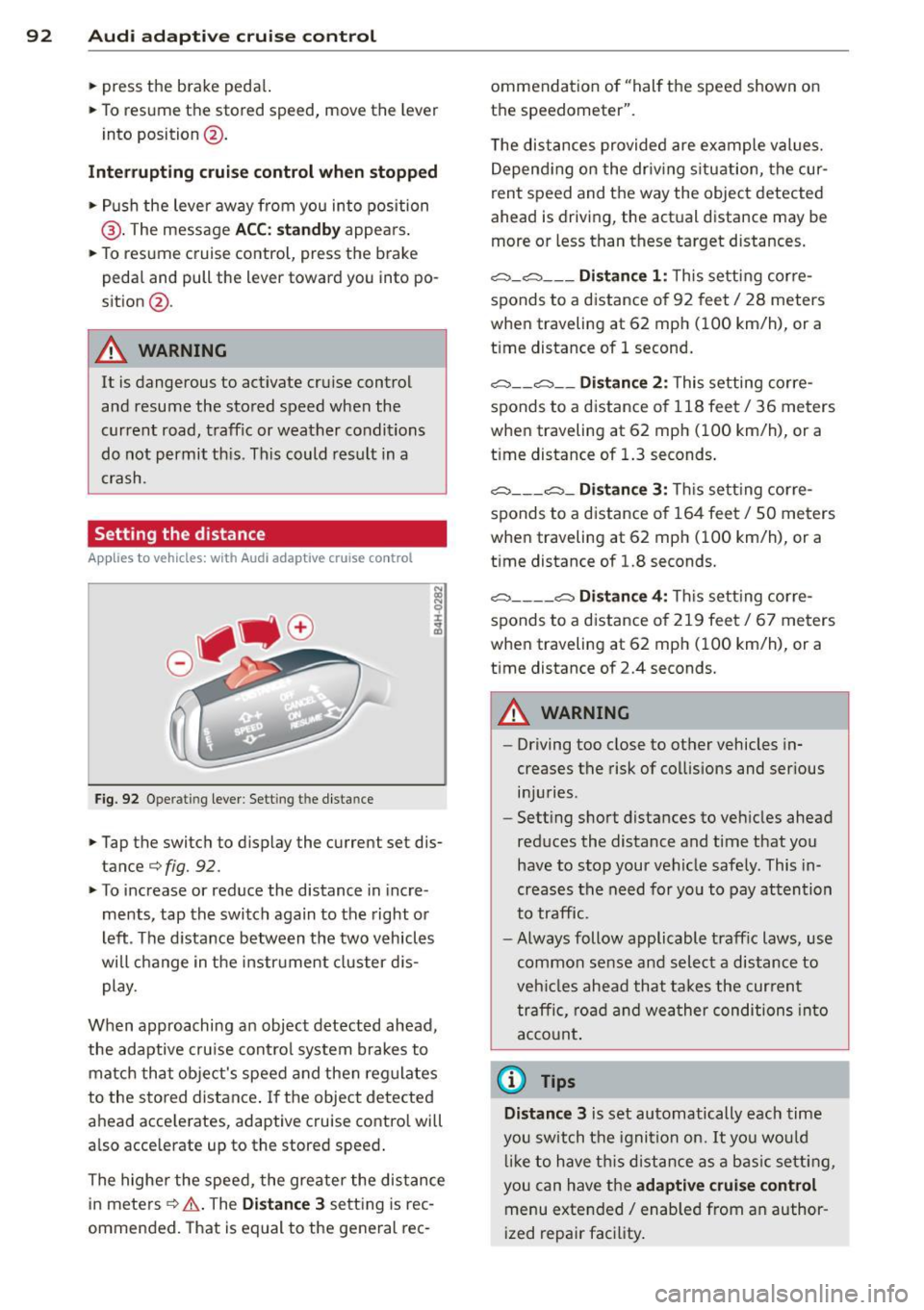
Fig. 92 Operat ing lever : Sett ing t he dist ance
-
• Tap the swit ch to display the current set dis
t ance
¢f ig. 92.
• To increase or reduce the distance in incre
ments, tap the switch again to the right or
left . The distance between the two vehicles
will change in the instrument cluster dis
play.
When approaching an object detected ahead,
the adaptive cruise con trol system brakes to
match that object's speed and then reg ulates
to the stored distance . If the object detected
ahead acce lerates, adapt ive cruise control will
a lso acce lerate up to the stored speed .
The highe r the speed, the greater the distance
in meters
c::;, & . The Distance 3 setting is rec
ommended. That is equal to the general rec- ommendation of "hal
f the speed shown on
the speedometer".
T he distances provided are example values.
Depending on the driv ing s ituation, the cur
rent speed and the way the object detected
ahead is driving, the actual distance may be
more or less than these target distances.
o:::::::, _o:::::::, ___ Distance 1: This setting cor re-
sponds to a distance of 92 feet
I 28 meters
when traveling at 62 mph (100 km/h), or a
t ime distance of 1 second.
o:::::::, __ o:::::::, __ Distance 2: This setting corre
sponds to a distance o f 118 feet/ 36 meters
when traveling at 62 mph (100 km/h), or a
t ime distance of 1.3 seconds .
o:::::::, ___ o:::::::,_ Distan ce 3: Thi s sett ing corre-
sponds to a distance of 164 feet/ 50 meters
when traveling at 62 mph (100 km/h), or a
t ime distance of 1.8 seconds.
o:::::::, ____ o:::::::, Distance 4: Thi s sett ing corre-
sponds to a distance of 219 feet/ 67 meters
when traveling at 62 mph (100 km/h), or a
t ime distance of 2.4 seconds.
A WARNING
--
- Driving too close to other vehicles in
creases the risk of collisions and ser ious
in jur ies.
- Sett ing short distances to vehicles ahead
reduces the distance and time that you
have to stop your vehicle safe ly . This in
creases the need for you to pay attention
to traffic.
- Always follow applicable traff ic laws , use
common sense and select a distance to
veh icles ahead that takes the current
traffic , road and weather conditions into
account.
{i) Tips
Distance 3
is set automatically each time
you switch the ignition on.
It you would
lik e to have this distance as a basic setting,
you can have the
adaptive cruise control
menu extended/ enabled from an author
ized repair facility .