key AUDI A3 CABRIOLET 2015 User Guide
[x] Cancel search | Manufacturer: AUDI, Model Year: 2015, Model line: A3 CABRIOLET, Model: AUDI A3 CABRIOLET 2015Pages: 302, PDF Size: 73.83 MB
Page 38 of 302
36 Opening and closing
-The central locking switch is inoperative
when the vehicle is locked from the out
side .
- Locked doors make it more difficult for
emergency workers to get into the vehi
cle, which puts lives at risk . Do not leave
anyone beh ind in the vehicle, especially
children.
(D Tips
Your vehicle will lock automatically at a
speed of 9 mph (15 km/h) ¢
page 31. You
can unlock the vehicle again using the cen
tral locking opening function .
Setting central locking
Applies to ve hicles: wit h dr ive r info rmatio n system
Various settings can be adjusted in the MMI:
Adjusting door unlocking
You can determine which doors should unlock
when opening the vehicle .
"' Se lect : the
I MENU ! button >Car> Systems *
control button > Vehicle settings > Central
locking > Door unlocking.
Selecting All and pressing the~ button on
the remote control key unlocks the entire ve
hicle.
If you select
Driver and then press the~ but
ton on the remote control key, only the driv
er's door will unlock. In vehicles with a con
venience key, only the front door whose han
dle you pull will unlock. If you press the
~ button twice, the entire vehicle will unlock.
If you press the
l@l button, the entire vehicle
will always lock .
Adjusting Auto Lock
"'Se lect : the I MENU ! button >Car > Systems*
control bu tton > Vehicle settings > Lock
when driving .
l) Thi s func tion is not available in all co untries.
If you se lect On , the entire vehicle wi ll lock
automatica lly when the speed reaches 9 mph
(15 km/h).
If the opening function is triggered by the
power lock ing system or a door hand le, the
vehicle unlocks again.
Folding* the exterior mirrors
"'Select: the I MENU I button > Car> Systems*
control button > Vehicle settings> Central
locking > Fold mirrors.
For more informa
tion , refer to¢
page 55, Adjusting the ex
ter ior mirrors .
If you select On , the outside mirrors will fo ld
in automat ica lly when you press the~ button
on the remote contro l key
¢ page 55.
Tone when locking
"'Select: the I MENU I button> Car> Systems*
contro l button > Vehicle settings > Central
lo ck ing > Tone when locking .
When checked off../, a tone will sound when
you lock the vehicle .
If you press the l@l button twice , the entire ve
hicle will lock . There is a lock ing tone at the
same t ime
l )_
Electronic immobilizer
The immobilizer prevents unauthorized use of
your vehicle .
A microchip in the key automatically deacti
vates the electronic immobilizer when the key
is located in the vehicle . If you remove the key
from the vehicle, the electronic immobilizer
activates again automatically.
_&. WARNING
A lways take the key with you whenever you
l eave your vehicle. The e lectronic immobil-
izer can be deactivated with the key, so
~
Page 39 of 302
....,
N
" > co
rl I.O
"' ,....,
"' rl
this could make it possible for unauthor
ized persons to start the engine and oper
ate vehicle systems such as the power win
dows or sunroof . This can increase the risk
of serious injury .
(D Tips
-The vehicle cannot be started if an unau
thorized key is used. It may not be poss i
ble to start the vehicle under certain cir
cumstances, for example if there is an
other radio module like the key from an
other vehicle or a transponde r on the
same keychain.
- For an explanation on conformity with
the FCC regu lations in the United States
and the Industry Canada regulations, re
fer to
c::; page 285.
Safety central locking
Applies to vehicles: with safety central locking
Safety central locking provides the possibility,
to only unlock the driver's door and the fuel
filler door. The rest of the vehicle remains
locked.
Unlocking the driver's door and the fuel
filler door
.. Press the remote contro l key or convenience
key @! but ton
once or turn the key once in
the opening direction .
Unlocking all doors, the luggage
compartment lid and the fuel filler door
.. Press the remote control key or convenience
key @! button
twice within five seconds or
turn the key
twice within five seconds in the
opening direction .
When unlocking just the driver's door, the an
ti -theft alarm system* is also immediately de
activated .
In vehicles with an MMI, you can d irectly ad
just the safety central locking
o page 36 .
Opening and closing 3 7
Front passenger's door emergency
locking
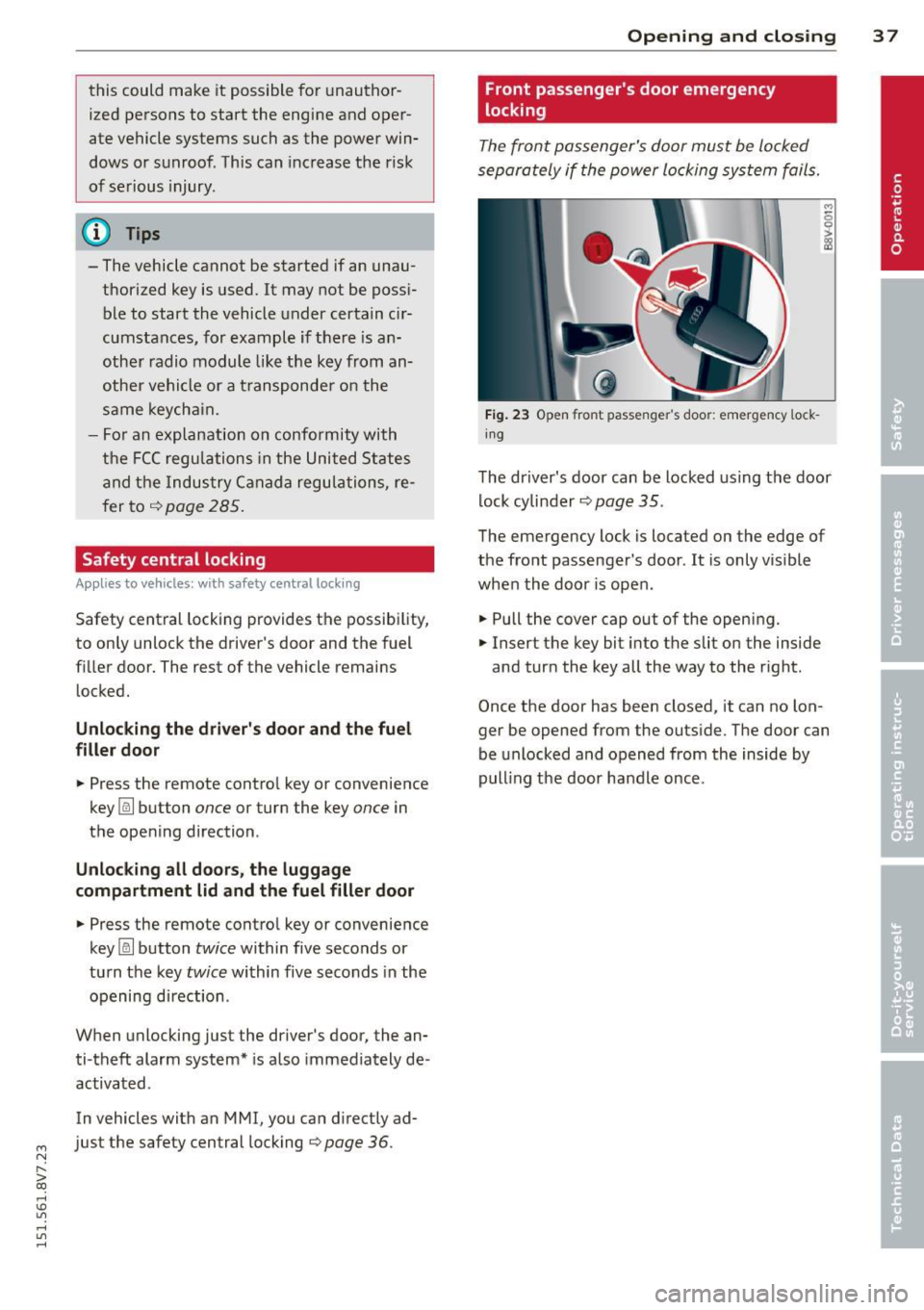
The front passenger's door must be locked
separately if the power locking system fails.
Fig. 23 Open fro nt passen ger' s doo r: emergency lock
in g
The driver's door can be locked using the door
lock cylinder
o page 35.
The emergency lock is located on the edge of
the front passenger 's door . It is only visible
when the door is open .
.. Pull the cover cap out of the opening.
.. Insert the key bit into the slit on the inside
and turn the key all the way to the right .
Once the door has been closed, it can no lon ger be opened from the outside. The door can
be unlocked and opened from the inside by
pulling the door handle once .
Page 40 of 302
38 Opening and closing
Luggage compartment
lid
Opening and closing the luggage
compartment lid
AUD .
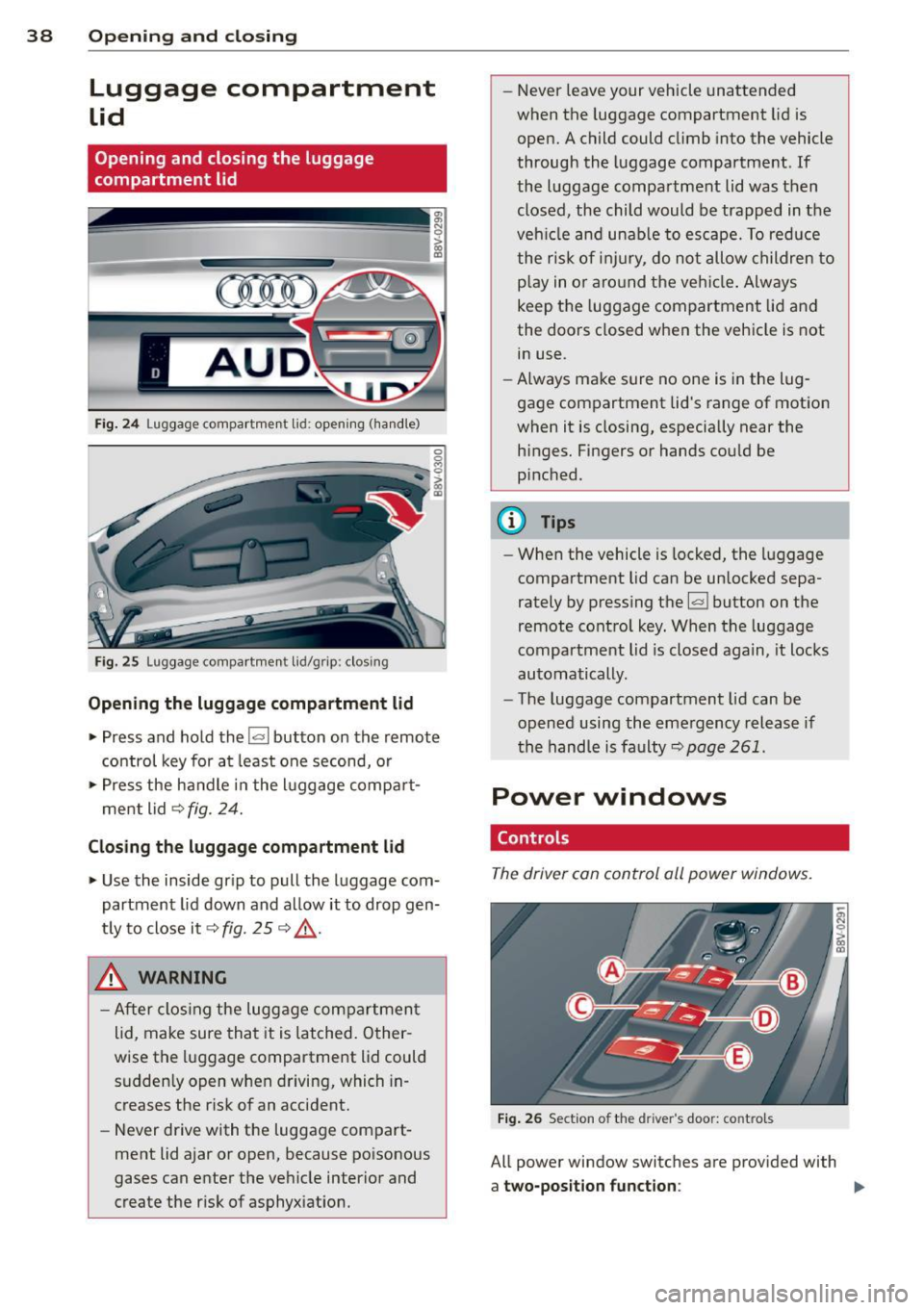
Fig. 24 Luggage compartment lid: opening (ha ndle)
Fig. 25 Luggage compartment lid/grip: clos ing
Opening the luggage compartment lid
.,. Press and hold the !a l button on the remote
control key for at least one second, or
.,. Press the handle in the luggage compart
ment lid ¢
fig. 24.
Closing the luggage compartment lid
.,. Use the inside grip to pull the luggage com
partment lid down and al low it to drop gen
t ly to close it¢
fig. 25 ¢ .&_.
& WARNING
-After clos ing the luggage compartment
lid, make sure that it is latched. Other
wise the luggage compartment lid could sudden ly open when driving, which in
creases the risk of an accident.
- Never drive with the luggage compart
ment lid ajar or open, because poisonous
gases can enter the vehicle interior and
create the r isk of asphyx iation. -
Never leave your vehicle unattended
when the luggage compartment lid is
open. A child could climb into the vehicle
through the luggage compartment. If
the luggage compartment lid was then closed, the child would be trapped in the
veh icle and unable to escape. To reduce
the risk of injury, do not allow children to
p la y in o r aro und the vehicle. Always
keep the luggage compartment lid and
the doors closed when the vehicle is not
in use.
- Always make sure no one is in the lug
gage compartment lid's range of motion
when it is closing, especia lly near the
h inges. Fingers or hands could be
p inched.
{!) Tips
- When the vehicle is locked; the luggage
compartment lid can be unlocked sepa
rately by pressing the~ button on the
remote control key. When the luggage
compartment lid is closed again, it locks
automatically.
- The luggage compartment lid can be
opened using the emergency release if
the hand le is faulty~
page 261.
Power windows
. Controls
The driver can control all power windows .
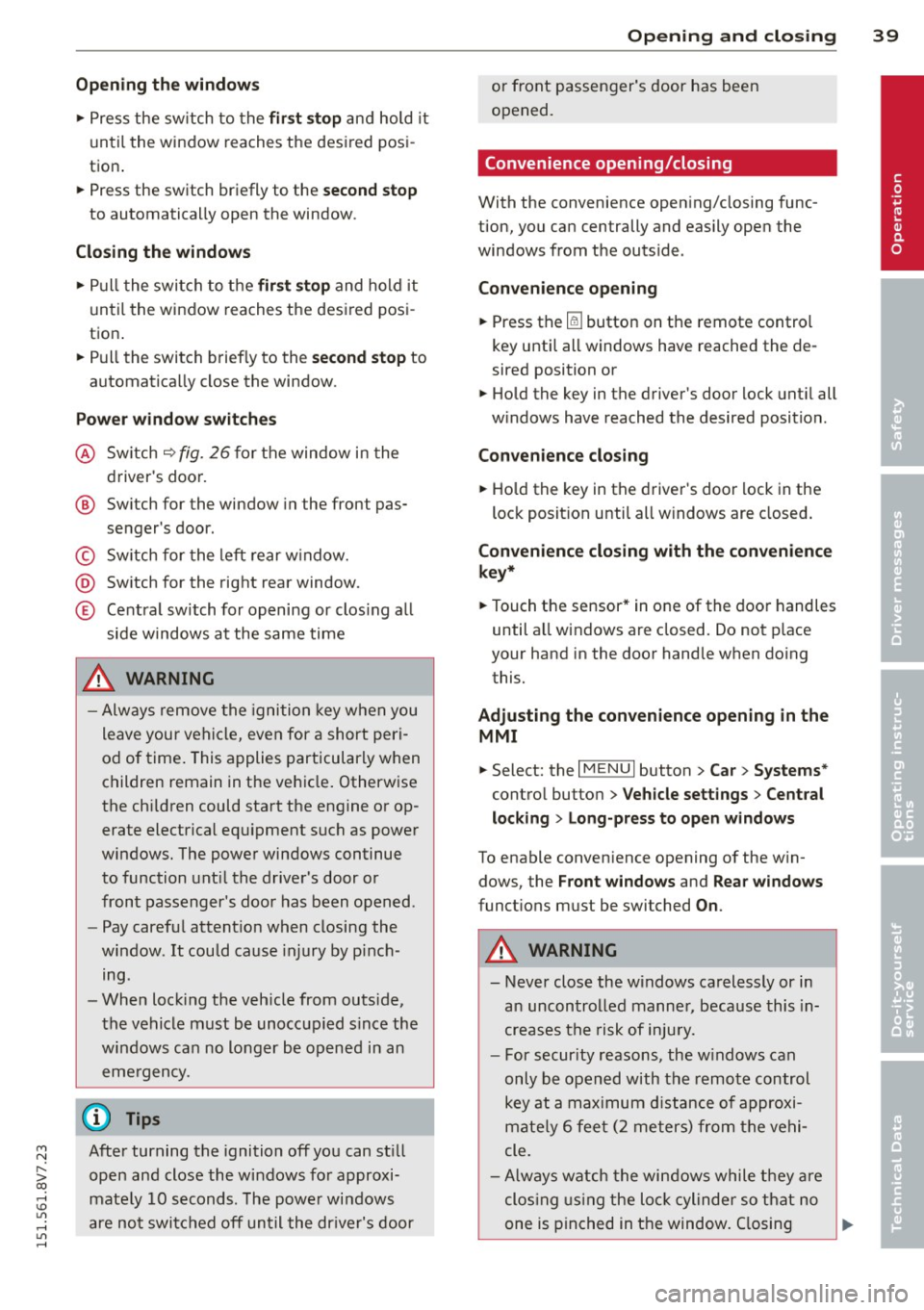
Fig. 26 Section of the dri ver 's doo r: contro ls
All power window switches are prov ided with
a two-position function : ""
Page 41 of 302
M N
" > co ,...., \!) ..,.,
,...., ..,., ,....,
Opening th e windows
"' Press the sw itch to the fir st sto p and hold i t
until the window reaches the desi red posi
tion .
"' Press the switch briefly to the
se cond stop
to automatically open the window .
Clos ing th e windows
"' Pull the swi tch to t he fir st sto p and hold it
until the window reaches the desi red posi
tion .
"' Pull the switch briefly to the
sec on d s top to
automatica lly close the window.
P ow er wi nd ow switch es
@ Sw itch c::> fig. 26 for the window in the
driver's door.
@ Sw itch for the window in the front pas-
senger's door.
© Switch for the left rear w indow.
@ Sw itch for the right rear window.
© Centra l switch for opening or clos ing a ll
side windows at the same time
_& WARNING
- Always remove the ignition key when you
leave your vehicle, even for a short peri
od of time . This applies particularly when
children remain in the vehicle . Otherw ise
the chi ldren could start the engine or op
erate electrical equ ipment such as power
windows. The power windows continue
to function unt il the driver's door or
front passenger's door has been opened .
- Pay carefu l attent ion when closing the
window.
It could cause injury by pinch
ing.
- When locking the veh icle from outs ide,
the vehicle must be unoccupied s ince the
windows can no longer be opened in an eme rgency.
(D Tips
After turning the ignition off you can still
open and close the windows for approxi
mate ly 10 seconds. The powe r windows
are not switc hed off until the dr iver's door
Opening and clo sin g 39
or front passenger's door has been
opened.
· Convenience opening /closing
With the convenience opening/closing func
tion, you can centrally and easily open the
windows from the outside.
Con ven ience opening
"' Press the Iii button on the remote contro l
key until all windows have reached the de
sired position or
"' Hold the key in the driver's door lock unt il all
w indows have reached the desired position.
Convenience clo sing
"' Ho ld the key in the driver's door lock in the
lock posit ion unti l all windows are closed .
Convenienc e closing with the convenience
ke y*
"'Touch the sensor* in one of the door handles
until all windows are closed. Do not p lace
your hand in the door handle when do ing
this.
Adju sting the conv enience opening in the
MM I
"'Select: the I MENU I button >Ca r> Sys tem s*
control button > Vehicle setting s > Central
lo cking
> Long-press to open windows
To enable convenience opening of the win-
dows, the
Front windows and Rear window s
functions must be switched On.
_& WARNING
- Never close the w indows carelessly or in
a n uncontrolled manner, because this in
creases the risk of inju ry.
- For secur ity reasons, the w indows can
only be opened with the remote control
key at a ma ximum d istance of approxi
mate ly 6 fee t (2 meters) from the vehi
cle.
- Always watch the windows while they are
clos ing using the loc k cylinder so that no
one is pinched in the window. C losing
•
Page 42 of 302
40 Opening and closing
stops when the key is moved into the
starting position.
Correcting power window malfunctions
After disconnecting the vehicle battery, the one -touch up and down feature must be acti
vated again.
• Pull the power window switch until the win
dow is comp lete ly raised.
• Release the switch and pull it again for at
l east one second.
Page 44 of 302
42 Power top
-Make sure no one will be injured by the
power top supports and other moving
components when opening and closing
the top.
- The headroom in the rear is reduced
when opening and closing the power top. Make sure the rear passengers keep
enough distance from the power top to
reduce the risk of injury.
- When operating the power top, visibility
to the rear is limited . Avoid operating the
top while driving in reverse.
(D Note
-To prevent damage to the power top:
- do not store any objects in the power
top storage compartment.
- make sure there is enough space above
the vehicle when opening or closing
the power top.
- To reduce the risk of damage, make sure
there are no sensitive objects in the pow
er top storage compartment's range of motion.
@ Tips
- To prevent the battery from draining un
necessarily, do not open or close the
power top repeatedly when the engine is
switched off.
- A message will appear in the instrument
cluster if there is a malfunction in the
power top c:>
page 43.
-The power top can also be operated
manually temporarily if there is a mal
function c:>
page 45, Power top emer
gency operation.
An authorized Audi
dealer or authorized Audi Service Facility
should diagnose and correct the cause of
the malfunction as soon as possible .
- If the vehicle is parked with the power
top open, the vehicle interior is not pro
tected from damaging weather or unau
thorized access. Lock any items you leave
behind in the luggage compartment.
Close the power top before leaving the
vehicle. - The
side windows automatically lower
slightly when opening or closing the
power top.
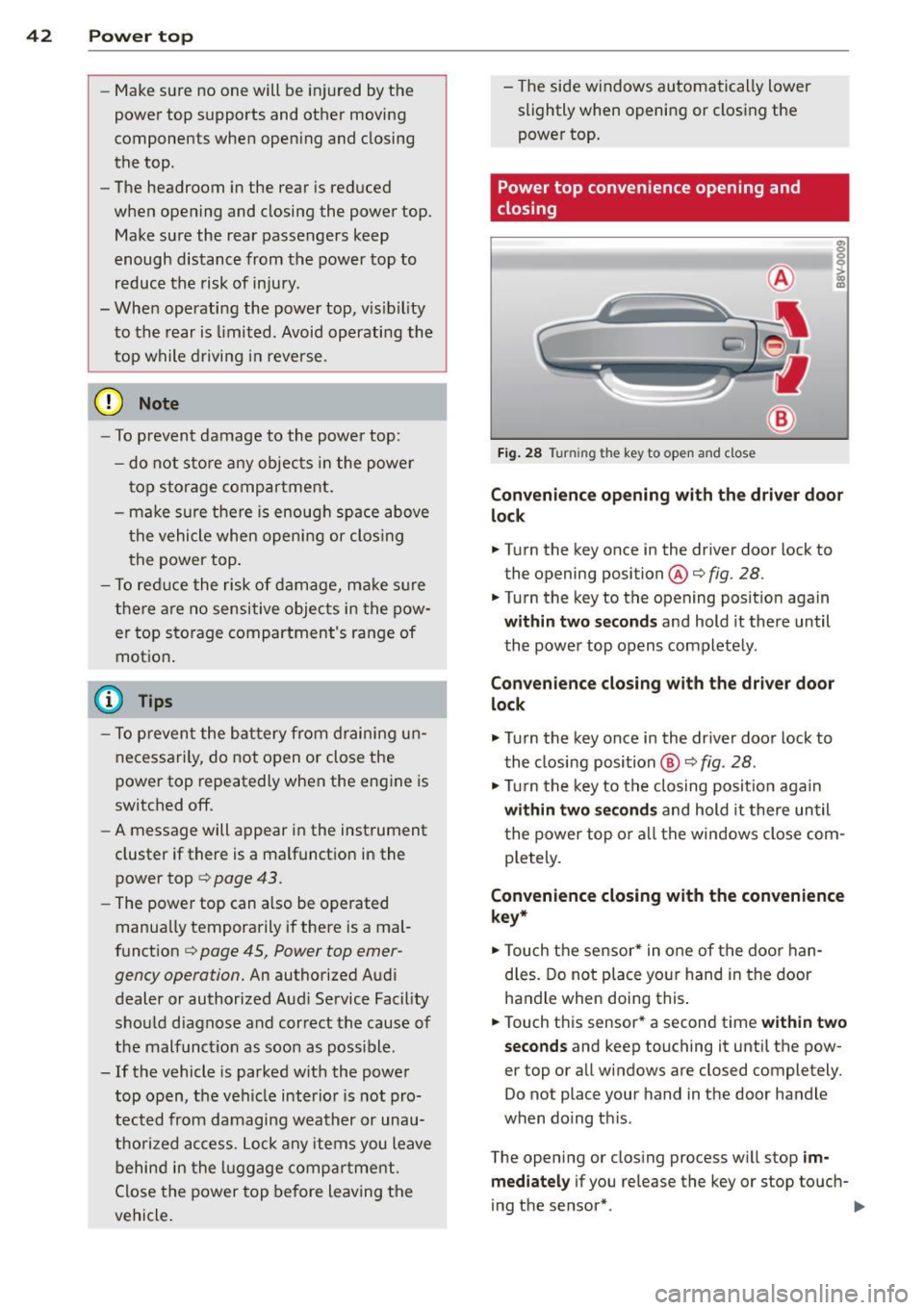
Power top convenience opening and
closing
Fig. 28 Tu rnin g the key to open and close
Convenience opening with the driver door
lock
.. Turn the key once in the driver door lock to
the opening position@c:>
fig. 28.
.. Turn the key to the opening position again
within two seconds and hold it there until
the power top opens completely.
Convenience closing with the driver door
lock
.,. Turn the key once in the driver door lock to
the closing position @
c:> fig. 28.
.,. Turn the key to the closing position again
within two seconds and hold it there until
the power top or all the windows close com
pletely .
Convenience closing with the convenience
key*
.. Touch the sensor* in one of the door han
dles. Do not place your hand in the door
handle when doing this.
.. Touch this sensor* a second time
within two
seconds
and keep touching it until the pow
er top or all windows are closed completely .
Do not place your hand in the door handle
when doing this .
The opening or closing process will stop
im
mediately
if you release the key or stop touch-
ing the sensor*. ..,.
Page 57 of 302
....,
N
r--. > co
rl I.O
"' rl
"' rl
Removing the wiper blade
• Fold the windshield wiper arm away from
the windshie ld .
• Press the locking knob@¢
fig. 50 on the
wiper blade. Hold the wiper blade firm ly.
• Remove the wiper blade in the direction of
the arrow.
In sta ll ing th e wiper blade
• Insert the new wiper blade into the mount
on the wiper arm @until you hear it latch
into place.
• Place the wiper arm back on the windshie ld.
• Turn the service pos ition
off.
A WARNING
For safety reasons, the windshield wiper
blades should be replaced once or twice
each year.
(D Note
- The windshield wiper blades must only
be folded away when in the serv ice posi
tion. Otherw ise, you risk damaging the
paint on the hood or the wi ndshield wip
er motor.
- You should not drive your veh icle or
press the w indshield w iper lever when
the w iper arms are folded away from the
windsh ield . The w indshield w ipers would
move back into their origina l position
and could damage the hood and wind
shield.
- To prevent damage to the windshield
washer system, always loosen w iper
blades that have frozen to the wind
s h ield before turning the wipers on.
- To prevent damage to the wiper blades,
do not apply gasoline, petroleum, thin
ning agents or other solvents on the wip
er blades or near them.
- To prevent damage to the wiper arms or
other components, do not try to move
the windshie ld w ipers by hand .
-
Lights and Visi on 55
@ Tips
-Commercial hot wax such as t he types
used by car washes make it more d ifficult
to clean t he windshie ld.
- Yo u can also use the service position, for
example, if yo u want to protect the
w indshield from icing by using a cover .
- Yo u cannot activate the serv ice position
when the hood is open.
Outside mirror
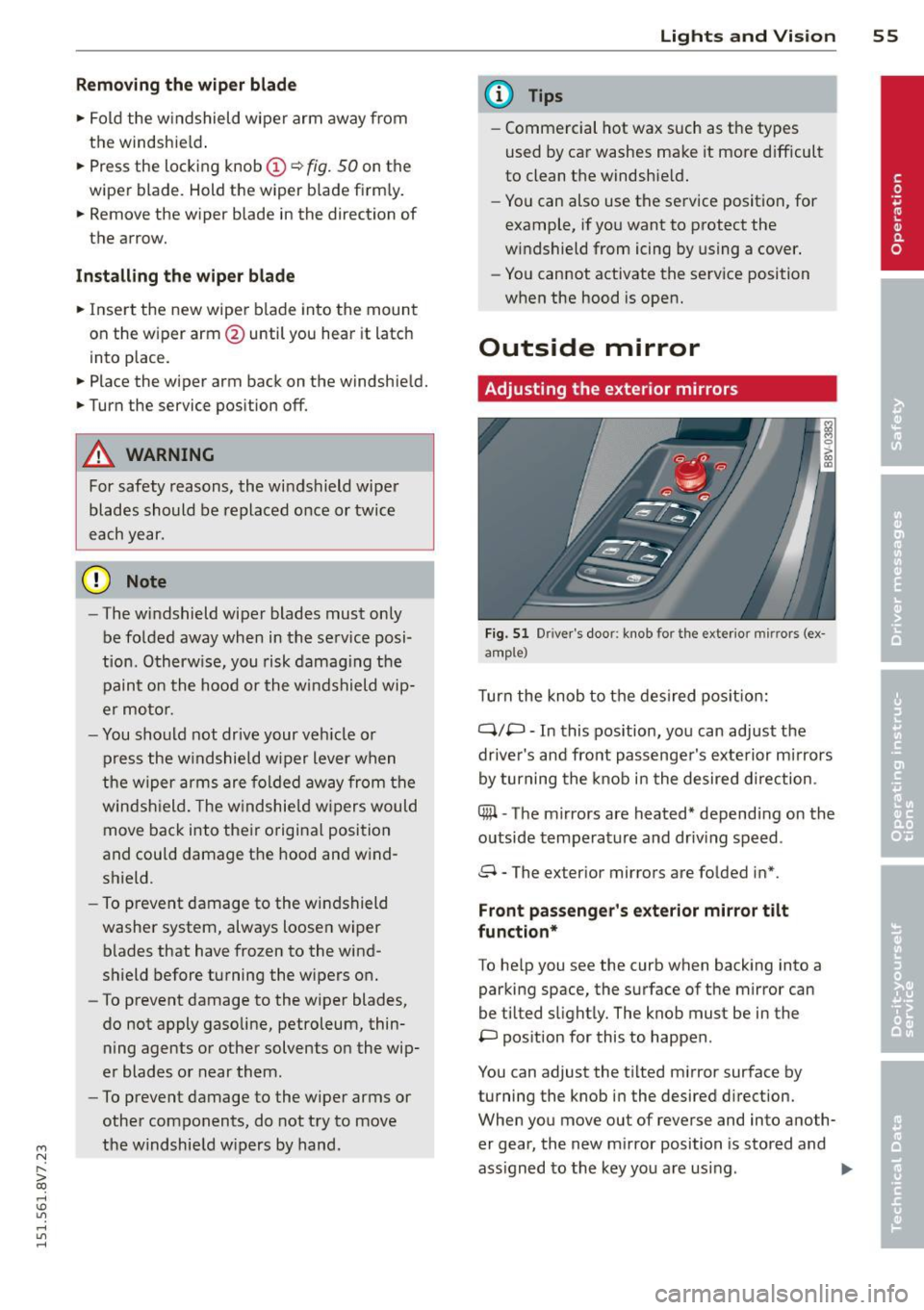
Adjusting the exterior mirrors
Fi g. 51 Dr iver's door : knob for the ex te ri or mi rrors (ex
a m ple)
T urn the knob to t he des ired pos it io n:
Q/P -In this position, you can adjust the
driver's and front passenge r's exte rior mirrors
by turning the knob i n the desired d irection .
C@ -The mirrors are heated* depend ing on the
outside temperature and driv ing speed .
8 - The exterior mirrors are folded in* .
Front passeng er's exterior mirror tilt
fun ction*
To he lp you see the curb when backing into a
parking space, the surface of the mirror can
be tilted s light ly. The knob must be in the
P pos ition for this to happen .
You can adjust the t ilted mirror surface by
turning the knob i n the desired d irection.
When you move out of reverse and into anoth
er gear, the new m irror position is sto red and
ass igned to the key you are using .
II>
Page 63 of 302
....,
N
r--. > co
rl I.O
"' rl
"' rl
driving or riding. The safety belts and air
bag system can provide the greatest pro
tection possible when the backrests are
in the upright position and the safety
belts are worn correctly. The more a
backrest is reclined, the greater the risk
of inju ry due to an incorrect seating posi
tion and safety belt position .
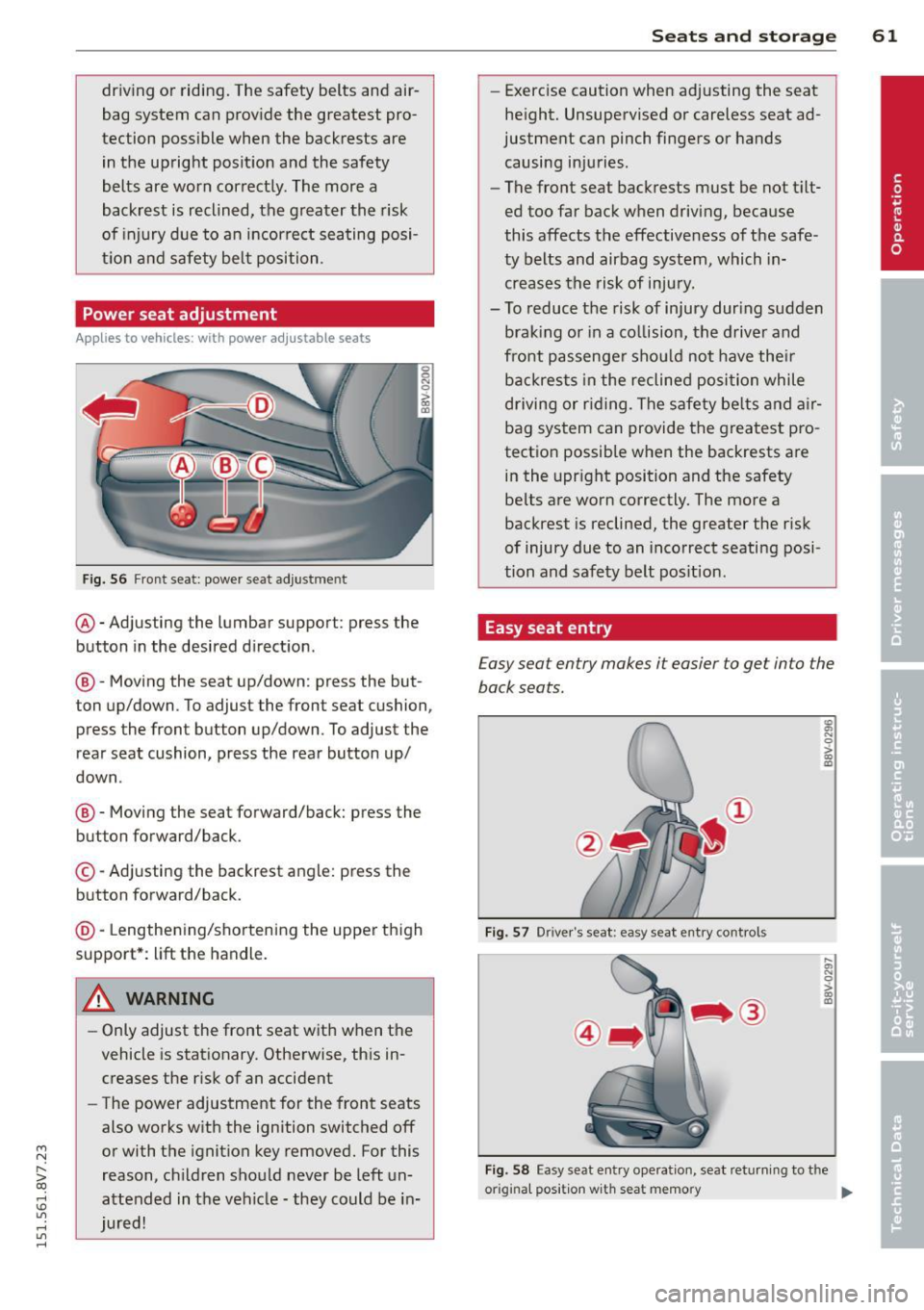
Power seat adjustment
Applies to vehicles: with power adjustable seats
Fig. 56 Fr ont seat: power seat adjustment
@ -Adjusting the lumbar support: press the
button in the desired d irection.
@ -Moving the seat up/down : press the but
ton up/down. To adjust the front seat cushion,
press the front button up/down. To adjust the
rear seat cushion, press the rear button up/
down .
@-Moving the seat forward/back: press the
button forward/back.
© -Adj usting the backrest angle: press the
button forward/back.
@ -Lengthening/shortening the upper thigh
support*: lift the handle.
A WARNING ,-
- Only adjust the front seat w ith when the
vehicle is stationary. Otherwise, this in
creases the r isk of an accident
- The power adjustment for the front seats
also works with the ignition switched off
or with the ignition key removed. For this
reason, ch ildren should never be left un
attended in the vehicle -they co uld be in
jured!
Seats and storage 61
-Exercise caution when adjusting the seat
height. Unsupervised or careless seat ad
justment can pinch fingers or hands
causing injuries.
- The front seat backrests must be not t ilt
ed too far back when driving, because
this affects the effective ness of the safe
ty belts and airbag system, which in
creases the risk of injury.
- To reduce the risk of injury dur ing sudden
braking or in a co llision, the driver and
front passenger shou ld not have their
backrests in the reclined position while
driving or rid ing. The safety be lts and air
bag system can provide the greatest pro
tection possible when the backrests are in the upright position and the safety
be lts are worn correctly. The more a
backrest is reclined, the greater the risk
of injury due to an incorrect seating posi
tion and safety belt position.
Easy seat entry
Easy seat entry makes it easier to get into the
back seats.
Fig. 57 Driver's seat: easy seat entry controls
~ N 0 > m a,
....
l1l 0 > m a,
Fig . 58 Easy seat entry operation, seat returning to the
origina l pos it ion w ith seat memory
Ill>
Page 66 of 302
64 Seats and storage
Socket
Applies to vehicles: wit h socket
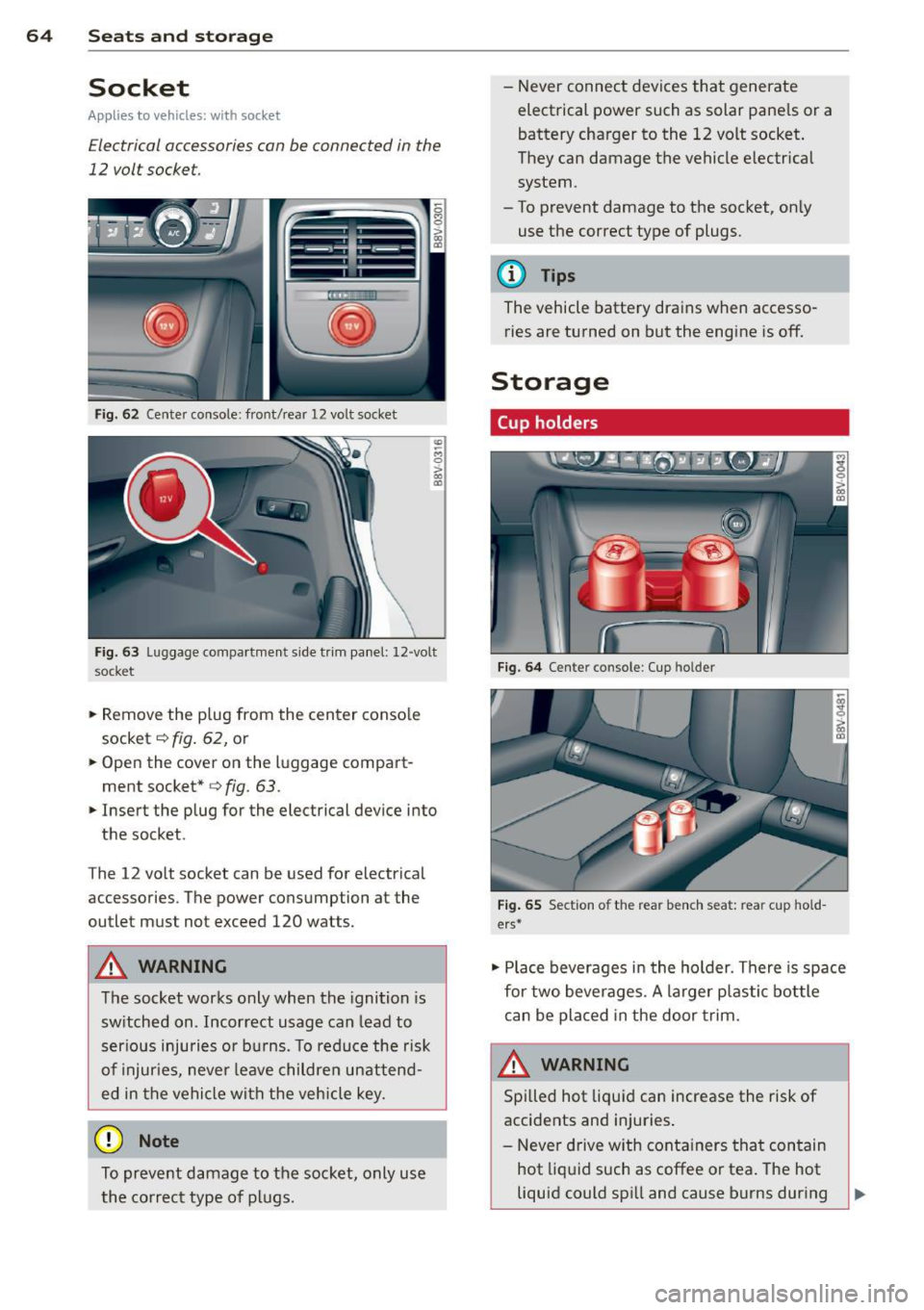
Electrical accessories can be connected in the
12 volt socket.
F ig . 6 2 Center console: front/rear 1 2 vol t so cket
"' -M
0
> a, (D
F ig. 63 Lu ggage compartme nt s ide tr im panel: 12 -volt
s ocke t
.,. Remove the p lug from the center conso le
socket
c::> fig . 62, or
~ Open the cover on the luggage compart
ment socket*
<=> fig. 63 .
.,. Insert the plug for the electrical device into
the socket .
T he 12 vo lt socket can be used for electrical
accessories. T he power cons umption a t the
outlet mus t not exceed 120 watts.
&_ WARNING
The socket works only when the ignition is
sw itched on . Incor rect usage can lead to
ser ious injuries or bu rns. To reduce the r isk
of injur ies, never leave childre n unattend
ed in the vehicle wi th the vehicle key.
(D Note
To preve nt damage to the socket, only use
the co rrect type o f plugs. - N
ever connec t devices tha t generate
electrical power such as solar pane ls or a
battery charger to the 12 volt socket .
They can damage the vehicle e lectrical
system .
- To prevent damage to the socket, on ly
use the correct type of plugs.
(D Tips
The vehicle battery dra ins when accesso
ries are turned on but the engine is off.
Storage
Cup holders
F ig. 6 4 Center co nso le : C up holde r
Fig. 65 Sect io n of th e re ar ben ch seat: re ar cu p hold
ers *
.,. Place beverages i n the holder . There is space
for two bever ages. A larger p lastic bottle
can be placed in the door trim.
&_ WARNING
Spi lled hot liquid can increase the risk of
accidents and injuries .
- Never d rive w ith conta iners that con tain
hot liq uid such as coffee or tea . The hot
liquid could spi ll and cause burns during
Page 67 of 302
....,
N
r--. > co
rl I.O
"' rl
"' rl
a collision, sudden braking or other vehi
cle movement. Spilled hot liquid can also
increase the risk of accidents and inju
ries .
- Only use soft conta iners in the cup hold
ers. Hard cups and glasses can increase
the risk of injury during a coll is ion.
- Never use the cup holder or the adapter
as an ashtray- this is a fire hazard .
(D Note
Make sure your beverage container has a
lid. If not, your beverage could spill and
cause damage to vehicle equipment or
stain the seat covers.
Glove compartment
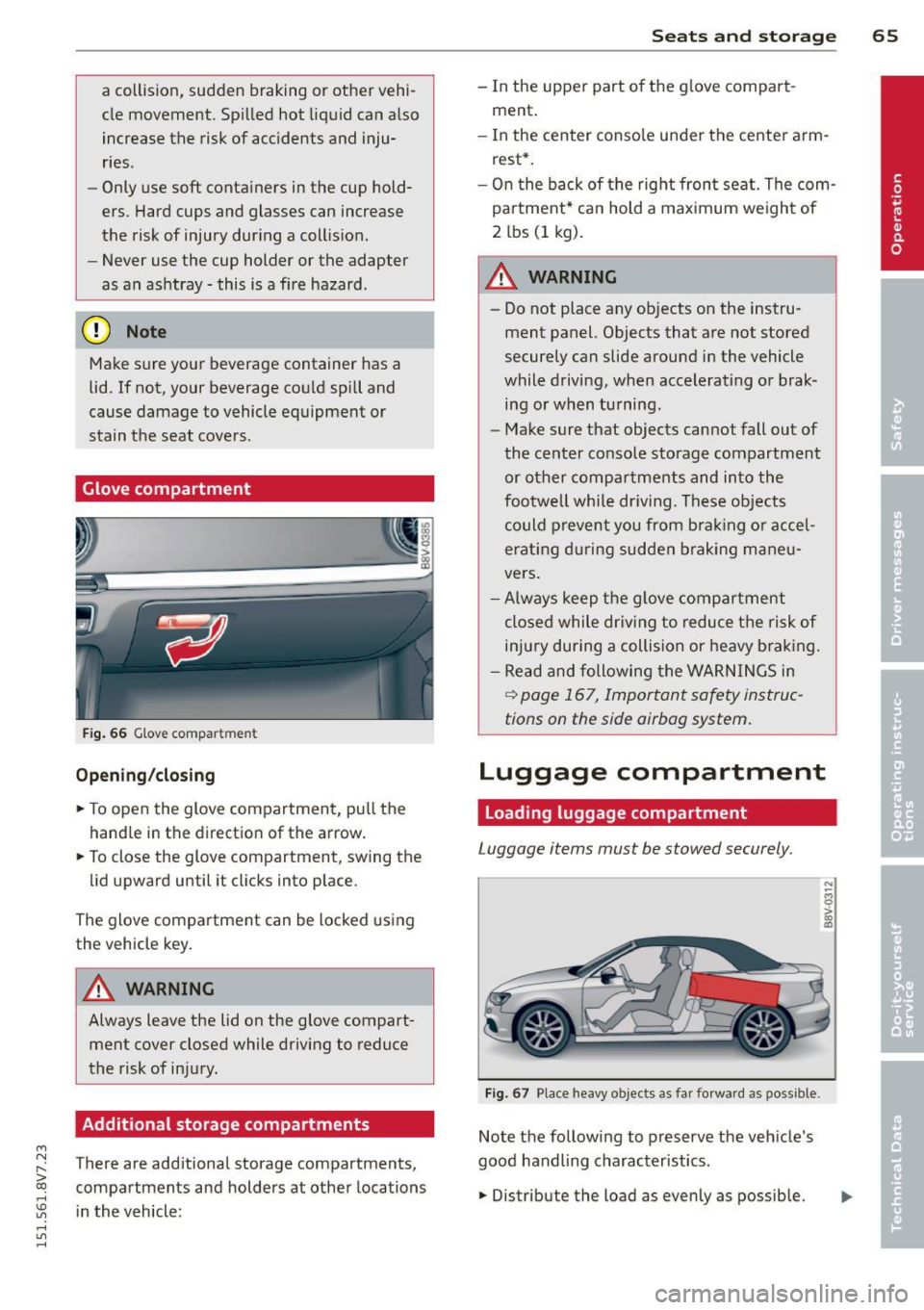
Fig. 66 G lo ve compar tmen t
Op ening /clo sing
• To open the glove compartment, pu ll the
hand le in the direction of the arrow.
• To close the glove compartment, swing the
lid upward until it clicks into place .
The glove compartment can be locked us ing
the vehicle key .
.&., WARNING
Always leave the lid on the glove compart
ment cover closed while driving to reduce
the risk of injury.
Additional storage compartments
T here are additional storage compartments,
compartments and holders at other locations
in the vehicle:
S ea ts a nd s to rage 65
- In the upper part of the g love compart
ment .
- In the center conso le under the center arm
rest*.
- On the back of the right front seat. The com partment" can hold a max imum weight of
2 lbs (1 kg).
.&., WARNING
-----
- Do not place any objects on the instru
ment panel. Objects that are not stored
securely can slide around in the vehicle
while driving, when accelerating or brak
ing or when turning .
- Make sure that objects cannot fall out of
the center console storage compartment
or other compartments and into the
footwell while dr iving . These objects
could prevent you from b ra ki ng o r accel
erating d uring sudden b raking mane u
vers.
- Always keep the g love compartment
closed while driv ing to reduce the risk of
injury during a collision or heavy braking.
- Read and following the WARNINGS in
~ page 167, Important safety instruc
tions on the side airbag system.
Luggage compartment
Loading luggage compartment
Luggage items must be stowed securely.
F ig. 67 Pla ce heavy o bjects as far forward as poss ible.
Note the following to preserve the veh icle's
good handling characteristics .
• Distribu te the load as evenly as possible.
N ;;; 0 ;;;. a,
"'