warning lights AUDI A3 CABRIOLET 2015 User Guide
[x] Cancel search | Manufacturer: AUDI, Model Year: 2015, Model line: A3 CABRIOLET, Model: AUDI A3 CABRIOLET 2015Pages: 302, PDF Size: 73.83 MB
Page 58 of 302
56 Lig hts an d Vi sion
The mirror goes back into its origina l position
once you drive forward faster than 9 mph
(15 km/h) or turn the ign ition
off.
Folding mirr ors in and out
To fold the mirrors in w ith the knob, turn the
knob in the 8 pos ition.
To fold the m irrors out, turn the knob in the
q or
P or O position .
You can set in the MMI if the mirrors shou ld
fold in when locking the vehicle or not
c::> page 36. When you lock the vehicle , the
mirrors fold in . When you sta rt the ignit ion,
the m irrors fold out .
A WARNING
Curved mirror s urfaces (convex or asphe
ric*) enlarge the field of vision. However,
they make objects in the mirror appear sma ller and farther away . Your may esti
mate incorrectly when you use these m ir
rors to gauge your d istance from the
veh icles behind you when changing lanes -
accident risk!
@ Note
- For vehicles with power folding exterior
mirrors*: If the m irror housing was
moved by outside forces (such as an im
pact when maneuvering), you must use
the power folding function to fold the mirro r all the way out. You will hear a
l oud noise when the m irrors are latched
back in place. The mir ror housi ng must
not be moved back into place by hand
because this would affect the mirror
mechan ism.
- Applies to vehicles witho ut power fold
i ng exter ior mirrors: If the mirror hous
ing was moved by outside forces (suc h as
in impact during maneuvering), you
must move the m irror housing back into
place by hand.
- If you wash the vehicle in an automatic
car wash, yo u m ust fold the e xterior m ir
r o rs in to reduce the risk of damage to
the m irrors. Never fold power fo ld ing ex-
-
terior mirrors by hand . On ly fold them in
and out using the power controls.
(D Tips
If t he power ad justmen t fails, bot h mir
ro rs can be adjusted by hand by pressing
on the edge of the mirror surface.
Dimming the mirrors
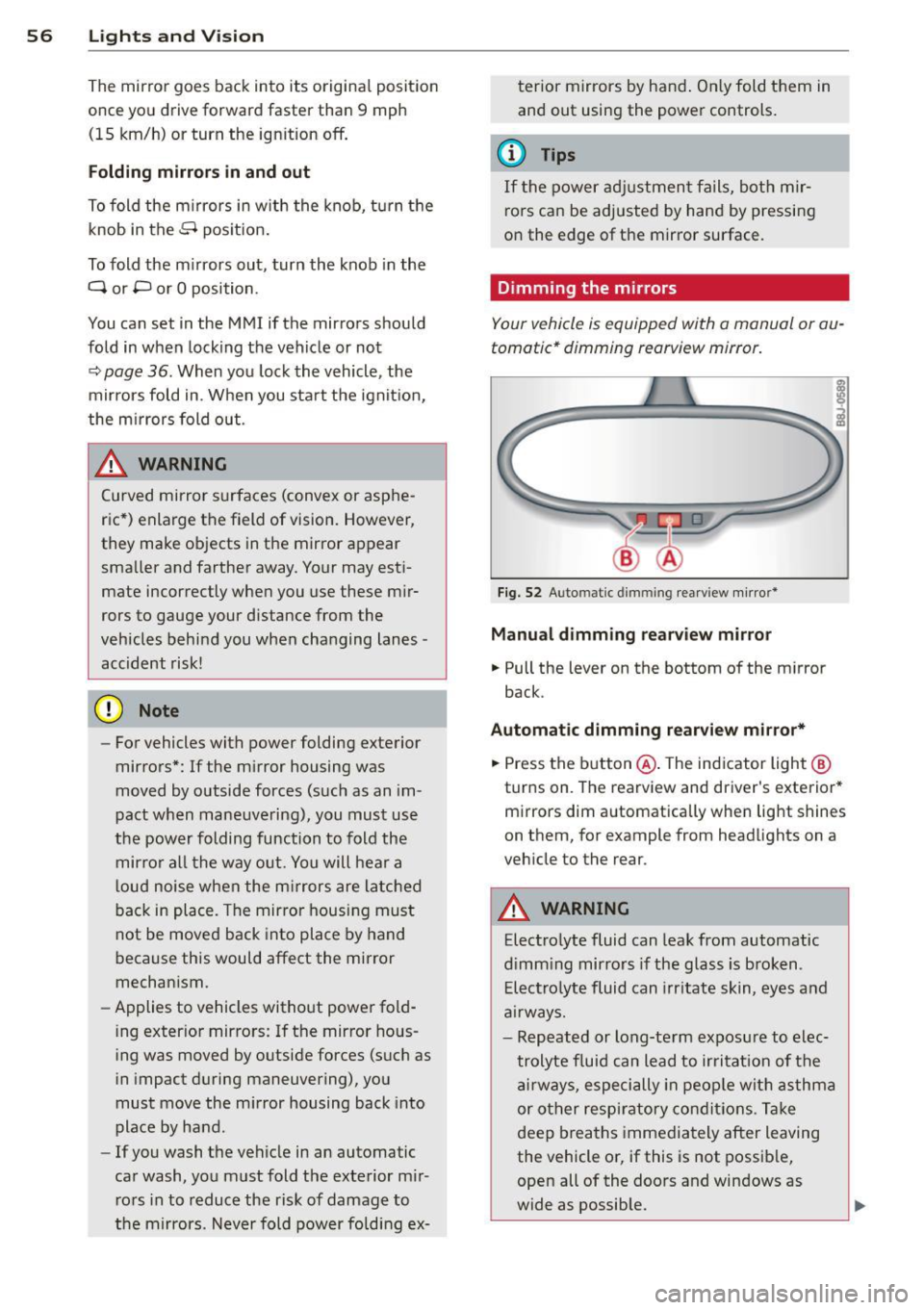
Your vehicle is equipp ed with a manual or au
tomatic* dimming rearview mirror.
F ig . 52 A uto matic dimmin g rea rv iew mi rro r*
Manu al dimming rearv iew mirro r
.. Pull the lever on the bottom of the m irror
back .
Automat ic dimming r earview mirror*
.. Press the b utton @. The ind icator light @
turns on . The rearview and driver's exterior*
mirrors dim a utomatically when light shines
on them, for example from headlights on a
veh icle to the rear .
A WARNING
Electrolyte fluid can leak from automatic
d imm ing mirrors if the glass is b roken .
E le ctro lyte fluid can irr itate skin, eyes and
a irways.
- Repeated or long-te rm exposure to e lec
t rolyte f luid can lead to ir ritat io n of the
a ir ways, especi ally in peo ple wit h asthma
or other respiratory co nd it ions. T ake
deep breaths immediately after leaving
the vehicle or, if this is not possib le,
open all of the doo rs and windows as
wide as possible.
Page 81 of 302
M N ,....
> co ,...., \!) 1.1'1 ,...., 1.1'1 ,....,
Switchin g th e ig nition on /off
If the> ,:r- u indicator l ight blinks and the mes
sage
Ple ase move s teering wheel appea rs
when switching the ignition on, the steering is locked by th e steering lock. In this case, turn
the steering wheel slight ly to the left/ right.
.. To switch the ignition on or
off, press the
I S TAR T ENG INE S T OPI button. Do not press
the brake pedal whil e doing this .
Starting the engin e
Your vehicle is equipped with launch cont ro l.
The engine starts automa tically when you
press the
I S T AR T ENG INE S T OP I button brief
l y.
.. Press the brake peda l and move the se lector
lever to the P or N pos ition .
.. Press the
I STAR T ENGINE STOP I button
briefly . The eng ine will star t.
Majo r electrical equ ipment switches
off tem
porarily when starting the eng ine .
I f the engine does not start immediately , stop
the starting procedu re by push ing the
I S TAR T ENGINE ST OP ! button again and re
peat after 30 seconds .
Automatic start m alfunction
If the Ila indicator l ight turns on (gasoline en
g ine) when you start the engine, there is an
automatic sta rt malfunction .
To start the eng ine, press and hold the
!STAR T ENGIN E STOP ! button until the eng ine
runs.
Drive to an authorized Aud i dealer or author
i z ed Audi Service Fac ility immed iately to have
the malfunction corrected .
A WARNING
-Never allow the engine to ru n in confined
spaces -there is a r isk of asphyxiation.
- Always take the veh icle key with you
when leaving the vehicle, even for a
short per iod of t ime . This applies partic
ularly when chi ldren remain in the vehi
cle . Otherwise the children could start
Dri vin g 79
the engine or operate electrical equip
ment such as power w indows.
- Please note that the brake booster and
power steering only work when the en
gine is running. When the engine
off, you
must use more force to steer or brake
the vehicle . Because the usual steer ing
and brak ing capability is not avai lable,
the risk of accidents or injur ies increases .
(D Note
-Avo id h igh engine speed, full throttle,
and heavy eng ine load as long as the en
gine has not reached operat ing tempera
ture yet. You could damage the engine .
- The engine cannot be started by pushing
or towing .
@ For the sake of the environment
Do not let the eng ine run wh ile parked to
warm up . Begin dr iv ing immediately . Th is
reduces unnecessary emissions .
(D Tips
-After starting a cold engine, there may
be a brief period of increased no ise be
cause the oil press ure must f irst bu ild up
in the hydraulic va lve ad justers. This is
normal and not a cause for concern.
- If the . indicator light blinks in the in
st rument cluste r before switching the ig
nition
off, the ignit ion wi ll not switch on
again .
qpoge 192
- If you leave your vehi cle wit h the ignition
switched on, the ign it ion w ill switch
off
after a certain amount of time . Make
sure that electrical equipment such as
the exterior lights are switched
off .
T · th · ff using the
button
App lies to vehicles: wit h convenience key
.. Bring the veh icle to a full stop .
.. Move the se lector lever into the P posit ion .
.. Press the
I STA RT E NGINE ST OP ! button
q page 78, fig. 80. ..,.
•
Page 84 of 302
82 Driving
Electromechanical
parking brake
Operating
The electromechanical parking brake replaces
the hand brake.
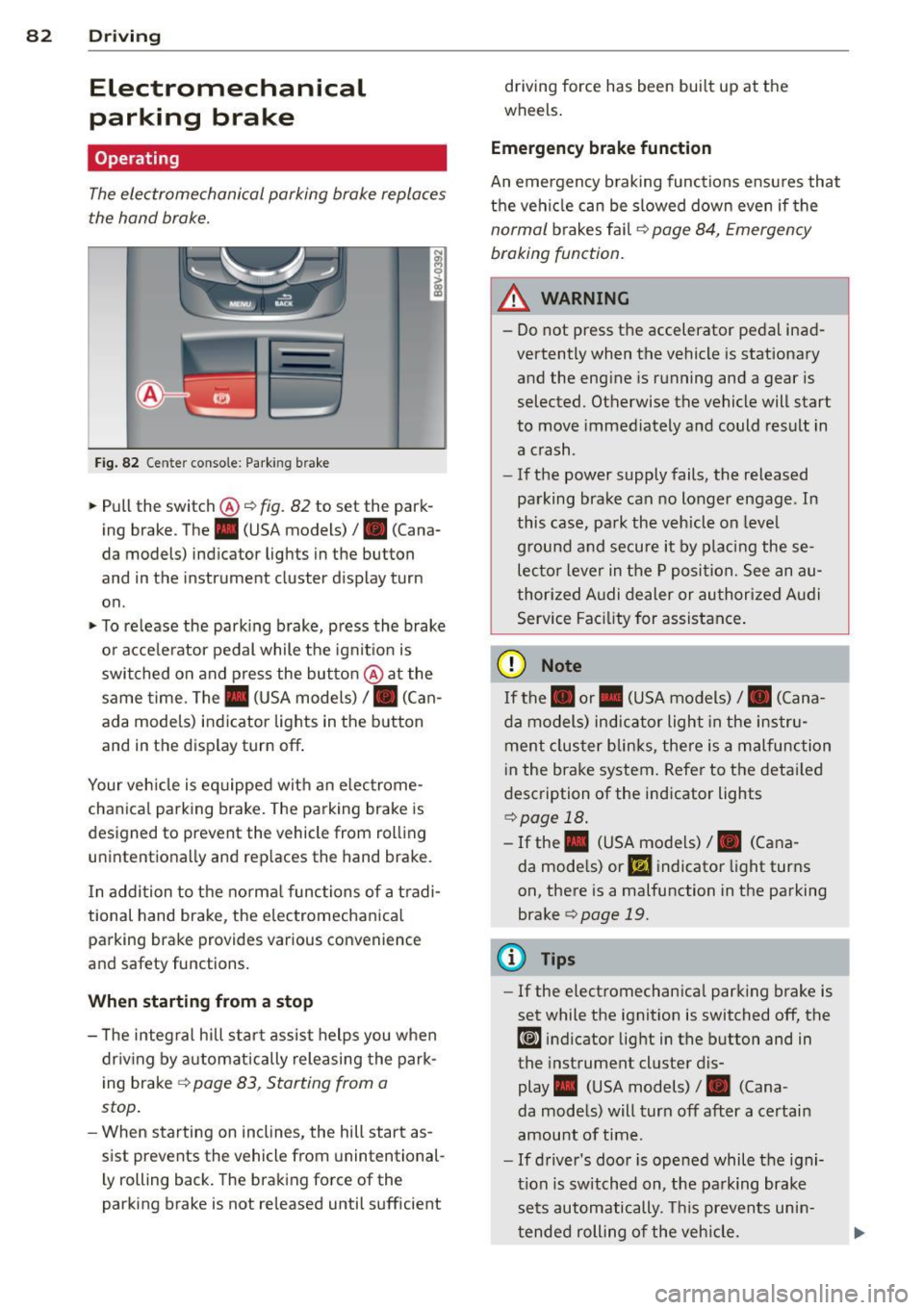
Fig. 82 Ce nter conso le: Park ing brake
~ Pull the switch@~ fig. 82 to set the park
ing brake . The . (USA models)/ . (Cana
da models) indicator lights in the button
and in the instrument cluster display turn
on .
~ To release the parking brake, press the brake
or acce le rator pedal while the ignit ion is
switched on and press the button @at the
same time. The. (USA models)
I. (Can
ada models) indicator lights in the button
and in the display turn off .
Your veh icle is eq uipped with an electrome
chanical parking brake. The parking brake is
designed to prevent the vehicle from rolling unintentionally and replaces the hand brake.
I n addition to the normal functions of a tradi
tional hand brake, the electromechanical parking brake provides various convenience
and safety functions.
When starting from a stop
- T he integral hill start assist helps you when
dr iving by automatically releasing the park
ing brake ~
page 83, Starting from a
stop .
-When starting on inclines, the hill start as
sist prevents the vehicle from unintentional
l y rolling back. The braking force of the
parking brake is not released until sufficient driving force has been built up at the
wheels.
Emergency brake function
An emergency braking functions ensu res that
the vehicle can be slowed down even if the
normal brakes fail~ page 84, Emergency
braking function.
_.&. WARNING
- Do not press the accelerator pedal inad
vertently when the vehicle is stationary
and the engine is running and a gear is
selected. Otherwise the vehicle will start
to move immediately and could result in
a crash .
- If the power supply fails, the released
parking brake can no longer engage . In
this case, park the vehicle on leve l
g round and secure it by placing these
lecto r lever in the P position. See an au
thorized Audi dealer or authorized Audi
Service Facility for assistance.
(D Note
If the. or. (USA models) I. (Cana
da models) indicator light in the instru
ment cluster blinks, there is a malfunction
i n the brake system. Refer to the detai led
description of the indicator lights
~page 18.
- If the . (USA models) I. (Cana-
da models) or
Ill indicator light turns
on, there is a malfunction in the parking
brake
c> page 19.
(D Tips
- If the electromechanica l parking brake is
set while the ignition is switched off, the
¢@'A indicator light in the button and in
the instrument cluster dis-
play . (USA models) /. (Cana-
da models) will turn off after a certain
amount of time.
- If driver's door is opened while the igni
tion is switched on, the park ing brake
sets automatically. This prevents unin
tended rolling of the vehicle.
Page 87 of 302
....,
N
r--. > co
rl I.O
"' rl
"' rl
off when the speed decreases below the stor
ed maximum speed.
Setting a thresho ld is recommended if yo u
wo uld like to be reminded when you reach a
certain maximum speed . Situations where you
may want to do so include d riving in a country
with a general speed limit or if there is a
specified max imum speed for winter tires.
@ Tips
Regard less of the speed warning system,
you shou ld always mon itor your speed us
ing the speedometer and make sure you
are following the legal speed limit.
Setting the threshold
You con set, change and delete the threshold
in the MMI.
• Se lect : the
IMENU ! button> Car> System s*
control button > Driv er assist an ce > Speed
w arning .
You can set any thresho ld between 20 mph
(30 km/h) and 150 mph (240 km/h). Settings
can each be adjusted in increments of 6 mph
(10 km/h).
Cruise control system
Description
Appl ies to vehicles : with cruise con trol system
The c ruise control system makes i t possible to
d rive at a constant speed starting at lS mph
(20 km/h).
The speed is kept constant by modify ing en
g ine power or through an a ct ive brake in ter
vention.
A WARNING
- Always pay attention to the traffic
around you when the cruise control is in
operation. You are always responsible for
your speed and the distance between
your vehicle and other vehicles.
- For reasons of safety, cruise contro l
should not be used in the c ity, in stop-
Dri vin g 85
and-go traffic, on winding roads and
when road cond itions are poor (such as
ice, fog, gravel, heavy rain and hydro
plan ing) -you could have an accident.
- Switch the cruise control off temporarily
when dr iv ing in turning lanes, h ighway
e xits or in construction zones.
- Please note that unconsc iously "resting"
your foot on the accelerator pedal p re
vents t he cr uise control from b raking.
This is due to the control system be ing
over ridden by the dr iver's acceleration .
- If the re is a brake system malfunct ion
such as overheating when the spee d
warn ing system is switched on, the bra k
ing f unction in the system w il l be deac ti
vated . The remaining speed warning sys
tem fu nctions will remain active, as long
as the
Ill ( U SA mode ls) I l'I (Canada
models) indicator light is on.
(D Tips
- T he cr uise control system is ideal fo r
st retches wit h speed limits. The driver is
responsib le for adhering to the correct
speed.
- The cr uise control remains act ive when
shift ing gears.
- The b ra ke lights turn on when the b rakes
are act ivated.
Switching on
Applies to vehicles: with cruise control system
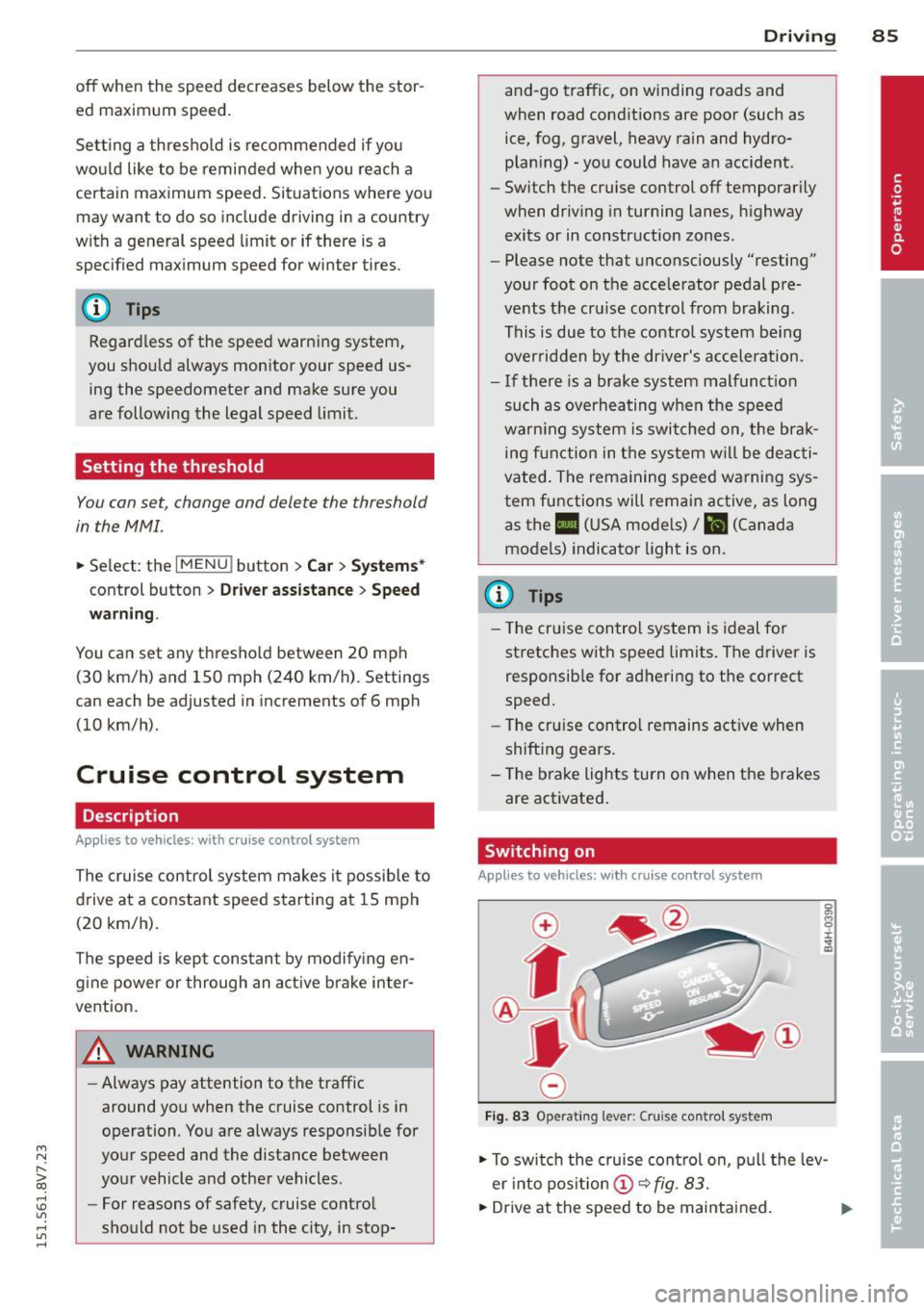
Fi g. 83 Operat ing lever: Cruise control system
• To swi tch the cruise cont ro l on, p ull the lev
er into pos it ion @
~fig. 83.
• Dr ive at the speed to be maintained.
Page 92 of 302
90 Audi adaptive cruise control
Switching adaptive cruise control off
.,. Push the lever away from you into position
@ until it clicks into p lace. The message
ACC: off appears.
The stored speed in the LED line is erased.
@ Indicator lights
II -adaptive cru ise contro l is switched on . No
objects are detected ahead. The stored speed
is maintained .
•- An object ahead was detected . The adap
tive cruise control system regulates the speed
and distance to the object ahead and brakes/
accelerates automatically.
r •j-adaptive cruise contro l is switched on . An
object ahead was detected. Your vehicle re
mains stopped and will not start driving auto
matica lly.
•- The automatic braking is not enough to
maintain a sufficient distance to an object
ahead. You must intervener:!>
page 93, Re
quest for driver intervention.
© Instrument cluster display
If adaptive cruise control is not shown in the
instrument cluster disp lay, you can call it up
using the mu ltifunction steering wheel but
tons
r:!> page 2 7.
Based on the graphics in the disp lay, yo u can
determine if the system is maintaining a dis
tance to a vehicle ahead and what that dis
tance to this vehicle is:
No vehicle -No object ahead was detected .
White vehicle -An object ahead was detected.
Red vehicle -Request for the driver to take ac
tion
c> page 93 .
Both arrows on the scale© indicate the dis
tance to the object ahead. No arrow appears
when the vehicle is on an open road and there
is no object ahead.
If an object is detected
ahead, the arrow moves on the scale .
The green zone on the scale indicates the
store distance. For information on changing the d
istance, refer to
i=;, page 92. If the dis
tance selected is exceeded or not reached, the
arrow moves into the red zone on the scale.
A WARNING
- Using adaptive cru ise control incorrectly
can cause collisions, other accidents and
serious injuries.
- If you press the
~IS-ET~I button when driv
ing at speeds below 20 mph (30 km/h),
the vehicle accele rates automatically up
to 20 mph (30 km/h), which is the mini
mum speed that can be set.
(D Tips
-If you switch the ignit ion or the adaptive
cruise control system off, the set speed
is erased for safety reason.
- The Electronic Stabilization Control (ESC)
and Anti-Slip Regulat ion (ASR) both
switch on when the adaptive cruise con
trol is switched on. ESC and ASR cannot
be switched
off when adaptive cruise
contro l is switched on.
- With the adaptive cruise control activat
ed the ESC sport mode canno t be activat
ed.
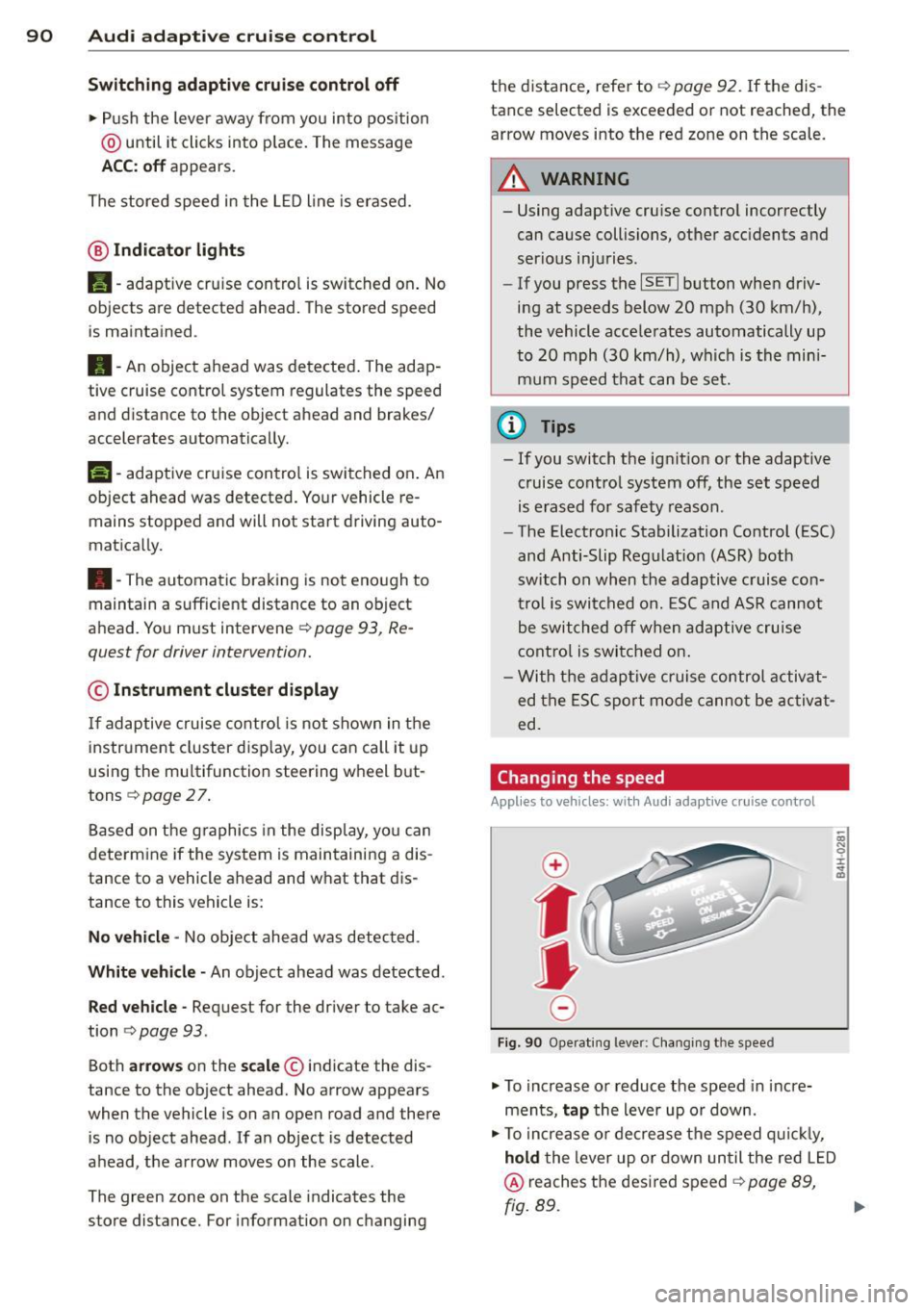
Changing the speed
App lies to vehicles: wi th Aud i ada ptive c ruise con tro l
0
f
• 0
Fig . 90 Ope rating lever: Changing the speed
.,. To increase or reduce the speed in incre
ments,
tap the lever up or down.
.,. To increase or decrease the speed quickly,
hold the lever up or down un til the red LED
@ reaches the desired speed i=;, page 89,
fig. 89.
Page 112 of 302
110 Automatic transmission
Automatic
transmission S tronic-transmission
Introduction
Appl ies to vehicles: with S tro nic tr ansmiss ion
Your vehicle is equipped with an electronical
ly-controlled DSG transmission called S tronic.
Two independent clutches transfer the power
between the engine and transmission. It al
lows the vehicle to accelerate without a no
ticeable interruption in traction .
The transmission upshifts or downshifts auto
matically. The driving style continuously influ
ences the selection of the driving program.
When a
moderate driving style is used, the
transmission selects the most economica l
driving mode. The transmission upshifts at a
lower RPM and downshifts at a higher RPM to
improve fuel efficiency.
The transmission switches to a sporty mode
after a kick-down or when the driver uses a
sporty driving style characterized by quick ac
celerator pedal movements, heavy accelera
tion, frequent changes in speed and traveling
at the maximum speed.
If desired, the driver can also select the gears
manually (tiptronic mode) o page 115,
Shifting manually (tiptronic mode).
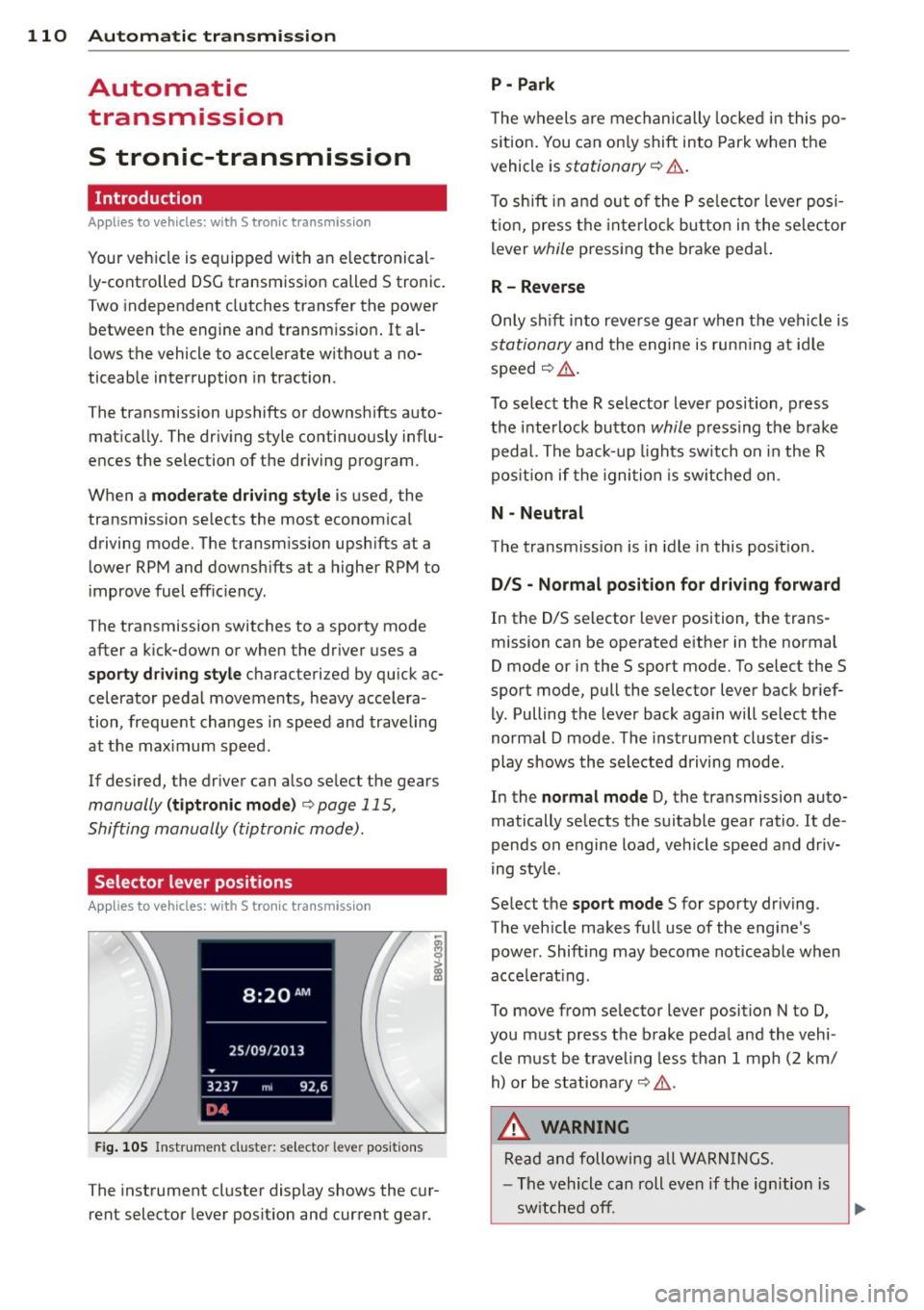
Selector lever positions
A pp lies to vehicles: with S tro nic tr ansmiss ion
Fig. 105 Instrument cluste r: selector leve r positions
The instrument cluster display shows the cur
rent selector lever position and current gear .
P -Park
The wheels are mechanically locked in this po
s iti on. You can only shift into Park when the
vehicle is
stationary o &..
To shift in and out of the P selector lever posi
tion, press the interlock button in the selector
lever
while pressing the brake peda l.
R- Reverse
Only shift into reverse gear when the vehicle is
stationary and the engine is running at idle
speed
o &. .
To select the R selector lever position, press
the interlock button
while pressing the brake
pedal. The back-up lights switch on in the R
pos ition if the ignition is switched on .
N -Neutral
The transmission is in idle in this position.
D/S - Normal position for driving forward
In the D/S selector lever position, the trans
mission can be operated either in the normal
D mode or in the S sport mode. To select the S
sport mode, pull the selector lever back brief
ly. Pulling the lever back again will select the
normal D mode . The instrument cluster dis
play shows the selected driving mode.
In the
normal mode D, the transmission auto
matically selects the suitable gear ratio.
It de
pends on engine load, vehicle speed and driv
ing style .
Se lect the
sport mode S for sporty driving.
The vehicle makes full use of the engine's
power. Shift ing may become noticeable when
acce lerat ing .
To move from selector lever position N to D,
you must press the brake pedal and the vehi
cle must be traveling less than 1 mph (2 km/
h) or be stationary
o &. .
,&. WARNING
Read and following all WARNINGS.
- The vehicle can roll even if the ignition is
switched
off. .__ _____________ __J~
Page 128 of 302
126 Driving saf ety
Driving safety
General notes
Safe driving habits
Please remember -safety first!
This chapter contains important information,
tips, instructions and warnings that you need
to read and observe for your own safety, the
safety of your passengers and others . We have
summarized here what you need to know
about safety belts, a irbags, ch ild restra ints as
well as child safety. Your safety is for us
priori
ty number 1.
Always observe the info rmat ion
and warn ings in th is sect ion -fo r yo ur own
safety as well as that of your passengers .
The information in this se ction app lies to all
model ve rsions of your veh icle . Some of the
feat ures described in this sec tions may be
standard equipment on some models, or may
be optional equipment on others . If you are
not sure, ask your authorized Audi dealer.
A WARNING
- Always make sure that you follow the in
struct ions and heed the WARNINGS in
this Manual. It is in your interest and in
the inte rest of you r passengers.
- Always keep the complete Owner's Liter
ature in your Audi when you lend or sell
yo ur vehicle so that this important info r
mation will always be ava ilable to the
dr iver and passengers.
- Always keep the Owner's literature handy
so that you can find i t eas ily if you have
ques tions.
- Always adjust your speed to the weather
traffi c and conditions. Follow the speed
limits.
- Always drive in su ch a way that you can
stop your vehicle sa fely .
- Always adjus t your speed to the general
flow of traffic. Fo llow the speed limits.
Safety equipment
The safety features are part of the occupant
restraint system and work together to help
reduce the risk of injury in a wide variety of
accident situations.
Your safety a nd the safety of your passengers
shou ld not be left to chance . Advances in
tec hno logy have made a variety of features
ava ilable to help reduce the r is k of injury in an
a cciden t. T he following is a lis t of just a few of
the safety features in yo ur Audi:
- sophisticated safety be lts fo r d rive r and all
passe nger sea ting posit io ns,
- safety b elt pretens ioners,
- safety belt force lim iters fo r the front seats,
- front airbags,
- knee airbags for the front seats*
- side airbags in the front seats,
- specia l LATCH anchorages for child re -
s traints,
- he ad restr aints for e ach sea ting pos ition,
- ad justab le steeri ng colum n.
- pre sense basic* (preventat ive passenger
protect ion)
These ind iv idual safety features, can work to
gether as a system to he lp p rotect you and
yo ur passengers in a wide range of accidents .
T hese features cannot work as a system if
t h ey a re not always cor re ct ly adjusted and co r
re ct ly used .
Safety is everybody' s re sponsibility!
Important things to do before driving
Safety is everybody 's job! Vehicle and occu
pant safety always depends on the informed and careful driver .
For your safety and the safety of your passen
gers,
before driving always:
.. Make s ure that all lights and signa ls are op
erating correctly .
.. Make sure that the tire pressure is correct .
.. Make sure that all windows are clean and af -
ford good vis ibility to the outs ide . ..,_
Page 140 of 302
138 Safety belts
Safety belts
General notes
Always wear safety belts!
Wearing safety belts correctly saves lives!
This chapter explains why safety be lts are nec
essary, how they work and how to adjust and
wear them correctly .
.. Read a ll the information that fo llows and
heed all of the instructions and WARNINGS.
A WARNING
Not wearing safety belts or wearing them
improperly increases the risk of ser ious
personal in jury and death .
- Safety belts are the sing le most effective
means avai lab le to reduce the risk of se
r ious injury and dea th in a utomob ile acci
dents. For your protection and that of
yo ur passenge rs, always co rrectly wear
safety belts when the vehicle is moving.
- Pregnant women, injured, or physically
im paired perso ns m ust also use safety
belts. Lik e all veh icle occup ants, they are
more like ly to be ser iously injured if they
do not wea r safety be lts . The best way to
protect a fetus is to protect the mother -
throughout the entire pregnancy.
Number of seats
Your Audi has a total of four seating positions: two in the front and two in the rear. Each seat
ing position has a safety belt .
A WARNING
Not wearing safety belts or weari ng them
improp erly increases th e risk of ser ious
pe rsonal i njury and deat h.
- Never st rap more than one pe rson, in
cl uding small ch ild ren, into any belt.
It is
e speci ally dange rous to pla ce a safety
belt over a child s itting on yo ur lap.
- N ever le t mo re people ride in the ve hicl e
than there are s afe ty be lts avail able. -
Be s ure everyone riding in the vehicle is
properly restrained w ith a separate safe
ty belt or child restra int.
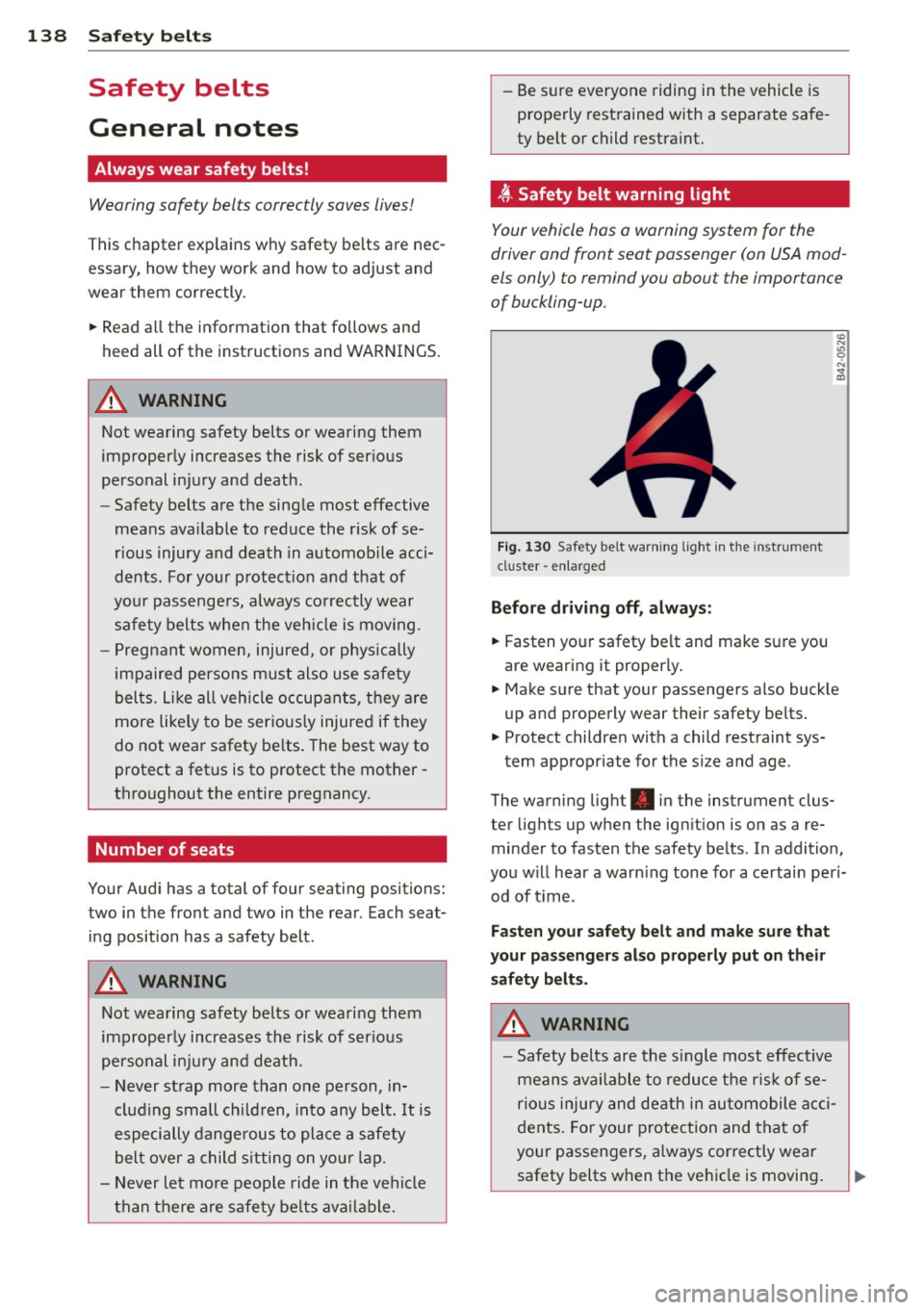
t Safety belt warning light
Your vehicle hos o warning system for the
driver and front seat passenger (on USA mod
els only) to remind you about the importance
of buckling-up .
Fi g. 130 Safety belt warni ng light in the instrument
cluster -en larged
Before driv ing off, alway s:
.. Fasten yo ur safety belt and make su re you
are wearing it properly .
.. Make s ure that your passengers also buck le
up and properly wear their safety be lts.
.. Protect childre n w ith a child restraint sys-
tem app ropriate for the s ize and age.
The warn ing light . in the instrument clus
ter lights up when the ign ition is on as a re
minder to fasten the safety be lts. In addition,
you w ill hear a warn ing tone for a ce rtai n pe ri
od of t ime.
Fasten you r safety belt and make sure that
your pass eng ers also properly put on the ir
s afety belt s.
A WARNING .....=-
-Safety b elts are the s ingle most eff ect ive
means avai lable to reduce t he ri sk of se
rio us inju ry and de ath in au tomobile a cci
dents. Fo r you r protection and that of
your passengers, a lways cor rectly wear
safety belts when t he vehicle is moving .
Page 194 of 302
192 Smart Technology
the brakes. If you need to brake addition
ally, brake in intervals and not continu
ously.
(D Tips
- If the brake booster is not working, you
must press the brake pedal with much
more force then norma l.
- If you retrofit your vehicle with a front
spoiler, wheel covers or similar items,
make sure that the air flow to the front
wheels is not interrupted. Otherwise the
brake system can become too hot.
Electromechanical
steering
The electromechanical steering supports the
driver's steering movements .
Power steering adapts electronically based on
the vehicle speed.
The vehicle still has full steering functionality if the power steering fai ls or when the engine
is stopped (towing). To steer, you must apply
much more force than usual.
Indicator lights and messages
• Do not drive vehicle: steering defective
If this indicator light turns on and stays on
and this message appears, the power steering may have failed.
Do
not continue driving. See an authorized
Audi dea ler or authorized Audi Service Facility
for assistance.
• Do not drive vehicle: steering defective
There is a malfunct ion in the electron ic steer
ing lock. You cannot turn the ign ition on.
Do
not tow your vehicle because it cannot be
steered. See an authorized Aud i dealer or au
thor ized Audi Serv ice Facility for ass istance.
'I j Steering malfunction: you can continue
driving
If the indicator light turns on, the steering
wheel may be more difficult to move or more sensitive than usual.
The stee ring wheel may
also be at an angle when driving straight.
Drive slowly to your authorized Audi dealer or
qualified wo rkshop to have the malf u nct ion
corrected.
II Steering lock : system fault! Please con
tact Service
There is a malfunction in the electronic steer
ing lock .
Drive to an authorized Audi dealer or author
ized Audi Service Facility immediately to have
the malfunction corrected.
A WARNING ,___
Have the system malfunction corrected as
soon as possible by an authorized Aud i
dealer or authorized Audi Service Facility,
as this increases the risk o f an accident.
@ Tips
If the . or ,~ n ind icator light only stays
on for a short tim e, you may continue dr iv
in g.
All wheel drive
(quattro)
Applies to vehicles: with all wheel drive
In all wheel drive, all four wheels are pow
ered.
General information
In all whee l drive, the driving power is divided
between a ll four wheels . This happens auto
matically depending on your driving behavior
as well as the current road conditions. Refer
to
¢ page 188, Electronic stabilization con
trol (£SC) .
The all wheel drive concept is designed for
high engine power. Your vehicle is exception
ally powerful and has excellent driving charac
teristics both under normal driving cond itions
and on snow and ice . Always read and follow
safety p recaut ions
Q ,& . .,.
Page 201 of 302
M N
" > co ...... \!) 1.1'1
...... 1.1'1 ......
than the posted speed limit and weather con
ditions permit. Reducing unnecessary idling
Even wh en your car is just idling it burns up
fuel.
.,. Shu t the engine off when you a re not dr iv ing
the vehi cle.
... Do not warm up the vehicle by letting the
engine run at idle.
It is effic ient to switch off the eng ine when
stopped at railroad crossings and long red
lights. Turning the engine
off for just 30-40
seconds saves more fu el than is burned by
starting the engine again.
It takes a long time fo r the engine to wa rm up
fu lly when it is running at idle. However , wear
and noxious emissions are especially high
when the engine is wa rming up. So you should
drive away as soon as you start the eng ine and
avoid running at h igh RPM while the engine is
still warm ing up.
Do not leave engine idling unattended af
ter starting. If warning lights should come on to indicate improper operation, they
wou ld go unheeded. Extended idling also
p roduces heat, which cou ld result in over
heating or other damage to the vehicle or
other prope rty .
Regular maintenance
A badly tuned engine unnecessarily wastes a lot of fuel.
.,. Have your vehicle serv iced at regular inter-
vals.
H aving your vehicle regularly serviced by an
author ized Audi dealer helps to ensure that it
runs properly and economically . T he condition
of your vehicle not only affects its safety and
ab ility to hold its value, it also affects fuel
c onsum ption.
Dri ving and the en vironm ent 199
Chec k your oil e ach t ime you fill your tank.
T he amou nt of oi l used is re lated to engine
load a nd speed.
It is normal for the oil consumption of a new
engine to reach its lowest value after a certa in
mileage has bee n driven.
You must drive your veh icle about 3,000 m iles
(5,000 kilometers) before you can properly
assess oil consumpt ion.
This also app lies to fue l consumption and en
gine output .
(D Note
- Have your veh icle ma inta ined properly
and in accordance with the service rec
ommendations in your Warranty
& Ma in
tenance booklet . Lack of proper mainte
nance as well as improper use of the ve
hicle will impair the function of the
em iss ion cont ro l system and cou ld lead
t o damage.
- Do not alter or remove any component of
the Emission Control System unless ap
proved by the manufacture r.
- Do not alter or remove any device, such
as hea t shie lds, switches, ign ition w ires,
valves, which are designed to protect
your vehicle's Emission Control System
and other important vehicle compo
nents.
Fewer short trips
Fuel consumption will always be relatively
high on short trips.
... Try to avoid dr iving sho rt distances with a
cold engine .
T he eng ine and catalytic conve rter have to
reach their optimal operati ng t emperature to
reduce fuel consumption and noxious emis
sions effectively.
Just after starting, a co ld eng ine in a mid-s ize
ca r only achieves a fuel economy of 6 -8 mi les
per gallon (30-40 l/100 km). After about a
half a mile, fuel economy climbs to 12 mpg ..,.
•
•
•