warning light AUDI A3 CABRIOLET 2015 Owner's Manual
[x] Cancel search | Manufacturer: AUDI, Model Year: 2015, Model line: A3 CABRIOLET, Model: AUDI A3 CABRIOLET 2015Pages: 302, PDF Size: 73.83 MB
Page 60 of 302
58 Light s a nd V is ion
• Press the button @repeated ly to select the
correct magnetic zone. The selection mode
turns off after a few seconds.
Calibrating the compass
Applies to vehicles: with dig ital compass
You must recalibrate the compass if it does
not display the correct direction .
• Press and ho ld the button @~ page 57,
fig . 53
until a C appears in the rearview mir
ror.
• Drive in a circle at about 5 mph ( 10 km/h)
until a direction is disp layed in the rearview
mirror .
A WARNING
- To avoid endangering yourself and other
dr ivers, calibrate the compass in an area
whe re there is no traffic.
- The digital compass should only be used
as an or ientat ion aid. If you want to
check the compass while dr iving, you
must still pay attention to traff ic, the
road, the weather and any other possible
hazards.
Page 61 of 302
M N ,....
> co ,...., \!) ..,.,
,...., ..,., ,....,
Seats and storage
General information
Important information
A WARNING
Refer to the chapter Driving Safely
¢ page 126, Driving safety for important
information, tips, suggestions and warn
ings that you should read and follow for
your own safety and the safety of your pas sengers.
The safety belts and the airbag system con
only provide maximum protection if the front
seats ore correctly adjusted.
There are various ways of adjusting the front
seats to provide safe and comfortable support
for the driver and the front passenger. Adjust
your seat properly so that :
- you can easily and quick ly reach all the
switches and controls in the instrument
panel
- your body is properly supported thus reduc
ing physical stress and fatigue
- the safety be lts and airbag system can offer
maximum protection
¢ page 146.
In the following sections, you will see exactly
how you can best adjust your seats .
There are special regulations and instructions
for installing a child seat on the front pas
senger's seat. Always follow the information
regarding chi ld safety provided in
¢ page 169, Child Safety.
A WARNING
Incorrect seating position of the driver and
all other passengers can result in serious
personal injury.
- Always keep your feet on the floor when
the vehicle is in motion -never put your
feet on top of the instrument panel, out
of the window or on top of the seat cush ion. This applies especially to the passen-
Seats and storage 59
gers. If your seating position is incorrect,
you increase the risk of injury in the case
of sudden braking or an accident. If the
airbag inflates and the seating position is incorrect, this could result in pe rsonal
injury or even death.
- It is important for both the driver and
front passenger to keep a distance of at
least 10 inches (25 cm) between them
selves and the steering wheel and/or in
strument panel. If you're sitting any
closer than this, the airbag system can
not protect you properly. In addition, the
front seats and head restraints must be
adjusted to your body height so that they
can give you maximum protect ion.
- Always try to keep as much distance as
possible between yourself and the steer
ing wheel or instrument panel.
- Do not adjust the driver's or front pas
senger's seat whi le the vehicle is moving.
Your seat may move unexpectedly, caus
ing sudden loss of veh icle control and
personal injury. If you adjust your seat
while the veh icle is moving, you are out
of posit ion.
Driver's seat
The correct seat position is important for safe
and relaxed driving .
We recommend that you adjust the dr iver's
seat in the follow ing manner:
"" Adjust the seat in fore and aft direction so
that you can easily push the pedals to the
floor wh ile keeping your knees slightly bent
¢ &, on page 59.
"" Adjust the backrest so that when you sit
w ith your back against the backrest, you can
still hold the top of the steering wheel.
""For adjustab le head restra ints: adjust the
head restraint so the uppe r edge is as even
as possible with the top of your head. If that
is not possible , try to adjust the head re
straint so that it is as close to this position ..,_
•
Page 70 of 302
68 Seats and storage
Cargo net/cargo bag
App lies to vehicles: with cargo net/cargo bag
The cargo net prevents light objects from
sliding, and it can also be used as a cargo bag .
-- ---
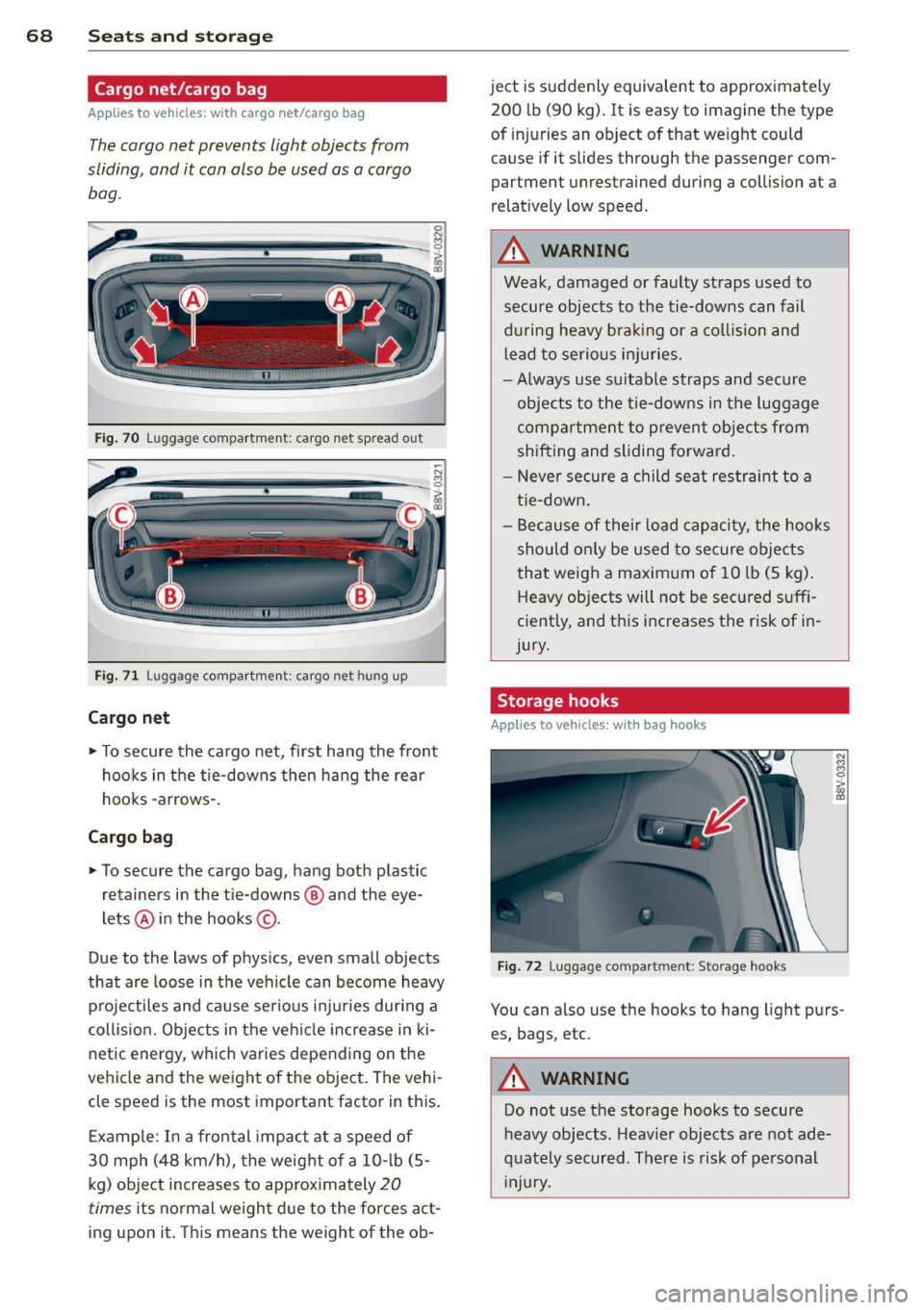
Fi g. 70 Luggage compartment: cargo net spread out
Fig. 71 Luggage compartment: cargo net hung up
Cargo net
.. To secure the ca rgo net, first hang the front
hoo ks in the tie-downs then hang the rear
hooks -arrows-.
Cargo ba g
.. To secure the cargo bag, hang bot h plastic
retainers in the t ie-downs @ and the eye
lets @ in the hooks ©-
Due to the laws of p hys ics, even small objects
that are loose in the vehicle can become heavy
projectiles and cause serious i njuries dur ing a
collis ion. Objects in the vehicle increase in ki
n etic energy, which varies depending on the
ve hicle and the weight of the object. The vehi
cle speed is the most important factor in th is.
E xample : In a frontal impact at a speed of
30 mph (48 km/h), the weight of a 10- lb (5-
kg) object increases to app roximately
20
times its normal weight d ue to the forces act
ing upon it. This means the weight of the ob- ject is suddenly equivalent to approximately
200 lb (90 kg). It is easy to imagine the type
of injuries an object of that weight could
cause if it slides through the passenger com
partment unrestrained during a collision at a
relat ively low speed.
_&. WARNING
-
Weak, damaged or faulty straps used to
secure objects to the tie-downs can fail
d uring heavy bra king or a collis ion and
l ead to se rious in juries.
- Always use su itable straps and secure
objects to the tie-downs in t he luggage
compartment to preven t objects from
shifting and sliding forward .
- Never secure a child seat restraint to a
tie -down .
- Because of thei r load capacity, the hooks
should only be used to secure objects
that weig h a maximum of 10 lb (5 kg).
Heavy objects will not be secured suff i
ciently, and t his increases the risk of in
jury.
Storage hooks
Applies to vehicles: with bag hooks
F ig. 72 Luggage compartmen t: Sto rage hooks
-
N M M 0 > gi
You can also use the hooks to hang light p urs
es, bags, etc .
_&. WARNING
-Do not use the storage hooks to secure
heavy objects . Heavier objects are not ade
q uate ly s ecured. Th ere is risk of personal
Injury.
Page 74 of 302
7 2 Warm and cold
1- 1 Sw itching r ecircul ation mode on and
off
In recirculation mode, the air inside the vehi
cle is circu lated and filtered. This prevents the
unfiltered air outside the vehicle from enter ing the vehicle inter ior. We recommend
switch ing recirculation mode on when driving
through a tunnel or when sitt ing in traffic
c::> ,& .
Automatic climate control system controls
App lies to vehicles: with a utomat ic climate contro l system
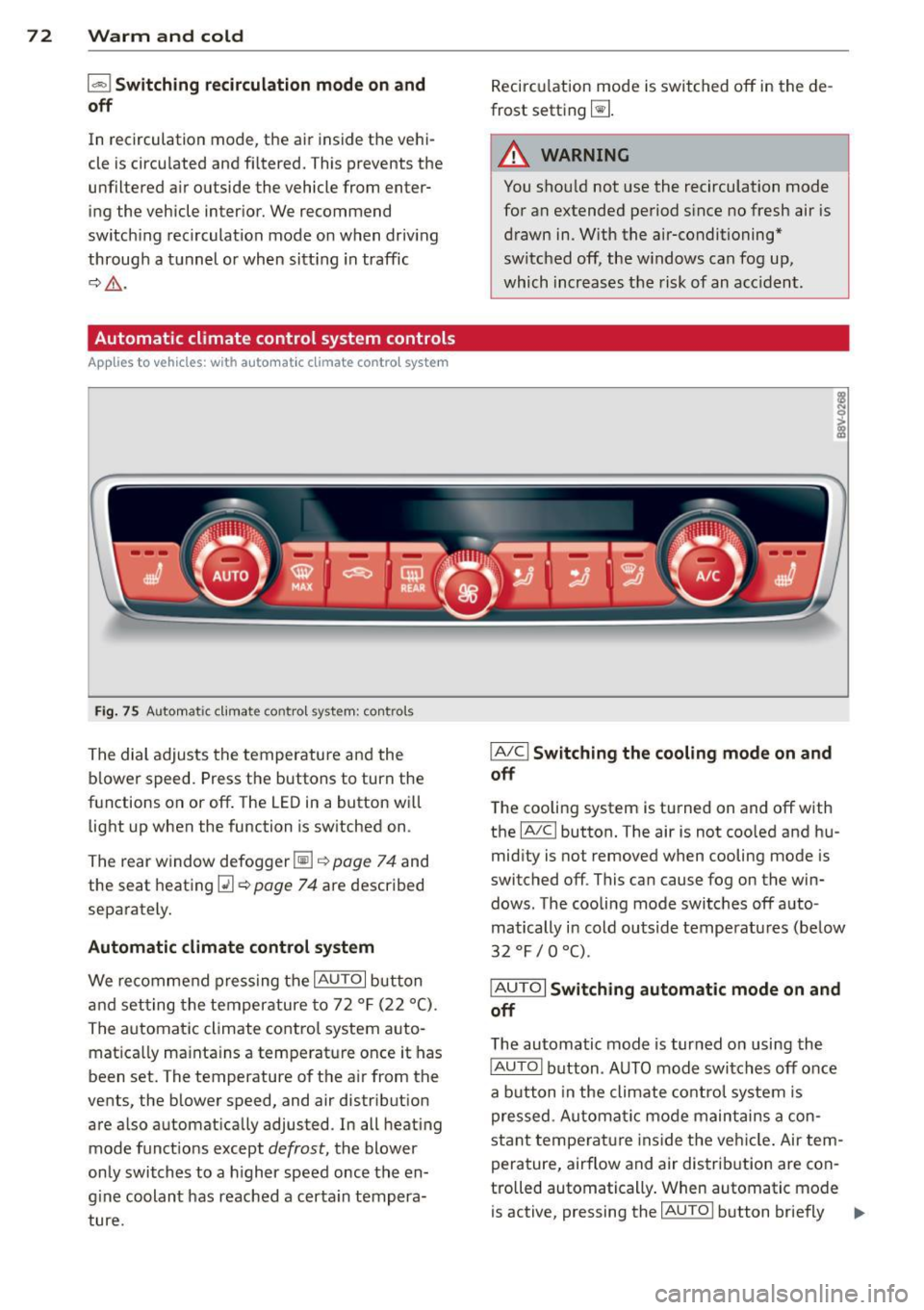
Fig . 75 A ut oma tic cl ima te co ntro l sy ste m: con trols
The dial adjusts the temperature and the
blower speed. Press the buttons to turn the
functions on or off . T he LED in a button w ill
light up when the function is sw itched on .
The rear window defogger~
c::> page 7 4 and
the seat heating
Q] c::> page 74 are described
separately.
Automatic climate control syst em
We re commend pressing the IAU TO I button
and setting the temperature to 72
°F (22 °() .
The automatic climate control system auto
matica lly ma inta ins a temperature once it has
been set. The temperature of the air from the
vents, the b lower speed, and air distribution
are also automat ically adju sted . In all heat ing
mode funct ions except
defrost, the blower
only switches to a h igher speed once the en
g ine coolant has reached a certa in tempera
ture . Recirculation mode is switched off in the de
frost setting ~-
.&_ WARNING
-You shou ld not use the recirculation mode
for an extended period s ince no fresh air is
drawn in. With the air-conditioning*
switched off, the w indows can fog up,
which increases the risk of an acc ident .
IA/ Cl Switching th e cooling mode on and
off
T he cooling system is turned on and off with
the
IA/C l button. The air is not coo led and hu
mid ity is not removed when cooling mode is
switched off . This can cause fog on the win
dows . The cooli ng mode switches off auto
matically i n cold outside temperatu res (be low
32 °F / 0 °() .
IAUTOI Switch ing automatic mode on and
off
The automatic mode is turned on using the
IAUTOI button . AUTO mode switches off once
a b utton in the climate control system is
pressed. Automatic mode maintains a con
sta nt temperature ins ide the ve hicle . Air tem
perature, airflow and air d istribution are con
trolled automatically . When automatic mode
is active, pressing the
IAU TO I button briefly IJJ,-
Page 76 of 302
7 4 Warm and cold
& WARNING
You should not use the rec irculation mode
for an extended per iod since no fresh air is
drawn in . With the ai r-conditioning switch
ed off, the windows can fog up, which in
c reases t he risk of an ac cident.
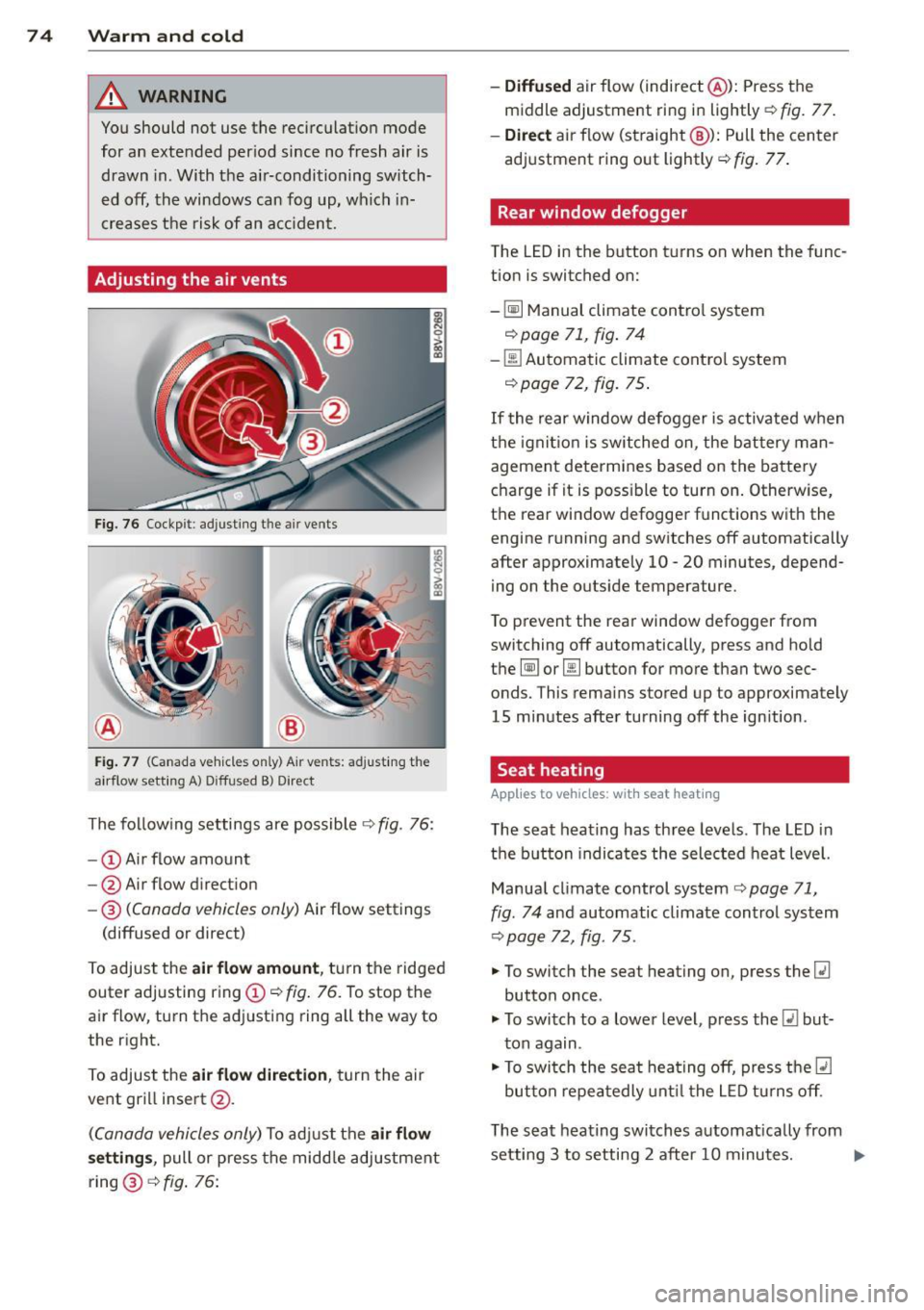
Adjusting the air vents
Fig. 76 Cockp it : adjust ing the a ir vents
®
Fi g. 77 (Canada ve hicles o nly) A ir ve nts : ad just ing t he
a irflow sett ing A ) D iffused B ) Direct
The fo llow ing settings are possible ¢ fig. 76:
- © Airflow amount
- @ Air flow d irect ion
- @
(Canada vehicles only) Air f low settings
(diffused or direct)
To adjust the
air flow amount , tu rn the ridged
outer adj usting ring©
c::> fig. 76. To stop the
air flow, turn t he adjusting ring all the way to
the right.
To adjust the
air flow direction , turn the air
ve nt gri ll insert @.
(C anada vehicles only) To ad just the air flow
setting s,
pull or press the midd le adjustment
ring @¢
fig. 76:
-Diffused air flow (indirect @): Press the
middle adjustment ri ng in lightly
c::> fig. 77 .
-Direct air f low (st raight @): Pull the center
ad justment ring o ut lightly ¢
fig. 77.
Rear window defogger
The LED in the button t urns on when the func
tion is switched on:
-
~ M anual climate contro l system
c::> page 71, fig . 74
-00 Automatic climate contro l system
¢ page 72, fig . 75 .
If the rear w indow defogger is activated w hen
t h e igni tion is switched on, the bat tery man
agement determines based on the battery
c h arge if i t is poss ible to turn on . Otherw ise,
the rear window defogge r funct ions w it h the
engine running and switches off automatically
after approximately 10 -20 minutes, depend
i ng on the outs ide temperature .
T o p revent the rear window defogger f rom
switching off automatically, press and hold
t h e
@ii or 00 button for more than two sec
onds. This rema ins stored up to approxima tely
15 minutes afte r turning off the ign ition .
Seat heating
Applies to veh icles : w it h seat heat ing
The seat heating has th ree leve ls. The LED in
the b utt on indica tes the sele cted heat leve l.
Manua l climate control system
c::> page 71,
fig . 74
and automatic climate control system
c::> page 72, fig . 75 .
"'To switch the seat heating on, press the lt:J
button once .
"' To swi tch to a lower level , press the
lt:I but
ton again .
"' To swi tch the sea t heating off, press the
lt:J
but ton re peat edly unt il t he L ED turns off .
T he seat heating swi tches a utomat ica lly from
setting 3 to setting 2 after 10 minutes.
Iii>
Page 79 of 302
M N ,....
> co ,...., \!) 1.1'1 ,...., 1.1'1 ,....,
Switchin g th e ig nition on /off
"'T o sw itch the ignition on, turn the ignition
key to position
(D .
"'To switch the ignition off, turn the ignition
key to position @.
Starting the engin e
Your vehicle is equipped w ith launch cont ro l.
As soon as you have turned the ign ition key to
position @, the engine will start automatical
l y.
"' Press the brake peda l and move the se lector
lever to the P or N pos it ion.
"'T urn the key briefly to position @. The igni
t ion key automatically r eturns to posit ion
(D . Do not press the accelerator pedal wh en
doing this .
Major electrical equipment switches off tem
porarily when starting the eng ine.
If the engine does not sta rt immedia tely , stop
the starting procedure by turning the ignition key to position @and repeat after 30 sec
onds .
Automatic start m alfunction
If the ~ indicator l ight turns on (gasoline en
g ine) and the message
Engin e start sys te m
m alfu nction. Ple ase contac t Se rvice
appears ,
there is an automatic start ma lfunction.
To start t he eng ine, hold the ignition key in
position @until the engine runs .
Drive to an authorized Aud i dealer or author
ized Audi Service Facility immed iate ly to have
the ma lfunction corrected .
_& WARNING
-Never allow the engine to run in confined
spaces -there is a risk o f asphyxiation.
- Never remove the ign ition key from the
ignition lock whi le the vehicle is moving .
Otherw ise the steering lock wi ll engage
and you will not be able to steer the vehi
cle.
- Please note that the brake booster and
power steering only work when the en-
Dri vin g 77
gine is running. When the engine off, you
must use more force to steer or brake
the vehicle. Because the usual steering
and brak ing capability is not avai lab le,
the risk of accidents or injur ies increases.
- Always take the vehicle key with you
when leaving the vehicle, even for a
short period of time. This applies part ic
ularly when children remain in the veh i
cle. Otherwise the ch ild ren could start
the engine or operate electrical equip
men t such as power w indows.
(D Note
- Avo id h igh engine speed, full throttle,
and heavy eng ine load as long as the en
gine has no t reached operat ing tempera
t u re yet . You could damage the engine.
- T he engine cannot be started by pushi ng
or towing.
(® For the sake of the environment
Do not let the eng ine run w hile pa rked to
warm u p. Begin driv ing immediately . T his
r educes unne cessary emissions.
(D Tips
- If it is d iff icult to turn the key to position
(D , turn the steering wheel back and
forth slightly to release the s teer ing
wheel lock .
- After s tarting a cold engine, there may
be a brief period of inc reased no ise be
cause the oil press ure must first bui ld up
in the hydraulic va lve adj usters . This is
normal and not a cause for concern.
- If the battery is disconnected and recon
nected, you have to hold the ignition key
in posit ion
(D for five seconds for the en
gine to start.
- After sw itching the ignition off, you can
only remove the key when the selector
lever is in the "P" (Park) position. After
that, the selector lever is locked.
•
Page 80 of 302
78 Driving
Stopping the engine with the key
A pplies to vehicles: with mechanical ignit ion lock
Stopp ing the engine
> Bring the vehicle to a ful l stop .
> Turn the key to position @.
Rele asing the steering lock
Requirement : The selector lever must be in
the P pos ition .
> Remove the ignit ion key in position @
Q page 78, fig. 80 Q _&.
> Turn the steering wheel until you hear the
stee ring wheel lock.
The locked steering helps prevent vehicle
theft.
A WARNING
- Never turn off the eng ine before the ve
hicle has come to a complete stop . The
full function of the brake booster and the powe r steering is not guaranteed. You
must use more fo rce to turn or brake, if
necessary. Because you cannot steer and
brake as you usually would, this could
lead to acc idents and se rious injuries.
- Never remove the ign ition key from the
ign ition lock whi le the vehicle is movi ng .
Otherwise, the steering lock co uld sud
denly engage and you would not be able
to steer the vehicle.
- Please note that the brake booster and
power steering only work when the en
gine is runn ing. When the engine off, you
must use more force to steer or brake
the vehicle. Because t he usual steering
and braking capability is not available,
the risk of accidents or injuries increases .
- Always take the vehicle key with you
when leaving the veh icle, even for a
short per iod of time. This applies partic
ularly when chi ldren remain in the vehi
cle. Otherwise the children could start
the engine or operate electrical equip
ment such as power windows .
- For safety reasons, always park the vehi
cle with the selector lever in the P posi- tion. Otherwise, there is the risk t
hat the
veh icle could roll.
- After the engine has been switched off,
the radiator fan can continue to run for
up to 10 minutes -even with the ignition
sw itched off. It can also sw itch on again
after some t ime if the coolant tempera
ture rises as a resu lt of heat buildup or if
the engine compartment is heated by
sunlight and the engine is hot.
(D Note
- If the engine has been under heavy load
for an extended per iod of t i me, heat
builds up in the engine compartment af
ter the engine is switched off - there is a
r isk of damaging the engine . For this
reason, let the engine r un for at id le for
approximately two minutes before shut
ting it off .
Starting and stopping
the engine (vehicles
with a convenience key)
St t· th · ith the
button
Appl ies to vehicles: wit h co nvenience key
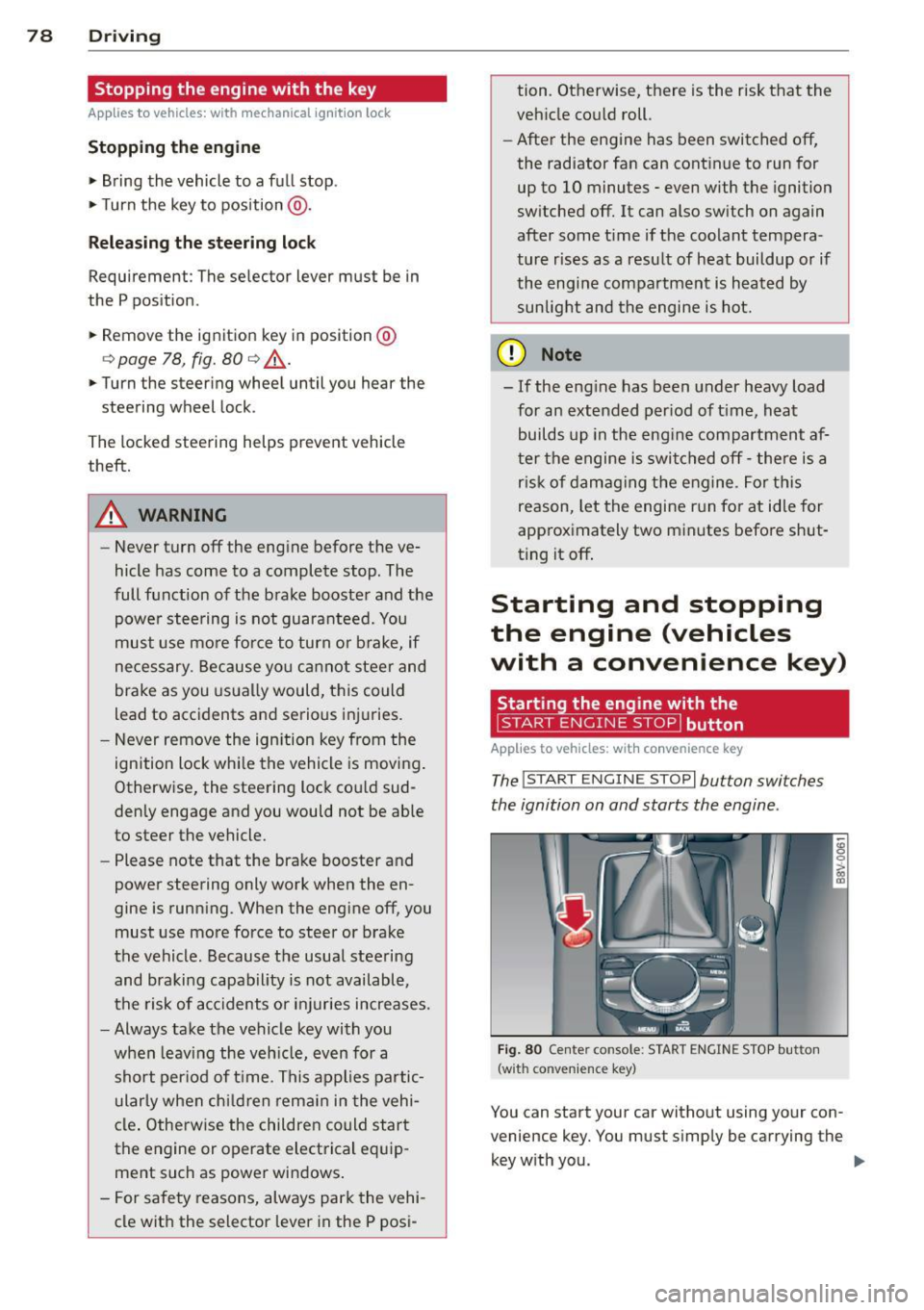
The !START E NGIN E STOPI button switches
the ignition on and starts the engine .
Fig. 80 Center conso le: STAR T ENGIN E STOP bu tton
(w ith co nvenie nce key)
You can start your car without using your con
venience key. You must s imply be carrying the
key with you. .,._
Page 81 of 302
M N ,....
> co ,...., \!) 1.1'1 ,...., 1.1'1 ,....,
Switchin g th e ig nition on /off
If the> ,:r- u indicator l ight blinks and the mes
sage
Ple ase move s teering wheel appea rs
when switching the ignition on, the steering is locked by th e steering lock. In this case, turn
the steering wheel slight ly to the left/ right.
.. To switch the ignition on or
off, press the
I S TAR T ENG INE S T OPI button. Do not press
the brake pedal whil e doing this .
Starting the engin e
Your vehicle is equipped with launch cont ro l.
The engine starts automa tically when you
press the
I S T AR T ENG INE S T OP I button brief
l y.
.. Press the brake peda l and move the se lector
lever to the P or N pos ition .
.. Press the
I STAR T ENGINE STOP I button
briefly . The eng ine will star t.
Majo r electrical equ ipment switches
off tem
porarily when starting the eng ine .
I f the engine does not start immediately , stop
the starting procedu re by push ing the
I S TAR T ENGINE ST OP ! button again and re
peat after 30 seconds .
Automatic start m alfunction
If the Ila indicator l ight turns on (gasoline en
g ine) when you start the engine, there is an
automatic sta rt malfunction .
To start the eng ine, press and hold the
!STAR T ENGIN E STOP ! button until the eng ine
runs.
Drive to an authorized Aud i dealer or author
i z ed Audi Service Fac ility immed iately to have
the malfunction corrected .
A WARNING
-Never allow the engine to ru n in confined
spaces -there is a r isk of asphyxiation.
- Always take the veh icle key with you
when leaving the vehicle, even for a
short per iod of t ime . This applies partic
ularly when chi ldren remain in the vehi
cle . Otherwise the children could start
Dri vin g 79
the engine or operate electrical equip
ment such as power w indows.
- Please note that the brake booster and
power steering only work when the en
gine is running. When the engine
off, you
must use more force to steer or brake
the vehicle . Because the usual steer ing
and brak ing capability is not avai lable,
the risk of accidents or injur ies increases .
(D Note
-Avo id h igh engine speed, full throttle,
and heavy eng ine load as long as the en
gine has not reached operat ing tempera
ture yet. You could damage the engine .
- The engine cannot be started by pushing
or towing .
@ For the sake of the environment
Do not let the eng ine run wh ile parked to
warm up . Begin dr iv ing immediately . Th is
reduces unnecessary emissions .
(D Tips
-After starting a cold engine, there may
be a brief period of increased no ise be
cause the oil press ure must f irst bu ild up
in the hydraulic va lve ad justers. This is
normal and not a cause for concern.
- If the . indicator light blinks in the in
st rument cluste r before switching the ig
nition
off, the ignit ion wi ll not switch on
again .
qpoge 192
- If you leave your vehi cle wit h the ignition
switched on, the ign it ion w ill switch
off
after a certain amount of time . Make
sure that electrical equipment such as
the exterior lights are switched
off .
T · th · ff using the
button
App lies to vehicles: wit h convenience key
.. Bring the veh icle to a full stop .
.. Move the se lector lever into the P posit ion .
.. Press the
I STA RT E NGINE ST OP ! button
q page 78, fig. 80. ..,.
•
Page 82 of 302
80 Driving
Steering lock1
)
The steering locks when you turn the engine
off using the
I START ENGINE STOPI* button,
move the selector lever into the P position
and open the driver's door.
The locked steering helps prevent vehicle
theft.
Emergency off function
If it is absolutely necessary, the engine can al
so be turned off while driving at speeds lower
than 6 mph (10 km/h).
If you press the
I START ENGINE STOPI* button while driving,
the message
Pressing start/stop button
again will switch off engine!
appears. To
switch the engine off, press the
I STAR T ENGINE STO PI* button twice in a row
briefly or press and hold for longer than two
seconds.
A WARNING
- Never turn off the engine before the ve
hicle has come to a complete stop. The
full function of the brake booster and the power steering is not guaranteed. You
must use more force to turn or brake, if
necessary. Because you cannot steer and
brake as you usually would, this could
lead to accidents and serious injuries .
- Please note that the brake booster and
power steering only work when the en
gine is running. When the engine off, you
must use more force to steer or brake
the vehicle. Because the usual steering and braking capability is not available,
the risk of accidents or injuries increases.
- Always take the vehicle key with you when leaving the vehicle, even for a
short period of time. This applies partic ularly when children remain in the vehi
cle. Otherwise the children could start
the engine or operate electrical equip
ment such as power windows.
- For safety reasons, always park the vehi
cle with the selector lever in the P posi-
ll This function is not available in all cou ntr ies.
tion. Otherwise, there is the risk that the
vehicle could roll.
- After the engine has been switched off,
the radiator fan can continue to run for
up to 10 minutes - even with the ignition
switched off. It can also switch on again
after some time if the coolant tempera
ture rises as a result of heat buildup or if
the engine compartment is heated by sunlight and the engine is hot.
(D Note
If the engine has been under heavy load
for an extended period of time, heat builds
up in the engine compartment after the
engine is switched off - there is a risk of
damaging the engine. For this reason, let
the engine run for at idle for approximate
ly two minutes before shutting it off.
Starting the engine if there is a
malfunction
Applies to vehicles: with convenience key
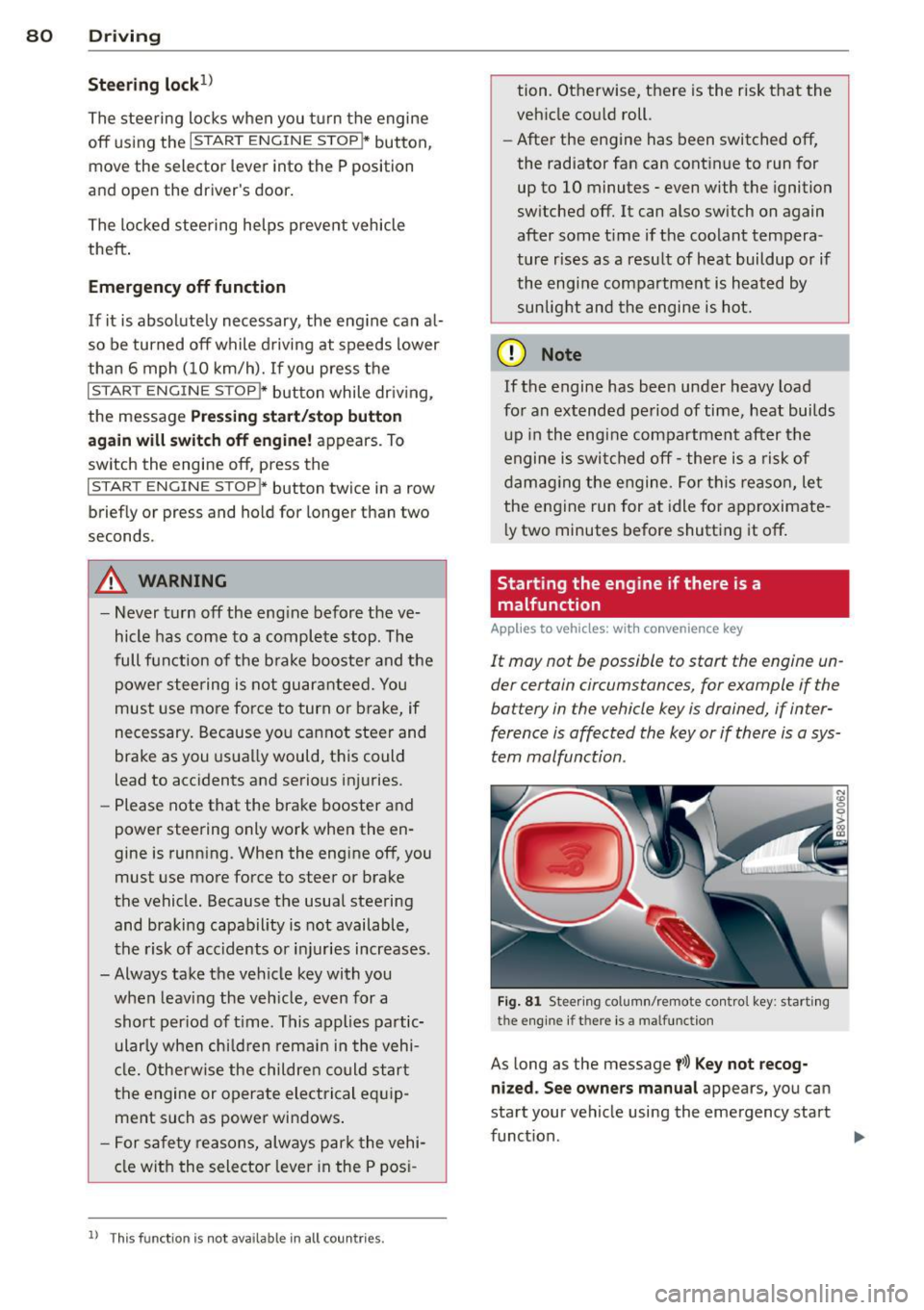
It may not be possible to start the engine un
der certain circumstances, for example if the
battery in the vehicle key is drained, if inter
ference is affected the key or if there is a sys
tem malfunction.
Fig. 81 Steer ing colum n/remote control key : start ing
the e ngine
if t h ere is a malfu nction
As long as the message y>l) Key not recog
nized. See owners manual
appears, you can
sta rt your vehicle using the emergency start
function . .,.
Page 84 of 302
82 Driving
Electromechanical
parking brake
Operating
The electromechanical parking brake replaces
the hand brake.
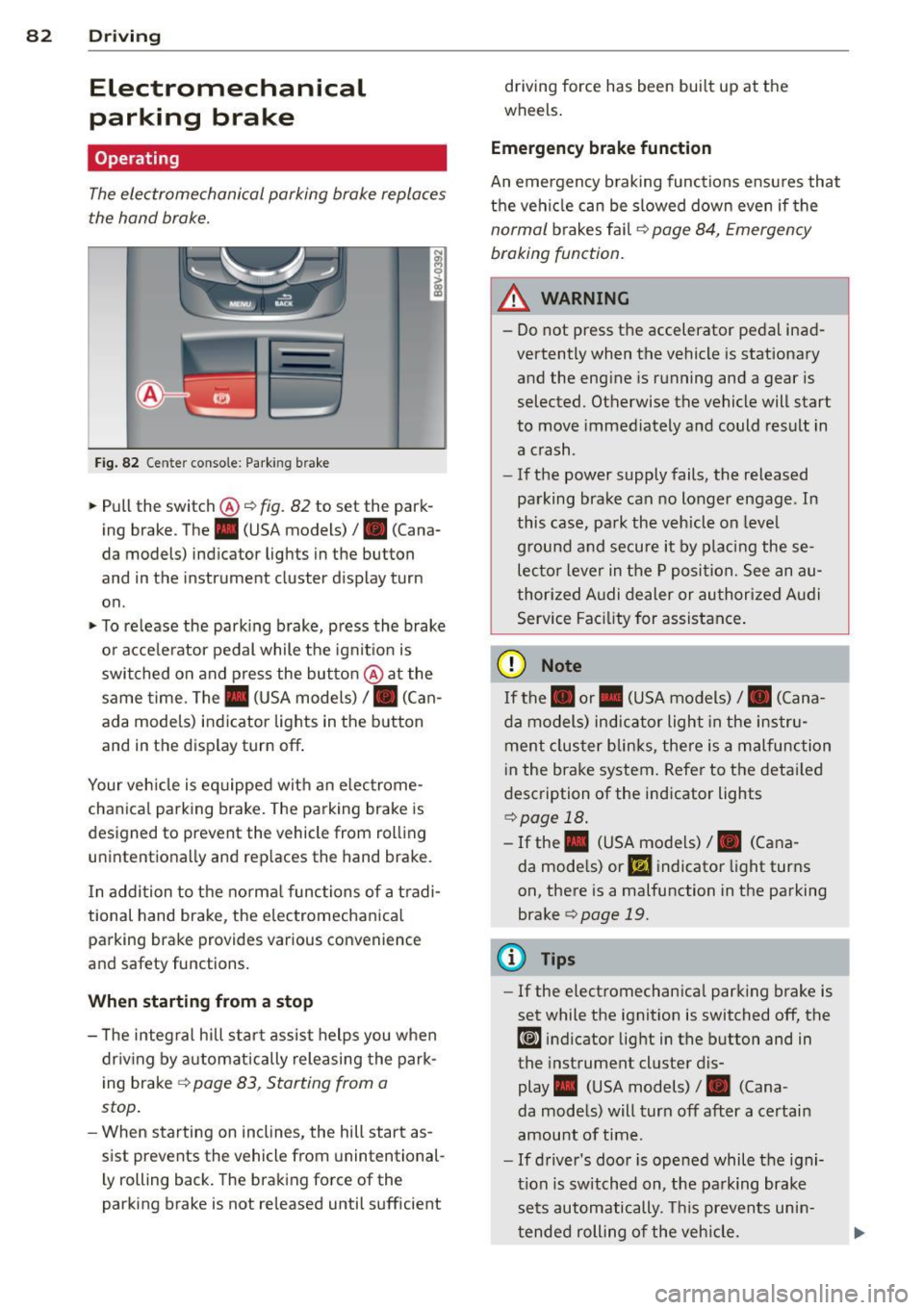
Fig. 82 Ce nter conso le: Park ing brake
~ Pull the switch@~ fig. 82 to set the park
ing brake . The . (USA models)/ . (Cana
da models) indicator lights in the button
and in the instrument cluster display turn
on .
~ To release the parking brake, press the brake
or acce le rator pedal while the ignit ion is
switched on and press the button @at the
same time. The. (USA models)
I. (Can
ada models) indicator lights in the button
and in the display turn off .
Your veh icle is eq uipped with an electrome
chanical parking brake. The parking brake is
designed to prevent the vehicle from rolling unintentionally and replaces the hand brake.
I n addition to the normal functions of a tradi
tional hand brake, the electromechanical parking brake provides various convenience
and safety functions.
When starting from a stop
- T he integral hill start assist helps you when
dr iving by automatically releasing the park
ing brake ~
page 83, Starting from a
stop .
-When starting on inclines, the hill start as
sist prevents the vehicle from unintentional
l y rolling back. The braking force of the
parking brake is not released until sufficient driving force has been built up at the
wheels.
Emergency brake function
An emergency braking functions ensu res that
the vehicle can be slowed down even if the
normal brakes fail~ page 84, Emergency
braking function.
_.&. WARNING
- Do not press the accelerator pedal inad
vertently when the vehicle is stationary
and the engine is running and a gear is
selected. Otherwise the vehicle will start
to move immediately and could result in
a crash .
- If the power supply fails, the released
parking brake can no longer engage . In
this case, park the vehicle on leve l
g round and secure it by placing these
lecto r lever in the P position. See an au
thorized Audi dealer or authorized Audi
Service Facility for assistance.
(D Note
If the. or. (USA models) I. (Cana
da models) indicator light in the instru
ment cluster blinks, there is a malfunction
i n the brake system. Refer to the detai led
description of the indicator lights
~page 18.
- If the . (USA models) I. (Cana-
da models) or
Ill indicator light turns
on, there is a malfunction in the parking
brake
c> page 19.
(D Tips
- If the electromechanica l parking brake is
set while the ignition is switched off, the
¢@'A indicator light in the button and in
the instrument cluster dis-
play . (USA models) /. (Cana-
da models) will turn off after a certain
amount of time.
- If driver's door is opened while the igni
tion is switched on, the park ing brake
sets automatically. This prevents unin
tended rolling of the vehicle.