transmission AUDI A3 CABRIOLET 2015 Owners Manual
[x] Cancel search | Manufacturer: AUDI, Model Year: 2015, Model line: A3 CABRIOLET, Model: AUDI A3 CABRIOLET 2015Pages: 302, PDF Size: 73.83 MB
Page 4 of 302
2 Table of contents Vehicle literature .. .. .. .. .. ... .
About this Owner's Manual ...
Operation .............. .... ... .
Cockpit ... ............. .... .. . .
Ove rv iew ... ... .. ..... ... .. .. ... .
Instruments and indicator
lamps ..... ............. .. .. .. . .
Ins truments . .. .. ..... ... .. .. ... .
Indicator lights ....... ... .. .. ... .
Driver information system .. .
Overview ... ... .. ..... ... .. .. ... .
Operation . .... .. ..... ... .. .. ... .
Efficiency program ........ .... ... .
On-Board Diagnostic system (OBD) . . .
Opening and closing .... .. ... .
Centra l loc king ........... .. .. ... .
Luggage compartment lid .. .. .. .. . .
Power windows
5
6
8
8
8
1 0
1 0
1 3
26
2 6
27
28
29
31
31
38
38
Power top . . . . . . . . . . . . . . . . . . . . . 41
Automatic power top ... ... .. .. .. . .
W ind deflecto r ............ ... .. . . 41
4 4
Power top emergency opera tion . . . . . 45
Lights and Vision .......... .. . .
Exte rior lighting .... ...... .. .. .. . .
I n ter io r light ing .......... .. .. .. . .
V 1s 1on . .. .. ............. ....... .
W indshie ld w ipers ...... .. .. .. .. . .
O utside mirror . .. ..... ... .. .. ... .
D ig ita l compass .. ..... ... .. .. ... .
Seats and storage ... .. .. .. .. . .
General info rmat ion . ... .. .. ... .. .
F ront seats .. .. .. ..... ... .. .. ... .
Head restraints .......... .. .. .. . .
Socket . .. .. .. . .......... .. .. ... .
Sto rage .. .. ... ....... ... .... .. . .
Luggage compartment
49
4 9
52
53
5 3
5 5
57
59
59
60
62
64
64
65
Warm and cold . . . . . . . . . . . . . . . . 70
Climate control system . . . . . . . . . . . . 70
Driving ... .... .. ... .. ..... .... . .
Stee ring . ..... .. .. ... ..... ... .. .
Starting and stopp ing t he engine
(ve hicles w ith an ign ition lock) ... .. .
Starting and stopp ing t he engine
(ve hicles w ith a convenience key) ... .
Drive r m essages .. ... .. .. ... ..... .
El ectromechanical pa rking brak e ... .
Hill ho ld .. .. .. . .............. .. .
S peed w arning system .......... .. .
C ruise con tro l system .. ..... ... .. .
76
76
76
78
81
82
84
8 4
8 5
Audi adaptive cruise control . . 8 7
In troduc tion ... .. ............... .
Genera l Info rmation . .. ..... ... .. .
Adaptive cruise contro l ...... .... . .
Drive r messages . .... .. ..... ... .. .
Audi pre sense .. .... .... ... .. .
Introduction ..... ... .. ..... .... . .
Genera l information ........... .. .
Audi pre sense basic .............. .
Audi pre sense front . .. ...... ... .. .
8 7
8 7
88
93
95
95
95
95
95
Driver messages . . . . . . . . . . . . . . . . . . 97
Audi active lane ass ist ..... .. .
Lane assist .. .. .. .......... ..... .
99
99
Audi side assist . . . . . . . . . . . . . . . 103
Side assist ...... ............... .
Audi drive select ............. .
Driving settings .. .... ... ...... .. .
Automatic transmission ..... .
S tronic-transmiss ion ........... .. .
Parking systems
General information ........... .. .
Rea r parki ng system ... ......... . .
Parking sys tem plus .............. .
Rea rv iew camera .... .. .. ... ..... .
Adjus ting t he d isplay a nd the wa rning
tones . .... .... ................. .
103
107
107
110
110
119
119
120
120
121
12 5
Er ror messages . . . . . . . . . . . . . . . . . . 125
Page 11 of 302
M N ,....
> co ...... \!) 1.1'1
...... 1.1'1 ......
CD
@
®
©
®
®
(J)
®
Power windows
Door handle
Aud i side assist ........ .... .
Centra l locking switch ... .. .. .
Powe r exter ior mirror adjust
ment
Light switch . ... .... ... .. .. .
Vents
L eve r fo r:
- Turn signals and high beams .
- Audi active lane assist ... .. .
® Steer ing wheel w ith horn and
- Drive r's airbag ........... .
- On-board computer controls
-MMI, telephone, navigat ion
and voice recogn it ion system
controls
- tiptron ic shift paddles (auto-
matic transmission) ....... .
@ Instrument cluster .. ... .. .. .
@ W indshield washer system
l ever
' .................... .
@ S teer ing column with:
- Ignit ion emergency operation
(in vehicles with conven ience
key) . .. ................. .
- Ignit ion lock (in vehicles with
mechanical key) .......... .
@ Adjustable s teer ing column
@ Depending on equipment:
- Cruise contro l lever ....... . 38
103 35
55
49
70
51
99
150 27
1 15
1 0
53
80
76
76
85
- adaptive cruise contro l . . . . . . 87
@ Driver's knee a irbag . . . . . . . . . 163
@ Instrument i llumination . . . . . . 53
@ H ood re lease . . . . . . . . . . . . . . . 215
@ Centra l power window swi tc h . . 38
@ MMI disp lay (navigation, radio,
TV/video)
@ Glove compartment ( lockable) . 65
@ Front passenger 's airbag . . . . . 150
@ Treble speakers
@ Front passenge r's knee ai rbag .
@ Depending on equipment, b ut
tons for: 163
Cockpi
t 9
-Audi drive select . .. ..... .. .
- P arking a id p lus (or w ith re ar-
view camera) . .. .. .. ..... .
- E mergency flashers ....... .
- Elect ron ic Stabilization Con-
t rol ( ESC) . .. .... ........ .
- MMI display
- Airbag Off indicator .... ... .
@ Depend ing o n equ ipment:
- Manual climate contro l
system
- Automatic climate control sys
tem
.. .. .. .. .. .. .........
Socket
S tronic se lector lever ..... .. .
Cup holder .. .. ............ .
MM I On/Off b utton
@ MMI control panel
@ Power top ope rat ion ... ..... .
@ Parking brake .... .. .. ..... .
@ I S T ART ENGINE STOPI button
(vehicles w ith convenience key)
(D Tips
107
120
so
188
159
71
72
64
110
64
41
82
78
- Some the eq uipment listed here is only
installed in certain models or is available
as an option.
- Operat ion of the Multi Med ia Interface
(MMI) is described in a separate operat
ing instructions manual. You can a lso
find info rmat ion on A udi connect ther e.
•
Page 17 of 302
or
or
or
or
or Engine o
il p ress ure
¢ page 20
Alternator ¢page 20
Front safety be lt
¢page20
Steering./
¢page 192
Stee ring lock
¢ page 21
Engine start system
¢page 21
Engine stops w hile driving
¢page 21
Transmission malfunction ¢page 116
Instruments and indicator lamps 15
Ad aptive cr uise c on tro l*./
¢page89
USA models : Speed wa rn ing
sys tem
¢ page84
Canada models: Spee d war ning
sys tem
¢page84
Yellow indicator lights
"O~ I I ~ 'I
-------------
Centra l indicator light ( pay at-
tention to t he addit ional info r
mat ion in the instrument cluster
d isp lay) @ ¢ page 13, fig . 8
E lectron ic Stabilization Control
( E SC) ./
¢ page 21
Electro nic Stabilization Control
(ESC) ./
¢page 21
El ect ro nic Sta bili zat ion Control
(E SC )
¢page 188
USA models:
Anti-loc k bra king system (ABS)
fau lty ./
¢ page 21
Canada models:
Anti-lock braking sys tem (ABS)
fau lty./
¢page 21
USA model s: Sa fety systems ./
¢ page 20
Canada models: Safety systems
./
¢page2 0
Brake pads
¢ page22
E lectromechanical par king brake
¢page 19
lill-
M a N
" > co ,...., \!) ..,.,
,...., ..,., ,....,
Page 19 of 302
M N
" > co ,...., \!) 1.1'1 ,...., 1.1'1 ,....,
or
or
or
or
or Engine start system
¢
page 21
Convenience key
¢page Bl
Convenience key
¢page BO
Battery in remote control key
¢page 33
Defective light bulb warning
¢ page24
Headlight range control system*
¢ page 24
adaptive light*
¢ page24
Instruments and indicator lamps 17
or
/:
or Light/rain
sensor*
¢page24
Active lane assist*
¢page 100
Transmission
¢page 116
Other indicator lights
-------------
Turn signals
¢page25
USA models: Cruise control sys
tem*
¢ page BS
Canada models : Cruise control
system*
¢page BS
Adapt ive cru ise control*
¢ page89
Adaptive cruise control* ¢page89
Adaptive cruise control* ¢page89
Active lane assist*
¢page 100
High beams
¢ page 51
Conven ience key
¢page 80
Electromechanical parking brake
¢ page 19
Adapt ive cru ise control*
¢page89
•
Page 20 of 302
18 Instruments and indicator lamps
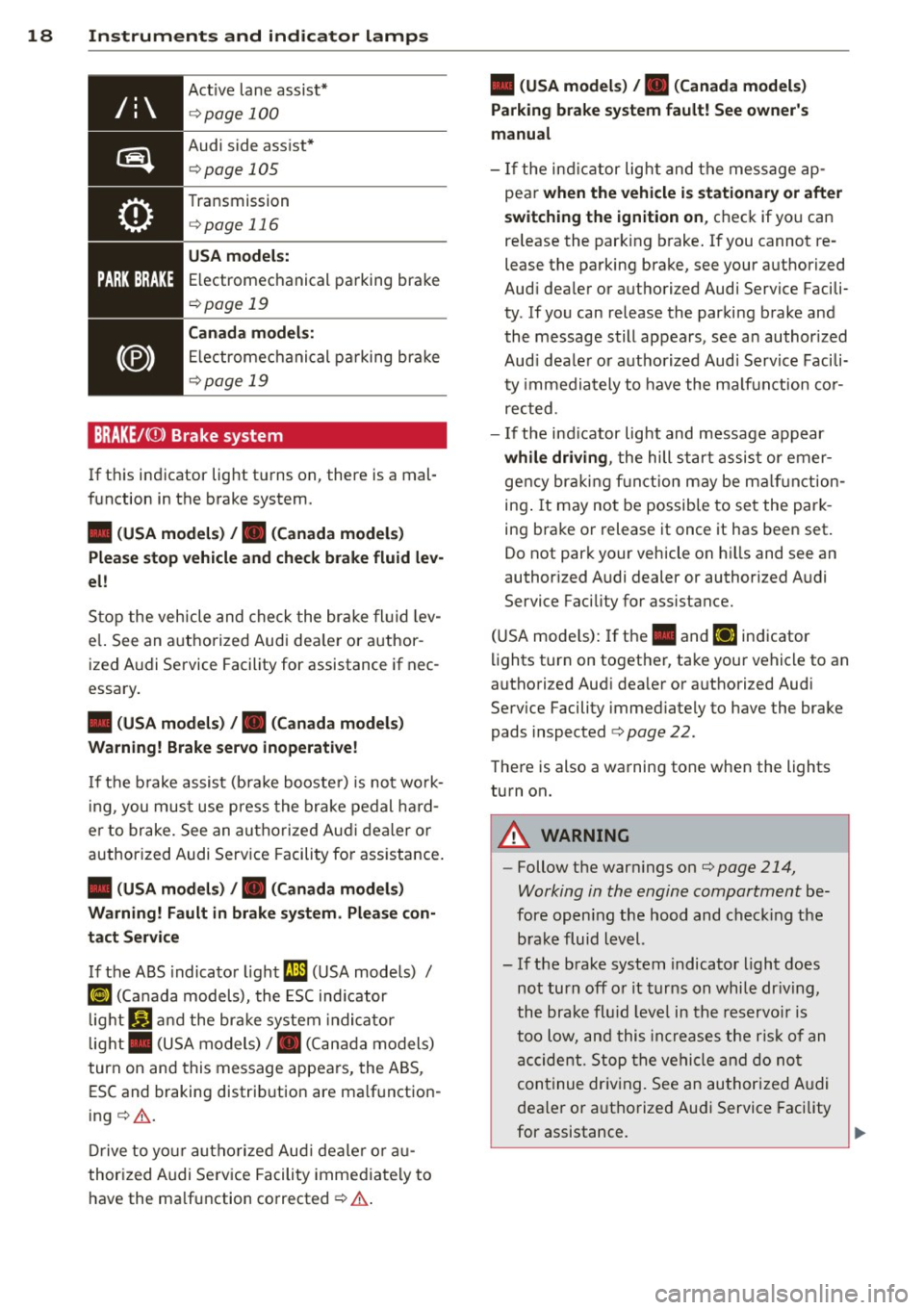
Active lane assist*
¢ page 100
Audi side assist*
¢page 105
Transmission
¢ page 116
USA model s:
Electromechanical parking brake
¢ page 19
Canada model s:
Electromechanical parking bra ke
¢page 19
BRAKE/((i)) Brake system
If this indicator light tu rns on, there is a mal
function in the brake system.
• (USA models) , • (Canada models)
Please stop vehicle and check brake fluid lev
el!
Stop the vehicle and check the brake fluid lev
e l. See an a uthorized Audi dea le r or author
ized Audi Service Facility for assistance if nec
essary.
• (USA models) , • (Canada models)
Warning! Brake servo inoperative!
If the b rake assist (bra ke booste r) is not wo rk
in g, you must use press the brake pedal hard
e r to brake. See an authorized Aud i dealer or
authorized Audi Serv ice Facility fo r ass istance.
• (USA models) , • (Canada models )
Warning! Fault in brake sy stem . Please con
tact Service
If the ABS indicator light (;I (USA models) /
KO) (Canada models), the ESC ind icator
light
Jil and the brake system indicator
light . (USA models)/ . (Canada models)
turn on and this message appears, the ABS,
ESC and braking distrib ution are ma lf u nction
ing ¢.&. .
Drive to your authorized Aud i dealer o r au
thorized Audi Service Facility immediately to
have the ma lfunction corrected ¢.&. .
• (USA models) , • (Canada models)
Parking brake system fault! See owner's
manual
- If the ind icator light and the message ap
pear
when the vehicle is stationary or after
switching the ignition on ,
check if you can
re lease the parking brake. If you cannot re
lease the parking brake, see your authorized
Aud i dealer or authorized Audi Service Facili
ty . If you can release the parking brake and
the message still appears, see an author ized
Aud i dea ler or a uthorized Audi Service Facili
ty immediately to have the ma lfunction cor
rected.
- If the ind icator lig ht and message appear
while driving , the hill start assist or emer
gency braking function may be malf uncti on
ing . It may not be possib le to set the park
ing brake or release it once it has been set.
Do not park your vehicle on hills and see an
author ized Audi dealer or authorized A udi
Service Facility for assistance.
(USA mode ls) : I f the . and
liJ indicator
lights turn on together, take your vehicle to an
authorized Aud i dea ler or a uthorized Audi
Serv ice Facility immed iately to have the brake
pads inspected ¢
page 22.
There is also a warning tone when the lights
turn on.
A WARNING
-- Follow the warn ings on¢ page 214,
Working in the engine compartment
be
fore opening the hood and check ing the
brake fluid level.
- If the brake system indicator light does
not turn off or it turns on while dr iving,
the brake fluid leve l in the reservo ir is
too low, and this increases the risk of an
accident. Stop the vehicle and do not
continue driving. See an authorized Aud i
dealer or authorized Aud i Service Facility
for assistance. ..,.
Page 109 of 302
M N
" > co ,...., \!) 1.1"1 ,...., 1.1"1 ,....,
Audi drive select Driving settings
Introduction
Applies to vehicles: with Audi drive select
Audi drive select makes it possible to experi
ence diffe rent types of vehicle settings in one
vehicle. The driver can select from three
com
fort , auto
and dynamic modes using the 1:1:.~
button in the center conso le or the MM I to
switch between a sporty and a comfortable
driving mode, for examp le. In the
individual *
mode, the settings can be adjusted to your
personal preferences. This makes it poss ible
to combine settings such as a sporty eng ine
tuning with light steering.
A WARNING
Using Audi drive select incorrectly can lead
to collisions, other accidents and serious injuries.
Description
Applies to vehicles: with Audi drive select
The vehicle setup in each mode depends on
the vehicle's features. However, the engine
and steering are always affected .
Engine and automatic transmission
Depending on the mode, the engine and auto
mat ic transmission* respond more quickly or
in a more balanced manner to acce lerator
pedal movements.
Adaptive dampers (Audi magnetic ride)*
The adaptive dampers use senso rs to record
information regarding steering movements,
brak ing and acce lerat ion operat ions by the
driver, road surface, driving speed, and load.
With Audi drive se lect you can adjust the
adaptive dampers sporty (dynamic), comfort
ab le (comfort) or balanced (auto).
Steering
The stee ring adapts in terms of stee ring assis
tance. There are different modes
¢page 108.
Indirect steering that moves easi ly as in com -
Audi drive select 107
fort mode is especially suited to long drives
on a highway. The dynamic mode provides
sporty, direct steer ing.
For vehicles wi th progressive steering* the
steering performance is mo re agile.
Cornering light*
The cornering light adjusts when driv ing on
curves at speeds between 6 mph (10 km/h)
and 68 mph (110 km/h). The pivoting action
and the lighting are also adapted to the
mode.
Adaptive cruise control*
T he behav ior when accelerating can be adjust
ed from comfortable to sporty, depending on
the Aud i drive select mode. Adapt ive cru ise
control also responds to the driving behavior
of the vehicle ahead in a more conservative or
sporty manner.
(D Tips
In some mode ls, the maximum vehicle
speed can only be reached in the auto and
dynamic modes.
•
Page 110 of 302
108 Audi drive select
Selecting the driving mode
App lies to vehicles: with Audi drive select
You can choose between comfort, auto, dy
namic and individual* .
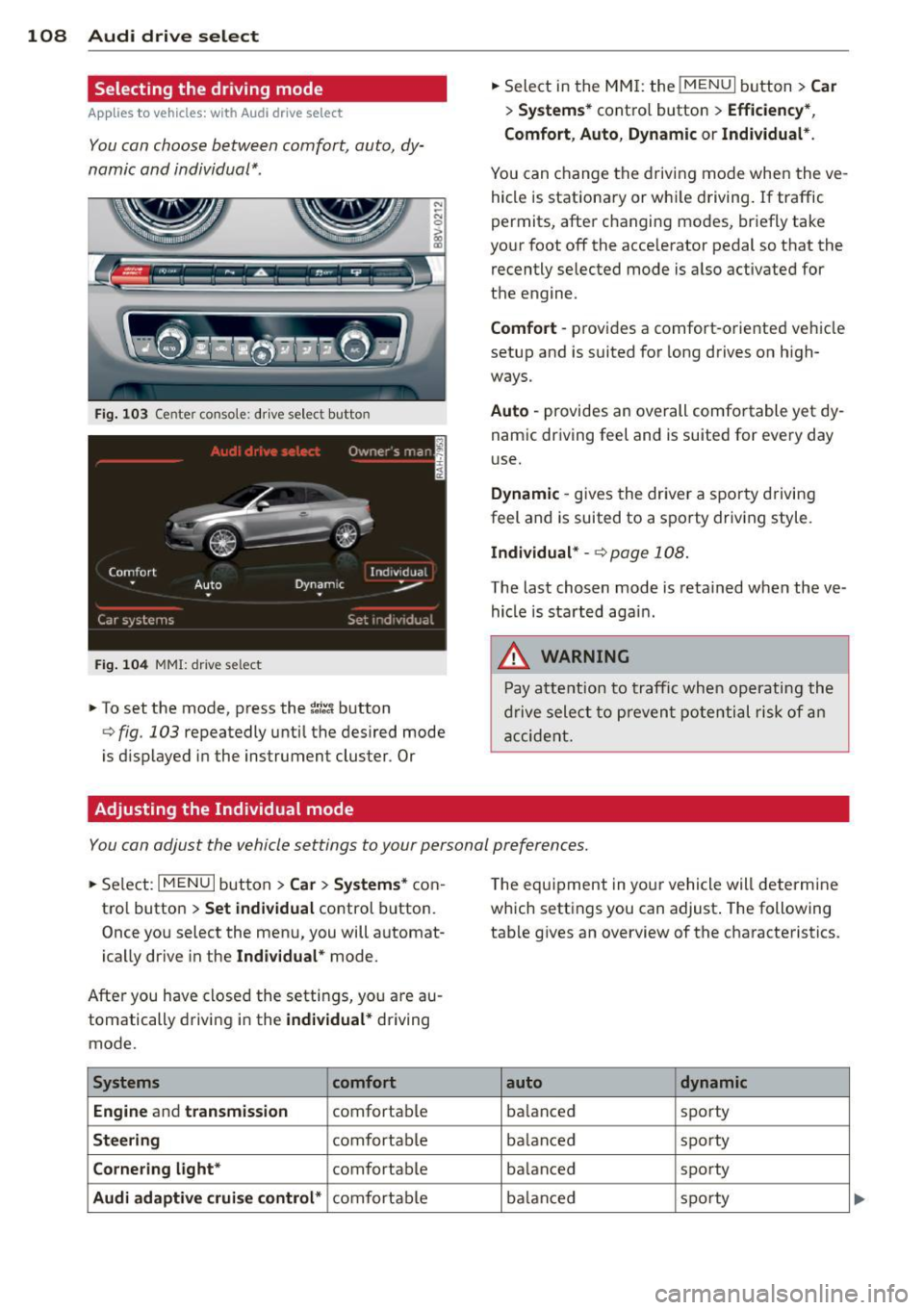
Fig. 103 Center console: drive select butto n
Fig. 104 MMI: drive select
.. To set the mode, press the ~;/:a button
<=> fig . 103 repeatedly until the desired mode
is d isplayed in the instrument cluster . Or
Adjusting the Individual mode
.. Select in the MMI: the !MENU I button> Car
> Systems* control button > Efficiency *,
Comfort , Auto , Dynamic
or Individual* .
You can change the driving mode when the ve
hicle is stationary or while driving . If traffic
permits, after changing modes, briefly take
your foot off the acce lerator pedal so that the
recently selected mode is also activated for
the engine.
Comfort -provides a comfort-oriented vehicle
setup and is suited for long drives on high
ways.
Auto -provides an overall comfortable yet dy
nam ic driving feel and is suited for every day
use.
Dynamic -gives the driver a sporty driving
feel and is suited to a spo rty driv ing style.
Individual* -<=>page 108.
The last chosen mode is retained when the ve
hicle is started agai n .
.&, WARNING
-Pay attention to traffic when operating the
dr ive select to prevent potential risk of an
accident.
You can adjust the vehicle settings to your personal preferences .
.. Se lect : I MENU I button >Car > Systems* con
tro l button >
Set individual control button.
Once you select the menu, you will automat
ically drive in the
Indiv idual* mode.
After you have closed the setti ngs, yo u are au
tomatically driving in the
individual* driving
mode.
Systems comfort
Engine
and transmission comfortable
Steering comfortable
Cornering light* comfortable
Audi adaptive cruise control* comfortable T
he equ ipment in you r vehicle will determine
which settings you can adjust . The following
tab le gives an overview of the characteristics .
auto dynamic
balanced sporty
ba lanced sporty
ba lanced sporty
ba lanced sporty
Page 112 of 302
110 Automatic transmission
Automatic
transmission S tronic-transmission
Introduction
Appl ies to vehicles: with S tro nic tr ansmiss ion
Your vehicle is equipped with an electronical
ly-controlled DSG transmission called S tronic.
Two independent clutches transfer the power
between the engine and transmission. It al
lows the vehicle to accelerate without a no
ticeable interruption in traction .
The transmission upshifts or downshifts auto
matically. The driving style continuously influ
ences the selection of the driving program.
When a
moderate driving style is used, the
transmission selects the most economica l
driving mode. The transmission upshifts at a
lower RPM and downshifts at a higher RPM to
improve fuel efficiency.
The transmission switches to a sporty mode
after a kick-down or when the driver uses a
sporty driving style characterized by quick ac
celerator pedal movements, heavy accelera
tion, frequent changes in speed and traveling
at the maximum speed.
If desired, the driver can also select the gears
manually (tiptronic mode) o page 115,
Shifting manually (tiptronic mode).
Selector lever positions
A pp lies to vehicles: with S tro nic tr ansmiss ion
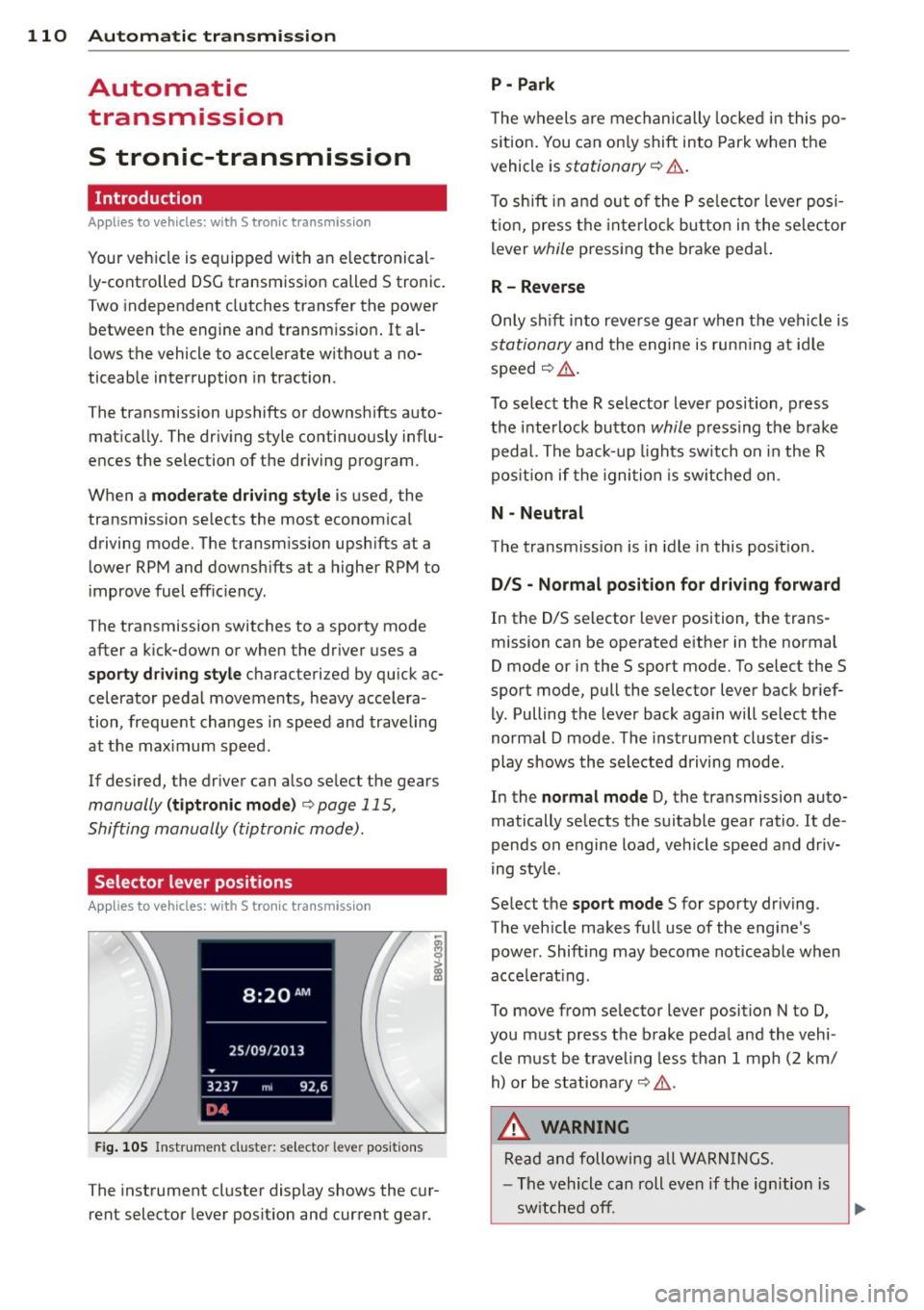
Fig. 105 Instrument cluste r: selector leve r positions
The instrument cluster display shows the cur
rent selector lever position and current gear .
P -Park
The wheels are mechanically locked in this po
s iti on. You can only shift into Park when the
vehicle is
stationary o &..
To shift in and out of the P selector lever posi
tion, press the interlock button in the selector
lever
while pressing the brake peda l.
R- Reverse
Only shift into reverse gear when the vehicle is
stationary and the engine is running at idle
speed
o &. .
To select the R selector lever position, press
the interlock button
while pressing the brake
pedal. The back-up lights switch on in the R
pos ition if the ignition is switched on .
N -Neutral
The transmission is in idle in this position.
D/S - Normal position for driving forward
In the D/S selector lever position, the trans
mission can be operated either in the normal
D mode or in the S sport mode. To select the S
sport mode, pull the selector lever back brief
ly. Pulling the lever back again will select the
normal D mode . The instrument cluster dis
play shows the selected driving mode.
In the
normal mode D, the transmission auto
matically selects the suitable gear ratio.
It de
pends on engine load, vehicle speed and driv
ing style .
Se lect the
sport mode S for sporty driving.
The vehicle makes full use of the engine's
power. Shift ing may become noticeable when
acce lerat ing .
To move from selector lever position N to D,
you must press the brake pedal and the vehi
cle must be traveling less than 1 mph (2 km/
h) or be stationary
o &. .
,&. WARNING
Read and following all WARNINGS.
- The vehicle can roll even if the ignition is
switched
off. .__ _____________ __J~
Page 113 of 302
....,
N
r--. > co
rl I.O
"' rl
"' rl
-Never select R or P while driving, because
this increases the risk of an accident.
- Power is stil l transmitted to the whee ls
when the engine is running at idle. To
prevent the vehicle from "creeping", you
must keep your foot on the brake in all
selector lever positions (except P) when
the engine is runn ing . Otherwise, th is in
creases the risk of an accident.
- Do not inadvertently press the accele ra
tor pedal when the vehicle is stopped if a
gear is engaged . Otherwise the vehicle
will start to move immediately, even if
the parking brake is set. This could res ult
in a crash .
- Do not press the accelera tor pedal when
changing the selector leve r pos ition
whi le the vehicle is stationary and the
engine is running.
- Never leave your vehicle with the eng ine
running whi le in gear . If you must leave
your vehicle when the engine is running, set the parking brake and move these
lector lever to the P posit ion.
- Before opening the hood and working on
a running engine, select the P position
with the se lector lever and set the park
ing brake. Always read and follow the ap
plicable warnings q page 214, Working
in the engine compartment.
(D Note
Never let the veh icle roll downhill with en
gine off and the selector lever in the N po
sition, beca use this could damage the a u
tomatic transmission and cata lytic con
ver ter .
@ Tips
-Audi drive select: Sporty shifting cha rac
te ristics can be se lected using the
dy
namic driving mode.Swill appear in the
i nst rument cl uster display i nstead of D.
- If you accidentally sele ct N while driv ing,
take you r foot off the a cce le rator pedal
i mmedia tely and wai t fo r the engine to
slow down to idle be fore se lecting Do r S.
Au tom atic tr an sm iss ion 11 1
-If there is a power fai lure, the selector
lever will not move out of the P position .
The emergency re lease can be used if
this happens qpage 117.
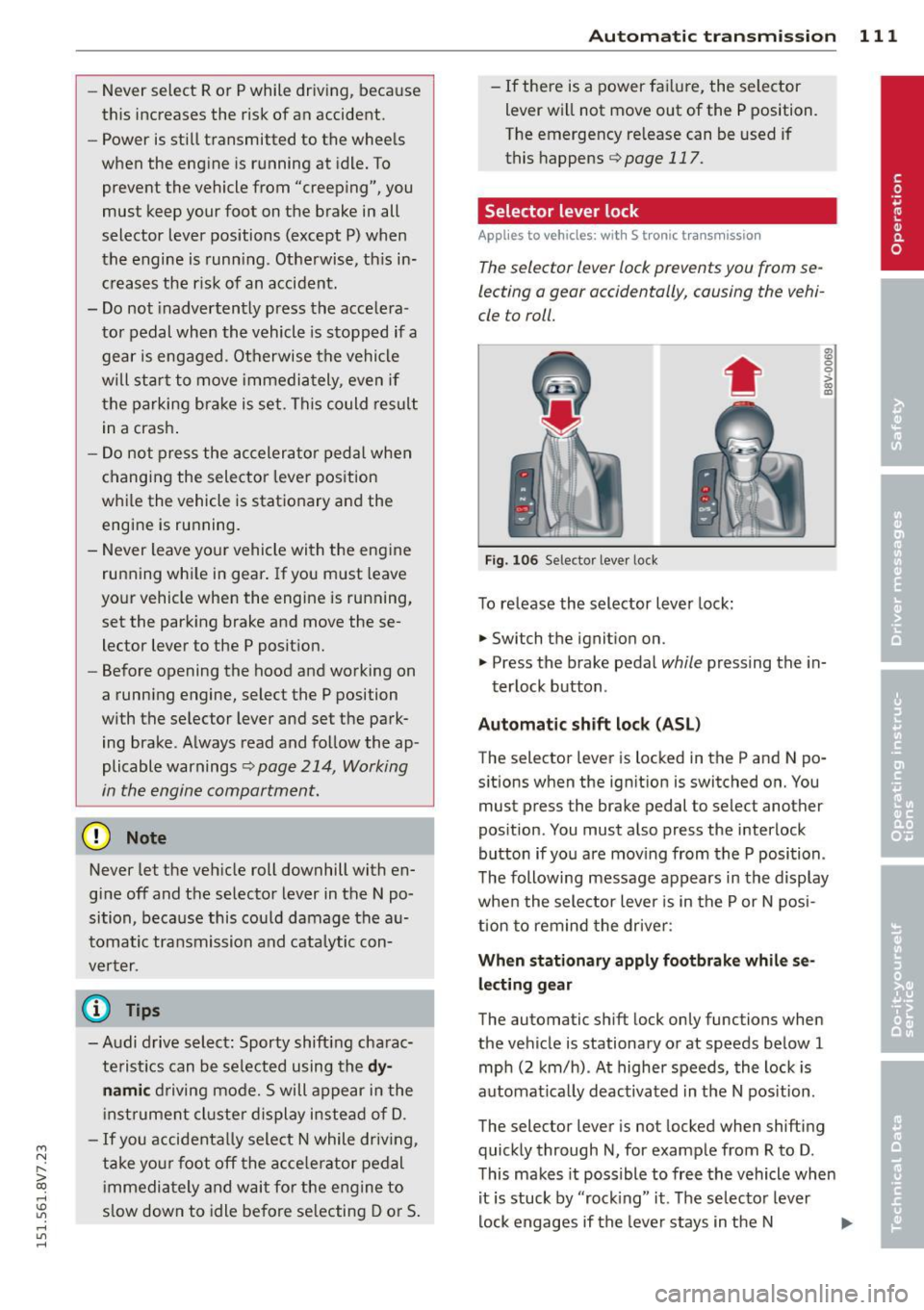
Selector lever lock
Applies to vehicles: with S tronic transmiss ion
The selector lever lock prevents you from se
lecting a gear accidentally, causing the vehi
cle to roll.
Fig. 106 Se lector lever lock
To re lease the selector lever lock:
.. Switch the ignit ion on.
* 0 > a,
"'
.. Press the brake pedal while pressing the in-
terlock button .
Automatic sh ift lock (ASL)
The selector lever is locked in the P and N po
sitions when the ign it ion is switched on. You
must press the brake pedal to select another
pos ition . You must also press the interlock
button if you are mov ing from the P position .
T he following message appears in the display
whe n the selector lever is in the P or N posi
t ion to remind the driver :
When stationar y app ly footbrake while se
l e cting gear
The automatic sh ift lock only functions when
the vehicle is stationary or at speeds be low 1
mph (2 km/h) . At higher speeds, the lock is
automat ica lly deactivated in the N pos ition .
The selector lever is not locked when shifting
quick ly through N, for examp le from R to D .
T his makes it possible to free the vehicle when
it is stuck by "rocking" it. The selector lever
lock engages if the leve r stays in the N ..,_
Page 114 of 302
112 Autom atic tr an smi ssion
position longer than approximately 2 seconds
when th e brake pedal is not pressed.
Inter lock butt on
The interlock button in the selector lever han
d le prevents you from moving the selector
lever inadvertently while in some se lecto r lev
er positions. The positions that require the in
terlock button to be pressed are marked in
color in the illustration
c::> fig. 106 .
Ignition k ey s afe ty inte rloc k*
You can only remove the key from the ignition
after switching the ignition off if the se lector
lever is in the P position. The selector lever
will be locked in the P position as long as the
key is not in the ign ition.
_&. WARNING
Read and following all WARNINGS. c::> .& in
Selector lever positions on page 110.
(D Tips
- If the se lector lever does not engage,
there is a malfunction. The engine is dis
abled to prevent the vehicle from driving
off unintentionally. Press the brake pedal briefly to allow the selector lever lock to
engage aga in .
- If the vehicle does not move forward or
in reverse even though a drive position is
se lected, proceed as follows:
- >If the veh icle does not move in the de
s ired direction, the system may not have
engaged the dr ive position co rrectly.
Press the brake pedal and select the
drive position again.
- >If the veh icle st ill does not move in the
desired direction, there is a system mal
f u nct ion . See an a uthorized Aud i dea ler
or authorized Audi Service Facility for as
sistance to have the system checked.
Driving tips
Applies to vehicles: with S tronic transmission
The transmission shifts up and down auto
matically when in the driving gears .
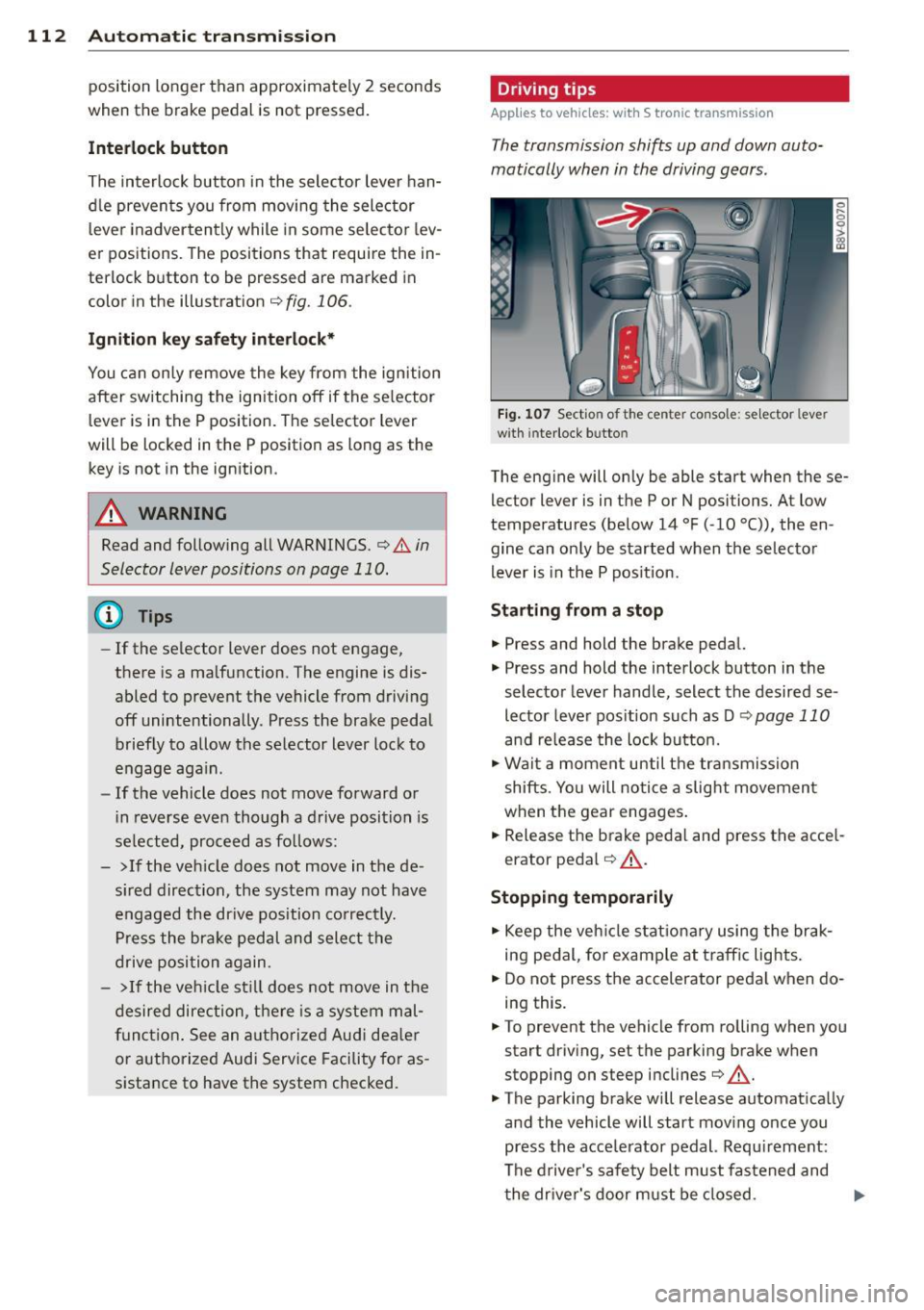
Fig . 107 Sect io n of the cente r co nsole: se lector leve r
w ith interlock b utto n
The eng ine will only be able start when these
lector lever is in the P or N positions. At low
temperatures (below 14 °F ( -10 °C)), the en
gine can only be started when the selector
lever is in the P pos it ion.
St arting from a stop
.,. Press and hold the brake pedal.
.,. Press and hold the interlock button in the
selector lever handle, select the desired se
lector lever pos ition such as D
c::> page 11 0
and release the lock button.
.,. Wa it a moment until the transmission
shifts . You will notice a slight movement
when the gear engages .
.. Release the b rake peda l and press the acce l
erator pedal
c::> _A .
Stopping t emporarily
.,. Keep the veh icle stat iona ry using the brak
ing pedal, fo r example at traffic lig hts.
.,. Do not press the accelerator peda l when do
ing this.
.,. To prevent the vehicle from ro lling when you
start driv ing, set the parking brake when
stopping on steep inclines
c::> _A .
.,. The parking brake will release automat ically
and the vehicle will start mov ing once you
press the acce lerator pedal. Requ irement:
The driver's safety belt must fastened and
the dr iver's door must be closed . .,._