ignition AUDI A3 CABRIOLET 2016 User Guide
[x] Cancel search | Manufacturer: AUDI, Model Year: 2016, Model line: A3 CABRIOLET, Model: AUDI A3 CABRIOLET 2016Pages: 272, PDF Size: 67.88 MB
Page 37 of 272
Power top
Power top
Automatic power top
General information
The power top opens and closes automatically .
When open, the powe r top is stored comp lete ly
in the power top compartment. The power top
can be opened or closed at speeds up to 30 mph
(SO km/h).
Unde r no rma l conditions, the power top is wind
and waterp roof. In rare cases, small d rople ts of
water may form under extreme weather condi
tions such as torrential o r prolonged rain. That is
normal and no cause for concern .
F ollow t he care instructions to keep the power
top free of leaks and to maintain its appearance
~ page 224, Core and cleaning. Also observe the
following:
- Open and s tow the power top only whe n it is
clean and dry . Sharp-edged dirt particles can
cause damage to the rear window and the pow
er top . Stowing the power top when it is damp
can create imprints in it, and if it is left that
way for long periods of time , mildew and other
damage can form .
- Do not leave the power top open for several weeks or the creases in it may become discol
ored.
- Remove ice and snow before open ing the power
top. Do not use any sharp edged objects to re move ice and snow or the powe r top could be
scratched or damaged . The rear window may be
clea red w ith a standard ice sc rape r.
- Do not open the power top when the tempera
ture is be low 32 °F (0 °C). The fabric in the
power top loses elast icity in sub-zero tempera
tu res .
&, WARNING
-When posi tioning the power top, avoid con
tact with the supports or other moving parts. Make sure all of the windows are low
ered. Otherw ise you could pinch your hands.
- Never dr ive when the power top is not
locked correctly. The wind from driving
36
could cause the power top to open. This can
result in injur ies and damage to the vehicle.
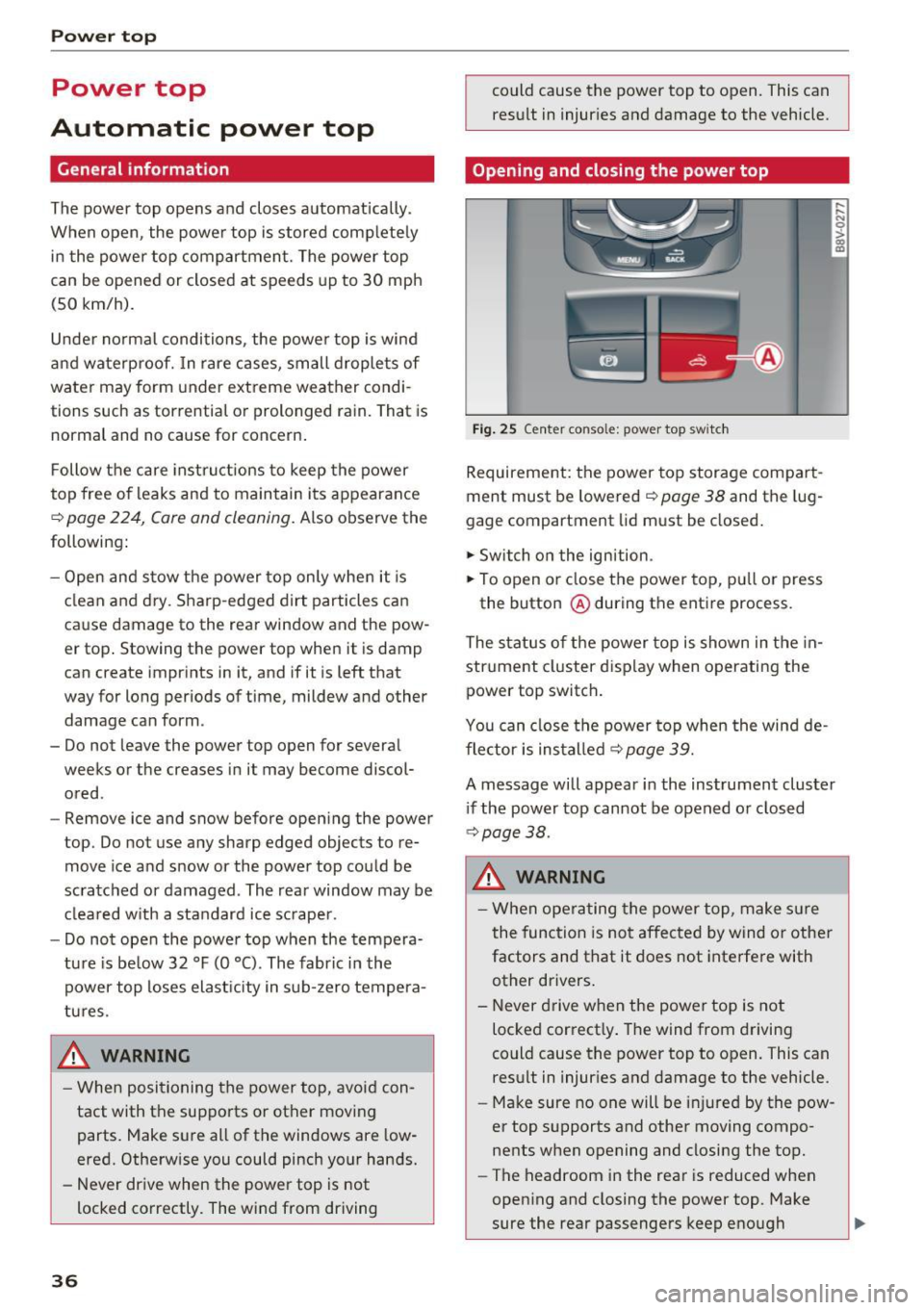
Opening and closing the power top
Fig . 25 Center conso le: power top sw itc h
Requirement: the power top storage compart
ment must be lowe red
~ page 38 and the lug
gage compartment lid must be closed.
.,. Switch o n the ignition .
.,. To open or close the power top, p ull or press
the button @during the ent ire process.
The status of t he power top is shown in the in
strument cluster d isp lay when o perating the
power top switch .
You can close the power top when the wind de
flector is installed
¢page 39.
A message will appear in the instrument cluster
i f the power top cannot be opened or closed
¢ page 38.
&, WARNING
-When operating the power top, make s ure
the function is not affected by wind or othe r
factors and that it does not interfere with
other drivers.
- Never drive w hen the power top is not
locked correct ly . The wind from driving
could cause the power top to open. This can
result in injur ies and damage to the vehicle .
- Make sure no one will be i njured by the pow
er top supports and other moving compo
nents when opening and closing the top.
- The headroom in the rear is reduced when
opening and closing the power top. Make
sure the rear passengers keep enough
Page 41 of 272
Power top
-Be careful when installing so you do not
pinch your fingers.
- Pay attention to the traffic when installing
the wind def lector. Install the w ind deflec
tor from the s ide of the vehicle that is away
from traffic.
(D Note
Do not lean against the veh icle when instal
ling the wind deflector. Hard objects and dec
orations on clothing such as belt buckles can
scratch the pa int.
{!) Tips
- The wind deflector works best when a ll of
the w indows are rolled up wh ile driving.
- Only store the wind deflector in the storage
bag* when it is dry.
Power top emergency
operation
General information
The power top con be closed manually if there is
o malfunction.
• Set the parking brake.
• Open all windows.
• Switch the ignition off.
• Pull the button@ for approximately 10 to
15 seconds to reduce th e pressure in the power
top hydraulics ¢
page 36, fig. 25.
Only close the power top m anually in an eme r
gency . Have a second person assist . Drive to an
author ized Audi dealer or author ized Audi Service
Facility immediately to have the malfunction cor
rected.
A WARNING
- There is a r isk of pinching the hands or othe r
people during all of the power top emergen
cy operat ion steps.
- Make sure a ll windows are lowered during
emergency ope ration.
- Do not reach into the power top suppor ts
or other moving components .
40
-Never drive when the power top is not
locked correct ly. The wind from driving
could cause the power top to open. This can
result in injur ies and damage to the vehicle .
{!) Tips
The power top storage compartment cover is
not latched after the emergency operation is
complete. Dr ive to an authorized Audi dealer
or authorized Audi Service Facility immediate
l y to have the malfu nction corrected.
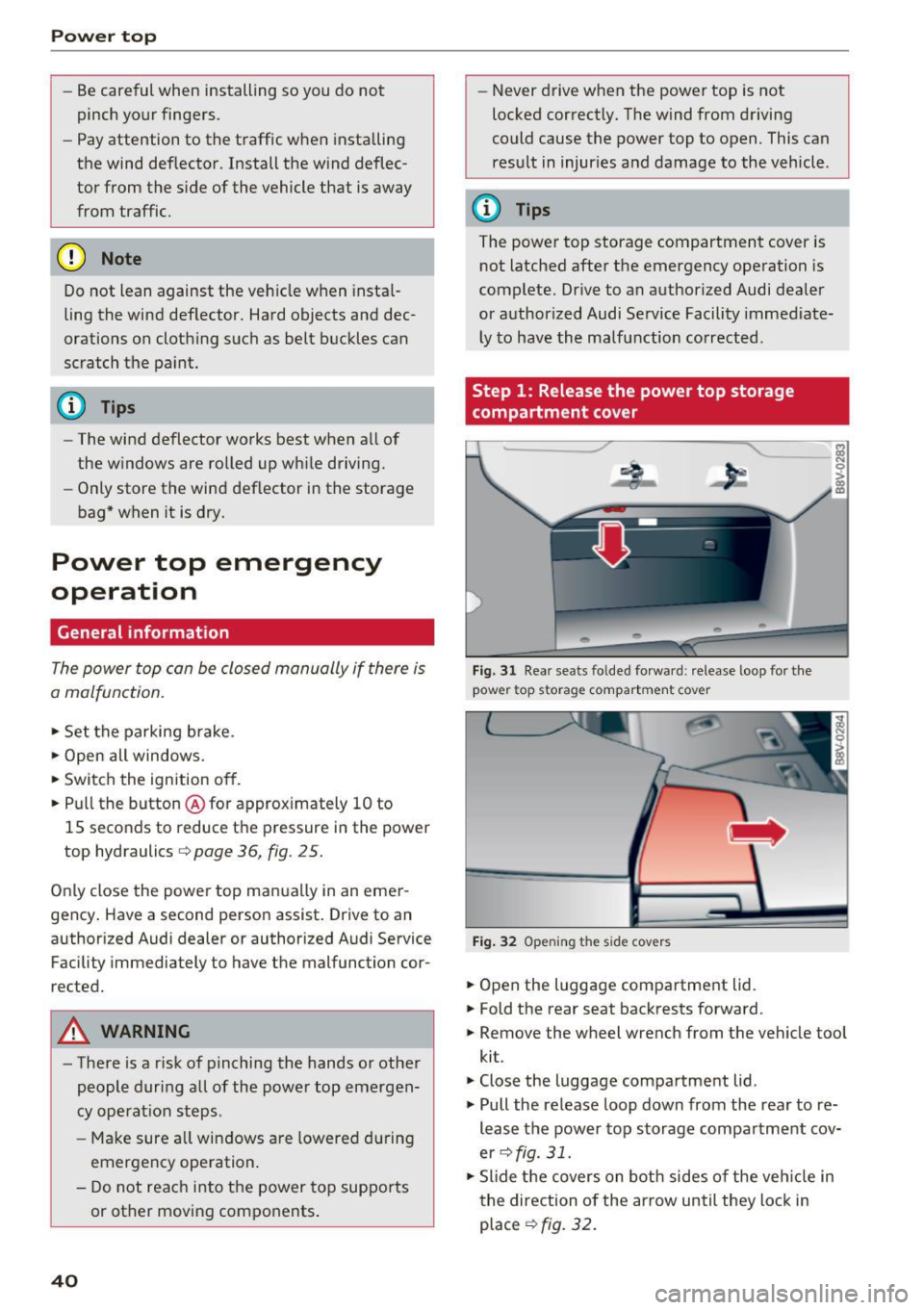
Step 1: Release the power top storage
compartment cover
Fig. 31 Rear seats fo lded forward : release loop for the
power top storage compartment cover
Fig. 32 Open ing the s ide covers
• Open the luggage compartment lid.
• Fold the rear seat backrests forward.
• Remove the wheel wrench from the vehicle tool
kit.
• Close the luggage compartment lid .
• Pull the release loop down from the rear to re
lease the power top storage compartment cov
er
¢ fig. 31.
• Slide the covers on both sides of the veh icle in
the direction of the arrow until they lock in
place
¢fig. 32.
Page 44 of 272
Lights and Vision
Exterior Lighting
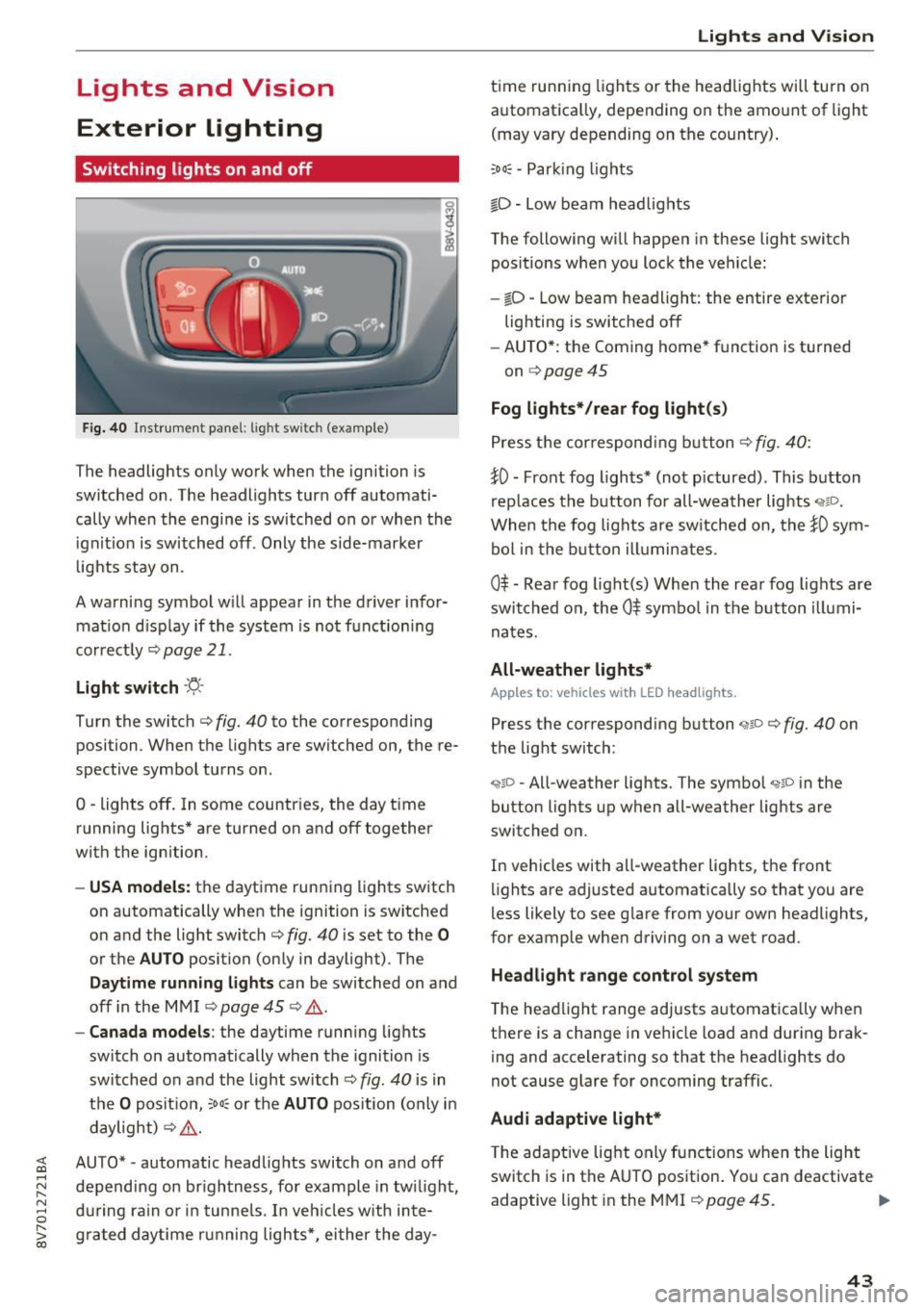
Switching lights on and off
Fig. 40 Instrument panel: l ig ht switc h (example)
The headlights only work when the ignition is
switched on . The headlights turn
off automati
cally when the engine is switched on or when the
i gn it ion is switched off . Only the side-marker
l ights stay on.
A warning symbol will appear in the driver infor mat io n disp lay if the system is not f unction ing
correctly
¢ page 21.
Light s witch ·'ti- ·
Turn the switch c:> fig. 40 to the corresponding
position . When the lights are switched on, the re·
spective symbol turns on .
0 -lights off . In some countries, the day time
running lights* are turned on and
off together
with the ign ition.
- USA model s: the daytime running lights switch
on automatically when the ignition is switched
on and the light switch <=>
fig. 40 is set to the 0
or the AUTO position (only in daylight) . The
Daytim e runn ing ligh ts can be switched on and
off in the MMI ¢ page 45 ¢ .&. .
-Canada model s: the daytime running lights
switch on automatically when the ignition is
switched on and the light switch ¢
fig. 40 is in
the
O posit ion, :oo: or the AUTO position (on ly in
daylight)
c:> ,&. .
;;§ AUTO* -automatic headlig hts switch on and off .....
~ depending on brightness, for example in tw ilight ,
8 during ra in or in tunne ls. In veh icles with inte-
S; g rated day time running lights*, ei ther the day-co
Lights and V ision
t ime running lights or the headlights will turn on
automatica lly, depending on the amo unt of light
(may vary depending on the country) .
:oo: -Par king ligh ts
io -Low beam headlights
The following will happen in these light switch pos itions w hen you lock the vehicle:
- iD -Low beam headlight: the entire exterior
lighting is switched
off
- AU TO *: the Coming home* function is turned
on
¢ page 45
Fog lights* /rear fog light(s )
Press the correspondi ng b utton c:> fig. 40:
tO -Front fog lights* (not pictured) . This b utton
rep laces the b utton for all-wea ther lights
When the fog lights are sw itched on, the tO sym
bol in the b utton ill umin ates .
0$ -Rear fog light(s) When the rea r fog lights are
swi tched on, the
0$ symbo l in the b utton illumi
nates.
All-weather light s*
Apples to : vehicles wit h LED he adlights.
Press the corresponding button ,;ii o ¢ fig. 40 on
the light switch :
"1~D -All-weather lights . The symbol "11D in the
button lights up when all-weather lights are
switched on.
In vehicles with all -weather lights, the front
lights are adjusted automatically so that you are
less likely to see g lare from your own headlights,
for example whe n driving on a wet road.
Headlight range control system
The headlight range adjusts a utomat ically when
t h ere is a change in ve hicle load and during brak
ing and accelerating so that the headlights do
not cause glare for oncoming traffic.
Audi adaptive light*
T he ada ptive lig ht only functions when the light
switch is in the AUTO pos ition . You can deactivate
adaptive light in the MMI
¢ page 45 . ..,.
43
Page 45 of 272
Lights and Vision
When switched on, adaptive light adjusts to
curves depending on the vehicle speed and steer
ing wheel angle. This provides better lighting
through the curve. The system operates in a
speed range from approximately 6 mph (10 km/
h) to 68 mph (110 km/h) .
Static cornering light* -the cornering light
switches on automatically when the steering
wheel is turned at a ce rtain angle at speeds up to
approximately 44 mph (70 km/h) and when the
turn signal is activated at speeds up to approxi
mately 25 mph (40 km/h) . The area to the side of
the vehicle is illuminated better when turning.
Speed dependent light distribution* -The speed
dependent light distribution adapts the light in
towns and on highways or expressways . Intersec
tions can also be illuminated on vehicles with a
navigation system* .
Highway light function*
This function adapts the lighting for highway
driving based on vehicle speed .
A WARNING
-Automatic headlights* are only intended to
assist the driver. They do not relieve the
driver of responsibility to check the head
lights and to turn them on manually accord
ing to the current light and visibility condi
tions. For example, fog cannot be detected by the light sensors . So always switch on the
low beam under these weather conditions
and when driving in the dark ~D.
- Accidents could occur if you can not see the road ahead of you well and if others on the
road cannot see you . Always switch your
headlights on so that you can see the road
ahead of you and others can see your vehicle
from behind.
- The rear fog lights should only be turned on
in accordance with traffic regulations, to
prevent glare for traffic behind your vehicle.
-If the battery has been discharging for a
while, the parking light may switch off auto
matically. Always make sure your vehicle is
parked and adequately lit according to the
44
laws. Avoid using the parking lights for sev
eral hours.
- Please observe legal regulations when using
the lighting systems described.
(D Tips
- The light sensor for the automatic head
lights* is in the rearview mirror mount.
Therefore , do not place any stickers in this
area on the windshield.
- Some exterior lighting functions can be ad
justed
Q page 45.
- If you turn off the ignition while the exterior lights are on and open the door, you will
hear a warning tone.
- In some market-specific versions, the tail
lights do not turn on when switching on the
daytime running lights .
- In cool or damp weather, the inside of the
headlights, turn signals and tail lights can
fog over due to the temperature difference between the inside and outside. They will
clear shortly after switching them on . This
does not affect the service life of the light
ing.
-A message will appear in the instrument
cluster if there is a malfunction in the light
sensor
Q page 21 .
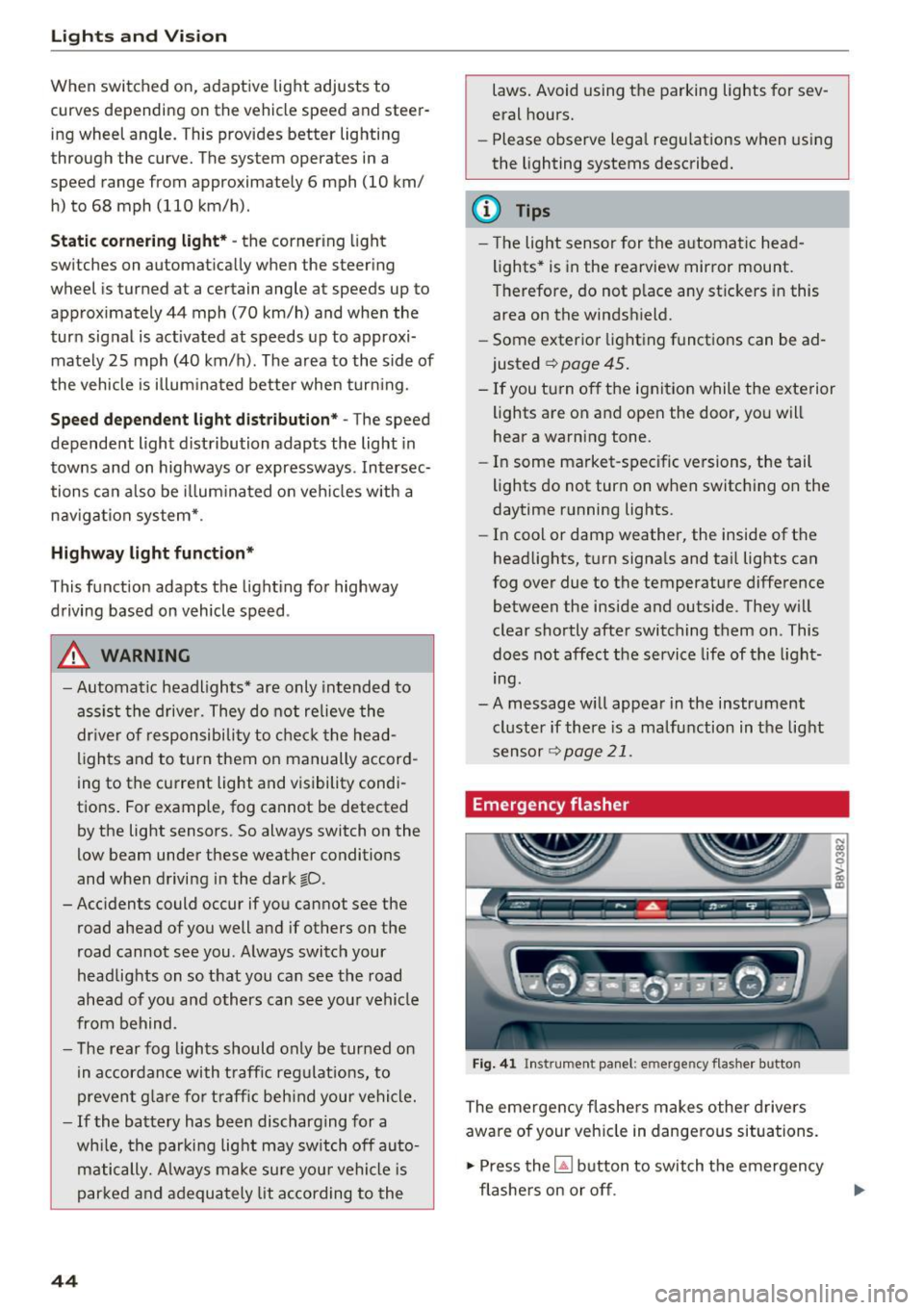
Emergency flasher
Fig. 41 Ins trumen t panel: e merge ncy flasher butto n
The emergency flashers makes other drivers
aware of your vehicle in dangerous situations.
.,. Press the~ button to switch the emergency
flashers on or off .
Page 46 of 272
<( co ..... N
" N ..... 0 r--. > 00
You can indicate a lane change or a tu rn when the
emergency flas hers are sw itche d on by us ing the
turn sig nal lever . The emergency flashers stop
tempo rarily.
The emergency flashers also work when the igni
tion is tur ned off.
@ Tips
You should s witch the e merge ncy fla shers on
if:
- Y ou a re the la st c ar in a tra ffic j am so th at
a ll ot her vehicles appro ach ing from be hind
ca n see you, or if
- You r vehicle has br oke n do wn or y ou ar e
h aving an eme rgency, or i f
- Y our vehi cle is bei ng towe d or if yo u are
tow ing anot her vehicle.
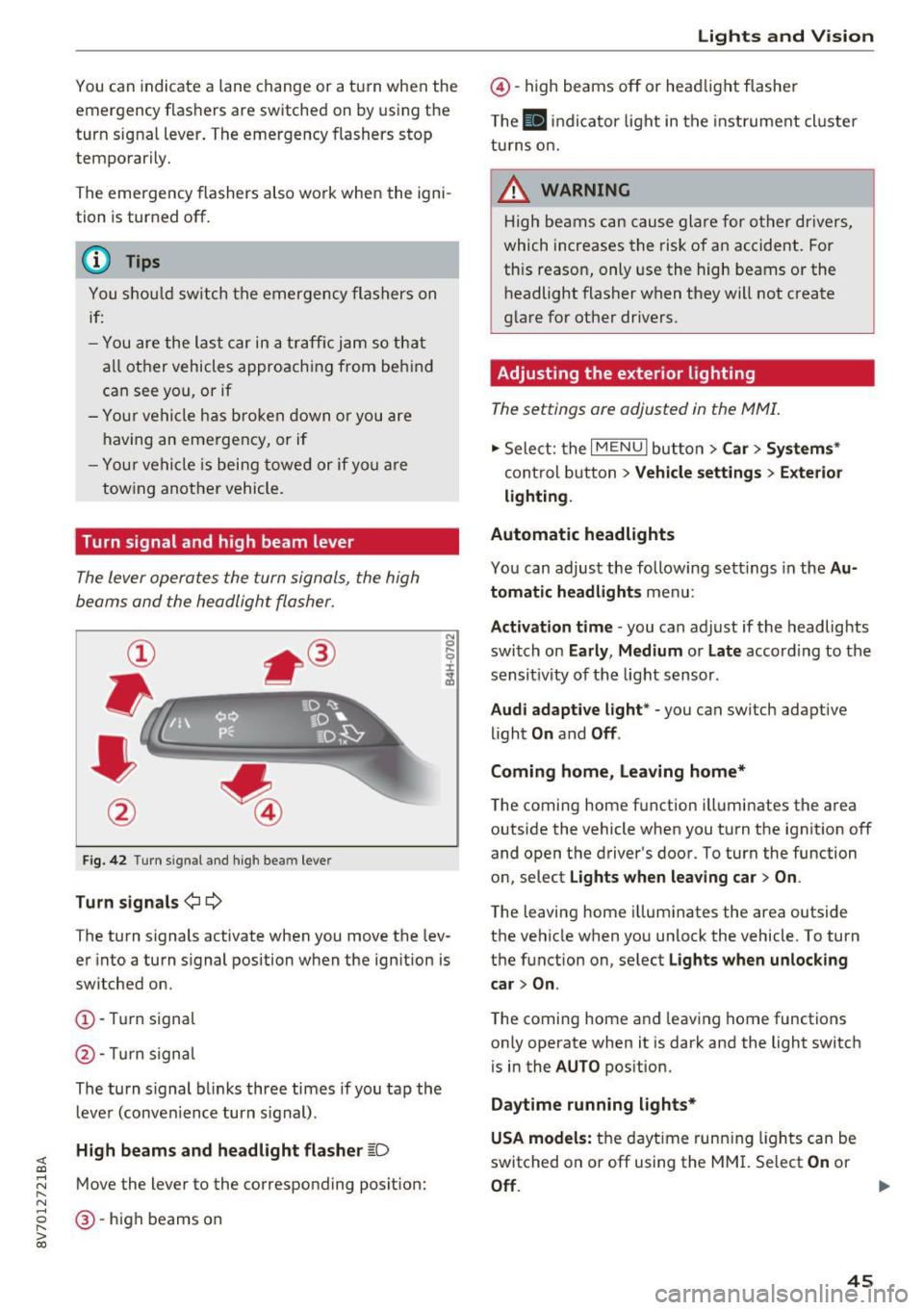
Turn signal and high beam lever
The Lever operates the turn signals, the high
beams and the headlight flasher.
F ig . 42 Turn signal an d high bea m lever
Turn signals ¢i ¢
The turn s ignals activate when you move the lev
er into a turn s ignal position w hen the ignition is
switched on.
(D -Tur n signa l
@-Tur n sign al
The tu rn s ignal bl inks three times if you tap th e
l eve r (conve nience turn s ignal) .
High beams and headlight flasher ~D
Move the lever to the correspond ing posit ion:
@ -high beams on
Lights and V ision
@ -high beams off or he adlight flasher
T he
El in di cato r light in t he inst rument cl uste r
tu rns o n.
_& WARNING
H ig h be ams can cau se gla re fo r ot her dr ivers,
which increases the risk of an accident. Fo r
this reason, only use the high beams or the
h eadlight flasher when they will not create
g la re for ot her dr ivers.
Adjusting the exterior lighting
The settings are adjusted in the MMI.
.,. Sele ct: the I MENU I but to n > Car > Systems *
control b utton > Vehicle settings > Exterior
lighting .
Automatic headlights
Yo u can adjust the following s ettings in the Au
tomatic headlights
menu:
Activation time -you can adjust if the headlights
switch on
Early , Medium or Late accord ing to the
sensit ivity of th e light s ensor .
Audi adaptive light * -you can switch adaptive
li ght
On and Off .
Coming home, leaving home*
T he coming home f unction ill uminates the area
outside the vehicle when you turn the ignit ion off
and open the driver 's door. To turn the function
o n, select
Lights when leaving car > On .
The leaving home i llum inates the area outside
the vehicle when yo u unlock the vehicle. To turn
t h e function on , se lect
Lights when unlocking
car > On .
The coming home a nd leav ing home functions
on ly operate when it is dark and the light switch
is in the
AUTO pos ition.
Daytime running lights*
USA models:
t h e dayt ime run ning lights can be
switched on or off using the MM I. Select
On or
Off . ..,_
45
Page 47 of 272
Lights and Vision
Canada models : this function cannot be switched
off . They activate automatica lly each time the ig
n ition is switched on. T his menu item is shown
with a "gray background".
Travel mode*
The headlig ht beam is asymme trical. This pro
vides stronge r ill uminat ion on the side of the
road on w hich you are driving . In ve hicles with
Xenon headlights* with tu rni ng light* or LED
headl ights* ,
you must adjust the headlights
when you are driv ing in a country where th e traf
fic direction is oppos ite from your own country .
Otherw ise, oncoming traffic will be blinded by
the glare from the headlights . An a djustment is
not needed in veh icles with Xenon headlights
w it h out t urni ng lig hts .
To prevent glare:
- Travel mode must be activated in vehicles w ith
Xenon headlights* and turning light* or LED
headlights*. Select: the
I M ENU I button> Car >
Sy stem s*
cont rol button > Vehicle settings >
Exterior lighting > Light for driving on left , for
example .
After you have adjusted the headlights , the fol
low ing message w ill appear:
II Headlight converter active for driv ing on
left. Range reduced!
(D Tips
When travel mode is activated, a disp lay in
the dr ive r information system indicates this
each t ime you switch the ignition on.
46
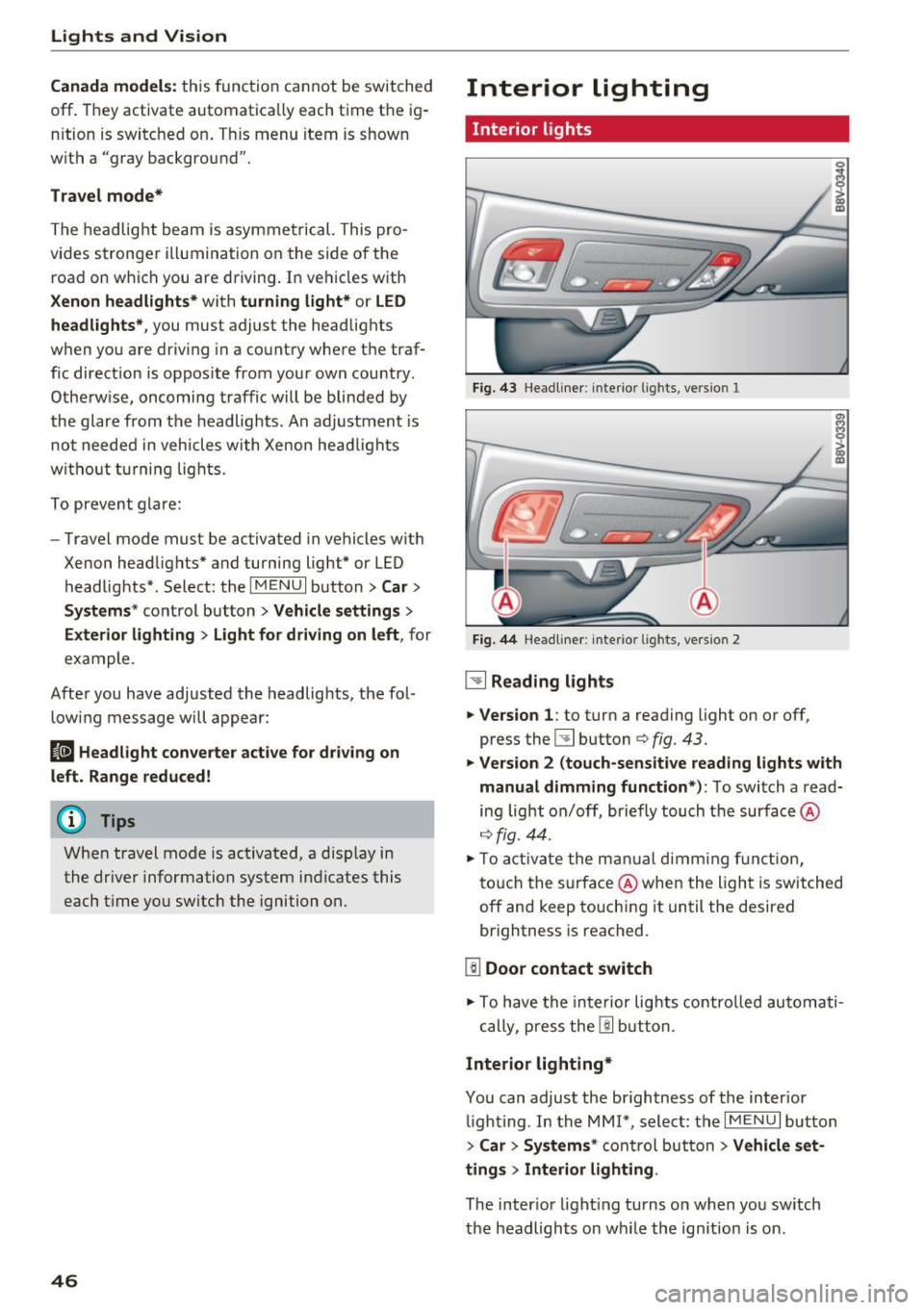
Interior lighting
Interior lights
Fi g. 43 Headliner: interior ligh ts, version 1
Fig. 44 Headline r: inte rior l ights, ve rs io n 2
~ Reading lights
.,. Ve rsion 1 :
to turn a reading light on or off,
press the
l!J button c:> fig. 43.
.,. Version 2 (touch-sensitive read ing lights w ith
manual dimming function *):
To switch a read
ing light on/off, briefly touch t he surface @
c:>fig. 44 .
.,. To acti vate the m anual dimmi ng f unc tion,
t o uch the s urfa ce @ when the ligh t is switched
off and keep touchi ng it un til the desired
brightness is reached.
[!I Door contact switch
.,. To have the in te rior lig hts contro lled automati -
cally, p ress the
I!] b utt on.
Interior lighting*
You can adjust the brightness of the inter ior
ligh ting . In the MMI*, select: the
I MENU I button
>
Car > System s* control but ton > Vehicle s et
tings > Interior lighting .
The interior light ing turns on when you sw itch
the headlights on w hile the ignition is on.
Page 48 of 272
<( co ..... N
" N ..... 0 r--. > 00
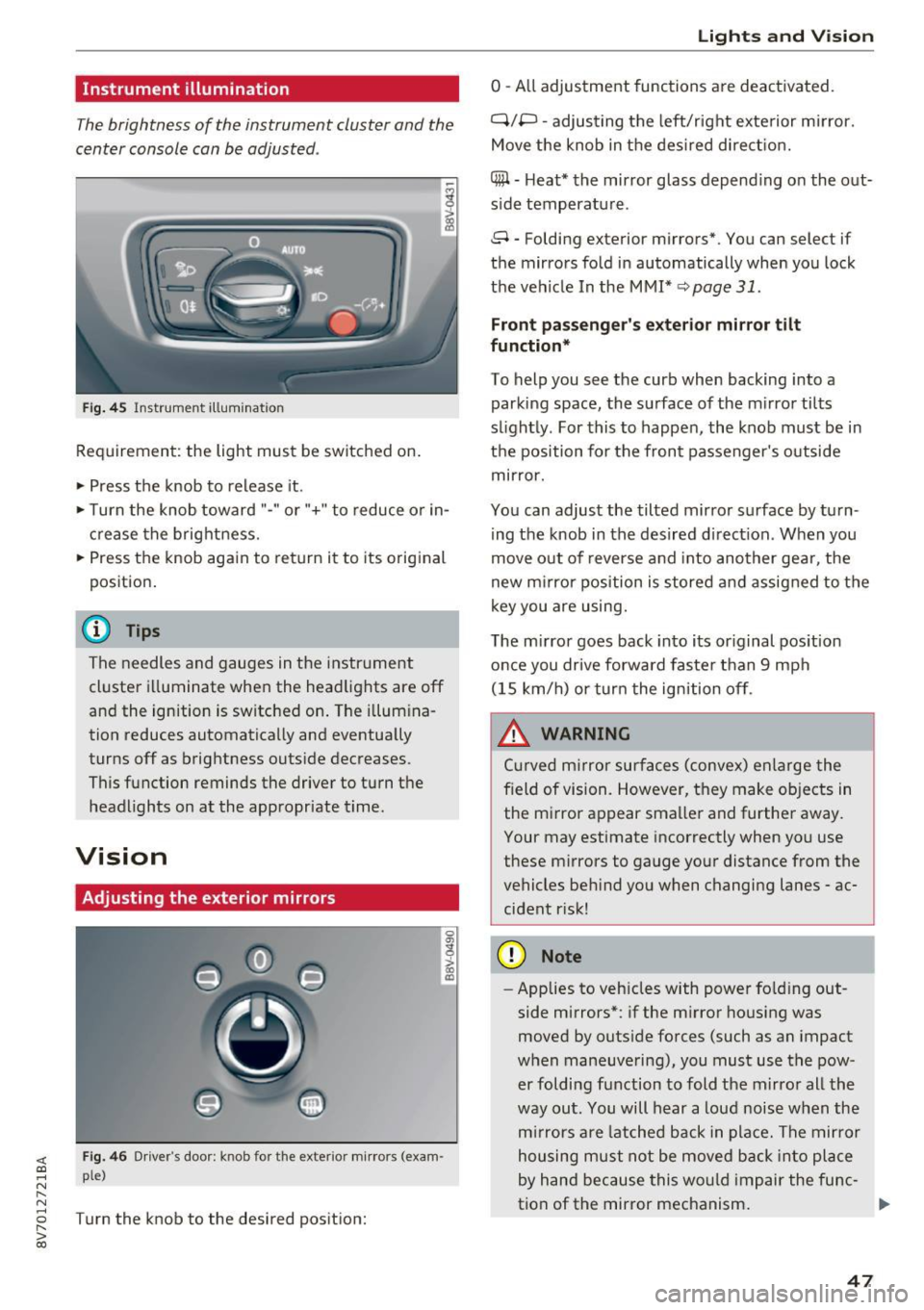
Instrument illumination
The brightness of the instrument cluster and the
center console can be adjusted .
Fig. 45 Instrumel'lt illumination
Requirement: the light must be switched on.
.. Press the knob to release it.
.. Turn the knob toward "-"or"+" to reduce or in
crease the brightness.
.. Press the knob again to return i t to its original
position .
@ Tips
The needles and gauges in the instrument
cluste r illuminate when the headlights are off
and the ignition is switched on . The illumina
tion reduces automatically and eventua lly
turns off as brightness outside decreases.
This function reminds the driver to turn the
headlights on at the appropriate time.
Vision
Adjusting the exterior mirrors
0
g
>
Fig. 46 Driver's doo r: knob fo r th e exterior mirrors (exam
ple)
Turn the knob to the desired position:
a, (X)
Lights and V ision
0 -All adjustment functions are deactivated.
Q/P -adjusting the left/r ight exte rior m irror.
Move the knob in the desired direction.
(@ -Heat* the mirror glass depend ing o n the out
s ide temperatu re.
8 -Folding exterior mirrors*. You can select if
the mirrors fold in automatically when you lock
the vehicle In the MMI*
q page 31.
Front passenger 's exterior mirror tilt
function*
To help you see the curb when backing into a
parking space, the surface of the m irror tilts
s li ghtly. For this to happen, the knob must be in
the position for the front passenger's outside
mirror .
You can adjust the tilted mirror surface by turn
ing the knob in the desired d irect ion . When you
move out of reverse and into another gea r, the
new mirror position is stored and assigned to the
key you are using.
The mirror goes back into its or iginal position
once you drive forward faste r than 9 mph
(15 km/h) or turn the ignition off.
_& WARNING
Cur ved m irror surfaces (convex) enlarge the
f ield of vision. However, they make objects in
the m irror appear smaller and further away.
Your may estimate incorrectly when you use
these mirrors to gauge your distance from the
vehicles beh ind you when changing lanes -ac
cident r isk!
(D Note
- Applies to vehicles with power fo lding out
side mirrors*: if the mirror housing was
moved by outside forces (such as an impact
when maneuvering), you must use the pow
er foldi ng function to fold the mirror all the
way out. You will hear a loud noise when the
mirrors are latched back in place. The mirror
housing must not be moved back into place
by hand because this would impair the func-
tion of the mirror mechanism. ..,.
47
Page 50 of 272
<( co ..... N
" N ..... 0 r--. > 00
Sun visors
Fig. 48 Left s ide : sun viso r
The sun visors can be moved out of their brackets
and turned toward the doors
(D.
The mirror light switches on when the cover over
the vanity mirror* @opens.
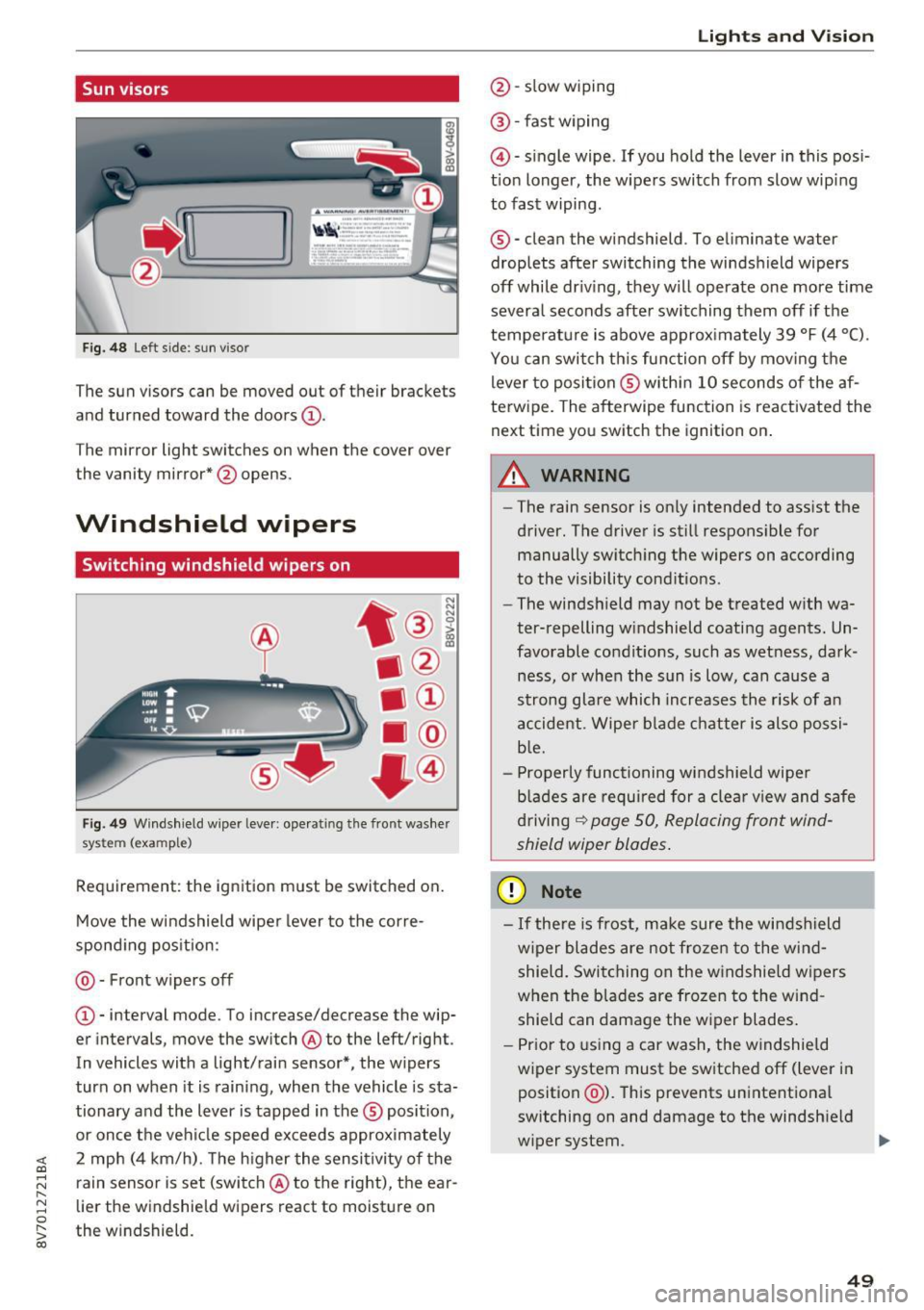
Windshield wipers
Switching windshield wipers on
Fig. 49 Windshie ld w iper leve r: ope rat ing the front was her
sys tem (exa mple)
Requirement: the ignition must be switched on.
Move the windshield wipe r lever to the corre
spond ing position:
@ - Front w ipers off
@ -interval mode. To increase/decrease the wip
er intervals, move the sw itch @ to the left/right .
In vehicles with a light/rain sensor*, the w ipers
turn on when it is raining, when the vehicle is sta
tionary and the lever is tapped in the ® position ,
or once the vehicle speed exceeds approximately
2 mph (4 km/h). The h igher the sensitivity of the
rain sensor is set (switch @ to the right), the ear
lier the windshield wipers react to moisture on
the w indshield .
Lights and V ision
@ -slow wiping
@ -fast wiping
@ -single wipe . If you hold the lever in this posi
t ion longer, the wipers switch from slow wip ing
to fast wiping .
® -clean the windshield . To e liminate water
droplets after switching the windshield wipers
off while dr iv ing, they w ill operate one more time
severa l seconds afte r switching them off if the
temperature is above approx imately 39 °F (4 °C) .
You can switch this funct ion off by moving the
lever to posi tion ® withi n 10 seconds of the af
terw ipe. The afterwipe function is reactivated the
next time you switch the ignition on.
A WARNING
-
-The rain sensor is on ly intended to assist the
driver. The driver is still respons ible for
manually switching the wipers on according
to the visibility cond itions .
- The windsh ield may not be treated w ith wa
ter-repelling w indshield coating agents. Un
favorable condit ions, such as wetness, dark
ness, o r when the sun is low, can cause a
strong glare which increases the risk of an
accident. Wiper blade chatter is also possi
b le.
- Properly functioning windshield wiper
b lad es are required for a clear view and safe
driving
~ page 50, Replacing front wind
shield wiper blades.
(D Note
-If there is frost, make sure the windshield
w iper blades are not frozen to the wind
shield. Switching on the windshie ld w ipers
when the blades are frozen to the wind
shield can damage the w iper blades.
- Prior to using a car wash, the windshield
w iper system must be switched off (lever in
position @). This prevents unintentional
switching on and damage to the windsh ield
wiper system .
IJIJ.
49
Page 51 of 272
Lights and Vi sion
- Do not use the windshield wipers to clear ice
off the windshield. If you switch the wind
sh ield wipers on when the w indshield is icy,
the w iper blades w ill be damaged .
@ Tips
-The windshield wipers switch off when the
i gnition is turned off . You can activate the
windsh ield wipers after the ign ition is
switched back on by moving the windsh ield
wiper lever to any pos it ion.
- Worn or dirty windshield wiper blades result
i n streak ing. This can affect the ra in sensor
funct ion . Check your windshield wiper
blades regularly.
- The washer fluid nozzles in the w indshield
washer system are heated* at low tempera
tures when the ignition is on .
- When stopp ing tempora rily, such as at a
traffic light, the speed of the windshie ld
wipers automat ically reduces by one leve l.
- In vehicles with an MMI, you can switc h the
rain sensor on or
off in the Dr iver a ssistance
menu.
Cleaning windshield wiper blades
C le an the w iper blades when you see wipe r
strea ks. Use a soft clot h and a glass cleaner.
.,. Place the w indshield wipe r arms i n the se rvice
pos it ion ,=:,
page 50.
.,. Fo ld the w indshield wipe r arms away from the
winds hield.
A WARNING
Dirty windshield wipe r blades can impair vi
sion, which increases the risk of an accident .
CJ) Note
If you see st reaks aga in a fter cleaning the
wiper blades, the blades must be replaced ,=:,
page 50.
so
-
· Replacing front windshield wiper blades
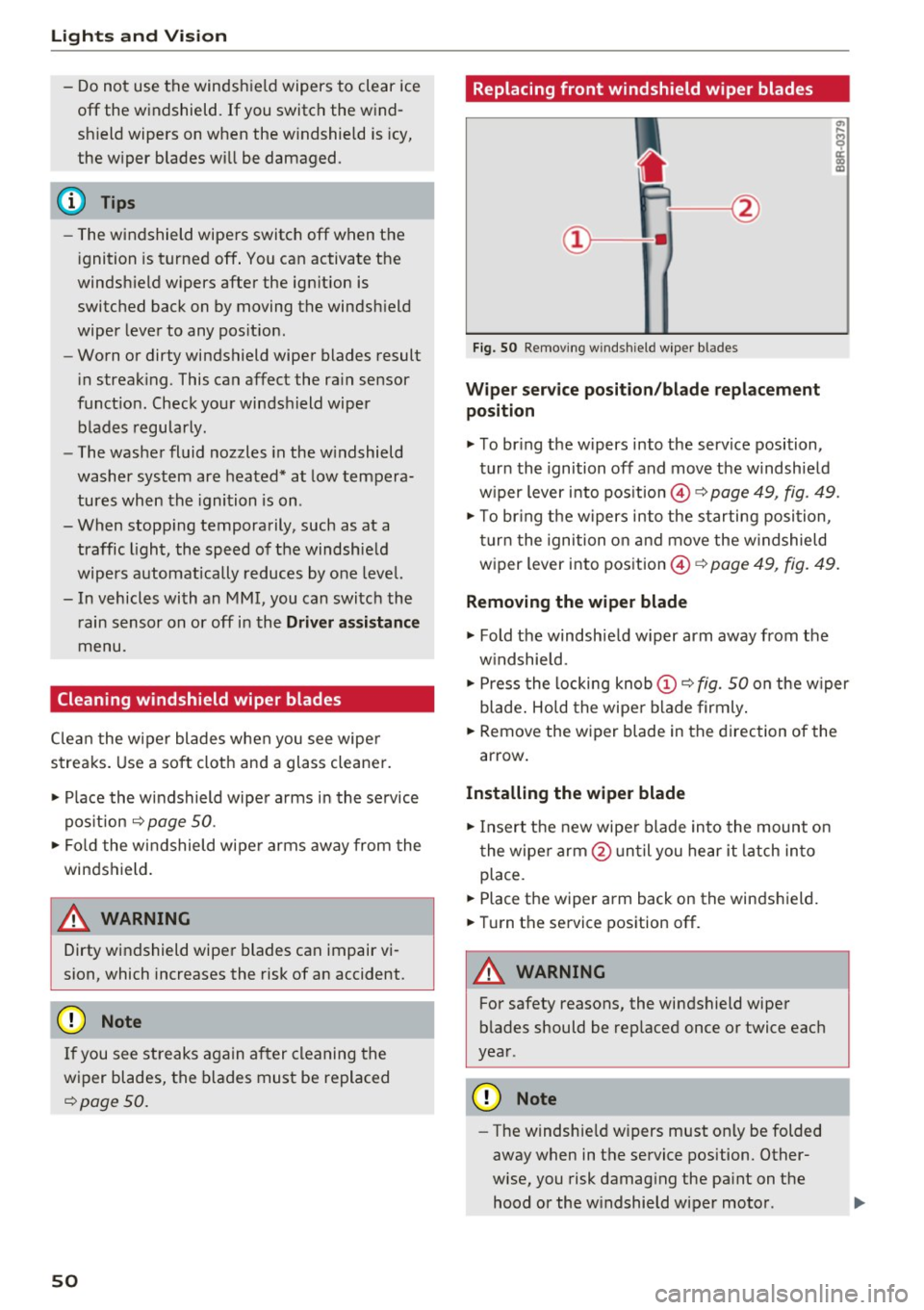
Fi g. 50 Remov ing w indsh ie ld w iper bl ades
Wipe r serv ice position /blade replacement
position
.,. To br ing the w ipers into the service position,
tur n the ignition off and move t he w indshie ld
w iper lever i nto pos ition @,=:,
page 49, fig. 49.
.,. To br ing t he w ipers into the starting posi tion ,
tu rn t he ignition o n and move the w indshield
w iper lever into pos ition ©
c:> page 49, fig. 49.
Removing the wiper blade
.,. Fold the windshie ld w iper arm away from the
w indshield .
.,. Press the locking knob
(D ,=:, fig. 50 on the w iper
blade . Ho ld the wipe r blade firmly .
.,. Remove the wiper blade in the direction of the
arrow .
Installing the wipe r blade
.,. Insert t he new wipe r blade in to the mount on
t he wipe r arm @ un ti l you hear it latch in to
place .
.,. Place the wiper arm back on the winds hield.
.,. Tur n the service position off .
A WARNING
-
For safety reasons, the windshield wipe r
b lades should be rep laced once or twice eac h
year .
Q) Note
-The w indshie ld w ipers must on ly be folded
away when in t he service position. Other
wise, you risk damag ing the pa int on the
hood or the w indshield wiper motor .
Page 52 of 272
<( co ..... N
" N ..... 0 r--. > 00
-You should not dr ive your vehicle or press
the windshie ld wiper lever when the wiper
arms are fo lded away from the windshield.
The windshield wipers would move back in
to their original position and could damage
the hood and windshield .
- To prevent damage to the windsh ield wash
er system, a lways loosen wiper blades that
have frozen to the w indshield before turn
i ng the wipers on .
- To prevent damage to the wiper blades, do
not apply gasoline, petroleum, thinning
agents or other solvents on the wiper
blades or near them.
- To prevent damage to the wiper a rms or
other components, do not try to move the
windsh ield wipers by hand.
@ Tips
- Commercial hot wax such as the types used
by car washes make it mo re difficult to
clean the windshield.
- You can also use the service position, fo r ex
ample, if you want to p rote ct the windsh ield
from icing by using a cover.
- You cannot activate the service position
when the hood is open.
Digital compass
Switching the compass on and off
Appl ies to: ve hicl es with digital compass
Fig . 51 Rearview mirror: digital compass activa ted
.. To turn the compass on or off, press the button
@ until the compass in the mirror appears or
disappears .
Lights and V ision
The digita l compass only works when the ignition
is turned on . The directions are indicated with ab
brev iat ions:
N (north), NE (northeast), E (east),
SE (southeast), S (south), SW (southwest), W
(west), NW (northwest).
You must recalibrate the compass if it does not
display the correct direct ion
¢ page 52, Cali
brating the compass.
(D Tips
To p revent inaccurate compass readings, do
not br ing any remote controls, electrical devi
ces or metallic objects near the mirror.
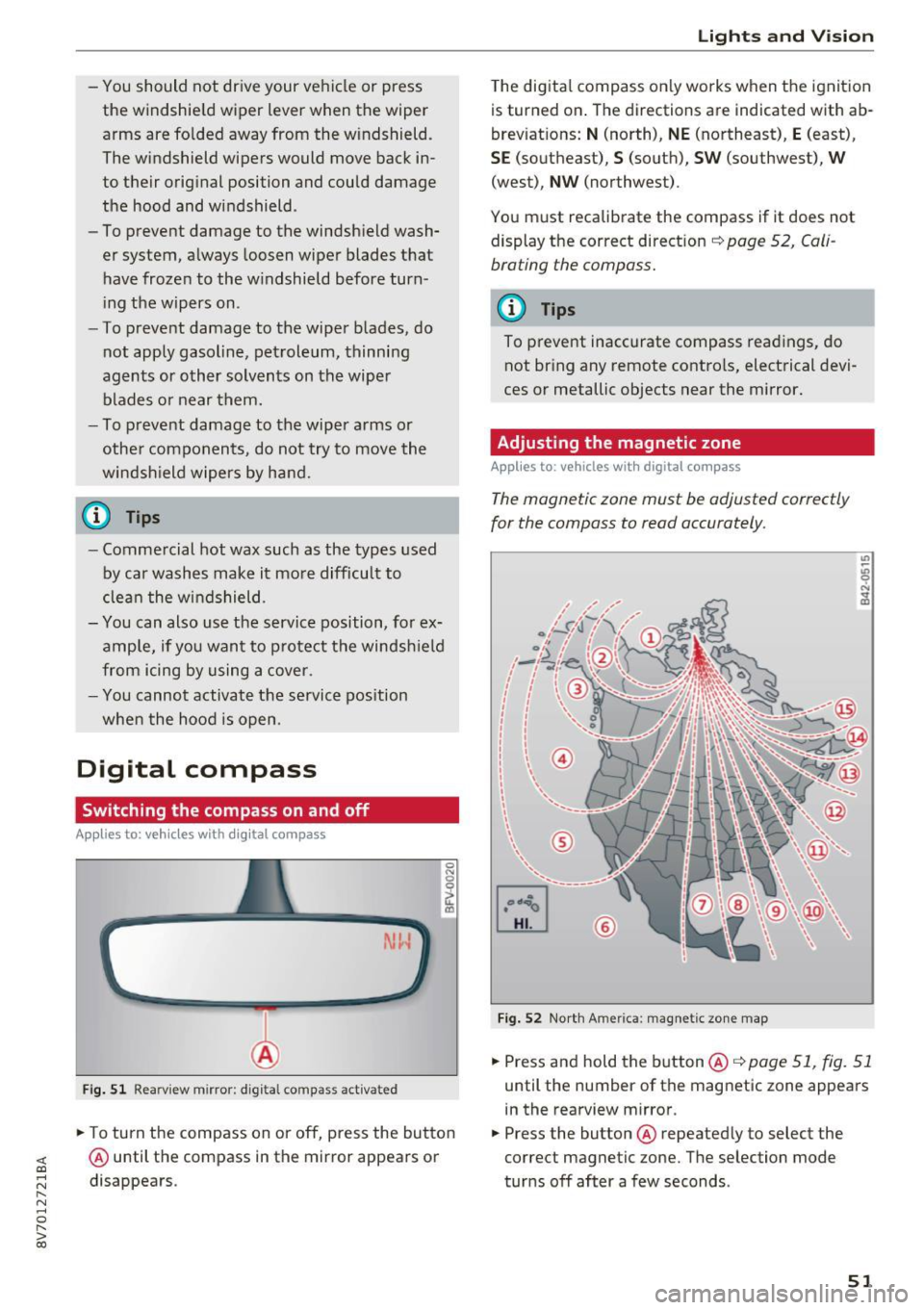
Adjusting the magnetic zone
Appl ies t o: vehicles wit h digita l co mp ass
The magnetic zone must be adjusted correctly
for the compass to read accurately.
®
Fig. 52 North Ame rica: magnetic zone map
.. Press and hold the button@q page 51, fig. 51
until the number of the magnetic zone appears
in the rearview m irror .
.. Press the button @ repeated ly to select the
correct magnetic zone. The selection mode
turns off after a few seconds .
51