key AUDI A3 CABRIOLET 2016 User Guide
[x] Cancel search | Manufacturer: AUDI, Model Year: 2016, Model line: A3 CABRIOLET, Model: AUDI A3 CABRIOLET 2016Pages: 272, PDF Size: 67.88 MB
Page 34 of 272
<( co ..... N
" N ..... 0
" > 00
A WARNING
Read and follow all WARNINGS¢&. in Key
set on page 2 7
Luggage compartment
Lid
Opening/closing the luggage compartment
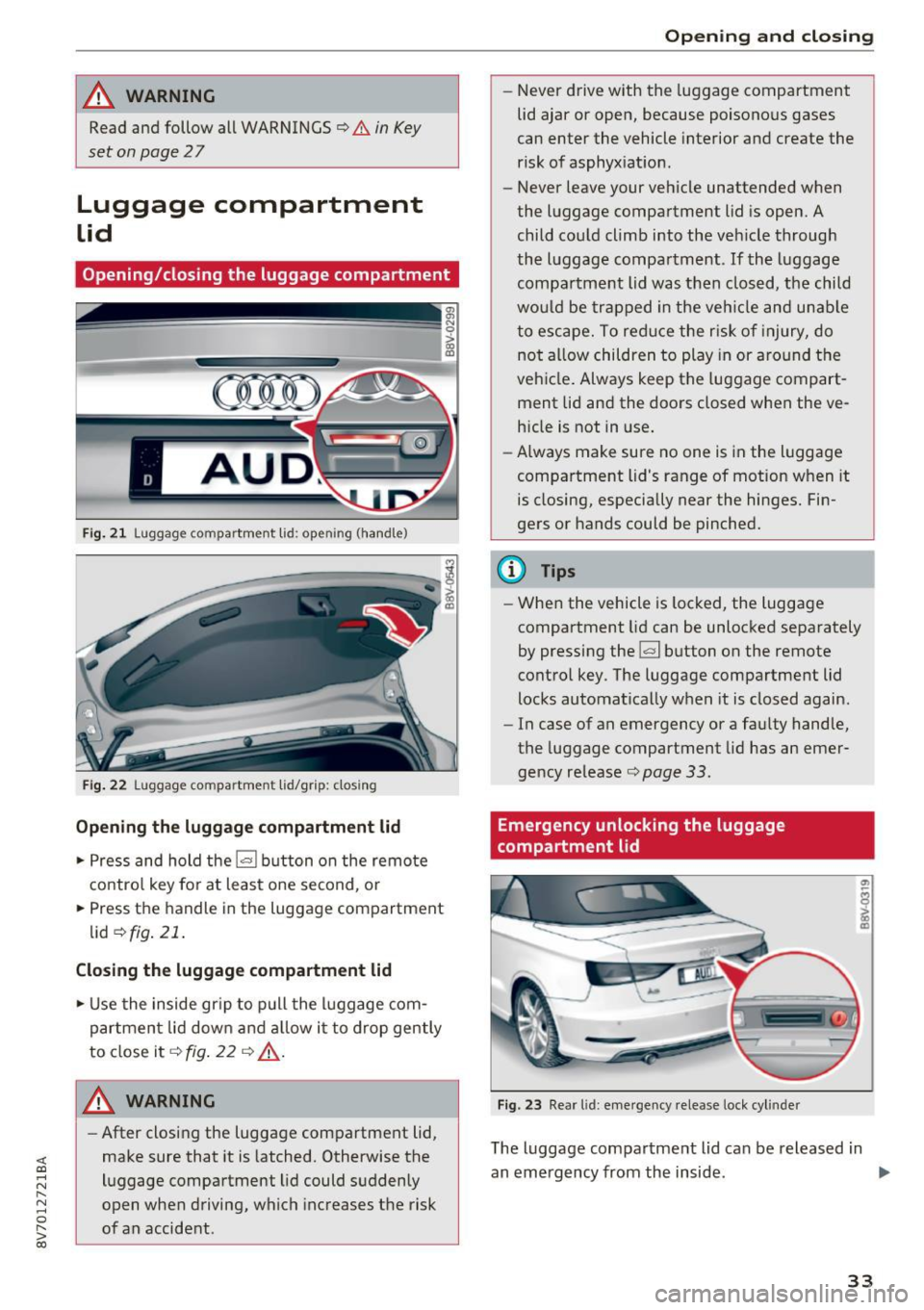
Fig . 21 Luggag e compartm ent lid : op enin g (handle)
Fig . 22 Luggage compartmen t lid/grip: closing
Opening the luggage compartment lid
... Press and hold the l= I button on the remote
control key for at least one second, or
... Press the handle in the luggage compartment
lid
¢ fig . 21.
Closing the luggage compartment lid
... Use the inside gr ip to pull the luggage com
partment lid down and allow it to drop gently
to close it¢
fig . 22 ¢ .&_.
A WARNING 1=
- After closing the luggage compartment lid,
make sure that it is latched. Otherwise the
luggage compartment lid could suddenly
open when driving, which increases the risk
of an accident .
Opening and closing
-Never drive with the luggage compartment
lid ajar or open, because poisonous gases
can enter the vehicle interior and create the
risk of asphyxiation .
- Never leave your vehicle unattended when
the luggage compartment lid is open. A
child could climb into the vehicle through
the luggage compartment .
If the luggage
compartment lid was then closed, the child
would be trapped in the veh icle and unab le
to escape. To reduce the r isk of injury, do
not al low children to play in or around the
vehicle. Always keep the luggage compart
ment lid and the doors closed when the ve hicle is not in use.
- Always make sure no one is in the luggage
compartment lid's range of motion when it
is closing, especially near the hinges. Fin
gers or hands could be pinched.
@ Tips
- When the vehicle is locked, the luggage
compartment lid can be unlocked separately
by pressing the
1£:1 button on the remote
control key. The luggage compartment lid
locks automatically when it is closed again.
- In case of an emergency or a faulty handle,
the luggage compartment lid has an emer
gency release¢
page 33.
Emergency unlocking the luggage
compartment lid
Fig. 23 Rear l id : eme rgency release lock cyl inder
The luggage compartment lid can be released in
an emergency from the inside . ..,_
33
Page 35 of 272
Opening and clo sin g
To reach the emergency release mechanism, the
rear bench seat backrest must be folded down .
¢page SB
.. Insert the key into the lock cylinder near the
handle.
.. Turn the key counterclockwise.
Power windows
Controls
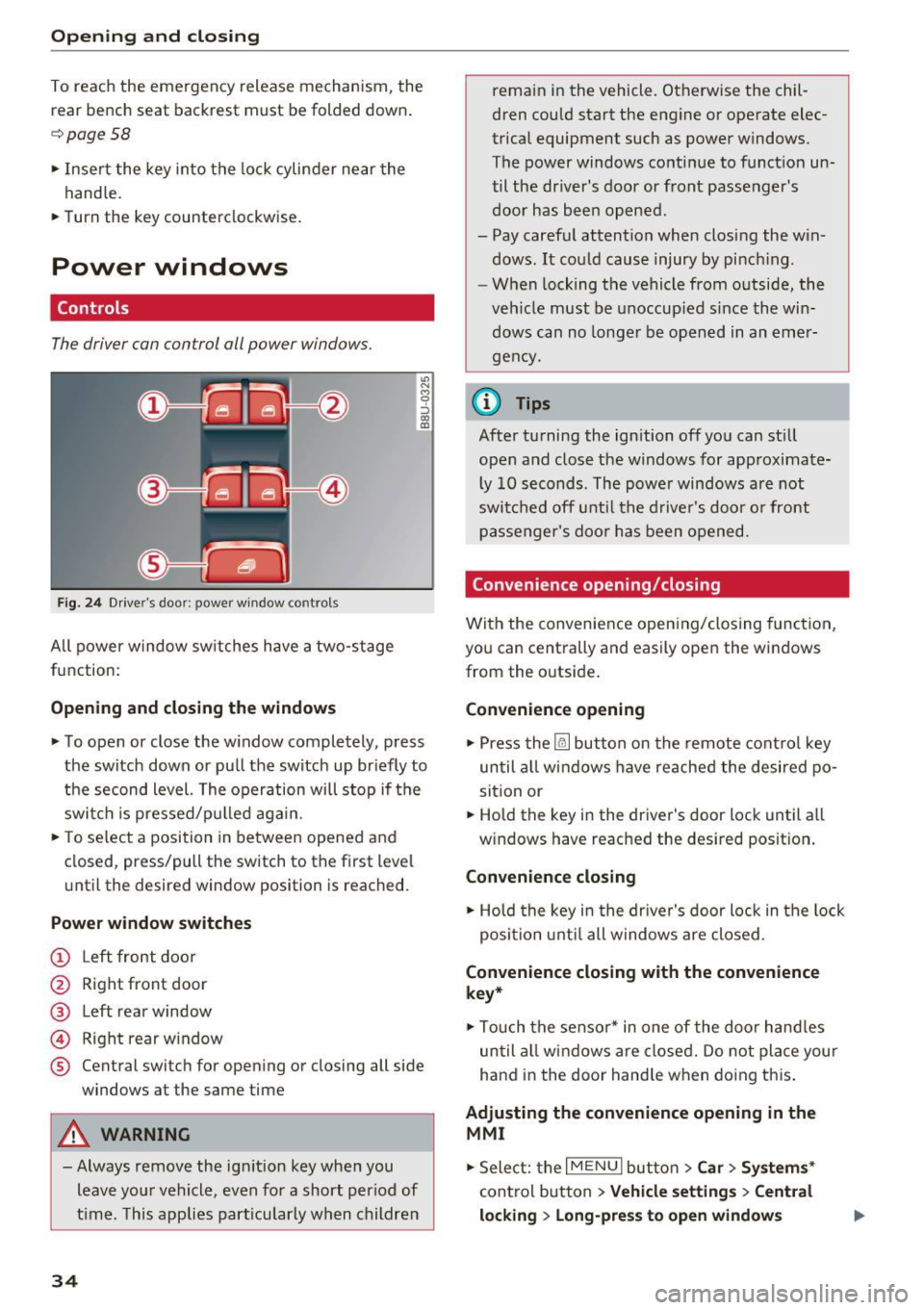
The driver can control all power windows.
F ig. 24 Driver's door: powe r w indow controls
All power w indow switches have a two-stage
function:
Opening and closing the windows
"' N M 9 ::J co (D
.. To open or close the w indow completely, press
the switch down or pull the switch up br iefly to
the second level. The operation will stop if the switch is pressed/p ulled aga in.
.. To se lect a position in between opened and
closed, press/pull the switch to the first level
u nt il the desired window position is reached.
Power window switche s
(!) Left front doo r
@ Right front door
@ Left rear window
@ Right rear window
® Central switch for open ing or closing all side
windows at the same time
A WARNING
- Always remove the ign it ion key when you
leave you r vehicle, even for a short period of
t ime . T his applies part icularly when children
34
remain in the vehicle. Ot herwise the chil·
dren could start the engine or operate elec
trical equipment such as power w indows.
The power windows cont inue to funct ion un
til the driver's door or front passenger's
door has bee n opened .
- Pay careful attention when closing the win dows. It cou ld cause injury by pinch ing .
- W hen lock ing the vehicle from o utside, the
veh icle must be unoccup ied since the win
dows can no longer be opened in an emer
gency.
{D Tips
After turning the ignition off you can st ill
open and close the windows for approximate l y 10 seconds . The powe r windows are not
swi tc h ed off u ntil t he drive r's doo r o r front
passenger's doo r has been opened.
Convenience opening/ closing
With the convenie nce opening/closing function,
you can centrally and easily open the windows
from the outside .
Convenience opening
.,. Press the ~ button on the remote cont rol key
until all windows have reached the desired po
sition or
.. Hold the key in the driver's door lock until a ll
w indows have reached the desired posit ion .
Convenience clo sing
.,. Ho ld the key i n the dr ive r's door lock in the lock
posi tion unti l all windows are closed .
Convenience closing with the convenience
key*
.,. Touch the senso r* in one of the door hand les
until all windows a re closed. Do not pla ce your
ha nd in the door hand le when do ing th is .
Adjusting the convenience opening in the
MMI
.. Sele ct: the I M ENU I button >Car > Systems *
control b utton > Vehicle setting s> Cent ral
lo cking > Long-pre ss to open windows
Page 36 of 272
<( co .... N ,.__
N .... 0 ,.__
> co
To enable convenience opening of the windows,
the
Front wi ndows and Rea r windo ws functions
must be switched
On .
A WARNING
- Never close the windows careless ly or in an
uncontrolled manner, because this increas
es the r isk of injury.
- For security reasons, the windows can only
be opened w ith the remote control key at a
maximum distance of approximately 6 feet
(2 mete rs) from the vehicle .
- Always watch the windows while they are
closing using the lock cylinder so that no
one is pinched in the w indow . Closing stops
when the key is moved into the start ing po
sit ion.
Correcting power window malfunctions
After disconnecting the vehicle battery, the one
touch up and down feature must be activated
again.
~ Pull the power window sw itch until the w indow
is comp lete ly ra ised.
~ Release the switch and pull it aga in for at least
one second.
Op ening and cl osing
35
Page 38 of 272
<( co ..... N
" N ..... 0 r--. > 00
distance from the power top to reduce the
risk of injury.
- When operating the power top, visibility to
the rear is limited. Avoid operating the top
while driving in reverse .
(D Note
- To prevent damage to the power top:
- do not store any objects in the power top
storage compartment.
- make sure there is enough space above
the vehicle when opening or closing the
power top.
- To reduce the risk of damage, make sure
there are no sensitive objects in the power
top storage compartment's range of mo
tion.
(D Tips
- To prevent the battery from draining unnec
essarily, do not open or close the power top
repeatedly when the engine is switched off.
- A message will appear in the instrument cluster if there is a malfunction in the power
top
~ page 38.
- The power top can also be operated manual ly temporari ly if there is a malfunction
~ page 40, Power top emergency opera
tion.
An authori zed A udi dealer or au thor
i zed Audi Service Facility should diag nose
and correct the cause of the malfunction as
soon as possib le .
- If the vehicle is parked with the power top open, the vehicle interior is not protected
from damaging weather or unauthorized ac
cess. Lock any items you leave behind in the
luggage compartment. Close the power top
before leaving the vehicle.
- The side windows automat ically lower
slightly when opening or closing the power
top.
P owe r top
Power top convenience opening and closing
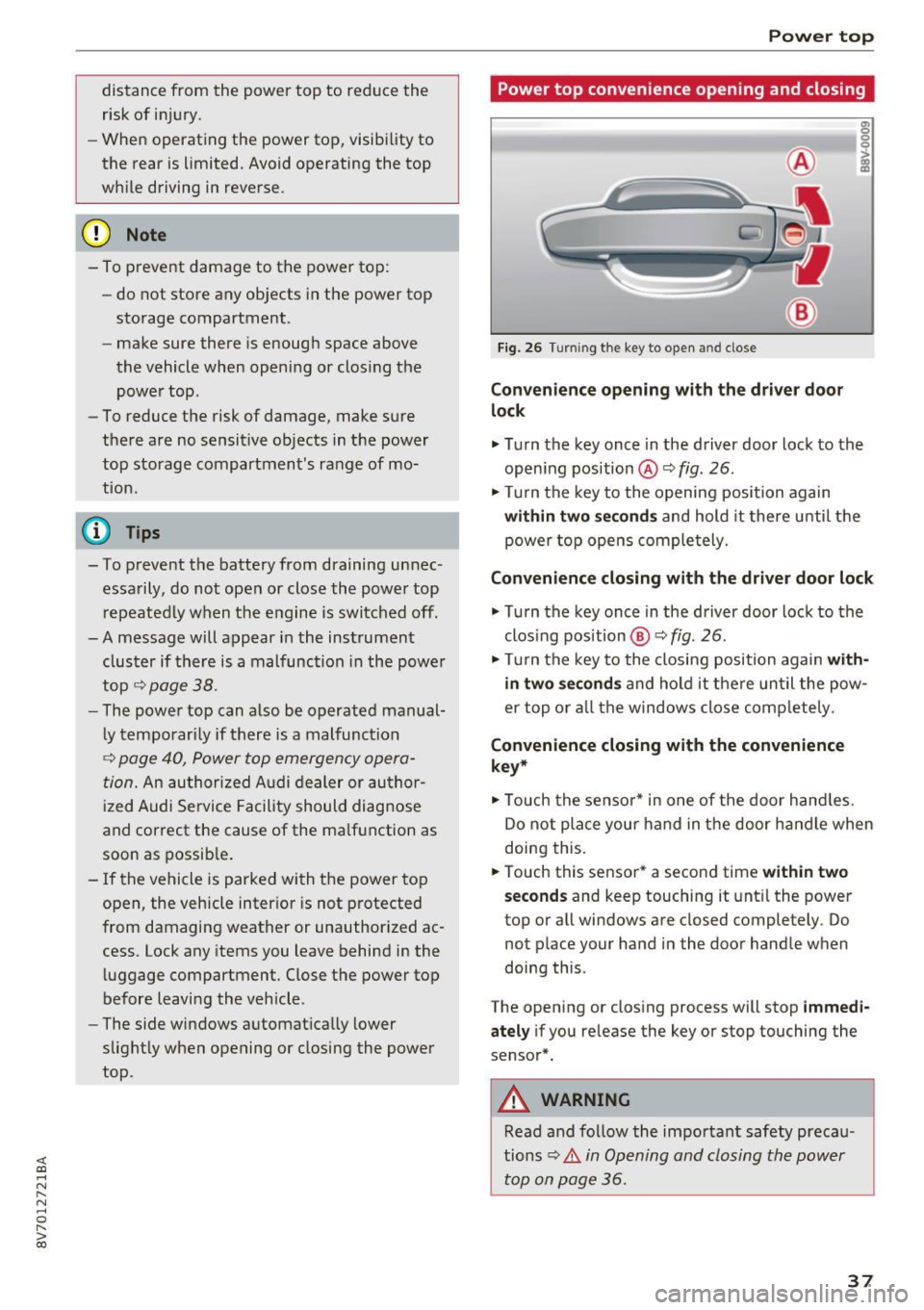
Fig. 26 Turning the key to open and close
Con ven ien ce opening with the dri ver door
lock
g: 0
0
>
18
.,. Turn the key once in the driver door lock to the
open ing position @ Q
fig. 26.
.,. Turn the key to the opening position again
within tw o seconds and hold it there unti l the
power top opens comple tely.
Conven ienc e closing with the driver door lock
.,. Turn the key once in the driver door lock to the
clos ing pos ition @Q
fig. 26.
.,. Turn the key to the closing position again w ith
in two second s
and ho ld it there un til the pow
er top or a ll the windows close comp letely .
Convenience closing with the convenience
ke y*
.,. Touch the senso r* in one of the door hand les.
Do not place your hand in the door handle when
doing this.
.,. Touch this sensor * a second time
w ith in tw o
sec ond s
and keep touching it unt il the power
top or a ll windows are closed completely. Do
not place your hand in the door handle when
doing this .
The opening or closing process will stop
imm ed i
ate ly
if you re lease the key or stop touching the
sensor*.
A WARNING
Read and follow the important safety precau
tions
~ .&. in Opening and closing the power
top on page 36 .
37
Page 48 of 272
<( co ..... N
" N ..... 0 r--. > 00
Instrument illumination
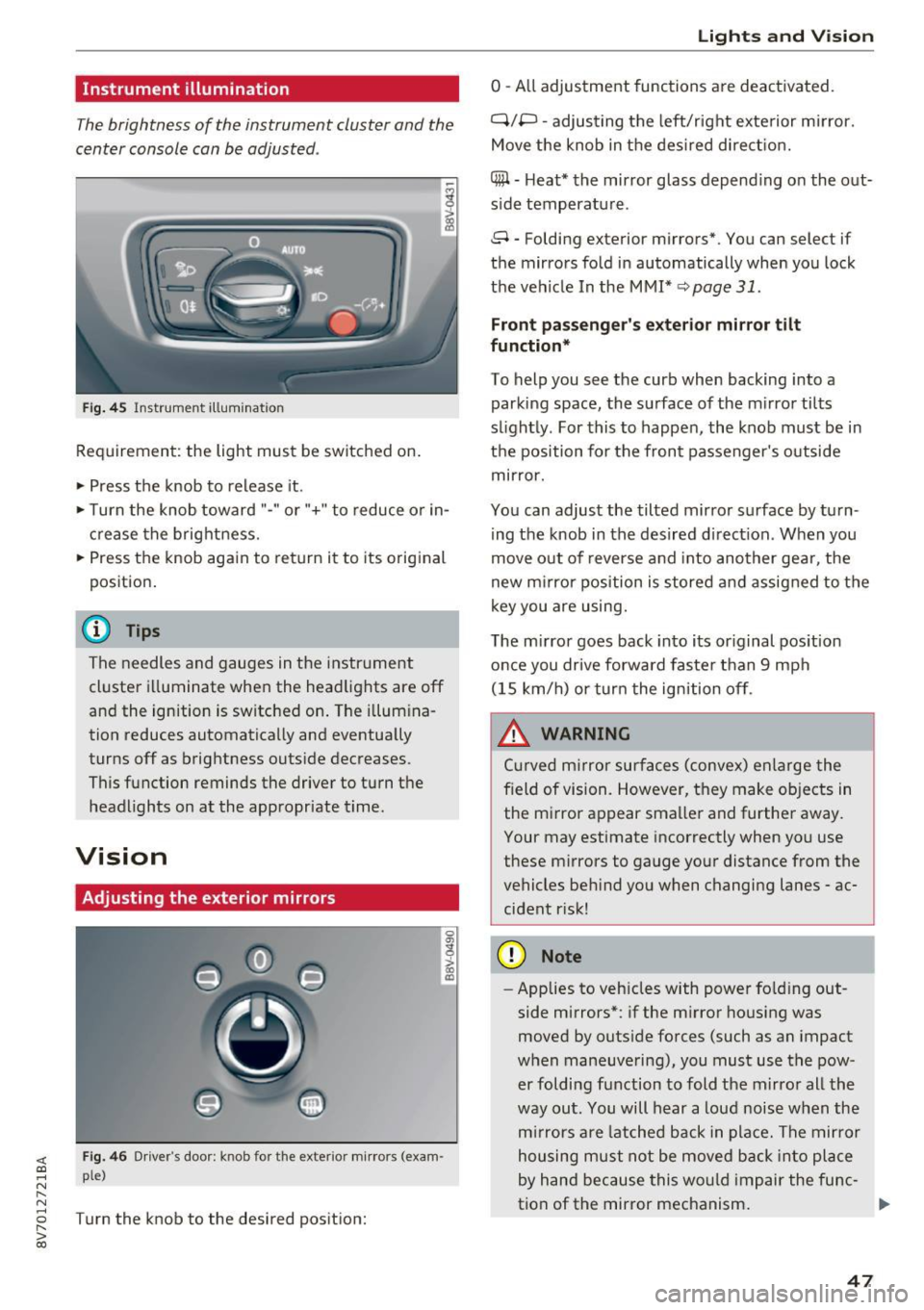
The brightness of the instrument cluster and the
center console can be adjusted .
Fig. 45 Instrumel'lt illumination
Requirement: the light must be switched on.
.. Press the knob to release it.
.. Turn the knob toward "-"or"+" to reduce or in
crease the brightness.
.. Press the knob again to return i t to its original
position .
@ Tips
The needles and gauges in the instrument
cluste r illuminate when the headlights are off
and the ignition is switched on . The illumina
tion reduces automatically and eventua lly
turns off as brightness outside decreases.
This function reminds the driver to turn the
headlights on at the appropriate time.
Vision
Adjusting the exterior mirrors
0
g
>
Fig. 46 Driver's doo r: knob fo r th e exterior mirrors (exam
ple)
Turn the knob to the desired position:
a, (X)
Lights and V ision
0 -All adjustment functions are deactivated.
Q/P -adjusting the left/r ight exte rior m irror.
Move the knob in the desired direction.
(@ -Heat* the mirror glass depend ing o n the out
s ide temperatu re.
8 -Folding exterior mirrors*. You can select if
the mirrors fold in automatically when you lock
the vehicle In the MMI*
q page 31.
Front passenger 's exterior mirror tilt
function*
To help you see the curb when backing into a
parking space, the surface of the m irror tilts
s li ghtly. For this to happen, the knob must be in
the position for the front passenger's outside
mirror .
You can adjust the tilted mirror surface by turn
ing the knob in the desired d irect ion . When you
move out of reverse and into another gea r, the
new mirror position is stored and assigned to the
key you are using.
The mirror goes back into its or iginal position
once you drive forward faste r than 9 mph
(15 km/h) or turn the ignition off.
_& WARNING
Cur ved m irror surfaces (convex) enlarge the
f ield of vision. However, they make objects in
the m irror appear smaller and further away.
Your may estimate incorrectly when you use
these mirrors to gauge your distance from the
vehicles beh ind you when changing lanes -ac
cident r isk!
(D Note
- Applies to vehicles with power fo lding out
side mirrors*: if the mirror housing was
moved by outside forces (such as an impact
when maneuvering), you must use the pow
er foldi ng function to fold the mirror all the
way out. You will hear a loud noise when the
mirrors are latched back in place. The mirror
housing must not be moved back into place
by hand because this would impair the func-
tion of the mirror mechanism. ..,.
47
Page 55 of 272
Sea ts and stor age
_& WARNING
- Only adjust the front seat with when the ve
hicle is stationary. Otherwise, this increases
the risk of an accident
- The power adjustment for the front seats al
so works wit h the ignition switched off or
with the ignition key removed. For this rea
son, children shou ld never be left unattend
ed in the veh icle - they could be injured!
- Exercise caution when adjusting the seat height. Unsuperv ised or careless seat ad
justment can p inch f ingers or hands causing
injuries.
- The front seat backrests must not be re
clined too far back when driving, because
this impairs the effectiveness of the safety belts and airbag system, which increases
the risk of injury.
- To reduce the risk of injury during sudden
bra king or i n a co llision, the driver and front
p as senge r shou ld no t have the ir back rests in
the reclined posit ion while driv ing or riding.
T he safety belts and airbag system can pro
vide the greatest protection possible when
the backrests are in the upr ight position and
the safety be lts a re worn correctly. The
more a backrest is reclined, the greater the
risk of injury due to an incorrect seating po
sit ion and safety belt position.
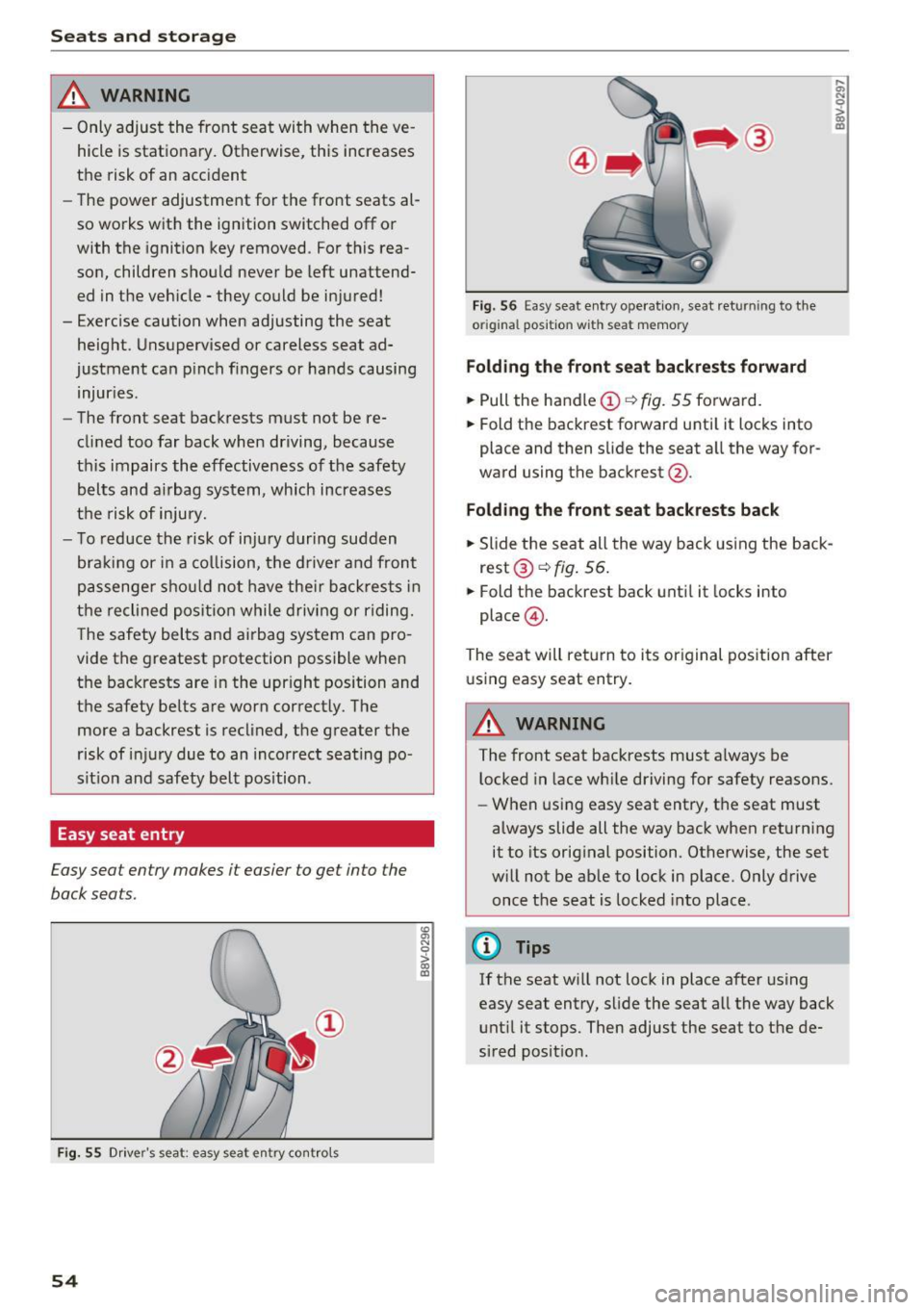
Easy seat entry
Easy seat entry makes it easier to get into the
back seats.
F ig. 55 Driver's seat: easy seat entry cont rols
54
F ig. 56 Easy seat entry operat io n, seat returning to the
or igi nal position w ith seat memory
Folding the front s eat backres ts forward
.. Pull the handle (D ¢ fig. 55 forward.
.. Fold the backrest forward unti l it locks into
place and then slide the seat a ll the way for
ward using the backrest @.
Fold ing the front seat back rests back
.. Slide the seat all the way back using the back
rest @¢
fig. 56 .
.. Fold the backrest back until it locks into
place @.
The seat will return to its original posit ion after
u sing easy seat entry.
A WARNING
:;; N 0
> 00 ID
-The front seat backrests must a lways be
l ocked in lace wh ile driving for safety reasons.
- When using easy seat entry, t he seat must
always slide all the way back when returning
it to its orig inal position. Otherwise, the set
w ill not be ab le to lock in place. Only drive
once the seat is locked into place.
{D Tips
If the seat w ill not lock in place after using
easy seat entry, slide the seat all the way back unt il it stops. Then adjust the seat to the de
sired posit ion.
Page 57 of 272
Sea ts and stor age
Removing th e head restraints
To remove the head restrai nts, the backrest m ust
be folded forward partially.
• Remove the screwd river from the vehicle tool
ki t
¢ page 230.
• Release t he backrest ¢ page 58 .
• Press the button @¢ fig. 59 and slide the head
restraint up as far as it can go¢&_ .
• Place the screwdriver in position @ in the
opening, press the button @ and pull the head
restra int out of the backrest at the same time
¢ &_ .
• Fo ld the backrest down until it latches securely
c> & in Increasing the size of the luggage
compartment on page 59.
Inst alling the head rest raints
To install the head restraints, the backrest must
be folded forward partially.
• Release the backrest ¢
page 58.
• Slide the posts on the head restraint down into
the gu ides until you feel the posts click into
place . You should not be able to pull the head
restra int out of the backrest.
• Fo ld the backrest down until it latches securely
¢ & in Increasing the size of the luggage
comportment on poge 59.
A WARNING
- Only remove the rear seat head rest raints
when necessary in order to install a child
seat . Insta ll the head restra int aga in imme
diately once the ch ild seat is removed. Driv
ing with the head restra ints removed or
head restraints not in the highest position
increases the risk of serio us in ju ry.
- Read and following the WARNINGS in
¢page 127.
56
-
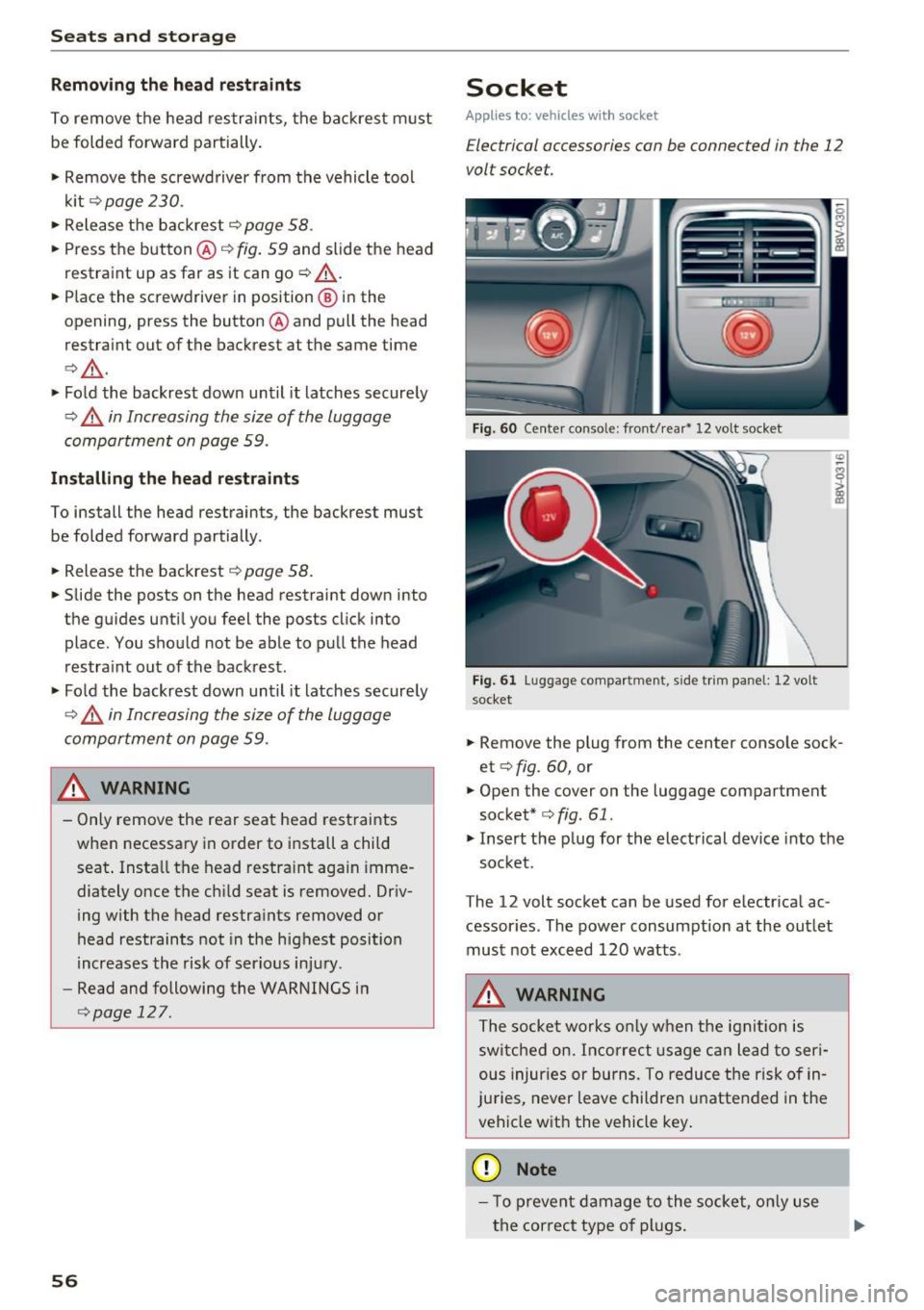
Socket
Applies to: vehicles with socket
E lectrical accessories con be connected in the 12
volt socket.
--
-IE_ _ _ ,-.;.. r- "-
--- --' I I
Fig. 60 Center conso le: front/rea r• 1 2 vo lt socket
F ig. 61 Luggage compa rt ment, s ide tr im panel : 12 volt
socket
• Remove the plug from the center conso le sock
et
c> fig. 60, or
• Open the cover on the luggage compartment
socket*
c:> fig . 61.
• Insert the p lug for the elect rical device into the
socket.
The 12 volt socket can be used for electr ical ac
cessor ies. The power consumption at the out let
must not exceed 120 watts.
A WARNING
The socket works on ly when t he ignit ion is
switched on. Incorrect usage can lead to ser i
ous injuries or burns. To reduce the risk o f in
ju ries, never leave children unatte nded in the
vehicle with the vehicle key .
{Q) Note
-To prevent d am age to the socke t, on ly use
the correct type of plugs .
-
Page 58 of 272
<( co ..... N
" N ..... 0 r--. > 00
-Never connect devices that generate elect ri
ca l power such as solar panels or a battery
charger to the 12 volt socket . They can dam
age the vehicle electrical system.
(D Tips
The vehicle battery drains when accessories
are turned on but the engine is off.
Storage
Beverage holders
F ig. 62 Sect io n of the rear bench seat: rea r cup ho lders •
I
Your veh icle has cup holders in the front center
console, in the door pockets and in the rear cen
ter armrest* .
A WARNING
-
-Do not p ut any hot beverages in the cup
holder while the vehicle is moving . Ho t bev
erages could spill, wh ich can cause injury.
- Do not use any breakable beverage cont ain
ers ( for example, m ade out of glass or po r
celain). You cou ld be injured by them in the
event of an accident.
(D Note
Beverage containers in the cup holders should
always have a lid. Otherwise, beverages could
spill and cause damage to veh icle equipment
or stain the seat cove rs.
Seats and storag e
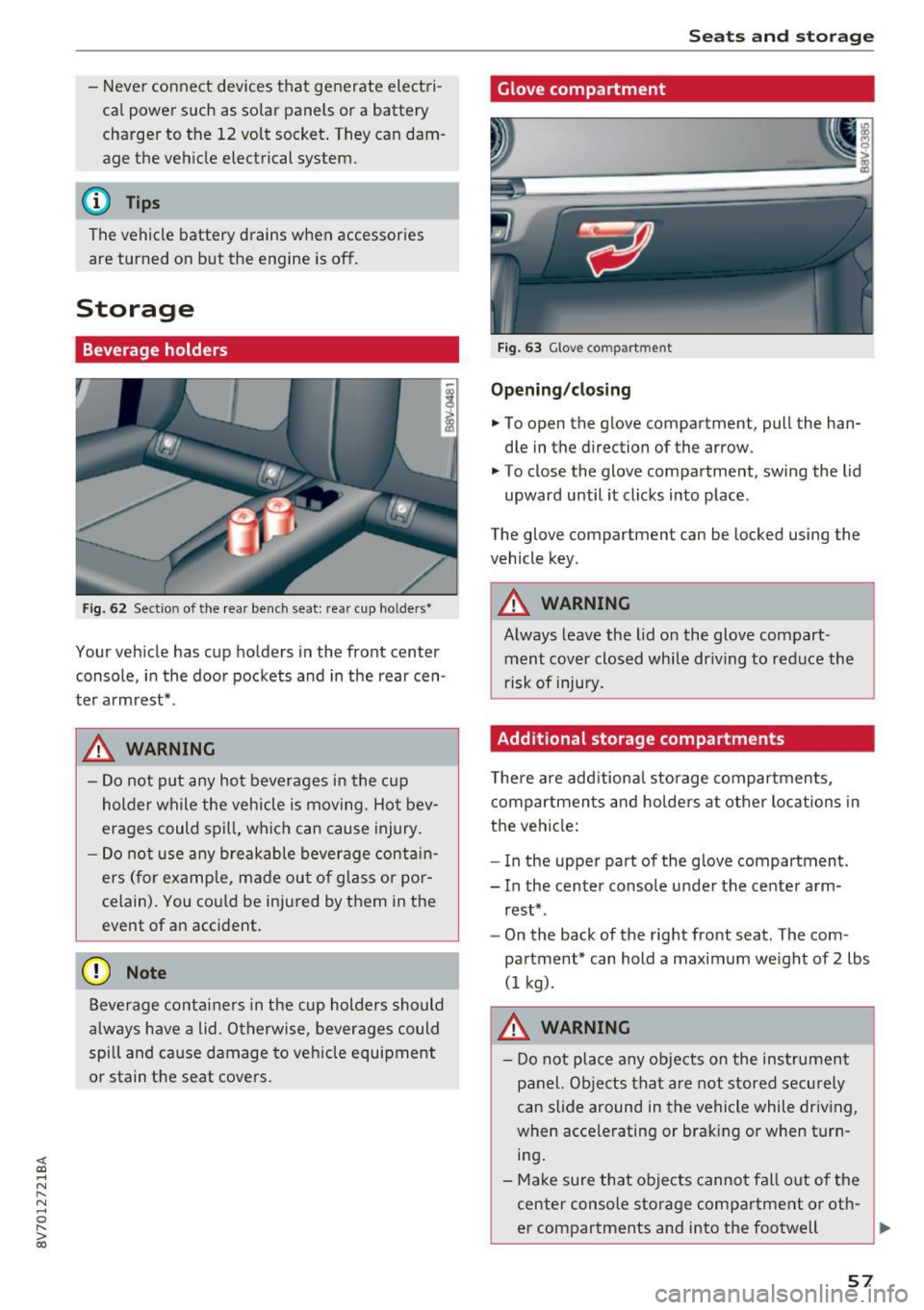
Glove compartment
Fig. 63 G love co mpart m ent
Opening /closing
• To open the glove compartment, pull the han
dle in the d irection of the arrow .
"' To close the glove compartment, swing the lid
upward until it clicks into place .
The glove compartment can be locked using the
vehicle key.
A WARNING
-Always leave the lid on the glove compart- ment cover closed while dr iving to reduce the
r isk of injury.
Additional storage compartments
T he re are add itiona l storage compartmen ts,
compartments and holders at other locations in
the vehicle:
- In the uppe r part of the glove compartment.
- In the center console under the center arm -
rest* .
- On the back of the right front seat. The com
partment* can hold a maximum we ight of
2 lbs
(1 kg) .
A WARNING
-Do not place any objects on the instrument
panel. Objects that are not stored secu rely
can slide around in the vehicle while driving,
when accele rating or braking or when turn
i n g .
- Make sure that objects cannot fa ll out of the
center console storage compartment or oth-
er compartments and into the footwell
~
57
Page 62 of 272

<( co .... N ,.__
N .... 0 ,.__
> co
Warm and cold Climate control system
Description
The climate control system* cools and removes
humidity from the air in the vehicle interior. It is
the most effect ive when the windows and power
top are closed. If there is a build-up of heat in
side the vehicle, ventilation can help to speed up
the cooling process. Because of this, the windows
can be opened from outside.
¢ page 34, Conven
ience opening/closing
Pollutant filter
The pollutant filter removes pollutants such as
dust and pollen from the air.
Key recognition
Different climate control system* settings are
stored and assigned to the remote control key
that is be ing used .
A WARNING
Poor visibility can lead to accidents.
- For safer driving, keep all windows free of
ice, snow and fog.
- Become familiar as quickly as possible with
the correct use and function of the climate
control system, especially with the defrost
ing and defogging function.
- When the temperature is below freezing,
only use the windshield washer system after
the windshield has been warmed by the cli
mate control system. The washer fluid could
Warm and cold
freeze on the windshield and impair visibili
ty.
@ Note
- If you suspect that the climate contro l sys
tem is damaged, switch the system off to
prevent further damage and have it checked
by an authorized Audi dealer or authorized
Audi Service Facility.
- Repairs to the Audi climate control system
require special technical knowledge and
special tools. See an authorized Audi dealer
or authorized Audi Service Fac ility.
@) For the sake of the environment
Reducing the amount of fuel used also re
duces the amount of pollutants that enter the
air.
(D Tips
- To prevent interference with the heating
and cooling output and to prevent the win
dows from fogging over, the air intake in
front of the windshield must be free of ice, snow or leaves.
- Condensation from the cooling system* can dr ip and form a pudd le of water under the
vehicle. This is normal and does not mean
there is a leak.
- The energy management system may switch
the seat heating* or rear window defroster
off temporarily . These systems are available
again as soon as the energy supply has been
restored.
- The flows through the vents under the rear
window. Make sure the openings are not
covered when placing clothing on the lug
gage compartment cover.
61
Page 65 of 272
Warm and cold
-@ Air flow amount
- @ Air flow d irection
- @
(Applies only to Canada) airf low setting (dif-
fused or direct)
To adjust the
air fl ow amount , turn the ridged
outer adjusting r ing
(D ¢ fig . 72. To stop the a ir
f low, tur n the adjusting ring all the way to the
right.
To adjust the
air fl ow dir ect ion , turn the air vent
grill insert @.
(Applies only to Canada) To adjust the air f low
se tting s,
pull or press the center adjustment
ring @¢
fig. 72:
-Diff used air flow (indirect @): press in the cen
ter adjusting ring gently
¢ fig. 73.
-Di re ct air flow (strong @): pull the center ad
justment ring out lightly¢
fig. 73.
ear window defogger
The LED in the~ button turns on when the func
tion is sw itched on¢
page 62, fig. 71 .
If the rear window defogger is activated when
the ignition is switched on, the battery manage
ment determ ines based on the battery charge if
it is possible to turn on . Otherwise, the rear win
dow defogger functions with the engine running
and switches off automatically after approxi mately 10 -20 minutes, depending on the out
side temperature.
To prevent the rear w indow defogger from
sw itching off automatically, p ress and hold the
00 butto n for mo re than th ree seconds. This re
mains stored up to approx imately 15 minutes af
ter turn ing off the ignition.
Seat heating
A ppl ies to: ve hicles w ith heated seats
The seat heating has three leve ls. The LED in the
button indicates the selected heat level
¢ page 62, fig. 71 .
.. To switc h the seat heating on, press the~ but
ton once .
.. To switch to a lower leve l, press the~ button
again.
64
.. To switch the seat heating off, press the~ but-
ton repeated ly until the LED turns off.
The seat heat ing swi tches a utomatically from
setting 3 to setting 2 after 10 minutes.
When seat heating should not be switched
on
Do n ot turn the seat heat ing on unde r the follow
i ng circumstances:
- The seat is unoccupied.
- The seat is covered with a seat cover.
- The seat is covered with a child seat.
- The seat is damp or wet.
A WARNING
Indiv iduals w ith reduced sensitivity to pain or
temperature could develop burns when us ing
the seat heat ing funct ion. To reduce the r isk
of injury, these ind ividuals should not use
seat heating.
(D Note
To avoid damage to the heating elements in
the seats, do not kneel on the seats or place heavy loads on a small area of the seat .
(D Tips
-The setting for the seat heating on the driv
er's s ide is assigned to the key that is in use.
- If the front passenger's seat heating is
turned on, it w ill not turn on again automat
ically if more than 10 minutes have passed
between switch ing the ignit ion off and
switching it on aga in.