park assist AUDI A3 CABRIOLET 2016 User Guide
[x] Cancel search | Manufacturer: AUDI, Model Year: 2016, Model line: A3 CABRIOLET, Model: AUDI A3 CABRIOLET 2016Pages: 272, PDF Size: 67.88 MB
Page 76 of 272
<( co .... N r--N .... 0 r--> co
Emergency braking function
In the event that the conventional brake system
fails or locks.
11-To brake your vehicle in an emergency, pull the
s wi tch (D and hold it¢
page 73, fig. 78.
11-As soon as you release the switch (Dor acceler -
ate , the brak ing stops.
Pulling and holding the switch (D while driving at
a speed of about 2 mph (3 km/h) or higher ini
tiates the emergency b raking function . The vehi
cle brakes at all four whee ls by act ivat ing the
b raking hydrauli cs. The b rake perfo rmance is
sim ilar to heavy braking.¢.&
To reduce the r isk of activating the emergency
braking by mistake, an audible warning tone
(buzzer) so unds when the switch (Dis pulled.
E mergency braking stops as soon as the
switch (Dis released o r the accelerator pedal is
pressed.
A WARNING
Emergency braking should only be used in an
emergency, when the normal brake pedal has
failed or the brake pedal is obstructed. Dur ing
emergency braking, your vehicle will brake
sim ilar to heavy braking . ESC and the associ
ated components (ABS, ASR, EDL) cannot
overcome the laws of physics. In corners and
when road o r weathe r cond itions are bad, a
full brake application can cause the vehicle to skid or the rear end to break away, wh ich in
creases the risk of an accident.
Hill hold
Appl ies to: ve hicles with hill hold assist
Hill hold makes it easier to start on hills.
Requiremen t: the d river's door must be closed
and the eng ine must be r unning.
The system is act ivated when the brake pedal is
p ressed wh ile the vehicle is stat iona ry .
T o prevent the veh icle from rolling back when
starting , the brake power is held for a brief mo
ment afte r releasing the brake pedal. Dur ing this
time, you can eas ily beg in to move you r vehicle.
D riv ing
A WARNING
- The intelligent technology of Hill Hold can
not overcome the limitat ions imposed by
natural phys ical laws. The increased comfort
offe red by Hi ll Hold shou ld no t cause you to
take safety risks.
- Hill Hold cannot hold the vehicle in a ll hill
start s ituations (for example, if the g round
is slippery or icy) .
- I f you do not beg in moving immediately af
ter releasing the b rake peda l, the vehi cle
could begin to roll ba ckward under certain
circumstances . Press the bra ke pedal or set
the parking brake immediately .
- If the engine "stalls", press the brake peda l
or set the parking bra ke immed iate ly.
- Stop-and-go traffic on inclines: to help pre
vent the vehicle from rolling back when con
tinuing to drive, press and hold the brake
pedal for several seconds when the vehicle
is stationary.
(D Tips
You can find out if your vehicle is eq uipped
with Hill Hold by checking at an authorized
A udi dealer or authorized Audi Service Fac ili
ty.
75
Page 79 of 272

Automatic transmission
stuck by "rocking" it. The selector lever lock en
gages if the lever stays in the N position longer
than approximately 2 seconds when the brake
pedal is not pressed .
Interlock button
The interlock button in the selector lever handle
prevents you from moving the selector lever in
advertently while in some se lector lever posi
tions. The positions that require the lock button
to be pressed are marked in color in the illustra
tion
c> fig. 80.
Ignition key safety interlock*
You can only remove the key from the ignition af
ter switching the ignition off if the selector lever
is in the P position. The selector lever wi ll be
locked in the P position as long as the key is not
in the ignition .
A WARNING
Read and follow all WARNINGS. c> A in Selec
tor lever positions on page 76.
(D Tips
-If the se lector lever does not engage, there
i s a malfunction . The eng ine is disabled to
prevent the vehicle from driving off unin
tentiona lly . Press the brake pedal br iefly to
al low the selector lever lock to engage
again .
-If the vehicle does not move forward or in
r everse even though a drive position is se
lected, proceed as follows:
- >If the vehicle does not move in the desired
direction, the system may not have engaged
the drive position correctly. Press the brake
pedal and select the drive position again.
-> If the vehicle st ill does not move in the de
sired direction, there is a system malfunc
tion. See an authorized Audi dealer or au
thorized Audi Service Facility for assistance
to have the system checked.
78
Driving tips
Applies to: vehicles with automatic transmissions
The transmission shifts up and down automati
cally when in the driving gears.
Fig. 81 Sect ion of t he ce nter console: se lector lever with
interlock button
The engine will only be able start when the selec
tor lever is in the P or N pos itions . At low temper
atures (below 14 °F (-10 °()), the engine can only
be started when the selector lever is in the P po
sition.
Starting from a stop
"' Press and hold the brake pedal.
"' Press and hold the interlock button in these
lector lever handle, select the desired selector
lever position such as D
c> page 76 and release
the lock button.
"' Wait a moment until the transmission shifts.
You will notice a slight movement when the gear engages.
"' Release the brake pedal and press the accelera
tor pedal
c> .&. -
Stopping temporarily
"'Keep the vehicle stationary using the braking
pedal, for example at traffic lights .
"' Do not press the acce lerator pedal when doing
this.
"' To prevent the vehicle from rolling when you
start driving, set the parking brake when stop
ping on steep incl ines
c> ,&. .
"'The parking brake will release automat ically
and the vehicle will start moving once you p ress
the acce lera tor pedal. Requirement: the driv
er's doo r must be closed and the driver's safety
belt must be fastened . ..,.
Page 81 of 272

Automatic transmissio n
and a message appears~ page 82 when
the clutch is overloaded.
- If the engine must run while you are work
ing in the engine compartment with the
hood open, make sure a gear is not engag
ed. The selector lever must be firmly in the
P position and locked in place and the park
ing brake m ust be set~
page 188. Other
wise, the vehicle could begin moving when
the engine speed increases, even with the
par king brake set.
{UJ Note
- When stopp ing on a n incline, do not t ry to
ho ld the vehicle in p lace by press ing the ac
ce le ra to r pedal wh ile a driv ing gear is se
l ected. Th is can ca use the au toma tic trans
mission to overheat and can damage it. Set
the parking brake or press the brake pedal
to prevent the vehicle from rolling .
- A llow ing the vehicle to ro ll when the eng ine
is stopped and the se lector lever is in the N
position will damage the automatic trans
mission because it is not l ubricated under
those circumstances.
- The transmiss ion can overheat and be dam
aged under certa in driving and traffic cond i
tions such as frequent starts, creep ing for a
long time, or stop-and-go traffic . W hen the
@l or. indicator light turns on, stop the
vehicle at the next oppo rt u nity and let the
transmission coo l~
page 82.
- Allow ing the veh icle to roll when the eng ine
i s stopped will damage the S tron ic trans
mission beca use it is not l ubricated
¢ page 246, Towing with a tow truck .
(D Tips
For safety reasons, the parking brake releases
automatically only when the driver's door is
closed and driver 's safety belt is fastened.
80
· Hill descent control
App lies to: vehicles with automatic transmissions
The hill descent control system assists the driver
when driving downhill .
Hill descent control is act ivated when the selec
tor lever is in the D or S position and you press
the brake pedal. The transmission automatically
selects a gear that is s uitable for the incline. H ill
descent control tries to maintain the speed ach
i eved at the t ime of braking, w it hi n phys ical and
technica l lim itations . If may still be necessary to
adjust the speed w ith the brakes. Because h ill de
scent control cannot shift down farther tha n 3rd
gear, it may be necessary to shift into tiptronic
mode in very steep areas. In this case, shift into 1st or 2nd gear in tiptronic mode to use the en
gine's braking force to relieve the brakes.
Hill descent control switches
off once the decline
l evels out or you press the accelerator pedal.
On vehicles with a cru ise control system*
¢ page 88, hi ll descent control is a lso activated
when the speed is set.
A WARNING
Hill descent contro l cannot overcome physical
limitations, so it may not be able to ma intain
a constant speed under all conditions. A lways
be ready to app ly the brakes.
Page 83 of 272
Automatic transmissio n
Launch Control-Program
Applies to: vehicles with Launch Control
The Launch Control Program enables maximum
acceleration .
Requirement: the engine must be at operating
temperature and the steer ing wheel must not be
turned .
.,. With the engine runn ing, press the
i ,; OFF ! but
ton br iefly one time
l) .
"' Pull the selector lever back out of the 0/5 posi
tion briefly to select the 5 posit ion, or press it
toward the rig ht into the tiptronic pos ition or
select the
Dynami c driving mode in d rive se
lect*
~ page 106.
"' Press the b rake pedal firmly with your left foot
and hold it all the way down for at least 1 sec
ond.
"' At the same time, press the gas pedal a ll the
way down w ith your right foot unti l the engine
reaches and stays at a high RPM level.
"' Remove your left foot from the brake.
_.&. WARNING
-Always adapt you r driv ing to the traffic flow .
- Only use Launch Control when road and traf-
fic cond itions allow it and other dr ivers will
not be endangered or impacted by your d riv
ing and the vehicle's a cce le ration.
- Please note that the dr ive wheels can sp in
and the vehicle can break away when sport
mode is switched on, especia lly when the
road is s lippery.
- Once the vehi cle has sta rted moving, press
the
l .!'3 OFF ! button briefly to tu rn the sport
mode off.
(D Tips
- The t ransmiss ion temperature may increase
significantly after using t he launch control
program.
If tha t happens, the p rogram may
l ) In vehicles with a driver info rma tion system, an ESC light
i n the in st rument cl uste r stays on cont inuous ly and t he
message Sta bilization co ntrol (ES C): sport . Warning! Re
st ricted stab il ity app ears temp orar ily .
82
not be avai lab le for a few minutes. It will be
available again after a coo l-down period.
- When accelerating using the launch contro l
program, all vehicle parts are s ubject to
heavy loads. This can lead to increased
wear .
Emergency mode
App lies to: vehicles with auto matic transmissions
In the event of a system malfunction, there is an
emergency program.
If all of the selector lever positions are hig hlight
ed with a light background in the instrument
cluster disp lay, there is a system malfunction and
the 5 tronic transmission is running in the emer
gency program. The veh icle can still be driven in
emergency mode, but only with reduced speed
and not in all gears . In some cases, the vehicle
cannot dri ve in rever se .
(D Note
If the transmission runs in emergency mode,
drive to an authorized A udi dealer or author
ized Audi Se rvice Facility immed iate ly to have
the malfunct ion corrected.
Transmission malfunction
• Tran smi ssion malfun ction ! Pl ea se stop the
vehicle and sele ct P
There is a ma lfunction in the transm ission . Park
the ve hicle secure ly and do not cont inue driving.
See an author ized Audi dealer or authorized A udi
Se rvice Facility for assistance.
• Tran smi ssion overheating! Pleas e stop the
v e hicle!
The transmission is too hot and can become dam
aged . Stop and let the transmiss ion cool w ith the
engine r unning (at idle) in the P se lector lever po
s it ion. Then the ind icator light and the message ..,.
Page 84 of 272
<( co ..... N
" N ..... 0 r--. > 00
turn off, drive to an authorized Audi dea ler or au
thorized Audi Service Facility immediate ly to have
the malfunction corrected.
If the indicator light
and the driver message do not turn off, do not
continue driving . See an authorized Audi dealer
or authorized Audi Service Facility for assistance .
ml Transmission malfunction: You can continue
driving
Drive to an authorized Audi dea ler o r authorized
Audi Service Facility immediately to have the
malfunction corrected.
ml Transmission malfunction: no reverse gear
(you can continue driving)
Drive to an authorized Aud i dea le r or authorized
Aud i Service Facility immediately to have the
malfunct ion corrected.
ml Transmission malfunction: You can continue
driving in D until engine off
Drive the vehicle away from moving traffic and
park. See an authorized Audi dealer or authorized
Audi Service Facility for assistance.
ml Transmission overheating! Please adapt
driving style
Continue driving moderately. When the indicator
light turns off, you can continue driving normal
ly .
ml Transmission : Press brake pedal and select
gear again.
If the transmission malfunctions because the
temperature is too high, a message appears
when the transmission is cooled.
Automatic transmission
Selector lever emergency release
A pp lies to : vehicles wi th automatic transmissions
If the vehicle's power supply fails, the selector
lever can be released in an emergency .
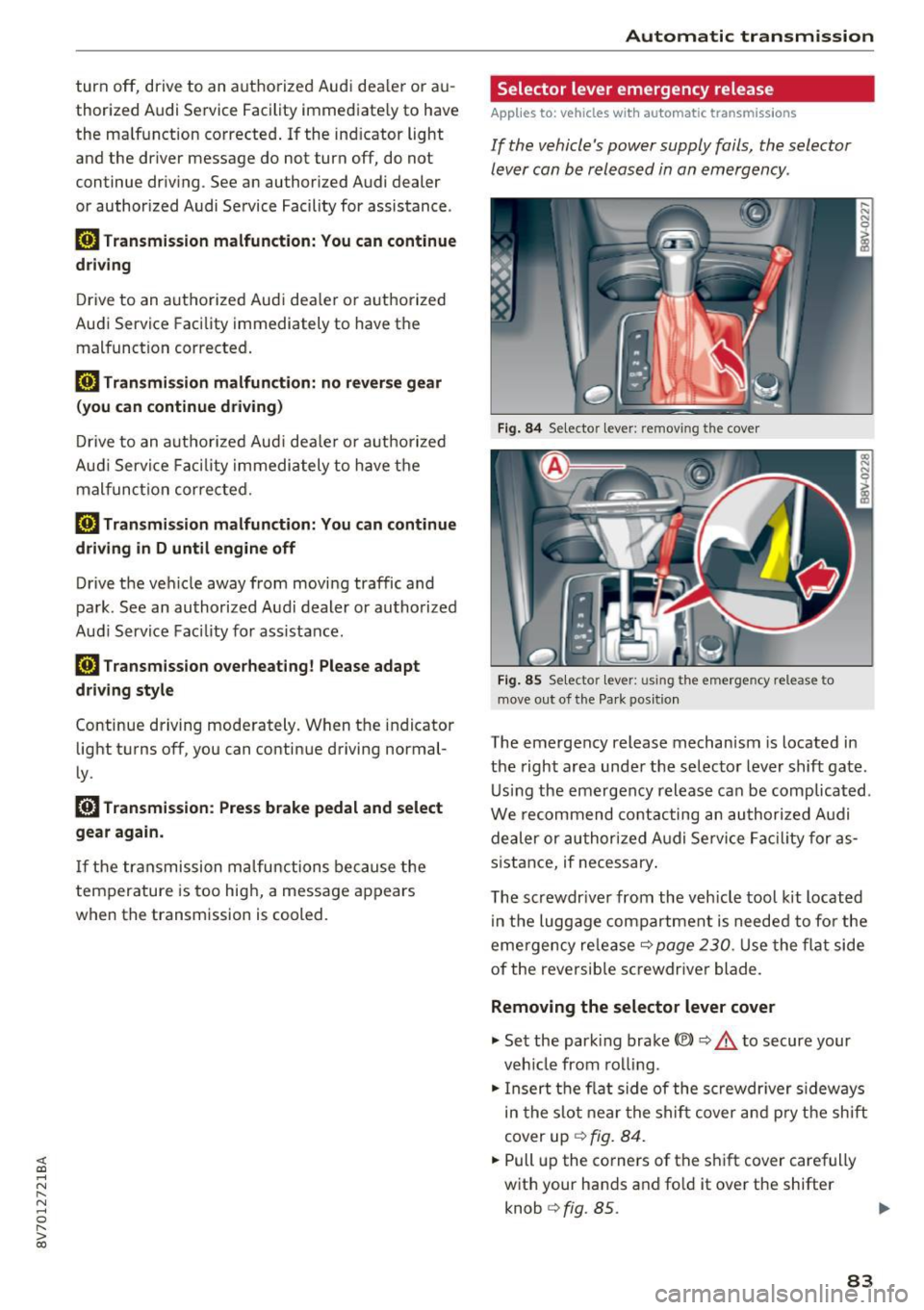
Fig. 84 Selector lever: removi ng the cover
Fig. 85 Se lecto r lever: using the emergency release to
move out of the Pa rk pos ition
The emergency release mechanism is located in
the right area under the selector lever shift gate .
Using the emergency release can be complicated .
We recommend contacting an authorized Aud i
dealer or authorized Audi Service Facility for as
sistance, if necessary .
The screwdr iver from the veh icle tool kit located
in the luggage compartment is needed to for the
eme rgency re lease
c:::> page 230. Use the flat side
of the reversible screwdriver blade.
Removing the selector lever cover
.,. Set the park ing brake<®> c:::> .&. to secure your
veh icle from rolling .
.,. Insert the flat side of the screwdriver sideways
in the slot near the shift cover and pry the shift
cover up
c:::> fig. 84 .
.,. Pull up the co rners of the shift cover carefully
with your hands and fold it over the shifter knob
c:::> fig. 85. ..,.
83
Page 109 of 272
<( co .... N r--N .... 0 r--> co
Parking systems
General information
Applies to: ve hicles with a rea r parking sys te m /pa rking sys
tem plus/rearv iew camera
Depending on your vehicle's equipment, various
parking aids will help you when parking and ma
neuvering.
The
rear parking system is an audible parking aid
that warns you of obstacles
behind the vehicle
¢page 110.
The parking system plus assists you when park
ing by audibly and visually indicating objects de
tected
in front of and behind the vehicle
¢page 110.
The rearview camera shows the area behind the
vehicle in the MMI display. This display assists
you when you are cross or parallel parking. The parking system plus functions are also available
¢page 111.
A WARNING ,--
- Always look for traffic and check the area
around your vehicle by looking at it directly
as well. The parking system cannot replace
the driver's attention. The driver is always
responsible when entering or leaving a park
ing space and during similar maneuvers.
- Please note that some surfaces, such as
clothing, are not detected by the system.
- Sensors and cameras have blind spots in
which people and objects cannot be detect
ed . Be especially cautious of small children
and animals.
- Always pay attention to the area around the
vehicle -using the rearview mirror, too.
- The sensors can be displaced by impacts or
damage to the radiator grille, bumper,
wheel housing and the underbody . The park
ing system may become impaired as a re
sult. Have an authorized Audi dealer or au
thorized Audi Service Facility check their
function.
- Make sure the sensors are not obstructed by
stickers, deposits or other materials. If they
are the sensor function could be impaired.
I
Parking systems
For additional information on cleaning, re
fer to¢
page 224.
@ Note
-Some objects are not detected or displayed
by the system under certain circumstances:
- Objects such as barrier chains, trailer draw
bars, vertical poles or fences
- Objects above the sensors such as wall ex
tensions
- Objects with specific surfaces or struc
tures such as chain link fences or powder
snow
- If you continue driving closer to a low-lying
object, it may disappear from the sensor
range . Note that you will no longer be
warned about this obstacle.
- The sensors can be displaced by impacts or
damage to the radiator grille, bumper,
wheel housing and the underbody. The
parking system may become impaired as a
result . Have an authorized Audi dealer or
authorized Audi Service Facility check their
function.
(D Tips
- The system may provide a warning even
though there are no obstacles in the cover
age area in some situations, such as:
- certain road surfaces or for long grass .
- external ultrasonic sources e.g. from
cleaning vehicles.
- heavy rain, snow, or thick vehicle exhaust.
- We recommend that you practice parking in
a traffic-free location or parking lot to be
come familiar with the system. When doing
this, there should be good light and weath
er conditions .
- You can change the volume and pitch of the
signals as well as the display¢
page 115.
-What appears in the MMI display is some
what time-delayed.
- The sensors must be kept clean and free of
snow and ice for the park assist to operate.
109
Page 112 of 272
Parking system s
General information
Applies to: ve hicles w ith park ing system p lus with rearv iew
camera
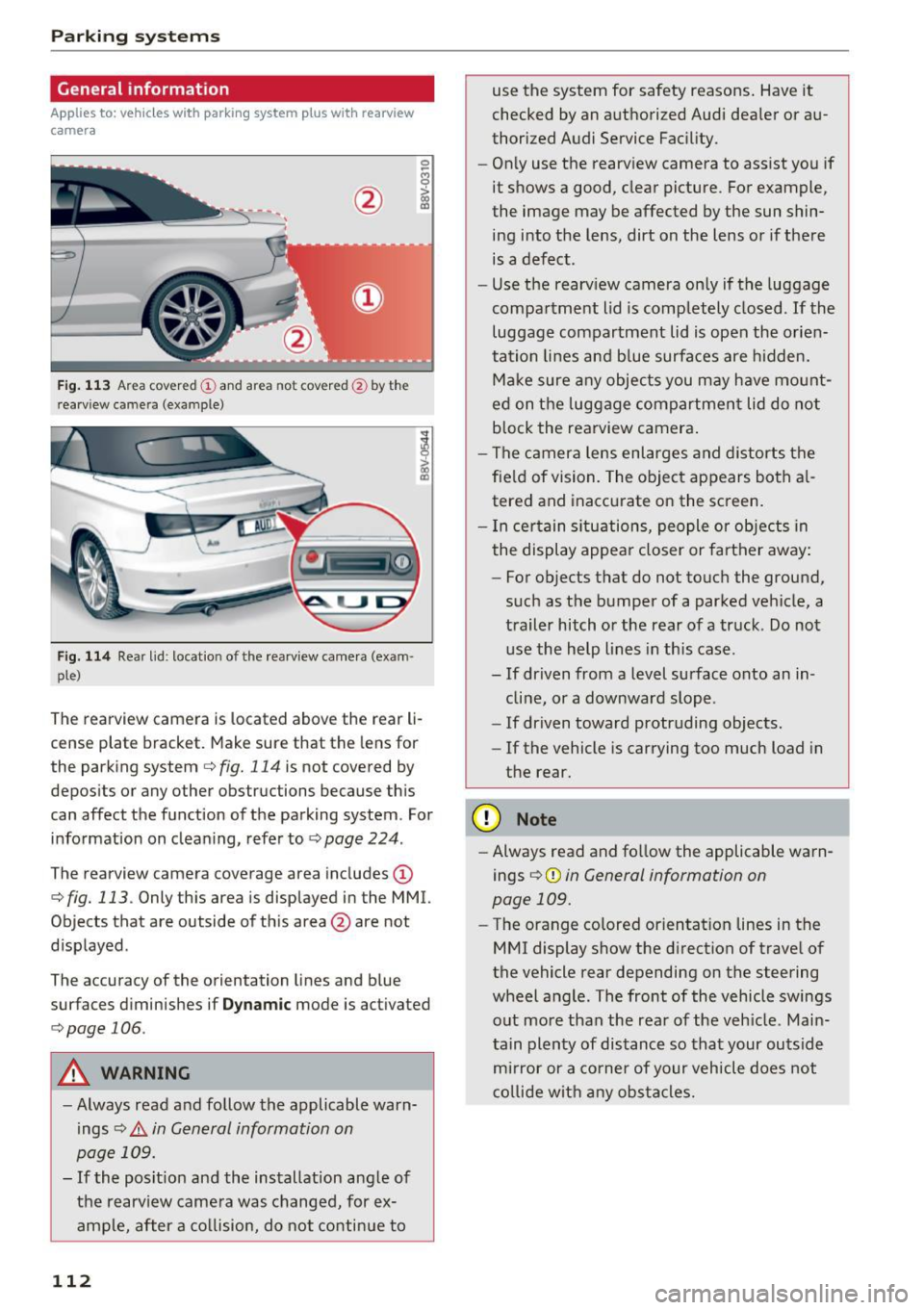
F ig . 1 13 Area covered © and area not covered @by the
r earv iew came ra (example)
Fig. 114 Rear lid : locat io n of the rearview camera (exam ·
ple)
0
-8
>
lll
The rearview camera is located above the rear li
cense plate bracket. Make sure that the lens for
the parking system
c.:> fig. 114 is not covered by
depos its or any other obstructions because th is
can affect the function of the parking system . For
information on cleaning, refer to
c.:> page 224 .
The rearview camera coverage area includes(!)
c.:> fig. 113. Only this area is displayed in the MMI.
Objects that are outside of th is area @are not
displayed .
The accuracy of the orientation lines and b lue
surfaces d iminishes if
D ynamic mode is activated
¢ page 106.
A WARNING
-Always read and follow the applicable warn
ings
c.:> .&. in General information on
page 109.
- If the posit ion and the installation ang le of
the rearv iew camera was changed, for ex
ample, after a co llision, do not continue to
112
use the system for safety reasons . Have it
checked by an a uthorized Audi dea ler or au
thorized Audi Service Fac ility.
- Only use the rearview camera to assist you if
it shows a good, clear picture . For example,
the image may be affected by the sun shin
ing into the lens, dirt on the lens or if there is a defect.
- Use the rearv iew camera on ly if the luggage
compa rtment lid is completely closed.
If the
luggage compartment lid is open the orien
tation lines and b lue surfaces are hidden.
Ma ke sure a ny objects you may h ave mo unt
ed on t he luggage compartment lid do not
b lock the rearview camera .
- The camera lens enlarges and distorts the
fie ld of vision. The object appears both a l
tered and inaccurate on the screen .
- I n cer tain s itu ations, people or objects in
the display appea r closer or farther away:
- For objects that do not touch the ground,
such as the bumper of a parked vehicle, a
trailer hitch or the rear of a truck . Do not
use the help lines in th is case.
- If driven from a level surface onto an in cline, or a downward slope .
- If driven toward protruding objects.
- If the vehicle is carrying too much load in
the rear .
(D Note
-Always read and fo llow the applicable warn
ings
c.:> (D in General information on
page 109.
- The orange colored orientat ion lines in the
MMI display show the direction of trave l of
the vehicle rear depending on the steering
wheel angle . The front of the vehicle swings
out more than the rear of the veh icle. Main
tain plen ty of dis tance so tha t your outside
mi rror or a co rne r of your veh icle does not
c o llide wit h any obs tacle s.
Page 115 of 272

<( co .... N ,.__
N .... 0 ,.__
> co
Adjusting the display and the warning tones
A ppl ies to: ve hicl es with parkin g system plus/rearview cam·
era
The display and warning tones con be adjusted in
the MMI.
~ Select: the I MENU ! button >Car > Systems *
control button > Driver assistance > Parking
aid .
Display
On * -
An op tical d isp lay is shown for the parking
system plus, a rearview camera image is s hown
for parking system plus with rearv iew camera* .
Off -Whe n the par king system is switched off,
only audib le sign als are give n.
Signal tones
Front volume -
volume for the front and side*
a rea
Rear volume -volume for t he rear area
Front frequenc y-frequency for the front and
side * area
Rear frequency -frequency fo r the rear area
Music volume during nav . prompts -the volume
of the a udio/v ideo so urce is lowe red when t he
pa rking system is turned o n.
The new ly selected leve l is demons trated briefly
by the sound generator.
- The warning tones ca n also be adjusted d i
r ec tly from the visua l display or t he rearv iew
cam era image *. Simply pr ess the
Settings
co ntrol bu tton.
- The setti ngs a re auto mat ica lly stored and
ass igned to the remote co ntro l key t hat is in
u se .
Error messages
App lies to: ve hicles with par kin g system plus/rearview cam
era
There is an erro r in the system if the LED in the
P111A. button is b linking and you hear a continuous
Parking systems
alarm for a few seconds after sw itch ing on the
par king system or w hen the pa rking system is a l
ready activated. If the error is not cor rected be
fo re you switch off the ignition, the LED in the
Pw ,
button w ill blink the next time you switch on the
park ing system by shifting into reverse.
Parking sy stem plus*
If a sensor is fa ulty, the~ symbol will appear i n
f ront of/behind the vehicle in the MMI display. If
a rear sensor is faulty, only obstacles that are in
areas @and @are shown
<=>page 110, fig. 108.
If a front sensor is fa ulty, only obstacles that are
i n a reas © and @are shown .
Drive to an authorized Audi dealer or authorized
Audi Service Facility immed iate ly to have the
malfu nction corrected.
115
Page 230 of 272

Emerg ency assis ta nce
Emergency assistance
Trunk escape latch
Applies to: vehicles with trunk escape latch (A3 sedan)
In case of an emergency, the rear lid can be
opened from the inside using the trunk escape
latch.
Fig. 172 luggage compartment: t runk escape latch
.,. Push the latch in the direction of the arrow un
til the lock releases .
The trunk escape latch inside the rear lid is made of fluo rescent mater ial to glow in the dark.
_& WARNING
The trunk escape latch is to be used only in an
emergency .
General information
.,. Park the vehicle as far as poss ible from moving
traff ic in the event of a flat tire. In the event of
a flat t ire, park the vehicle on a level surface. It
you are on a steep incline, be especia lly careful.
.,. Set the park ing brake.
.,. Place the selector lever in the P position.
.,. Switch the emergency flashers on.
.,. Put on a reflective vest, if available .
.,. Set up the warning triangle, if available .
.,. Have the passengers exit the vehicle . They
should move to a safe place, for example be
hind a guard rail.
_& WARNING
Pay attention to the steps above. They are for
your protection and the for the safety of other
drivers.
2 30
Equipment
Vehicle tool kit
Applies to: vehicles with vehicle tool kit
Fig. 173 lu gg age compartmen t: cargo floor cove r fo lded
upward (example)
The vehicle tool kit, t ire repa ir set* and compres
sor* are stored in the luggage compartment un
der the floor cover~
fig. 173 .
.,. Hook the p lastic hook@ into the luggage com
partment seal.
.,. Unhook the cargo floor before closing the lug
gage compartment lid.
_& WARNING
Improper use of the vehicle jack can cause se
rious personal injuries.
- Never use the screw driver hex head to
tighten wheel bolts, since the bolts cannot
attain the necessary tightening torque if you
use the hex head, potentially causing an ac
cident.
- The factory-supplied jack is intended only
for your veh icle model. Under no circum
stances should it be used to lift heavy
vehicles or other loads; you risk injuring
yourself .
- Never start the engine when the veh icle is
raised, which co uld cause an accident .
- Support the vehicle securely with a ppropri
ate stands if work is to be pe rformed under
neath the vehicle; otherwise, there is a po
tential risk for injury.
- Never use the jack supplied with your Audi
on another vehicle, particularly on a heavier
one. The jack is only su itable for use on the
vehicle it came with. ..,.
Page 236 of 272
Emergency assistance
The caps are to protect and keep the whee l bolts
clean.
Loosening and tightening the wheel bolts
Th e wheel bolts must be loosened before raising
the vehicle.
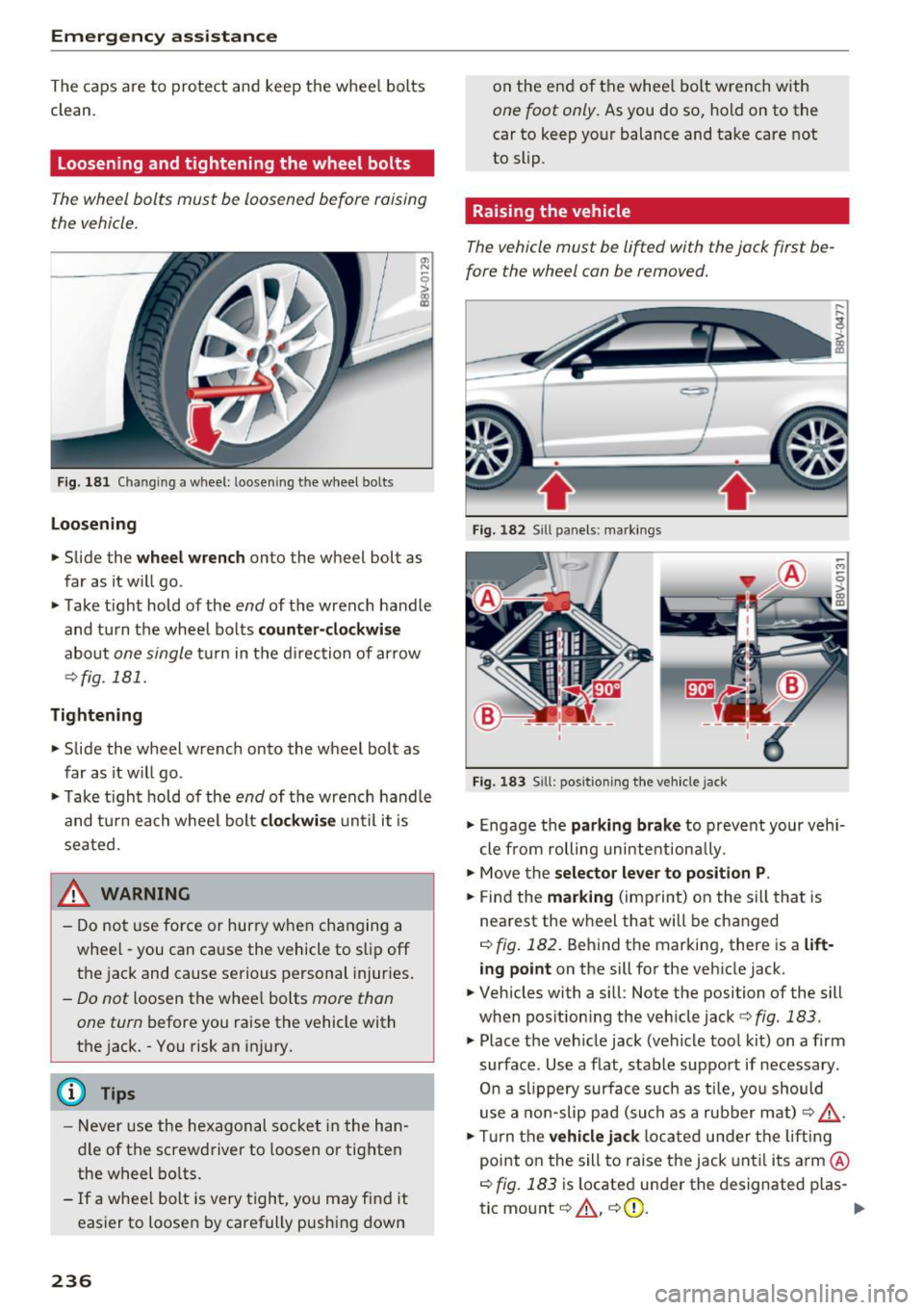
Fig . 181 Cha ngin g a wheel: loosening t he w heel bolts
Loosening
• Slide the wheel wrench onto the wheel bolt as
far as it w ill go .
• Take tight hold of the
end of the wrench handle
and turn the wheel bolts
counter-clockwise
about one single tur n in the direction of arrow
c:::>fig . 181.
Tightening
• Slide the wheel wrench onto the wheel bolt as
far as it w ill go .
• Ta ke tight hold of the
end of the wrench handle
and turn each whee l bolt
clockwise until it is
seated.
_& WARNING
- Do not use force or hurry when changing a
wheel -you can cause the vehicle to slip off
the jack and cause serious personal injuries.
-Do not loosen the whee l bolts more than
one turn
before you raise the vehicle with
the jack . - You risk an injury .
(D Tips
-Never use the hexagonal socket in the han
dle of the screwdriver to loosen o r tighten
the wheel bolts.
- If a whee l bolt is very tight, you may find it
easier to loosen by carefully push ing down
236
on the end of the whee l bolt wrench with
one foot only. As you do so, hold on to the
car to keep your balance and take care not
to slip .
Raising the vehicle
The vehicle must be lifted with the jack first be
fore the wheel can be removed.
Fig. 182 Sill panels: marking s
Fig. 183 S ill: pos itio ning the vehicle jack
• Engage the parking brake to prevent your vehi
cle from rolling unintentiona lly .
• Move the
selector lever to position P .
• Find the marking (imprint) on the sill that is
nea rest the wheel that will be changed
c:::>fig. 182. Behind the marking, there is a lift
ing point on the sill for the vehicle jack.
• Vehicles with a sill : Note the position of the sill
when position ing the veh icle jack
c:::> fig. 183 .
• Place the veh icle jack (vehicle tool kit) on a firm
surface . Use a f lat, stable support if necessary .
On a slippery surface such as tile, you should
use a non-slip pad (such as a rubber mat)
c:::> & -
• Tur n the vehicle jack located under the lifting
point on the sill to raise the jack until its arm @
c:::> fig. 183 is located under the designated plas-
tic mount
c:::> ,&. , c:::>(D . "'