steering AUDI A3 CABRIOLET 2016 Owner's Manual
[x] Cancel search | Manufacturer: AUDI, Model Year: 2016, Model line: A3 CABRIOLET, Model: AUDI A3 CABRIOLET 2016Pages: 272, PDF Size: 67.88 MB
Page 94 of 272

Switching adaptive crui se control on
"' Pull the lever toward you into position @
¢
fig. 91. A CC: s tandby appea rs in the instru
ment cluster disp lay .
Saving the speed and activating regulati on
"'T o save the c urrent speed , press the ISETI
¢ fig. 91 button . The stored speed is shown in
t h e tachomete r LED line @and appears briefly
in the information line ®¢
fig. 92 .
"' To activate the regulation whi le stationary, you
must press the brake pedal.
Sw itching adaptiv e cruise control off
"' Push the lever away from you into position @
until it clicks i nto place ¢
fig. 91 . The message
AC C: off appears.
The stored speed in the LED line is e rased.
@ Indicato r lights
II -adaptive cruise control is switched on. No
objects are detected ahead. The stored speed is
maintained.
• -An object a head was detected . The adaptive
cruise control system regulates the speed and
d istance to the object ahead and brakes/acce ler
ates automatica lly.
fij -adaptive cru ise control is switched on. An
object ahead was detected. Your vehicle remains
stopped and w ill not start driving automatica lly.
• -T he automatic bra king is no t enough to
maintain a sufficient distance to a n object ahead.
You must intervene ¢
page 96, Request for
driver intervention.
© Instrument cluster display
I f adaptive cruise control is not shown in the in
s trument cluster disp lay, yo u can call it up using
the mu ltifunction steering wheel b uttons
¢ page 24.
Based on the g raph ics in the d isp lay, you can de
termine if the system is m ainta ining a distance to
;;!; a vehicle ahead and what that distance to this ve-....
~ hide is: N ....
R No vehi cle -No object ahead was detected.
> 00
Assist
White vehicl e -An object ahead was de tected .
Red vehicl e -Request for the dr iver to take action
¢page 96.
Both
arrows on t he scal e@ indicate the d istance
to the object ahead . No arrow appears when the
vehicle is on an open road and t here is no object
ahead. If an object is detec ted ahead, the a rrow
moves on the sca le.
T he green zone o n the scale indicates the store
distance. For informat ion on changing the dis
t a nce, refer to ¢
page 95. If the dis tance se
l ected is exceeded or not reached, the arrow
moves into the red zone on the scale.
A WARNING
- Using adaptive cruise control incorrectly can
cause collisions, other accidents and ser ious
in ju ries.
- If you press the
!SET ! button w hen driving at
speeds be low 20 mph (30 km/h), the vehi
cle acce lerates automatically up to 20 mph
(30 km/h), wh ich is the minimum speed
that can be set.
{!) Tips
- If you switch the ignit ion or the adaptive
cruise control system off, the set speed is
erased for safety reason.
- The Elect ronic Stabilization Control (ESC)
and Anti-S lip Regulat ion (ASR) both sw itch
on when the adaptive cruise control is
switched on . ESC and ASR ca nnot be switch
ed off when adapt ive cruise control is
switched on.
- With the adaptive cruise control act ivated
t he ESC spo rt mode cannot be activated.
93
Page 98 of 272
<( co .... N r--N .... 0 r--> co
llJ ACC off: manual control!
This message appears if the vehicle rolls back
when starting on a slight incline, even though
ACC is active. Press the brake pedal to prevent
the vehicle from rolling or starting to move.
Ill ACC: engine speed
This message appears if the driver has not shift
ed up or down in time when the adaptive cruise
control is braking or accelerating, causing the ve
hicle to exceed or to not reach the permitted en
gine speed . The adaptive cruise control turns off.
A chime sounds as a reminder.
•••
Three white dots appear if a setting cannot be se
lected with the operating lever. For example, this
happens if adaptive cruise control cannot be acti
vated when stopped because the driver has not fastened the safety belt.
Door open
Adaptive cruise control cannot be switched on
when the vehicle is stationary and the driver's
door is open.
Audi pre sense
Introduction
Applies to: vehicles with Audi pre sense basic or Audi pre
sense front
Within the limits of the system, pre sense basic
and pre sense front can initiate steps to protect
vehicle occupants in certain dangerous situa
tions.
Critical driving situations can be recognized by
the pre sense front via a network of different ve
hicle systems and can take steps to prepare the
vehicle occupants for a potential collision.
The pre sense front works with a radar sensor
and a video camera*. It also functions within the
limits of the system when adaptive cruise con
trol* is switched off.
Assist
General information
General information
Applies to: vehicles with Audi pre sense front or Audi adaptive
cruise control
A WARNING
Also follow the general information found on
~ page 91, General information.
Audi pre sense basic
Description
Applies to: vehicles with Audi pre sense basic
The function of the pre sense basic is activated at
a speed of 20 mph (30 km/h) or higher.
The following functions can be triggered under
certain conditions within the limits of the sys
tem:
- Tensioning of the safety belts (for examp le,
during heavy braking): the front safety belts have reversible belt tensioners. If a collision
does not occur, the safety belts loosen slightly
and are ready to trigger again.
- Closing the windows (for example when over
or understeering): the windows close until
there is a small gap open.
Audi drive select: the deployment time is adapt ed in dynamic mode.
A WARNING
-The pre sense basic cannot overcome natural
physical laws. It is a system designed to assist
and it cannot prevent a collision. Do not let
the increased safety provided tempt you into
taking risks. This could increase your risk of a
collision.
- The system can dep loy incorrectly due to
system-specific limits.
@ Tips
-Certain pre sense basic functions switch off
when ESC is switched off (sport mode) or
when driving in reverse.
97
Page 100 of 272

Assist
can prevent undesired warnings from the
pre sense system.
Driver messages
App lies to: ve hicles w ith Audi p re se nse or Aud i adap tive
cr uise cont rol
Audi pre sense currently unavailable. No sensor
vision
This message appears if the sensor view is ob
structed, for example by leaves, snow, heavy
spray or d irt. C lean the sensor¢
page 91, fig. 88.
Audi pre sense: off
This message appears when the ESC is switched
to sport mode, for example ¢
page 117 .
Audi pre sense: system fault!
This message appears when the pre sense func
tion is affected. For examp le, this could be
caused by a faulty sensor.
If the message stays on, drive to an authorized
Aud i deale r or authorized Aud i Serv ice Facility to
have the ma lfunction corrected.
Audi active lane assist
Description
Appl ies to: ve hicles w ith Audi active lane assist
Active lane assist detects lane marker lines with
in the limits of the system using a camera in the
windshield. If you are approaching a detected lane marker line and it appears likely that you
will leave the lane, the system will warn you with
correct ive steering . You can override this steer ing
at any time . If you pass over a line, the steer ing
wheel will vibrate lightly. In order for this warn
ing vibration to occur, it must first be switched
on in the MMI. Active lane assist is operable
when the lane marker line is detected on at least
one side of the vehicle.
The system will not warn you before crossing a lane marker line if you have activated the turn
signal. In this case, it assumes that you are
changing lanes intentionally.
l) Thi s fun ctio n is not availab le in all c ount ries.
100
The system is designed for driving on express
ways and highways and therefore on ly activates
at speeds above approximately 40 mph (65 km/
h).
A WARNING
-
-The system warns the driver that the vehicle
is leaving the lane using correct ive steering.
The driver is always responsible for keeping
the vehicle within the lane .
- The system can help you keep the vehicle in the lane, but it does not drive by itself. Al
ways keep your hands on the steering wheel.
- Corrective steering may not occur in certain
situations, such as during heavy braking.
- There may be cases where the camera does
not recognize all lane marker lines. Correc
tive steering can only take place on the side
of the vehicle where lane marker lines are
detected.
- Other road structures or objects could possi
bly be identified un intent ionally as lane
marker lines . As a result, corrective steering
may be unexpected or may not occur.
- The camera view can be restricted, for ex
ample by vehicles driving ahead or by rain,
snow, heavy spray light shining into the
camera or by dirt on the window. This can result in active lane assist not detecting the
lane marker lines or detect ing them incor
rectly .
- In certain situations where visibility is low,
the vehicle may switch from "early" to "late"
corrective steer ing
1>.
- Under certain cond itions such as ruts in the
road, an inclined roadway or crosswinds, the
corrective steer ing alone may not be enough
to keep the vehicle in the m iddle of the lane.
- For safety reasons, act ive lane assist must
not be used when there are poor road and/
or weather conditions such as slippery
roads, fog, gravel, heavy rain, snow and the
potential for hydrop laning . Using active lane
assist under these conditions may increase
the risk of a crash.
Page 101 of 272
<( co ..... N
" N ..... 0 r--. > 00
Switching on and off
App lies to: ve hicles with Audi active lane assist
Fig . 98 Turn signal lever: button for act ive lane assist
Fig. 99 Windshield: camera wind ow for active lane assist
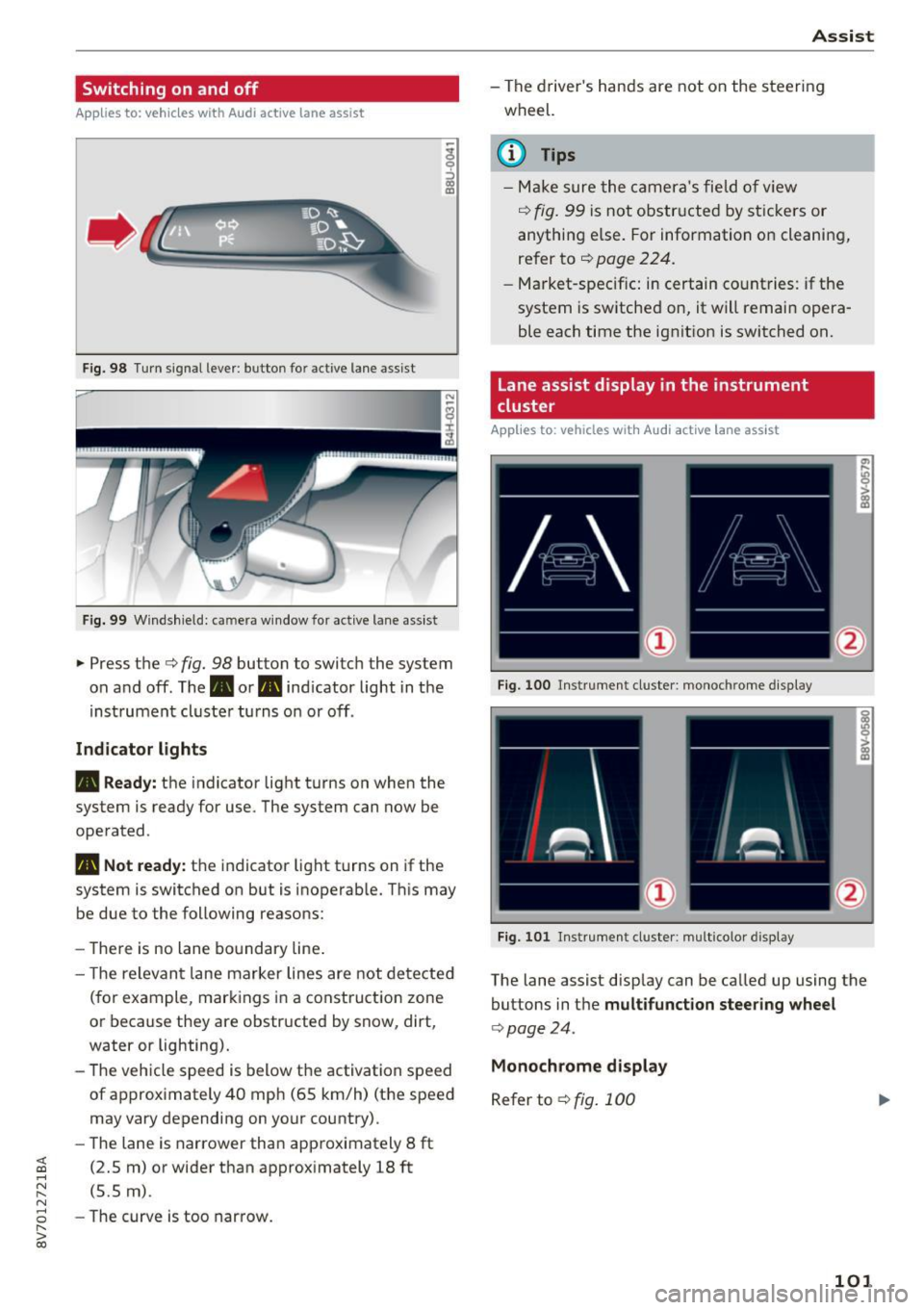
... Press the c:> fig. 98 button to switch the system
on and off. The . or
Pl1 indicator light in the
instrument cluster turns on or off.
Indicator lights
• Ready: the indicator light turns on when the
system is ready for use. The system can now be
operated .
Pl1 Not ready: the indicator light turns on if the
system is switched on but is inoperable. This may
be due to the following reasons:
- There is no lane boundary line.
- Th e relevant lane marker lines are not detected
(for example, markings in a construction zone
or because they are obstructed by snow, dirt,
water or lighting).
- The vehicle speed is below the activation speed
of approximately 40 mph (65 km/h) (the speed
may vary depending on your country).
- The lane is narrower than approximately 8
ft
(2.5 m) or wider than approximately 18 ft
(5.5 m).
- The curve is too narrow.
Assist
-The driver's hands are not on the steering
wheel.
(D Tips
- Make sure the camera's field of view
¢ fig. 99 is not obstructed by stickers or
anything els e. For information on cleaning,
refer to
c:> page 224.
-Market-specific: in certain countries: if the
system is sw itched on, it will remain opera
ble each time the ignition is switched on.
Lane assist display in the instrument
cluster
Applies to : vehicles wit h Audi act ive la ne ass ist
Fig. 100 Instrument cluster: monoc hrome disp lay
Fig. 101 Instrument cl uster : mult icolor displ ay
The lane assist disp lay can be called up using the
buttons in the
multifunction steering wheel
c:>poge 24.
Monochrome display
Refer to c:> fig. 100
101
Page 102 of 272
Assist
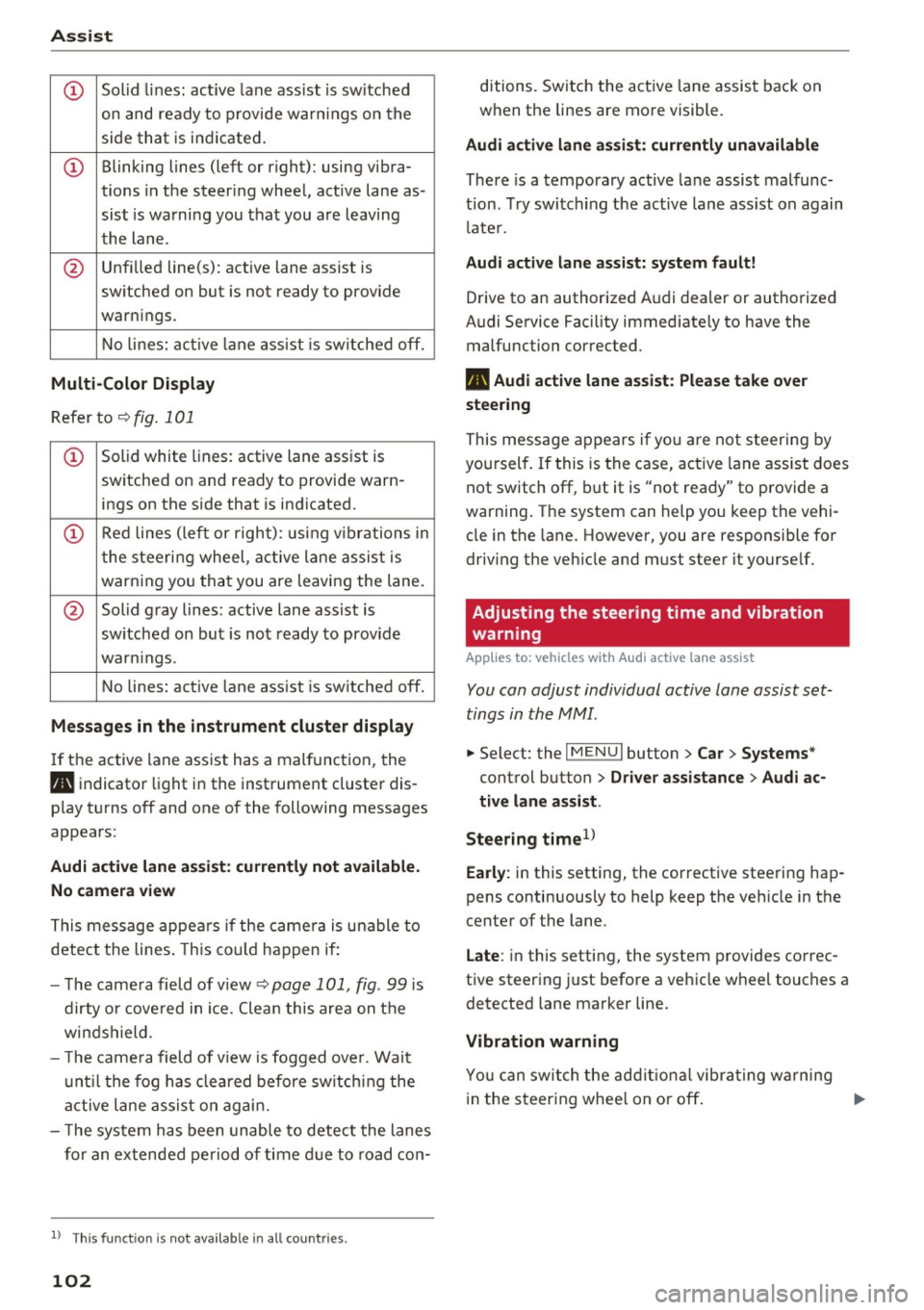
CD Solid lines: active lane assist is sw itched
on and ready to provide warnings on the
side that is ind icated.
CD Blinking lines (left or right): using vibra-
tions in the steer ing wheel, active lane as -
sist is warning you that you are leaving
the lane .
@ Unfilled line(s): active lane assist is
sw itched on but is not ready to prov ide
warn ings.
No lines: active lane assist is sw itched off.
Multi-Color Display
Refer to c;, fig. 101
CD Solid white lines: active lane assist is
switched on and ready to provide warn- ings on the side that is indicated.
CD Red lines (left or right): using vib rations in
the steering wheel, active lane assist is
warning you that you are leaving the lane.
@ Solid gray lines: active lane assist is
sw itched on but is not ready to prov ide
war nings.
No lines: active lane assist is sw itched off.
Messages in the instrument cluster display
If the active lane assist has a malfunction, the
Pl1 indicator light in the instrument cluster dis
p lay turns off and one of the following messages
appears:
Audi active lane assist : currently not available.
No camera view
This message appears if the camera is unable to
detect the lines. This could happen if :
- The came ra field of view ¢
page 101, fig. 99 is
dirty or covered in ice. C lea n this area on the
winds hield.
- T he camera field of view is fogged over. Wait
until the fog has cleared before switching the
active lane assist on again.
- T he system has been unable to detect the lanes
for an extended period of time due to road con-
l) Thi s fun ctio n is not avai lab le in all count ries.
102
ditions. Switch the active lane assist back on
when the lines are more visible.
Audi active lane assist: currently unavailable
There is a temporary active lane assist malfunc
tion. Try switc hing the active lane ass ist on again
l ate r.
Audi active lane assist: system fault!
Drive to an authorized Audi dealer or authorized
Audi Service Facility immediately to have the malfunction corrected .
Pl1 Audi active lane assist: Please take over
steering
This message appears if you are not steering by
you rself. If this is the case, active lane assist does
not switch off, but it is "not ready" to provide a
warning. The system can help you keep the vehi
cle in the lane. However, you are responsible for
driv ing the veh icle and must steer it yourself.
Adjusting the steering time and vibration
warning
Applies to: vehicles with Audi active lane assist
You can adjust individual active lane assist set
tings in the MMI.
.,. Select: the I MENU I button> Car> Systems*
control button > Driver assistance > Audi ac
tive lane assist .
Steering time
1 )
Early: in this setting, the corrective steering hap
pens continuously to help keep the veh icle in the
center of the lane.
Late : in this setting, the system provides correc
tive steering just before a vehicle wheel touches a
detected lane marker line.
Vibration warning
You can switch the additional vibrating warning
in the s teering whee l on or off . ..,.
Page 106 of 272

Ass is t
- Your settings are automatically stored and
assigned to the remote control key being
used .
Driver messages
Applies to: ve hicles w ith Audi side assist
If the side assist switches off automatically, a
message appears in the instrument cluster dis
play.
(ij Audi side a ssi st : cur rentl y un ava ilable No
s en so r v isi on
The radar sensors' vision is affected. Do not cover
the area in front of the sensors with bike wheels,
stickers, dirt or other objects . Clean the area in
front of the sensors, if necessary~
page 104,
fig. 105.
@j Audi side assist : cur rently un available
Side assist cannot be switched on temporar ily be
cause there is a malfunction (for example, the
battery charge level may be too low).
@j Audi side a ssi st : S ystem fau lt!
The system cannot guarantee that it will detect
veh icles correctly and it is switched off. The sen
sors have been d isplaced or are faulty . Have the
system checked by an authorized Audi dealer or
author ized Audi Service Facility soon .
Audi drive select (drive
settings)
Introduction
App lies to: vehicles with Aud i drive select
Audi drive select makes it possible to experience
d ifferent types of vehicle settings in o ne veh icle .
The drive r can select from three
Comfort , Auto
and D ynam ic modes us ing the te'i:.1 button in the
center console or the MMI to switch between a
sporty and a comfortable driving mode, for ex
ample. In the
Ind ividu al* mode, the settings can
be adjusted to your personal preferences. This
makes it poss ible to combine settings such as a
sporty eng ine setting w ith smooth steering.
106
A WARNING ,_
Using Aud i drive select incorrectly can lead to
coll is ions, other accidents and serious inju
ries.
Description
App lies to: vehicles with Aud i drive se lect
The vehicle setup in each mode depends on the
vehicle's features. However, the engine a nd
steering are a lways affected.
Engine and automatic tr ansmiss ion
Depending on the mode, the engine and auto
matic transmission* respond more qu ickly or in a
more ba lanced manner to accelerator pedal
movements.
Adapt ive damper s (Audi magneti c ride )*
The adaptive dampers use sensors to record in
format ion regarding steering movements, brak
i ng and acceleration operations by the driver,
road surface, driving speed, and load . W ith Aud i
drive select you can adjust the adaptive dampers
spo rty (dynamic), comfortable (comfort) o r bal
anced (auto).
Ste ering
The steering adapts in terms of steering ass is
tance. There are d ifferent modes
~page 107.
Ind irect steering that moves easi ly as in comfort
mode is espec ially suited to long d rives on a h igh
way. The dynamic mode provides sporty, direct
steering.
Fo r vehicles with p rogress ive steering* the steer
i ng perfo rmance is more agile.
Corn ering light*
The cornering light adjusts when driv ing on
curves at speeds between 6 mph (10 km/h) and 68 mp h (1 10 km/h) . The pivoting act ion and the
li ght ing are also adapted to the mode.
Adapt ive cruise cont rol*
The behavior whe n accelerating can be adjusted
from comfortable to sporty, depending on the
Audi drive select mode . Adaptive cruise control ..,.
Page 108 of 272
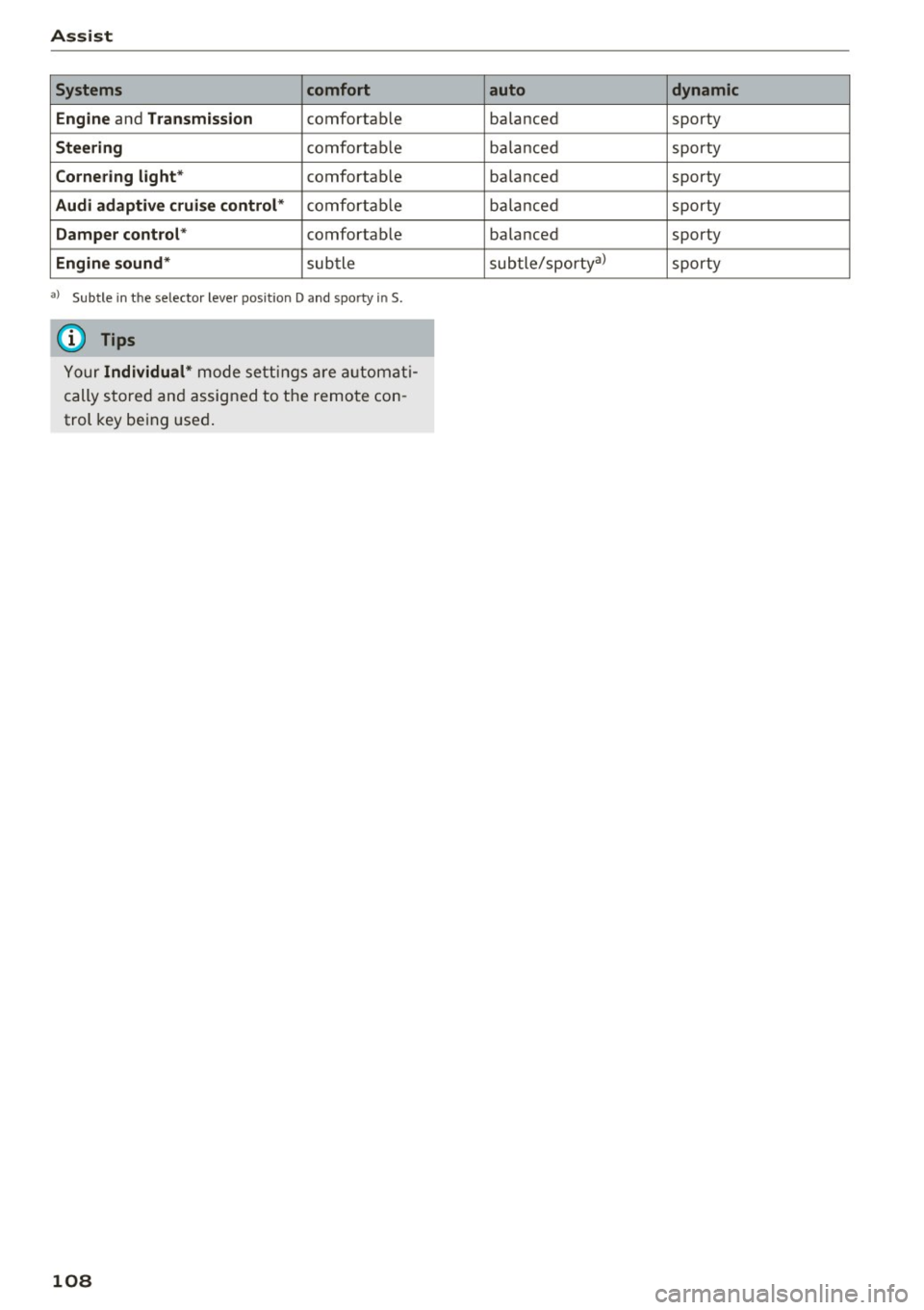
Assist Systems comfort
Engine
and Transmission comfortab le
Steering comfortable
Cornering light* comfortab le
Audi adaptive cruise control* comfortable
Damper control* comfortable
Engine sound* subtle
a) Subt le in th e se lector le ver pos it ion D and sporty in S.
(D Tips
Your Individual* mode settings are automati
cally stored and assigned to the remote con
trol key being used.
108
auto dynamic
balanced sporty
balanced sporty
balanced sporty
ba lanc ed sporty
balanced sporty
subtle/sporty a)
sporty
Page 111 of 272
<( co ..... N
" N ..... 0 r--. > 00
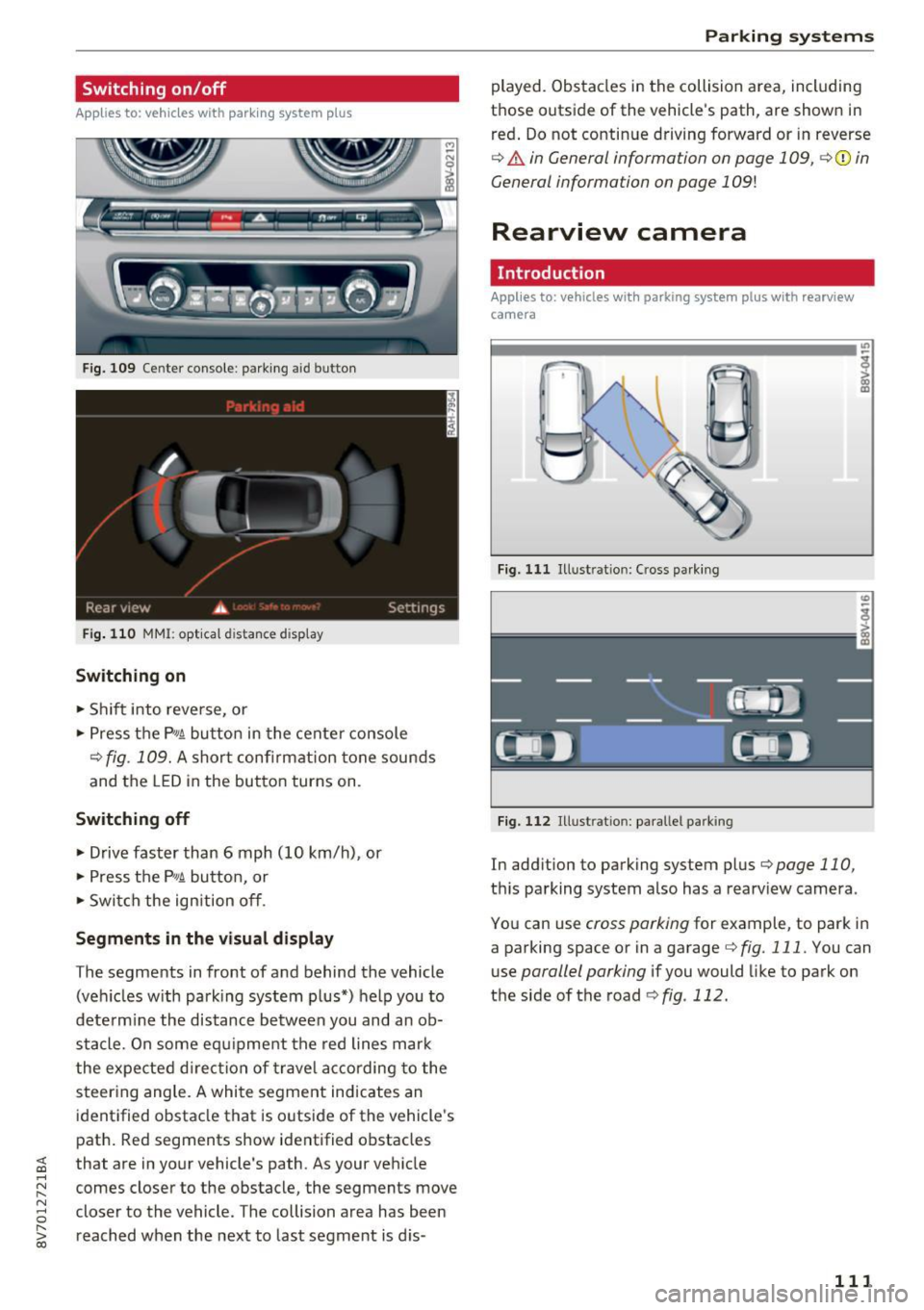
Switching on/off
App lies to: vehicles with parking system plus
F ig. 109 Center console: parking aid button
Fig. 110 MMI: opt ical dista nce display
Switching on
• Shift into reverse, or
• Press the
P,,1A button in the center console
¢fig. 109. A short confi rmation tone sounds
and the LED in the button turns on.
Switching off
• Drive faster than 6 mph (10 km/h), or
• Press the
P,,1A button, or
• Switch the ign ition off.
Segments in the visual display
The segments in front of and behind the vehicle
(veh icles w ith park ing system plus*) help you to
dete rm ine the distance between you and an ob
stacle. On some equipment the red lines mark
the expected direction of travel according to the
steering angle. A white segment indicates an
identified obstacle that is outside of the vehicle's
path. Red segments show identified obstacles
that are in your vehicle's path. As your vehicle
comes closer to the obstacle, the segments move
closer to the vehicle. The collision area has been
reached when the next to last segment is d is-
Parking systems
played. Obstacles in the collision area, including
those outside of the vehicle's path, are shown in
red. Do not continue driving forward or in reverse
¢ & in General information on page 109, ¢ (i) in
General information on page
109!
Rearview camera
Introduction
Appl ies to: vehicles with parking system plus with rearview
camera
Fig. 111 Illust ratio n: Cross parking
Fig. 112 Illust ratio n: pa rallel parking
In add ition to parking system plus¢ page 110,
this parking system also has a rearv iew camera.
You can use
cross parking for example, to park in
a parking space or in a garage ¢
fig. 111. You can
use
parallel parking if you would like to park on
the side of the road ¢
fig. 112.
111
Page 112 of 272
Parking system s
General information
Applies to: ve hicles w ith park ing system p lus with rearv iew
camera
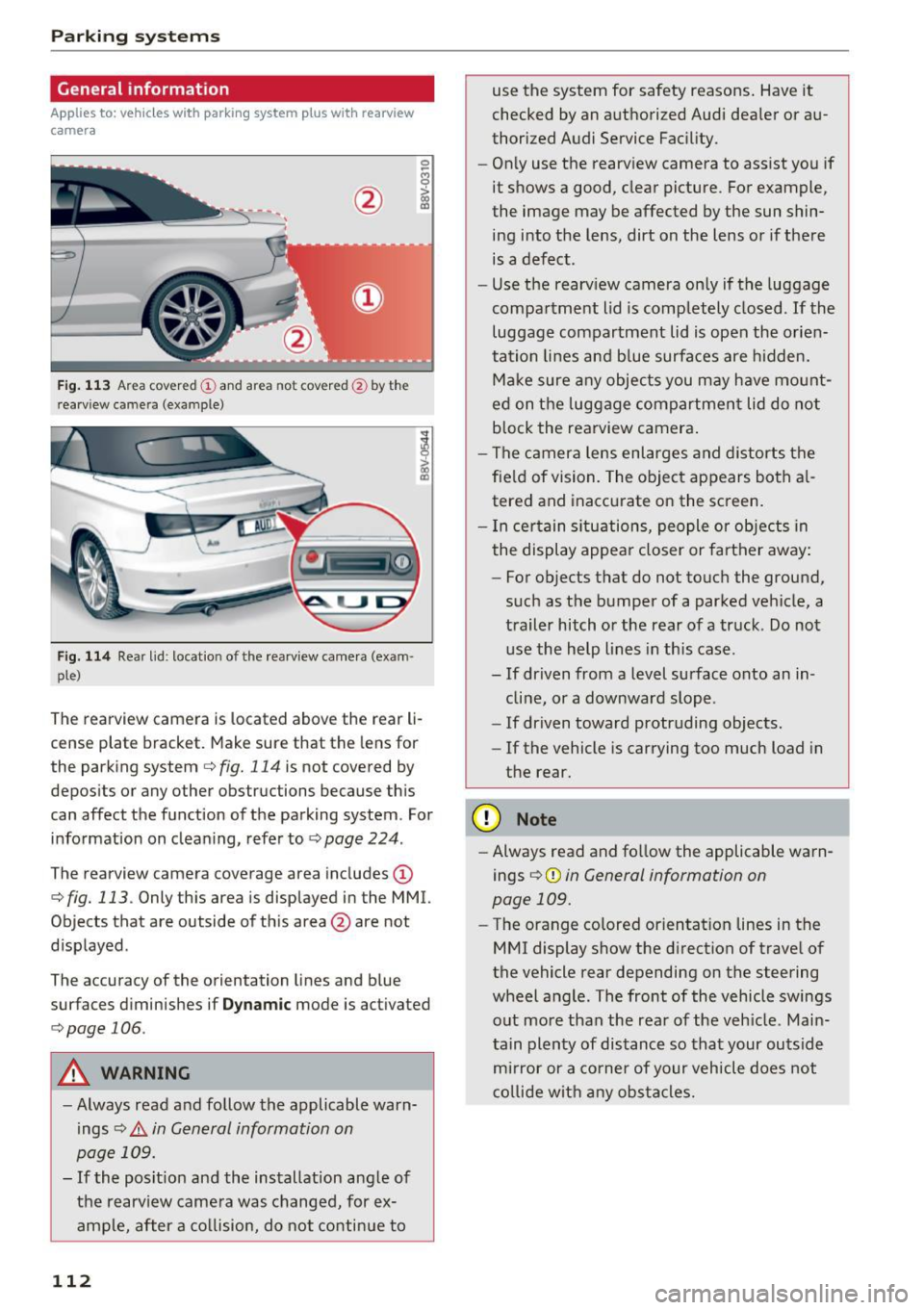
F ig . 1 13 Area covered © and area not covered @by the
r earv iew came ra (example)
Fig. 114 Rear lid : locat io n of the rearview camera (exam ·
ple)
0
-8
>
lll
The rearview camera is located above the rear li
cense plate bracket. Make sure that the lens for
the parking system
c.:> fig. 114 is not covered by
depos its or any other obstructions because th is
can affect the function of the parking system . For
information on cleaning, refer to
c.:> page 224 .
The rearview camera coverage area includes(!)
c.:> fig. 113. Only this area is displayed in the MMI.
Objects that are outside of th is area @are not
displayed .
The accuracy of the orientation lines and b lue
surfaces d iminishes if
D ynamic mode is activated
¢ page 106.
A WARNING
-Always read and follow the applicable warn
ings
c.:> .&. in General information on
page 109.
- If the posit ion and the installation ang le of
the rearv iew camera was changed, for ex
ample, after a co llision, do not continue to
112
use the system for safety reasons . Have it
checked by an a uthorized Audi dea ler or au
thorized Audi Service Fac ility.
- Only use the rearview camera to assist you if
it shows a good, clear picture . For example,
the image may be affected by the sun shin
ing into the lens, dirt on the lens or if there is a defect.
- Use the rearv iew camera on ly if the luggage
compa rtment lid is completely closed.
If the
luggage compartment lid is open the orien
tation lines and b lue surfaces are hidden.
Ma ke sure a ny objects you may h ave mo unt
ed on t he luggage compartment lid do not
b lock the rearview camera .
- The camera lens enlarges and distorts the
fie ld of vision. The object appears both a l
tered and inaccurate on the screen .
- I n cer tain s itu ations, people or objects in
the display appea r closer or farther away:
- For objects that do not touch the ground,
such as the bumper of a parked vehicle, a
trailer hitch or the rear of a truck . Do not
use the help lines in th is case.
- If driven from a level surface onto an in cline, or a downward slope .
- If driven toward protruding objects.
- If the vehicle is carrying too much load in
the rear .
(D Note
-Always read and fo llow the applicable warn
ings
c.:> (D in General information on
page 109.
- The orange colored orientat ion lines in the
MMI display show the direction of trave l of
the vehicle rear depending on the steering
wheel angle . The front of the vehicle swings
out more than the rear of the veh icle. Main
tain plen ty of dis tance so tha t your outside
mi rror or a co rne r of your veh icle does not
c o llide wit h any obs tacle s.
Page 113 of 272
<( co ..... N
" N ..... 0 r--. > 00
Switching on/off
App lies to: vehicles with parking system plus with rearv iew
camera
S wi tc hing on
• Shift into reverse, or
• Press the
Pw.A button in the center console
¢ page 111, fig . 109 . A short conf irmat ion
tone sounds and the LED in the button turns
on.
S wi tching betwe en th e re ar view came ra and
optical displa y
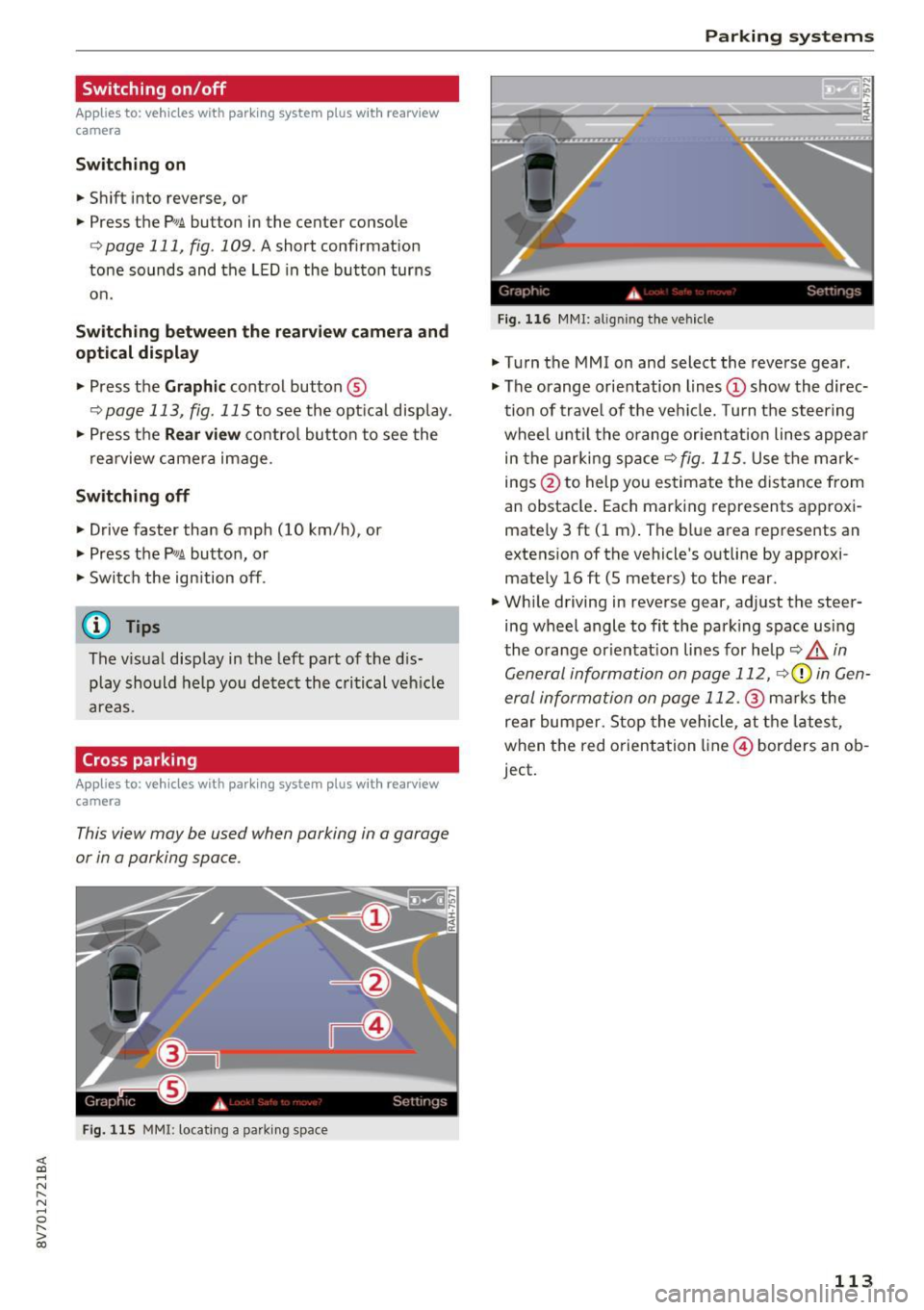
• Press the Gr aphic control button ®
r::!.> page 113, fig . 115 to see the optica l display .
• Press the
Rear view control button to see the
rea rview camera image .
Switching off
• Drive faster than 6 mph (10 km/h), or
• Press the
P•1A button, or
• Switch the ign ition off .
@ Tips
The visual display in the left part of the d is
play should help you detect the c ritical ve hicle
areas.
Cross parking
Appl ies to: vehicles with parking system plus with rearview
camera
This view may be used when parking in a garage
or in a parking space .
Fig. 115 MMI: locating a park ing space
Parking systems
Gr,11;t I( i._ S,·T .. 1',lJ',
Fig. 11 6 MMI: a lig nin g the vehicle
• Turn the MMI on and select the reverse gear .
• The orange orientation lines
(D show the direc
tion of trave l of the vehicle. Turn the steering
wheel until the orange orientation lines appea r
in the parki ng space
r:!) fig. 115 . Use the mark
ings @to help you estimate the distance from
an obstacle . Each marking represents approxi
mately 3 ft (1 m) . The blue area represents an
extens ion of the vehicle 's outline by approxi
mate ly 16
ft (5 meters) to the rear .
• Wh ile driving in reverse gear, adjust the steer
ing wheel angle to fit the park ing space using
the o range or ientat ion lines for help
r:!) A in
General information on page 112,
r::> 0 in Gen
eral information on page 112.@
marks the
rear bumper. Stop the vehicle, at the lates t,
when the red o rientation line @) borders an ob
ject.
113