lights AUDI A3 CABRIOLET 2016 Service Manual
[x] Cancel search | Manufacturer: AUDI, Model Year: 2016, Model line: A3 CABRIOLET, Model: AUDI A3 CABRIOLET 2016Pages: 272, PDF Size: 67.88 MB
Page 198 of 272
Check ing and F illing
@ For the sake of the environment
Because of the prob lem of proper disposal of
brake fluid as we ll as the special tools re
quired and the necessary expertise, we rec
ommend that you have the b rake fluid
changed by your author ized Audi dealer .
Battery ( 12 V)
General information
All work on the battery requires expert knowl
edge .
Read and follow the WARNINGS
before check
i n g a nyth ing in the engine compartment
c::> page 188, Working in the engine compart
ment.
The batte ry in you r Aud i does not need any main
tena nce unde r
normal operating cond itions. A udi
re commends hav ing the e lectro lyte level check
by an au thor ized A udi dealer or au thori ze d Audi
Serv ice Facility when there a re
high outs ide tem
peratures or when driving a ll day. The elect rolyte
level sho uld a lso be checked each time the bat
tery is charged
c::> page 200.
Have the battery checked when you bring your ve
hicle in for an inspection. It is a good idea to re
p lace the battery if it is more than 5 years old .
T he batte ry is located in the eng ine compar tment
and is practically
maintenance-free .
Disconnecting the battery terminals
The battery shou ld not be d isconnected. Severa l
veh icle functions (power w indows, for example)
w ill be lost w hen the b attery is disconne cted. The
f u nctions mus t be reprog rammed after connect
in g the battery. To avo id th is, the battery shou ld
only be disconn ecte d from the vehicle e lectrica l
system when it is abso lutely necessary.
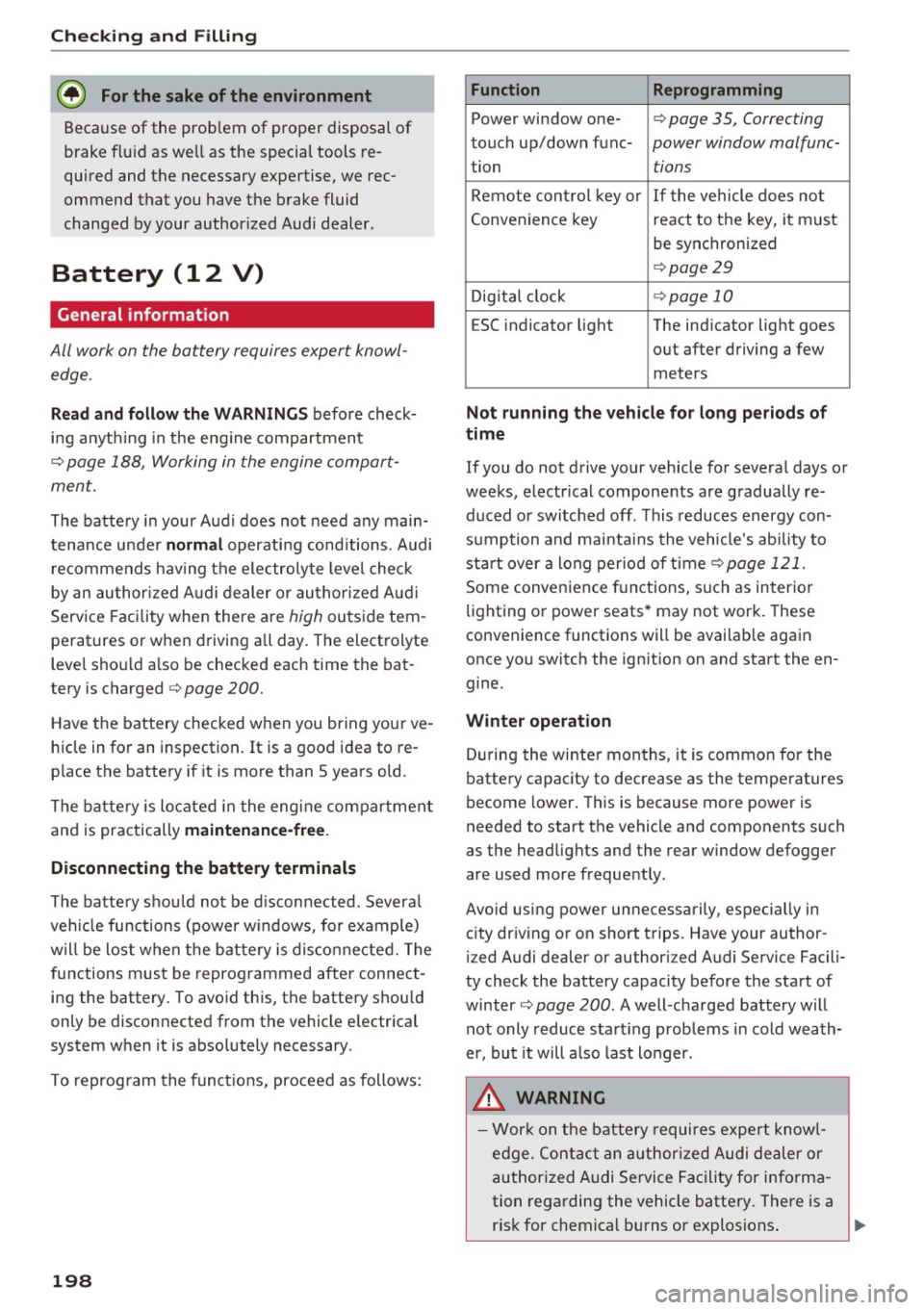
T o reprogram the func tions, proceed as follows:
198
Function Reprogramming
Power window one-c::> page 35, Correcting
touch up/down func-power window malfunc-
tion tions
Remote control key o r If the vehicle does no t
Convenience key react to the key, it must
be synchronized
c::> page29
Dig ita l cl ock c::>page 10
ESC indicator light The ind icator light goes
o ut after driving a few
meters
Not running the vehicle for long period s of
time
If you do not drive your vehicle for severa l days o r
weeks, electrical components are gradually re d u ced or switched off . This reduces energy con
s u mp tion and mai ntain s the vehicle's ability to
st art over a long perio d of time
c::> page 1 21.
Some conven ien ce f unctions, such as inter ior
li ght ing o r power seats* may not wor k. T hese
convenience functions will be availab le aga in
once you sw itch the ignition on and start the en
gine.
Winter operation
D ur ing the winte r mon ths, it is common for the
batte ry capac ity to decrease as the temperatures
become lower . This is because more power is
needed to start the vehicle and components such
as the headlights and the rear window defogger
a re used more freque ntly .
Avoid using power unnecessa rily, espec ia lly in
c ity dr iving o r on short t rips. Have your author
i z ed Audi dealer or author iz ed Audi Se rvice Facili
ty check the battery capacity be fore the start of
winter
c::> page 200 . A well -cha rged battery will
not only reduce sta rting prob lems in cold wea th
e r, bu t it will a lso l ast longer.
.&_ WARNING
- W ork on the b attery requires e xper t knowl
e d ge. Con tact an a uthor ized Audi dealer or
author ized Audi Se rvice Facility for info rma
tion rega rding the vehicle batte ry. There is a
-
ris k for chemical burns or e xplosions . ..,.
Page 199 of 272
<( co .... N ,.__
N .... 0 ,.__
> co
-Never open the vehicle battery. Do not try to
change the battery electro lyte level. Other
wise explosive gas will escape from the bat
tery and increase the r isk of an explos ion .
(D Tips
If your vehicle is not driven for several weeks
in very cold temperatures, remove the battery
and store it in a place where it will not freeze.
This prevents the battery from being dam
aged and needing to be replaced .
Working on the battery
Be especially careful when working on or near
the battery .
The battery (12 V) is located in the engine com
partment.
Always heed the
safety warnings, when working
on the vehicle battery or the vehicle electrical
system to prevent injury.
The following WARNINGS are very important
when working on the battery:
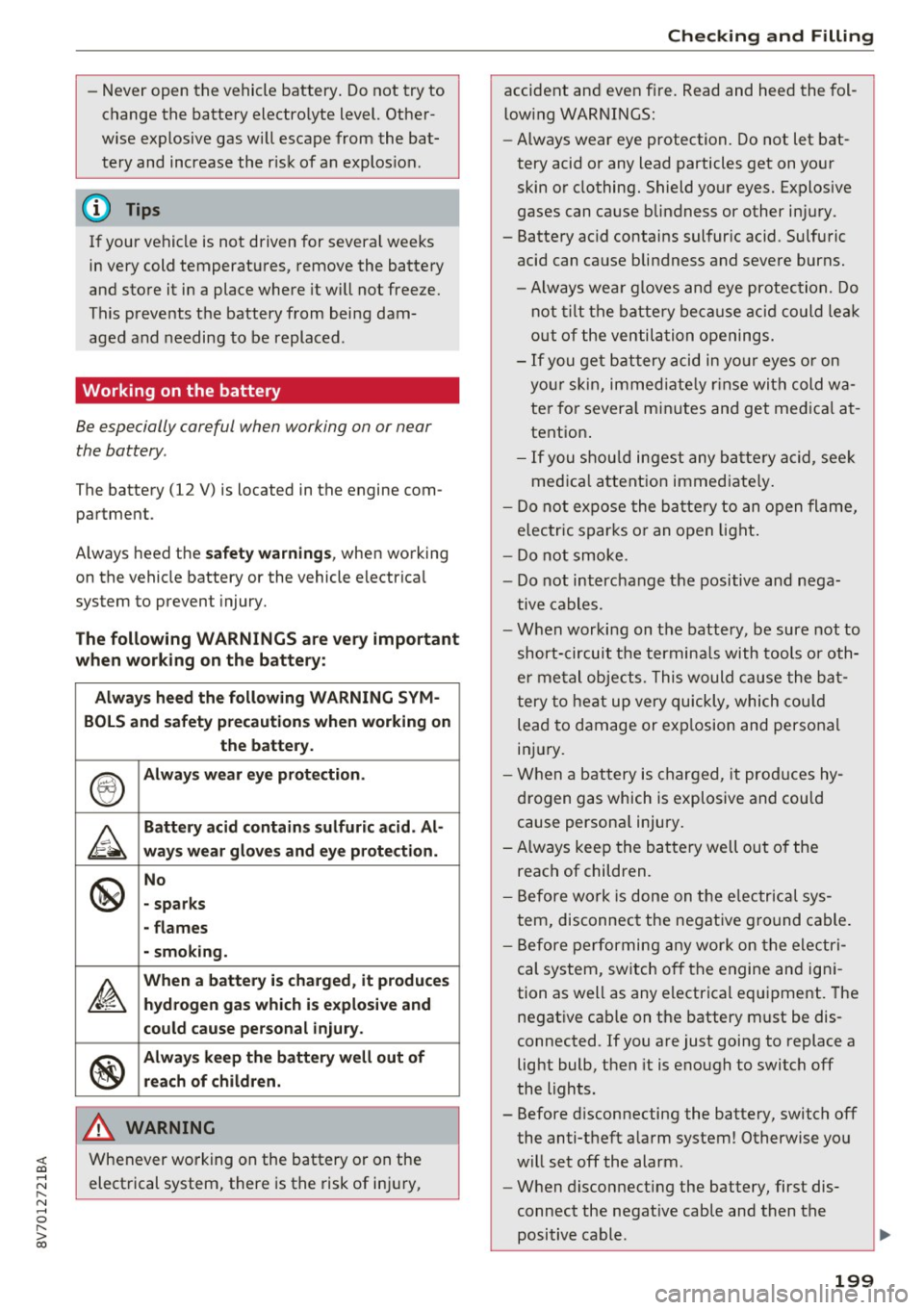
Always heed the following WARNING SYM-
BOLS and safety precautions when working on
the battery.
®
Always wear eye protection.
&
Battery acid contains sulfuric acid. Al-
ways wear gloves and eye protection.
@
No
- sparks
- flames
- smoking.
A
When a battery is charged, it produces
hydrogen gas which is explosive and
.
could cause personal injury .
®
Always keep the battery well out of
reach of children.
A WARNING
Whenever working on the battery or on the
electrical system, there is the risk of injury,
-
Checking and Filling
accident and even fire . Read and heed the fol
low ing WARNINGS:
- Always wear eye protection. Do not let bat
tery acid or any lead particles get on your
skin or clothing. Shield your eyes. Explosive
gases can cause blindness or other injury.
- Battery acid contains sulfur ic acid. Sulfuric
acid can cause blindness and severe burns.
- Always wea r gloves and eye protection. Do
not tilt the battery because acid could lea k
out of the ventilation openings.
- If you get battery acid in yo ur eyes or on
you r skin, immed iate ly r inse with cold wa
ter for severa l min utes and get medical at
tent ion .
- If you shou ld ingest any battery acid, seek
medica l attention immediate ly.
- Do not expose the battery to an open flame,
electric sparks or an open light.
- Do not smoke.
- Do not interchange the positive and nega-
tive cables.
- When working on the battery, be sure not to
short-circuit the termina ls with tools or oth
er metal objects. This would cause the bat
tery to heat up very quickly, which could
lead to damage or exp losion and personal
inj ury.
- When a battery is charged, it produces hy
drogen gas which is explosive and could
cause persona l injury.
- Always keep the battery well out of the
reach of children.
- Before work is done on the e lectrical sys
tem, disconnect the negative ground cable.
- Before performing any work on the electri
cal system, switch off the engine and igni
tion as well as any electrical equipment. The
negat ive cab le on the battery must be dis
connected. If you are just going to replace a
light bulb, then it is enough to switch off
the lights.
- Before disconnecting the battery, switch off
the anti-theft a larm system! Otherwise you
will set off the alarm .
- When disconnecting the battery, first dis
connect the negat ive cable and then the
positive cable.
199
Page 223 of 272
<( co .... N r--N .... 0 r--> co
Indicat or lights
IE -Loss of pressure in at least one ti re c::> ,& .
Check the tires and replace or repair if necessary.
Check/correct the pressures of all four tires. Then
store the tire pressures in the MMI
<=:>page 223.
mm (T ire Pressure Monitoring System) Tire
press ure: System malfuncti on!.
Ifm appears
after switching the ignition on or whi le driving
and the
IE indicator light in the instrument clus
ter blinks for approximately one minute and then
stays on, there is system malfunction . Try to
store the correct tire pressures
c::> page 223 . If
the indicator light does not turn off or turns on
again after a short period of time, drive to an au
thor ized Audi dealer or authorized Audi Service
Faci lity immediately to have the malfunction cor
rected.
A WARNING
- If the tire pressure warning light IE in the
instrument cluster turns on, the pressure in
one or more tires is too low . Reduce the ve
hicle speed immediately and avo id any hard
steering or braking maneuvers. Stop as soon as possible, check the tire and inflate the
t ire to the correct pressure, which is speci
fied on the tire pressure label on the veh icle
<=:> page 214. Driving w ith a t ire with low
pressure c auses the t ire to overheat and can
result in failure of the tire . Low pressure can
also have a negative effect on the driving
and braking behavior of the vehicle .
- T he driver is responsib le for maintaining the
correct tire pressures . You must check the
tire pressures regularly .
- Under certain conditions (such as a sporty
driv ing style, winter conditions or unpaved
roads), the pressure monitor indicator may
be delayed.
- Do not use run-flat tires on your vehicle . Us
ing them when not permitted can lead to
vehicle damage or accidents .
(D Tips
-The tire pressure monitoring system can al
so stop working when there is an ESC mal
function.
Tir es and wheel s
- Us ing snow chains may result in a system
ma lfunction.
- The tires with the identification "AO" or
"RO"
c::> page 211 have been matched with
your Audi tire pressure monitoring system .
We recommend that you use these tires.
- The tire pressure monitoring system can on
ly monitor the tire pressure of the driving
tires. Check the tire pressure of the spare
wheel in the luggage compartment so that if necessary it is ready for use.
Storing tire pressures
App lies to : vehicles wi th Tir e Pressure Mo nito rin g Sys te m in
dic ator
A change in tire pressur e or a change in tires
must be stored in the syst em .
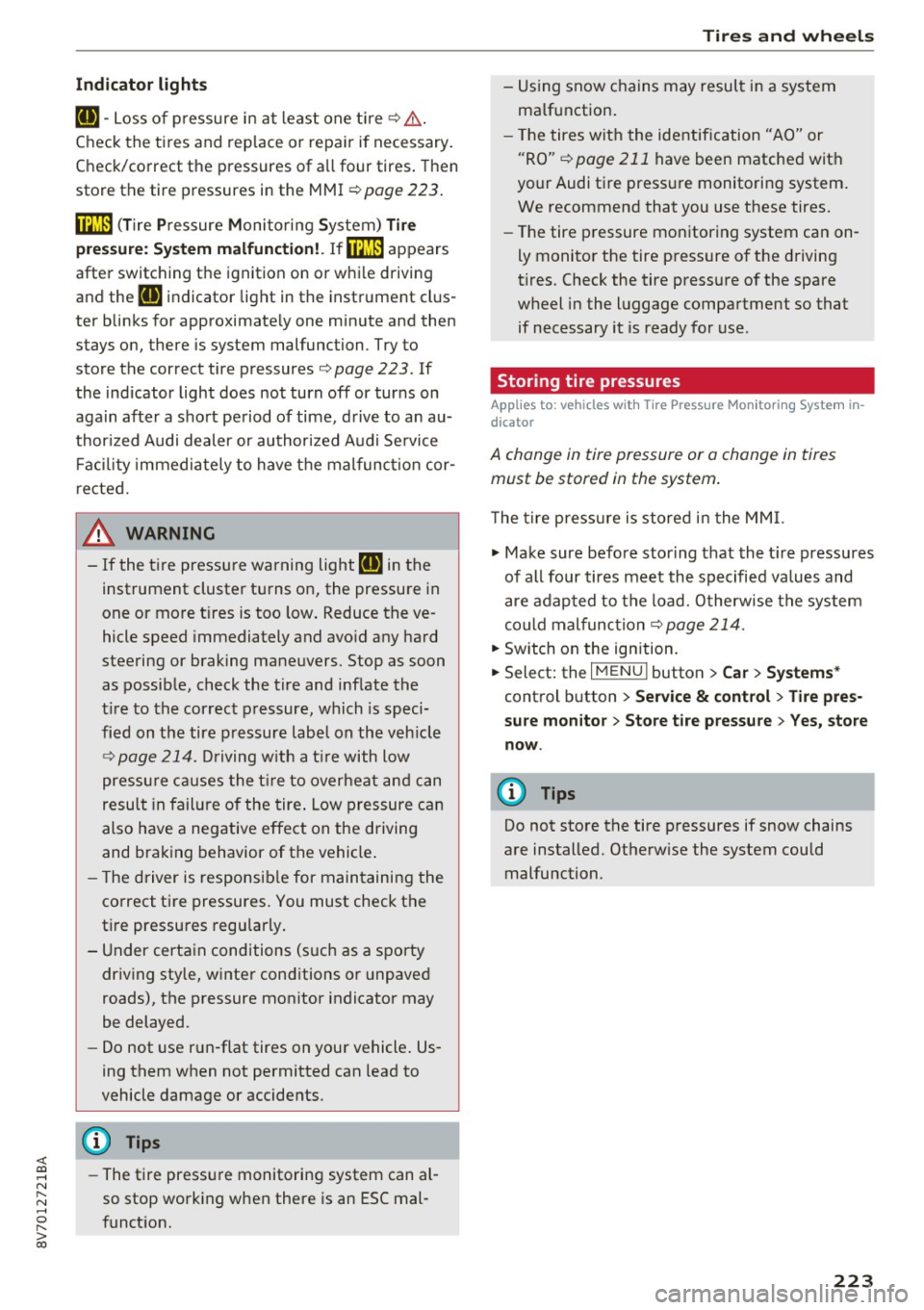
The tire press ure is stored in the MM I.
.,. Make sure before storing that the t ire pressures
of all four tires meet the specified values and
are adap ted to the load. O therwise the system
could malfunction
c::> page 214.
.. Switch on the ignition.
.,. Select: the I MENU I button> Ca r> Sys tem s*
con trol button > S er vice & control > Tire pre s
s u re m on itor > Stor e tire pressu re > Yes , sto re
no w.
(D Tips
Do not store the tire pressures if snow chains
are installed. Otherw ise the system could
malfunction.
223
Page 225 of 272
<( co .... N ,.__
N .... 0 ,.__
> co
A WARNING
-Only wash the vehicle when the ignition is
off and follow the instructions from the car
wash operator to reduce the risk of acci dents.
- To reduce the risk of cuts, protect yourself from sha rp metal components when wash
ing the underbody or the inside of the wheel
housings.
- After washing the vehicle, the bra king effect
may be de layed due to mo isture on the
bra ke rotors or i ce in the w inte r. The brake s
must be dried fi rst w ith a few care ful brake
applications .
Q) Note
-If yo u wash t he vehi cle in an au toma tic car
wash, yo u m ust fold the exte rior m irrors i n
to re duce the risk of damage to the mirrors .
Power folding exterior m irrors * must on ly
be fo lded in and out using the power folding
funct ion.
- To p revent paint damage, do not wash the
vehicle in d irect sunlight.
Ca re and cleaning
- To re duce the risk of damage, do not wash
the power top with a pressure washer .
- T o red uce the risk of damage to the surface,
do not use insect removing sponges, kitche n
sponges o r similar items .
- M atte finish painted veh icle components:
- To reduce the risk of damage to the sur-
face, do not use polishing agents or hard
wax.
- Never use protective wax. It can destroy
the matte finish effect.
- Do not place any stickers or magnetic
signs on vehicle parts painted with matte
finish paint. The paint could be damaged
when the stickers or magnets are re
moved.
@ For the sake of the environment
Only wash t he veh icle in facili ties s pec ially de
s igned for that pu rpose. This will reduce the
r isk of dirty wate r contamina ted with o il from
ente ring the sewe r sys tem.
Cleaning and care information
When cleaning and caring for individua l vehicle
components, refer to the follow ing tables . The
information contained there is simp ly recom
mendations. For quest ions or for components t
h at are not listed, cons ult an authorize d Audi
dealer or authorized Audi Service Fac ility . Also
f o llow the information found in c> ,& .
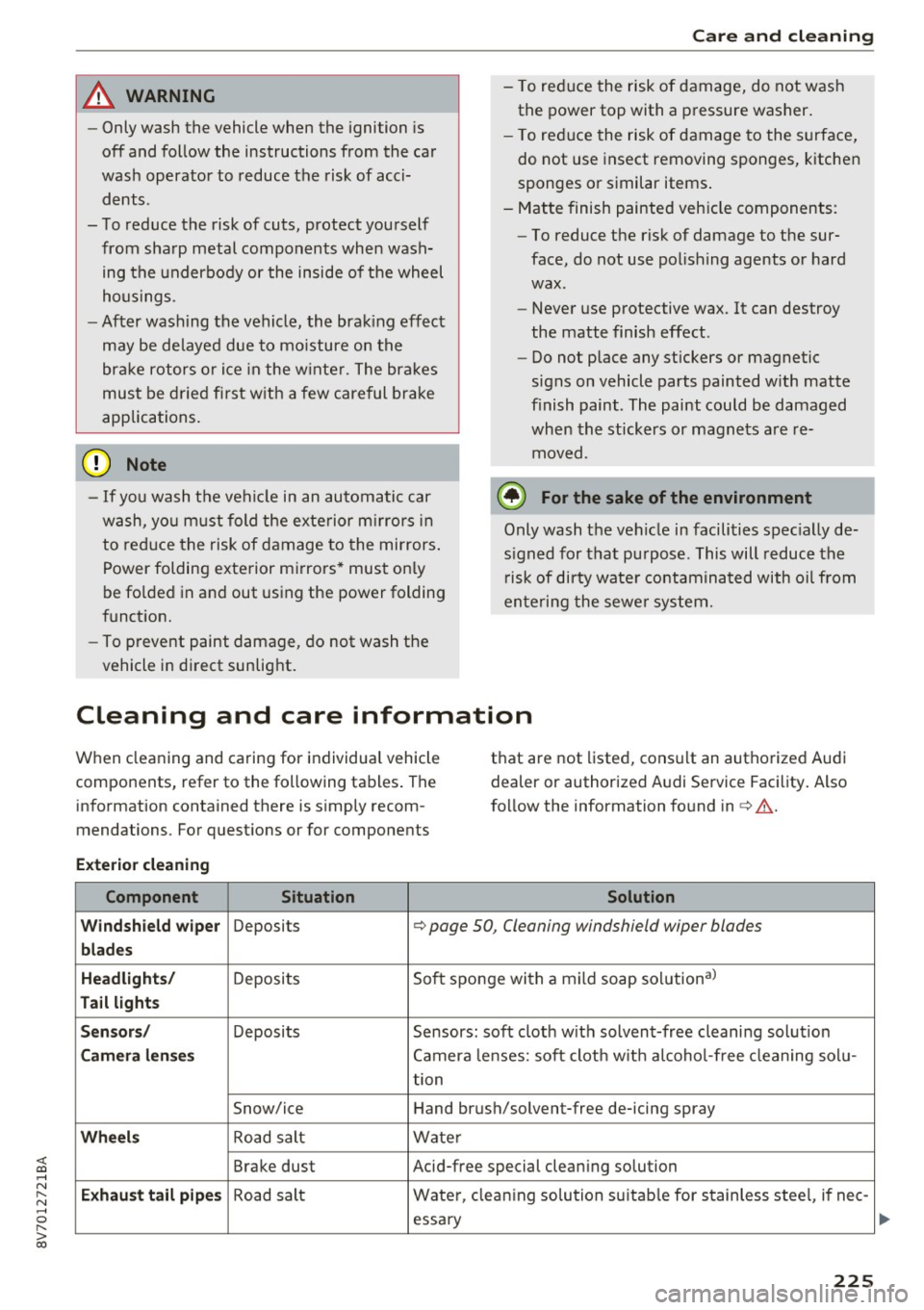
Exterior cleaning
Component Situation Solution
Windshield wiper
Deposits <=> page 50 , Cleaning windshield wiper blades
blades
Headlights /
Deposits So
ft sponge with a mild soap solutiona)
Tail light s
Sensors /
Deposits Sensors: soft cloth w it h solvent-free cleani ng solut io n
Camera len ses Camera lenses: soft clot h w ith alcoho l-free cleaning sol u-
tion
Snow/ice Hand br ush/solvent-free de-icing spray
Wheels Road salt Water
Brake dust Acid-free special cleaning solution
Exhaust tail pipe s Road salt Wate
r, clean ing so lution su itab le for s tainless stee l, if ne e-
essa ry
225
Page 227 of 272
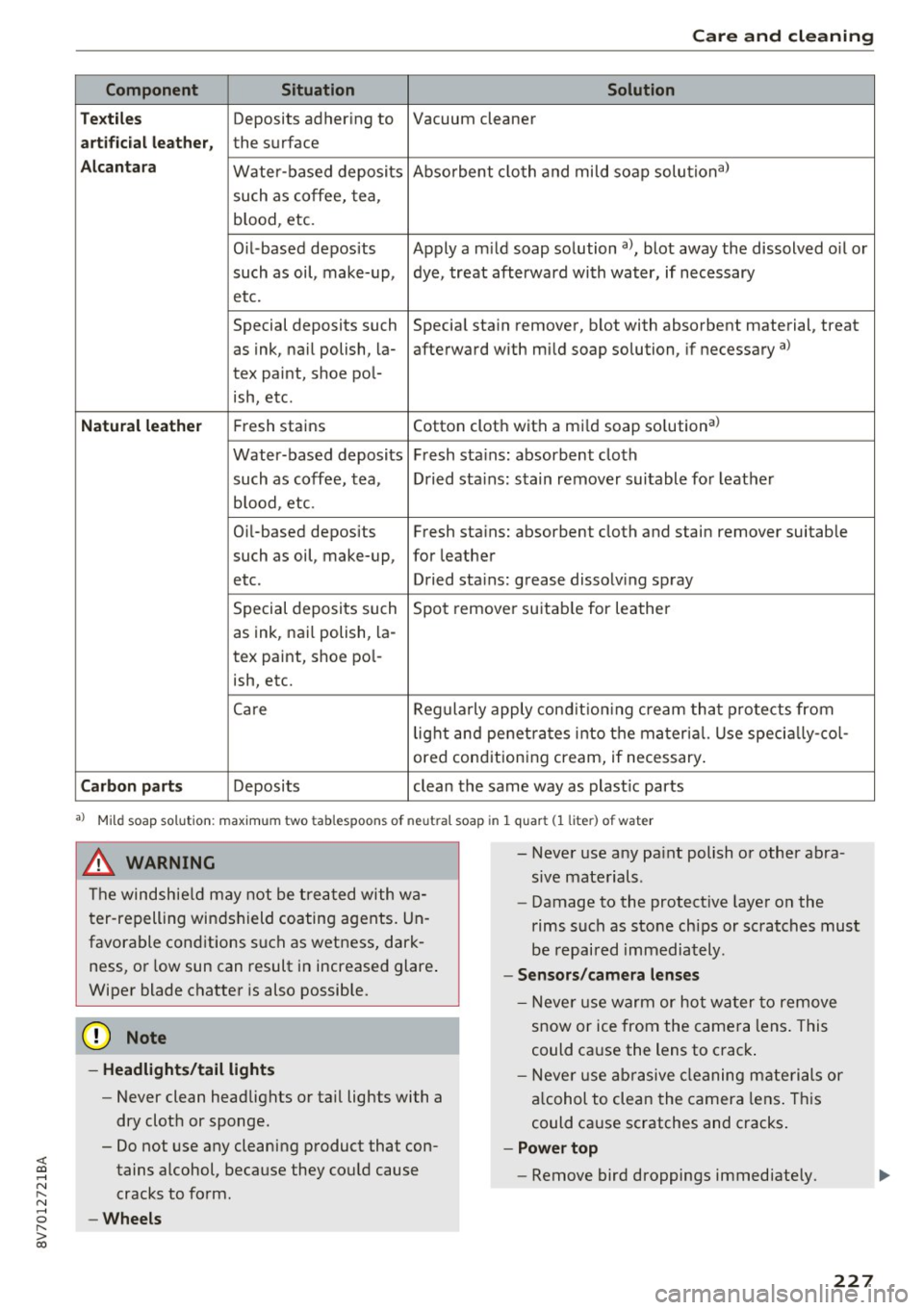
<( co .... N ,.__
N .... 0 ,.__
> co
Care and cleaning
Component Situation Solution
T ex til es
Deposits adhering to Vacuum cleaner
art ifici al leat her, the surface
A lcan tara Water-based deposits Absorbent
cloth and mild soap solutiona>
such as coffee, tea,
b lood, etc.
Oil -based deposits Apply a m ild soap solution
a), blot away the dissolved o il or
such as oil, make-up, dye, treat afterward with water, if necessary
etc.
Special deposits such Special stain
remover, blot with absorbent material, treat
as ink, nail polish, la- afterward with mild soap solution, if necessary
a)
tex paint, shoe pol-
ish, etc.
Natu ral le ath er Fresh stains Cotton cloth with a mild soap solution a>
Water-based deposits Fresh stains: absorbent cloth
such as coffee, tea, Dried stains : stain
remover suitable fo r leather
b lood , etc.
Oi l-based deposits Fresh stains: absorbent cloth and stain
remover suitable
such as oil, make-up, for leather
etc. Dried stains : grease dissolving spray
Special deposits such Spot remove r suitab le for leather
as ink, nai l polish, la-
tex paint, shoe pol-
ish, etc.
Care Regularly apply condit ion ing c ream that protects from
lig ht and penet rates into the material. Use specia lly-co l-
ored conditioning cream, if necessary .
Carbon part s Deposits clean the same way as plast ic parts
a) Mi ld soap solution: maximum two tablespoons of neutral soap in 1 q uart (1 liter) of water
.8, WARNING
The windshield may not be trea ted with wa
ter-repelling windshield coating agents. Un
favorable cond itions such as wetness, dark
ness, or low sun can result in increased glare.
Wiper blade chatter is also possible.
@ Note
- Headlight s/tail li ght s
-Never clean headlights or tail lights with a
dry cloth or sponge.
- Do not use any cleaning product that con
tains alcohol, because they could cause
cracks to form.
- Whe els
-
- Never use a ny pa int polish or other abra
sive materials .
- Damage to the protect ive layer on the
rims such as sto ne ch ips or scratches must
be repaired immediately .
-Sen sor s/camera l enses
- Neve r use warm or hot water to remove
snow or ice from the camera lens . This
could cause the lens to crack .
- Neve r use ab rasive cleaning materials or
a lcohol to clean the camera lens . This
could cause scratches and cracks .
-Power top
- Remove bird droppings immediately .
227
Page 241 of 272
<( co ..... N
" N ..... 0 r--. > 00
-Some of the equipment listed in the follow
ing tables applies only to certain model ver
s ions or certain optional equipment .
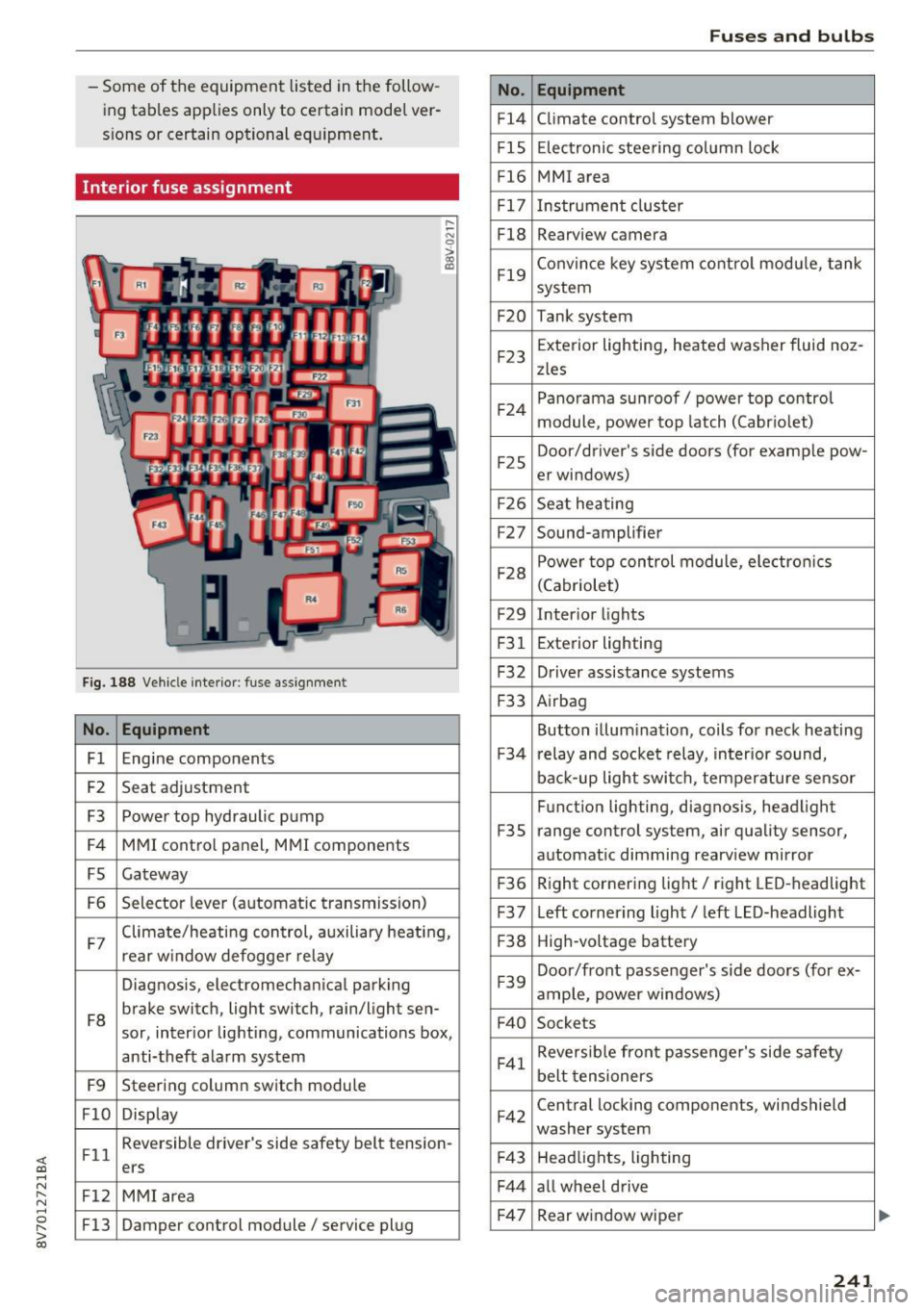
Interior fuse assignment
Fig. 188 Vehicle interior: fuse assignment
No. Equipment
Fl Engine components
F2 Seat
adjustment
F3 Power top hydraulic pump
F4 MMI control panel, MMI components
FS Gateway
F6 Selector
lever (automatic transmission)
.... ~ N
0
>
"' (0
F7 Climate/heating control, auxiliary heating,
rear w
indow defogger relay
Diagnosis, electromechanical parking
FB brake switch, light switch
, rain/light sen-
sor, inter ior lighting, communications box,
anti-theft alarm system
F9 Steering column switch module
FlO Display
Fll Reversible driver's side safety belt tension
-
ers
F12 MMI area
F13 Damper control module/ service plug
No.
Fl4
FlS
Fl6
F 17
FlB
F19
F20
F23
F 24
F2 5
F2 6
F27
F28
F29
F 31
F32
F 33
F 34
F35
F 36
F37
F38
F39
F40
F41
F42
F4 3
F44
F 47
Fuses and bulbs
Equipment
Climate control system blower
Electronic steering column lock
MMI area
Instrument cluster
Rearview camera
Convince key system control module, tank
system
Tank system
Exterior lighting, heated washer fluid noz -
zles
Panorama sunroof/ power top control
module, power top latch (Cabriolet)
Door/driver's side doors (for examp le pow-
er windows)
Seat heating
Sound-amplifier
Power top control module, electro nics
(Cabriolet)
Inter ior lights
Exterior lighting
Driver assistance systems
Airbag
Button illumination, coils for neck heating
r elay and socket relay, interior sound,
back-up light switch, temperature sensor
Function lighting, diagnosis, headlight
range control system, air quality sensor,
automat ic dimming rearview mirror
R ight cornering light/ right LED-headlight
Left cornering light/ left LED-headlight
High-voltage battery
Door/front passenger's side doors (for ex-
ample, power windows)
Sockets
Reversible front passenger's side safety
belt tensioners
Central locking components, windshield
washer system
Headlights, lighting
all wheel drive Rear w indow wiper
241
Page 242 of 272
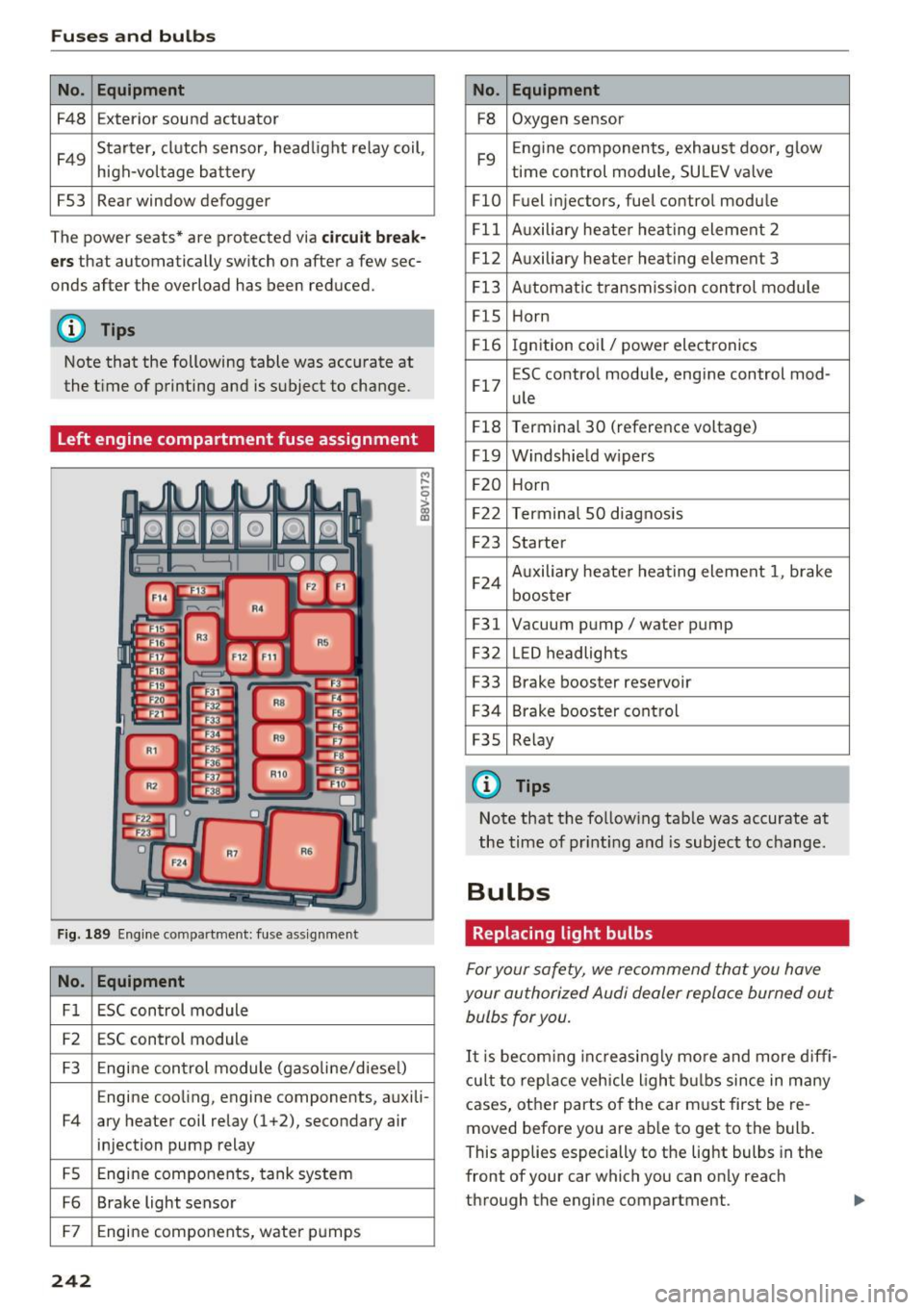
Fuses and bulbs
No . Equipment
F48 Exterior sound actuator
F49 Starter, clutch sensor, headlight relay coil,
high-voltage
battery
FS3 Rear window defogger
The power seats* are protected via
circuit break
ers
that automatically switch on after a few sec
onds after the overload has been reduced.
(D Tips
Note that the following table was accurate at
the time of printing and is subject to change.
Left engine compartment fuse assignment
Fig . 189 Engine compartment: fuse assignment
No. Equipment
Fl ESC control module
F2 ESC control module
F3 Engine control module (gaso line/diesel)
Engine cooling, engine components, auxili-
F4 ary heater coil relay (1+2), secondary air injection pump relay
FS Engine components,
tank system
F6 Brake light sensor
F7 Engine components, water
pumps
242
No. Equipment
F8 Oxygen sensor
F9 Engine
components, exhaust door, glow
time control module, SU LEV valve
FlO Fuel injectors, fuel control module
Fll Auxiliary heater heat ing element 2
F12 Auxiliary heater heating element 3
F13 Automatic transmiss ion control module
FlS Horn
F16 Ignition coil/ power electronics
F17 ESC control module, engine control mod-
ule
F18 Terminal 30 (reference voltage)
F19 Windshie ld w ipers
F20 Horn
F22 Terminal SO diagnosis
F23 Starter
F24 Auxiliary heater heating element
1, brake
booster
F31 Vacuum pump/ water pump
F32 LED headlights
F33 Brake booster reservoir
F34 Brake booster control
F3S Relay
@ Tips
Note that the following tab le was accurate at
the time of printin g and is subject to change.
Bulbs
Replacing light bulbs
For your safety, we recommend that you have
your authorized Audi dealer replace burned out bulbs for you.
It i s becom ing increasingly more and more diffi
cult to replace vehicle light bulbs since in many
cases, other parts of the car must first be re
moved before you are ab le to get to the bulb.
This applies especially to the light bulbs in the
front of your car which you can only reach
through the engine compartment .
Page 243 of 272
<( co .... N ,.__
N .... 0 ,.__
> co
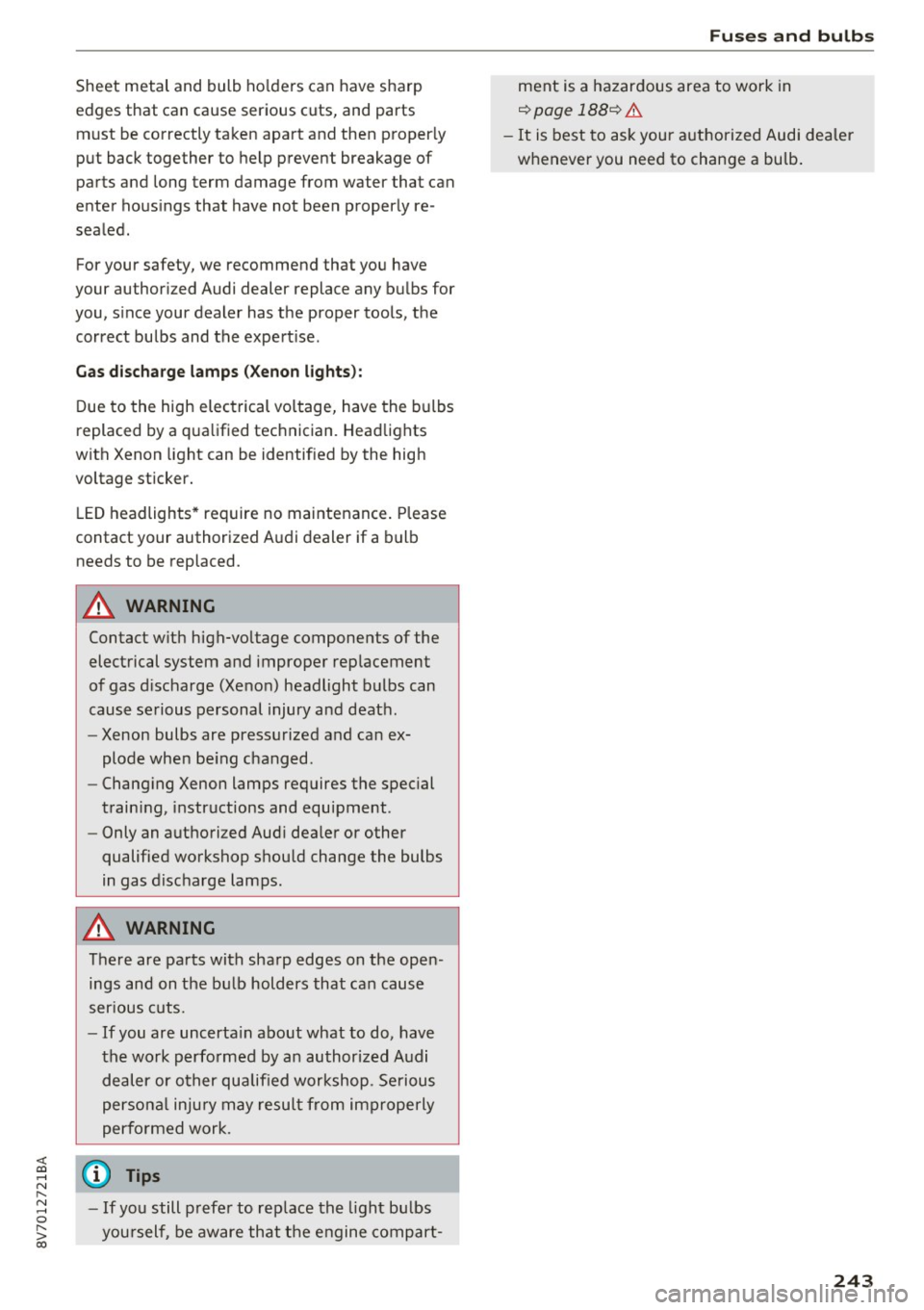
Sheet metal and bulb holders can have sharp
edges that can cause serious cuts, and parts must be correctly taken apart and then proper ly
put back together to help prevent breakage of
parts and long term damage from water that can
enter housings that have not been properly re
sealed.
For your safety, we recommend that you have
your authorized Audi dealer replace any bulbs for
you, since your dealer has the proper tools, the
correct bulbs and the expert ise.
Gas discharge lamps (Xenon lights):
Due to the high electrical voltage, have the bulbs
replaced by a qualified technician . Headlights
with Xenon light can be identif ied by the high
voltage sticker.
LE D headlights* require no maintenance. Please
contact your authorized Audi dealer if a bulb
needs to be replaced.
A WARNING
Contact w ith high-voltage components of the
electrical system and improper replacement
of gas discharge (Xenon) headlight bulbs can
cause serious personal injury and death.
- Xenon bulbs are pressurized and can ex
plode when be ing changed.
- Changing Xenon lamps requires the special
training, instructions and equipment .
- Only an authori zed Audi dea ler or other
qualified workshop should change the bulbs
in gas discharge lamps .
A WARNING
There are parts with sharp edges on the open
ings and on the bulb holders that can cause
ser ious cuts.
- If you are uncerta in about what to do, have
the work performed by an authorized Audi
dealer or other qualified workshop . Serious
personal injury may resul t from improperly
performed work .
(D Tips
-If you still prefer to rep lace the light bu lbs
you rself , be aware that the engine compart-
Fuses and bulbs
ment is a hazardous area to work in
¢ page 188¢ &.
-It is best to ask your authorized Audi dealer
whenever you need to change a bulb.
243
Page 245 of 272

<( co ..... N
" N ..... 0
" > 00
When jump starting or charging the battery,
never connect the negative ground cable to
the battery negative post because the battery
manager system must be able to detect the
battery's state of charge . Always connect the
negative ground cable to the negat ive ground
post of the battery manager control unit .
Using jump start cables
Connect the jump start cables in the exact order
described below.
Fig . 190 Engine compa rtment: connec tor s for ju mp start
cab les and a charger
Fig. 191 Jump start ing th e battery w ith another vehicle:
@ -dra ined bat tery, @-sta rter battery
m ~ 0 :> m
m
The battery is located to the left in the engine
compartment.
Do not jump start a frozen or
thawed battery
c> A in Starting with jumper ca
bles on page
244! Replace the battery. The pro
cedure for connecting jump start cables that is
described next is designed to help jump start
your veh icle.
Vehicle with drained battery:
.. Read the following carefully
c> page 244
.. Set the parking brake and place the selector
lever in the P position .
Emergency situations
.. Turn the ignition and electrica l equipment off
in both vehicles .
Connecting the negative terminal(-) to the
negative terminal(-) (black)
.. To reach the battery terminals, flip the battery
cover cap to the side
c> fig. 190.
1. Clamp the end of the red jump start cable to
the terminal
(D c> fig. 191 on the dead bat
tery @
c> CD in Starting with jumper cables
on page 244 .
2. Clamp the other end of the red jump start ca
ble to the terminal @on the charging bat
tery @.
Connect NEGATIVE (-) to NEGATIVE (-)
(black)
3. Clamp the black end of the jump start cable
preferably at the ground point, or on the
negative term inal @ on the charging battery
®·
4. Clamp the other end of the black jump start
cable
only to the ground point© on your
vehicle @Q(D.
5. Route the jump start cables so they cannot
get caught in the moving parts in the engine
compartment.
Starting the engine
6. Start the engine in the vehicle giving the charge and let it run at idle.
7. Start the engine in the vehicle with the dead battery and wait two to three minutes until it
"runs smoothly" .
8.
If the engine does not start, stop the start ing
procedure after 10 seconds and then repeat
it after approx imately 30 seconds.
9. In the vehicle that is being jump started,
switch the heate r fan and rear window de
froster on to red uce any voltage peaks that
may occur when disconnecting the jumper
cables. The headlights must be switched off.
10. With the engines running, remove the cables in
reverse order of the way they were instal
led . Make sure the cables do not get caught
in moving eng ine components .
11. Switch the heater fan and rear window de
froster off.
12 . Close the battery cover.
245
Page 257 of 272

<( co .... N ,.__
N .... 0 ,.__
> co
A
A/C
refer to Climate control system (automatic) .62
A/C (automat ic climate control system) . . . . 62
Accessories . . . . . . . . . . . . . . . . . . . . . . . 56, 255
Active lane assist . . . . . . . . . . . . . . . . . . . . . 100
Activating vibration warning . . . . . . . . . . . 102
Adjusting steering time . . . . . . . . . . . . . . . 102
C leaning the camera area . . . . . . . . . . . . . 225
Driver messages . . . . . . . . . . . . . . . . . . . . . 101
Indicator light . . . . . . . . . . . . . . . . . . . . . . 101
switching on and off . . . . . . . . . . . . . . . . . 101
Active rollover protection system . . . . . . . . 133
Retracting rollover protection . . . . . . . . . . 134
Adapt ive cruise control . . . . . . . . . . . . . . . . . . 90
Automatic transmission . . . . . . . . . . . . . . . 94
C leaning sensors . . . . . . . . . . . . . . . . . . . . 225
Driver messages . . . . . . . . . . . . . . . . . . . . . . 96
General Information . . . . . . . . . . . . . . . . . . 91
Request for driver intervention . . . . . . . . . . 96
Stop-and-go traffic . . . . . . . . . . . . . . . . . . . 94
Adaptive dampers . . . . . . . . . . . . . . . . . . . . . 106
Indicator light . . . . . . . . . . . . . . . . . . . . . . . 21
Adaptive light . . . . . . . . . . . . . . . . . . . . . 43 , 106
Indicator light . . . . . . . . . . . . . . . . . . . . . . . 21
Adjusting air distribution (Climate control sys-
tem) . . . . . . . . . . . . . . . . . . . . . . . . . . . . . . . . 63
Adjusting automatic headlights . . . . . . . . . . 45
Adjusting the air vents . . . . . . . . . . . . . . . . . . 63
Adjusting the center console lighting . . . . . . 47
Advanced key
refer to Convenience key . . . . . . . . . . . . . . . 70
Airbag . . . . . . . . . . . . . . . . . . . . . . . . . . . . . . 143
I ndicator light . . . . . . . . . . . . . . . . . . . . . . . 17
Airbag system . . . . . . . . . . . . . . . . . . . . . . . . 163
Advanced Airbag -System . . . . . . . . . . . . . . 147
Advanced Airbag System components . . . 150
Care . . . . . . . . . . . . . . . . . . . . . . . . . . . . . . 158
Ch ildr en . . . . . . . . . . . . . . . . . . . . . . . . . . . 167
Ch ild restraints . . . . . . . . . . . . . . . . . . . . . 167
Components (front airbags) . . . . . . . . . . . 150
Danger of fitting a child seat on the front
passenger seat . . . . . . . . . . . . . . . . . . . . . . 144
Disposal . . . . . . . . . . . . . . . . . . . . . . . . . . . 158
Front airbags . . . . . . . . . . . . . . . . . . . 147, 148
How do the front airbags work? . . . . . . . . 153
H ow many airbags does my vehicle have? 150
Index
How the Advanced Airbag System compo-
nents work together . . . . . . . . . . . . . . . . . 152
Important informat ion . . . . . . . . . . . . . . . 143
Important safety instructions on the knee
airbag system . . . . . . . . . . . . . . . . . . . . . . . 161
Knee airbags . . . . . . . . . . . . . . . . . . . . . . . . 159
Monitoring . . . . . . . . . . . . . . . . . . . . . . . . . 155
PASSENGER AIR BAG OFF light . . . . . . . . . 155
Repairs . . . . . . . . . . . . . . . . . . . . . . . . . . . . 158
Safety instructions . . . . . . . . . . . . . . . . . . . 157
Side airbags . . . . . . . . . . . . . . . . . . . . . . . . 161
Warning/Indicator lights . . . . . . . . . . . . . 155
When must the system be inspected? . . . 155
Alarm system
refer to Anti-theft alarm system . . . . . . . . . 27
Alignment pin (tire change) . . . . . . . . . . . . . 230
All-weather lights ( LED headlights) . . . . . . . 43
All season ti res . . . . . . . . . . . . . . . . . . . . . . . 219
All wheel drive . . . . . . . . . . . . . . . . . . . . . . . 120
Alternator
refer to Alternator (indicator light) . . . . . . 17
Alternator (indicator light) . . . . . . . . . . . . . . 17
Ambient lighting . . . . . . . . . . . . . . . . . . . . . . 46
Anti-lock braking system . . . . . . . . . . . . . . . 116
Indicator light . . . . . . . . . . . . . . . . . . . . . . . 18
Anti-slip regulat ion . . . . . . . . . . . . . . . . . . . 116
Indicator light . . . . . . . . . . . . . . . . . . . . . . . 18
Anti-theft alarm system . . . . . . . . . . . . . . . . . 27
Anti-theft protection Electronic immobilizer.............. .. . 31
Audi active lane assist
refer to Active lane assist . . . . . . . . . . . . . 100
Audi adaptive cruise control
refer to Adaptive cruise control . . . . . . . . . 90
Audi adaptive light
refer to Adaptive light . . . . . . . . . . . . . . . . . 43
Audi dr ive select
refer to Drive select . . . . . . . . . . . . . . . . . . 106
Audi Service Repair Manuals and Literature 253
Audi side ass ist
refer to Side assist . . . . . . . . . . . . . . . . . . . 103
AUTO Automat ic climate control system . . . . . . . 62
Automatic headlights . . . . . . . . . . . . . . . . . 43
Auto Lock (central locking system) . . . . . . . . 28
Automatic belt retractor . . . . . . . . . . . . . . . 138
257