lights AUDI A3 CABRIOLET 2016 Owner's Guide
[x] Cancel search | Manufacturer: AUDI, Model Year: 2016, Model line: A3 CABRIOLET, Model: AUDI A3 CABRIOLET 2016Pages: 272, PDF Size: 67.88 MB
Page 87 of 272
Trailer mod e
load" on the la bel located on the driver's side B
pillar (visib le when the door is open) . Inflate
tra iler tires to trailer and tire manufacturers'
specif ications.
Lights
Check to make sure both vehicle and t railer lights
are working p roper ly.
Safety chains
Be sure t railer safety chains are properly connect
ed from the trai le r to the hi tch on the veh icle.
L eave enough sla ck in the cha ins to permi t turn
ing corners. When yo u install safety chains, ma ke
sure they wi ll not drag on the road when yo u are
driving .
The cha ins s hou ld cross under the trailer tongue
t o prevent it from dropping in case of separation
from the h itch .
Driving instructions
Driving with a trailer always requires extra care
and consideration .
To obtain t he best poss ible handling of vehicle
and traile r, please note the fo llow ing :
.,. Do not tow a loaded trailer when your car itself
is not loaded.
.. Be especi ally ca ref ul when pass ing othe r
vehicles.
.. Observe speed limi ts .
.. Do not d rive at the maximum permissible
speed.
.. Always apply brakes early.
.. Monitor the temperature gauge .
Weight distribution
Towing a loaded t railer w ith an empty car res ults
in a high ly unstable distribution of weight . If this
cannot be avoided, drive at very low speeds on ly
to avoid the risk of losing steering control.
A "balanced" rig is easie r to operate and cont rol.
This means that the tow vehi cle should be loaded
to the extent possible and permissible, while
keep ing the tra iler as light as possib le under the
circumstances. Whenever possible, transfer
some cargo to the l uggage compartment of the
86
tow veh icle wh ile observing tong ue load require
ments and vehicle loading considerations.
Speed
The higher the speed, the mo re diff icu lt i t be
comes for the driver to con trol the r ig. Do not
drive at t he maxim um permissible speed. Reduce
you r speed even more if load, weather or wind
con dit ions are unfavorab le - partic ularly when
go ing downh ill.
Reduce vehicle speed
immediately if the trailer
shows the slightest sign of swaying.
Do not try
to stop the swaying by accelerating.
Observe speed limi ts. In some areas, s peeds fo r
vehicles towing trailers are lower than for regular
vehicles .
A lways apply bra kes early. Whe n driving down
hill, shift in to a lower gea r to use the engine
b raki ng effect to slow the vehi cle. Use of the
brakes alone ca n cause them to over heat and fai l.
Coolant temperature
The coolant temperature gauge 9 page 12 must
be obse rved caref ully. The coolant temperature
c a n incre ase if yo u drive o n long incl ines in a low
gear a t high engine speeds . Red uce your speed
immediately if the LE Ds in the top part of the dis
play turn on .
Fo r more info rm ation abou t indicator lights, re
fer to .
¢ page 16 .
A WARNING
-
Anyone not prope rly restrai ned in a moving
vehicle is at a much greate r risk in an acci
dent. Never let anyone ride in your car who is
not properly wear ing the restraints provided
by Aud i.
Trailer mode notes
Important to know
Your vehicle handles differen tly when towing a
trailer because o f the additiona l weight and di f
ferent weight distribution. Safety, performance
and economy will g reatly depend on how caref ul-
l y you load your trai ler and operate you r rig. ..,_
Page 90 of 272
<( co ..... N
" N ..... 0 r--. > 00
-Please note that unconsciously "resting"
your foot on the accelerator pedal prevents the cruise control from braking. This is be
cause pressing the accelerator pedal over
rides the cruise control system .
-If there is a brake system malfunction such
as overheating when the speed warning sys
tem is switched on, the braking function in
the system will be deactivated. The remain
ing speed warning system functions will re
main active , as long as the~ (USA mod
els) /
fil (Canada models) indicator light is
on.
{i) Tips
- The cruise control system is ideal for
stretches with speed limits. The driver is re
sponsible for adhering to the correct speed.
- The cruise control remains active when
shifting gears.
- The brake lights turn on when the brakes
are activated.
Switching on
A pp lies to: ve hicles with c ru ise control system
0
f
®t
0
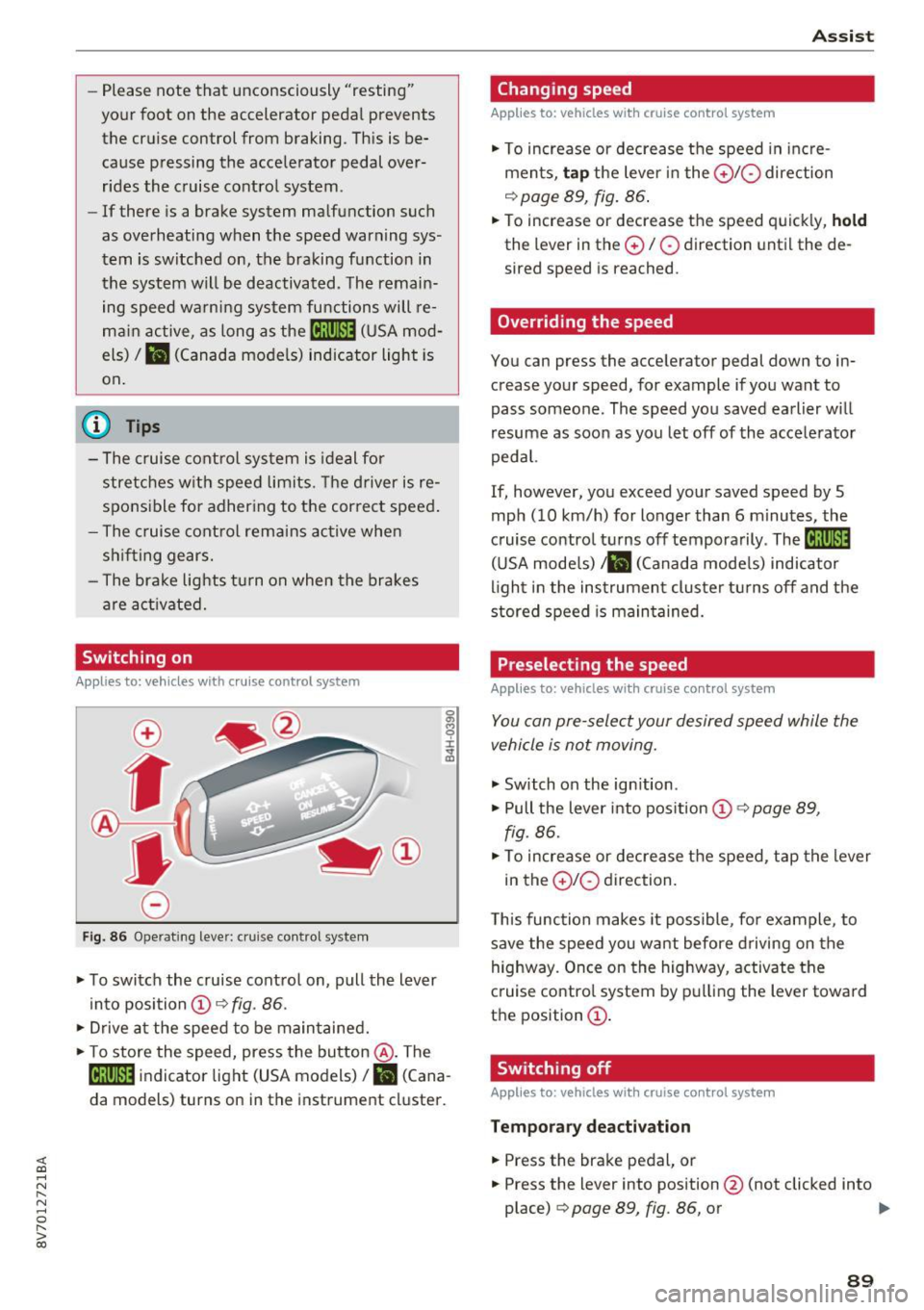
Fig. 86 Operat ing lever: c ru ise control syste m
.. To switch the cruise control on, pull the lever
into position @~
fig. 86 .
.. Drive at the speed to be maintained .
.. To store the speed, press the button @. The
@;\1)~14 indicator light (USA models)/ fil (Cana
da models) turns on in the instrument cluster.
Assist
Changing speed
Applies to : vehicles wit h cruise co ntrol sys tem
., To increase or decrease the speed in incre
ments,
tap the lever in the 010 direction
~ page 89, fig. 86.
.. To increase or decrease the speed quickly, hold
the lever in the 0 / 0 direction until the de
sired speed is reached.
Overriding the speed
You can press the acce lerator pedal down to in
crease your speed, for example if you want to
pass someone. The speed you saved earlier will
resume as soon as you let off of the accelerator
pedal.
If, however, you exceed your saved speed by 5
mph (10 km/h) for longer than 6 minutes, the
cruise control turns off temporarily .
The@;\!)~14
(USA models) ;fil (Canada models) indicator
light in the instrument cluster turns off and the
stored speed is maintained.
Preselecting the speed
Appl ies to: vehicles wi th cruise co ntrol sys te m
You can pre-select your desired speed while the
vehicle is not moving.
., Switch on the ignition .
.. Pull the lever into position
(D 9 page 89,
fig. 86 .
.. To increase or decrease the speed, tap the lever
in the
0 10 direction.
This function makes it possible, for example, to
save the speed you want before driving on the
highway. Once on the highway, activate the
cruise control system by pulling the lever toward
the position
(D .
Switching off
Applies to : vehicles wi th cruise co ntrol syste m
Temporary deactivation
.. Press the brake pedal, or
.. Press the lever into position @ (not clicked into
place)
~ page 89, fig. 86, or ..,
89
Page 93 of 272
Ass is t
(D Note
The sensor can be displaced by impacts or
damage to the bumper, whee l housing and
underbody. The adaptive cruise control and
pre sense front may become impa ired as a re
sult . Have an authorized Audi dealer or au
thorized Audi Service Fac il ity check their func
tion.
In curves
Applies to: ve hicles w ith Aud i adapt ive cru ise co ntro l and Audi
pre se nse front
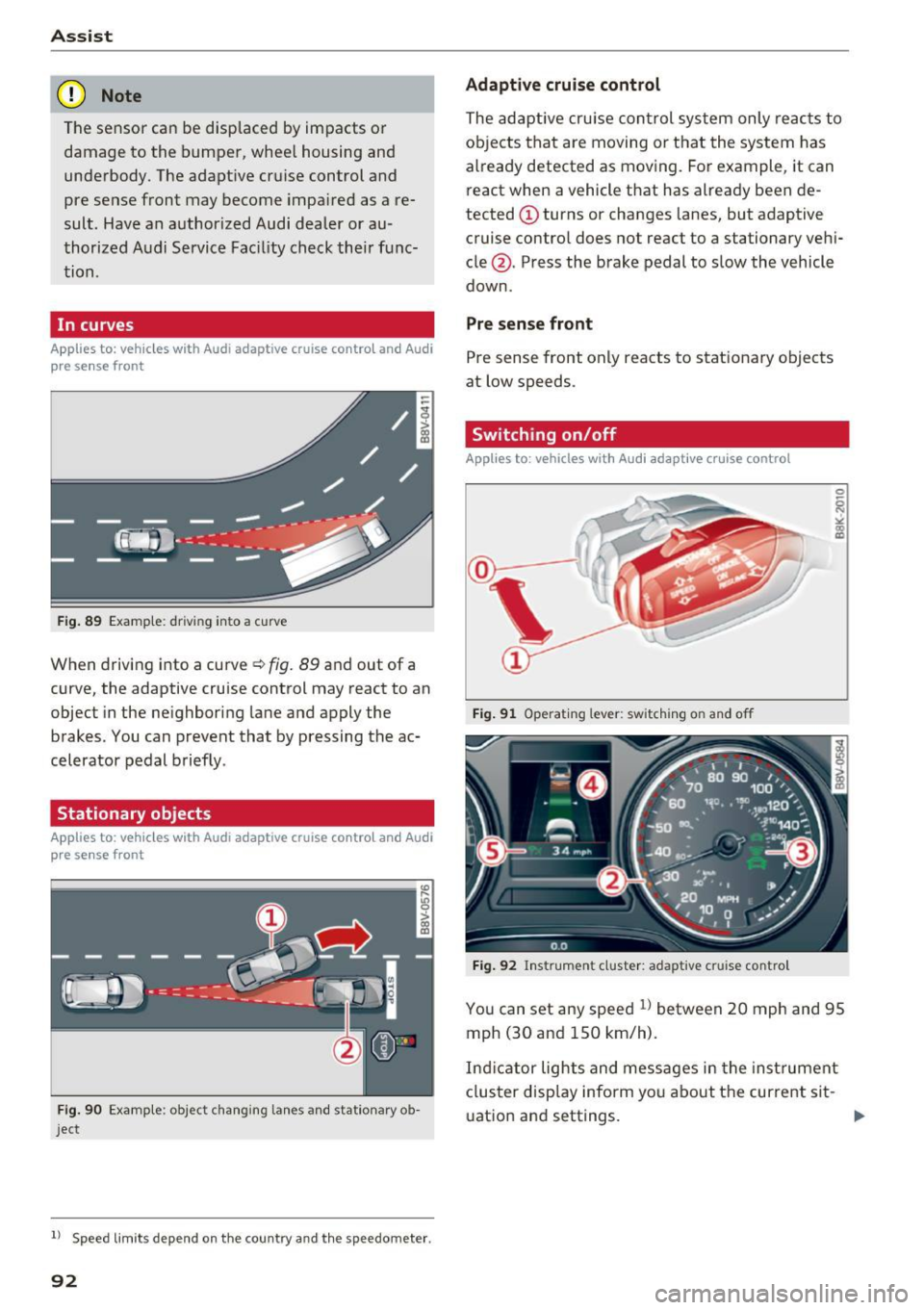
F ig . 89 Examp le: driv ing into a cu rve
When driving into a curve ¢ fig. 89 and out of a
curve, the adaptive cruise control may react to an
object in the neighboring lane and apply the
brakes . You can prevent that by pressing the ac
celerator pedal briefly .
Stationary objects
Applies to: vehicles with Aud i adapt ive cruise co ntro l and Audi
p re se nse front
Fig . 90 Examp le : object changing lanes and stationary ob
j ect
l ) Speed lim it s depend on t he country a nd the speedomete r.
92
Adaptive cruise cont rol
The adaptive cru ise con trol system only reac ts to
ob jects that are moving or t hat the system has
already detected as moving . For example, it can
react when a vehicle that has already been de
tected @turns or changes lanes, but adaptive
cruise contro l does not react to a stationary vehi
cle @. Press the brake pedal to slow the vehicle
down .
Pre sense front
Pre sense front only reacts to stat ionary objects
at low speeds .
Switching on/off
Applies to : vehicles wit h Audi adapt ive cruise control
Fig . 91 Operat ing lever: switch ing on and off
Fig . 92 Instrument cluster: adaptive cru ise contro l
You can set any speed l) between 20 mph and 95
mph (30 and 150 km/h) .
Ind icator lights and messages in the inst rument
cluster disp lay inform yo u about the curre nt sit -
uat ion and settings. .,.
Page 94 of 272

Switching adaptive crui se control on
"' Pull the lever toward you into position @
¢
fig. 91. A CC: s tandby appea rs in the instru
ment cluster disp lay .
Saving the speed and activating regulati on
"'T o save the c urrent speed , press the ISETI
¢ fig. 91 button . The stored speed is shown in
t h e tachomete r LED line @and appears briefly
in the information line ®¢
fig. 92 .
"' To activate the regulation whi le stationary, you
must press the brake pedal.
Sw itching adaptiv e cruise control off
"' Push the lever away from you into position @
until it clicks i nto place ¢
fig. 91 . The message
AC C: off appears.
The stored speed in the LED line is e rased.
@ Indicato r lights
II -adaptive cruise control is switched on. No
objects are detected ahead. The stored speed is
maintained.
• -An object a head was detected . The adaptive
cruise control system regulates the speed and
d istance to the object ahead and brakes/acce ler
ates automatica lly.
fij -adaptive cru ise control is switched on. An
object ahead was detected. Your vehicle remains
stopped and w ill not start driving automatica lly.
• -T he automatic bra king is no t enough to
maintain a sufficient distance to a n object ahead.
You must intervene ¢
page 96, Request for
driver intervention.
© Instrument cluster display
I f adaptive cruise control is not shown in the in
s trument cluster disp lay, yo u can call it up using
the mu ltifunction steering wheel b uttons
¢ page 24.
Based on the g raph ics in the d isp lay, you can de
termine if the system is m ainta ining a distance to
;;!; a vehicle ahead and what that distance to this ve-....
~ hide is: N ....
R No vehi cle -No object ahead was detected.
> 00
Assist
White vehicl e -An object ahead was de tected .
Red vehicl e -Request for the dr iver to take action
¢page 96.
Both
arrows on t he scal e@ indicate the d istance
to the object ahead . No arrow appears when the
vehicle is on an open road and t here is no object
ahead. If an object is detec ted ahead, the a rrow
moves on the sca le.
T he green zone o n the scale indicates the store
distance. For informat ion on changing the dis
t a nce, refer to ¢
page 95. If the dis tance se
l ected is exceeded or not reached, the arrow
moves into the red zone on the scale.
A WARNING
- Using adaptive cruise control incorrectly can
cause collisions, other accidents and ser ious
in ju ries.
- If you press the
!SET ! button w hen driving at
speeds be low 20 mph (30 km/h), the vehi
cle acce lerates automatically up to 20 mph
(30 km/h), wh ich is the minimum speed
that can be set.
{!) Tips
- If you switch the ignit ion or the adaptive
cruise control system off, the set speed is
erased for safety reason.
- The Elect ronic Stabilization Control (ESC)
and Anti-S lip Regulat ion (ASR) both sw itch
on when the adaptive cruise control is
switched on . ESC and ASR ca nnot be switch
ed off when adapt ive cruise control is
switched on.
- With the adaptive cruise control act ivated
t he ESC spo rt mode cannot be activated.
93
Page 101 of 272
<( co ..... N
" N ..... 0 r--. > 00
Switching on and off
App lies to: ve hicles with Audi active lane assist
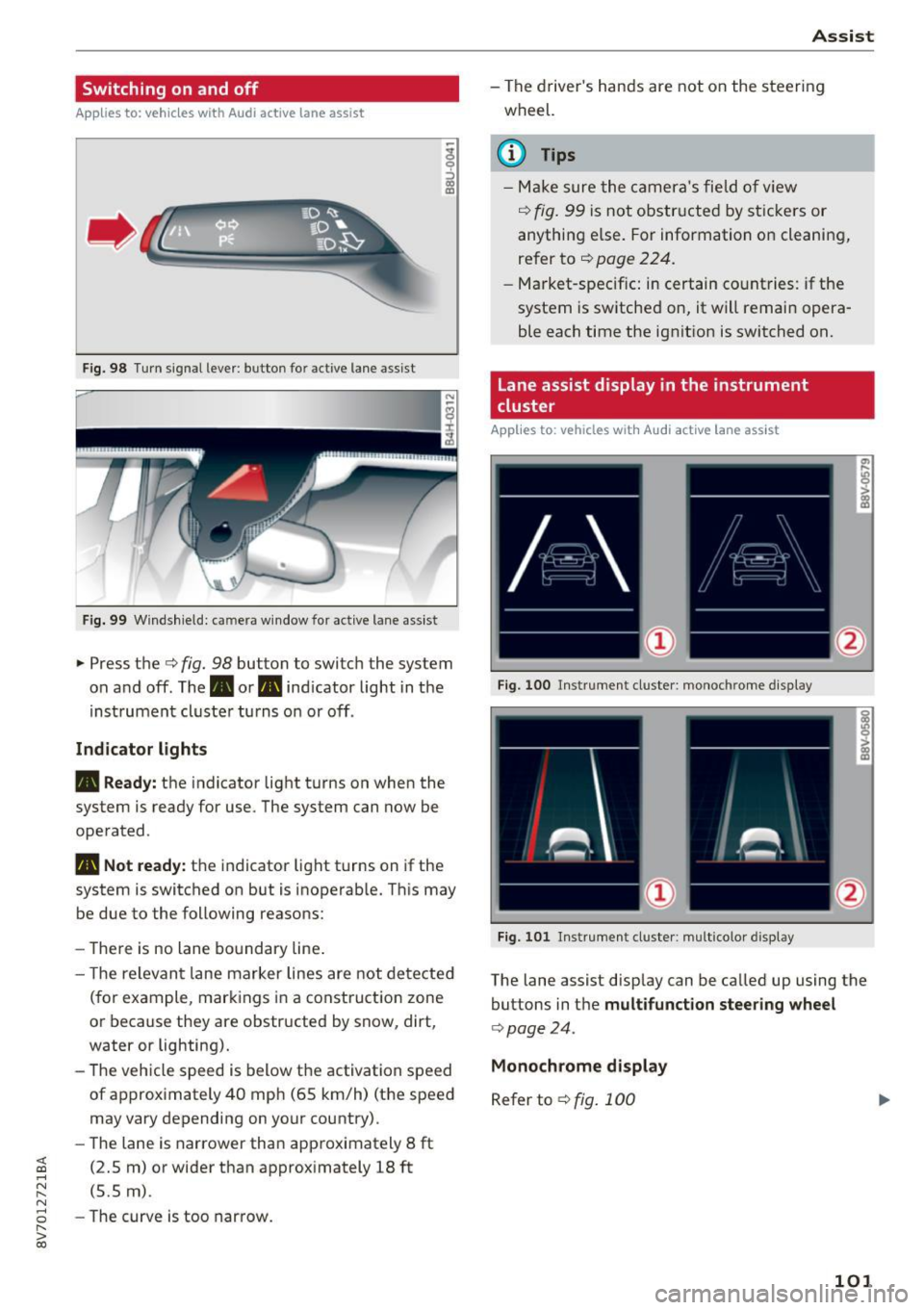
Fig . 98 Turn signal lever: button for act ive lane assist
Fig. 99 Windshield: camera wind ow for active lane assist
... Press the c:> fig. 98 button to switch the system
on and off. The . or
Pl1 indicator light in the
instrument cluster turns on or off.
Indicator lights
• Ready: the indicator light turns on when the
system is ready for use. The system can now be
operated .
Pl1 Not ready: the indicator light turns on if the
system is switched on but is inoperable. This may
be due to the following reasons:
- There is no lane boundary line.
- Th e relevant lane marker lines are not detected
(for example, markings in a construction zone
or because they are obstructed by snow, dirt,
water or lighting).
- The vehicle speed is below the activation speed
of approximately 40 mph (65 km/h) (the speed
may vary depending on your country).
- The lane is narrower than approximately 8
ft
(2.5 m) or wider than approximately 18 ft
(5.5 m).
- The curve is too narrow.
Assist
-The driver's hands are not on the steering
wheel.
(D Tips
- Make sure the camera's field of view
¢ fig. 99 is not obstructed by stickers or
anything els e. For information on cleaning,
refer to
c:> page 224.
-Market-specific: in certain countries: if the
system is sw itched on, it will remain opera
ble each time the ignition is switched on.
Lane assist display in the instrument
cluster
Applies to : vehicles wit h Audi act ive la ne ass ist
Fig. 100 Instrument cluster: monoc hrome disp lay
Fig. 101 Instrument cl uster : mult icolor displ ay
The lane assist disp lay can be called up using the
buttons in the
multifunction steering wheel
c:>poge 24.
Monochrome display
Refer to c:> fig. 100
101
Page 117 of 272
<( co ..... N
" N ..... 0 r--. > 00
prevent collisions -there is still a risk of ac
cidents!
- Press the accelerator pedal carefully when
accelerating on even, slippery surfaces such
as ice and snow. The drive wheels can spin
even when these control systems are instal
led and this can affect driving stability and
increase the risk of a collision.
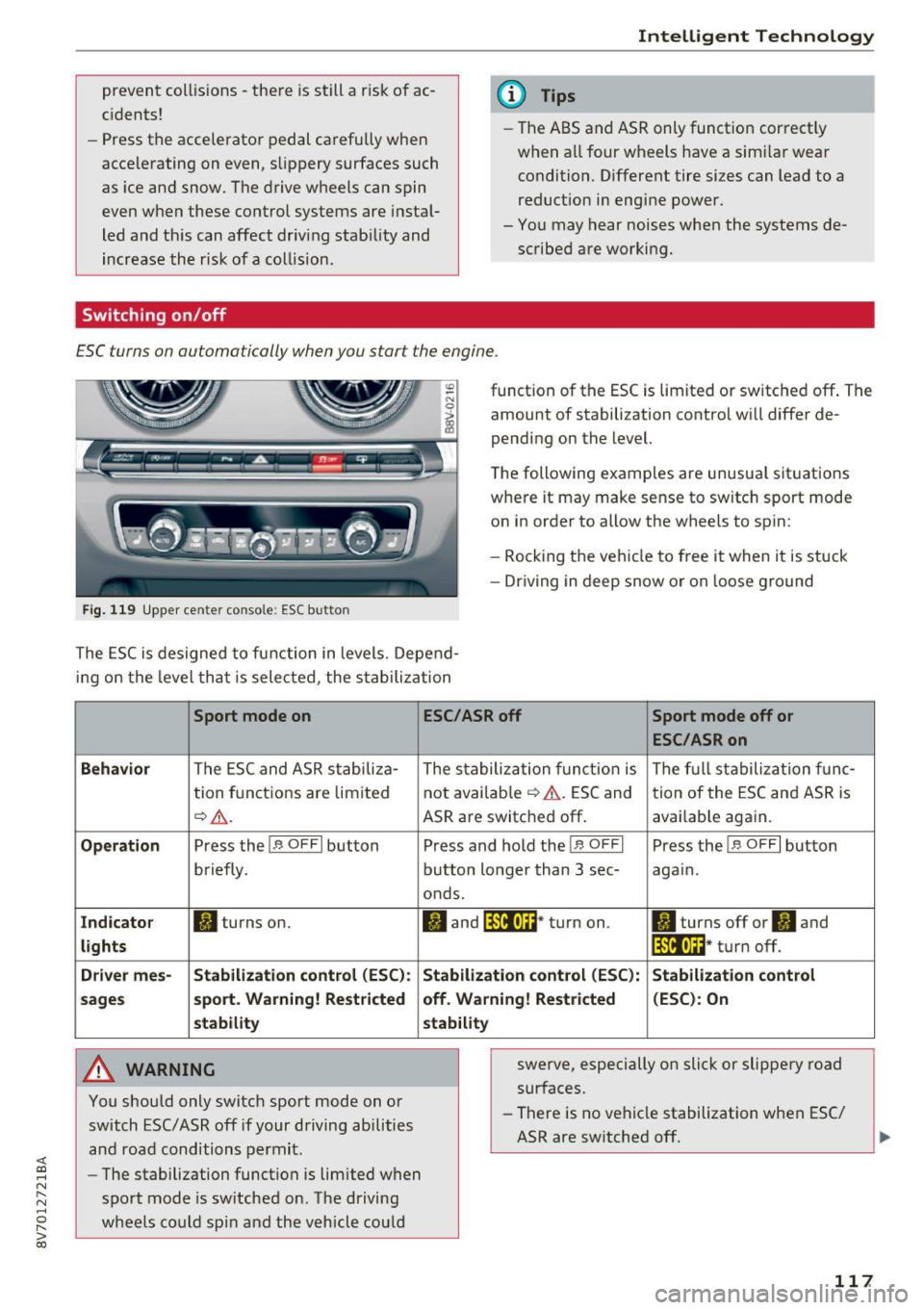
Switching on /off
Intelligent Technology
(D Tips
- The ABS and ASR only function correctly
when all four wheels have a sim ilar wear
condition. Different tire sizes can lead to a
reduction in engine power.
- You may hear noises when the systems de
scribed are working.
£SC turns on automatically when you start the engine.
Fig. 119 Upper center console : ESC button
function of the ESC is limited or switched off . The
amount of stabilization control will differ de
pending on the level.
The following examples are unusual situations
where it may make sense to switch sport mode
on in order to allow the wheels to spin:
- Rocking the vehicle to free it when it is stuck
- Dr iving in deep snow or on loose ground
The ESC is designed to function in levels. Depend
ing on the level that is selected, the stabilization
Sport mode on
Behavior
The ESC and ASR stabiliza-
tion functions are limited
~A .
Operation Press the!.$ OFFI button
briefly .
Indicator II turns on.
lights
Driver mes- Stabilization
control (ESC):
sages sport. Warning! Restricted
stability
A WARNING
You should only switch sport mode on or
switch ESC/ ASR off if your driving abilities
and road conditions permit.
- The stabilization function is limited when
sport mode is switched on. The driving
wheels could spin and the vehicle could
ESC/ASR off Sport mode off or
ESC/ASRon
The stabilization function is The full stabilization func-
not available
~ A. ESC and tion of the ESC and ASR is
ASR are switched off. avai lab le again.
Press and hold the!.$ OFFI Press the!.$ OFFI button
button longer than 3 sec- again.
onds.
II and lf'illtla~* turn on . II turns off or'II and
lf'tl•I~~ · turn off.
Stabilization control (ESC):
Stabilization control
off. Warning! Restricted (ESC): On
stability
swerve, especially on slick or slippery road
surfaces.
- There is no vehicle stabilization when ESC/
ASR are switched off.
117
Page 119 of 272
<( co .... N r--N .... 0 r--> co
-On steep slopes, reduce the speed and se
lect a lower gear or lower selector lever po
sition. Dr ive as little as possible while press
ing the brake pedal and avoid putt ing your
left foot on the brake pedal while driving.
Th is co uld cause the brakes to overheat and
impai r the efficiency of the brakes.
- Do not let the brakes "g rind " by a lways
keeping your foot on the brake pedal. This
can cause the br akes to overhea t, i ncrease
wea r and incre ase braking dis tance unneces
sari ly.
- Certa in wea ther an d operat ing co ndi tio ns
s u ch as dr iving through wate r, d riving in
heavy ra in or d riving after washing your ve
hicle can impair the effectiveness of the
brakes . In the w inte r, ice may b uild up on
the brake pads, rotors and drums. Check
these components by braking ca refu lly . Ap
plying the brakes carefu lly severa l times
dr ies the brakes and removes ice bu ild-up .
- The effic iency of the brakes can also be im
paired by driving for long st retches on roads
cove red w ith salt without using the b rakes .
Yo u can remove sa lt deposits from the
bra ke rotors and pads by caref ully app lying
the brakes severa l t imes .
-If the front spoiler is damaged or you ins tall
ano ther spoiler, m ake sure the front wheel
bra kes are vent ilated p roper ly. O therwise,
the b rake system could overheat, whic h re
duces the ir effectiveness.
- Failure of a brake circuit impai rs b raking
performance, which increases braking dis
tance . Avoid driving the vehicle . Have it tow
ed to the nearest authorized Aud i dealer or
authorized Audi Service Fac ility .
- Never let the vehicle roll while the engine is
stopped because this increases the risk of an
acc ident.
- If the brake booster is not working, you will
have to press m uch ha rder on the brake
peda l to compensate for the lack o f the
booster .
0 Note
-Never let the bra kes " rub" by pressing the
pedal lightly when braking is not really nee-
Intellig ent Technology
essary . This causes the b rakes to overheat
and increases braking distance and causes
wear .
- Before driving on a long st retch with steep
slopes, reduce your speed and shift to the
next lower gear Th is makes use of the en
gine braking effect and relieves the brakes.
If you need to brake additionally, brake in
intervals and not continuously .
(D Tips
-If the brake booster is not work ing, you
must press the brake peda l with much more
force than normal.
- If you retrof it your vehicle with a front spo il
er, wheel covers or sim ilar items, make sure
that the air flow to the fro nt wheels is not
inter rupted . Otherwise the b rake system
can become too hot.
Electromechanical
steering
The electromechanical steering supports the
driver's steering movement s.
Power steering adapts electronically based on
the ve hicle speed .
T he veh icle st ill has f ull s teer ing f unct iona lity if
t h e power steering fails or when the engine is
stopped (towing) . To steer, you must app ly m uch
more force than usual.
Indicator lights and messages
• Do not driv e vehicle : steering defective
If this indicator light turns on and stays on and
t hi s message appears , the power steering may
have failed .
Do
not continue dr iv ing . See an author ized Audi
dealer or authorized A udi Se rvice Fac ility for as
s istance .
• Do not dr ive vehicle: steering defecti ve
There is a ma lfunction in the e lectronic steering
l ock. You cannot turn the ignition on. ..,.
119
Page 124 of 272
Driving sa fe ty
Driving safety
Basics
Safe driving habits
Please remember -safety first!
This chapter contains important information,
tips, instruct ions and warn ings that you need to
read and observe for your own safety, the safety
of your passengers and others. We have summar ized here what you need to know about safety
be lts, a irbags, child restra ints as well as child
safety. Your safety is for us
priority number 1 . Al
ways observe the i nfo rmation and wa rn ings in
this section - for your own safety as well as that
of your passengers.
The information i n this section applies to all
model versions of yo ur vehicle . Some of the fea
tures descr ibed in t his sections may be s tanda rd
equipment on some models, or may be optional
equipment on others . If you are not sure, ask
your authorized Audi dealer.
A WARNING
- Always make sure that you follow the in
structions and heed the WARNINGS in th is
Manual.
It is in your interest and in the in
te rest of your passengers.
- Always keep the comp lete Owner's Litera
ture in your A udi when you lend or se ll your
vehicle so that this important information
will always be available to the d river and
passenge rs.
- Always keep the Owner 's literature handy so
that you can find it easily i f you have ques
t ions.
- Always adjust your speed to the wea ther
t raff ic and conditions. Follow the speed lim
its.
- Always dr ive in such a way that you can s top
yo ur vehicle safely.
- Always adjust your speed to the genera l
flow of traffic. Follow the speed l imits.
124
· Safety equipment
The safety features are part of the occupant re
straint system and work together to help reduce the risk of injury in a wide variety of accident sit
uations.
You r safety and the safety of your passengers
should not be left to chance . Advances in tech
no logy have made a va riety of features available
to help red uce the risk of inj ury in an accident.
The following is a lis t of jus t a few of the safe ty
fea tures in yo ur Audi :
- sophisticated safety be lts fo r drive r and all pas-
senge r seat ing pos itions,
- safety belt pretensioners,
- safety bel t force lim ite rs fo r the front seats,
- front airbags,
- knee airbags for the front seats*
- side airbags in the front seats,
- special LATCH anchorages fo r child res trai nts,
- head rest raints fo r each seati ng position,
- adjustab le steering column.
- pre sense bas ic * (preventative passenger pro-
tect ion)
These ind iv idual safety features, can work to
gether as a system to he lp protect you and your
passengers i n a wide range of acc idents. These
fea tures cannot wo rk as a system if they are not
always correctly adjusted and cor rect ly used.
Safet y is e verybody's responsibility!
Important things to do before driving
Safety is everybody 's job! Vehicle and occupant
safety always depends on the informed and care
ful driver .
For your safety and the safety of your passen
gers,
be fo re dri ving always:
.. Make sure that a ll lights and signals a re operat
ing correctly.
.. Make sure that the tire pressure is correct.
.. Make sure that all windows are clean and afford
good vis ibility to the outs ide .
.. Secu re all luggage and other items carefully
,=;,page 58, ,=;,page 57 . .,.
Page 135 of 272
<( co .... N r--N .... 0 ,.__
> co
Safety belts
General notes
Always wear safety belts!
Wearing safety belts correctly saves lives!
This chapter explains why safety belts are neces
sary, how they work and how to adjust and wear
them correctly.
~ Read all the information that follows and heed
all of the instructions and WARNINGS.
A WARNING
Not wearing safety belts or wearing them im
properly increases the risk of serious personal
injury and death .
- Safety belts are the single most effective
means available to reduce the risk of serious
injury and death in automobile accidents.
For your protection and that of your passen
gers, always correctly wear safety belts
when the vehicle is moving.
- Pregnant women, injured, or physically im
paired persons must also use safety belts.
Like all vehicle occupants, they are more
likely to be seriously injured if they do not
wear safety belts. The best way to protect a
fetus is to protect the mother -throughout
the entire pregnancy.
Number of seats
Your Audi has a total of four seating positions:
two in the front and two in the rear. Each seating position has a safety belt .
A WARNING
Not wearing safety belts or wearing them im
properly increases the risk of serious personal
injury and death.
- Never strap more than one person, includ
ing small children, into any belt.
It is espe
cially dangerous to place a safety belt over a
child sitting on your lap.
- Never let more people ride in the vehicle
than there are safety belts available.
Safety belts
-Be sure everyone riding in the vehicle is
properly restrained with a separate safety
belt or child restraint.
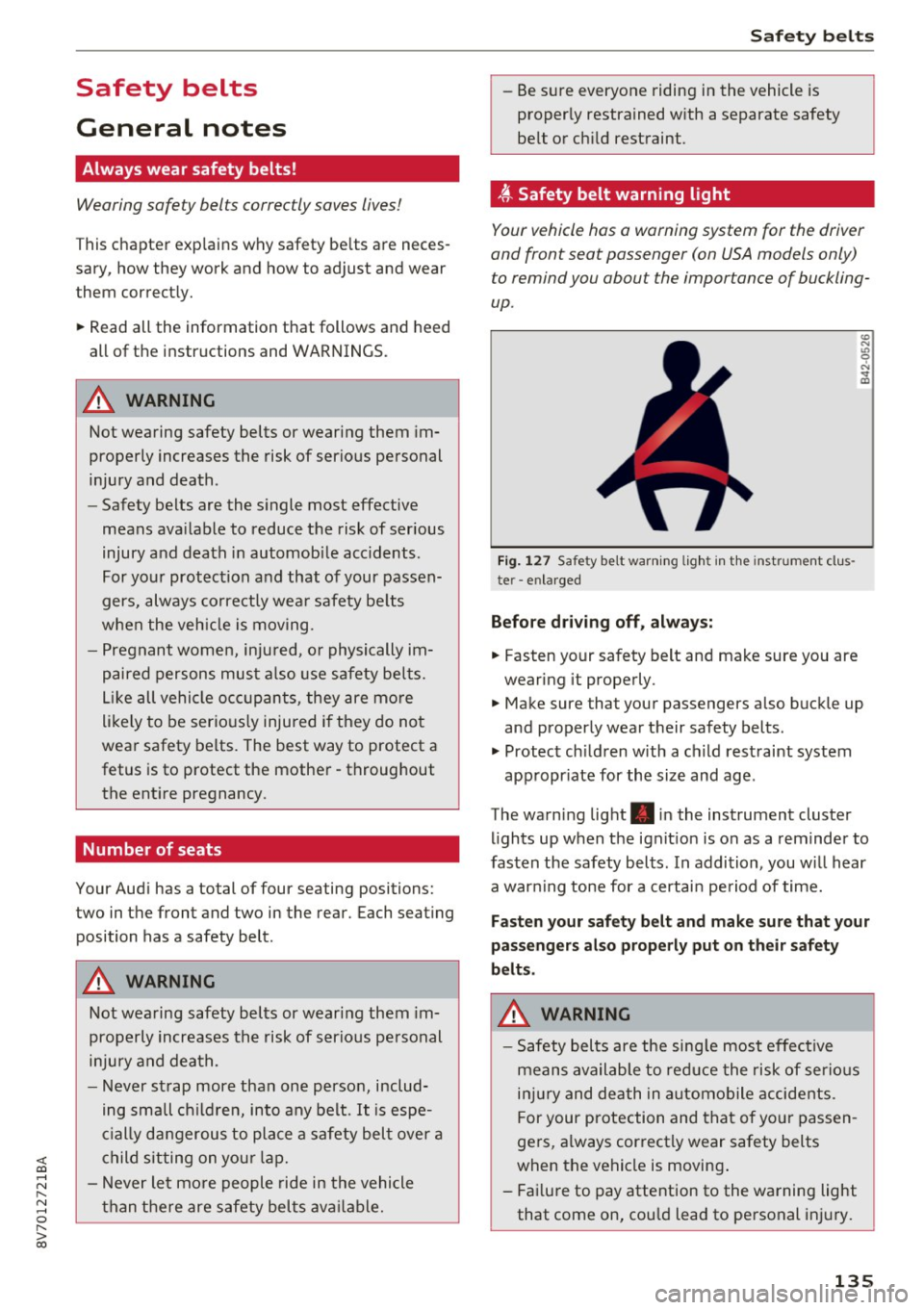
~ Safety belt warning light
Your vehicle hos o warning system for the driver
and front seat passenger (on USA models only)
to remind you about the importance of buckling
up .
Fig. 127 Safety belt warn ing light in the instrument clus
te r -enlarged
Before driving off, always:
.. Fasten your safety belt and make sure you are
wearing it properly.
.,, N
"' 0 ..:, ., m
~ Make sure that your passengers also buckle up
and properly wear their safety belts .
~ Protect children w ith a ch ild restraint system
appropr iate for the size and age .
The warning light . in the instrument cluster
lights up when the ignit ion is on as a reminder to
fasten the safety belts. In addition, you wil l hear
a warning tone for a certain period of time.
Fasten your safety belt and make sure that your
passengers also properly put on their safety
belts.
A WARNING
-
- Safety belts are the sing le most effective
means available to reduce the risk of serious
injury and death in automobile accidents.
F or your protection and that of your passen
gers, a lways correctly wear safety belts
when the vehicle is moving .
- Failure to pay attention to the warning light
that come on, could lead to personal injury.
135
Page 192 of 272
Check ing and F illing
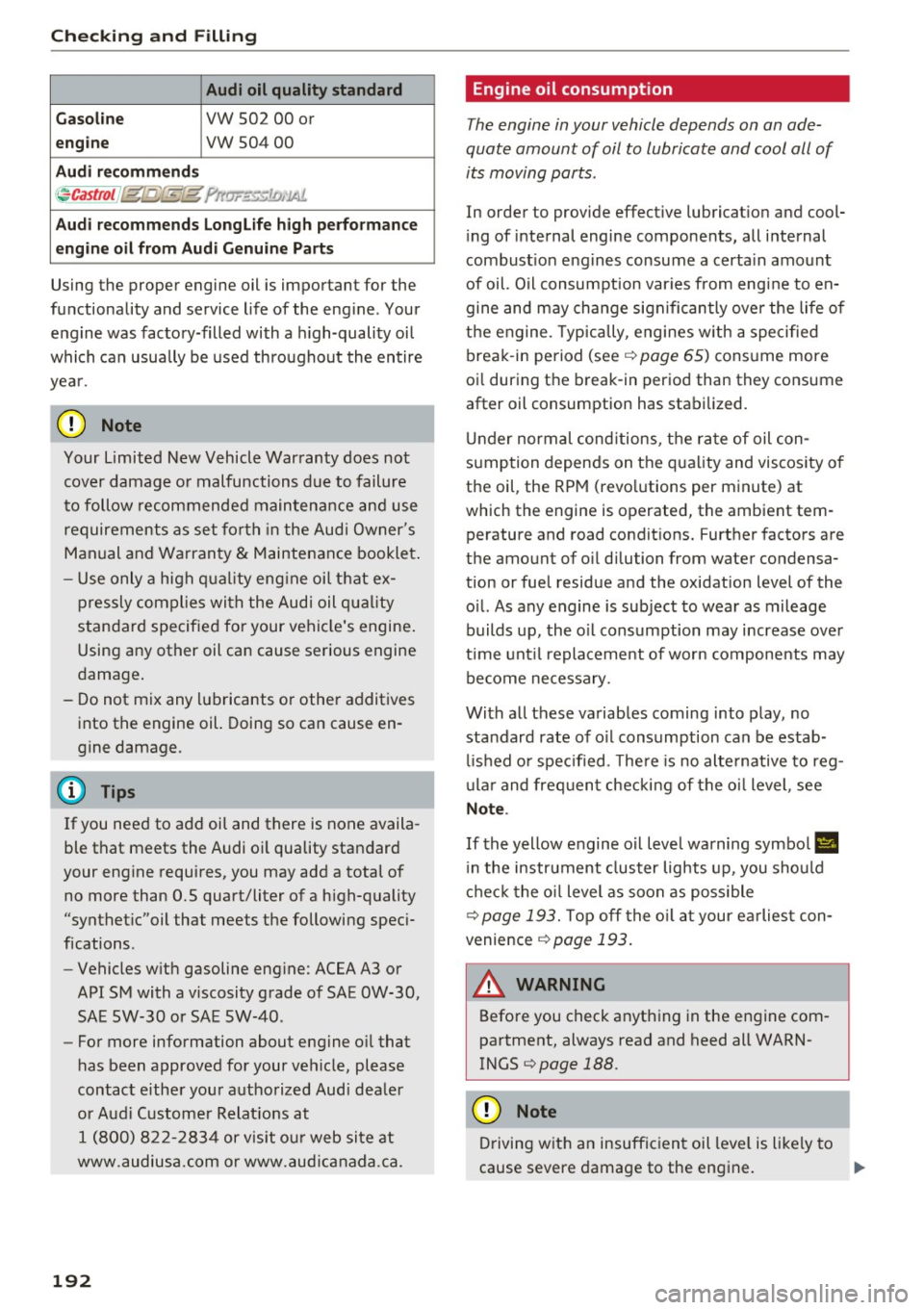
Audi oil quality standard
Gas olin e
VW 502 00 or
engi ne vw 50400
A udi reco mmend s
~Castrol I jgl[J,'fE{g ?r,w.:..~J ri, '.IA!,
Audi rec ommends Longlif e high perform ance
engi ne oil from Au di Genuin e Parts
Using the proper engine oil is important for the
functionality and service life of the engine. Your
engine was factory-filled with a h igh-quality oil
which can usually be used throughout the entire
yea r.
(D Note
Your Limited New Vehicle Warranty does not
cover damage or malfunctions due to failure
to follow recommended maintenance and use
requirements as set forth in the Audi Owner's
Manual and Warranty & Maintenance booklet .
- Use only a high qual ity eng ine oil that ex-
pressly complies with the Audi oil quality
standard specified for your vehicle's engine .
Using any other oil can cause serious engine
damage.
- Do not mix any lubricants or other additives into the engine oil. Doing so can cause en
gine damage.
@ Tips
If you need to add oil and there is none availa
ble that meets the Audi oil quality standard
your engine requires, you may add a total of
no more than 0.5 quart/liter of a h igh-quality
"synthet ic"oil that meets the following speci
fications.
- Vehicles w ith gasoline eng ine: ACEA A3 or
API SM with a viscosity grade of SAE OW-30,
SAE 5W-30 or SAE 5W-40.
- For more information about engine o il that
has been approved for your vehicle, please
contact either your authorized Audi dea ler
or Aud i Custome r Relat ions at
1 (800) 822- 2834 or visit ou r web site at
www.audiusa.com or www .aud icanada.ca.
192
· Eng ine oil consumption
The engine in your vehicle depends on an ade
quate amount of oil to lubricate and cool all of
its moving parts.
In order to provide effect ive lubricat ion and cool
i ng of internal engine components, all internal
combust ion eng ines consume a certa in amount
of oil. Oil consumption var ies from engine to en
gine and may change sign ificantly over the life of
the engine . T ypically, engines w ith a specified
break -in period (see¢
page 65) consume more
oi l during the break-in period than they consume
after oil consumption has stabilized.
U nder normal cond itions, the rate of oil con
sumption depends on the quality and viscosity o f
the oil , the RPM (revo lutions per minute) at
which the engine is operated, the ambient tem perature and road conditions. Further factors are
the amount of o il dilution from water condensa
tion or fuel residue and the oxidation level of the
o il. As any engine is subject to wear as mileage
builds up, the o il consumption may increase over
ti me unt il replacement of wo rn compo nents may
become necessary.
With all these variables coming into play, no standard rate of o il consumption can be estab
li shed or spec ified . T he re is no alte rnative to reg
u la r and freq uent checki ng of the oi l level, see
Note.
If the yellow engine oil level warning symbo l II
in the instrument cluster lights up, you sho uld
chec k the o il level as soon as possible
¢
page 193. Top off the o il at your earlies t con
venience
¢ page 193.
A WARNING
Before you check anything in the engine com
partment, always read and heed all WARN
INGS
¢page 188.
(D Note
Driving with an insufficient oil level is likely to
cause severe damage to the engine.
IJII,