fuel AUDI A3 CABRIOLET 2016 Owners Manual
[x] Cancel search | Manufacturer: AUDI, Model Year: 2016, Model line: A3 CABRIOLET, Model: AUDI A3 CABRIOLET 2016Pages: 272, PDF Size: 67.88 MB
Page 5 of 272
<( co .... N ,.__
N .... 0 ,.__
> co
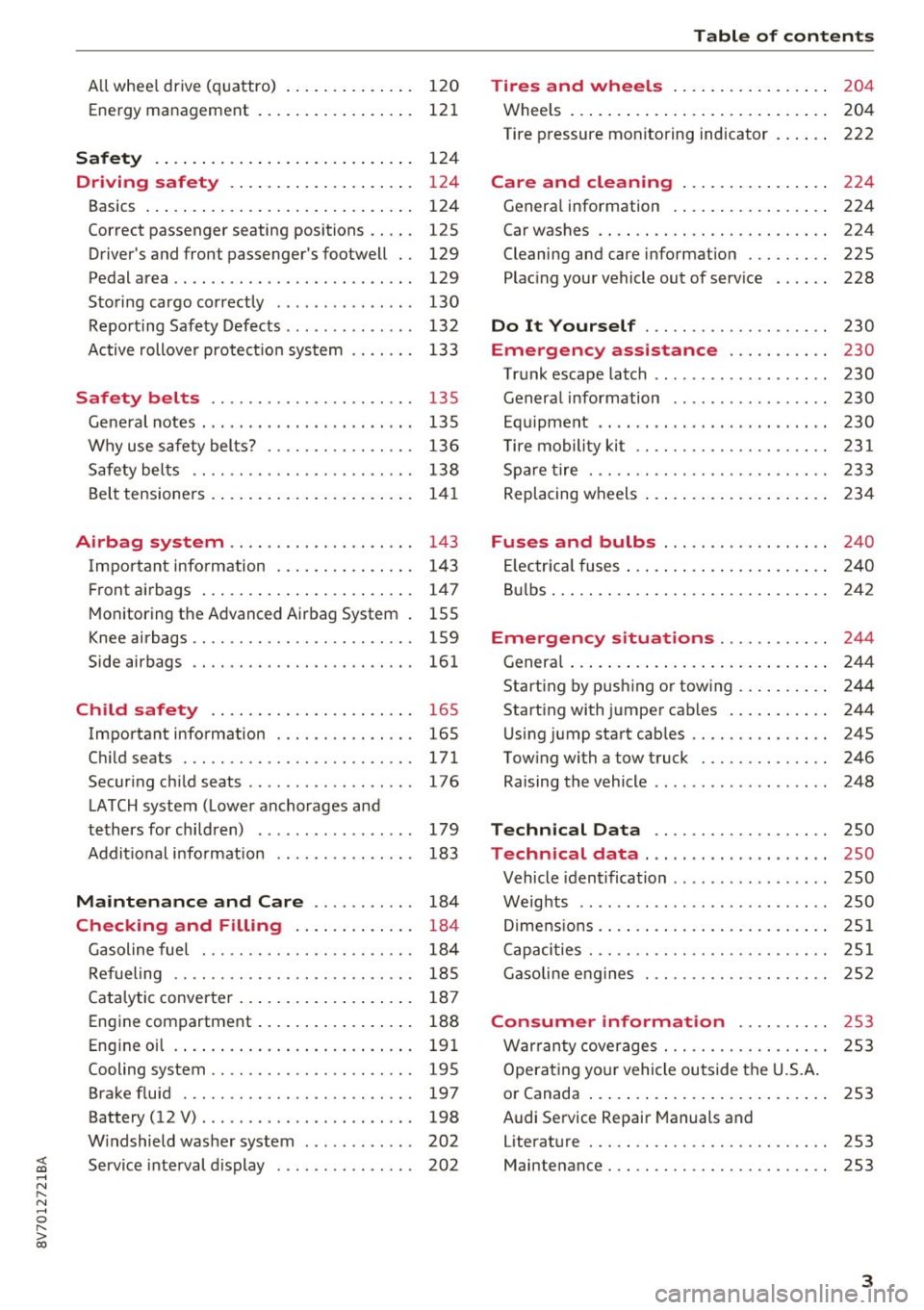
All w hee l drive ( quattro) . . . . . . . . . . . . . . 120
Ene rgy management 121
Safety .. .. .. .. .. .. .... ... .. .. .... . 124
Driving safety . . . . . . . . . . . . . . . . . . . . 124
Basics . . . . . . . . . . . . . . . . . . . . . . . . . . . . . 124
Co rrect p assenge r seating positions . . . . . 125
Driver 's and front passenger 's footwell . . 129
Pedal area . . . . . . . . . . . . . . . . . . . . . . . . . . 129
S toring cargo co rrectly . . . . . . . . . . . . . . . 130
Repo rting Safe ty Defects . . . . . . . . . . . . . . 132
Active rollove r protect io n system 133
Safety belts . . . . . . . . . . . . . . . . . . . . . . 135
Ge neral notes . . . . . . . . . . . . . . . . . . . . . . . 13 5
Why use safety belts? . . . . . . . . . . . . . . . . 136
S afety bel ts . . . . . . . . . . . . . . . . . . . . . . . . 138
B el t tensione rs . . . . . . . . . . . . . . . . . . . . . . 1 41
Airbag system . . . . . . . . . . . . . . . . . . . . 143
I mpor tant info rm ation . . . . . . . . . . . . . . . 14 3
Fr ont airbags . . . . . . . . . . . . . . . . . . . . . . . 1 47
M oni toring th e Advanced Airbag System . 155
K nee airbags . . . . . . . . . . . . . . . . . . . . . . . . 159
Side airbags . . . . . . . . . . . . . . . . . . . . . . . . 161
Child safety . . . . . . . . . . . . . . . . . . . . . . 165
Important info rmation . . . . . . . . . . . . . . . 165
C hi ld seats . . . . . . . . . . . . . . . . . . . . . . . . . 171
Secur ing ch ild seats . . . . . . . . . . . . . . . . . . 176
L ATCH system ( Lowe r anchorages and
tethers for chi ldren) . . . . . . . . . . . . . . . . . 179
Addit io nal i nfo rmat ion . . . . . . . . . . . . . . . 183
Maintenance and Care . . . . . . . . . . . 184
Checking and Filling . . . . . . . . . . . . . 184
G asoline fuel . . . . . . . . . . . . . . . . . . . . . . . 184
Refueling . . . . . . . . . . . . . . . . . . . . . . . . . . 18 5
Cata lytic converter . . . . . . . . . . . . . . . . . . . 187
Eng ine compartment . . . . . . . . . . . . . . . . . 188
Eng in e oi l . . . . . . . . . . . . . . . . . . . . . . . . . . 191
Cooling system . . . . . . . . . . . . . . . . . . . . . . 195
Brake fluid . . . . . . . . . . . . . . . . . . . . . . . . . 197
Battery (12 V) . . . . . . . . . . . . . . . . . . . . . . . 198
W indshield was her system . . . . . . . . . . . . 202
Service inte rval display . . . . . . . . . . . . . . . 202
Table of contents
Tires and wheels . . . . . . . . . . . . . . . . .
204
Whee ls . . . . . . . . . . . . . . . . . . . . . . . . . . . . 204
Tire p ressure monitoring ind icator . . . . . . 222
Care and cleaning . . . . . . . . . . . . . . . . 224
G enera l information . . . . . . . . . . . . . . . . . 224
Car washes . . . . . . . . . . . . . . . . . . . . . . . . . 224
Cleaning and ca re i nformat ion . . . . . . . . . 225
Plac ing you r vehicle out of serv ice . . . . . . 228
Do It Yourself . . . . . . . . . . . . . . . . . . . . 230
Emergency assistance . . . . . . . . . . . 230
T ru nk escape latch . . . . . . . . . . . . . . . . . . . 230
Genera l information . . . . . . . . . . . . . . . . . 230
E q ui pment . . . . . . . . . . . . . . . . . . . . . . . . . 230
T ire mobility kit . . . . . . . . . . . . . . . . . . . . . 231
Sp are tire . . . . . . . . . . . . . . . . . . . . . . . . . . 233
Replacing w heels . . . . . . . . . . . . . . . . . . . . 2 34
Fuses and bulbs . . . . . . . . . . . . . . . . . . 240
El ec trica l fuses . . . . . . . . . . . . . . . . . . . . . . 2 40
B ul bs . . . . . . . . . . . . . . . . . . . . . . . . . . . . . . 2 42
Emergency situations . . . . . . . . . . . . 244
Genera l . . . . . . . . . . . . . . . . . . . . . . . . . . . . 2 44
Starting by p ush ing o r towing . . . . . . . . . . 244
Start ing with jumpe r cab les . . . . . . . . . . . 244
U sing jump sta rt cab les . . . . . . . . . . . . . . . 24S
Tow ing with a tow truck . . . . . . . . . . . . . . 246
Raising the vehicle . . . . . . . . . . . . . . . . . . . 248
Technical Data . . . . . . . . . . . . . . . . . . . 250
Technical data . . . . . . . . . . . . . . . . . . . . 250
Vehicle ident ification . . . . . . . . . . . . . . . . . 250
Weig hts . . . . . . . . . . . . . . . . . . . . . . . . . . . 250
Di mens io ns .. .. . .......... ... ..... .. 251
C apaci ties . . . . . . . . . . . . . . . . . . . . . . . . . . 251
Gasoline e ng ines . . . . . . . . . . . . . . . . . . . . 2S2
Consumer information . . . . . . . . . . 2S3
Warr anty cove rages . . . . . . . . . . . . . . . . . . 253
Operat ing yo ur vehicle outside the U.S.A.
o r Canada . . . . . . . . . . . . . . . . . . . . . . . . . . 253
Audi Se rvice Repair Manuals and
Literat ure . . . . . . . . . . . . . . . . . . . . . . . . . . 253
Maintenance. . . . . . . . . . . . . . . . . . . . . . . . 253
3
Page 13 of 272
<( co
for all gears once the engine has been broken in
and when it is warm. You should select the D/S
se lector lever position or take your foot off the
accelerator pedal before reaching th is area .
CD Note
The needle in the tachometer (D c::> page 10,
fig.
3 may only be in the red area of the gauge
for a short time or there is a risk of damaging
the engine.
@ For the sake of the env ironment
Upshifting early helps you to save fuel and re
duce operating noise.
Odometer
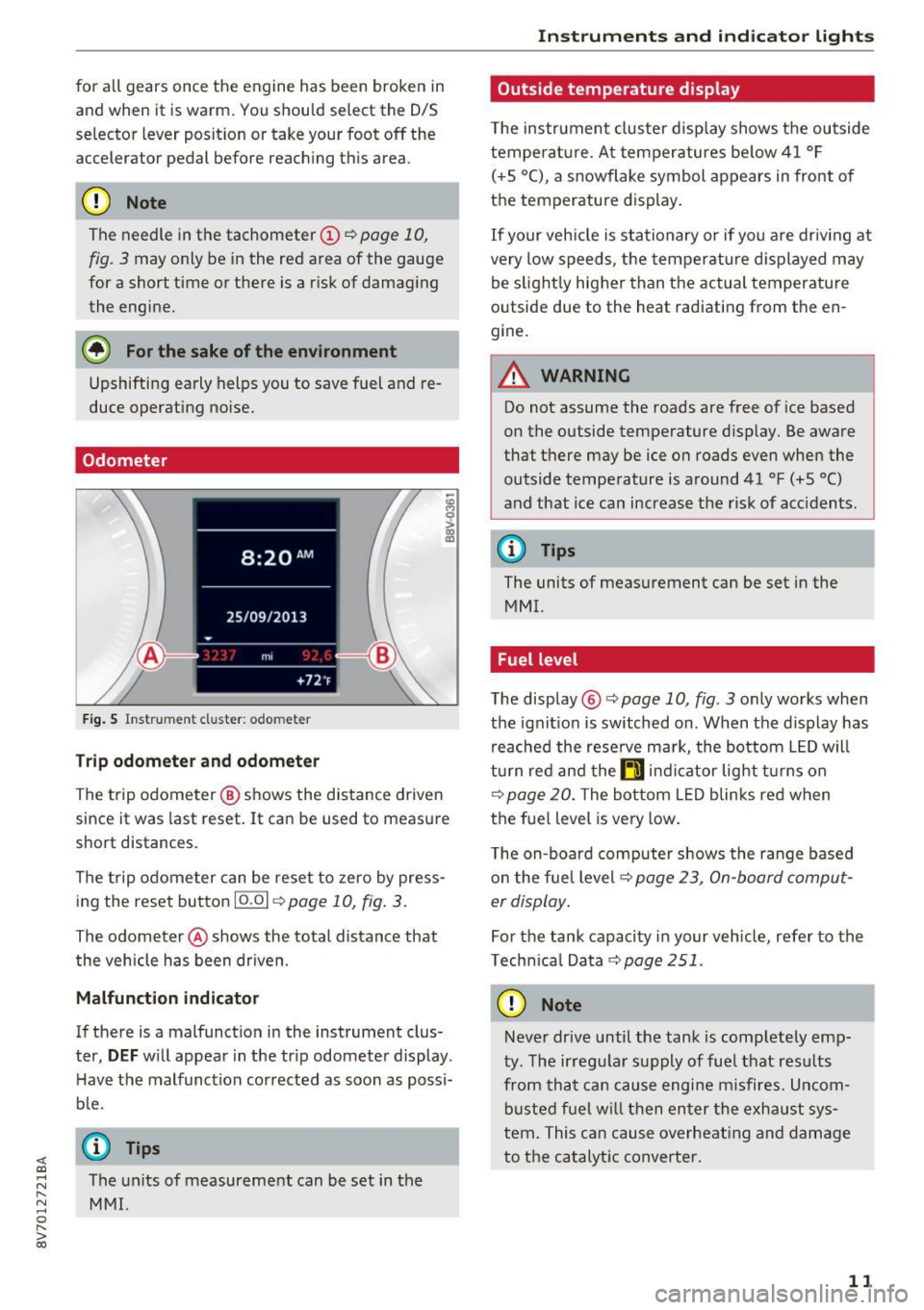
Fig . S In strum ent cl uster : odo meter
Tr ip o dom eter and odom eter
-~ 0
> a, ID
The trip odometer @ shows the distance driven
since it was last reset. It can be used to measure
short distances .
The trip odometer can be reset to zero by press ing the reset button
10.01 c::> page 10, fig. 3.
The odometer @shows the total distance that
the vehicle has been dr iven.
M alfun cti on indic ator
If there is a malfunction in the instrument clus
ter,
DEF w ill appear in the tr ip odometer display .
H ave the malfunction corrected as soon as possi
b le.
@ Tips
;::: The units of measurement can be set in the
" ~ MMI.
0
" > 00
Inst rum ents a nd ind icat or ligh ts
Outside temperature display
The instrument clus ter display shows the outside
temperature. At temperatures below 41 °F
( + 5 °C), a snowflake symbol appears in front of
the temperature display.
If your vehicle is stationary or if you are driv ing at
very low speeds, the temperature d isplayed may
be slight ly higher than the actual temperature
outside due to the heat radiating from the en
gine.
A WARNING
-
Do not assume the roads are free of ice based
on the outside temperature display. Be aware
that there may be ice on roads even when the
outside temperature is around 41 °F
(+5 °()
and that ice can increase the risk of acc idents.
@ Tips
The units of measurement can be set in the
MMI.
Fuel level
The display @c::>page10 , fig. 3 only works when
the ignit ion is switched on . When the display has
reached the rese rve ma rk, the bottom LED will
tu rn red and the
ti ind icator light t urns on
c::>page 20. The bottom LED blinks red when
the fuel level is very low .
The on-board computer shows the range based on the fuel level c::>
page 23, On-board comput
er display.
For the tank capacity in your veh icle, refer to the
Technica l Data
c::> page 251.
CD Note
Never drive until the tank is completely emp
ty . The ir regular supply of fue l that resu lts
from that can cause engine misfires. Uncom
busted fuel w il l then enter the exha ust sys
tem. This can cause overheat ing and damage
to the catalytic converter.
1 1
Page 20 of 272
<( co .... N r--N .... 0 r--> co
A WARNING ,~
If the ~ (USA models) /. (Canada mod
els) brake system indicator light turns on to
gether with the ABS and ESC indicator lights,
the ABS/ESC regulat ing funct ion may have
fai led. Functions that stabilize the vehicle are
no longer available. This could cause the vehi
cle to swerve, which increases the risk that
the vehicle will slide. Drive carefully to the
nearest author ized Audi dealer or authorized
Audi Service Facility and have the malfunction corrected.
@ Tips
For additional information on ESC and ABS,
refer to¢
page 116.
{0} Brake pads
IJ Brake pads!
The brake pads are worn.
Drive to an autho rized Aud i dea le r or authorized
Aud i Service Faci lity immediately to have the
b ra ke pads checked.
Applies to: USA models
The IJ indicator light turns on together with the
~ indicator light
·~ Hill hold assist
Hill hold assist: unavailable
If thP&) indicator light tu rns o n and this mes
sage appears, hill hold is not available.
II Manual control!
If this message appears, press the brake pedal.
Continue driving w ith the help of the park ing
brake. ¢
page 73
EPC Engine control (gasoline engine)
Applies to: veh icles with gasoline engines
If the ~ indicator light turns on if there is a
malfunction in the engine control.
Instruments and indicator lights
Drive slowly to an authorized Audi dea ler or au
thorized Audi Service Facility to have the engine
checked .
If the~ indicator light turns on when you start
the engine, there is an automatic start malfunc
tion. To start the engine, fo llow these steps:
- Vehicles with ignition lock¢
page 68, Auto-
matic start malfunction
- Veh icles with a conve nience key¢ page 70,
Automatic start malfunction.
a System indicator light (MIL)
The system indicator light (MIL) is pa rt of the On
Board Diagnostic system (OBD II) . The
II! sym
bol turns on when the ignition is switched on and
turns off again once the engine is started and
running at a steady idle speed. This indicates that
the MIL is functioning correctly .
The indicator light turns on if there is a malfunc
t ion in the engine electronics . See an authorized
Audi dealer or authorized Audi Service Fac ility to
have the malfunction corrected.
The system indicator light (MIL) may turn on if
the fuel filler cap is not closed correctly
¢ page 186.
For additional information, refer to ¢ page 21.
!? Engine speed limitation
Applies to : vehicles with engine speed limitation
(II Max . engine speed: XXXX rpm
The engine speed is automatically limited to the
speed displayed in the driver information system.
This protects the engine from overheating.
T he eng ine speed limitation deactivates once the
engine is no longer in the critical temperature
range and you have re leased the accelerator ped
al once.
If the engine speed limitation was activated by
an engine control malfunction, the~ indicato r
light also turns on . Make sure the engine speed
does not go above the speed displayed, for exam-
ple when downshifting. Drive to an authorized .,.
19
Page 21 of 272
Instruments and indicator lights
Audi dealer or authorized Audi Service Facility im
m ediately to have the malfunction corrected.
~ i. Engine oil level (min .)
Ill Check oil level
You may continue driving for the time being.
Check the engine oil level as soon as possible
r::!) page 191.
-If the engine oil level is too low, add engine oil
¢page 193 .
-If the engine oil level is correct and the indica
tor light st ill turns on, drive at low engine
speed to an authorized Audi dealer or author
ized Audi Service Facility.
~ .... Engine oil sensor
• Oil level sensor: system fault!
The sensor to check the engine oil level has
failed. Drive to an authorized Audi dealer or au
thorized Audi Service Facility immediately to have
the malfunction corrected.
(D Note
Refer to the description in the Owner's Man
ual ¢
page 193, Checking the engine oil level
and adding oil.
Bil Tank system
D Please refuel
If the indicator light turns first turns on and this
message appears, the tank contains the follow
ing amount of fuel :
- Front wheel drive: approximately 1.8 gallons (7
liters)
- All wheel drive: approximately 2.2 gallons (8.S
liters)
D Please refuel immediately
If the indicator light turns on the message ap
pears, the fuel tank is almost empty . Refuel the
vehicle immediate ly.
D Fuel tank malfunction! Please contact Serv
ice
20
If the indicator light turns on and this message
appears, there is a malfunction in the tank sys
tem.
Drive to an authorized Audi dealer or authorized
Audi Service Facility immediately to have the
malfunction corrected .
@ For the sake of the environment
Fuel should never enter the sewer system or
come into contact with the ground.
(D Tips
More information on refueling is available on
page
¢page 185.
.. Washer fluid level
C·w$ Please add washer fluid
Fill the washer fluid for the windshield washer
system and the headlight washer system* when
the ignition is switched off¢
page 202.
• Windshield wipers
m Windshield wiper: system fault!
There is a malfunction with the windsh ield wip
ers .
Drive to an authorized Audi dealer or authorized
Audi Service Facility immediate ly to have the
malfunction corrected .
~ Defective light bulb warning
Applies to: vehicles with driver info rmation system
If the J:i indicator light turns on, a bulb has
failed . The message indicates the location of the
bulb.
Replace the bulb immediately.
Vehicle lights: system fault!
There is a malfunction in the headlights or the
light switch. Drive to an authori zed Audi dealer or
authorized Aud i Service Facility immediately to
have the malfunction corrected .
...
Page 23 of 272
Instruments and indicator lights
fast acceleration) and have the malfunction cor
rected . See an authorized Audi dealer or
author ized Audi Service Facility .
The indica tor may turn on if the electronic speed
limiter is fau lty. For additional information, refer
to
¢ page 88, Electronic speed limiter .
The MIL may also turn on if the fuel filler cap is
not closed correctly
¢ page 186.
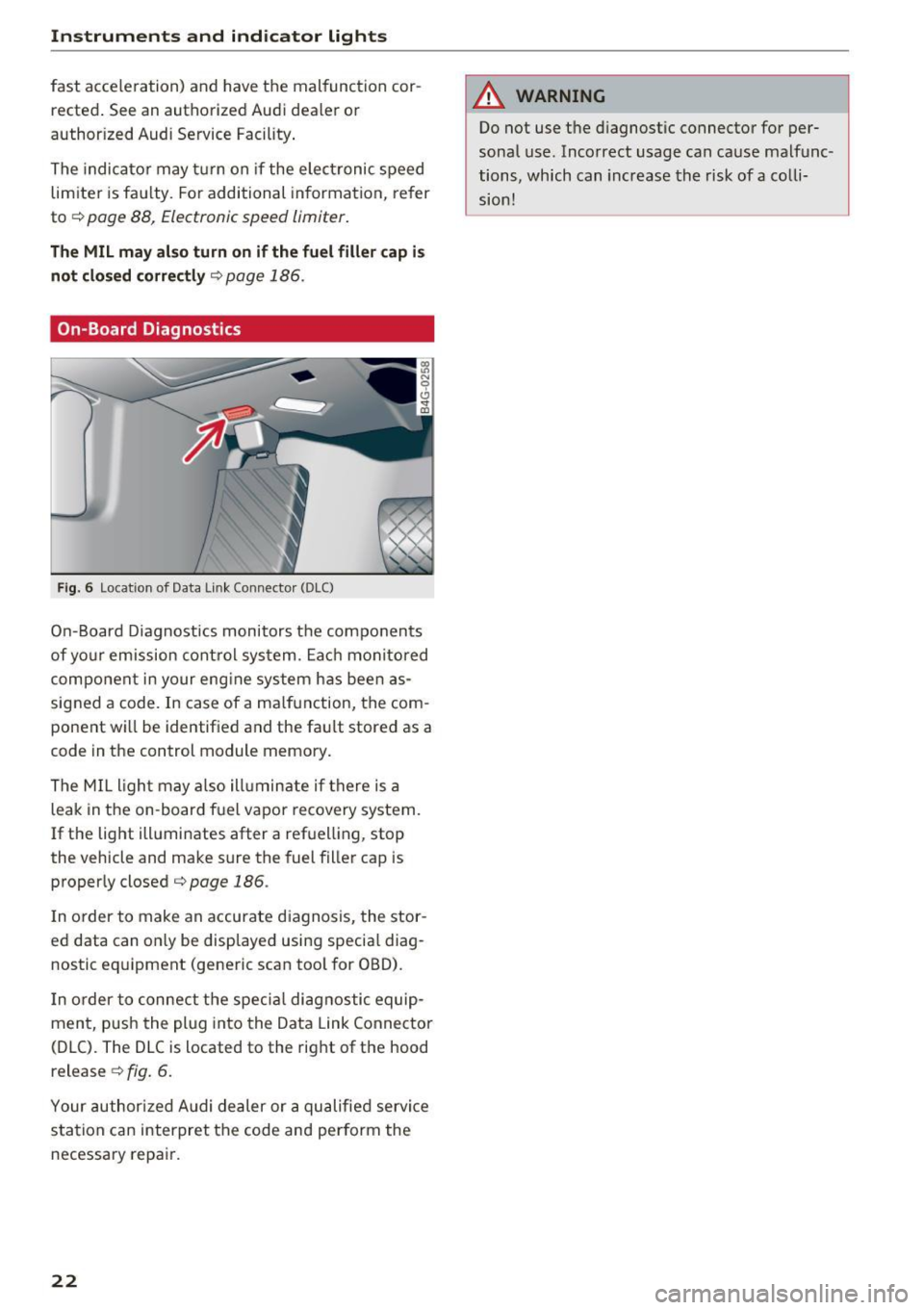
On-Board Diagnostics
F ig. 6 Location of Data Link Connecto r (DLC)
On-Board Diagnostics monitors the components
of yo ur emission control system. Each monitored
component in your eng ine system has been as
signed a code. In case of a ma lfunction, the com
ponent wi ll be identified and the fault stored as a
code in the control module memory.
The MIL light may also ill uminate if there is a
leak in the on -board fuel vapor recovery system.
If the light illuminates after a refuelling, stop
the vehicle and make sure the fuel filler cap is
properly closed¢
page 186.
In order to make an accurate diagnosis, the stor
ed data can on ly be displayed using specia l diag
nostic eq uipment (generic scan tool for OBD).
I n order to connect the specia l diagnostic equip
ment, push the plug into the Data Link Connector
(DLC). The DLC is located to the right of the hood
release ¢
fig. 6.
Your authorized Audi dealer or a qualified servi ce
station can interpret the code and perform the
necessary repair.
22
A WARNING
Do not use t he diagnostic connector for per
sonal use. Incorrect usage can cause malfunc
tions, which can increase the risk
of a colli
sion!
Page 25 of 272
Driver information system
-Long-term memory (on-board computer 2)
- Efficiency program
The follow ing information can be displayed con
secutively in the on-board computer:
- Time
- Date
- Estimated range based on current fue l level
- Travel time
- Average consumpt ion
- Average speed
- Distance
- Current fuel consumption
On-board computer
O (short-term memory)
The short-term memory collects driving informa tion from the time the ignition is switched on un
til it is switched off. If you continue driving
with
in two hours
after switching the ignition off, the
new values are included when calculating the cur
rent tr ip informat ion. If stopped for more the
two hours, the short term memory is automati
cally erased once you begin driving.
On-board computer
fl (long-term memory)
Unlike the short-term memory, the long-term
memory is not erased automatically. You can se
lect the time period for evaluating trip informa
tion yourself .
Efficiency program
ii
The efficiency program can help you to use less
fuel
c::;,page 25.
(D Tips
- For information on using the other button
fields, such as the audio, telephone* and
navigation* functions, see the MMI owner's
manual.
- Disconnecting the battery causes all the
memory data to be erased.
24
Operation
Applies to: vehicles wit h driver information system
The driver information system is controlled with
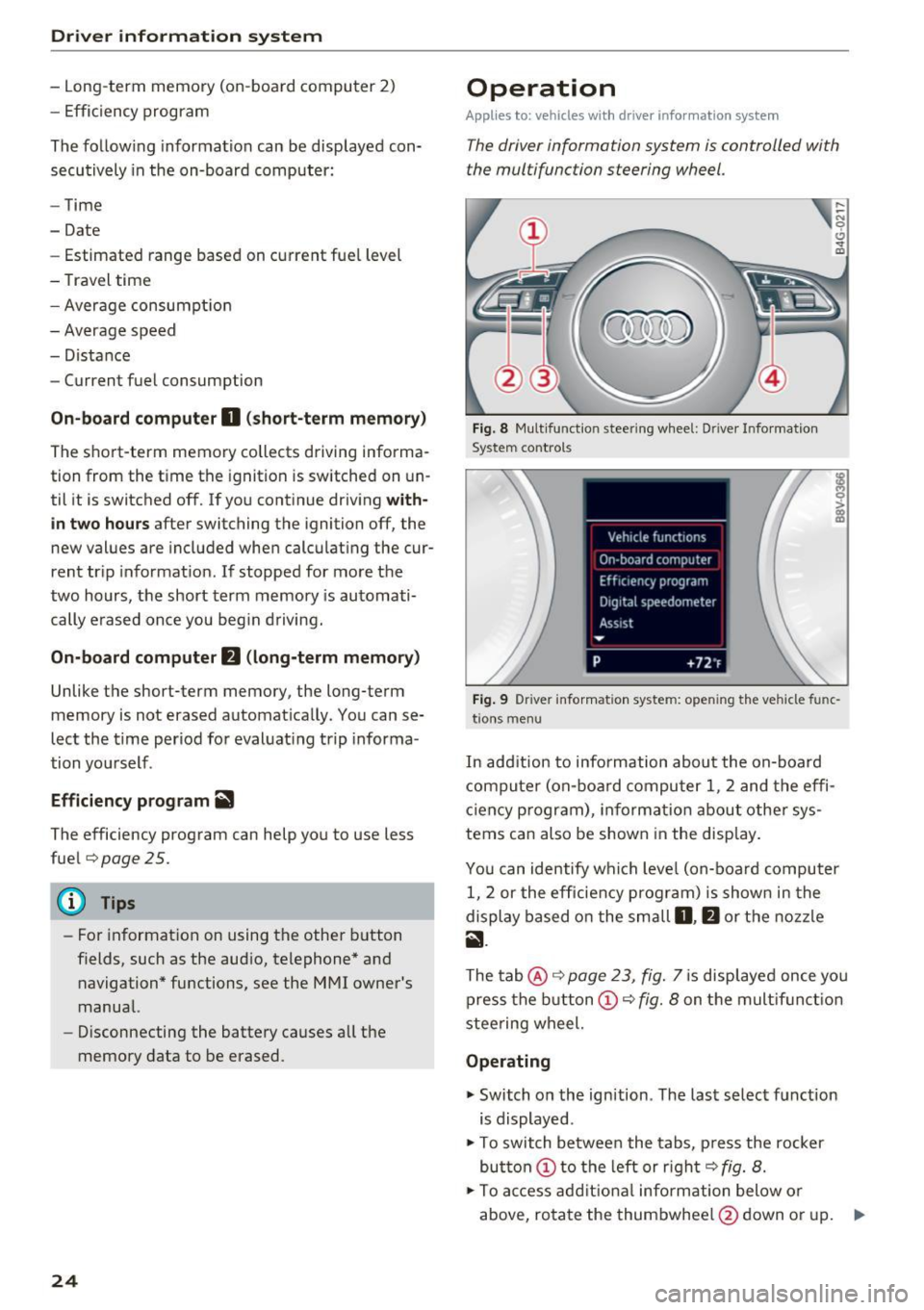
the multifunction steering wheel.
Fig. 8 Mult ifunction steering wheel: Dr iver Info rmation
System controls
Fig. 9 Dr iver infor mation system: open ing the vehicle func
t ions menu
In add it ion to information about the on-board
computer (on-board computer 1 , 2 and the effi
c iency p rogram), informa tion about other sys
tems can also be shown in the display.
You can identify which level (on-board computer
1, 2 or the efficiency program) is shown in the
display based on the small
D, fJ or the nozzle
ii.
The tab@ c::;, page 23, fig. 7 is displayed once yo u
press the button(!)¢
fig. 8 on the multifunct ion
steering wheel.
Operating
"' Switch on the ignition . The last select function
is displayed .
"' To switch between the tabs, press the rocker
button
(D to the left or right c::;, fig. 8.
"'To access additional information below or
above, rotate the thumbwheel @down or up. ""
Page 26 of 272
<( co ..... N
" N ..... 0 r--. > 00
"'To conf irm a sele ction, press the th umbwhee l
@.
"'To select a f unction programmed to a steering
whee l button , press the button @. For addi
tiona l information, see¢
page 25, Assigning
a function to a programmable steering wheel
button
Opening the Vehicle functions
"' Se lect the f irst tab with the button(!).
"' Press the button @. The
Veh icle functions
menu is displayed¢ fig. 9.
"' To select a menu item , turn and press the
t hu mbwheel @.
Resetting values to zero
"'In the Vehicle functions menu, se lect On
board computer or Efficiency program .
"'Select a value in the desired tr ip computer or in
t h e efficiency program .
"'T o reset the va lues in a memory, p ress and ho ld
t h e thu mbw heel @for one secon d.
Recalling indicator lights and messages
"'Press the button CD repeatedly unt il the a tab
appears.
The
a tab is only vis ible when there is a mal
function.
Assigning a function to a programmable s teering wheel button
"' Se lect: the IMENU j button> Car> Systems *
control button > Vehicle settings > Steering
wheel button p rogramming .
The a tab is only visi ble when there is at least
one ind icator light or message displayed .
Driver informa tion system
Efficiency program
Description
Applies to: vehicles with driver information system
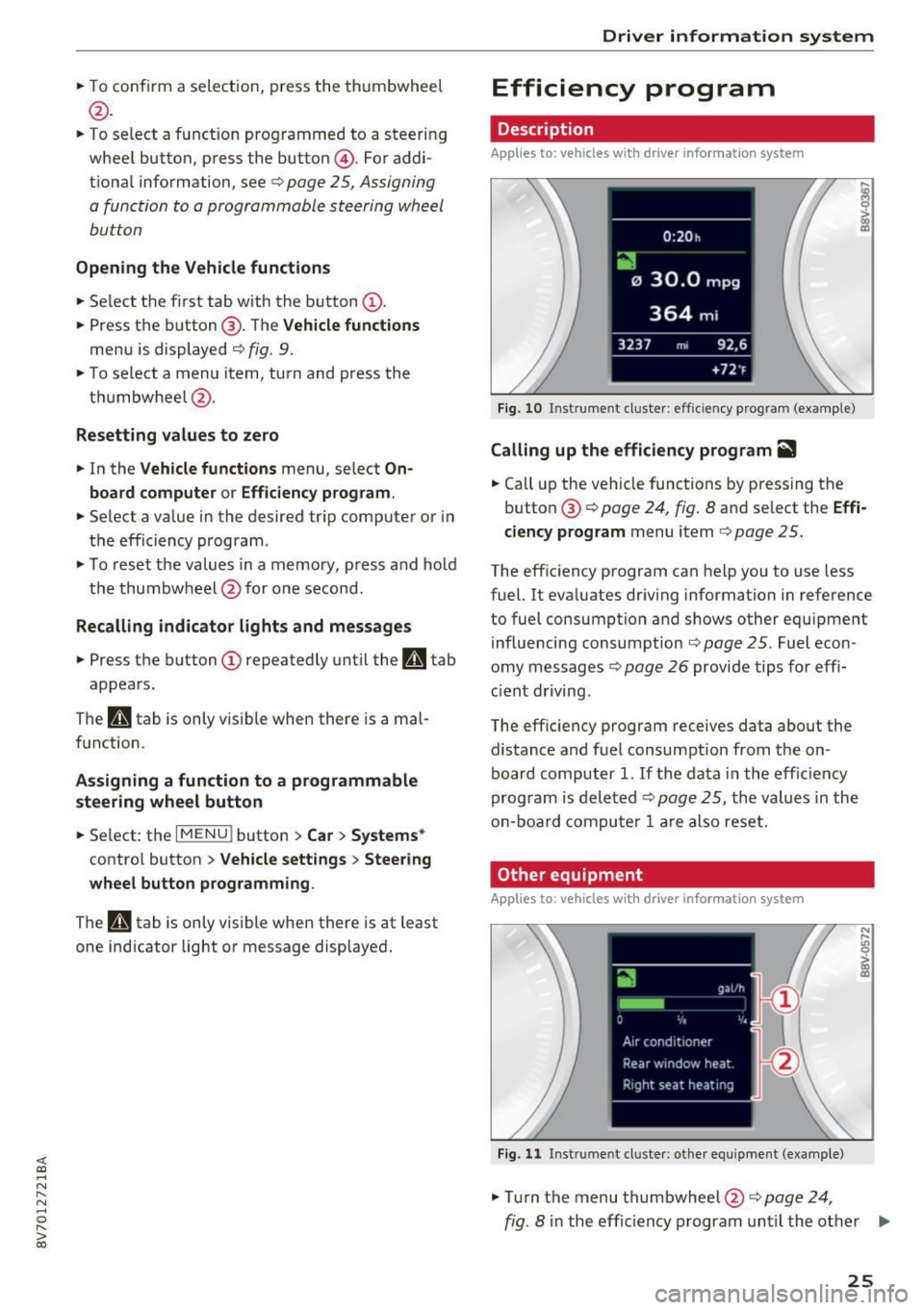
Fig. 10 Inst rume nt cl uste r: eff icie ncy progra m (exa mple)
Calling up the efficiency program ii1
"'Call up the veh icle functions by pressing the
button @¢
page 24, fig . 8 and se lect the Effi
ciency program
menu i tem ¢ page 25.
The eff ic iency program can he lp you to use less
fuel. It eva luates dr iving information in reference
to fuel consumption and shows other equ ipme nt
i nfluencing consumption ¢
page 25. Fuel econ
omy messages ¢
page 26 provide tips for effi
ci ent driving .
The eff ic iency p rogram receives data about the
distance a nd fuel consumpt ion from the on
board computer
1. If t he data i n the eff iciency
program is deleted¢
pag e 25 , the values in the
o n-b oar d co mpu ter 1 ar e als o re se t.
Other equipment
Applies to: vehicles with driver information system
Fig. 11 Inst rume nt cl uste r: other e quipment (exa mple)
"' Tur n the menu th umbwheel @c::> page 24,
N ,..
! m
fig. 8 in the effic iency program unti l the other .,.
25
Page 27 of 272
Driver information system
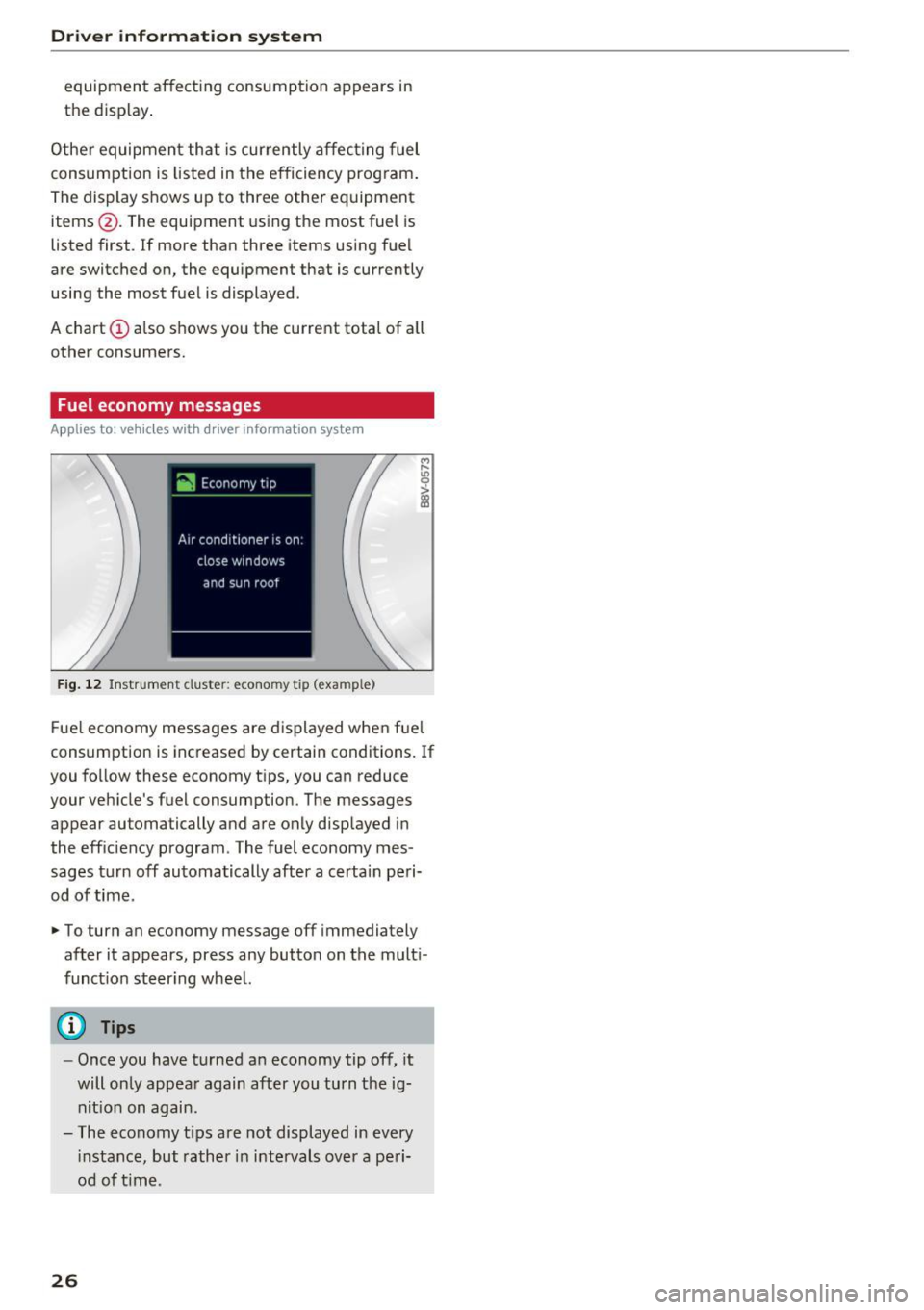
equipment affecting consumption appears in
the display .
Other equipment that is currently affecting fuel
consumption is listed in the efficiency prog ram .
The display shows up to three other equipment
items @. The equipment using the most fuel is
listed first. If more than three items using fuel
are switched on, the equipment that is currently
using the most fuel is displayed .
A chart © also shows you the current total of all
other consumers.
Fuel economy messages
A pp lies to: ve hicles w ith driver informa tion syste m
Fig. 12 Instrument clus te r: econo my tip (exa mple)
M r-
"' 0
> ~
Fue l economy messages are displayed when fuel
consumption is increased by certain conditions. If
you follow these economy tips, you can reduce
your vehicle 's fuel consumption. The messages
appear automatically and are only displayed in
the efficiency program . The fuel economy mes
sages turn off automatically after a certain peri
od of time .
.- To turn an economy message off immediately
after it appears, press any button on the multi
funct ion steer ing wheel.
(D Tips
- Once you have turned an economy tip off, it
will only appear again after you turn the ig
nit ion on again .
- The economy tips are not displayed in every
i nstance, but rather in intervals over a peri
od of t ime .
26
Page 30 of 272
<( co ..... N
" N ..... 0 r--. > 00
.. If you press a button longer (convenience open
ing*), the LED blinks several times .
.. If the LED does not blink, the remote control
key battery is dead. The message
Ill Please
change key battery
may also appear in the in
strument cluster display . Replace the battery .
Replacing the remote control key battery
.. Pry the cover @off of the key (Dusing a coin
¢fig . 15 .
.,. Insert the new battery with the "+" facing up .
.. Press the cover back onto the key until it clicks
into place .
We recommend having the battery replaced by
an authorized Audi dealer or authorized Audi
Service Facility .
@ For the sake of the environment
Dead batteries must be disposed of using
methods that will not harm the env ironment.
Do not dispose of them in household trash .
@ Tips
The replacement battery must meet the same
specifications as the orig inal battery.
Remote control key synchronization
The remote control key must be synchronized if
the vehicle does not lock and unlock with the re
mote control.
.. Press the remote control key button~-
1> Insert the key in the driver's door lock within 30
seconds .
.,. Press the~ button or~ button .
Open ing and closing
Unlocking/locking by remote control
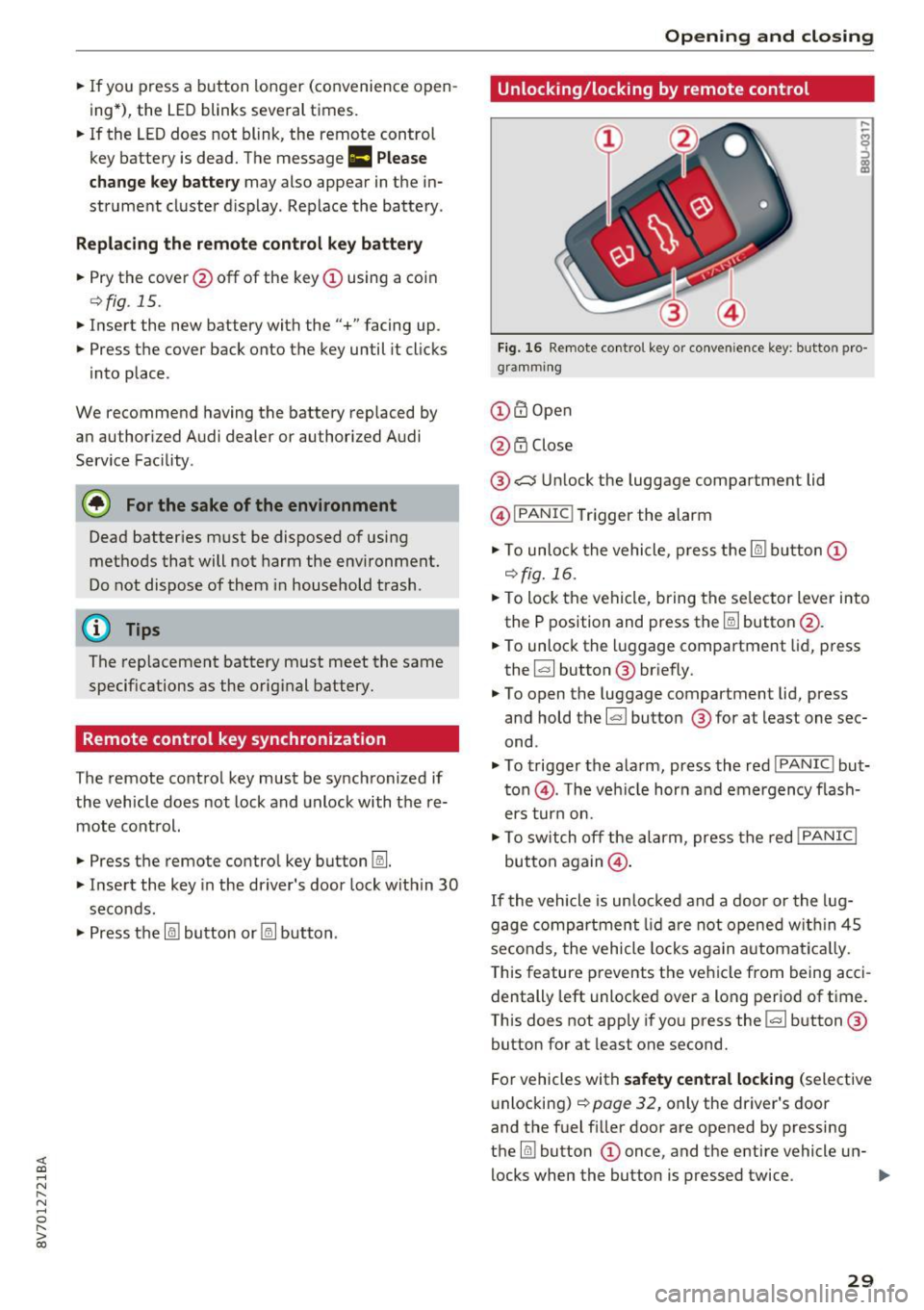
Fig. 16 Remote control key or conve nien ce key : button pro
gramm ing
(D m Open
@ i'.D Close
® .:::::$Unlock the luggage compartment lid
@ I
PANIC ! Trigger the alarm
... To unloc k the vehicle , press the~ but ton (D
c::>fig.16 .
.. To lock the vehicle, bring the selector lever into
the P position and press the~ button @.
.. To unlock the luggage compartment lid, press
the ~ button ® briefly.
.,. To open the luggage compartment lid, press
and hold the~ but ton ® for at least one sec
ond .
... To trigger the alarm, press the red I
PANIC ! but
ton @. T he veh icle horn and emergency flash
ers turn on.
.. To switch off the alarm, press the red
!PANIC I
button again@.
If the vehicle is unlocked and a door or the lug
gage compartment lid are not opened w ithin 45
seconds, the vehicle locks again automat ically.
This feature prevents the vehicle from being acci
dentally left unlocked over a long period of time.
This does not apply if you press the~ button ®
button for at least one second.
For vehicles with
safety central locking (selective
unlocking)
c::> page 32, only the driver's door
and the fuel f iller door are opened by pressing
the ~ button (D once, and the entire vehicle un-
locks when the button is pressed twice .
Ill>
29
Page 33 of 272
Opening and closing
@ Tips
-The vehicle cannot be started if an unau
thorized key is used. It may not be possible
to start the vehicle under certain circum
stances, for example if there is another ra
d io module like the key from another vehi-
cle or a transponder on the same keychain .
- For an explanation on conformity with the
FCC regulations in the United States and the
Industry Canada regulations, refer to
r::;> page 256.
Safety central locking
App lies to: ve hicles w ith safety central lo ck in g
Safety central locking provides the possibility, to
only unlock the driver's door and the fuel filler
door. The rest of the vehicle rema ins locked .
Unlocking the driver's door and the fuel filler
door
.,. Press the remote control key or conven ience
key
[ru button once or turn the key once in the
opening direction .
Unlocking all doors, the luggage
compartment lid and the fuel filler door
.,. Press the remote control key or convenience
key
[ru button twice within five seconds or turn
the key
twice within five seconds in the opening
direction .
When unlocking just the driver's door, the anti
theft alarm system* is also immediately deacti
vated.
I n vehicles with an MMI, you can direct ly adjust
the safety central locking
r::;> page 31.
32
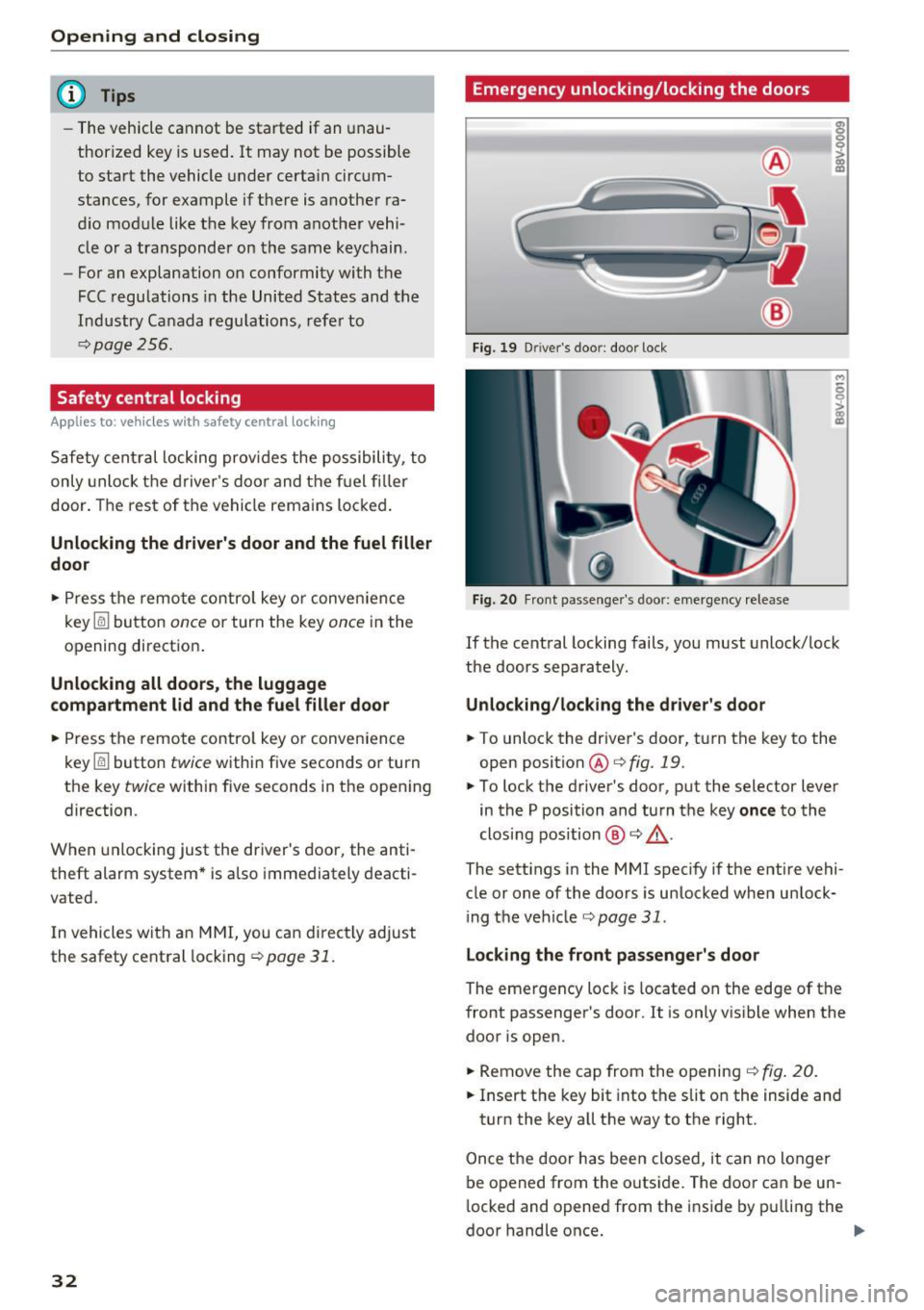
Emergency unlocking/locking the doors
Fig. 19 D river's doo r: door lock
Fig. 20 Front passenger's door: emergency release
M
s 0 :> a> II)
If the central locking fails, you must unlock/lock
the doors separately.
Unlocking/locking the driver 's door
.,. To unlock the driver's door, turn the key to the
open position
@ c:;> fig. 19.
.,. To lock the driver's door, put the selector lever
in the P position and turn the key
once to the
closing position ®
c:;> ,&.
The sett ings in the MMI specify if the entire vehi
cle or one of the doors is unlocked when unlock
ing the vehicle
c;, page 31.
Locking the front passenger's door
The emergency lock is located on the edge of the
front passenger's door . It is only v isible when the
door is open .
.,. Remove the cap from the opening
c;, fig. 20 .
.,. Insert the key bit into the slit on the inside and
turn the key a ll the way to the right.
Once the door has been closed, it can no longer
be opened from the outs ide. The door can be un
l ocked and opened from the inside by pulling the
door handle once.