light AUDI A3 SEDAN 2017 Owners Manual
[x] Cancel search | Manufacturer: AUDI, Model Year: 2017, Model line: A3 SEDAN, Model: AUDI A3 SEDAN 2017Pages: 400, PDF Size: 67.32 MB
Page 352 of 400
Care and cleaning
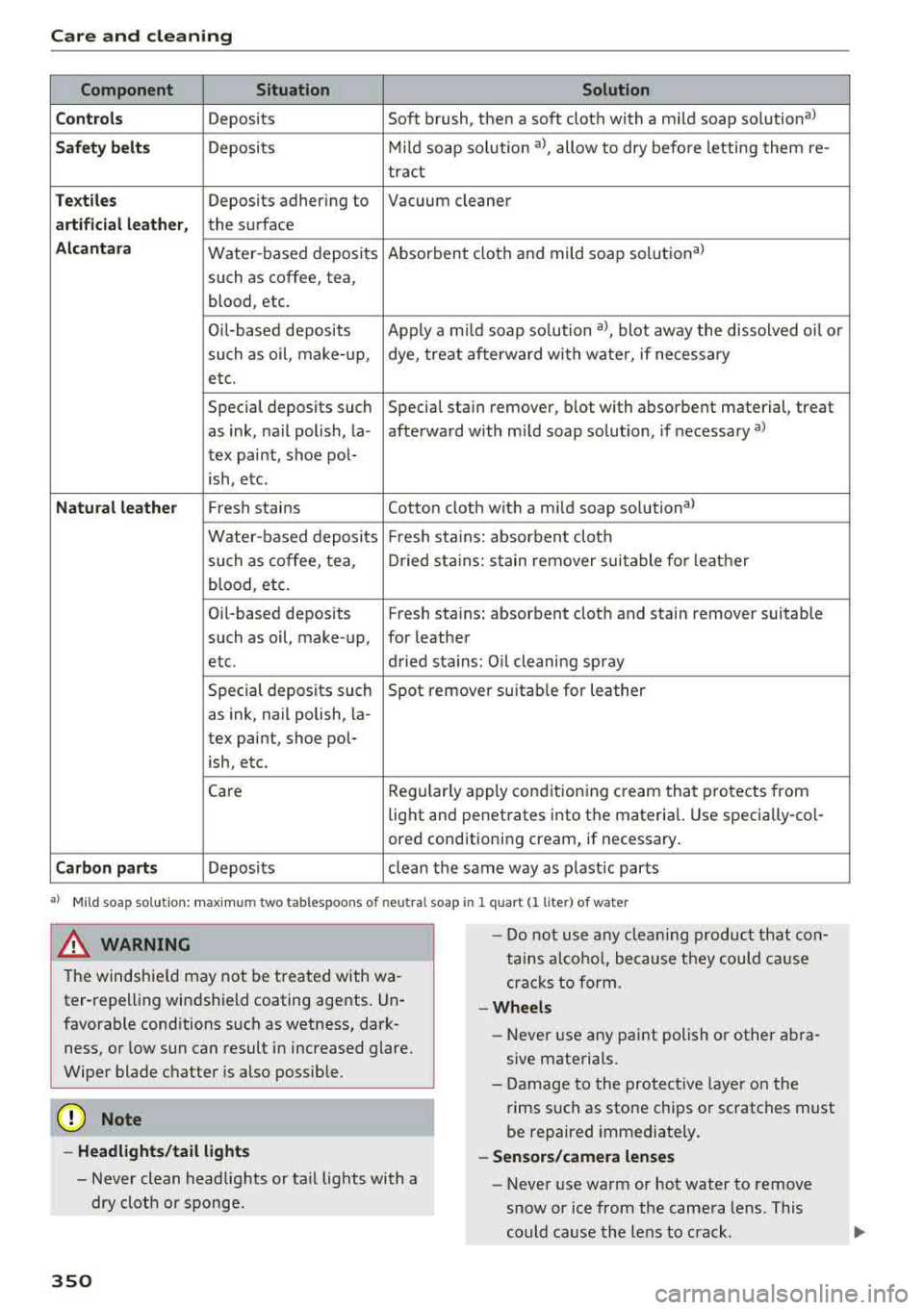
Component Situation Solution
C ont rols
Deposits Soft brush, then a soft cloth with a mild soap solution a)
Safet y belt s Deposits M
ild soap so lution a), allow to dry befo re letting them re-
tract
Te xt ile s Deposits adhering to Vacuum cleaner
artifi cial le athe r, the surface
Alcantara Water -based deposits Absorbent cloth and mild soap solutional
such as coffee, tea,
blood , etc.
Oi l-based deposits Apply a m ild soap so lution al, blot away the dissolved oi l or
such as oil, make-up , dye, treat afterward with water, if necessary
etc.
Special deposits such Special sta in remover, blot with absorbent material, treat
as ink, na il polish, la -afterward with mild soap solution, if necessary al
tex paint, shoe pol-
ish, etc.
N atu ral leath er Fresh stains Cotton cloth with a mild soap so lutiona )
Water-based deposits Fresh sta iins: absorbent cloth
such as coffee, tea , Dried st ains: stain remover suitable fo r leathe r
blood , etc.
Oil-based deposits Fresh
sta iin s: absorbent cloth and stain remover suitable
such as oil, make -up, for leather
etc. dried stains: Oil cleaning spray
Special deposits such Spot remover suitab
le for leather
as ink, nail polish, la-
tex paint, shoe pol-
ish, etc.
Care Regularly apply conditioning cream that protects from
light and penetrates into the materia l. Use specially-co l-
ored cond itioning cream, if necessary .
Carbon part s Deposits clean the same way as plastic parts
a) M ild soap so lution: maxim um two tabl espoo ns o f neu tral s oa p in 1 quart (l lite r) of water
8_ WARNING
-The windshie ld may not be treated with wa-
ter-repelling windshield coating agents. Un
favorable conditions such as wetness, dark ness, or low sun can result in increased glare.
Wiper blade chatter is also possible.
Q;) Note
- Headl ights /tail li ght s
- Never clean headlights or ta il lights with a
dry cloth or sponge .
350
-
-Do not use any clea ning product that con
tains alco ho l, because they could cause
crac ks to form.
-Whe els
- Never use any paint polish or other abra-
sive materials.
- Damage to the protect ive layer on the
rims such as stone chips or scratches must
be repaired immediately.
- Sensors /camera lenses
- Never use warm or hot water to remove
snow or ice from the camera lens . This
could cause the lens to crack.
Page 353 of 400
CXl CXl .... N ,.__
N .... 0 N > 00
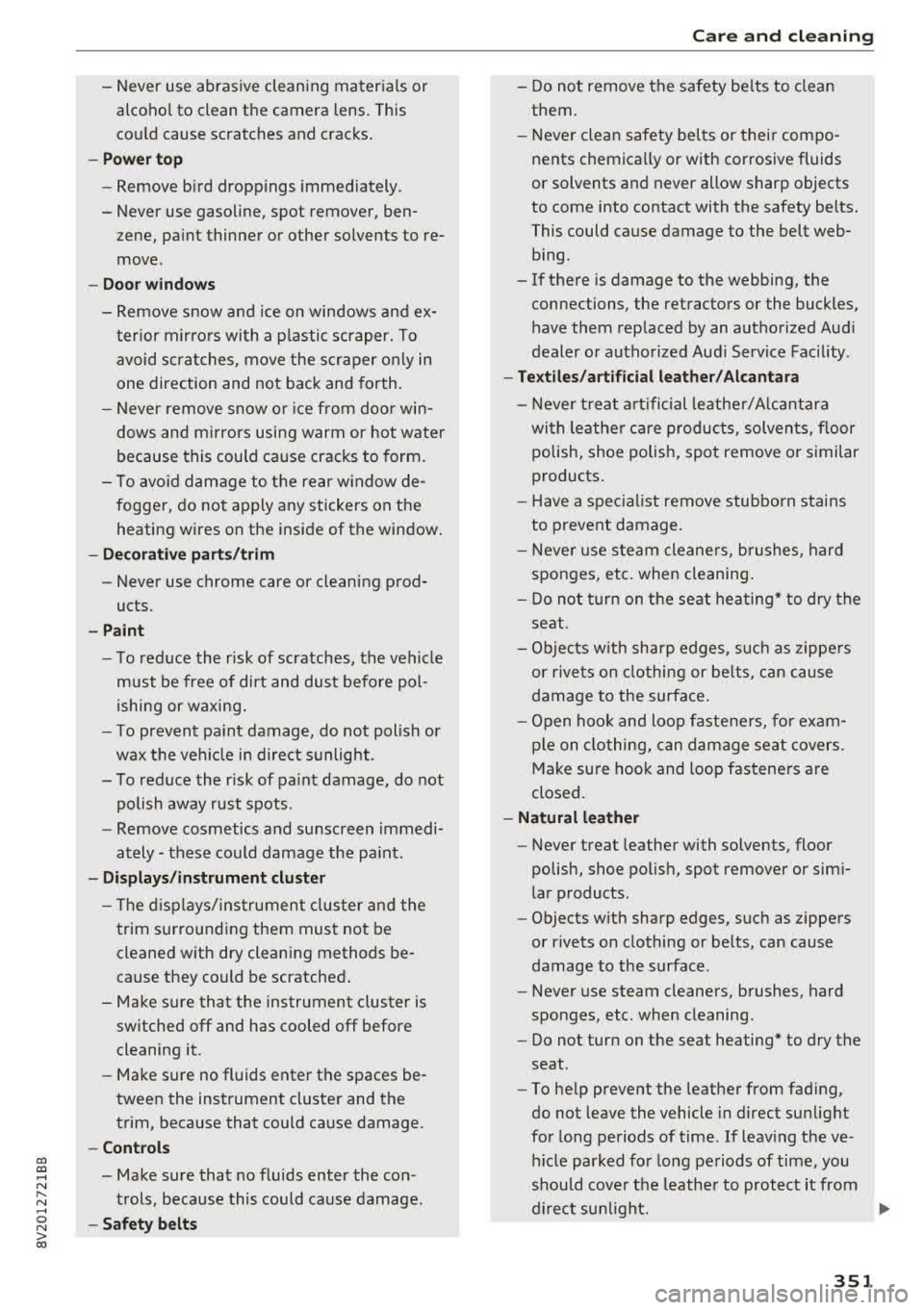
-Never use abrasive cleaning materials or
alcohol to clean the camera lens. This
could cause scratches and cracks.
-Power top
-Remove bird droppings immediately.
-Never use gasoline, spot remover, ben-
zene, paint thinner or other solvents to re
move.
-Door windows
-Remove snow and ice on windows and ex-
terior mirrors with a plastic scraper. To
avoid scratches, move the scraper only in
one direction and not back and forth.
-Never remove snow or ice from door win
dows and mirrors using warm or hot water
because this could cause cracks to form.
-To avoid damage to the rear window de
fogger, do not apply any stickers on the heating wires on the inside of the window.
-Decorative parts/trim
-Never use chrome care or cleaning prod-
ucts.
-Paint
-To reduce the risk of scratches, the vehicle
must be free of dirt and dust before pol
ishing or waxing.
-To prevent paint damage, do not polish or
wax the vehicle in direct sunlight .
-To reduce the risk of paint damage, do not
polish away rust spots .
-Remove cosmetics and sunscreen immedi
ately- these could damage the paint.
-Displays/instrument cluster
-The displays/instrument cluster and the
trim surrounding them must not be
cleaned with dry cleaning methods be
cause they could be scratched.
-Make sure that the instrument cluster is
switched off and has cooled off before
cleaning it.
-Make sure no fluids enter the spaces be
tween the instrument cluster and the
trim, because that could cause damage.
-Controls
-Make sure that no fluids enter the con-
trols, because this could cause damage.
-Safety belts
Care and cleaning
-Do not remove the safety belts to clean
them.
-Never clean safety belts or their compo
nents chemically or with corrosive fluids
or solvents and never allow sharp objects
to come into contact with the safety belts.
This could cause damage to the belt web bing .
-If there is damage to the webbing, the
connections, the retractors or the buckles
,
have them replaced by an authorized Audi
dealer or authorized Audi Service Facility .
-Textiles/artificial leather/ Alcantara
-Never treat artificial leather/Alcantara
with leather care products, solvents , floor
polish, shoe polish, spot remove or similar
products.
-Have a specialist remove stubborn stains
to prevent damage.
-Never use steam cleaners, brushes , hard
sponges, etc. when cleaning.
-Do not turn on the seat heating* to dry the
seat.
-Objects with sharp edges, such as zippers
or rivets on clothing or belts, can cause
damage to the surface.
-Open hook and loop fasteners, for exam
ple on clothing, can damage seat covers .
Make sure hook and loop fasteners are
closed.
-Natural leather
-Never treat leather with solvents, floor
polish, shoe polish, spot remover or simi
lar products.
-Objects with sharp edges, such as zippers
or rivets on clothing or belts, can cause
damage to the surface.
-Never use steam cleaners, brushes, hard
sponges, etc . when cleaning.
-Do not turn on the seat heating* to dry the
seat.
-To help prevent the leather from fading,
do not leave the vehicle in direct sunlight
for long periods of time. If leaving the ve
hicle parked for long periods of time, you
should cover the leather to protect it from
direct sunlight.
Ill>
351
Page 359 of 400
a, a, ..... N
" N ..... 0 N > 00
_& WARNING
You or your passengers could be injured while
changing a wheel if you do not follow these
safety precautions:
- If you have a flat tire, move a safe distance
off the road. Turn off the engine, turn the emergency flashers on and use other warn
ing devices to alert other motorists.
- Make sure that passengers wait in a safe
place away from the vehicle and well away
from the road and traffic.
- To help prevent the vehicle from moving
suddenly and possibly slipping off the jack,
always fully set the parking brake and block
the wheel diagonally opposite the wheel be
ing changed. When one front wheel is lifted
off the ground, placing the Automatic
Transmission in P (Park) will
not prevent the
vehicle from moving.
- Before you change a wheel, be sure the
ground is level and firm. If necessary, use a
sturdy board under the jack.
- Always store the vehicle tool kit, the jack
and the replaced tire in the luggage com
partment
c:> page 253.
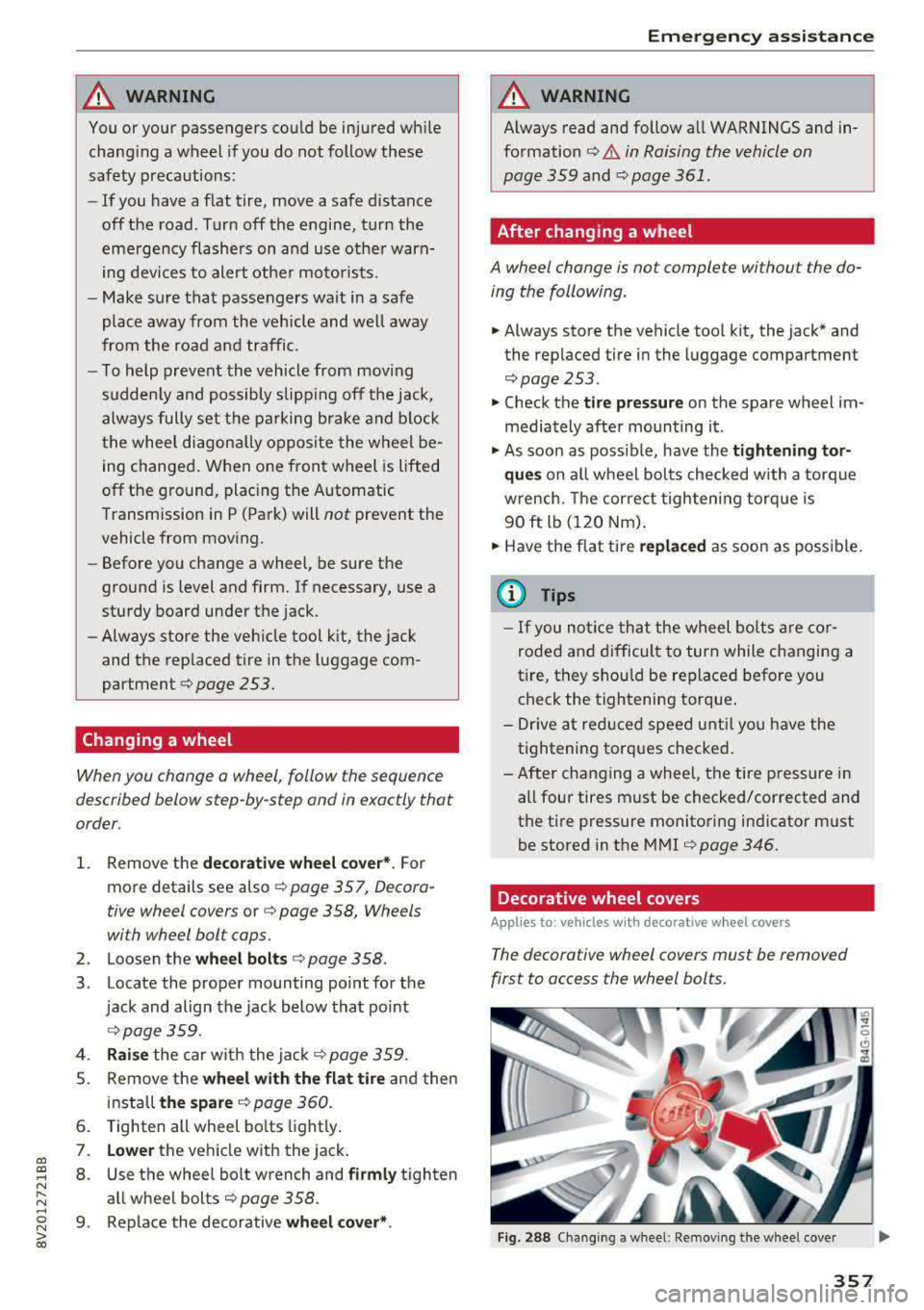
Changing a wheel
When you change a wheel, follow the sequence
described below step-by-step and in exactly that
order.
1. Remove the decorative wheel cover*. For
more details see also
c:> page 357, Decora-
tive wheel covers
or c:> page 358, Wheels
with wheel bolt caps.
2. Loosen the wheel bolts c:> page 358.
3 . Locate the proper mounting point for the
jack and align the jack below that point
c:> page359.
4. Raise the car with the jack c:> page 359.
5. Remove the wheel with the flat tire and then
install
the spare c:> page 360.
6. Tighten all wheel bolts lightly.
7. Lower the vehicle with the jack .
8 . Use the wheel bolt wrench and firmly tighten
all wheel bolts
c:> page 358 .
9. Replace the decorative wheel cover* .
Emergency assistance
_& WARNING
-Always read and follow all WARNINGS and in-
formation
c:> .&. in Raising the vehicle on
page 359
and c:> page 361.
After changing a wheel
A wheel change is not complete without the do
ing the following.
.. Always store the vehicle tool kit, the jack* and
the replaced tire in the lugg age compartment
c:> page 253.
.. Check the tire pressure on the spare wheel im
mediately after mounting it .
.. As soon as possible, have the tightening tor
ques
on all wheel bolts checked with a torque
wrench. The correct tightening torque is
90 ft lb (120 Nm).
.. Have the flat tire replaced as soon as possible.
@ Tips
-If you notice that the wheel bolts are cor
roded and difficult to turn while changing a
tire, they should be replaced before you
check the tightening torque.
- Drive at reduced speed until you have the tightening torques checked.
- After changing a wheel, the tire pressure in
all four tires must be checked/corrected and
the tire pressure monitoring indicator must
be stored in the MMI
c:>page 346.
Decorative wheel covers
Applies to : vehicles wit h decorative w heel covers
The decorative wheel covers must be removed
first to access the wheel bolts.
Fig. 288 Changing a wheel: Removing the wheel cover
357
Page 362 of 400
Emerg ency assis ta nce
-To help prevent injury to yourself and your
passengers:
-Do not ra ise the vehicle until you are sure
the jack is secure ly engaged.
-Passengers must not remain in the vehicle
when it is jacked up.
-Make sure that passengers wait in a safe
place away from the vehicle and well away
from the road and traffic.
-Make sure jack posit ion is correct, adjust
as necessary and then cont inue to raise
the jack.
CD Note
Do not lift the vehicle by the sill. Position the
veh icle jack only at the designated lifting
points on the sill. Otherwise, your vehicle will
be damaged.
Taking the wheel off /installing the spare
Follow these instructions step-by-step for chang
ing the wheel .
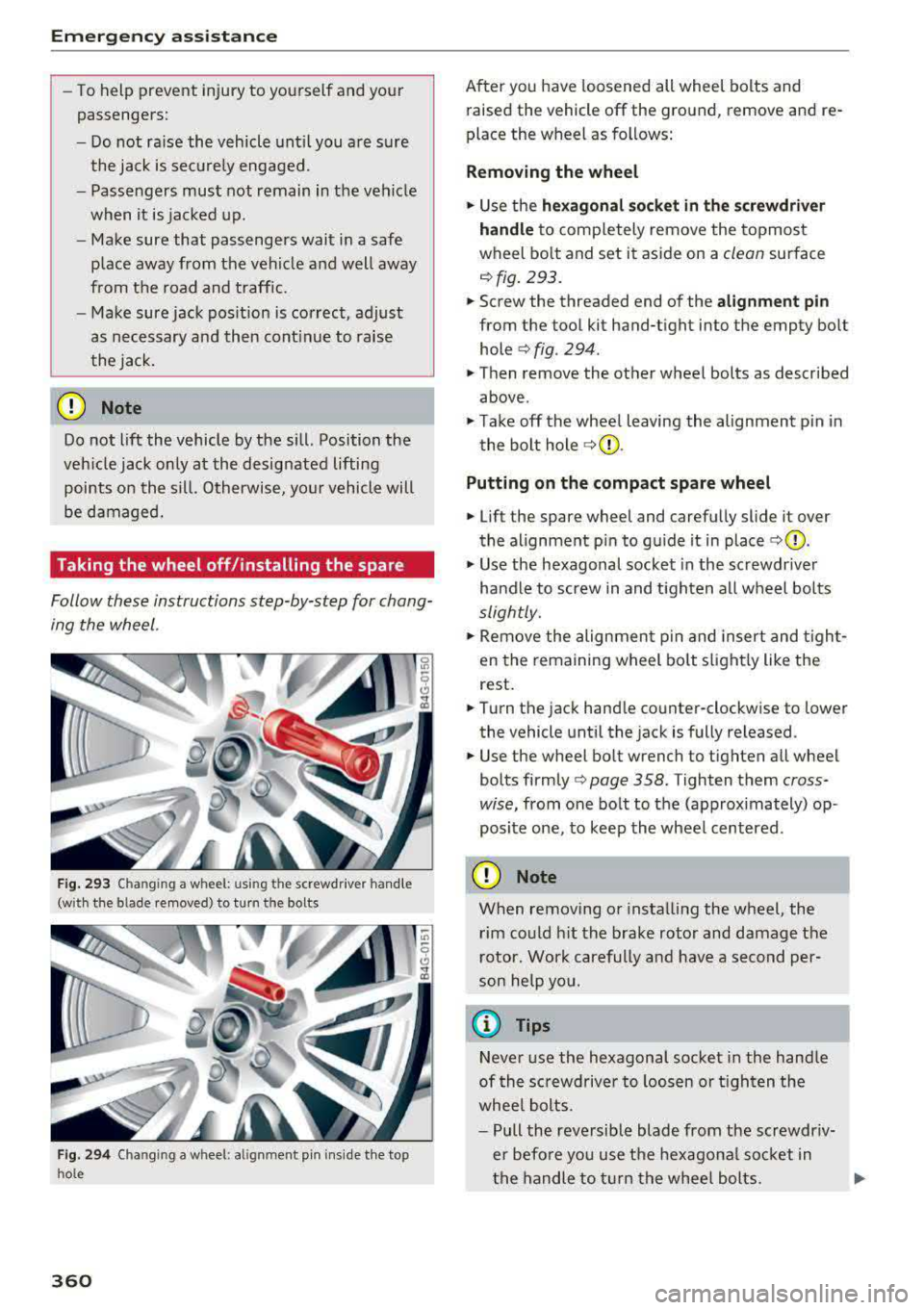
Fig . 293 Changing a wheel: using the screwdr iver hand le
(with the blade removed) to turn the bolts
Fig. 29 4 Changing a wheel: alignm ent pin ins ide the top
ho le
360
After you have loosened all wheel bolts and
raised the vehicle off the ground, remove and re
place the wheel as follows:
Removing the wheel
.. Use the he xago nal socket in th e screwdriver
handle
to comp letely remove the topmost
wheel bo lt and set it aside on a
clean surface
<=> fig. 293.
.. Screw the threaded end of the alig nm ent pi n
from the tool kit hand-tight into the empty bolt
hole
<=> fig. 294.
.. Then remove the other wheel bolts as described
above .
.. Take off the whee l leaving the alignment p in in
the bolt hole
<=> (j) .
Putting on the c omp act spare wheel
.. Lift the spare wheel and carefully slide it over
the alignment p in to gu ide it in place
<=>(j) .
.. Use the hexagonal socket in the screwdr iver
handle to screw in and t igh ten all wheel bolts
slightly.
.. Remove the alignmen t pin and insert and t igh t
en the remaining wheel bolt s light ly like the
rest .
.. Turn the jack hand le counter-clockwise to lower
the vehicle until the jack is fully released .
.. Use the wheel bolt wrench to tighten all wheel
bolts
firmly <=> page 358. Tighten them cross
wise,
from one bolt to the (approximately) op
posite one, to keep the wheel centered.
CD Note
When removing o r insta lling the wheel, the
rim could h it the brake rotor and damage the
r otor. Wor k carefully and have a second per
son he lp yo u.
{!) Tips
Neve r use the hexagonal socket in the handle
of th e sc rewdriver to loos en o r tigh ten the
whee l bolts.
-Pull the reve rsible blade from the screwdr iv
er befo re you use the hexagona l socket in
the handle to turn the whee l bolts.
Page 366 of 400
Fuses and bulbs
Fuses and bulbs
Fuses
Changing fuses
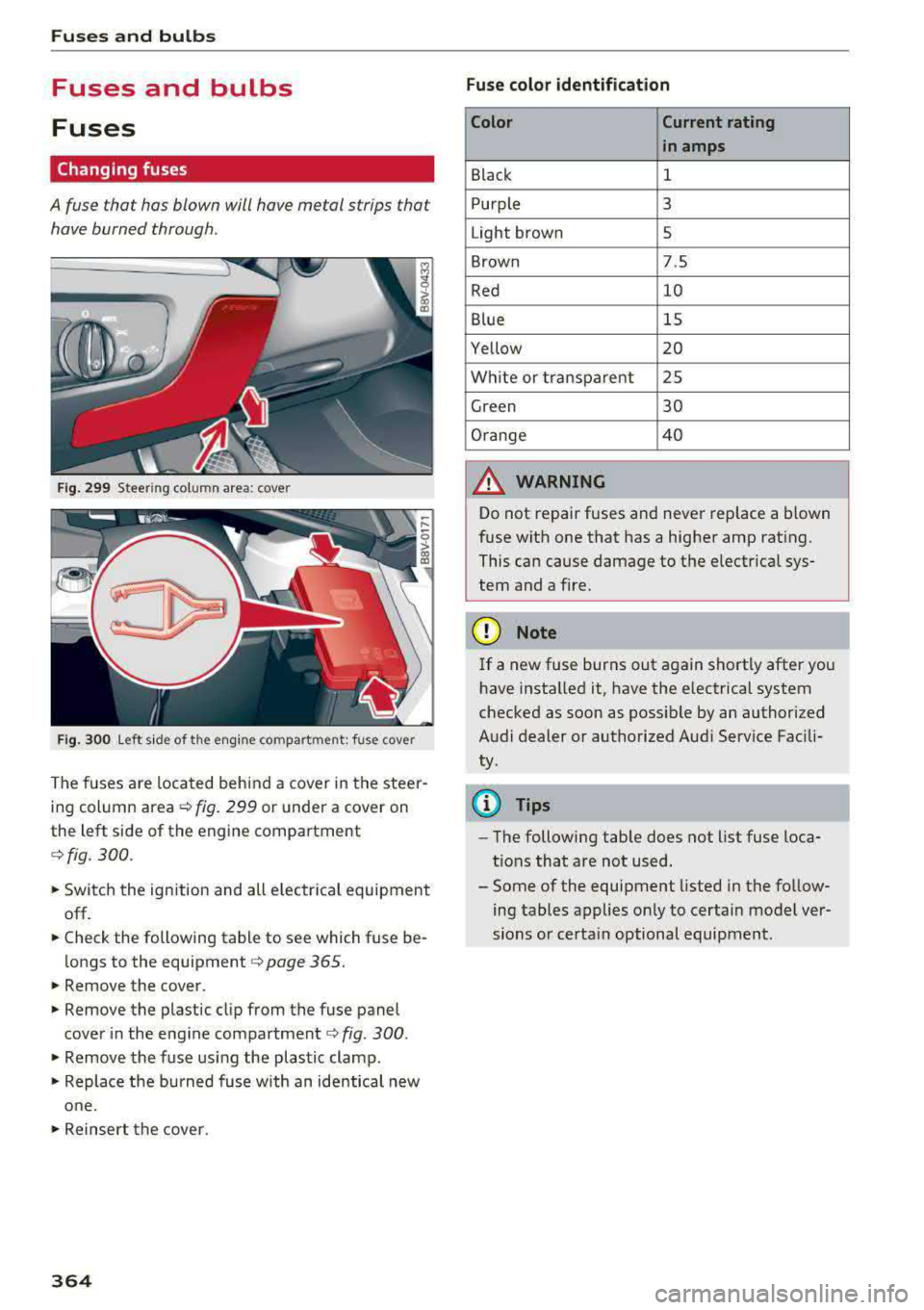
A fuse that has blown will have me tal strips that
have burned through .
Fig. 2 99 Stee rin g co lu m n a rea : cove r
Fig. 30 0 Left s ide of the engine co mpart ment: fuse cover
The fuses are located behind a cover in the steer
i n g column
area ¢ fig. 299 or under a cover on
the left side of the engine compartment
¢ fig. 300 .
• Switc h the ignition and all e lectr ica l equipment
off.
• Check the following table to see which fuse be
longs to the
equipment ¢ page 365.
• Remove the cover.
• Remove the plastic cl ip from the fuse panel
cove r in the eng ine
compartment ¢ fig. 300 .
• Remove the fuse us ing the plastic clamp.
• Replace the bu rned fuse w ith an identical new
o ne.
• Reinser t the cover.
364
Fuse color identification
Color Current rating
in amps
Black 1
Purple 3
Light brown 5
Brown 7.5
Red 10
Blue 15
Yellow 20
Wh ite or transpa re nt 25
Green 30
Orange 4 0
A WARNING
-
Do not repair fuses and never replace a blown
f u se with one that has a higher amp rat ing.
This can cause damage to the e lectr ica l sys
tem and a fire.
(D Note
If a new fuse burns out again sho rtly after you
h ave installed it, have the electrical system
checked as soon as possible by an authorized
A udi dealer or authorized Aud i Service Fac ili
ty .
(D Tips
-The following table does not list fuse loca
t ions that are not used.
- Some of the equipment listed in the fo llow
ing tables applies on ly to certai n model ver
sions or certa in optional equipment .
Page 367 of 400
a, co ..... N
" N ..... 0 N > 00
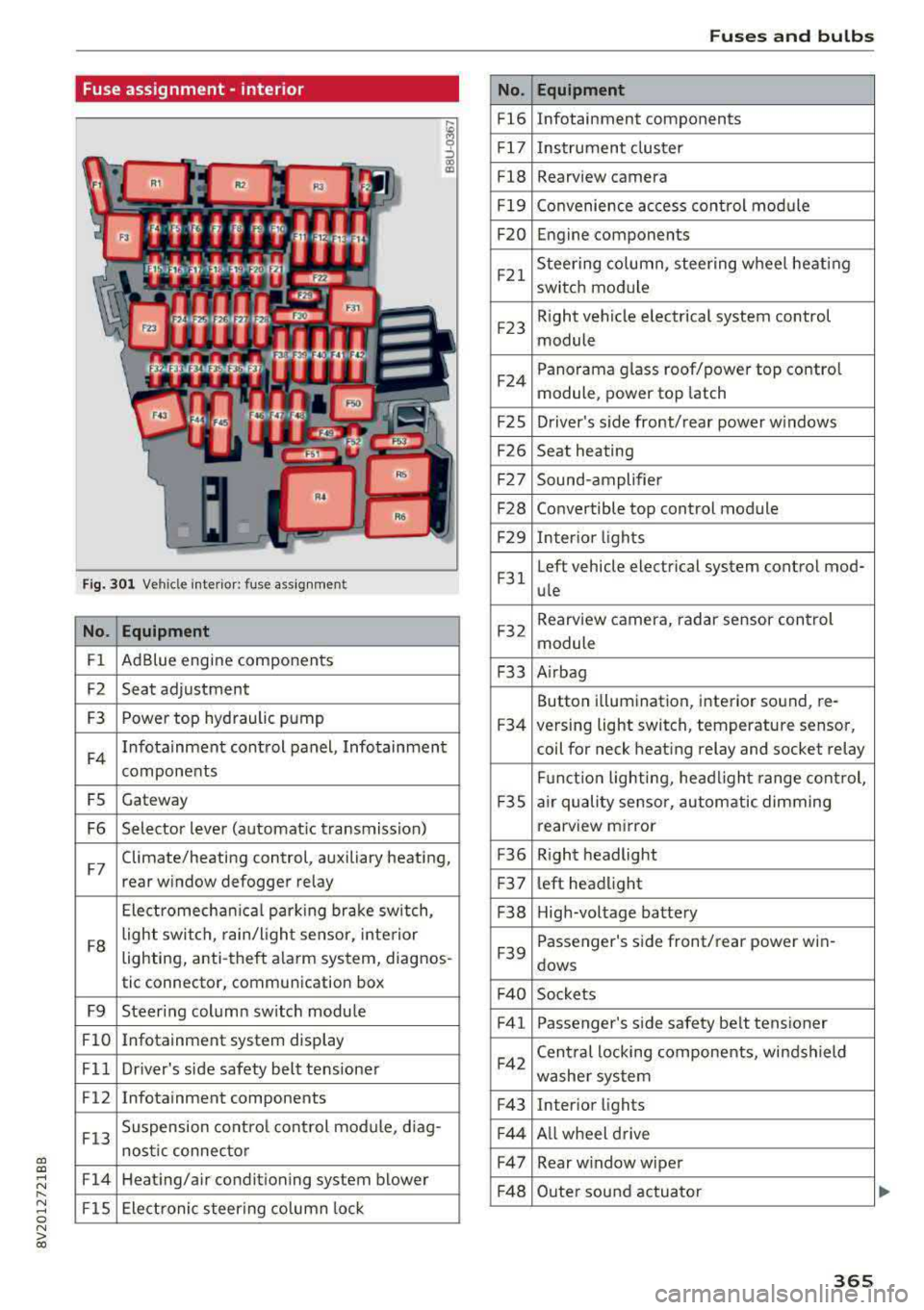
Fuse assignment -interior
Fig. 301 Vehicle interior: fuse assignment
No. Equipment
Fl Ad
Blue engine components
F2 Seat adjustment
F3 Power top hyd
raulic pump
F4 Infotainment control panel, Infotainment
components
FS Gateway
F6 Selector lever (automat ic transmission)
F7 Climate/heating control, auxiliary heating,
rear window defogger relay
Electromechan ica l parking brake sw itch,
F8 light switch,
rain/light sensor, inte rior
lighting, anti-theft alarm system, diagnos -
tic connector, communication box
F9 Steering column sw itch module
Fl0 Infotainment system display
Fll Dr iver's side safety belt tens ioner
F12 Infotainment components
F13 Suspension
control control module, diag-
nostic connector
F14 Heating/air conditioning system blower
FlS Electronic steering column lock
No .
Fl6
F 17
Fl8
F 19
F20
F21
F2 3
F24
F 2S
F26
F 27
F28
F2 9
F 31
F32
F33
F34
F 3S
F36
F3 7
F38
F39
F 40
F41
F42
F43
F44
F47
F4 8
Fuses and bulbs
Equipment
Infotainment components
Instrument cluster
Rearview camera
Convenience access cont rol module
Engine components
Steering column, steering wheel heating
switch module
Right vehicle electrical system control
module
Panorama glass roof/power top control
module, power top latch
Driver's s ide front/rear power w indows
Seat heating
Sound-amplifier
Convertible top control module
Interior lights
Left vehicle electrical system control mod-
ule
Rearview camera, radar sensor control
module
A irbag
Button i llumination, interior sound, re-
versing light switch, temperature sensor,
coil for neck heating relay and socket relay
Fu nct ion lighting, headl ight range control,
a ir quality sensor, automatic dimming
rearview mirror
R ight headlight
l eft headlight
High-voltage battery
Passenger's s ide front/rear power win -
dows
Sockets Passenger's side safety belt tensioner
Cen tral locking components, windshield
washer system
Interior lights
Al l wheel drive
Rear w indow wiper
Outer sound actuator
365
Page 368 of 400
Fuses and bulbs
No . Equipment
F49 Starter, clutch sensor, high-voltage bat-
tery, power electronics
FS3 Rear window defogger
The power seats* are protected via
circuit break
ers
that automatically switch on after a few sec
onds after the overload has been reduced.
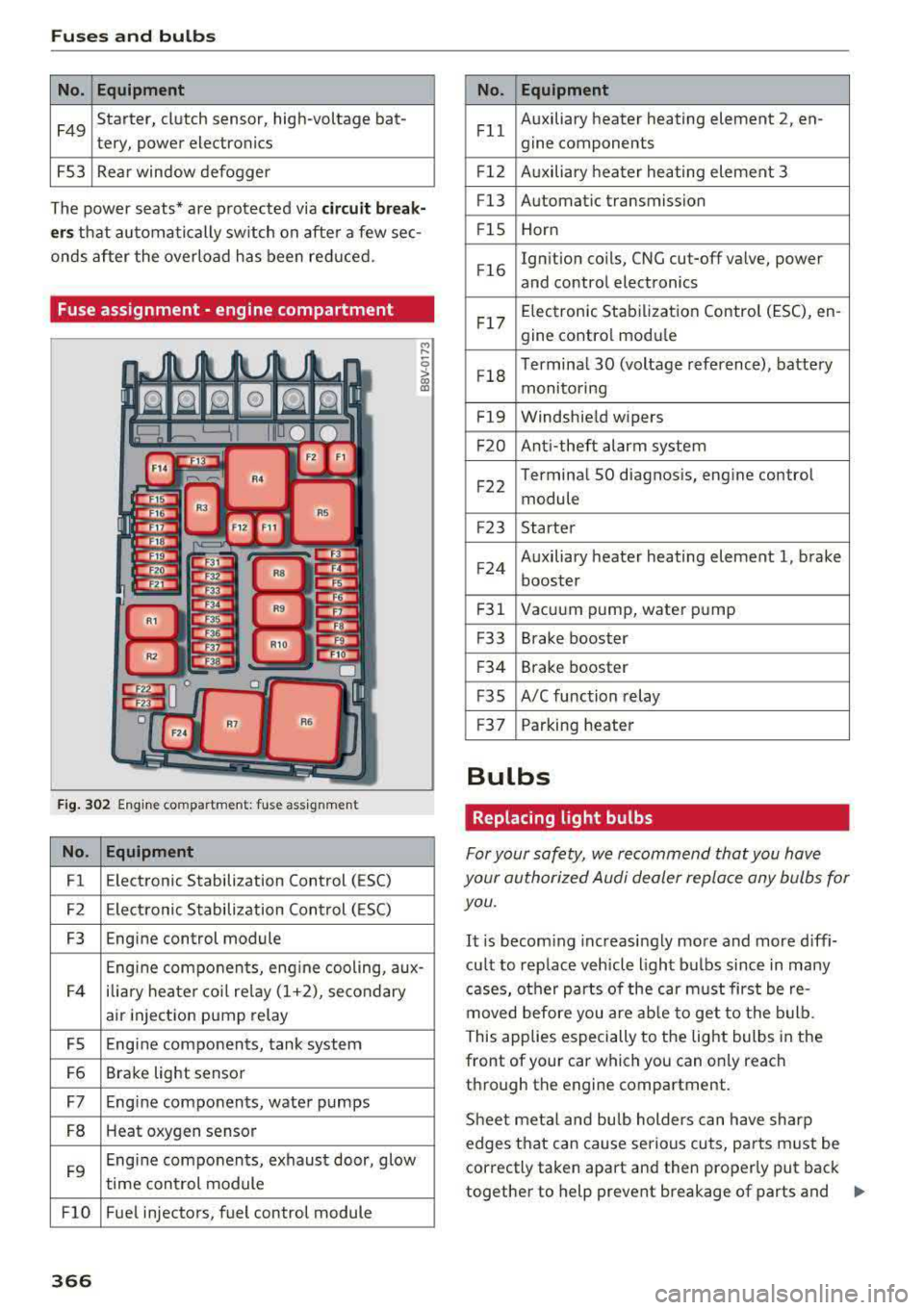
Fuse assignment - engine compartment
F ig . 302 Engine co mpa rtment: fuse assignmen t
No. Equipment
Fl E
lectronic Stabilization Control (ESC)
F2 Electronic Stabilization Control ( ESC)
F3 Engine control module
Engine components, eng ine cooling, aux-
F4 ilia
ry heater coil relay (1+2), secondary
air injection pump relay
FS Engine components, tank system
F6 Brake light sensor
F7 Engine components, water pumps
FB Heat oxygen sensor
F9 Engine components, exhaust door, glow
time control module
FlO Fue l injectors, fuel control module
366
No . Equipment
Fll Auxiliary heater heating element 2
, en-
gine components
F l2 Auxiliary heater heating element 3
Fl3 Automatic transmission
F lS Horn
F l6 Ignition coils, CNG cut-off valve, power
and control electronics
Fl7 Elec
tronic Stabilization Control (ESC), en -
gine contro l module
Fl8 Terminal 30 (voltage
reference), battery
monitoring
F19 Windshield wipers
F20 Anti-theft alarm system
F 22 Terminal SO diagnosis, engine control
module
F2 3 Starter
F 24 Auxiliary heater heating element 1, brake
booster
F31 Vacuum pump, water pump
F33 Brake booster
F34 Brake booster
F35 A/C function relay
F37 Parking heater
Bulbs
Replacing light bulbs
For your safety, we recommend that you have
your authorized Audi dealer replace any bulbs for you.
It is becoming increasingly more and more diffi
cu lt to replace vehicle light bulbs since in many
cases, other parts of the car must first be re
moved before you are able to get to the bulb.
This applies especially to the light bulbs in the
front of your car which you can only reach
through the engine compartment.
Sheet meta l and bulb holders can have sharp
edges that can cause serious cuts, parts must be
correctly taken apa rt and then properly put back
together to help prevent breakage of parts and
..,.
Page 369 of 400
CXl CXl .... N ,.__
N .... 0 N > 00
long term damage from water that can enter
housings that have not been properly resea led.
F or your safety, we recommend that you have
your author ized Audi dealer replace any b ulbs for
you, since your dealer has the proper tools, the
correct bulbs and the expertise.
Ga s di sc har ge l amp s (Xe non light s)
Due to the high electrical voltage, have the bulbs
replaced by a qua lified technician . Headlights
with Xenon light are identified by the high-volt
age sticker.
LE D hea dlight s*
LED headlights require no maintenance. Please
contact your authorized Audi dealer if a bulb needs to be replaced .
A WARNING
Changing Xenon lamps w ithout the necessa ry
equipment can cause ser ious personal injury .
- Bulbs are pressur ized and can explode when
being changed . Potential risk of injury!
- On vehicles
equipped with gas discharge
bulbs (Xenon l ight) life-threatening injuries
can result from improper handling of the
high-voltage po rtions of such lamps!
- Only you r authorized Aud i dea ler or quali
fied workshop should change the bulbs in
gas dis charge lamps. There are parts with
sharp edges on the openings and on the
bulb ho lders that can cause serious cuts . If
you are uncertain about what to do, have
the work perfo rmed by an authorized Audi
dealer or qualif ied workshop. Serious per
sonal injury may resu lt from improperly per
formed work.
@ Tips
- If you still prefer to rep lace the light bu lbs
yourself, be aware that the engine compart
ment is a hazardous area to work
in¢ .&. in
Working in the engine compartment on
page 316 .
-It is best to ask your authorized Audi dealer
whenever you want to change a bulb .
Fuses an d bulb s
367
Page 372 of 400
Emerg enc y s it uati ons
9. In the ve hicle that is being jump started,
switch the heater fan and rear window de
froster on to reduce any voltage peaks that
may occur when disconnecting the jumper
cables. The headlights must be switched off.
10. With the engines running, remove the cables
i n
reverse order of the way they were instal
l ed. Make sure the cables do not get caught
in mov ing engine components.
11. Sw itch the heater fan and rear w indow de-
froster off.
12. C lose the battery cover .
The battery is vented to the outside so that gases
do not enter the passenger compartment. Make
sure that the connected positive termina l clamps
on the jump start cab le have sufficient contact
with metal.
A WARNING
Follow the warnings and instructions from
the jump start cab le manufacturer to reduce
the risk of ser ious injuries and vehicle dam
age. If you are unsure about anything, call
roads ide ass istance.
- The jump start cables must be long enough
so that the veh icles do not touch.
-
- Route the jump start cables so they cannot
get caught in the moving parts in the engine
compartment.
- Always read and follow the warnings before check ing anything in the engine compart
ment
~page 316.
(D Note
Connecting jump start cables incorrectly can
damage the alternator .
- Always connect the positive terminal(+) to
the positive term inal(+) and the negative
term inal(-) to the negat ive terminal(-) on
the body ground po int, but not the negative
terminal on the battery.
- Make su re the screw plugs on the battery
cells are installed securely. If not, tighten
the plugs before connecting the clamps to
the negat ive termina l on the b attery.
- Please note t hat the connecting p rocess de
scribed below for the jump sta rt cab les is
in-
370 tended for when your vehicle is being jump
started. If you are jump starting another ve
hicle, do not connect the negat ive cab le to
the negative term inal (-) on the dra ined
battery, but rather connect it to a large
metal component that is bolted secure ly to
the engine block, or to the engine block it
self.
If the battery in the vehicle being jump
sta rted is not vented to the outside, there is
a risk of explosion due to hyd rogen gas.
- Make sure that the connected pos itive ter
minal clamps have suff icient contact with
metal.
- Do not use the battery negative terminal fo r
jump starting or a ma lfunction co uld occ ur
in the vehicle electrical system.
Towing with a tow truck
General tips
Your Audi requires special handling for towing.
The following information is to be used by com mercia l tow truck operators who know how to op
erate their equipment safely.
-Never tow your Audi. Towing will cau se dam
age to the engine and t ran smi ssi on.
- Nev er wrap the safet y ch ains or winch cables
aroun d the br ake lines .
- To pr event unne ce ssa ry damag e, your Audi
must be tran sported with a flat be d tru ck .
- To load th e vehicle on to the flat bed , use th e
towing l oop found in the vehicl e tool s and at
t a ch to the front or rear an chorage
.=;,page 371 and ~page 371.
A WARNING
A veh icle being towed is not safe for passen
gers. Never allow anyone to ride in a vehicle
being towed, fo r any reason.
Page 384 of 400
Index
A
A/C (automatic climate control system) . . . . 71
Accessories . . . . . . . . . . . . . . . . . . . . . . . 64, 380
Active lane assist
refer to Audi active lane assist . . . . . . . . . 136
Active rollover protection system . . . . . . . . 256
Retracting rollover protection.......... 257
Adaptive cruise control
refer to Audi adaptive cruise control . . . . 126
Adaptive light
refer to Audi adaptive light . . . . . . . . . . . . . 51
Adjusting the air distribution Automatic climate control system . . . . . . . 72
Adjusting the air vents . . . . . . . . . . . . . . . . . . 73 Automatic climate control system . . . . . . . 72
Adjusting the sound . . . . . . . . . . . . . . . . . . . 245
Advanced key
refer to Convenience key . . . . . . . . . . . . . . . 78
Airbag .... .. .. ............... .... ... 267
Airbag system .. .... .............. 267,287
Advanced Airbag System components . . . 274
Care . . . . . . . . . . . . . . . . . . . . . . . . . . . . . . 282
Ch ildren . . . . . . . . . . . . . . . . . . . . . . . . . . . 294
Ch ild restraints . . . . . . . . . . . . . . . . . . . . . 295
Components (front airbags) . . . . . . . . . . . 274
Danger of fitting a child safety seat on the
front passenger seat . . . . . . . . . . . . . . . . . 268
Disposal . . . . . . . . . . . . . . . . . . . . . . . . . . . 282
Front airbags . . . . . . . . . . . . . . . . . . . . . . . 272
How do the front airbags work? . . . . . . . . 277
How many airbags does my vehicle have? 274
How the Advanced Airbag System compo -
nents work together . . . . . . . . . . . . . . . . . 276
Important safety instructions on the knee
airbag system . . . . . . . . . . . . . . . . . . . . . . . 285
Knee airbags . . . . . . . . . . . . . . . . . . . . . . . . 283
Monitoring . . . . . . . . . . . . . . . . . . . . . . . . . 279
PASSENGER AIR BAG OFF light . . . . . . . . . 279
Repairs . . . . . . . . . . . . . . . . . . . . . . . . . . . . 282
Safety instructions . . . . . . . . . . . . . . . . . . . 281
Side airbags . . . . . . . . . . . . . . . . . . . . . . . . 285
Warning/Indicator lights . . . . . . . . . . . . . 279
When must the system be inspected? . . . 279
Air pressure (tires) . . . . . . . . . . . . . . . . 336, 345
A lignment pin (tire change) . . . . . . . . . . . . . 353
All-weather lights..... ......... .... .. .. 51
382
All season tires
All wheel drive 342
refer to quattro (all wheel drive) . . . . .
. . 154
AMI
refer to Audi music interface . . . . . . . 228, 229
Android Auto
refer to Audi smartphone interface . . . . . 239
Ant i-freeze
Windshield washer system . . . . . . . . . . . . 327
Anti -Lock Braking System (ABS) . . . . . . . . . 151
Anti-Slip Regulation (ASR) . . . . . . . . . . . . . . 151
Apple CarP lay
refer to Aud i smartphone interface . . . . . 239
Audi active lane assist . . . . . . . . . . . . . . . . . 136
Cleaning the camera area . . . . . . . . . . . . . 348
Messages . .. .. .. ... .... ....... .... .
Audi adaptive cruise control ........... . .
Cleaning the sensor . .. .. ........... . . 138
126
348
Distance display, distance warning ..... . 132
Messages . . . . . . . . . . . . . . . . . . . . . . . . . . 133
Audi adaptive light . . . . . . . . . . . . . . . . . 51, 143
Audi connect e-tron services . . . . . . . . . . . . 198
Doors and lights .. .. .. .. ........... .. 198
Audi connect (Infotainment) ........ 190,195
Data protection . . . . . . . . . . . . . . . . . . . . . 196
Services overview . . . . . . . . . . . . . . . . . . . . 191
Start ing . . . . . . . . . . . . . . . . . . . . . . . . . . . 191
Audi drive select . . . . . . . . . . . . . . . . . . . . . . 143
Audi magnetic ride
refer to Suspension control . . . . . . . . . . . . 143
Audi music interface . . . . . . . . . . . . . . . . . . . 228
Audi music stream
refer to Wi-Fi . . . . . . . . . . . . . . . . . . . . . . . 226
Audio files . . . . . . . . . . . . . . . . . . . . . . . . . . . 230
Audio player Bluetooth audio player . . . . . . . . . . . . . . . 225
Wi-Fi audio player . . . . . . . . . . . . . . . . . . . 226
Audio track . . . . . . . . . . . . . . . . . . . . . . . . . . 233
Audi pre sense . . . . . . . . . . . . . . . . . . . . . . . 133
Messages . . . . . . . . . . . . . . . . . . . . . . 133, 136
Settings . . . . . . . . . . . . . . . . . . . . . . . . . . . 136
Audi Service Repair Manuals and Literature 378
Audi side assist . . . . . . . . . . . . . . . . . . . . . . . 139
Cleaning the sensors . . . . . . . . . . . . . . . . . 348
Messages . ....... ... ..... .........
.
Rear cross-traffic assist ... ........... . 143
142