phone AUDI A3 SEDAN 2017 User Guide
[x] Cancel search | Manufacturer: AUDI, Model Year: 2017, Model line: A3 SEDAN, Model: AUDI A3 SEDAN 2017Pages: 400, PDF Size: 67.32 MB
Page 168 of 400
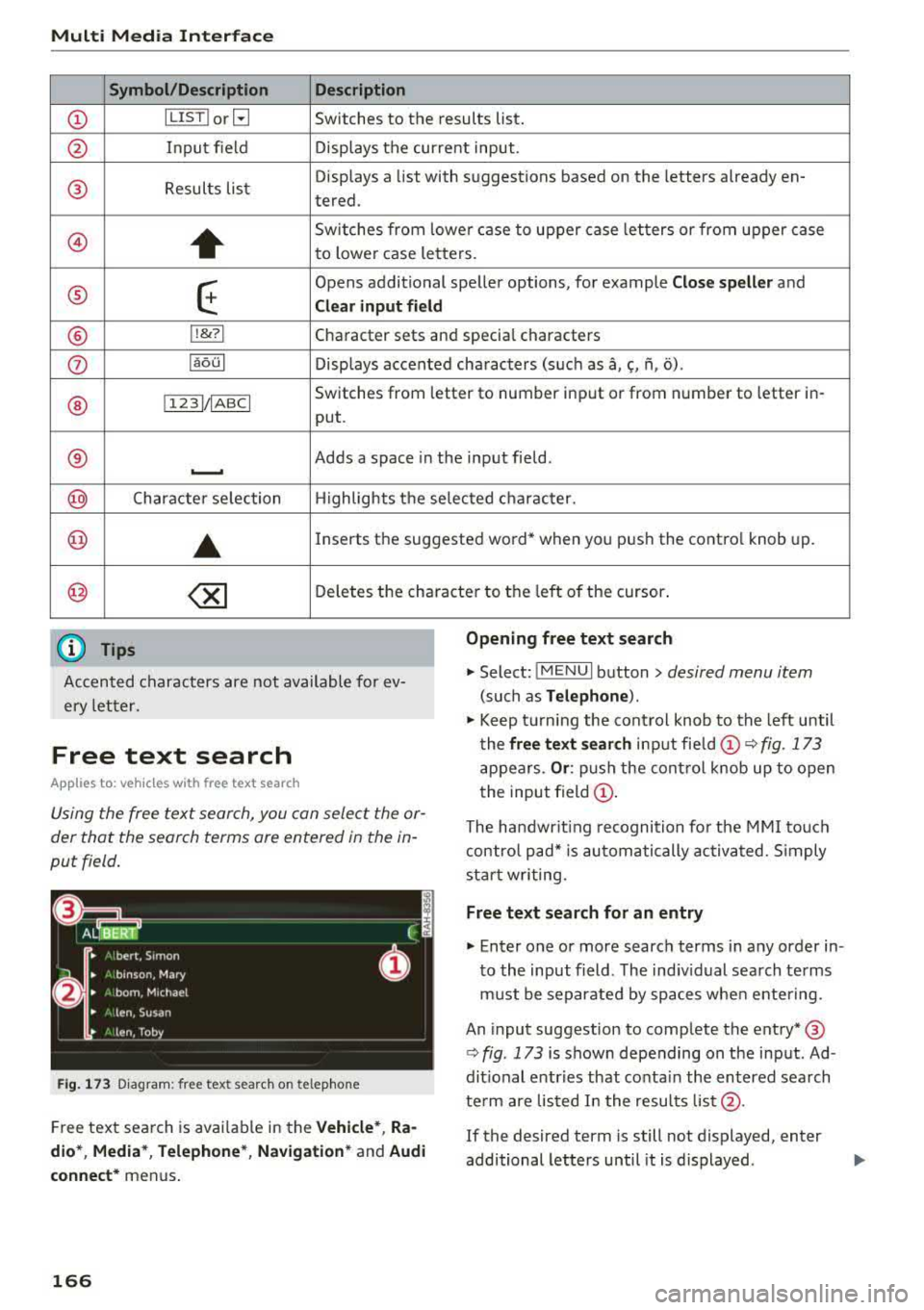
Multi Media Interface
Symbol /Description Description
(D IL IST lorB Switches to the results list.
@ Input field Displays the current input.
® Results lis t Displays a
list with suggestions based on the letters already en-
tered.
@)
+
Switches from lower case to upper case letters or from upper case
to lower case letters.
® E
Opens additional speller options, for example Close speller and
Clear input field
® 11
& 71 Character sets and specia
l characters
0 laoul Displays accented characters (such as a,~' fi, o).
Switches from letter to number input or from number to letter in-
® 1 1231/ IABC I
put.
® Adds a space in the input field . ..........
@ Character selection Highlights the selected character.
@ ..
Inserts the suggested word* when you pus h the contro l knob up .
@ <&] Deletes the character to the left of the cursor .
(D Tips
Opening free text search
Accented characters are not available for ev
ery letter.
.,. Select: IMENUI button> desired menu item
(such as Telephone ).
.,. Keep turning the control knob to the left until
the
free text search input fie ld (D ¢ fig. 173
appears . Or: push the control knob up to open
the input field
(D.
Free text search
App lies to: veh icles with free text search
Using the free text search, you can select the or
der that the search terms are entered in the in
put field .
Fig . 173 Diagram: free text search on telep hone
Free text search is avai lab le in the Vehicle*, Ra
dio *, Media* , Telephone* , Navigation*
and Audi
connect*
menus .
166
The handwr it ing recognition for the MMI touch
control pad* is automatically activated . S imply
start writing.
Free text search for an entry
.,. Enter one or more search terms in any order in
to the input field. The ind iv idual search terms
must be separated by spaces when entering.
An input suggestion to complete the entry* ®
¢ fig. 173 is shown depending on the input. Ad
dit ional entries that co nta in the entered search
te rm are listed I n the results list@.
If the desired term is still not displayed, enter
additional letters until it is displayed .
Page 169 of 400
a, co ..... N
" N ..... 0 N > 00
Multi Media I nterfac e
It is often enough ju st to enter the first letters of
the search term in order for it to display in the
re
sults list . For examp le, in the Tele phon e* menu,
write the initials of the contact being searched
separated by a space.
Sele cting an entry from the re su lts li st
Requireme nt: at least one entry mus t be dis
played in the results
list @c::> fig. 173.
• MMI tou ch input* : turn the control knob to the
r ight. Select a nd confi rm an entry from the list.
Sel ecting the input suggest ion to comp lete
th e entry •
Sp eller input : select and co nfirm I L IST !©
c::> page 165, fig . 172. Or: push the control knob
down. Select and confirm an entry from the
Requirement : an input suggestion to complete
the
entry* ®¢ fig. 173 must be disp layed. list
.
• MMI touch input *: press the control knob .
Menus and Symbols
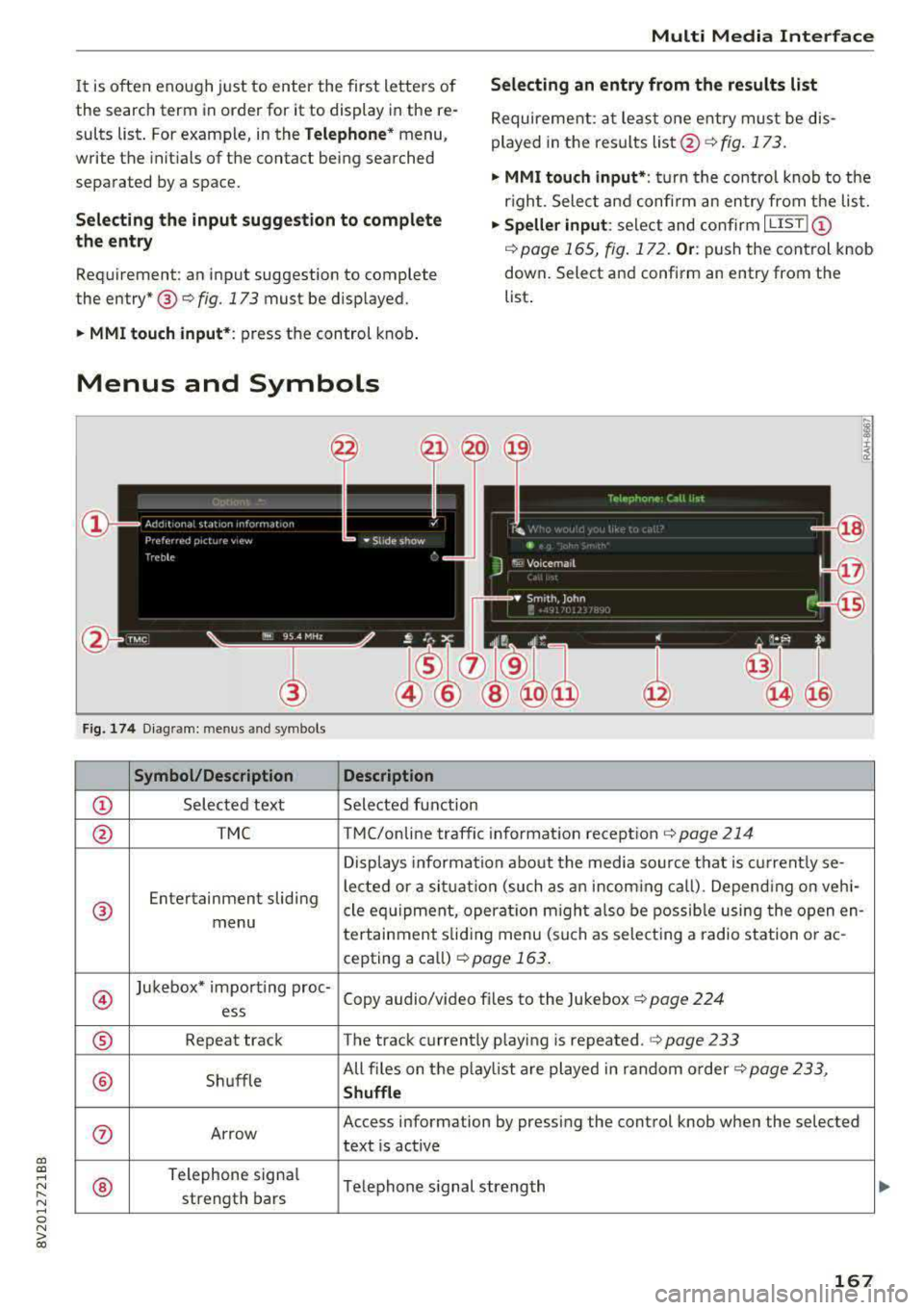
Fig. 174 D iagram: menus and symbols
Sy mbol /Description Description
© Selected text Selected function
@ TMC TMC/online traffic information reception c::> page 214
Displays information about the media source that is current ly se-
Entertainment sliding lected or a situat
ion (such as an incoming ca ll) . Depend ing on veh i-
® cle equipment, operat io n m igh t also be possib le using the open en-menu
tertainment sliding menu (such as select ing a radio station o r ac-
cepting a ca ll) c::> page 163 .
@
Jukebox* importing proc-
Copy audio/v ideo fi les to the Jukebox
c::> page 224 ess
® Repeat track The track currently playing is repeated.¢ page 233
® Shuffle All files on the play
list are played in random o rder
c::> page 233,
Shuffl e
0 Arrow Access
information by pressing the control knob when the selected
text is active
®
Telephone signa l
Telephone s ignal strength
strength bars
167
Page 170 of 400
Multi Med ia Int erfac e
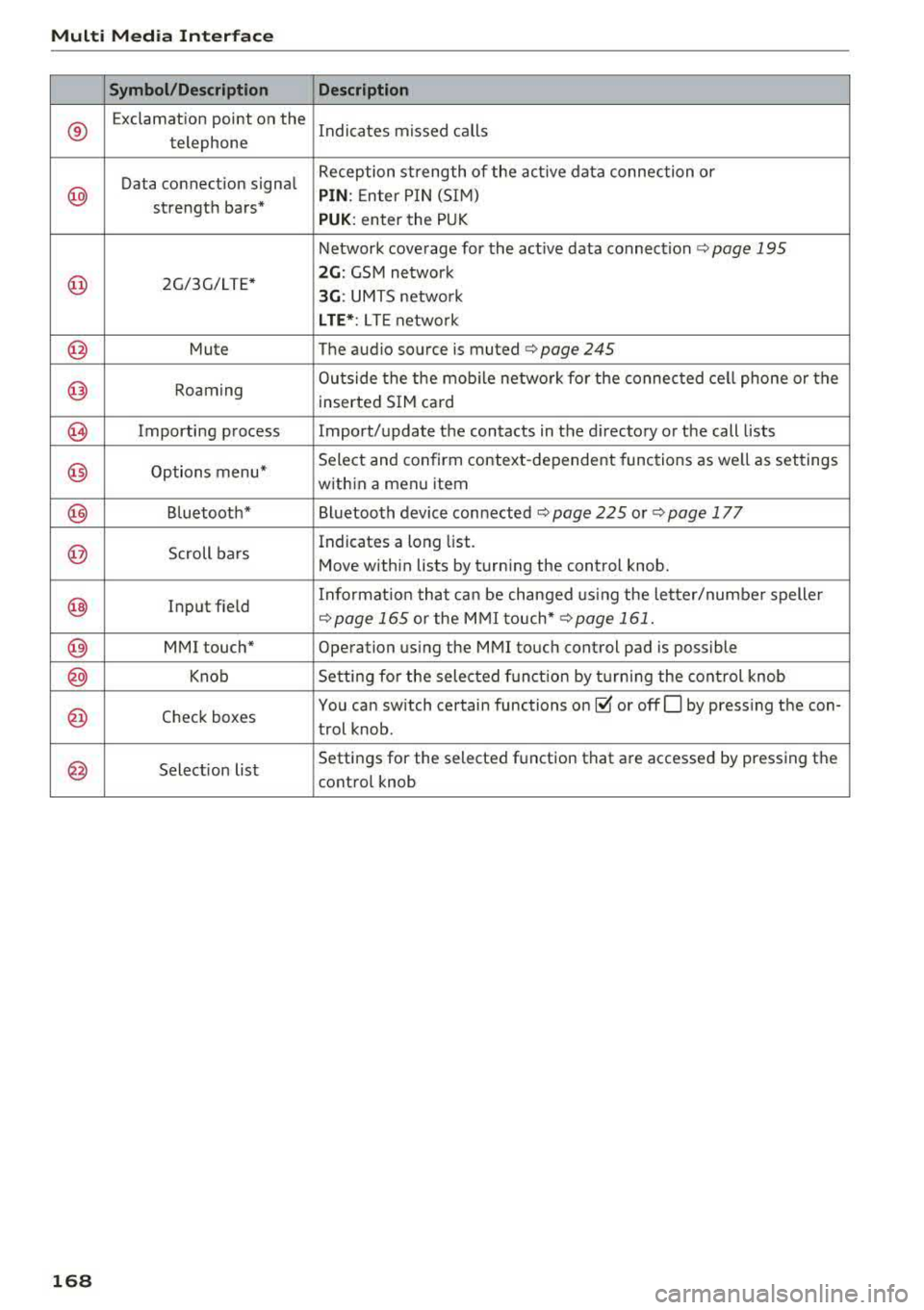
Symbol /Description Descr iption
®
Exclamation point on the
Indicates missed calls
telephone
Data connection signal Reception strength of the active data connection or
@ PIN
: Enter P IN (SIM)
strength bars*
PUK: enter the PUK
Network coverage for the active data connection
c:::> page 195
@ 2G/3G/LTE* 2G : GSM network
3G : UMTS netwo rk
L TE *: L TE netwo rk
@ Mute The audio source is. muted ¢ page 245
@ Roaming Outside the the mob
ile network fo r the connected cell phone or the
inserted SIM card
@ Importing process Import/update the contacts in the directory or the call lists
@ Options menu* Select and confirm context-dependent functions as
well as settings
within a menu item
@ Bluetooth* Bluetooth device connected c:::> page 225 or¢ page 177
@ Scroll bars Indicates
a long list.
Move within lists by turning the control knob.
@ Input field Informat
ion that can be changed us ing the le tter/numbe r speller c:::>page 165 or the MMI touch* ¢ page 161.
@ MMI touch* Operation using the MMI touch control pad is possible
@ Knob Setting for the selected funct ion by t urning the control knob
@ Check boxes You
can switch certain functions on~ or offO by pressing the con-
trol knob .
@ Selection list Settings
for the selected function that are accessed by pressing the
control knob
1 6 8
Page 171 of 400
"' "' ... N ,.._ N ... 0 N > a,
Voice recognition system
• Telephone
• Audi connect •
Favor ites
• Call (XY)
• Navigation
• Directory
• Radio
• Med ia
• Sound •
Enter number
• Redial
• Read new tex t message
• N avigate to (XV)
• Enter address/destination
• Help • Onhne destinations
• Help Speech dia log system
• Help Telephone •
Cancel route guidance
• M ap
• Help Audi connect •
Line (XY)
• Help Navigation
• Help Map
• Help Radio
• Help Media • N
ext page/ previous page
• Cancel
• No, l meant
()(Y)
• Correction
TELEPHONE
• Enter number • Call list
• Delete number/ correc tion
• Redial
•
Oltectory
• Call (XY) •
Call mailbox
• Enter PIN/ delete PI N
· business/ private/ land line/ mobile • Telephone favorites
NAVIG:ATI0N
• N avigate to CXV)
• Start/ cancel route guidance
• Directory
• Last destinations •
Bloc k route for
(XYJ miles/ Block
the next section
• Route list
• Calculate alternative routes
• Nav igation favorites
• Drive home
• Enter address •
Online destinations
• Special destination
• Enter country/ town
I street I state
• Exclude route / Exclude route for (XY)
km / m
M~P
• Map
• Day map/ Night map
• 20 driving position map/ 20 north posi tion map/ 30 map/ Destination map/ Overview map
AllJDI G QNNECT
• Audi connect
• Travel Information/ Parking Information
• Fuel prices
• Weather
RADIO
• Rad io presets
• FM
• FM/ AM/ SIRIUS XM
• Station (XY) / Frequency
(XYJ
• Traffic announcement on/ off
Fig. 17 S Co mmand overv ie w
• Flight Information
• City events
• Online news
• Twitter
MEDIA
• Jukebo x
• CO/ DVD .))
• SD card 1 / SD card 2
• Audi music Interface/
IPod I use / Bluetooth /
W I-Fl/ Medium (XV)
• Media favorites/ Artists/ Albums/ Genres/
Tracks/ Ptayllsts / Videos
· Folder up
• Random playback on / off
169
Page 172 of 400
Voice recognition system
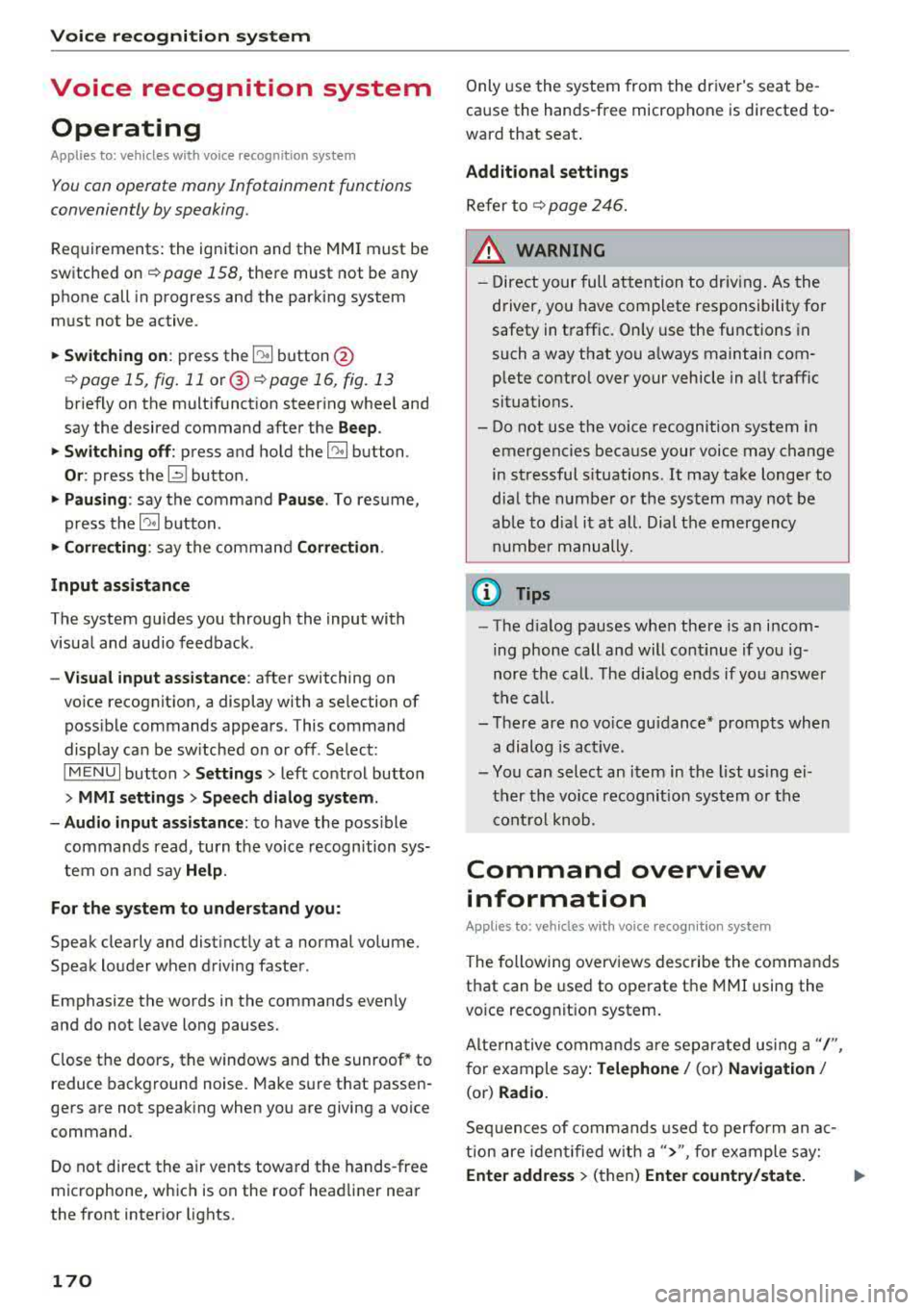
Voice recognition system Operating
Applies to: vehicles with vo ice recognition system
You con operate many Infotainment functions
conveniently by speaking.
Requirements: the ignition and the MM I must be
sw itched
on~ page 158, the re must not be any
phone call in progress and the parking system
m ust not be active.
.. Switching on : press the~ button @
¢ page 15, fig. 11 or@ ~ page 16, fig . 13
briefly on the multifunct ion steer ing whee l and
say the desired command after the
Beep.
.. Switching off : press and hold the~ button.
Or : press the l2l butto n.
.,. Pausing : say the command Pause. To resume,
press
the~ button.
.,. Corre cting : say the command Correction .
Input assistance
The system guides you through the input with
visua l and audio feedback.
- Visual input as sistance : after switching on
vo ice recognit ion, a display with a selection of
poss ible commands appears. This command
display can be sw itched on or off . Se lect:
IMENU I button> Settings > left control button
> MMI settings > Speech dialog sy stem .
- Audio input as sis tance :
to have the poss ible
commands read, turn the voice recognition sys
tem on and say
Help .
For the system to understand you:
Speak clearly and distinct ly at a normal volume.
Speak louder when driving faster.
Emphasize the words in the commands even ly
and do not leave long pauses.
Close the doors, the windows and the sunroof* to
reduce background noise. Make sure th at passen
gers are not speaking when you are giving a voice
command.
D o not direct the air vents toward the hands-free
microphone, whic h is on the roof head liner near
the front interior lights.
170
Only use the system from the dr iver's seat be
cause the hands-free microphone is directed to
ward that seat.
Additional sett ings
Refer to~ page 246.
_&. WARNING
- Direct your full attention to dr iv ing. As the
driver, you have complete responsibility fo r
safety in t raffic. Only use the functions in
such a way that you a lways maintain com
plete contro l over your vehicle in all traffic
situations.
-
- Do not use the voice recognition system in
emergencies because your voice may change
in stressful s ituations.
It may take longer to
dial the numbe r or the system may not be
ab le to dia l it at all. Dial the emergency
number manually .
(D Tips
- The d ia log pauses when the re is an incom
ing phone call a nd will continue i f you ig
nore the cal l. The dia log ends if you answer
the ca ll.
- There are no vo ice gu idance* prompts when
a dialog is act ive.
- You can select an item in the list using ei
ther the vo ice recognit ion system or the
cont rol knob.
Command overview
information
Applies to: vehicles with voice recognition system
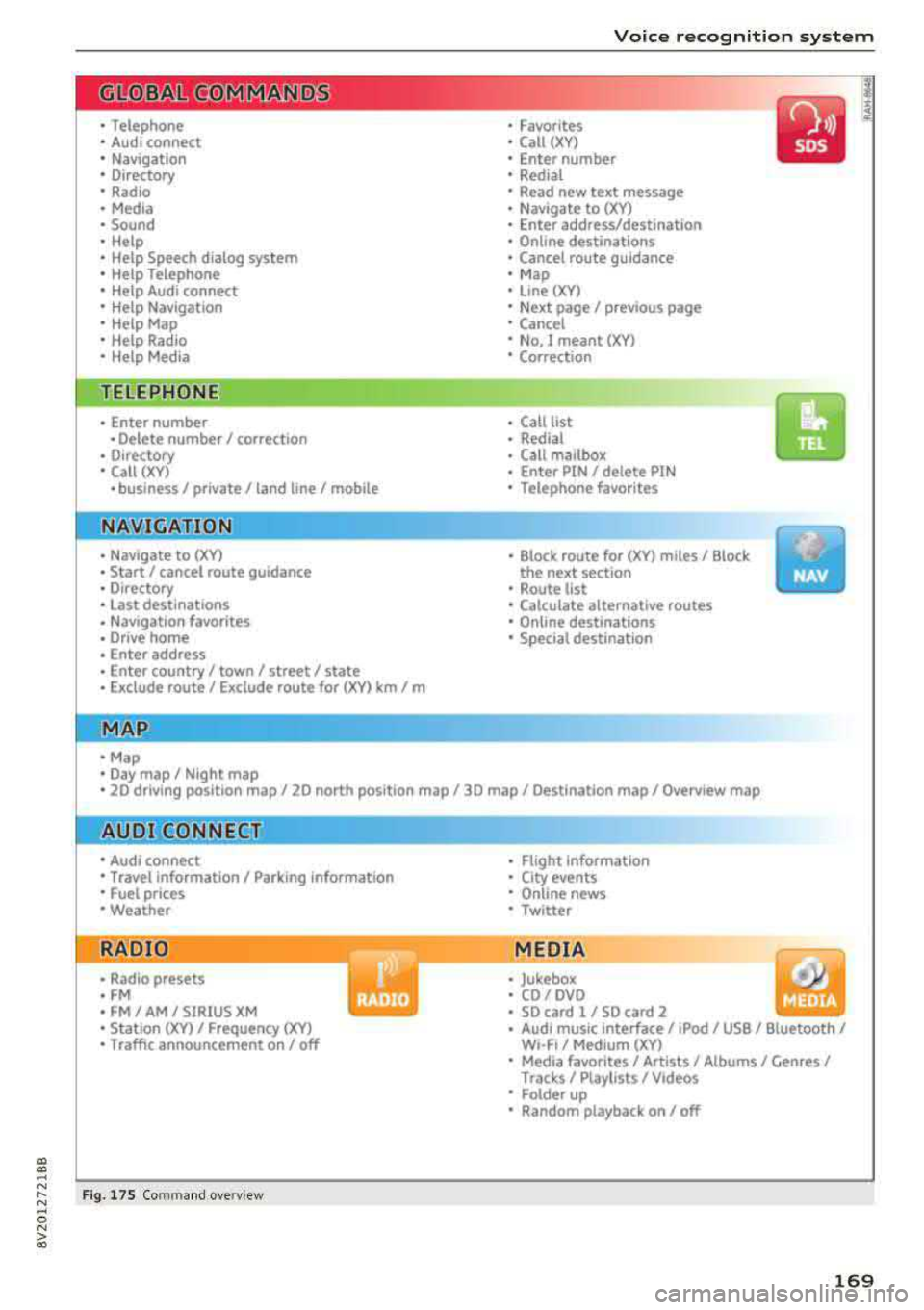
The following overv iews des cribe the commands
that can be used to operate the MMI using the
vo ice recog nit ion system.
Alte rnative commands are separated using a"/",
for example say:
Telephone / (or) Navigation /
(or) Radio.
Sequences of com mands used to perform an a c
tion are iden tified w ith a
">", fo r example say:
Ente r addre ss > (then) Enter country /state. IJ,,
Page 173 of 400
CXl CXl .... N ,.__
N .... 0 N > 00
Voice recognition system
The majority shown are main commands. This
system also recognizes synonyms in certain cas-es
. For a Bu sine ss addre ss, you can a lso say bu si
ness , work , office or at the office .
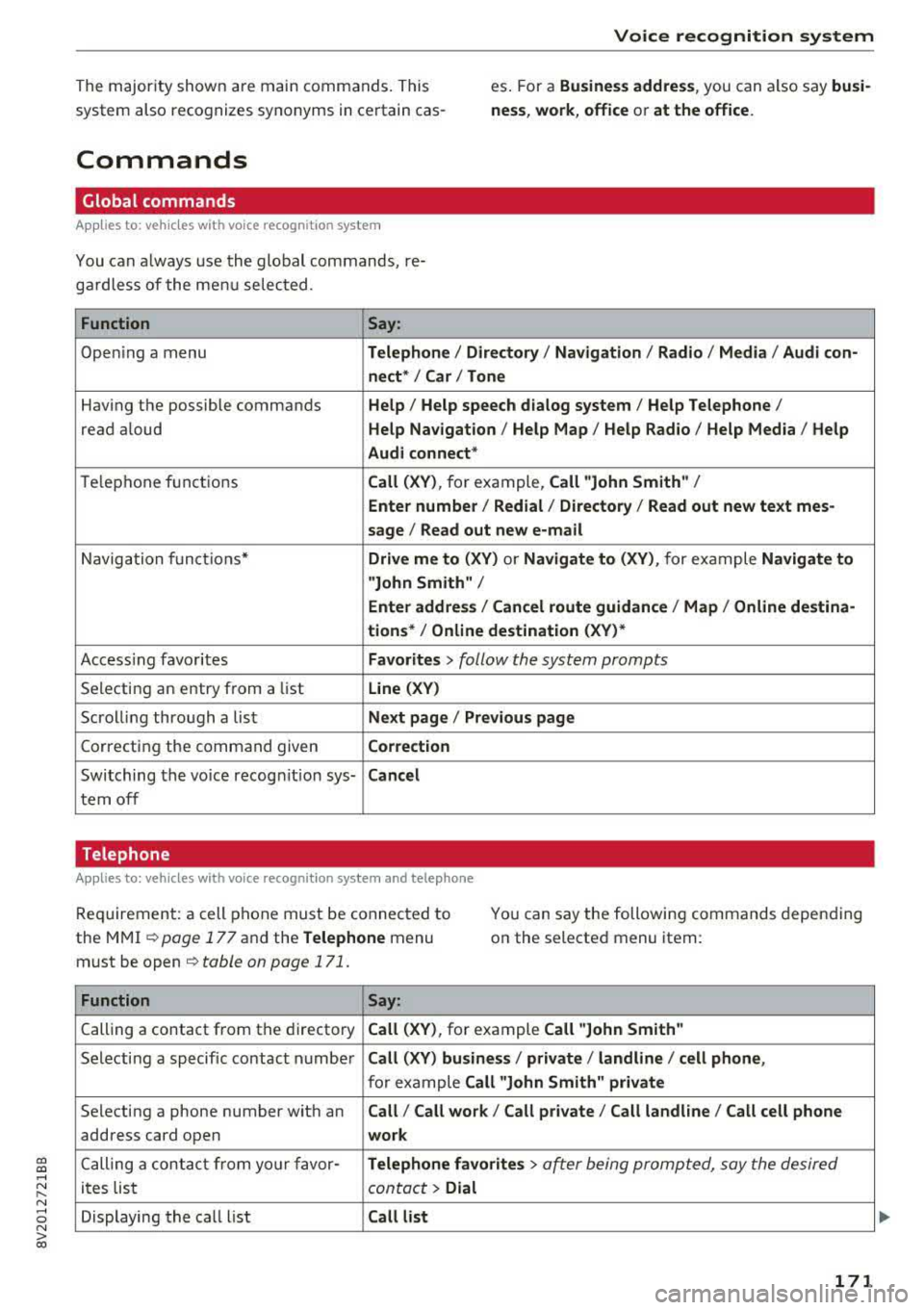
Commands
Global commands
Applies to: vehicles with voice recognition system
You can a lways use the global commands, re
ga rdless of the me nu selected .
Function Say:
Open ing a menu Tel ephon e/ Directory / Navigation / Radio / Medi a/ Audi con ·
n ec t*
I Car I Tone
Hav ing the possible commands Help / Help s peech dialog s ystem / Help Telephone /
read aloud Help Na vigat ion / Help Map / Help Radio / Help Med ia / He lp
Aud i connect *
Telephone fu nctions Call (XV ), for example, Call "John Smith" /
Enter numbe r/ Redial / Di rectory
I Read out new te xt me s-
s age
I Read out new e -mail
Navigation funct ions* Driv e me to (XV ) or Navigate to (XV ), for example Navigate to
"John Smith" /
Enter addre ss/ Cancel r oute guidance / Map / Online de stin a·
tion s*
I Online destinat ion (X V)*
Access ing favorites Favorit es > follow the system prompts
Selecting an entry from a list Line (XV)
Scrolling through a list N ex t page I Pre viou s page
Correcting the command given Correction
Switching the vo ice recogn it io n sys-Canc el
tern off
Telephone
Applies to: veh icles with vo ice recognition system and telephone
Req uirement: a cell phone must be connected to
the MMI ¢
page 177 and the Telephone menu
must be open ¢
table on page 171.
You can say the following commands depending
on the selected menu item :
Function
Say:
Calling a contact from the directory Call (X V ), for example Call "John Smith "
Selecting a specific contact number Call (XV) bu sines s/ private / land line / cell phone ,
for example Call "John Smith " privat e
Selecting a phone number with an Call/ Call wo rk / Call private / Call land l ine / Call cell phone
address card open wo rk
Calling a contact from yo ur favor -Teleph one fav orite s > a~er being prompted, say the desired
ites list contact > Dial
Displaying the call list Call list
171
Page 174 of 400
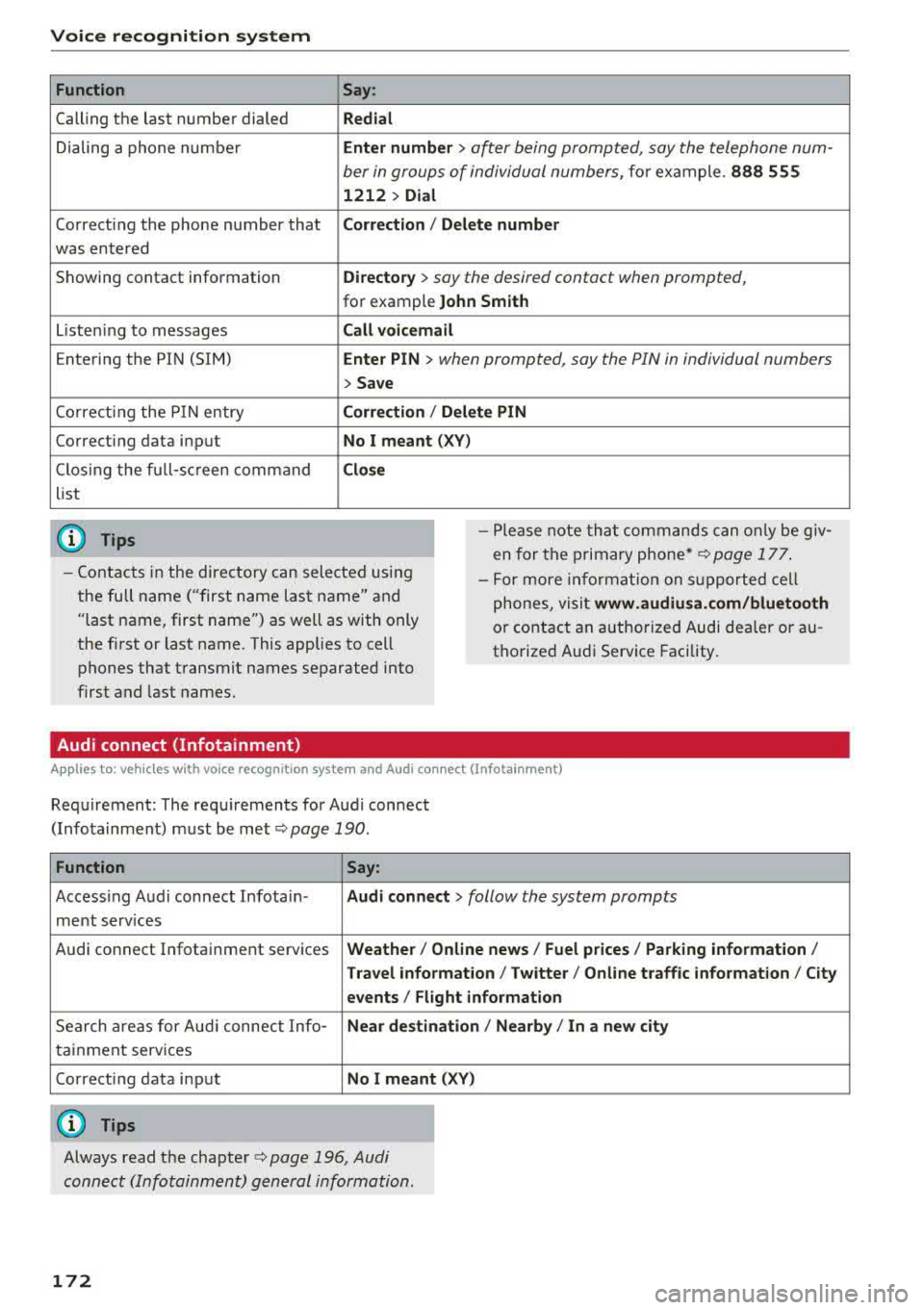
Voice recognition system Function
Calling the last number dialed
Dialing a phone numbe r
Correcti ng the phone number that
was entered
Showing contact information
L iste ning to messages
Entering the PIN (SIM)
Co rrecting the P IN entry
Correcting data input
C los ing the full-sc reen command
list
(D Tips
Say :
Redial
Enter number
> after being prompted, say the telephone num-
ber in groups of individual numbers,
fo r example. 888 555
1212 > Dial
Corr ect ion / Delete numb er
Director y
> say the desired contact when prompted,
for example John Sm ith
Call voicemai l
Ente r PIN
> when prompted, say the PIN in individual numbers
> Save
Corr ection / Delete PIN
No I meant ( XV)
Clos e
-Please note th at commands can on ly be giv
en for the primary
phone *¢ page 177 .
-Contacts in the directory can sele cted us ing
the full name ("first name las t name" and
"last name, first name") as well as with only
the fi rst or last name. This applies to cell
phones that transmit names separated into
first and last names. -
For more informat ion on s upported cell
phones, visit
www .audiusa. com /bluetooth
or contact an authorized Audi dealer or au
thorize d Audi Service Facility.
Audi connect (Infotainment)
A ppl ies to: ve hicles w ith vo ice recognition system and Audi co nnect (Infota inment)
Req uirement: The requ irements for Audi connect
(Infotainment) must be met
¢page 190 .
Function Say:
Accessing Audi connect Infotain-Audi connect > follow the system prompts
ment serv ices
Audi connect Infotainment services
Weather/ On line new s/ Fuel p rice s/ Parking info rmation /
T rav el info rmat ion / Twitter / Online tr affic info rmation / City
e v ents / Fl ight informat ion
Search areas for Aud i connect Info-Near de stination / Nearb y/ In a new city
tainment serv ices
Correcting data input
No I meant (XV)
(0 Tips
Always read the chapter ¢ page 196, Audi
connect (Infotainment) general information.
172
Page 175 of 400
CXl CXl .... N r--N .... 0 N > 00
Voice recognition system
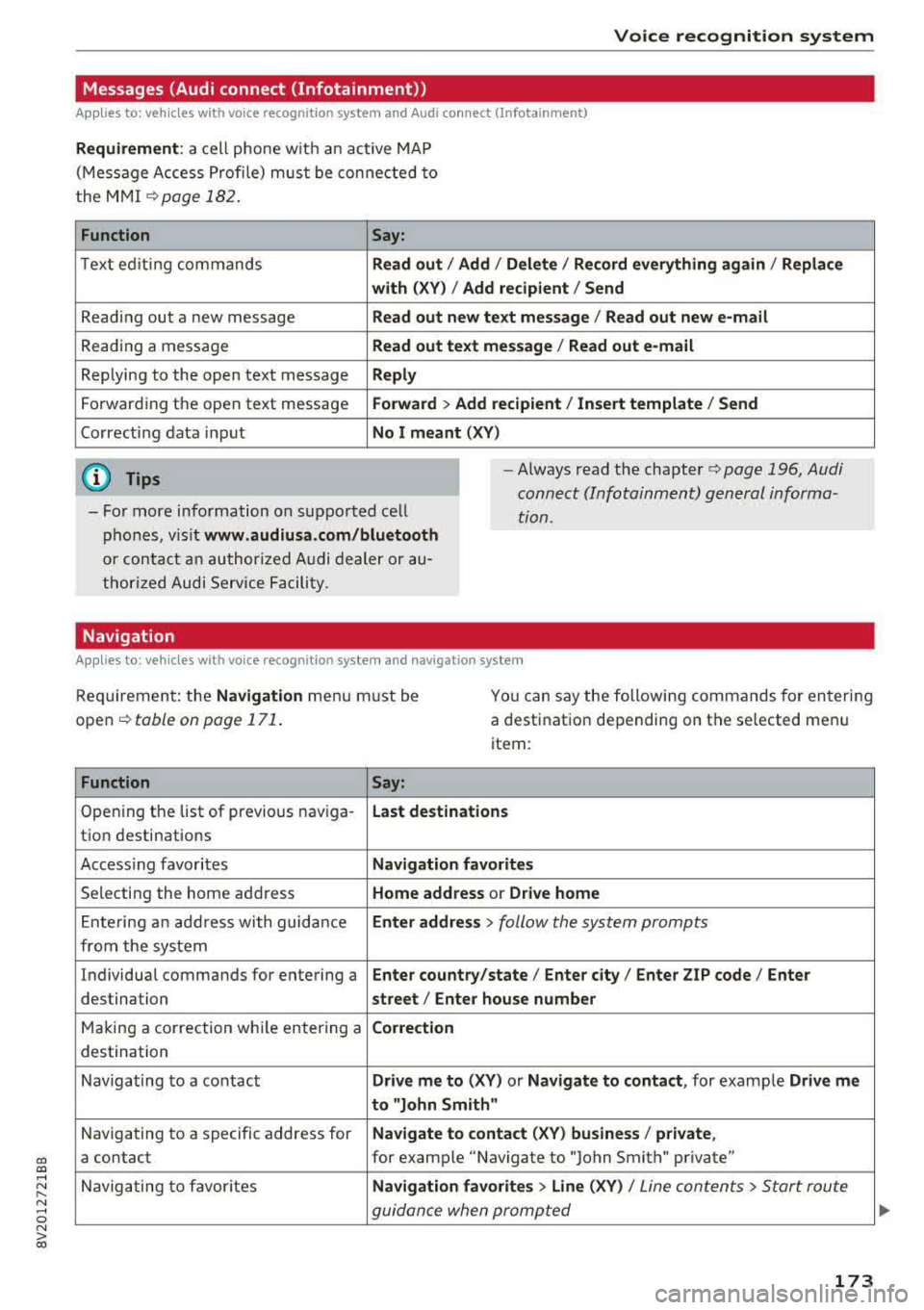
Messages (Audi connect (Infotainment))
Applies to: vehicles with voice recognition system and Audi connect (Infotainment)
Requirement: a cell phone with an active MAP
(Message Access Profile) must be connected to
the MMI
¢page 182.
Function Say:
Text ed iting commands Read out / Add / Delete / Record everything again / Replace
with (XV) / Add recipient / Send
Reading out a new message Read out new text message / Read out new e-mail
Reading a message Read out text message / Read out e-mail
Replying to the open text message Reply
Forwarding the open text message Forward > Add recipient/ Insert template/ Send
Correcting data input No I meant (XV)
(D Tips
-For more information on supported cell
phones, visit
www.audiusa.com/bluetooth
or contact an authorized Audi dealer or au
thorized Audi Service Facility.
-Always read the chapter¢ page 196, Audi
connect (Infotainment) general informa
tion .
Navigation
Applies to: vehicles with voice recognitio n system and navigation system
Requirement: the Navigation menu must be
open
¢ table on page 171.
You can say the following commands for entering
a destination depending on the selected menu
item :
Function
Say:
Opening the list of previous naviga-Last destinations
tion destinations
Accessing favorites
Navigation favorites
Selecting the home address Home address or Drive home
Ent ering an address with guidance Enter address > follow the system prompts
from the system
Individual commands for entering a
Enter country/state / Enter city/ Enter ZIP code / Enter
destination street/ Enter house number
Making a correction while entering a Correction
destination
Navigating to a contact
Drive me to (XV) or Navigate to contact , for example Drive me
to "John Smith"
Navigating to a specific address for Navigate to contact (XV) business/ private,
a contact for example "Navigate to "John Smith" private"
Navigating to favorites
Navigation favorites > Line (XV) / Line contents> Start route
guidance when prompted
173
Page 177 of 400
CXl CXl .... N r--N .... 0 N > 00
Voice recognition system
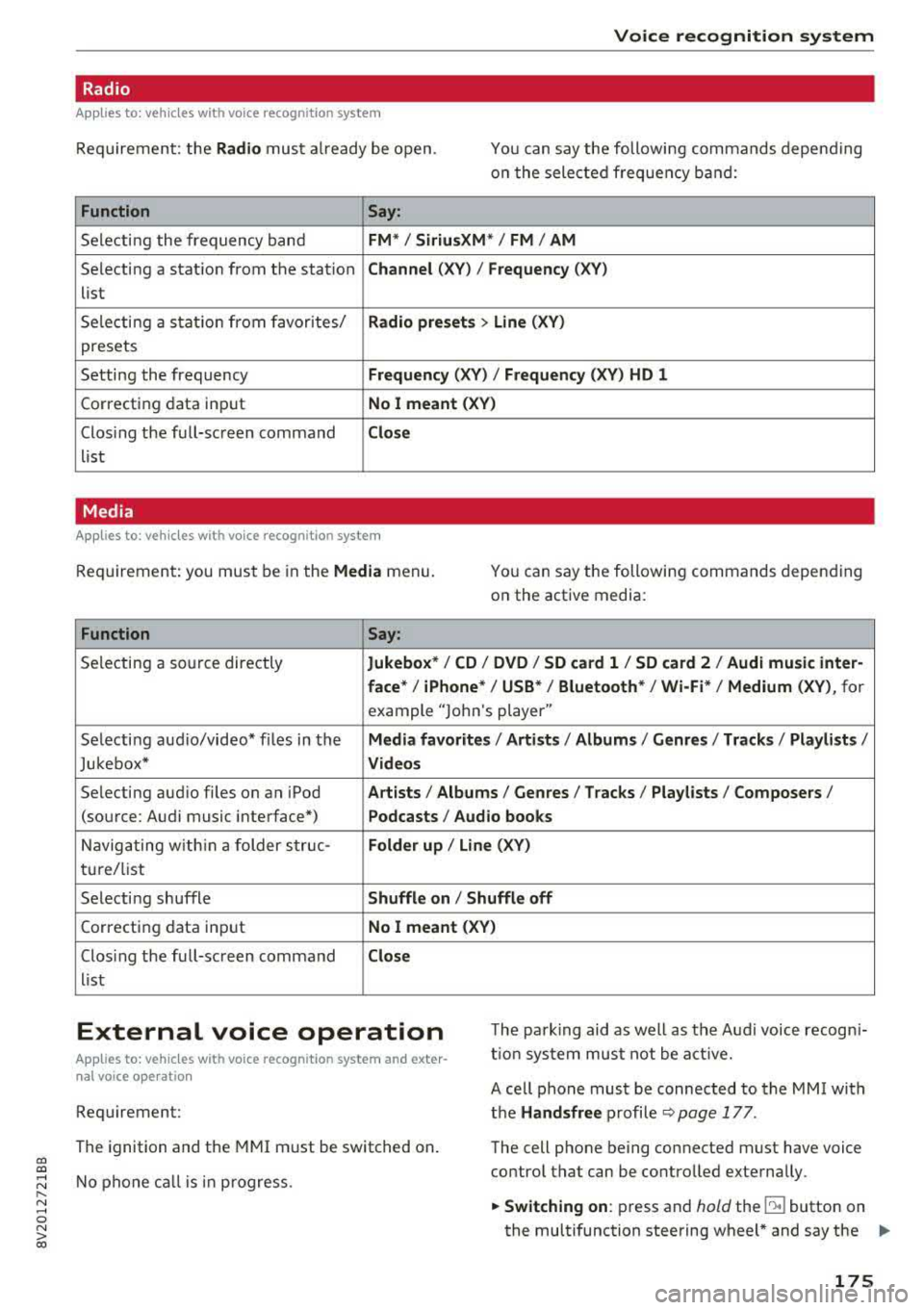
Radio
Applies to: vehicles with voice recognition system
Requ ireme nt: the Radio must a lready be open. You can say the followi ng commands depend ing
o n t he sele cted frequen cy b and:
Function Say:
Sele cti ng the frequency ba nd FM */ SiriusXM * / FM / AM
Selecting a stat ion from the station Channel (XV ) / Frequency (XV)
list
S ele cti ng a s tat io n from favorites/
Radio prese ts > Line (XV)
presets
Setting the frequency
Frequency (XV) I Frequency (XV) HD 1
Correcting data inp ut No I meant (XV )
Closing the full-sc reen command Close
list
Media
Applies to: vehicles with voice recognitio n system
Re qui reme nt: you mus t be in the Media menu.
You can say the following commands depen ding
on the active media:
Function Say:
Selectin g a so urce directly Jukebox* / CD / DVD / SD card 1 / SD card 2 / Audi music inter-
face *
I iPhone* / USB * / Bluetooth* / Wi-Fi * / Medium (XV) , for
example "Jolhn 's player"
Selecti ng aud io/video * fi les in the
Media favorites / Artists / Albums / Genres / Track s/ Playlists /
Jukebox* Videos
Selecting aud io files on an iPod A rt ists / Albums / Genres / Tracks / Playlists /Composers /
(source: Audi music interface*) Podcasts / Audio books
Naviga ting w ith in a folder s truc -Folder up / Line (XV)
tu re/list
Selecti ng shuffle
Shuffle on I Shuffle off
C orrecting data inp ut No I meant (XV)
Clos ing the fu ll-sc reen command Close
list
External voice operation T he pa rk ing aid as well as the A ud i voice r ecogn i
t io n sys te m must not be a ctive.
Applies to: vehicles with voice recognition system and exter
nal voice operation
Requirement:
The ignition and the MMI m ust be switched on.
N o phone call is in progress . A cell phone must be connected to the MMI with
the Handsfree p rofile ~ pag e 177.
The cell p hone be ing connected must have voice
contro l that can be contro lled exte rna lly.
.,. Switching on : press and hold the lei.I button on
the multifunction steering wheel * and say the
liJJ,,
175
Page 178 of 400
Voice recognition system
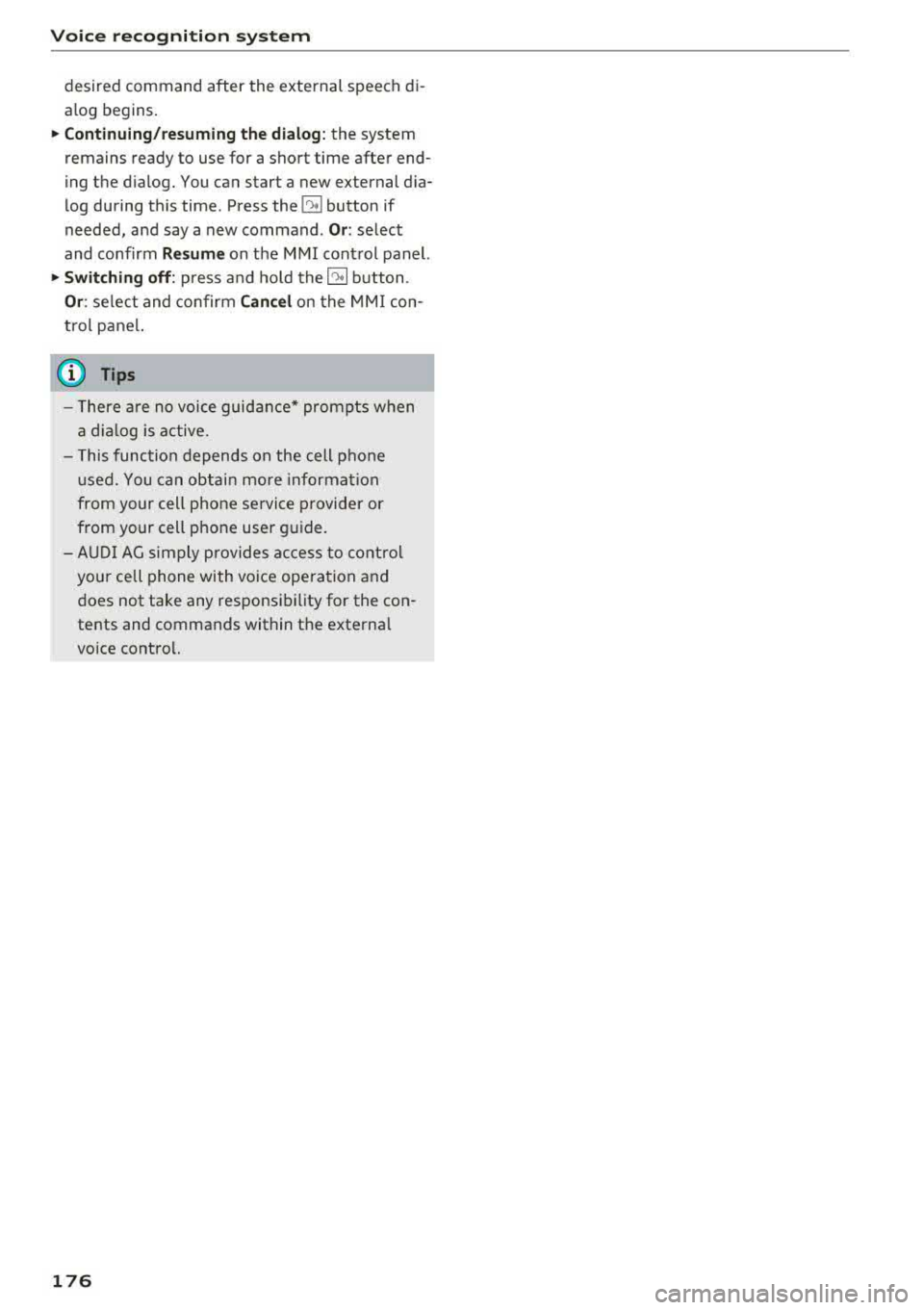
desired command after the external speech di
alog begins.
~ Continuing/resuming the dialog: the system
remains ready to use for a short time after end
ing the dialog. You can start a new external dia
log during this time. Press the
10.I button if
needed, and say a new command .
Or: select
and confirm
Resume on the MMI control panel.
~ Switching off: press and hold the~ button .
Or: select and confirm Cancel on the MMI con
trol panel.
a) Tips
- There are no voice guidance* prompts when
a dialog is active.
- This function depends on the cell phone
used. You can obtain more information
from your cell phone service provider or
from your cell phone user guide.
- AUDI AG simply provides access to control
your cell phone with voice operation and
does not take any responsibility for the con
tents and commands within the external
voice control.
176