steering AUDI A3 SEDAN 2017 User Guide
[x] Cancel search | Manufacturer: AUDI, Model Year: 2017, Model line: A3 SEDAN, Model: AUDI A3 SEDAN 2017Pages: 400, PDF Size: 67.32 MB
Page 23 of 400
CXl CXl .... N ,.__
N .... 0 N > 00
-Accepting a call : press the left thumbwheel
when there is an incoming ca ll.
-D eclining a call: select and confirm Declin e
when there is an incoming call.
-Ending a phone call : select and confi rm End
call .
Funct ion s du ring a phon e ca ll
Applies to: ve hicles with analog instrument clus ter
-Making an addition al call : select Hold > ~
button > Directo ry or C all list > an entry in the
list.
- Ac cepting an incom ing call when there is an
act ive call and a call on hold :
select and con
firm
Replace . The active call is replaced with
the incoming call.
Applies to: vehicles with Audi virtual cockpit
-Making an additional call : selec t: Hold call >
le ft control b utton > Director y or Call list > an
entry .
-Acc epting an inc oming call when there i s an
acti ve call and a call on hold :
select and con
firm
An sw er. The active call is replaced with the
incoming call.
Addit ional functions incl ude:
Mute : if you se lect and co nfirm this function , the
o ther pe rson on the phone cannot hear yo u. You
can hea r the other person.
Holding or r esumin g a call : you can put an ex ist
i ng phone call o n hold and resume it .
S w ap call : you can alternate between two phone
calls at the same time . One of the calls w ill be on
hold.
End call ends the active phone call. A call
that was placed on hold stays on ho ld a nd can be
taken off hold with
Re sume .
Confe rence call :
a call on hold and up to five ac
tive parties (depending on the cell phone service p rovider) can be added to a conference ca ll. To
make an addit ional call, put all pa rti ci pants in
the curren t confe rence ca ll on ho ld using
Hold .
By pressing the left contro l button, yo u can make
additional calls from the directory or the call list.
Re sume takes all parties off ho ld .
Coc kpit o ve rv iew
{!) Tips
-The telephone functions can on ly be con
trolled with the multif unction steering
wheel if the telephone equipment was in
stalled
at the factory.
- The telephone functions depend on the cell phone and whether they are supported by
your cell phone service provider or not.
- The
Call waiting function must be act ivated
in your cell phone and in the MMI to be
alerted when there is an incoming call dur
ing an act ive call. The call options depend
on the cell phone and se rvice provide r. You
can obta in mo re information from your cell
phone serv ice provider.
Navigation
Applies to: vehicles wi th naviga tion system
Requirement: the navigation tab must be dis
played.
If you have not star ted rou te guidance, a com
pass will disp lay in the drive r information sys
tem. The map is displayed in the Audi v irtual
cockpit *.
.,. Press eithe r the ~ button o r the left contro l
but ton
q page 14, depending on vehicle equip
ment .
Depend ing on veh icle equ ipment, the followi ng
funct ions may be ava ilable i n the dr iver informa
t ion system.
-A ccessing last d estinations : select and confirm
Last destinations > the desired destination.
-Accessing favorites ": select and confirm F av or
ite s>
the desired destination.
Applies to: vehicles with analog instru men t cluster
-Showing na vigation when route guidance is
a cti ve :
select and confirm Route gu idance .
-Showing compas s when route guidance is not
a ctive:
select and confirm Compass .
- Starting route guidance to the stored home
add re ss :
if necessary, first select and confirm
Stop route guidance and then Fav orite s >
Home a ddre ss .
- Canceling act ive route guidan ce :
se lect and
confirm
Stop route guidance .
21
Page 26 of 400
Cockpit over view
(D LC). The DLC is located to the rig ht o f the hood
release
¢ fig. 19 .
Your author ized Audi dealer or a qualified service
s ta tion can interpret the code and perform the
necessary repair.
A WARNING
Do not use the diagnostic connector for per
sonal use. Incorrect usage can cause malfunc
tions, which can increase the risk of a colli
sion!
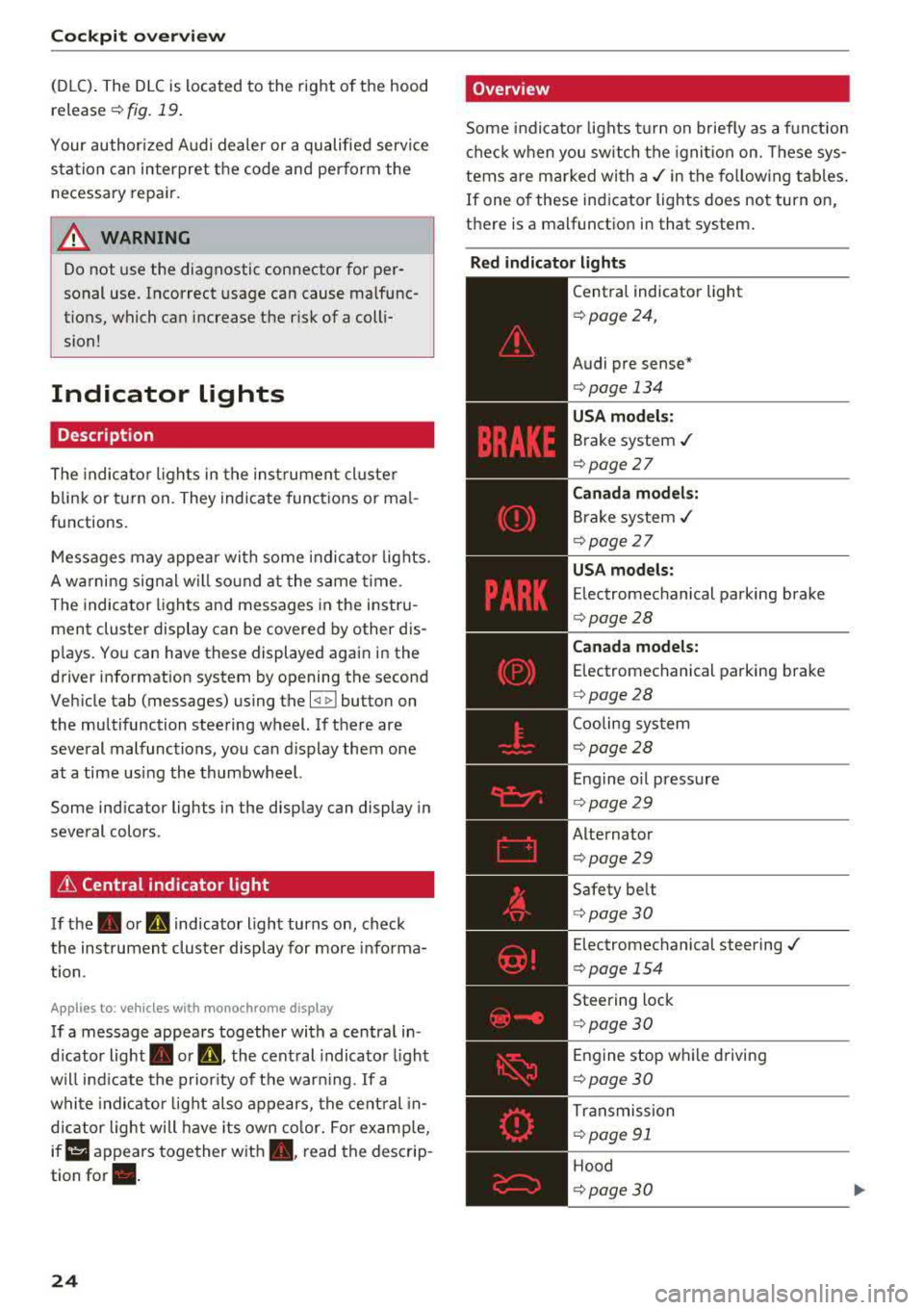
Indicator Lights
Description
The indica to r lights in the inst rument cluste r
blink or t urn on. They indicate funct ions or ma l
functions .
-
Messages may appea r wi th some indi cato r lights.
A wa rning signal w ill so und at the same time.
The indicator ligh ts and messages in the instru
ment cluster display can be covered by other dis
p lays. Yo u can have these displayed again in the
drive r information system by opening the second
Veh icle tab (messages) using the
l <1 ~ I button on
the multifunction steering wheel. If there are
several malfunctions, you can d isplay them one
at a time us ing the thumbwhee l.
Some ind icator lights in the display can display in
several colors .
& Central indicator light
If the. or mi indicator light turns on, check
the instrument cluster display for more info rma
tion .
App lies to: ve hicles w ith monochro me display
If a message appears together with a central in
d icator light . or
Q. the central indicato r ligh t
will ind icate the prior ity of t he war ning . If a
whi te indicato r light also appears, the cent ral in
d ica tor light will have its own co lor. For e xamp le,
ir ii :ippears together w ith . , read the descrip
tion
for •.
24
'Overview
Some indicator lights t urn on b riefly as a f unction
c h eck when you switch the ignition on. These sys
tems are marked wi th
a ,/ in the fo llow ing tab les .
If one of these indicator lights does not turn on,
there is a malfunctio n in that system .
Red indicator light s
--------------
Central indicator light
¢ page 24,
Audi pre sense *
¢page 134
USA model s:
Brake system ./
¢ page 27
Canada models:
Brake system ,/
¢page 27
USA models:
Electromechanical parking brake
¢ page28
Canada model s:
E lectromechanical parking brake
¢ page28
Coo ling system
¢ page28
Engine o il press ure
¢ page29
Alternator
¢page29
Safety be lt
¢ page30
Electromechanical steering ./
¢ page 154
Steering lock
¢page 30
Engine stop w hile driving
¢ page 30
Tr ansmission
¢ page 91
Hood
¢page30
Page 32 of 400
Cockpit over view
A WARNING
Have the safety systems i nspected immed i
ately . Otherw ise, there is a risk that the sys
tems may not activate during a collision,
wh ich increases the risk of serious injury or
death.
~ Safety belt
The . indicator light stays on unti l the d rive r's
and fron t passenger's safety be lts are buckled .
Above a certain speed, there will also be a wa rn
ing tone.
(D Tips
For add it iona l information on safety be lts ,
see
~ page 258.
@ -Steering lock
• Do not d rive vehicle: steering defecti ve
There is a malfunc tion in the elect ronic stee ring
loc k. You ca nnot t urn the ignition on .
D o
not tow your veh icle because it cannot be
steered . See an authorized A udi dealer or au tho r
i z ed A udi Servi ce Fa cili ty for assistance.
1;11 Steering lock: sy stem fault! Pleas e contact
Servic e
There is a malfunction in the elec tronic steering
lock .
Drive to an a uthor ized Audi dea ler or authori zed
Aud i Serv ice Fa cili ty immediately to have the
malfunct io n corrected.
A WARNING
Do not tow your veh icle when there is a mal
function in the electronic stee ring lock
-this
increases the risk of an accident.
....e Engine start system
M ·I t-:ngin e start system ma lfun ction! Plea se
c ontact Servic e
Do not switch the ignit ion off because you may
not be able to switc h it o n aga in .
30
Drive to an au thorized A udi dealer or authori zed
Audi Se rvice Facility immediate ly to have the
malfunction corrected.
IIJ Engine s tart system malfunction! Plea se
contact Service
There is a ma lf u nction in the engine sta rting sys
tem.
Drive to an authorized Audi dealer or authorized
Audi Se rvice Facility immed iate ly to have the
malfunction corrected .
~ Engine stop while driving
• Engine stopped: brake servo and power
steering not po ssible
There is a ma lfunction in the engine or in t he fuel
s u pp ly system.
More force is needed to steer and brake the mov
i ng vehicle whe n the engi ne is stopped . If the ve
hicle is rolling, t ry to bring it to a stop off to the
s ide from moving traffic. See an author ized Audi
dealer or authori zed A udi Service Fac ility for as
s istance .
A WARNING -
If the engine stops while driving, you will
need to use more force to brake the vehicle.
This increases the risk of an acc ident . There
will still be powe r steering if the ignition is
switched on while the vehicle is ro lling and
there is suff ic ient veh icle battery charge . Oth
e rw ise, you must use greate r force when
steering .
c:::::::> Hood
• Warning! Hood i s no t lo cked. Stop vehicle
and che ck the lo ck
If the indicator light turns on and the message
appears , the hood lock ing mechan ism is not en
gaged co rrectly .
Stop immediately and close the hood
~ page 318 .
Page 75 of 400
a, a, ..... N
" N ..... 0 N > 00
_& WARNING
-You should not use the recirculation mode
for an extended period of time, because no
fresh a ir is drawn in and the windows can
fog when coo ling mode* is switched off .
T his increases the r is k of an accide nt.
- Individuals with reduced sensitivity to pain
o r temperat ure cou ld develop burns when
using the seat heating fu nction . To reduce
the risk of injury, these ind iv iduals should
not use seat heating.
(D Note
To avoid damage to the heat ing elements in
the seats, do not kneel on the sea ts or place
heavy loads on a small area of the seat.
@ Tips
-The setting for the seat heating on the driv
er's side is ass igned to the key that is in use.
-If the front passenger's seat heat ing is
turned on, it will not turn on again automat
i ca lly if more than 10 m inutes have passed
between sw itching the ign ition off and
switching it on again .
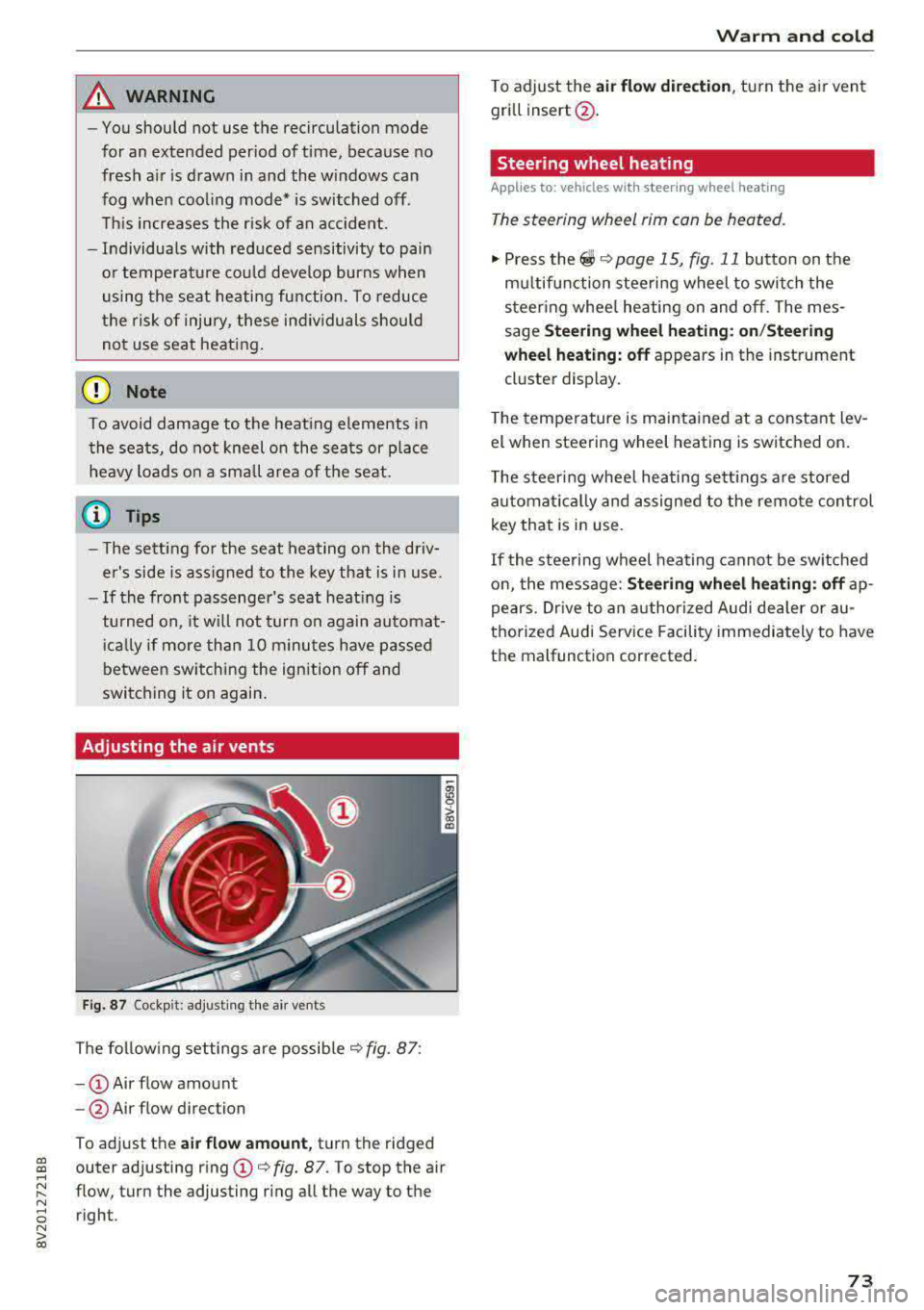
Adjusting the air vents
Fig. 87 Cockp it: adjust ing the air vents
The fol low ing settings are possib le ¢fig. 87:
- CD Air flow amount
-@ Air flow direction
To adjust the
air fl ow a mount , turn the ridged
outer adjusting ring
CD ¢ fig. 87. To stop the air
flow, turn the adjusting ring all the way to the right .
Warm and cold
To adjust the air fl ow directio n, turn the air vent
gri ll insert @.
Steering wheel heating
Applies to: vehicles with steering wheel heating
The steering wheel rim can be heated.
"' Press the ~ ¢ page 15, fig. 11 button on the
mu ltifunction steering wheel to switch the
steering whee l heating on and off. The mes
sage
St ee ring wheel h eatin g: on/St eering
w hee l heating: off
appears in the instrument
cluster display.
T he temperature is mainta ined at a constant lev
el when steering wheel heating is switched on.
T he s teering wheel heating settings a re stored
automat ica lly and assigned to the remote control
key that is in use .
If the steering wheel heating cannot be sw itched
on, the message:
S te e ring wh eel h eating : off ap
pears. Dr ive to an authorized Audi dea ler or au
thorized Audi Service Facility immediately to have
the malfunction corrected.
73
Page 78 of 400
Driving
other damage to the vehicle or other property .
-Have your vehicle maintained properly and
in accordance with the service recommenda
tions in your Warranty
& Maintenance book
let . Lack of proper maintenance as well as
improper use of the vehicle will impair the
function of the emission control system and
could lead to damage.
- Do not alter or remove any component of
the Emission Control System unless ap
proved by the manufacturer .
- Do not alter or remove any device, such as
heat shields, switches, ignition wires,
valves, which are designed to protect your
vehicle's Emission Control System and other
important vehicle components.
(I) Tips
The consumption estimates as published by
ENVIRONMENTAL PROTECTION AGENCY
(EPA) and Transport Canada may not corre
spond to your actual consumption on the
road, which will vary depending upon vehicle
load and speed, road and weather conditions,
trip length, etc .
Steering
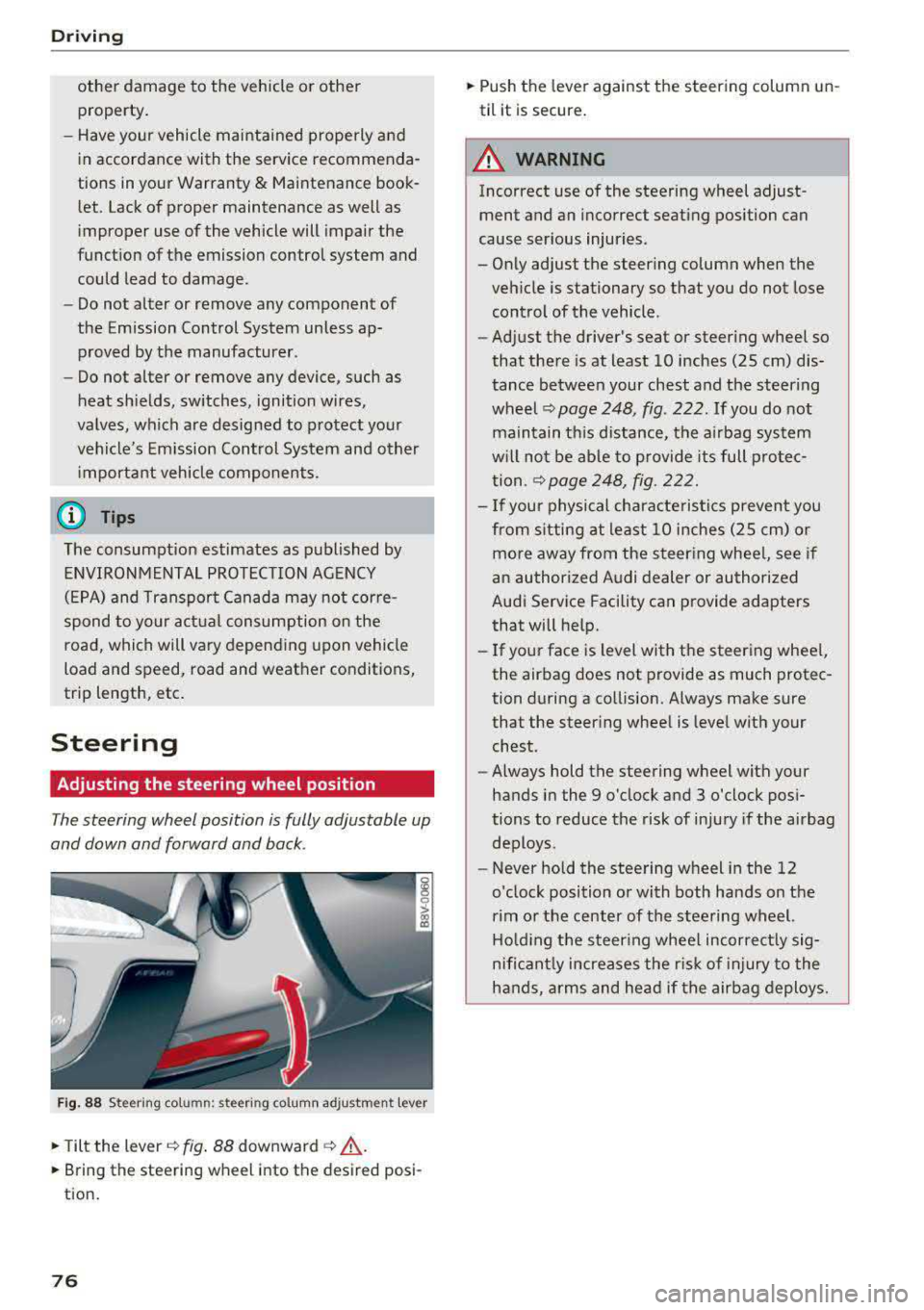
Adjusting the steering wheel position
The steering wheel position is fully adjustable up
and down and forward and back .
Fig. 88 Steering column: steering col umn adjustment lever
.,. Tilt the lever c:::;, fig. 88 downward c:::;, ,& .
.,. Bring the steering wheel into the desired posi
tion.
76
.,. Push the lever against the steering column un
til it is secure.
A WARNING
Incorrect use of the steering wheel adjust ment and an incorrect seating position can
cause serious injuries.
- Only adjust the steering column when the
vehicle is stationary so that you do not lose control of the vehicle .
-
-Adjust the driver's seat or steering wheel so
that there is at least 10 inches (25 cm) dis
tance between your chest and the steering
wheel
c:::;, page 248, fig. 222 . If you do not
maintain this distance, the airbag system
will not be able to provide its full protec
tion .
c:::;,page248, fig. 222.
- If your physical characte ristics prevent you
from s itting at least 10 inches (25 cm) or
more away from the steering whee l, see if
an authorized Audi dealer or authorized
Audi Service Facility can provide adapters
that will help.
- If your face is level with the steering whee l,
the airbag does not provide as much protec
tion during a collision. Always make sure
that the steer ing wheel is level with your
chest.
- Always hold the steering wheel with your
hands in the 9 o'clock and 3 o'clock posi
tions to reduce the risk of injury if the airbag
deploys.
- Never hold the steering wheel in the 12
o'clock position or with both hands on the
rim or the center of the steering wheel.
Holding the steer ing wheel incorrect ly sig
nificant ly increases the r isk of injury to the
hands, arms and head if the airbag deploys.
Page 79 of 400
a, a, ..... N
" N ..... 0 N > 00
Starting and stopping
the engine (vehicles with
an ignition lock)
Starting the engine
Ap plies to: ve hicles with ign itio n lock
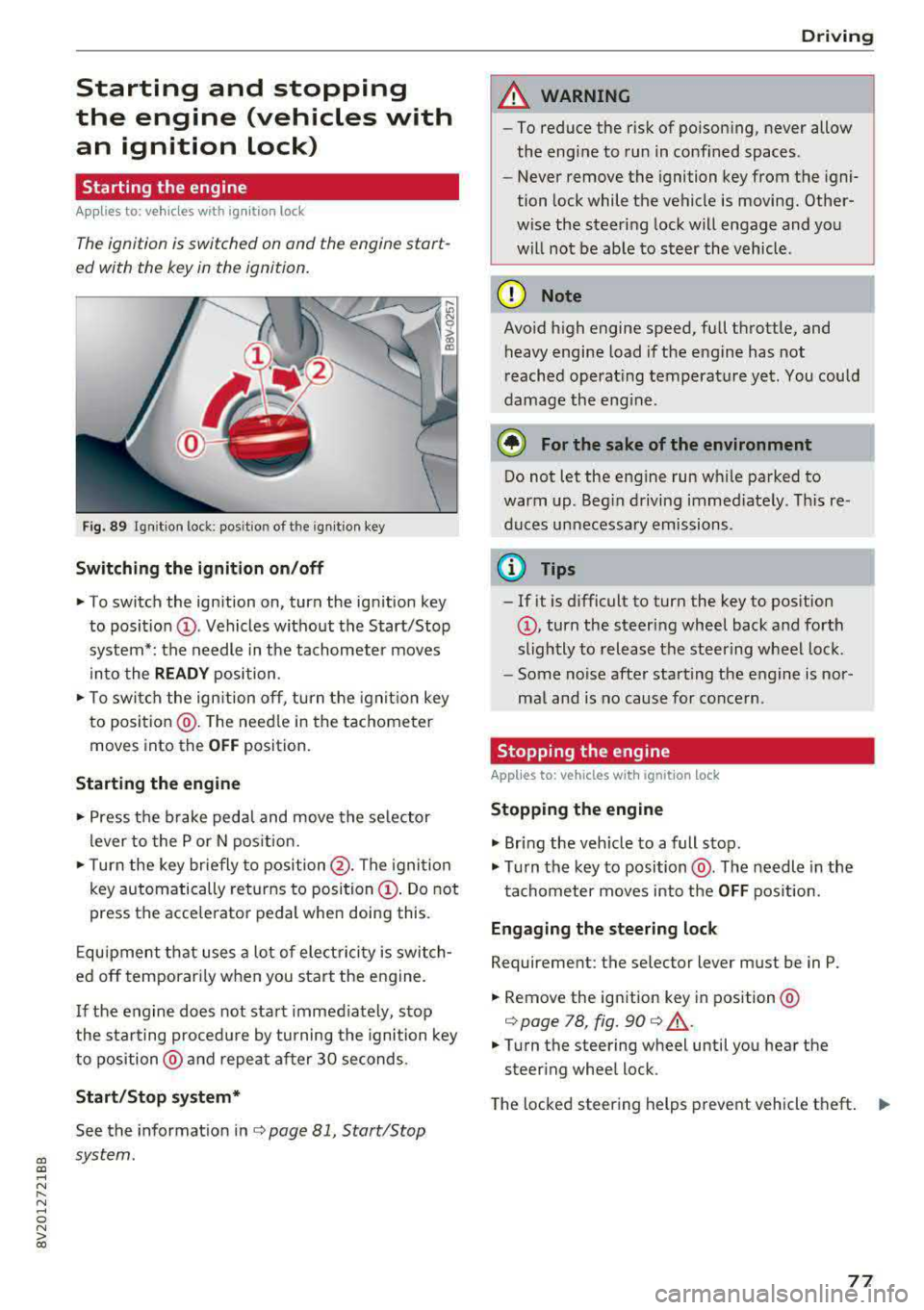
The ignition is switched on ond the engine start
ed with the key in the ignition.
Fig. 89 Ignit ion lock: posit ion of the ignitio n key
Switching the ignition on /off
~ To switch the ignition on, turn the ign ition key
to posit io n
(D . Vehicles w ithout the Start/Stop
system*: the needle in the tachomete r moves
into the
READY position .
~ To swi tch the ign ition off, turn the ignit io n key
to positio n@ . The need le in the tachometer
moves into the
OFF position.
Starting the engine
~ Press the b rake peda l and move the se lector
l ever to the P or N pos ition.
~ T urn the key br iefly to position @. The igni tion
key automatically returns to position
(D . Do not
press the accelerator pedal when doing this .
E qu ipment that uses a lot of elect ric ity is switch
ed off temporar ily when you sta rt the engine.
I f the engine does not sta rt immed iately, stop
the s ta rting proced ure by turning the ignition key
to position @ and repeat after 30 seconds.
Start /Stop system*
See the informat ion inc:> page 81, Start/Stop
system.
Driving
A WARNING
-- To reduce the r isk of po ison ing, never allow
the engine to run in confined spaces .
- Never remove the ignition key from the igni
tion lock while the vehicle is moving. Other
wise the steering lock will engage and you
w ill no t be ab le to s teer the vehicle.
(D Note
Avo id high engine speed, fu ll throttle, and
heavy engine load i f the engine has not
reached operat ing temperat ure yet. You could
damage the eng ine.
@ For the sake of the environment
Do not let the engine run w hile parked to
warm up . Beg in driving immed iately . T hi s re
duces unnecessa ry emissions .
@ Tips
-If it is d ifficult to tur n the key to pos ition
(D , turn the steer ing wheel back and fo rth
sligh tly to release the steering wheel lock.
- Some noise after starting the engine is nor
ma l and is no cause for conce rn .
Stopping the engine
Applies to: vehicles w ith ign ition lock
Stopping the engine
~ Br ing the veh icle to a full stop.
~ Tu rn the key to position @. The needle in the
tachometer moves into the
OFF pos ition.
Eng aging the steering lock
Requirement: the selector lever must be in P.
~ Remove the ignition key in position @
i:>page 78, fig. 90 c:> &,.
~ Tu rn the steering wheel until you hea r the
steer ing wheel lock.
The locked steer ing helps prevent vehicle theft.
""
77
Page 80 of 400
Driving
_& WARNING
-Never turn off the engine before the vehicle
has come to a complete stop. The full func
t ion of the brake booster and the power
steering is not guaranteed. Yo u must use
more force to turn or brake. Because you
cannot steer and brake as you usually
would, this could lead to accidents and ser i
ous injuries.
- Never remove the ignit ion key from the ign i
tion lock while the vehicle is moving. Other
wise, the steering lock cou ld sudden ly en
gage and you would not be able to steer the
vehicle.
- Always take the key with you whenever you
leave your vehicle. Otherw ise, the engine
could be started or electrical equipment
suc h as the power windows could be operat
ed . This can lead to serious injury.
- For safety reasons, always park the vehicle
with the selector lever in the P position .
Otherwise, there is the r isk that the vehicle
could roll unintentionally.
(D Note
If the engine has been under heavy load for
an extended per iod of t ime, heat builds up in
the engine compartment after the engine is
sw itched off and there is a risk of damaging
the engine. For this reason, let the engine run
for at idle for approximately two minutes be
fore shut ting it off.
(0 Tips
For up to 10 minutes after stopping the en
gine, the rad iator fan may turn on again auto
matically or it may continue to run (even if
the is ignition switched off) due to the follow
ing reasons:
- The coolant temperature is increasing due
to trapped heat.
- If the engine is warm and the engine com
partment also heats up from strong sun
light.
78
Starting and stopping
the engine (vehicles with
convenience key)
Starting the engine
App lies to : vehicles with co nvenience key
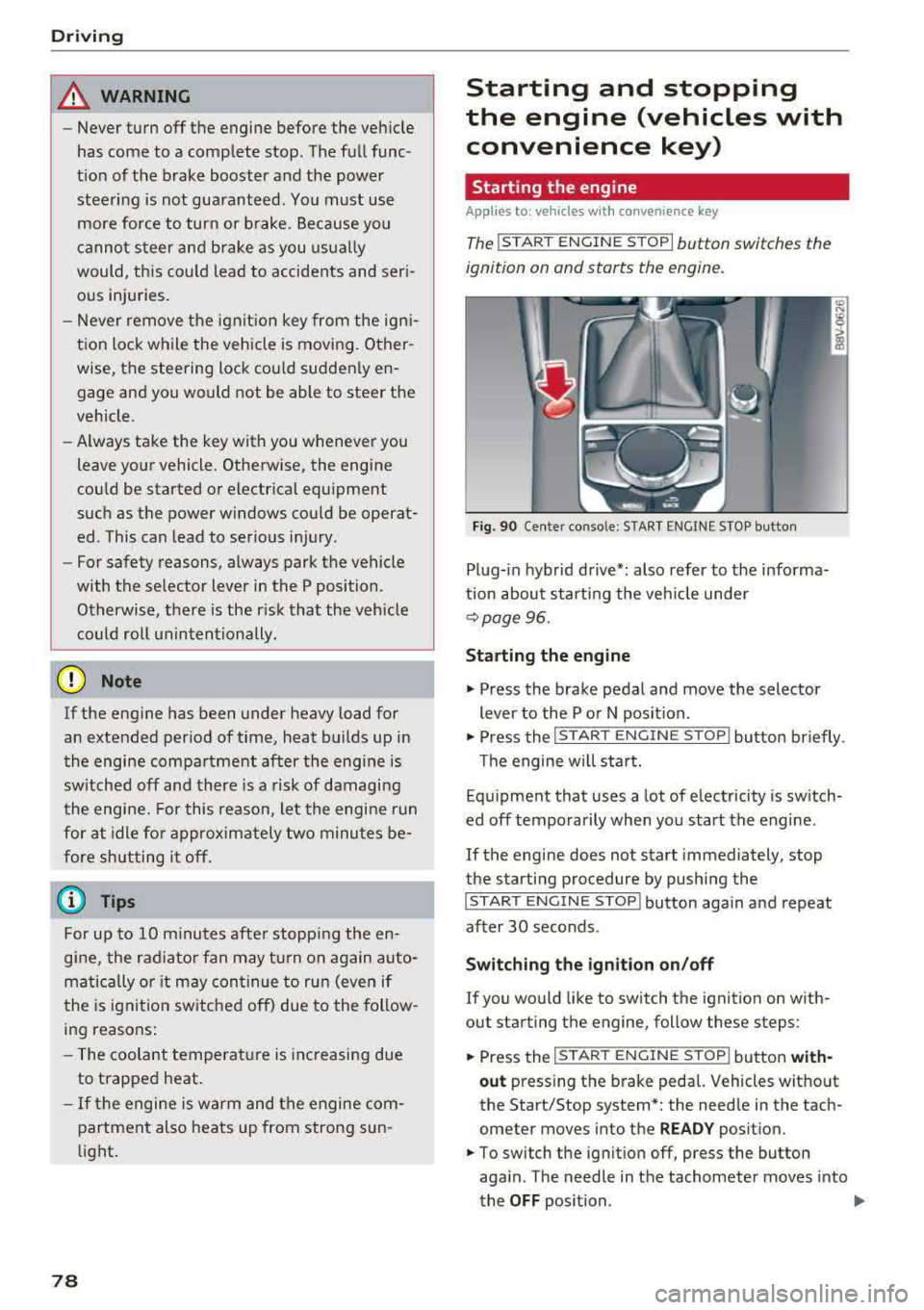
The I ST ART ENGINE STOP I button switches the
ignition on and starts the engine.
Fig. 90 Center conso le: STAR T ENGINE S TOP button
Plug-in hybrid drive*: also refer to the informa
t ion about starting the veh icle under
r::!v page 96.
Starting the engine
"'Press the brake pedal and move the selector
lever to the P or N position .
"'Press the I START ENGINE STOP ! button briefly .
Th e engine will start.
Equipment that uses a lot of electricity is switch
ed off temporarily when you start the engine .
If the engine does not start immediately, stop
the starting procedure by pushing the
I START ENGINE STOP ! button again and repeat
after 30 seconds .
Switching the ignition on/off
If you would like to switch the ignition on with
out starting the engine, follow these steps:
"' Press the I S TAR T ENGINE ST OP I button with-
out press ing the brake pedal. Vehicles without
the Start/Stop system *: the need le in the tach
ometer moves into the
READY position.
"'To switch the ignition off, press the button
aga in . The needle in the tachometer moves into
the
OFF position . .,..
Page 81 of 400
If the 'Tj indicator light blinks and the message
Please turn steering wheel appears when switch
ing the ign ition on, the steer ing lock is locking
the steering wheel. In this case, turn the steering
wheel slight ly to the left/right.
Start /Stop system*
See the information in¢ page Bl, Start/Stop
system .
A WARNING
To reduce the risk of poisoning, never allow
the engine to run in confined spaces.
@ Note
Avoid high engine speed, full throttle, and
heavy engine load if the engine has not
reached operating temperature yet. You could
damage the engine.
@ For the sake of the environment
Do not let the engine run while parked to
warm up. Begin driving immediately. This
re
duces unnecessary emissions.
(D Tips
-Some noise after starting the engine is nor
mal and is no cause for concern.
- If you leave your vehicle with the ignition
switched on, the ignition will switch off
af
ter a certa in amount of t ime. Make sure that
electr ica l equ ipment such as the exter ior
lights are switched off.
Stopping the engine
Applies to: veh icles with conve nience key
-
Plug-in hybrid dr ive*: refer to the informat ion un
der ¢ page 96.
.. Bring the vehicle to a full stop.
.. Move the selector lever into the P pos ition.
.. Press the I STAR T ENGINE ST OPI button
¢ page 78, fig. 90 .
CXl CXl .... N r--N .... 0 N > l) This func tion is not avai lable in all countries. 00
D riving
Steering
lock1 )
T he steering locks when yo u turn the engine off
using the
I STA RT ENG INE S TOPI* button, move
the selector lever into the P position and open
the driver's door. The locked steering hel ps pre
vent vehicle theft.
Emergency off function
If it is absolutely necessary, the eng ine can also
be turned off whi le driving at speeds starting at
4 mph (7 km/h). To switch the engine off, press
the
I START ENGINE STOPI button twice in a row
briefly or press and ho ld for longer than two sec
onds.
A WARNING
-- Never turn off the engine before the vehicle
has come to a complete stop. The full func
tion of the brake booster and the power
steer ing is not guaranteed. You must use
mo re force to turn or brake. Because you
cannot steer and brake as you usually
wou ld, this could lead to accidents and seri
ous injuries.
-Always take the key with you whenever yo u
leave your vehicle. Otherwise, the engine
could be started or electrical equipment
such as the power windows could be operat
ed. This can lead to ser ious injury.
- For safety reasons, always park the vehicle
with the selector lever in the P pos ition.
Otherw ise, there is the risk that the vehicle
could roll unintentionally .
(D Note
If the engine has been under heavy load for
an extended period of time, heat builds up in
the engine compartment after the engine is
switched off and there is a r isk of damaging
the engine. For th is reason, let the engine run
for at id le for approximately two minutes
be-
fore shutting it off . ..,.
79
Page 83 of 400
a, a, ..... N
" N ..... 0 N > 00
Starting the engine
when there is a
malfunction
Appl ies to: vehicles with convenience key
It may not be possible to start the engine under
certain circumstances, for example if the battery
in the vehicl e key is drained, if interference is af
fect ed the key or if there is a syst em malfunc
tion.
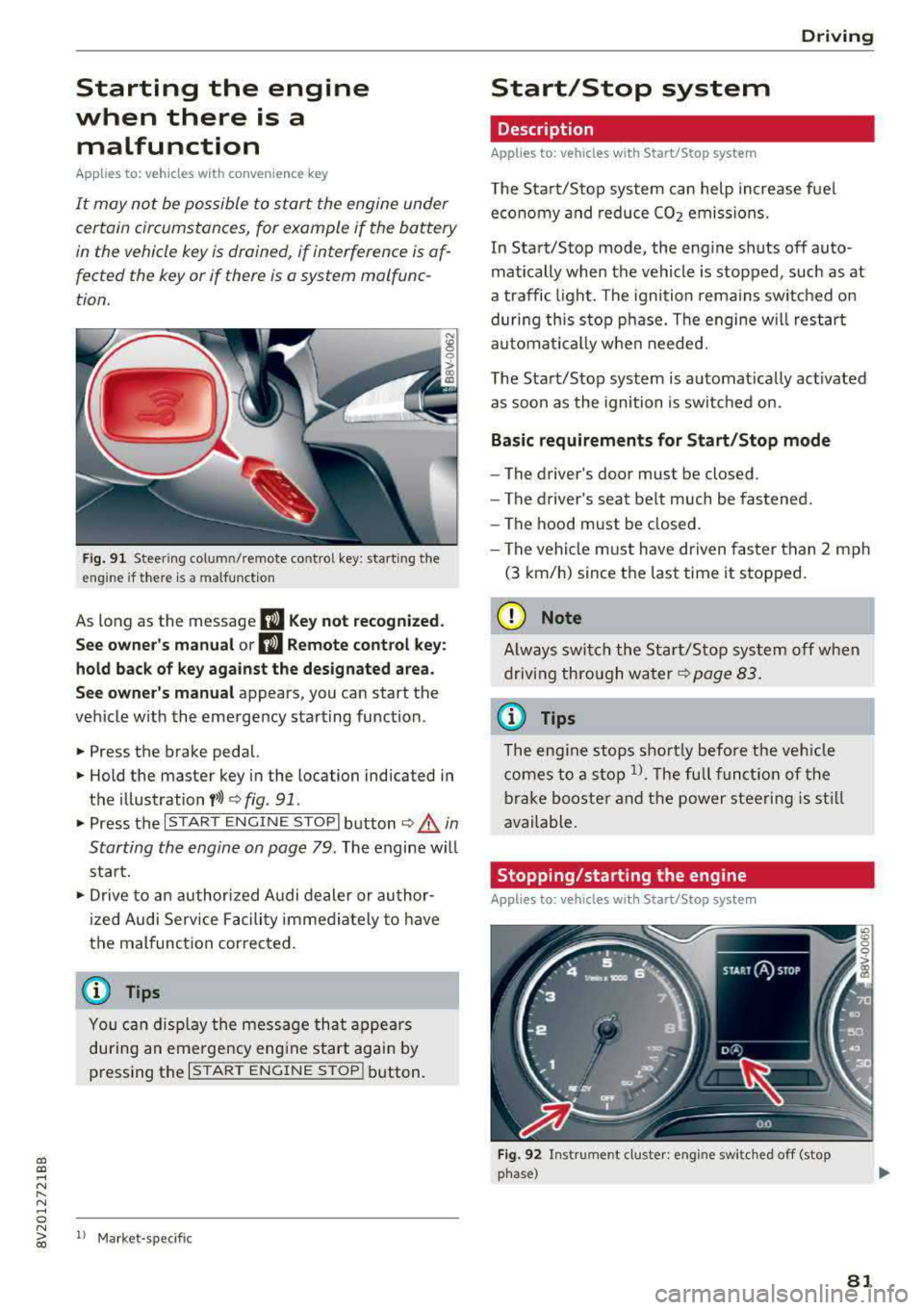
Fig. 91 Steer ing colum n/remote co ntro l key: starting the
e ngi ne if there is
a malfunction
As long as the message II Key not recognized.
See owner's manual or
II Remote control key:
hold back of key against the designated area.
See owner's manual
appears, you can start the
vehicle w ith the emergency starting function .
.,. Press the brake pedal.
.,. Hold the master key in the location indicated in
the illustration
f>l) r:> fig. 91.
.,. Press the I STAR T ENGIN E ST OPI button r:> _&. in
Starting the engine on page
79. The engine will
start.
.,. Drive to an authorized A udi dealer or author
ized Audi Service Facility immediately to have
the malfunction cor rected.
@ Tips
You can d isplay the message that appears
during an emergency engine start again by
pressing the
I START ENGINE STOPI button.
l l Market -s p ecific
D rivi ng
Start/Stop system
Description
Applies to: vehicles with Start/Stop system
The Start/Stop system can help increase fuel
economy and reduce CO2 emissions.
In Start/Stop mode, the engine shuts off auto
matically when the vehicle is stopped, such as at
a traffic light. The ignition remains switched on
during this stop phase. The engine w ill restart
automat ically when needed.
The Start/Stop system is automat ically act ivated
as soon as the ignition is switched on.
Basic requirements for Start/Stop mode
-The driver's door must be closed .
- The driver's seat belt much be fastened.
- The hood must be closed.
- The vehicle must have driven faster than
2 mph
(3 km/h) since the last time it stopped.
(D Note
Always switch the Start/Stop system off when
driving through water
r:> page 83.
(D Tips
The engine stops shortly before the veh icle
comes to a stop
l). The full function of the
brake booster and the power steering is still
available.
Stopping /starting the engine
Applies to: vehicles with Start/Stop system
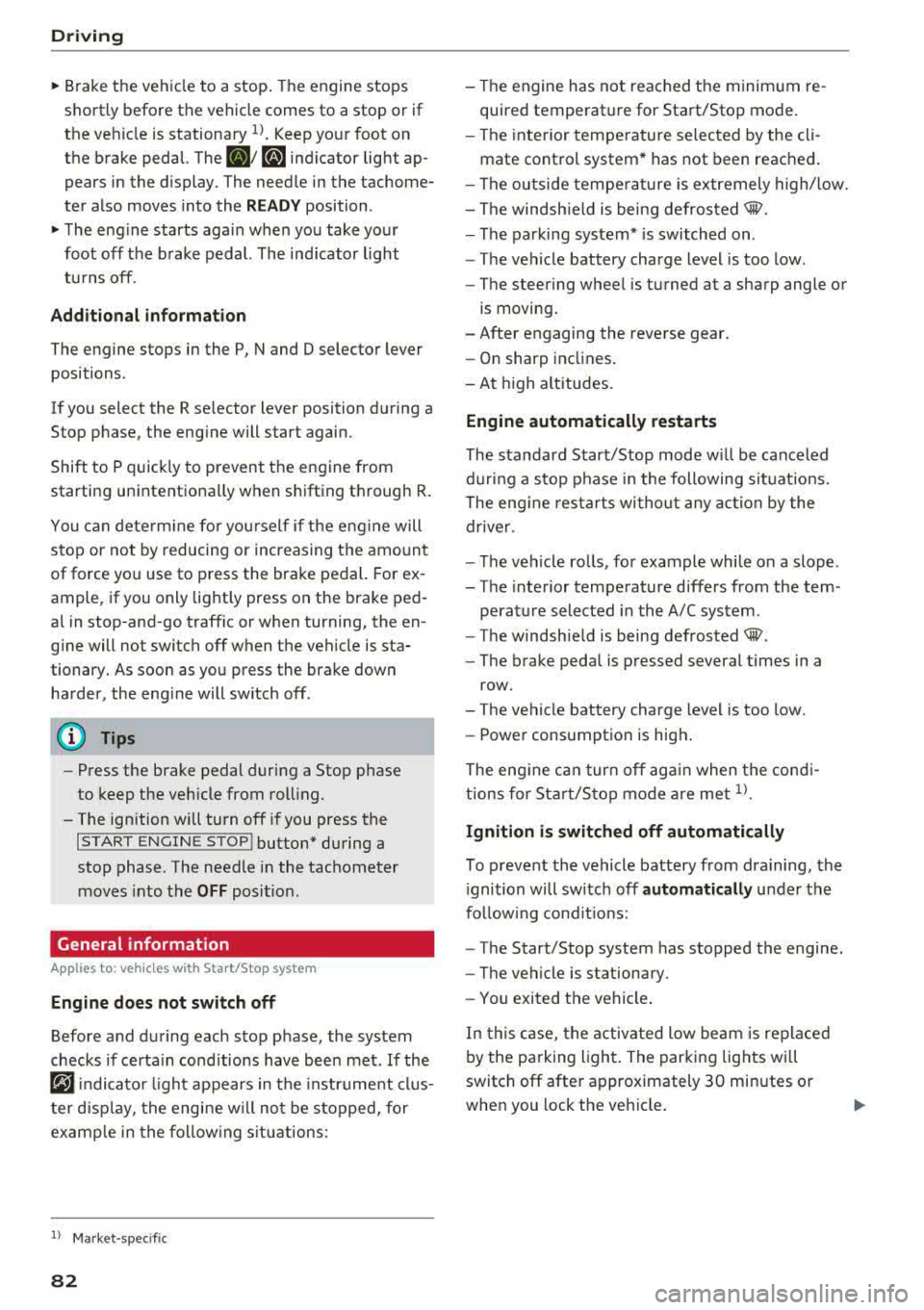
Fig. 92 Instrument cluster: eng ine swi tched off (stop
phase)
81
Page 84 of 400
Driving
"' Brake the vehicle to a stop . The engine stops
sho rtly before th e vehicle comes to a stop or if
the ve hicle is stationary
l). Keep your foot on
the brake pedal. The
D] ; D] ind icator light ap
pears in the display. The need le in the tachome
ter also moves into the
READ Y position .
"'The eng ine starts aga in when you take you r
foot off the b rake pedal. The ind icator light
tu rns off.
Add itional information
The engine stops in the P , N and D selector lever
positions .
If you select the R se lector lever position during a
Stop phase, the eng ine will start again.
Shift to P quick ly to prevent t he engine from
starting unintent iona lly when s hifting t hrough R.
You can dete rm ine fo r you rself if the engine will
s top or not by reducing or increas ing the amount
of force you use to press the brake pedal. For ex
ample, if you only lig htly press on the brake ped
a l in stop -and-go traff ic or when turning, the en
g ine will not switch off when the vehicle is sta
tionary. As soon as you press the brake down harder , the eng ine will switch off.
(D Tips
- Press the brake pedal during a Stop phase
to keep the veh icle from rol ling.
- The ignition will turn off if you press the
I STAR T ENGINE ST OP ! button* d uring a
stop phase. The needle in the tac hometer
moves into the
OFF posit io n.
General information
A pp lies to: ve hicles w ith Start/Stop system
Engine does not switch off
Before and d uring each stop phase, the system
checks if certa in cond itions have been met .
If the
fiJ indica to r li ght appears in the inst rument cl us
ter disp lay, the engine w ill not be s topped, for
examp le in the fo llow ing s itu ations :
l) Market -spe cific
82
-The engine has not reached the minim um re
quired temperature for Start/Stop mode.
- The interior tempera ture selected by the cli -
mate cont rol system* has not been reached.
- The ou tside tempe ra tu re is extremely h igh/low.
- The windsh ield is being
defros ted® .
-The pa rking system * is switched on .
- The vehicle battery charge level is too low.
- The steering wheel is turned at a sharp angle o r
is moving.
- After engaging the reve rse gear.
- On sharp inclines .
- A t high altitu des .
Engine automatically restarts
The standard Start/Stop mode w ill be canceled
d urin g a s top p hase in the following si tuations.
The eng ine res tarts wi tho ut any ac tion by the
drive r.
- T he vehicle ro lls, fo r example whi le on a slope .
- T he interior temperature d iffers from the tem -
perat ure selected i n the A/C system .
- The windsh ie ld is being
defrosted® .
-The b rake peda l is p ressed several times in a
row.
- The vehicle battery charge level is too low.
- Powe r consumption is hig h.
The eng ine ca n turn off ag ain when the cond i
tions for Sta rt/S top mode a re met
1>.
Ignition is switched off automatically
To p reve nt the vehicle battery from dra ining, the
i gnition will switch off
automatically under the
fo llow ing cond it io ns:
- The Start/Stop system has stopped the engine.
- The veh icle is stationary.
- You exit ed the vehicle .
I n this case, the activ ated low be am is replaced
by the pa rking light . The parking lig hts will
switch off afte r approximately 30 minutes or
whe n you lock the ve hicle.
.,..