lock AUDI A3 SEDAN 2017 Owner's Manual
[x] Cancel search | Manufacturer: AUDI, Model Year: 2017, Model line: A3 SEDAN, Model: AUDI A3 SEDAN 2017Pages: 400, PDF Size: 67.32 MB
Page 52 of 400
Power top
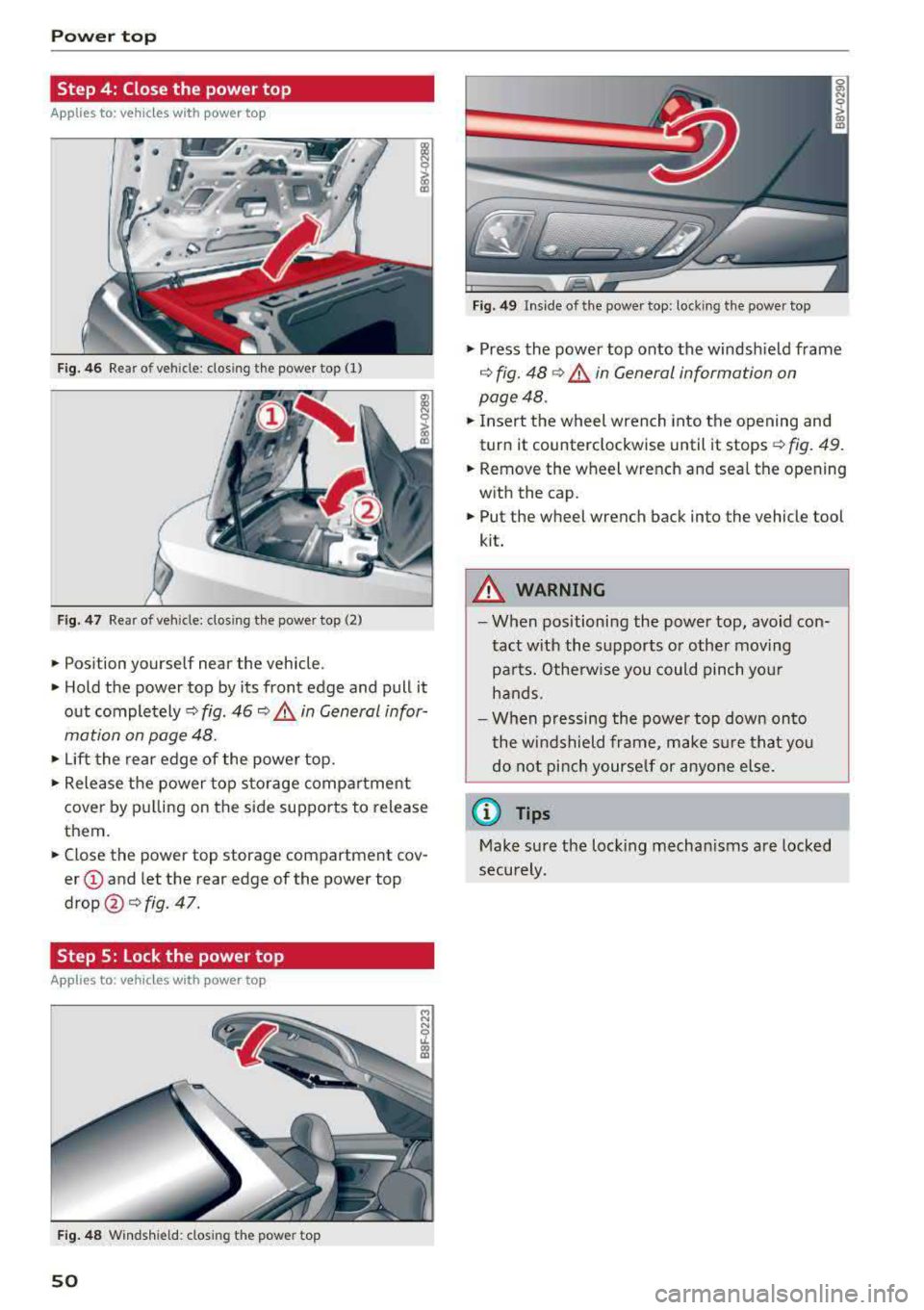
Step 4: Close the power top
Applies to: vehicles w ith power top
Fig. 46 Rear of vehicle: closing the power top (1)
Fig. 47 Rear of veh icle: clos ing the power top (2)
• Position yourself near the vehicle .
• Hold the power top by its front edge and pull it
out
completely¢ fig. 46 ~ .&. in General infor
mation on page 48.
• Lift the rear edge of the power top.
• Release the power top storage compartment
cover by pulling on the side supports to release
them.
• Close the power top storage compartment cov
er @ and let the rear edge of the power top
drop @¢ fig. 47.
Step 5: Lock the power top
Appl ies to : ve hicles w ith power top
Fig. 48 Windshield: closing the power top
50
Fig. 49 In side of the power top: locking the power top
• Press the power top onto the windshield frame
¢ fig. 48 ¢.&. in General information on
page 48.
• Insert the wheel wrench into the opening and
turn it counterclockwise until it stops¢
fig. 49.
• Remove the wheel wrench and seal the opening
with the cap.
• Put the wheel wrench back into the vehicle tool
kit.
&_ WARNING
- When positioning the power top, avoid con
tact with the supports or other moving
parts. Otherwise you could pinch your
hands.
- When pressing the power top down onto
the windshield frame, make sure that you
do not pinch yourself or anyone else.
(D Tips
Make sure the locking mechanisms are locked
securely.
Page 55 of 400
a, a, ..... N
" N ..... 0 N > 00
~ Headlight assista nt: m alfun cti on! See own
e r's manual
Drive to an autho rized Aud i deale r or a uthorized
Aud i Service Facility immedia tely to have the
malfunct ion corrected. You can still switch the
high beams on or off manually.
ID High beam as sis t : currently unavailable. No
ca mera vie w
~ Headlight a ssi stant: currently un available .
Camera view re strict ed du e to surroundin gs.
See owner 's manual
The camera view is blocked, for example by a
sticker or debris. Please clean the windshie ld .
The sensor is located in the inter ior rearview mir
ror mount . Do not place any stickers in this area
on the windsh ield .
& WARNING
High beam assistant is only intended to assist
the drive r. The dr iver is still responsible for
con troll ing the headlights and may need to
switch t hem on and off manually depending
on light and visibility conditions . It may be
necessaty to operate them manua lly in s itua
tions such as:
- In adverse weather conditions such as fog,
heavy rain, b low ing snow or spraying water.
- On roads where oncoming traffic may be partially obscu red, such as expressways .
-If there are road users with poor lighting,
such as bicyclists .
- In tight c urves and on s teep hills.
- In poorly lit areas.
- With strong reflecto rs, such as s igns.
- If the area of the windsh ield near the sensor
is fogged over, dirty, icy or covered with a
st icker.
ll Th is fun ctio n is not a vail able in al l countries.
Lights and V ision
Adjusting the exterior lighting
T he functions are adjusted in the Infotainment
system .
.,. Select in the Infotainment system: I MENU ! but
ton
> V ehicle > left control button > V ehicle
setting s> Exterior light ing .
Aut omat ic h eadlight s*
You can adjust the following settings in the Au
tomati c headlights
menu :
Activation tim e* -you can adjust if the head
lights sw itch on
Earl y, Medium or Late acco rding
to the sensitivity of the light s ensor .
Headlight a ss is tant * -you can switch the h igh
beam assistant * on and off .
Entry/exit lighting*
You can switch the entry/exit lighting* on and
off. When it is dar k, it illum inates the area
around the vehicle when un loc king t he ve hicle
and after sw itchi ng off the ignition and opening
the driver's door .
T he entry/exit lighting only work s whe n it is da rk
and the light sw itch is in the
AUTO * position .
Daytime running lights1
)
The daytime runni ng lig hts can be turned on and
off . When daytime r unning lights are turned on,
the lights w ill stay on continuously whenever the
i gni tion is sw itched on .
Emergency flashers
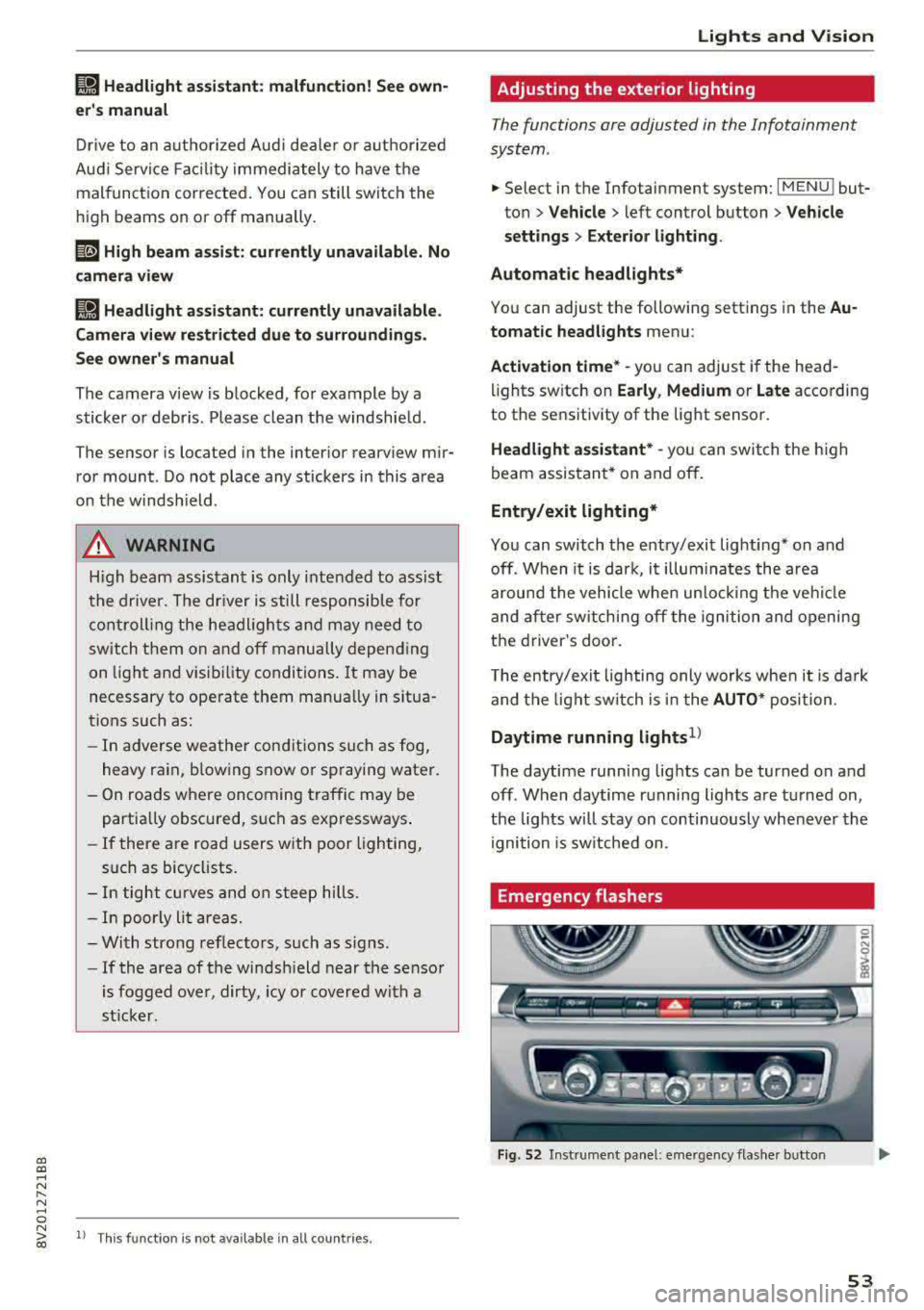
Fig. 52 Instrume nt pa nel : eme rge ncy flas her b utto n
53
Page 57 of 400
a, a, ..... N
" N ..... 0 N > 00
Instrument illumination
You can adjust the background brightness of the
instruments and display illumination .
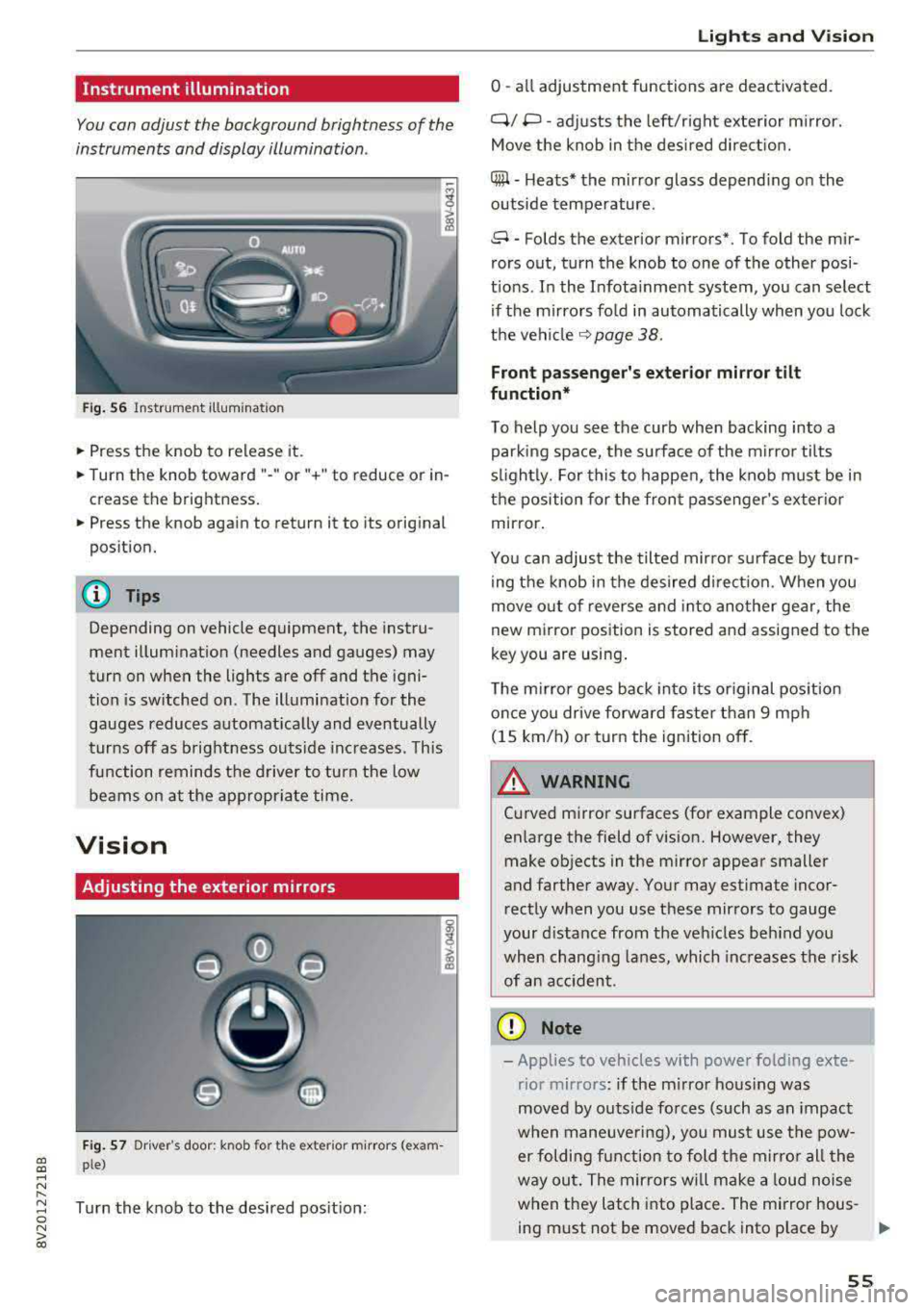
Fig. 56 Instrumerit illumination
• Press the knob to release it.
• Turn the knob toward"-" or"+" to reduce or in
crease the brightness.
• Press the knob again to return it to its original
position.
(D Tips
Depending on vehicle equipment, the instru
ment illuminat ion (needles and gauges) may
turn on when the lights are off and the igni
tion is sw itched on. The illumination for the
gauges reduces automat ically and eventually
turns off as brightness outs ide inc reases. This
function remind s the d river to turn the low
beams on at the appropr iate time.
Vision
Adjusting the exterior mirrors
F ig . 57 Dr iver's door: knob for t he exter ior m irrors (exam
ple)
Turn the knob to the desired pos it ion:
Lights and V ision
0 -all adjustment functions are deactivated.
Q/ P -adj usts the left/right exte rior m irror.
Move the knob in the des ired direct ion.
C@ -H eats* the mir ror glass depend ing on the
outside temperature .
8 -Folds the exterior mirrors*. To fold the mir
rors out, turn the knob to one of the other posi
t ions. In the Infota inment system, you can select
if the mirrors fo ld in automatically when you lock
the
vehi cle ~ page 38.
Front passenge r's e xterior mirror tilt
function*
To help you see the curb when backing into a parking space, the surface of the m irro r tilts
s li ghtly. For this to happen, the knob must be in
the position for the front passenger's exterio r
mirror.
You can adjus t the tilted mirro r sur face by turn
ing the knob in the desired d irect ion. When you
move out o f reverse and into another gear, the
new mirror position is stored and assigned to the
key you are using .
T he m irror goes back into its or iginal pos ition
once you drive forwa rd faster than 9 mph
(15 km/h) or turn the ignition off.
A WARNING ~
Cu rved mirror surfaces (for example convex)
enlarge the field of vision. However, they make objects in the mirror appear smaller
and farther away. Your may est imate incor
rect ly when you use these mirrors to gauge
your distance from the veh icles beh ind you
when chang ing lanes, which increases the risk
of an accident .
(D Note
-Applies to vehicles with power folding exte
rior mirrors : if the m irro r hous ing was
moved by outs ide forces (such as an impact
w hen maneuve ring), you must use the pow-
er folding function to fold the mirro r all the
way out. The mirrors will make a loud noise
when they latch into place. The mirror hous-
ing must not be moved back into p lace by
II>-
55
Page 60 of 400
Lights and Vi sion
CJ) Note
- If there is frost, make sure the windshie ld
wiper blades are not frozen to the wind
sh ield. Switching on the windshield wipers
when the blades are frozen to the wind
shield can damage the wiper blades.
- The windshield wiper system must be
switched off (lever in position @) before
us
ing a car wash. This prevents the wipers
from sw itching on unintentionally and caus
i ng damage to the w indshield wiper system.
(D Tips
- The windshield wipers switch off when the
ignition is switched off. You can act ivate the
windsh ield wipers after the ign ition is
switched back on by moving the windsh ield
wiper lever to any pos it ion.
- Wo rn o r dirty windshield wipe r blades result
i n streak ing. This can affect the ra in sensor
fun ct ion . Check your windshield wiper
blades regularly .
- The washer fluid nozzles in the w indshield
washer system are heated* at low tempera
tures when the ignition is on.
- When stopp ing temporarily, such as at a
traffic light, the speed of the windshie ld
wipers automatically reduces by one leve l.
Cleaning the wiper blades
Clean the wiper blades when you see wiper
streaks. Use a soft cloth and a glass cleaner .
Windshi eld w iper
.. Place the windshield wiper arms in the service
position
r=;, page 58.
.. Fo ld the windshield wiper arms away from the
windshield.
R ea r w indo w wi per
Applies to: ve hicles w ith rear w indow w ipe r
.. Fo ld the w iper arm away from the rear w indow .
A WARNING
Dirty windshield wiper blades can impair vi
sion, which increases the risk of an accident.
58
-
(D Note
If you see streaks again after cleaning the
wiper b lades, the blades must be replaced
c:>page 58.
Replacing the front wiper blades
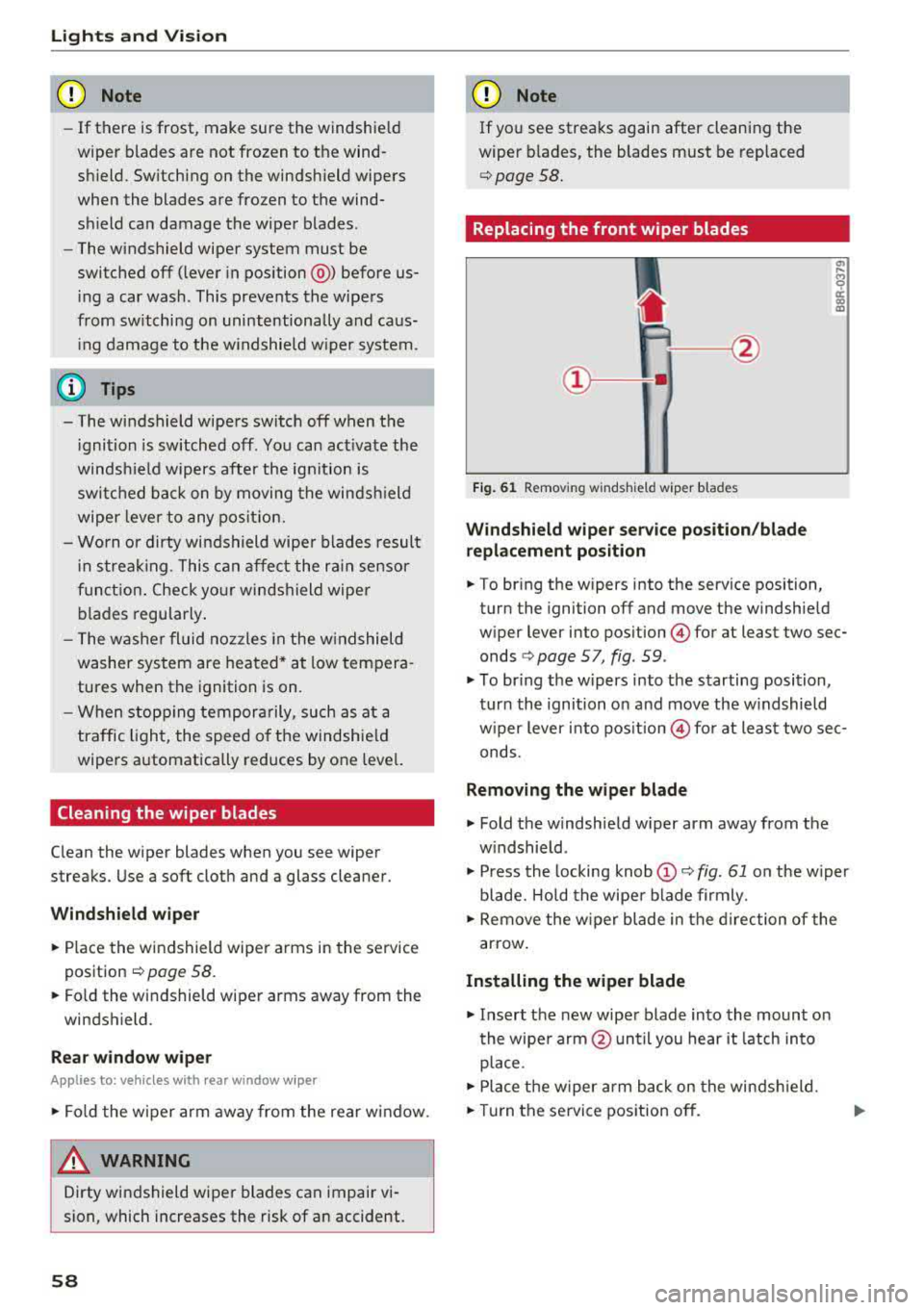
Fig . 61 Removing windshield wiper blades
Wind shi eld wiper s ervice pos iti on/blad e
r ep la cem ent po sition
"' !ii cc c:o m
.. To bring the wipers into the service position,
turn the ignition off and move the windshie ld
wiper lever into position
@ for at least two sec
onds
c:> page 5 7, fig. 59 .
.. To br ing the wipers into the starting position,
turn the ignition on and move the w indshield
w iper lever into
pos ition @) for at least two sec
onds.
Removin g the wiper blade
.. Fold the windshield w iper arm away from the
w indshield .
.. Press the locking knob@r=;, fig. 61 on the w iper
blade. Hold the wipe r blade firmly.
.. Remove the w iper blade in the d irection of the
arrow .
Install ing the w ipe r blade
.. Insert the new wiper blade into the mount on
the wipe r arm @until you hear it latch into
place .
.. Place the w iper arm back on the windsh ield .
.. Turn the se rvice position off .
Page 64 of 400
Sea ts and stor age
_& WARNING
- Only adjust the front seat with when the ve
hicle is stat ionary . Otherwise, this increases
the risk of an acc ident
- The power adjustment for the front seats al
so works with the ignition switched off or
with the ignition key removed . For this rea
so n, children should never be left unattend
ed in the veh icle
-they co uld be inj ured!
- Exercise caution when adjusting the seat
height. Uns upervised or careless seat ad
justment can p inch fingers or hands causing
injur ies .
- T he front seat backrests m ust not be re
cl ined too far back when driving, because
this impairs the effectiveness of the safety
belts and airbag system, which increases
the risk of injury .
(Di Tips
The massage function* switches off a utomat i
cally after approximately 10 mi nutes.
Entry assistance
Applies to: vehicles with entry ass istance
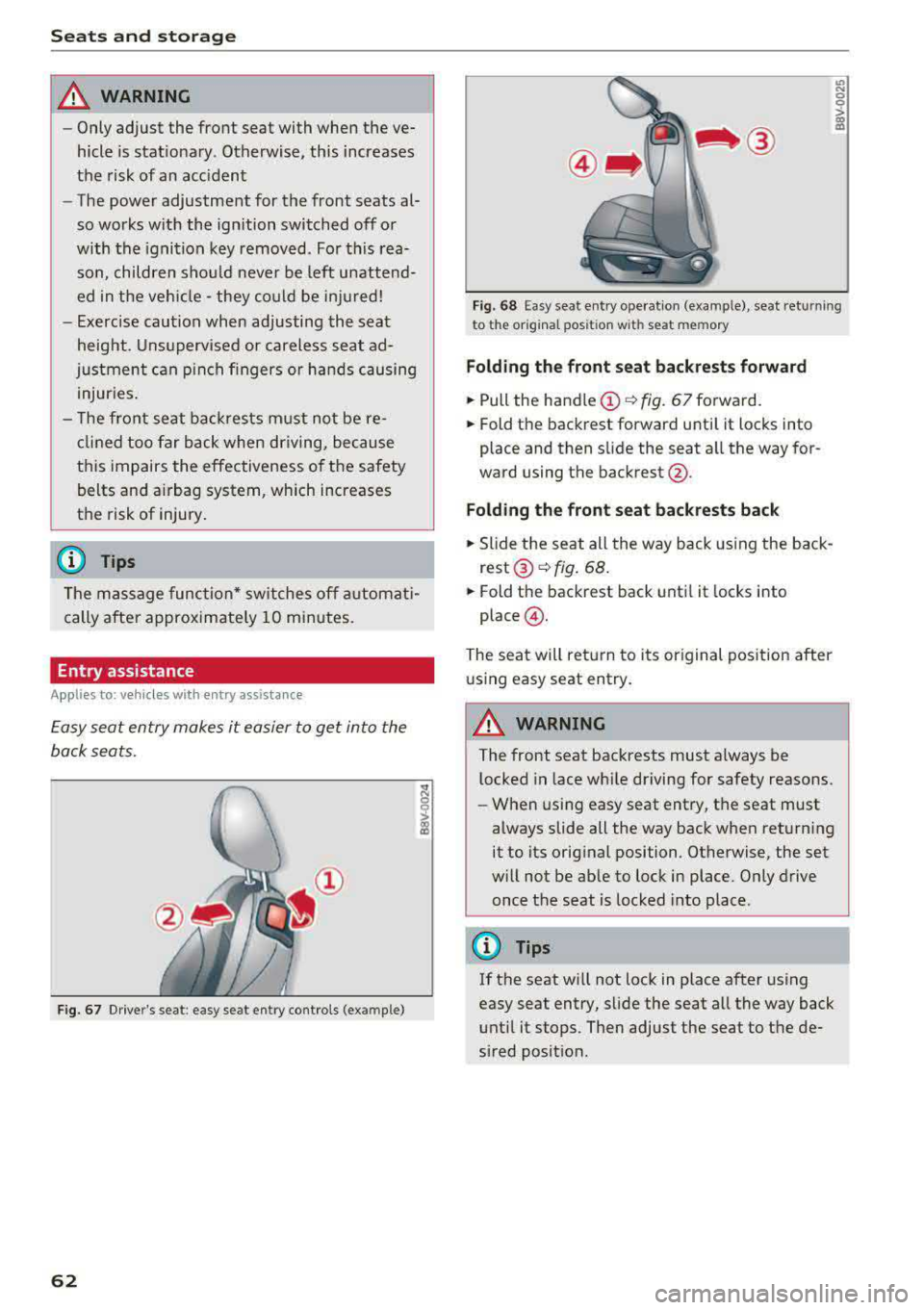
E asy seat entry makes it easier to get into the
back seats .
Fig. 67 Dr ive r's seat : easy se at ent ry controls (ex ample )
62
'° ::: 0 ::l-a) 113
F ig. 6 8 Easy sea t en try ope rat io n (examp le) , seat ret urnin g
t o t he origina l pos ition w it h se at mem ory
Fold ing th e front seat backrests forward
.,. Pull the handle (!)¢ fig. 67 forward.
.,. Fold the backrest forward unti l it locks into
place and then slide the seat a ll the way for
ward using the backrest @.
Fold ing the front seat back rests back
.,. Slide the seat all the way back using the back
rest ®~ fig. 68 .
.,. Fold the backrest back until it locks into
place @.
The seat will ret urn to its original posit ion after
u sing easy seat entry.
A WARNING
-The front seat backrests must a lways be
l ocked in lace wh ile driving for safety reasons.
- When using easy seat entry, t he seat must
always slide all the way back when returning
it to its orig inal position . Otherwise, the set
w ill not be ab le to lock in place. Only drive
once the seat is locked into place .
(D Tips
If the seat w ill not lock in place after using
easy seat entry, slide the seat all the way back
unt il it stops. Then adjust the seat to the de
sired posit ion.
Page 65 of 400
a, a, ..... N
" N ..... 0 N > 00
Front center armrest
Applies to vehicles with a front center armrest
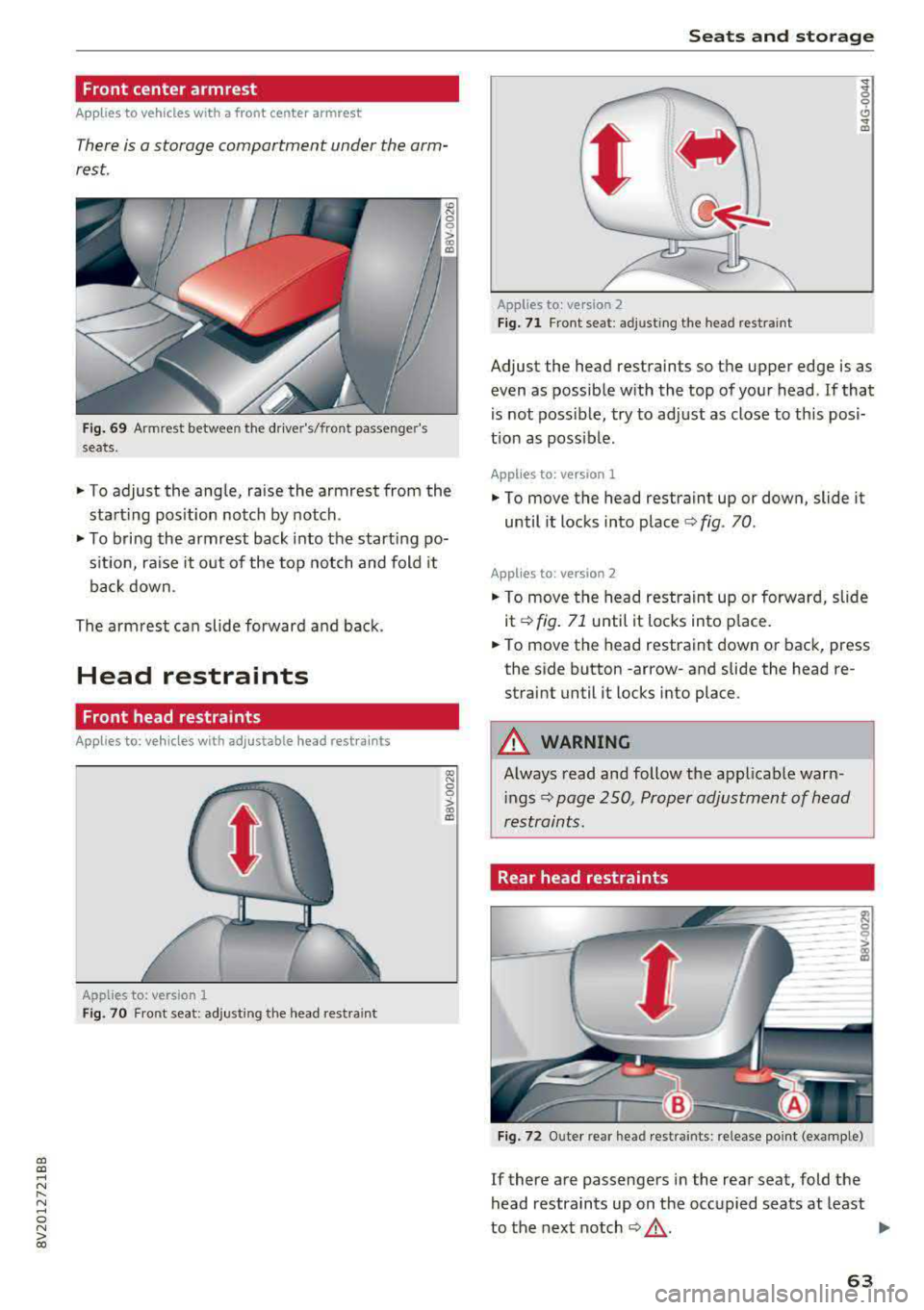
There is a storage compartment under the arm
rest.
Fi g. 69 Armrest between the driver's/front passenge r's
seats.
.. To adjust the angle, raise the armrest from the
start ing pos ition notch by notch.
.. To bring the armrest back into the starting po
s it ion, ra ise it out of the top notch and fold it
back down .
The armrest can slide forward and back.
Head restraints
Front head restraints
Applies to: ve hicles with ad justable head rest ra in ts
Applies to: version 1
Fig. 70 Fr ont seat: adjusting the head restraint
Seats and storag e
Applies to: vers ion 2
F ig . 71 Front seat: adjusting the head restra int
Adjust the head restraints so the upper edge is as
even as possible with the top of you r head . If that
is not possible, try to adjust as close to th is posi
t ion as poss ible .
Applies to: version 1
.. To move the head restraint up or down, slide it
until it locks into place
c:> fig. 70 .
Applies to : version 2
.. To move the head restraint up or forward, slide
it
c:>fig . 71 until it locks into p lace.
.. To move the head restraint down or back, press
the side button
-arrow-and slide the head re
straint until it locks into place.
_& WARNING
-A lways read and follow the applicable warn-
i ngs
c:> page 250, Proper adjustment of head
restraints.
Rear head restraints
F ig . 72 O ute r rear head rest rain ts: release point (exam ple)
If there are passengers in the rear seat, fold the
head restraints up on the occupied seats at least
-
to the next notch c:> _& . Iii-
63
Page 67 of 400
a, a, ..... N
" N ..... 0 N > 00
Storing
Cup holders
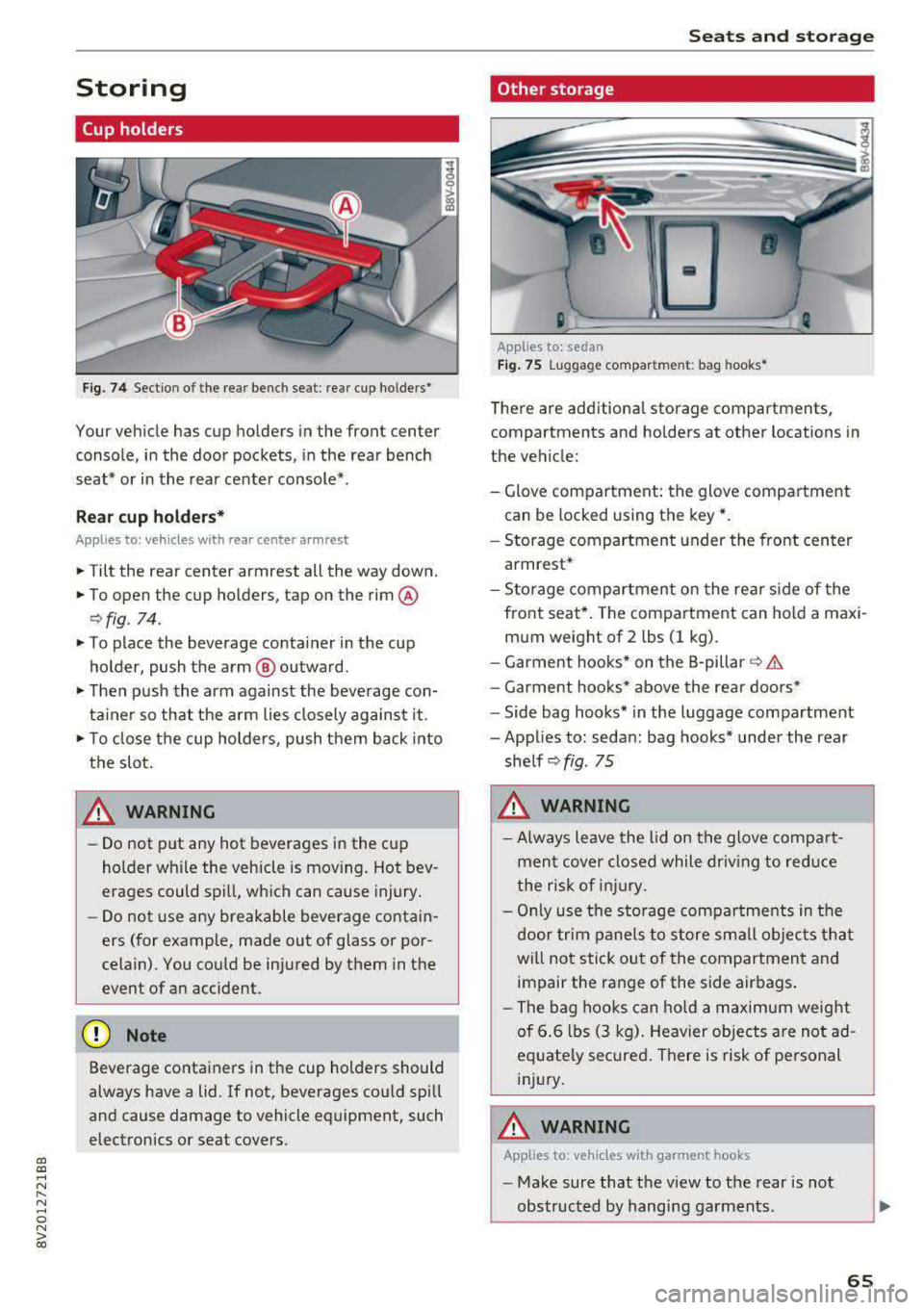
Fig. 74 Sectio n of the rear bench seat : rea r cup ho lders•
Your vehicle has cup holders in the front center
console, in the door pockets, in the rear bench
seat* or in the rear center console*.
Re ar cup ho lders*
Applies to: ve hicles with rear center arm rest
.,. Tilt the rear center armrest all the way down.
.,. To open the cup holders, tap on the rim @
r:=>fig . 74.
.,. To place the beverage co nta iner in the cup
holder , push the arm @ outward .
.,. Then push the arm against the beve rage con
ta iner so that the a rm lies closely against it .
.,. To close the cup holders, push t hem back into
the slot .
A WARNING -
-Do not put any hot beverages in the cup
holder while the vehicle is moving. Hot bev
erages could spill, wh ic h can cause injury.
- Do not use any breakable beverage contai n
ers (for example, made out of glass or por
celain). You co uld be injured by them in the
event of a n accident .
(D Note
Beverage containers in the cup holders should
always have a lid. If not, beverages cou ld sp ill
and cause damage to vehicle equipment, such
electronics or seat covers .
Seats and storage
Other storage
Applies to: sedan
Fig. 75 Lu gga ge compar tm en t: bag hooks *
There are add itiona l storage compartments,
compartments and holders at other locations in
the vehicle:
- Glove compartment: the glove compa rtme nt
can be locked using the key* .
- Storage compartment under the front cen ter
armrest*
- Storage compartment o n the re ar side of the
front seat*. The com partment can hold a maxi
m um weight of 2 lbs (1 kg) .
- Garment hooks* on the B -pillar
r=> &.
- Garment hoo ks* above the rea r doo rs *
- Side bag hooks* in the luggage compartment
- Applies to: sedan : bag hooks* under the rear
she lf
r=> fig . 75
A WARNING
-Always leave the lid on the glove compa rt
men t cover closed while driv ing to red uce
t he risk of injury .
- Onl y use t he storage compa rtme nts in the
door trim panel s to sto re sm all obje cts th at
will not sti ck ou t of the compartmen t and
impair the range of the side air bags .
- Th e bag hoo ks c an ho ld a m aximum weight
of 6.6 lbs (3 kg) . Heavier objects are no t ad
equate ly secured . There is risk of pe rsonal
inj ury.
A WARNING
-App lies to: ve hicles with garment hooks
- Make sure that the view to the rear is not
obs tructed by hangi ng garments .
-
65
Page 68 of 400
Sea ts and stor age
-Hang only lightweight cloth ing and be s ure
that there are no heavy or sharp-edged ob
jects in the pockets.
-Do not use coat hangers to hang garments,
because th is could reduce the effectiveness
of the side curtain airbags.
Luggage compartment
General information
A WARNING
Read and follow the important safety p recau
tions in
¢ page 253, Storing cargo correctly.
Luggage compartment cover
A pp lies to: ve hicles with luggage compart men t cover
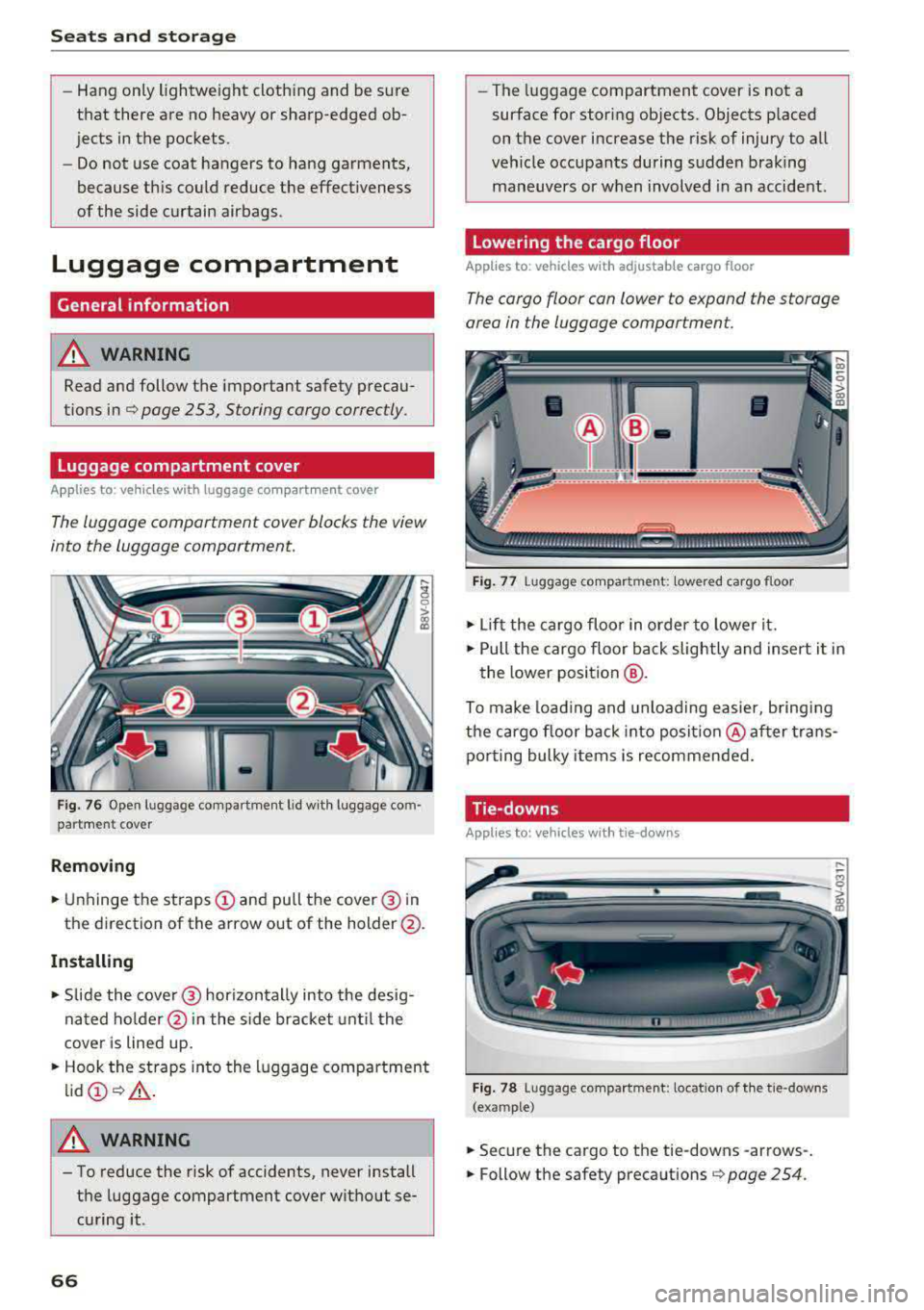
The luggage comportment cover blocks the view
into the luggage comportment.
F ig . 76 Open luggage com pa rtment l id w ith luggage com
partment cover
Remov ing
... U nhinge the straps (D and pull the cover @ in
the d irection of the arrow out of the holder @.
Installing
... Slide the cove r@ horizontally into the desig
nated ho lder @in the s ide bracket until t he
cove r is lined up .
... Hook the st raps into the luggage compartment
lid @ ¢,& .
A WARNING
-To reduce the risk of accidents, never install
t h e luggage compartment c over wit hout se
cu ring it.
66
-The luggage compartment cover is not a
surface for storing objects. Objects p laced
on the cover increase the risk of injury to all
veh icle occupants during sudden braking
maneuvers or when involved in an accident.
Lowering the cargo floor
App lies to: vehicles with adjustable cargo floor
The cargo floor con lower to expand the storage
area in the luggage comportment.
Fi g. 7 7 Luggage co mpa rt ment: lowe re d cargo floor
... Lif t the cargo floo r in o rder to lowe r it .
... Pull the cargo floor ba ck slightly and insert i t in
the lower position
@ .
To make load ing and unloading easier, b ringi ng
the cargo floor back into posit io n @ aft er trans
po rting bulky item s is recommended.
Tie-downs
Appl ies to: vehicles with tie-downs
- ------- --
Fig. 7 8 Luggage compa rtment: locat io n of t he t ie-downs
(example)
... Secure the cargo to the tie-downs -arrows-.
... Follow the safety preca utions ¢ page 254.
Page 69 of 400
a, a, ..... N
" N ..... 0 N > 00
Cargo net/cargo bag
Applies to: vehicles with luggage compartment cargo net/car
go bag
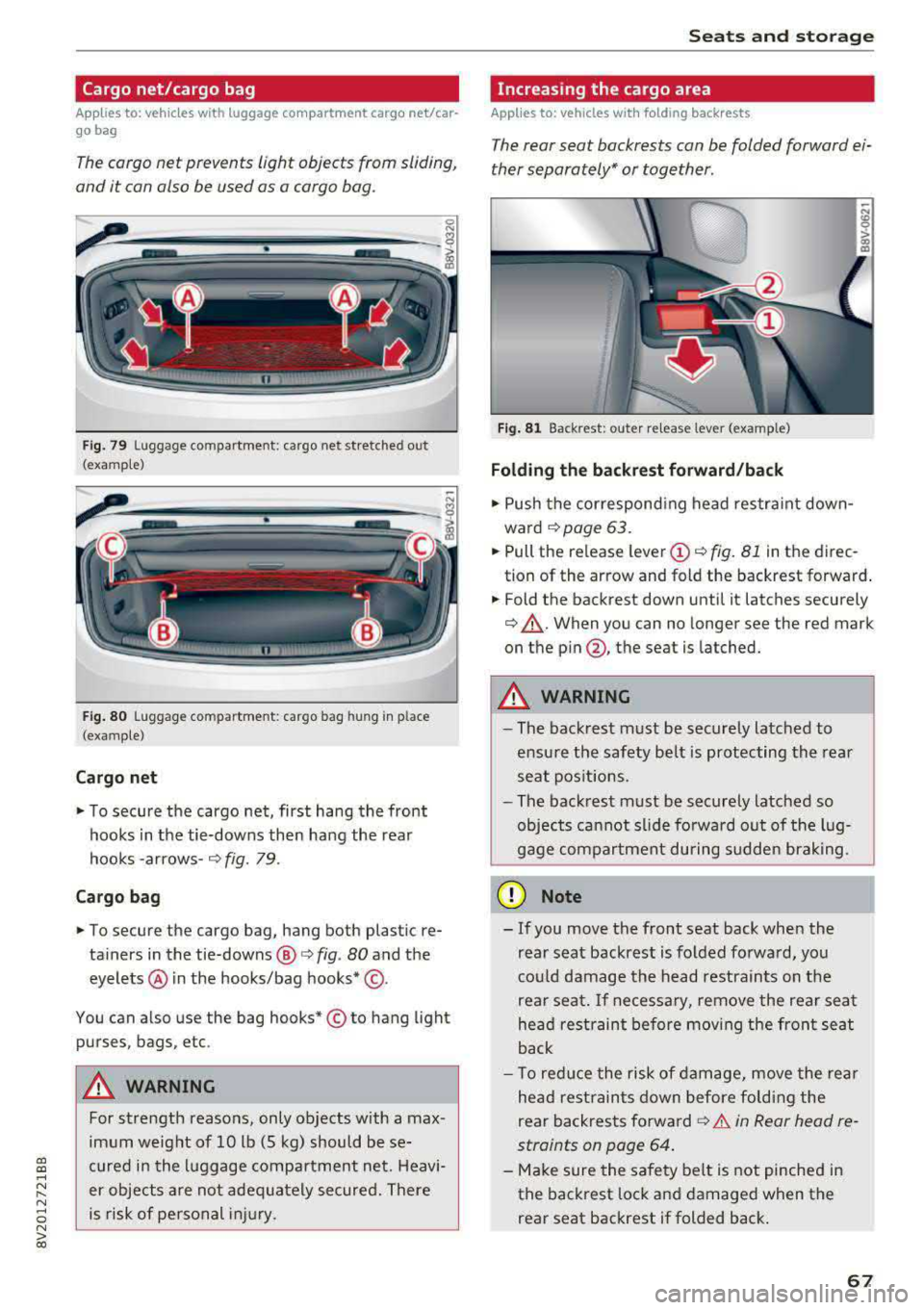
The cargo net prevents light objects from sliding,
and it can also be used as a cargo bog.
Fig. 79 Luggage compartment: cargo net stretched out
(examp le)
F ig . 80 Luggage compartme nt: cargo bag hung in place
(examp le)
Cargo net
.. To secure the cargo net, first hang the front
hooks in the tie-downs then hang the rear
hooks
-arrows-¢ fig. 79.
Ca rgo b ag
.. To secure the cargo bag, hang both plastic re
tainers in the tie-downs @
c> fig. 80 and the
eyelets @ in the hooks/bag
hooks* @.
You can also use the bag hooks* © to hang light
purses, bags, etc .
&_ WARNING
For strength reasons, only objects with a max
imum weight of 10 lb (5 kg) should be se
cured in the l uggage compartment net. Heavi
er objects are not adeq uately secured. There
is risk of personal injury .
Seats and storag e
Increasing the cargo area
Applies to: vehicles with folding backrests
The rear seat backrests con be folded forward ei
ther separately" or together .
n
Fig. 81 Backrest: outer re lease lever (example)
Folding the b ackrest forward /back
.. Push the correspond ing head restraint down
ward
¢page 63 .
.. Pull the release lever (D ¢ fig. 81 in th e direc
tion of the arrow and fold the backrest forward .
.. Fold the backrest down until it latches securely
¢ .,&.. When you can no longer see the red mark
on the
pin @ , the seat is latched.
&_ WARNING
~ -
-The backrest must be sec urely latched to
ensu re the safety belt is protecting the rear
seat pos it ions.
- The back rest must be securely latched so
objects ca nnot slide fo rwa rd out of the lug
gage compartment during sudden brak ing.
(D Note
- If you move the front seat back when the
rear seat backrest is folded fo rwa rd, you
co uld damage the head restrain ts on t he
rear seat.
If ne cessary, remove the rea r seat
he ad restraint before mov ing the front seat
back
- T o red uce the risk of damage, move the rea r
he ad rest raints down before fo ldi ng the
rear backrests
forward¢ .&. in Rear head re
straints on page 64 .
-Make sure the safety belt is not pinched in
the back rest lock a nd damaged when the
rear seat backrest if folded back .
67
Page 70 of 400
Sea ts and stor age
Pass-through
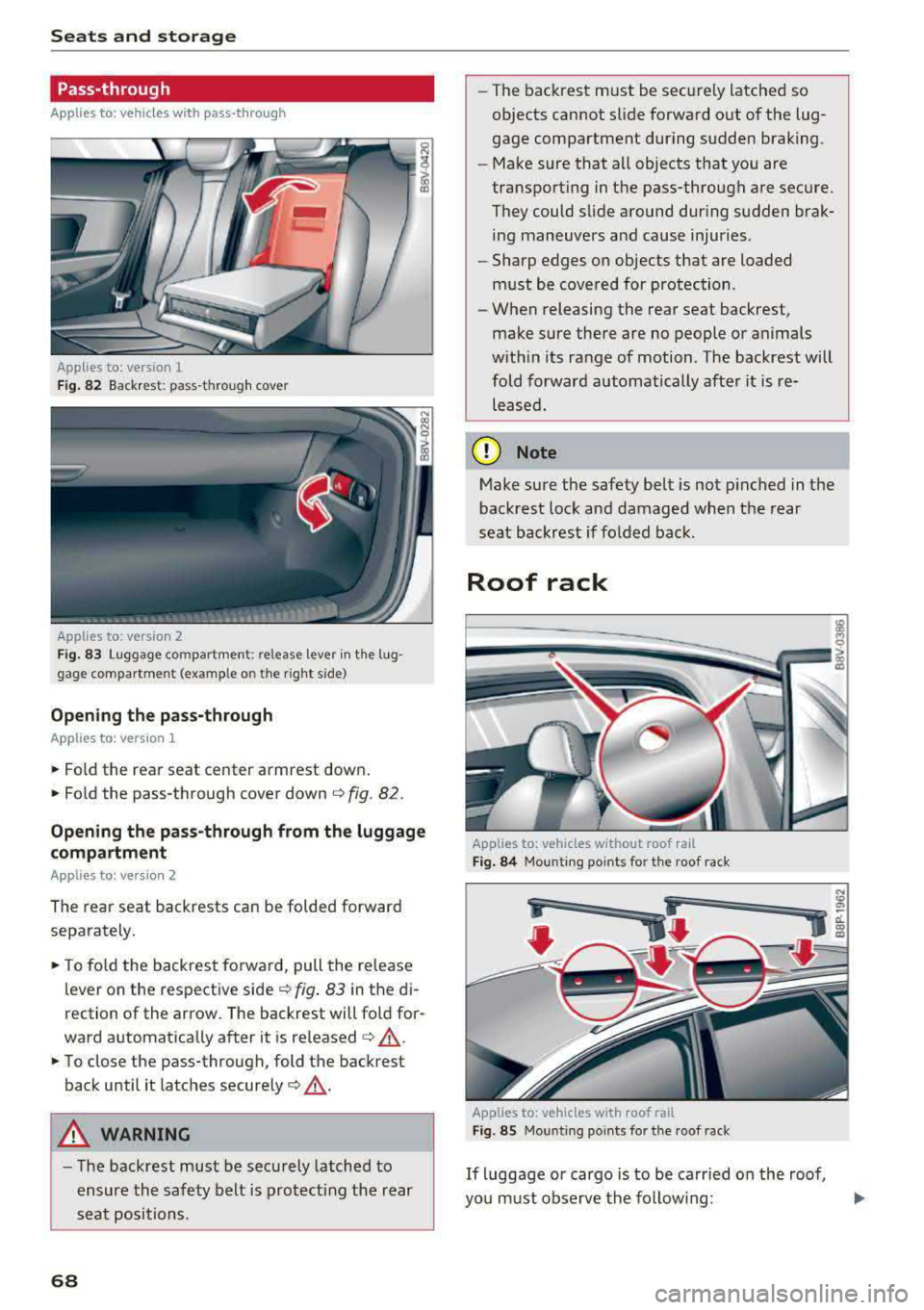
Applies to: vehicles with pass-through
Applies to: version
1
F ig . 82 Backrest : pass-throug h cover
App lies to: version 2
Fig. 83 Luggage compart ment: release lever in th e lug
gage compartme nt (ex am ple o n the r ight s ide)
Opening th e pass -through
Applies to : vers ion 1
.. Fo ld the rear seat center armrest down .
.. Fold the pass -through cover down¢ fig. 82 .
0 N
i (D
Opening the pas s-through from the luggage
compa rtment
Applies to : version 2
The rear seat backrests can be folded forward
separately .
.. To fo ld the backrest forward, pull the re lease
lever on the respective side
¢ fig . 83 in the di
rection of the arrow. The backrest will fo ld for
ward automatically after it is
released ¢,&. .
.. To close the pass-through, fold the backrest
back until it latches
securely ¢,&. .
A WARNING
-The backrest must be securely latched to
ensure the safety belt is protect ing the rear
seat positions.
68
- The backrest must be securely latched so
objects cannot slide forward o ut of the lug
gage compartment during sudden brak ing.
- Make sure that all objects that you are
transporting in the pass-through are secure.
They could slide around dur ing sudden brak
ing maneuvers and cause injuries .
- Sharp edges on objects that are loaded
must be covered for protection .
- When releasing the rear seat backrest,
make sure there are no people or animals
with in its range of motion . The backrest will
fold forward automatically after it is re leased.
(D Note
Make sure the safety be lt is not p inched in the
backrest lock and damaged when the rear
seat backrest if folded bac k.
Roof rack
Applies to: vehicles w ithout roof rail
F ig . 84 Mou nti ng po ints for the roof rack
Applies to: vehicles with roof rail
F ig. 85 Mou nting po ints fo r the roof rack
If luggage or cargo is to be carr ied on the roof,
you must observe the fo llow ing: