lock AUDI A3 SEDAN 2017 Workshop Manual
[x] Cancel search | Manufacturer: AUDI, Model Year: 2017, Model line: A3 SEDAN, Model: AUDI A3 SEDAN 2017Pages: 400, PDF Size: 67.32 MB
Page 124 of 400
Trailer towing
room to stop . To compensate fo r the trai ler, you
will need a larger than normal turning radius.
When pass ing, remembe r that you cannot accel
erate as fast as you norma lly would because of
the added load. Make s ure yo u have eno ugh room
to pass . After passing, allow plenty of room for
your tra ile r before chang ing lanes again.
Avoid jer ky s tar ts, sharp turns or rap id lane
changes .
{D) Tips
- Do not tow a trailer during t he b reak-in per i
od of yo ur vehicle.
- If you tow a trailer, your Aud i may require
more frequent m ain tenance d ue to the ex
tra load
r:!) page 3 78.
Parking on a slope
Do not park on a slope with a trailer. If it cannot
be avoided, do so only
a~er doing the following:
When parking:
.,. Apply the foot b rake .
.. Have someone place chocks under both t he ve
hicle and the trai le r wheels .
.. With chocks i n place, slowly release the brakes
u nt il the whee l cho cks absorb the load .
.. T urn the wheels towards the curb .
.. Apply the parking brake .
.. Select the P selector lever position.
When restarting after parking:
.,. Apply the foo t bra ke .
.. Start the engi ne .
.. Se lect the D/S selector lever position .
.. Release the parking brake and slowly pull out
and away from the wheel chocks .
.. Stop and have someone retrieve the wheel
chocks.
(D Tips
If you move the se lector lever of the a utomat
ic transm ission to P before apply ing t he park
ing brake and before block ing the wheels, you
may have to use more fo rce later to move the
lever ou t of the P position .
122
Page 151 of 400
a, a, ..... N
" N ..... 0 N > 00
-Only use the rearview camera to assist you if
it shows a good, clear p icture. For examp le,
the image may be affected by the sun sh in
ing into the lens, dirt on the lens, or if there
is a malfunction.
- Use the rearview camera only if the luggage
compartment lid is completely closed . If the
luggage compartment l id is open the orien
tation lines and blue su rfaces are hidden .
Make su re any objects you may have mount
ed on the luggage compar tme nt lid do not
block the rearview camera.
- T he came ra lens enlarges and distorts the
field of v is ion. The object appea rs both al
tered and inaccurate on the screen.
- In cert ain situations, people or objec ts in
the display appear closer or farther away:
- For objects that do not touch the ground,
such as the bumper of a parked vehicle, a
tra iler hitch or the rear of a truck . Do not
use the orientation lines in this case.
- If driven from a level surface onto an in
cline , or a downward slope.
- If driven toward protrud ing objects .
- If the veh icle is carry ing too much load in
the rear.
(D Note
- Always read and follow the applicable warn
i ngs
<* 0 in General information on
page 146 .
-The orange-colored orientatio n lines in the
Infotainment display show the veh icle path
based on the steering wheel angle. The
front of the vehicle swings out more than
the rear of the veh icle. Ma inta in p lenty of
distance so that an exterio r mirror or a cor
ner of the veh icle does not co llide with any
obstacles.
Switching on /off
Appl ies to: ve hicles with rearv iew camera
Switching on
• S hift into reverse , or
• Press the P' 1! bu tton in the center console
~ page 147 , fig. 152 . A short confirmat ion
Parking systems
tone sounds and the LED in the button turns
on.
Switching off
• Dr ive faste r th an 6 mp h (10 km/h), o r
• Press the p, q! button, or
• Switch t he ignit ion off .
(0 Tips
- The visu al display in the righ t part of the
display sho uld help you de te ct the c riti cal
vehicle area .
- Yo u can ch ange the vol ume o f the signa ls
and the display ¢
page 150.
Perpendicular par king
Applies to: veh icles w ith rearv iew camera
This view may be used when parking in a garage
or in a parking space.
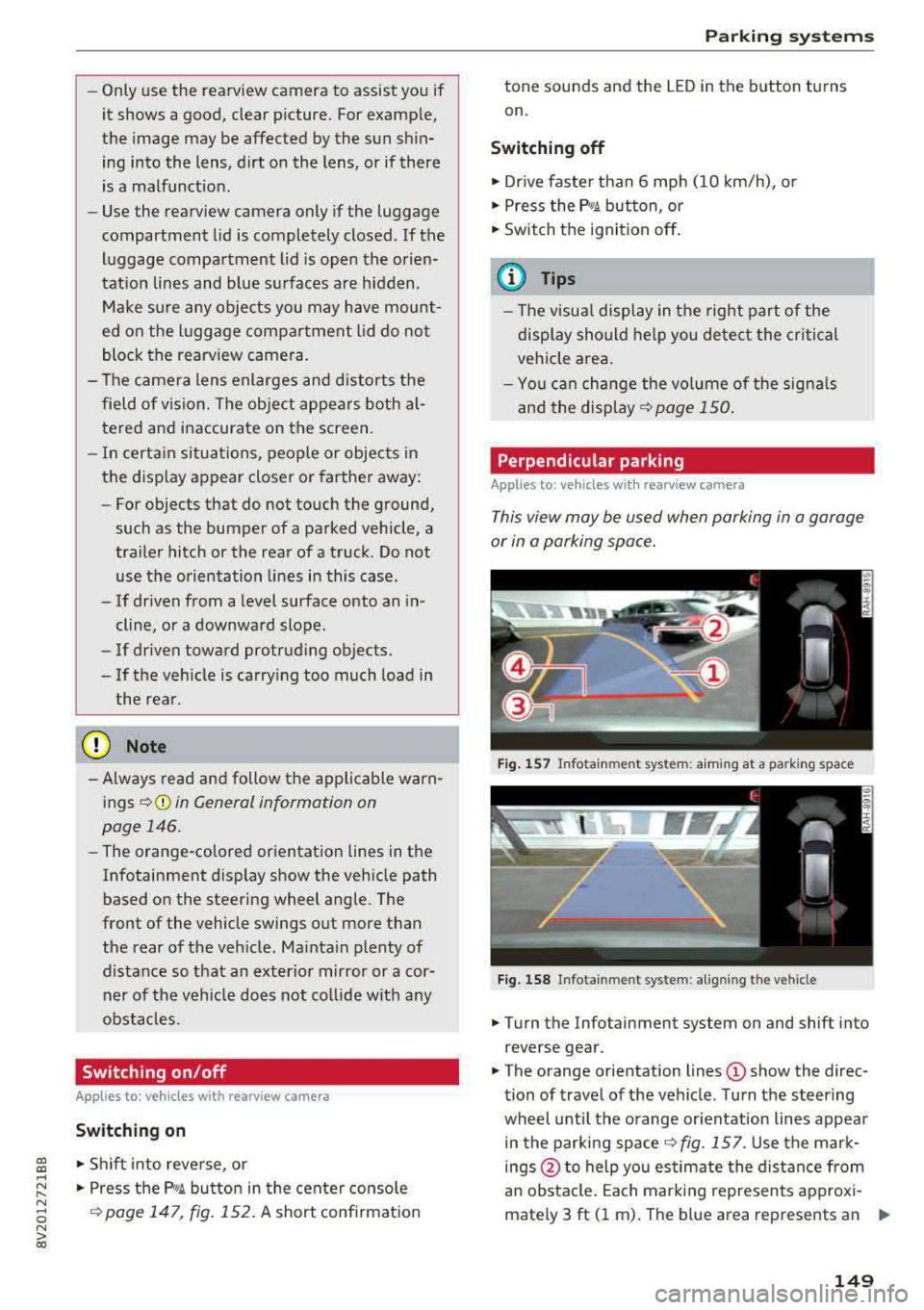
Fi g. 157 In fota inme nt sys tem: a im ing at a par king space
Fig . 1 58 In fotai nment syste m: alig ning t he vehicl e
.. Turn the Infotainment system on and shift into
reverse gear .
• The orange orientation lines (D show the direc
tion of travel of the vehicle . Turn the steering
wheel unti l the orange or ientation lines appea r
in the parking
space ~ fig. 157. Use the mar k
ings @to help you es timate the distance from
an obsta cle. Each marking represents approxi
mately 3 ft (1 m) . The b lue area represents an
.,..
149
Page 153 of 400
CXl CXl .... N ,.__
N .... 0 N > 00
Intelligent Technology Electronic Stabilization
Control (ESC)
Description
Electronic Stabilization Control ( ESC) supports
driver safety . It reduces the risk of slipping and
improves dr iving stability. ESC detects critica l sit
uations such as the vehicle oversteering and un
dersteer ing or the wheels are spinning. The vehi
cle is stabilized by apply ing the brakes or reduc
ing engine torque . When the ESC engages, the
G1 indicato r light b links in the instrume nt clus
ter.
The follow ing systems are integrated in the ESC:
Anti-loc k bra king system (ABS)
ABS prevents the whee ls from locking when brak
ing. The vehicle can still be steered even during
hard brak ing. Apply steady pressure to the brake
pedal. Do not pump the pedal. A pulsing in the
b rake pedal indicates that the system is act ing to
stabilize the vehicle .
Brake a ssist system
The brake assist system can decrease braking dis
tance. It increases brak ing power when the driver
presses the brake pedal quick ly in emergency sit
uations . You must press and hold the brake pedal
u nti l the dangerous sit uat io n is ove r. In veh icles
with adaptive cr uise contro l*, the bra ke assist
s ys tem is more sensitive if t he d istance detec ted
to the veh icle dr iv ing ahe ad is too small.
Anti -slip regulation (ASR)
ASR reduces eng ine power when the drive wheels
begin spinning and adapts the force to the road
conditions . This makes i t eas ie r to sta rt, acceler
ate and dr ive up hill s.
Electronic differential lock (EDL )
The EDL applies the brakes to a wheel that starts
spinning and transfers t he drive power to the
other driving wheel or wheels ( if the veh icle is
eq uipped w ith all whee l dr ive*) . T his function is
n o t available at higher speeds.
Intellig ent Technology
In extreme cases, ED L automat ica lly switches off
to keep the brake o n the braked whee l from over
heating. The veh icle is still working correct ly. EDL
will switch on again automatically when condi
t ions have returned to normal.
Ste ering recommendation
The ESC he lps to s tabilize the vehicle by changing
the steering torque.
Select ive wheel torque control
Se lective wheel to rque cont rol is used w hen driv
i ng on curves. The fron t whee l on the inside of
the curve or bo th wheels on the i nside of the
c u rve are braked se lective ly as needed . This al
l ows more precise driving in c urves.
Automatic post-collision braking system
T he "automat ic pos t-collision braking system"
c an help to reduce the risk of sliding an d of addi
tiona l co llisions a fter an acciden t. If the ai rbag
contro l modu le detects a co llision above a certain
vehicle speed, the veh icle is bra ked by the ESC.
T he vehicle does not bra ke autorn,;1tically if;
- t he dr ive r presses the acce le rator pedal, or
- the ESC, the brake system or the veh icle elect ri-
cal system are not functioning .
A WARNING
-The ESC and its integ rated systems cannot
overcome the lim its imposed by natura l
phys ic al laws. This is especially important
on sli ppery or wet roads . If the sy stems be
gin acting to stabilize your vehicle, you
should immediately alter your speed to
match the road and traffic conditions. Do
not let the inc reased safety provided tempt
you into taking risks. This could increase
your r isk of a coll is ion.
- Please n ote the r isk of a coll is ion increases
when dr iv ing fast, especially t hrough curves
a nd on slippery or wet roads, and when dr iv
ing too close to objects ahead. The ESC and
its integrated systems ca nnot always pre
vent collisions
-there is st ill a ris k of ac ci-
dents!
..,.
151
Page 171 of 400
"' "' ... N ,.._ N ... 0 N > a,
Voice recognition system
• Telephone
• Audi connect •
Favor ites
• Call (XY)
• Navigation
• Directory
• Radio
• Med ia
• Sound •
Enter number
• Redial
• Read new tex t message
• N avigate to (XV)
• Enter address/destination
• Help • Onhne destinations
• Help Speech dia log system
• Help Telephone •
Cancel route guidance
• M ap
• Help Audi connect •
Line (XY)
• Help Navigation
• Help Map
• Help Radio
• Help Media • N
ext page/ previous page
• Cancel
• No, l meant
()(Y)
• Correction
TELEPHONE
• Enter number • Call list
• Delete number/ correc tion
• Redial
•
Oltectory
• Call (XY) •
Call mailbox
• Enter PIN/ delete PI N
· business/ private/ land line/ mobile • Telephone favorites
NAVIG:ATI0N
• N avigate to CXV)
• Start/ cancel route guidance
• Directory
• Last destinations •
Bloc k route for
(XYJ miles/ Block
the next section
• Route list
• Calculate alternative routes
• Nav igation favorites
• Drive home
• Enter address •
Online destinations
• Special destination
• Enter country/ town
I street I state
• Exclude route / Exclude route for (XY)
km / m
M~P
• Map
• Day map/ Night map
• 20 driving position map/ 20 north posi tion map/ 30 map/ Destination map/ Overview map
AllJDI G QNNECT
• Audi connect
• Travel Information/ Parking Information
• Fuel prices
• Weather
RADIO
• Rad io presets
• FM
• FM/ AM/ SIRIUS XM
• Station (XY) / Frequency
(XYJ
• Traffic announcement on/ off
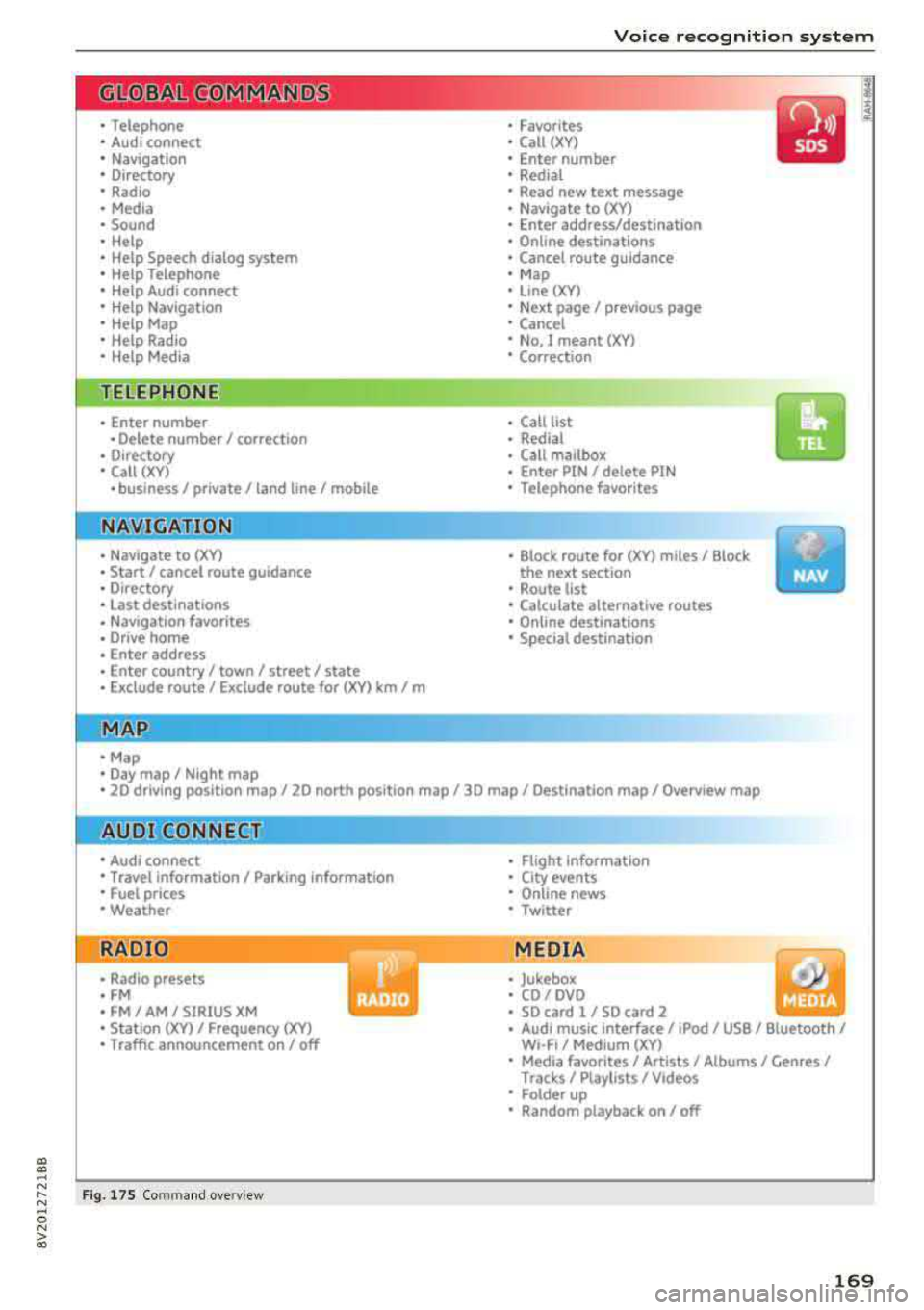
Fig. 17 S Co mmand overv ie w
• Flight Information
• City events
• Online news
• Twitter
MEDIA
• Jukebo x
• CO/ DVD .))
• SD card 1 / SD card 2
• Audi music Interface/
IPod I use / Bluetooth /
W I-Fl/ Medium (XV)
• Media favorites/ Artists/ Albums/ Genres/
Tracks/ Ptayllsts / Videos
· Folder up
• Random playback on / off
169
Page 176 of 400
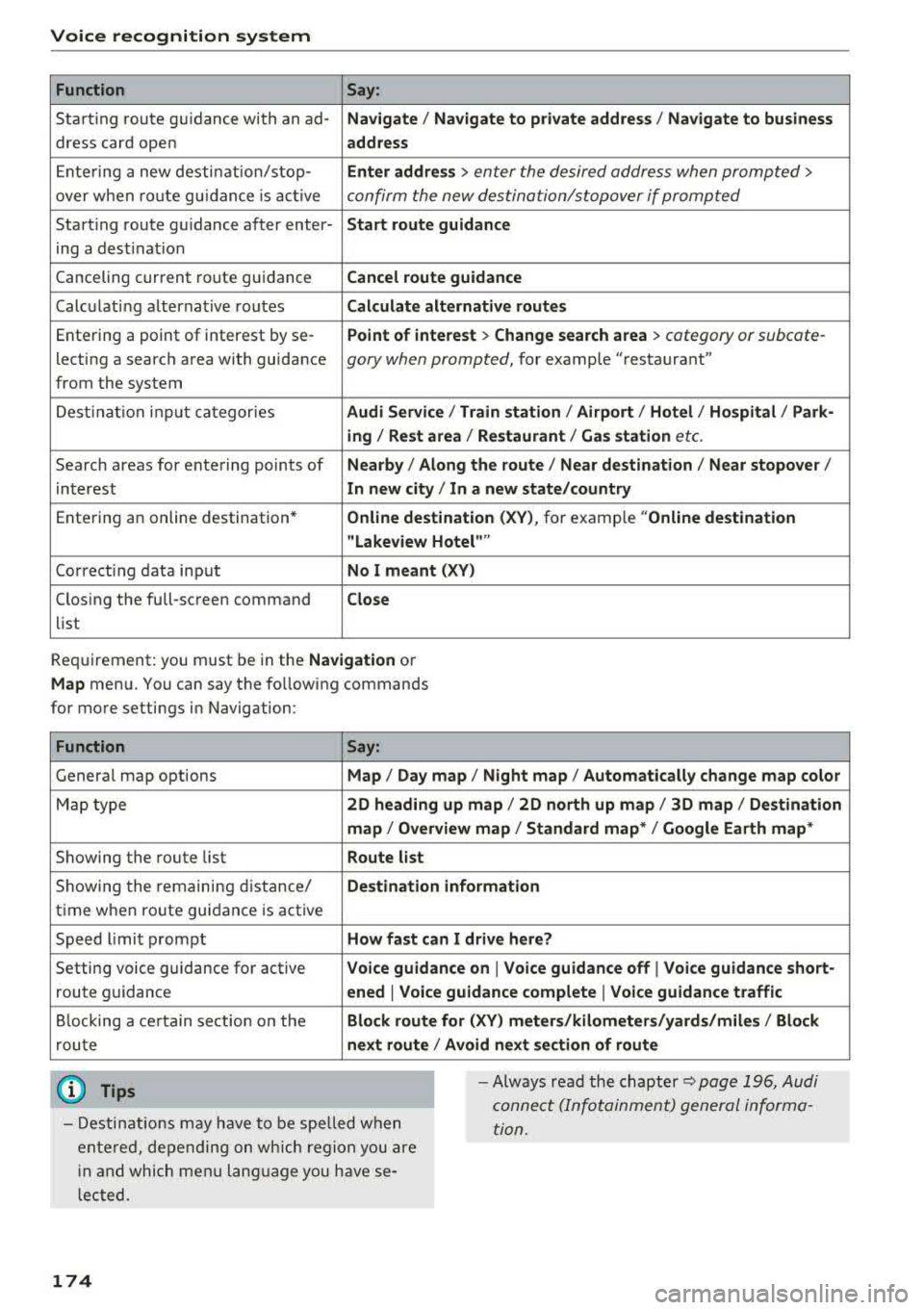
Voice recognition system Function Say:
Start ing route g uidance with an
ad-Na vigate / Navigate to p riv ate addre ss / Na vig ate to bu sin ess
dress card open address
E nte ring a new desti nation/stop- Enter address >
enter the desired address when prompted>
over when ro ute gu idance is ac tive confirm the new destination/stopover if prompted
Start ing route gu idance after enter- Start route guidance
ing a dest inat ion
Canceling current route gu idance Cancel route guidance
Calc ulating alternative routes Calculate alternati ve route s
Entering a point of interest by
se-Point of interest > Change search area > category or subcate-
lecting a searc h area with guidance gory when prompted, for example "restaurant"
from the system
Dest ina tion input categor ies Audi Service / Train station
I Airport / Hot el / Ho spital / Park -
ing / Re st area /Restaurant / G as sta tion
etc.
Search areas for entering points of Nearb y/ Along the route I Near destination / Near stopove r/
interest In new city/ In a new state /country
Ente ring an online destination * Online destina
tion ( XV), for example "Online de stin ation
" Lake view Hotel ""
Co rrect ing data input No I meant (XV)
Clos ing the full-screen command
Clo se
list
Requirement: you must be in the Navigation or
M ap menu. You can say the following commands
for more settings in Navigation:
Function Say:
General map options Map/ Da y map / N ight map / Automa tically change map colo r
Map type 2D heading up map
I 2D north up map/ 3D map / Destination
map
I Ov erview ma p/ Standard map */ Googl e Earth map *
Showing the route list Route list
Showing the remaining d istance/ Destin ation information
time when route guidance is active
Speed l imit prompt How fast can I dri ve here ?
Setting voice g uidance for active Voice guidance on
I Vo ice guidan ce off I Vo ice guidance short-
route guidance ened
I Voice guidance complete I V oi ce guidance traffic
B locking a ce rtain sect ion on the Block route for (XV ) m eter s/kilometers /yard s/miles / Block
rou te next route
I A void n ext se ction of r oute
(D Tips
- Destinations may have to be spe lled when
entered, depending on which region you are
i n and which men u language you have se
l ected. -
Always read the
chapter~ pag e 196, Audi
connect (Infotainment) general informa
tion.
174
Page 237 of 400
CXl CXl .... N ,.__
N .... 0 N > 00
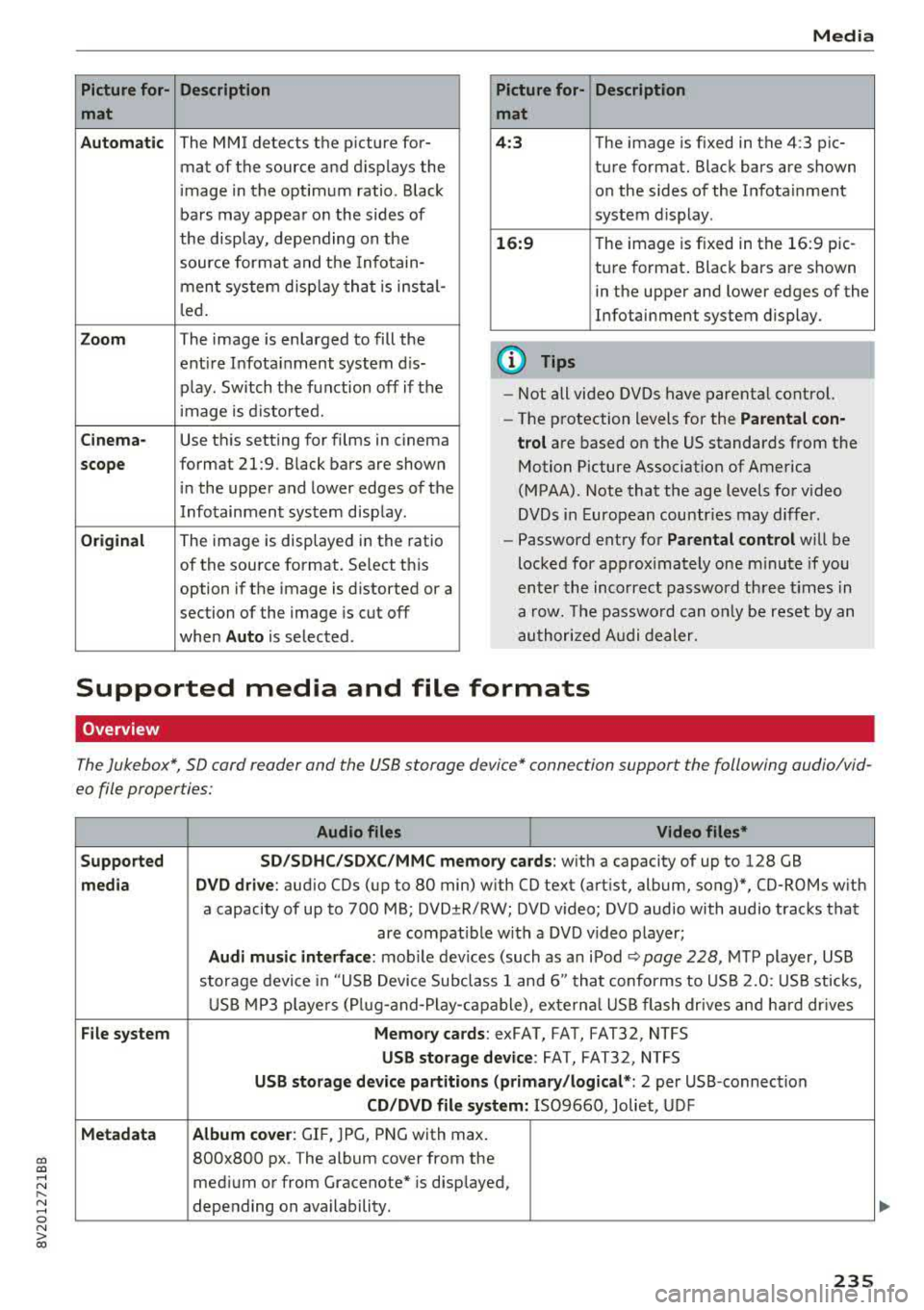
Picture for- Description
mat
Automatic
The MMI detects the picture for- mat of the source and displays the
image in the optimum ratio . Black
bars may appear on the sides of
the display, depending on the
source format and the Infotain-
ment system d isp lay that is instal-
led.
Zoom The image is enlarged to fill the
ent ire Infotainment system d is-
p lay . Switch the function off if the
image is distorted.
Cinema-Use this setting for films in cinema
scope format 21:9. Black bars are shown
in the upper and lower edges of the
Infotainment system display.
Original The image is displayed in the ratio
of the source format. Se lect th is
option if the image is distorted or a
section of the image is cut off
when
Auto is selected . Media
Picture for- Description
mat
4 :3 The image is fixed in the 4:3 pie-
ture format. Black bars are shown on the sides of the Infotainment
system display.
16:9 T he image is f ixed in the 16:9 pie-
ture format . Black bars are shown
in the upper and lower edges of the
Infotainment system display.
(D Tips
- Not all video DVDs have parenta l control.
- The protection levels for the
Parental con-
trol
are based on the US standards from the
Motion Picture Association of America
(MPAA). Note that the age levels for v ideo
DVDs in European countries may differ.
- Password entry for
Parental control will be
locked for approx imately one m inute if you
enter the incorrect password three times in
a row. The password can o nly be reset by an
authorized Audi dealer.
Supported media and file formats
Overview
The Jukebox*, SD card reader and the USB storage device* connection support the following audio/vid
eo file properties:
Audio files Video files*
Supported SD/SDHC/SDXC/MMC
memory cards:
with a capacity of up to 128 GB
media DVD drive : audio CDs (up to 80 min) w ith CO text (artist, album, song)*, CO-ROMs with
a capacity of up to 700 MB; DVD±R/RW; DVD v ideo; DVD audio with audio tracks that
are compatible with a DVD video player;
Audi music interface: mobile devices (such as an iPod ¢ page 228 , MTP player, USB
storage device in "USB Device Subclass 1 and 6" that conforms to USB 2.0: USB sticks,
USB MP3 players (Plug-a nd-Play-capable), exte rna l USB flash drives and hard dr ives
File system Memory cards: exFAT, FAT, FAT32, NTFS
USB storage device: FAT, FAT32, NTFS
USB storage device partitions (primary /logical* : 2 per USB-connection
CD/DVD file system: IS09660, Joliet, UDF
Metadata Album cover
: GIF, )PG, PNG with max.
800x800 px . The album cover from the
medium or from Gracenote* is disp layed,
depending on availability.
235
Page 243 of 400
CXl CXl .... N r--N .... 0 N > 00
System settings
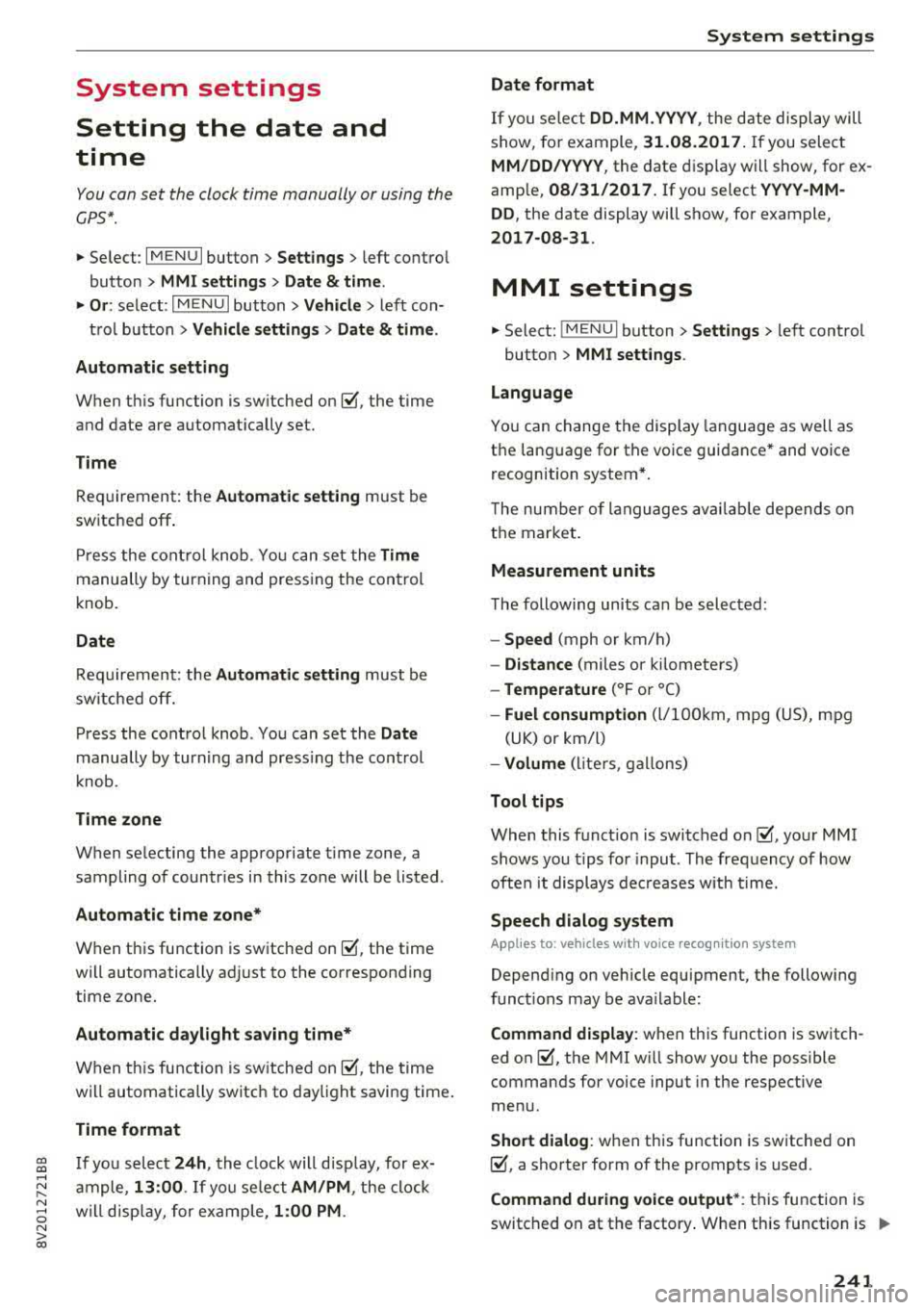
Setting the date and
time
You can set the clock time manually or using the
CPS*.
.,. Select : I MENU I button> Settings> left control
button >
MMI settings> Date & time .
.,. Or: select : IMENUI button> Vehicle > left con-
trol button >
Vehicle settings> Date & time.
Automatic setting
When this function is switched on g, the time
and date are automatically set.
Time
Requirement: the Automatic setting must be
switched
off .
Press the control knob. You can set the Time
manually by turning and pressing the control
knob.
Date
Requirement: the Automatic setting must be
switched
off.
Press the control knob . You can set the Date
manually by turning and press ing the cont rol
knob.
Time zone
When selecting the appropriate time zone, a
sampling of countr ies in this zone will be listed .
Automatic time zone*
When this function is switched on g, the time
will automatically adjust to the corresponding
time zone.
Automatic daylight saving time*
When this function is switched on g, the time
will automatically switch to daylight saving time .
Time format
If you select 24h, the clock will disp lay, for ex
ample ,
13:00 . If you se lect AM/PM , the clock
will disp lay, for example,
1:00 PM .
System settings
Date format
If you select DD.MM .YYYY , the date display will
show, for example,
31.08.2017. If you select
MM/DD/YYYY , the date display will show, for ex
ample,
08/31/2017. If you select YYYY-MM
DD ,
the date display will show, for example,
2017-08-31 .
MMI settings
.,. Select: !MENUI button> Settings> left control
button >
MMI settings .
Language
You can change the display language as well as
the language for the voice guidance* and voice
recognition system*.
T he number of languages available depends on
the market.
Measurement units
The following units can be selected:
-Speed (mph or km/h)
- Distance (miles or kilometers)
-Temperature (°For 0
()
-Fuel consumption (L/100km, mpg (US), mpg
(UK) or km/l)
- Volume (liters , gallons)
Tool tips
When this function is switched on g, your MMI
shows you tips for input. The frequency of how
often it displays decreases with time.
Speech dialog system
Applies to : vehicles wi th voice recog nitio n system
Depend ing on vehicle equipment, the following
functions may be ava ilable:
Command display : when this function is switch
ed on
g, the MMI will show you the possible
commands for voice input in the respective
menu.
Short dialog : when this function is switched on
g, a shorter form of the prompts is used .
Command during voice output*: this function is
switched on at the factory . When this function is
II>-
241
Page 251 of 400
CXl CXl .... N ,.__
N .... 0 N > 00
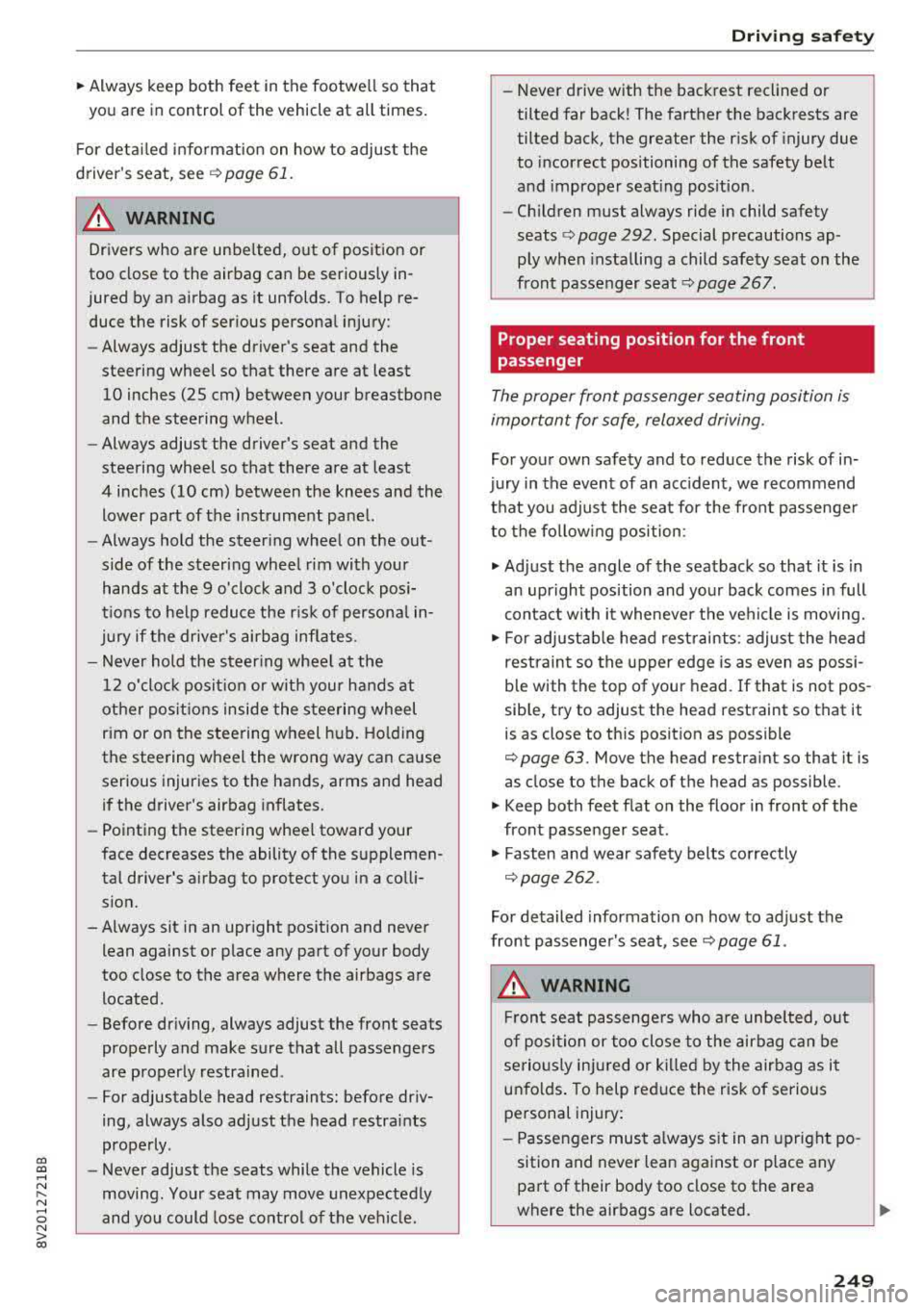
~ Always keep both feet in the footwell so that
you are in control of the vehicle at all times.
F or detailed information on how to adjust the
driver's seat, see
¢ page 61.
A WARNING
Drivers who are unbelted, out of position or
too close to the airbag can be seriously in
jured by an airbag as it unfolds. To help re
duce the risk of serious personal injury:
-Always adjust the driver's seat and the
steering wheel so that there are at least
10 inches (25 cm) between your breastbone
and the steering wheel.
-Always adjust the driver's seat and the
steering wheel so that there are at least
4 inches (10 cm) between the knees and the
lower part of the instrument panel.
-Always hold the steering wheel on the out
side of the steering wheel rim with your
hands at the 9 o'clock and 3 o'clock posi
tions to help reduce the risk of personal in
jury if the driver's airbag inflates.
-Never hold the steer ing wheel at the
12 o'clock posit ion or with your hands at
other positions inside the steering wheel
rim or on the steering wheel hub. Holding
the steering wheel the wrong way can cause
serious injuries to the hands, arms and head if the driver 's airbag inflates.
-Pointing the steering wheel toward your
face decreases the ability of the supplemen
tal driver's airbag to protect you in a colli sion.
-Always sit in an upright position and never lean against or place any part of your body
too close to the area where the airbags are
located.
-Before driving, always adjust the front seats
properly and make sure that all passengers
are properly restrained.
-For adjustable head restraints: before driv
ing, always also adjust the head restraints
properly .
-Never adjust the seats while the vehicle is
moving. Your seat may move unexpectedly
and you could lose control of the vehicle.
-
Driving safety
-Never drive with the backrest reclined or
tilted far back! The farther the backrests are
tilted back, the greater the risk of injury due
to incorrect positioning of the safety belt
and improper seating position.
-Children must always ride in child safety
seats
c::;, page 292. Special precautions ap
ply when installing a child safety seat on the
front passenger seat
c::;, page 267.
Proper seating position for the front
passenger
The proper front passenger seating position is
important for safe, relaxed driving.
For your own safety and to reduce the risk of in
jury in the event of an accident, we recommend
that you adjust the seat for the front passenger
to the fol lowing position:
~ Adjust the angle of the seatback so that it is in
an upright position and your back comes in full
contact with it whenever the vehicle is moving.
~ For adjustable head restraints: adjust the head
restraint so the upper edge is as even as possi
ble with the top of your head. If that is not pos
sible, try to adjust the head restraint so that it is as close to this position as possible
c::;, page 63. Move the head restraint so that it is
as close to the back of the head as possible .
~ Keep both feet flat on the floor in front of the
front passenger seat.
~ Fasten and wear safety belts correctly
c::;, page 2 62 .
For detailed information on how to adjust the
front passenger's seat, see
c::;, page 61 .
A WARNING
Front seat passengers who are unbe lted, out
of position or too close to the airbag can be
seriously injured or killed by the airbag as it
unfolds . To help reduce the risk of serious
personal injury:
-Passengers must always sit in an upright po
sition and never lean against or place any pa rt of their body too close to the area
where the airbags are located.
.,,.
249
Page 256 of 400
Driving safety
-Close the power top*,
- Open all air outlets in the instrument pan-
el,
- Switch off the air recirculation,
- Set the fresh air fan to the highest speed.
.&, WARNING
-
Always make sure that the doors, all win
dows, the power roof*, the power top* and
the rear lid are securely closed and locked to
reduce the risk of injury when the vehicle is
not being used.
- After closing the rear lid, always make sure
that it is properly closed and locked.
- Never leave your vehicle unattended espe cially with the rear lid left open. A child
could crawl into the vehicle through the lug
gage compartment and close the rear lid be
coming trapped and unable to get out. Be
ing trapped in a vehicle can lead to serious
personal injury.
- Never let children play in or around the vehi
cle.
- Never let passengers ride in the luggage
compartment. Vehicle occupants must al
ways be properly restrained in one of the ve
hicle's seating positions.
(D Tips
- Air circulation helps to reduce window fog
ging . Stale air escapes to the outside
through vents in the trim panel. Be sure to
keep these slots free and open.
- The tire pressure must correspond to the load. The tire pressure is shown on the tire
pressure label. The tire pressure label is lo
cated on the driver's side B-pillar. The tire
pressure label lists the recommended cold
tire inflation pressures for the vehicle at its
maximum capacity weight and the tires that
were on your vehicle at the time it was man ufactured. For recommended tire pressures
for normal load conditions, please see chap ter
c:> page 336.
254
· Tie-downs
The luggage compartment is equipped with four
tie-downs to secure luggage and other items .
Use the tie-downs to secure your cargo properly
c:> page 253, Loading the luggage compartment .
In a collision, the laws of physics mean that even
smaller items that are loose in the vehicle will
become heavy missiles that can cause serious in
jury . Items in the vehicle possess energy which
vary with vehicle speed and the weight of the
item . Vehicle speed is the most significant factor .
For example, in a frontal collision at a speed of
30 mph (48 km/h), the forces acting on a 10-lb
(4 .5 kg) object are about 20 times the normal
weight of the item. This means that the weight
of the item would sudden ly be about
200 lbs. (90 kg). You can imagine the injuries
that a 200 lbs. (90 kg) item flying freely through
the passenger compartment could cause in a col
lision like this.
.&, WARNING
Weak, damaged or improper straps used to
secure items to tie-downs can fail during hard
braking or in a collision and cause serious per
sonal injury.
- Always use suitable mounting straps and
properly secure items to the tie-downs in
the luggage compartment to help prevent
items from shifting or flying forward as dan
gerous missiles.
- When the rear seat backrest is folded down, always use suitable mounting straps and properly secure items to the tie-downs in
the luggage compartment to help prevent
items from flying forward as dangerous
missiles into the passenger compartment.
- Never attach a child safety seat tether strap
to a tie-down.
-
Page 264 of 400
Safe ty belts
Safety belts
Fastening safety belts
Safety fir st -everybody bu ckle up!
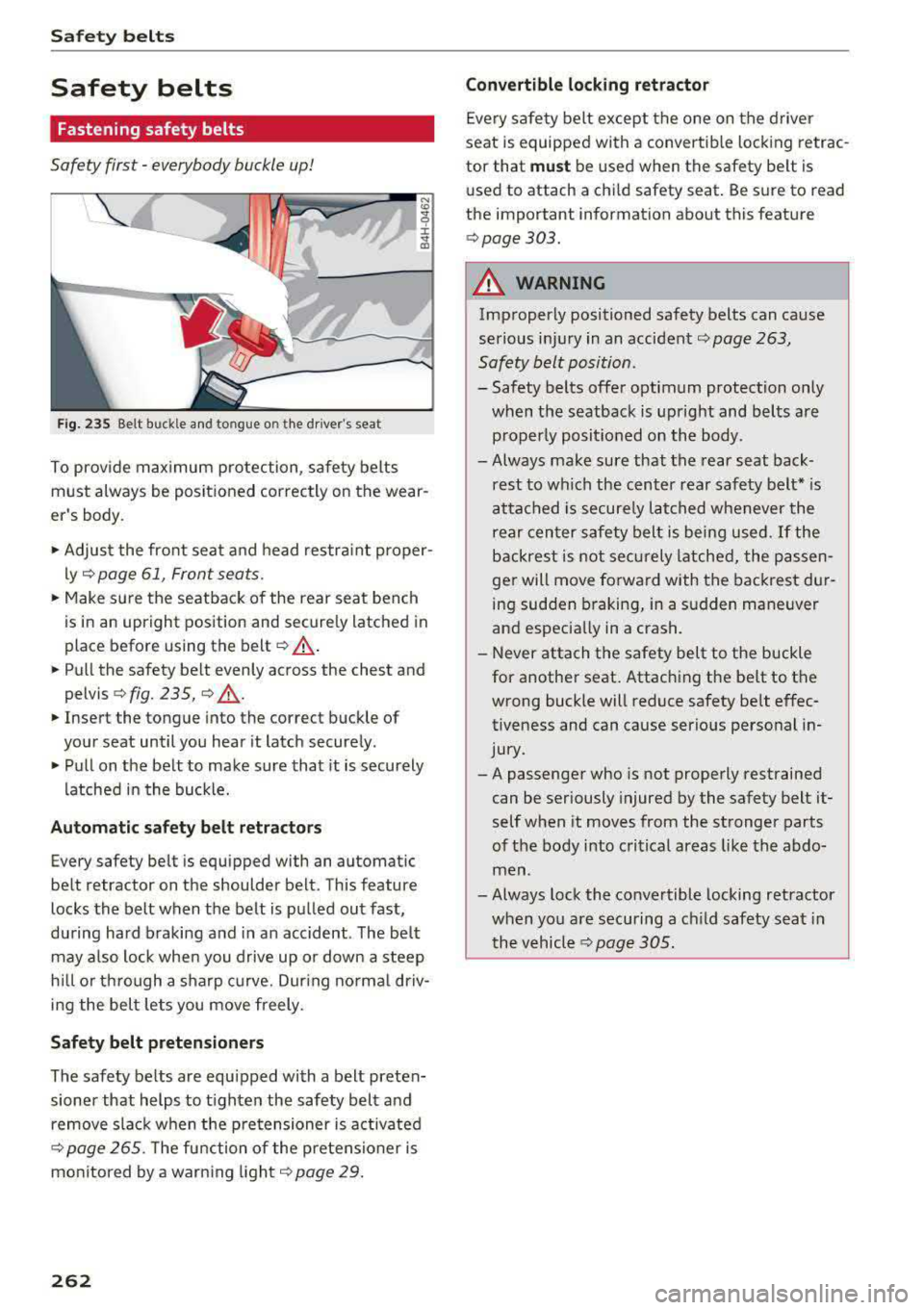
Fig. 235 Belt buckle an d tongue o n the driver's seat
To prov ide max imum protection, safety belts
must always be positioned correctly on the wear
er's body .
• Adjust the front seat and head restra int proper
ly ¢
page 61 , Front seats .
• Make sure the seatback of the rear seat bench
is in an upright position and secure ly latched in
place before us ing the
belt ¢,&. .
• Pull the safety belt evenly across the chest and
pelv is
¢fig. 235, ¢ ,&. .
• Insert the tongue into the correct buckle of
your seat until you hear it latch securely .
• Pull on the belt to make sure that it is securely
latched in the buck le.
Autom ati c safet y belt retr actors
Every safety belt is equipped with an automatic
belt retractor on the shoulder belt . This feature
locks the belt when the belt is pulled out fast,
during hard braking and in an accident . The belt
may a lso lock when you drive up or down a steep
h ill or th rough a sharp curve. Dur ing no rmal driv
ing the bel t lets you move freely.
Safe ty belt pret ension ers
The safety belts are equipped with a belt preten
sioner that helps to t ighten the safety belt and
remove slack when the pre tensioner is activated
¢ page 265. T he fu nction of the pretensioner is
monitored by a warning light ¢
page 29.
262
Convertibl e lock ing r etractor
Every safety belt except the one on the driver
seat is equipped with a convertib le lock ing retrac
tor that
mu st be used when the safety belt is
used to attach a child safety seat . Be sure to read
the important information about thi s feature
¢ page 303.
A WARNING
Improperly positioned safety belts can cause
serious injury in an accident ¢
page 263,
Safety belt position .
- Safety belts offer optimum protection only
when the seatback is upright and belts are properly posit ioned on the body .
- Always make sure that the rear seat back
rest to which the center rear safety belt* is
attached is securely latched whenever the
rear center safety belt is being used.
If the
backrest is not sec urely latched, the passen
ger will move forward with the back rest du r
ing sudden braking, in a sudden maneuver
and especia lly in a crash.
- Never attach the safety belt to the buckle for another seat. Attaching the belt to the
wrong buckle will reduce safety be lt effec
tiveness and can cause serio us personal in
jury.
-A passenger who is not properly restrained
can be seriously injured by the safety belt it
self when it moves from the stronger parts
of the body into critical areas like the abdo
men .
-Always lock the convertible locking retractor
when you are securing a c hild safety seat in
the vehicl e
¢page 305.