service AUDI A3 SEDAN 2017 Owner's Manual
[x] Cancel search | Manufacturer: AUDI, Model Year: 2017, Model line: A3 SEDAN, Model: AUDI A3 SEDAN 2017Pages: 400, PDF Size: 67.32 MB
Page 61 of 400
a, co .... N
" N .... 0 N > 00
_& WARNING
For safety reasons, the windshield wiper
blades should be replaced once or twice each
year .
(D Note
-The windshield wiper blades must only be
folded away when in the service position!
Otherwise, you risk damaging the paint on
the hood or the windshield wiper motor .
- You should not drive your vehicle or press
the windshield wiper lever when the wiper
arms are folded away from the windshield.
The windshield wipers would move back in
to their original position and could damage
the hood and windshield .
@ Tips
- You can also use the service position, for ex
ample, if you want to protect the windshield
from icing by using a cover.
- You cannot activate the service position
when the hood is open .
Replacing rear wiper blade
Applies to: vehicles with rear window wiper
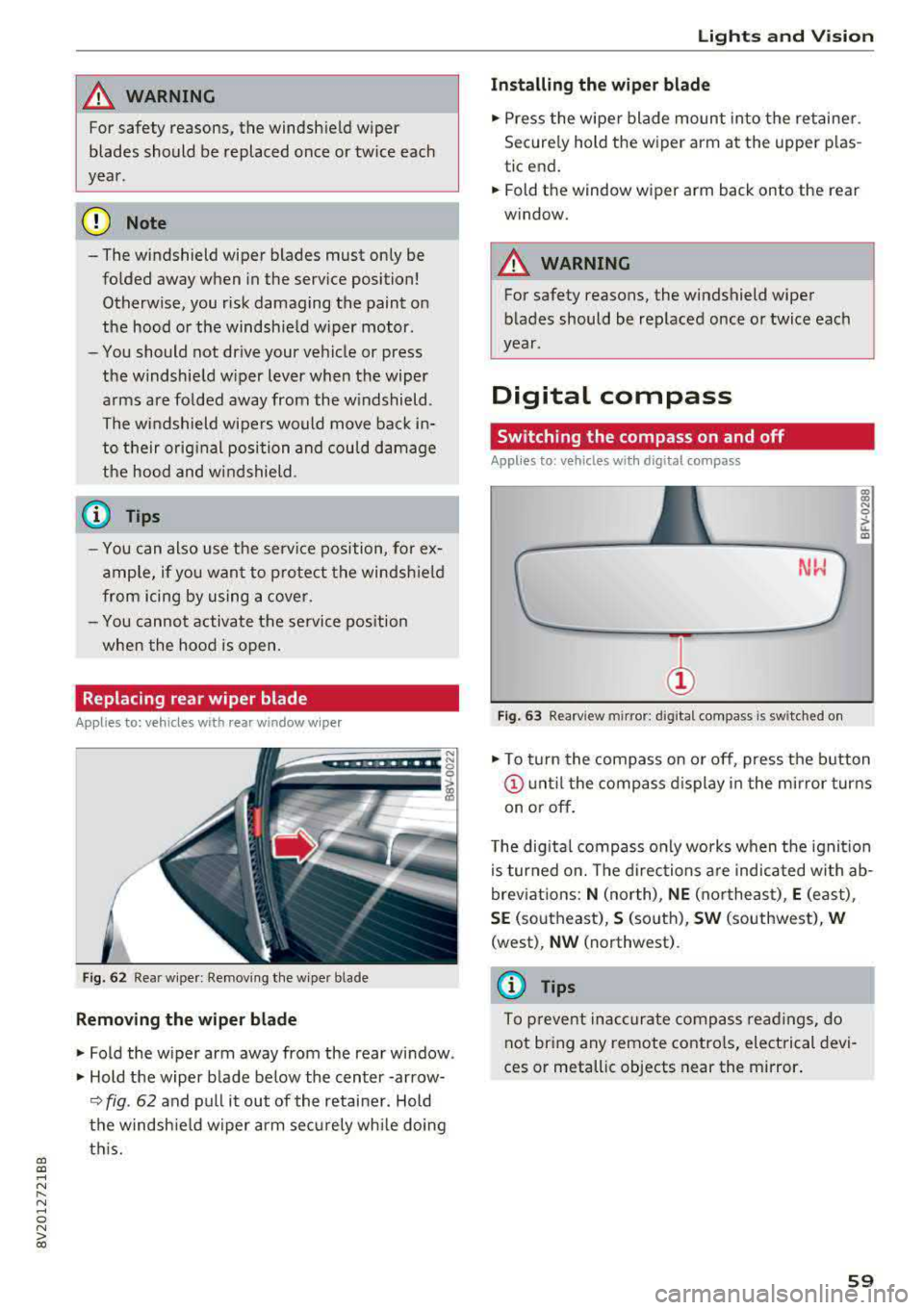
Fig. 62 Rear wiper : Removing the wiper bla de
Removing the wiper blade
"Fold the wiper arm away from the rear window .
" Hold the wiper blade below the center -arrow-
¢ fig. 62 and pull it out of the retainer . Hold
the windshield wiper arm securely while doing
this.
Lights and Vision
Installing the wiper blade
"Press the wiper blade mount into the retainer.
Securely hold th e wiper arm at the upper plas
tic end.
"Fold th e window wiper arm back onto the r ear
window.
_& WARNING
= -
For safety reasons, the windshield wiper
blades should be replaced once or twice each
year .
Digital compass
Switching the compass on and off
Applies to: vehicles with digital compass
Fig. 63 Rearview mir ror : digi tal compa ss is s wit c hed on
gi N 0
> u. m
"To turn the compass on or off, press the button
@until the compass display in the mirror turns
on or off.
The digital compass only works when the ignition
is turned on. The directions are indicated with ab
breviations:
N (north), NE (northeast), E (east) ,
SE (southeast), S (south), SW (southwest), W
(west) , NW (northwest) .
(D Tips
To prevent inaccurate compass readings, do
not bring any remote controls, electrical devi
ces or metallic objects near the mirror.
59
Page 72 of 400
Warm and cold
Warm and cold Climate control system
Description
The climate control system circulates, warms or
cools, and removes humid ity from the air in the
veh icle inter ior .
It is the most effective when the
windows and panorama glass roof* or power top*
are closed. If there is a build-up of heat inside
the vehicle, ventilation can help to speed up the
cooling process.
Pollutant filter
The pollutant filter removes pollutants such as
dust and pollen from the a ir.
Key recognition
Various settings are stored and assigned to the
remote control key be ing used .
These settings are different when the power top* is open or closed .
Presetting
Several functions can be preset in the Infotain
ment system.
Select in the Infotainment system:
I MENU I but
ton
> Vehicle > left control button > Air condi
tioning
A WARNING
Poor visibility can lead to accidents .
- For safer driving, keep all windows free of
ice, snow and fog.
- Become familiar with the correct use and
function of the climate control system as
quickly as possible, especially with the de
frosting and defogging functions.
- When the temperature is below freezing, only use the windshield washer system after
70
the windshield has been warmed by the cli
mate control system. The washer fluid could
freeze on the windshield and impair visibili
ty .
Cl) Note
-If you suspect that the climate control sys
tem is damaged, switch the system off to
prevent further damage and have it checked
by an authorized Audi dealer or authorized
Audi Service Facility.
- Repairs to the Audi climate control system
require special technical knowledge and
special tools . See an authorized Aud i dealer
or authorized Aud i Service Facility .
@ For the sake of the environment
-To save fuel, turn off the climate control
system cooling mode by press ing the A/C
button. This will also reduce emissions . The
climate control system is off when the LED
in the button turns off.
- In vehicl es w ith the efficiency prog ram*,
you can find other consumption information
and more economy tips <=? page 19.
(D Tips
- T o prevent interference with the heating
and cooling output and to prevent the win
dows from fogging over, the a ir intake in
front of the windshie ld must be free of ice,
snow or leaves.
- Condensation from the cooling system* can
drip and form a pudd le of water under the
vehicle. This is norma l and does not mean
there is a leak.
- The energy management system may tem
porarily switch off certain functions, such as
the seat heating* or rear window defogger.
These systems are available again as soon
as the energy supply has been restored.
Page 75 of 400
a, a, ..... N
" N ..... 0 N > 00
_& WARNING
-You should not use the recirculation mode
for an extended period of time, because no
fresh a ir is drawn in and the windows can
fog when coo ling mode* is switched off .
T his increases the r is k of an accide nt.
- Individuals with reduced sensitivity to pain
o r temperat ure cou ld develop burns when
using the seat heating fu nction . To reduce
the risk of injury, these ind iv iduals should
not use seat heating.
(D Note
To avoid damage to the heat ing elements in
the seats, do not kneel on the sea ts or place
heavy loads on a small area of the seat.
@ Tips
-The setting for the seat heating on the driv
er's side is ass igned to the key that is in use.
-If the front passenger's seat heat ing is
turned on, it will not turn on again automat
i ca lly if more than 10 m inutes have passed
between sw itching the ign ition off and
switching it on again .
Adjusting the air vents
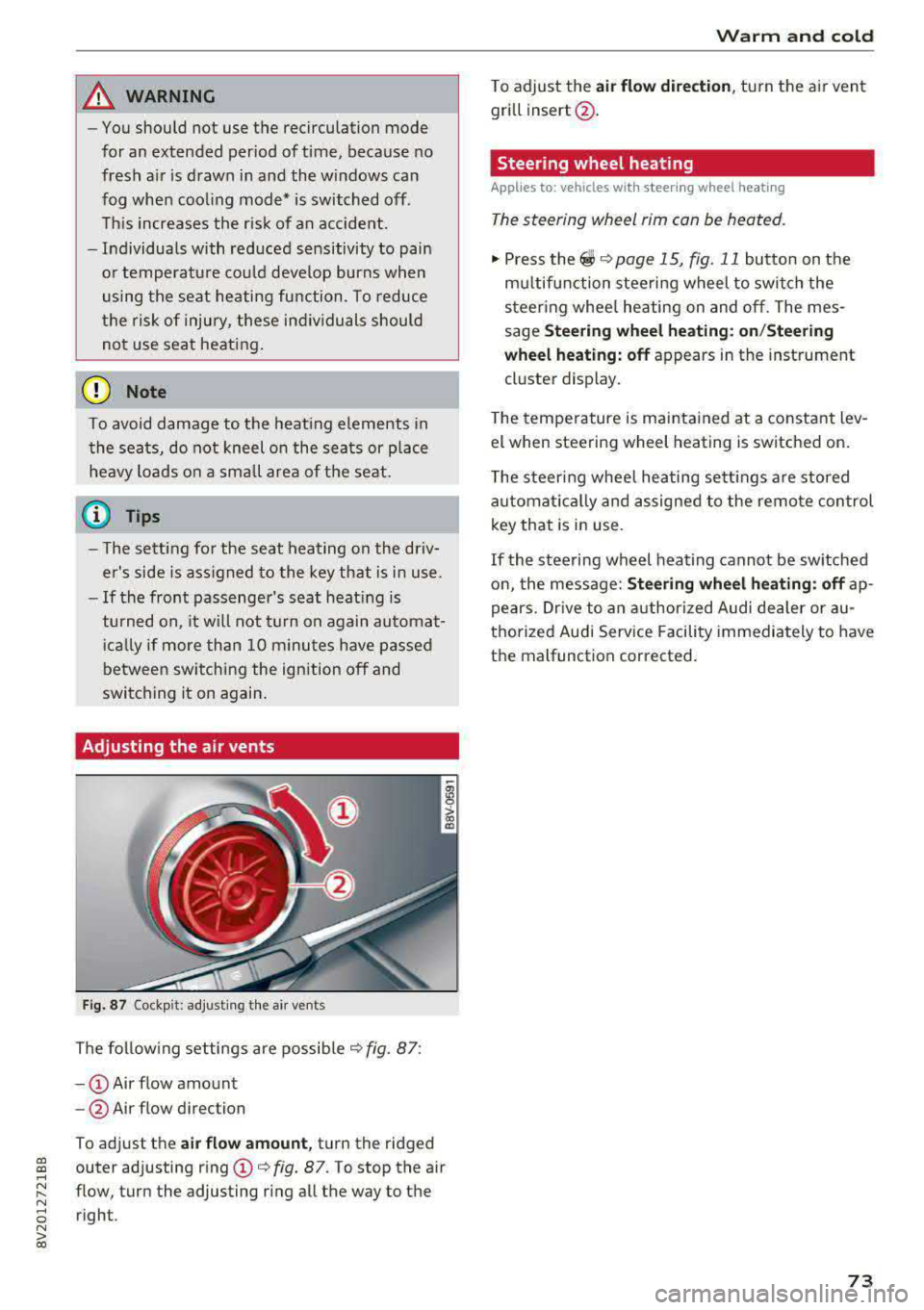
Fig. 87 Cockp it: adjust ing the air vents
The fol low ing settings are possib le ¢fig. 87:
- CD Air flow amount
-@ Air flow direction
To adjust the
air fl ow a mount , turn the ridged
outer adjusting ring
CD ¢ fig. 87. To stop the air
flow, turn the adjusting ring all the way to the right .
Warm and cold
To adjust the air fl ow directio n, turn the air vent
gri ll insert @.
Steering wheel heating
Applies to: vehicles with steering wheel heating
The steering wheel rim can be heated.
"' Press the ~ ¢ page 15, fig. 11 button on the
mu ltifunction steering wheel to switch the
steering whee l heating on and off. The mes
sage
St ee ring wheel h eatin g: on/St eering
w hee l heating: off
appears in the instrument
cluster display.
T he temperature is mainta ined at a constant lev
el when steering wheel heating is switched on.
T he s teering wheel heating settings a re stored
automat ica lly and assigned to the remote control
key that is in use .
If the steering wheel heating cannot be sw itched
on, the message:
S te e ring wh eel h eating : off ap
pears. Dr ive to an authorized Audi dea ler or au
thorized Audi Service Facility immediately to have
the malfunction corrected.
73
Page 78 of 400
Driving
other damage to the vehicle or other property .
-Have your vehicle maintained properly and
in accordance with the service recommenda
tions in your Warranty
& Maintenance book
let . Lack of proper maintenance as well as
improper use of the vehicle will impair the
function of the emission control system and
could lead to damage.
- Do not alter or remove any component of
the Emission Control System unless ap
proved by the manufacturer .
- Do not alter or remove any device, such as
heat shields, switches, ignition wires,
valves, which are designed to protect your
vehicle's Emission Control System and other
important vehicle components.
(I) Tips
The consumption estimates as published by
ENVIRONMENTAL PROTECTION AGENCY
(EPA) and Transport Canada may not corre
spond to your actual consumption on the
road, which will vary depending upon vehicle
load and speed, road and weather conditions,
trip length, etc .
Steering
Adjusting the steering wheel position
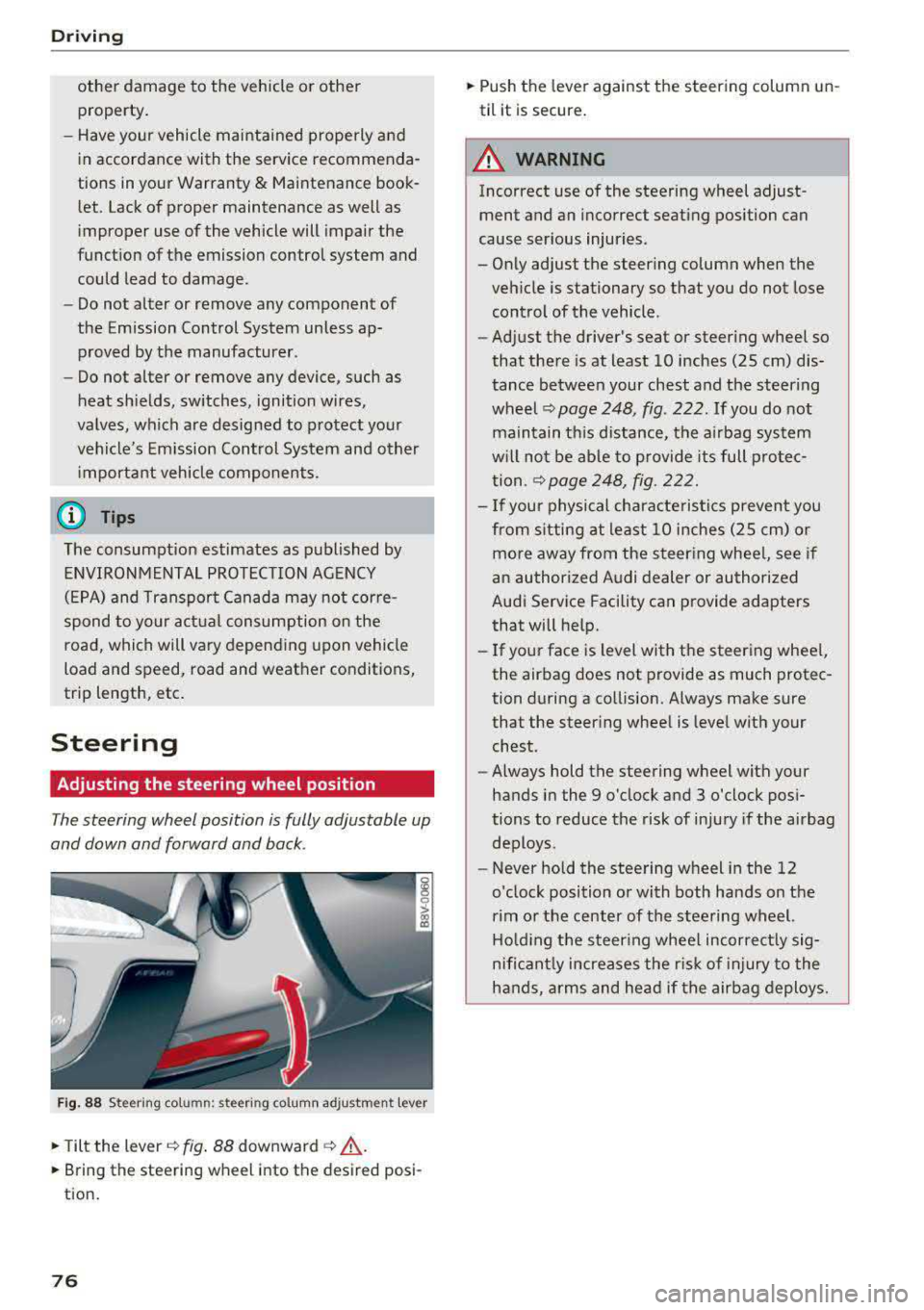
The steering wheel position is fully adjustable up
and down and forward and back .
Fig. 88 Steering column: steering col umn adjustment lever
.,. Tilt the lever c:::;, fig. 88 downward c:::;, ,& .
.,. Bring the steering wheel into the desired posi
tion.
76
.,. Push the lever against the steering column un
til it is secure.
A WARNING
Incorrect use of the steering wheel adjust ment and an incorrect seating position can
cause serious injuries.
- Only adjust the steering column when the
vehicle is stationary so that you do not lose control of the vehicle .
-
-Adjust the driver's seat or steering wheel so
that there is at least 10 inches (25 cm) dis
tance between your chest and the steering
wheel
c:::;, page 248, fig. 222 . If you do not
maintain this distance, the airbag system
will not be able to provide its full protec
tion .
c:::;,page248, fig. 222.
- If your physical characte ristics prevent you
from s itting at least 10 inches (25 cm) or
more away from the steering whee l, see if
an authorized Audi dealer or authorized
Audi Service Facility can provide adapters
that will help.
- If your face is level with the steering whee l,
the airbag does not provide as much protec
tion during a collision. Always make sure
that the steer ing wheel is level with your
chest.
- Always hold the steering wheel with your
hands in the 9 o'clock and 3 o'clock posi
tions to reduce the risk of injury if the airbag
deploys.
- Never hold the steering wheel in the 12
o'clock position or with both hands on the
rim or the center of the steering wheel.
Holding the steer ing wheel incorrect ly sig
nificant ly increases the r isk of injury to the
hands, arms and head if the airbag deploys.
Page 83 of 400
a, a, ..... N
" N ..... 0 N > 00
Starting the engine
when there is a
malfunction
Appl ies to: vehicles with convenience key
It may not be possible to start the engine under
certain circumstances, for example if the battery
in the vehicl e key is drained, if interference is af
fect ed the key or if there is a syst em malfunc
tion.
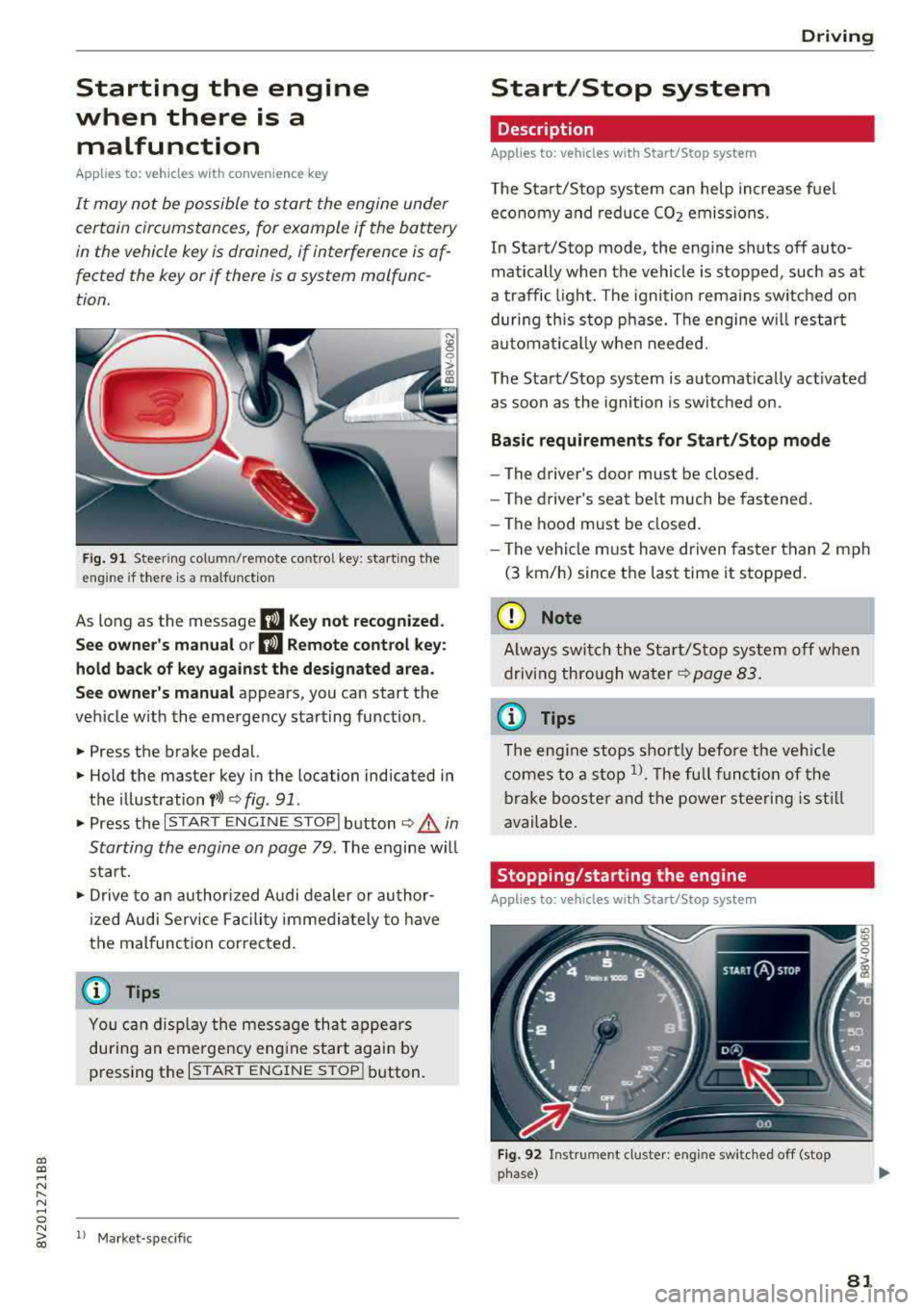
Fig. 91 Steer ing colum n/remote co ntro l key: starting the
e ngi ne if there is
a malfunction
As long as the message II Key not recognized.
See owner's manual or
II Remote control key:
hold back of key against the designated area.
See owner's manual
appears, you can start the
vehicle w ith the emergency starting function .
.,. Press the brake pedal.
.,. Hold the master key in the location indicated in
the illustration
f>l) r:> fig. 91.
.,. Press the I STAR T ENGIN E ST OPI button r:> _&. in
Starting the engine on page
79. The engine will
start.
.,. Drive to an authorized A udi dealer or author
ized Audi Service Facility immediately to have
the malfunction cor rected.
@ Tips
You can d isplay the message that appears
during an emergency engine start again by
pressing the
I START ENGINE STOPI button.
l l Market -s p ecific
D rivi ng
Start/Stop system
Description
Applies to: vehicles with Start/Stop system
The Start/Stop system can help increase fuel
economy and reduce CO2 emissions.
In Start/Stop mode, the engine shuts off auto
matically when the vehicle is stopped, such as at
a traffic light. The ignition remains switched on
during this stop phase. The engine w ill restart
automat ically when needed.
The Start/Stop system is automat ically act ivated
as soon as the ignition is switched on.
Basic requirements for Start/Stop mode
-The driver's door must be closed .
- The driver's seat belt much be fastened.
- The hood must be closed.
- The vehicle must have driven faster than
2 mph
(3 km/h) since the last time it stopped.
(D Note
Always switch the Start/Stop system off when
driving through water
r:> page 83.
(D Tips
The engine stops shortly before the veh icle
comes to a stop
l). The full function of the
brake booster and the power steering is still
available.
Stopping /starting the engine
Applies to: vehicles with Start/Stop system
Fig. 92 Instrument cluster: eng ine swi tched off (stop
phase)
81
Page 86 of 400
Driving
"'To start driving and release the parking brake
automatically, press the accelerator pedal as
usual.
In addition to releasing the parking brake auto
matically, other convenience and safety functions
are available when you start driving
¢ page 85,
Starting from a stop.
Preventing the automatic parking brake
release
The vehicle could begin rolling unintentionally,
dep ending on the hill or if towing a trailer.
"'To prevent the parking brake from releasing au
tomatically, pull and hold
the®> switch and
press the accelerator pedal. The parking brake
remains set and prevents the vehicle from roll
ing backward.
"'You can release the(®) switch again once you
are sure that you are giving enough driving
force to the wheels by pressing the accelerator pedal.
Emergency braking function
You can use the emergency braking function in an emergency situation, or if the standard brake op
eration malfunctions or is disabled .
"'Pull and hold the(®) switch.
"' As soon as you release the ®> switch or acceler-
ate, the braking stops .
Pulling and holding
the®> switch while driving
the vehicle activates the emergency braking func
tion . The vehicle is braked at all four wheels by
activating the hydraulic brake system. The brak ing effect is similar to heavy
braking ¢,&. .
To reduce the risk of activating the emergency
braking by mistake, a warning tone (bu zzer)
sounds when
the(®) switch is pulled. Emergency
braking stops as soon as
the(®) switch is released
or the accelerator pedal is pressed .
Parking
"' Press the brake pedal to stop the vehicle.
"'Pull the®> switch to set the parking brake.
"'Place the selector lever in the P position.
"'Turn the engine off ¢,&. .
84
"'Turn the steering wheel when parking on in
clines so that the wheels will roll into the curb
if the vehicle starts moving.
A WARNING
- Do not press the accelerator pedal inadver
tently if a gear is selected when the vehicle
is stationary and the engine is running . Oth
erwise, the vehicle will start to move imme
diately and this could result in an accident.
- Emergency braking should only be used in
an emergency, when the normal brake pedal has failed or the brake pedal is obstructed.
During emergency braking, your vehicle will
brake similar to heavy braking. ESC and the
associated components (ABS, ASR, EDL)
cannot overcome the laws of physics. In cor
ners and when road or weather conditions
are bad, a full brake application can cause
the vehicle to skid or the rear end to swerve,
which increases the risk of an accident.
- If the power supply fails, you cannot set the
parking brake if it is released . In this case,
park the vehicle on level ground and secure
it by placing the selector lever in the P posi
tion. See an authorized Audi dealer or au
thorized Audi Service Facility for assistance.
-Always take the vehicle key with you when
leaving your vehicle, even for a short period
of time . This applies particularly when chil
dren remain in the vehicle. Otherwise chil
dren could start the engine, release the
parking brake or operate electrical equip
ment such as power windows, which in
creases the risk of an accident.
- No one should remain in the vehicle when it
is locked - especially children. Locked doors
make it more difficult for emergency work
ers to get into the vehicle, which puts lives
at risk .
(D Tips
When stopping at a traffic signal or stopping
in city traffic, you can set the parking brake
manually . The vehicle does not have to be
held with the brake pedal. The parking brake
eliminates the tendency to creep when a se lector lever position is engaged . As soon as
Page 87 of 400
CXl CXl .... N ,.__
N .... 0 N > 00
you press the accelerator pedal, the parking
brake releases automatica lly and your vehicle
starts to move ¢
page 85.
(D Tips
-Occasional noises when the park ing brake is
set and re leased are normal and are not a
cause for concern .
-The parking brake goes through a se lf-test
cycle at regular intervals when the vehicle is
stopped. Any noises associated w ith this are
normal.
-If there is a power failure, the parking brake
will not set if it is released, and it will not
release if it is
set¢,&.. See an author ized
Audi dealer or authorized Audi Service Fa
cility for assistance.
Starting from a stop
Various convenience and safety functions may be
ava ilable when the vehicle begins dr iv ing, de
pending on vehicle equipment .
Starting on hills with the parking brake set
Requirement: the driver's door must be closed.
.,. To start driving comfortab ly when on a hill, set
the parking brake and begin driving as usual.
The braking force of the parking brake does not
release automatically until the wheels build up
enough driving force .
Starting on hills with hill hold assist
Hill hold assist makes it easier to start on hills.
Requirement: the driver's door must be closed
and the eng ine must be r unning.
.,. To activate hill hold assist, press and hold the
brake pedal for several seconds . The vehicle
must be in an uph ill direction of travel.
After releasing the brake pedal, the braking pow
er is ma inta ined for a br ief
moment ¢,& to pre
vent the vehicle from rolling back when starting.
During this time, you can easily beg in to move
your veh icle.
Driving
A WARNING
Applies to: ve hicles with h ill ho ld assist
-I f you do not beg in driving immediate ly or
the engine stalls afte r releasing the brake
pedal, your veh icle may begin to roll back
ward. Press the brake pedal or set the park
ing brake immediately.
-The intelligent technology of hill hold assist
cannot overcome the limitations imposed by
natural physica l laws. The increased comfort
offered by hill hold assist should not cause
you to take safety risks.
-Hill hold assist cannot hold the vehicle in
p lace on a ll hills (for example, if the ground
is slippery or icy).
-To reduce the risk of an accident, always make sure the veh icle is situated safely
while stationary.
Automatic transmission
Introduction
Applies to: vehicles with automatic transmissions
T he automatic transmission is controlled elec
tronically . Upshifting and downshifting occur au
tomatica lly .
When a
moderate driving style is used, the
transm ission selects the most economica l dr iv ing
mode. The transmission upshifts at a lower RPM
and downshifts at a higher RPM to improve fue l
efficiency.
In the S selector leve r pos ition, the transmission
switches to a sporty mode after a kick-down or
when the driver uses a
sporty driving style char
acterized by quick accelerator pedal movements,
heavy acce leration , frequent changes in speed
and traveling at the maximum speed.
If desired, the driver can also select the gea rs
manually (tiptronic mode) ¢ page 90, Manual
shifting (tiptronic mode).
The S tron ic is a dual-clutch transmission. Power
is transferred using two clutches that work inde
pendent ly from one another. They rep lace the
torque converter used in conventional automatic
..,.
85
Page 89 of 400
CXl CXl .... N ,.__
N .... 0 N > 00
the lever back again will select the norma l D
mode. The instrument cluster display shows the
selected driv ing mode.
I n the
no rmal mode D, the transmission a uto
matica lly selects the suitab le gear ratio .
It de
pends on engine load, vehicle speed and driving
style.
The engine 's power reserves are used fully in the
Sport mode S . Shifting may become noticeab le
when accelerating .
To move from selector lever position N to D, yo u
must press the bra ke pedal and the veh icle mus t
be traveling less than 1 mph (2 km/h) or be sta
tionary ¢.&, .
A WARNING
Read and follow all WARNINGS.
-The vehicle can roll even if the ignition is
switched off.
-Never select R or P while driv ing, beca use
this increases the risk of an accident.
-Power is st ill transmitted to the wheels
when the eng ine is r unning at idle . To pre
vent the vehicle from "creeping", you must
keep your foot on the brake in all selector
lever positions (except P) when the engine is
running . Otherwise, th is increases the r isk
of an accident .
-Do not inadvertent ly press the acce lerator
peda l when the veh icle is stopped if a gear is
engaged . Otherwise the veh icle wi ll start to
move immediately, even i f the pa rking brake
is se t. T his cou ld res ult in a crash.
-Do not p ress the accelerator pedal when
changing the s elector leve r pos ition w hile
the vehicle is stationa ry and the engine is
running.
-Never leave yo ur vehicle with the engine
running wh ile in gear. If yo u m ust leave
yo ur vehicle when the engine is runn ing, set
the parking brake and move the selecto r lev
er to the P position.
- T o decrease the risk of an accident, t hese
lector lever must be in the P position and
the parking brake must be set before open ing the hood and wo rking on a running en-
D riv ing
gine . A lways read and follow the app licab le
warn ings
¢ page 316, Working in the en
gine compartment.
-Read and fo llowing a ll WARNINGS c> .&. in
Driving tips on page 88 .
(D Tips
-Audi drive select: Sporty shifting character
istics can be selected using the
Dynam ic
dr iving mode c> page 143 Sw ill appear in
the instrument cluster display instead of D.
-If you accidentally select N wh ile driving,
take your foot off the accelerator peda l im
mediately and wait for the eng ine to slow
dow n to idle before selecting Dor S.
-If the selector leve r does not engage, there
is a malfunct ion. The engine is disabled to
prevent the veh icle from drivi ng off unin
tentionally. To allow t he selecto r lever to
engage again, proceed as follows:
- >Briefly press the brake pedal.
-If the vehicle does not move forward or in
reverse even tho ugh a drive posit io n is se
lected, proceed as follows:
->If the vehicle does not move in the desired
direction, the system may not have engaged
the drive position correctly. Press the bra ke
peda l and select the dr ive position again.
- >If the vehicle still does not move in the de
sired d irection, there is a system malfunc
tion. See an autho riz ed Aud i dealer o r au
tho rized Audi Service Fac ility for assistan ce
t o have the system checked .
- If there is a powe r fail ure, the se lector lever
w ill not move ou t of the P posi tion. The
emergency re lease can be used if this hap
pens
¢ page 92.
(D Tips
P lug-i n hy brid drive *: the transm iss ion
swi tches automatically to the norma l mode D
if the
l""'I button¢ page 100 is p ressed wh ile
i n sport mode S.
87
Page 93 of 400
CXl CXl .... N ,.__
N
Requirement: the engine must be at operating
temperature and the steering whee l must not be
turned.
.,. Deact ivate ll the Start/Stop system*
¢ page 83. The LED in the ~ button turns on.
.,. With the engine running, press the l.t, O FFj but
ton briefly one time .
.,. Pull the selector lever back out of the D/S posi
t ion briefly to select the S posit ion, or press it
toward the right into the tiptronic pos ition or
select the
D ynamic driving mode in drive se
lect*
¢ page 143 .
.,. Press the b rake peda l firmly with you r left foot
and hold it all the way down for at least one
second .
.,. At the same time, press the gas pedal all the
way down with your right foot unti l the engine
reaches and stays at a high RPM level.
.,. Remove your left foot from the brake.
A WARNING
- Always adapt yo ur driv ing to the traffic flow .
- Only use Launch Control when road and traf-
fic cond itions allow it and other dr ivers will
not be endangered or impacted by your driv
ing and the vehicle's acceleration .
- Please note that the drive whee ls can sp in
and the vehicle can break away when sport
mode is switched on, especially when the
road is s lippery.
- Once the vehicle has started moving, press
the
I ~ OFF j button briefly to tu rn the sport
mode off.
@ Tips
-The transmiss ion temperature may increase
s ignificantly after us ing the launch cont rol
program.
If that happens, the program may
not be available for a few m inutes. It w ill be
available again after a cool-down pe riod.
-When accelerating using the la unch control
program, all veh icle parts are subject to
heavy loads. Th is can lead to increased
wear .
8 1
> It is not pos sib le to deact iv a te t he system w it h all vers io n s N iii of th e tran sm is s ion.
D riv ing
Emergency mode
Applies to: vehicles with automatic transmissions
In the event of a system malfunction, there is an
emergency program .
If all of the selector lever positions are highlight
ed with a light background in the instrument
cluster display, there is a system malfunct ion and
the transmission is running i n the emergency
program. The veh icle can sti ll be driven in emer
gency mode, but only with red uced speed and
not in all gears . In some cases, the vehicle
can
not d riv e in revers e .
([) Note
If the transm ission runs in eme rgency mode,
drive to a n author ized A udi dealer or author
i zed Audi Se rvice Facility immed iate ly to have
the malfunction corrected .
Transmission malfunction
Applies to: vehicles with automatic transmissions
• Tran smission: malfunction! Please stop ve
hicle and shift t o P
There is a ma lfunction in the transm ission. Park
the vehicle secure ly and do not continue driving.
See an author ized Audi dealer or authorized Audi
Service Facility for assistance .
• Transmis sion overheat ing! Plea se stop the
ve hicle!
The tra nsmission is too hot and can become dam
aged. Stop and le t the transmiss ion cool w ith the
engine r unning (at idle) in the P se lector lever po
sition . Then the indicator light and the message
turn off, drive to an authorized A udi dealer or au
thori zed Audi Serv ice Facility immediately to have
the malfunction corrected. If the indicator light
and the driver message do not turn off, do not
continue driving . See an authorized Aud i dealer
or authorized Audi Serv ice Facility for ass istance.
[!l Tran smiss ion malfunction : you can continu e
driving
.,,.
91
Page 94 of 400
Driving
Drive to an a uth o rized Audi dea ler or authorized
Audi Service Facility immediately to have the
malfunct ion corrected .
rm Transmis sion malfunction : no reverse ge ar
( you can continue driving )
Drive to an a uthorized Aud i dea le r or aut horized
Aud i Serv ice Facility immediately to have the
malfunct io n corrected.
[O] Tran smis sion malfunction: You can continue
driving in D until engine off
Drive the vehicle away from moving traffic and
park. See an authorized Audi dealer or autho rized
Aud i Serv ice Facility for assistance .
rm Transmission : too hot. Pleas e adapt d riving
style
Continue driving mode rately. When the indicator
light turns off , you can continue driving normal
ly .
rm Transmis sion : please p ress brake pedal and
select gear ag ain
If the transmission malfu nctions be ca u se the
temperature is too high, a message appears
when the transmission is cooled.
Selector lever emergency release
Applies to: vehicles with automatic transmissions
If the vehicle's power supply fails, the selector
lever can be released in an emergency .
Fig. 100 Selecto r leve r: remov ing the s hifter boot
92
Fig . 101 Se lector leve r: u si ng the eme rgency release to
mov e out of the Park pos iti on
To maneuver or tow the vehicle, the emergency
release must be used to
move the selector lever
from the P position.
The emergency release mechanism is located in
the right area unde r the selector lever shift gate .
Using the emergency release can be complicated .
We recommend contacting an authorized Audi
dealer or author ized Audi Service Fac ility for as
s ista nce, if necessary .
The screwdr iver from the vehicle tool kit located
i n the luggage compartment is needed to for the
emergency re lease
r::;, page 353 . Use the flat side
of the reversible sc rewdriver blade .
Removing the shifter boot
.. Set the park ing brake <®> r::;, .&. to secure your
vehicle from ro lling. If th is is not possible, se
cure your vehicle from rolling using another
method.
.,. Sw itch the ignit ion off .
.,. To loosen the shifter boot, carefully inse rt the
fla t side of the s crewd river si deways in to the
slit nea r the sh ifte r boot
r::;, fig. 100 .
.,. Care fully p ry t he sh ifter boot o ut w ith t he
screwdriver wh ile gripping the boot at the fold
and pulling it upward and out -arrow -unti l all
four corne rs are re leased .
.. Fold the shifter boot up around the sh ifter knob
¢fig. 101.
Selector lever emergency release
.. Press and hold the ye llow release b utton with
the screwdriver
¢ fig. 101 .
.. Press the release button in the selector lever @
and move the lever into the N position .
II>