service AUDI A3 SEDAN 2017 Service Manual
[x] Cancel search | Manufacturer: AUDI, Model Year: 2017, Model line: A3 SEDAN, Model: AUDI A3 SEDAN 2017Pages: 400, PDF Size: 67.32 MB
Page 129 of 400
a, a, ..... N
" N ..... 0 N > 00
Which functions can be contr oll ed?
When you sw itch adaptive cruise control on, you
can set the current speed as the "control speed"
¢ page 128 , Switching on/off .
When driving, you can stop cruise co ntro l
¢ page 130 or change the speed ¢ poge 129 at
any time .
You can also set the distance to the veh icle ahead
and set t he adaptive cruise contro l dr iv ing pro
g ram
¢ page 131 .
General information
Applies to: vehicles with Audi adaptive cruise control/Audi pre
sense front
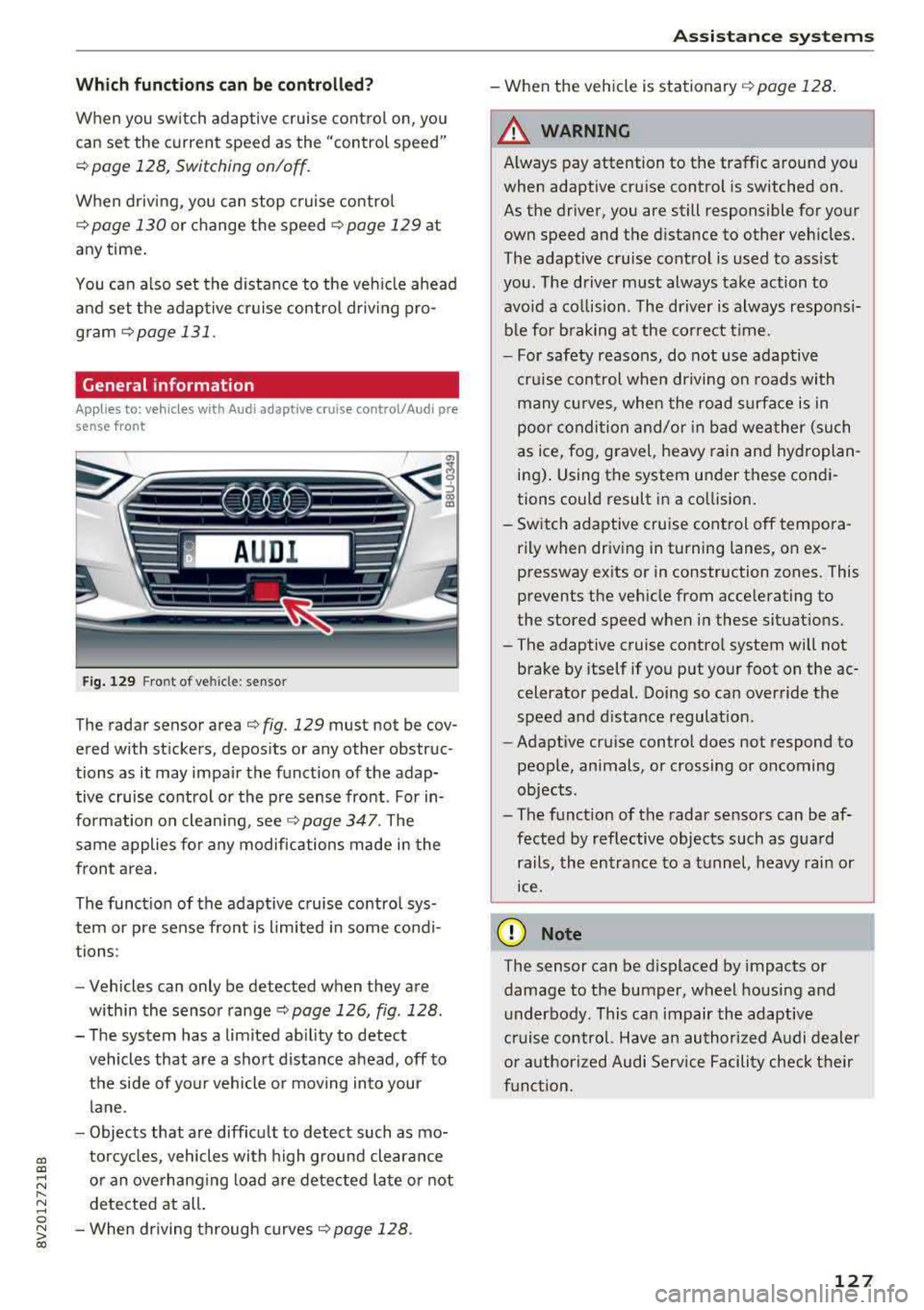
F ig. 129 Fro nt o f vehicl e: sensor
T he radar sensor area ¢ fig . 129 mus t not be cov
ered with st ickers, deposits or any other obstruc
tions as it may impair the function of the adap tive c ruise control or the pre sense front . For in
formation on clean ing ,
see ¢ page 347 . The
same applies fo r any modifications made in the
front area .
The funct ion of the adaptive cruise contro l sys
tem or pre sense fron t is l imited in some cond i
tions :
- Vehicles can only be detected when they are
within the senso r
range¢ page 126, fig . 128 .
- The system has a limited abil ity to detect
vehicles that are a short distance ahead, off to
t h e side of your vehicle or moving into your
lane .
- Objects that are difficu lt to detect such as mo
torcycles, vehicles with high ground clearance
or an overhanging load are detected late or not detected at all .
- When driving through curves
¢ page 128 .
Ass is ta nce syst ems
-When the vehicle is stationary ¢ page 128.
A WARNING
Always pay attention to the traffic around you
when adaptive cruise control is switched on.
As the driver , you are still responsible for your
own speed and the d istance to other veh icles .
The adaptive cruise control is used to ass ist
you . The driver m ust always take action to
avo id a co llision . The d river is always responsi
b le for b raking at the co rrect t ime.
- For safety reasons, do not use adaptive
cru ise control when driving on roads with
many cu rves , when the road s urface is in
poor conditio n and/or in bad wea ther (such
as ice, fog, gravel, heavy rain and hyd roplan
ing) . Using the system under these condi
tions could result in a co llision.
- Sw itch adaptive cruise control off tempora
rily when driving in turning lanes, on ex pressway ex its or in construction zones . This
prevents the veh icle from acce lerating to
the stored speed when i n these situat ions.
- The adaptive cruise contro l system will not
brake by itself if you put you r foot on the ac
celerator pedal. Doing so can override the
speed and d istance regulat ion .
- Adapt ive cruise control does not respond to
peop le, animals, or crossing or oncoming
objects .
- The funct ion of the radar sensors can be af
fected by reflective objects such as gua rd
rails, the en trance to a t unnel, heavy rain or
ice .
(D Note
The sensor can be displaced by impacts or
damage to the bumper, wheel housing and underbody. This can impair the adaptive
cruise control. Have an authorized A udi dealer
o r authorized Audi Service Facility check t heir
f u nct ion.
127
Page 135 of 400
CXl CXl .... N ,.__
N .... 0 N > 00
fall below t he warn ing t hreshold for an ex
tende d pe riod of time .
Messages
Applies to: veh icles with Audi adaptive cruise control
ll'J ACC: unavailable
The system ca nnot guaran tee that it will detec t
ve hicl es co rrectly a nd it h as sw it c he d off . T he
sensor was moved or is fau lty . Dr ive to an au tho r
i z ed A udi dealer or au thori zed A udi Service Fac ili
ty immediately to have the malfunction cor rect
ed .
Ill ACC : currently unavailable . No sensor vision
II ACC: currently unavailable. Sensor vision re
stricted due to surroundings . See owner's man
ual
This message appears if the sensor view is ob
structed, for example by leaves, snow, heavy
sp ray o r d i rt. C lean the sensor
r:::;, page 12 7,
fig. 12 9.
II ACC : currently unavailable . Gradi ent too
steep
The road exceeds the maximum possib le ang le
for safe adaptive cruise control operation . The
adapt ive cr uise control cannot be sw itched on .
II ACC: only available in D, Sor M
Select the D/S or M se lector lever posi tion.
Ill ACC : parking brake applied
The adaptive cruise co ntro l system switches off
automatically if the parking brake is set. T he
adapt ive cr uise control is ava ilable aga in a fter re
l easi ng the par king brake .
ll'J ACC: currently unavailable. Stabilization
c ontrol input
T his message appea rs if the Electronic Stabiliza
tion Control (ESC) is tak ing action to stabili ze the
ve hicle. In this case, adapt ive cruise control
sw itches off automatically.
II) ACC off: manual control!
This message appea rs if the veh icle rolls back
when sta rting on a slight in cline , even though
Assistance systems
ACC is ac tive . Press t he b rake pedal to preven t
t h e vehi cle from rolling o r starting to move.
Distance warning: malfunction! Please contact
Service
T he system canno t gua rantee that it will detect
vehicles cor rect ly and it has switc hed off. The ra
dar sensor was move d or is faulty. Drive to an a u
thorized Aud i de aler o r au thori zed Audi Service
F acility immed iate ly to have the ma lfunction co r
rected.
Distance warning: currently unavailable. Sensor
view restricted due to surroundings.
T h is message appears if the senso r view is ob
str ucted, for examp le by leaves, snow, heavy
s pra y or dirt. Cle an t he
sensor <> page 12 7,
fig. 129 .
Distance warning: currently unavailable. See
owner's manual
This message appears if the system has a tempo rary fa ilure.
If this occurs m ultiple t imes, drive to
an a uth orized Aud i dea le r or a uth orized Audi
Se rvice Facility i mmed ia te ly to h ave the ma lfu nc
t ion co rre cte d.
Fasten seat belt
The system is not complete ly ava ilable if the dr iv
er 's seat belt is unfastened.
Stat. obj. ahead
T h is m ess age appears if yo u wo uld like to switch
t h e sys tem on and t here is a s ta ti onary objec t di
rectly in front o f yo ur vehicle.
Door open
The system is not available whe n the vehicle is
stationary and the driver's door is open.
Audi pre sense
Introduction
Appl ies to : vehicles wit h Aud i pre sense
Within t he limits of the system, the pre sense
f unct ions can initiate measures in pa rtic ularly
dange rous situations to protect the vehicle pas-
sengers and other road users.
..,.
133
Page 138 of 400
Assistance systems
by this. Have an authorized Audi dealer or au
thorized Audi Service Facility check their func
tion.
(D Tips
- You can cancel the braking with increasing
force that is initiated by the system by brak
ing yourself, by accelerating noticeably or
by swerving.
- Certain pre sense front functions switch off
when ESC is switched off (sport mode) or
when driving in reverse.
- If you restrict or switch off the ESC, the pre
sense also switches itself off ¢
page 152.
Settings in the Infotainment system
Applies to: vehicles with Audi pre sense front/Audi adaptive
cruise control
~ Select in the Infotainment system: I MENU I but
ton
> Vehicle > left control button > Driver as
sistance
> Audi pre sense.
System -
the pre sense functions can be switched
on/off.
If the system is switched off, it switches on again
automatically once the ignition is switched on
again.
Prewarning -the early warning can be switched
off permanently or the pre sense front warning
point can be set
(Early/Medium/Late).
Messages
Applies to: vehicles with Audi pre sense
IIJ Audi pre sense: malfunction! Please contact
Service
This message appears when the pre sense func
tion is affected. For example, this could be
caused by a faulty sensor. If the message stays
on, drive immediately to an authorized Audi deal
er or authorized Audi Service Facility to have the
malfunction corrected.
IIJ Audi pre sense currently restricted. Restrict
ed sensor vision due to surroundings.
This message appears if the sensor view is ob
structed, for example by leaves, snow, heavy
136
spray or dirt. Clean the sensor if necessary
¢page 127, fig. 129.
II] Audi pre sense: currently restricted
This message appears if the ESC is restricted or
switched off, for example .
II] Audi pre sense: currently restricted. See
owner's manual
This message appears when there is a temporary
failure in a subsystem, such as the ESC. If this
message appears repeatedly, drive to an author
ized Audi dealer or authorized Audi Service Facili
ty to have the malfunction corrected .
fl] Audi pre sense: emergency braking system
off
This message appears if the pre sense functions
are switched off through the Infotainment sys
tem or if the system is not ready.
Audi active lane assist
Description
Applies to: vehicles with Audi active lane assist
Active lane assist (lane departure warning) de
tects lane marker lines within the limits of the
system using a camera in the windshield. If you
are approaching a detected lane marker line and
it appears likely that you will leave the lane, the
system will warn you with corrective steering.
You can override this steering at any time. If you pass over a line, the steering wheel will vibrate
lightly. In order for this warning vibration to oc
cur, it must first be switched on in the Infotain
ment system. Active lane assist is ready for oper
ation when the lane marker line is detected on at
least one side of the vehicle.
The system is designed for driving on express
ways and highways and therefore only activates
at speeds above approximately 40 mph (65 km/
h).
Applies to: vehicles with Audi side assist
If you activate a turn signal when active lane as
sist is ready and it classifies a lane change as crit
ical because of vehicles traveling alongside you or
approaching you, there will be noticeable
.,.
Page 140 of 400
Ass is tance sy stems
If the system is switched on but is not ready to
provide warn ings, one of the following cou ld be
the cause:
- T here is no lane marker line .
- The re levant lane marker lines are not detected
(for example, markings in a constru ction zone
or because they are obstructed by snow , dirt,
water or lighting).
- T he vehicle speed is below the ac tiva tion speed
of approx imately 40 mph (65 km/h).
- T he lane is too narrow or too wide .
- T he curve is too nar row .
- The driver's hands are not on the steering
whee l.
@ Tips
-Make sure the camera 's field of view
¢ fig . 142 is not obst ructed by sticke rs o r
anything else . For informat ion on cleaning,
see
i::> page 347.
- In certain markets: if the system is switched
on, it will sw itch on automat ically each time
the ig nition is swi tched on.
Display in the instrument cluster
Applies to: ve hicles with Audi active lane assist
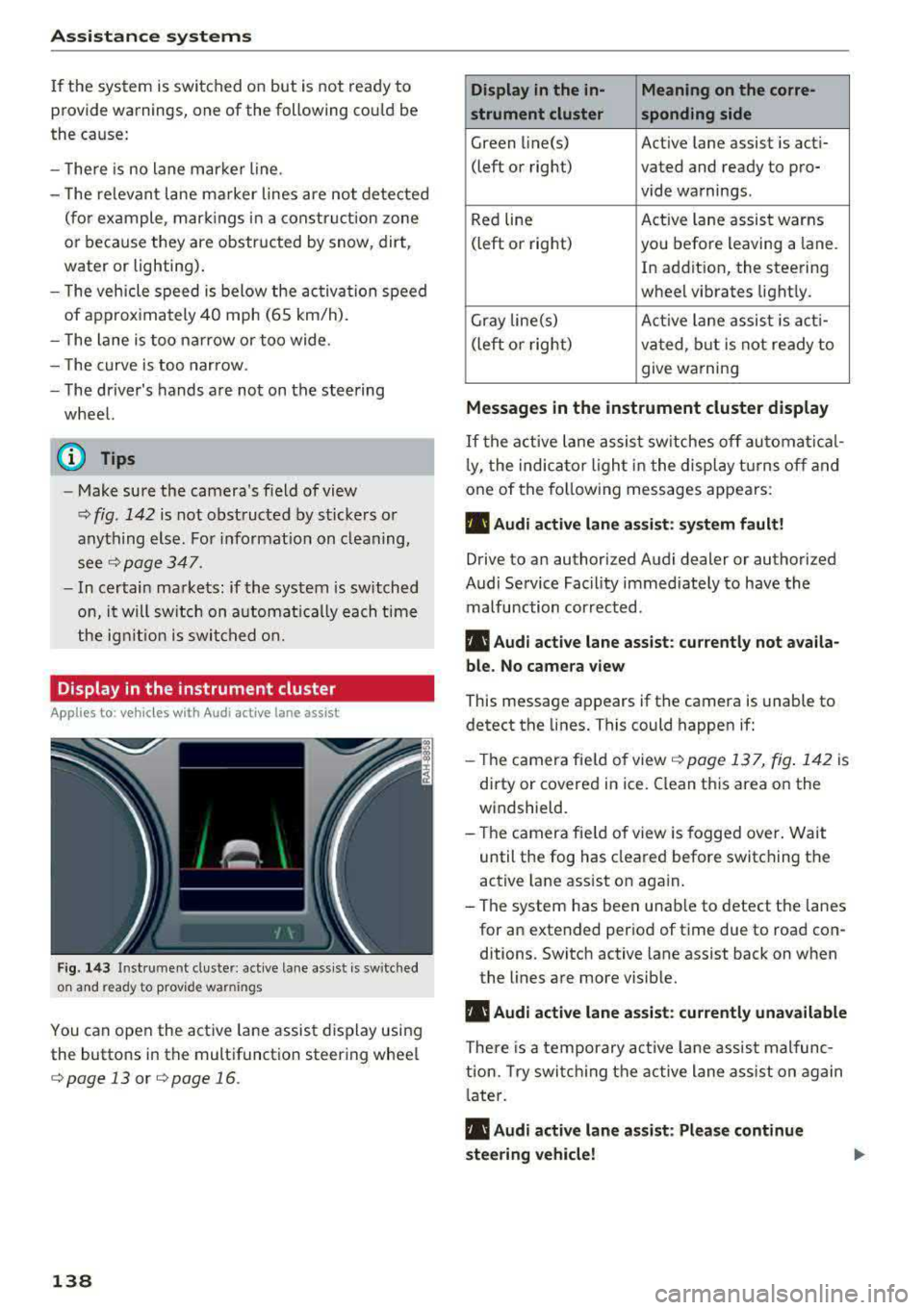
Fig . 14 3 Instrum ent cluste r: act ive lane as sis t is sw itc hed
on and read y to p rov id e wa rnin gs
You can open the act ive lane assist display using
the buttons in the multifunct io n steering wheel
¢ page 13 or ¢ page 16 .
138
Display in the in- Meaning on the corre-
strument cluster sponding side
Green line(s) Act ive lane assist is act i-
(left or right) vated and ready to pro- vide warnings.
Red line Act
ive lane assist warns
(left or right) you befo re leaving a lane.
In addition, the steering
wheel vibrates light ly.
Gray line(s) Active lane assis t is act i-
(left o r right) va ted , b ut is not ready to
give warning
Messag es in the instrument cluster display
If the active lane assist sw itches off au tomati cal
l y, the indica to r li ght in the display t urns off and
one of the fo llow ing messages appears :
• Audi active lane assist: sy stem fault!
Drive to an authori zed Audi dealer or authori zed
Audi Service Facil ity immediate ly to have the
malfunction corrected.
• Audi active lane a ssist : cu rrently not a vaila
bl e. No came ra view
This message appears if the camera is unable to
detect the lines. This could happen if:
- Th e camera fie ld of view
¢ page 137, fig . 142 is
dirty or covered in ice . Clean this area on the
windsh ield.
- The camera fie ld of view is fogged over. Wait
until the fog has cleared before switching the
active lane assist on again.
- The system has been unable to detect the lanes for an extended per iod of time due to road con
ditions . Switch active lane assist back on when
the lines are more visib le.
• Audi active lane a ssist: currently una vailable
There is a temporary act ive la ne assis t malfunc
tion. Try swi tch ing the active lane a ss ist on again
l ate r .
• Audi active lane a ssist : Please continue
steering vehicle!
Page 145 of 400
@ Tips
-You can cance l the automatic brake activa
tion w ith increasing bra king fo rce if you ap
ply the brakes y ourse lf or accelerate cons id
erab ly.
- In some sit uations, rea r cross-traffic assist
may warn yo u even if there is no cross traffic
i n a cr itical a rea , for examp le w hen back ing
i nto a parki ng space or ma neuver ing.
- The rea r cross-traffic ass ist also switches off
whe n you switch off the ESC.
- The rea r cross traffic assist switches on and
off thro ugh the pa rking aid
qpage 146.
- The system is not available when towin g a
trailer.
Messages
A ppl ies to: ve hicles with Audi side assist
If t he side assist switches off automatically, a
message appea rs in the ins trumen t clus ter dis
pl ay.
@j Aud i side assist: System fault!
The system can not guarantee that it wi ll detect
ve hicles co rrectly and it has switched off. The
sensors have been moved o r are faulty. Have t he
system checked by an authorized Audi dea ler or
author ized Audi Service Facility soon .
@j Audi side assist: currently unavailable. No
sensor vision
@j Audi side assist: currently unavailable. Sen
sor vision restricted due to surroundings . See
owner 's manual
The radar senso r vis io n i s im paire d. Do not cove r
the area i n front of t he senso rs with bike wheels,
stickers, dirt o r othe r objects. C lean the area in
fron t of t he senso rs, if necessary
q page 140,
fig. 147.
@j Audi side assist: currently unavailable
S ide assis t cann ot be swi tched o n at thi s time be
c a use t here is a mal func tion (fo r ex amp le, the
~ ba ttery ch arge level may be too low) .
....
~ @j Audi side assist: unavailable in towing mode
....
~ @j Audi side assist: unavailable in towing mode
00
Assistance systems
Sid e ass ist swi tches off automatically a fter a
s h ort time when a factory -insta lled tra ile r h itch
i s connected to the e lectrica l connecto r on the
t railer . T here is no gua rantee the system will
switch off when using a retrofitted trailer h itch.
Do not use side assist when tow ing a trailer .
Ill Rear parking aid : obstacle detection restrict
ed
T he rea r cross -tra ffic ass is t is not available. Ei
t h er th e ESC is sw itched off, or the rada r senso rs
may be cove red by a bike rack, st icke rs, leaves,
snow o r other objects. Switch the ESC on, or
clean the area in front of the senso rs if necessa ry
q page 140, fig . 147. If t his message continues
to be displayed , dr ive immed ia tely to a n author
iz ed Audi dea ler or author ized Audi S ervic e Facili
ty to ha ve the m alfunc tion re paire d.
Audi drive select
Introduction
Applies to : vehicles wit h Audi drive se lec t
Audi dr ive select makes it poss ible to experience
diffe rent types of vehicle settings in one vehicle.
T he dr iver can select from three modes,
Comfort ,
Auto
and Dynamic , using t he r:;~, bu tton in the
c en te r c onsole o r by usin g the Info ta in m ent sys
te m. T hi s a llow s yo u t o swi tch between a sporty
and a com fo rt ab le driv ing mode, fo r ex am ple. In
t h e
Individual* mode , the settin gs ca n be adjus t
ed to yo ur persona l preferences . T his makes it
p oss ible to com bine settings such as a spo rty en
gine setting with light steer ing.
Description
App lies to : vehicles wi th Audi drive se lect
The veh icle set up i n eac h mode depends on the
vehicle's features. However, the eng ine a nd
stee ring are always affec ted .
Engine and automatic transmission
Depend ing on the mode, the engine an d auto
matic transm ission* respond more q uickly o r in a
more ba la nced manner to acce lerato r pedal
movements . In the sporty dynam ic mode, th e
t ransm iss io n shifts at higher spe ed ranges .
..,.
143
Page 148 of 400
Parking systems
Parking systems
General information
A ppl ies to: ve hicles w ith parking system plus/rearview cam
era
Depending on your vehicle's equipment , various
parking aids will help you when parking and ma
neuvering.
The
parking system plus assists you when park
ing by audibly and visually indicating objects de
tected
in front of and behind the vehicle
¢page 147.
The rearview camera shows the area behind the
vehicle in the Infotainment system display. This display assists you when you are cross or parallel parking. The parking system plus functions are
also available ¢
page 148.
A WARNING
-
-Always look for traffic and check the area
around your vehicle by looking at it directly
as well. The parking system cannot replace
the driver's attention. The driver is always
responsible when entering or leaving a park
ing space and during similar maneuvers .
-Please note that some surfaces, such as
clothing, are not detected by the system .
-Sensors and cameras have blind spots in
which people and objects cannot be detect
ed . Be especially cautious of small children
and animals .
-Always pay attention to the area around the
vehicle -us ing the rearview mirror, too.
-The sensors can be displaced by impacts or
damage to the radiator grille, bumper,
wheel housing and the underbody . The park
ing system may be impaired as a result.
Have an authorized Audi dealer or author
ized Audi Service Facility check their func
tion .
(D Note
-Some objects are not detected or displayed
by the system under certain circumstances:
-objects such as barrier chains, trailer draw
bars, vertical poles or fences
146
-objects above the sensors such as wall ex
tensions
-objects with certain surfaces or structures
such as chain link fences or powder snow
-If you continue driving closer to a low ob
ject, it may disappear from the sensor range. Note that you will no longer be
warned about this obstacle.
-Keep enough distance from the curb to re
duce the risk of damage to the rims.
(D Tips
-T he system may provide a warning even
though there are no obstacles in the cover age area in some situations, such as:
-certain road surfaces or when there is tall
grass .
-external ultrasonic sources such as from
cleaning vehicles.
-in heavy rain, snow, or thick vehicle ex
haust.
-We recommend that you practice parking in
a traffic-free location or parking lot to be
come familiar with the system . When doing
this, there shou ld be good light and weath
er conditions.
-You can change the volume and pitch of the
signals as well as the display¢
page 150.
-What appears in the infotainment display is
somewhat time-delayed .
-The sensors must be kept clean and free of
snow and ice for the parking aid to operate .
Page 150 of 400
Parking system s
-The ignition is switc h off and back on again.
-The park ing brake is set and then re leased.
-T he selector lever must be in the P position .
Segments in the vis u al display
The segments in front of and behind the vehicle
i::> fig . 153 help you to determine the distance be
tween your vehicle and an obstacle. The red
lines* mark the expected direction of travel ac
cord ing to the steering angle . A white segment
i n dicates an identified obstacle that is outside of
the vehicle's path. Red segments show identified
obstacles that are in your vehicle's path . As your
veh icle comes closer to the obstacle, the seg
ments move closer to the veh icle. The collision
area has been reached when the next to last seg ment is displayed. Obstacles in the collision area ,
including those outside of the vehicle's path, are
shown in red . Do not continue dr iv ing forward or
i n
reverse ¢.& in General information on
page 146,
¢ Cf) in General information on
page 146!
Rearview camera
Introduction
App lies to: veh icles with rearview camera
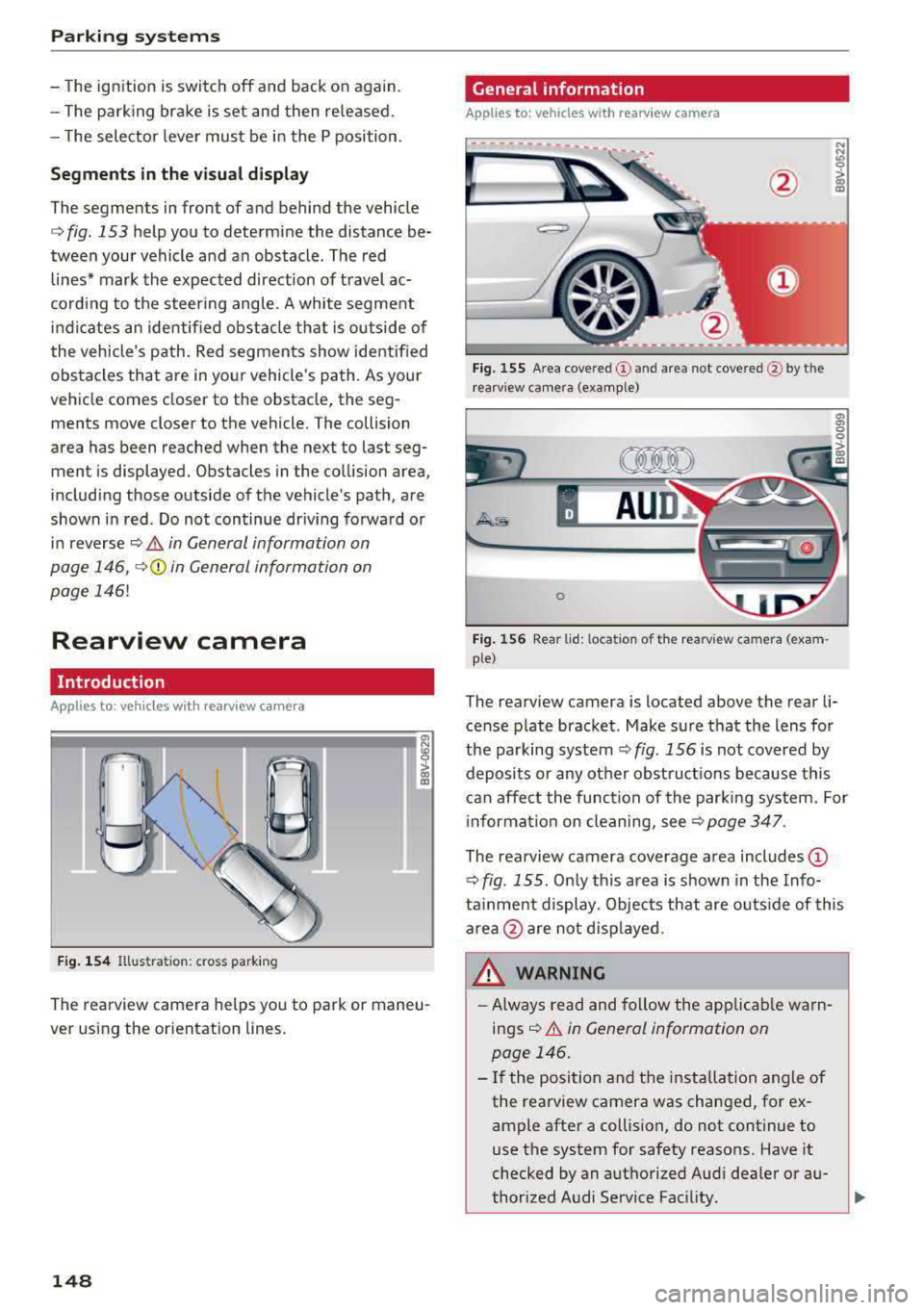
Fig. 1 54 Illustra tion: c ross park ing
a, N
~
> 00 (X)
The rearview camera helps you to park or maneu
ver using the orientation lines .
148
General information
Applies to: vehicles with rearview camera
Fig. 155 Area cove re d (D and area not cove re d @ by t he
r earv iew camera (examp le)
A UD ~
0
Fig . 156 Rea r lid: loca tion of the rearv iew ca mera (exa m
ple)
The rearview camera is located above the rear li
cense p late bracket . Make sure that the lens for
the parking system
¢ fig . 156 is not covered by
deposits or any other obstruct ions because this
can affect the function of the parking system. For
i nforma tion on cleaning,
see¢ page 347.
The rearview camera coverage area includes (D
¢ fig . 155 . Only this area is shown in the Info
ta inme nt display. Objects that are o uts ide of this
area
@ are not disp layed .
WARNING
-Always read and follow the applicab le warn
ings
¢ &. in General information on
page 146 .
-If the position and the installation angle of
the rearview camera was changed, for ex
ample after a collision, do not continue to
use the system for safety reasons. Have it
checked by an aut horized Aud i dealer or au-
thorized Audi Service Fac ility .
..,
Page 155 of 400
CXl CXl .... N ,.__
N .... 0 N > 00
-There is no vehicle stabilization when ESC/
ASR are switched off.
(D Tips
-ESC/ASR cannot be switched off or sport
mode cannot be switched on if the cruise
control system * or the adaptive cruise con
tro l* is sw itched on.
-Malfunctions in the Audi magnetic ride *
may make it imposs ible to switch the ESC/
ASR off or to switch sport mode on.
Brakes
New brak e pad s
New brake pads do not achieve their full braking
effect during the first 2S0 mi (400 km) . They
must be "broken in" f irst. However, you can com
pensate for the slightly reduced braking force by
pressing firmly on the brake pedal. Avoid heavy
braking during the break-in per iod.
Wear
B rake pad
wear depends largely on the way the
veh icle is driven and on operat ing cond itions.
This is especially true if you are driving frequently
in the c ity and on curves or with a sporty driving
style.
Operat ing no ise
Noises may occur when braking depending on the
speed, braking force and outs ide cond itions such
as temperature and humidity .
Effect of wat er and road salt
In certain situations, for example after driving
through water, in heavy rain, after overnight con
densation or after washing your car, the braking
effect can be reduced by moisture or ice on the brake rotors and brake pads . The brakes must be
"dr ied" first w ith a few careful brake applica
tions .
At higher speeds and with the windsh ield wipers
turned on, the brake pads press against the brake
rotors for a short amount of time. Th is action,
which is not felt by the d river , happens at regular
Intellig ent Technology
interva ls and ensures a better reaction time for
the brakes in wet weather.
T he brak ing effect ca n also be reduced if yo u are
driv ing on sal ted roads and yo u do not app ly the
brakes for long per iods o f time. The layer o f salt
on the brake rotors and pads must be worn off
first when the brakes are applied.
Corrosion
Leav ing the veh icle pa rked for long periods of
time, low mileage and avoiding heavy b raking
can contribute to corrosion on the brake roto rs
and to dirty brake pads .
If you usua lly avoid heavy bra king or if there is
corrosion present, occasiona l heavy brak ing at
high speeds is recommended to clean the brake
rotors and
pads ¢,& .
Brake system malfunction
If you notice that the bra ke pedal travel has sud
denly inc re ased, then a br ake circuit in the dua l
c ircuit b rake system may have malfunctioned.
Drive to an authorized Audi dealer or authorized
Audi Service Facility immediate ly to have the
problem corrected. On the way there, drive with
reduced speed and keep in mind that you will
need a longer distance to stop and you will need
to press the brake pedal harder.
L o w bra ke fluid le ve l
When the brake fluid level is low, malfunctions in
the brake system may occur. The brake fluid level is electronically monitored.
Brake bo oster
The brake boos ter amplifies the p ressure you ap
ply to the brake pedal. It on ly operates whi le the
engine is running or when the ignition is switched
on (p lug-in hybrid dr ive*) .
A WARNING
-Only app ly the brakes for the purpose of
cleaning the brake system when road and
traffic cond itions permit. You must not en
danger other road users. This increases the
risk of an accident.
153
Page 159 of 400
CXl CXl .... N r--N .... 0 N > 00
Some state laws restrict the retrieval or down
l oading of data stored by EDRs insta lled in a vehi
cle for the express purpose of retrieving data af
ter an accident or crash event without the own
er's consent.
Audi will not access the EDR and/or similar data
or give it to others -
- u nless the vehicle owner (or lessee if the vehi
cle has been leased) agrees; or
- u pon the off icia l request by the po lice; or
- upon the order of a court of law or a govern-
ment agency; o r
- for the defense of a laws uit through the judicial
dis cove ry process.
- Audi may also use the data for research about
vehicle ope ration and safety performance or
provide the data to a thi rd party for research
purposes without iden tifying the specific vehi
cl e or information about the identity of its own
er or lessee and on ly after the recorded vehicle
data has been accessed .
Vehicle control modules
Your vehicle is also equipped wi th a number of
e lec tronic contro l mod ules for vario us veh icle
systems, such as eng ine management, emission
control, airbags, and safety belts .
These electroni c con trol modules re co rd da ta
d ur ing normal vehi cle ope ra tion that may be
needed by trained technicians for diagnostic and
repair pu rposes. The recording capability of these
modules is limited to data (no sound is record
ed). On ly a small amount of data is actually re
corded over a very limited per iod of t ime, or stor
ed when a system fau lt is detected by a control
module . Some of the data stored may relate to
ve hicle speed, d irect ion, or brak ing, as well as re
stra int system use and perfo rma nce in the even t
of a c rash . Stored data can also only be read and
downloaded with special e quipment that is di
rect ly connected to the veh icle.
(D Tips
Your veh icle may be equ ipped with Audi con
nect. Your use of ce rtain Audi conne ct fea
tures req uires w ireless services that are pro
vided by a third pa rty wire less telecommuni-
Intellig ent Technology
cations provider. Fo r details regarding how in
fo rmation obtained through Audi connect is
collected, p rocessed, transmitted, used, and
shared, please see you r contract with the
wireless telecommun ications provider and the
"About Audi connect" tab in your vehicle's In
fota inment system:
I MENU I butto n> Audi
connect
> right contro l button > About Audi
connect .
157
Page 174 of 400
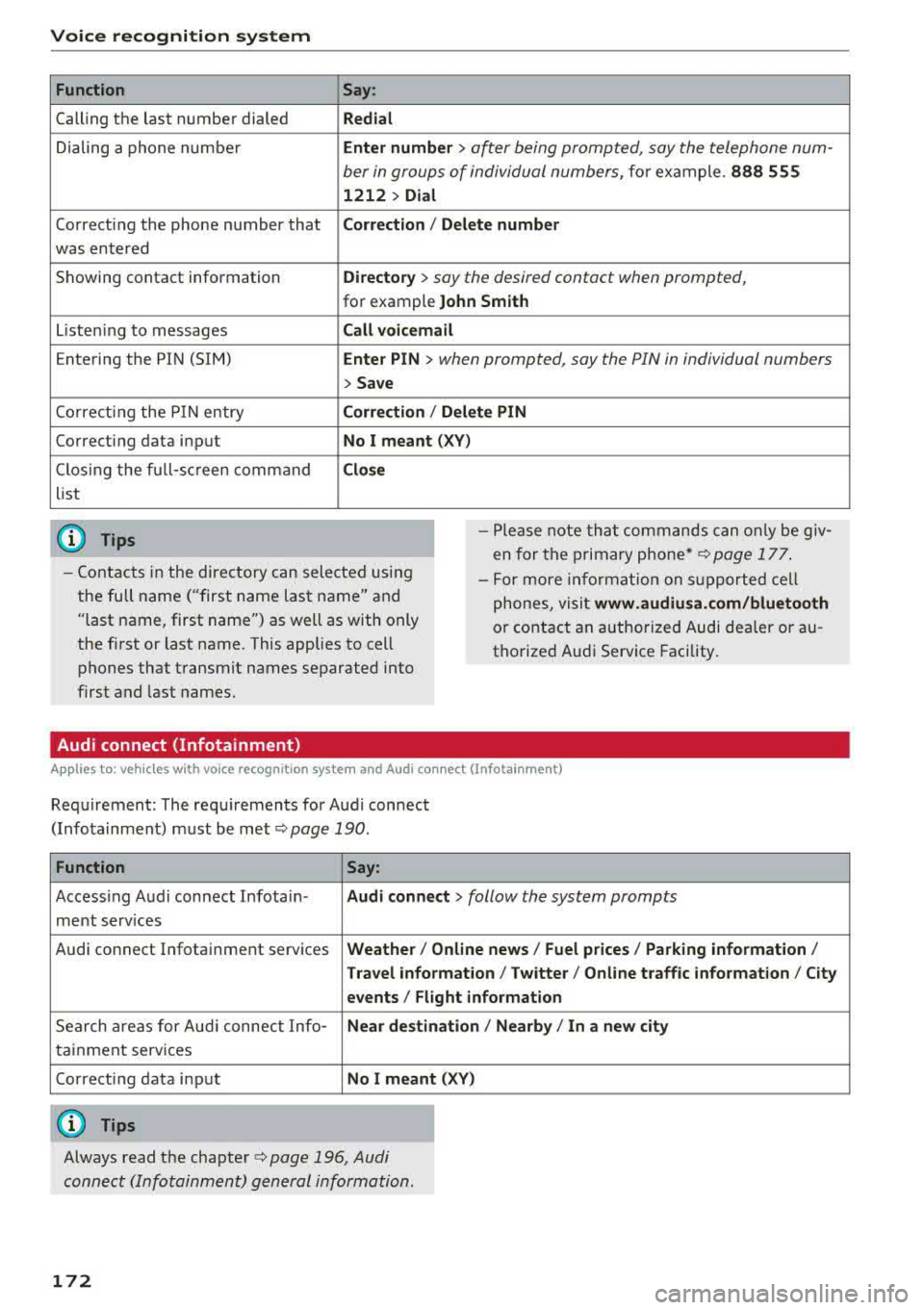
Voice recognition system Function
Calling the last number dialed
Dialing a phone numbe r
Correcti ng the phone number that
was entered
Showing contact information
L iste ning to messages
Entering the PIN (SIM)
Co rrecting the P IN entry
Correcting data input
C los ing the full-sc reen command
list
(D Tips
Say :
Redial
Enter number
> after being prompted, say the telephone num-
ber in groups of individual numbers,
fo r example. 888 555
1212 > Dial
Corr ect ion / Delete numb er
Director y
> say the desired contact when prompted,
for example John Sm ith
Call voicemai l
Ente r PIN
> when prompted, say the PIN in individual numbers
> Save
Corr ection / Delete PIN
No I meant ( XV)
Clos e
-Please note th at commands can on ly be giv
en for the primary
phone *¢ page 177 .
-Contacts in the directory can sele cted us ing
the full name ("first name las t name" and
"last name, first name") as well as with only
the fi rst or last name. This applies to cell
phones that transmit names separated into
first and last names. -
For more informat ion on s upported cell
phones, visit
www .audiusa. com /bluetooth
or contact an authorized Audi dealer or au
thorize d Audi Service Facility.
Audi connect (Infotainment)
A ppl ies to: ve hicles w ith vo ice recognition system and Audi co nnect (Infota inment)
Req uirement: The requ irements for Audi connect
(Infotainment) must be met
¢page 190 .
Function Say:
Accessing Audi connect Infotain-Audi connect > follow the system prompts
ment serv ices
Audi connect Infotainment services
Weather/ On line new s/ Fuel p rice s/ Parking info rmation /
T rav el info rmat ion / Twitter / Online tr affic info rmation / City
e v ents / Fl ight informat ion
Search areas for Aud i connect Info-Near de stination / Nearb y/ In a new city
tainment serv ices
Correcting data input
No I meant (XV)
(0 Tips
Always read the chapter ¢ page 196, Audi
connect (Infotainment) general information.
172