window AUDI A3 SEDAN 2017 Owner's Manual
[x] Cancel search | Manufacturer: AUDI, Model Year: 2017, Model line: A3 SEDAN, Model: AUDI A3 SEDAN 2017Pages: 400, PDF Size: 67.32 MB
Page 136 of 400
Assistance systems
-Due to the interlinking of various vehicle sys
tems, critica l driving situations can be detected
by
pre sense basic and measures for preventa
tive occupant protection are can be initiated.
-The pre sense front uses the data from the ra
dar sensors and calcu lates the probability of an
accident
c> page 127. An impending collision
with vehicles can be detected within the limits
of the system . In this case, the system warns
the driver visually, acoustically and with a jerk
on the brakes if necessary. If needed, it can i ni
tiate a partia l or full dece le rat ion to reduce the
collision speed o r to avoid the coll ision unde r
ce rtain c ircumstances. In conjunction with pre
sense basic, the front safety belts are also re
versib ly tensioned when needed . The pre sense
front is also active when adaptive cruise con
trol* is sw itched off.
.,&. WARNING
Also follow the general instructions found in
c> .&. in General information on page 127.
(i) Tips
-Certain pre sense functions switch off when
driving in reverse.
-The pre sense functions may not be availa ble if there is a malfunction in the ESC sys
tem or the airbag contro l module.
-Note that the reversible belt tensioner on
the front passenger's side deactivates when
the front passenger's a irbag is deactivated .
-Switch the pre sense off when you are not
us ing public streets or when loading the ve
hicle onto a vehicle carr ier, train, ship or
other type of transportation. This can pre
vent an undes ired intervention from the pre
sense system.
Audi pre sense basic
Description
Applies to: veh icles with Audi pre sense basic
The pre sense basic funct ions are activated at a
speed of approximately 20 mph (30 km/h) or h igher.
134 The following
functions can be triggered under
certain conditions within the limits of the sys
tem:
-Tensioning of the safety bel ts (for examp le,
during heavy braking): the front safety belts
have reversib le be lt tensioners. If a collision
does not occur, the safety belts loosen slightly
and are ready to trigger aga in.
-Initiating the closing of the windows and the
panorama glass roof* (for examp le when un
der- or oversteering).
Audi drive select* : the trigger times are adjusted
depending on the mode selected.
Audi pre sense front
· Description
Applies to: vehicles with Audi pre sense front
Within the limits of the system and depending
on the situation and speed, pre sense front can
warn you about impending collisions with sta
tionary, stopped, and moving vehicles and ini
tiate appropriate braking measures.
If detection is not possib le, then pre sense front
does not react.
The following func tions trigger in conjunction
with pre sense basic at corresponding vehicle
speeds :
-Reversible tens ion ing of the front safety belts.
-Closing the windows and panorama glass roof*.
Warnings and braking
Applies to: vehicles with Audi pre sense front
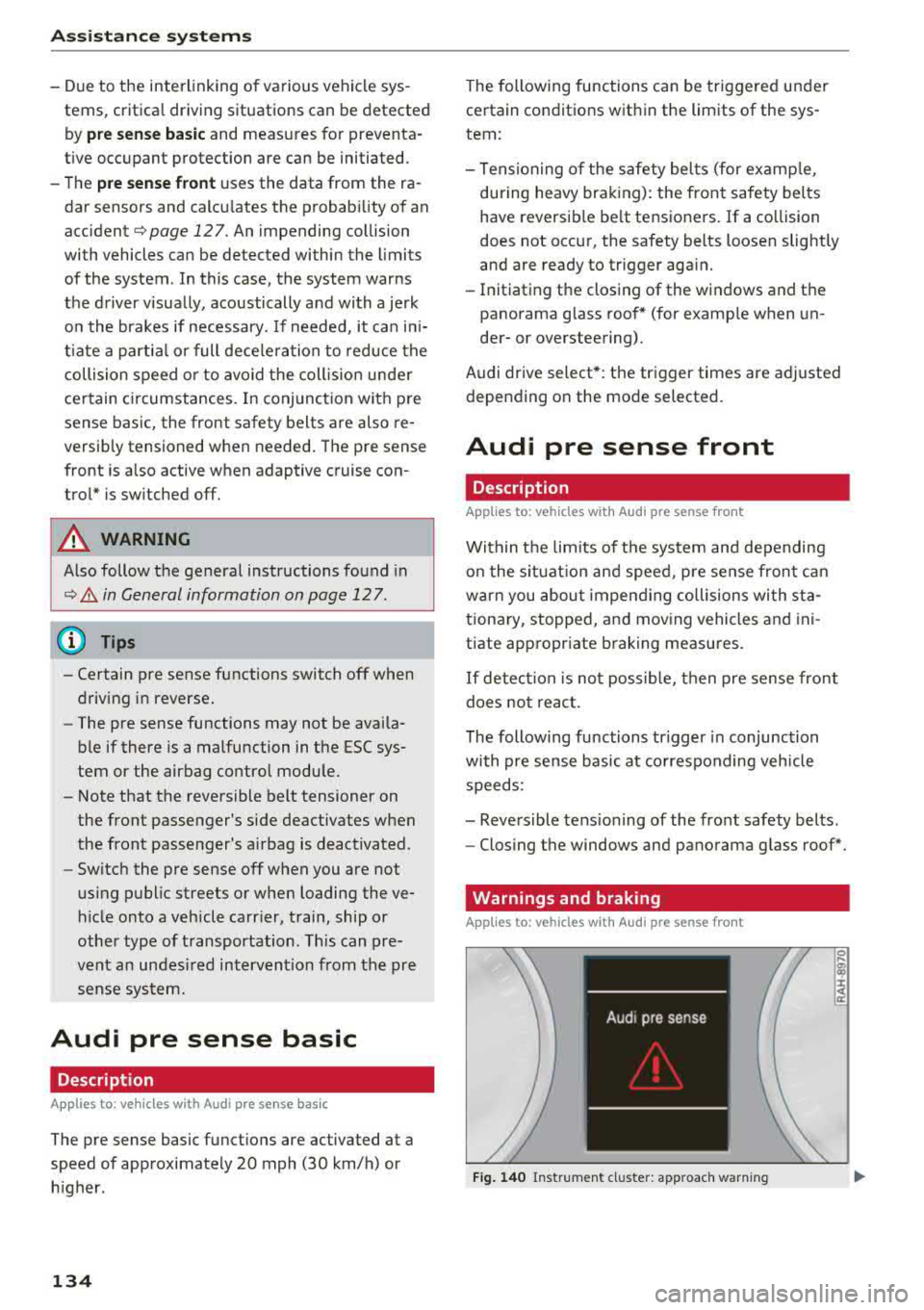
Fig. 140 Instrument cluster: approach warning
0
;
::c
Page 139 of 400
a, a, ..... N
" N ..... 0 N > 00
corrective steering shortly before you leave the lane . This will attempt to keep your vehicle in the
lane .
Appl ies to: veh icles without Audi sid e assist
The system will not warn you before crossing a
lane marker line if you have activated the turn
signal. In this case , it ass umes that you are
changing lanes intent ionally.
& WARNING
- The system warns the driver that the vehicle
is leaving the lane using corrective steering.
The driver is always responsib le for keeping
the vehicle within the lane.
- The system can help you keep the vehicle in
the lane, but it does not drive by itself. Al
ways keep your hands on the steering
wheel.
- Corrective steering may not occur in certain
situations, such as during heavy brak ing.
- There may be cases where the camera does not recogni ze all lane marker lines. Correc
t ive steering can only take p lace on the side
of the veh icle where lane marker lines are
detected.
- Other road structures or objects could possi
bly be identified unintentionally as lane
marker lines . As a result , corrective steering
may be unexpected or may not occur.
- The camera view can be restr icted, for ex
amp le by vehicles driv ing ahead or by rain,
snow, heavy spray light shining into the
camera or by d irt on the window. This can
result in active lane ass ist not detecting the
lane marker l ines or detecting them incor
rectly .
- Under certain conditions such as ruts in the road, an inclined roadway or crosswinds, the
corrective steering alone may not be enough
to keep the vehicle in the middle of the lane.
- For safety reasons, active lane assist m ust
not be used when there are poor road and/
or weather conditions such as slippery
roads, fog, gravel, heavy ra in, snow and the
potent ial for hydroplaning . Using active lane
assist unde r these conditions may increase
the risk of a crash.
A ss is ta nce syst ems
Switching on/off
Applies to: vehicles with A udi active lane ass ist
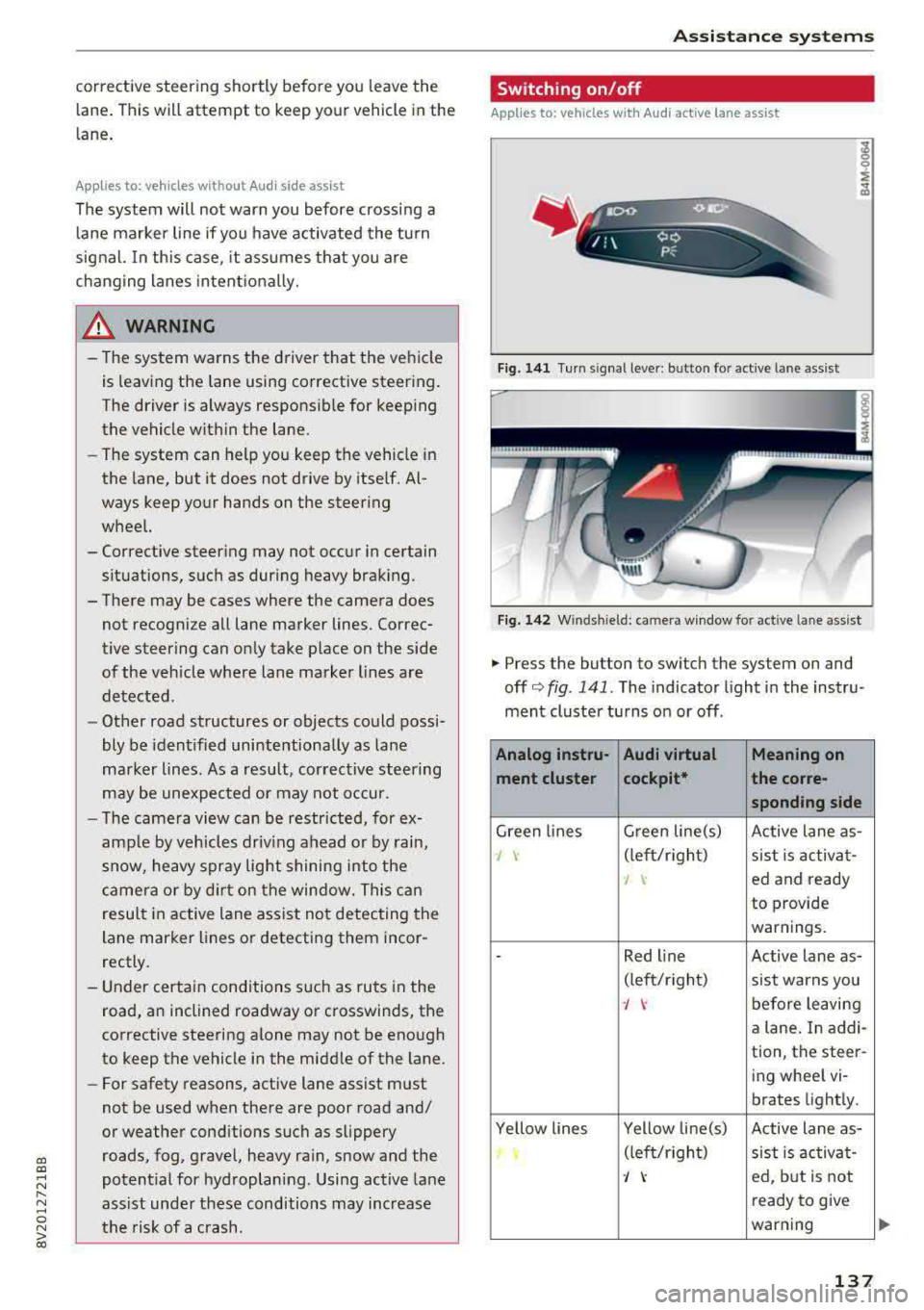
Fig. 141 Turn signal leve r: bu tto n fo r a ctive lan e ass ist
Fi g. 142 Winds hield : camera w indow fo r active lane a ssist
.,. Press the button to swi tch the sys tem on and
off
c'.> fig . 141. The indicator light in the instru
ment cluster turns on or off .
Analog instru- Audi virtual Meaning on
ment clu ster cockpit* the co
rre-
sponding s ide
Green lines G
reen line(s)
Active lane as-
J \· (left/rig ht)
sist is activa t-
I ed and ready
to provide
warnings.
-Red l ine Active lane as-
(lef t/r ight)
sist warns you
J \· before leaving
a lane. In addi-
tion, the steer-
ing wheel vi-
brates light ly.
Ye llow lines Yellow line(s)
Active lane as-
(left/r ight)
sist is activa t-
J ed, but is not
ready to give
warning
137
Page 143 of 400
CXl CXl .... N r--N .... 0 N > 00
A WARNING 1=
- Always pay attention to traffic and to the
area around your vehicle. Side assist cannot
replace a dr iver's attention. The dr iver alone
is always responsible for lane changes and
similar driving maneuvers.
- In some situat ions, the system may not
function or its funct io n may be limited. For
example:
- If vehicles are approaching or being left
behind very quickly. The display may not
turn on in time.
- In poor weather conditions such as heavy
rain, snow or heavy mist.
- On very wide lanes, in tight curves, or if
there is a rise in the road surface. Vehicles
in the adjacent lane may not be detected
because they are outside of the sensor
range.
(D Note
The sensors can be displaced by impacts or
damage to the bumper, wheel housing and
underbody. Th is can impa ir the system. Have
an authorized Audi dealer or authorized Audi
Serv ice Facility check their function .
(Di Tips
If the window glass in the driver's door or
front passenger's door has been tinted, the
disp lay in the exterior mirror may be incor
rect.
Switching on/off
A ppl ies to: ve hicles with Audi side assis t
The system can be switched on/off in the Info
tainment system.
-
If the system is activated, the displays in the ex
terior mirrors will turn on briefly when the ign i
tion is sw itched on .
.,. Select in the Infotainment system: !MENUI but
ton
> Vehicle > left control button > Driver as
sistance
> Audi side assist . Off switches the
system off.
Assistance systems
Setting the display brightness
Applies to : vehicles wi th Audi side ass ist
The display brightness can be adjusted in the In
fotainment system .
.. Select in the Infotainment system: I MENU! but
ton
> Veh icle > left control button > Driver as
sistance
> Audi side assist .
The display brightness adjusts automatically to
the brightness of the surroundings, both in the
information and in the warning stage. In very
dark or very bright surround ings, the automatic
adjustment will set the display to the minimum
or max imum level. In such cases, you may notice
no change when adjusting the brightness, or the
change may only be noticeab le once the sur
roundings change.
Adjust the br ightness to a level where the display
in the information stage will not disrupt yo ur
view ahead. If you change the brightness, the dis
play in the exterior mirror will briefly show the
brightness level in the information stage. The
brightness of the warning stage is linked to the
brightness in the information stage and is adjust
ed along with the information stage.
Q') Tips
- Side ass ist is not act ive while you are mak
ing the adjustment.
- Your settings are automatically stored and
assigned to the remote control key being
used.
141
Page 158 of 400
Intelligent Technology
and at cold times of the year. A lot of energy is
used but little is generated. It is also critical
when the engine is not running but electrical
equipment is switched on. In this case, energy is
used but none is generated.
In situations like this, energy management will
actively regulate the distribution of energy.
Long periods without use
If you do not drive your vehicle for several days or
weeks, electrical equipment is gradually scaled
back or switched off. This reduces energy use and
ensures the vehicle will be able to start after long
periods of time. Some convenience functions
such as opening with the remote control key may not be available. These convenience functions
will be available again once you switch the igni tion on and start the engine.
With the engine switched off
The vehicle battery will drain if you use Infotain
ment functions such as listening to the radio
while the engine is switched off.
If the vehicle's ability to start may be impaired by
the energy use, a message will appear in the In
fotainment system display. The message indi
cates that the system will switch off automatical ly soon . If you would like to continue using the
functions, you must start the engine.
With the engine running
Although electrical energy is generated while
driving, the vehicle battery can drain . This can
happen if little energy is generated but much is
used, and the charge level of the vehicle battery
is not optimal.
To restore the balance of energy, components that require large amounts of energy are temporar ily scaled back or switched off. Heating sys
tems in part icular require a great deal of energy .
If you notice, for example, that the seat heating*
or rear window defogger is not working, then it
has been temporarily reduced or switched off.
These systems are available again as soon as the
energy supply has been restored .
In addition , you may notice that the idle speed
has slightly increased. That is normal and no
156
cause for concern . By increasing the idling speed,
the additional required energy will be generated
and the vehicle battery will be charged.
Notice about data
recorded by the Event
Data Recorder and
vehicle control modules
Event Data Recorder
This vehicle is equipped with an Event Data Re
corder (EDR). The main purpose of an EDR is to
record, in certain crash or near crash-like situa
tions, such as an airbag deployment or hitting a road obstacle, data that will assist in understand
ing how a vehicle's systems performed . The EDR
is designed to record data related to vehicle dy
namics and safety systems for a short period of
time, typically 30 seconds or less. The EDR in this
vehicle is designed to record such data as:
- How various systems in your vehicle were oper
ating;
- Whether or not the driver and passenger safety
belts were buckled/fastened;
- How far (if at all) the driver was depressing the
accelerator and/or brake pedal; and,
- How fast the vehicle was traveling.
These data can help provide a better understand
ing of the circumstances in which crashes and in
juries occur. NOTE: EDR data are recorded by your
vehicle only if a non-trivial crash situation occurs;
no data are recorded by the EDR under normal
driving conditions and no personal data (e.g .,
name, gender, age, and crash location) are re
corded . However, other parties, such as law en
forcement, could combine the EDR data with the
type of personally identifying data routinely ac
quired during a crash investigation .
To read data recorded by an EDR, special equip
ment is required, and access to the vehicle or the
EDR is needed . In addition to the vehicle manu
facturer, other parties, such as law enforcement,
that have the special equipment, can read the in
formation if they have access to the vehicle or the EDR.
~
Page 172 of 400
Voice recognition system
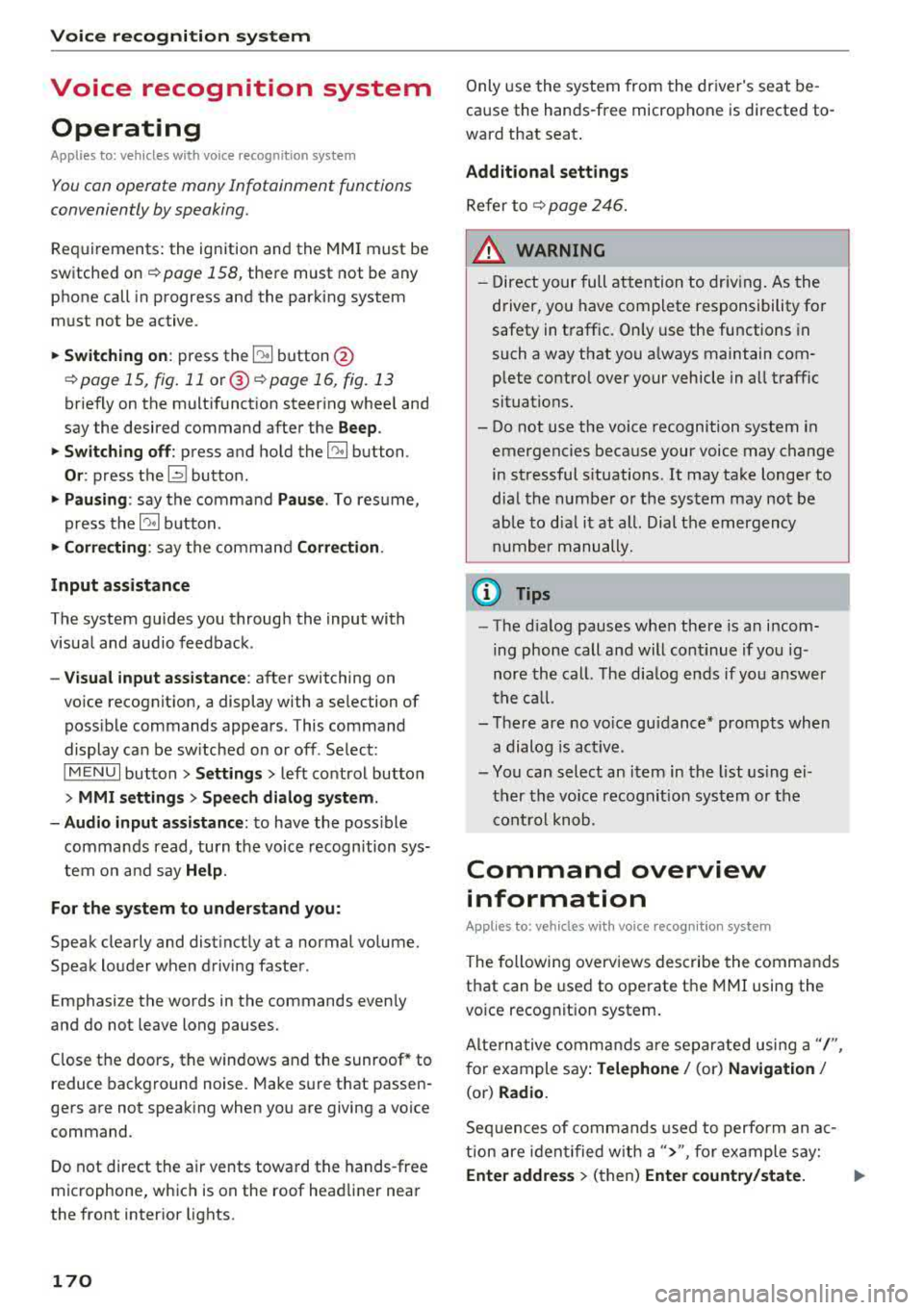
Voice recognition system Operating
Applies to: vehicles with vo ice recognition system
You con operate many Infotainment functions
conveniently by speaking.
Requirements: the ignition and the MM I must be
sw itched
on~ page 158, the re must not be any
phone call in progress and the parking system
m ust not be active.
.. Switching on : press the~ button @
¢ page 15, fig. 11 or@ ~ page 16, fig . 13
briefly on the multifunct ion steer ing whee l and
say the desired command after the
Beep.
.. Switching off : press and hold the~ button.
Or : press the l2l butto n.
.,. Pausing : say the command Pause. To resume,
press
the~ button.
.,. Corre cting : say the command Correction .
Input assistance
The system guides you through the input with
visua l and audio feedback.
- Visual input as sistance : after switching on
vo ice recognit ion, a display with a selection of
poss ible commands appears. This command
display can be sw itched on or off . Se lect:
IMENU I button> Settings > left control button
> MMI settings > Speech dialog sy stem .
- Audio input as sis tance :
to have the poss ible
commands read, turn the voice recognition sys
tem on and say
Help .
For the system to understand you:
Speak clearly and distinct ly at a normal volume.
Speak louder when driving faster.
Emphasize the words in the commands even ly
and do not leave long pauses.
Close the doors, the windows and the sunroof* to
reduce background noise. Make sure th at passen
gers are not speaking when you are giving a voice
command.
D o not direct the air vents toward the hands-free
microphone, whic h is on the roof head liner near
the front interior lights.
170
Only use the system from the dr iver's seat be
cause the hands-free microphone is directed to
ward that seat.
Additional sett ings
Refer to~ page 246.
_&. WARNING
- Direct your full attention to dr iv ing. As the
driver, you have complete responsibility fo r
safety in t raffic. Only use the functions in
such a way that you a lways maintain com
plete contro l over your vehicle in all traffic
situations.
-
- Do not use the voice recognition system in
emergencies because your voice may change
in stressful s ituations.
It may take longer to
dial the numbe r or the system may not be
ab le to dia l it at all. Dial the emergency
number manually .
(D Tips
- The d ia log pauses when the re is an incom
ing phone call a nd will continue i f you ig
nore the cal l. The dia log ends if you answer
the ca ll.
- There are no vo ice gu idance* prompts when
a dialog is act ive.
- You can select an item in the list using ei
ther the vo ice recognit ion system or the
cont rol knob.
Command overview
information
Applies to: vehicles with voice recognition system
The following overv iews des cribe the commands
that can be used to operate the MMI using the
vo ice recog nit ion system.
Alte rnative commands are separated using a"/",
for example say:
Telephone / (or) Navigation /
(or) Radio.
Sequences of com mands used to perform an a c
tion are iden tified w ith a
">", fo r example say:
Ente r addre ss > (then) Enter country /state. IJ,,
Page 238 of 400
Media
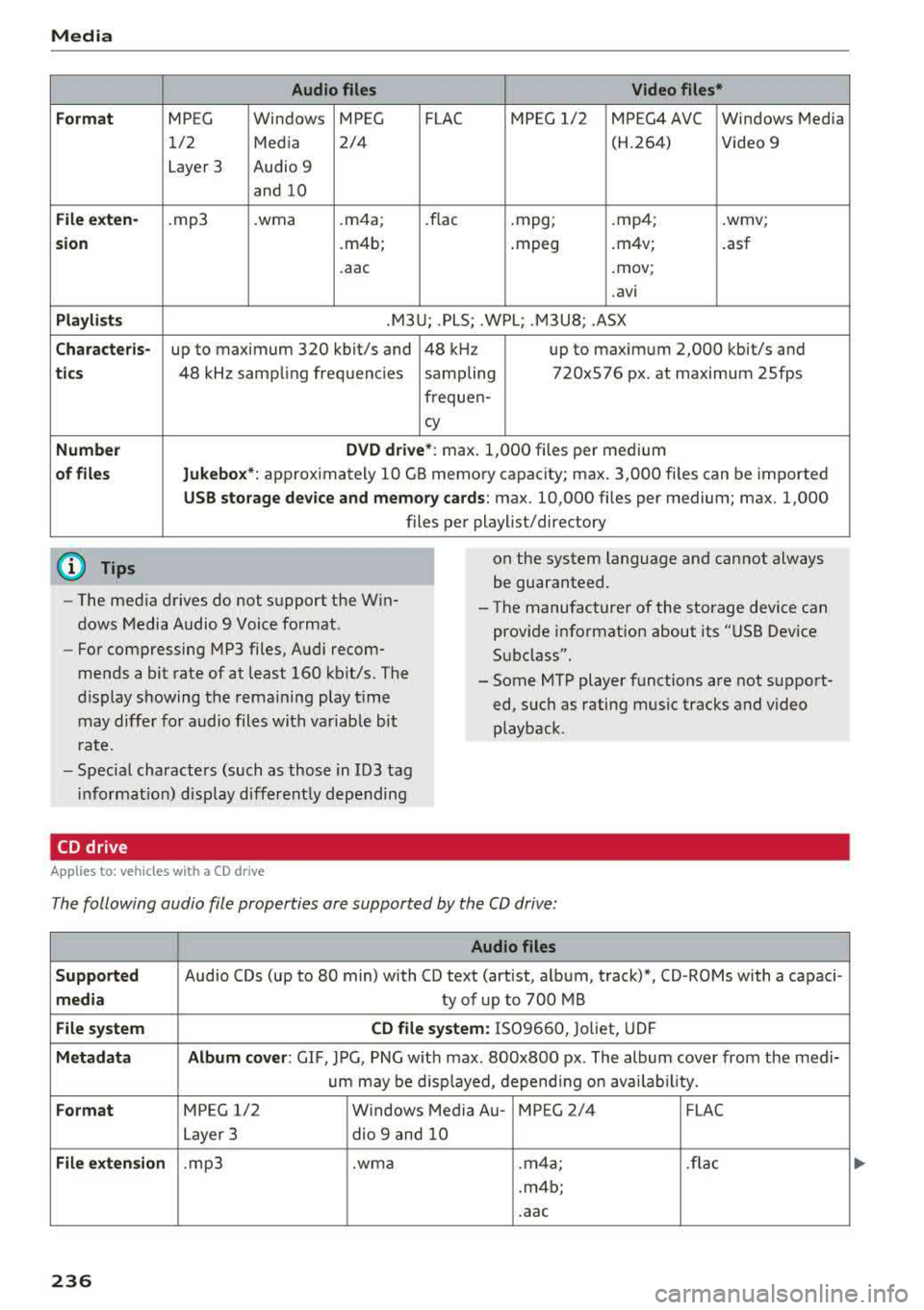
Form at
Fil e ex te n-
s ion
Pla ylists
C ha ra cteri s-
ti cs
Number
of fil es
(D Tips Audio files
Video files*
MPEG Windows MPEG FLAC MPEG 1/2 MPEG4 AVC Windows Media
1/2 Media 2/4 (H.264) Video 9
Layer 3 Audio 9
and 10
. mp3 .wma .m4a; .flac .mpg; .mp4; .wmv;
.m4b; .mpeg .m4v;
.asf
.aac .mov;
.avi
.M3U; .PLS; .WPL; .M3U8; .ASX
up to maximum 320 kbit/s and 48 kHz up to maximum 2,000 kbit/s and
48 kHz sampling frequencies sampling 720x576 px. at maximum 25fps
freq uen-
cy
D VD d riv e* : max . 1,000 files per medium
Jukebo x*: approximately 10 GB memory capacity; max. 3,000 files can be imported
USB stor age de vice a nd m emor y cards : max. 10,000 files per medium; max. 1,000
files per playlist/directory
on the system language and cannot always
be guaranteed.
- The med ia drives do not support the Win
dows Media Audio 9 Voice format. - The
manufacturer of the storage device can
prov ide information about its "USB Dev ice
Subclass".
-
For compressing MP3 files, Audi recom
mends a bit rate of at least 160 kb it/s. The
display showing the remaining play t ime
may differ for audio files with variable bit
r a te. -
Some MTP player functions are not support
ed, such as rating mus ic tracks and video
playback.
- Special characters (such as those in 103 tag
i nformat ion) disp lay different ly depending
CD drive
A pp lies to: ve hicles w ith a CD drive
The following audio file properties are supported by the CD drive:
Audio files
S upported
Audio CDs (up to 80 min) with CD text (artist, album, track)*, CD-ROMs with a capaci-
medi a ty of up to 700 MB
File system CD file syste m: IS09660, Joliet, UDF
Metadat a A lbum co ver : GIF , JPG, PNG w ith max. 800x800 px . The album cover from the medi-
um may be d isp layed, depend ing on avai lab ility.
Form at MPEG 1/2 Windows Media Au- MPEG 2/4 FLAC
Layer 3 dio
9 and 10
File exten sion .mp3 .wma .m4a; .flac
.m4b;
.aac
236
Page 249 of 400
CXl CXl .... N ,.__
N .... 0 N > 00
Driving safety
Basics
Safe driving habits
Please remember -safety first!
This chapter contains important information,
tips, instructions and warnings that you need to
read and observe for your own safety, the safety
of your passengers and others . We have summar
ized here what you need to know about safety
belts, airbags, child restraints as well as child
safety. Your safety is for us
priority number 1. Al
ways observe the information and warnings in
this section - for your own safety as well as that
of your passengers.
The information in this section applies to all
model versions of your vehicle. Some of the fea
tures descr ibed in this sections may be standard
equipment on some models, or may be optional
equipment on others. If you are not sure, ask
your authorized Audi dealer.
A WARNING
- Always make sure that you follow the in
structions and heed the WARNINGS in this
Manual. It is in your interest and in the in
terest of your passengers .
-
-Always keep the complete Owner's Litera
ture in your Audi when you lend or sell your
vehicle so that this important information
will always be available to the driver and
passengers.
- Always keep the Owner's literature handy so
that you can find it easily if you have ques
tions.
Safety equipment
The safety features are part of the occupant re
straint system and work together to help reduce the risk of injury in a wide variety of accident sit
uations.
Your safety and the safety of your passengers
should not be left to chance. Advances in tech
nology have made a var iety of features available
to help reduce the risk of injury in an accident.
Driving safety
The following is a list of just a few of the safety
features in your Audi:
- sophisticated safety belts for driver and all pas
senger seat ing pos itions,
- safety belt pretensioners,
- safety belt height adjustment systems for the
front seats*,
- front airbags,
- knee airbags for the front seats*
- side airbags in the front seats and outer rear seats*,
- side curtain airbags with ejection mitigation features*,
- special LATCH anchorages for child restraints,
- head restraints for each seating position,
- adjustable steering column.
- pre sense* (preventat ive passenger protection)
These individual safety features, can work to gether as a system to help protect you and your
passengers in a wide range of accidents . These
features cannot work as a system if they are not
always correctly adjusted and correctly used.
Safety is everybody's responsibility!
Important things to do before driving
Safety is everybody 's job! Vehicle and occupant
safety always depends on the informed and care
ful driver .
For your safety and the safety of your passen
gers,
before driving always:
.,. Make sure that all lights and signals are operat
ing correctly .
.,. Make sure that the tire pressure is correct.
.,. Make sure that all windows are clean and afford
good visibility to the outside .
.,. Secure all luggage and other items carefully
¢ page 66, ¢ page 65.
.,. Make sure that nothing can interfere with the
pedals.
.,. Adjust front seat, head restraint and mirrors correctly for your height .
.,. Instruct passengers to adjust the head re
straints according to their height .
247
Page 252 of 400
Driving safety
-Passengers who are unbelted , out of posi
tion or too close to the airbag can be seri
ously injured by an airbag as it unfolds with
great force in the blink of an eye .
-Always make sure that there are at least
10 inches (25 cm) between the front pas
senger 's breastbone and the instrument
panel.
-Always make sure that there are at least
4 inches (10 cm) between the front passen ger's knees and the lower part of the instru
ment panel.
-Each passenger must always sit on a seat of
their own and properly fasten and wear the
safety belt belonging to that seat.
-Before dr iving, always adjust the front pas
senger seat properly .
-For adjustable head restraints: before driv
ing, always also adjust the head restraints
properly .
- Always keep your feet on the floor in front
of the seat. Never rest them on the seat, in
strument pane l, out of the window, etc. The
airbag system and safety be lt will not be
able to protect you properly and can even in
crease the risk of injury in a crash .
-Never dr ive with the backrest reclined or
ti lted far back! The farther the backrests are
ti lted back , the greater the risk of injury due
to incorrect positioning of the safety belt
and improper seating position.
-Children must always ride in child safety
seats
c::> page 292 . Special precautions ap
ply when installing a child safety seat on the
front passenger seat
c::> page 267 .
Proper seating positions for passengers in
rear seats
Rear seat passengers must sit upright with both
feet on the floor consistent with their physical
size and be properly restrained whenever the ve
hicle is in use.
To reduce the r isk of injury caused by an incorrect
seating position in the event of a sudden braking
maneuver or an accident, you r passengers on the
rear bench seat must always observe the follow
ing:
250
.,. For adjustab le head restraints: adjust the head
restraint so the upper edge is as even as possi
ble with the top of your head. If that is not pos
sible, try to adjust the head restraint so that it
is as close to this position as possible
c::> page 63.
.,. Keep both feet flat in the footwell in front of
the rear seat .
.,. Fasten and wear safety belts properly
c::> page 2 62.
.,. Make sure that children are always properly re
strained in a child restraint that is appropriate
for their size and age
c::> page 292.
A WARNING
Passengers who are improperly seated on the
rear seat can be seriously injured in a crash.
-E ach passenger must always sit on a seat of
their own and properly fasten and wear the safety belt belonging to that seat .
-Safety belts only offer maximum protection
when the safety belts are properly posi
tioned on the body and securely latched . By
not sitting upright, a rear seat passenger in
creases the risk of personal injury from im
properly positioned safety belts!
-For adjustable head restraints: always ad
just the head restraint properly so that it
can give maximum protection.
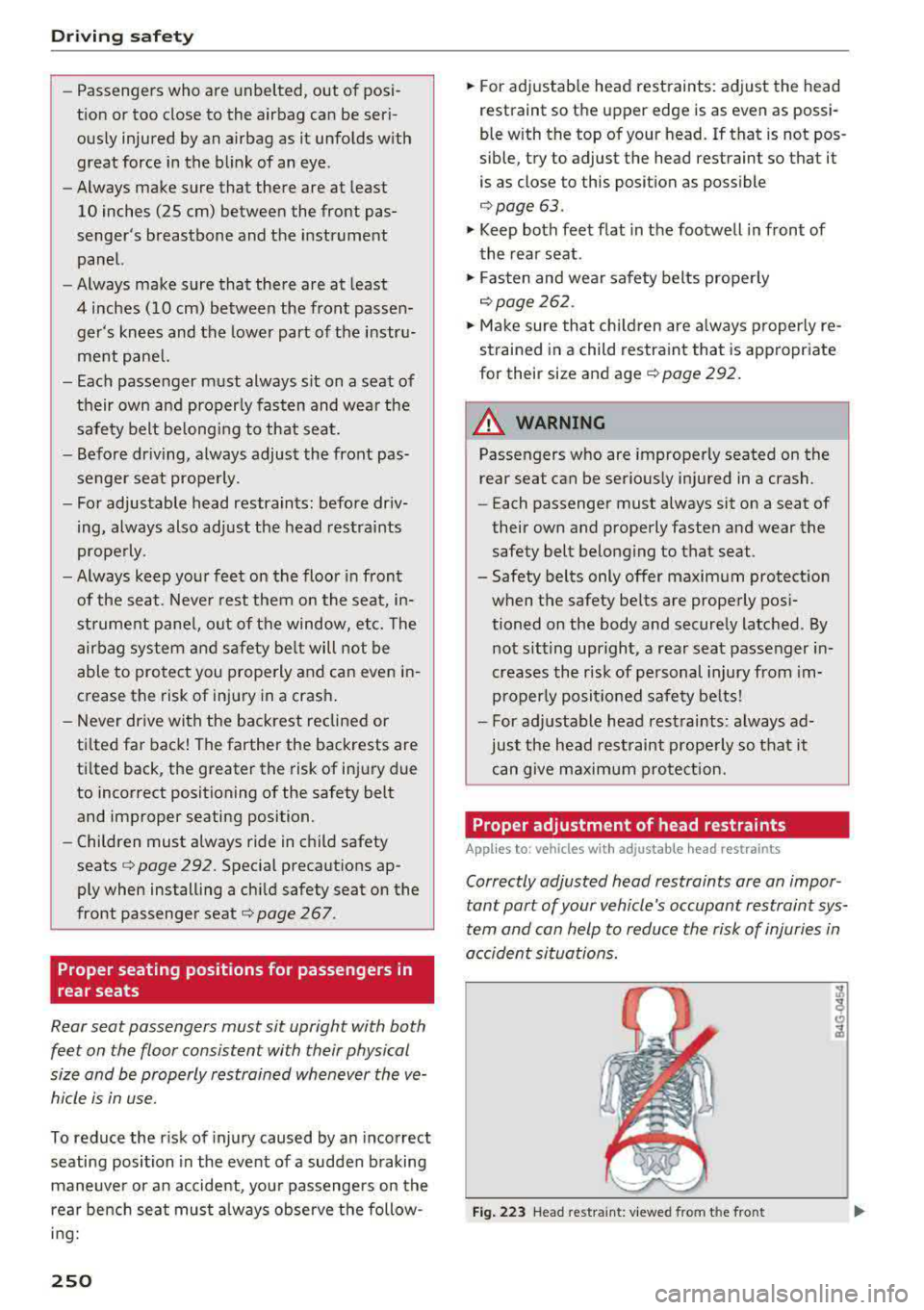
Proper adjustment of head restraints
Applies to: vehicles with adjustable head restraints
Correctly adjusted head restraints ore on impor
tant port of your
vehicle's occupant restraint sys
tem and con help to reduce the risk of injuries in
occident situations.
Fig. 223 Head restraint : viewed from t he front
Page 253 of 400
CXl CXl .... N ,.__
N .... 0 N > 00
The head restraints must be correctly adjusted to
achieve the best protection.
.,. Adjust the head restraint so the upper edge is
as even as possible with the top of your head. If
that is not possible, try to adjust the head re
straint so that it is as close to this position as
poss ible
¢ fig. 223.
... Applies to: forward/back adjustable head re
straints: Move the head restraint so that it is as
close to the back of the head as possible .
... If there is a passenger on the rear center seat
ing position, slide the center head restraint up
ward at least to the next notch.
Adjusting head restraints
<=>page 63 .
A WARNING
-
All seats are equipped with head restraints.
Driv ing without head restraints or with head
restraints that are not properly adjusted in
creases the risk of serious or fatal neck injury
dramatically. To help reduce the risk of injury:
- Always dr ive with the head restraints in
place and properly adjusted.
- Every person in the vehicle must have a
properly adjusted head restraint.
- Always make sure each person in the vehicle
properly adjusts their head restraint. Adjust
the head restraint so the upper edge is as
even as possible with the top of your head.
If that is not possible, try to adjust the head
restraint so that it is as close to this position
as possible.
- App lies to: forward/back adjustable head
restra ints: Move the head restraint so that it
is as close to the back of the head as possi
ble.
- Never attempt to adjust head restraint
while driving. If you have driven off and
must adjust the driver headrest for any rea
son, first stop the vehicle safely before at
tempting to adjust the head restraint.
- Children must always be properly restrained in a child restraint that is appropriate for
their age and size
r=;, page 292.
Driving safety
Examples of improper seating positions
The occupant restraint system can only reduce
the risk of injury if vehicle occupants are properly
seated.
Improper seating positions can cause serious in
jury or death . Safety belts can only work when
they are properly positioned on the body . Im
proper seat ing positions reduce the effectiveness
of safety belts and will even increase the risk of
injury and death by moving the safety belt to cr it
ical areas of the body. Improper seating positions
also increase the risk of serious injury and death
when an airbag deploys and strikes an occupant
who is not in the proper seating position. A driver
is responsible for the safety of all vehicle occu
pants and especially for children . Therefore:
... Never allow anyone to assume an incorrect
seating position when the vehicle is being used
0 _& .
The following list contains exxamples of some
positions that will increase the risk of serious in
jury and death. Our hope is that these examples
will make you more aware of seating positions
that are dangerous .
Therefore, whenever the vehicle is moving:
-never stand up in the vehicle
- never stand on the seats
- never kneel on the seats
- never ride with the seatback recl ined
- never lie down on the rear seat
- never lean up against the instrument panel
- never sit on the edge of the seat
- never sit sideways
- never lean out the window
- never put your feet out the window
- never put your feet on the instrument panel
- never rest your feet on the seat cushion or back
of the seat
- never ride in the footwell
- never ride in the cargo area
251
Page 255 of 400
a, a, .... N
" N ..... 0 N > 00
-Never place or install floor mats or other
floor coverings on top of already installed
floor mats. Additional floor mats and other
coverings w ill reduce the size of the pedal
area and inte rfere with the pedals.
- Always properly reinstall and secure floor
mats that have been taken out for cleaning.
- Always make sure that objects cannot fall
into the driver footwell while the veh icle is
moving . Objects can become trapped under
the brake peda l and accelerator pedal caus
ing a loss of veh icle control.
Storing cargo correctly
Loading the luggage compartment
All luggage and other objects must be properly
stowed and secured in the luggage compart
ment.
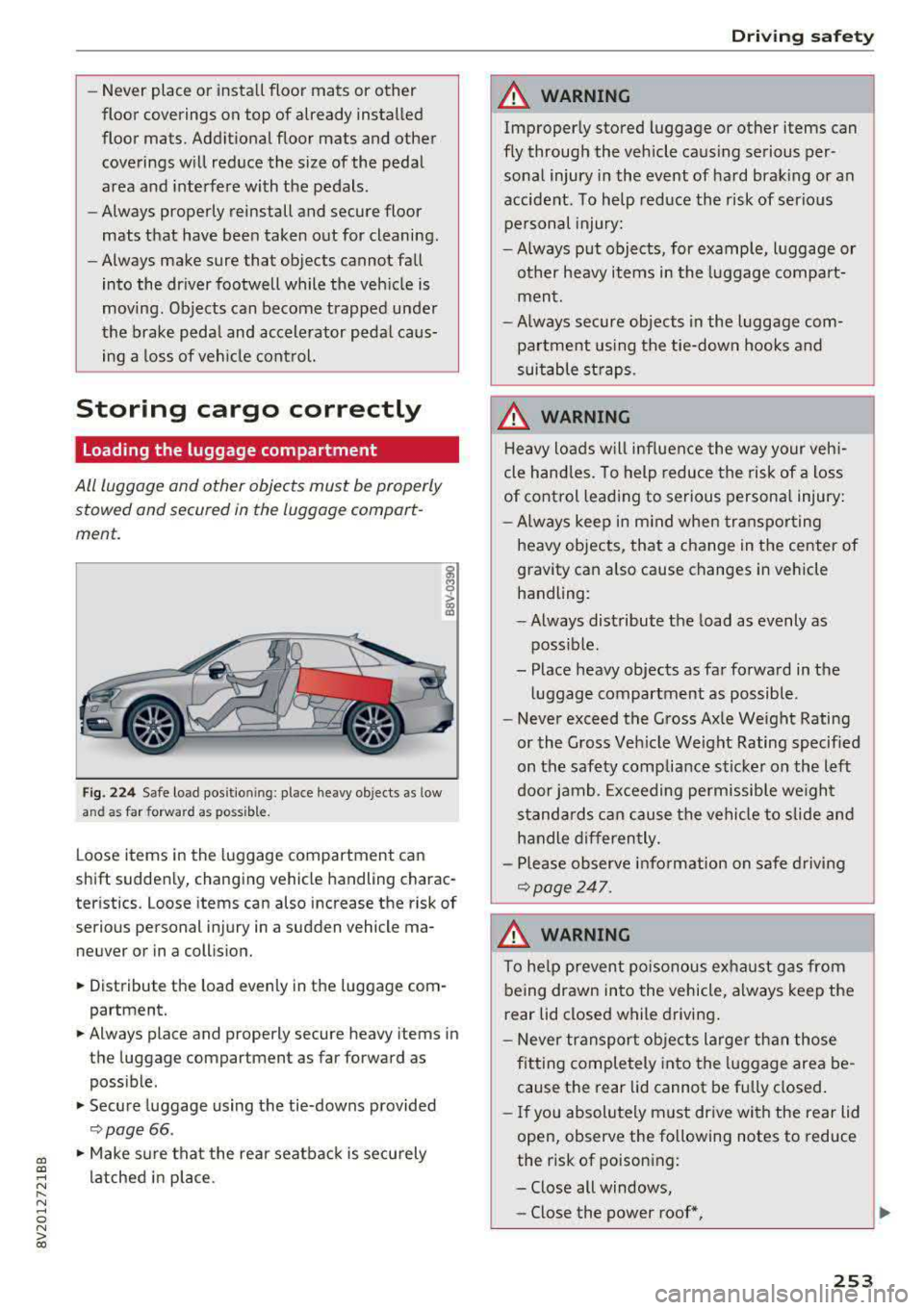
F ig. 22 4 Safe load position ing: place heavy objects as low
and as
far forward as possible.
L oose items in the luggage compartment can
shift sudden ly, changing vehicle handling charac
teristics. Loose items can also increase the risk of
serious personal injury in a sudden vehicle ma
neuver or in a coll ision.
• Distribute the load evenly in the luggage com
partment.
• Always place and properly secure heavy items in
the luggage compartment as far forward as
poss ib le.
• Secure luggage using the tie-downs provided
<:;> page 66 .
• Make sure that the rear seatbac k is securely
latched in place.
Dr iving safety
A WARNING
-
Improperly stored luggage or other items can
fly through the vehicle caus ing serious per
sonal injury in the event of hard brak ing or an
accident. To help reduce the risk of serio us
pe rsonal injury:
- Always put objects, for example, l uggage or
other heavy items in the luggage compa rt
men t.
- Always secure objects in the luggage com
partment using the tie-down hooks and
suitable st raps.
A WARNING
H eavy loads will influen ce the way your veh i
cle hand les. To help reduce the risk of a loss
of cont rol leading to serious personal injury:
- Always keep in m ind when transpo rting
heavy objects, that a change in the center of
gravity can also cause changes in vehicle
handling:
- Always distribute the load as evenly as
poss ible.
- Place heavy objects as far fo rwa rd in the
lu ggage compartment as possible.
- Never exceed the Gross Ax le Weight Rating
or the Gross Ve hicle Weight Rating specified
on the safety compliance s ticker on the left
door jamb. Exceeding permissible we ight
s tanda rds can cause the vehicle to slide and
h a ndle differen tly.
- Pl ease observe info rmat ion on safe driv ing
¢page 247.
A WARNING
To he lp prevent poiso nous ex ha ust gas from
being drawn into the vehicle, always keep the
r ear lid closed while driving .
- Never transport ob jects larger t han those
f itting completely into the luggage area be
cause the rear lid cannot be f ully closed .
- If you absolutely m ust dr ive wi th the rear lid
open, observe the following notes to reduce
the risk of poisoning:
- Close all windows,
- Close the power roof*,
253