battery AUDI A3 SEDAN 2017 Service Manual
[x] Cancel search | Manufacturer: AUDI, Model Year: 2017, Model line: A3 SEDAN, Model: AUDI A3 SEDAN 2017Pages: 400, PDF Size: 67.32 MB
Page 227 of 400
CXl CXl .... N r---N .... 0
When importing, the audio files a re automatical
l y sorted into the media center categor ies based
on the stored addit ional info rmation
c:> page 231. The copied video files are stored in
the media ce nter under the
Videos category.
Playing the Ju kebo x
Req uirement: the J ukebox must contain audio/
vi deo fi les
c:> page 224, Adding files to the Juke
box.
The Jukebox is a ccesse d and ope rated thr ou gh
the
M MI(D c:>page230, fig. 213.
Displaying Jukebox memory capacity
Select: r igh t control button > Jukebox memory
c apacity .
Inform ation abou t the J ukebox memory
c a pacity and the numbe r of store d tra cks is dis
p layed .
Deleting tracks from the Jukebox1
)
Req uirement: the Ju kebox must contain audio/
video fi les.
- Deleting an entry : select an entry from the
Jukebox media center. Select: rig ht cont ro l but
ton
> Delete from jukebox > This entry or En
tire list .
- The s tatus of the de leti ng p rocess is shown in
the MMI. Jukebox playback stops d uring the de
l eting process a nd starts again au tomatically
on ce the dele tio n i s comp lete.
(D Note
D o not import au dio/video files when the en
g in e is t urned off because this will d rain the
ve hicl e battery.
(D Tips
-Tracks fro m aud io C Ds cannot be impo rted
t o the Jukebox for leg al re as ons .
- Files that have al rea dy been import ed are
a utomat ica lly recogn ized and ca nnot be
cop ied to the Juk ebox again.
-It is no t possib le to play audio/v ideo* files
i n the C D/D VD* drive while import ing the m.
N iii l) Not in th e Playba ck view .
Media
-The Jukebox does not provi de a n export
function d ue to legal reasons .
- F iles o r trac ks w ithout addi tion al store d in
formatio n are listed as
Unknown . Audi rec
ommends adding a dditio nal info rmation
(such as 103 tags) to a udio f iles.
- Reset the
Jukebox to the factory defa ult
sett ings when selling you r vehicle
<=:> page 242.
Bluetooth audio player
Appl ies to: vehicles with Bluetooth
With the Bluetooth audio player , you con ploy
music wirelessly from your Bluetooth-capoble
device (such as a cell phone) through the MMI.
Requirement: the vehicle must be stationary and
t h e Bluetooth function on your Bl uetooth device
and the
Bluetooth audio player c:> page 244 in
the MMI m ust both be switched on .
- Connecting a
Bluetooth dev ice : press the
!MEDI Ai butto n. Press the left control button
until the sources overview is disp layed. Selec t
and confirm Bluetooth audio player ®
<=:>page 230, fig. 214 .
-If necessa ry, select and co nfirm, Not connected
> Connect Bluetooth audio player . The Blue
t oot h dev ice searc h starts. Follow the inst ru c
tion s in the M MI.
- Select and confirm the des ired Bluetooth d e
vice from the list. The M MI generates a PIN fo r
t he conne ction.
- Select an d confirm
Yes .
-En ter the PIN for connect ing o n your Bl uetoo th
dev ice .
Or : if the PIN is already displayed on
your Bl uetoo th device, co nfi rm i t in the Bl ue
t ooth dev ice and in the MMI. The t ime a llowed
for ente ring the P IN is lim ite d t o approx ima tely
30 seconds.
T he media is s tarted and operated thro ugh the
mobile device o r th e
M MI, depending on t he de-
vi ce being used.
..,.
225
Page 230 of 400
Media
-Do not u se any wireless devices on the fro nt
seats within range of the airba gs w hile driv
ing. Also read and follow the warnings in
r=> page 271, Fro nt airbags.
CD Note
- Always follow the information found in ¢ 0
in Wi-Fi hotspot on page 195 .
-Please note that there generally are add i
tiona l costs when using an online media
service account, especially when it is used i nternationally.
{!) Tips
-Depending on the Internet connection and
network traff ic, a connection loss can occur
during p layback of on line media serv ices.
-Online media and Internet radio usage de
pends on the serv ice avai lability of the third
party provider.
- Audi AG simply makes the access to on line
media serv ices possible t hrough the MMI
and does not take any respons ibility for the
contents of the onli ne med ia serv ices .
-Always read the chapter r:> page 196, Audi
connect (Infotainment) general informa tion.
-Depending on the mobile device used, the re
may be interr uptions du ring media playback
and when using the
Audi MMI connect app.
T o avoi d inter ruption s when usi ng a mob ile
device, do no t loc k t he s creen on you r mo
bi le dev ice a nd keep the
Audi MMI connect
app in the foreground .
- Co ntact an a utho rized Audi dea le r or a u
thorized Audi Service Facili ty for additional
informat ion about on line media .
228
Multimedia connections
USB adapter for Audi music interface
You can connect your mobile devices (such as a
smartphone or
MP3 player) to the Audi music in
terface and charge them using a special USB
adapter .
®-
Fig. 2 11 Audi USB adapters
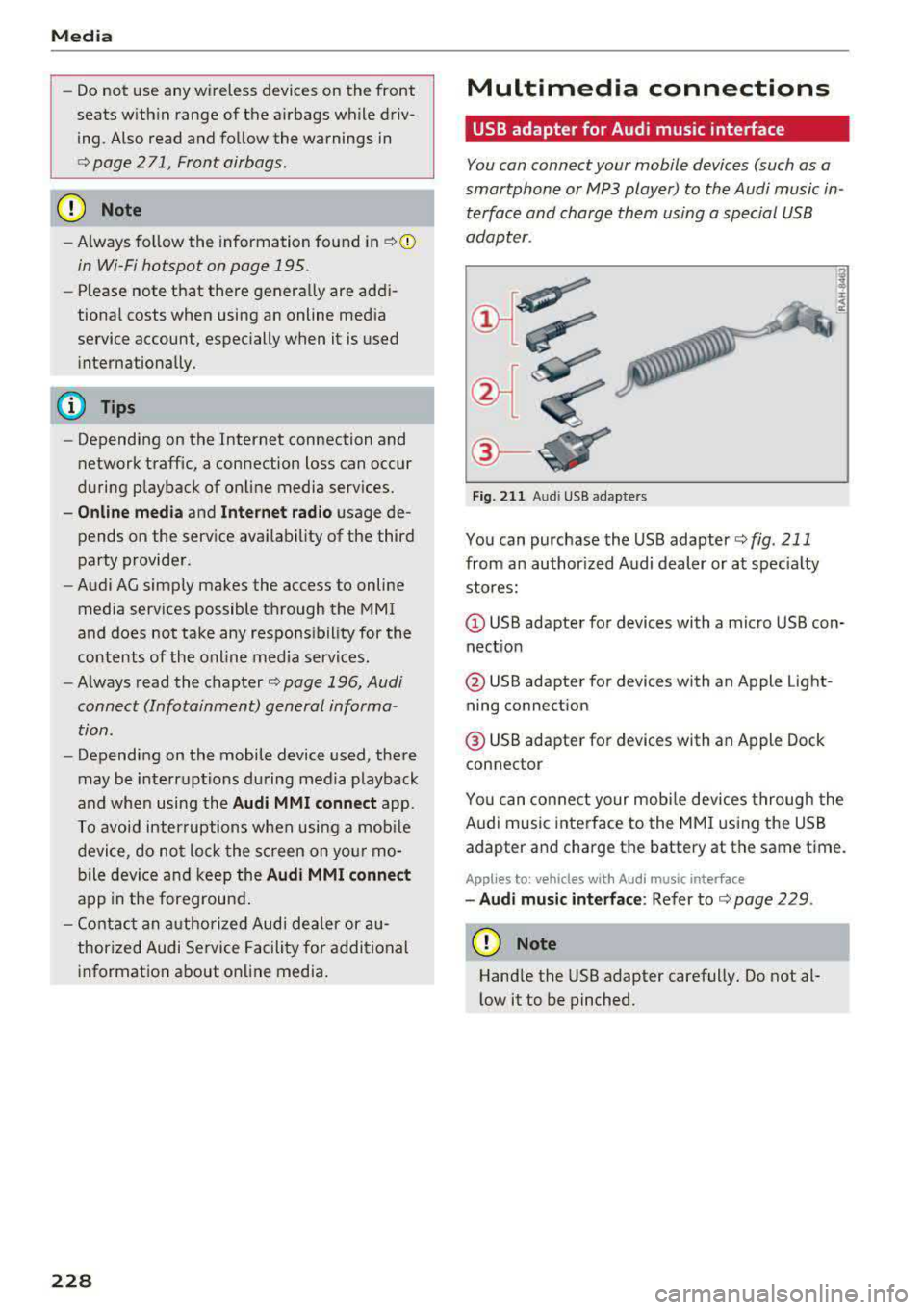
You can purchase the USB adapter ¢ fig . 211
from an author ized Audi dealer or at spec ia lty
stores:
Q) USB adapter for devices with a micro USB con
nect ion
@ USB adapter for devices with an Apple Light
ning connect ion
@ USB adapte r for devices with an Apple Dock
connector
You can conne ct your mob ile dev ices throug h the
Audi music interface to the MM I using the USB
adapter and charge the battery at the same time.
Applies to: vehicles wit h Aud i music interface
-Audi musi c interface : Refer to¢ page 229.
CD Note
Handle the USB adapter carefully. Do not al
l ow it to be pinched .
Page 231 of 400
a, a, ..... N
" N ..... 0 N > 00
Audi music interface
Connect your mobile devices to the Audi music
interface in order to operate them through the
MMI and charge the battery.
Fig. 212 Connecting mo bile dev ices
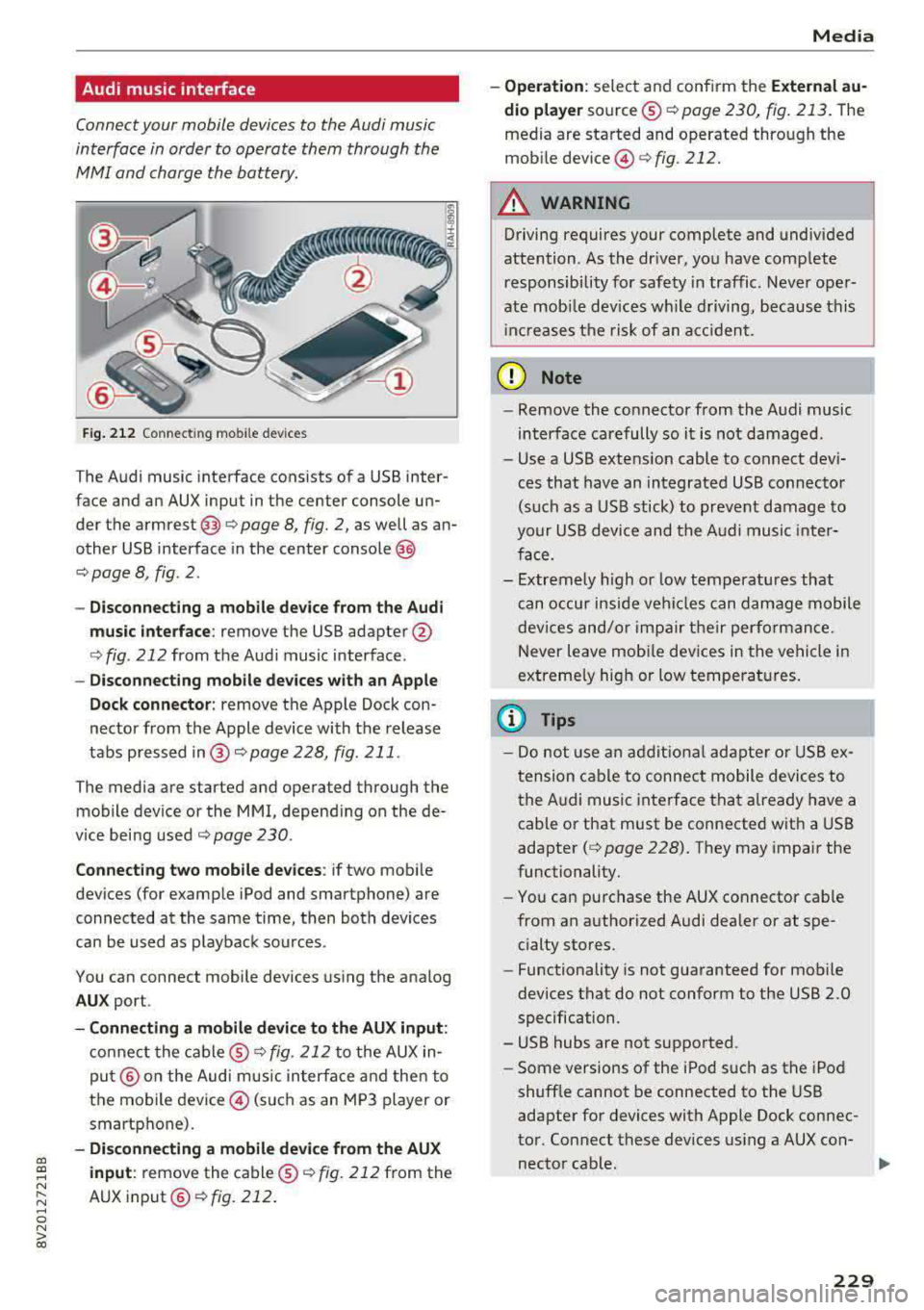
T he Audi music interface consists of a USB inter
face and an AUX input in the center console un
der the
armrest @Q page 8, fig. 2, as well as an
other USB interface in the center
console @
Q page 8, fig . 2 .
- Disconnecting a mobile device from the Audi
music interface:
remove the USB adapter @
Qfig . 212 from the Audi music interface .
-Disconnecting mobile devices with an Apple
Dock connector:
remove the Apple Dock con
nector from the Apple device with the release
tabs pressed in@ c:>page228, fig . 211.
The media are started and operated through the mobile device or the MMI, depending on the de
vice being used
c:> page 230 .
Connecting two mobile devices : if two mobi le
devices (for example iPod and smartphone) are
connected at the same time, then both devices
can be used as playback sources .
You can connect mobile devices using the analog
AUX port.
-Connecting a mobile device to the AUX input:
connect the cable ® Q fig. 212 to the AUX in
put@ on the Audi mus ic interface and then to
the mobile device© (such as an MP3 player or
smartphone).
- Disconnecting a mobile device from the AUX
input :
remove the cable ® c:> fig. 212 from the
AUX
input @Qfig. 212.
Media
-Operation : select and confirm the External au
dio player
source ® c:>page 230, fig. 213. The
media are started and operated through the
mobi le
dev ice @ c:>fig . 212.
A WARNING
Driving requires your complete and undivided
attention . As the dr iver, you have complete
re sponsibility for safety in traffic . Never oper
ate mob ile dev ices while driving, because this
i nc reases the risk of an accident.
(D Note
-Remove the connector from the Audi music
interface carefully so it is not damaged.
- Use a USB extens ion cable to connect dev i
ces that have an integrated USB connector
(such as a USB stick) to prevent damage to
your USB device and the Audi music inter
face .
- Extremely high or low temperatures that
can occur inside vehi cles can damage mobile
devices and/or impair the ir performance.
N ever leave mob ile devices in the vehicle in
extreme ly high or low temperat ures.
(D Tips
-Do not use an additional adapter or USB ex
tension cable to connect mobile devices to
the Audi music interface that already have a
cable or that must be connected w ith a USB
adapter
( c:> page 228). They may impair the
functionality.
- You can purchase the AUX connector cab le
from an authorized Audi dealer or at spe
cialty sto res.
- Functionality is not guaranteed for mobile
devices that do not conform to the USB 2.0
specification .
- USB hubs are not supported.
- Some versions of the iPod such as the iPod
shuff le cannot be connected to the USB
adapter for devices with Apple Dock connec
tor . Connect these devices using a AUX con-
nector cable .
liJ,,
229
Page 239 of 400
CXl CXl .... N r--N .... 0 N > 00
Media
Audio files
Pla ylists
.M3U; .PLS; .WPL; .M3U8; .ASX
Chara cter istic s up to maxim um 320 kb it/s and 48 kHz samp ling freque ncies 48 kHz sampling
frequency
N umber Maximum 1,000 files per medium
of fil es
(D Tips
- For compressing MP3 files, Audi recom
mends a bit rate of at least 160 kb it/s. The
display s howing the remaining play t ime
may diffe r for audio files with va riab le bit
r ate. -
Special characters (such as those in 1D3 tag
information) display differently depend ing
on the system language a nd can not always
be guaran teed .
Troubleshooting
Problem Solution
Audi music interface /Bluetooth
Read the in struc tions in the chapter c::> page 228, Multimedia con-
audio player* :
mobile dev ice is nections/ c::> page 225, Bluetoo th audio player. Yo u can learn
not supported . about s
upported mobi le devices in the A udi database fo r mobile
devices at
www.audiusa.com /bluetooth .
Audi music interface :
the volum e Adjust the volume of the mobile device to approximate ly 70% of
is too high/too low when sta rt ing the maximu m output
9 page 233, Input level.
playb ack th rough t he AUX inp ut.
Audi music interface : the porta- For many cell phones or mobile devices, playback is not possible
ble device is not recognized as a when the battery level is too low (less than 5% of its capacity) .
sou rce. The mobile de·vice will o nly be recogn ized as a so urce in the M MI
afte r con necting if the batte ry charge is sufficient .
Audi music interface : malfunc-
The Bluetooth audio playe r function is switched on. Switch this
t ions during audio playback function off
c> page 244 when you are not using the Bluetooth
through an iPod/ iPhone. audio player .
Audi music interface :
conten ts Reset the M edia setting s to the f acto ry de fau lt set tings
that are changed on a mobile de -
c::>page 242.
vice al connected to the Aud i m u-
sic inter face are not d isplayed in
the media center.
AUX input : there is s tat ic when W hen con necting and disconnec ting, the External audio player
co nne ct ing and dis co nne ct ing the source is alr e a dy sele cted. Befo re con necting or d isconnecting the
AUX connection cable. mo
bile device, either mu te the dev ice (see
c::> page 245) or switch
to a different audio so urce (fo r example
c::> page 217, Opening the
radio) .
Bluetooth audio player* /Wi-Fi
Only on e interface s hou ld be act ively used at a time to ens ure
audio player *: audio playback in- p roblem-free playback.
t e rfe re n ce .
237
Page 242 of 400
Audi smartphone interface
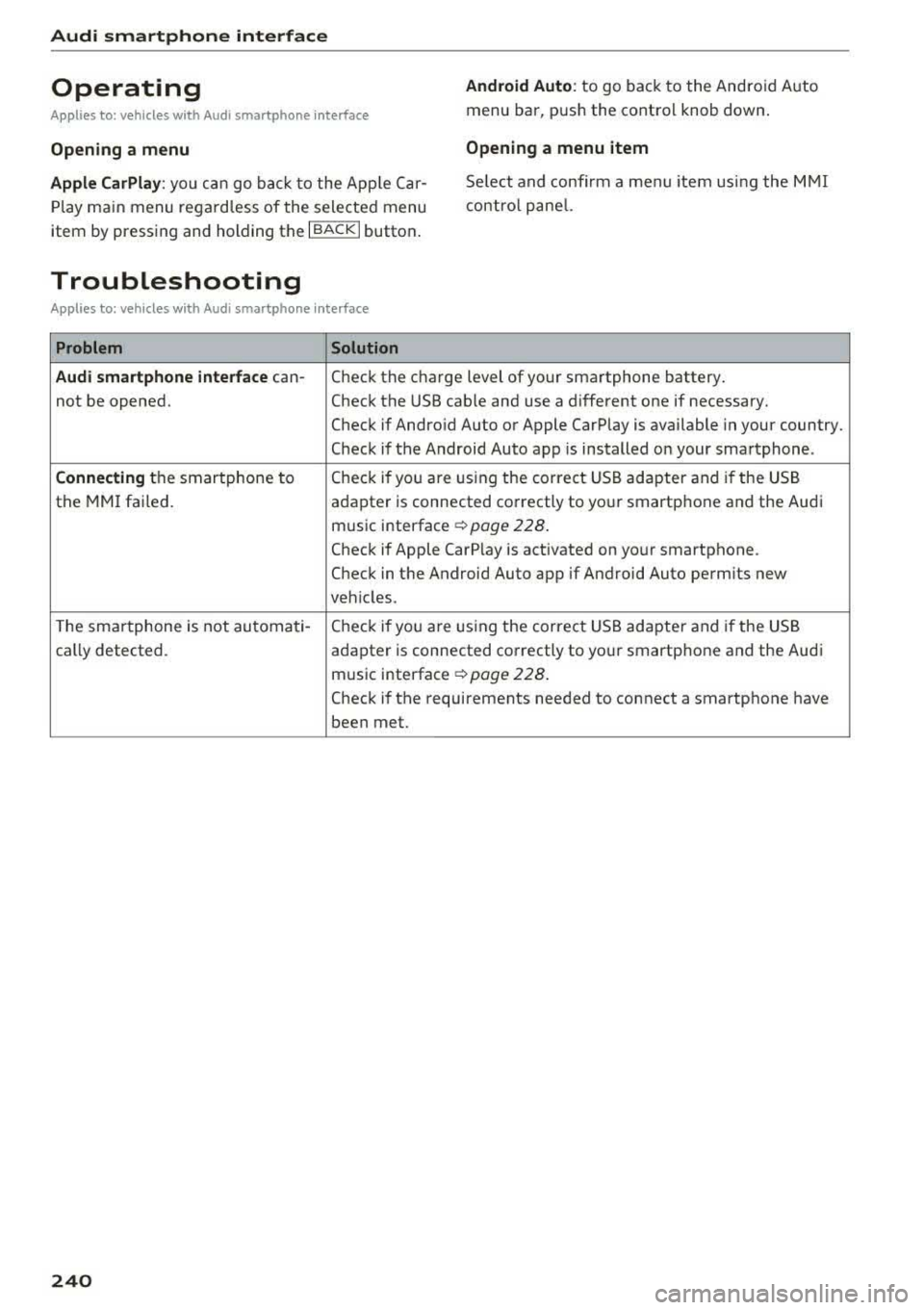
Operating
Applies to: vehicles w ith Audi smartphone interface
Android Auto: to go back to the Android Auto
menu bar, push the contro l knob down.
Opening a menu Opening a menu item
Apple CarPlay:
you can go back to the App le Car
Play main menu regardless of the selected menu
item by pressing and holding the
I BACKI button. Se
lect and confirm a menu item using the MMI
contro l panel.
Troubleshooting
Applies to: vehicles with Audi smartphone interface
Problem Solution
Audi smartphone interface
can-
Check the charge level of your smartphone battery.
not be opened. Check the USB cable and use a different one if necessary.
Check if Android Auto or Apple CarPlay is available in your country.
Check if the Android Auto app is installed on your smartphone .
Connecting the smartphone to Check if you
are U1sing the corre ct USB adapter and if the USB
the MMI failed.
adapter is connected correctly to your smartphone and the Audi
mus ic interface
c:> page 228 .
Check if Apple CarP lay is activated on your smartphone .
Check in the Android Auto app if Android Auto permits new
veh icles .
T he smartphone is not automati-
Check if you are U1sing the correct USB adapter and if the USB
cally detected . adapter is connected correctly to your smartphone and the Aud i
music interface
c:> page 228 .
Check if the requirements needed to connect a smartphone have
been met.
240
Page 285 of 400
a, a, ..... N
" N ..... 0 N > 00
action is entered in your Audi Warranty &
Maintenance booklet under
AIRBAG RE
PLACEMENT RECORD.
- Applies to plug-in hybrid* vehicles: In the
event of a co llision where the a irbags de
ploy, the electrical connection to the high
voltage battery is automatically disconnect
ed. This prevents a short c ircuit.
@) For the sake of the environment
Undep loyed airbag modules and pretension
ers might be classified as Perch lorate Materi
al - special handling may apply, see
www.dtsc.ca.gov/hazardouswaste/perchlo
rate. When the veh icle or parts of the re
straint system incl uding airbag modules and
safety belts with pre tensioners are scrapped,
all applicable laws and regulations must be
observed. Your authorized Audi dealer is fa
miliar with these requirements and we recom
mend that you have your dealer perform this
service for you.
Other things that can affect Advanced
Airbag performance
Changing the vehicle's suspension system can
change the way that the Advanced Airbag Sys tem
performs in a crash. For examp le, using tire-r im
combinations not approved by Audi, lowering the
vehicle, changing the stiffness of the suspension, including the springs , suspension struts, shock
absorbers etc. can change the forces that are
measured by the airbag sensors and sent to the
electronic control unit . Some suspens ion changes
can, for example, increase the force levels meas
ured by the sensors and make the airbag system
deploy in crashes in wh ich it would not dep loy if
t he changes had no t been made. Other kinds of
changes may reduce the force levels meas ured by
the sensors and prevent the airbag from deploy ing when it should.
.&_ WARNING
Changing the vehicle 's s uspension incl uding
use of unapproved tire-rim combinations can
change Advanced A irbag performance and in-
Airb ag sys tem
crease the risk of serious personal injury in a
crash.
- Never install suspension components that
do not have the same performance charac
ter istics as the components originally instal
led on your vehicle.
- Never use tire-rim combinations that have
not been approved by Audi.
Knee airbags
Description of knee airbags
Applies to: vehicles wit h knee airbags
The knee airbag system con provide supplemen
tal protection to properly restrained front seat
occupants.
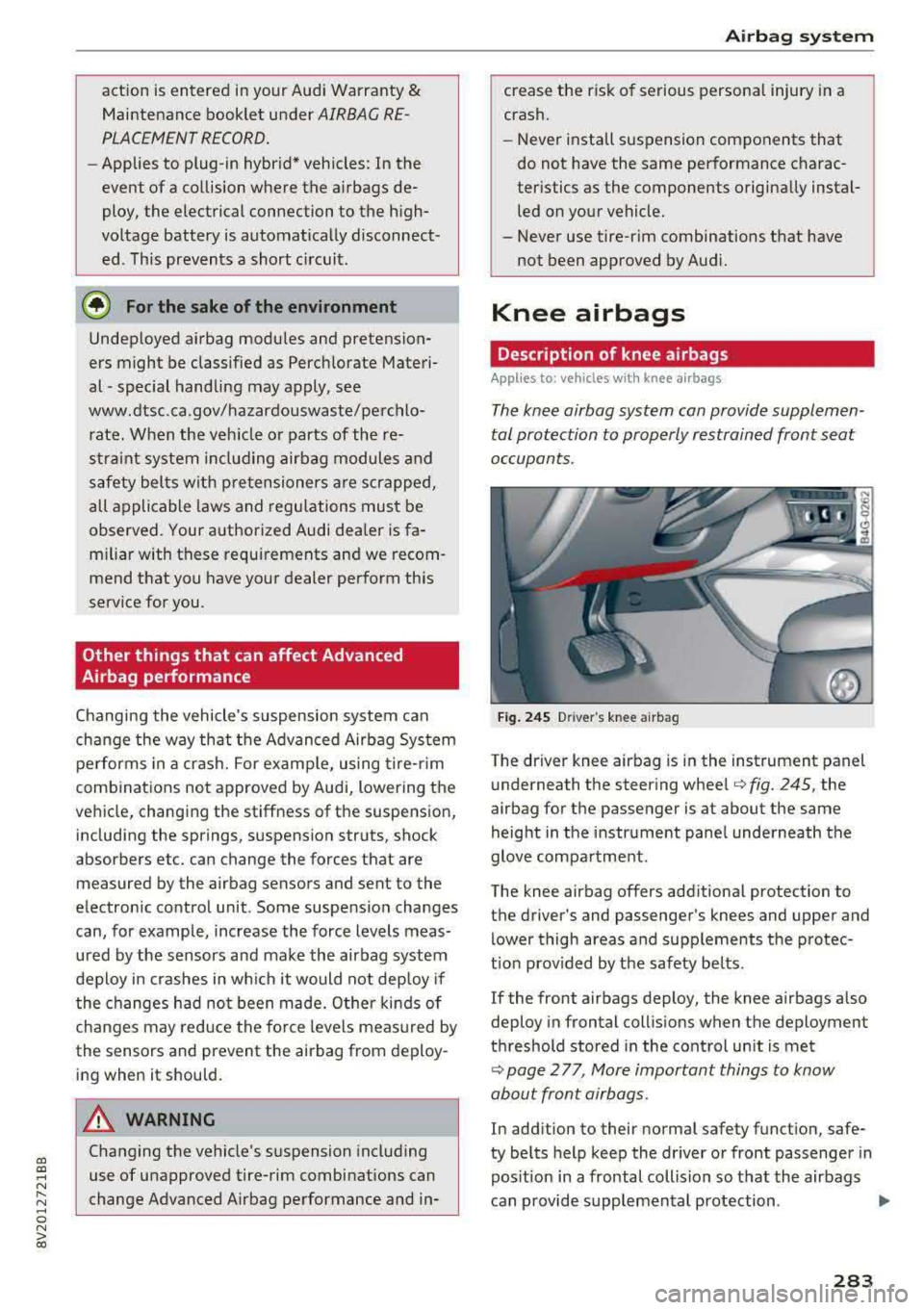
F ig . 24 S Driver 's knee airbag
The driver knee airbag is in the instrument panel
underneath the steering
whee l¢ fig. 245, the
airbag for the passenger is at about the same
height in the instrument pane l underneath the
glove compartment.
The knee airbag offers additiona l protection to
t h e driver's and passenger's knees and upper and
lower thigh areas a nd supplements the p rotec
t io n prov ided by the safety belts .
If the front airbags deploy, the knee airbags also
deploy in frontal collis ions when the deployment
threshold stored in the control un it is met
¢ page 2 77, More important things to know
about front airbags .
In addition to their normal safety function, safe
ty belts help keep the dr iver or front passenger in
pos it ion in a frontal collision so t hat the airbags
can p rovide supplemental protection .
..,.
283
Page 319 of 400
CXl CXl .... N ,.__
N .... 0 N > 00
-If tests need to be performed with the en
gine running, there is additional danger due
to moving components (such as the ribbed belt, alternator and radiator fan) and from
the high-voltage ignition system.
-Never reach into the radiator fan. The elec
tric auxiliary fan is controlled by tempera
ture and can switch on suddenly.
-Do not under any circumstances activate the
throttle inadvertently (for example, by hand
from the engine compartment) if the vehi
cle is stationary but the engine is running
and a gear is engaged. Otherwise, the vehi
cle will start to move immediately and this
could result in an accident.
-Pay attention to the following warnings list
ed when work on the fuel system or on the
electrical equipment is required.
- Do not smoke .
-Never work near open flames.
- Always have a working fire extinguisher
nearby
- All work on the battery or electrical system
in your vehicle can result in injuries, chemi •
cal burns, accidents or burns. Because of
this, all work must be performed
only by an
authorized Audi dealer or authorized Audi
Service Facility.
-To reduce the risk of electric shock and in
jury, never touch the following components when the engine is running or is being start
ed :
- Ignition cable
-Other components in the electronic high-
voltage ignition system
-If you must check or perform work on the
engine while it is running:
-Set the parking brake and place the selec
tor lever in the P (park) position first .
- Always proceed with extreme caution so
that clothing, jewelry or long hair do not
become caught in the radiator fan, fan
belt or other moving components or do
not come into contact with hot compo
nents. Tie back long hair before beginning
work and do not wear clothing that can
hang down into the engine .
Checking and Filling
-Limit your exposure to exhaust and chemi
cals to as short a time as possible
c:> A .
A WARNING
-California Proposition 65 Warning:
-Engine exhaust, some of its constituents,
and certain vehicle components contain or
emit chemicals known to the State of Cali
fornia to cause cancer and birth defects and
reproductive harm . In addition, certain flu
ids contained in vehicles and certain prod
ucts of component wear contain or emit
chemicals known to the State of California
to cause cancer and birth defects or other
reproductive harm.
- Battery posts, terminals and related acces
sories contain lead and lead compounds,
chemicals known to the State of California
to cause cancer and reproductive harms.
Wash hands after handling.
(D Note
When filling fluids, be sure not to mix the flu
ids up. Otherwise severe malfunctions and en
gine damage will occur.
@ For the sake of the environment
You should regularly check the ground under
your vehicle in order to detect leaks quickly. If
there are visible spots from oil or other fluids, bring your vehicle to an authorized Audi deal
er or authori zed Audi Service Facility to be
checked.
317
Page 321 of 400
a, a, ..... N
" N ..... 0 N > 00
Checking and Filling
Engine compartment overview
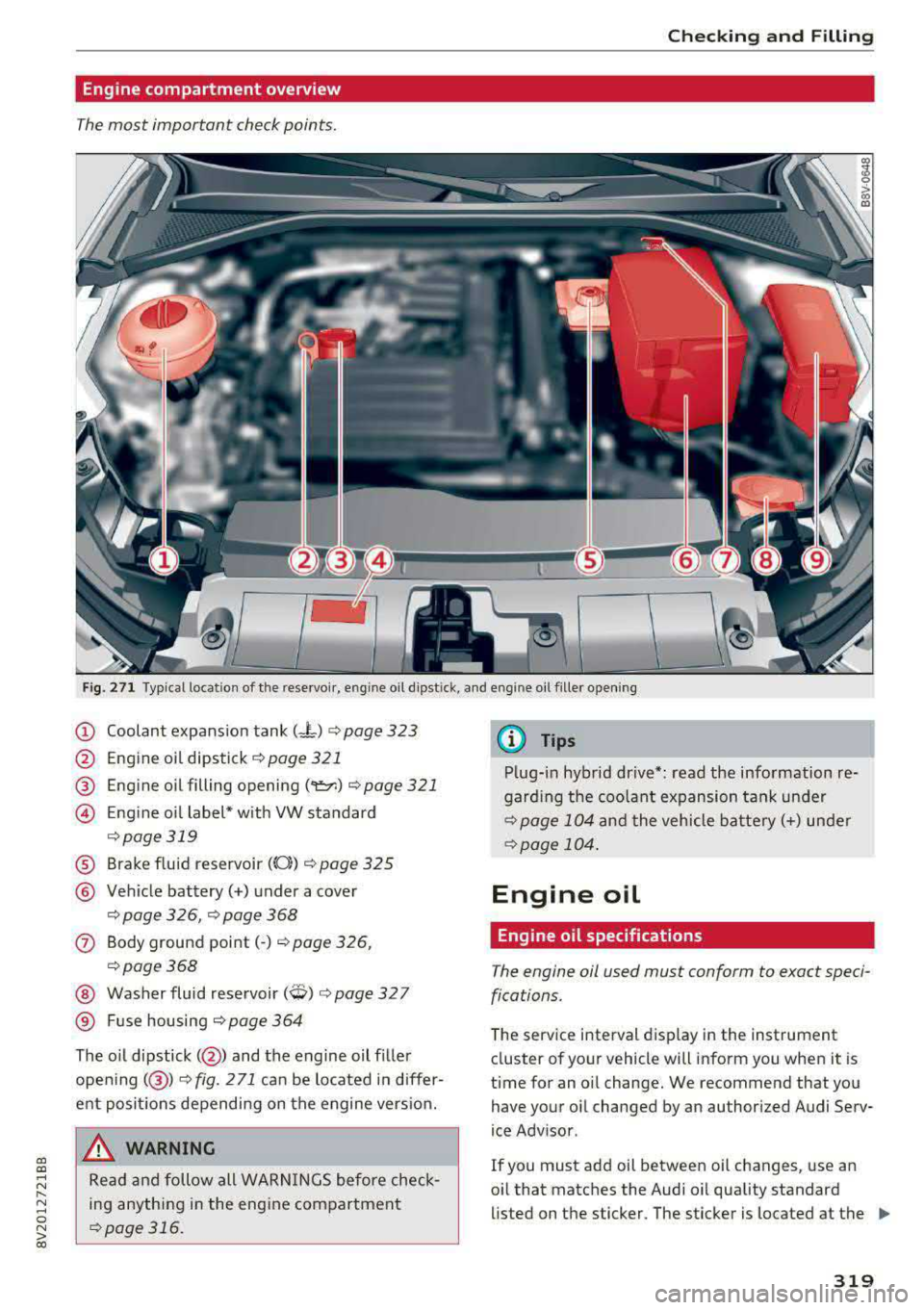
The most important check points .
-
Fig. 271 Typical location of the reservoir , engine oil dipst ick, and eng ine oil filler opening
(D Coolant expansion tank (-"-) ¢ page 323
@ Engine oil dipstick¢ page 321
® Eng ine oil filling opening ('er.) ¢page 321
@ E ng ine o il label* w ith VW standard
¢ page 319
® Brake fluid reservoir ((0}) ¢ page 325
@ Vehicle battery(+) under a cover
¢ page 326, ¢ page 368
0 Body ground point(-) ¢page 326,
¢page 368
@ Washer fluid reservoir (W) ¢ page 32 7
® Fuse housing ¢ page 364
The o il dipstick( @) and the engine oil f iller
opening( @)
¢fig. 271 can be located in differ
ent posit ions depending on the engine vers ion.
A WARNING
Read and follow all WARN INGS before check
ing anything in the engine compartment
¢page 316.
(D Tips
Plug-in hybrid drive*: read the information re
garding the coolant expansion tank under
¢page 104 and the vehicle battery(+) under
¢page 104 .
Engine oil
Engine oil specifications
The engine oil used must conform to exact speci
fications.
The service interval display in the instrument
cluster of your vehicle will inform you when it is
time for an oil change . We recommend that you
have your oil changed by an authorized Audi Serv
ice Advisor .
If you must add oil between oil changes , use an
oil that matches the Audi oil quality standard
li sted on the sticker. The sticker is located at the
Ill>
319
Page 327 of 400
a, a, ..... N
" N ..... 0 N > 00
- the temperature of the engine coolant r ises due
to the heat bui ld-up from the engine in the en
gine compartment , or
- the engine compartment heats up because the
vehicle is parked in intense su nlight .
_& WARNING
- To reduce the risk of personal injury never
touch the radiator fan .
- The auxiliary elect ric fan is temperature
contro lled and can switch on suddenly even
w hen the eng ine is not running.
- The auxiliary radiator fan switches on auto matically when the engine coo lant reaches a
certain temperature and will cont inue to run
until the coolant temperat ure drops.
Brake fluid
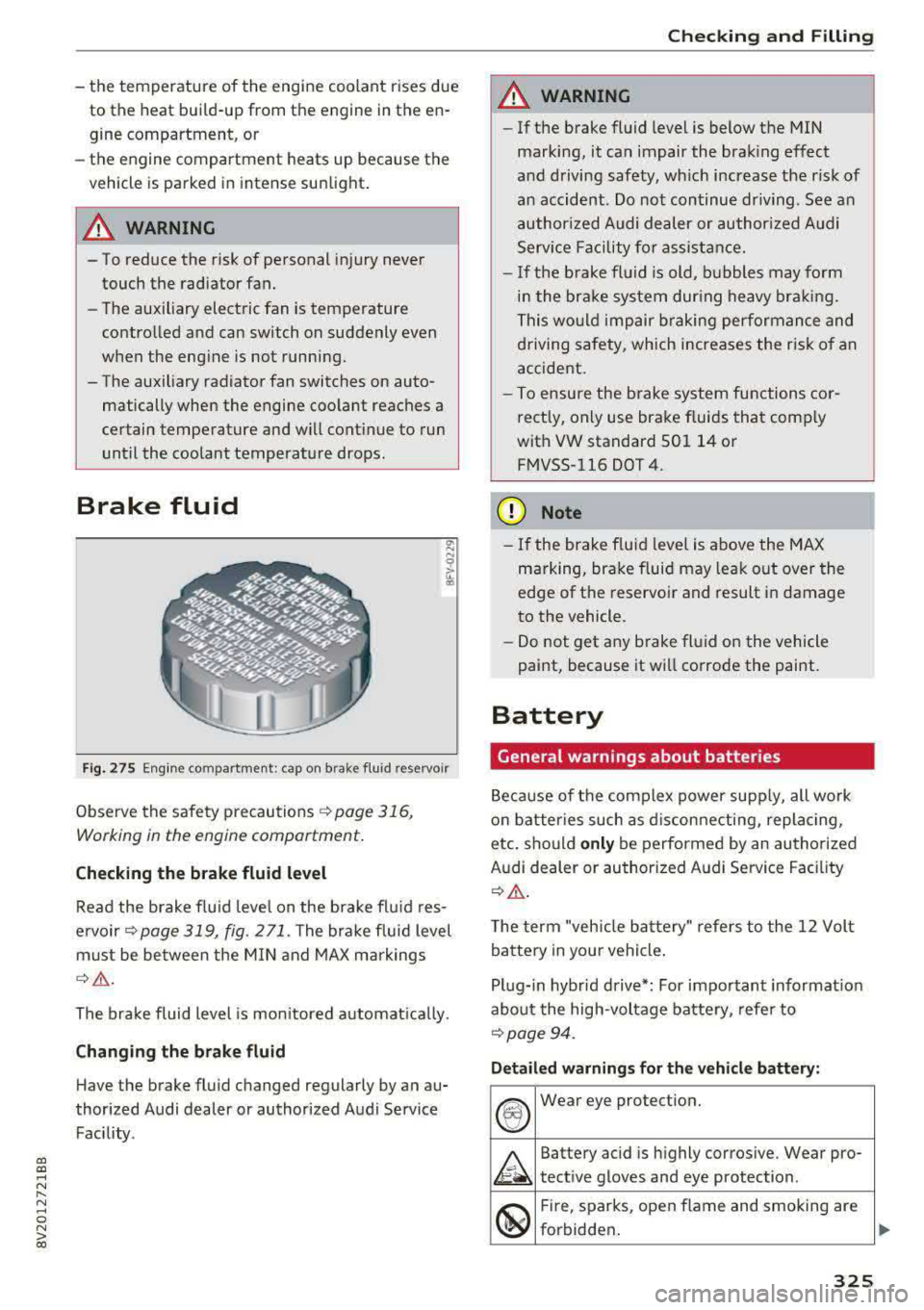
Fi g. 27 5 Engine co mpartment: cap on b rake f lu id reservoir
Observe the safety p recau tions ¢ page 316,
Working in the engine compartment .
Checking the brake fluid level
Read the brake f lu id leve l on the brake fl uid res
e rvo ir
Q page 319 , fig. 271. The bra ke fluid level
must be be tween the M IN and MAX m ark ings
¢ _& .
The brake fluid level is mon itored a utomat ica lly .
Changing the brake fluid H ave the brake fluid changed regularly by an au
thor ized Audi dealer or authorized Audi Service
Facility .
-
Checking and Filling
A WARNING
=
-If the brake fluid level is below the MIN
marking, it can impair the brak ing effect
and d riving safety, wh ich increase the risk of
a n accident . Do no t continue dr iving . See a n
a uthor ized Audi dealer or author ized A udi
Serv ice F acility for a ssistance.
- I f the b rake fl uid is old, b ubbles may form
i n t he bra ke sys tem dur ing heavy bra king.
This wo uld impair braking per formance an d
d riving safety, which increases the r is k of an
accident.
- T o ensu re the brake system fu nctions cor
rectly, only use brake fluids that comp ly
with VW standard 501 14 or F M VSS -116 DOT 4.
(D Note
- If the brake flu id leve l is above the MAX
marking, bra ke f luid may leak o ut over the
edge of the reservo ir and result in damage
to the vehicle.
- Do not get any b rake fl uid on the vehicle
paint, because it wi ll corrode the paint.
Battery
General warnings about batteries
B ecause of the complex power supp ly, all work
o n batter ies such as d iscon necti ng, replac ing,
etc. should only be performed by an authori ze d
Audi dealer or au thor ized A udi Service Fac ility
Q _& .
The term "veh icle batte ry" refe rs to the 1 2 Vol t
battery in your vehicle .
P lug- in hybr id driv e*: For important informat ion
abou t the high-vol tage batte ry, refe r to
Qpage 94.
Detail ed warnings fo r the vehicle battery :
®
Wear eye protect ion.
A
Battery acid is h ighly corros ive. Wear pro-
tect ive gloves and eye protection.
@
F ir e, sparks, open flame and smoking are
forbidden .
325
Page 328 of 400
Checking and Filling
A
A highly explosive mixture of gases can
form when charging batteries.
®
Keep children away from battery acid and
batteries.
A WARNING
All wo rk on the battery or electrical system in
your vehicle can result in injuries, chemical burns, accidents o r burns. Because of this, a ll
work m ust be performed
only by an author
ized Aud i dea ler or a uthorized Audi Service
Facility.
A WARNING
California Proposition 65 Warning:
- Battery posts, termina ls and re lated acces
sories contain lead and lead compounds,
chemicals known to the State of California
to cause cancer and reproduct ive p roblems.
Wash hands after handling.
(D Note
Protect the vehicle battery against freezing if
the vehicle will be parked for long periods of
time so that it is not destroyed by "freezing"
¢ page 326, Charging the vehicle battery.
Charging the vehicle battery
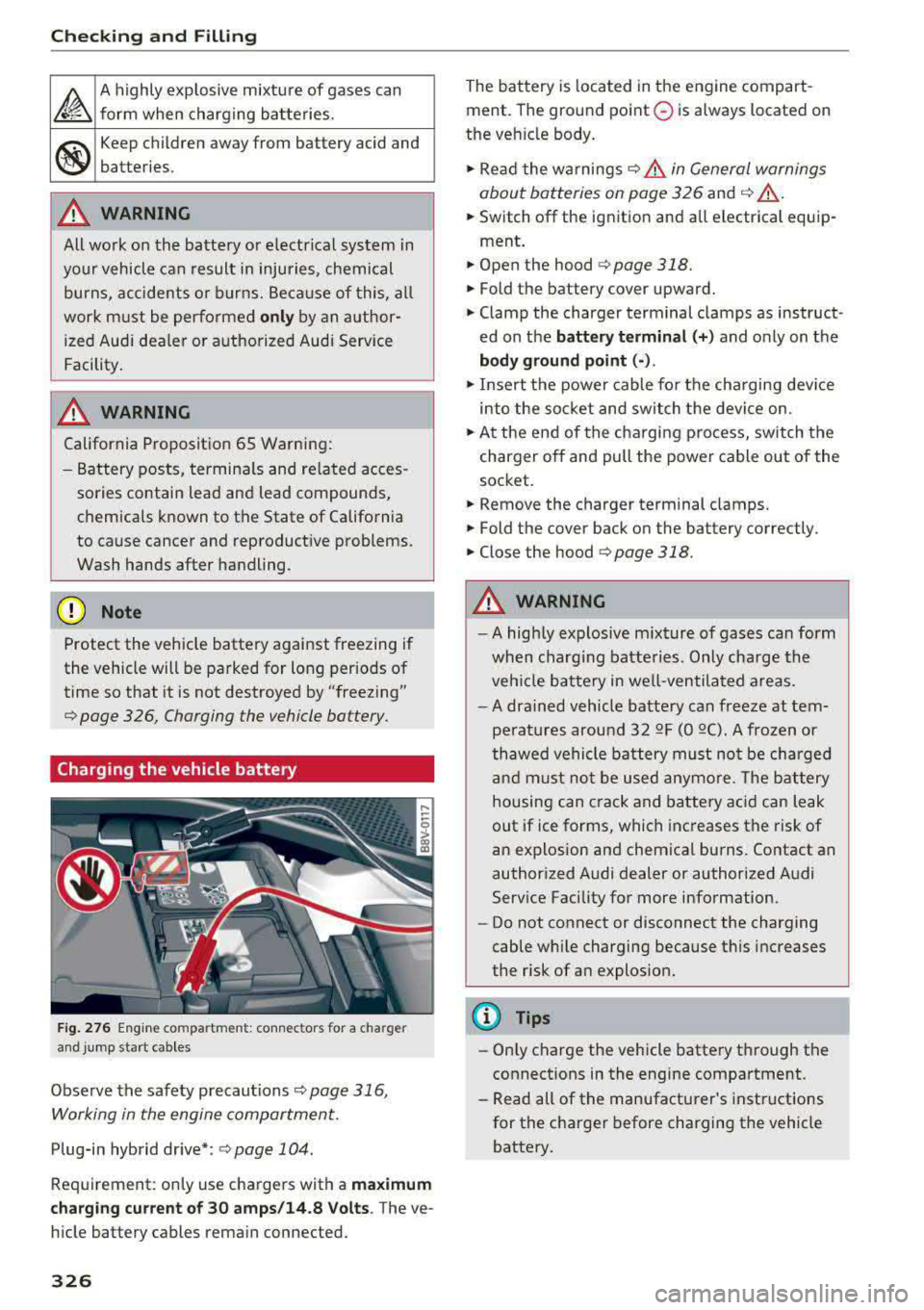
F ig. 276 Eng ine compartment: connectors for a charger
and jump start cables
Observe the safety precautions c:;;, page 316,
Working in the engin e compartment.
Plug-in hybrid drive*: ¢ page 104.
Req uirement: on ly use chargers with a maximum
charg ing current of 30 amps /14 .8 Volts .
The ve
hicle battery cables rema in connected.
326
The battery is located in the engine compart
ment. The ground point
0 is always located on
the ve hicle body.
.. Read the wa rnings¢ A in General warnings
about batteries on page 326
and ¢ _& .
.. Switch off the ignition and all electrica l equip-
ment .
.. Open the hood ¢page 318.
.. Fold the battery cover upward.
.. Clamp the charger terminal clamps as instruct
ed on the
battery terminal (+ ) and only on t he
bod y ground point (· ).
.,. Insert the power cable fo r th e cha rging dev ice
into the socket and switch t he device on .
.. At the end of the cha rging p rocess, switch the
charger off and pull the power cable out of the
socket.
.. Remove the charger terminal clamps.
.. Fold the cover back on the battery correctly.
.. Close the hood¢ page 318.
A WARNING
-A high ly explosive m ixture of gases can form
when charg ing batte ries. Only cha rge the
veh icle ba ttery in well-ven tila ted a reas.
- A dra ined vehicle battery can free ze at tem
pe ratures arou nd
32 QF (0 QC). A frozen or
thawed vehicle bat tery must no t be cha rged
and must no t be used anymo re. The b attery
housing can crack and battery ac id can leak
out if ice forms, which increases the risk of
an explosion and chemical burns. Contact an
authorized Audi dealer or authorized A udi
Serv ice Facility fo r more info rmation.
- Do not connect or disconnect the charging
cable wh ile charging because this increases
the risk of an explos ion.
@ Tips
- Only charge the vehicle battery t hrough the
connect ions in the engine compartment.
- Read all of the manufacturer's instructions
for the c harger before charging the vehicle
battery.