light AUDI A3 SEDAN 2017 Manual PDF
[x] Cancel search | Manufacturer: AUDI, Model Year: 2017, Model line: A3 SEDAN, Model: AUDI A3 SEDAN 2017Pages: 400, PDF Size: 67.32 MB
Page 148 of 400
Parking systems
Parking systems
General information
A ppl ies to: ve hicles w ith parking system plus/rearview cam
era
Depending on your vehicle's equipment , various
parking aids will help you when parking and ma
neuvering.
The
parking system plus assists you when park
ing by audibly and visually indicating objects de
tected
in front of and behind the vehicle
¢page 147.
The rearview camera shows the area behind the
vehicle in the Infotainment system display. This display assists you when you are cross or parallel parking. The parking system plus functions are
also available ¢
page 148.
A WARNING
-
-Always look for traffic and check the area
around your vehicle by looking at it directly
as well. The parking system cannot replace
the driver's attention. The driver is always
responsible when entering or leaving a park
ing space and during similar maneuvers .
-Please note that some surfaces, such as
clothing, are not detected by the system .
-Sensors and cameras have blind spots in
which people and objects cannot be detect
ed . Be especially cautious of small children
and animals .
-Always pay attention to the area around the
vehicle -us ing the rearview mirror, too.
-The sensors can be displaced by impacts or
damage to the radiator grille, bumper,
wheel housing and the underbody . The park
ing system may be impaired as a result.
Have an authorized Audi dealer or author
ized Audi Service Facility check their func
tion .
(D Note
-Some objects are not detected or displayed
by the system under certain circumstances:
-objects such as barrier chains, trailer draw
bars, vertical poles or fences
146
-objects above the sensors such as wall ex
tensions
-objects with certain surfaces or structures
such as chain link fences or powder snow
-If you continue driving closer to a low ob
ject, it may disappear from the sensor range. Note that you will no longer be
warned about this obstacle.
-Keep enough distance from the curb to re
duce the risk of damage to the rims.
(D Tips
-T he system may provide a warning even
though there are no obstacles in the cover age area in some situations, such as:
-certain road surfaces or when there is tall
grass .
-external ultrasonic sources such as from
cleaning vehicles.
-in heavy rain, snow, or thick vehicle ex
haust.
-We recommend that you practice parking in
a traffic-free location or parking lot to be
come familiar with the system . When doing
this, there shou ld be good light and weath
er conditions.
-You can change the volume and pitch of the
signals as well as the display¢
page 150.
-What appears in the infotainment display is
somewhat time-delayed .
-The sensors must be kept clean and free of
snow and ice for the parking aid to operate .
Page 153 of 400
CXl CXl .... N ,.__
N .... 0 N > 00
Intelligent Technology Electronic Stabilization
Control (ESC)
Description
Electronic Stabilization Control ( ESC) supports
driver safety . It reduces the risk of slipping and
improves dr iving stability. ESC detects critica l sit
uations such as the vehicle oversteering and un
dersteer ing or the wheels are spinning. The vehi
cle is stabilized by apply ing the brakes or reduc
ing engine torque . When the ESC engages, the
G1 indicato r light b links in the instrume nt clus
ter.
The follow ing systems are integrated in the ESC:
Anti-loc k bra king system (ABS)
ABS prevents the whee ls from locking when brak
ing. The vehicle can still be steered even during
hard brak ing. Apply steady pressure to the brake
pedal. Do not pump the pedal. A pulsing in the
b rake pedal indicates that the system is act ing to
stabilize the vehicle .
Brake a ssist system
The brake assist system can decrease braking dis
tance. It increases brak ing power when the driver
presses the brake pedal quick ly in emergency sit
uations . You must press and hold the brake pedal
u nti l the dangerous sit uat io n is ove r. In veh icles
with adaptive cr uise contro l*, the bra ke assist
s ys tem is more sensitive if t he d istance detec ted
to the veh icle dr iv ing ahe ad is too small.
Anti -slip regulation (ASR)
ASR reduces eng ine power when the drive wheels
begin spinning and adapts the force to the road
conditions . This makes i t eas ie r to sta rt, acceler
ate and dr ive up hill s.
Electronic differential lock (EDL )
The EDL applies the brakes to a wheel that starts
spinning and transfers t he drive power to the
other driving wheel or wheels ( if the veh icle is
eq uipped w ith all whee l dr ive*) . T his function is
n o t available at higher speeds.
Intellig ent Technology
In extreme cases, ED L automat ica lly switches off
to keep the brake o n the braked whee l from over
heating. The veh icle is still working correct ly. EDL
will switch on again automatically when condi
t ions have returned to normal.
Ste ering recommendation
The ESC he lps to s tabilize the vehicle by changing
the steering torque.
Select ive wheel torque control
Se lective wheel to rque cont rol is used w hen driv
i ng on curves. The fron t whee l on the inside of
the curve or bo th wheels on the i nside of the
c u rve are braked se lective ly as needed . This al
l ows more precise driving in c urves.
Automatic post-collision braking system
T he "automat ic pos t-collision braking system"
c an help to reduce the risk of sliding an d of addi
tiona l co llisions a fter an acciden t. If the ai rbag
contro l modu le detects a co llision above a certain
vehicle speed, the veh icle is bra ked by the ESC.
T he vehicle does not bra ke autorn,;1tically if;
- t he dr ive r presses the acce le rator pedal, or
- the ESC, the brake system or the veh icle elect ri-
cal system are not functioning .
A WARNING
-The ESC and its integ rated systems cannot
overcome the lim its imposed by natura l
phys ic al laws. This is especially important
on sli ppery or wet roads . If the sy stems be
gin acting to stabilize your vehicle, you
should immediately alter your speed to
match the road and traffic conditions. Do
not let the inc reased safety provided tempt
you into taking risks. This could increase
your r isk of a coll is ion.
- Please n ote the r isk of a coll is ion increases
when dr iv ing fast, especially t hrough curves
a nd on slippery or wet roads, and when dr iv
ing too close to objects ahead. The ESC and
its integrated systems ca nnot always pre
vent collisions
-there is st ill a ris k of ac ci-
dents!
..,.
151
Page 154 of 400
Intelligent Technology
- Press the accelerator pedal carefully when
acce le rating on even, slippery surfaces such
as ice and snow. The drive wheels can spin
even when these control systems are instal
led and th is can affect driving stability and
increase the risk of a co llision . condition
. Different tire sizes can lead to a
reduction in engine power.
- You may hear noises when the systems de
scribed are working .
@ Tips
-The ABS and ASR only function correctly
when all four whee ls have a s imilar wear
Switching on/off
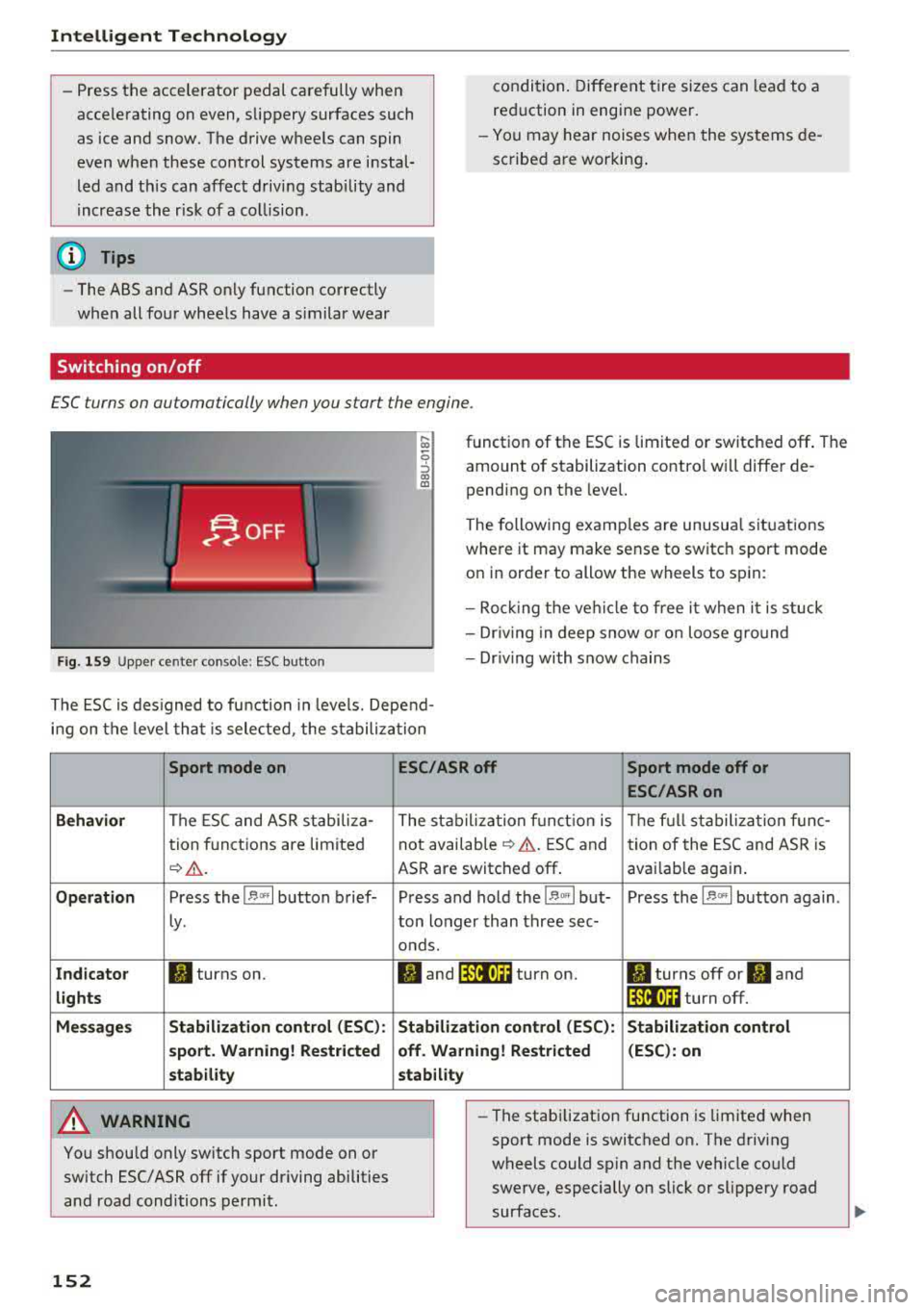
ESC turns on automatically when you start the engine .
Fig . 1 59 Upper ce nter console: ESC butto n
function of the ESC is limited or switched off . The
amount of stabilization contro l will differ de
pending on the level.
The following examp les are unusua l situations
where it may make sense to switch sport mode
on in order to allow the wheels to sp in:
- Roc king the ve hicle to free it when it is stuck
- Dr iv ing in deep snow o r o n loose g round
- Dr iv ing with snow chains
The ESC is des igned to fu nction in levels. Depend
i n g on the level tha t is sele cted , the stabilization
Sport mode on
Behavior
The ESC and ASR stabiliza-
tion f unctions are limited
¢ .&. .
Op eration Press the l.$ ,., I button brief-
Ly .
Ind icator II turns on.
lights
Me ssage s Stabilizati
on cont rol (ESC ):
s port . Warning! Re st ric ted
s tability
A WARNING
You should only switch sport mode on or
switch ESC/ ASR
off if your driving abilities
and road conditions permit.
152
ESC /ASR off Sport mode off or
ESC /ASRon
The stabiliza tion f unct ion is The f ull stabiliza tion f unc-
not availab le
¢ .&. . ESC and
tion of the ESC and ASR is
ASR are switched
off . avai lab le again .
Press and hold the
1 .$ .. , I but- Press the l.$ ,., I button again .
ton longer than three sec-
onds.
fl and 14il•U~ turn on. II turns off or II and
1 4il•U~ turn off.
Stabi lization control (ESC): S tabilization control
off. Warning! Re stricted (
ESC ): on
stability
-
- The stabi lization function is limited when
sport mode is switched on. The driving
wheels could spin and the vehicle could
swerve, especially on slick or slippery road
surfaces.
Page 155 of 400
CXl CXl .... N ,.__
N .... 0 N > 00
-There is no vehicle stabilization when ESC/
ASR are switched off.
(D Tips
-ESC/ASR cannot be switched off or sport
mode cannot be switched on if the cruise
control system * or the adaptive cruise con
tro l* is sw itched on.
-Malfunctions in the Audi magnetic ride *
may make it imposs ible to switch the ESC/
ASR off or to switch sport mode on.
Brakes
New brak e pad s
New brake pads do not achieve their full braking
effect during the first 2S0 mi (400 km) . They
must be "broken in" f irst. However, you can com
pensate for the slightly reduced braking force by
pressing firmly on the brake pedal. Avoid heavy
braking during the break-in per iod.
Wear
B rake pad
wear depends largely on the way the
veh icle is driven and on operat ing cond itions.
This is especially true if you are driving frequently
in the c ity and on curves or with a sporty driving
style.
Operat ing no ise
Noises may occur when braking depending on the
speed, braking force and outs ide cond itions such
as temperature and humidity .
Effect of wat er and road salt
In certain situations, for example after driving
through water, in heavy rain, after overnight con
densation or after washing your car, the braking
effect can be reduced by moisture or ice on the brake rotors and brake pads . The brakes must be
"dr ied" first w ith a few careful brake applica
tions .
At higher speeds and with the windsh ield wipers
turned on, the brake pads press against the brake
rotors for a short amount of time. Th is action,
which is not felt by the d river , happens at regular
Intellig ent Technology
interva ls and ensures a better reaction time for
the brakes in wet weather.
T he brak ing effect ca n also be reduced if yo u are
driv ing on sal ted roads and yo u do not app ly the
brakes for long per iods o f time. The layer o f salt
on the brake rotors and pads must be worn off
first when the brakes are applied.
Corrosion
Leav ing the veh icle pa rked for long periods of
time, low mileage and avoiding heavy b raking
can contribute to corrosion on the brake roto rs
and to dirty brake pads .
If you usua lly avoid heavy bra king or if there is
corrosion present, occasiona l heavy brak ing at
high speeds is recommended to clean the brake
rotors and
pads ¢,& .
Brake system malfunction
If you notice that the bra ke pedal travel has sud
denly inc re ased, then a br ake circuit in the dua l
c ircuit b rake system may have malfunctioned.
Drive to an authorized Audi dealer or authorized
Audi Service Facility immediate ly to have the
problem corrected. On the way there, drive with
reduced speed and keep in mind that you will
need a longer distance to stop and you will need
to press the brake pedal harder.
L o w bra ke fluid le ve l
When the brake fluid level is low, malfunctions in
the brake system may occur. The brake fluid level is electronically monitored.
Brake bo oster
The brake boos ter amplifies the p ressure you ap
ply to the brake pedal. It on ly operates whi le the
engine is running or when the ignition is switched
on (p lug-in hybrid dr ive*) .
A WARNING
-Only app ly the brakes for the purpose of
cleaning the brake system when road and
traffic cond itions permit. You must not en
danger other road users. This increases the
risk of an accident.
153
Page 156 of 400
Intelligent Technology
- Never let the vehicle roll while the engine is
stopped beca use this increases the risk of an
acc ident.
@ Note
- Never let the brakes "rub" by pressing the
pedal light ly when bra king is not actually
necessary. This causes the brakes to over
h eat and inc reases bra king d istance and
causes wear .
- Befo re dr iv ing on a long stretch w ith steep
s lopes, red uce your speed a nd shift to the
next lower gear This makes use of t he en
g ine bra king effect a nd relieves the b rakes.
If you need to bra ke a dd it iona lly, bra ke in
in te rv a ls and no t conti nuou sly.
@ Tips
- If the brake booste r is no t wo rking , you
must pr ess the brake pedal wi th much more
f orc e th an norma l.
- If you re trofit you r vehicle with a front spoil
e r, whee l cove rs o r similar ite ms, m ake sure
that the air flow to the front wheels is not
i n te rrupt ed. Ot he rw ise the bra ke sys tem
ca n become too hot.
Electromechanical
steering
The electromechanical steering supports the
driver's steering movements.
Powe r steering adapts electronically based on
the vehicle speed.
Indicator lights and messages
• Do not dr ive vehicle: steering defective
If thi s in dicator light t urns o n and stays o n and
this message appears, t he power s teer ing may
h a ve fa iled.
Stop the veh icle in a safe locat io n as soon as pos
sib le. Do
not continue driving. See an author ized
Aud i deale r or auth o riz ed Au di Serv ice F acility fo r
assis tance.
l~ij Steering: malfunction! You can continue
driving
154 I
f the indica to r li gh t turns on, the s teering w hee l
may be more difficult to move or more sens itive
t h an usua l. The steer ing whee l may a lso be at an
angle when driving straight.
Drive slowly to an a uth o rized Audi dea ler or au
thorized Audi Serv ice Facility to have the mal
funct ion corrected .
(D Tips
If t h e . or £-y.ij in dicator light on ly s tays on
fo r a short time, yo u may continue driving.
All wheel drive (quattro)
App lies to : vehicles wi th all w heel drive
In oil wheel drive, oil four wheels ore powered .
General information
In all wheel drive, the dr iv ing power is divided be
tween all fou r whee ls . This happens autom atic al
l y depending on yo ur driv ing beh avior as we ll as
the cur rent road conditions . Also see
c:> page 151, Electronic Stabilization Control
(ESC).
The all whee l drive concep t is designed for high
engine power. Yo ur vehicle is exce ptiona lly pow
erfu l and has excellent driving cha racteristics
both under normal driving conditions and on
snow and ice. A lways read and follow safety pre
cautions
c:> .&. .
Winter t ires
By using all whee l drive, your veh icle has goo d
forward motion with standard tires in winter con
dit ions. However, using w inter or all season t ires
o n
all four wheels in the winter is recommended,
because th is w ill imp rove the
braking effect .
Snow chains
If there are s now chain laws, snow cha ins m ust
also be used on veh icles with all wheel drive
c:> page 342, Snow chains.
Replacing tires
Fo r vehicles wi th a ll w hee l drive, o nly wheels wi th
the same rol ling circ umfe rence sho uld be used .
Avoid using tires with different tread depths
c:> page 335, New tires or wheels. IJI>
Page 157 of 400
CXl CXl .... N ,.__
N .... 0 N > 00
Offroad vehicle?
Your Audi is not an offroad vehicle -th ere is not
enough ground clearance . For this reason, avoid
d ifficult terrain.
& WARNING
- Also, in vehicles with all wheel drive, adapt
your driv ing style to the current road and
traff ic conditions. Do not let the increased
safety provided tempt you into taking risks,
because th is increases the r isk of an acci
dent .
-The braking ability of your veh icle is limited
to the tract ion of the wheels . In this way, it
is not diffe rent from a two whee l dr ive vehi
cl e. Do not be tempted to accelerate to a
high speed when the road is slippe ry, be
cause this increases the risk of an accident.
-Note that on wet streets, the front wheels
c an "hyd roplane" if dr iving at speeds that
are too high . Unlike front whee l drive
vehicles, the eng ine does not rev higher su d
denly when the vehicle begins hyd roplaning .
For this reason, adapt your speed to the
road conditions to reduce the risk of an acc i
dent .
Energy management
The starting ability is optimized
The energy management system manages the
electrical energy distribution and optimizes the
availability of electrical energy for starting the
engine .
When a ve hicl e w ith a co nventional energy sys
tem is not d riven for a long time, the vehicle bat
tery is dra ined by equipment (for example, the
immobilizer). In certain circumstances, there
could may not be enough energy to start the en
g ine.
Your veh icle is equipped with an inte lligent ene r
gy managemen t system for d istr ibuting electrici
ty. This significantly improves the starting ability
and inc reases t he vehicle battery life.
Intellig ent Technology
The ene rgy management system Is made up o f
battery diagnosi s, idling cu rrent management ,
and dynamic energy management .
Battery diagnosis
T he battery diagnos is determines the vehicle ba t
te ry c harge level. The sensors de termine the bat
te ry vo ltage, the batte ry cu rrent, and the batte ry
temperat ure. The cur rent charge level and the
performa nee of the vehicle battery a re deter
mined based on this.
Idling current management
T he idling cur rent management decreases the
energy used while parked . With the engine
switched off, it ma nages the energy distribution
to the d ifferent e lectr ica l components . Data from
the battery d iagnosis is taken into account for
th is.
Depending on the vehicle battery charge level,
electr ical eq uipment is switched
off one item af
ter the other to prevent the vehicle battery from dra ining and to ma intain the starting ab ility .
Dynamic energy manag ement
While driving, dynamic ene rgy management dis
t ributes the appropr iate amo unt of energy to the
electrical eq uipment. It contro ls the battery
charge level so that the amount of energy is not
greater than the amount being generated in or
der to maintain an optimal vehicle battery charge
level.
(D Tips
-Energy management cannot overcome the
laws of physics . Note that the charge level
and length of the veh icle bat tery life are
li m ited.
-Whe n the sta rting ability is endangered, the
i•) i n dicator light t urns on r=v pag e 29.
What you should know
Maintaining the starting ability is the highest
priority .
A lot of stress is placed on the veh icle battery
whe n driving short distances, during city driving,
..,.
155
Page 158 of 400
Intelligent Technology
and at cold times of the year. A lot of energy is
used but little is generated. It is also critical
when the engine is not running but electrical
equipment is switched on. In this case, energy is
used but none is generated.
In situations like this, energy management will
actively regulate the distribution of energy.
Long periods without use
If you do not drive your vehicle for several days or
weeks, electrical equipment is gradually scaled
back or switched off. This reduces energy use and
ensures the vehicle will be able to start after long
periods of time. Some convenience functions
such as opening with the remote control key may not be available. These convenience functions
will be available again once you switch the igni tion on and start the engine.
With the engine switched off
The vehicle battery will drain if you use Infotain
ment functions such as listening to the radio
while the engine is switched off.
If the vehicle's ability to start may be impaired by
the energy use, a message will appear in the In
fotainment system display. The message indi
cates that the system will switch off automatical ly soon . If you would like to continue using the
functions, you must start the engine.
With the engine running
Although electrical energy is generated while
driving, the vehicle battery can drain . This can
happen if little energy is generated but much is
used, and the charge level of the vehicle battery
is not optimal.
To restore the balance of energy, components that require large amounts of energy are temporar ily scaled back or switched off. Heating sys
tems in part icular require a great deal of energy .
If you notice, for example, that the seat heating*
or rear window defogger is not working, then it
has been temporarily reduced or switched off.
These systems are available again as soon as the
energy supply has been restored .
In addition , you may notice that the idle speed
has slightly increased. That is normal and no
156
cause for concern . By increasing the idling speed,
the additional required energy will be generated
and the vehicle battery will be charged.
Notice about data
recorded by the Event
Data Recorder and
vehicle control modules
Event Data Recorder
This vehicle is equipped with an Event Data Re
corder (EDR). The main purpose of an EDR is to
record, in certain crash or near crash-like situa
tions, such as an airbag deployment or hitting a road obstacle, data that will assist in understand
ing how a vehicle's systems performed . The EDR
is designed to record data related to vehicle dy
namics and safety systems for a short period of
time, typically 30 seconds or less. The EDR in this
vehicle is designed to record such data as:
- How various systems in your vehicle were oper
ating;
- Whether or not the driver and passenger safety
belts were buckled/fastened;
- How far (if at all) the driver was depressing the
accelerator and/or brake pedal; and,
- How fast the vehicle was traveling.
These data can help provide a better understand
ing of the circumstances in which crashes and in
juries occur. NOTE: EDR data are recorded by your
vehicle only if a non-trivial crash situation occurs;
no data are recorded by the EDR under normal
driving conditions and no personal data (e.g .,
name, gender, age, and crash location) are re
corded . However, other parties, such as law en
forcement, could combine the EDR data with the
type of personally identifying data routinely ac
quired during a crash investigation .
To read data recorded by an EDR, special equip
ment is required, and access to the vehicle or the
EDR is needed . In addition to the vehicle manu
facturer, other parties, such as law enforcement,
that have the special equipment, can read the in
formation if they have access to the vehicle or the EDR.
~
Page 168 of 400
Multi Media Interface
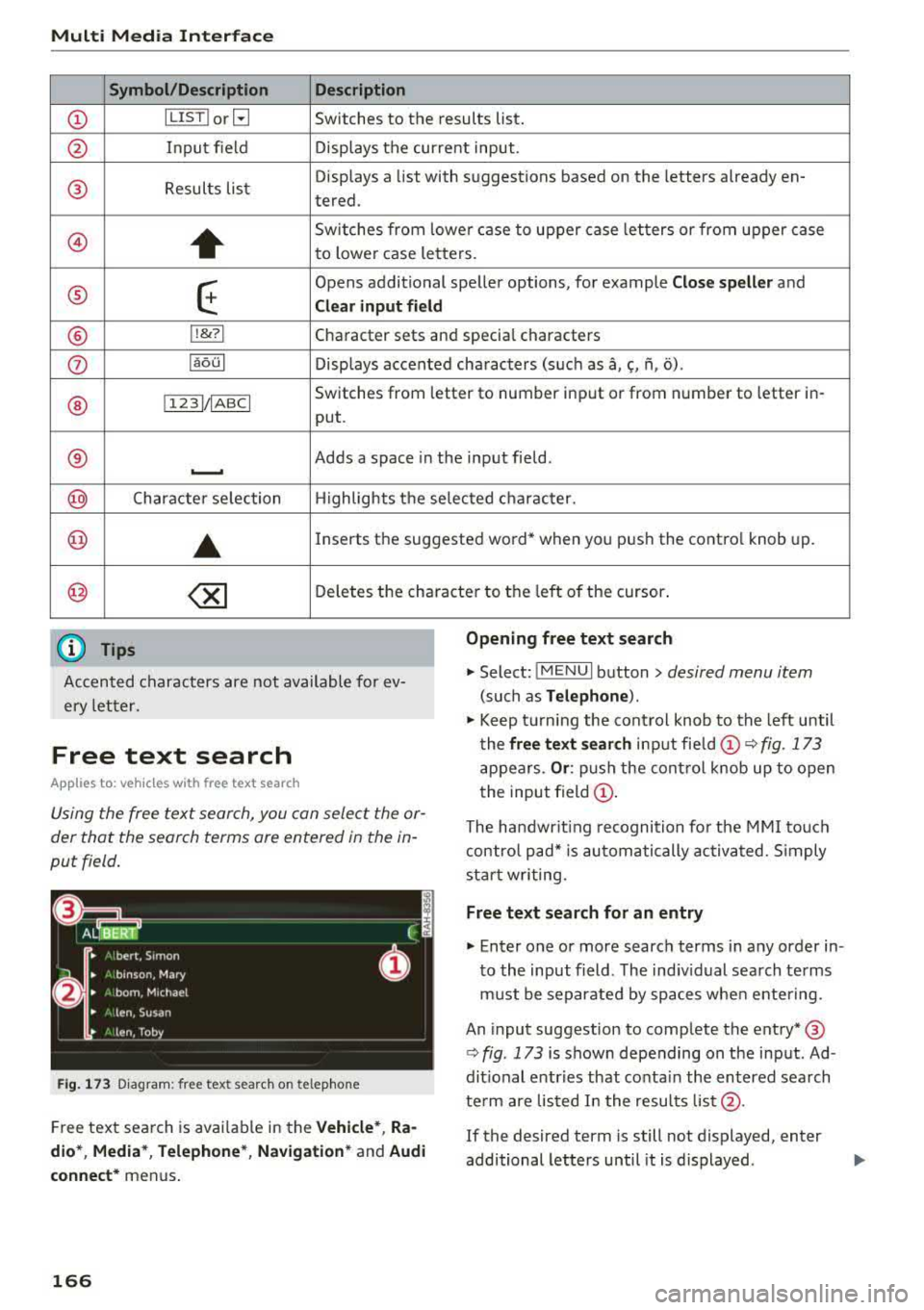
Symbol /Description Description
(D IL IST lorB Switches to the results list.
@ Input field Displays the current input.
® Results lis t Displays a
list with suggestions based on the letters already en-
tered.
@)
+
Switches from lower case to upper case letters or from upper case
to lower case letters.
® E
Opens additional speller options, for example Close speller and
Clear input field
® 11
& 71 Character sets and specia
l characters
0 laoul Displays accented characters (such as a,~' fi, o).
Switches from letter to number input or from number to letter in-
® 1 1231/ IABC I
put.
® Adds a space in the input field . ..........
@ Character selection Highlights the selected character.
@ ..
Inserts the suggested word* when you pus h the contro l knob up .
@ <&] Deletes the character to the left of the cursor .
(D Tips
Opening free text search
Accented characters are not available for ev
ery letter.
.,. Select: IMENUI button> desired menu item
(such as Telephone ).
.,. Keep turning the control knob to the left until
the
free text search input fie ld (D ¢ fig. 173
appears . Or: push the control knob up to open
the input field
(D.
Free text search
App lies to: veh icles with free text search
Using the free text search, you can select the or
der that the search terms are entered in the in
put field .
Fig . 173 Diagram: free text search on telep hone
Free text search is avai lab le in the Vehicle*, Ra
dio *, Media* , Telephone* , Navigation*
and Audi
connect*
menus .
166
The handwr it ing recognition for the MMI touch
control pad* is automatically activated . S imply
start writing.
Free text search for an entry
.,. Enter one or more search terms in any order in
to the input field. The ind iv idual search terms
must be separated by spaces when entering.
An input suggestion to complete the entry* ®
¢ fig. 173 is shown depending on the input. Ad
dit ional entries that co nta in the entered search
te rm are listed I n the results list@.
If the desired term is still not displayed, enter
additional letters until it is displayed .
Page 171 of 400
"' "' ... N ,.._ N ... 0 N > a,
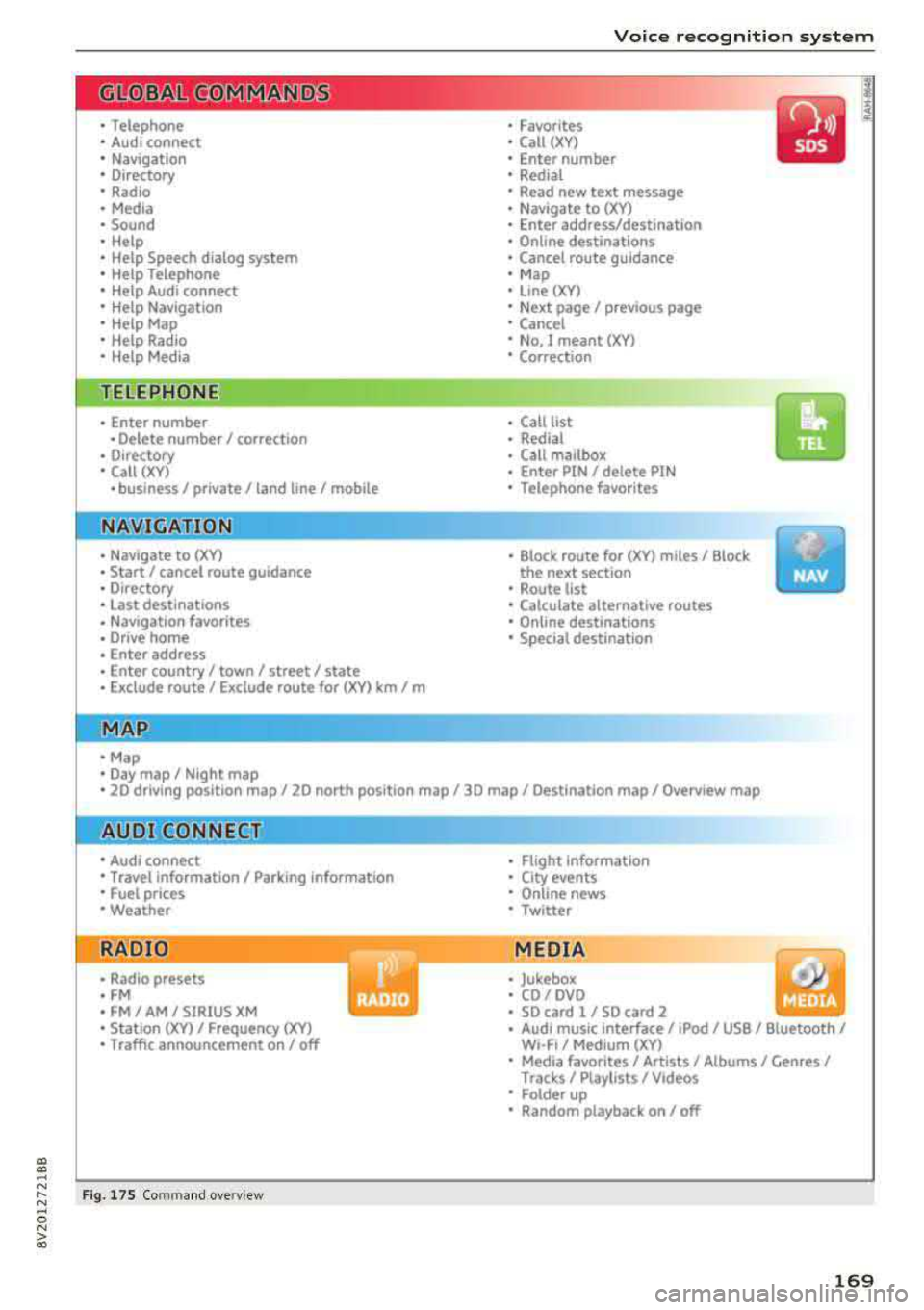
Voice recognition system
• Telephone
• Audi connect •
Favor ites
• Call (XY)
• Navigation
• Directory
• Radio
• Med ia
• Sound •
Enter number
• Redial
• Read new tex t message
• N avigate to (XV)
• Enter address/destination
• Help • Onhne destinations
• Help Speech dia log system
• Help Telephone •
Cancel route guidance
• M ap
• Help Audi connect •
Line (XY)
• Help Navigation
• Help Map
• Help Radio
• Help Media • N
ext page/ previous page
• Cancel
• No, l meant
()(Y)
• Correction
TELEPHONE
• Enter number • Call list
• Delete number/ correc tion
• Redial
•
Oltectory
• Call (XY) •
Call mailbox
• Enter PIN/ delete PI N
· business/ private/ land line/ mobile • Telephone favorites
NAVIG:ATI0N
• N avigate to CXV)
• Start/ cancel route guidance
• Directory
• Last destinations •
Bloc k route for
(XYJ miles/ Block
the next section
• Route list
• Calculate alternative routes
• Nav igation favorites
• Drive home
• Enter address •
Online destinations
• Special destination
• Enter country/ town
I street I state
• Exclude route / Exclude route for (XY)
km / m
M~P
• Map
• Day map/ Night map
• 20 driving position map/ 20 north posi tion map/ 30 map/ Destination map/ Overview map
AllJDI G QNNECT
• Audi connect
• Travel Information/ Parking Information
• Fuel prices
• Weather
RADIO
• Rad io presets
• FM
• FM/ AM/ SIRIUS XM
• Station (XY) / Frequency
(XYJ
• Traffic announcement on/ off
Fig. 17 S Co mmand overv ie w
• Flight Information
• City events
• Online news
• Twitter
MEDIA
• Jukebo x
• CO/ DVD .))
• SD card 1 / SD card 2
• Audi music Interface/
IPod I use / Bluetooth /
W I-Fl/ Medium (XV)
• Media favorites/ Artists/ Albums/ Genres/
Tracks/ Ptayllsts / Videos
· Folder up
• Random playback on / off
169
Page 172 of 400
Voice recognition system
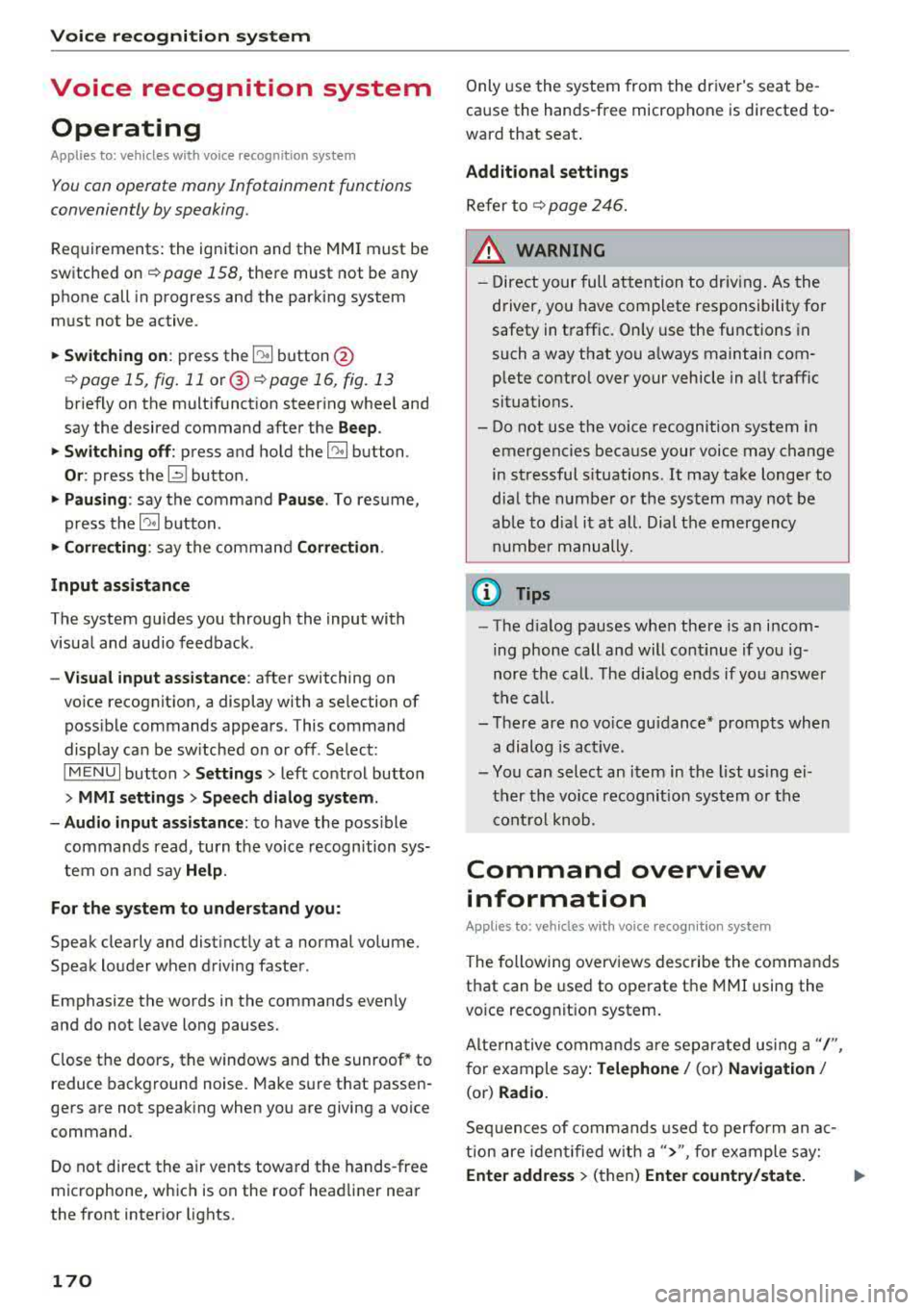
Voice recognition system Operating
Applies to: vehicles with vo ice recognition system
You con operate many Infotainment functions
conveniently by speaking.
Requirements: the ignition and the MM I must be
sw itched
on~ page 158, the re must not be any
phone call in progress and the parking system
m ust not be active.
.. Switching on : press the~ button @
¢ page 15, fig. 11 or@ ~ page 16, fig . 13
briefly on the multifunct ion steer ing whee l and
say the desired command after the
Beep.
.. Switching off : press and hold the~ button.
Or : press the l2l butto n.
.,. Pausing : say the command Pause. To resume,
press
the~ button.
.,. Corre cting : say the command Correction .
Input assistance
The system guides you through the input with
visua l and audio feedback.
- Visual input as sistance : after switching on
vo ice recognit ion, a display with a selection of
poss ible commands appears. This command
display can be sw itched on or off . Se lect:
IMENU I button> Settings > left control button
> MMI settings > Speech dialog sy stem .
- Audio input as sis tance :
to have the poss ible
commands read, turn the voice recognition sys
tem on and say
Help .
For the system to understand you:
Speak clearly and distinct ly at a normal volume.
Speak louder when driving faster.
Emphasize the words in the commands even ly
and do not leave long pauses.
Close the doors, the windows and the sunroof* to
reduce background noise. Make sure th at passen
gers are not speaking when you are giving a voice
command.
D o not direct the air vents toward the hands-free
microphone, whic h is on the roof head liner near
the front interior lights.
170
Only use the system from the dr iver's seat be
cause the hands-free microphone is directed to
ward that seat.
Additional sett ings
Refer to~ page 246.
_&. WARNING
- Direct your full attention to dr iv ing. As the
driver, you have complete responsibility fo r
safety in t raffic. Only use the functions in
such a way that you a lways maintain com
plete contro l over your vehicle in all traffic
situations.
-
- Do not use the voice recognition system in
emergencies because your voice may change
in stressful s ituations.
It may take longer to
dial the numbe r or the system may not be
ab le to dia l it at all. Dial the emergency
number manually .
(D Tips
- The d ia log pauses when the re is an incom
ing phone call a nd will continue i f you ig
nore the cal l. The dia log ends if you answer
the ca ll.
- There are no vo ice gu idance* prompts when
a dialog is act ive.
- You can select an item in the list using ei
ther the vo ice recognit ion system or the
cont rol knob.
Command overview
information
Applies to: vehicles with voice recognition system
The following overv iews des cribe the commands
that can be used to operate the MMI using the
vo ice recog nit ion system.
Alte rnative commands are separated using a"/",
for example say:
Telephone / (or) Navigation /
(or) Radio.
Sequences of com mands used to perform an a c
tion are iden tified w ith a
">", fo r example say:
Ente r addre ss > (then) Enter country /state. IJ,,