light AUDI A3 SEDAN 2017 Workshop Manual
[x] Cancel search | Manufacturer: AUDI, Model Year: 2017, Model line: A3 SEDAN, Model: AUDI A3 SEDAN 2017Pages: 400, PDF Size: 67.32 MB
Page 105 of 400
a, a, ..... N
" N ..... 0 N > 00
Component Color
@Gasoline engine Orange
Gray
@ High-voltage battery Green Green
(animated in the
Infotainment sys -
tern
a))
Gray
(§) Motion arrow Green
Orange
Green-orange
@ Motion ar row Green
•> Not availab le in all Infot ainmen t systems .
The power currently available in the e lectric drive
system is displayed when you open the energy
flow disp lay .
The bars are fi lled in with different co lors based
on the power
status @ Q fig. 107:
- White: electr ic power currently availab le
- Green: electric power currently being used
The more bars that are filled in the E-max section
@ , the longer the maximum power can be utiliz
ed. The bars turn off in the E-max section when
the maximum power can no longer be utilized.
When the drive power is greatly reduced, the
drive mode will automatically switch to using the
gasoline engine.
The availability of power is genera lly restricted
under the following conditions:
- T he temperature of the high-voltage battery is
very co ld or very hot.
- The high-vo ltage battery charge level is low.
The power availability is not visible if the
Ii] indi
cator light turns on.
(D Tips
High power ava ilability is necessary, for exam
ple, when needing to accelerate quickly while
in electric driving mode to pass another vehi
cle.
e-tron
Me aning
The gasoline engine is running
The gasoline engine is off High -voltage battery charge level
The high-voltage battery is charging
The vehicle is not in drive ready mode Electric driving
Driving w ith the gasoline engine
Driving with the gasoline engine and electric
mo-
tor (boost)
Recuperation
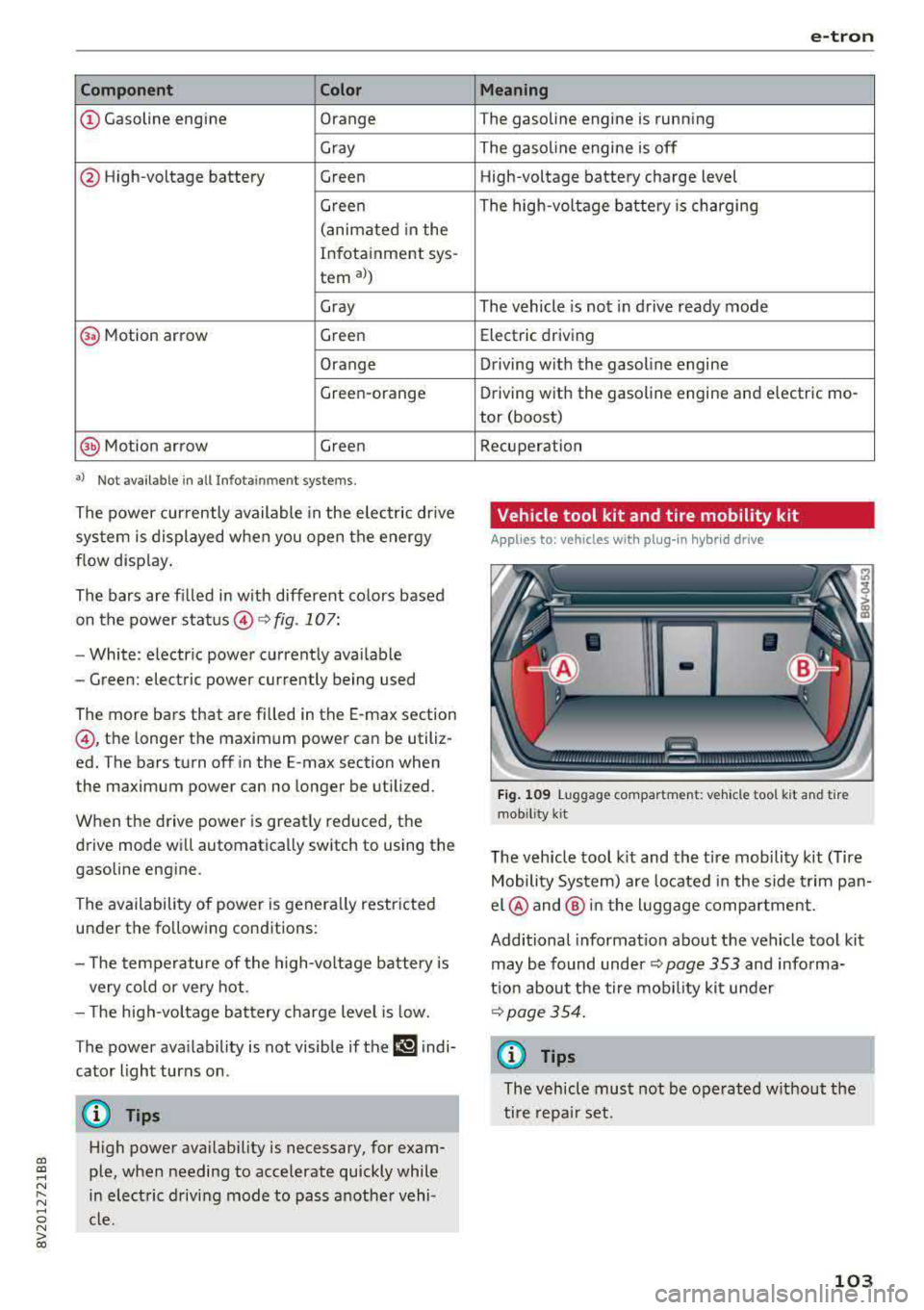
Vehicle tool kit and tire mobility kit
App lies to: vehicles wit h pl ug-in hy brid drive
Fig . 1 09 Luggage compartment: veh icle too l kit and tire
mob ility
k it
The veh icle tool k it and the tire mobility kit (Tire
Mobility System) are located i n the side t rim pan
el @ and @ in the l uggage compartment.
Additional information about the vehicle tool kit may be found under ¢
page 353 and informa
tion about the tire mob ility kit under
~page 354.
(f) Tips
The vehicle must not be operated w ithout the
tire repa ir set.
103
Page 108 of 400
e-tron
The gasoline engine is no longer available be
cause th ere is not enough fuel. Drive immediately
to a gas station.
Fuel filler door emergency release
A pp lies to: ve hicles w ith plug- in hy brid drive
You must use the emergency release to open the
fuel filler door when there is a malfunction
c::> page315 .
The tank is not vented. You can only fill a small
amount of fuel in the tank.
~ Fill only until the automatic fuel pump nozzle
turns off for the first time when it is operated
correctly.
Drive to an authorized Audi dealer or authorized
Audi Service Facility immediately to have the
malfunction corrected.
(D Tips
Pressure can escape if you open the tank cap
after using the emergency release. This can
create noises.
Charging
General information
A pp lies to: ve hicles w ith p lug -in hybrid drive
Two options are available for charging the vehi
cle:
- Charge at a public charging station with a spe
cial charging cable*
c::> page 108.
- Charge with household and industrial power
sockets using the Audi e-tron charging system
c::> page 108.
Environmental conditions when using the
Audi e-tron charging system
-Operating temperature : -13 °F (-2 5 °C) to 9 5 °F
(+35 °C)
- Humidity: S% to 95%, non-condensing
- 13,000 feet (4,000 meters) maximum above
sea level
- Protected against dust and spray (IP54 (USA:
enclosure 3 R))
106
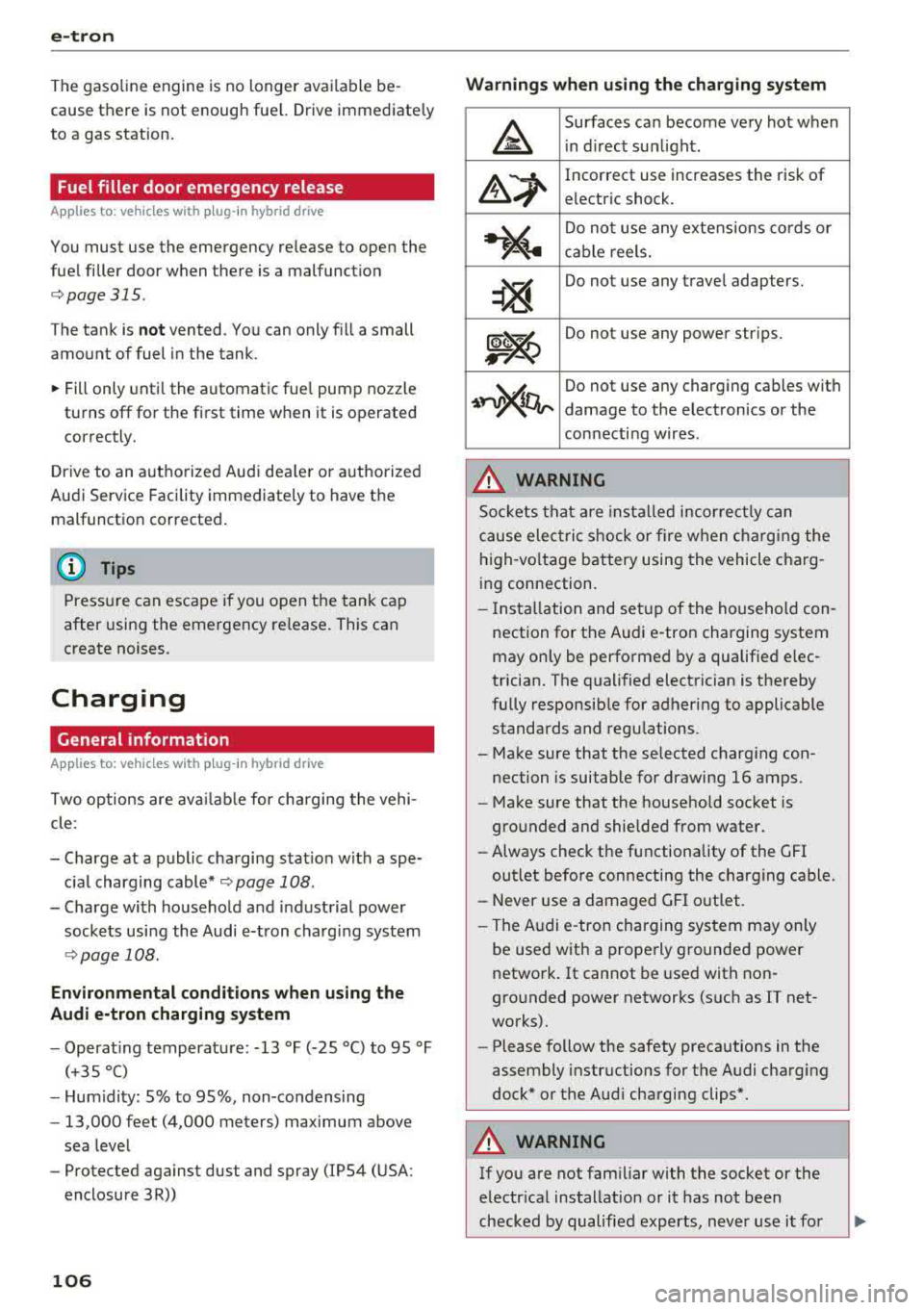
Warnings when using the charging system
&
Surfaces can become very hot when
in direct sunlight.
&~
Incorrect use increases the risk of
electric shock.
~"4
Do not use any extensions cords or
cable reels.
~
Do not use any travel adapters.
~~
Do not use any power strips.
~~~
Do not use any charging cables with
damage to the electronics or the
connecting wires.
.&_ WARNING
-
Sockets that are installed incorrectly can
cause electric shock or fire when charging the
high-voltage battery using the vehicle charg
ing connection.
- Installation and setup of the household con
nection for the Audi e-tron charging system
may only be performed by a qualified elec
trician. The qualified electrician is thereby
fully responsible for adhering to applicable
standards and regulations.
- Make sure that the selected charging con nection is suitable for drawing 16 amps .
- Make sure that the household socket is
grounded and shielded from water.
- Always check the functionality of the GFI
outlet before connecting the charging cable.
- Never use a damaged GFI outlet.
- The Audi e-tron charging system may only
be used with a properly grounded power
network. It cannot be used with non
grounded power networks (such as IT net
works).
- Please follow the safety precautions in the
assembly instructions for the Audi charging
dock* or the Audi charging clips*.
.&_ WARNING
If you are not familiar with the socket or the
electrical installation or it has not been
checked by qualified experts, never use it for
Page 111 of 400
a, a, ..... N
" N ..... 0 N > 00
-Using the control unit while operating the
charging dock*
c!;> page 110 or charging
clip*
c!;> page 110 is recommended .
-Do not immerse the control un it in water or
cover with snow or ice.
@ Tips
-Always place the Audi e-tron charging sys
tem on a secure surface when charg ing.
-To reduce the risk of over heat ing during op
eration, do not place the Audi e -t ron cha rg
i ng system in direct sunlight for long per i
ods of time.
-If the temperature inside the control unit r ises above 176 °F (80 °C), the charging
process will stop automatically unt il the
temperature decreases back down to the normal range.
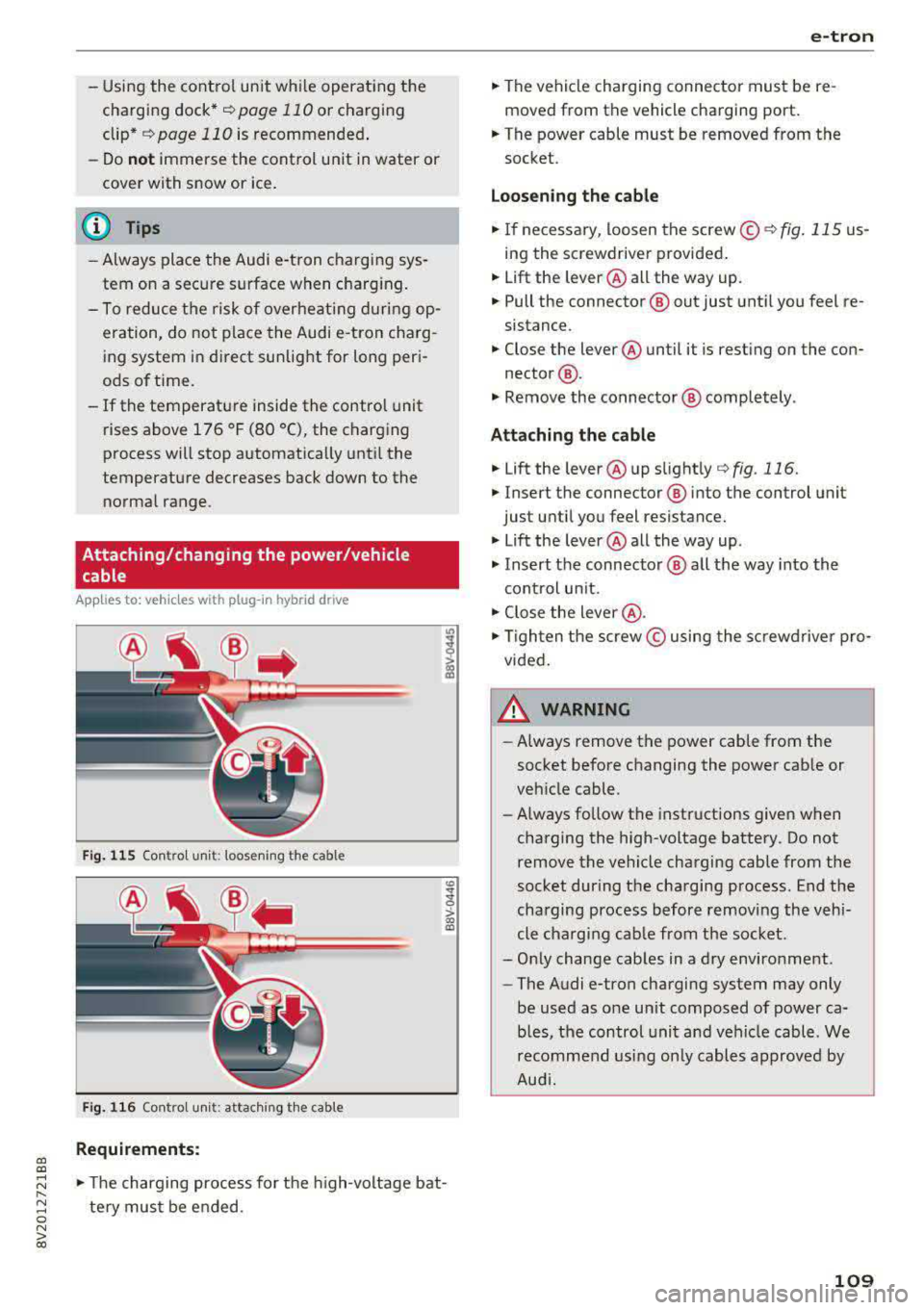
Attaching/changing the power/vehicle cable
A pp lies to: ve hicles with p lug -in hybrid dr ive
Fi g. 11 5 Contro l u ni t: loose nin g the cable
Fig. 116 Co ntro l u ni t: attach ing t he cable
Requirements:
co
~
> ex, a,
.,. The charging process for the high -voltage bat
te ry mus t be e nded .
e-tron
.,. The vehicle charging connector must be re
moved from the vehicle charging port.
.,. The power cable must be removed from the
socket.
Loosening th e cable
.,. If ne cessary, loosen the screw © r::!:>fig . 115 us
ing the screwdriver provided .
.,. Lift the lever@all the way up.
.,. Pull the connector @out just unt il you feel re
sistance.
.,. Close the lever @until it is rest ing on the con-
nector @.
.,. Remove the connector @ completely .
Attaching the cable
.,. Lift the lever @up slight ly c!;> fig. 116.
.,. Insert the connector ® into the control unit
just until you feel resistance .
.,. Lift the lever @all the way up .
.,. Insert the connector @ all t he way into the
cont rol un it.
.,. Close the lever @ .
.,. Tigh ten the screw © using the sc rewdrive r pro
vided .
A WARNING
-
-Always remove the power cable from the
socket before changing the power cab le or
veh icle cable.
- Always follow the instructions given when
charging the high-voltage battery. Do not
remove the vehicle charging cable from the
socket during the charging p rocess . End the
charging process before removing the vehi
cle charging cab le from the socket.
-Only change cab les in a dry enviro nment .
-The Audi e-tron charging system may only
be used as one un it composed of power ca
b les, the control unit and vehicle cable . We
recomme nd usi ng only cables approved by
Aud i.
109
Page 117 of 400
CXl CXl .... N r--N .... 0 N > 00
e-tron
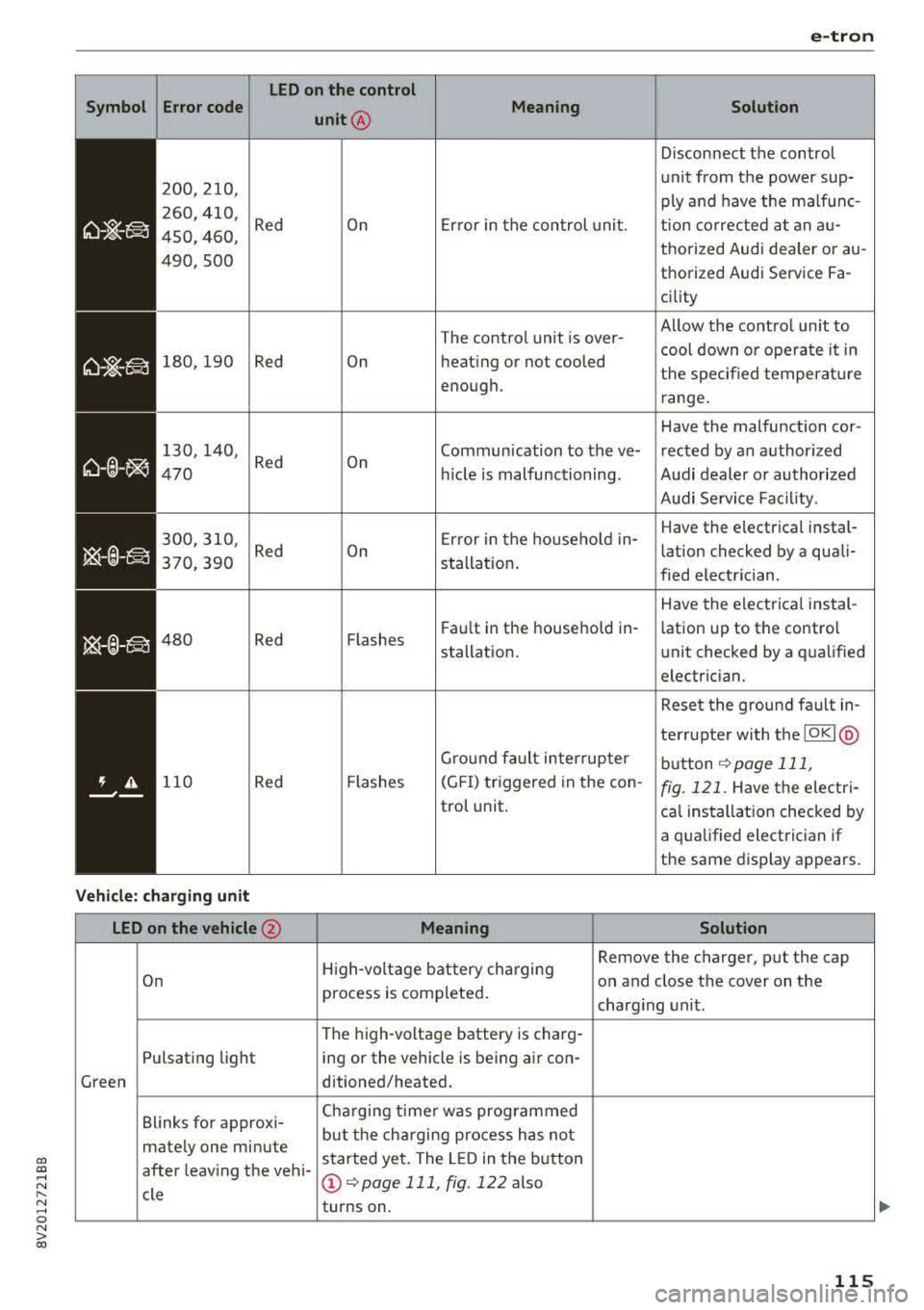
LED on the control
Symbol Error code
unit@ Meaning
Solution
Disconnect the control
200,210, unit from the power sup-
ply and have the malfunc-
260, 410,
Red On Error in the control unit. tion corrected at an au-450, 460, thorized Audi dea ler or au-
490,500 thorized Audi Service Fa -
ci lity
The control unit is over- Al
low the control un it to
cool down or operate it in
180,190 Red On heating or not cooled
the specified temperature
enough. range.
Have the malfunction cor -
130, 140,
Red On Communication to
the ve- rected by an authorized 470 hid e is malfunctioning. Audi dealer or authorized
Audi Service Facility.
300,310 , Error in the household in-Have the electrical instal-
Red On lation checked by a quali-
370,390 sta llation .
fied electrician.
Have the electrical instal-
480 Red Flashes F
au lt in the household in-
lation up to the control
stallation. unit checked
by a qualified
electrician.
Reset the ground fau lt in-
terrupter with the
IOKI @
Ground fault interrupter
button ~ page 111,
110 Red Flashes (GFI) triggered
in the con-fig. 121. Have the electri-
trol unit.
cal installation checked by
a q ualified electrician if
the same display appears.
Vehicle: charging unit
LED on the vehicle @ Meaning Solution
High-voltage battery cha rging Remove the charger, put the cap
On on and close the cover on the
process is completed.
charging unit.
The high-voltage battery is charg-
Pulsating light ing or the vehicle is being air con-
Green ditioned/heated.
Blinks for approxi- Cha
rging timer was programmed
but the charging process has not
mate ly one minute
started yet. The LED in the button
after leaving the vehi -
@~ page 111, fig. 122 also
cle turns on .
115
Page 119 of 400
CXl CXl .... N r--N .... 0 N > 00
unavailable because of this. Contact an au
thorized Audi dealer or authorized Audi
Service Fac ility for more in format ion .
- Charg ing may take longe r when tempera
tures a re extremely high or low .
- The char ging t ime at pu blic char ging sta
tions may vary from the times given in the
ta ble
¢ table on page 116 .
Audi e-tron charging system PIN
Applies to: ve hicles with p lug- in hybrid drive
The contro l unit can be locked by entering a 4-
d igit PIN of yo ur cho ice. If a PIN is activated, the
selected PIN must be ente red before every use .
We recommend locking yo ur contro l unit to pro
tect it against unautho riz ed access by a third pa r
ty .
Activating the PIN
~ Press t he IOK I@ ¢ page 111, fig . 121 bu tton
on the cont ro l unit.
POWER and SET PIN ap
pear in the display field .
~ Select SET PIN using t he arrow button ©-
~ Press the IOKI b utton @. ENTER PIN appears i n
t h e d isplay field .
~ Select t he des ired value by pressing the arrow
bu ttons © up or dow n.
~ U se the right ar row bu tto n© to go t o th e nex t
digi t.
~ Press t he left ar row bu tto n © to go to the pre -
vio us menu.
~ Ente r all of the d igits .
~ Press t he IOKI b utton @after the last d igit .
~ REPEAT PIN appears in the display field .
~ Enter the PIN again using the arrow buttons
© -
~ Press t he IOKI button @.
~ PIN OK appears in t he di sp lay fie ld if bo th en-
t ries ma tch.
~ Th e P IN is now a ct ivate d.
Deactivating the PIN
Requ irement: The control unit mus t be un locked .
~ Enter the numer ica l code 0000 . Proceed as if
you were act ivat ing the
PIN¢ page 117 .
~ The PIN is deact ivated .
e-tron
Locking the control unit
Requiremen t: T he PIN m ust be activated.
~ Press t he~ button @¢ page 111, fig . 121 o n
t he co ntrol unit.
Unlocking the control unit
Requirement: The PIN m ust be act ivated.
~ Press any button on the contro l unit .
~ PIN? appears in the display field.
~ Enter the P IN .
~ Press the I OK I button @.
(D Tips
-The PIN is deactivated in the factory defa ult
sett ings.
- If you do not remember yo ur PIN, contact
an authorized A udi dealer or autho rized
Audi Service Facility.
- If the first PIN entry differs from the second
entry, the first PIN entry is d isplayed .
- If nothin g is entered within
20 seconds of
this , the set va lue is not changed.
Indicator Lights and
messages
Applies to : vehicles with plug-in hybr id drive
If the . indicator light tu rns o n, the high -volt
age ba tte ry is charging or is already completely
c h arged .
If
the . indicator light stays on, the re is a ma l
funct ion in the charg ing system. Have t he p rob
l em corrected immediately by an a uthor ized Audi
d eal er or authori zed A udi Se rvice Fa cility.
!I Charging connector still attached . Driving
not possible
This message appears w hen the charging system
is still connected to the vehicle. Remove the con
nector
c:> page 114, After charging.
Applies to: vehicles with A udi v irtual cockpit : ii
Incompatible charging system. Please check
charging system
Applies to: vehicles wi th analog instr ument clus -
te r:
ii AC charging: currently not possible IJ,-
117
Page 122 of 400
Trailer towing
Trailer towing
Driving with a trailer
General information
Your Audi was designed primarily for passenger
transportation.
If you plan to tow a trailer, please remember that
the additional load will affect durability, econo
my and performance.
Trailer towing not on ly places more stress on the
ve hicle, it also ca lls for more concentration from
the dr iver.
F or this reason, always follow the operating and
driving instructions provided and use common
sense.
Technical requirements
Trailer hitch
Use a weight-carrying hitch conforming to the
gross tra iler weight. The hitch must be suitab le
for your veh icle and tra iler and must be mounted
securely on the vehicle's chassis at a technically
sound
locat ion . Use on ly a trailer hitch with a re
movable ba ll mount . Always che ck with the t rail
er hitch man ufac tur er to make s ure t hat you are
using the co rrect hi tc h.
Do not use a bumper hitch.
The hitch must be installed in such a way that it
does not interfere with the impact -absorbing
bumper system. No mod ificat ions should be
made to the vehicle exhaust and b rake systems .
Fr om t ime to t ime, che ck tha t all hitch mo unti ng
bol ts rem ain securely f aste ned.
W hen you are not tow ing a tra iler, remove the
tra ile r hitc h ba ll mount . This prevents the hit ch
from caus ing damage s hou ld your veh icle be
s truck from be hind
c> ,&. .
Trailer brakes
If your trailer is equipped with a brak ing system,
check to be su re that it conforms to all regula
tions .
120
The t rai ler hydraulic bra ke system must not be
directly connected to the vehicle's hydraulic
bra ke system.
Safety chains
A lways use s afety chains between you r vehi cle
and t he tra ile r.
Trailer lights
Traile r lights must meet all regula tions . B e s ure
to check w ith your Aud i dea le r fo r cor rect wir ing,
switches and relays .
Mirrors
If you are unable to see t he traffic behind you us
i ng t he regular outs ide mir rors, then yo u
must in
stall extended mirro rs . It is impo rtant that you
always have clear vision to the rear.
&, WARNING
Afte r remov ing the tr ailer hi tch, do not s to re
i t i n yo ur vehicle. In case o f su d den braking,
the hitch could fly fo rwa rd and injure you or
your passengers .
Operating instructions
Maximum trailer weight
A tra iler f or yo ur vehicle is lim ite d to a typical
class 1 or class 2 trailer.
Trailer load distribution
Be sure the load in the t rai le r i s he ld se curely in
pla ce to p revent i t from shi fting forward, bac k
ward or si deways.
Never allow a passenger to ride in a trailer c> &.
in Driving instructions on page 121.
Engine cooling system
Towing a tra iler makes the engine work harder. It
is important that the cooling system's perform
ance is up to the additional load . Make sure tha t
the coo ling system has enoug h flu id.
Tire pressure
When towing a trailer, inf late the tires of your
vehicle to the tire pressure listed under "Full load" on the label
c> page 336. Inflate trailer
Page 123 of 400
CXl CXl .... N ,.__
N .... 0 N > 00
tires to trailer and tire manufacturers' specifica
tions.
Lights
Check to make sure both vehicle and trailer lights
are working p roperly.
Safety chains
Be sure trailer safety chains are properly connect
ed from the tra iler to the hitch on the vehicle.
Leave enough slack in the chains to permit turn
in g corners . When you install safety cha ins, ma ke
sure they w ill not drag on the road when yo u are
driving .
The chains shou ld cross under the trailer tongue
to prevent it from dropping in case of separat ion
from the hitch.
Driving instructions
Driving with a trailer always requires extra care
and consideration.
Weight distribution
Towing a loaded trailer w ith an empty car results
in a highly unstable distribution of weight . If this
cannot be avo ided, drive at very low speeds only
to avoid the risk of losing steering control.
A "balanced" rig is easier to operate and control.
This means that the tow vehicle should be loaded
to the extent possible and permissible, while
keep ing the tra iler as light as possib le under the
circumstances. Whenever possib le, t ransfer
some cargo to the luggage compartment of the
tow vehicle whi le observing tongue load require
ments and vehicle loading considerations .
Speed
The higher the speed, the more difficult it be
comes for the driver to control the rig. Do not
drive at the maximum permissible speed. Reduce
your speed even more if load, weather or wind
conditions are unfavorable
-particu larly when
going downhill.
Reduce vehicle speed
immediately if the trailer
shows the s lightest sign of swaying .
Do not try
to stop the swaying by accelerating.
Tra iler towing
Observe speed limits. In some a reas, speeds for
vehicles towing trailers are lower than for regular
vehicles .
Always apply brakes early. When driving down
hill, shift into a lower gear to use the engine
braking effect to slow the vehicle. Use of the
brakes alone can cause them to overheat and fa il.
Coolant temperature
T he coo lant tempe rature gauge ~ page 11 must
be observed carefully . The coolant temperature
can increase if you drive on long inclines in a low
gear at high engine speeds. Reduce your speed
immediately if the LEDs in the top part of the dis
play turn on.
For more information about indicator lights, re
fer
to . ~page 28.
A WARNING ,-
Anyone not properly restrained in a moving
vehicle is at a much greater risk in an acci
dent. Never let anyone ride in your car who is
not properly wearing the restraints provided
by Aud i.
Trailer towing
information
Important to know
Your vehicle handles differently when towing a
trailer because of the addit ional weight and dif
ferent weight distribution . Safety, performance
and economy will g reatly depend on how careful
ly you load your trailer and operate yo ur rig.
Before you actually tow your trailer, pract ice
turning, stopping and backing up in an area away
from traffic. Keep practic ing until you have be
come complete ly familiar w ith the way your vehi
cle-trailer combination behaves and responds.
Backing up is difficult and requires practice.
Backing up with a t railer genera lly requires steer
i ng action opposite to that when backing up your
vehicle without a tra iler.
Maintain a greater distance between your vehicle
and the one in front of you. You will need more
.,,.
121
Page 125 of 400
a, a, ..... N
" N ..... 0 N > 00
Assistance systems Electronic speed limiter
Applies to: vehicles with electronic speed lim iter
Your vehicle may be factory equipped with tires
that are rated for a maximum speed of 130 mph
(210 km/h). This is less than the maximum speed
of your vehicle. To reduce the risk of sudden tire
failure and loss of control if the vehicle is operat
ed at excessive speeds, your vehicle also has an
electronic speed lim iter . The electronic speed
limiter prevents your vehicle from going faster
than the tir e speed rating. For more information
¢page 335.
If the engine control unit receives faulty vehicle
road speed s ignals, the Malfunction Indicator
L amp (MIL)
II! will illuminate . If this occurs,
contact the nearest authorized Audi dealer for
assistance .
& WARNING
Always observe the posted speed limits and
adjust your speed to suit prevailing road, traf
fic and weather conditions. Never drive your
vehicle faster than the max imum speed rat ing
of the tires installed.
Speed warning system
Applies to: vehicles with speed warning system
The speed warning system helps you to stay be
low a specified maximum speed that can be set,
changed or deleted in the Infotainment system .
The speed warning system warns you if you are
exceeding the maximum speed that you have set.
A warning tone will sound as soon as your speed
exceeds the stored value slightly . The
101 (USA
models) /
[01 (Canada mode ls) indicator light
and the corresponding message appear in the in
strument cluster display at the same time. The
[OJ (USA models)/ (•j (Canada models) indicato r
light and the message turn
off when the vehicle
speed drops below the stored maximum speed.
Setting a threshold is recommended if you would
like to be reminded when you reach a certain
maximum speed. Situations where you may want
to do so include driving in a country with a gener-
Assistance systems
al speed limit or if there is a specified maximum
speed for winter tires.
Setting the warning threshold
• Select in the Infotainment system: I MENU ! but
ton
> Vehicle > left control b utton > Driver as
sistance
> Speed warning > Manual.
(0 Tips
Regardless of the speed warning system, you
shou ld always monitor your speed using the
speedometer and make sure you are following
the lega l speed limit.
Cruise control system
Switching on
Applies to: vehicles wit h cruise control system
The cruise control system makes it possible to
drive at a constant speed starting at 15 mph (20kmlh) .
0
f
~
0
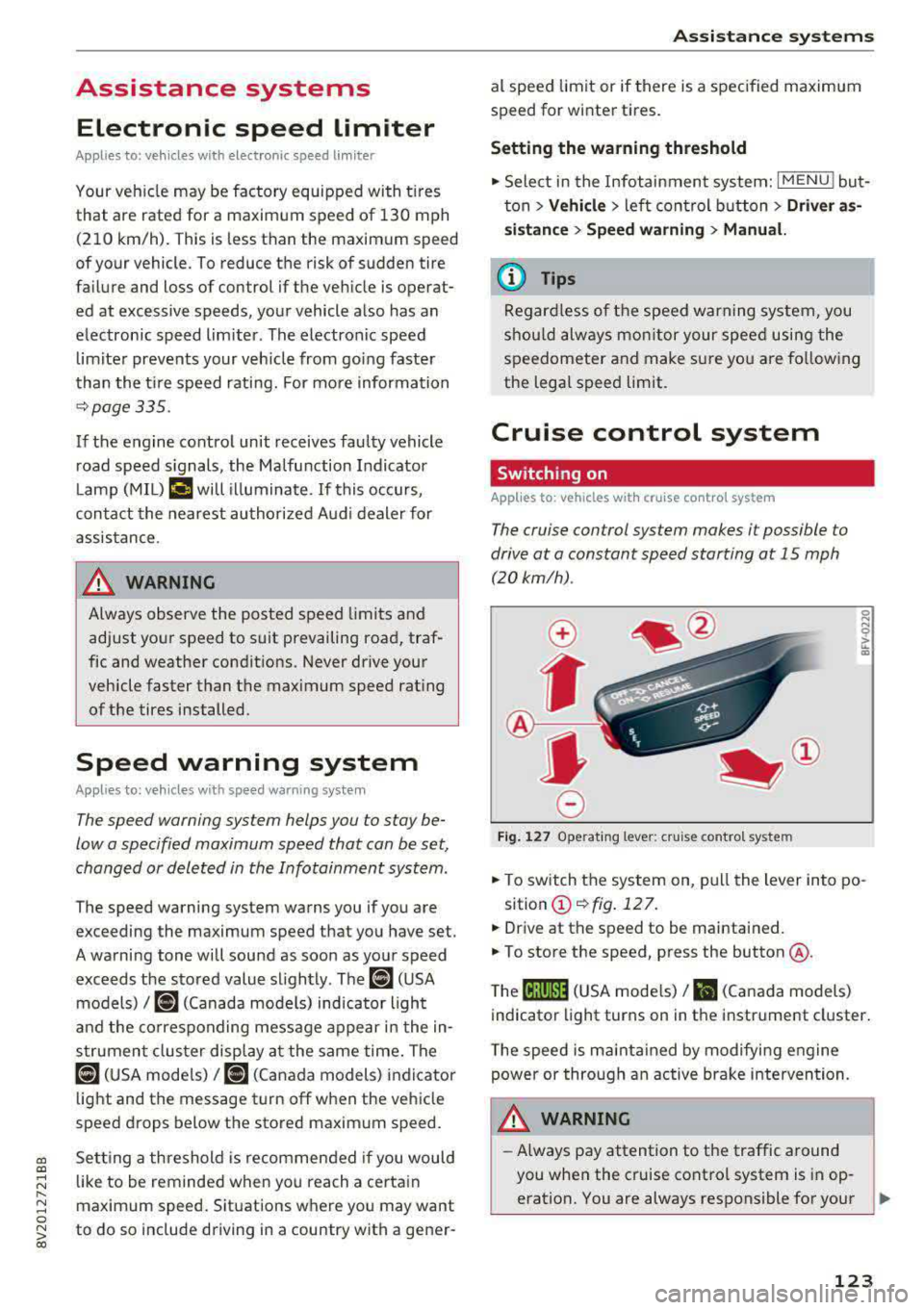
Fig. 127 Operat ing lever: cruise control system
i;:i N 0 > ... m
• To switch the system on, pull the lever into po-
sition
(D ¢fig . 127.
• Drive at the speed to be maintained.
.. To store the speed, press the button @.
T he
(ij;jl)~1i (USA mode ls)/ Bl (Canada models)
indicator light turns on in the instrument cluster.
T he speed is maintained by modifying engine
power or through an active brake intervention.
.i\, WARNING
-Always pay attention to the traffic around
-
you when the cruise control system is in op
eration. You are always responsible for your
..,
123
Page 126 of 400
Ass is tan ce sys tems
speed and the distance between your
vehicle and other vehicles.
- For safety reasons, cruise control should not
be used in the city, in stop-and-go traffic, on
winding roads and when road condit ions are
poor (such as ice, fog, gravel, heavy rain and
hydroplaning), because th is increases the
r isk of an accident.
- Switch the cruise control off temporar ily
when driving in turn ing lanes, h ighway exits
or in construction zones.
- Please note that unconsciously "resting" yo ur foot on the accelerator pedal prevents
the cruise control from braking. This is be
ca use p ressing the acce le rato r pedal ove r
rides the c ruise contro l system.
- If a bra ke system ma lf u nction such as over
heating occu rs when the c ruise contro l sys
tem is sw itched on, the braking function in
the system may be switched off . The rest of
the cr uise control system f unctions remain
active as long as the
(lj;(i)~i~ (USA models) /
Bl (Canada models) indicator light is on.
(D Note
Before driving downhill a long distance on a
steep hill, decrease your speed and select a
lower gear. Th is makes use of the eng ine
braking effect and relieves the brakes.
@ Tips
The brake lights turn on when the brakes a re
activated.
Changing the speed
A pp lies to: ve hicles w ith c ruise contro l system
.,. To increase or decrease the speed in incre
ments,
tap the lever in the 0 10 d irection
¢ page 123, fig . 127 .
.,. To inc rease o r decrease the speed quickly, hold
the leve r in the 0 / 0 direct io n until the de
s ir ed speed is reached.
124
' Overriding the speed
App lies to : vehicles wit h cruise co ntrol system
You can press the acce lera to r pedal to increase
you r speed, fo r example if you want to p ass
someone. The speed you set ear lier will resume
as soon as you release the acce lerator pedal.
However, if yo u are d rivi ng considerably faste r
t h an the s to red speed for a lo ng period of time
time, the cr uise con trol sys tem w ill temporari ly
switch off . The
(lj;(i)~i~ (USA models) !Bl (Canada
models) indicato r light in the instrument cluste r
turns off and the stored speed is maintained.
Preselecting a speed
App lies to : vehicles wi th cruise co ntrol system
You can pre -select your desired speed when the
vehicle is stationary.
.,. Switch the ignit io n on.
.,. Pull the lever into position (D ¢ page 123,
fig. 127 .
.,. To increase or decrease the speed, tap the lever
in the
0 10 direction.
This function makes it possible, for example, to
save the speed you want before d riving on t he
highway. Once on the highway, activate the
cruise contro l system by pu lling the lever toward
the position
(D .
' Switching off
App lies to: vehicles wit h cruise co ntrol system
Deactivating temporarily
.,. Press the brake pedal, or
.,. Press the lever into position @ (not clicked into
place) ¢ page 123, fig . 12 7, or
Switching off completely
.,. Press the lever into position @(clicked into
place), or
.,. Switch the ignit io n off.
The speed you stored will be maintained if the cruise contro l has been switched off temporarily .
To resume the stored speed, release the brake pedal and pull the lever to position
(D . ..,.
Page 130 of 400
Assistance systems
In curves
Applies to: vehicles with Audi adaptive cruise contro l/Audi pre
sense front
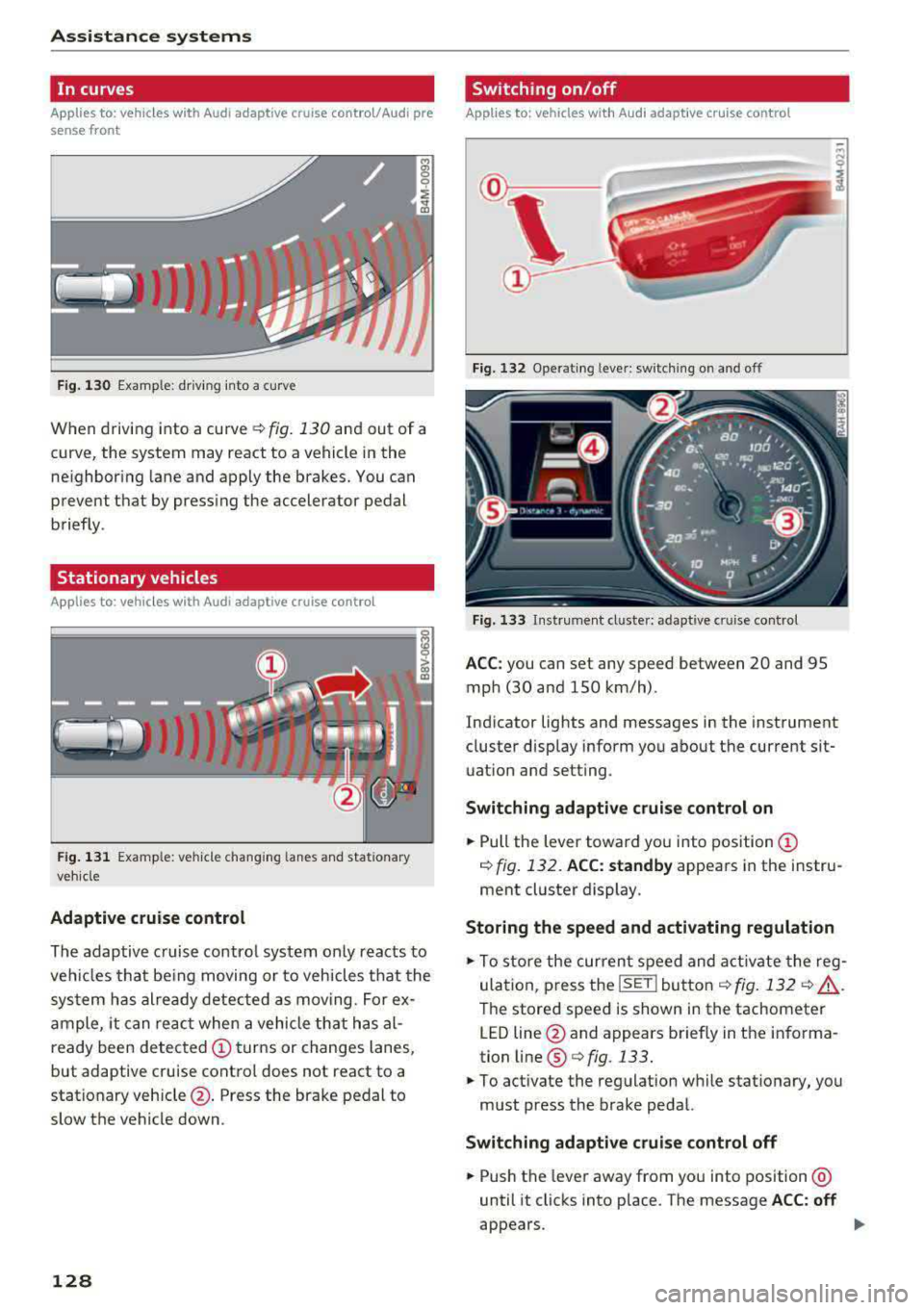
Fig . 130 Example: dr iv ing into a curve
When driving into a curve r:!;> fig. 130 and out of a
curve, the system may react to a vehicle in the
ne ighbor ing lane and apply the brakes. You can
prevent that by pressing the accelerator pedal briefly .
Stationary vehicles
Applies to: vehicles with Audi adaptive cruise control
))))
Fig. 131 Example: veh icle changing lanes and stationary
veh icle
Adaptive cruise control
The adaptive cruise control system only reacts to
ve hicl es that being moving or to vehicles that the
system has already detected as moving. For ex
ample, it can reac t when a vehicle that has al
ready been detected
@turns or changes lanes,
but adaptive cruise control does not react to a
stationary vehicle @. Press the brake pedal to
slow the vehicle down.
128
Switch ing on /off
Applies to: vehicles with Audi adaptive cruise control
Fig. 132 Ope rating leve r: sw itching on and o ff
Fig. 133 Instrument cl uste r: ad apt ive c ruise contro l
ACC: you can set any speed between 20 and 95
mph (30 and 150 km/h) .
Indicator lights and messages in the instrument
cluster disp lay inform you about the current sit
uation and setting .
Switching adaptive cruise control on
.,. Pull the lever toward you into position@
¢ fig. 132. ACC: standby appears in the instru
ment cluster display.
Storing the speed and activating regulation
.,. To store the current speed and activate the reg
ulation, p ress the
ISE TI button ¢ fig. 132 r:!;> .&,.
The stored speed is shown in the tachometer
LED line @and appears briefly in the informa
tion line ®
Q fig. 133.
.,. To activate the regulation while stationary, you
must press the brake pedal.
Switching adaptive cruise control off
.,. Push the lever away from you into position @
until it clicks into place . The message ACC: off
appears .