MMI AUDI A3 SEDAN 2017 Manual Online
[x] Cancel search | Manufacturer: AUDI, Model Year: 2017, Model line: A3 SEDAN, Model: AUDI A3 SEDAN 2017Pages: 400, PDF Size: 67.32 MB
Page 243 of 400
CXl CXl .... N r--N .... 0 N > 00
System settings
Setting the date and
time
You can set the clock time manually or using the
CPS*.
.,. Select : I MENU I button> Settings> left control
button >
MMI settings> Date & time .
.,. Or: select : IMENUI button> Vehicle > left con-
trol button >
Vehicle settings> Date & time.
Automatic setting
When this function is switched on g, the time
and date are automatically set.
Time
Requirement: the Automatic setting must be
switched
off .
Press the control knob. You can set the Time
manually by turning and pressing the control
knob.
Date
Requirement: the Automatic setting must be
switched
off.
Press the control knob . You can set the Date
manually by turning and press ing the cont rol
knob.
Time zone
When selecting the appropriate time zone, a
sampling of countr ies in this zone will be listed .
Automatic time zone*
When this function is switched on g, the time
will automatically adjust to the corresponding
time zone.
Automatic daylight saving time*
When this function is switched on g, the time
will automatically switch to daylight saving time .
Time format
If you select 24h, the clock will disp lay, for ex
ample ,
13:00 . If you se lect AM/PM , the clock
will disp lay, for example,
1:00 PM .
System settings
Date format
If you select DD.MM .YYYY , the date display will
show, for example,
31.08.2017. If you select
MM/DD/YYYY , the date display will show, for ex
ample,
08/31/2017. If you select YYYY-MM
DD ,
the date display will show, for example,
2017-08-31 .
MMI settings
.,. Select: !MENUI button> Settings> left control
button >
MMI settings .
Language
You can change the display language as well as
the language for the voice guidance* and voice
recognition system*.
T he number of languages available depends on
the market.
Measurement units
The following units can be selected:
-Speed (mph or km/h)
- Distance (miles or kilometers)
-Temperature (°For 0
()
-Fuel consumption (L/100km, mpg (US), mpg
(UK) or km/l)
- Volume (liters , gallons)
Tool tips
When this function is switched on g, your MMI
shows you tips for input. The frequency of how
often it displays decreases with time.
Speech dialog system
Applies to : vehicles wi th voice recog nitio n system
Depend ing on vehicle equipment, the following
functions may be ava ilable:
Command display : when this function is switch
ed on
g, the MMI will show you the possible
commands for voice input in the respective
menu.
Short dialog : when this function is switched on
g, a shorter form of the prompts is used .
Command during voice output*: this function is
switched on at the factory . When this function is
II>-
241
Page 244 of 400
System settings
switched on~, you can say new commands dur
ing announcements. You do not need to wait for
the signal tone (beep) during an announcement.
When the function is switched off
0, you need to
wait for the signa l tone (beep) to say a new com
mand .
Volume: you can adjust the volume of the
prompts by turning the control knob.
Speech training (only when the vehicle is station
ary): you can adapt the voice recognition system
to your voice or pronunciation in order to improve
the system's ability to recogni ze your speech. In
d iv idual training is comprised of 20 speech en
tr ies that consist of commands and sequences of
numbers . You can delete the programmed voice
training with the
Reset individual speech train
ing
function.
Display brightness
Display brightness:
you can adjust the bright
ness of the Infotainment system display by turn
ing the control knob .
Factory settings
The following functions can be reset to the facto
ry default settings :
-Sound settings
- Radio
- Media settings
-Jukebox*
- Directory
- Telephone
- Bluetooth and Wi-Fi*
- Navigation settings*
- Navigation and online memory*
- Speech dialog system*
- Message settings*
- Apps *
- Tool tips
- Audi connect*
- Audi smartphone interface*
You can select the desired functions individually
or all at once with the option
Select all entries .
Select and confirm Restore factory settings.
242
(D Tips
-Make sure that not only the settings were
deleted but also the stored data, if applica
ble .
- If you reset the
Navigation and on line
memory* , Apps* or Audi connect*
to the
factory default settings, the system auto matically restarts after approximately 20
seconds . The Infotainment system display
will be black for several minutes when re
sta rting.
- Please note that the voice recognition sys
tem* is not available in Cabriolets.
Connection manager
Introduction
The connection manager gives you an overview
of your connected dev ices and their network sta
tus .
Fig. 219 Connect ion manager
.. Select: !MENU I button> Settings > left control
button >
MMI settings > Connection manager.
.. Select and confirm a menu item.
If a mobile device was already connected and you
select and confirm the corresponding menu item,
the device name and connect ion mode are dis
played under the menu item
c::>fig. 219.
You can individually Connect(~) o r Disconnect
(0) a paired device.
Using the telephone
Appl ies to: vehicles with telephone
-Connect new device: search for and connect a
cell phone.
..,.
Page 245 of 400
CXl CXl .... N ,.__
N .... 0 N > 00
-List of dev ice s already pa ired : select your cell
phone from the list of all the devices that are
already pa ired .
Secondary telephone
-Connect ne w de vic e: search for and connect a
cell phone.
-Lis t of dev ice s alread y pa ired : select your cell
phone from the list of all the devices that are
already pa ired.
Data connection
App lies to: vehicles with Audi connect (Infotainment)
The data connection is made us ing the embedded
SIM ca rd
~ page 190. You do not need to adjust
any add it ional se ttings .
(D Note
Always follow the i nformat ion found inc:> @ in
Wi-Fi hotspot on page 195.
MMI connect app
Applies to: vehicles with Audi connect (Infotainment)
Requiremen t: the Audi MMI connect app m ust
be i nstalled and open on your mobile device .
-Connect new d evice: search for and connect a
mobile device (s uch as a smartp ho ne).
-Li st of device s already pa ir e d : select your mo
bile device from the list of a ll the devices that
are already paired.
Music
Applies to vehicles with B luetooth or Wi -Fi audio playe r
Audio player *
Requirement: the Bluetooth func tion and v is ib il i
ty must be sw itched on in the MMI
c:> page 244
and on the ce ll phone.
-Connect n ew de vice : press the contro l knob.
Se lect
Bl uetooth audio pla yer . Search for and
connect a mobile device .
-List of devic es alrea dy pa ired : selec t a Blue
too th device from the l ist of a ll the devi ces that
are already paired .
Sys te m set ting s
Wi-Fi audio playe r*
Re quirement: the Wi- Fi hotspot* on the M MI
c:>
page 195 and on yo ur cell phone m ust be
switched on .
-Connect new device : press the cont rol knob .
Search for and connect a W i- Fi capab le dev ice.
-Disconn ect Wi-Fi audio player : deactivate the
Wi- Fi on you r Wi-Fi capable device. The device
w ill be automati cally removed from the list .
(Q) Note
Always fo llow the information found in ~ © in
Wi-Fi hotspo t on page 195.
Directory
Applies to: vehicles with telephone
Display contacts from a cell phone (or an addi
tional cell phone).
Requirement: no cell phones can be connected to
the MMI using the
Hand sfr ee profile.
-Connect new de vice : search for and connect a
new cell phone .
-List of devices alre ad y paired : select your ce ll
phone from the list of all the cell phones that
are already paired .
Audi smartphone
Applies to: vehicles with Aud i smartphone interface
-Connect your ce ll phone to the Audi music in
terface ~ page 229 using a USB adapter
c:> page228, fig. 211 .
-Select your cell phone from the list of cell
p hones that have a lready bee n connected .
Additional options
Depending on the selected function, yo u can use
the right control button to access the availab le
additional options in the connection manager.
Delete Bluetooth device*
T he selected cell phone/mobile device is d iscon
nected from the MM I and is removed from the
list of a ll devices that are a lready paired.
..,.
243
Page 246 of 400
System settings
Show Bluetooth profiles*
You can Connect or Disconnect the Handsfree ,
Messages *, Directory/contacts
and Bluetooth
audio player
profiles separately.
Bluetooth settings*
- Bluetooth :
select and confirm a setting for the
Bluetooth connection v is ibility. Select
Visible
for the MMI to be v isib le to other dev ices. Se
lect
Inv isible for the MMI to not be visible to
other devices. However, it is still possib le to es
tablis h a Bl uetooth connection with paired de
vices when the v is ibility is switched off. Select
Off to turn visibility off. Then a B luetooth con
nect ion is not possible .
-Bluetooth audio player : when this function is
switched
on~, the Bluetooth audio player is
available as a source in the
Media menu .
-Bluetooth name : the MMI Bluetooth name (for
example ,,AUDI MMI 2017") is displayed and
can be changed .
Online settings*
- Data usage counter :
the amount of data pack
ets that are sent and received through the MMI
is d isplayed. You can reset the data usage infor
mation to zero using the
Reset data counter
option.
-Network status : the mobile network provider
for data service as well as the network status
are displayed .
Wi-Fi settings*
Refer to<=> page 195, Wi-Fi hotspot.
Storing as a default telephone
Applies to: vehicles with telephone
Req uiremen t: a cell phone must be connected to
the MMI
¢page 177 .
As soon as th e cell phone is i n range and the
Bluetooth function on the cell phone and in the
MMI is swi tched on, this cell phone is given prior
ity over the other Bluetooth devices and is con
nected direct ly to the MMI. The connected cell
phone is displayed first in the device list.
244
Network settings*
- Login :
you can chose an automatic log in to
your cell phone service provider's network, or
you can choose a
manual l ogin from the list of
avai lab le networks .
-Network selection: available networks in the
present location can be selected under network
selection. This function is on ly availab le for the
Manual l ogin setting .
Apple CarPlay sound settings/ Android Auto
sound settings
Applies to: vehicles with Audi smartphone interface
Refer to ¢ page 245.
About Apple CarPlay/ About Android Auto
Applies to: vehicles with Audi smartphone interface
Here you w ill find legal information regarding
the use of Apple CarPlay or Andro id Aut o and in
formation about device -specific data exchange.
Delete CarPlay device/Delete Android Auto
device
Applies to: vehicles with Audi smartphone interface
Requirement: your cell phone must not be cona
nected to the Audi m usic interface with a USB
adapter .
To remove your cell phon e from the list of all cell
phones that are already paired, select and con
firm
Delete CarPlay device or Delete Android Au
to device .
(D Tips
Some SIM cards do not allow the SIM PIN
queries to be switched off.
System update
.,. Select: !MENUI button> Settings> left control
button >
System maintenance.
- System update :
slide the storage device with
t he update data into the appropriate drive
¢page 223. Select and confirm the drive>
Start update. The length of the process de
pends on the size of the update.
-Reset driver installation: the selected media
driver package is reset to the settings at the
time of delivery .
Page 247 of 400
-Version information : information on the MMI
software version and the navigation database *
software version is displayed . The
Software in
format ion
function a lso provides information
on the software contained in the MMI and the
licensing agreement .
Sound settings
The sound distribution and volume of the MMI
can be adjusted individually . The settings depend
on vehicle equipment.
---- 1
J .-.6 ...
I
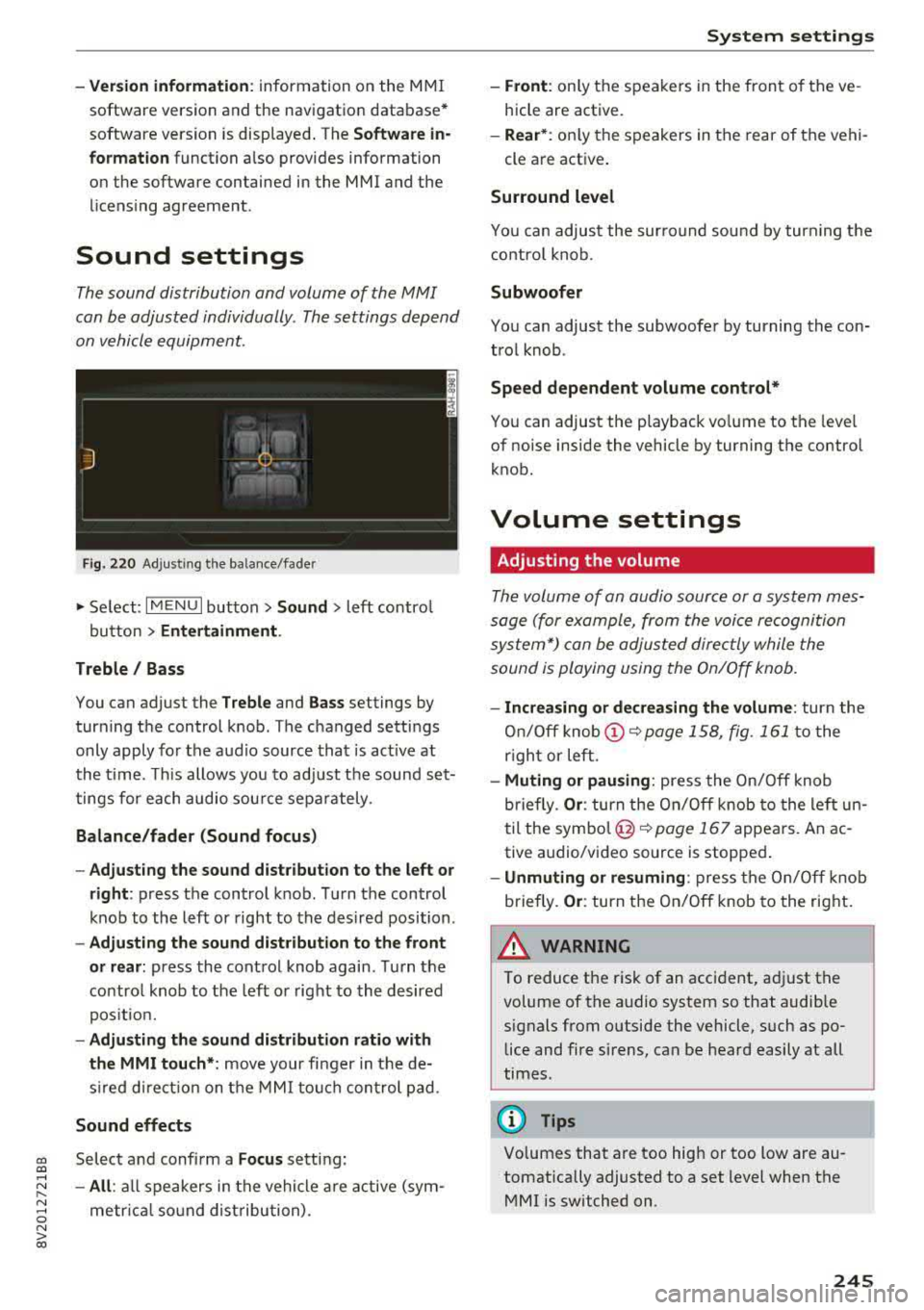
Fig. 220 Adjusti ng the balance/fader
" Se lect: I MENU I button> Sound > left contro l
button
> Entertainment .
Treble / Bass
You can adjust the Treble and Bass settings by
turning the control knob. The changed settings
only apply fo r the audio source that is act ive at
the time. This allows you to adjust the sound set
tings for each audio source separately .
Balance/fader (Sound focus)
-Adjusting the sound distribution to the left or
right :
press the control knob. Turn the control
knob to the left or right to the desired position .
-Adjusting the sound distribution to the front
or rear:
press the control knob again. Turn the
contro l knob to the left o r right to the desired
position.
-Adjusting the sound distribution ratio with
the MMI touch* :
move your finger in the de
s ir ed direct ion on the MMI touch control pad.
Sound effects
cc Select and confirm a Focus setting: CXl ....
~ -All: all speakers in the vehicle are active (sym-
~ metr ical sound distribution) . 0 N > 00
System settings
-Front: only the speakers in the front of the ve
hicle are active.
-Rear* : only the speakers in the rear of the vehi-
cle are active .
Surround level
You can adjust the surround sound by turn ing the
control knob.
Subwoofer
You can adjust the subwoofer by turning the con
trol knob .
Speed dependent volume control*
You can adjust the playback vo lume to the leve l
of noise inside the vehicle by turning the control
knob.
Volume settings
Adjusting the volume
The volume of an audio source or a system mes
sage (for example, from the voice recognition
system*) can be adjusted directly while the
sound is playing using the On/Off knob.
-Increasing or decreasing the volume: turn the
On/Off
knob (!) ~page 158, fig. 161 to the
r ight or left.
-Muting or pausing: press the On/Off knob
briefly.
Or : turn the On/Off knob to the left un
til the
symbol @~ page 167 appears. An ac
tive a udio/video source is stopped .
-Unmuting or resuming: press the On/Off knob
briefly .
Or: turn the On/Off knob to the right.
A WARNING ~ .
To reduce the risk of an accident, adj ust the
volume of the a udio system so that audible
signals from outside the vehicle, such as po lice and fire sirens, can be heard easily at all
times .
Q) Tips
Volumes that are too high or too tow are au
tomatically adjusted to a set level when the MMI is switched on.
245
Page 248 of 400
System settings
Adjusting the system volume
~ Select : I MENU I bu tton > Sound > left co ntro l
b utt on.
Telephone
App lies to: veh icles w ith telephone
Mute telephone: messages and ringtones are set
to mut e.
Ringtone : see c:;, page 187, Ringtone and volume
settings .
Ringtone volume :
you can adjust t he volume of
the selecte d ringtone by turning the contro l
knob.
Message volume: yo u can ad just the volume of
the not ificat io n for a n incom ing text message by
tur ning the c ontrol knob.
Microphone input level : you ca n adju st the ca ll
volume du ring a phone ca ll by tu rnin g the contro l
knob.
Navigation
Applies to: veh icles with navigation system
Voice guidance: s ee c:;, page 2 09.
Voice guidance during phone call: see
c:>page209 .
Voice guidance volume : you can adjust the vo ice
gu idance volume by tur ning t he control knob .
Or:
you can adjust the vo ice gu idance volume d uring
ac tive rou te g uidance by turning the On/Off
knob .
Enterta inment fader : the volume of aud io play
back can be temporarily lowe red w hen the pa rk
i n g sys tem or vo ice g uidance is ac tive .
Voice recognition system
Applies to: veh icles w ith vo ice recognition system
Command display : see c:;, page 241.
Short dialog : see c:;, page 241.
Volume : seec:> page 241 .
Speech training : see c:;, page 241.
1> Not available in all ve hicles .
246
Parking aid*
Yo u ca n adju st the vol ume of the sig nal t one by
t u rning the co ntro l knob.
- Adjusting th e Front volume : select and con
fir m
High , Medium or Low .
- Adjusting
the Rear volume : select and co nfir m
High , Medium o r Low .
MMI touch*
You can adjust the vol ume of the prompts fo r th e
M MI touch* by turnin g the cont rol knob.
Restarting the MMI
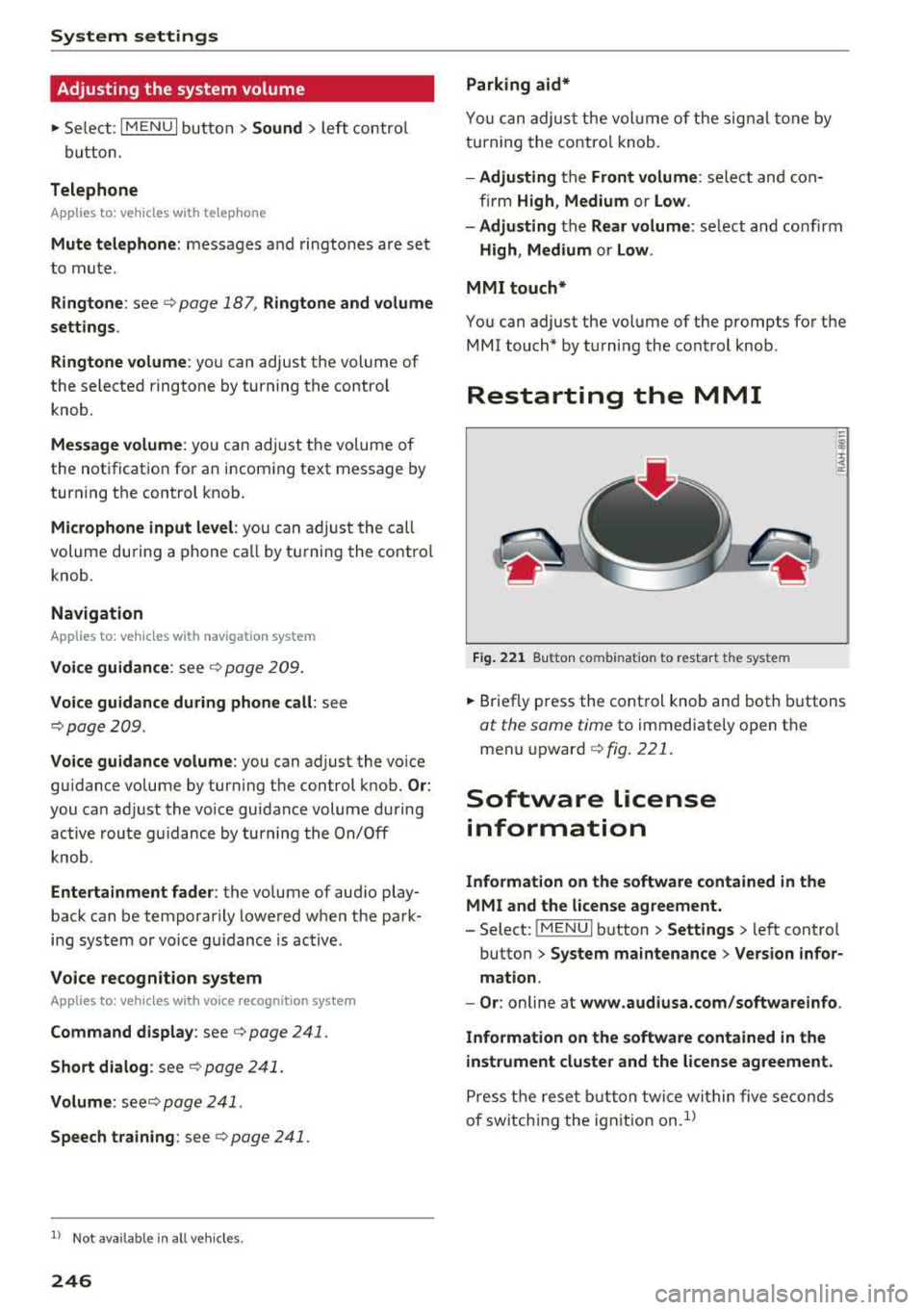
Fig. 221 Butto n comb inat ion to restar t th e sys te m
~ Br ief ly p ress the cont rol knob and both buttons
at the same time to immediate ly o pen t he
menu upward
c:> fig. 221.
Software license
information
Information on the software contained in the
MMI and the license agreement.
- Select: ! ME NUI button> Settings > left cont rol
button >
System maintenance > Version infor
mation.
- Or :
online at www.audiusa.com/softwareinfo .
Information on the software contained in the
instrument cluster and the license agreement.
P ress t he rese t bu tt o n t wice wi thin five se conds
of sw itch ing the ign ition on .
1>
Page 297 of 400
CXl CXl .... N r--N .... 0 N > 00
Child restraints and Advanced front airbag
system
Regardless of the child restra int that you use,
make sure that it has been certified to meet Safe
ty Standards and has been certified by its manu
facturer for use with an airbag. Always be sure
that the child restraint is properly installed at
one of the rear seating positions. If in exception
al c ircumstances you must use it on the front
passenger seat, carefully read all of the informa
tion on child safety and Advanced Airbags and
heed all of the applicable WARNINGS. Make cer
tain that the child and child restraint are correct
l y recognized by the capacitive passenger detec
tion system in the front passenger seat, that the
front passenger airbag is turned off, and that the
airbag status is always correctly signaled by the
PASSENGER AIR BAG OFF light.
Many types and models of child restraints have
been available over the years, new models are in
troduced regularly incorporat ing new and im
proved designs and older models are taken out of
product ion. Child restraints are not standardized.
Ch ild restraints of the same type typically have
d ifferent weights and s izes and different "foot
p rints", the siz e and shape of the bottom of the
chi ld restraint that sits on the seat, when they
are installed on a vehicle seat. These differences
make it virtually impossible to certify compliance
with the requirements for advanced airbags with
each and every child restraint that has ever been
sold in the past or will be sold over the course of
the useful life of your veh icle.
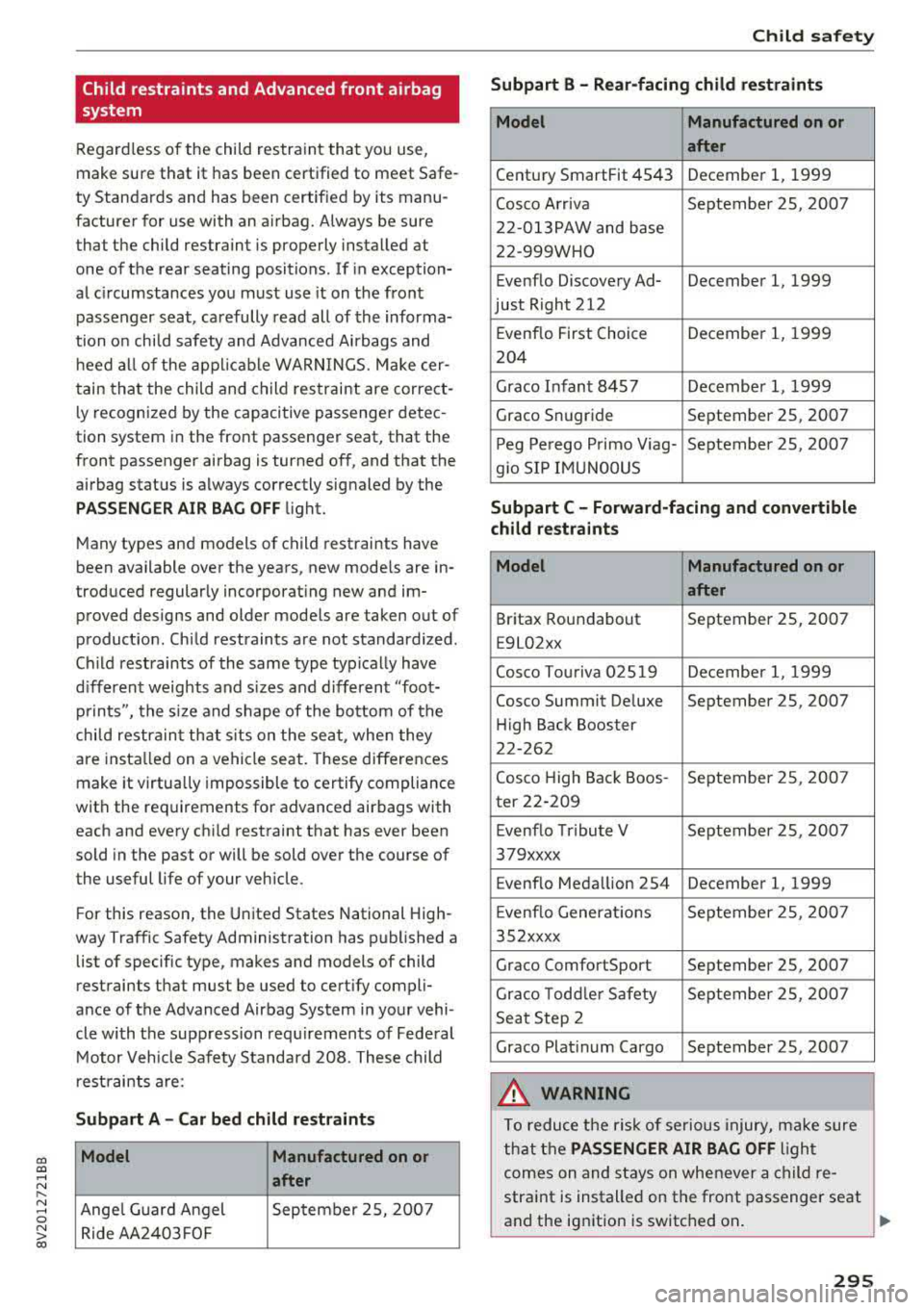
For this reason, the United States National High
way Traffic Safety Administration has published a
list of specific type, makes and models of child
restraints that must be used to cert ify compli
ance of the Advanced Airbag System in your vehi
cle with the suppression requirements of Federal
Motor Vehicle Safety Standard 208. These child
restraints are:
Subpart A -Car bed child restraints
Model Manufactured on or
after
Ange l Guard Angel September 2S, 2007
Ride AA2403FOF
Child safety
Subpart B - Rear-facing child restraints
Model Manufactured on or
after
Century SmartFit 4543 December 1, 1999
Cosco Arriva September 25, 2007
22-013PAW and base
22-999WHO
Evenflo Discovery Ad- December 1, 1999
just Right 212
Evenflo First Choice December 1, 1999
204
Grace Infant 8457 Decembe r 1, 1999
Grace Snugride September 25, 2007
Peg Perego Primo Viag- September 25, 2007
g io SIP IMUNOOUS
Subpart C - Forward-facing and convertible
child restraints
Model Manufactured on or
after
Britax Roundabout September 25, 2007
E9L02xx
Cosco Touriva 02519 December 1, 1999
Cosco Summit De luxe September 25, 2007
High Back Booster
22-262
Cosco High Back Boos- September 25, 2007
ter 22-209
Evenflo Tribute V September 25, 2007
379xxxx
Evenflo Meda llion 254 December 1, 1999
E venflo Generations September 25, 2007
352xxxx
Grace ComfortSport September 25, 2007
Grace Todd le r Safety September 25, 2007
Seat Step 2
Grace Plat inum Cargo September 25, 2007
A WARNING
To reduce the risk of serious injury, make sure
that the
PASSENGER AIR BAG OFF ligh t
comes on and stays on whenever a child re
straint is installed on the front passenger seat
and the ignition is switched on .
..,.
295
Page 359 of 400
a, a, ..... N
" N ..... 0 N > 00
_& WARNING
You or your passengers could be injured while
changing a wheel if you do not follow these
safety precautions:
- If you have a flat tire, move a safe distance
off the road. Turn off the engine, turn the emergency flashers on and use other warn
ing devices to alert other motorists.
- Make sure that passengers wait in a safe
place away from the vehicle and well away
from the road and traffic.
- To help prevent the vehicle from moving
suddenly and possibly slipping off the jack,
always fully set the parking brake and block
the wheel diagonally opposite the wheel be
ing changed. When one front wheel is lifted
off the ground, placing the Automatic
Transmission in P (Park) will
not prevent the
vehicle from moving.
- Before you change a wheel, be sure the
ground is level and firm. If necessary, use a
sturdy board under the jack.
- Always store the vehicle tool kit, the jack
and the replaced tire in the luggage com
partment
c:> page 253.
Changing a wheel
When you change a wheel, follow the sequence
described below step-by-step and in exactly that
order.
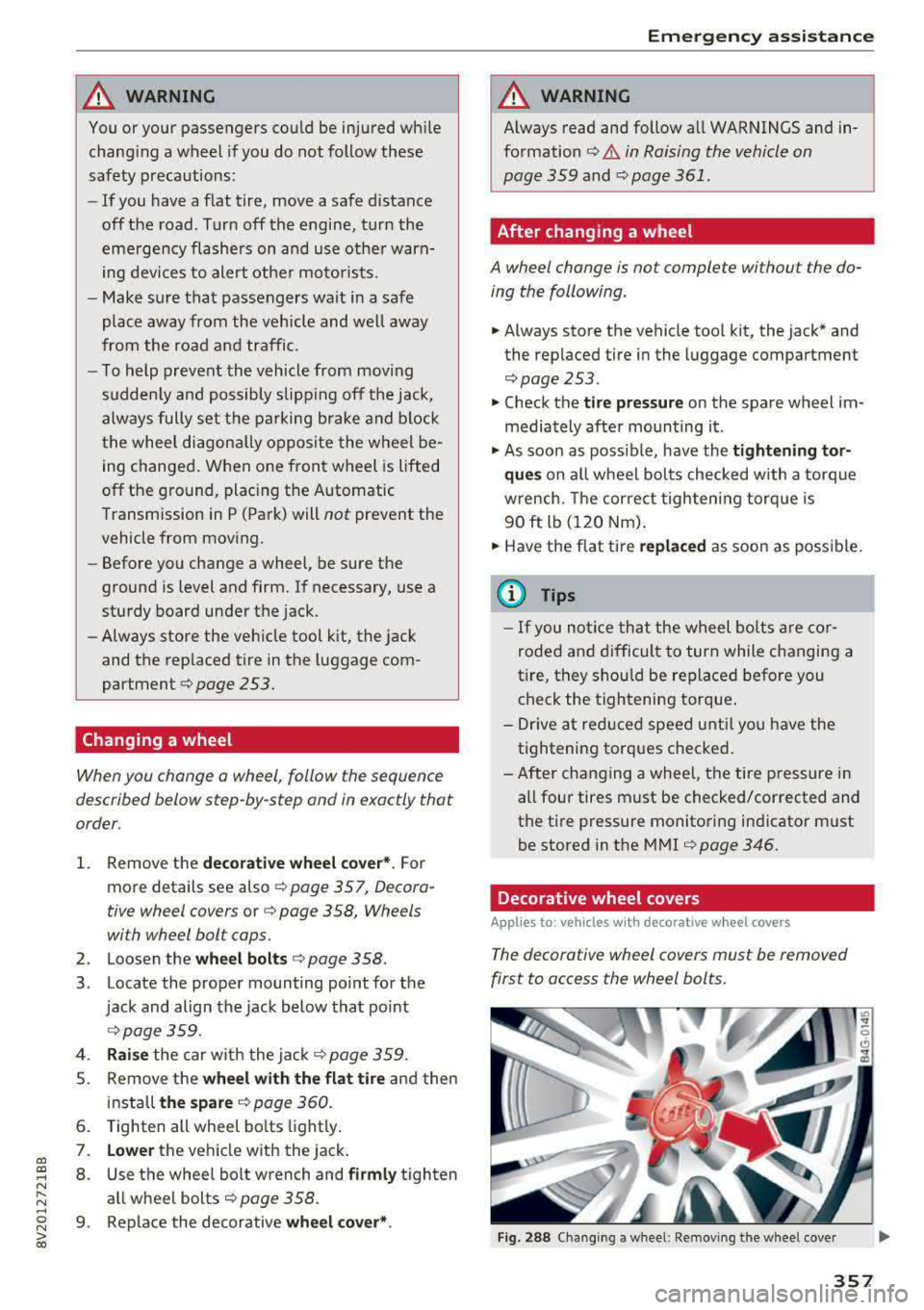
1. Remove the decorative wheel cover*. For
more details see also
c:> page 357, Decora-
tive wheel covers
or c:> page 358, Wheels
with wheel bolt caps.
2. Loosen the wheel bolts c:> page 358.
3 . Locate the proper mounting point for the
jack and align the jack below that point
c:> page359.
4. Raise the car with the jack c:> page 359.
5. Remove the wheel with the flat tire and then
install
the spare c:> page 360.
6. Tighten all wheel bolts lightly.
7. Lower the vehicle with the jack .
8 . Use the wheel bolt wrench and firmly tighten
all wheel bolts
c:> page 358 .
9. Replace the decorative wheel cover* .
Emergency assistance
_& WARNING
-Always read and follow all WARNINGS and in-
formation
c:> .&. in Raising the vehicle on
page 359
and c:> page 361.
After changing a wheel
A wheel change is not complete without the do
ing the following.
.. Always store the vehicle tool kit, the jack* and
the replaced tire in the lugg age compartment
c:> page 253.
.. Check the tire pressure on the spare wheel im
mediately after mounting it .
.. As soon as possible, have the tightening tor
ques
on all wheel bolts checked with a torque
wrench. The correct tightening torque is
90 ft lb (120 Nm).
.. Have the flat tire replaced as soon as possible.
@ Tips
-If you notice that the wheel bolts are cor
roded and difficult to turn while changing a
tire, they should be replaced before you
check the tightening torque.
- Drive at reduced speed until you have the tightening torques checked.
- After changing a wheel, the tire pressure in
all four tires must be checked/corrected and
the tire pressure monitoring indicator must
be stored in the MMI
c:>page 346.
Decorative wheel covers
Applies to : vehicles wit h decorative w heel covers
The decorative wheel covers must be removed
first to access the wheel bolts.
Fig. 288 Changing a wheel: Removing the wheel cover
357
Page 367 of 400
a, co ..... N
" N ..... 0 N > 00
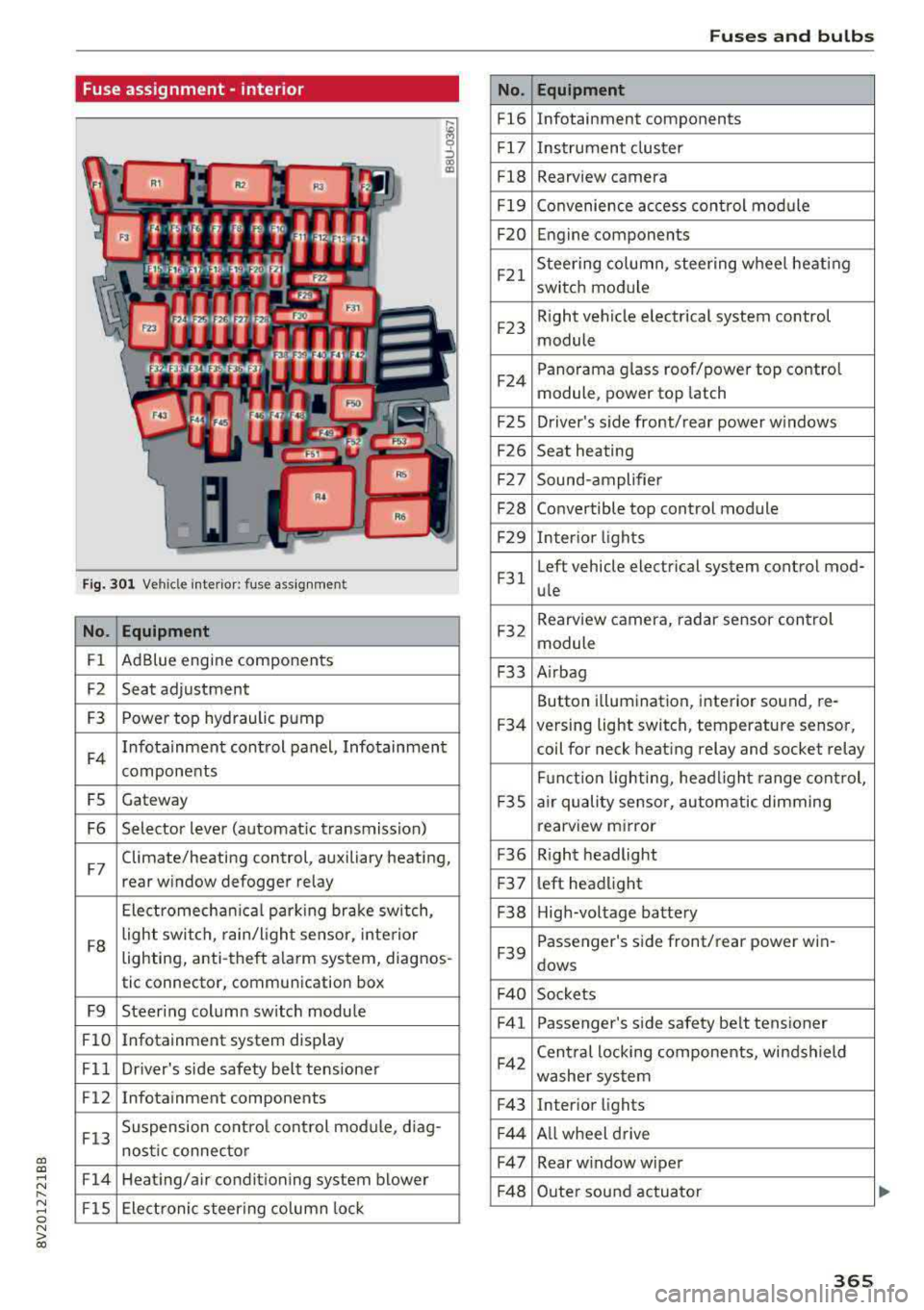
Fuse assignment -interior
Fig. 301 Vehicle interior: fuse assignment
No. Equipment
Fl Ad
Blue engine components
F2 Seat adjustment
F3 Power top hyd
raulic pump
F4 Infotainment control panel, Infotainment
components
FS Gateway
F6 Selector lever (automat ic transmission)
F7 Climate/heating control, auxiliary heating,
rear window defogger relay
Electromechan ica l parking brake sw itch,
F8 light switch,
rain/light sensor, inte rior
lighting, anti-theft alarm system, diagnos -
tic connector, communication box
F9 Steering column sw itch module
Fl0 Infotainment system display
Fll Dr iver's side safety belt tens ioner
F12 Infotainment components
F13 Suspension
control control module, diag-
nostic connector
F14 Heating/air conditioning system blower
FlS Electronic steering column lock
No .
Fl6
F 17
Fl8
F 19
F20
F21
F2 3
F24
F 2S
F26
F 27
F28
F2 9
F 31
F32
F33
F34
F 3S
F36
F3 7
F38
F39
F 40
F41
F42
F43
F44
F47
F4 8
Fuses and bulbs
Equipment
Infotainment components
Instrument cluster
Rearview camera
Convenience access cont rol module
Engine components
Steering column, steering wheel heating
switch module
Right vehicle electrical system control
module
Panorama glass roof/power top control
module, power top latch
Driver's s ide front/rear power w indows
Seat heating
Sound-amplifier
Convertible top control module
Interior lights
Left vehicle electrical system control mod-
ule
Rearview camera, radar sensor control
module
A irbag
Button i llumination, interior sound, re-
versing light switch, temperature sensor,
coil for neck heating relay and socket relay
Fu nct ion lighting, headl ight range control,
a ir quality sensor, automatic dimming
rearview mirror
R ight headlight
l eft headlight
High-voltage battery
Passenger's s ide front/rear power win -
dows
Sockets Passenger's side safety belt tensioner
Cen tral locking components, windshield
washer system
Interior lights
Al l wheel drive
Rear w indow wiper
Outer sound actuator
365
Page 385 of 400
CXl CXl .... N ,.__
N .... 0 N > 00
Audi smartphone interface . . . . . . . . . 239, 243
Audi virtual cockpit
refer to Instrument cluster . . . . . . . . . . . . . 10
AUTO Automatic climate control system . . . . . . . 71
Automatic headlights . . . . . . . . . . . . . . . . . 51
Auto Lock (central locking system) . . . . . . . . 34
Automatic belt retractor . . . . . . . . . . . . . . . 262
Automatic climate control system
refer to Climate control system
(automatic) . . . . . . . . . . . . . . . . . . . . . . 70, 71
Automatic power top
refer to Power top . . . . . . . . . . . . . . . . . . . . 44
Automatic transm iss ion . . . . . . . . . . . . . . . . . 85
Driving tips . . . . . . . . . . . . . . . . . . . . . . . . . . 88
Emergency mode . . . . . . . . . . . . . . . . . . . . . 91
Hill descent control . . . . . . . . . . . . . . . . . . . 89
Kick-down . . . . . . . . . . . . . . . . . . . . . . . . . . . 90
Launch control program . . . . . . . . . . . . . . . 90
Malfunction . . . . . . . . . . . . . . . . . . . . . . . . . 86
Manual shifting (tiptronic mode) . . . . . . . . 90
Selector lever . . . . . . . . . . . . . . . . . . . . . . . . 88
Selector lever emergency release . . . . . . . . 92
Selector lever lock . . . . . . . . . . . . . . . . . . . . 86
Selector lever posit ions . . . . . . . . . . . . . . . . 86
Shift padd les . . . . . . . . . . . . . . . . . . . . . . . . 90
Automatic wipe/wash system . . . . . . . . . . . . 57
Auto Safety Hotline . . . . . . . . . . . . . . . . . . . 255
Auxiliary climate control . . . . . . . . . . . . . . . 118
AUX input . . . . . . . . . . . . . . . . . . . . . . . . . . . 229
Average consumption ............ .... 17, 18
Average speed . . . . . . . . . . . . . . . . . . . . . 17, 18
B
BACK button . . . . . . . . . . . . . . . . . . . . . . . . . 158
Bag hooks . . . . . . . . . . . . . . . . . . . . . . . . . 65, 67
Balance (sound) . . . . . . . . . . . . . . . . . . . . . . 245
Bass (sound) . . . . . . . . . . . . . . . . . . . . . . . . . 245
Battery In the key . . . . . . . . . . . . . . . . . . . . . . . . . . . 35
Jump starting . . . . . . . . . . . . . . . . . . . . . . . 368
also refer to High-voltage battery . . . . . . . 94
also refer to Vehicle battery . . . . . . . . . . . 325
Before driving . . . . . . . . . . . . . . . . . . . . . . . . 247
Belt tensioners . . . . . . . . . . . . . . . . . . . . . . . 265
Blended gasoline . . . . . . . . . . . . . . . . . . . . . 312
Index
Blower
Automatic climate control system . . . . . . . 72
Bluetooth Audio player . . . . . . . . . . . . . . . . . . . . . . . . 225
Connecting a ce ll phone . . . . . . . . . . . . . . 177
Settings . . . . . . . . . . . . . . . . . . . . . . . . . . . 244
Boost . . . . . . . . . . . . . . . . . . . . . . . . . . . . . . . . 11
Booster seats . . . . . . . . . . . . . . . . . . . . . . . . 302
Boost pressure ind icator . . . . . . . . . . . . . . . . 11
Brakes . . . . . . . . . . . . . . . . . . . . . . . . . . . . . . 153
Brake fluid . . . . . . . . . . . . . . . . . . . . . . . . . 325
Electromechanical parking brake . . . . . . . . 83
New brake pads . . . . . . . . . . . . . . . . . . . . . 153
Braking Brake assist . . . . . . . . . . . . . . . . . . . . . . . . 151
Emergency braking function . . . . . . . . . . . . 84
Breaking in New brake pads . . . . . . . . . . . . . . . . . . . . . 153
New engine . . . . . . . . . . . . . . . . . . . . . . . . . 74
New tires . . . . . . . . . . . . . . . . . . . . . . . . . . 335
Browser
refer to Media center . . . . . . . . . . . . . . . . . 231
Bulbs . . . . . . . . . . . . . . . . . . . . . . . . . . . . . . . 366
Buttons Control panel (MMI) . . . . . . . . . . . . . . . . . 158
Multifunct ion steer ing wheel . . . . . . . . 13, 16
Programming (multifunction steering
wheel) . . . . . . . . . . . . . . . . . . . . . . . . . . . . . . 15
C
Cable (USB adapter/AUX connector cable) 228
California Proposition 65 Warning ... .. .. 317
Battery specifi c . . . . . . . . . . . . . . . . . . . . . 326
Call list . . . . . . . . . . . . . . . . . . . . . . . . . . . . . 180
Call options . . . . . . . . . . . . . . . . . . . . . . . . . . 187
Capacities Fuel tank. . . . . . . . . . . . . . . . . . . . . . . . . . . 375
Washer fluid reservoir . . . . . . . . . . . . . . . . 375
Care . . . . . . . . . . . . . . . . . . . . . . . . . . . . . . . . 347
also refer to Cleaning . . . . . . . . . . . . . . . . 347
Car Finder Audi connect e -tron services . . . . . . . . . . . 199
Cargo area . . . . . . . . . . . . . . . . . . . . . . . . . . . 253
Caring for and cleaning leather . . . . . . . . . . 350
Catalytic converter . . . . . . . . . . . . . . . . . . . . 316
CD drive (media drives) . . . . . . . . . . . . . . . . 224
383