display AUDI A3 SEDAN 2018 Owners Manual
[x] Cancel search | Manufacturer: AUDI, Model Year: 2018, Model line: A3 SEDAN, Model: AUDI A3 SEDAN 2018Pages: 404, PDF Size: 62.3 MB
Page 331 of 404
u. 00 .-< N l' N .-< 0 N > 00
-Inspection or oil change reminder: after a cer
tain distance driven, a message appears in the i nst rument cluste r display each time the ign i
t ion is switched on or off. The rema ining dis
tance or time is displayed briefly .
-Inspection or oil change due: if your vehicle
has reached an inspection or o il change interval
or bot h intervals at t he same time, the mes
sage
Inspection due! or Oil change due! or Oil
change and in spection due!
appears briefly a f
te r swi tc h ing t he ignition on/off.
Checking service intervals
You can check the rema ining distance or time un
til the nex t oil change o r next inspection in the
Info tainmen t sys tem. Select in the Infotainmen t
sys tem: th e
I MENU I button > Vehicle > left con
tro l button
> Service & checks > Service inter
vals .
Resetting the indicator
An author ized A udi dealer or author ized A udi
Serv ice Fac ility will reset the serv ice inte rval dis
p lay after pe rforming serv ice .
If you have changed t he oil you rself, you must re
set t he oil change interva l.
To reset the display, se lect in the Infotainment
system: the
I MENU I button > Vehicle > left con
tro l button
> Service & checks > Service intervals
> Reset oil change interval.
@ Note
- Only reset the oil c hange indicato r if the oil
was c hanged.
- Fo llow ing the service inte rvals is c ritical to
maintai ning the fu nction, serv ice li fe, and
va lue of yo ur ve hicle , es pecially the eng ine.
Eve n if th e m ile ag e on the v ehicle is low, do
not exc eed t he ti me f or th e next ser vic e.
Checking and Filling
329
Page 351 of 404
u. 00 .-< N l' N .-< 0 N > 00
individual tires. If the pressure changes in one or
more tires, this is indicated in the instrument
cluster display with an
RE ind icator light and a
message . If only one tire is affected, the location
of that tire w ill be ind icated.
The tire pressures must be stored in the menu
d isp lay aga in each time the press ures c hange
(sw itching between part ial and fu ll load p res
sure) or after changing or replac ing a tire on your
ve hicle
r=>page 349 . The t ire pressure monitor
in g sys tem only monito rs t he tire pressure you
have stored . Refe r to the ti re p ressure labe l for
the recommended ti re p ressure for you r veh icle
r=>page 341, fig. 278.
Tire tread circumference and v ibrat ion character
i stics can change a nd cause a t ire pressure warn
in g if:
- the tire pressure i n one or more tires is too low
- the tire has structura l damage
- the tire was replaced o r the tire p ressure was
changed and it was not stored
r=> page 349
- one si de of the vehicle is more heavily loaded
than the other
- th e whee ls on one ax le are mo re heavi ly loaded
t h an the others (for examp le, w hen tow ing a
trailer or when driv ing up and down hills)
- snow c hains a re installed
- the spare t ire* is ins talle d
- on ly one tire w as replaced on each ax le
Indicator lights
RE -loss of pressu re in at least one tire r=> ,&. .
Check the ti res and rep lace o r repa ir if necessary .
C heck/ co rrect t he p ressures of a ll four tires. Then
s to re t he ti re p ressures i n the men u
r=> page 349 .
mm (Ti re Pressure Monitori ng System) Tire
pressure: malfunction! See owner's manual. If
mm appears after switching t he ign it io n on o r
while driving and the
RE i ndicato r light in the in
s trumen t cluster blinks fo r approxim ately one
minu te and t hen stays o n, there is system ma l
f u nction. Check/cor rect the pressu res on all fo ur
tires an d sto re t he p ressures
r=> page 349. If the
ind icator light does turn
off or turns on again af
ter a short per iod of t ime, drive to an author ized
Wheels
Audi dealer or author ized A udi Se rvice Fac ility im
med iate ly to have the ma lfu nction co rrected.
A WARNING
--
- If the tire p ressure ind icator appears in the
instr ument cluster disp lay, reduce your
speed immediately and avoid any hard
steer ing o r braking maneuvers . Stop as soon
as poss ible and check the tires and the ir
p ressures.
- The drive r is responsible fo r maintain ing the
correct tire press ures . You must check the
tire p ressures regularly.
- Unde r ce rtain condit ions (such as a sporty
d riving s tyle, win ter condi tions or unpaved
roads), the pressu re moni tor indicator may
be de layed.
- Do not use run -flat tires on your vehicle. Us
ing them when no t pe rm itted can lead to
veh icle d amage o r acc id en ts .
(D Tips
- The tire p ressure mon itoring system can al
so s top working w hen
th ere is a n ESC/ ABS
m alfunc tion.
- Us ing snow chains may resul t in a system
m alfu nction.
- The tire p ressure mon itoring system in your
Audi was calibrat ed with "Audi Original
Ti res"
r=>page 33 7. Usi ng these tires is rec
ommende d.
- The tire p ressure mon itoring system can on
ly moni to r the tire p res sure o f the d riving
t ires. Check the tir e press ure o f the spare
wheel in the l uggage compa rtment so tha t
if necessary it is ready for use .
Storing tire pressures
Applies to: vehicles wit h Tir e Pressure Monito rin g Syste m in·
dicator
A change in tire pr essure or a change in tires
must be stored in the system.
Make su re before stori ng that the tire p ressures
of all fo ur tir es meet the specified val ues and a re
adapted to the load
r=> pag e 339. .,,.
349
Page 353 of 404
u. 00 .-< N l' N .-< 0 N > 00
A WARNING
-The tire pressure monitoring system assists
the driver in monitoring tire pressures . The
driver is responsible for having the tires in
flated to the correct pressure.
- Do not change the tire pressure when the
temperature of the tire is extremely high.
This could result in serious damage to the
tire and even cause the tire to burst, in
creasing the risk of an accident.
- A tire with low pressure flexes more. This
heats the tire up too much. This could cause
the tread to separate and even cause the
tire to burst, increasing the risk of an acci
dent.
- The tire pressure monitoring system does
not warn about damage or defects in the
tire construction that could cause the tire to burst, for example . Inspect your tires regu
larly .
(D Tips
-If tires are replaced, the sensors/valves do
not need to be removed or replaced. Just re
placed the valve stem and, if necessary, the
valve and the wheel electronics. If you have
questions, see an authorized Audi dealer or
authorized Audi Service Facility .
- An incorrect display or a malfunction in the
tire pressure monitoring system can occur
after using the tire mobility kit . Have the
sensors replaced by an authorized Audi
dealer or authorized Audi Service Facility.
- For an explanation on conformity with the
FCC regulations in the United States and the
Industry Canada regulations, see
r=;,page 386.
Displaying tire pressures/temperatures
Applies to: vehicles with tire pressure mo nito ring system
Requirement: you must be driving the vehicle.
"'Select in the Infotainment system: the I MENU I
button > Vehicle > left control button > Service
& checks > Tire pressure monitoring > Display
tire pressures.
Wheels
The current tire pressures are shown in green,
yellow or red numbers in the Infotainment sys
tem:
- Green: the current tire pressure and the speci
fied tire pressure are approximately the same.
- Yellow: the current tire pressure is too low
compared to the specified tire pressure.
-Red: the current tire pressure is extremely low
compared to the specified tire pressure .
The specified tire pressure is the last tire pres
sure that was stored
r=;, page 352.
Note that the tire pressure also depends on the
temperature of the tire. The tire pressure in
creases as the engine becomes warmer while
driving.
A WARNING
Read and follow the important information
and notes
"*page 350.
(D Tips
The tire pressure or temperature is not dis
played while the vehicle is stationary and in
adaptation mode. Dashes--.-- are shown in
place of the pressure and temperature.
ill Tire pressure loss
Applies to: vehicles with tire press ure mo nito ring system
-
If the [tE indicator light turns on, the pressure in
at least one tire is too low or new sensors were
not adapted:
RE Indicator light turns on after turning the
ignition on
The tire pressure is too low compared to the
specified pressure .
.,. Check and store the tire pressure(s) the next
time it is possible
"*page 352.
RE Indicator light turns on while driving
Wheels with new sensors were not adapted or
the tire pressure has reached a critical level com
pared to the specified pressure.
"'Avoid unnecessary steering and braking maneu-
vers.
..,_
351
Page 354 of 404
Wheels
~ Adapt your driving style to the situation.
~ Stop as soon as possible and check the tire(s) .
~ If it is possible to continue driving, see an au-
thorized Audi dea ler or authorized Audi Service
Facility immediately and have your tire(s) re
paired or replaced.
A WARNING
Read and follow the important information
and
notes ~ page 350.
Storing new tire pressures
App lies to: ve hicles w ith tire press ure m on itoring system
Correctly stored tire pressure specifications are
necessary for reliable tire pressure monitoring.
-
It is always necessary to store the tire pressures
when the tire pressures are modified, for exam ple due to a change in load. or when new sensors
are installed .
~ Before storing the tire pressures, make sure the
tire pressures of all four tires meet the speci
fied values and are adapted to the load
~ page 341, fig . 2 78 . Only correct and store
the pressure in tires whose temperature is ap
prox imat ely the same as the ambient tempera
ture .
If the temperature of the tire is higher
than the ambient air temperature, the tire
pressure must be increased approximate ly
3 .0 PSI (0 .2 bar) above the va lue on the sticker .
~ Switch the ignition on.
~ Select in the Infotainment system: IMENUI but
ton
> Vehicle > left control button > Service &
checks > Tire pressure monitoring > Store tire
pressure > Yes, store now .
After storing the
tire pressu res, the t ire pressu re monitoring sys
tem measures the current pressures wh ile driv
in g and stores them as the new specified pres
sures.
~ If the changed tire pressures are not displayed
in the Infotainment system, drive the vehicle
for approximate ly 10 minutes so that the sen
sor signal from the wheels is received again.
During this adaptation phase, --.-- is displayed
for the pressure and temperature and the tire
pressure mon itor ing system is only partially
ava ilable. It only provides a warning if one or
352 more
tire pressures is below the minimum per
mitted specified pressure.
If the
[I] ind icator light turns on and the mes
sage
Tire pressure : wheel change detected .
Please check all tires and store pressures in
MMI also appears, the system has detected that
the position of the sensors has changed because
of a tire rotation, or that new sensors were in
stalled. Store the new tire pressures.
A WARNING
Read and follow the important information
and notes
~pag e 350.
Malfunctions
Applies to: vehicles with t ire pressure mo nitori ng syste m
If the tire pressure monitoring system is not
available, t he
mm in dicator light appears in the
instr umen t cluste r display along with the mes
sage
Tire pressure : malfun ction! See owner's
manual.
-
If the ffim ind icator light appears after switch
in g the ignitio n on or wh ile dr iving and the
[IJ in
dicator light also blinks for approximately one
minute and then stays on, there is a system ma l
function . The fo llowing are examples of situa
tions that could cause a malfunction:
- If the message appears at the end of the adap
tation phase, the system may not detect one or
several of the whee l sensors necessary for pres
sure monitoring. This may res ult from one or
more whee ls being installed without wheel sen
sors or with incompatible wheel sensors.
- A wheel sensor or another component has
fa iled.
- Using snow chains can affect the function of
the system because of the shielding effect of
the chains.
- The tire pressure monitoring system is not
avai lab le due to a ma lfunction.
- Transmitters with the same frequency, such as
headphones or remote-controlled devices, may
cause a temporary system malfunct ion due to
the strong electromagnetic field.
.,.
Page 364 of 404
Emergency assistance
-If tire sealant gets in your eyes or on your
skin, thoroughly rinse the affected area im
mediately with clean water.
-Do not inhale the fumes .
-If you swallow any of the tire sealant, thor-
oughly rinse your mouth immediately and
drink a lot of water. Do not induce vomiting .
Seek medical attention immediately.
-Change your clothes immediately if they get
tire sealant on them.
-If an allergic reaction occurs, seek immedi
ate medical attention .
-Keep the tire sealant away from children .
-In vehicles with a tire pressure monitoring
system*, using tire sealant can results in an
incorrect display or a system malfunction .
Drive carefully to the nearest authorized
Audi dealer or authorized Audi Service Facili
ty.
(D Tips
- If sealant leaks, allow it to dry in place . You
can then peel it off like a sticker .
- Note the expiration date on the sealant bot
tle . Replace the tire sealant at an author
ized Audi dealer or authorized Audi Service
Facility.
- Radio reception can be interrupted when operating the compressor* .
- Obey all laws.
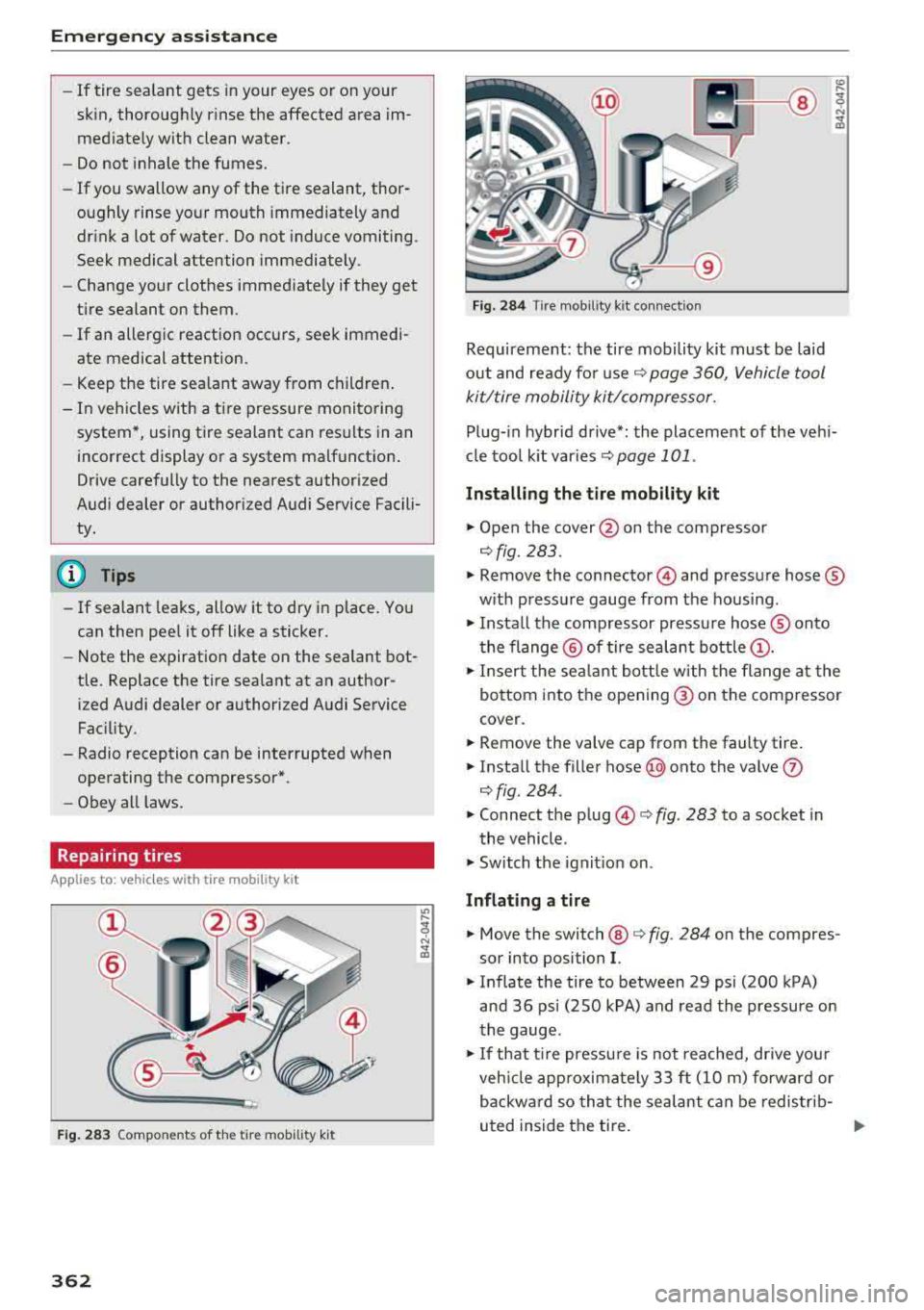
Repairing tires
Applies to: vehicles with tire mob ility kit
Fig. 283 Compo nents of the tire mobilit y kit
362
Fig. 284 Ti re mobil ity k it connec tion
Requirement: the tire mobility kit must be laid
out and ready fo r
use¢ page 360, Vehicle tool
kit/tire mobility kit/compressor.
;1i
Plug-in hybrid drive*: the placement of the vehi
cle tool kit
var ies ~ page 101 .
Installing the tire mobility kit
"" Open the cover @on the compressor
¢fig. 283.
""Remove the connector © and pressure hose ®
with pressure gauge from the housing .
""Insta ll the compressor pressure hose® onto
the flange @ of tire sealant
bottle @.
""Insert the sealant bottle with the flange at the
bottom into the opening ® on the compressor
cover.
"" Remove the valve cap from the faulty tire .
""Install the filler hose (@ onto the valve (J)
¢fig. 284.
"" Connect the plug ©¢ fig. 283 to a socket in
the vehicle .
.,. Switch the ignition on.
Inflating a tire
"" Move the switch @¢ fig. 284 on the compres
sor into position
I.
"" Inflate the tire to between 29 psi (200 kPA)
and 36 psi (250 kPA) and read the pressure on
the gauge .
""If that tire pressure is not reached, drive your
veh icle approximately 33
ft (10 m) forward or
backward so that the sealant can be redistrib-
uted inside the tire.
..,.
Page 374 of 404
Fuses and bulbs
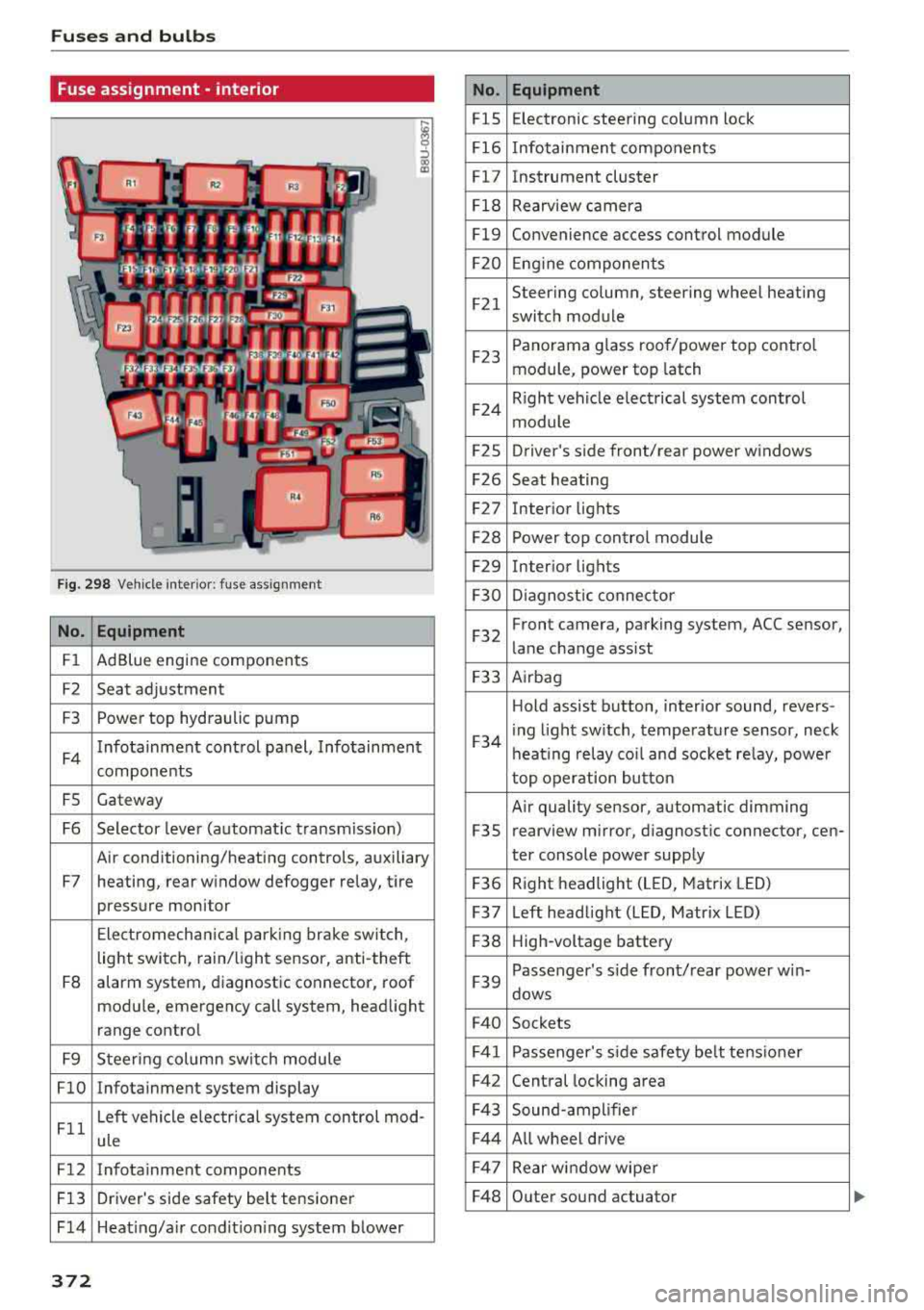
Fuse ass ignment - interior
ij
::, CX) ID
F ig. 298 Vehicle interior: fuse assignment
No. Equipment
Fl Ad Blue engine components
F2 Seat adjustment
F3 Power top hydraulic pump
F4 Infotainment control panel,
Infotainment
components
FS Gateway
F6 Selector lever (automat ic transm iss ion)
Air conditioning/heating controls, auxiliary
F7 heating, rear window defogger relay, tire pressure monitor
Electromechan ical park ing brake switch,
light switch, rain/light sensor, anti-theft
F8 alarm system,
diagnostic connector, roof
module, emergency call system, head light
range control
F9 Steering col umn sw itch module
FlO Infotainment system display
Fll Left vehicle electrica
l system control mod-
ule
F12 Infotainment components
F13 Driver's side safety belt tensioner
F 14 Heat ing/a ir condit ion ing system blower
372
No . Equipment
FlS Electronic
steering column lock
F16 Infotainment components
Fl7 Instrument cluster
Fl8 Rearview camera
Fl9 Convenience access control module
F20 Engine components
F21 Steering column, steering wheel heating
switch module
F23 Panorama glass
roof/power top control
module, power top latch
F24 R
ight vehicle electrical system control
module
F2S Driver
's side front/rear power windows
F26 Seat heating
F27 Interior
lights
F28 Power top control module
F29 Interior lights
F30 Diagnostic connector
F32 Front camera, parking
system, ACC sensor,
lane change assist
F33 Airbag
Hold assist button, interior sound, revers-
F34 i
ng light sw itch, temperature sensor, neck
heating relay coil and socket relay, power
top operation button
Air quality sensor, automatic dimming
F3S rearview
mirror, diagnostic connector, cen-
ter console power supply
F36 Right
headlight (LED, Matrix LED)
F37 Left headlight (LED, Matrix LED)
F38 High-voltage battery
F39 Passenger
's side front/rear power w in-
dows
F40 Sockets
F41 Passenger's sid e safe ty be lt tens ioner
F42 Central locking area
F43 Sound-amplifier
F44 All wheel drive
F47 Rear window wiper
F48 Outer sound actuator
Page 389 of 404
u. 00 .-< N l' N .-< 0 N > 00
A
A/C (automatic climate control system)
Accessories
. . .. ................ ...
Active lane assist ..
.. 69
62 ,385
refer to Audi active lane assist . . . . . . . . . 133
Active rollover protection system . . . . . . . . 257
Retracting rollover protection . . . . . . . . . . 257
Adapt ive cruise control
refer to Audi adaptive cruise control . . . . 123
Adaptive light
refer to Audi adaptive light . . . . . . . . . . . . . 49
Adjusting the additiona l display . . . . . . . . . . 15
Adjusting the air d istr ibut ion
Automatic climate control system . . . . . . . 70
Adjusting the air vents . . . . . . . . . . . . . . . . . . 71
Automatic climate control system . . . . . . . 70
Adjusting the sound . . . . . . . . . . . . . . . . . . . 247
Advanced key
refer to Convenience key . . . . . . . . . . . . . . . 76
Airbag .. .. .. .. ............... .. .. .. . 269
Airbag system . . . . . . . . . . . . . . . . . . . . 269, 289
Advanced Airbag System components . . . 276
Care . . . . . . . . . . . . . . . . . . . . . . . . . . . . . . 284
Children
Child restraints 296
297
Components (front airbags) . . . . . . . . . . . 276
Danger of fitting a child seat on the front
passenger seat . . . . . . . . . . . . . . . . . . . . . .
2 70
Disposal . . . . . . . . . . . . . . . . . . . . . . . . . . . 284
Fr ont airbags . . . . . . . . . . . . . . . . . . . . . . . 274
How do the front airbags work? . . . . . . . . 279
How many airbags does my vehicle have? 276
How the Advanc ed Airbag System compo-
nents wo rk together . . . . . . . . . . . . . . . . . 278
Important safety instructions on the knee
airbag system . . . . . . . . . . . . . . . . . . . . . . . 287
Knee airbags . . . . . . . . . . . . . . . . . . . . . . . . 285
Monitoring . . . . . . . . . . . . . . . . . . . . . . . . . 281
PASSENGER AIR BAG OFF light . . . . . . . . . 281
Repairs . . . . . . . . . . . . . . . . . . . . . . . . . . . . 284
Safety instructions . . . . . . . . . . . . . . . . . . . 283
Side airbags . . . . . . . . . . . . . . . . . . . . . . . . 287
Warning/Indicator lights . . . . . . . . . . . . . 281
Wh en must the system be inspected? . . . 281
Air pressure
Tire Pressure Monitoring System indicator 348
Index
Alarm system
refer to Anti-theft alarm system . . . . . . . . . 36
Al ignment pin (tire change) . . . . . . . . . . . . . 360
All-weather lights . . . . . . . . . . . . . . . . . . . . . . 49
All season tires . . . . . . . . . . . . . . . . . . . . . . . 346
All wheel drive
refer to quattro (all wheel drive) . . . . . . . 152
AMI
refer to Audi music interface . . . . . . . 229, 230
Android Auto
refer to Audi smartphone interface 241
Anti-freeze Windshield washer system . . . . . . . . . . . . 328
Anti-Lock Braking Sys tem (ABS) . . . . . . . . . 148
Anti-Slip Regu lation (ASR) . . . . . . . . . . . . . . 148
Anti-theft alarm system . . . . . . . . . . . . . . . . . 36
Apple CarP lay
refer to Audi sm artphone interface . . . . . 241
ASR
refer to Anti-Slip Regulation (ASR) . . . . . . 148
Audi active lane assist Cleaning the camera area
Messages ... .. .. .. ............... . .
Audi adaptive cruise control ............ .
Cleaning the sensor ................. .
Distance display, distance warning .. .. . .
Messages ... .. .. .. ............. .. . .
Audi adap tive light ... ............... . .
Audi connect e-tron services
............
Doors and lights .... ................ . 133
355
135
123
355 129
130
140
199
199
Audi connect (Infotainment) ........ 190, 196
Data protection . . . . . . . . . . . . . . . . . . . . . 197
Services overview . . . . . . . . . . . . . . . . . . . . 191
Starting . . . . . . . . . . . . . . . . . . . . . . . . . . . 191
Audi drive select . . . . . . . . . . . . . . . . . . . . . . 140
Audi magnetic ride
refer to Suspension control . . . . . . . . . . . . 140
Audi music interface . . . . . . . . . . . . . . . . . . . 229
Audi music stream
refer to Wi-Fi . . . . . . . . . . . . . . . . . . . . . . . 227
Audio files . . . . . . . . . . . . . . . . . . . . . . . . . . . 232
Audio player
Bluetooth audio player . . . . . . . . . . . . . . . 226
Wi-Fi audio p lay er . . . . . . . . . . . . . . . . . . . 227
Audio track 235
387
Page 390 of 404
Index
Audi pre sense . . . . . . . . . . . . . . . . . . . . . . . 130
Messages . . . . . . . . . . . . . . . . . . . . . . 130, 133
Aud i Service Repair Manuals and Literature 383
Audi side assist . . . . . . . . . . . . . . . . . . . . . . . 136
Cleaning the sensors . . . . . . . . . . . . . . . . . 355
Messages . . . . . . . . . . . . . . . . . . . . . . . . . . 140
Rear cross-traffic assist . . . . . . . . . . . . . . . 139
Audi smartphone interface . . . . . . . . . 241, 245
Aud i virtual cockp it
refer to Instrument cluster . . . . . . . . . . . . . 10
AUTO
Automatic climate control system . . . . . . .
69
Automatic headlights . . . . . . . . . . . . . . . . . 49
Auto Lock (centr al locking system) . . . . . . . . 31
Automatic belt retractor . . . . . . . . . . . . . . . 264
Automatic climate control system
refer to Climate control system
(automatic) . . . . . . . . . . . . . . . . . . . . . .
68, 69
Automatic power top
refer to Power top . . . . . . . . . . . . . . . . . . . . 42
Automatic transmission . . . . . . . . . . . . . . . . . 83
Driving tips . . . . . . . . . . . . . . . . . . . . . . . . . . 86
Emergency mode . . . . . . . . . . . . . . . . . . . . . 89
Hill descent control . . . . . . . . . . . . . . . . . . . 87
Kick -down . . . . . . . . . . . . . . . . . . . . . . . . . . .
88
Launch control program . . . . . . . . . . . . . . . 89
Malfunction . . . . . . . . . . . . . . . . . . . . . . . . . 84
Manual shift ing (tiptronic mode) . . . . . . . . 88
Selector lever . . . . . . . . . . . . . . . . . . . . . . . . 86
Selector lever emergency re lease . . . . . . . . 90
Selector lever lock . . . . . . . . . . . . . . . . . . . . 84
Selector lever positions . . . . . . . . . . . . . . . . 84
Shift padd les . . . . . . . . . . . . . . . . . . . . . . . . 88
Automatic wipe/wash system . . . . . . . . . . . . 55
Auto Safety Hotline . . . . . . . . . . . . . . . . . . .
258
Auxiliary climate contro l . . . . . . . . . . . . . . . 116
AUX input . . . . . . . . . . . . . . . . . . . . . . . . . . . 230
Average consumption ........... .... . 17, 18
Average speed . . . . . . . . . . . . . . . . . . . . . 17, 18
B
BACK button . . . . . . . . . . . . . . . . . . . . . . . . . 154
Bag hooks . . . . . . . . . . . . . . . . . . . . . . . . .
63, 65
Balance (sound) . . . . . . . . . . . . . . . . . . . . . . 247
Bass (sound) . . . . . . . . . . . . . . . . . . . . . . . . . 247
388
Battery
In the key . . . . . . . . . . . . . . . . . . . . . . . . . . .
32
also refer to High-voltage battery . . . . . . . 92
also refer to Vehicle battery . . . . . . . . . . . 326
Before driv ing . . . . . . . . . . . . . . . . . . . . . . . . 249
Belt tensioners . . . . . . . . . . . . . . . . . . . . . . . 267
Blended gasoline . . . . . . . . . . . . . . . . . . . . . 314
Blower
Automat ic climate control system . . . . . . .
70
Bluetooth
Audio player . . . . . . . . . . . . . . . . . . . . . . . .
226
Connecting a cell phone . . . . . . . . . . . . . . 177
Settings . . . . . . . . . . . . . . . . . . . . . . . . . . . 246
Boost . . . . . . . . . . . . . . . . . . . . . . . . . . . . . . . . 19
Booster seats . . . . . . . . . . . . . . . . . . . . . . . . 304
Boost pressure indicator . . . . . . . . . . . . . . . . 19
Brakes . . . . . . . . . . . . . . . . . . . . . . . . . . . . . . 150
Brake assist . . . . . . . . . . . . . . . . . . . . . . . . 148
Brake fluid . . . . . . . . . . . . . . . . . . . . . . . . . 326
Electromechanical parking brake . . . . . . . . 81
Emergency braking function . . . . . . . . . . . . 82
New brake pads . . . . . . . . . . . . . . . . . . . . . 150
Break-in security feature . . . . . . . . . . . . . . . . 36
Breaking in
New brake pads . . . . . . . . . . . . . . . . . . . . .
150
New engine . . . . . . . . . . . . . . . . . . . . . . . . . 72
New tires . .... .. .. .. ............. .. 337
Browser
refer to Media center . . . . . . . . . . . . . . . . . 233
Bulbs . . . . . . . . . . . . . . . . . . . . . . . . . . . . . . . 373
Buttons
Control panel (MMI) . . . . . . . . . . . . . . . . .
154
Multifunction steering wheel . . . . . . . . 13, 16
Programming (multifunction steering
wheel) . . . . . . . . . . . . . . . . . . . . . . . . . . . . . . 15
Switching the Infotainment system display
on/off . . . . . . . . . . . . . . . . . . . . . . . . . . . . .
155
C
Cable (USB adapter/AUX connector cable) 229
California Proposition 65 Warning . . . . . . . 319
Battery specific . . . . . . . . . . . . . . . . . . . . . 327
Call list . . . . . . . . . . . . . . . . . . . . . . . . . . . . . 180
Call options . . . . . . . . . . . . . . . . . . . . . . . . . . 188
Page 392 of 404
Index
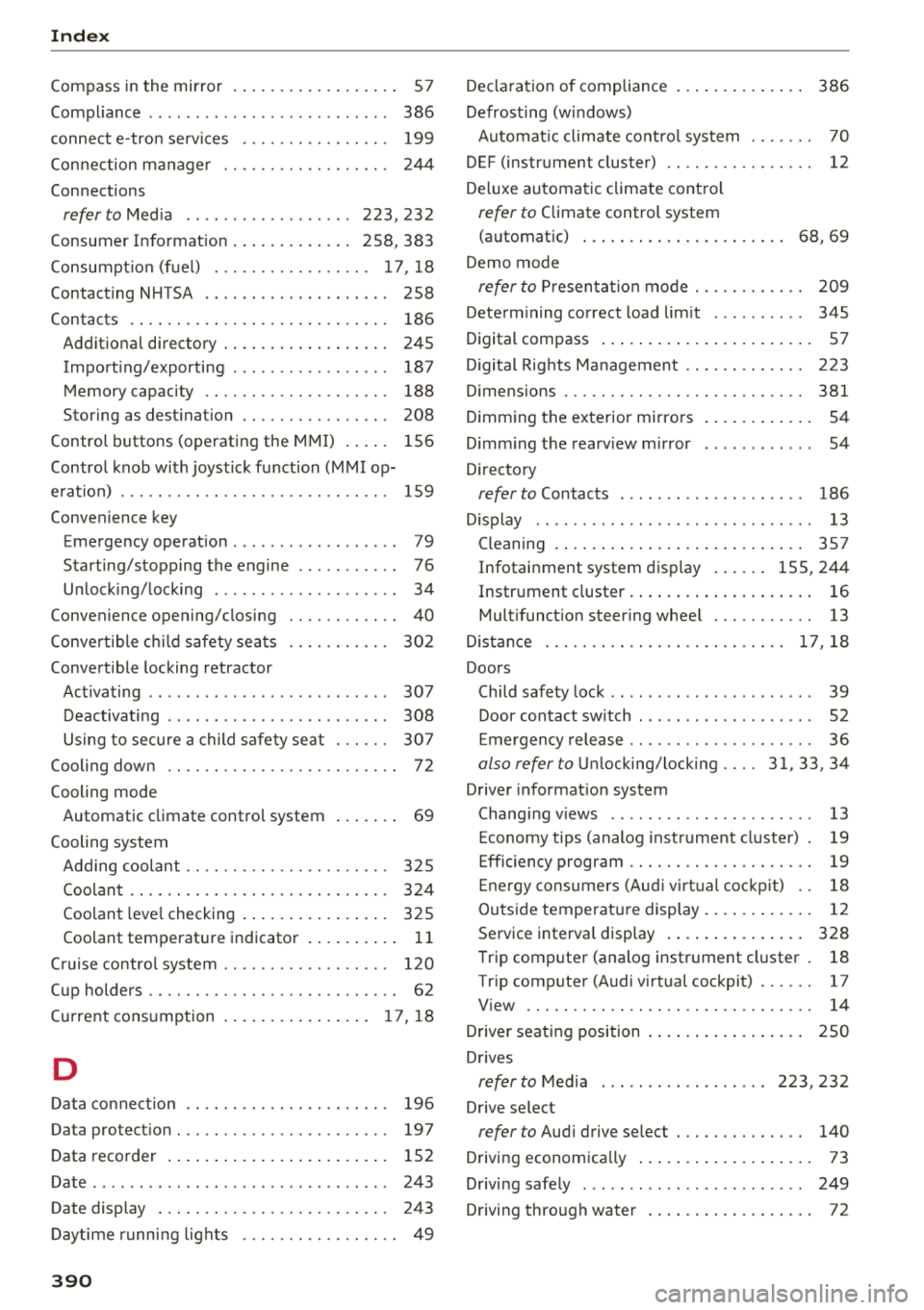
Compass in the mirror . . . . . . . . . . . . . . . . . . 57
Compl iance . . . . . . . . . . . . . . . . . . . . . . . . . . 386
connect e-tron services ......... .... .. .
Connection manager
Connections 199
244
refer to Med ia . . . . . . . . . . . . . . . . . . 223, 232
Consumer I nformat ion . . . . . . . . . . . . . 258, 383
Consumpt ion (f uel) . . . . . . . . . . . . . . . . . 17 , 18
Contact ing NHT5A . . . . . . . . . . . . . . . . . . . . 258
Contacts . . . . . . . . . . . . . . . . . . . . . . . . . . . . 186
Additional directory . . . . . . . . . . . . . . . . . . 245
Impo rt ing/exporting . . . . . . . . . . . . . . . . . 187
Memory capacity . . . . . . . . . . . . . . . . . . . . 188
Storing as dest ination . . . . . . . . . . . . . . . . 208
Control buttons (operating the M MI) . . . . . 156
Contro l knob with joystick f unction (MMI op
e ration) . . . . . . . . . . . . . . . . . . . . . . . . . . . . . 159
Convenience key Emergency operat ion . . . . . . . . . . . . . . . . . . 79
Starting/stopping the engine . . . . . . . . . . . 76
Unlock ing/ lock ing . . . . . . . . . . . . . . . . . . . . 34
Convenience opening/closing . . . . . . . . . . . . 40
Conve rtible ch ild safety sea ts . . . . . . . . . . . 302
Convert ible locking retractor
Activating . . . . . . . . . . . . . . . . . . . . . . . . . . 307
D eactivating . . . . . . . . . . . . . . . . . . . . . . . . 308
Using to secure a child safety seat . . . . . . 307
Cooling down . . . . . . . . . . . . . . . . . . . . . . . . . 72
Cooling mode Automatic climate control system . . . . . . . 69
Cooling system Add ing coolant . . . . . . . . . . . . . . . . . . . . . . 325
Coolan t . . . . . . . . . . . . . . . . . . . . . . . . . . . . 324
Coolant leve l checking . . . . . . . . . . . . . . . . 325
Coolant temperature indicator . . . . . . . . . . 11
C ru ise contro l system . . . . . . . . . . . . . . . . . . 120
Cup holders . . . . . . . . . . . . . . . . . . . . . . . . . . . 62
Curre nt cons umption . .. ..... ... .. .. . 17 , 18
D
Data co nnect ion . . . . . . . . . . . . . . . . . . . . . . 196
Data pro tec tio n . . . . . . . . . . . . . . . . . . . . . . . 197
D ata recorder . . . . . . . . . . . . . . . . . . . . . . . . 152
D ate ..... ... .. .. ................ ... . 24 3
Date display . . . . . . . . . . . . . . . . . . . . . . . . . 243
Daytime runni ng lights . . . . . . . . . . . . . . . . . 49
390
Decla ration of compliance . . . . . . . . . . . . . . 386
Defrosting (windows) Automat ic cl imate cont ro l system . . . . . . . 70
DEF (instrument cluster) . . . . . . . . . . . . . . . . 12
De luxe automa tic climate contro l
refer to Climate control system
(automatic) . . . . . . . . . . . . . . . . . . . . . . 68, 69
De mo mode
refer to Pr esen ta ti on mode . . . . . . . . . . . . 209
Determ ining correct load lim it . . . . . . . . . . 345
Digital compass . . . . . . . . . . . . . . . . . . . . . . . 57
D igital R ights Ma nagement . . . . . . . . . . . . . 223
D imensions . . . . . . . . . . . . . . . . . . . . . . . . . . 381
D imm ing t he exterior mi rro rs . . . . . . . . . . . . 5 4
D imm ing t he rearv iew m irror . . . . . . . . . . . . 54
D irecto ry
refer to Contacts . . . . . . . . . . . . . . . . . . . . 186
D isplay . . . . . . . . . . . . . . . . . . . . . . . . . . . . . . 13
Cleaning . . . . . . . . . . . . . . . . . . . . . . . . . . . 357
Infotainment system disp lay . . . . . . 155, 244
Instrument cluster . . . . . . . . . . . . . . . . . . . . 16
Mult ifunct ion steer ing whee l . . . . . . . . . . . 13
D ista nce . . . . . . . . . . . . . . . . . . . . . . . . . . 17 , 18
Doors Child safety lock . . . . . . . . . . . . . . . . . . . . . . 39
Door con tact sw itch . . . . . . . . . . . . . . . . . . . 52
E mergency release . . . . . . . . . . . . . . . . . . . . 36
also refer to Unl ocking/locking .... 3 1, 33 , 34
Driver informat ion system
Chang ing v iews . . . . . . . . . . . . . . . . . . . . . . 13
E conomy tips (analog instrument cluster) . 19
E ffic iency program . . . . . . . . . . . . . . . . . . . . 19
E ne rgy cons ume rs (Aud i v ir tu al co ckpit) . . 18
Ou tside temperat ure display. . . . . . . . . . . . 12
Service interva l display . . . . . . . . . . . . . . . 328
T rip computer (analog instrument cl uster . 18
Tr ip comp uter (A udi v irtual cockpit) . . . . . . 17
V iew . . . . . . . . . . . . . . . . . . . . . . . . . . . . . . . 14
Drive r seating position . . . . . . . . . . . . . . . . . 250
Drives
refer to M edia . . . . . . . . . . . . . . . . . . 223, 232
D rive select
refer to Aud i drive select . . . . . . . . . . . . . . 140
Drivi ng econom ica lly . . . . . . . . . . . . . . . . . . . 73
D rivi ng safely . . . . . . . . . . . . . . . . . . . . . . . . 249
Driving thro ugh water . . . . . . . . . . . . . . . . . . 72
Page 393 of 404
u. 00 .-< N l' N .-< 0 N > 00
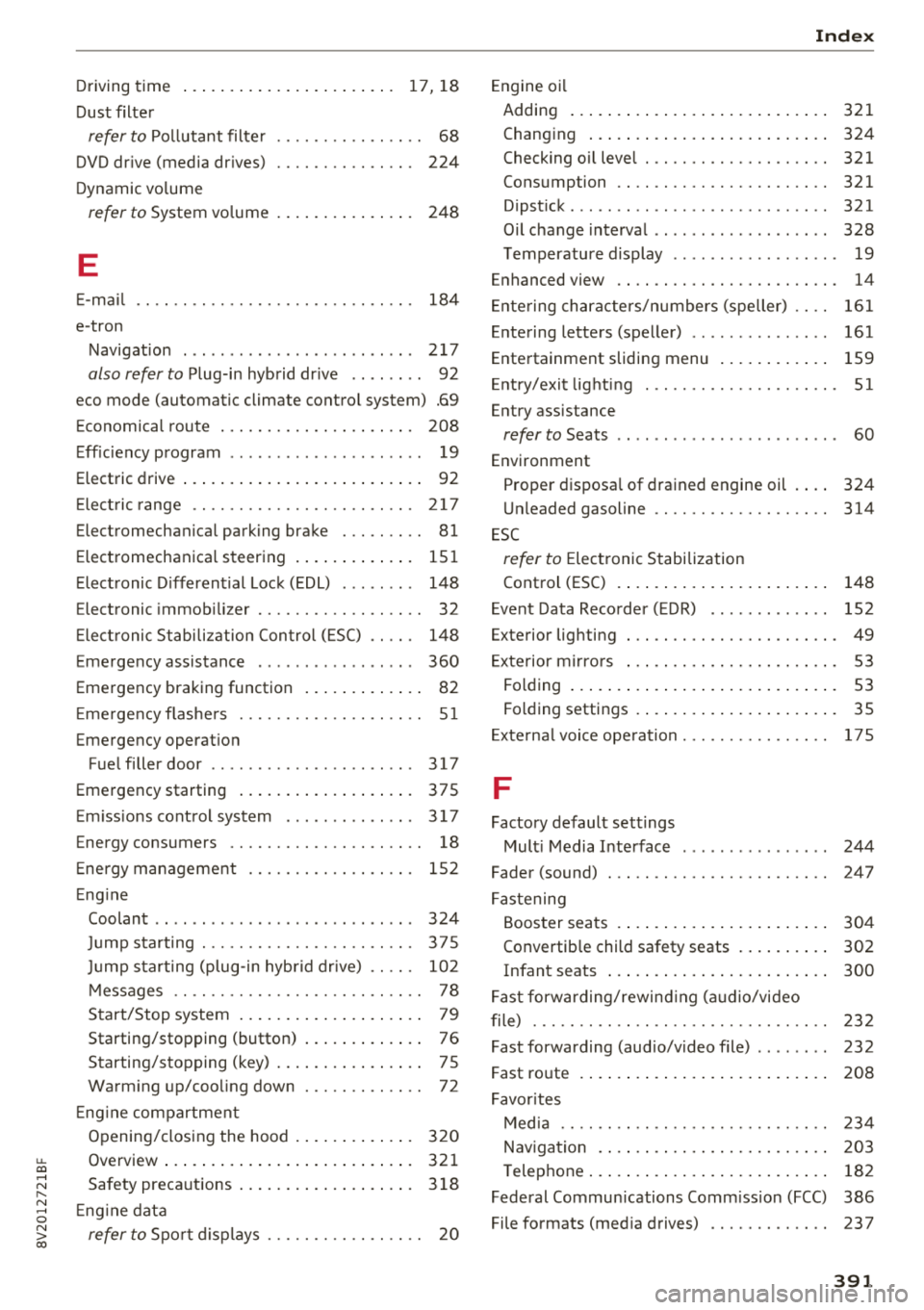
Driving time ... ... .. ..... ... .. .. ... 17 , 18
Dust filter
refer to Pollutant filte r . . . . . . . . . . . . . . . . 68
DVD dr ive (media dr ives) 224
Dynamic vo lume
refer to System vo lume . . . . . . . . . . . . . . . 248
E
E-ma il 184
e-tron
Navigation . . . . . . . . . . . . . . . . . . . . . . . . . 217
also refer to P lug-in hyb rid dr ive . . . . . . . . 92
eco mode (automatic climate control system) .69
E conomical route . . . . . . . . . . . . . . . . . . . . . 208
E ff iciency program . . . . . . . . . . . . . . . . . . . . . 1 9
Electric drive . . . . . . . . . . . . . . . . . . . . . . . . . . 92
E le ct ric range . . . . . . . . . . . . . . . . . . . . . . . . 217
Electromechanical parking brake . . . . . . . . . 81
Electromechanica l steering . . . . . . . . . . . . . 15 1
Elect ronic D ifferent ial Lock (EDL) . . . . . . . . 148
Electronic immob ilizer . . . . . . . . . . . . . . . . . . 32
E lect ronic S tabili zation Control ( ESC) . . . . . 148
Emergency assistance . . . . . . . . . . . . . . . . . 360
Emergency braking function . . . . . . . . . . . . . 82
E me rgency flashe rs . . . . . . . . . . . . . . . . . . . . S 1
Emergency operat ion
Fuel filler door . . . . . . . . . . . . . . . . . . . . . . 317
Emergency starting .. ..... ... .. .. .... . 375
E m iss ions cont rol system . . . . . . . . . . . . . . 317
Energy consumers . . . . . . . . . . . . . . . . . . . . . 18
E ne rgy management . . . . . . . . . . . . . . . . . . 152
E ng ine
Coolant . . . . . . . . . . . . . . . . . . . . . . . . . . . . 324
Ju mp starting . . . . . . . . . . . . . . . . . . . . . . . 375
Ju mp s tarting (plug -in hyb rid drive) . . . . . 102
M essages . . . . . . . . . . . . . . . . . . . . . . . . . . . 78
Start/Stop system . . . . . . . . . . . . . . . . . . . . 79
Starting/stopping (button) . . . . . . . . . . . . . 76
Starting/stopping (key) . . . . . . . . . . . . . . . . 7 S
Warm ing up/coo ling down . . . . . . . . . . . . . 72
E ng ine compartmen t
Opening/closing the hood . . . . . . . . . . . . . 320
Overview ..... ... .. ..... ... .. .. .... . 32 1
Safety preca utions . . . . . . . . . . . . . . . . . . . 3 18
E ng ine data
refer to Spo rt displays . . . . . . . . . . . . . . . . . 20
Ind ex
Engine oi l
Adding . . . . . . . . . . . . . . . . . . . . . . . . . . . . 321
Chang ing . . . . . . . . . . . . . . . . . . . . . . . . . . 324
Checking oil level . . . . . . . . . . . . . . . . . . . . 321
Consumption . . . . . . . . . . . . . . . . . . . . . . . 321
Dipst ick .... ... .. .. ................ . 321
Oil change interval . . . . . . . . . . . . . . . . . . . 328
T emperature display . . . . . . . . . . . . . . . . . . 19
Enhanced view . . . . . . . . . . . . . . . . . . . . . . . . 14
Ente ring characte rs/numbers (speller) . . . . 161
Entering letters (speller) . . . . . . . . . . . . . . . 161
Entertainment sliding menu . . . . . . . . . . . . 159
E nt ry/ exit lig hting . . . . . . . . . . . . . . . . . . . . . S 1
Entry assistance
refer to Seats . . . . . . . . . . . . . . . . . . . . . . . . 60
Environment Proper disposa l of drained engine oil . . . . 324
U nleaded gasoline . . . . . . . . . . . . . . . . . . . 314
E SC
refer to Electronic Stabilization
Control (ESC) . . . . . . . . . . . . . . . . . . . . . . . 148
E vent Data Reco rder ( EDR) . . . . . . . . . . . . . 152
Exterior lighting . . . . . . . . . . . . . . . . . . . . . . . 49
E xterior mirrors . . . . . . . . . . . . . . . . . . . . . . . 53
Folding . . . . . . . . . . . . . . . . . . . . . . . . . . . . . 53
Folding settings . . . . . . . . . . . . . . . . . . . . . . 35
Ex terna l voice ope ra tion . . . . . . . . . . . . . . . . 175
F
Factory default sett ings
Mult i Media Interface . . . . . . . . . . . . . . . . 244
Fader (sound) . . . . . . . . . . . . . . . . . . . . . . . . 24 7
F astening
Booster seats . . . . . . . . . . . . . . . . . . . . . . . 304
Convertib le child safety seats . . . . . . . . . . 302
Infant seats . . . . . . . . . . . . . . . . . . . . . . . . 300
Fast forwarding/rewind ing (a udio/video
f ile) . . . . . . . . . . . . . . . . . . . . . . . . . . . . . . . . 232
Fast forwarding (aud io/video file) . . . . . . . . 232
Fast route 208
Favor ites
Med ia . . . . . . . . . . . . . . . . . . . . . . . . . . . . . 234
Nav iga tion . . . . . . . . . . . . . . . . . . . . . . . . . 203
T elep hone . . . . . . . . . . . . . . . . . . . . . . . . . . 182
Federal Commun ications Comm iss ion (FCC) 386
File formats (med ia drives) . . . . . . . . . . . . . 237
391