infotainment AUDI A3 SEDAN 2018 User Guide
[x] Cancel search | Manufacturer: AUDI, Model Year: 2018, Model line: A3 SEDAN, Model: AUDI A3 SEDAN 2018Pages: 404, PDF Size: 62.3 MB
Page 38 of 404
Opening and closing
Mechanically unlocking/locking the doors
If the central locking foils, you must unlock/lock the doors separately .
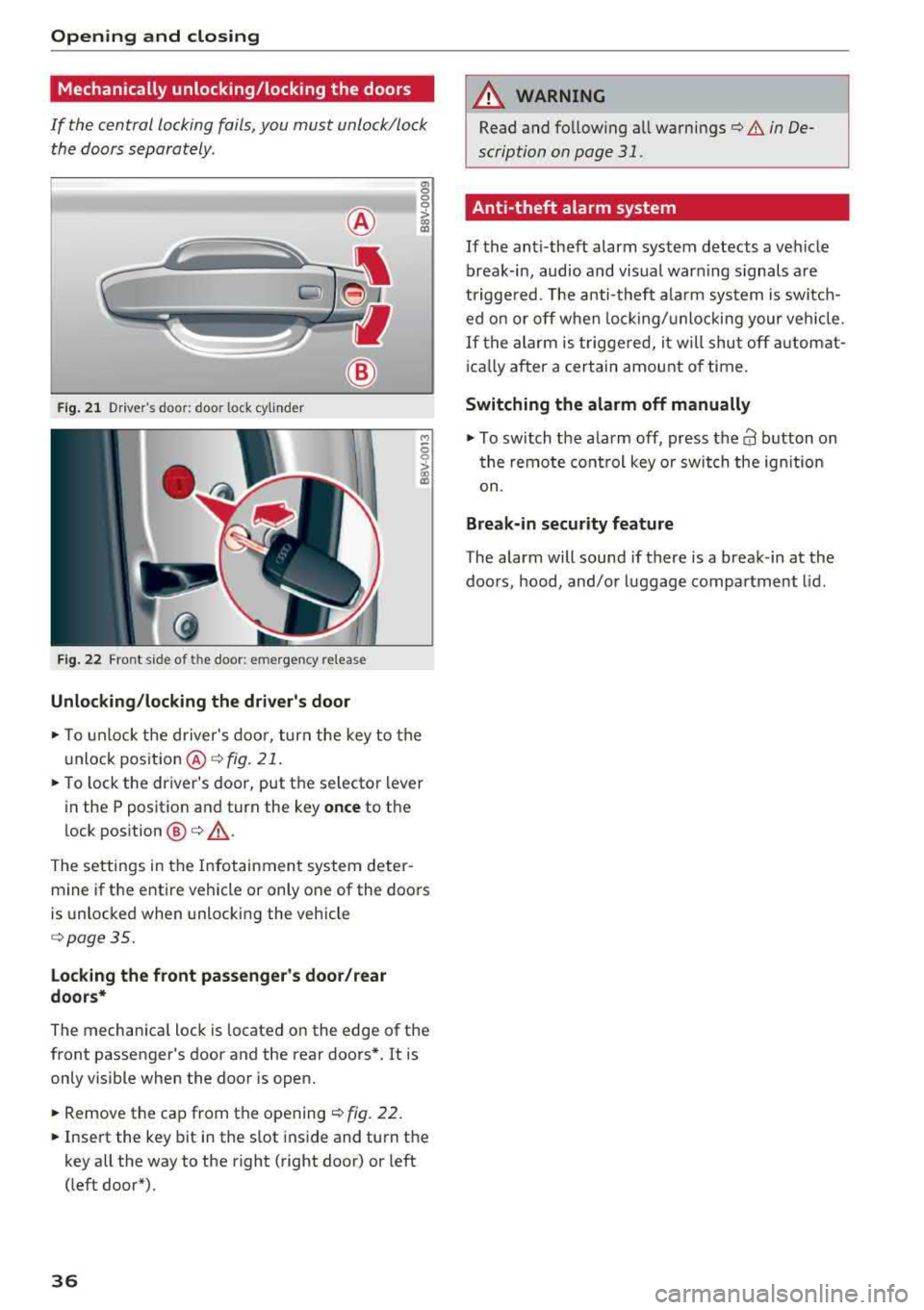
Fig. 21 Driver's door : door lock cylinder
Fig . 22 Fro nt s ide of t he doo r: emerg en cy release
Unlocking/locking the driver's door
a, 0
0
0
> (X) a,
M
5
i
~ To unlock the driver's door, turn the key to the
u nlock position @
¢fig . 21.
~ To lock the driver's door, put the se lector lever
in the P position and turn the key
once to the
lock position
@ ¢ ,&..
The settings in the Infotainment system deter
mine if the entire vehicle or only one of the doors
is unlocked when unlocking the vehicle
¢page 35.
Locking the front passenger's door/rear
doors*
The mechanica l lock is located on the edge of the
front passenger's door and the rear doors*. It is only visible when the door is open.
~ Remove the cap from the opening ¢ fig. 22.
~ Insert the key bit in the slot inside and turn the
key all the way to the right (right door) or left
(left door*).
36
A WARNING
, -
Read and fo llowing all warnings¢ & in De-
scription on page
31.
Anti-theft alarm system
If the anti-theft alarm system detects a vehicle
break-in, audio and visual warning s ignals a re
triggered. The anti-theft alarm system is switch
ed on or off when locking/unlocking your vehicle.
If the alarm is triggered, it will shut off automat
ically after a certain amount of time.
Switching the alarm off manually
~ To switch the a larm off, press the 63 button on
the remote control key or switch the ignition
on .
Break-in security feature
The alarm will sound if there is a break-in at the
doors , hood, and/or luggage compartment lid.
Page 51 of 404
LL co .... N
" N .... 0 N > co
Lights and Vision
Exterior Lighting
Switching lights on and off
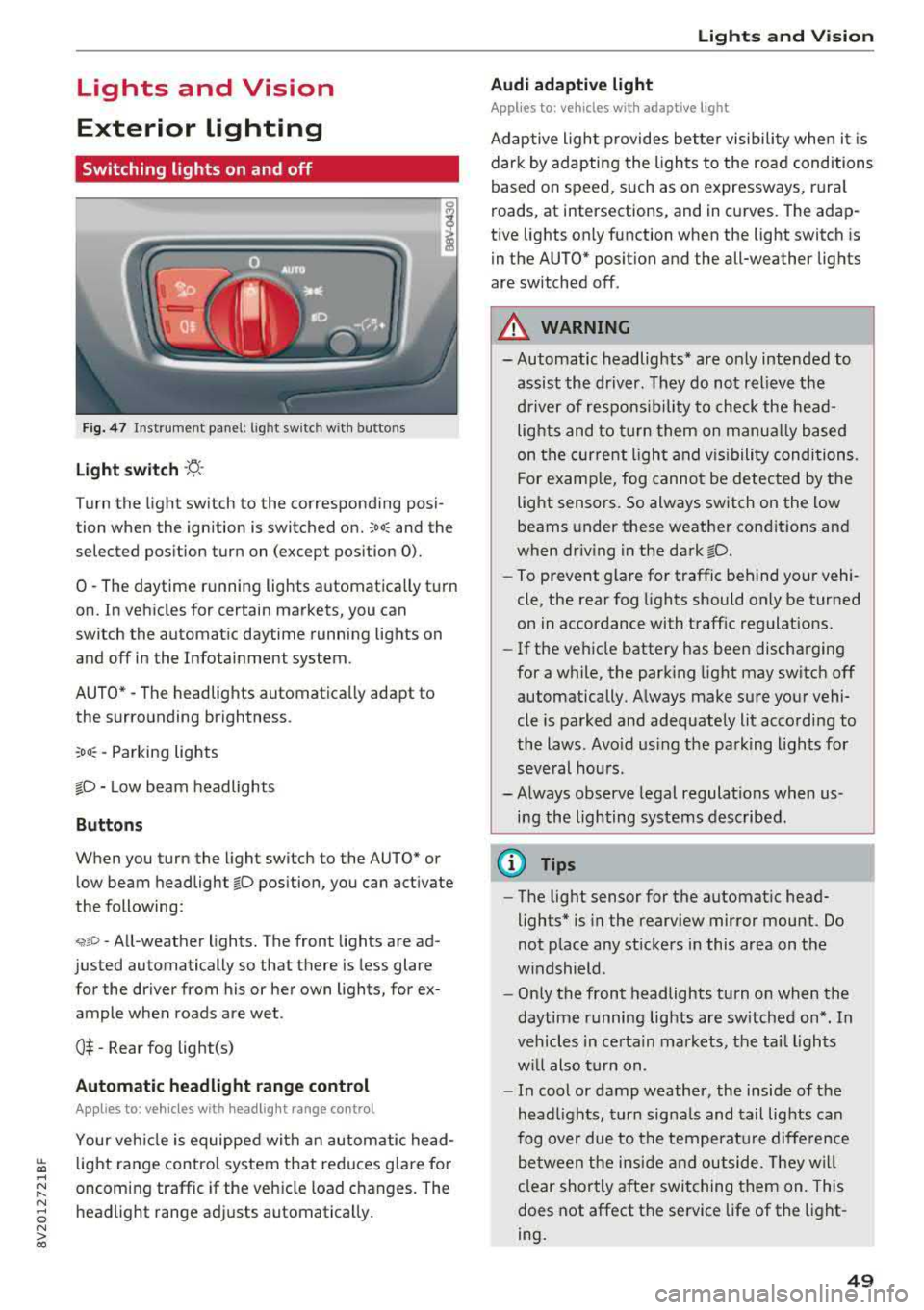
F ig . 4 7 Instrument p anel: l ig ht sw itc h w ith buttons
Li ght switch ·'A ·
Turn the light sw itch to the corresponding posi
tion when the ignition is switched on.
;oo : and the
selected pos ition turn on (except pos ition 0).
0
-The daytime r unning lights automat ica lly t urn
on. In veh icles for certain markets, you can
switch the automat ic daytime running lights on
and off in the Infotainment system.
AUTO *
-The headlights automatica lly adapt to
the surro unding brightness.
:oo : -Parking lights
fD -Low beam headlights
Buttons
When you turn the light switch to the AUTO" or
low beam headlight
fD position, you can activate
the following:
<,if.D -All-weather lights. The front lights are ad
justed automatically so that there is less glare
for the driver from his or her own lights, for
ex
ample whe n roads are wet .
0$ -Rear fog light(s)
Automatic headlight range control
Applies to: ve hicles with headlig ht range control
Your veh icle is equipped with an autom atic head
light range control system that red uces g lare fo r
oncoming traffic if the veh icle load c hanges. The
headlight range ad justs automatica lly .
Lights and V ision
Audi adaptive light
Appl ies to: vehicles wit h adaptive light
Adaptive ligh t provides bet ter visibili ty whe n it i s
dark by adapting the ligh ts to the road conditions
based on speed , such as on e xpressways, rura l
roads, at intersections, and in c urves. The adap
t ive lights only function when the light switch is
i n the AUTO* posit io n and the all-weather lig hts
are switched off.
A WARNING
-
- Automatic headlights * are on ly intended to
assis t the driver. They do not relieve t he
d river of re spo nsibility to check the head
lights and to t urn them on m anua lly b ased
on t he cur re nt ligh t an d visibility condition s.
For e xam ple, fo g canno t be detecte d by the
light senso rs . So always switch on the low
beams under these weather con dit ions an d
when dr iv ing in the dark
fD.
-To prevent glare for traffic behind yo ur vehi ·
cle, the rear fog lights shou ld only be turned
on in accordance with t raff ic regulat ions.
- If the ve hicle battery has been discharging
for a while , the park ing light may switch off
automatically. A lways make su re you r vehi
cle is parked and adequately lit acco rding to
the laws . Avo id us ing the pa rking ligh ts for
sev eral hou rs .
- Always observe legal regula tions when us
ing the lighting sys tems desc ribed.
@ Tips
- The lig ht sensor for the automat ic head
lights* is in the rearview mirror mount . Do
not p lace any st ickers in this area on t he
w indshield .
- Only the front headlights turn on when the
daytime running lig hts are sw itched on *. In
veh icles in ce rtain markets, t he tai l lights
w ill also turn on .
- In cool or damp weather, the inside of the
hea dlights, t urn sign als and tail lights can
fog ove r due to t he tempera ture diffe rence
b etween the insi de an d outside. They will
clear shortly after swit ching them on. This
does not affect the service life of the light
ing .
49
Page 53 of 404
LL co .... N
" N .... 0
Drive to an authorized Audi dea le r o r aut horized
Audi Service Facility immediately to have the
malfunct ion corrected. You can still switch the
high beams on or off manually.
11 Hea dlight a ssistant : currently unav ailable.
No camera view
a:a Headlight a ssistant : currently unavailable.
Camera view restricted due to surroundings .
See owner 's manual
The camera view is b locked, fo r example by a
s tic ker o r debris. Ple ase clean t he w indshie ld.
The senso r is located i n the inter ior rearv iew m ir
ro r mount . D o not place any stickers in this a rea
on the windsh ield.
,& WARNING
High bea m assistan t is only i ntended to assist
t he driver. The dr iver is still re sponsib le for
contro lling the headlights and may need to
switch them on and off manually depend ing
on light and visib ility conditions. It may be
necessary to ope rate them manua lly in s itua
tions such as:
- In adverse weather cond itions such as fog,
heavy ra in, b low ing snow or sp raying water .
- On roads where oncoming traffic may be
partially obsc ured, such as expressways .
- If there a re road users w ith poor lighting ,
such as bicyclists.
- In tight c urves and on steep hills .
- In poor ly li t areas.
- W it h stro ng reflec tors, such as si gns.
- If the ar ea of the windsh ield near the s enso r
is fogged ove r, dirty, i cy or covere d w it h a
sti cker.
Adjusting the exterior lighting
The fu nctions are adjusted in t he Infotainment
system.
• Se lect in the Infotainment system: ! M ENU I but
ton
> Vehicle > left contro l butto n > Vehicle
settings
> Exterior lighting .
N > l) This fun ctio n is not a vailab le in all c oun tries. co
Lights and V ision
Automatic headlights*
Yo u ca n adjus t the following se ttings in the Au
tomatic headlights
men u:
Activation time* -yo u can adjust if th e he ad
li gh ts sw itc h on
Early , Medium or Late acc ording
t o th e se nsitivity o f the light sensor .
Headlight assistant *· you can switch the high
beam assis tant* on and off.
Entry/ exit lighting*
You can switch the entry/exit lighting" on and
off . When it is dark, it illum inates the area
aroun d th e vehicle whe n unlock ing the vehicle
and af ter sw itchi ng off th e i gnition and opening
t h e dr iver 's doo r.
The entry/exit lighting only works whe n it is da rk
and the light sw itch is i n the
AUTO * position .
Daytime running lights1l
The daytime running lig hts can be turned on and
off. When daytime running lights a re t urned on,
the lights will stay on continuously whenever the ignition is sw itched on .
Emergency flashers
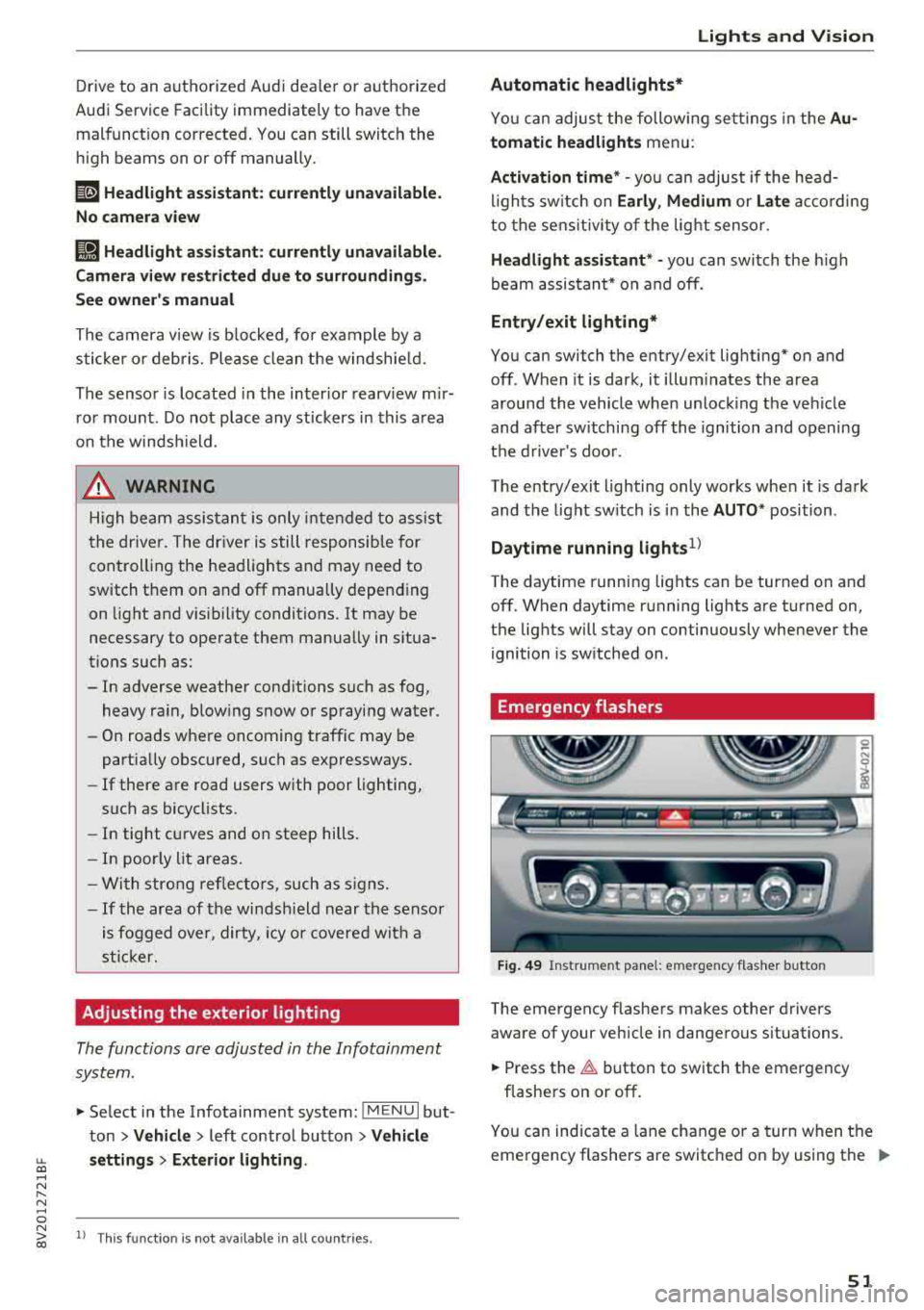
Fig. 49 Instrume nt pa nel: e merge ncy f las her b utto n
The emergency flashe rs makes other drivers
aware of your ve hicle in dange rous situations.
• Press the ~ button to switch the emergency
flashe rs on or off .
0
i
You can ind icate a lane cha nge or a turn when t he
eme rgency flashers a re switc hed on by using the
..,_
51
Page 54 of 404
Lights and Vision
turn signal lever. The emergency flashers stop
temporarily .
The emergency flashers also wo rk when the igni
tion is turned off.
Interior lighting
Front interior lighting
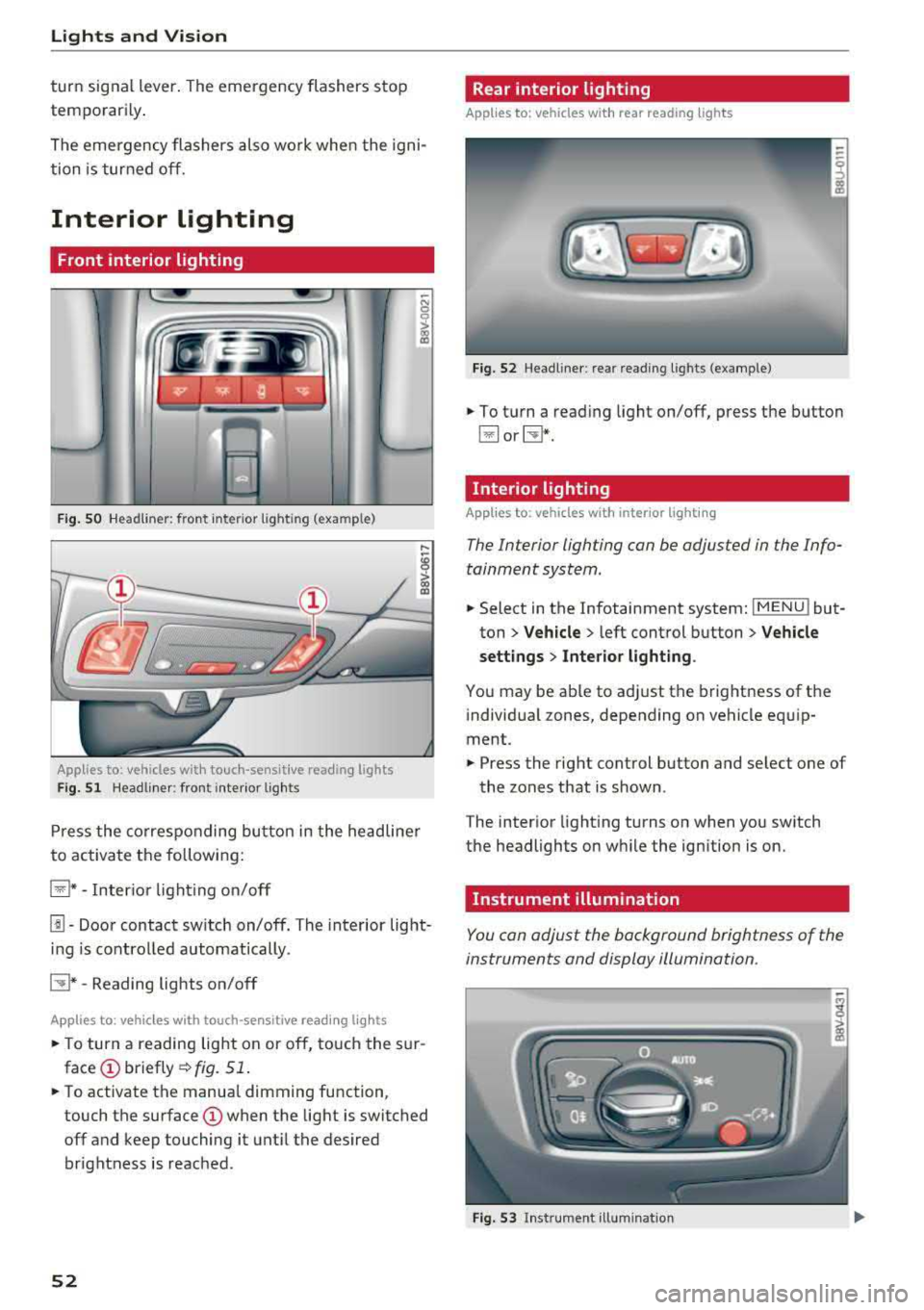
F ig . SO Headl iner: fr ont inte rior lig htin g (exa mple)
:ti ?
Applies to: vehicles with touch-sensitive reading lights
F ig. 51 Headli ner: front inte rior lig hts
Pr ess the co rres ponding bu tton in the he adline r
to activate the following:
~ * -Inter io r li ght ing o n/off
[!] -Door contact sw itch on/off. The interior light
i n g is controlled automatically.
CTI* -Reading lights on/off
App lies to: veh icles with touch-sensitive reading lights
.. T o turn a reading lig ht on or off, to uch the s ur
face (!) briefly ¢fig. 51 .
.. To activate the manua l dimming function ,
touch the
surface (!) when the light is switched
off and keep touching it unt il the desired
brightness is reached .
52
Rear interior lighting
Applies to: vehicles with rear reading lights
Fi g. 52 Headli ne r: re ar reading l ights (example)
.. To t urn a read ing light on/off, press the button
~ or~ *-
Interior lighting
Applies to: vehicles with interior lighting
The Interior lighting can be adjusted in the Info
tainment system .
.. Select in the Infotainment system: IMENU ! but
ton
> Vehicle > l eft cont rol button > Vehicle
settings
> Inte rior light ing .
You may be ab le to ad just the brightness of the
i ndivid ua l zones, depending on vehicle eq uip
ment .
.. Press the right control button and se lect one of
the zones that is shown .
The inter ior light ing turns on when you sw itch
the headlights on w hile the ign ition is on.
Instrument illumination
You can adjust the background brightness of the
instruments and display illumination.
Fi g. 53 In st ru m en t ill uminat ion
Page 55 of 404
LL co ..... N
" N ..... 0 N > co
~ Press the knob to release it.
~ Turn the knob toward "-"or"+" to reduce or in
crease the brightness.
~ Press the knob again to return it to its original
position.
(l') Tips
Depending on vehicle equipment, the instru
ment illumination (needles and gauges) may
turn on when the lights are off and the igni
tion is sw itched on . The illumination for the
gauges reduces automat ica lly and eventually
turns off as brightness outside increases. This
function reminds the driver to turn the low
beams on at the appropriate time.
Vision
Adjusting the exterior mirrors
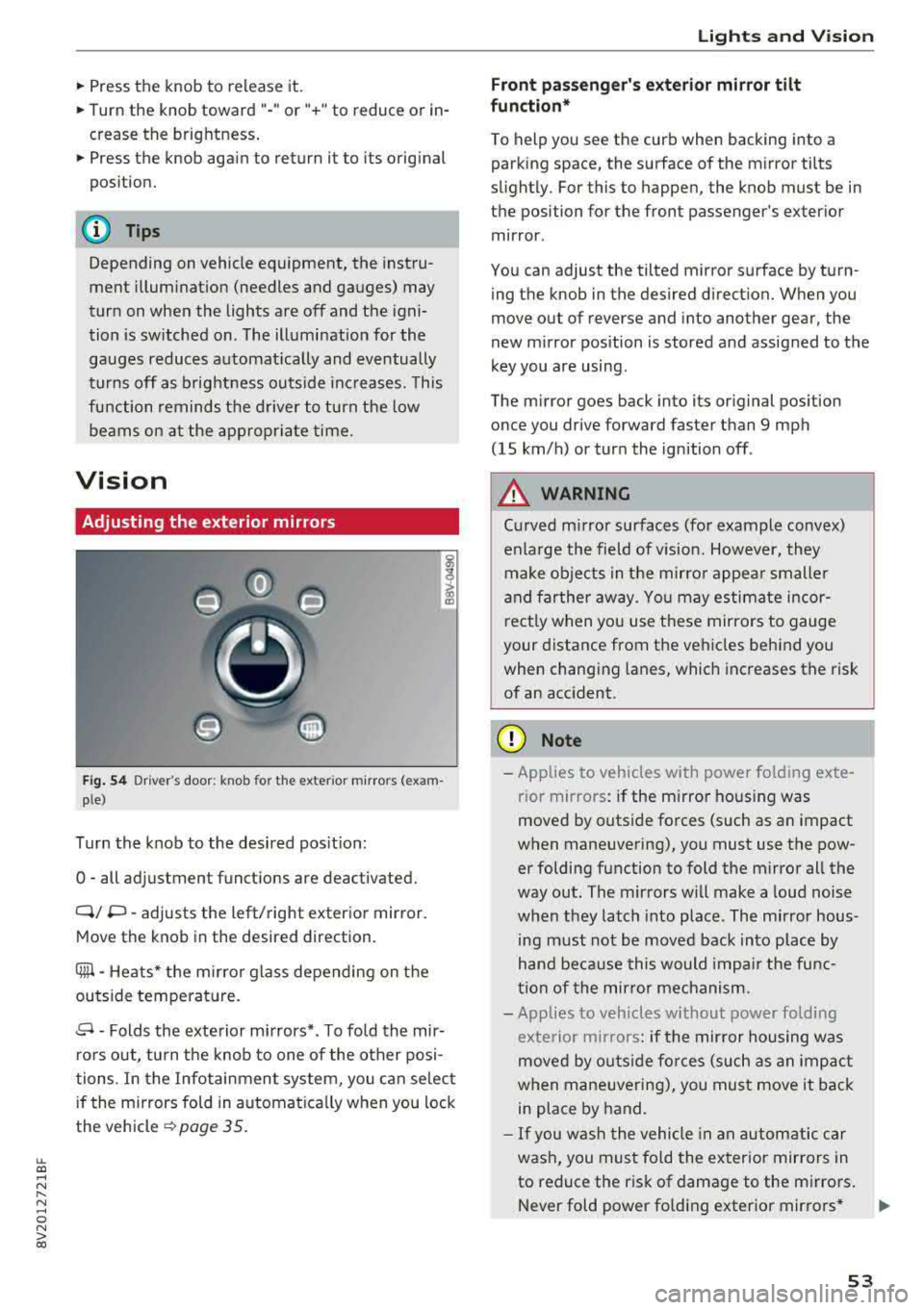
Fig. 54 Driv er's door: k n ob for the ex ter ior mirrors (exam
p le)
Turn the knob to the desired position:
0
-all adjustment functions are deactivated.
Q/ P -adjusts the left/right exterio r mirror.
Move the knob in the desired direction .
Cilll -Heats* the mirro r glass depending on the
outside temperature.
.9 -Folds the exterior mirrors* . To fold the mir
rors out, turn the knob to one of the other posi
tions . In the Infotainment system, you can select
if the mirrors fold in automat ically when you lock
the vehicle
~ page 35.
Lights and Vision
Front passenger 's exterior mirror tilt
function*
To help you see the curb when backing into a
parking space, the surface of the mirror tilts
slightly. For this to happen, the knob must be in the position for the front passenger's exterior
mirror .
You can adjust the tilted mirror surface by turn ing the knob in the desired direction. When you
move out of reverse and into another gear, the
new mirror position is stored and assigned to the
key you are using.
The mirror goes back into its original position
once you drive forward faster than 9 mph
(15 km/h) or turn the ignition off .
A WARNING
Curved mirror surfaces (for example convex)
enlarge the field of v is ion. However, they
make objects in the mirror appear smaller
and farther away . You may estimate incor
rectly when you use these mirrors to gauge
your distance from the vehicles behind you when changing lanes, which increases the risk
of an accident .
(D Note
-Applies to vehicles with power fo lding exte
r ior mirrors : if the mirror hous ing was
moved by outside forces (such as an impact
when maneuvering), you must use the pow er folding function to fold the mirror all the
way out. The mirrors will make a loud noise
when they latch into place. The mirror hous
ing must not be
moved back into place by
hand because this would impair the func
tion of the mirror mechanism.
- Applies to veh icles without power folding
exterior mirrors : if the mirror housing was
moved by outside forces (such as an impact
when maneuvering), you must
move it back
in place by hand.
- If you wash the vehicle in an automatic car
wash, you must fold the exterior mirrors in
to reduce the risk of damage to the mirrors .
Never fold power fo lding exterior mirrors*
.,.
53
Page 57 of 404
LL co .... N
" N .... 0 N > co
Windshield wipers
Switching the windshield wipers on
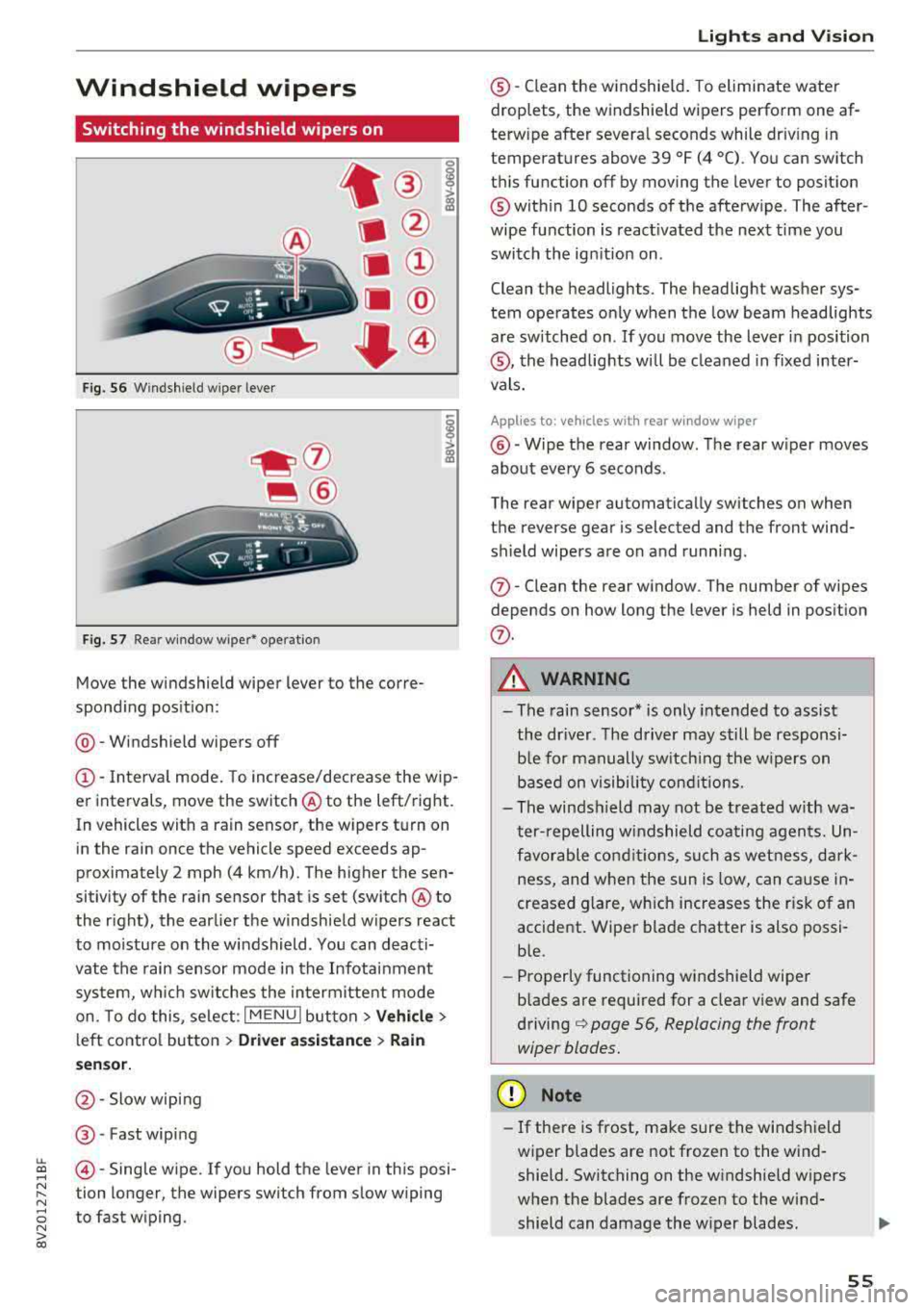
Fig. S6 Windshield wiper lever
Fig. S7 Rear window wiper• operatio n
t® I
a @
lll ®
Iii @
•®
Move the windshield wiper lever to the corre
spond ing pos ition:
@ -Windshield wipers off
(D-Interval mode. To increase/decrease the wip
er intervals, move the switch
@ to the left/right.
In vehicles with a rain sensor, the wipers turn on in the rain once the vehicle speed exceeds ap
proximately 2 mph (4 km/h). The higher the sen
sitivity of the rain sensor that is set (switch
@ to
the right), the earlier the w indshield w ipers react
to moisture on the windshield . You can deacti
vate the rain sensor mode in the Infotainment
system, wh ich switches the intermittent mode
on. To do this, select :
I MENU I button> Vehicle>
left control button > Driver a ssistance > Rain
se nsor.
@ -Slow wiping
@ -Fast wiping
@-Single wipe. If you hold the lever in this posi
tion longer, the wipers switch from slow wiping
to fast wiping.
Lights and Vision
®-Clean the windshield. To eliminate water
droplets, the windshield wipers perform one af
terw ipe after several seconds while dr iv ing in
temperatures above 39 °F (4 °C). You can switch
this function off by moving the lever to position
@within 10 seconds of the afterwipe . The after
wipe function is react ivated the next time you
switch the ignition on .
Clean the headlights. The headlight washer sys
tem operates only when the low beam headlights
are sw itched on . If you move the lever in position
®, the headlights will be cleaned in fixed inter
vals.
Applies to: vehicles wi th rear window wiper
@ -Wipe the rear window. The rear wiper moves
about every 6 seconds .
The rear wiper automatically switches on when
the reverse gear is selected and the front wind
sh ield wipers are on and running.
(j)-Clean the rear window . The number of wipes
depends on how long the lever is held in position
(j) .
A WARNING
-The rain sensor* is only intended to assist
the driver. The driver may still be responsi
ble for manually switch ing the w ipers on
based on visibility conditions.
-The windsh ield may not be treated w ith wa
ter-repelling windshield coating agents. Un
favorable conditions, such as wetness, dark
ness and when the sun is low, can cause in-
'
creased glare, which increases the r isk of an
accident. Wiper blade chatter is also possi
ble.
-Properly functioning windshield wiper
b lades are required for a clear view and safe
driving¢ page 56, Replacing the front
wiper blades.
(D Note
- If there is frost, make sure the windshield
wiper blades are not frozen to the wind
shield. Switching on the windshield wipers
when the blades are frozen to the wind
shield can damage the wiper blades .
-
55
Page 70 of 404
Warm and cold
Warm and cold Climate control system
Description
The climate control system circulates , warms or
coo ls, and removes humid ity from the air in the
veh icle interior . It is the most effective when the
windows and panorama g lass roof* or power top*
are closed. If there is a build-up of heat inside
the vehicle, ventilation can help to speed up the
coo ling process.
Pollutant filter
The pollutant filter removes pollutants such as
dust and po llen from the air.
Key recognition
Various sett ings are stored and ass igned to the
remote control key being used.
These settings are different when the power top* is open or closed .
Presetting
Several functions can be preset in the Infotain
ment system.
Select in the Infotainment system:
IMENU ! but
ton
> Vehicle > left control button > Air condi
tioning
A WARNING
Poor visibility can lead to accidents.
- For safer driving, keep all windows free of
ice, snow and fog.
- Become familiar with the correct use and
function of the climate control system as
quickly as poss ible, espec ia lly with the de
frosting and defogging functions.
- When the temperature is below freezing, only use the windsh ield washer system after
68
the windshield has been warmed by the cli
mate control system. The washer fluid could
freeze on the windshie ld and impair visib ili
ty .
@ Note
-If you suspect that the climate contro l sys
tem is damaged, switch the system off to
prevent further damage and have it checked
by an authorized Aud i dealer or authorized
Audi Serv ice Facility.
- Repa irs to the Aud i climate control system
require special technical knowledge and
special tools . See an authorized Aud i dealer
o r authorized Aud i Serv ice Facility .
@ For the sake of the environment
-To save fuel, turn off the climate control
system cooling mode by press ing the A/C
button. This w ill also reduce emissions . The
climate control system is off when the LED
in the button turns off.
- In vehicl es w ith the efficie ncy prog ram*,
yo u can find other consumpt ion information
and more economy tips ¢ page 19.
© Tips
- To prevent int erference with the heat ing
and cooling output and to prevent the win
dows from fogging over, the air intake in
front of the windshie ld must be free of ice,
snow or leaves.
- Condensation from the cooling system* can
drip and form a pudd le of water under the
vehicle . This is normal and does not mean
there is a leak.
- Th e energy management system may tem
porarily switc h off certain functions, such as
the seat heating* or rear window defogger.
These systems are ava ilable again as soon
as the energy supply has been restored.
Page 72 of 404
Warm and cold
driver 's side is transferred to the front passeng
er's side. This applies a temperature change to
the front passenger 's side .
8/r Blower
Using the regu lator 8f?, you ca n manually adjust
the vo lume of a ir generated by the blower to your
p reference . The blowe r shou ld always run at a
low setting to prevent the windows from fogging
and to ensure a continuous exchange of air inside
t he vehicle . To h ave the blower regu lated au to
mat ically , press the AUTO button.
~/ :01 ~ Air distribution
The air distribution can adjusted with t he but
tons. To have the air distribution regulated auto matica lly, press the AU TO button.
The round air vents in t he cockpit are adjustable
q page 71 .
To keep the front s ide windows from fogging up
in damp weathe r, we recommend opening the
side air vents and tilting them to the side .
Foot vents are located under the front seats and
adjustab le vents o n the end of t he center console
t o heat the re ar of the vehicle .
3fx Defrosting
The windshield and s ide windows are defrosted
or cleared of condensation as qu ickly as possible .
The max imum amo unt of air flows ma inly from
the vents below the w indshield. Recircu lation
mode switches off. The temper ature s hou ld be
set at +72°F (22°() or higher. The temperat ure is
controlled automatica lly. In the
;Ix setting, the
A/C cooling mode switches on a utomatically , de
pending on the outside air temperature.
The A UTO button switches the defroster off.
~ Recirculation mode
The recircu lation mode can be turned on manua l
ly or automat ica lly*.
- Swi tc h ing man ua l rec irculat ion mode on and
off: press
t h e ~ button .
70
-Automatic * reci rcu lat ion mode : auto recircula
tion needs to be activated in the Infotainment
system. Se lect in the Infotainment system:
I MENU I button > Veh icle > left control button >
Air cond itioning > Aut o recircul ation
The air
quality sensor that is designed for d iesel and
gasoline exhaust automatically sw itches the re
circulation mode on or off depending on the level of pollutants in the o utside air.
In rec irculat ion mode, the air inside the vehicle is
c ir culated and filte red . T his prevents the unfil
te red air outs ide t he ve hicle from enteri ng the
vehicle inte rior. Switching rec irculat io n mode on
whe n driving throug h a tu nnel o r whe n sitting in
traffic is recommended
q & .
Pressing the~ button, A UTO o r the ;Ix button
switches recirculation mode off .
T he system switches to recirculation mode when
driv ing in reverse when the engine is cold .
SP. Rear window defogger
If the rear window defogger is act ivated when
the ignit ion is swi tched on, the battery manage
ment determines based on the battery charge if
i t is possible to turn on . Otherwise, the rear w in
dow defogger funct ions w it h the eng ine runni ng
and switches off automat ically after approxi
mately 1 0 - 20 m inutes, depending on the out
s ide temperat ure.
To p reve nt the rear window defogger from
switching off automat ica lly, press and hold the
!fP. button for more tha n two seconds. This re
mai ns sto red up to approxim ate ly lS m in utes af
te r turning off the ignition.
J Seat heating*
P ressing the J button switches the seat heat ing
o n at t he hi ghest sett ing (level 3) . The L EDs ind i
c a te the temperat ure level. To reduce the tem
per atu re , press t he button again . T o swi tc h t he
seat heating off, press the bu tton repeatedly un
ti l the LED turns off .
After approximate ly 10 m inu tes, the sea t heat ing
a utomat ic all y switches from leve l 3 to leve l 2.
..,_
Page 99 of 404
LL co ..... N
" N ..... 0 N > co
Faci lity immedi ately to have t he m alfunc tion cor
rected .
IIJII Battery temperature too low . Vehicle
cannot be started. See owner's manual
Th e outside tempe rature is too low . The vehicle
can no longe r st art at tempe ra tur es below - 18 °F
(- 28 °C). Con ta ct an a utho riz e d Audi d ealer o r au
thor ized A udi Se rvice Fac ility.
POWER LIMIT Warning! Limited performance
If t he indicator lig ht turns on and th is message
appears , th ere may be a n engine co ntro l ma l
f u nction. The
[3B* in d icator light in t he instr u
men t clus ter also tur ns on . The engine ou tput is
r educed . Dr ive to a n au thor ized Audi dealer or
a uthor ized Audi Se rvice Facili ty i mme diate ly to
ha ve the m alfunct ion co rre cted.
II e-tron mode: EV currently unavailable
This message appea rs whe n the 1.,,..1 button is
p ressed and the con ditions for elect ric d rive
mode a re not met.
Ill Vehicle sound: malfunction! Pedestrians
cannot hear vehicle . Please contact Service
The vehicle sou nd is no longer f unctio ning. D rive
e xtremely care fully, since ot he rs may not hea r
your veh icle. Dr ive to an author ized Audi dealer
or author ized Audi Se rvice Facility immed iate ly to
have the ma lf u nction corrected .
Range display
Applies to: ve hicles with plug-in hybrid drive
Fig. 99 Instr ume nt cluste r: ra nge disp lay
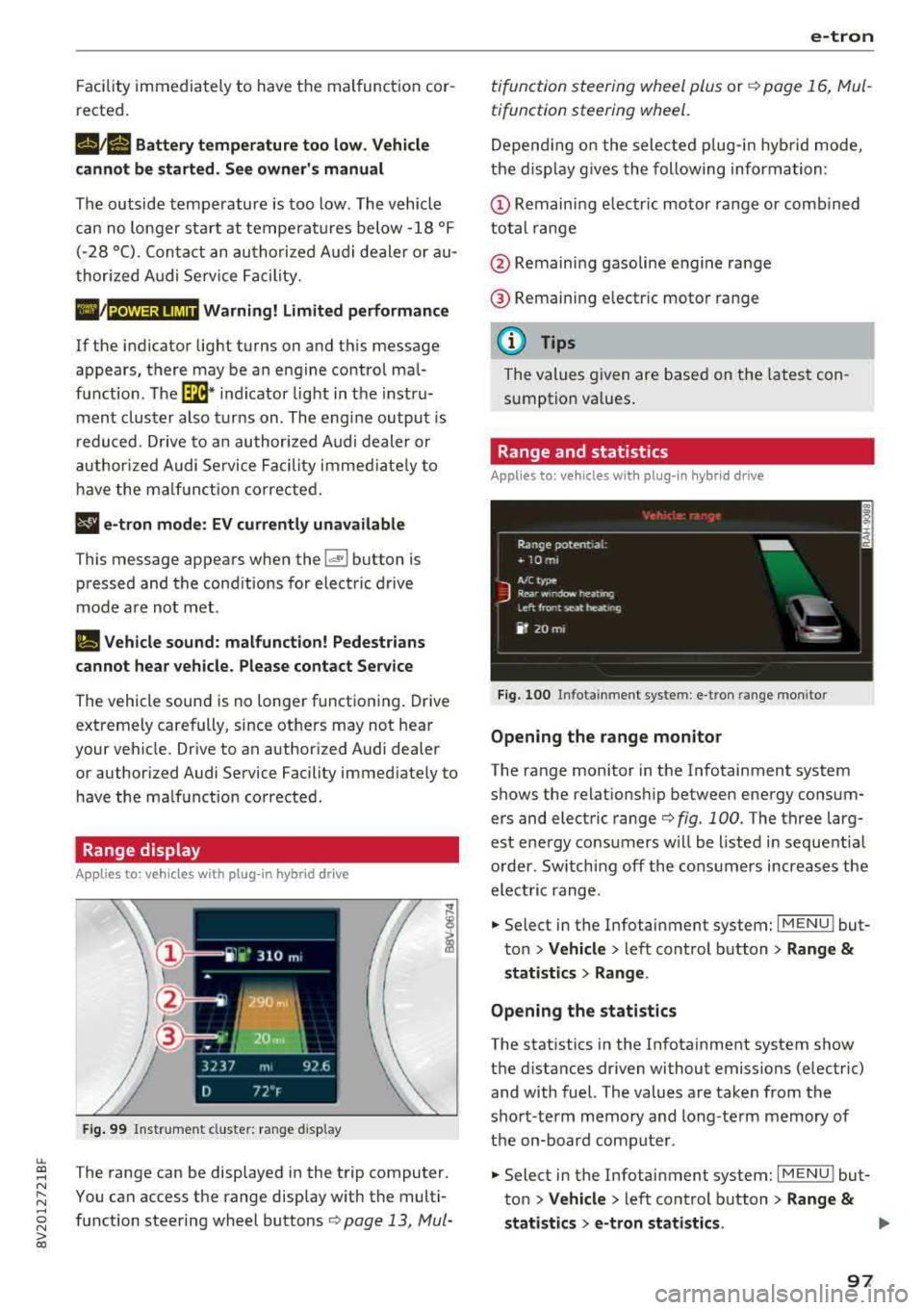
The range can be disp layed in the trip computer .
You can access t he range disp lay w ith the multi
fu nction steeri ng wheel buttons
c:;> page 13 , Mui-
e-tron
ti function s teeri ng whee l plus or r:::;> page 1 6, M ul
tifunction steering wheel.
D epen ding on t he sele cte d plug -in hy brid mo de,
t he disp la y g ives the foll owing informa tion:
(D Remaini ng e lec tric m otor range or comb ined
total range
@ Remaini ng gasoline eng ine range
® R emaini ng e lectr ic moto r ra nge
(D Tips
The va lues given are b ase d on t he lates t con
sum ption va lues .
Range and statistics
Applies to: vehicles with plug-in hybrid drive
Fig. 100 In fotainmen t system : e -tro n range mo nitor
Opening the range monitor
The range monitor in the Infotainment system
shows the relat ions hip between ene rgy co nsum
ers and elect ric range
c:;> fig. 100 . The three larg
est ene rgy consu mers w ill be l ist ed in sequent ia l
o rder. Sw itching off the cons umers increases the
elect ric range .
.. Select in the Infotai nment system: I MENU ! but
t o n
> Vehicle > left con trol button > Range &
statist ics > Range .
Opening the statistics
The stat istics in the In fotainment system show
t h e d ista nces dr iven without emissions (electric)
and with fuel. The values are taken from the
sho rt-term memory and long-te rm m emory of
the on-board comp ute r.
.. Select in the Infotai nment system: I MENU ! but
ton
> Vehicle > left con trol b utton > Range &
statistics > e-tron statistics . IJ,,
97
Page 102 of 404
e-tron
Driving situations Conditions Vehicle behavior
-Intentionally take your foot off of The gasoline engine turns off automati-
the gas pedal to allow for pro- cally and disengages when you release the longed coasting. accelerator pedal completely. The veh icle
Driving on highways glides without being propelled
.
- Reduce the vehicle speed by re-Fuel consumption can be reduced by
and expressways
leasing the accelerator pedal and coasting.
not by braking.
- Use the "S" selector lever position A sporty driving style increases fue l con-
and tiptron ic mode sparingly.
sumption.
- Do not run the gasoline engine to The temperature of the gasoline engine
warm the engine while the vehicle rises very s lowly and the fuel consump-
is parked tion increases considerably.
- Use the rear window/exterior This conserves the energy in the high-volt-
Driving in cold weath- mirror defogger and the seat heat-
age battery so that it is availab le to run
ing sparing ly. the vehicle in electric mode.
er
- Park the vehicle in a garage over-This reduces exposure of the high-voltage
n ight battery to cold temperatures. The re-
quired temperature range for the high-
voltage battery will then be reached more quickly after you start dr iving.
Energy flow display
Applies to : vehicles with plug-in hybrid drive
Fig. 102 Inst rument duster: energy flow display
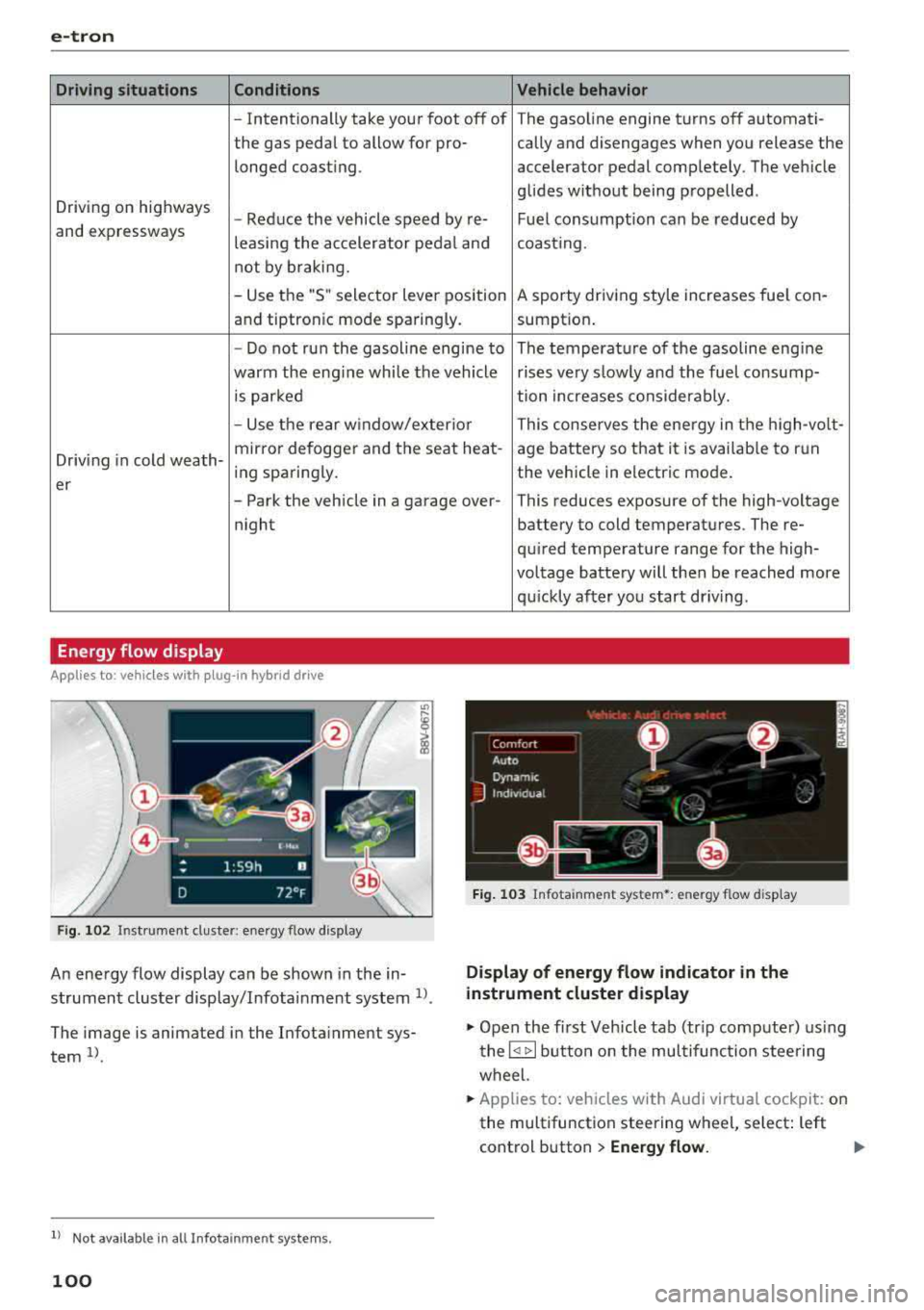
An energy flow display can be shown in the in
strument cluster display/Infotainment system
1>.
The image is animated in the Infota inment sys
tem
1> .
l l Not available in all Infota inme nt syste ms.
100
Fig. 103 Infota inment system•: energy flow disp lay
Display of energy flow indicator in the
instrument cluster display
.,. Open the first Veh icle tab (tr ip compute r) using
the
l q 1> I button on the multifunction steering
wheel.
.,. Applies to: vehicles with Audi virtual cockpit: on
the multifunction steering wheel, select: left
control button
> Energy flow.