infotainment AUDI A3 SEDAN 2018 Owner's Manual
[x] Cancel search | Manufacturer: AUDI, Model Year: 2018, Model line: A3 SEDAN, Model: AUDI A3 SEDAN 2018Pages: 404, PDF Size: 62.3 MB
Page 103 of 404
LL co .... N
" N
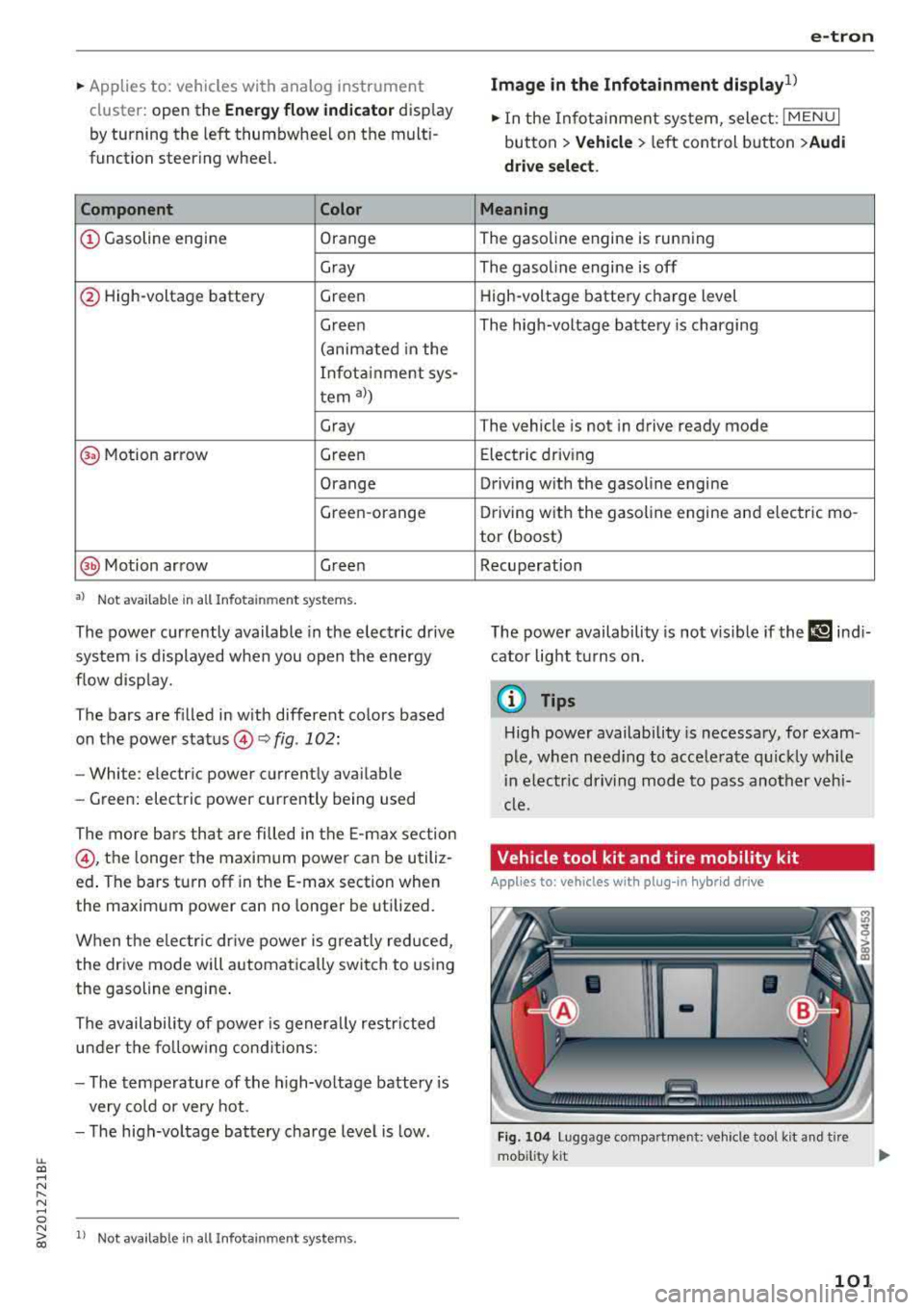
~ Applies to: vehicles with analog instrument cluster: open the
Energy flo w ind icator disp lay
by turning the left thumbwhee l on the mult i
function steering wheel.
Component Color
(D Gasoline engine Orange
Gray
@ High-voltage battery Green
Green
(animated in the
Infota inment sys-
tern
al)
Gray
(§) Motion arrow Green
Orange
Green -orange
@ Motion arrow Green
a) Not avail ab le in all Infot ainmen t systems.
The power currently available in the electric drive
sys tem is displayed when you open the energy
flow disp lay.
The bars are filled in with different colors based
on the power
status @~ fig. 102:
- White : electric power currently availab le
- Green: electric power currently being used
The more ba rs that are filled in the E-max section
@ , the longe r the maximum power can be utiliz
ed . The bars turn off in the E-max section when
the maximum power can no longer be utilized.
When the elec tric dr ive power is greatly red uced,
the drive mode will automatically switch to using
the gasoline engine.
The availability of power is genera lly restr icted
under the fo llow ing cond itions:
- The temperature of the high-voltage battery is
very co ld or very hot.
- The high-voltage battery charge level is low.
.... 0 N ii'i l) Not availab le in al l Infota inment system s.
e-tron
Image in the Infota inment display1
)
~ In the Infotainment system, select: I MENU I
button > Veh icl e > left control button >Audi
d rive select .
M eaning
The gasoline engine is running
The gasoline engine is off
High-voltage battery charge level
The high-voltage battery is charging
The vehicle is not in drive ready mode
E lectric driv ing
Driving w ith the gasoline engine
Driving with the gasoline engine and electric mo-
tor (boost)
Recuperation
The power availability is not v is ible if the
111 ind i
cator light turns on.
(0 Tips
High power availability is necessary, for exam
ple, when need ing to acce lerate q uickly wh ile
i n e lectric driving mode to pass another vehi
cle.
Vehicle tool kit and tire mobility kit
Applies to: vehicles wit h plug -in hybr id drive
F ig. 104 Lu ggage compartment: veh icle tool kit and tire
mob ility k it
101
Page 112 of 404
e-tron
@ Tips
-The device runs a self test after power has
been restored to the control unit.
- You can activate a PIN for the control unit
¢page 115.
-The vehicle cannot be started if a charging
connector is connected .
Before charging
Applies to: vehicles w ith p lug- in hy brid drive
Fig. 117 Radiator grille: opening the charging unit cover
lll
~;:::;::.::.=;;.;;;:;;: --------- !
Fig. 118 Radiator grille: charging port cap
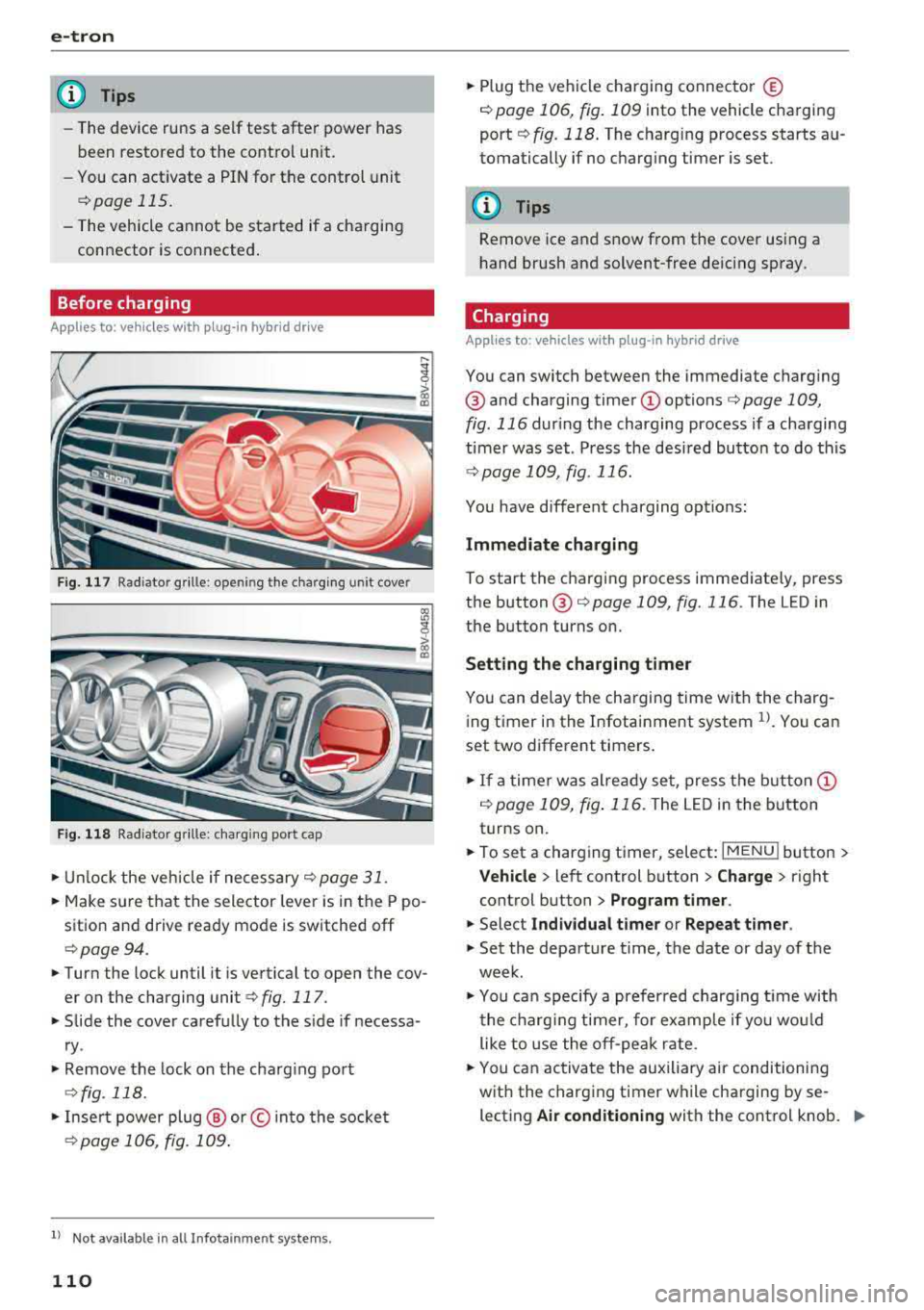
.. Unlock the veh icle if necessary¢ page 31 .
.. Make sure that the selector lever is in the P po
sition and drive ready mode is switched off
¢page 94 .
.. Turn the lock until it is vertical to open the cov
er on the charging
unit ¢ fig. 117.
.. Slide the cover carefully to the side if necessa
ry .
.. Remove the lock on the charging port
¢fig. 118.
.. Insert power plug @ or© into the socket
¢page 106, fig. 109 .
ll Not availab le in a ll Infotainment systems.
110
.. Plug the vehicle charging connector ©
¢ page 106, fig. 109 into the vehicle charging
port
¢ fig. 118. The charging process starts au
tomatically if no charging timer is set.
(D Tips
Remove ice and snow from the cover using a
hand brush and solvent-free deicing spray.
Charging
Applies to: vehicles wit h pl ug -in hybrid drive
You can switch between the immediate charging
@ and charging timer
timer was set . Press the desired button to do this
¢page 109, fig. 116.
You have different charging options:
Immediate charging
To start the charging process immediately, press
the
button @¢ page 109, fig. 116 . The LED in
the button turns on.
Setting the charging timer
You can delay the charging time with the charg
ing timer in the Infotainment system
1>. You can
set two different timers .
.. If a timer was already set, press the button @
i:!.> page 109, fig. 116. The LED in the button
turns on.
.. To set a charging timer, select: I MENU ! button >
Vehicle > left control button > Charge > right
control button
> Program timer.
.. Select Individual timer or Repeat timer.
.. Set the departure time, the date or day of the
week .
.. You can specify a preferred charging t ime with
the charging timer, for example if you would
like to use the off-peak rate.
.. You can activate the auxiliary air conditioning
with the charging timer while charging by se lecting
Air conditioning with the control knob. ..,_
Page 113 of 404
u. 00 .-< N l' N .-< 0 N > 00
A./ appears in the box. This activation is sepa
rate from the Infotainment system settings in
the climate control menu
¢ page 116.
~ Press the I BACKI button.
~ To activate the desired timer, confirm the set
ting with the control knob.
A,/ appears in the
box .
Power save mode
Power save mode is automatically switched on
when the control unit has not been operated for
more than one minute. The
LEO @¢ page 109,
fig. 115 stays on. All other displays turn off.
~ To switch power save mode on or off, press the
~ button @¢page 109, fig. 115.
Power save mode ends automatically when the
vehicle charging connector is plugged into the ve
hicle.
The high-voltage battery is charging when the
LED@ blinks.
(D Tips
-Auxiliary climate control is powered electri
cally if you select climate control using the
charging timer. This may also be used in
confined spaces such as garages.
- Using the auxiliary air conditioning while
charging can also reduce the charge level of
the high-voltage battery.
- The high-voltage battery also charges in
power save mode.
- If the charging process is in progress, it will
not be interrupted when power save mode
switches on.
- The charging process can be interrupted at
any time. Press the active button on the ve
hicle to do this
¢page 109, fig. 116.
-The climate control output while charging
depends on the capacity of the electrical
connection. Additional information on cli
mate control can be found under
¢page 116.
e-tron
Setting the charging power level
App lies to : veh icles w it h pl ug-in hybr id drive
The control unit automatically recognizes the
voltage and the available current strength. You
can set whether you would like to charge with the
full or half of the charging power.
~ Press the I OKI@ ¢ page 109, fig. 115 button
on the control unit.
~ Enter the PIN if necessary.
~ POWER and SET PIN appear in the display
field.
~ Select POWER with the arrow button @.
~ Press the I OK I button @.
~ The charging power display appears. The cur
rent set value (50% or 100%) is marked with a
frame.
~ If necessary, change the setting using the ar
row button © to move downward or upward.
~ Press the I OK I button @.
(D Tips
- If a household socket is used for the charg
ing process, the charging power level is au
tomatically set to 100%. If multiple electri
cal consumers are connected to a circuit
'
the charging power may be limited to 50%
when charging with a household socket in
order to relieve the load on the electrical in
stallation.
- If an industrial socket is used for the charg
ing process, the charging power level is au
tomatically set to 50%. To receive the maxi
mum charging power, the value must be set
to 100% .
- A selected value remains set until the power
cable is connected again.
111
Page 116 of 404
e-tron
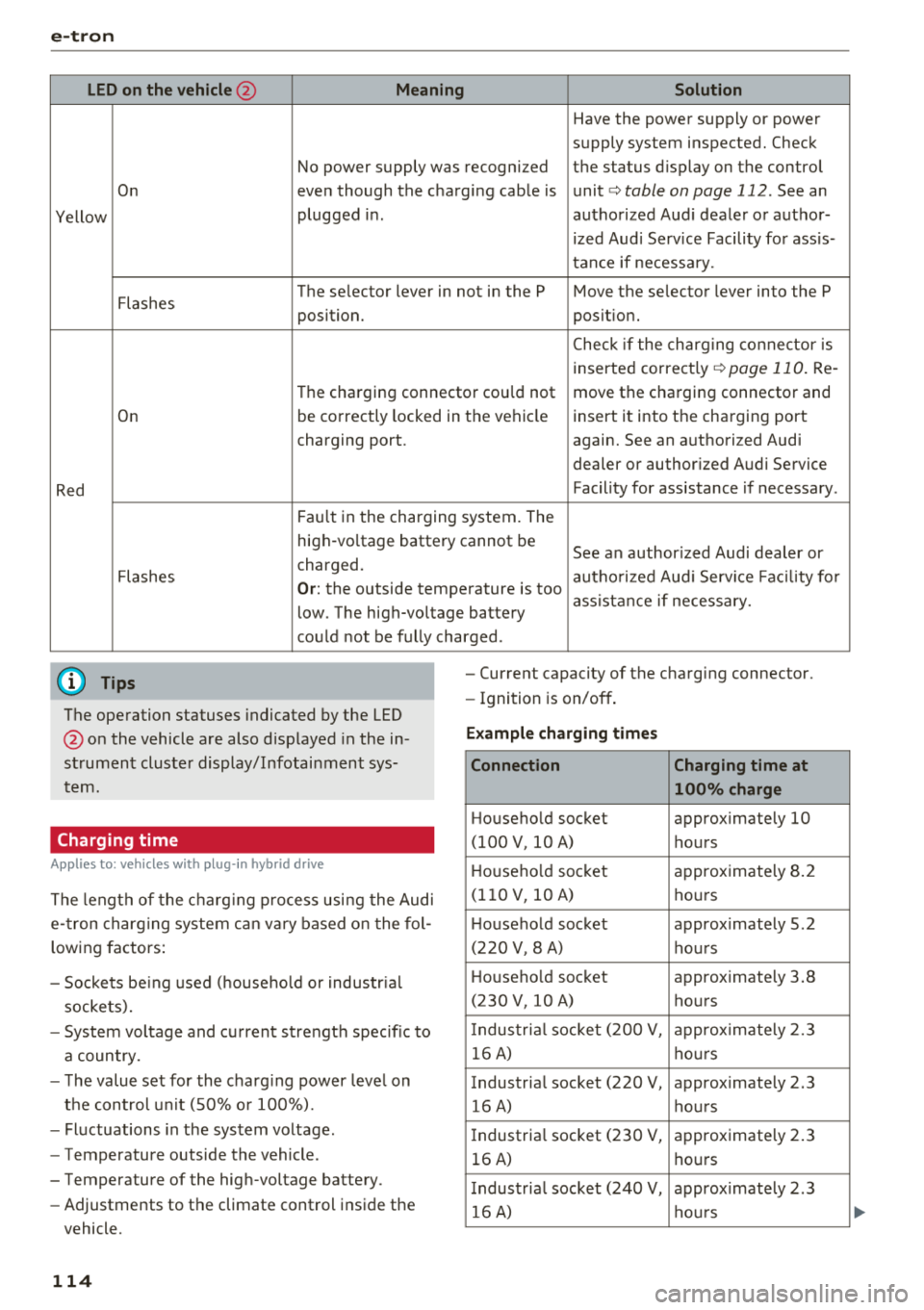
LED on the vehicle@ Meaning Solution
Have the power supply or power
supply system inspected. Check
No power supply was recognized the status display on the control
On even though the charging cable is unit
c> table on page 112. See an
Yellow plugged
in. authorized Audi dealer or author-
ized Audi Service Facility for ass is-
tance if necessary.
Flashes The se
lector lever in not in the P Move the selector lever into the P
position. position.
C heck if the charging connector is
inserted correct ly
c> page 110. Re-
Th e charging connector cou ld not move the charging connector and
On be correctly
locked in the vehicle insert it into the charging port
charging port . again. See an authorized Audi
dealer or author ized Audi Service
Red Facility for assistance
if necessary.
Fault in the charging system. The
high -vo ltage battery cannot be
See an author ized Audi dealer or
charged.
Flashes authorized Audi Service Fac ility for
Or: the outside temperature is too
assistance if necessary.
low. The high-voltage battery
could not be fully cha rged .
(D Tips -Current capacity of the charging connector.
The operation statuses indicated by the LED
@ on the vehicle are also displayed in the in
strument cluster display/Infotainment sys
tem.
Charging time
A pp lies to: ve hicles w ith plug -in hybr id drive
The length of the charging process using the Audi
e- tron charging system can vary based on the fol
lowing factors:
- Sockets be ing used (household or industr ial
sockets).
- System voltage and current strength specific to
a country.
- The value set for the charg ing power leve l on
the control unit (50% o r 100%).
- Fluctuations in the system voltage .
- Temperature outside the vehicle.
- Temperature of the high-voltage battery .
- Adjustments to the climate control inside the
vehicle.
114
- Ignition is on/off .
Example charging times
Connection Charging time at
100% charge
Household socket approximately 10
(100 V, 10 A) hours
H ouseho ld socket approximately 8.2
(110 V, 10 A)
hours
H ousehold socket approx imately 5.2
(220 V, 8 A) hours
Household socket approximately 3
.8
(230 V, 10 A) hours
I ndustria l socket (200 V, approximately 2.3
16 A) hours
Industrial socket (220 V, approximately 2.3 16 A) hours
I ndustria l socket (230 V, approximately 2.3
16 A) hours
I ndustria l socket (240 V, approximately 2.3
16 A) hours
Page 119 of 404
air conditioning also switches o ff immedi
ate ly.
Setting the timer
A ppl ies to: ve hicles w ith plug- in hybrid drive
By setting the departure time, you determ ine
when your vehicle shou ld reach the desired tem
perature. You ca n set the timer in the auxiliary air
conditioning menu in the Infota inment system .
Auxili ary climate c ontrol : sett ing the t imer
~ Se lect : IMENUI button> Vehicle > left control
button >
Au xiliar y A/C > right control b utton>
Program t imer .
~ Set the time and the date.
~ Press the I BACKI button .
~ Confirm the setting w ith the contro l knob to ac-
t ivate the t imer.
A./ appea rs i n the box .
When you reprogram a t imer, the next calendar
day is automat ically entered in the Infota inment
system. To act ivate the aux iliary climate control
fo r the next day, confirm t he sett ing(./ in the In
fotainmen t system).
Error messages
ea -The high -voltage battery charge level is too
low to heat/air condition the veh icle using only
e lectr ic powe r.
If one of the follow ing symbols appears in the
d isplay, then you cannot switch on the aux iliary
climate cont rol:
,....c -There is a system ma lfunction.
Bu -The fue l level is too low.
(D Tips
- You can set the t imer a m axim um of seve n
days in advan ce.
- You can operate the clima te con trol in the
vehicle inte rior w hen the h igh -vo ltage bat
tery is charging using the c harging timer
¢ page 110 . The climate cont rol output de
pends on the powe r socket capac ity.
::li -M ake s ure the time and date match in the .-<
~ Infotainment system settings so that the
N 8 timer can function properly¢ page 243.
N > 00
e-tron
- T he auxiliary climate contro l can contin ue to
ru n after the departure time is reached .
Cleaning/maintenance
information
App lies to : vehicles wi th plug-in hybrid drive
When was hing your vehicle with a pressure wash
er, always follow the operat ing instruct ions pro
v ided w ith the pressure washer. This is especially
i mportant in regard to the pressu re and spray ing
distance. Do not direct cleaning spray at the
c h arg ing unit in the rad iator g rille or at t he
c h arg ing dock*/charging cl ip*. Keep a d istance of
at least 16 in (40 cm) .
Do not remove snow and ice with a p ressure
washe r.
Never use cone nozzles or high pressu re nozzles .
The water temperature must not be above 60
°C.
Remove contaminants on the Audi e -tron system
with a dry towel.
Remove contaminants on the charging dock*/
c h arg ing clip* wi th a wet towe l dampened w ith
alcohol-free clean ing solution .
& WARNING
=
-Never immerse the Audi e-tron charging
system and connectors in water.
-
- The A udi e -tron charging system must on ly
be cleaned when the control unit is com
p letely disconnected from the power supp ly
and from the vehicle.
@ Note
To dec rease the risk of discolora tion, never
clean the charging doc k*/charging clip * with
harsh cleaning sol utions or so lutions that
contain alcoho l.
117
Page 122 of 404
Ass is tance sy stem s
Assistance systems
Speed warning system
Description
Applies to: veh icles with speed warning system
The speed warning system helps you to stay be
low a specified maximum speed that can be set,
changed or deleted in the Infotainment system.
The speed warning system warns you if you are
exceeding the maximum speed that you have set .
A warni ng tone will sound as soon as your speed
exceeds the sto red value slight ly. The
[OJ (USA
models) ;[;] (Canada models) indica to r li gh t and
the co rresponding message appear in the inst ru
ment cluster display at the same time. The
[C]
(USA models)/ [ej (Canada mode ls) indicator
light and the message turn off w hen the vehicle
speed drops below the stored maximum speed .
Sett ing a threshold is recommended if you would
like to be reminded when yo u reach a certa in
maximum speed . Situations where you may want
to do so include driving in a country with a ge ner
al speed limit or if there is a specified maximum
speed for winter tires.
Setting the warning thr eshold
.. Select in the Infotainment sys tem : IMENUI but
ton
> Vehicle > left contro l button > Driver a s
sistance
> S peed warning > Manual.
@ Tips
Regardless of the speed warning system, you
should always monitor yo ur speed using the
speedometer and make sure you are following
the legal speed limit.
120
Cruise control system
Switching on
Applies to: vehicles with cruise control system
The cruise control system makes it possible to
drive at a constant speed starting at 15 mph (20km/h) .
0
f
~
0
Fig . 1 21 Ope rat ing lev er : cru ise co ntrol sys te m
0
"' N
~ CD
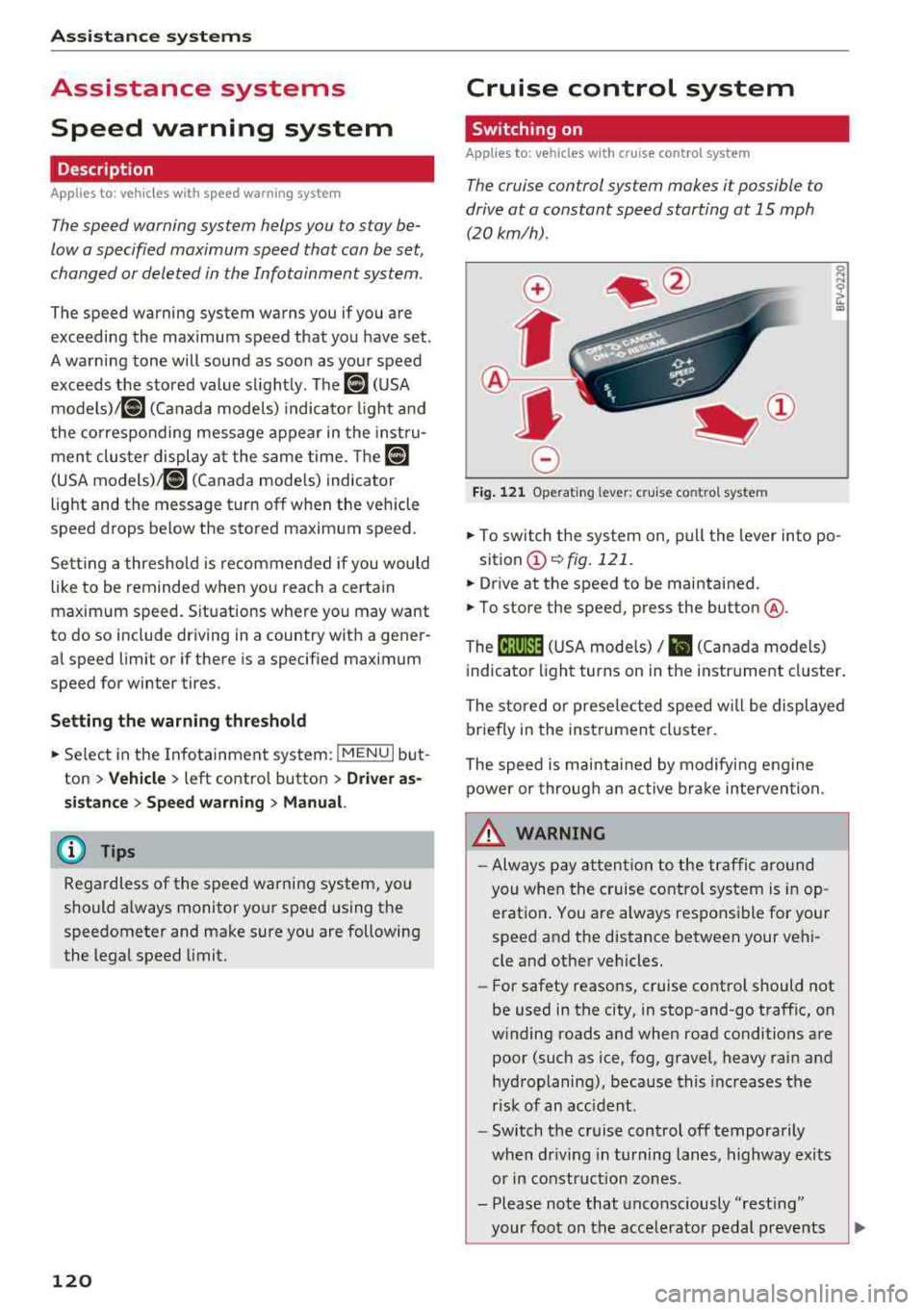
.. To switch t he system on, pull the lever into po -
sition
CD ¢ fig. 121 .
.. Drive at the speed to be maintained .
.. To store the speed, press the button @.
The
[ij;(l)~1j ( U SA mode ls) / 51 (Canada models)
indicator light turns on in the instr ument cluster .
The stored or prese lec ted speed w ill be displayed
briefly in the instrument cluster .
The speed is mainta ined by modifyi ng engine
power or through an active bra ke intervention.
&_ WARNING
- Always pay at ten tion to the traffic a ro und
you whe n the cruise contro l system is in op
erat ion . You are always respons ible fo r your
speed and the distance between your vehi
cle and other vehicles.
-For safety reaso ns, cruise cont rol should not
be used in the city, in stop-and-go traff ic, on
w inding roads and when road conditions are
poor (such as ice, fog, gravel, heavy rai n and
hydroplaning), because this increases the
r isk of an accident.
-Switch t he cr uise control off temporarily
when dr iv ing in turning lanes, highway exits
or in construction zones .
- Please note that unconsciously
"rest ing"
your foot on the accelerator pedal prevents
-
Page 131 of 404
LL co ..... N
" N ..... 0 N > co
Setting the driving program
Applies to: vehicles with Audi adaptive cruise contro l
Depending on the se lected dr iv ing program and
d istance, dr iv ing behav ior when ac celerating w ill
va ry from dy namic to comfortab le.
Setting the driving program on vehicles
w ithout drive sele ct*
• Se lect in the Infotainment sys tem: IM ENUI but
ton
> Vehicle > left contro l bu tto n > Dri ver a s·
si stan ce
> Audi adapt ive crui se contr ol > Dri v
ing p rogram
> Comfort , Standard or D yn am ic.
Setting the driving mode on vehicles with
d rive s elect *
See i::!) page 141.
@ Tips
Your sett ings are automa tic ally sto red and as
signed to the remote control key being used.
Driver intervention request
Applies to: vehicles with Audi adaptive cruise control
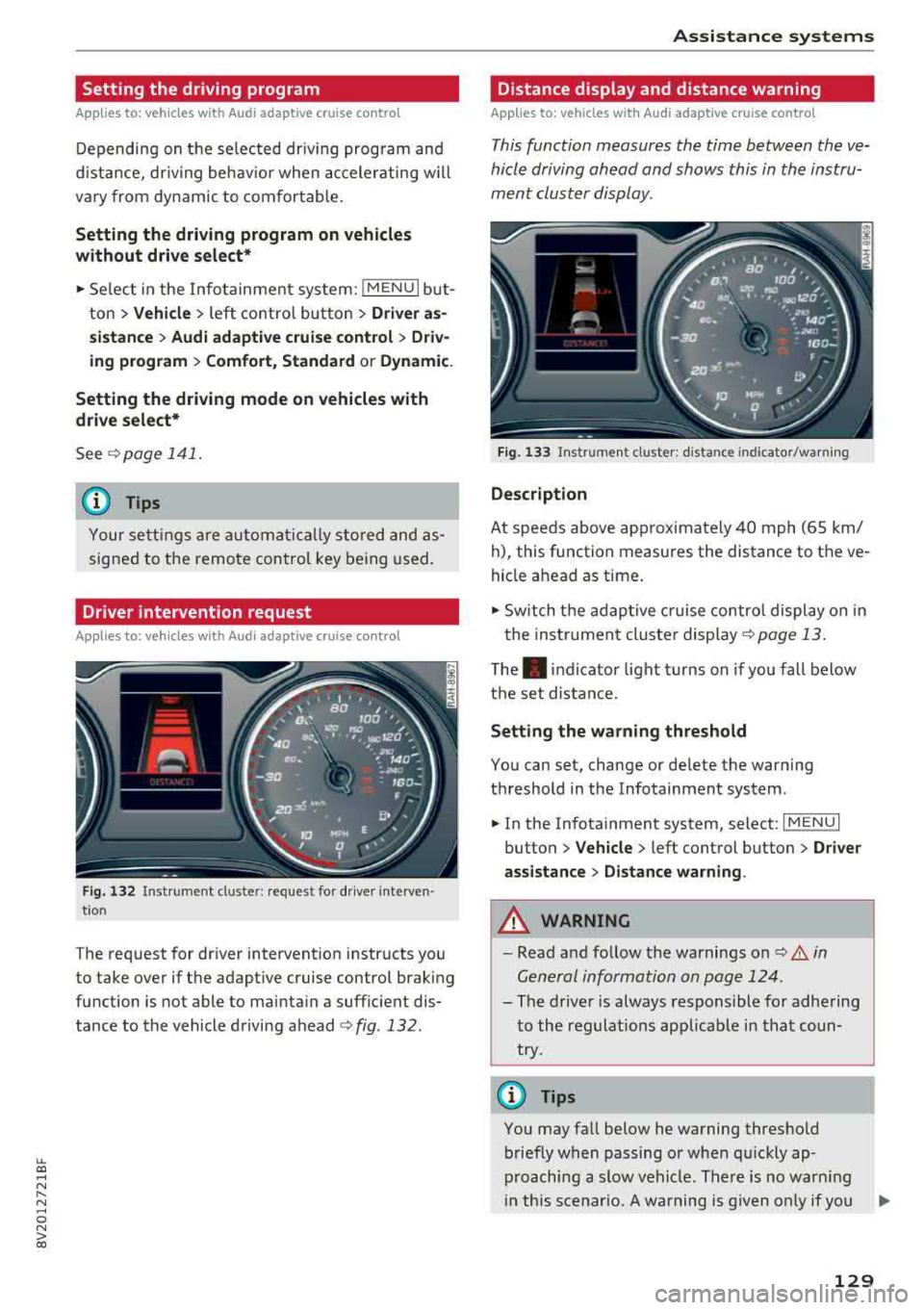
F ig . 132 Ins tru ment clust er: reques t for dr iver in ter ven
tio n
The request for driver intervention instructs you
to take over if the adaptive cruise control brak ing
function is not able to mainta in a suff icient dis
tance to the vehicle driving ahead
¢ fig . 132 .
Assi st a nce systems
Distance display and distance warning
Applies to: vehicles with Audi adaptive cruise control
This function measures the time between the ve
hicle driving ahead and shows this in the instru
ment cluster display.
F ig. 13 3 Instrumen t cluster : dista nce in dicato r/warn ing
D escription
At speeds above app roximately 40 mph (65 km/
h), this function measures the distance to the ve
hicle ahead as time .
• Switch the adaptive cruise contro l display on in
the instrument cluster
display ¢ page 13.
The. indicator light turns on if you fall below
the set distance.
Setting the wa rning threshold
You can set, change or de lete the warning
threshold in the Infotainment system .
• In the Infotainment system, select: I MENU I
button > Vehicle > left control button > Dri ver
assistance
> D istance warning .
A WARNING
-Read and follow the warnings on i::!) A in
Gen eral information on page 124 .
-
- The driver is always responsible for adhering
to the regulat ions applicab le in that coun
try.
(D Tips
You may fall below he warning threshold briefly when passing or when qu ickly ap
proaching a slow vehicle . There is no warn ing
i n th is scenar io. A warning is given only if you
..,.
129
Page 135 of 404
u. 00 ... N l' N ... 0 N > 00
(D Tips
-You can cancel the braking with increasing
fo rce that is init iated by the system by brak
i ng yourself, by accelerat ing noticeab ly or
by swerving.
- Certain pre sense front functions switch off when ESC is switched off (sport mode) or
when driving in reverse.
- If you rest rict or sw itch off the ESC, the pre
sense a lso switches itself
off¢ page 149.
Settings in the Infotainment system
Applies to: vehicles with Audi pre sense
.,. Select in the Infotainment system: !MENUI but
ton
> Vehicle > left control butto n > Driver a s
s istance > Audi pr e sense .
Sys tem
-the pre sense functions can be switched
on/off .
If the system is switched off, it switches on aga in
automatically once the ignition is sw itched on
again .
Prewa rning -the early warning can be switched
off permanently or the pre sense front warning
point can be set
( Early /Medium /Late ).
Set the warning time for the early warning to
Early at first . If t his causes undesired early warn
ings to appear, then set the warning time to
Me ·
dium .
The Late warning t ime should on ly be set
i n specia l circumstances .
Messages
Applies to: vehicles with Audi pre sense
II Audi pre sen se: malfunction! Plea se contact
Servic e
This message appears when the pre sense func
tion is affected. For example, this could be
caused by a faulty sensor. If the message stays
on, dr ive immed iately to an author ized Audi deal
e r o r author ized Audi Serv ice Facility to have the
malfunc tion cor re cted.
II Audi pre sense: currentl y limited . Sensor
view limited du e to surrounding s.
Ass istance systems
T his message appears if the senso r view is ob
structed, for examp le by leaves, snow, heavy
spray or dirt. Clean the sensor if necessa ry
¢ page 124, fig. 123.
liJ Audi pre sen se: currently limited
T his message appears if the ESC is rest ricted or
swit ched off, fo r example.
liJ Audi pre sen se: currently limited . See own
er 's manual
This message appears when there is a temporary
failure in a s ubsystem, such as the ESC. If this
message appears repeatedly, drive to an author
ized Audi dea ler or author ized Audi Se rvice Facili
ty to have the ma lf u nction co rrected.
liJ Audi pre s en se: emerg ency braking system
off
This message appears if the pre sense functions
are switched off throug h the Infotainment sys
tem or if the system is not ready .
Audi active lane assist
Description
Applies to: vehicles with Audi active lane assist
Active lane assist (lane departure warning) de
tects lane marker lines within the limits of the
system using a camera in the windshie ld. If you
are approaching a detected lane marker line and
it appears likely that you w ill leave the lane, the
system will warn you with corrective steering.
You can overr ide this steer ing at any time. If you
pass over a line, the stee ring wheel will vib rate
li gh tly. In order for this wa rning vib rat ion to
oc
c ur , it must firs t be swi tc h ed o n in the I nfot ain
ment system. Active lane assist is ready for oper
ation when the lane marker line is detected on at
l east one side of the vehicle.
T he system is des igned for dr iving on express
ways and hig hways and t herefo re o nly ac tiva tes
at speeds above approximate ly 40 mph (65 km/
h). ....
133
Page 138 of 404
Ass is tance sy stem s
-The camera field of view ¢ page 134, fig. 136 is
dirty or covered in ice. Clean this area on the
windshield.
-The camera field of view is fogged over. Wait until the fog has cleared before switching the
active lane assist on again.
-The system has been unable to detect the lanes
for an extended period of time due to road con
ditions. Switch active lane assist back on when
the lines are more visible .
fl1 Audi acti ve lan e ass is t: curr entl y una vailabl e
There is a temporary active lane ass ist ma lf u n c
tion . Try sw itching the act ive lane assist on aga in
later.
fl1 Aud i activ e lane ass is t: Pl ea se ta ke over
stee ring!
This message appears if you are not steering by
yourse lf . Active lane assist is activated, but is not
ready to give wa rning
.&_ WARNING
Note that messages may be delayed or not
displayed on vehicles with accessor ies mount
ed on the steering whee l, s uch as a steering
wheel spinner knob . Always keep your hands
on the steering whee l.
Setting the vibration warning
Applies to: vehicles with Audi active lane assist
-
You can adjust individual Audi active lane assist
settings in the Infotainment system .
.. Select in the Infotainment system : I MENUI but
ton
> Vehi cle > left contro l bu tton > Dri ver a s
s is tan ce
> Audi active lane as sist .
V ibration warning
You can switch the additional vibration wa rning
in the steering wheel on or off.
.&_ WARNING
-
With the v ibration warning switched off,
there w ill also be no visual warn ing in the in
strument cluster display when crossing a lane
marker line.
136
@ Tips
Your settings are automatically stored and as
signed to the remote contro l key being used.
Audi side assist
Description
Applies to: vehicles with Audi side assist
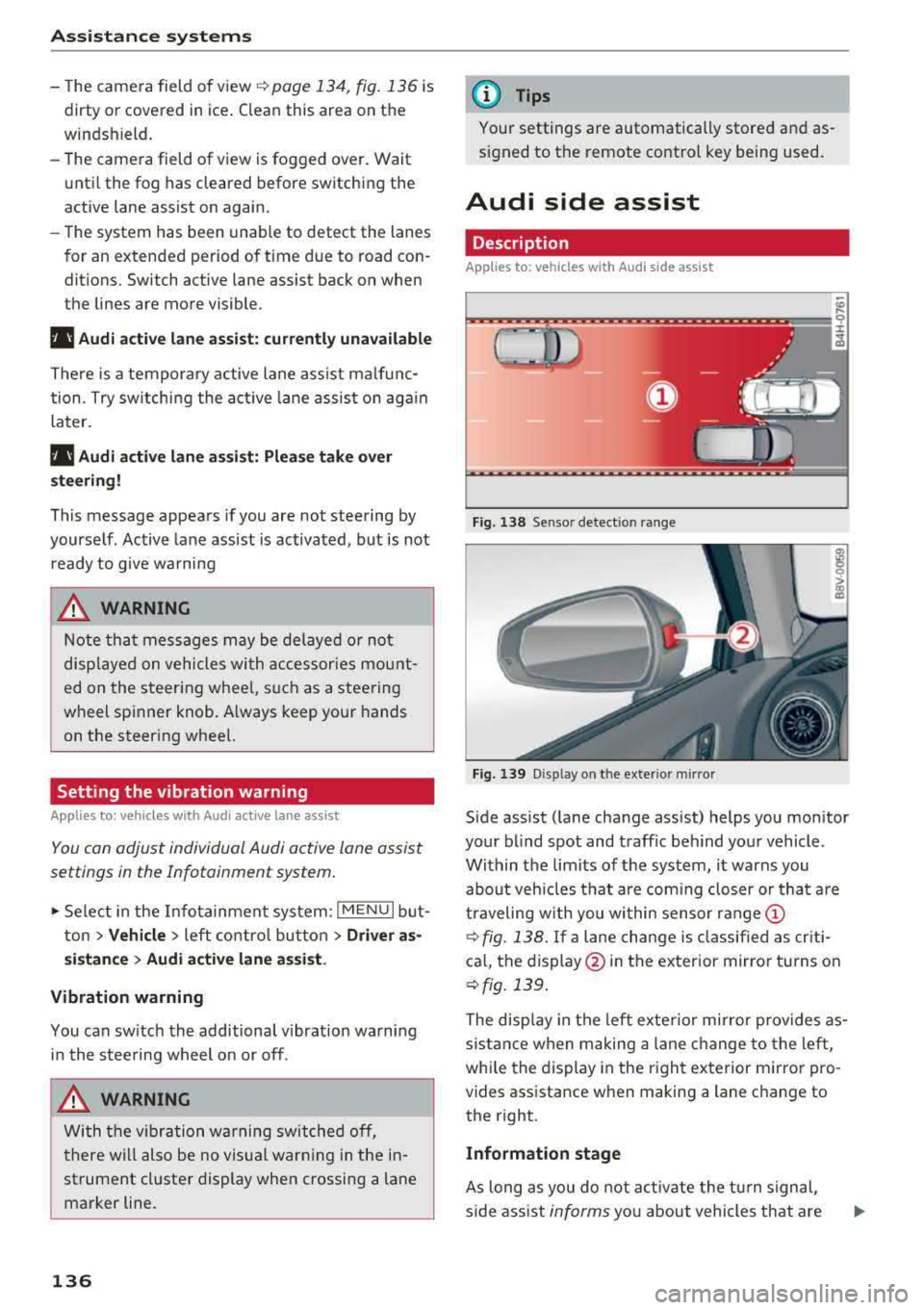
Fig. 138 Sensor detect ion range
Fig. 139 Dis pl ay on t he exterio r mir ror
Side assist (lane change ass ist) helps you monitor
your blind spot and traffic behind your vehicle .
Within the limits of the system, it warns you
about veh icles that are com ing closer or that are
traveling w ith you wi thin sensor range
(D
¢ fig. 138. If a lane change is classified as cr iti
ca l, the display @in the exterior mirror tu rns on
¢ fig. 139 .
The display in the left exte rior mirror provides as
s istance when making a lane change to the left,
whi le the display in the right exterior m irror pro
vides assistance when making a lane change to
the right.
Information stage
As long as you do not act ivate the tu rn signal,
side ass ist
informs you about vehicles that are
Page 140 of 404
Ass is tanc e system s
-If the lanes are narrow or i f you are driving on
the edge of your lane. If this is the case, the
system may have detected a vehicle in another
lane that is
not adjacent to your current lane.
- If you are driving t hrough a curve. Side assist
may react to a vehicle that is one lane over
from the adjacent lane .
- If side assist reacts to other objects (such as
high or displaced guard rails).
- In poor weather conditions . The side assist
functions are limited.
Do not cove r the radar
sensors¢ fig . 141 with
stickers, deposits, bicycle whee ls or other ob
jects, beca use they wi ll impair the f unction . Do
not use side assist when towing a trailer. For in
formation on cleaning,
see¢ page 354 .
A WARNING
-Always pay atte ntion to traffic and to the
area aro und your vehicle. Side assist cannot
r ep lace a dr ive r's attent ion. The dr ive r alone
is a lways responsible for lane c hanges and
s imi lar d riving maneuvers.
- In some situat ions, the system may not
func tion or its f un ct io n may be lim ited. Fo r
exa mple:
- If vehicles are approach ing or being le ft
beh ind very quickly. The display may not
tur n on in t ime.
- In poor weather conditions s uch as heavy
rain, snow or heavy mist.
- On very wide lanes, in tight curves, or i f
there is a rise in the road su rface. Vehicles
in the adjacent lane may not be detected
because they are outs ide of the sensor
range.
@ Note
The sensors can be displaced by impacts or
damage to the bumpe r, whee l housing and
underbody. Th is can impa ir the system. Have
an au thor ized A udi dealer or au tho rized Aud i
Serv ice Facility c heck their fu nction .
(D Tips
- If the window g lass in the driver 's door o r
front passenger's doo r has been t inted, the
138 -
display in the exterior mirro
r may be incor
rect.
- For an exp lanat io n on co nform ity w it h t he
FCC reg ulations in the United States and the
Industry Canada regulations, see
¢page 386.
Switching on/off
App lies to : vehicles wit h Audi side ass ist
The system can be switched on/off in the Info
tainment system .
If the system is act ivated, the disp lays in the ex
terior mirrors wi ll turn on brief ly when the igni
tion is switched on .
.,. Select in the Infotainment system: IMENU! but
ton
> Vehicle > l eft control button > Driver as
sistance
> Audi side a ssist. Off switc hes the
system off.
Setting the display brightness
App lies to: vehicles wit h Aud i side ass ist
The display brightness can be adjusted in the In
fotainment system.
.,. Select in the Infotainment system: IMENU ! but
ton
> Vehicle > l e ft control button > Driver as
sistance
> Audi side assist.
The disp lay br igh tness adjusts au toma tically to
t h e b righ tness o f the sur ro undings, bo th in the
i nforma tion and in the warning stage. In very
dar k or very bright surroundings, the automatic
adjustment will set the display to the minim um
or max imum level. In such cases, yo u may notice
no change when adjusting the br ightness, or the
change may only be noticeab le once the sur
r ound ings change .
Adjust the br ightness to a leve l whe re the display
i n the information stage will not disrupt your
v iew ahead. If you change the br ightness, the dis
play in the exterior mirror w ill br iefly show the
brightness leve l in the i nfo rmation stage . The
br ightness of the warn ing stage is linked to the
br ightness in the infor mation stage an d is adjus t-
ed a long w ith the info rm ation st age .
..,.