sport mode AUDI A3 SEDAN 2018 User Guide
[x] Cancel search | Manufacturer: AUDI, Model Year: 2018, Model line: A3 SEDAN, Model: AUDI A3 SEDAN 2018Pages: 404, PDF Size: 62.3 MB
Page 133 of 404
u. 00 .-< N l' N .-< 0 N > 00
-Due to t he interlinking o f various vehicle sys
tems, critica l driving situations can be detected
by
pre sense ba sic and meas ures for preventa
t ive occ upant protection are can be initiated.
- The
pre sense front uses the data from the ra
dar sensors and calc ulates the probab ility of an
acc ident
c::> page 124. An impending collision
with vehicles ca n be detected within the limits
of the system . In this case, the system warns
the driver v isually, acoustically and with a je rk
on the brakes if necessary. If needed, it ca n ini
tiate a part ia l o r full dece le ra tion to reduce the
co llision speed o r to avo id t he coll is io n unde r
ce rtain c ircumstances. In conjunc tion wi th pre
sense basic, the front safety belts are a lso re
versib ly tensioned w hen needed . The pre sense
front is a lso active when adaptive cruise con
trol* is sw itched off.
A WARNING
Also follow the genera l instructions fo und in
c::> .&. in G eneral information on page 124.
(D Tips
- Certain pre sense f unctions switch off when
d riving in reverse.
- The pre sense functions may not be avai la
b le if there is a ma lfunction in the ESC sys
tem or the airbag contro l modu le.
- Note t hat the revers ible belt tensioner on
t h e front passe nger's side deactivates w hen
the front passe nger's a irbag is deact ivated .
- Switch the pre sense off when you are not
us ing public streets or whe n loadi ng the ve
h icle onto a veh icle carrier, train, ship or
othe r type of t ransportation . T his can pre
vent a n un des ired intervent ion from the pre
sense sys te m .
Audi pre sense basic
App lies to: ve hicles with Audi pre sense basic
The pre sense basic funct io ns are activ ated a t a
speed of approximate ly 20 mph (30 km/h) or
h igher .
The fo llow ing funct io ns can be t rigge red unde r
cert ain cond itions withi n the limi ts of the sys
tem :
Ass istance systems
- Tensioning o f the safety belts (for examp le,
during heavy braking) : the front safety belts
have revers ib le be lt tens ione rs . If a collision
does not occu r, the safety belts loosen slig htly
and are ready to tr igger aga in.
- Initiat ing the clos ing of the w indows and the
panorama g lass roof* (for examp le when un
der- or oversteering).
Audi drive select*: the trigger times are adjusted depending on the mode selected .
Audi pre sense front
Applies to : vehicles wi th Audi pre sense fro nt
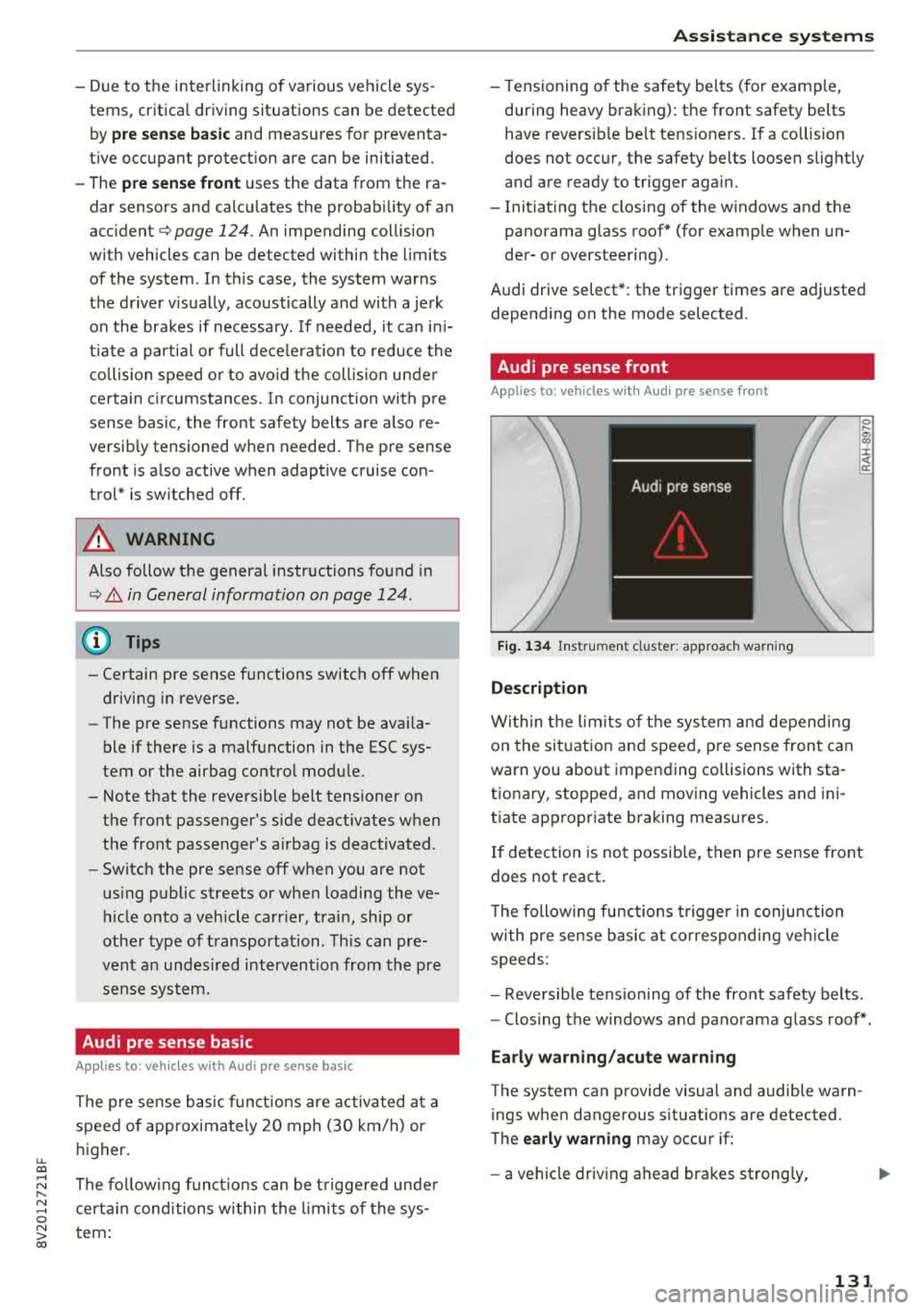
Fig. 134 In str u men t cluster : approac h warni ng
Description
Wi thin the lim its of t he sys tem and depending
on the sit uat ion and spee d, p re sense front can
warn you about impending collisions with sta
t iona ry, stopped, and moving vehicles and ini
tiate app ropr iate braking measu res.
0 .... a, "? :i:: ~ a:
If detection is not possib le, then pre sense front
does not react.
T he following fu nctions t rigge r in conjunction
wi th pre sense basic at co rresponding ve hicle
speeds :
- Reve rsible tens ion ing of the front safety belts.
- Clos ing the windows and pano rama g lass roof* .
Early warning /acute warning
The system can provide visual and audible warn
ings when dangerous situations are detected.
The
early warning may occur if:
- a vehicle driving ahead brakes st rong ly,
131
Page 135 of 404
u. 00 ... N l' N ... 0 N > 00
(D Tips
-You can cancel the braking with increasing
fo rce that is init iated by the system by brak
i ng yourself, by accelerat ing noticeab ly or
by swerving.
- Certain pre sense front functions switch off when ESC is switched off (sport mode) or
when driving in reverse.
- If you rest rict or sw itch off the ESC, the pre
sense a lso switches itself
off¢ page 149.
Settings in the Infotainment system
Applies to: vehicles with Audi pre sense
.,. Select in the Infotainment system: !MENUI but
ton
> Vehicle > left control butto n > Driver a s
s istance > Audi pr e sense .
Sys tem
-the pre sense functions can be switched
on/off .
If the system is switched off, it switches on aga in
automatically once the ignition is sw itched on
again .
Prewa rning -the early warning can be switched
off permanently or the pre sense front warning
point can be set
( Early /Medium /Late ).
Set the warning time for the early warning to
Early at first . If t his causes undesired early warn
ings to appear, then set the warning time to
Me ·
dium .
The Late warning t ime should on ly be set
i n specia l circumstances .
Messages
Applies to: vehicles with Audi pre sense
II Audi pre sen se: malfunction! Plea se contact
Servic e
This message appears when the pre sense func
tion is affected. For example, this could be
caused by a faulty sensor. If the message stays
on, dr ive immed iately to an author ized Audi deal
e r o r author ized Audi Serv ice Facility to have the
malfunc tion cor re cted.
II Audi pre sense: currentl y limited . Sensor
view limited du e to surrounding s.
Ass istance systems
T his message appears if the senso r view is ob
structed, for examp le by leaves, snow, heavy
spray or dirt. Clean the sensor if necessa ry
¢ page 124, fig. 123.
liJ Audi pre sen se: currently limited
T his message appears if the ESC is rest ricted or
swit ched off, fo r example.
liJ Audi pre sen se: currently limited . See own
er 's manual
This message appears when there is a temporary
failure in a s ubsystem, such as the ESC. If this
message appears repeatedly, drive to an author
ized Audi dea ler or author ized Audi Se rvice Facili
ty to have the ma lf u nction co rrected.
liJ Audi pre s en se: emerg ency braking system
off
This message appears if the pre sense functions
are switched off throug h the Infotainment sys
tem or if the system is not ready .
Audi active lane assist
Description
Applies to: vehicles with Audi active lane assist
Active lane assist (lane departure warning) de
tects lane marker lines within the limits of the
system using a camera in the windshie ld. If you
are approaching a detected lane marker line and
it appears likely that you w ill leave the lane, the
system will warn you with corrective steering.
You can overr ide this steer ing at any time. If you
pass over a line, the stee ring wheel will vib rate
li gh tly. In order for this wa rning vib rat ion to
oc
c ur , it must firs t be swi tc h ed o n in the I nfot ain
ment system. Active lane assist is ready for oper
ation when the lane marker line is detected on at
l east one side of the vehicle.
T he system is des igned for dr iving on express
ways and hig hways and t herefo re o nly ac tiva tes
at speeds above approximate ly 40 mph (65 km/
h). ....
133
Page 142 of 404
Assistance systems
-The rear cross-traffic assist will not provide
alerts if the veh icle is in a paralle l parking
space or an angled parking space.
(LlJ Note
Also read the information in <=:>@ in General
information on page 138 .
(D Tips
-You can cancel the automa tic brake activa
tion with increasing braking force if you ap
ply the brakes yourse lf or accelerate consid
erab ly.
- In some situations, rear cross-traffic assist
may warn you even if there is no cross traffic
i n a critical area, for example when backing
i nto a parking space or maneuver ing.
- The rear cross-traffic assist also switches off when you switch off the ESC.
- The system is not available when towing a
trailer.
Messages
A pp lies to: ve hicles w ith Audi side assis t
If the side assist sw itches off automatically, a
message appears in the instrument cluster dis
play.
@j Aud i side assist: malfunction! Please contact
Service
The system cannot guarantee that it wi ll detect
veh icles correctly and it has switched off. The
sensors have been moved or are faulty. Have the
system checked by an authorized Audi dealer or
author ized Audi Service Facility soon .
(ij Audi side assist: currently unavailable. No
sensor view
(ij Audi side assist: currently unavailable. Sen
sor vision restricted due to surroundings. See
owner 's manual
The radar sensor vis ion is impaired . Do not cover
the area in front of the sensors with bike wheels,
stickers, dirt or other objects. C lean the area in
front of the sensors, if necessary
c> page 13 7,
fig . 141.
140
(ij Audi side assist: currently unavailable
Sid e assist cannot be switched on at this time be
cause there is a malfunction (for ex am ple, the
battery charge level may be too low).
@j Audi side assist: unavailable in towing mode
(ij Audi side assist: unavailable in towing mode
Side assist switches off automatically after a
short time when a factory-insta lled trai ler hitch
i s connected to the electr ica l connector on the
trailer. There is no guarantee the system will
switch off when using a retrofitted trailer hitch .
Do not use side assist when tow ing a tra iler .
[I! Rear parking aid : obstacle detection restrict
ed
The rear cross-traffic assist is not available . Ei
ther t he ESC is switched off, or the radar sensors
may be covered by a bike rack, stickers, leaves,
snow or other objects. Switc h the ESC on, or
clean the area in front of the sensors if necessary
<=:>page 137 , fig . 141. If th is message continues
to be displayed, dr ive immed iate ly to an author
iz ed Audi dealer or authorized Audi Se rvice Facili
ty to have the malfunction repaired.
Audi drive select
Introduction
App lies to : vehicles wi th Audi drive se lec t
Audi drive select makes it poss ible to experience
different types of vehicle settings in one vehicle.
The dr iver can select from three modes,
Comfort ,
Auto
and Dynamic , using the ~.'/:.1 button in the
center console or by using the Infotainment sys
tem. This allo ws you to switch between a sporty
and a comfo rtable driving mode, for example. In
the
Individual* mode, the settings can be adjust
ed to your personal preferences . This makes it
possible to comb ine settings such as a sporty en
gine setting with light steering.
Description
Applies to: vehicles wit h Audi drive se lect
The vehicle setup in each mode depends on the
vehicle 's features. However, the engine and
steering are a lways affected .
Page 143 of 404
u. 00 .-< N l' N .-< 0 N > 00
Engine and automatic transmission
D epending on the mode, the eng ine and auto
mat ic transmission * respond more quickly or in a
more balanced manner to accelerator pedal
movements . In the sporty dynamic mode, the
transmission shifts at higher speed ranges.
Suspen sion control (Audi magnetic ride) *
The s uspension contro l uses sensors to reco rd in
formation regarding steering movements, brak
ing and acce leration operations by the driver, as
well as information abo ut th e road s urface, driv
ing speed, and load. With Audi dr ive select you
can adjust the suspens ion control to sporty (dy
namic), comfortable (comfort) or balanced (au
to) .
Steering
T he steering adapts in terms of steering assis
tance. There are different modes
¢ page 142 .
Indirect steering that moves easily as in comfort
mode is especia lly su ited to long drives on a high
way . The dynam ic mode p rovides sporty, d irect
steer ing .
For vehicles w ith progressive steering* the steer
in g performance is more ag ile .
Audi adapt ive light *
The i llumination on curves in adaptive light is
adapted to the se lected mode.
Audi adaptive cruise control*
The behav ior when a cce le ra ting can be adjus ted
from com fortab le to sporty, depending on the
drive select mode . Adaptive cr uise control a lso
r e sponds to the driving behavior of the ve hicle
ahead in a more conservative or sporty manner.
(D Tips
- In some models, the maximum vehicle
speed can only be reached in the auto and
dynam ic modes.
A ss istance systems
- The "S " sele ctor leve r position au tomatically
engages if the dynamic mode is selected.
Selecting the driving mode
Applies to: vehicles with Audi drive select
You con choose between comfort, auto, dynamic
and individual* .
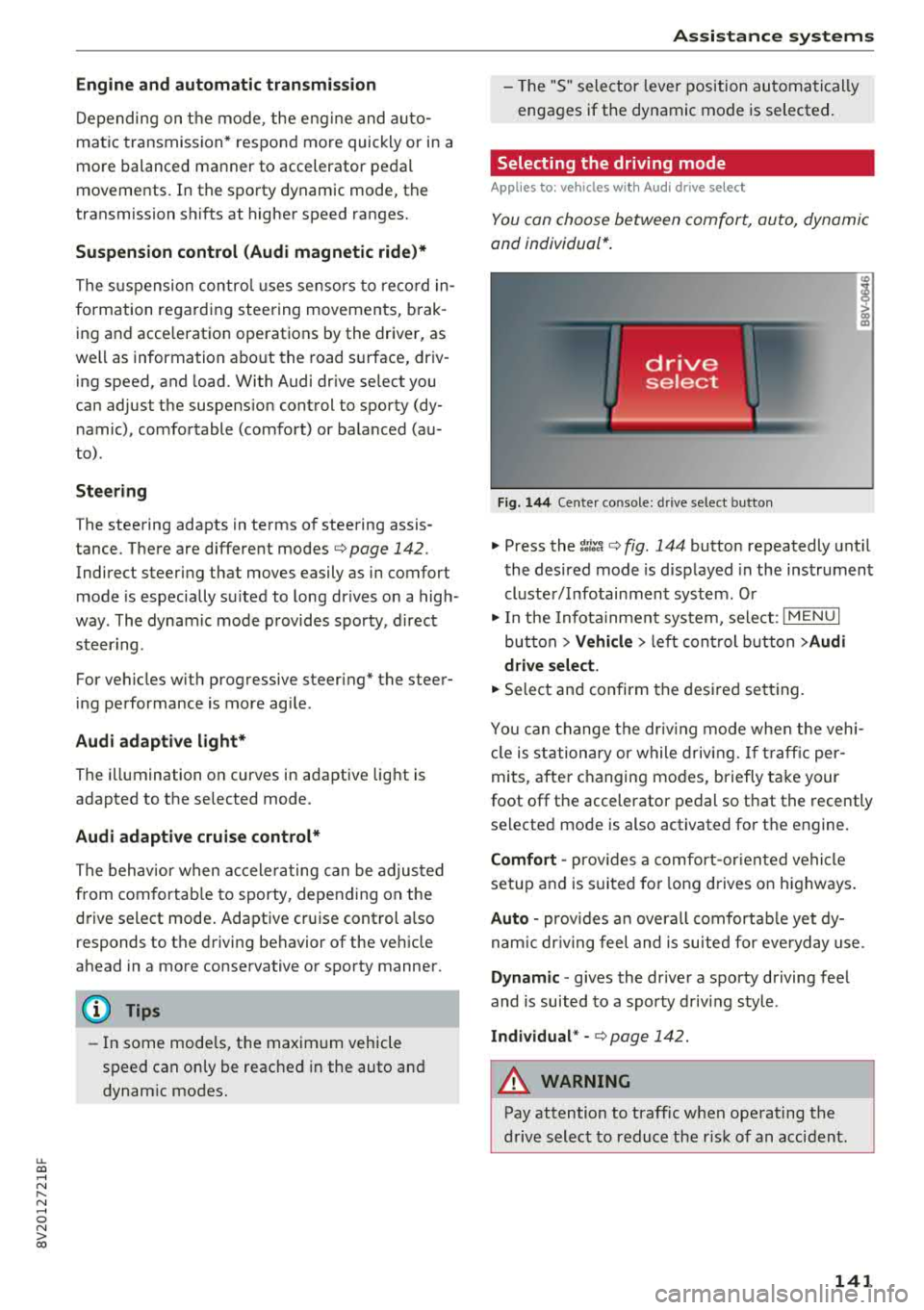
Fig. 144 Ce nter co nso le: dri ve se lect button
"' Press the ~:i;~ ¢ fig . 144 button repeatedly unt il
the desired mode is d isp layed in the instrument
cluste r/ Infotainment system . Or
"' In the Infota inment system, selec t: I M ENU I
bu tton > Vehicl e > left cont rol b utt on > Audi
dri ve select .
"'Select and confirm the desired se tting.
Yo u can change the dr iv ing mode when the veh i
cl e is stationary or while drivin g. If t raff ic per
mi ts, after c hanging mo des, briefly ta ke your
foot off t he accelerator pedal so that the recently
selected mode is also activated fo r th e engine.
Comfort -prov ides a co mfort -or iented vehicle
setup a nd is s uited for long d rives on h ighways .
Auto -provides a n overa ll comfortab le yet dy
nam ic dr iv ing feel and is suited for eve ryday use.
Dynamic
-g ives the drive r a sporty driving fee l
and is suited to a spo rty d riving style .
Individual * -¢ page 142.
A WARNING
--
Pay attention to traffic when ope rating the
drive select to reduce the r is k of an accident .
141
Page 144 of 404
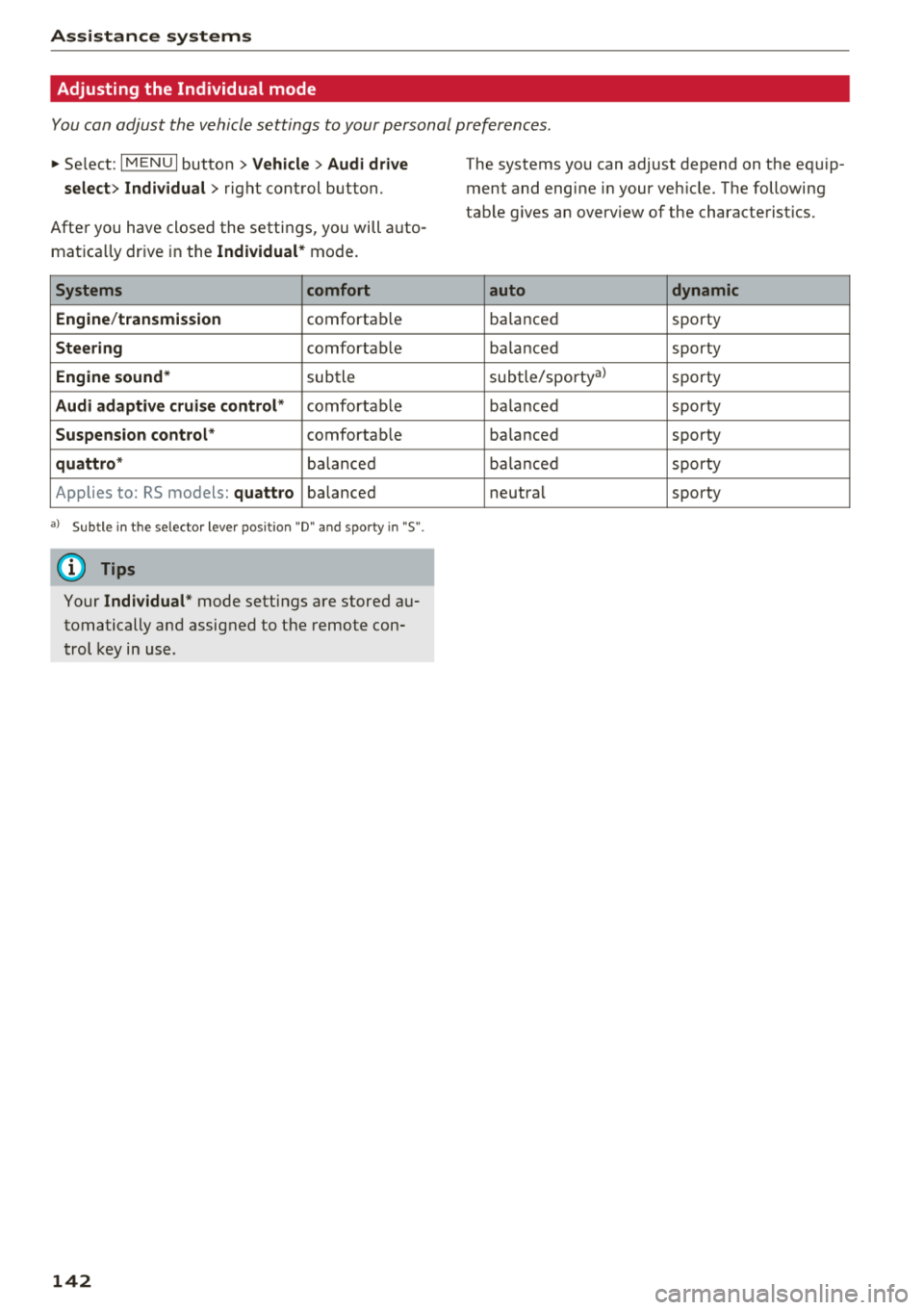
Assistance systems
Adjusting the Individual mode
You can adjust the vehicle settings to your personal preferences.
~ Select: I MENU I button >Vehicle> Audi drive
select> Individual >
right control button.
After you have closed the settings, you will auto
mat ica lly dr ive in the
Individual * mode.
Systems comfort
Engine /transmission
comfortab le
Steering comfortab le
Engine sound* subtle
Audi adaptive cruise control* comfortable
Suspension control* comfortable
quattro * balanced
Applies to: RS models:
quattro balanced
a) Subtle in t he selector lever position "D" and sporty in "S".
(0 Tips
Your Individual * mode settings are stored au
tomatically and assigned to the remote con
trol key in use.
142
The systems you can adjust depend on the equip
ment and engine in your veh icle. The following
table g ives an overview of the characterist ics.
auto dynamic
ba
lanced sporty
ba lanced sporty
subtle/sportyal sporty
ba lanced sporty
ba lanced sporty
ba lanc ed sporty
neutral sporty
Page 151 of 404
u. 00 .-< N l' N .-< 0 N > 00
Intelligent Technology
-Press the accelerator pedal carefully when
accelerating on even, slippery surfaces such
as ice and snow. The drive wheels can spin
even when these control systems are instal
led and this can affect dr iv in g stab ility and
increase the risk of a collision. condition. Different tire
sizes can lead to a
reduction in engine power.
- You may hear noises when the systems de
scribed are working .
(D Tips
-The ABS and ASR only function correctly
when all four wheels have a s imilar wear
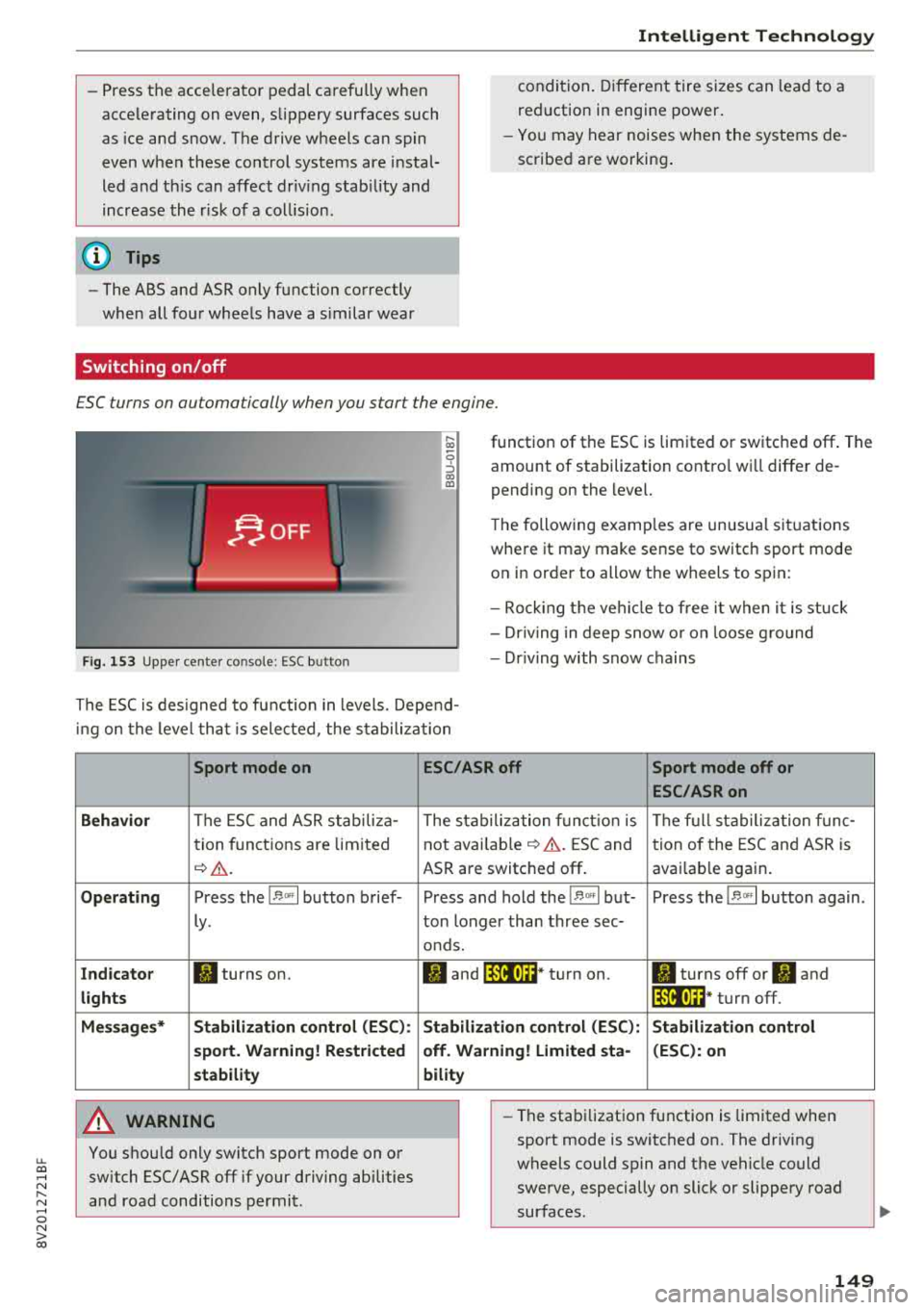
Switching on/off
ESC turns on automatically when you start the engine.
F ig. 153 Upper center console: ESC button
function of the ESC is limited or switched off. The
amount of stabilization contro l wi ll differ de
pending on the level.
The following examp les are unusua l situations
where it may make sense to switch sport mode on in order to allow the wheels to spin:
- Rocking the vehicle to free it when it is stuck
- Dr iving in deep snow o r on loose g round
- Dr iving with snow chains
The ESC is designed to function in levels. Depend
ing on the level that is selected , the stabilization
Sport mode on
Behavior
The ESC and ASR stab iliza-
tion functions are limited
~ &..
Operating Press the 11> .. , I button brief-
ly .
Indicator II turns on.
lights
Messages* Stabilization control (ESC):
sport. Warning! Restricted
stability
A WARNING
You should only switch sport mode on or switch ESC/ ASR
off if your driving abilities
and road conditions permit.
ESC/ASR off Sport mode off or
ESC/ASRon
The stabilization function is The full stabilization func-
not
avai lab le~ A . ESC and tion of the ESC and ASR is
ASR are switched off . availab le again.
Press and hold the
! 1> °',1 but- Press the 11> .. , I button again .
ton longer than three sec-
onds.
II and lfil•)~~* turn on. II turns off or II and
lfil•)~~ * turn off.
Stabilization control (ESC): Stabilization control
off. Warning! Limited sta- (ESC): on
bility
-
- The stabilization function is limited when
sport mode is switched on. The driving
wheels could spin and the vehicle could swerve, especially on slick or slippery road
surfaces .
149
Page 152 of 404
Intelligent Technology
-There is no vehicle stabilization when ESC/
ASR are switched off.
(D Tips
- ESC/ ASR cannot be switched off or sport
mode cannot be switched on if the cruise
control system * or the adaptive cruise con
tro l* is switched on.
- Malfunctions in the Audi magnetic ride*
may make it impossible to switch the ESC/
ASR off or to switch sport mode on.
Brakes
New brake pads
New brake pads do not achieve their full braking
effect during the first 250 mi (400 km). They
must be "broken in" first. However, you can com
pensate for the slightly reduced braking force by
pressing firmly on the brake pedal. Avoid heavy
braking dur ing the break-in per iod .
The break-in period can be considerably longer
for vehicles with ceramic brake rotors*. However,
you can compensate for the slightly reduced
braking force by pressing f irmly on the brake
pedal. Avoid heavy brak ing dur ing the break- in
pe riod .
Wear
Brake pad
wear depends largely on the way the
veh icle is driven and on operat ing cond itions .
This is especially true if you are driving frequently
in the city and on curves or with a sporty driving
style.
Operating noise
Noises may occur when braking depend ing on the
speed, braking force and outs ide cond itions such
as temperature and humidity.
Noises may become more apparent at lower
speeds due to the nature of the materials in the
ceramic brake rotors*.
Effect of water and road salt
In certain situations, for example after driving
through water, in heavy rain, after overnight con
densat ion or after washing your car, the braking
150
effect can be reduced by moisture or ice on the
brake rotors and brake pads . The brakes must be
"dried" first with a few carefu l brake applica
tions.
At higher speeds and with the windshield wipe rs
turned on, the brake pads press against the brake
rotors for a short amount of time . This action,
which is not felt by the dr iver, happens at regular
i ntervals and ensures a better reaction t ime for
the brakes in wet weather .
The brak ing effect can also be reduced if you are
driv ing on salted roads and you do not app ly the
brakes for long periods of time. The layer of salt
on the brake rotors and pads must be worn off
first whe n the brakes are applied .
Due to its surface, the ceram ic brake rotor* ab
sorbs moisture in certain s ituations . Therefore,
there will temporarily be less braking force than
when the brakes are dry . You can compensate for
th is by press ing the brake pedal harder.
Corrosion
Leaving the vehicle parked for long periods of
time, low mileage and avoiding heavy braking
can contribute to corros ion on the brake rotors
and to dirty brake pads.
If you usually avoid heavy braking or if there is
corrosion present, occasional heavy brak ing at
high speeds is recommended to clean the brake
rotors and
pads~.& .
Brake system malfunction
If you notice that the brake pedal travel has sud
denly
i ncreased, then a brake circuit in the dua l
c ir cuit brake system may have malfunctioned.
Drive to an authorized Audi dealer or authorized
Audi Service Fac il ity immed iately to have the
problem corrected. On the way there, drive with
r educed speed and keep in mind that you will
need a longer distance to stop and you will need
to press the brake pedal harder.
Low brake fluid level
When the brake fluid level is low, malfunctions in
t h e b rake system may occur. The b rake flu id level
is electronically monitored.
II>-
Page 286 of 404
Airbag syste m
seat into its rearmost position in the seat's
fore and aft adjustment range, as far away
from the airbag as possible. The backrest must be adjusted to an upright posit ion .
Make sure that the
P A SSEN GER AIR BAG
OFF
light comes on and stays on all the t ime
whenever the ignition is sw itched on.
A WARNING
- If the PASSENGER AIR BAG OFF light does
not go o ut w hen an ad ult is sitting on the
front passenger seat after taking the steps
described above, make sure the adu lt is
properly seated and restrained at one of the
rear seating positions .
- Have the airbag system inspected by your
Audi dealer before transporting anyone on
the front passenger seat .
(D Tips
If the capacitive passenge r detection system
determines that the front passenger seat is
empty, the fronta l airbag on the passenger
side w ill be turned off, and the
PA SSE NGER
AIR BAG OFF light will stay on.
Repair , care and disposal of the airbags
Parts of the a irbag system are installed at many
d ifferent places on your Aud i. Install ing , remov
ing, servic ing or repa iring a part in an area of the
ve hicle can damage a pa rt of an airbag system
and p revent that system from working properly
in a co llision .
There are some important th ings you have to
know to make sure that the effect iveness of the
system w ill not be impaired and th at discarded
components do not cause injury or pollute the
environment .
A WARNING
Improper care, servicing and repair proce
dures can increase the r isk of personal injury
and death by preventing an airbag from de
ploying when needed or dep loying an airbag
unexpectedly:
284
-
- Never cover, obstruct, or change the steer
ing wheel horn pad or airbag cover or the in
strument panel or modify them in any way.
- Never attach any objects such as cup ho lders
or telephone mountings to the surfaces cov
ering the a irbag un its .
- For cleaning the horn pad or instrument panel, use only a soft, dry cloth or one mois
tened w it h plai n water . Solvents or cleaners
could damage the airbag cover or change
the st iffness or strength of the material so
that the ai rbag cannot deploy and p rotect
p roperly.
- Never repair, ad just, o r change any parts of
the airbag system.
- All work on the steer ing wheel, inst rument
pa nel, front seats o r electr ica l system ( in
cl uding the insta llation of a udio eq uipment,
cell ular te lephones and CB radios, etc.)
m ust be performed by a qualified techn ician
who has the training and specia l equipment
necessary.
- For any work on the airbag system, we
strong ly recommend that you see yo ur a u
thorized A udi dealer or qualified workshop .
- Never modify the front b umper or parts of
the vehicle body.
-Always make sure that the side airbag can inf late wit hout interference:
- Never install seat covers or replacement upholstery ove r the front seatbacks that
have not bee n specifica lly approved by
A udi .
- Never use additional seat c ushi ons that
cover the areas where the side airbags in
flate.
- Damage to the orig inal seat cove rs or to
t h e seam in the area of the s ide a irbag
module mus t always be repai red immedi
ate ly by an authorized Aud i dealer.
- The airba g sys tem can deploy o nly on ce. Af
t er an airbag has been dep loyed, i t m ust be
replaced with new replaceme nt parts de
signed and approved especia lly for your
Aud i mode l version . Rep lacement of com
plete airbag systems or airbag components
must be performed by qua lified workshops
only . Make sure t hat any airbag service
Page 299 of 404
u. 00 .-< N l' N .-< 0 N > 00
Child restraints and Advanced front airbag
system
Regardless of the child restraint that you use,
make sure that it has been certified to meet Safe
ty Standards and has been certified by its manu
facturer for use with an airbag. Always be sure
that the child restraint is properly installed at
one of the rear seating positions . If in exception
al c ircumstances you must use it on the front
passenger seat, carefully read all of the informa
tion on child safety and Advanced Airbags and
heed all of the applicable WARNINGS. Make cer
tain that the child and child restraint are correct
l y recognized by the capacitive passenger detec
tion system in the front passenger seat, that the
front passenger airbag is turned off, and that the
airbag status is always correctly signaled by the
PASSENGER AIR BAG OFF light.
Many types and models of child restraints have
been available over the years, new mode ls are in
troduced regularly incorporat ing new and im
proved designs and older models are taken out of
product ion . Child restraints are not standardized .
Ch ild restraints of the same type typically have
different weights and size s and different "foot
prints", the size and sh ape of the bottom of the
chi ld restraint that sits on the seat, when they
are installed on a vehicle seat. These differences
make it virtua lly impossible to certify compliance
with the requirements for advanced airbags with
each and every child restraint that has ever been
sold in the past or will be sold over the course of
the useful life of your veh icle.
F or this reason, the United States National High
way Traffic Safety Administration has published a
list of specific type, makes and models of child
restraints that must be used to certify compli
ance of the Advanced Airbag System in your vehi
cle with the suppression requirements of Federal
Motor Vehicle Safety Standard 208. These child
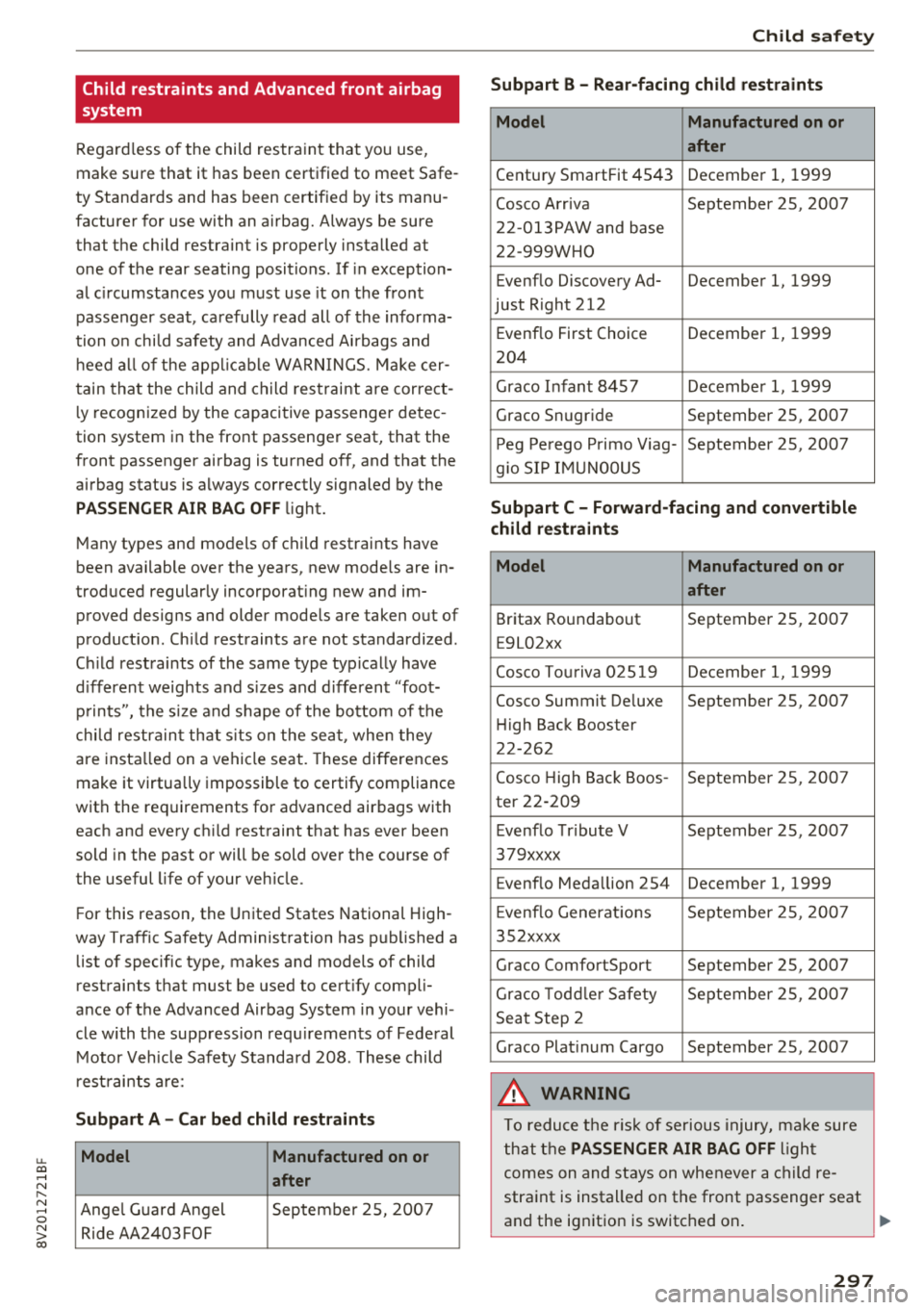
restraints are:
Subpart A -Car bed child restraints
Model Manufactured on or
after
Ange l Guard Angel September 25, 2007
Ride AA2403FOF
Child safety
Subpart B - Rear-facing child restraints
Model Manufactured on or
after
Century SmartFit 4543 December 1, 1999
Cosco Arriva September 25, 2007
22-013PAW and base
22-999WHO
Evenflo Discovery Ad- December 1, 1999
just Right 212
E venflo First Choice December 1, 1999
204
Graco Infant 8457 December 1, 1999
Graco Snug ride September 25, 2007
Peg Perego Primo Viag- September 25, 2007
g io SIP IMUNOOUS
Subpart C -Forward-facing and convertible
child restraints
Model Manufactured on or
after
Britax Roundabout September 25, 2007
E9L02xx
Cosco Touriva 02519 December 1, 1999
Cosco Summit De luxe September 25, 2007
Hi gh Back Booster
22-262
Cosco High Back Boos- September 25, 2007
ter 22-209
E venflo Tribute V September 25, 2007
379xxxx
Evenflo Medallion 254 December 1, 1999
E venflo Generations September 25, 2007
352xxxx
Graco ComfortSport September 25, 2007
Graco Toddler Safety September 25 , 2007
Seat Step 2
Graco Plat inum Cargo September 25, 2007
A WARNING
To reduce the risk of serious injury, make sure
that the
PASSENGER AIR BAG OFF l ight
comes on and stays on whenever a child re
straint is installed on the front passenger seat
and the ignition is switched on .
~
297
Page 345 of 404
u. 00 .-<
Wheels
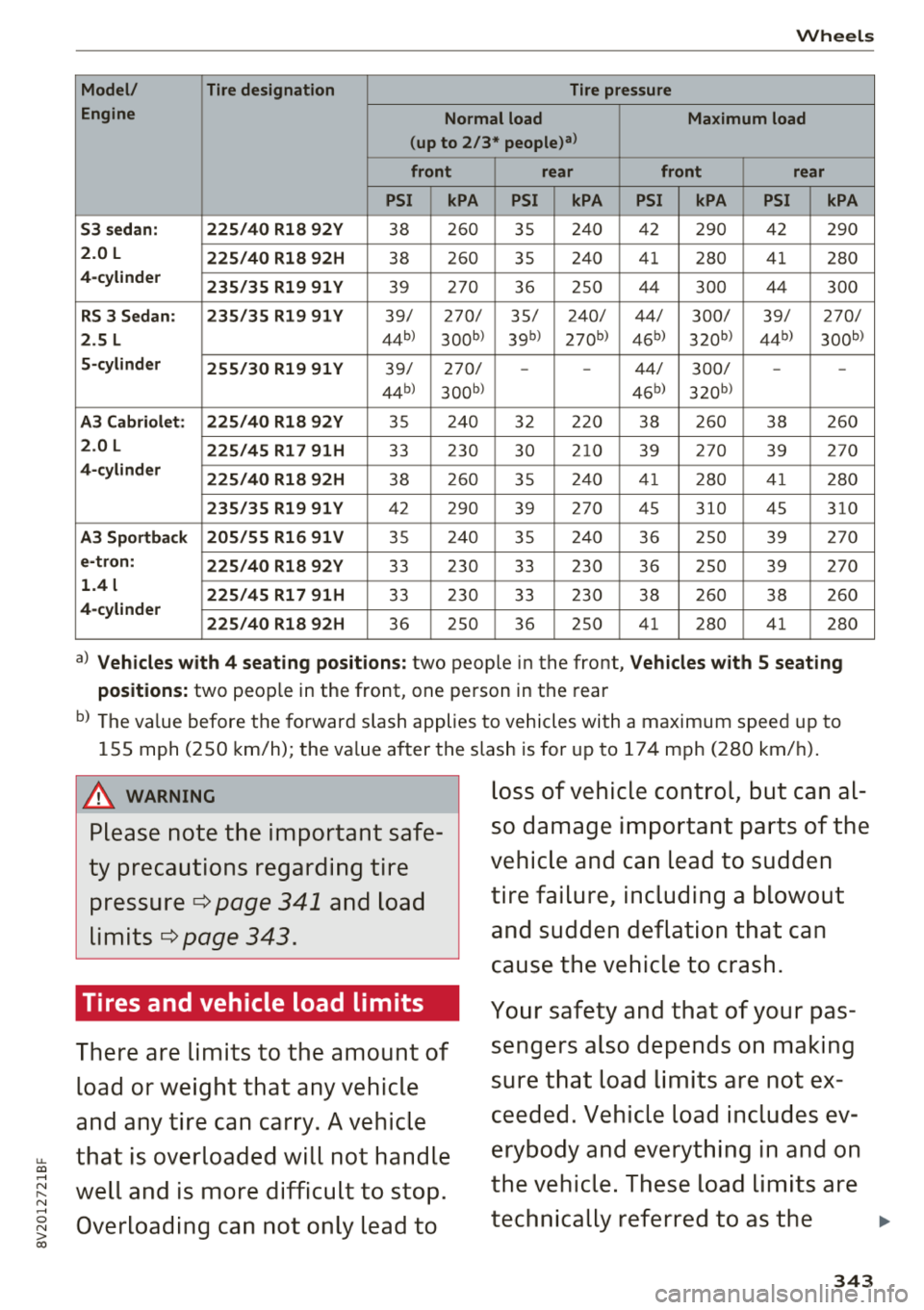
Model/ Tire designation Tire pressure
Engine Normal load Maximum load
(up to 2/3*
people)a>
front rear front rear
PSI kPA PSI kPA PSI kPA PSI kPA
S3 sedan: 225/40 Rl8 92Y
38 260 35 240 42 290 42 290
2.0 L
225/40 Rl8 92H 38 260 35 240 41
280 41
280
4-cylinder
235/35 Rl9 91 Y 39 270 36 250 44 300 44 300
RS 3 Sedan: 235/35 Rl9 91 Y 39/ 270/ 35/ 240/ 44/ 300/ 39/ 270/
2.5 L 44b) 300b) 39b) 270b ) 45b) 320b) 44b) 300b)
5-cylinder
255/30 Rl9 91 Y 39/ 270/ --44/ 300/ --
44b) 3oob> 45b) 320 b)
A3 Cabriolet: 225/40 Rl8 92Y 35 240 32 220 38 260 38 260
2.0 L
225/45 Rl7 91H 33 230 30 210 39 270
39 270
4-cylinder
225/40 Rl8 92H 38 260 35 240 41 280 41 280
235/35 Rl9 91 Y 42
290 39 270
45
310 45
310
A3 Sportback 205/55 Rl6 91 V 35 240 35 240 36 250 39 270
e-tron:
225/40 Rl8 92Y 33 230 33 230 36 250 39 270
1.4 l 225/45 Rl7 91H 33
230 33 230 38 260 38 260
4-cylinder
225/40 Rl8 92H
36 250 36 250 41
280 41
280
a) Vehicles with 4 seating positions: two people in the front, Vehicles with S seating
positions:
two peop le in the front, one person in the rear
b) The value before the forward slash applies to vehicles with a maximum speed up to
155 mph (250 km/h) ; the value after
the· slash is for up to 174 mph (280 km/h).
A WARNING
Please note the important safe
ty precautions regarding tire
pressure
c:::> page 341 and load
Lim its
c:::> page 343.
Tires and vehicle load limits
There are limits to the amount of load or weight that any vehicle
and any tire can carry. A vehicle
that is overloaded will not handle loss of vehicle control, but can al
so damage important parts of the
vehicle and can lead to sudden
tire failure, including a blowout
and sudden deflation that can
cause the vehicle to crash.
~ well and is more difficult to stop. Your safety and that of your pas
sengers also depends on making
sure that load limits are not ex
ceeded. Vehicle load includes ev
erybody and everything in and on
the vehicle . These load limits are
.-<
~ Overloading can not only lead to
00
technically referred to as the ..,
343