ECO mode AUDI A3 SEDAN 2018 Owner's Manual
[x] Cancel search | Manufacturer: AUDI, Model Year: 2018, Model line: A3 SEDAN, Model: AUDI A3 SEDAN 2018Pages: 404, PDF Size: 62.3 MB
Page 122 of 404
Ass is tance sy stem s
Assistance systems
Speed warning system
Description
Applies to: veh icles with speed warning system
The speed warning system helps you to stay be
low a specified maximum speed that can be set,
changed or deleted in the Infotainment system.
The speed warning system warns you if you are
exceeding the maximum speed that you have set .
A warni ng tone will sound as soon as your speed
exceeds the sto red value slight ly. The
[OJ (USA
models) ;[;] (Canada models) indica to r li gh t and
the co rresponding message appear in the inst ru
ment cluster display at the same time. The
[C]
(USA models)/ [ej (Canada mode ls) indicator
light and the message turn off w hen the vehicle
speed drops below the stored maximum speed .
Sett ing a threshold is recommended if you would
like to be reminded when yo u reach a certa in
maximum speed . Situations where you may want
to do so include driving in a country with a ge ner
al speed limit or if there is a specified maximum
speed for winter tires.
Setting the warning thr eshold
.. Select in the Infotainment sys tem : IMENUI but
ton
> Vehicle > left contro l button > Driver a s
sistance
> S peed warning > Manual.
@ Tips
Regardless of the speed warning system, you
should always monitor yo ur speed using the
speedometer and make sure you are following
the legal speed limit.
120
Cruise control system
Switching on
Applies to: vehicles with cruise control system
The cruise control system makes it possible to
drive at a constant speed starting at 15 mph (20km/h) .
0
f
~
0
Fig . 1 21 Ope rat ing lev er : cru ise co ntrol sys te m
0
"' N
~ CD
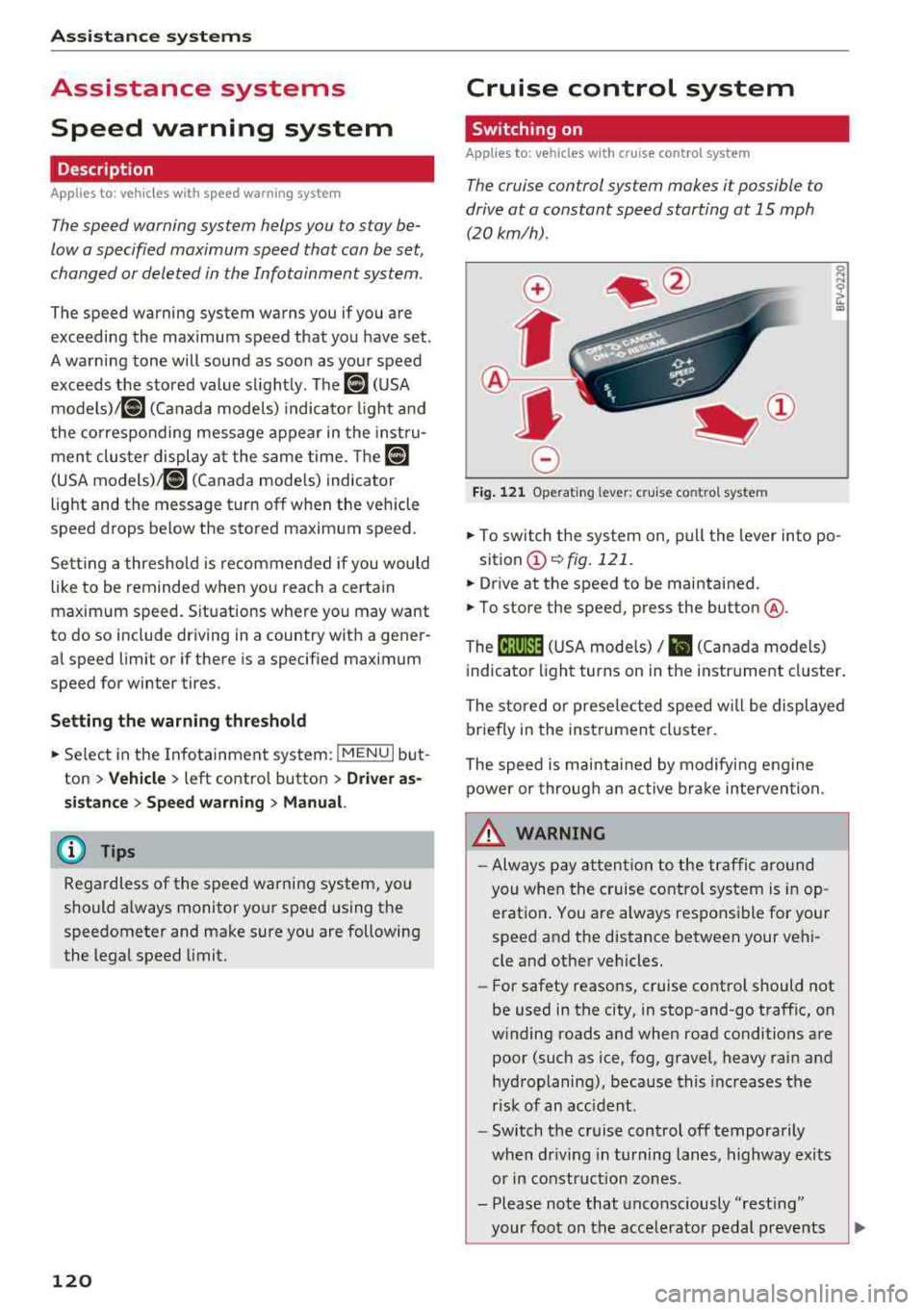
.. To switch t he system on, pull the lever into po -
sition
CD ¢ fig. 121 .
.. Drive at the speed to be maintained .
.. To store the speed, press the button @.
The
[ij;(l)~1j ( U SA mode ls) / 51 (Canada models)
indicator light turns on in the instr ument cluster .
The stored or prese lec ted speed w ill be displayed
briefly in the instrument cluster .
The speed is mainta ined by modifyi ng engine
power or through an active bra ke intervention.
&_ WARNING
- Always pay at ten tion to the traffic a ro und
you whe n the cruise contro l system is in op
erat ion . You are always respons ible fo r your
speed and the distance between your vehi
cle and other vehicles.
-For safety reaso ns, cruise cont rol should not
be used in the city, in stop-and-go traff ic, on
w inding roads and when road conditions are
poor (such as ice, fog, gravel, heavy rai n and
hydroplaning), because this increases the
r isk of an accident.
-Switch t he cr uise control off temporarily
when dr iv ing in turning lanes, highway exits
or in construction zones .
- Please note that unconsciously
"rest ing"
your foot on the accelerator pedal prevents
-
Page 143 of 404
u. 00 .-< N l' N .-< 0 N > 00
Engine and automatic transmission
D epending on the mode, the eng ine and auto
mat ic transmission * respond more quickly or in a
more balanced manner to accelerator pedal
movements . In the sporty dynamic mode, the
transmission shifts at higher speed ranges.
Suspen sion control (Audi magnetic ride) *
The s uspension contro l uses sensors to reco rd in
formation regarding steering movements, brak
ing and acce leration operations by the driver, as
well as information abo ut th e road s urface, driv
ing speed, and load. With Audi dr ive select you
can adjust the suspens ion control to sporty (dy
namic), comfortable (comfort) or balanced (au
to) .
Steering
T he steering adapts in terms of steering assis
tance. There are different modes
¢ page 142 .
Indirect steering that moves easily as in comfort
mode is especia lly su ited to long drives on a high
way . The dynam ic mode p rovides sporty, d irect
steer ing .
For vehicles w ith progressive steering* the steer
in g performance is more ag ile .
Audi adapt ive light *
The i llumination on curves in adaptive light is
adapted to the se lected mode.
Audi adaptive cruise control*
The behav ior when a cce le ra ting can be adjus ted
from com fortab le to sporty, depending on the
drive select mode . Adaptive cr uise control a lso
r e sponds to the driving behavior of the ve hicle
ahead in a more conservative or sporty manner.
(D Tips
- In some models, the maximum vehicle
speed can only be reached in the auto and
dynam ic modes.
A ss istance systems
- The "S " sele ctor leve r position au tomatically
engages if the dynamic mode is selected.
Selecting the driving mode
Applies to: vehicles with Audi drive select
You con choose between comfort, auto, dynamic
and individual* .
Fig. 144 Ce nter co nso le: dri ve se lect button
"' Press the ~:i;~ ¢ fig . 144 button repeatedly unt il
the desired mode is d isp layed in the instrument
cluste r/ Infotainment system . Or
"' In the Infota inment system, selec t: I M ENU I
bu tton > Vehicl e > left cont rol b utt on > Audi
dri ve select .
"'Select and confirm the desired se tting.
Yo u can change the dr iv ing mode when the veh i
cl e is stationary or while drivin g. If t raff ic per
mi ts, after c hanging mo des, briefly ta ke your
foot off t he accelerator pedal so that the recently
selected mode is also activated fo r th e engine.
Comfort -prov ides a co mfort -or iented vehicle
setup a nd is s uited for long d rives on h ighways .
Auto -provides a n overa ll comfortab le yet dy
nam ic dr iv ing feel and is suited for eve ryday use.
Dynamic
-g ives the drive r a sporty driving fee l
and is suited to a spo rty d riving style .
Individual * -¢ page 142.
A WARNING
--
Pay attention to traffic when ope rating the
drive select to reduce the r is k of an accident .
141
Page 152 of 404
Intelligent Technology
-There is no vehicle stabilization when ESC/
ASR are switched off.
(D Tips
- ESC/ ASR cannot be switched off or sport
mode cannot be switched on if the cruise
control system * or the adaptive cruise con
tro l* is switched on.
- Malfunctions in the Audi magnetic ride*
may make it impossible to switch the ESC/
ASR off or to switch sport mode on.
Brakes
New brake pads
New brake pads do not achieve their full braking
effect during the first 250 mi (400 km). They
must be "broken in" first. However, you can com
pensate for the slightly reduced braking force by
pressing firmly on the brake pedal. Avoid heavy
braking dur ing the break-in per iod .
The break-in period can be considerably longer
for vehicles with ceramic brake rotors*. However,
you can compensate for the slightly reduced
braking force by pressing f irmly on the brake
pedal. Avoid heavy brak ing dur ing the break- in
pe riod .
Wear
Brake pad
wear depends largely on the way the
veh icle is driven and on operat ing cond itions .
This is especially true if you are driving frequently
in the city and on curves or with a sporty driving
style.
Operating noise
Noises may occur when braking depend ing on the
speed, braking force and outs ide cond itions such
as temperature and humidity.
Noises may become more apparent at lower
speeds due to the nature of the materials in the
ceramic brake rotors*.
Effect of water and road salt
In certain situations, for example after driving
through water, in heavy rain, after overnight con
densat ion or after washing your car, the braking
150
effect can be reduced by moisture or ice on the
brake rotors and brake pads . The brakes must be
"dried" first with a few carefu l brake applica
tions.
At higher speeds and with the windshield wipe rs
turned on, the brake pads press against the brake
rotors for a short amount of time . This action,
which is not felt by the dr iver, happens at regular
i ntervals and ensures a better reaction t ime for
the brakes in wet weather .
The brak ing effect can also be reduced if you are
driv ing on salted roads and you do not app ly the
brakes for long periods of time. The layer of salt
on the brake rotors and pads must be worn off
first whe n the brakes are applied .
Due to its surface, the ceram ic brake rotor* ab
sorbs moisture in certain s ituations . Therefore,
there will temporarily be less braking force than
when the brakes are dry . You can compensate for
th is by press ing the brake pedal harder.
Corrosion
Leaving the vehicle parked for long periods of
time, low mileage and avoiding heavy braking
can contribute to corros ion on the brake rotors
and to dirty brake pads.
If you usually avoid heavy braking or if there is
corrosion present, occasional heavy brak ing at
high speeds is recommended to clean the brake
rotors and
pads~.& .
Brake system malfunction
If you notice that the brake pedal travel has sud
denly
i ncreased, then a brake circuit in the dua l
c ir cuit brake system may have malfunctioned.
Drive to an authorized Audi dealer or authorized
Audi Service Fac il ity immed iately to have the
problem corrected. On the way there, drive with
r educed speed and keep in mind that you will
need a longer distance to stop and you will need
to press the brake pedal harder.
Low brake fluid level
When the brake fluid level is low, malfunctions in
t h e b rake system may occur. The b rake flu id level
is electronically monitored.
II>-
Page 184 of 404
Tele phone
- Muting the incoming ca ll: select and confirm
Mut e.
- Additi onal c all :
se lect: Find c onta ct > Call li st/
Di rector y/Fa vo rites
> an entry from the list.
M ute: if you se lect and co nfirm th is function , the
other pe rson on the phone cannot hea r yo u. You
can hear the other person . To turn the micro
phone back on, se lect and confirm
Unmute.
Hold call /R es um e held call:
you can p lace the ex
isting call on hold and resume i t again. To re
sume the call, select and confirm the ca ll you
wou ld like to resume.
Tran sfe r ca ll to m obile d evic e*: select and con
fi rm
Tr ansfe r call to mobil e devic e to transfer
the existing call from the MM I to your cell phone.
Switch to hands -fr ee mod e*: Requirement: you
must have a phone ca ll in prog ress o n your cell
p hone. Select and confirm
Swit ch to hand s-free
mode
to transfer the call from your ce ll phone
back to the MMI.
Swap call : alternate between two phone ca lls
while one of the ca lls is on hold. Select ing
End
c a ll
wi ll end the active phone call. A p hone call on
hold can be resumed using the right control but
ton >
Resume .
Co nne cti on manag er:
see ~ page 244.
Telephone sett ings : see ~ page 187 .
(D Tips
-To be notified of an incoming call during a
phone call, the
call waiting function in your
cell phone must be switched on when using
the
Handsfre e profile .
- You can obta in more information from your
ce ll phone serv ice prov ider or from your cell
phone use r guide.
- When leaving the vehicle, the Bluetooth
con nection to the ce ll phone w ill automat i
ca lly dis co nne ct. Depending on you r cell
phone, phone ca lls in p rogress may be auto
matically redirected from t he M MI to your
ce ll phone and you can continue t he call on
your phone.
- The display of an incoming phone ca ll in the
Infotainment system disp lay may still be
182
visible for a few seconds after a call is an
swered/ignored depending on the ce ll
phone in use.
Making an emergency call
Applies to: vehicles with telephone
.,. Select: ! MENU I button> Telephone > left con
trol button >
Enter n umber > Enter emergency
call number (for example, 911) >
OK .
A WARNING
-
-Because you r phone works with rad io sig
na ls, a connection canno t be gua ran teed un
de r all ci rcumsta nces. Do not rely o n only
your phone when it comes to essential com
munication (such as a medical emergency) .
- Always follow the instr uct ions given by the
emergen cy personne l dur ing an emergency
call and on ly end the ca ll when they instruct
you to do so.
(D Tips
E mergency numbe rs a re not the s ame every
whe re. Find out wh ic h emergency n umber is
u sed in your current location.
Favorites
Applies to: vehicles with telephone
Up to 50 contacts , in addition to the voicemail
number, can be stored in any order in the favor
ites lis t.
.,. Select: !MENU I button> Telephone > left con-
trol b utton .
Storing an e xis ting phone number as a
fa vorit e:
-Select and confirm Call list /Director y.
- Select a contact or phone n umbe r from the list.
- Select: r ight cont rol b utton>
S tor e as favorite .
-Enter a name for the favor ite or select a sug-
gestion .
- Select and confirm
Save .
Ren aming stored fa vorite s
- Select: Favo rite s > a favorite from the list.
Page 211 of 404
u. 00 .-< N l' N .-< 0 N > 00
- Traffic congestion along the ro ute including
time delays
The route that was calcu lated acco rding to the
ro ute criter ia you sele cted is shown on the over
view map . The special propert ies of the route are
a lso
displayed @~ fig. 187 and given as a spo
k en message.
Using the contro l knob , you can se lect t he possi
b le routing for the alternative routes and show
them on map Select and confirm the desired ro ute that you would like to use for route guid
ance.
Additional settings
Navigation settings
Applies to: vehicles with navigation system
.,. Press the I NAV /MAPI but ton repe ated ly un til
the
Enter de stination menu is displayed
¢ page 201, fig.182 .
.,. Select : rig ht contro l button > Navigation set-
tings .
Depending on the se lected function, the follow ·
ing settings can be se lected :
Show alternative routes
Up to three suggested ro utes are shown on the
map whe n this funct ion is switched
on~
~ page 208, Alternative routes.
Low fuel warning
A message is disp layed if the fuel gauge goes be
l ow the reserve mar king when this funct ion is
sw itched
on~-Co nfirm ing th is m essage displays
a lis t of gas stations in the area. When a gas sta
t ion is selec ted, route g uidance from the c urren t
ve hicl e position is calc ulated .
Trailer mode*
Tra iler mode is sw itched off at the factory .
When the function is switched
on~. the maxi
mum permitted speed for vehicles with trailers is
i ncorporated into the route guidance and the cal
culated arr ival time is adjusted acco rding ly . T rail
e r mode is d isp layed using symbols
-Pe' in the side
menu on the m ap .
Na vigation
Personal route as sistance*
Persona l rou te ass istance is swi tched off at the
f actory.
You r trips a re recorded and dest inations a re s ug
gested by the M MI w hen th is fu nction is sw itched
o n ~¢ page 206.
Notification when nearby*
The not ification when nearby is switched off at
the factory .
The MM I not ifies you when you are approaching
selected points of interest when t his function is
switched
on~ -You can also have a Notification
tone .
Presentation mode
The Presentation mode he lps you to effectively
plan a tr ip and fo llow the planned route without
moving the vehicle . You can use
Select starting
point
when you wou ld like to calculate a ro ute
sta rt ing from a location othe r than the ve hicle
pos it ion, for examp le. Sta rt
Presentation mode
to s imula te rou te g uidance .
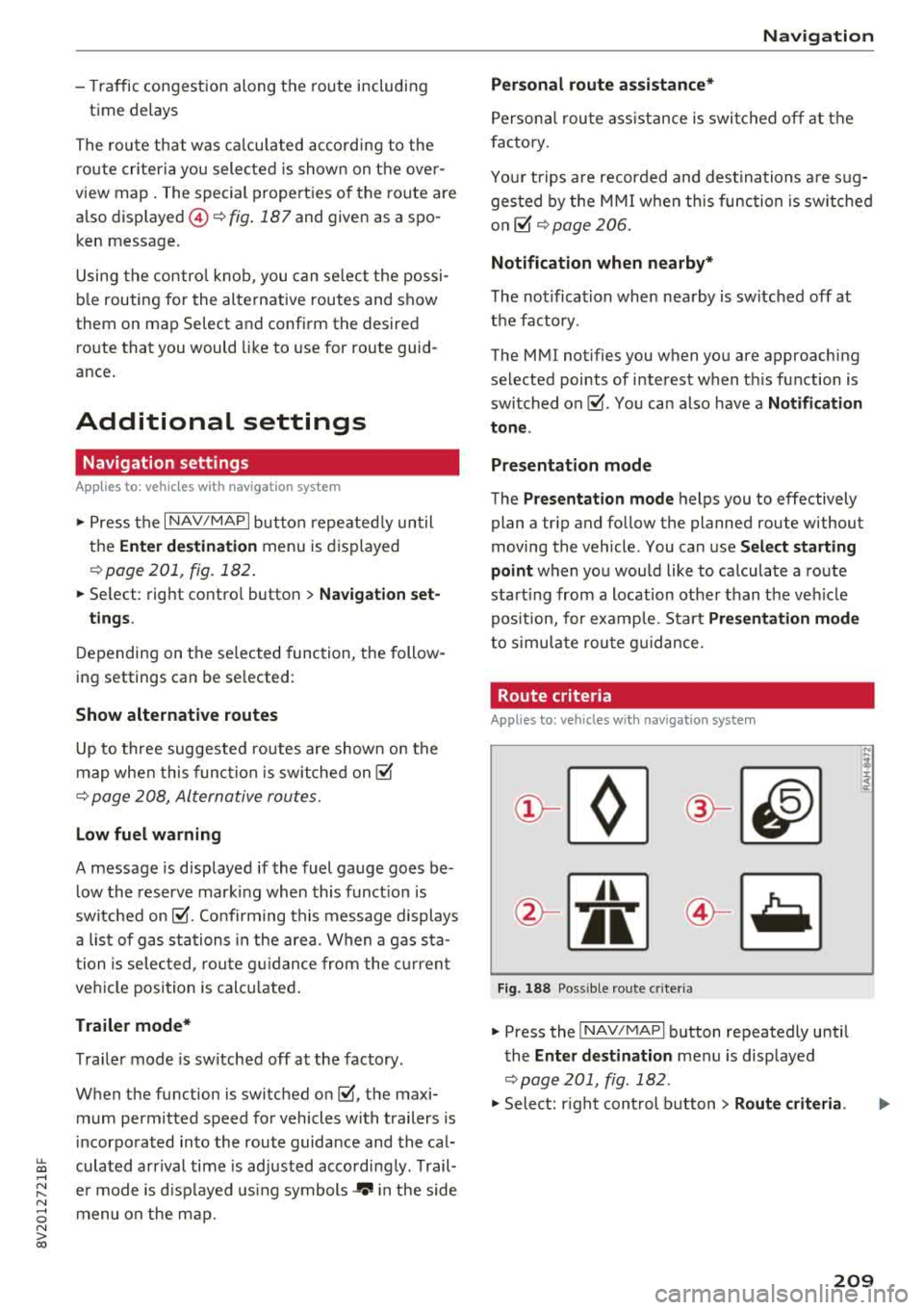
Route criteria
Applies to: vehicles with navigation system
Jl
Fig. 18 8 Possible ro ute c rit e ri a
.,. Press the INAV/MAPI button repeatedly unti l
the
Enter destination men u is displayed
¢page 201, fig . 182 .
.,. Select: r ight cont rol b utton> Route criteria .
209
Page 242 of 404
Media
Problem Solution
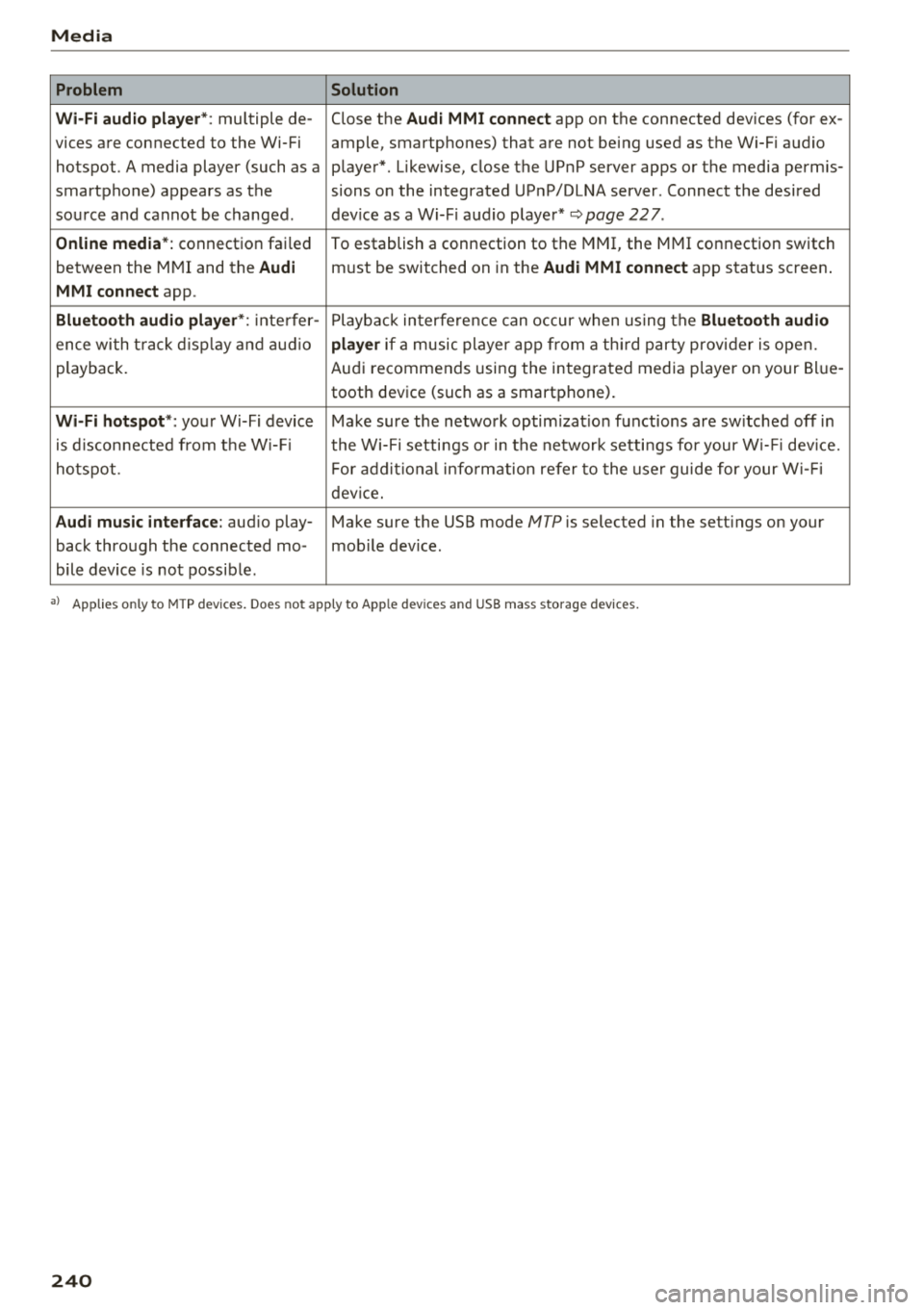
Wi-Fi audio playe r*:
multiple de- Close the Audi MMI connect app on the connected devices (for ex -
vices are connected to the Wi-Fi ample, smartphones) that are not being used as the Wi-Fi audio
hotspot. A media player (such as a player*. Likewise, close the UPnP server apps or the media permis-
smartphone) appears as the sions on the integrated UPnP/DLNA server. Connect the desired
source and cannot be changed. dev ice as a Wi-F i aud io player*
~page 227.
Online media*: connection failed
To establish a connection to the MMI, the MMI connection switch
between the MMI and the
Audi must be switched on in the Audi MMI connect app status screen .
MMI connect app.
Bluetooth audio player *: inte rfer -Playback interfere nce can occur when us ing the Bluetooth audio
ence wi th t rack d isp lay and audio player if a music player app from a third party provider is open.
playback. Audi recommends using the integrated media p layer on your Bl ue-
tooth device (such as a smartphone).
Wi-Fi hotspot *: your Wi-Fi device Make sure the network optim izat ion functions are sw itched off in
is disconnected from the W i- Fi the Wi-Fi setti ngs or in the network settings for your W i- Fi dev ice.
ho tspot. For additional information refer to the user guide for your Wi-Fi
device.
Audi music interface: aud io play- Make sure the USB mode MTP is selected in the sett ings on your
back through the connected mo- mob ile device.
bile device is not possible .
a) Applies only to MTP devices. Does not app ly to Apple dev ices and USB m ass storage dev ices.
240
Page 246 of 404
System settings
wait for the sig nal t one (bee p) to say a new
command.
Volume : you can a djust th e vol ume of th e
p romp ts by turning the con tro l k no b.
Individual speech training (on ly when the v ehi
cle is s ta ti onary): yo u ca n ad apt the vo ice recog
ni tion sy ste m to your voic e or pro nunciati on in
or der to im prove the sys tem's a bili ty to re co gni ze
your speec h. Indivi dua l speech train ing is com
p rised of 20 s peech ent ries t hat consist o f com
mands and sequences of numbers . You can de
lete the p rogrammed voice t rain ing with the
Re
set individual speech training
function.
Display brightness
You can a djust the brigh tness o f the Info tain
ment system disp lay by t urning the cont ro l knob.
Factory settings
D epe ndi ng on t he ve hicle eq uipme nt, th e fo llow
i ng fu nctio ns ca n b e rese t to factory se ttings :
-Sound settings
- Radio
- Media settings
- Jukebox *
- Directory
-Telephone
- Bluetooth and Wi-Fi*
- Navigation settings*
- Navigation and online memory *
- Speech dialog system*
- Message settings *
-Apps*
- Tool tips
- Audi connect*
- Audi smartphone interface *
You can select the des ired functions individually
or all at once with the option
Select all entries .
Select and confirm Restore factory settings .
(D Tips
-Make s ure that n ot on ly t he settings we re
d eleted but also the stored data, if ap plica
b le.
- Pleas e note t hat the vo ice reco gnit io n sys
te m* is not availab le in Cabr io lets .
244
Connection manager
Introduction
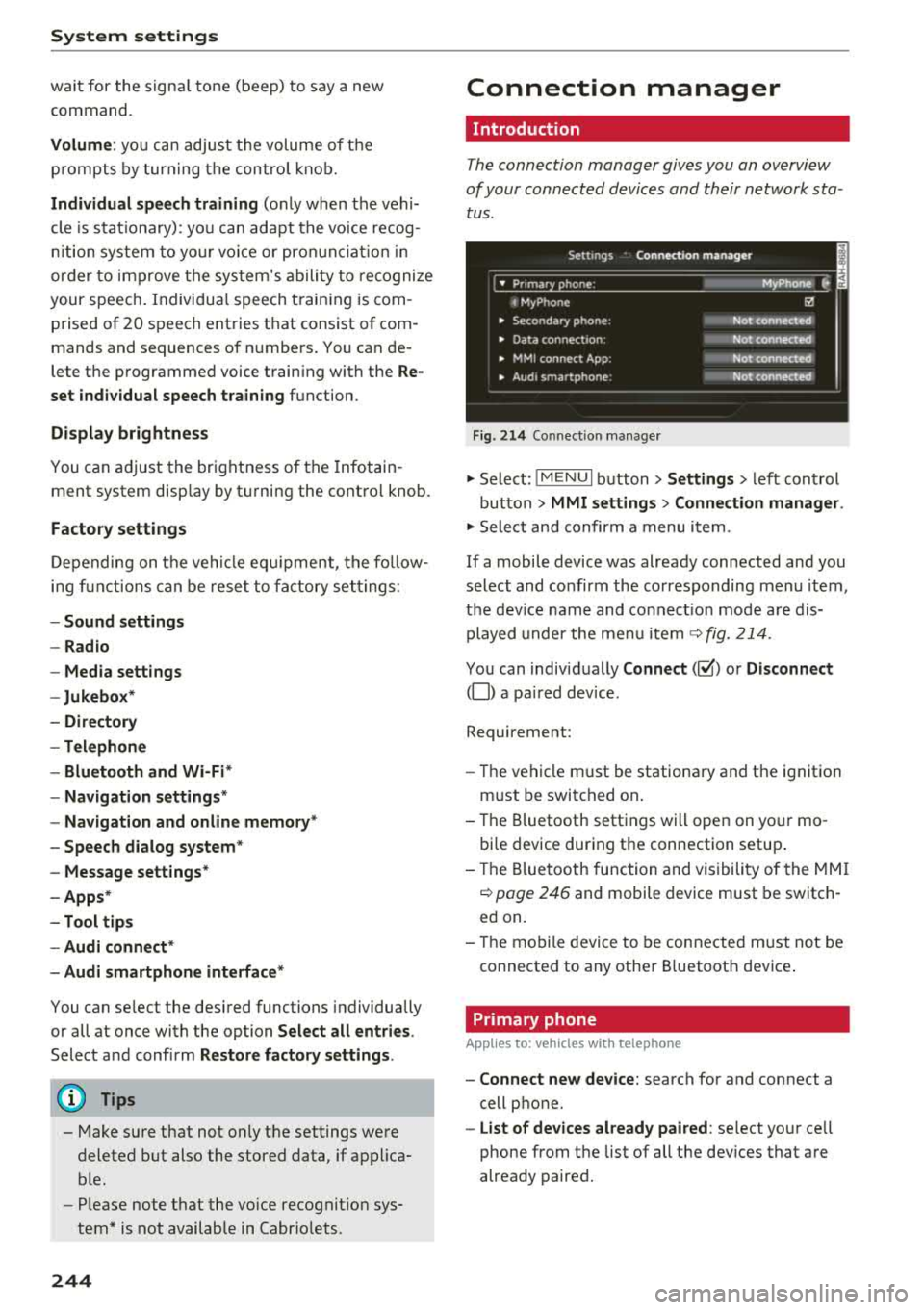
The connection manager gives you an overview
of your conn ected devic es and th eir network sta
tus .
Settings Conne -ction manager I
-====- ,.· • Prima hone: MyPhone .,.
c M yPhone
• Second ary phone :
• Data conn ection :
• MM I connect App :
• Audi smartphone:
Fig. 214 Co nnec tion man ag er
Ii'!
Not connected
Not
conn.,ct.,d
Not connected
Not
conn..cted
"' Select : !ME NUI bu tton> Settings > left con trol
bu tton >
MMI settings > Connection manager .
"'Sele ct a nd confirm a menu item.
If a mobile device was already connected and you
select and co nfirm the co rresponding menu item,
t h e dev ice name and co nnect ion mode a re dis
p layed under the menu i tem
r:!;> fig. 214 .
You can indiv id ually Connect (~ ) or Disconnect
(0) a pa ired device .
Requirement:
- The ve hicl e m ust be statio na ry and the ignit io n
m ust be switc hed on .
- Th e Bluetooth sett ings will open on yo ur mo
bi le device dur ing the connection setup .
- T he Blue tooth func tion and v is ibili ty of the MMI
c:!;> page 24 6 and mobile device must be switc h
ed on.
- T he mo bile device to be con nected m ust not be
connected to any othe r Bluetoot h dev ice .
Primary phone
App lies to: vehicles wit h telepho ne
- Connect new device: search for and connect a
cell p hone.
- List of devices already paired : select yo ur cell
phone from the list of all the dev ices that a re
already paired.
Page 251 of 404
u. 00 .-< N l' N .-< 0 N > 00
Driving safety
Basics
Safe driving habits
Please remember -safety first!
The individual safety features of your vehicle can
work together as a system to help protect you
and your passengers in a wide range of accidents.
These features cannot work as a system if they
are not always correctly adjusted and correctly
used .
This chapter contains important informat ion,
tips, instructions and warnings that you need to
read and observe for your own safety, the safety
of your passengers and others . We have summar
iz ed here what you need to know about safety
belts, airbags, child restraints as well as child
safety. Your safety is for us
priority number 1. Al
ways observe the information and warnings in
this section -for your own safety as well as that
of your passengers.
The informa tion in t his section applies to all
model versions of your vehicle. Some of the fea
tures described in this sections may be standard
eq uip ment on some models, or may be optional
equ ipment on others. If you are not sure, ask
your author ized Audi dealer.
A WARNING
-Always make sure that you follow the in
struct ions and heed the WARNINGS in this
Manual. It is in your interest and in the in
terest of your passengers .
-
-Always keep the complete Owner's Litera
ture in your Audi when you lend or sell yo ur
vehicle so that this important information
w ill always be available to the driver and
passengers.
-Always keep the Owner's literature handy so
that you can find it easily if you have ques
tions .
Driving safety
Important things to do before driving
Safety is everybody 's job ! Vehicle and occupant
safety always depends on the informed and care
ful driver .
For your safety and the safety of your passen
gers,
before driving always:
.. Make sure that a ll lights and signals are operat
ing correctly.
.. Make sure tha t the tire pressure is correct .
.. Make sure that all w indows are clean and afford
good vis ibility to the outs ide.
.. Secure all luggage and othe r items ca refully
c::> page 63, c::> page 63 .
.. Make sure that nothing can interfere with the
peda ls .
.. Adjust front seat, head restraint and mirrors
correct ly for your height.
.. Instruct passengers to adjust the head re
straints according to their height.
.. Make sure to use the right child restraint cor
rectly to protect children
c::> page 294, Child
safety .
.. Sit properly in your seat and make sure t hat
your passengers do the same
c::> page 59, Front
seats .
.. Fasten your safety belt and wear it properly. Al
so instruct your passengers to fasten their safe
ty belts properly
c::> page 260.
What impairs driving safety?
Safe driving is directly related to the condition of
the vehicle , the driver as well as the driver 's abili
ty to concentrate on the road without being dis
tracted.
The driver is responsible for the safety of the ve
hicle and a ll of its occupants. If your ability to
drive is impa ired, safety risks for everybody in the
vehicle increase and you a lso become a hazard to
everyone else on the road
c::> &_ . Therefore:
.. Do not let yourse lf be distracted by passengers
or by using a cellular telephone .
.. NEVER drive when your driving abi lity is im
pa ired (by med ications, alcohol, drugs, etc .) .
.. Observe all traffic laws, rules of the road and
speed lim its and plain common sense .
.,.
249
Page 286 of 404
Airbag syste m
seat into its rearmost position in the seat's
fore and aft adjustment range, as far away
from the airbag as possible. The backrest must be adjusted to an upright posit ion .
Make sure that the
P A SSEN GER AIR BAG
OFF
light comes on and stays on all the t ime
whenever the ignition is sw itched on.
A WARNING
- If the PASSENGER AIR BAG OFF light does
not go o ut w hen an ad ult is sitting on the
front passenger seat after taking the steps
described above, make sure the adu lt is
properly seated and restrained at one of the
rear seating positions .
- Have the airbag system inspected by your
Audi dealer before transporting anyone on
the front passenger seat .
(D Tips
If the capacitive passenge r detection system
determines that the front passenger seat is
empty, the fronta l airbag on the passenger
side w ill be turned off, and the
PA SSE NGER
AIR BAG OFF light will stay on.
Repair , care and disposal of the airbags
Parts of the a irbag system are installed at many
d ifferent places on your Aud i. Install ing , remov
ing, servic ing or repa iring a part in an area of the
ve hicle can damage a pa rt of an airbag system
and p revent that system from working properly
in a co llision .
There are some important th ings you have to
know to make sure that the effect iveness of the
system w ill not be impaired and th at discarded
components do not cause injury or pollute the
environment .
A WARNING
Improper care, servicing and repair proce
dures can increase the r isk of personal injury
and death by preventing an airbag from de
ploying when needed or dep loying an airbag
unexpectedly:
284
-
- Never cover, obstruct, or change the steer
ing wheel horn pad or airbag cover or the in
strument panel or modify them in any way.
- Never attach any objects such as cup ho lders
or telephone mountings to the surfaces cov
ering the a irbag un its .
- For cleaning the horn pad or instrument panel, use only a soft, dry cloth or one mois
tened w it h plai n water . Solvents or cleaners
could damage the airbag cover or change
the st iffness or strength of the material so
that the ai rbag cannot deploy and p rotect
p roperly.
- Never repair, ad just, o r change any parts of
the airbag system.
- All work on the steer ing wheel, inst rument
pa nel, front seats o r electr ica l system ( in
cl uding the insta llation of a udio eq uipment,
cell ular te lephones and CB radios, etc.)
m ust be performed by a qualified techn ician
who has the training and specia l equipment
necessary.
- For any work on the airbag system, we
strong ly recommend that you see yo ur a u
thorized A udi dealer or qualified workshop .
- Never modify the front b umper or parts of
the vehicle body.
-Always make sure that the side airbag can inf late wit hout interference:
- Never install seat covers or replacement upholstery ove r the front seatbacks that
have not bee n specifica lly approved by
A udi .
- Never use additional seat c ushi ons that
cover the areas where the side airbags in
flate.
- Damage to the orig inal seat cove rs or to
t h e seam in the area of the s ide a irbag
module mus t always be repai red immedi
ate ly by an authorized Aud i dealer.
- The airba g sys tem can deploy o nly on ce. Af
t er an airbag has been dep loyed, i t m ust be
replaced with new replaceme nt parts de
signed and approved especia lly for your
Aud i mode l version . Rep lacement of com
plete airbag systems or airbag components
must be performed by qua lified workshops
only . Make sure t hat any airbag service
Page 299 of 404
u. 00 .-< N l' N .-< 0 N > 00
Child restraints and Advanced front airbag
system
Regardless of the child restraint that you use,
make sure that it has been certified to meet Safe
ty Standards and has been certified by its manu
facturer for use with an airbag. Always be sure
that the child restraint is properly installed at
one of the rear seating positions . If in exception
al c ircumstances you must use it on the front
passenger seat, carefully read all of the informa
tion on child safety and Advanced Airbags and
heed all of the applicable WARNINGS. Make cer
tain that the child and child restraint are correct
l y recognized by the capacitive passenger detec
tion system in the front passenger seat, that the
front passenger airbag is turned off, and that the
airbag status is always correctly signaled by the
PASSENGER AIR BAG OFF light.
Many types and models of child restraints have
been available over the years, new mode ls are in
troduced regularly incorporat ing new and im
proved designs and older models are taken out of
product ion . Child restraints are not standardized .
Ch ild restraints of the same type typically have
different weights and size s and different "foot
prints", the size and sh ape of the bottom of the
chi ld restraint that sits on the seat, when they
are installed on a vehicle seat. These differences
make it virtua lly impossible to certify compliance
with the requirements for advanced airbags with
each and every child restraint that has ever been
sold in the past or will be sold over the course of
the useful life of your veh icle.
F or this reason, the United States National High
way Traffic Safety Administration has published a
list of specific type, makes and models of child
restraints that must be used to certify compli
ance of the Advanced Airbag System in your vehi
cle with the suppression requirements of Federal
Motor Vehicle Safety Standard 208. These child
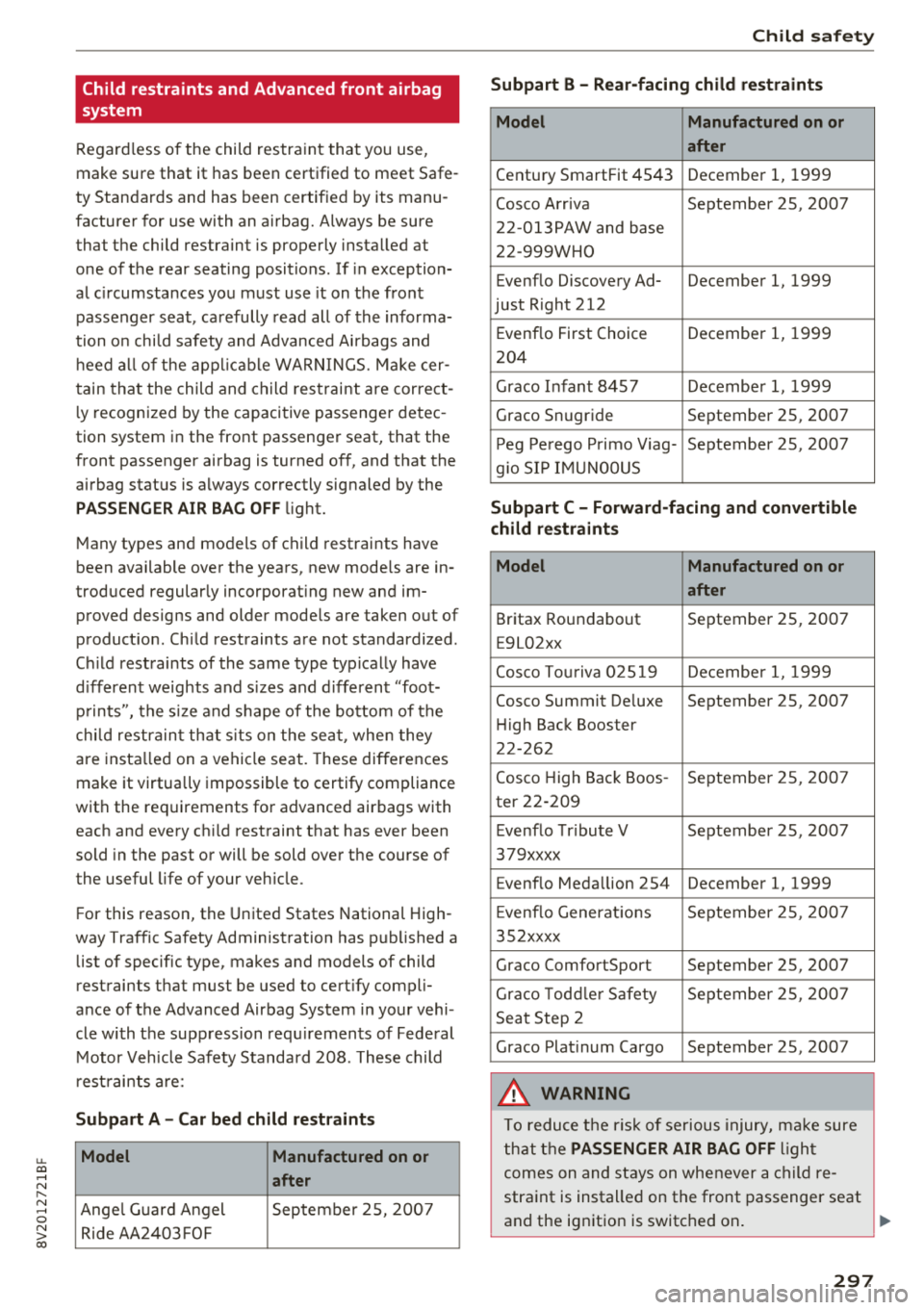
restraints are:
Subpart A -Car bed child restraints
Model Manufactured on or
after
Ange l Guard Angel September 25, 2007
Ride AA2403FOF
Child safety
Subpart B - Rear-facing child restraints
Model Manufactured on or
after
Century SmartFit 4543 December 1, 1999
Cosco Arriva September 25, 2007
22-013PAW and base
22-999WHO
Evenflo Discovery Ad- December 1, 1999
just Right 212
E venflo First Choice December 1, 1999
204
Graco Infant 8457 December 1, 1999
Graco Snug ride September 25, 2007
Peg Perego Primo Viag- September 25, 2007
g io SIP IMUNOOUS
Subpart C -Forward-facing and convertible
child restraints
Model Manufactured on or
after
Britax Roundabout September 25, 2007
E9L02xx
Cosco Touriva 02519 December 1, 1999
Cosco Summit De luxe September 25, 2007
Hi gh Back Booster
22-262
Cosco High Back Boos- September 25, 2007
ter 22-209
E venflo Tribute V September 25, 2007
379xxxx
Evenflo Medallion 254 December 1, 1999
E venflo Generations September 25, 2007
352xxxx
Graco ComfortSport September 25, 2007
Graco Toddler Safety September 25 , 2007
Seat Step 2
Graco Plat inum Cargo September 25, 2007
A WARNING
To reduce the risk of serious injury, make sure
that the
PASSENGER AIR BAG OFF l ight
comes on and stays on whenever a child re
straint is installed on the front passenger seat
and the ignition is switched on .
~
297