ESP AUDI A3 SEDAN 2018 Owner's Manual
[x] Cancel search | Manufacturer: AUDI, Model Year: 2018, Model line: A3 SEDAN, Model: AUDI A3 SEDAN 2018Pages: 404, PDF Size: 62.3 MB
Page 95 of 404
u. 00 ... N l' N ... 0 N > 00
injuries. When the vehicle enters drive ready
mode, the status message
e-no"' ~... ap
pears briefly in the instrument cluster display
and the needle in the power meter points to
READY ¢ page 9 5.
-Make sure that the selector lever is in the P
position and the ignition is switched off
when leaving the vehicle.
@ Note
-The high-voltage system can be damaged if
the vehicle underbody comes into contact
with the ground . Immediately drive your ve
hicle to an authorized repair facility and
have it inspected.
- The electric drive motor can become very
hot during operation . Do not stop the vehi
cle if there is oil, fuel residue or other flam
mable substances under or next to the vehi
cle.
Special considerations for the high-voltage
battery
Applies to: vehicles with plug-in hybrid drive
Please first read and note the introductory infor
mation and heed the warnings
¢page 92.
All batteries age with use and over time. There
are things you should know about the care of the
high voltage battery that will help it keep giving
you good service and reliability over time. Please
read and keep the following information in mind
while you enjoy the performance and economy of
your vehicle.
- Be sure to charge the high voltage battery be
fore leaving the vehicle parked and unused for a longer period of time. Ideally the high-voltage
battery should have a charge level between
40 % and 60 % when parked for a long t ime .
- If the battery charge level is below 3 %, never
park the vehicle for more than 21 days without
charging the high-voltage battery. Should you
have to park the vehicle for a long time, make
sure that the charge level is sufficient to help
prevent the battery from aging prematurely.
- Frequent and consecutive charging of the high
voltage battery when the charge level is above
e-tron
98 % can also decrease the capacity of the
high-voltage battery. Make sure the charge lev
el is be low 98 % when you start the charging
process.
- Should the vehicle be parked for longer than
2 days at temperatures below -13 °F ( -25 °C),
the high-voltage battery could free ze and not
be able to provide energy to the electric motor.
The battery will start working again, once it
warms up . The battery can be warmed up when
the outside temperature rises or when the vehi
cle is garaged appropriately. The battery will al
so warm up when being used (sw itching on the
air conditioner, the heater or by driving the ve
hicle) . Should you have to park your vehicle at
very low temperatures for longer than 1 day,
make sure that the high-voltage battery does
not freeze by parking the vehicle in a garage
that is heated or protected from the outside
temperature.
- The high-voltage battery can be damaged and
the capacity can be decreased when the vehicle
is parked for longer than 24 hours when the
ambient temperature is higher than 118 °F
(48 °C). Always make sure that the h igh-volt
age battery is not exposed to temperatures
above 118 °F (48 °C) for a long time.
- Never park the veh icle in areas that are lik ely to
be flooded, such as beaches or river banks, and
never drive the vehicle in WA TER, on flooded
roads or through water that is higher than the
bottom of the vehicle body. The high-voltage
battery, along with other vehicle components,
can be damaged severely if the high-voltage battery is exposed to open water especially for
a longer time. However, you can drive through
water on roads under certain conditions
~ page 72.
Failure to heed any of these requirements can
age the battery prematurely and lead to a perma
nent decrease of the high-vo ltage battery's ca
pacity.
(D Tips
Always make sure that the high-voltage bat
tery is not exposed to extremely low and high
temperatures as well as to water espec ially
for a longer time. Failure to protect and care
93
Page 106 of 404
e-tron
The gaso line engine is no longer ava ila b le be
cause there is not enough fue l. Drive immediate ly
to a gas station.
Fuel filler door emergency release
A pp lies to : ve hicles w ith plug- in hybrid drive
You must use the emergency re lease to open the
fue l filler door when there is a malfunct io n
c::;, page317 .
The tank is not vented. You can only f ill a small
amount of fuel in the tank.
~ Fill only unti l the automatic fue l pump nozzle
turns off for the first time when it is operated correctly.
Drive to an a utho rized Aud i de aler or a uth o rized
Audi Service Facility immediately to have the
malfunctio n corrected .
(D Tips
Pressure can escape if you open the tank ca p
after using the emergency release . This can
create noises.
Charging
General information
A pp lies to: ve hicles w ith plug -in hybrid drive
Two options are ava ilab le for cha rging the vehi
cle:
- Charge at a p ublic charging stat ion w ith a spe
c ia l charging cable*
c::;, page 106 .
-Charge with ho useho ld and industrial power
sockets using the Audi e-t ron c harg ing system
¢ page 106.
Environmental condition s when using the
Audi e-tron charging system
- Operat ing temperatu re : -13 °F (-25 °C) to 95 °F
(+35 °C)
- Humidity: 5% to 95%, non-co ndensing
- 13,000 feet (4,000 meters) maximum above
sea leve l
- Protected against dust and spray (IP54 (USA:
enclosure 3 R))
104
Warnings when using the charging system
&
Surfaces ca n become very hot when
i n d irect su nlight .
&~
Incorrect use increases the risk of
electric shock.
~¼
Do not use any extens ions co rds o r
c abl e reels.
~
Do not use any travel adapters.
~~
Do not use any power str ips.
~~~
Do not use any charg ing cables with
damage to the electronics or the
con necti ng w ires .
.&_ WARNING -
Sockets that are inst alled incorrect ly can
cause elect ric shock or fire when charging the
h igh -vo ltage battery using the vehicle charg
ing connection .
- Installation and set up of the household con
nection for the Audi e-tron charging system
may only be performed by a qualified e lec
trician. The q ualified electrician is thereby
fully responsib le for adhering to applicable
standards and regu lations.
- Make sure that the selected charg ing con
nection is suitable for drawing 16 amps .
- Make sure that the household soc ket is
grounded and shielded from water.
- The A udi e-tron charging system may only
be used with a prope rly grounded power
network. It cannot be used with non
gro unded power networks (s uch as IT net
wo rks) .
- Please follow the safety precautions in the
assembly instr uctions for the A udi cha rging
dock* or the Audi cha rging clips* .
.&_ WARNING
If you are not fam il iar with the socke t or the
e lectr ica l installation or it has not been
checked by qualified e xperts, never use i t fo r
cha rging. Even very low ch arg ing cu rrents can
cause ser ious damage and in particular fires if
the socket or electrical installation is in bad
Ill>
Page 107 of 404
u. 00 .-< N l' N .-< 0 N > 00
condition. If necessary, get expert assistance
from a qualified electrical installation special
ist.
A WARN ING
Incorrect handling of the connector contacts
can cause electric shock or fire.
- Do not touch the contacts for vehicle charg
ing port and for the Audi e-tron charging
system .
- Do not insert any objects in the vehicle
charging port or in the Audi e-tron charging
system .
- Protect the sockets and connectors against
any moisture, water and other fluids .
A WARNING
Using a damaged or incorrect charging cable
or a damaged or incorrect socket, using the
Audi e-tron charg ing system incorrectly or
disregarding the safety precaut ions could
cause short circu iting, electric shock, explo
sions, fires and burns .
- Do not use the Audi e-tron charging system
if it is damaged and/or dirty . Check the ca
ble and connector for damage and dirt be
fore using.
- T he Audi e-tron charging system must only
be connected to sockets that are installed
correctly and that are not damaged as well
as to electrical installations that have no
faults.
- Do not use any extension cords, cable reels,
power strips or (travel) adapters.
- Disconnect the Audi e-tron charging system
from the power network during a thunder storm.
- Do not modify or repair any electrical com
ponents.
- Never immerse the Audi e-tron charging
system and connectors in water.
- The Audi e-tron charging system must only
be cleaned when the control unit is com
pletely disconnected from the power supply
and from the vehicle. Use a dry towel to
clean .
e-t ron
-If a 110 volt household socket is used for
charging, only connect one vehicle at a time
to the same circuit. Use a different circuit if
an additional vehicle needs to be charged at
the same time. Note the maximum permit
ted current draw for the circuit . Contact a
qualified electrical technician if there is any
doubt .
A WARNING
The components in the Audi e -tron charg ing
system can trigger sparks which can cause
flammable or explosive fumes to ignite.
- To reduce the r isk of exp losions, espec ially
in garages, make sure the contro l unit is at
least 19 inches (SO cm) above the floor
when charging.
- Do not use the Audi e-tron charging system in areas at risk for exp losions .
- The Audi e-tron charging system is only suit ed for use on Audi vehicles and vehicles
within the Volkswagen Group . Using the de
vice on vehicles made by another manufac
turer is not authori zed.
@ Note
Make sure that you always use the suitable
power plug provided with the Audi e-tron
charging system for the corresponding mar
ket. Contact an authori zed Audi dealer or au
thorized Audi Service Facility for more infor mation .
(D Tips
-Only use the factory-provided charging ca
ble from Audi or the Volkswagen Group to
charge your vehicle .
- For an uninterrupted charging process, we
recommend only charging using sockets
that are connected to a separately protect
ed circuit .
- Using either NEMA sockets with a current
rating of at least 30 A or industrial sockets
in accordance with IEC 60309 when charg
ing is recommended.
1 05
Page 119 of 404
air conditioning also switches o ff immedi
ate ly.
Setting the timer
A ppl ies to: ve hicles w ith plug- in hybrid drive
By setting the departure time, you determ ine
when your vehicle shou ld reach the desired tem
perature. You ca n set the timer in the auxiliary air
conditioning menu in the Infota inment system .
Auxili ary climate c ontrol : sett ing the t imer
~ Se lect : IMENUI button> Vehicle > left control
button >
Au xiliar y A/C > right control b utton>
Program t imer .
~ Set the time and the date.
~ Press the I BACKI button .
~ Confirm the setting w ith the contro l knob to ac-
t ivate the t imer.
A./ appea rs i n the box .
When you reprogram a t imer, the next calendar
day is automat ically entered in the Infota inment
system. To act ivate the aux iliary climate control
fo r the next day, confirm t he sett ing(./ in the In
fotainmen t system).
Error messages
ea -The high -voltage battery charge level is too
low to heat/air condition the veh icle using only
e lectr ic powe r.
If one of the follow ing symbols appears in the
d isplay, then you cannot switch on the aux iliary
climate cont rol:
,....c -There is a system ma lfunction.
Bu -The fue l level is too low.
(D Tips
- You can set the t imer a m axim um of seve n
days in advan ce.
- You can operate the clima te con trol in the
vehicle inte rior w hen the h igh -vo ltage bat
tery is charging using the c harging timer
¢ page 110 . The climate cont rol output de
pends on the powe r socket capac ity.
::li -M ake s ure the time and date match in the .-<
~ Infotainment system settings so that the
N 8 timer can function properly¢ page 243.
N > 00
e-tron
- T he auxiliary climate contro l can contin ue to
ru n after the departure time is reached .
Cleaning/maintenance
information
App lies to : vehicles wi th plug-in hybrid drive
When was hing your vehicle with a pressure wash
er, always follow the operat ing instruct ions pro
v ided w ith the pressure washer. This is especially
i mportant in regard to the pressu re and spray ing
distance. Do not direct cleaning spray at the
c h arg ing unit in the rad iator g rille or at t he
c h arg ing dock*/charging cl ip*. Keep a d istance of
at least 16 in (40 cm) .
Do not remove snow and ice with a p ressure
washe r.
Never use cone nozzles or high pressu re nozzles .
The water temperature must not be above 60
°C.
Remove contaminants on the Audi e -tron system
with a dry towel.
Remove contaminants on the charging dock*/
c h arg ing clip* wi th a wet towe l dampened w ith
alcohol-free clean ing solution .
& WARNING
=
-Never immerse the Audi e-tron charging
system and connectors in water.
-
- The A udi e -tron charging system must on ly
be cleaned when the control unit is com
p letely disconnected from the power supp ly
and from the vehicle.
@ Note
To dec rease the risk of discolora tion, never
clean the charging doc k*/charging clip * with
harsh cleaning sol utions or so lutions that
contain alcoho l.
117
Page 120 of 404
Trail er to wing
Trailer towing
Driving with a trailer
General information
Your veh icle is primari ly intended for transport
ing peop le and luggage. Howeve r, if you dr ive
with a tra iler , follow the techn ica l requirements ,
the operation and driving tips, and the lega l reg
ulations.
Dr iving w ith a trailer affects the vehicle 's fuel
consumpt ion, performance and wear. It a lso re
quires higher concentration from the driver .
A WARNING
Do not transport any people in a trailer due to
the risk of fatal injury .
Technical requirements
Certain requirements must be met when towing
a trailer.
Trailer hitch
Only use a trailer hitch with a removab le ball
h itch mount and ball h itch. The tra ile r hitc h must
be pe rm it t ed for the vehicle, the tra iler and the
permitted tota l weight of the trailer being
pu lled . Above all, it must be secure ly and safe ly
attached to the vehicle trailer.
Never mo unt a t rai ler hitch on the bumper. The
trai ler hitc h must be mounted in a way that does
not impair the function of the bumper. Do not
make any changes to the exhaust system and the
brake system.
Check regu larly if the trai ler hitc h is securely
mounted . A lways follow the instructions given by
the trai ler hitch manufacturer .
Trailer brakes
If t he tra ile r has its own bra ke system, then fol
low the manufacturer specifica tions. Howeve r,
the brake system on the trai ler must never be
connected to the vehicle brake system.
118
Engine cooling system
D riving w ith a tra ile r means a higher load on t he
engine and the cooling sys tem. The coo ling sys
tem must be designed for additiona l load and
contain enoug h
coolant ¢@ .
@ Note
Longer incl ines cannot be driven wi tho ut a
suitab le cooling system, especia lly if the out
side temperatures are high . ot herwise, this
i ncreases the risk of eng ine damage.
Operating instructions
Several things must be noted when towing a
trailer.
Towing capacity
Yo ur vehicle can only be ope ra ted with class 1 or
class 2 trai le rs.
Load distribution
Poor cargo load and distr ib ution can negatively
i mpact vehicle handling . T o have the lowest im
pact as poss ible, load the tra ile r according to
t h ese cr ite ria :
- Store objects preferably in the vehicle luggage
compartment . The vehicle should a lways carry
the heaviest poss ib le load and the trailer
should have t he lig htest poss ible load .
- Dist ribute the load in the t railer so that the
heavy objects a re as close to the axle as poss i
ble.
- Secu re objects from s lid ing o ut of place.
- Ut il ize the maximum permitted tongue we ight
if poss ible .
Tire s
Set the tire pressure on your vehicle for a "full
load"; see the tire pressure
st icker ¢ page 341.
If necessary, also adjust the t ire pressure on the
trailer acco rding to the manufactu rer's recom
mendat ion.
Winter tires should be mounted on the vehicle and on the trailer during w inter temperatures .
Page 121 of 404
Outside mirrors
If yo u cannot see the traffic behind the tra iler
with the standard exterior mirrors, then you
must attach additiona l exterior mirrors . Adj ust
them so you have a sufficient visibility behind
you .
Exterior lighting
Follow the legal regulat ions regard ing the light
ing equipment on your trailer . Contact an author
ized Audi dealer or authorized Audi Service Facili
ty for more information.
Before starting to drive, check all lighti ng equip
ment on the hitched trailer.
The headlight range contro l adjusts automatical
l y to the light range of the headl ights.
Safety chains
Make sure the safety chains are correctly applied
when pull ing a trailer . The chains should hang
enough so that the trailer can dr ive around
curves. However, they must not touch the
g ro und .
(D Tips
-Use chocks whe n parking on incl ines if the
trailer is load ed.
- We recommend also hav ing the veh icle in
spected between the inspect ion intervals if
you are towing a trailer frequently.
- Avo id driving with a trailer during the vehi
cle break- in period .
Driving with a trailer
Driving with a trailer requires extra caution.
Speed
Adhere to the legal speed limits. Follow the legal
regulations specific to the country.
As the speed increases, the driving stability of
the trai ler decreases. Therefore you should not
exceed the maximum legal speed limit when
u. there are unfavorable road, weather and/or wind 00
~ conditions . This especially applies when driving
~ downhill.
0 N > 00
Trailer towing
You m ust always reduce your speed as soon as
you notice even the slightest swinging motion of
the tra iler. Never try to "stra ighten out" the tra il
er by acce lerating.
T he weight distribution is very poor if the vehicle
is empty and the trai ler is loaded . However if you
must drive under these circumstances, then dr ive
especially slowly .
Brakes
Brake in a timely manner. Downshift before driv
ing down hill so that t he engine can assist with
braking ~.&. .
When using a trailer w it h overrun brakes, first
brake gently then quickly. This reduces the r isk of
jerking while braking if the trailer wheels lock up .
Engine coolant temperature
Pay attention specifically to the coo lant tempera
ture display when there are high outside temper
a tur es, and when driving on long inclines
~page 11. Shift to a hig her gear in a timely man
ner .
A WARNING
= -
Constant braking causes the brakes to over-
heat and substantially reduces braking per
formance, increases braking distance or caus
es complete failure of the brake system.
119
Page 122 of 404
Ass is tance sy stem s
Assistance systems
Speed warning system
Description
Applies to: veh icles with speed warning system
The speed warning system helps you to stay be
low a specified maximum speed that can be set,
changed or deleted in the Infotainment system.
The speed warning system warns you if you are
exceeding the maximum speed that you have set .
A warni ng tone will sound as soon as your speed
exceeds the sto red value slight ly. The
[OJ (USA
models) ;[;] (Canada models) indica to r li gh t and
the co rresponding message appear in the inst ru
ment cluster display at the same time. The
[C]
(USA models)/ [ej (Canada mode ls) indicator
light and the message turn off w hen the vehicle
speed drops below the stored maximum speed .
Sett ing a threshold is recommended if you would
like to be reminded when yo u reach a certa in
maximum speed . Situations where you may want
to do so include driving in a country with a ge ner
al speed limit or if there is a specified maximum
speed for winter tires.
Setting the warning thr eshold
.. Select in the Infotainment sys tem : IMENUI but
ton
> Vehicle > left contro l button > Driver a s
sistance
> S peed warning > Manual.
@ Tips
Regardless of the speed warning system, you
should always monitor yo ur speed using the
speedometer and make sure you are following
the legal speed limit.
120
Cruise control system
Switching on
Applies to: vehicles with cruise control system
The cruise control system makes it possible to
drive at a constant speed starting at 15 mph (20km/h) .
0
f
~
0
Fig . 1 21 Ope rat ing lev er : cru ise co ntrol sys te m
0
"' N
~ CD
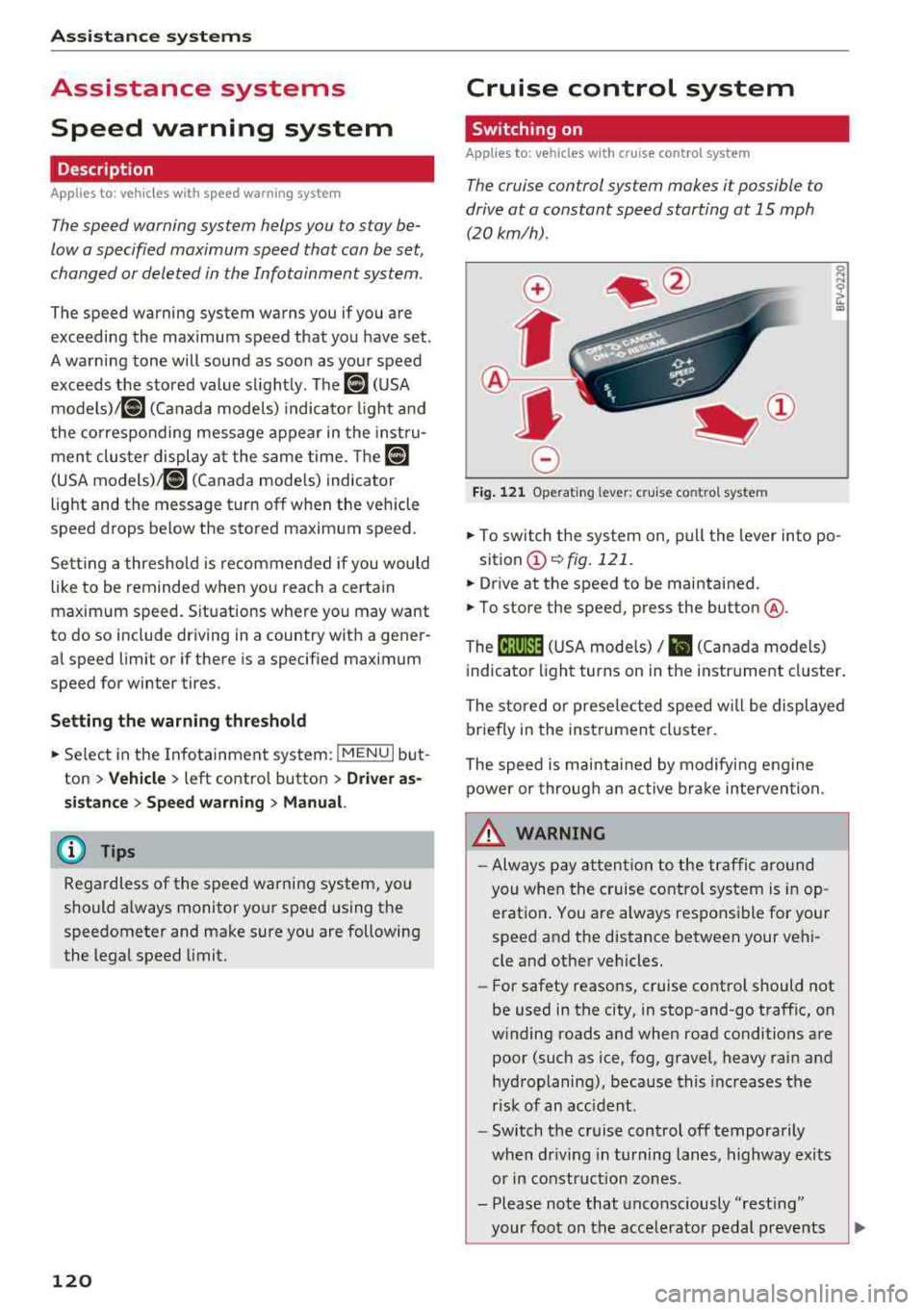
.. To switch t he system on, pull the lever into po -
sition
CD ¢ fig. 121 .
.. Drive at the speed to be maintained .
.. To store the speed, press the button @.
The
[ij;(l)~1j ( U SA mode ls) / 51 (Canada models)
indicator light turns on in the instr ument cluster .
The stored or prese lec ted speed w ill be displayed
briefly in the instrument cluster .
The speed is mainta ined by modifyi ng engine
power or through an active bra ke intervention.
&_ WARNING
- Always pay at ten tion to the traffic a ro und
you whe n the cruise contro l system is in op
erat ion . You are always respons ible fo r your
speed and the distance between your vehi
cle and other vehicles.
-For safety reaso ns, cruise cont rol should not
be used in the city, in stop-and-go traff ic, on
w inding roads and when road conditions are
poor (such as ice, fog, gravel, heavy rai n and
hydroplaning), because this increases the
r isk of an accident.
-Switch t he cr uise control off temporarily
when dr iv ing in turning lanes, highway exits
or in construction zones .
- Please note that unconsciously
"rest ing"
your foot on the accelerator pedal prevents
-
Page 124 of 404
Ass is tanc e system s
A WARNING
You should only resume the stored speed if it
is not too high for existing traffic condit ions.
Otherwise you can increase the r isk of an acci
dent .
Lap timer
Introduction
Applies to: vehicles with lap timer
You can measure and analyze lap times with the
lap timer in the display.
Opening th e lap timer
i.. Open the first Vehicle tab (t rip computer) using
t h e
l
whee l.
i.. Applies to: vehicles with analog instrument
cluster: Press the
[gJ button on the m ultifunc
tion steering whee l and select
Lap t imer in the
menu .
... Applies to: vehicles with Audi virtual cockpit: on
the multifunction steering wheel, select: left
contro l button
> Lap times .
Operating the lap t ime r
... On the multifunction steering whee l, turn the
l eft thumbwhee l
(J) ¢page 13 or (D ¢page 16
unt il the desired menu item is d isplayed in the
instrument cluster .
... Press the left thumbwheel to confirm the selec
tion .
A WARNING
Your foc us should always be on d riving your
vehicle safely. As the drive r, you have com
ple te responsibi lity for safety in traffic. Only
use the functions s uch as the lap timer in such
a way that you always maintain comp lete con
trol over your vehicle in all traffic situations.
(D Tips
You can ret rieve information from the trip
computer while the lap timer stopwatch is
running .
122
-
Lap times and timing
Applies to: vehicles with lap timer
Requirement: the lap time r must be open
¢ page 122.
Timing laps
... To start timing, select Lap 1 - pre ss OK or S tart
lap 1
in the menu .
i.. Applies to: vehicles with Audi virtual cockpit: to
start t iming au tomatically when yo u start dr iv
ing, select
S tart lap 1 by driving off or St art by
dri ving off in the menu .
... To measure the lap time, select New lap - pre ss
OK or New lap
in t he menu . This starts timing
the next lap at the same t ime .
After completing, the d ifference between the
l ast lap and the previous best lap time will be in
dicated with
a" -"/ . or "+ "fll .
Pausing timing and displaying a split time
i.. To insert a pause m , sele ct Pau se in the menu.
i.. To cont inue tim ing, select Pre ss OK to re sume
or Re sume in the menu .
... T o display a sp lit time, select Split time in the
menu. The split time
r~1 appears for approxi
mate ly 10 seconds in the instrument cluster .
The timing of the current lap continues.
Re setting timing
... Using the mult ifunct ion steer ing whee l, select
Reset or Reset time s in the menu.
(D Tips
-A max imum of 30 lap t imes (analog instru
ment cl uster) or 99 lap times (Audi virtua l
cockpit*) can be measured.
- If tim ing is paused, you can continue i t later
even if you switch the ignition off.
- Saved lap times cannot be individually de
leted from the total results .
- T he save d la p timer va lues w ill remain after
switching the ignition off.
Page 126 of 404
Ass is tance sy stem s
General information
Applies to: vehicles with Audi adaptive cruise contro l/Audi pre
sense front
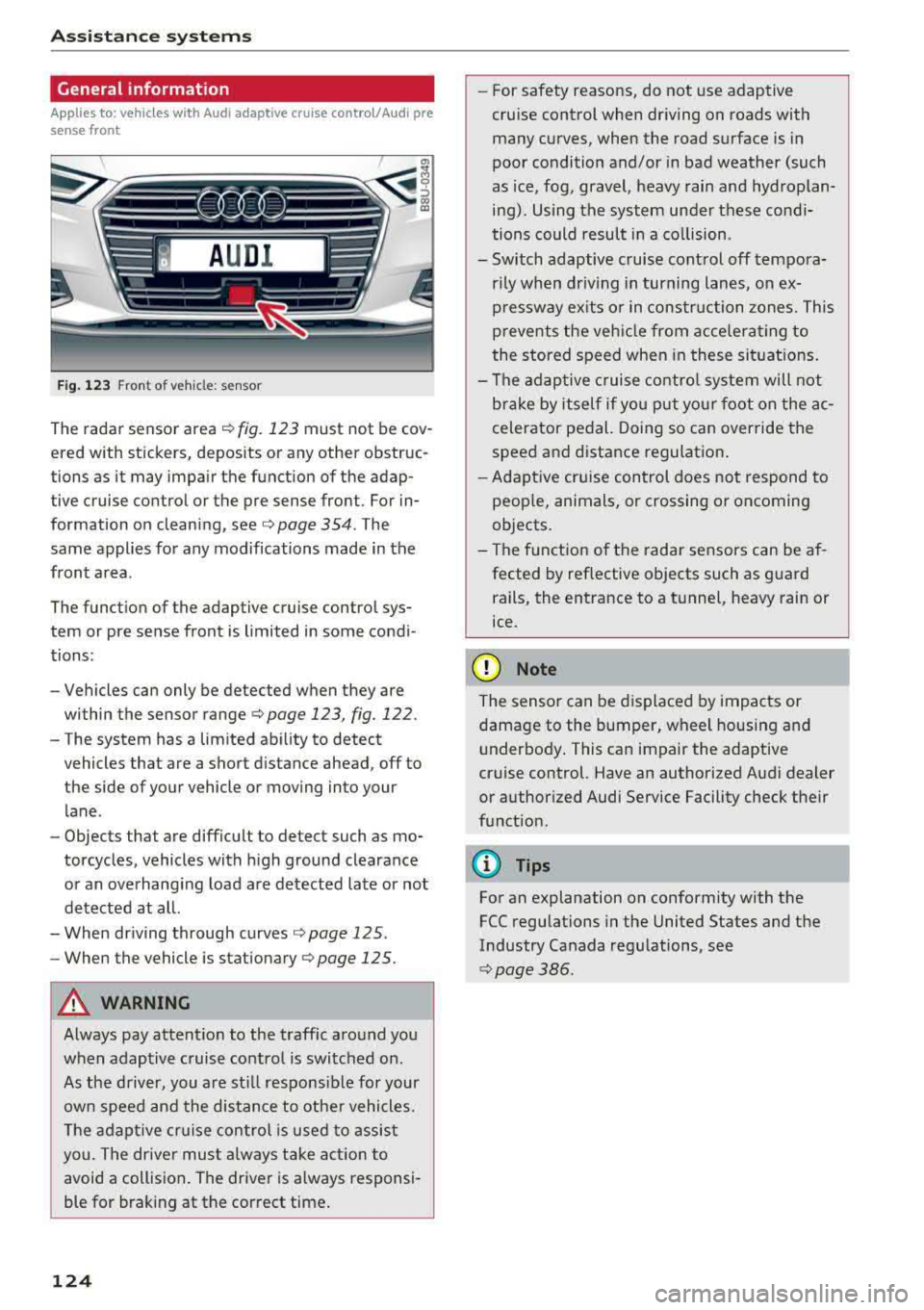
Fig . 1 23 Front o f veh icle: sensor
The rada r sensor area r:!) fig. 123 must not be cov
ered with stickers, deposits or any other obstruc
tions as it may impair the function of the adap
tive cruise control or the pre sense front . For in
formation on cleaning,
see ¢ page 354 . The
same applies for any modifications made in the
front area .
The funct ion of the adaptive cruise contro l sys
tem or pre sense front is limited in some condi
tions:
-Vehicles can only be detected when they are
within the sensor range
¢page 123, fig. 122 .
-The system has a lim ited abi lity to detect
vehicles that are a short d istance ahead , off to
the side of your vehicle or moving into your lane .
-Objects that are difficu lt to detect such as mo
torcycles, vehicles with h igh ground clearance
or an overhang ing load are detected late or not
detected at all.
-When dr iving through curves ¢ page 125.
-When the vehicle is stationary ¢ page 125.
A WARNING
Always pay attent io n to the traffic aro und you
when adaptive cruise control is switched on .
As the driver, you a re st ill respons ible for your
own speed and the distance to othe r vehicles.
Th e adapt ive cr uise control is u sed to assis t
you . The driver must a lways take act ion to
avoid a collision . The driver is always responsi
ble for brak ing at the correct time .
124
-For safety reasons, do not use adaptive
cru ise control when dr iving on roads with
many curves, when the road surface is in
poor condition and/or in bad weather (such
as ice, fog, gravel, heavy rain and hydroplan
ing). Using the system under these cond i
tions could result in a co llision .
-Switch adaptive cruise cont rol off tempora
rily when dr iv ing in turning lanes, on ex
pressway ex its or in construction zones. This
prevents the veh icle from accelerating to
the stored speed when in these situat io ns.
-The adap tive cruise contro l system will not
brake by itself if you put yo ur foot on the ac
celerator pedal. Doing so c an override the
speed and distance regulation .
- Adapt ive cruise control does not respond to
peop le, animals, or crossing or oncoming
objects .
-The funct ion of the radar se nsors can be af
fected by ref lective objects such as guard
rails, the entrance to a tunnel, heavy rain or
ice .
~ Note
The sensor can be d isplaced by impacts or
damage to the bumper, wheel housing and underbody . This can impair the adaptive
cruise control. Have an authorized A udi dealer
or authorized Audi Service Facility check their
f u nct ion.
@ Tips
For an explanation on conformity with the
FCC regulations in the United States and the
Industry Canada regu lations, see
¢ page 386 .
Page 130 of 404
Ass is tance sy stem s
Interrupting cruise contr ol while driving
• Move the leve r into position @. The message
AC C: s tandb y appears . Or
• Press the brake pedal.
• To resume th e stor ed speed, move the lever in
to position
@ .
Inter rupt ing crui se contr ol when stopped
• Push the lever away from you into position @.
The message
A CC : s tandb y appears.
• To resume cruise control , press the brake pedal
and pull the l ev er toward you into position @.
A WARNING
It is dangerous to activate cruise control and
resume the stored speed when the current
road, traffic or weather conditions do not per
mit this. This increases the risk of an accident.
Setting the distance
App lies to: vehicles with Audi adaptive cruise contro l
,
0
Fig. 131 Oper ating lever: setting the distance
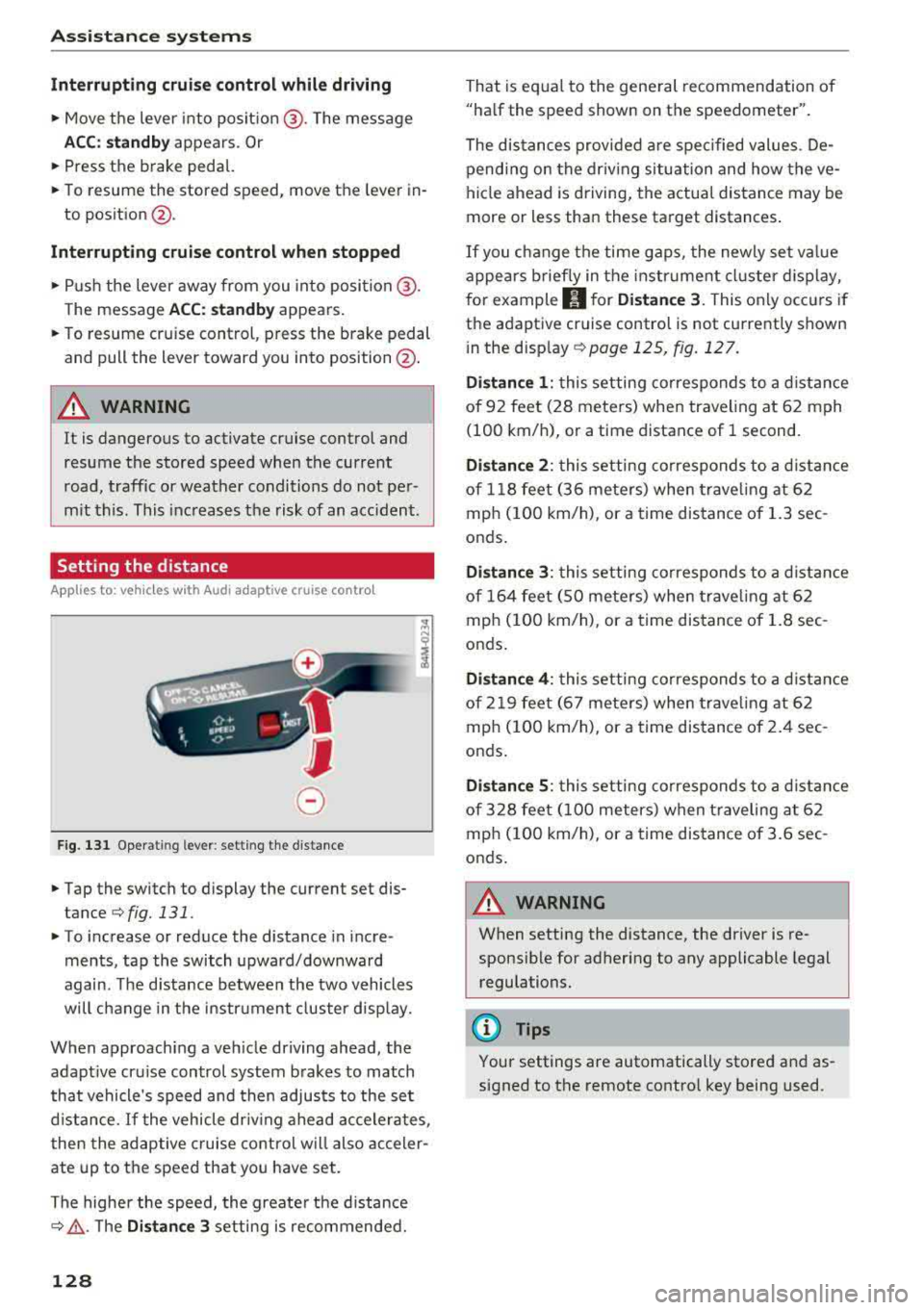
• Tap the switch to display the current set dis
tance
¢fig. 131.
• T o increase or reduce the distance in incre
ments, tap the switch upward/downward
again. The d istance between the two vehicles
will change in the instr ument cluster disp lay.
When approaching a veh icle driving ahead, the
adaptive cru ise control system brakes to match
that vehicle's speed and then adjusts to the set
d istance.
If the vehicle dr iv ing ahead accelerates ,
then the adaptive cruise control will also acceler
ate up to the speed that you have set.
The higher the speed, the greate r the d istance
c::;, ,&. . The Di stan ce 3 setting is recommended.
128
That is equa l to the general recommendation of
"ha lf the speed shown on the spe edometer".
The distances provided a re spec ified values . De
pending on the dr iv ing situation and how the
ve
hicle ahead is driving, the actual distance may be
more or less than these target distances .
If you c hange the time gaps, the newly set va lue
appears b rief ly in the instrument cl uster d isplay,
for example
II for Di stan ce 3. This on ly occurs if
the adaptive cruise control is not currently shown
i n the display
c::;, page 125, fig. 127.
Di stance 1 : this setting corresponds to a d istance
of 92 feet (28 meters) when traveling at 62 mph
(100 km/h), or a time distance of 1 second.
Di stanc e 2: this setting corresponds to a d istance
of 118 feet (36 meters) when trave ling at 62
mph (100 km/h), or a time distance of 1.3 sec
onds.
Di stanc e 3: this setting corresponds to a d istance
of 164 feet ( SO meters) when trave ling at 62
mph ( 100 km/h), or a time distance of 1.8 sec
onds .
Distanc e 4: this setting corresponds to a d istance
of 219 feet (67 meters) when trave ling at 62
mph ( 100 km/h), or a time distance of 2 .4 sec
onds .
Distance 5 : this setting corresponds to a d istance
of 328 feet ( 100 meters) when t raveling a t 62
mph ( 100 km/h), or a time distance of 3 .6 sec
onds .
A WARNING
When setting the distance, the driver is re
sponsible for adhering to any applicable legal
regulations.
(D Tips
-
Your settings are automatically stored and as
signed to the remote contro l key being used.