light AUDI A3 SEDAN 2018 Owner's Manual
[x] Cancel search | Manufacturer: AUDI, Model Year: 2018, Model line: A3 SEDAN, Model: AUDI A3 SEDAN 2018Pages: 404, PDF Size: 62.3 MB
Page 37 of 404
~ To lock the vehicle, press the ~ button ¢.&_ .
~ To unlock the vehicle, press the Iii button
¢ fig. 20.
When locking the vehicle with the centra l locking
switch, the fo llowing applies :
- Open ing the doors and the l uggage compart
ment lid from the
outside i s not possib le for se
curity reasons , such as when stopped at a light.
- T he L ED in the cent ral lock ing switch turns o n
when a ll doo rs a re closed and locked.
- Front doo rs: you can open the doors indiv idual
ly from the ins ide by p ulling the doo r hand le.
- Rear doors*: pu ll on the door hand le
once to
u nlock the door. Pull on the doo r hand le
again
to open t he door.
- In the event of a crash w ith airbag dep loyment,
the doors un lock automatically to a llow access
to the vehicle .
A WARNING
-Read and following all warnings ¢.& in De
scription on page 31 .
- The powe r locking sw itch works w ith the ig
nition off and a utomatically locks the entire
vehicle when
the [@] button is p ressed.
- T he centra l locking switc h is inoperative
when the vehicle is locked from the o utside .
- L ocked doors make it mo re difficult for
emergency worke rs to get into the vehicle,
which puts lives at risk. Do not leave anyone
behind in the vehicle, especially children.
(D Tips
Your veh icle locks automat ica lly w hen it
reaches a speed of 9 mph (15 km/h) (Auto
Lock)
¢ page 31. You can unloc k the vehicle
aga in using the
63 button in the centra l lock
ing sw itch.
u. 00 .-< N l' N .-< 0 N > ll Th is fun ctio n is not a vail abl e in a ll co untries. 00
Open ing and cl osing
Central locking settings
You con set which functions ore controlled by the
central locking system .
~ Select in the Infotainment system: I MENU! but
ton
> Vehicle > lef t control button > V ehicle
setting s> Central lo cking .
Door unloc king
-you can decide if All doors or
o n ly the
Dr iver's door shou ld unlock. The lug
gage compartment lid also unlocks when
All is
selected . If you select
Driver' s door in a veh icle
with a conve nience key*, on ly the doo r whose
hand le you p ull will u nlock .
If you se lect
Driver 's door , all the doors and lug
gage compartment l id w ill unlock if you press the
~ button on the remote co ntrol key twice .
Long press to open windo ws -the convenience
opening/closing function can be switched on/off
¢ page 40 .
Fold mirror s* -if you switch the function on, the
ex ter ior mirrors fold in automatically when the
vehicle is locked .
Confirmation tone -when checked off./, a tone
will sound when yo u lock the vehicle
l).
35
Page 45 of 404
LL co .... N
" N .... 0 N > co
-Visibility to the r ear is limited when operat
ing the power top. Avoid operating the top
while driving in reverse .
(D Note
-To prevent damage to the power top:
- do not store any objects in the power top
storage compartment .
- make sure there is enough space above
the vehicle when opening or closing the
power top .
- To reduce the risk of damage, make sure
there are no sensit ive objects in the power
top storage compartment's range of
mo
tion.
(D Tips
- To prevent the vehicle battery from draining unnecessari ly, do not open or close the
pow
er top repeatedly when the engine is switch
ed off.
- A message will appear in the instrument cluster if there is a malfunction in the power
top
¢ page 44 .
-The powe r top can also be operated manual
l y temporari ly if there is a malfunction
¢ page 46, Power top emergency opera
tion .
An authorized A udi dealer or author
ized Audi Service Facility should diagnose
and correct the cause of the ma lfunction as
soon as possible.
- If the vehicle is parked with the power top
open, the vehicle interior is not protected
from damaging weather or unauthorized ac
cess. lock any items you leave behind in the
luggage compartment. Close the power top
before leaving the vehicle .
- The side windows automat ically lower
slight ly when opening or closing the power
top .
Powe r top
Power top convenience opening/closing
Applies to : veh icles w it h power top
Fig. 33 Turnin g the key to open and close
Conven ien ce opening with the dri ver do or
lock
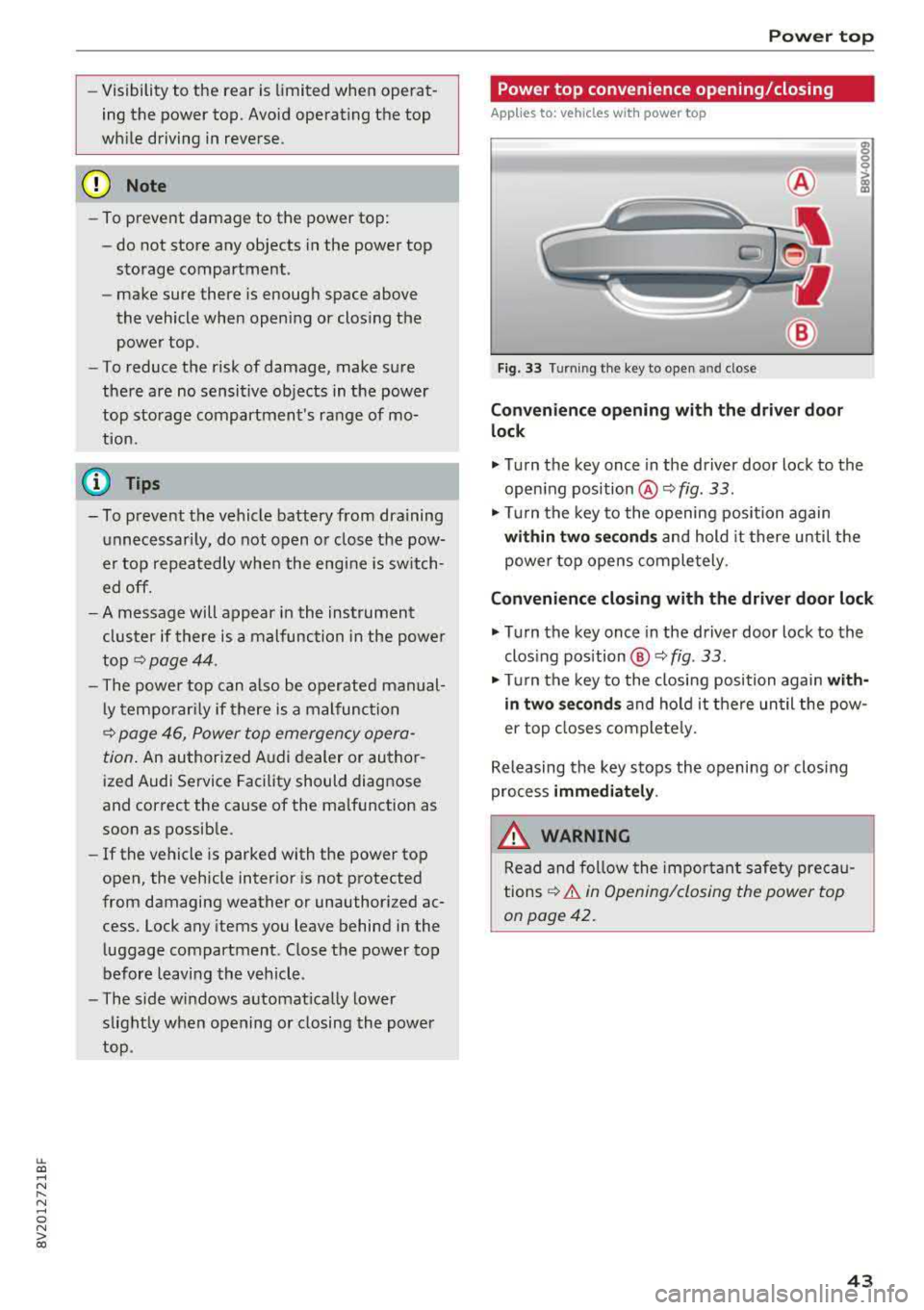
.,. Turn the key once in the driver door lock to the
open ing position
@ ¢fig . 33 .
.,. Tur n the key to the opening position again
within tw o second s and hold it there until the
power top opens comple tely .
Conven ienc e closing with the driver door lock
.,. Turn the key once in the driver door lock to the
clos ing position @¢
fig. 33.
"Tu rn the key to the closing position again w it h
in two se co nd s and hold it there until the pow
er top closes completely.
Releasing the key stops the opening or clos ing
process
immediat ely .
.&_ WARNING
Read and follow the important safety pre ca u
tions
¢ & in Opening/closing the power top
on page 42.
43
Page 47 of 404
LL co .... N
" N .... 0 N > co
Power top: operation currently not possible.
Outside temperature too low
The power top will not open whe n the te mpe ra
ture iS belOW
-5 Of (-15 ° ( ),
Power top: operation currently not possible .
Speed too high
If you go above 30 mph (SO km/h), t he power
top cannot be operated d ue to safety reaso ns.
Reduce the vehicle speed to close or open the
power top.
Power top: not secur e. Speed too high
This message appea rs if you go above 30 mph
(SO km/h) when ope rating the power top . Reduce
the vehicle speed and operate the power top
again .
Power top: malfunction! You can continue dri v·
ing
This message appears i f there is a ma lf u nct ion in
the system. Try to open or close the power top
again.
If the message st ill appea rs, have the mal
f u nction co rrected by an autho rized Aud i dealer
or author ized Audi Se rvice Facility .
A WARNING
Never drive whe n the powe r top is not locked
co rrectly . The w ind from driving cou ld cause
t he power top to open . This can resul t in inju
r ies an d da m age to the vehicle.
Wind deflector
Ap plies to: veh icles with wind deflector
The wind deflector reduces air movement in the
pas senger compar tment in order to make driving
more comfortable .
Fig. 36 Re ar of th e ve hicle: insert ing t he w ind deflecto r (1)
Power top
~ a, N 0 > a, m
Fig. 37 Rea r o f th e ve hicle : in sert ing t he w ind deflec to r (2)
The w ind defl ecto r is located i n the l uggage com
partmen t in a storage b ag*.
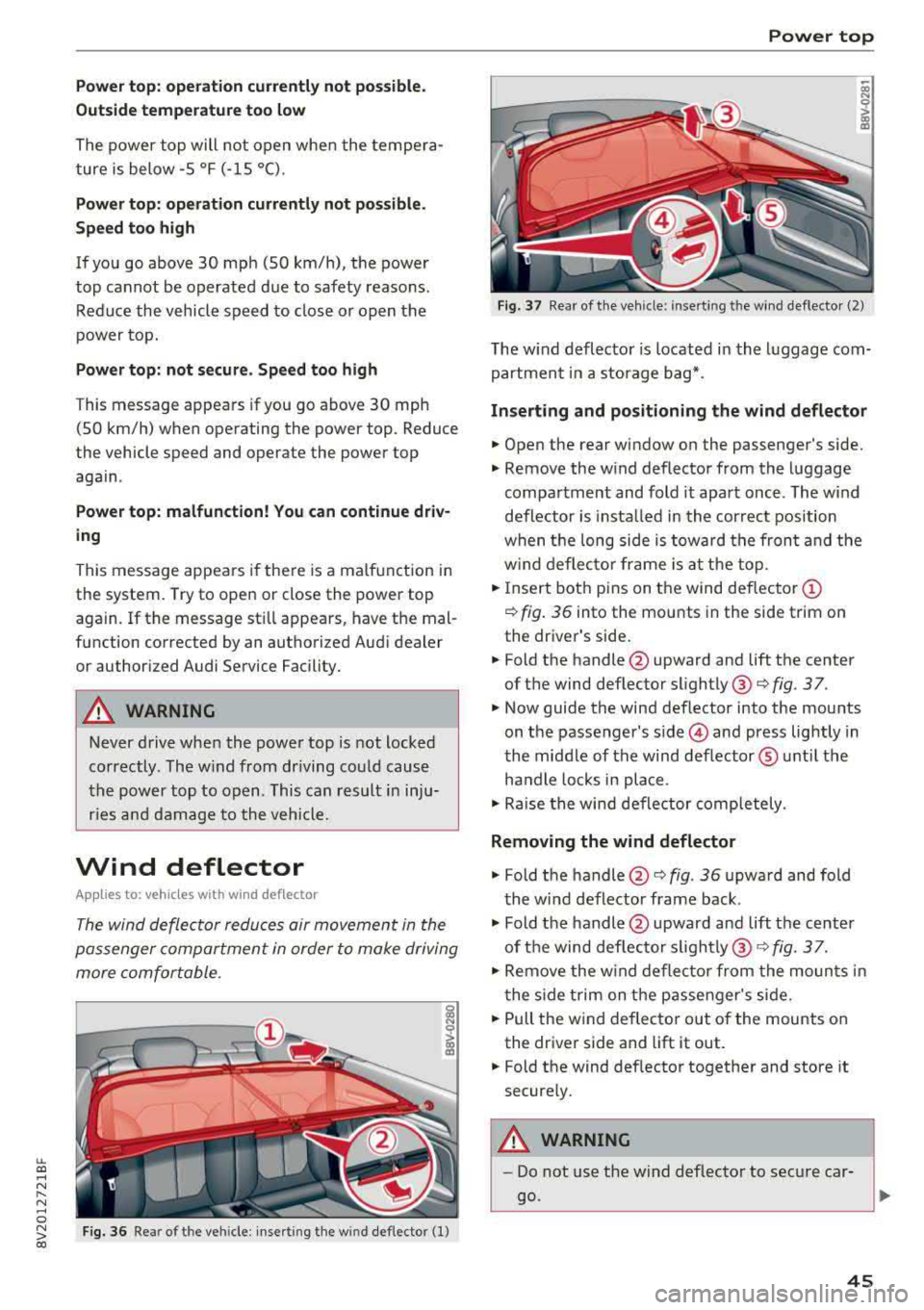
Inserting and positioning the wind deflector
.. Open the rear wi ndow on the passenger 's side.
.. Remove the w ind deflector from the l uggage
compa rtment and fold it apart once . The w ind
defle ctor is insta lled in the correct position
w hen t he long side is tow ard th e fron t and the
w ind deflec to r fra me is at th e to p .
.. Insert bot h pins on t he wind deflec tor (D
¢ fig . 3 6 into the mounts in the side trim on
the dr iver's side .
.. Fold the handle @upward and lift t he center
of t he wind deflector slightly @¢
fig. 3 7.
.. Now guide the wind deflector into the mou nts
on t he passenger's
side © and press lightly in
t he middle of the wind def lector ® unt il the
ha ndle loc ks in place .
.. Rai se the win d de flector comp letely .
Removing the wind deflector
.. Fold t he handle @¢ fig. 36 upwa rd and fold
t he wi nd deflector frame back .
.. Fold the handle @upwar d an d lift t he center
of t he wind def lec to r
sligh tly @ ¢ fig. 3 7.
.. Re move the w ind defle ctor from the moun ts in
t he side trim on the p assen ger's si de .
.. Pull the w ind deflec to r out of the mounts on
the dr iver side and lift it out .
.. Fold the wind def lector toget her and store it
secure ly.
A WARNING
=
- Do not use t he wind deflecto r to sec ure car -
go.
~
45
Page 51 of 404
LL co .... N
" N .... 0 N > co
Lights and Vision
Exterior Lighting
Switching lights on and off
F ig . 4 7 Instrument p anel: l ig ht sw itc h w ith buttons
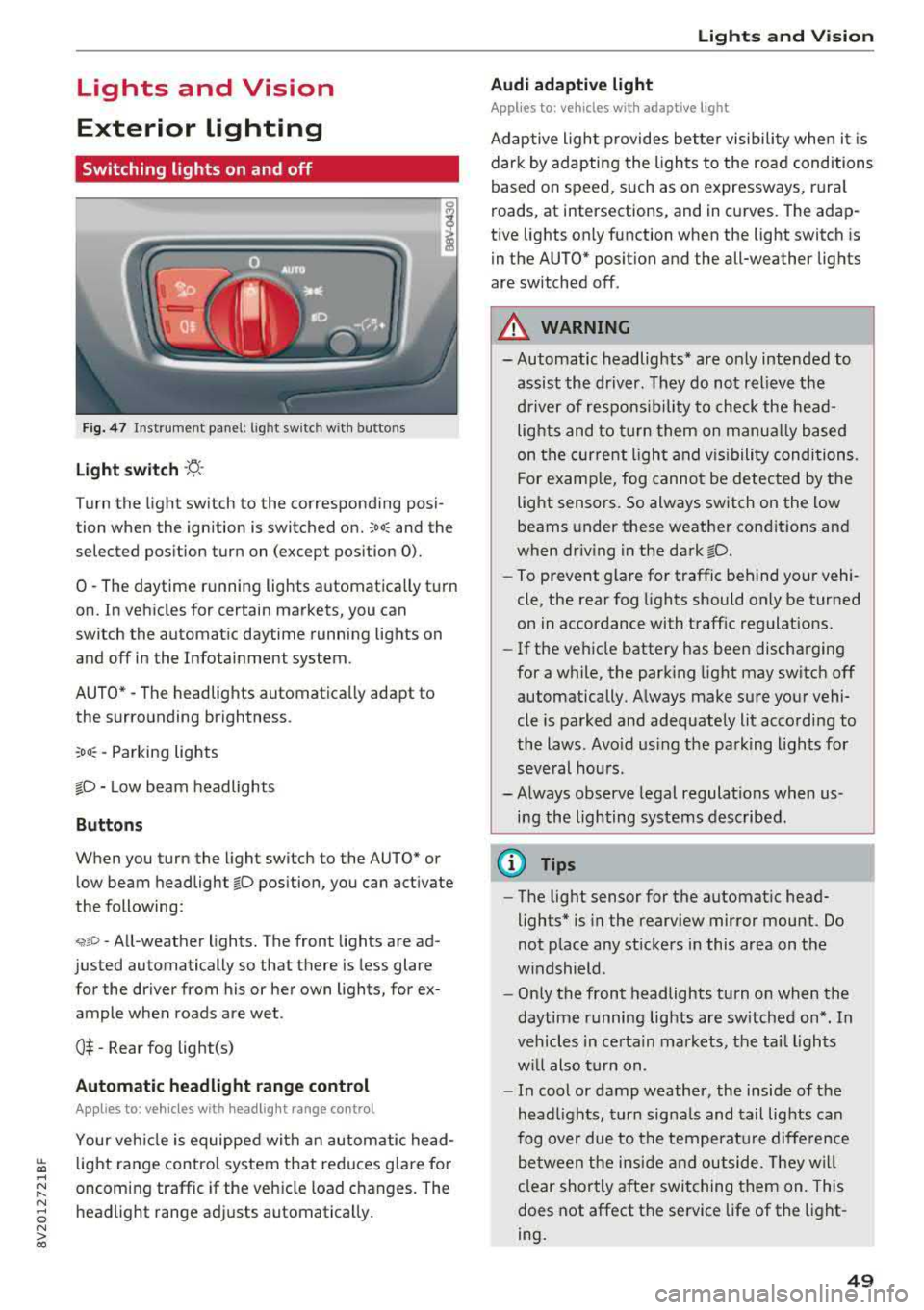
Li ght switch ·'A ·
Turn the light sw itch to the corresponding posi
tion when the ignition is switched on.
;oo : and the
selected pos ition turn on (except pos ition 0).
0
-The daytime r unning lights automat ica lly t urn
on. In veh icles for certain markets, you can
switch the automat ic daytime running lights on
and off in the Infotainment system.
AUTO *
-The headlights automatica lly adapt to
the surro unding brightness.
:oo : -Parking lights
fD -Low beam headlights
Buttons
When you turn the light switch to the AUTO" or
low beam headlight
fD position, you can activate
the following:
<,if.D -All-weather lights. The front lights are ad
justed automatically so that there is less glare
for the driver from his or her own lights, for
ex
ample whe n roads are wet .
0$ -Rear fog light(s)
Automatic headlight range control
Applies to: ve hicles with headlig ht range control
Your veh icle is equipped with an autom atic head
light range control system that red uces g lare fo r
oncoming traffic if the veh icle load c hanges. The
headlight range ad justs automatica lly .
Lights and V ision
Audi adaptive light
Appl ies to: vehicles wit h adaptive light
Adaptive ligh t provides bet ter visibili ty whe n it i s
dark by adapting the ligh ts to the road conditions
based on speed , such as on e xpressways, rura l
roads, at intersections, and in c urves. The adap
t ive lights only function when the light switch is
i n the AUTO* posit io n and the all-weather lig hts
are switched off.
A WARNING
-
- Automatic headlights * are on ly intended to
assis t the driver. They do not relieve t he
d river of re spo nsibility to check the head
lights and to t urn them on m anua lly b ased
on t he cur re nt ligh t an d visibility condition s.
For e xam ple, fo g canno t be detecte d by the
light senso rs . So always switch on the low
beams under these weather con dit ions an d
when dr iv ing in the dark
fD.
-To prevent glare for traffic behind yo ur vehi ·
cle, the rear fog lights shou ld only be turned
on in accordance with t raff ic regulat ions.
- If the ve hicle battery has been discharging
for a while , the park ing light may switch off
automatically. A lways make su re you r vehi
cle is parked and adequately lit acco rding to
the laws . Avo id us ing the pa rking ligh ts for
sev eral hou rs .
- Always observe legal regula tions when us
ing the lighting sys tems desc ribed.
@ Tips
- The lig ht sensor for the automat ic head
lights* is in the rearview mirror mount . Do
not p lace any st ickers in this area on t he
w indshield .
- Only the front headlights turn on when the
daytime running lig hts are sw itched on *. In
veh icles in ce rtain markets, t he tai l lights
w ill also turn on .
- In cool or damp weather, the inside of the
hea dlights, t urn sign als and tail lights can
fog ove r due to t he tempera ture diffe rence
b etween the insi de an d outside. They will
clear shortly after swit ching them on. This
does not affect the service life of the light
ing .
49
Page 52 of 404
Lights and Vi sion
Turn signal and high beam lever
The lever operates the turn signals, the high
beams and the headlight flasher .
®
,
I
@
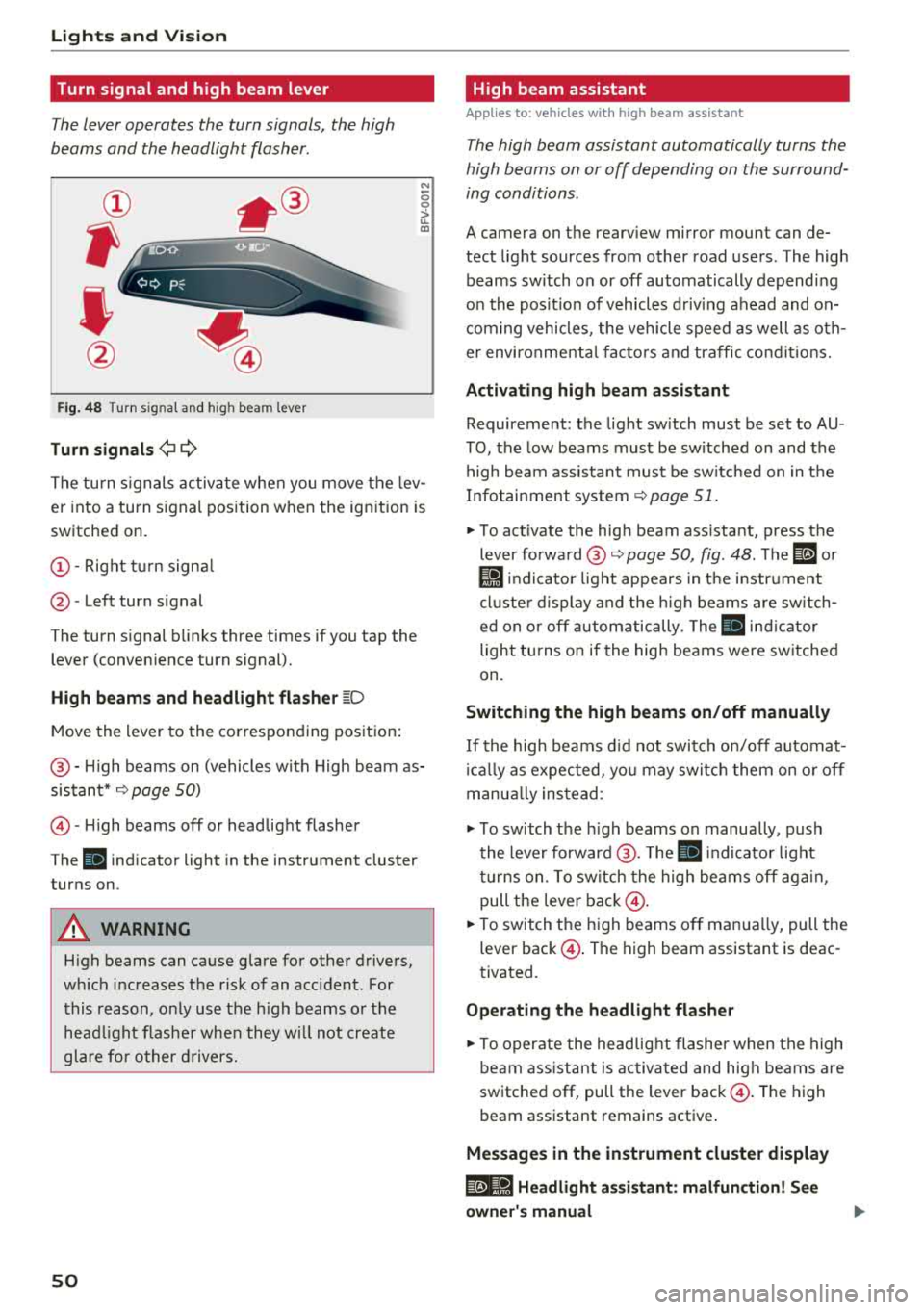
Fig . 48 Turn s ig nal and hig h bea m le ver
Tu rn signals ¢i Q
N
0 0
> u. a,
The turn s ignals activa te whe n you move the lev
er into a turn signal position w hen the ignition is
switched on.
(D -Right tu rn signa l
@-Left turn signal
The turn signal b links three times if you tap the
lever (conven ience turn signal).
High b eams and h eadlight flash er ~D
M ove the lever to the corresponding position :
@-High beams on (vehicles w ith High beam as
sistant*
9 page 50)
© -High beams off or headlight flasher
The
ii indicator light in the instrument cluster
turns on .
A WARNING
High beams can cause g lare for other drivers,
w hi ch increases the risk of an accident . For
this reason, o nly use the high beams or the
head light flashe r whe n they w ill not create
glare fo r other d rivers.
so
High beam assistant
App lies to : vehicles wit h high bea m ass istant
The high beam assistant automatically turns the
high beams on or off depending on the surround
ing conditions .
A camera on the rearv iew mirror mou nt can de
tect light sources from other road users . The high
beams sw itch on or off automatically depend ing
on the pos it ion of vehicles d riving ahead and on
com ing vehicles , the veh icle speed as well as o th
e r environme nta l fac to rs and traffic co ndit io ns.
Activating high beam assistant
Requirement: the light sw itch must be set to AU
TO, the low beams must be sw itched on and the
high beam assistant must be sw itched on in t he
Infotai nment system
9 page 51.
"" To act ivate the hig h beam ass istant, press the
lever forward @
9 page 50, fig. 48 . The ID or
Ji1 indicator light appears in t he i nstr ument
cl uste r d isplay and the h igh beams are sw itch
ed on o r off autom atically. The
ii ind icator
light tu rns on if the high beams were sw itched
on.
Switching the high beams on /off manually
If the high beams d id not swi tch on/off automat
i ca lly as expected, yo u may switc h them on o r off
manua lly ins tead :
""To switch the h igh beams on manually, push
the lever forward @. T he
ii indicator light
tu rns on. To sw itch the high beams off aga in ,
pull the leve r
back@.
""To switch t he high beams off man ua lly, pull the
lever
back @. The high beam assistant is deac
tivated .
Operating the headlight flasher
""To operate the headlig ht flashe r when the high
beam ass istant is activated and hig h beams a re
switched off, pull the lever
back @. The high
beam assistant remains active .
Messages in the instrument cluster display
@e-8·1 Headlight assistant : malfun ction! See
owner' s manual
Page 53 of 404
LL co .... N
" N .... 0
Drive to an authorized Audi dea le r o r aut horized
Audi Service Facility immediately to have the
malfunct ion corrected. You can still switch the
high beams on or off manually.
11 Hea dlight a ssistant : currently unav ailable.
No camera view
a:a Headlight a ssistant : currently unavailable.
Camera view restricted due to surroundings .
See owner 's manual
The camera view is b locked, fo r example by a
s tic ker o r debris. Ple ase clean t he w indshie ld.
The senso r is located i n the inter ior rearv iew m ir
ro r mount . D o not place any stickers in this a rea
on the windsh ield.
,& WARNING
High bea m assistan t is only i ntended to assist
t he driver. The dr iver is still re sponsib le for
contro lling the headlights and may need to
switch them on and off manually depend ing
on light and visib ility conditions. It may be
necessary to ope rate them manua lly in s itua
tions such as:
- In adverse weather cond itions such as fog,
heavy ra in, b low ing snow or sp raying water .
- On roads where oncoming traffic may be
partially obsc ured, such as expressways .
- If there a re road users w ith poor lighting ,
such as bicyclists.
- In tight c urves and on steep hills .
- In poor ly li t areas.
- W it h stro ng reflec tors, such as si gns.
- If the ar ea of the windsh ield near the s enso r
is fogged ove r, dirty, i cy or covere d w it h a
sti cker.
Adjusting the exterior lighting
The fu nctions are adjusted in t he Infotainment
system.
• Se lect in the Infotainment system: ! M ENU I but
ton
> Vehicle > left contro l butto n > Vehicle
settings
> Exterior lighting .
N > l) This fun ctio n is not a vailab le in all c oun tries. co
Lights and V ision
Automatic headlights*
Yo u ca n adjus t the following se ttings in the Au
tomatic headlights
men u:
Activation time* -yo u can adjust if th e he ad
li gh ts sw itc h on
Early , Medium or Late acc ording
t o th e se nsitivity o f the light sensor .
Headlight assistant *· you can switch the high
beam assis tant* on and off.
Entry/ exit lighting*
You can switch the entry/exit lighting" on and
off . When it is dark, it illum inates the area
aroun d th e vehicle whe n unlock ing the vehicle
and af ter sw itchi ng off th e i gnition and opening
t h e dr iver 's doo r.
The entry/exit lighting only works whe n it is da rk
and the light sw itch is i n the
AUTO * position .
Daytime running lights1l
The daytime running lig hts can be turned on and
off. When daytime running lights a re t urned on,
the lights will stay on continuously whenever the ignition is sw itched on .
Emergency flashers
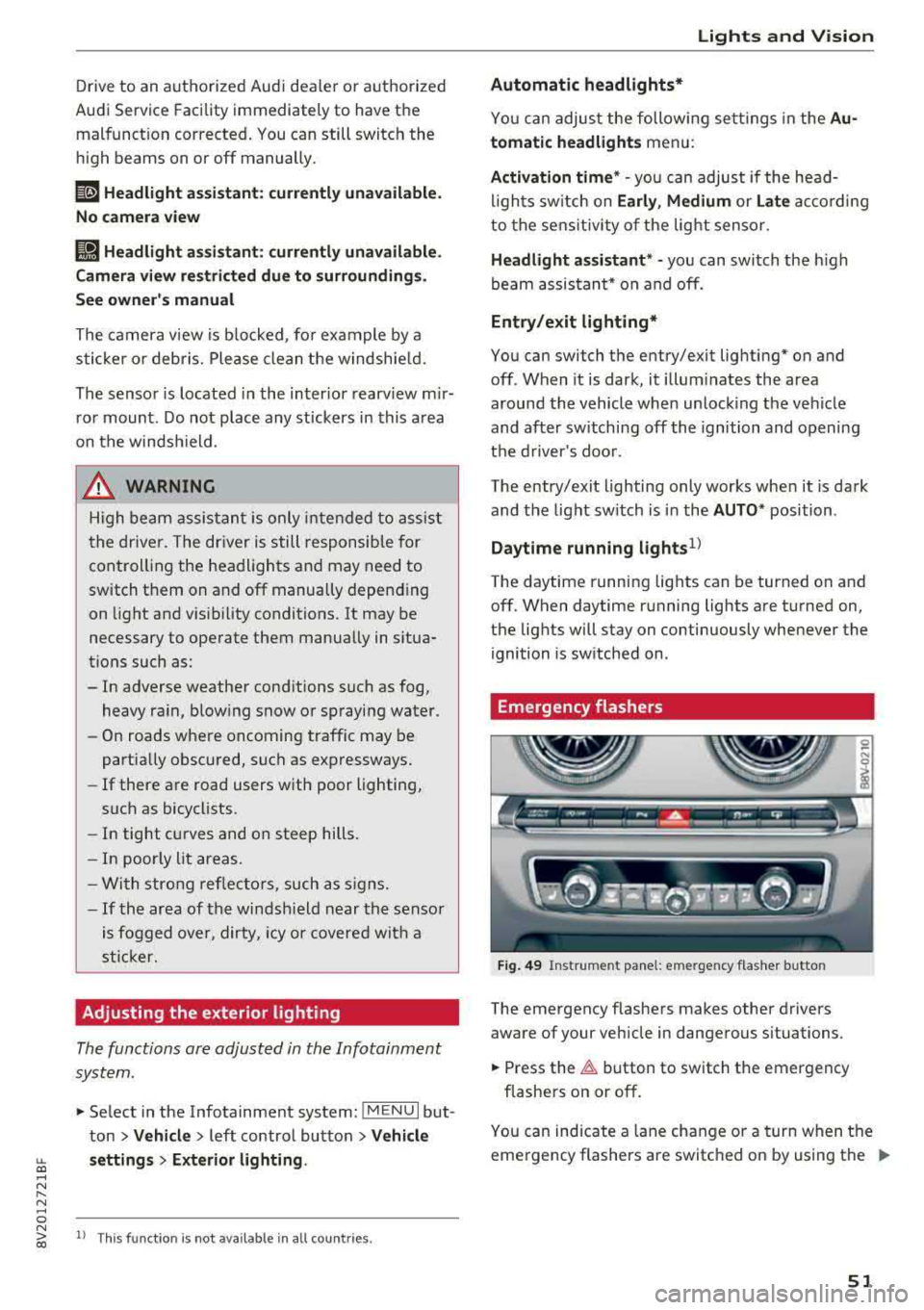
Fig. 49 Instrume nt pa nel: e merge ncy f las her b utto n
The emergency flashe rs makes other drivers
aware of your ve hicle in dange rous situations.
• Press the ~ button to switch the emergency
flashe rs on or off .
0
i
You can ind icate a lane cha nge or a turn when t he
eme rgency flashers a re switc hed on by using the
..,_
51
Page 54 of 404
Lights and Vision
turn signal lever. The emergency flashers stop
temporarily .
The emergency flashers also wo rk when the igni
tion is turned off.
Interior lighting
Front interior lighting
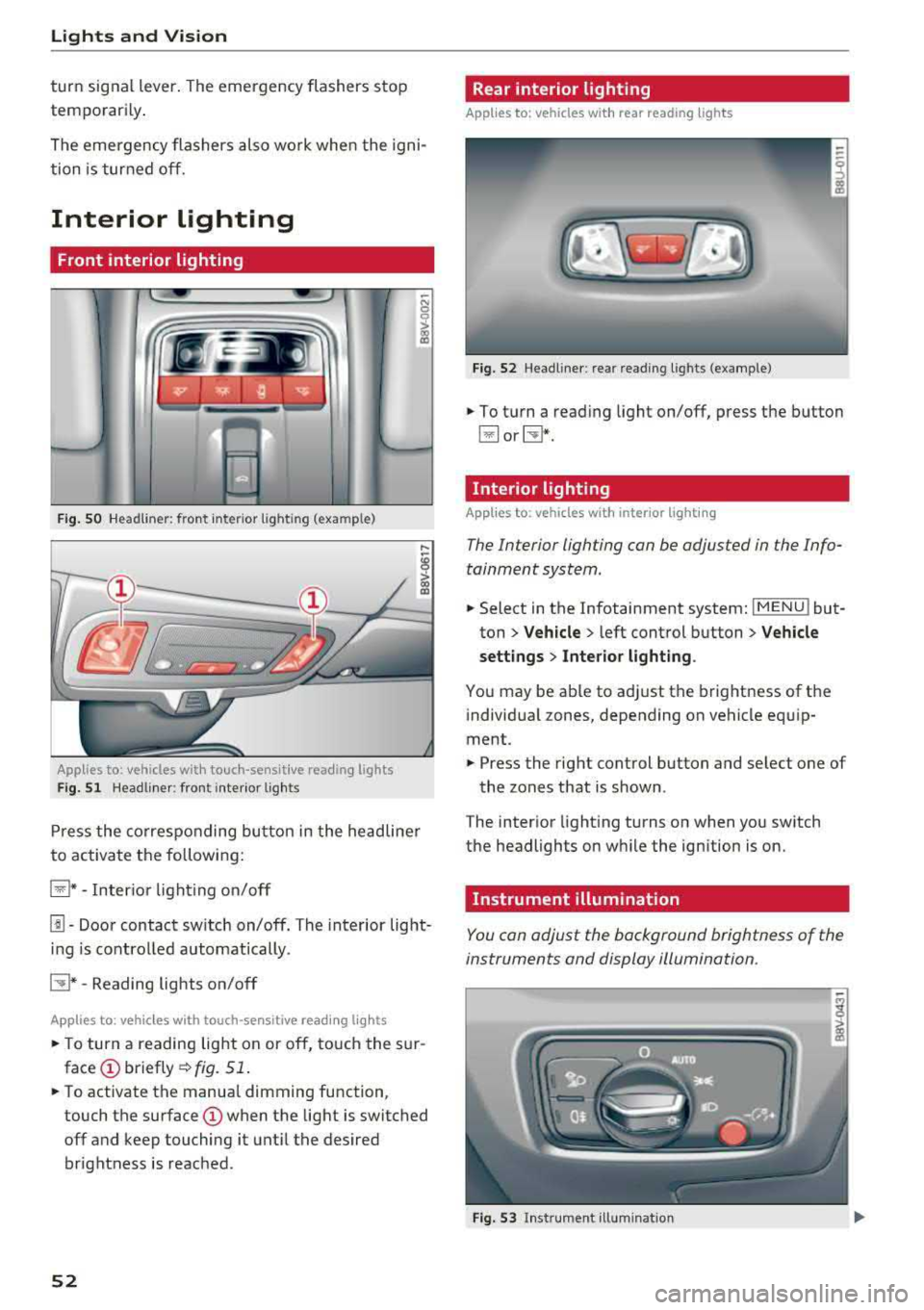
F ig . SO Headl iner: fr ont inte rior lig htin g (exa mple)
:ti ?
Applies to: vehicles with touch-sensitive reading lights
F ig. 51 Headli ner: front inte rior lig hts
Pr ess the co rres ponding bu tton in the he adline r
to activate the following:
~ * -Inter io r li ght ing o n/off
[!] -Door contact sw itch on/off. The interior light
i n g is controlled automatically.
CTI* -Reading lights on/off
App lies to: veh icles with touch-sensitive reading lights
.. T o turn a reading lig ht on or off, to uch the s ur
face (!) briefly ¢fig. 51 .
.. To activate the manua l dimming function ,
touch the
surface (!) when the light is switched
off and keep touching it unt il the desired
brightness is reached .
52
Rear interior lighting
Applies to: vehicles with rear reading lights
Fi g. 52 Headli ne r: re ar reading l ights (example)
.. To t urn a read ing light on/off, press the button
~ or~ *-
Interior lighting
Applies to: vehicles with interior lighting
The Interior lighting can be adjusted in the Info
tainment system .
.. Select in the Infotainment system: IMENU ! but
ton
> Vehicle > l eft cont rol button > Vehicle
settings
> Inte rior light ing .
You may be ab le to ad just the brightness of the
i ndivid ua l zones, depending on vehicle eq uip
ment .
.. Press the right control button and se lect one of
the zones that is shown .
The inter ior light ing turns on when you sw itch
the headlights on w hile the ign ition is on.
Instrument illumination
You can adjust the background brightness of the
instruments and display illumination.
Fi g. 53 In st ru m en t ill uminat ion
Page 55 of 404
LL co ..... N
" N ..... 0 N > co
~ Press the knob to release it.
~ Turn the knob toward "-"or"+" to reduce or in
crease the brightness.
~ Press the knob again to return it to its original
position.
(l') Tips
Depending on vehicle equipment, the instru
ment illumination (needles and gauges) may
turn on when the lights are off and the igni
tion is sw itched on . The illumination for the
gauges reduces automat ica lly and eventually
turns off as brightness outside increases. This
function reminds the driver to turn the low
beams on at the appropriate time.
Vision
Adjusting the exterior mirrors
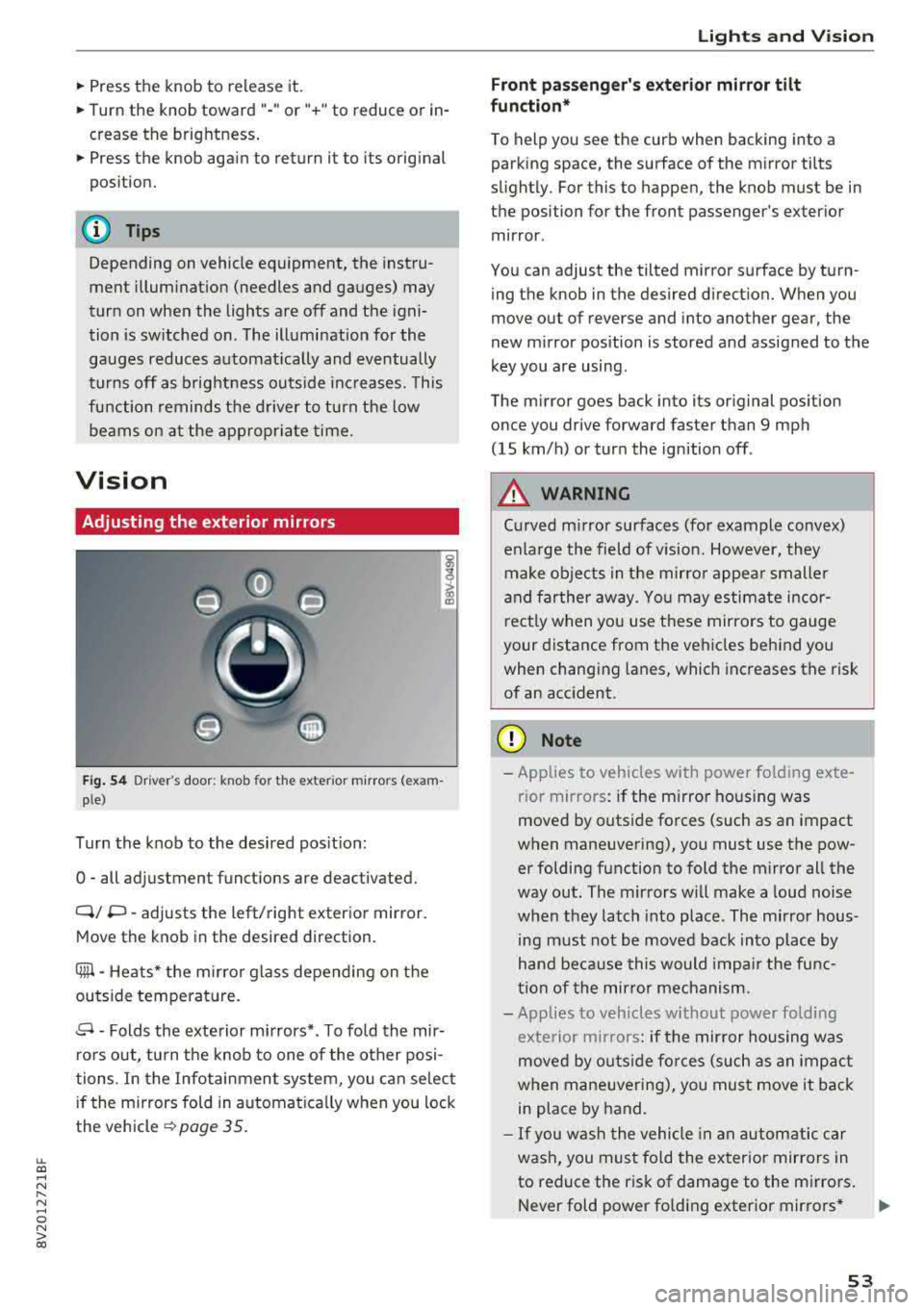
Fig. 54 Driv er's door: k n ob for the ex ter ior mirrors (exam
p le)
Turn the knob to the desired position:
0
-all adjustment functions are deactivated.
Q/ P -adjusts the left/right exterio r mirror.
Move the knob in the desired direction .
Cilll -Heats* the mirro r glass depending on the
outside temperature.
.9 -Folds the exterior mirrors* . To fold the mir
rors out, turn the knob to one of the other posi
tions . In the Infotainment system, you can select
if the mirrors fold in automat ically when you lock
the vehicle
~ page 35.
Lights and Vision
Front passenger 's exterior mirror tilt
function*
To help you see the curb when backing into a
parking space, the surface of the mirror tilts
slightly. For this to happen, the knob must be in the position for the front passenger's exterior
mirror .
You can adjust the tilted mirror surface by turn ing the knob in the desired direction. When you
move out of reverse and into another gear, the
new mirror position is stored and assigned to the
key you are using.
The mirror goes back into its original position
once you drive forward faster than 9 mph
(15 km/h) or turn the ignition off .
A WARNING
Curved mirror surfaces (for example convex)
enlarge the field of v is ion. However, they
make objects in the mirror appear smaller
and farther away . You may estimate incor
rectly when you use these mirrors to gauge
your distance from the vehicles behind you when changing lanes, which increases the risk
of an accident .
(D Note
-Applies to vehicles with power fo lding exte
r ior mirrors : if the mirror hous ing was
moved by outside forces (such as an impact
when maneuvering), you must use the pow er folding function to fold the mirror all the
way out. The mirrors will make a loud noise
when they latch into place. The mirror hous
ing must not be
moved back into place by
hand because this would impair the func
tion of the mirror mechanism.
- Applies to veh icles without power folding
exterior mirrors : if the mirror housing was
moved by outside forces (such as an impact
when maneuvering), you must
move it back
in place by hand.
- If you wash the vehicle in an automatic car
wash, you must fold the exterior mirrors in
to reduce the risk of damage to the mirrors .
Never fold power fo lding exterior mirrors*
.,.
53
Page 56 of 404
Lights and Vision
by hand. Only fo ld them in and out using
the power controls.
(D Tips
If the power adjustment fails, both mirrors
can be adjusted by hand by pressing on the
edge of the mirror surface .
Dimming the mirrors
Your vehicle is equipped with a manual or auto
matic* dimming rearview mirror .
Manual dimming rearview mirror
~ Pull the lever on the bottom of the mirror back .
Automatic dimming rearview mirror*
~ The interior and exterior mirrors dim automati
cally when light shines on them, for example
from headlights on a vehicle behind you .
.&_ WARNING
Applies to: vehicles with automa tic dimming rearview
m irror
Electro lyte fluid can leak out from broken
m irror glass. This liquid can irritate the skin,
eyes and resp iratory system.
If there is con
tact with the fluid, flush immediate ly with
plenty of water. Consult a physician if neces
sary.
- Repeated or long-term exposure to electro
lyte fluid can lead to irritation of the air
ways, especially in peop le with asthma or
other respiratory condit ions. Take deep
breaths immediate ly after leaving the vehi
cle or, if this is not possible, open all of the
doors and windows as wide as possible.
- If electrolyte fluid enters the eyes, flush
them thoroughly with a large amount of
clean water for at least 15 minutes and then
seek medical attention .
- If electrolyte flu id comes into contact w ith
the skin, flush the affected area with clean
water for at least 15 minutes and then clean
with soap and water and seek med ica l at
tention. Clean affected clothing and shoes
tho roughly before wearing again.
54
-
-If the fluid was swallowed and the person is
conscious, flush the mouth w ith water for at
least 15 minutes. Do not induce vomiting
unless this is recommended by medical pro
fessionals . Seek medical attention immedi
ately .
(D Note
Applies to: veh icles with automatic d imming rearv iew
mirro r
Electrolyte fluid can leak out from broken
mirror glass. This liquid damages plastic sur
faces . Clean this liquid as quickly as possible
with a wet sponge.
@ Tips
App lies to: veh icles with automatic d imm ing rearv iew
mirro r
-If the light reaching the rearview mirror is
obstructed, the automatic d imm ing mirror
will not function correctly,
- The automatic dimming m irrors do not dim
when the interior lighting is turned on or
the reverse gear is selected.
Sun visors
(~--- )
Fig. 55 Left side: sun viso r (example)
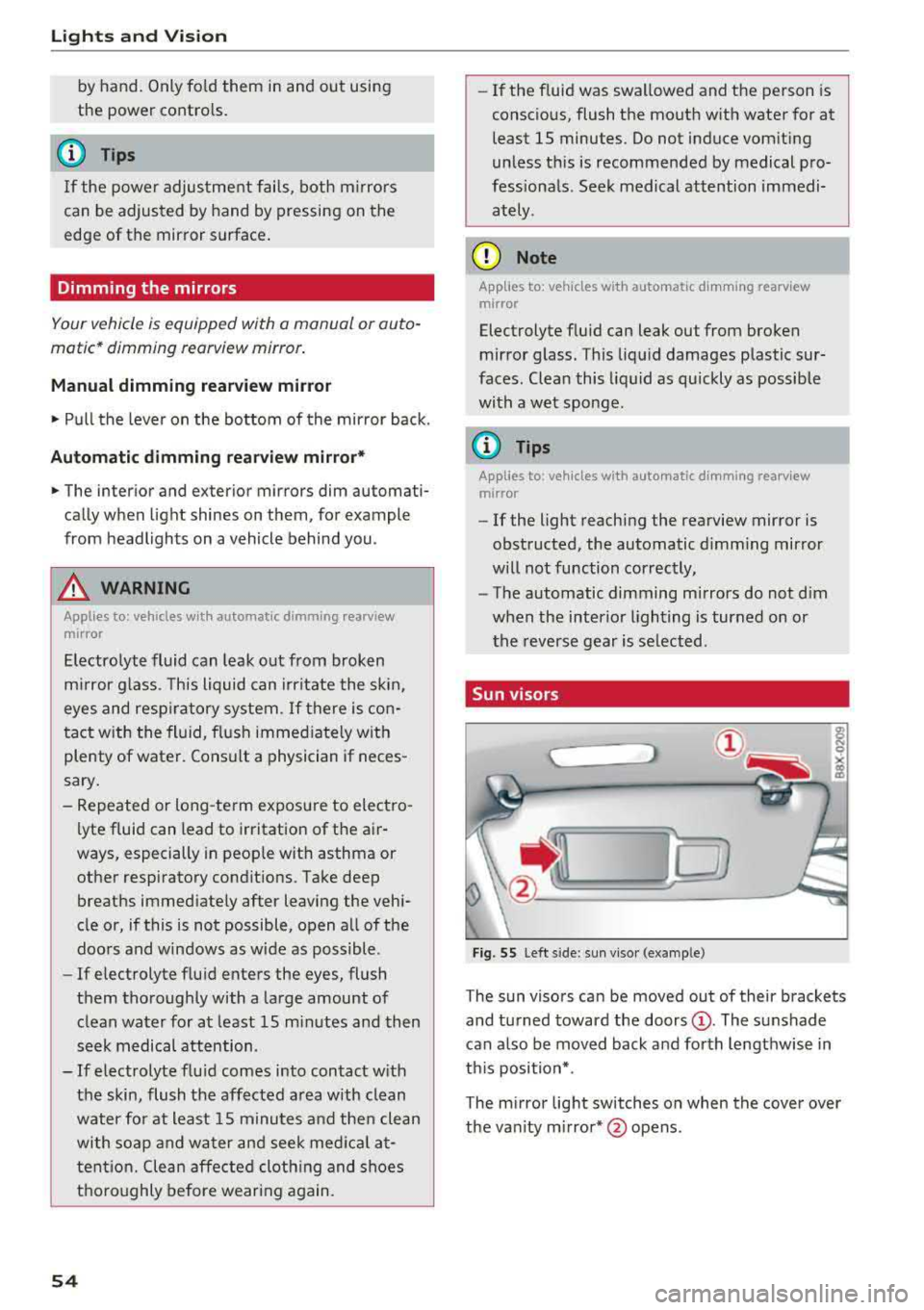
The sun visors can be moved out of their brackets
and turned toward the doors
(D. The sunshade
can a lso be moved back and forth lengthwise in
th is position*.
The mirror light switches on when the cover over
the van ity m irror* @opens .
Page 57 of 404
LL co .... N
" N .... 0 N > co
Windshield wipers
Switching the windshield wipers on
Fig. S6 Windshield wiper lever
Fig. S7 Rear window wiper• operatio n
t® I
a @
lll ®
Iii @
•®
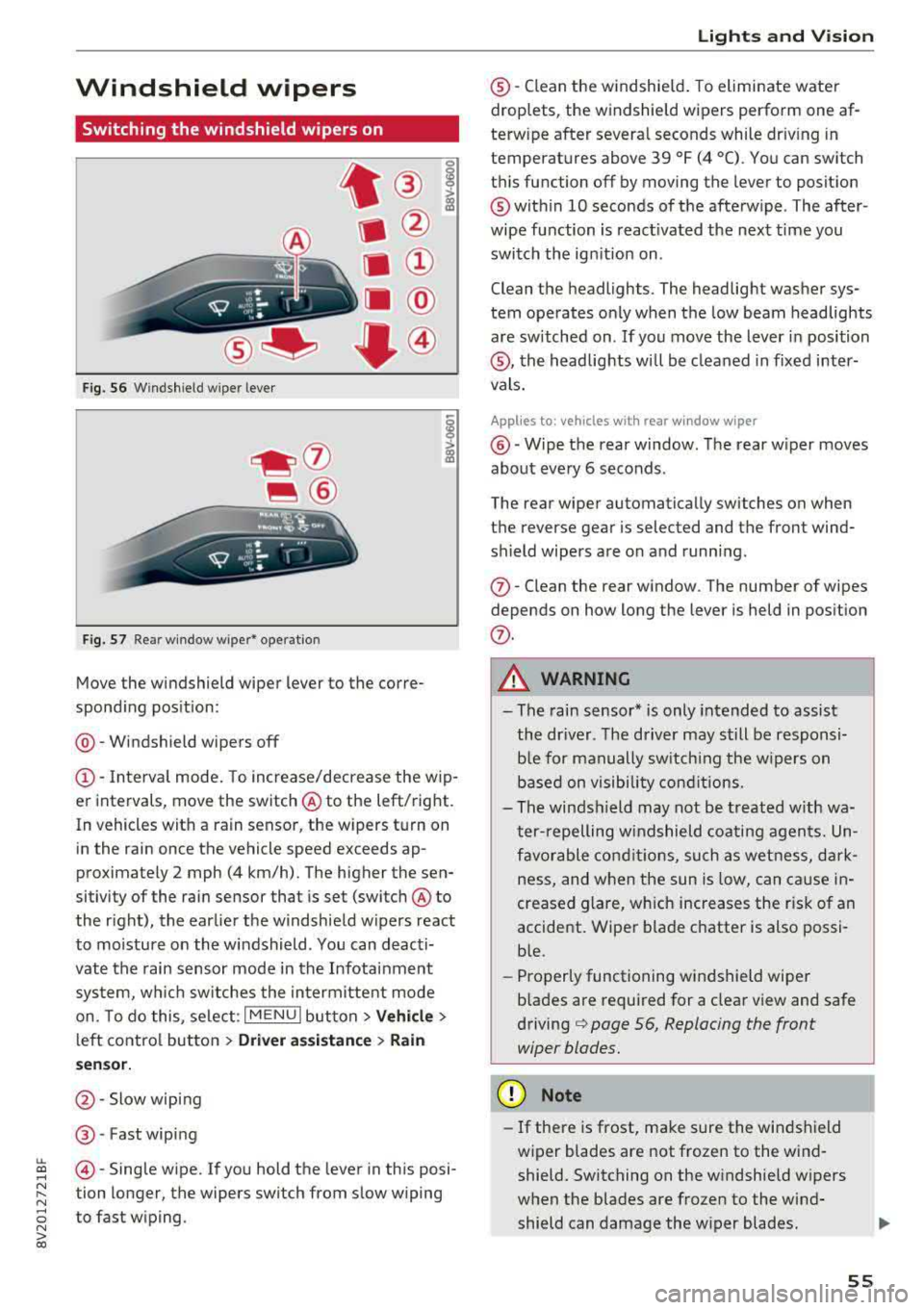
Move the windshield wiper lever to the corre
spond ing pos ition:
@ -Windshield wipers off
(D-Interval mode. To increase/decrease the wip
er intervals, move the switch
@ to the left/right.
In vehicles with a rain sensor, the wipers turn on in the rain once the vehicle speed exceeds ap
proximately 2 mph (4 km/h). The higher the sen
sitivity of the rain sensor that is set (switch
@ to
the right), the earlier the w indshield w ipers react
to moisture on the windshield . You can deacti
vate the rain sensor mode in the Infotainment
system, wh ich switches the intermittent mode
on. To do this, select :
I MENU I button> Vehicle>
left control button > Driver a ssistance > Rain
se nsor.
@ -Slow wiping
@ -Fast wiping
@-Single wipe. If you hold the lever in this posi
tion longer, the wipers switch from slow wiping
to fast wiping.
Lights and Vision
®-Clean the windshield. To eliminate water
droplets, the windshield wipers perform one af
terw ipe after several seconds while dr iv ing in
temperatures above 39 °F (4 °C). You can switch
this function off by moving the lever to position
@within 10 seconds of the afterwipe . The after
wipe function is react ivated the next time you
switch the ignition on .
Clean the headlights. The headlight washer sys
tem operates only when the low beam headlights
are sw itched on . If you move the lever in position
®, the headlights will be cleaned in fixed inter
vals.
Applies to: vehicles wi th rear window wiper
@ -Wipe the rear window. The rear wiper moves
about every 6 seconds .
The rear wiper automatically switches on when
the reverse gear is selected and the front wind
sh ield wipers are on and running.
(j)-Clean the rear window . The number of wipes
depends on how long the lever is held in position
(j) .
A WARNING
-The rain sensor* is only intended to assist
the driver. The driver may still be responsi
ble for manually switch ing the w ipers on
based on visibility conditions.
-The windsh ield may not be treated w ith wa
ter-repelling windshield coating agents. Un
favorable conditions, such as wetness, dark
ness and when the sun is low, can cause in-
'
creased glare, which increases the r isk of an
accident. Wiper blade chatter is also possi
ble.
-Properly functioning windshield wiper
b lades are required for a clear view and safe
driving¢ page 56, Replacing the front
wiper blades.
(D Note
- If there is frost, make sure the windshield
wiper blades are not frozen to the wind
shield. Switching on the windshield wipers
when the blades are frozen to the wind
shield can damage the wiper blades .
-
55