light AUDI A3 SEDAN 2018 Repair Manual
[x] Cancel search | Manufacturer: AUDI, Model Year: 2018, Model line: A3 SEDAN, Model: AUDI A3 SEDAN 2018Pages: 404, PDF Size: 62.3 MB
Page 117 of 404
(D Tips
- Multip le versions of charging cables are of
fered d ue to the different power s upply sys
tems in d ifferent countries. The maximum
charging power may potentially be unavaila
ble because of this . Contact an author ized
Audi dealer or authorized Aud i Service Fa
c ility fo r more info rmat ion .
- Charg ing may take longer when tempera
tures a re extremely high o r low .
- The charging t ime at pub lic charging sta
t ions may vary from the times g iven in the
tab le
o table on page 114 .
Audi e-tron charging system PIN
Applies to: vehicles with plug-in hybrid drive
The contro l unit ca n be loc ked by enter ing a 4-
d ig it PI N of yo ur cho ice. If a PIN is act ivated, the
se lected PIN must be entered before every use.
We recommend lock ing you r contro l unit to pro
tect it against unautho rized access by a third pa r
ty .
Activating the PIN
.,. Press the I OKI @ o page 109, fig . 1 1 S button
on the control un it .
POWER and SET P IN ap
pear in the display field .
.,. Select SET PIN u sing the a rrow b utton @.
.,. Press t he IOK I button @. ENTER PIN appea rs in
the disp lay fie ld .
.. Se lect the desired value by pressing the arrow
buttons © up or down .
.. Use the right arrow button © to go to the next
digi t .
.. Press the left arrow button © to go to the pre-
v ious menu .
.,. Enter a ll of the d ig its .
.,. Press t he IOKI button @afte r the last d ig it.
.,. REPEAT PIN appears in the display field .
.,. Ente r th e PI N aga in using the arrow but tons
© -
.. Press th e IOK I button @ .
.. PIN OK appears in the display field if both en-
::li tries match. ...
~ .. The PIN is now activ ated.
N ... 0 N > 00
e-tron
D eactivating the PIN
Requirement: the con trol uni t must be unloc ked.
.,. Enter the numerical code 0 000 . Proceed as if
you were activating the PIN
o page 115.
.. The PIN is deactivated.
Locking the control uni t
Requirement: the PIN must be activated .
.,. Press the Iii button @ o page 109, fig. 11 Son
the contro l unit .
Unlocking th e control unit
Requirement: the PIN must be act ivated .
.,. Press any button on the control unit .
.,. PIN? appears in the display field.
.,. Enter the PIN .
.. Press the I OK! button @.
(j) Tips
- Th e PI N is deactivated in t he factory defa ult
se tt ings.
- If you do not remembe r yo ur PIN, contact
an au tho riz ed A ud i d ealer o r autho rized
Audi Serv ice Facili ty .
- If the fi rst PIN entry differs from the second
en try, the first PIN en try is d isplayed .
- If nothi ng is entered within 20 seconds of
t his, the se t val ue is not changed .
Indicator Lights and
messages
Applies to: vehicles with plug-in hybrid drive
If the B indicator light turns on, the high -volt
age battery is charging or is a lready comp letely
charged .
If
the . indicator light stays on , there is a ma l
function in the charging system . Have the prob
l em corrected immediately by an a uthorized Audi
dealer or authorized Audi Service Facility.
l!i1 Ch arging conn ecto r still attached . Vehicle
cannot be dri ven
T his message appears when t he cha rging system
is s till connec ted to the vehicle. Remove the con -
nector
o page 112, A~er charging . ..,.
115
Page 121 of 404
Outside mirrors
If yo u cannot see the traffic behind the tra iler
with the standard exterior mirrors, then you
must attach additiona l exterior mirrors . Adj ust
them so you have a sufficient visibility behind
you .
Exterior lighting
Follow the legal regulat ions regard ing the light
ing equipment on your trailer . Contact an author
ized Audi dealer or authorized Audi Service Facili
ty for more information.
Before starting to drive, check all lighti ng equip
ment on the hitched trailer.
The headlight range contro l adjusts automatical
l y to the light range of the headl ights.
Safety chains
Make sure the safety chains are correctly applied
when pull ing a trailer . The chains should hang
enough so that the trailer can dr ive around
curves. However, they must not touch the
g ro und .
(D Tips
-Use chocks whe n parking on incl ines if the
trailer is load ed.
- We recommend also hav ing the veh icle in
spected between the inspect ion intervals if
you are towing a trailer frequently.
- Avo id driving with a trailer during the vehi
cle break- in period .
Driving with a trailer
Driving with a trailer requires extra caution.
Speed
Adhere to the legal speed limits. Follow the legal
regulations specific to the country.
As the speed increases, the driving stability of
the trai ler decreases. Therefore you should not
exceed the maximum legal speed limit when
u. there are unfavorable road, weather and/or wind 00
~ conditions . This especially applies when driving
~ downhill.
0 N > 00
Trailer towing
You m ust always reduce your speed as soon as
you notice even the slightest swinging motion of
the tra iler. Never try to "stra ighten out" the tra il
er by acce lerating.
T he weight distribution is very poor if the vehicle
is empty and the trai ler is loaded . However if you
must drive under these circumstances, then dr ive
especially slowly .
Brakes
Brake in a timely manner. Downshift before driv
ing down hill so that t he engine can assist with
braking ~.&. .
When using a trailer w it h overrun brakes, first
brake gently then quickly. This reduces the r isk of
jerking while braking if the trailer wheels lock up .
Engine coolant temperature
Pay attention specifically to the coo lant tempera
ture display when there are high outside temper
a tur es, and when driving on long inclines
~page 11. Shift to a hig her gear in a timely man
ner .
A WARNING
= -
Constant braking causes the brakes to over-
heat and substantially reduces braking per
formance, increases braking distance or caus
es complete failure of the brake system.
119
Page 122 of 404
Ass is tance sy stem s
Assistance systems
Speed warning system
Description
Applies to: veh icles with speed warning system
The speed warning system helps you to stay be
low a specified maximum speed that can be set,
changed or deleted in the Infotainment system.
The speed warning system warns you if you are
exceeding the maximum speed that you have set .
A warni ng tone will sound as soon as your speed
exceeds the sto red value slight ly. The
[OJ (USA
models) ;[;] (Canada models) indica to r li gh t and
the co rresponding message appear in the inst ru
ment cluster display at the same time. The
[C]
(USA models)/ [ej (Canada mode ls) indicator
light and the message turn off w hen the vehicle
speed drops below the stored maximum speed .
Sett ing a threshold is recommended if you would
like to be reminded when yo u reach a certa in
maximum speed . Situations where you may want
to do so include driving in a country with a ge ner
al speed limit or if there is a specified maximum
speed for winter tires.
Setting the warning thr eshold
.. Select in the Infotainment sys tem : IMENUI but
ton
> Vehicle > left contro l button > Driver a s
sistance
> S peed warning > Manual.
@ Tips
Regardless of the speed warning system, you
should always monitor yo ur speed using the
speedometer and make sure you are following
the legal speed limit.
120
Cruise control system
Switching on
Applies to: vehicles with cruise control system
The cruise control system makes it possible to
drive at a constant speed starting at 15 mph (20km/h) .
0
f
~
0
Fig . 1 21 Ope rat ing lev er : cru ise co ntrol sys te m
0
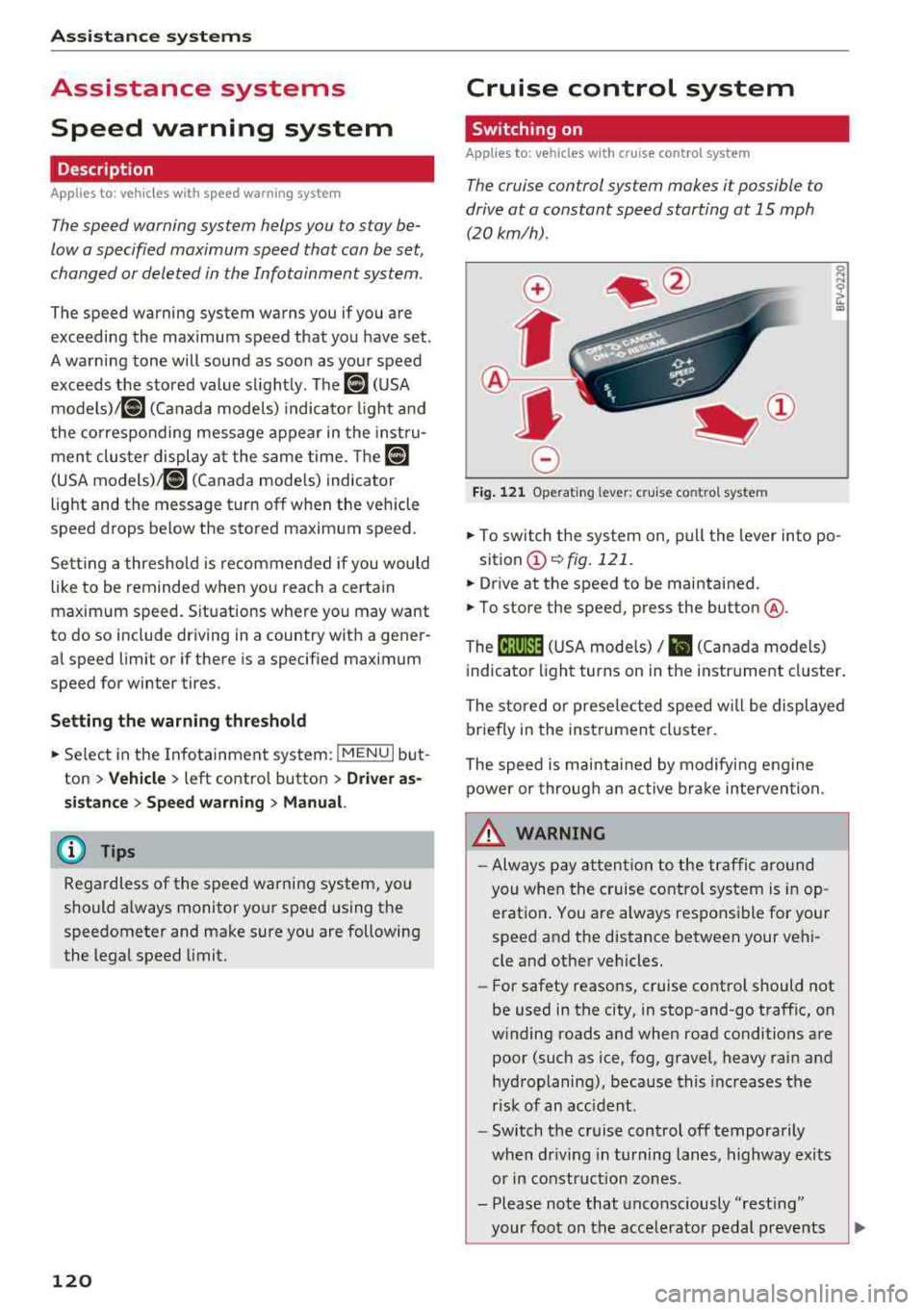
"' N
~ CD
.. To switch t he system on, pull the lever into po -
sition
CD ¢ fig. 121 .
.. Drive at the speed to be maintained .
.. To store the speed, press the button @.
The
[ij;(l)~1j ( U SA mode ls) / 51 (Canada models)
indicator light turns on in the instr ument cluster .
The stored or prese lec ted speed w ill be displayed
briefly in the instrument cluster .
The speed is mainta ined by modifyi ng engine
power or through an active bra ke intervention.
&_ WARNING
- Always pay at ten tion to the traffic a ro und
you whe n the cruise contro l system is in op
erat ion . You are always respons ible fo r your
speed and the distance between your vehi
cle and other vehicles.
-For safety reaso ns, cruise cont rol should not
be used in the city, in stop-and-go traff ic, on
w inding roads and when road conditions are
poor (such as ice, fog, gravel, heavy rai n and
hydroplaning), because this increases the
r isk of an accident.
-Switch t he cr uise control off temporarily
when dr iv ing in turning lanes, highway exits
or in construction zones .
- Please note that unconsciously
"rest ing"
your foot on the accelerator pedal prevents
-
Page 123 of 404
u. 00 .-< N l' N .-< 0 N > 00
the cruise control from braking. This is be
cause p ressing the acce lerato r pedal over
rides the cruise contro l system.
- If a brake system ma lf u nction such as over
heating occurs when the cruise contro l sys
tem is switched on , the braking function in
the system may be switched off . The rest of
the cr uise control system f unctions remain
act ive as long as
the @;(i)~14 (USA models) /
lll (Can ada models) indicato r light is o n.
@ Note
Before driving downhill a long distance on a
s teep hill, decrease yo ur speed and select a
lower gear. This makes use of the eng ine
b rak ing effect and re lieves the bra kes.
(D Tips
The b rake ligh ts turn on w hen the brakes a re
act ivated .
Changing the speed
Applies to: vehicles with cruise control system
"'T o inc rease o r decrease the speed in incre
ments,
tap t he lever in the 0 10 d irec tion
Q page 12 0, fig. 1 21 .
.. To increase or decrease the speed quickly, hold
the leve r in the 0 / 0 di rect io n until t he de
s ired speed is reached.
Overriding the speed
Applies to: vehicles with cruise control system
You can press the accelerator pedal to increase
your speed, for example if you want to pass someo ne. The s peed yo u set ea rlier will resume
as soo n as yo u release the accelerator pedal.
H owever, if you are driving cons iderably faster
tha n the stored s peed for a long period of time,
the c ruise cont rol system will tempora rily switch
off.
Th e@;(l)~i4 (USA models) 1B (Canada mod
e ls) indica to r li ght in the ins trumen t cluste r
turns off and t he stored s peed is main taine d.
A ss istance systems
Preselecting a speed
Applies to: vehicles with cruise control system
You can pre-select your desired speed when the
vehicle is stationary .
"'Switch the ignit ion on.
"' Pull the lever into pos ition (D Q page 120 ,
fig . 121 .
.. To increase or decrease the speed, tap the lever
in the
0 10 d irection .
This function makes it possible, for example, to
save the speed you want before driving on the highway . Once on the highway, activate the
cr uise co ntro l system by p ulling the lever towa rd
t h e position
(D .
Switching off
Applies to: vehicles with cruise control system
Deactivating temporarily
"' Press the br ake pe dal, or
"' Press the lever into position @(not clicked in to
p lace)
Qpage 1 2 0, fig. 1 21, or
Switching off completely
"' Press the lever into pos ition @(clicked into
p lace), o r
"'Swi tch the ignit ion off.
T he speed you stored will be ma intained if the
cr uise co ntro l has been switche d off tempora rily.
T o resume the sto red speed, re lease the br ake
ped al and pull the lever to posi tion
(D .
Switch ing the ignition off w ill erase the stored
speed.
Switching off automatically
[~;(1)~14 ( USA models )/EI (Canada models )
Crui se control syst em: currently unavailable .
Se e owner's manual
The cruise cont rol system was automatically
turned off because the system has detected a
malfu nction th at is impa iring the c ruise control
func tion. Try switching the cruise contro l system
o n aga in later .
.,.
121
Page 127 of 404
LL co .... N
" N .... 0 N > co
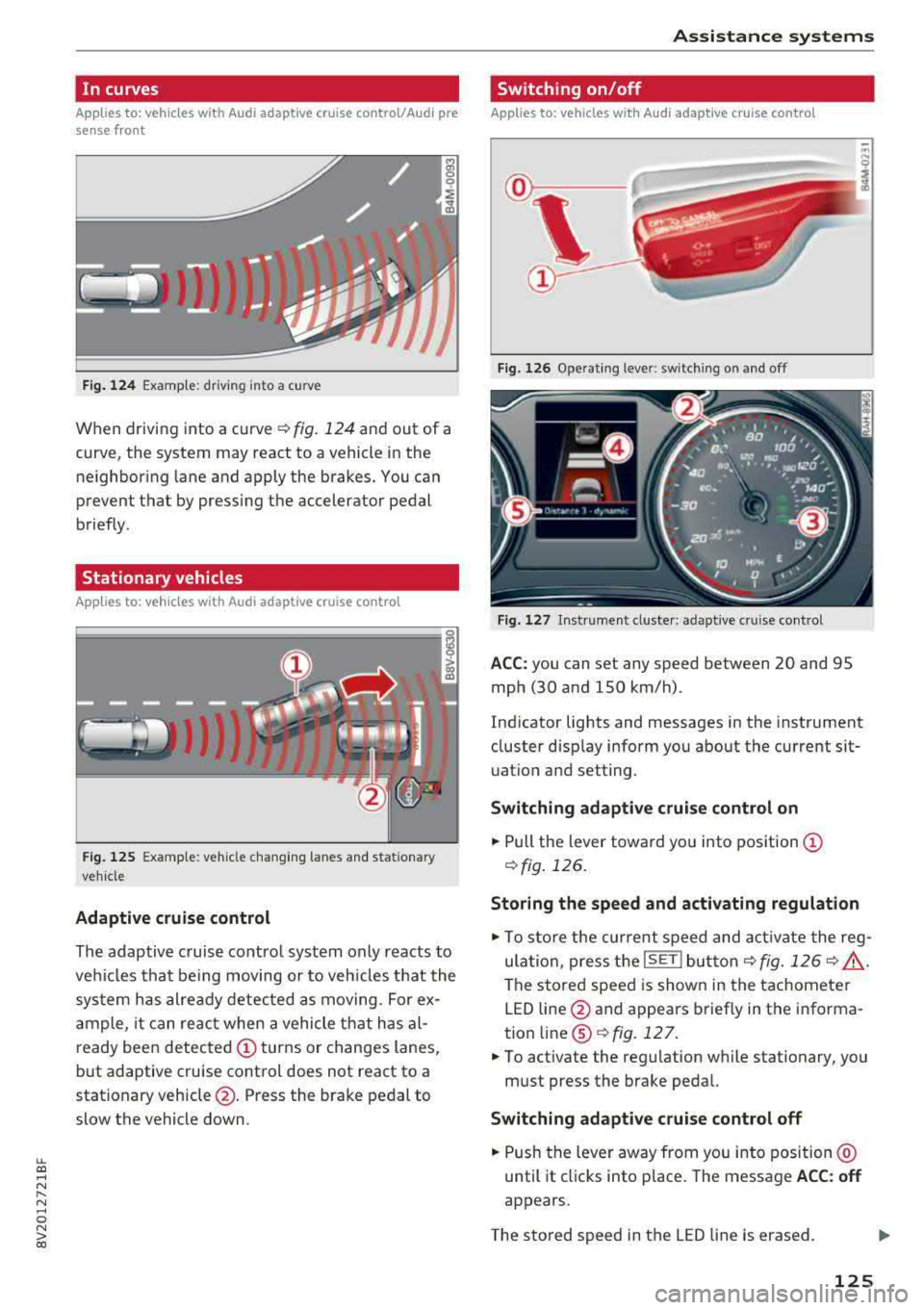
In curves
Applies to: vehicles with Audi adaptive cruise control/Audi pre sense front
Fig. 124 Examp le: driving into a curve
When driving into a curve ¢ fig. 124 and out of a
curve, the system may react to a vehicle in the ne ighboring lane and apply the brakes. You can
prevent that by pressing the accelerator pedal
briefly .
Stationary vehicles
Applies to: vehicles with Audi adaptive cruise control
J))
Fig . 12 5 Example: vehicle c hang ing lanes a nd statio nary
ve hicle
Adaptive cruise control
The adaptive c ruise contro l system only reacts to
ve hicles that be ing moving or to veh icles that the
sys tem has alre ady detected as moving. For ex
a mple, it can reac t when a vehicle that has al
ready been detected
CD turns or changes lanes,
but adaptive cruise control does not react to a
stationary vehicle @. Press the brake pedal to
slow the vehicle down.
A ssi st a nce systems
Switching on/off
Applies to: vehicles with Audi adaptive cruise control
Fig. 126 Ope rat ing lever: switch ing on and off
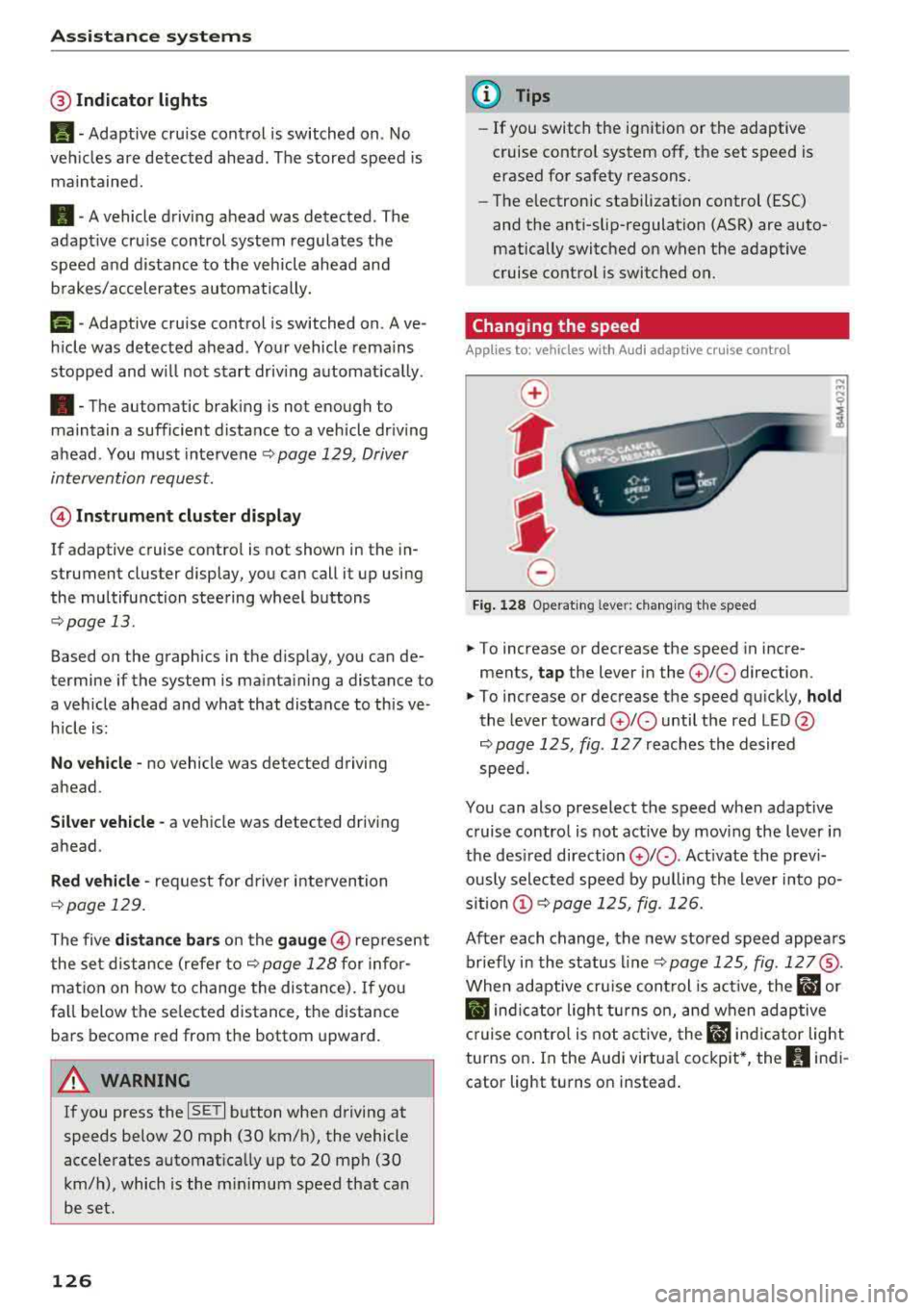
Fig . 1 27 In strume nt clus te r: adaptive cruise control
A CC: you can set any speed between 20 and 95
mph (30 and 150 km/h) .
Ind icator lights and messages in the instrument
cluster disp lay inform you about the current sit
uatio n and setting.
Switching adaptive crui se control on
"' Pull the lever towa rd yo u into pos ition CD
¢fig . 126.
Storing the speed and activating regulation
"'To store the cur rent speed and act ivate the reg
ula tion, press the
ISE TI but ton¢ fig. 126 ¢ .&_ .
The stored speed is show n in the tachometer
LED line @and appears briefly in the informa
tion
line @¢ fig. 127 .
"'To act ivate the reg ulation while stationary, you
must press the brake pedal.
Swi tching adaptive cruise control off
"' Push the lever away from you into position @
until it cl icks into place. The message
ACC : off
appears.
T he s tored speed in the LED line is erased.
125
Page 128 of 404
Ass is tance sy stem s
@Indicator lights
Ill-Adaptive cruise control is switched on . No
veh icles are detected ahead . The stored speed is
maintained.
• -A vehicle driving ahead was detected. The
adapt ive cruise control system regulates the
speed and d istance to the vehicle ahead and
brakes/accelerates automatically.
(-) -Adaptive cruise control is switched on. Ave
h icle was detected ahead . Yo ur vehicle remains
stopped and w ill not start driv ing automat ica lly .
• -The automatic braking is not enough to
maintain a sufficient distance to a vehicle dr iv ing
ahead . You must intervene
r:::;, page 129, Driver
intervention request .
© Instrument clu ster di splay
If adaptive cruise contro l is not shown in the in
strument cluster display, you can call i t up using
the multifunction steering wheel buttons
r:::;, page 13 .
Based on the graphics in the d isp lay, you can de
termine if the system is mainta ining a distance to
a vehicle ahead and what that distance to this ve
h icle is:
No vehicle -no vehicle was detected driving
ahead.
Sil ver vehicle -a vehicle was detected driving
ahead.
Red vehicle -request for driver intervention
r:::;, page 129.
The five distance bar s on the gauge@ represent
the set d istance (refer
to r:::;, page 128 for infor
mat io n on how to change the distance). If yo u
fa ll below the se lected distance, the distance
bars become red from the bottom upward.
A WARNING
If you press the ISE TI b utton when driving at
speeds below 20 mph (30 km/h), the vehicle
accelerates automat ica lly up to 20 mph (30
km/h), which is the m inimum speed that can
be set.
126
@ Tips
- If you switch the ignition or the adaptive
cruise control system off, the set speed is
erased for safety reasons.
- The electronic stabilization control (ESC)
and the anti-slip-regulation (ASR) are auto
matically switc hed on when the adaptive
cruise control is switched on.
Changing the speed
Applies to: vehicles with Audi adaptive cruise control
0
f
I
0
Fig . 12 8 Ope rat ing leve r: chang ing the speed
.. To increase or decrease the speed in incre
ments,
tap the lever in the 0 10 direction.
,... ... ,...
i
.. To increase or decrease the speed qu ick ly, hold
the lever toward 0 10 until the red LED @
r:::;,page 125, fig . 127 reaches the desired
speed.
You can also preselect the speed when adapt ive
c ruise control is not active by moving the lever in
the des ired direction
0 10 . Act ivate the prev i
ous ly selected speed by pulling the lever into po
s ition
(D r:::;, page 125, fig. 126.
After each change, the new stored speed appea rs
br iefly in the status l ine
r:::;, page 125, fig . 127@.
When adaptive cru ise cont rol is act ive , the flJ or
• ind icator light turns o n, and when adaptive
c ruise contro l is not a ctive, the
IIJ ind icator light
turns on . In the Audi virtua l cockpit*, the
II indi
cator light turns o n instead .
Page 131 of 404
LL co ..... N
" N ..... 0 N > co
Setting the driving program
Applies to: vehicles with Audi adaptive cruise contro l
Depending on the se lected dr iv ing program and
d istance, dr iv ing behav ior when ac celerating w ill
va ry from dy namic to comfortab le.
Setting the driving program on vehicles
w ithout drive sele ct*
• Se lect in the Infotainment sys tem: IM ENUI but
ton
> Vehicle > left contro l bu tto n > Dri ver a s·
si stan ce
> Audi adapt ive crui se contr ol > Dri v
ing p rogram
> Comfort , Standard or D yn am ic.
Setting the driving mode on vehicles with
d rive s elect *
See i::!) page 141.
@ Tips
Your sett ings are automa tic ally sto red and as
signed to the remote control key being used.
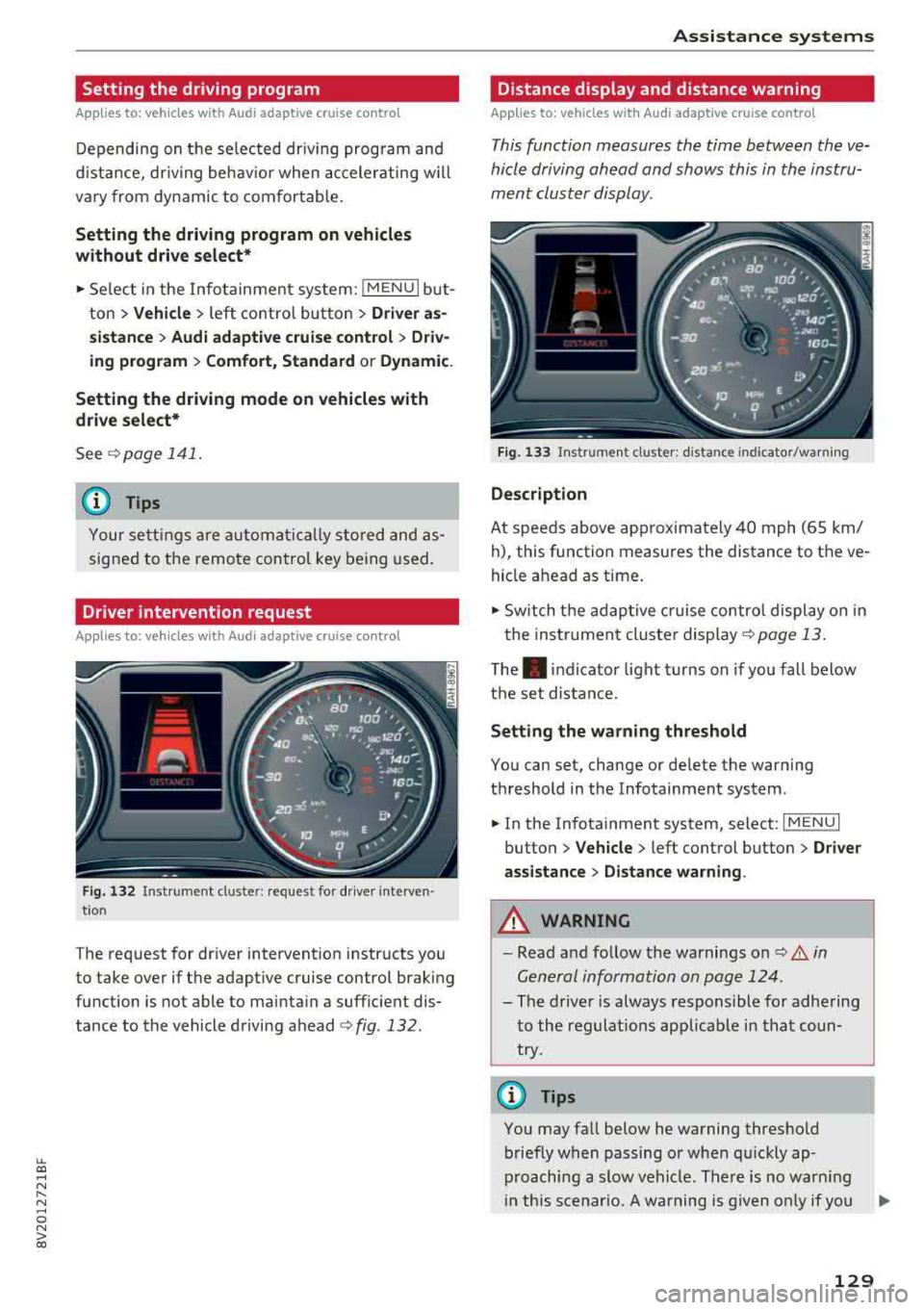
Driver intervention request
Applies to: vehicles with Audi adaptive cruise control
F ig . 132 Ins tru ment clust er: reques t for dr iver in ter ven
tio n
The request for driver intervention instructs you
to take over if the adaptive cruise control brak ing
function is not able to mainta in a suff icient dis
tance to the vehicle driving ahead
¢ fig . 132 .
Assi st a nce systems
Distance display and distance warning
Applies to: vehicles with Audi adaptive cruise control
This function measures the time between the ve
hicle driving ahead and shows this in the instru
ment cluster display.
F ig. 13 3 Instrumen t cluster : dista nce in dicato r/warn ing
D escription
At speeds above app roximately 40 mph (65 km/
h), this function measures the distance to the ve
hicle ahead as time .
• Switch the adaptive cruise contro l display on in
the instrument cluster
display ¢ page 13.
The. indicator light turns on if you fall below
the set distance.
Setting the wa rning threshold
You can set, change or de lete the warning
threshold in the Infotainment system .
• In the Infotainment system, select: I MENU I
button > Vehicle > left control button > Dri ver
assistance
> D istance warning .
A WARNING
-Read and follow the warnings on i::!) A in
Gen eral information on page 124 .
-
- The driver is always responsible for adhering
to the regulat ions applicab le in that coun
try.
(D Tips
You may fall below he warning threshold briefly when passing or when qu ickly ap
proaching a slow vehicle . There is no warn ing
i n th is scenar io. A warning is given only if you
..,.
129
Page 132 of 404
Assistance systems
fal l below the warn ing th reshold for an ex
tende d pe rio d of time .
Messages
Applies to: veh icles w ith Audi adaptive cruise control
II ACC: unavailable
T he system cannot guar antee that it w ill detec t
ve hicl es co rrectly and it has switched
off. T he
sensor was moved or is fau lty . D rive to an aut hor
ized A udi dealer or autho rized Au di Service Faci li
ty immediately to have the malfunct ion correct
ed .
IIJ ACC: currently unavailable. No sensor view
II ACC: currently unavailable . Sensor vision re
stricted due to surroundings. See owner's man
ual
T his message appea rs if the sensor view is ob
s truc ted, fo r ex am ple by le aves, snow, he avy
sp ray o r dir t. C le a n the sensor
q page 12 4,
fig. 123 .
II ACC: currently unavailable . Incline too steep
The road exceeds the ma ximum possib le ang le
for safe a dapt ive cr uise control o peration . T he
a d ap tive cr uise con trol cannot be switched on .
II ACC: only available in D, Sor M
Select the "D/S" o r "M" selector leve r position .
II ACC: parking brake applied
The adaptive c ruise contro l sys tem swi tches off
automatically if the park ing bra ke is set . Th e
a da pti ve cr uise co ntrol is av ailab le ag ain a fter re
le asi ng t he p arki ng brak e.
II ACC: currently unavailable . Stabilization
control input
This message appea rs if the elect ronic stab iliza
tion contro l (ESC) is taki ng action to stab ilize t he
ve hicle. In this case, a dap tive cr uise control
sw itch es off au toma tically.
II ACC: Please take over!
This message appea rs if the veh icle rolls bac k
when sta rting on a slight incl ine, even thoug h
130
ACC i s active. Press t he b rake pedal to preven t
t h e ve hicle from rol ling o r start ing to move.
Distance warning: malfunction! Please contact
Service
The sys tem canno t gua ran tee that it will detect
vehicles corre ctly an d it h as sw itched off . T he ra
d ar sen sor w as mo ved or is faulty . D rive to a n au
th ori ze d Aud i de aler o r aut horized Audi Se rvice
F aci lity imme diate ly to h ave the mal function co r
r ected .
Distance warning: currently unavailable. Sensor
view limited due to surroundings .
This message appears if the sensor v iew is ob
str uct ed , for e xam ple by leaves, s now , heavy
s pra y or dirt. C lean t he se nsor
q poge 124 ,
fig. 12 3 .
Distance warning: currently unavailable. See
owner's manual
This message appears if the system has a tempo
r ary fa ilure. If this occurs m ultip le times, drive to
an a uthorized Au di dea le r or a uthor ized Audi
Se rvice Fa cility i mmediat ely to ha ve the malf unc
t ion co rre cted.
Fasten seat belt
The system is not com plete ly ava ila bl e if the dr iv
e r's seat belt is unfastened .
Stat. obj. ahead
T his mes sage app ears if yo u w ould like to swi tch
th e sys tem on a nd th ere is a station ary objec t di
r ec tly in front o f yo ur vehicle .
Door open
The system is not available whe n the vehicle is
stationary a nd the driver's door is open .
Audi pre sense
Introduction
Applies to: vehicles with Aud i pre sense
Wit hin t he limits o f th e system , th e pr e sense
funct ions can initiate measures i n pa rtic ularly
dange rous situations to p rotect the vehicle pas-
sengers and other road users.
IJIJ,
Page 136 of 404
Assistance systems
Appl ies to: vehicles w ith Audi side assist
If you activate a turn signal when active lane as
sist is ready and it classifies a lane change as crit
ical because of vehicles traveling alongside you or
approaching you, there will be noticeable correc
tive steering shortly before you leave the lane.
This will attempt to keep your vehicle in the lane .
Applies to: veh icles without Audi s ide ass ist
The system will not warn you before crossing a
lane marker line if you have activated the turn
signal. In this case, it assumes that you are
changing lanes intentionally.
A WARNING
-The system warns the driver that the vehicle
is leaving the lane using corrective steering.
The driver is always responsible for keeping
the vehicle within the lane.
- The system can help you keep the vehicle in
the lane, but it does not drive by itself. Al
ways keep your hands on the steering
wheel.
- Corrective steering may not occur in certain
situations, such as during heavy braking.
- There may be cases where the camera does not recognize all lane marker lines . Correc
tive steering can only take place on the side of the vehicle where lane marker lines are
detected.
- Other road structures or objects could possi
bly be identified unintentionally as lane
marker lines. As a result, corrective steering
may be unexpected or may not occur.
- The camera view can be restricted, for ex
ample by vehicles driving ahead or by rain,
snow, heavy spray light shining into the
camera or by dirt on the window. This can
result in active lane assist not detecting the
lane marker lines or detecting them incor
rectly.
- Under certain conditions such as ruts in the
road, an inclined roadway or crosswinds, the
corrective steering alone may not be enough
to keep the vehicle in the middle of the lane.
- For safety reasons, active lane assist must
not be used when there are poor road and/
or weather conditions such as slippery
134
roads, fog, gravel, heavy rain, snow and the
potential for hydroplaning . Using active lane
assist under these conditions may increase
the risk of a crash .
Switching on/off
Applies to: vehicles with Aud i act ive lane ass ist
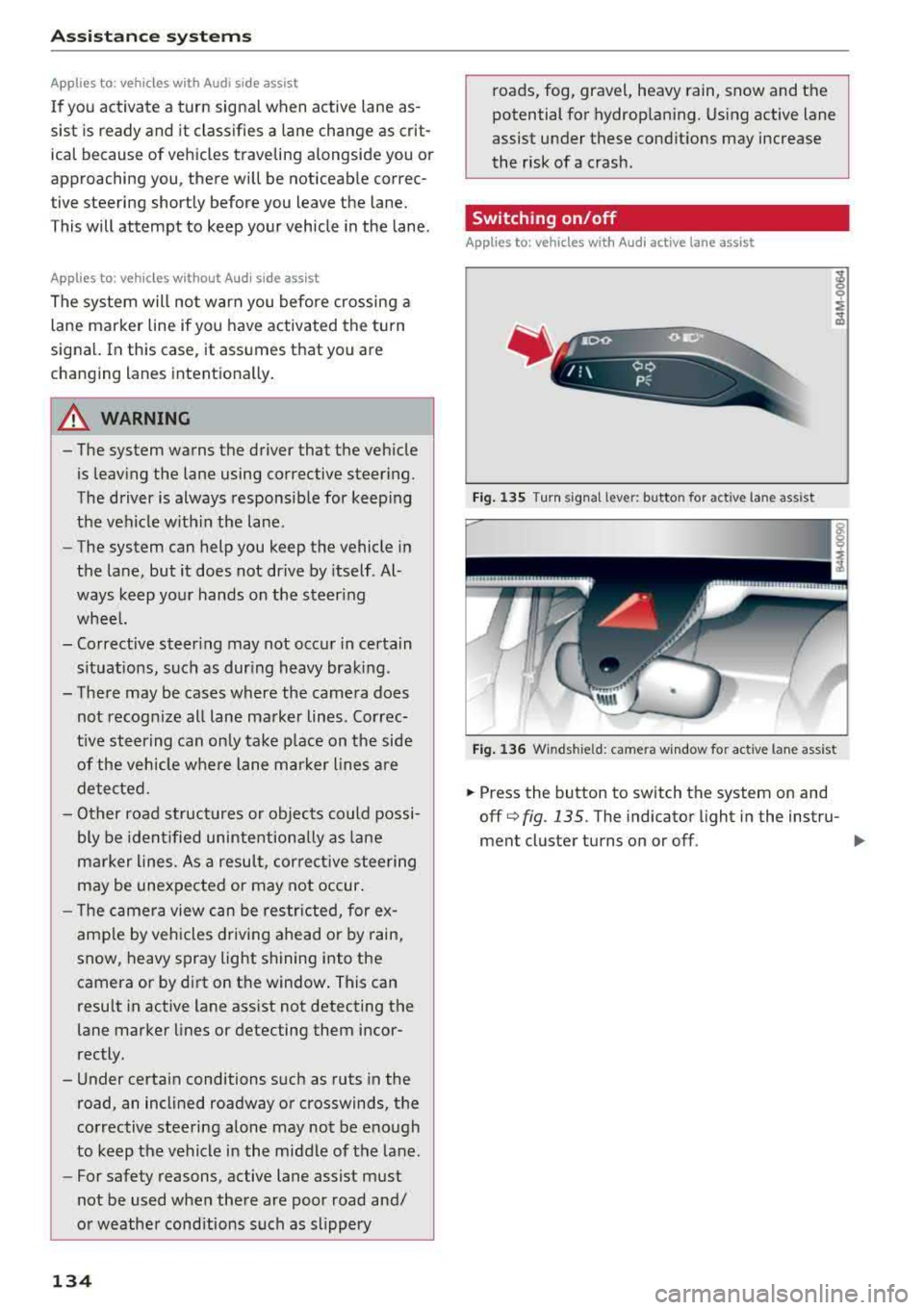
Fig. 135 Turn signa l lev er: butto n for active lane assist
Fig. 136 Winds hield: ca mera w indo w for active lane assist
.,. Press the button to switch the system on and
off
q fig . 135. The indicator light in the instru-
ment cluster turns on or off .
IJI,
Page 137 of 404
LL co .... N
" N .... 0 N > co
Analog instru- Audi virtual Meaning on ment cluster cockpit* the corre-
sponding side
Green lines Green li ne(s) Active lane as-
'/ \' (left/right) sist is activat-
'/ 'r ed and ready
to prov ide
warnings.
-Red line Active lane as-
(left/right) sist warns you
'/ \ · before leaving
a lane . In add i-
tion , the steer-
ing wheel vi-
brates lightly.
Yellow lines Yellow line(s) Active lane as-
(left/right) sist is act ivat-
'/ \· ed, but is not
ready to give
warning
If the system is switched on but is not ready to
p rovide warnings, one of the following cou ld be
the cause:
-There is no lane marker line.
-The relevant lane marker lines are not detected
(for example, mark ings in a construction zone
or because they are obstructed by snow, dirt,
water or lighting).
-The veh icle speed is below the activation speed
of approx imately 40 mph (65 km/h) .
-The lane is too narrow or too wide .
-The curve is too narrow.
-The driver's hands are not on the steering
wheel.
@ Tips
-Make sure the camera's field of view
¢ fig. 136 is not obstructed by stickers or
anything else. For informat ion on cleaning,
see
¢ page 354.
-In certain markets: if the system is switched
on, it will switch on automatically each t ime
the ignit ion is switched on.
Assistance systems
Display in the instrument cluster
Applies to : veh icles w it h Audi act ive la ne ass ist
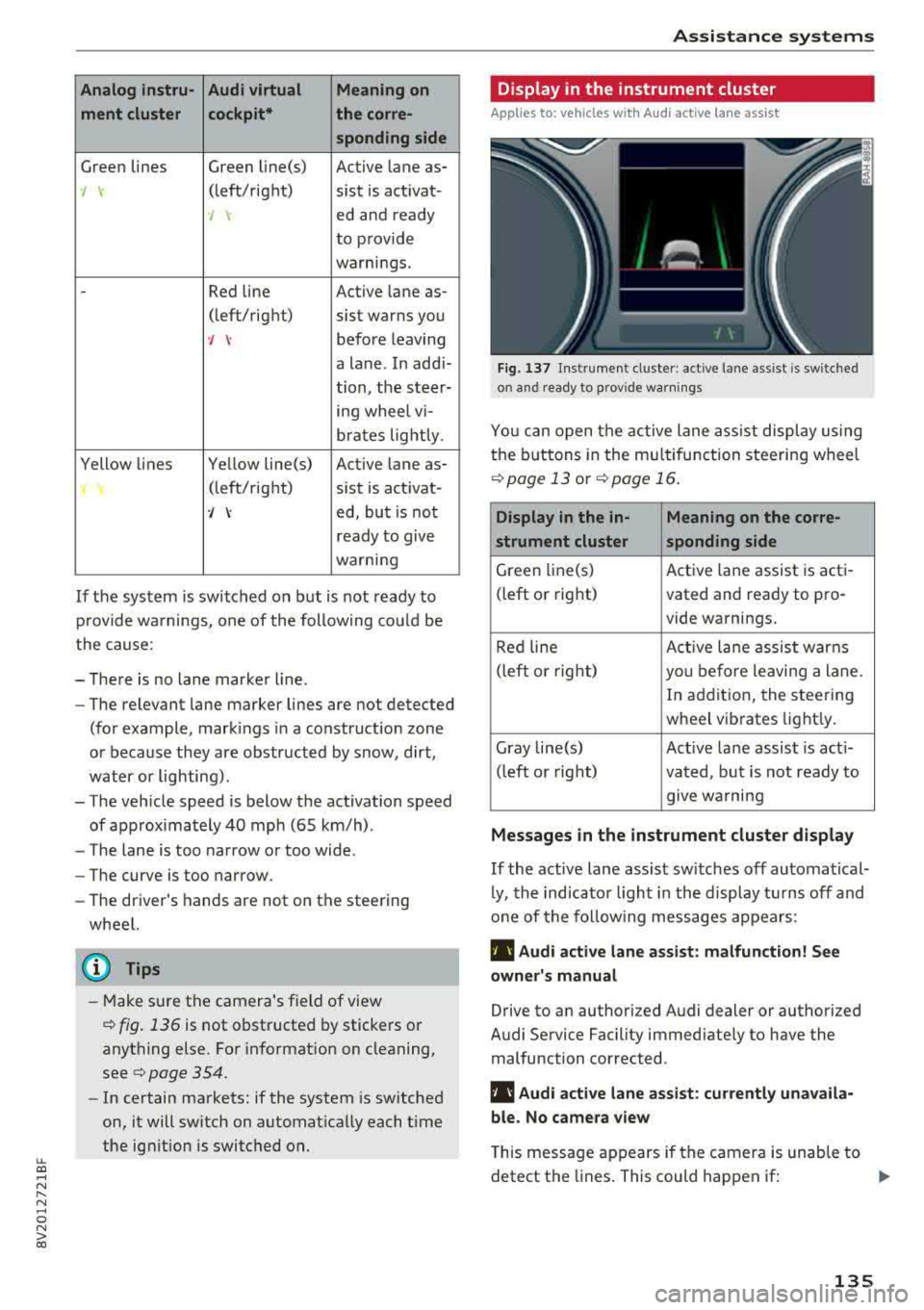
Fig . 137 Ins trumen t cluster: active lane assist is sw it c hed
on and ready to prov ide warnings
You can open the active lane ass ist display using
the buttons in the multifu nction steering wheel
¢ page 13 or¢ page 16.
Display in the in- Meaning on the corre-
strument cluster sponding side
Green li ne(s) Active lane assist is acti-
(left or right) vated and ready to pro-
vide warnings.
Red line Active lan e assist warns
(left or right)
you before leaving a lane.
In addition, the steering
wheel vibrates lightly.
Gray line(s) Act ive lane assist is act i-
(left or right)
vated, but is not ready to
give wa rning
Messages in the instrument cluster display
If the active lane assist sw itches off automatical
ly, the indicator light in the display turns off and
one of the following messages appears:
Ill Audi active lane assist : malfunction! See
owner's manual
Drive to an authorized Audi dealer or authorized
Audi Service Facility immed iate ly to have the
malfunction corrected .
Ill Audi active lane assist : currently unavaila
ble. No camera view
This message appears if the camera is unable to
detect the lines. This could happen if:
.,.
135