warning AUDI A3 SEDAN 2018 Service Manual
[x] Cancel search | Manufacturer: AUDI, Model Year: 2018, Model line: A3 SEDAN, Model: AUDI A3 SEDAN 2018Pages: 404, PDF Size: 62.3 MB
Page 66 of 404
Seats and stor age
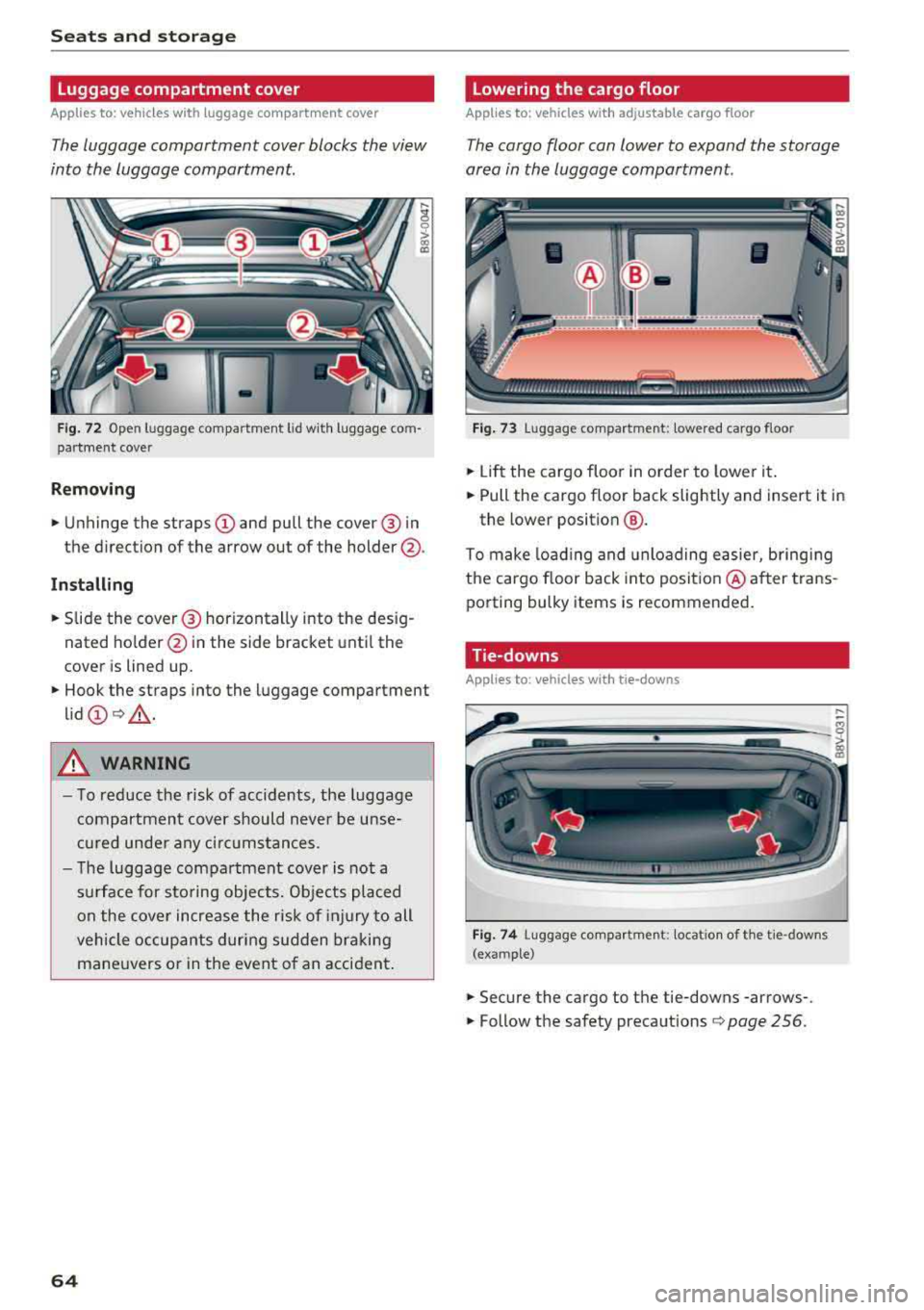
Luggage compartment cover
App lies to: ve hicles w ith luggage co mpartme nt cover
The luggage compartment cover blocks the view
into the luggage compartment.
F ig. 72 Open luggage compartment lid wit h luggage com
par tme nt cover
Remo ving
.. Unhinge the straps CD and pull the cover @ in
the direction of the arrow out of the holder @.
Install ing
.. S lide the cover @ horizontally into the des ig
nated ho lder @in the side bracket unt il the
cover is lined up.
.. Hook the straps into the luggage compartment
lid
CD Q _A .
A WARNING
- To reduce the risk of accidents, the luggage
compartmen t cover should never be unse
cu red unde r any ci rc u mstances.
- The luggage compartment cover is not a
s u rface for sto ring objects. Objects placed
on the cover increase the risk of injury to all
vehicle occupants during sudden bra king
mane uvers o r in the event o f an accident .
64
Lowering the cargo floor
Applies to : vehicles with adjustable cargo floor
The cargo floor can lower to expand the storage
area in the luggage compartment.
Fig . 73 Luggage compartment: lowered cargo floor
.. Li ft the cargo floor in order to lower it .
.. Pull the cargo floor back slightly and insert it in
the lower position
@ .
To make load ing and unloading easier, bringing
the cargo floor back into posit io n @ after trans
porting bulky items is recommended .
Tie-downs
App lies to : vehicles wi th tie- downs
Fig . 74 Luggage compartment: locat io n of th e tie -downs
(example)
.. Secure the cargo to the tie-downs -arrows-.
.. Follow the safety precautions Q page 256.
Page 67 of 404
LL co .... N
" N .... 0 N > co
Luggage compartment net/cargo bag
Applies to: vehicles with luggage compartment cargo net/car
go bag
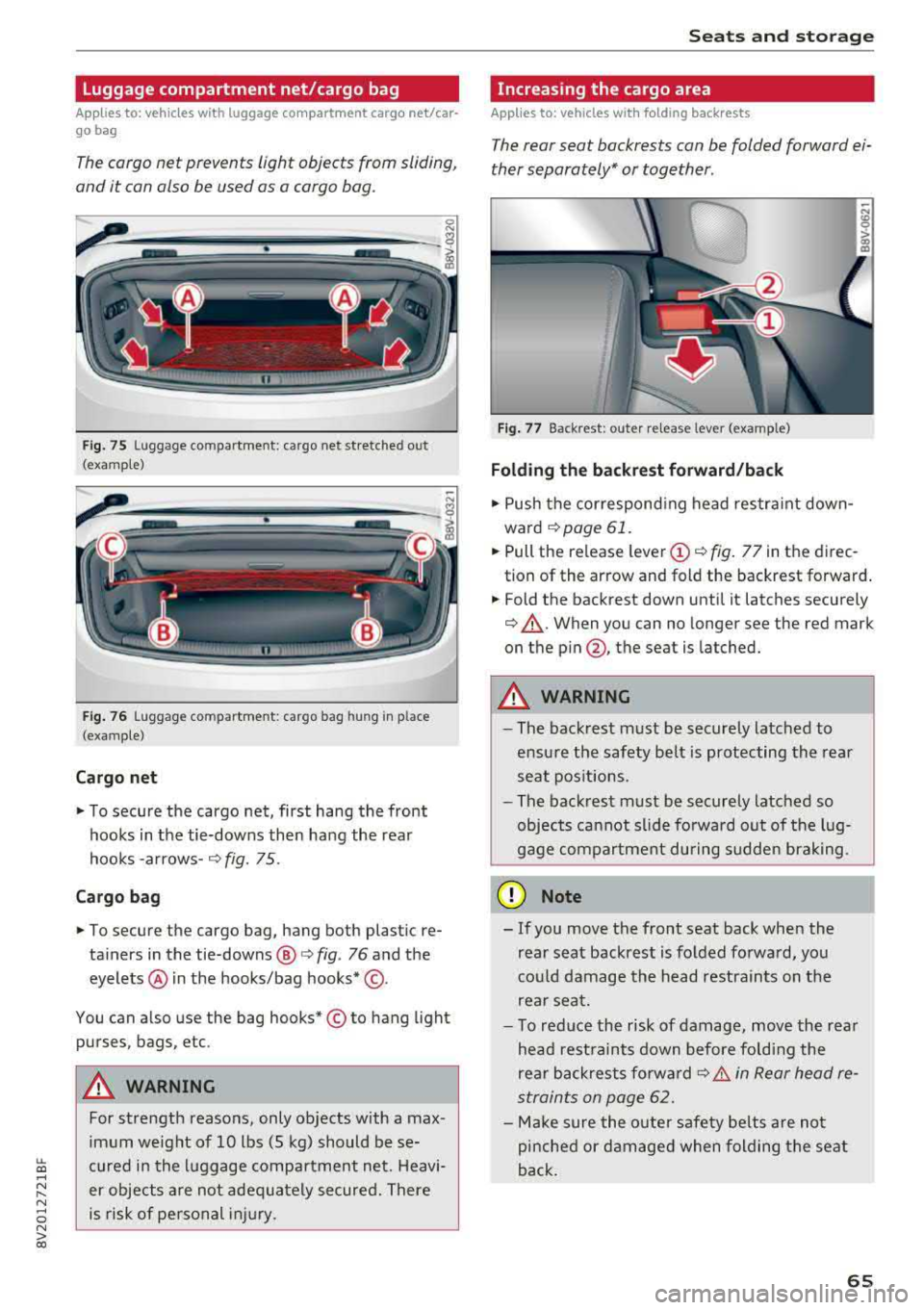
The cargo net prevents light objects from sliding,
and it can also be used as a cargo bog.
Fig. 75 Luggage compartment: cargo net stretched out
(examp le)
F ig . 76 Luggage compartment: cargo bag hung in place
(examp le)
Cargo net
" To secure the cargo net, first hang the front
hooks in the tie-downs then hang the rear
hooks
-arrows- ¢ fig. 75.
Cargo bag
" To secure the cargo bag, hang both plastic re
ta iners in the tie-downs @
c> fig. 76 and the
eyelets @ in the hooks/bag hooks* ©-
You can also use the bag hooks* © to hang light
purses, bags, etc .
A WARNING
For strength reasons, only objects with a max
imum weight of 10 lbs (5 kg) should be se
cured in the luggage compartment net. Heavi
er objects are not adeq uately secured. There
is risk of personal injury .
Seats and storag e
Increasing the cargo area
Applies to: vehicles with folding backrests
The rear seat backrests con be folded forward ei
ther separately* or together .
Fig. 77 Backrest: outer re lease lever (example)
Folding th e backr est forward /back
" Push the correspond ing head restra int down
ward
¢page 61.
" Pull the release leve r (D ¢ fig. 77 in the direc
tion of the arrow and fold the backrest forward .
.. Fold the backrest down until it latches securely
¢ &_. When you can no longer see the red mark
on the
p in @ , the seat is latched.
A WARNING ~ -
- The backrest must be securely latched to
ensu re the safety belt is protecting the rear
seat pos itions.
- The backrest must be securely latched so
objects cannot slide fo rwa rd out of the lug
gage compartment during sudden brak ing.
@ Note
- If you move the front seat back when the
rear seat backrest is folded forwa rd, yo u
cou ld damage the head restrain ts on the
rear seat.
- To red uce the risk of damage, move the rea r
head rest raints down before fo ld ing the
rear backrests fo rwa rd
¢ &. in Rear head re
straints on page
62.
- Make sure the oute r safety be lts are not
pinche d or damaged when folding the seat
back.
65
Page 68 of 404
Seats and storage
Pass-through
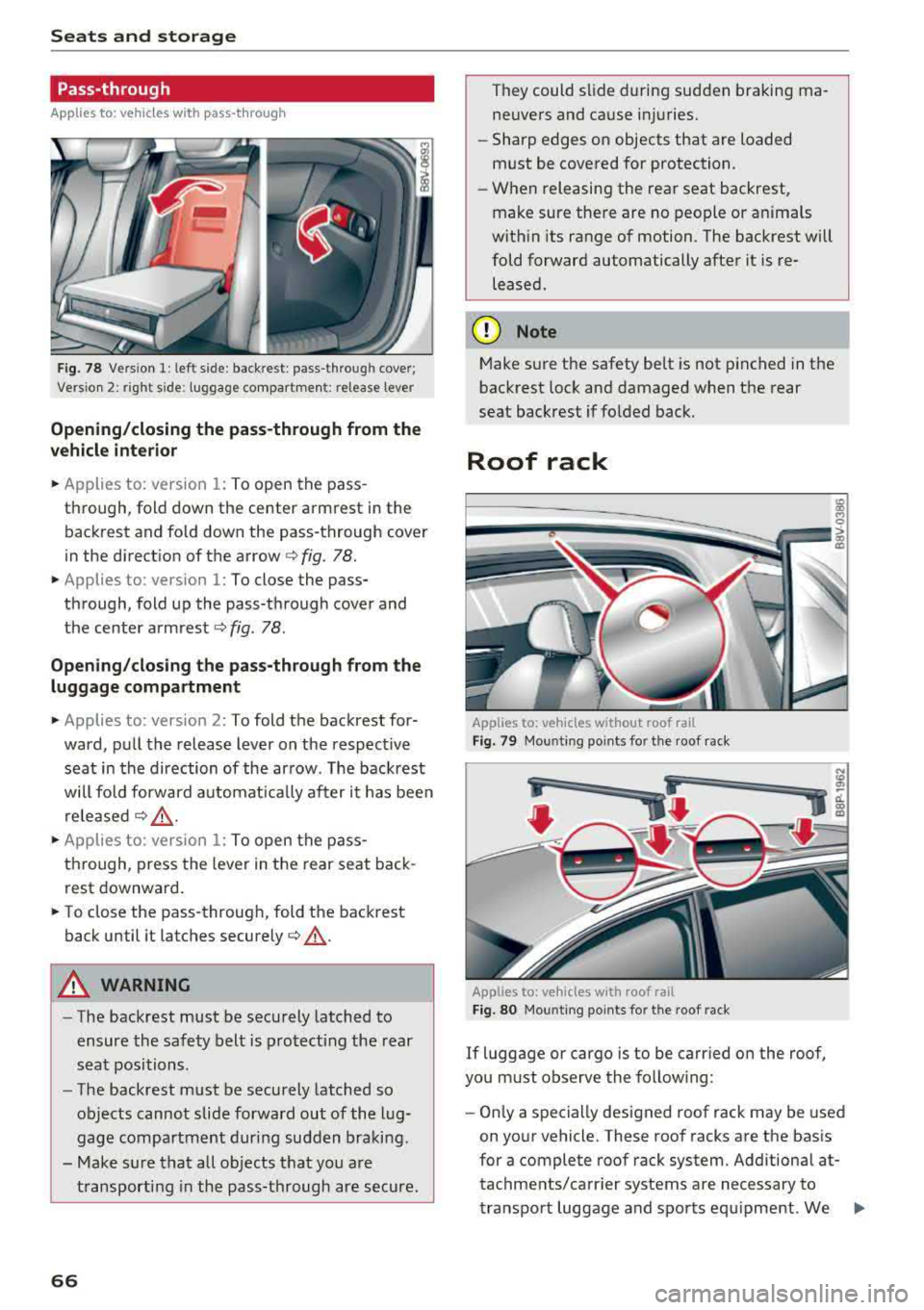
Applies to: vehicles with pass-through
Fig. 78 Vers ion 1: left side: backrest: pass-through cover;
Vers io n 2: right side : luggage co mpartment: relea se lever
Opening/closing the pass-through from the
vehicle interior
.,. Applies to: version 1: To open the pass
through, fold down the center armrest in the backrest and fo ld down the pass-through cover
in the direct ion of the arrow
c:> fig. 78 .
.,. Applies to: version 1: To close the pass
through, fold up the pass-through cover and
the center
armrest¢ fig. 78.
Opening/closing the pass-through from the luggage compartment
.,. Applies to: version 2: To fold the backrest for
ward, pull the release lever on the respect ive
seat in the direction of the arrow. The backrest
will fo ld forward automat ically after it has been
released
¢ &_ .
.,. Applies to: version 1: To open the pass
through, press the lever in the rear seat back
rest downward .
.,. To close the pass-through, fold the backrest
back until it latches
securely¢ &_.
A WARNING
-The backrest must be securely latched to
ensure the safety belt is protecting the rear
seat positions .
- The backrest must be securely latched so
objects cannot slide forward out of the lug
gage compartment during sudden braking .
- Make sure that all objects that you are
transporting in the pass-through are secure.
66
They could slide during sudden braking ma
neuvers and cause injuries.
- Sharp edges on objects that are loaded
must be covered for protection.
- When releasing the rear seat backrest,
make sure there are no people or anima ls
with in its range of motion. The backrest will
fold forward automatically after it is re leased.
(D Note
Make sure the safety belt is not pinched in the
backrest lock and damaged when the rear
seat backrest if folded back.
Roof rack
Applies to: vehicles without roof rail
Fig. 79 Mounting po ints for the roof rack
Applies to: vehicles with roof rail
Fig. 80 Moun ting points fo r the roof rack
If luggage or cargo is to be carried on the roof,
you must observe the following:
- Only a specially designed roof rack may be used
on your vehicle. These roof racks are the basis
for a complete roof rack system. Additional at
tachments/carr ier systems are necessary to
transport luggage and sports equipment. We
..,.
Page 69 of 404
u. 00 .-< N l' N .-< 0 N > 00
recommend roof racks and attachments from
the Audi Genuine Accessories program.
- When installing the roof rack, make sure that it
is mounted on ly at the designated points on
the roof ¢
fig. 79 or ¢ fig. 80.
-Note the permitted axle load, permitted tota l
weight, and permitted roof load of your vehicle
¢
page 382 . The roof load is the tota l of the
weight of the roof rack, the attachments and
the cargo you are carrying. However, you must also note the permitted load of the carr ier sys
tem being used .
A WARNING
-Follow the installat io n instructions provided
with the roof rack system. If you do not se
cur e the roof ra ck sys tem and objec ts on the
roof correctly, they co uld come loose from
the vehi cle and cause an accident.
- T he ris k of an a cc ident i ncreases when using
a roof rack system, because it changes the
driving characteristics by shifting the center
of gravity and/or the increasing the s urface
area exposed to wind. You may need to
adapt your driv ing style and speed to the
current conditions.
@ Note
- If you use other roof luggage rac k systems
or do not insta ll the racks as intended, any
damage to the ve hicle is not cove red by the
warranty. Carefully follow the assembly and i nsta llation instruct ions included with the
r oof rack car rier system .
- Make sure t hat the luggage compartment
l id and the pa norama glass
roof* do not
come into contact with objects on the roof
whe n they are ope n.
@) For the sake of the environment
Your veh icle w ill req uir e more fuel due to the
increased wi nd resistance. So remove th e roof
rac k after using it.
Seat s and sto rag e
67
Page 70 of 404
Warm and cold
Warm and cold Climate control system
Description
The climate control system circulates , warms or
coo ls, and removes humid ity from the air in the
veh icle interior . It is the most effective when the
windows and panorama g lass roof* or power top*
are closed. If there is a build-up of heat inside
the vehicle, ventilation can help to speed up the
coo ling process.
Pollutant filter
The pollutant filter removes pollutants such as
dust and po llen from the air.
Key recognition
Various sett ings are stored and ass igned to the
remote control key being used.
These settings are different when the power top* is open or closed .
Presetting
Several functions can be preset in the Infotain
ment system.
Select in the Infotainment system:
IMENU ! but
ton
> Vehicle > left control button > Air condi
tioning
A WARNING
Poor visibility can lead to accidents.
- For safer driving, keep all windows free of
ice, snow and fog.
- Become familiar with the correct use and
function of the climate control system as
quickly as poss ible, espec ia lly with the de
frosting and defogging functions.
- When the temperature is below freezing, only use the windsh ield washer system after
68
the windshield has been warmed by the cli
mate control system. The washer fluid could
freeze on the windshie ld and impair visib ili
ty .
@ Note
-If you suspect that the climate contro l sys
tem is damaged, switch the system off to
prevent further damage and have it checked
by an authorized Aud i dealer or authorized
Audi Serv ice Facility.
- Repa irs to the Aud i climate control system
require special technical knowledge and
special tools . See an authorized Aud i dealer
o r authorized Aud i Serv ice Facility .
@ For the sake of the environment
-To save fuel, turn off the climate control
system cooling mode by press ing the A/C
button. This w ill also reduce emissions . The
climate control system is off when the LED
in the button turns off.
- In vehicl es w ith the efficie ncy prog ram*,
yo u can find other consumpt ion information
and more economy tips ¢ page 19.
© Tips
- To prevent int erference with the heat ing
and cooling output and to prevent the win
dows from fogging over, the air intake in
front of the windshie ld must be free of ice,
snow or leaves.
- Condensation from the cooling system* can
drip and form a pudd le of water under the
vehicle . This is normal and does not mean
there is a leak.
- Th e energy management system may tem
porarily switc h off certain functions, such as
the seat heating* or rear window defogger.
These systems are ava ilable again as soon
as the energy supply has been restored.
Page 73 of 404
LL co .... N
" N .... 0 N > co
_& WARNING
-You should not use the recirculation mode
for an extended period of time, because no
fresh a ir is drawn in and the windows can
fog when coo ling mode is sw itched off. This
increases the risk of an accident .
-Individuals with reduced sensitivity to pain
o r temperature could develop burns when
using the seat heating function. To reduce
the risk of injury, these indiv iduals should
not use seat heating.
(D Note
To avoid damage to the heat ing elements in
the seats, do not kneel on the seats or place
heavy loads on a small area of the seat.
@ Tips
-The setting for the seat heating on the driv
er's side is ass igned to the key that is in use .
-If the front passenger's seat heating is
turned on, it will not turn on again automat
icall y if more than 10 minutes have passed
between switching the ign ition off and
switching it on again.
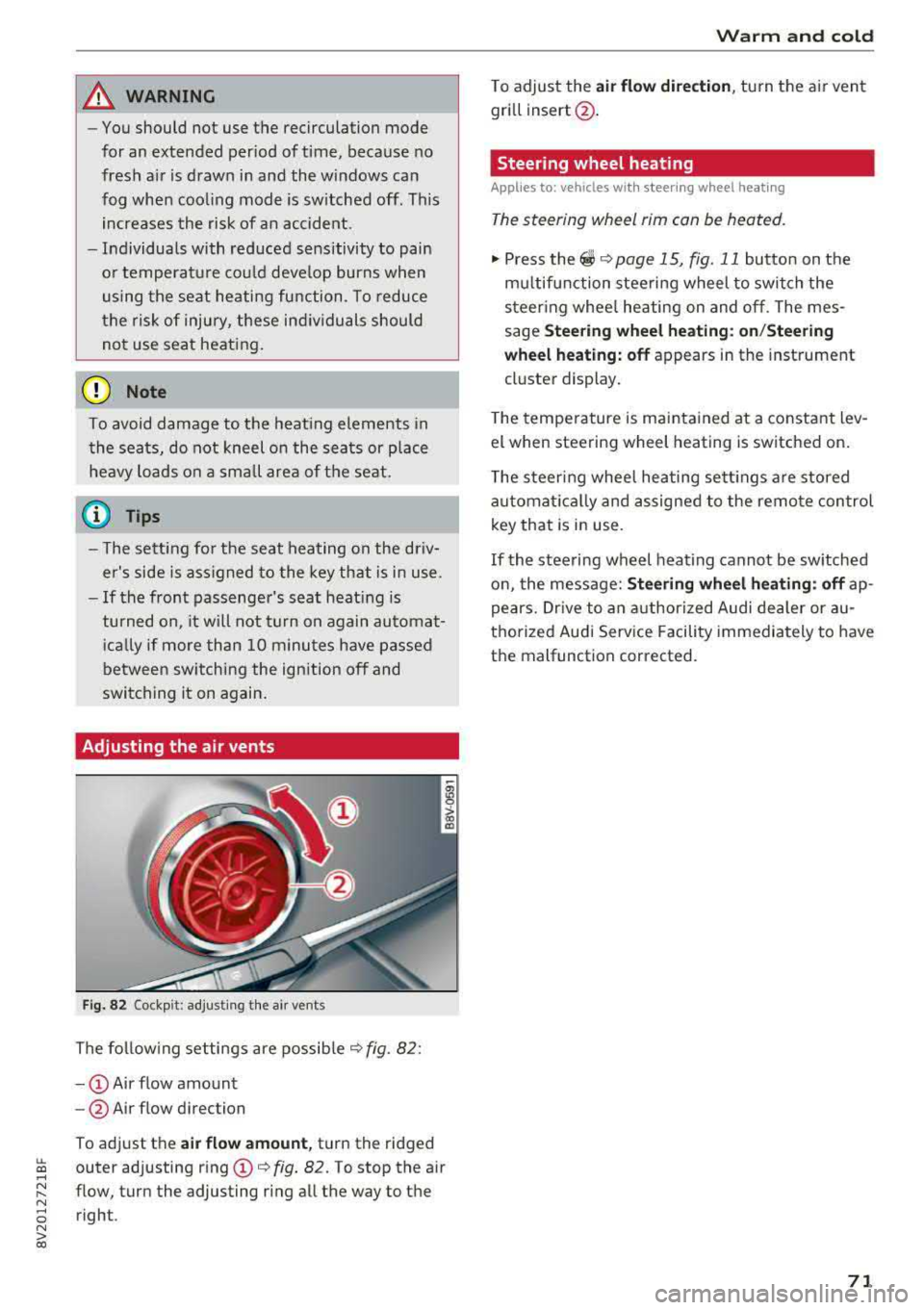
Adjusting the air vents
Fig. 82 Cockp it: adjust ing the a ir vents
The following settings are possible ¢ fig. 82 :
-CD Air flow amount
- @ Air flow direction
To adjust the
air flow amount, turn the ridged
outer adjusting ring
CD ¢ fig. 82. To stop the air
flow, turn the adjusting ring all the way to the right .
Warm and cold
To adjust the air flow dire ction , turn the air vent
gri ll insert @.
Steering wheel heating
Applies to: veh icles w ith steering whee l heating
The steering wheel rim can be heated.
"' Press the ~ ¢ page 15, fig. 11 button on the
mu ltifunction steering wheel to switch the
steering whee l heating on and off. The mes
sage
Steering wheel heating: on/Steering
wheel heating: off
appears in the instrument
cluster display.
T he temperature is maintained at a constant lev
el when steering wheel heating is switched on .
The steering wheel heating sett ings are stored
automat ically and assigned to the remote control
key that is in use .
If the steering wheel heating cannot be switched
on, the message:
Steering wheel heating : off ap
pears. Drive to an authorized Audi dealer or au
thorized Audi Service Facility immediately to have
the malfunction corrected.
71
Page 74 of 404
Drivin g
Driving
General information
Breaking in
A new vehicle must be broken in for the first 1,000 mi les (1,500 km). Do not dr ive at speeds
t hat will exceed 2/3 of the max imum pe rm itted
engine speed (RPM) for the first 600 miles
(1,000 km), and avoid fu ll acceleration during
this period . You may gradually start increasing
the RPM and the speed between 600 miles (1,000 km) and 1,000 miles (1,500 km) .
During the first hours of use, the engine has a
higher internal friction than later on when all
moving parts have settled into place with each
other.
How the vehicle is driven d uring the first 1,000
miles (1 ,500 km) a lso affects the engine quality .
Drive at moderate engine speeds after the initial
break-in per iod, part icu larly when running a cold
eng ine . Th is will reduce eng ine wear and improve
the m ileage .
Do not drive at too
low of an engine speed (RPM).
Shift down if the engine stops running "smooth ly". Extremely high eng ine speeds are automati
cally reduced .
Reducing the risk of vehicle damage
@ Note
When driving on poo r roads, by cu rbs and on
s teep ramps, make su re t hat low-hang ing
compone nts such as the spo ile r and exha ust
system do not come into contact with these
or they could be damaged. This especially ap
plies to vehicles with low ground clearance
and veh icles that are heavily loaded.
Warming up/cooling down
Applies to: RS models
By warming up/cooling down the engine carefu l
ly, you can help reduce unnecessary stra in o n
your veh icle when driving in a sporty sty le .
72
The tires only reach t heir full road ho ld ing capa
bility once they have warmed up under load.
Yo ur vehicle also has an afte r-run cooli ng fea
tu re . Howeve r, cooling down is st ill import ant.
The eng ine and t he brakes as we ll as the exhaust
system and the transmission become very hot
when driving in a sporty style. Before you shut
the veh icle off, you should cool down the vehicle
by driving a few miles at low speeds with light ac
ce leration .
Driving through water on roads
Note the following to reduce the risk of veh icle
damage when dr iving throug h wate r, fo r example
o n flooded roads:
-The water must not be any higher than the bot
tom of the vehicle body .
-Do not drive faster than walk ing speed .
A WARNING
After driving thro ugh water or m ud, the effec
tiveness of t he b rakes may be reduced due to
mo istu re o n the bra ke rotors and brake pads.
A few ca reful br ake app lica tions sho uld d ry
off the bra kes and restore the fu ll b raking ef
fect.
@ Note
-Vehicle components such as the e ng ine,
t ra nsmiss ion, sus pens io n or elect rical sys
tem can be severely damaged by d riving
throug h water.
-Alw ays sw itch the S tart/Stop system* o ff
when driving thro ugh wa ter
r=;, page 79.
(j) Tips
-De ter mine the dep th before dr iving throug h
w ate r.
-Do not stop the vehi cle, d rive in reverse or
switch t he e ngine off whe n driving through
water .
-Keep in mind that o ncom ing vehicles may
c re ate w aves th at r aise the wa ter level and
make i t too deep for yo ur vehicle to drive
throug h safe ly.
Page 76 of 404
Driving
When not being used, a roof rack should be re
moved to decrease the wind resistance of the ve
hicle. This will save you approximately 12% fuel
at speeds from 62
-75 mph (100 -120 km/h).
Save energy
The engine drives the generator, which generates
electricity; the fuel consumption also increases
with the demand for electricity. Therefore, switch
electrical equipment
off when you no longer
need it. Examples of equipment that uses a lot of
energy are air blowers at a high setting, the rear
window defogger and seat heating* .
(D Note
-Do not leave engine idling unattended after
starting. If warning lights should come on
to indicate improper operation, they would
go unheeded. Extended idling also produces
heat, which could result in overheating or
other damage to the vehicle or other prop erty.
- Have your vehicle maintained properly and
in accordance with the service recommenda
tions in your Warranty
& Maintenance book
let . Lack of proper maintenance as well as
improper use of the vehicle will impair the
function of the emission control system and
could lead to damage.
- Do not alter or remove any component of
the Emission Control System unless ap
proved by the manufacturer.
- Do not alter or remove any device, such as
heat shields, switches, ignition wires,
valves, which are designed to protect your
vehicle's Emission Control System and other
important vehicle components.
@ Tips
The consumpt ion estimates as published by
ENVIRONMENTAL PROTECTION AGENCY
(EPA) and Transport Canada may not corre
spond to your actual consumption on the
road, which will vary depending upon vehicle
load and speed, road and weather conditions,
trip length, etc.
74
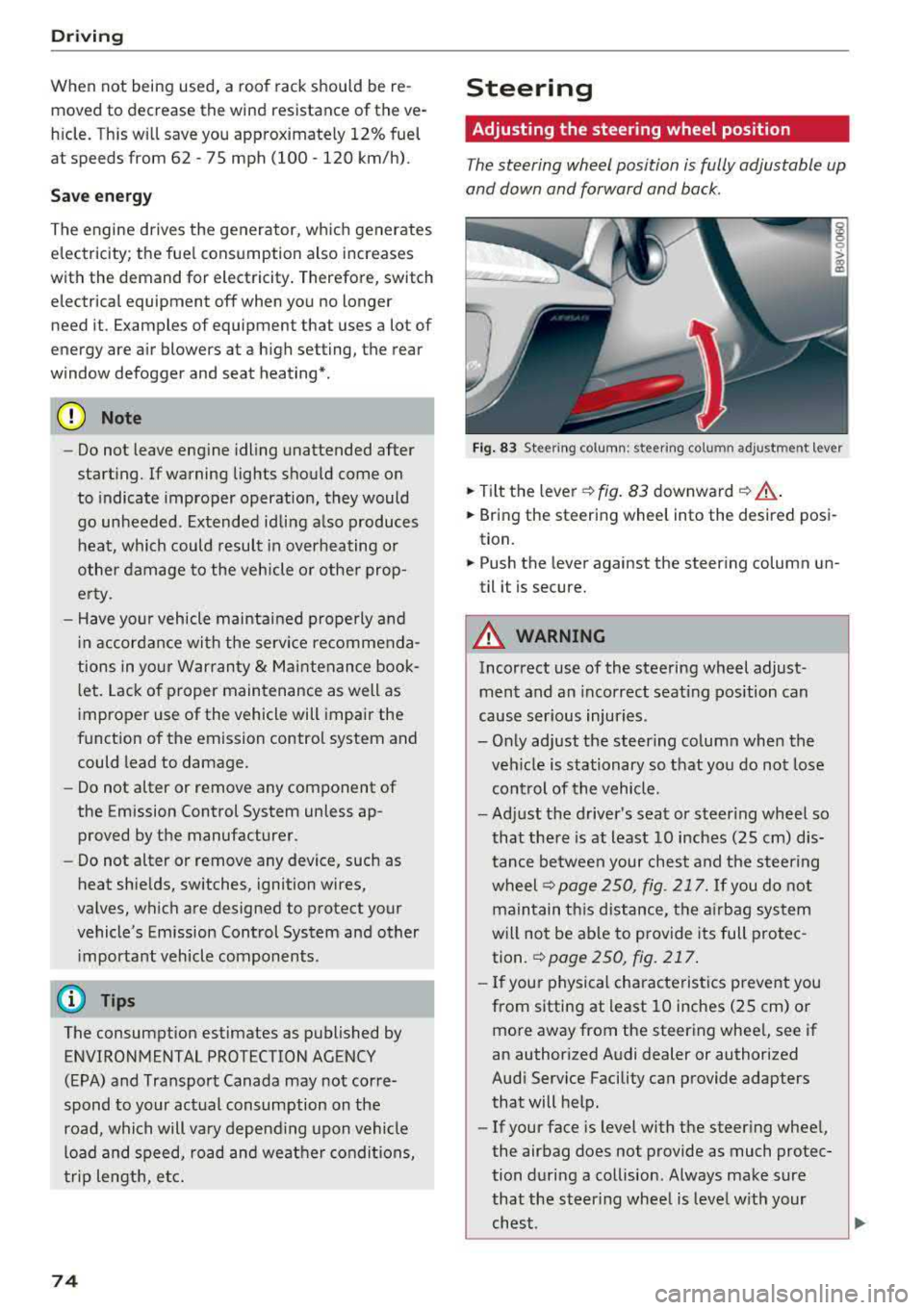
Steering
Adjusting the steering wheel position
The steering wheel position is fully adjustable up
and down and forward and back.
Fig . 83 Steering column : steering column adjustment lever
.. Tilt the lever -c> fig. 83 downward¢ ,&..
.. Bring the steering wheel into the desired posi
tion.
.. Push the lever against the steering column un
til it is secure.
A WARNING
Incorrect use of the steering wheel adjust
ment and an incorrect seating position can
cause serious injuries.
- Only adjust the steering column when the veh icle is stationary so that you do not lose
control of the vehicle.
-
-Adjust the driver's seat or steer ing wheel so
that there is at least 10 inches
(25 cm) dis
tance between your chest and the steering
wheelr::!>page250, fig. 217. If you do not
maintain this distance, the airbag system
will not be able to provide its full protec tion.
c:> page 250, fig. 217.
- If your physical characteristics prevent you
from sitting at least 10 inches
(25 cm) or
more away from the steering wheel, see if
an authorized Audi dealer or authorized
Audi Service Facility can provide adapters that will help.
- If your face is level with the steering wheel,
the airbag does not provide as much protec
tion during a collision. Always make sure
that the steering wheel is level with your
chest.
Page 77 of 404
-Always hold the steering whee l with your
hands in the 9 o'clock and 3 o'clock posi
tions to reduce the risk of injury if the airbag
deploys.
- Never hold the steer ing wheel in the 12
o'clock position or with both hands on the
rim or the center of the steer ing wheel.
Holding the steering wheel incorrectly s ig
nificantly increases the risk of in jury to the
hands, arms and head if t he a irbag dep loys.
Starting and stopping
the engine (vehicles with an ignition lock)
Starting the engine
A pp lies to: ve hicles with ignitio n lock
The ignition is switched on and the engine start
ed with the key in the ignition .
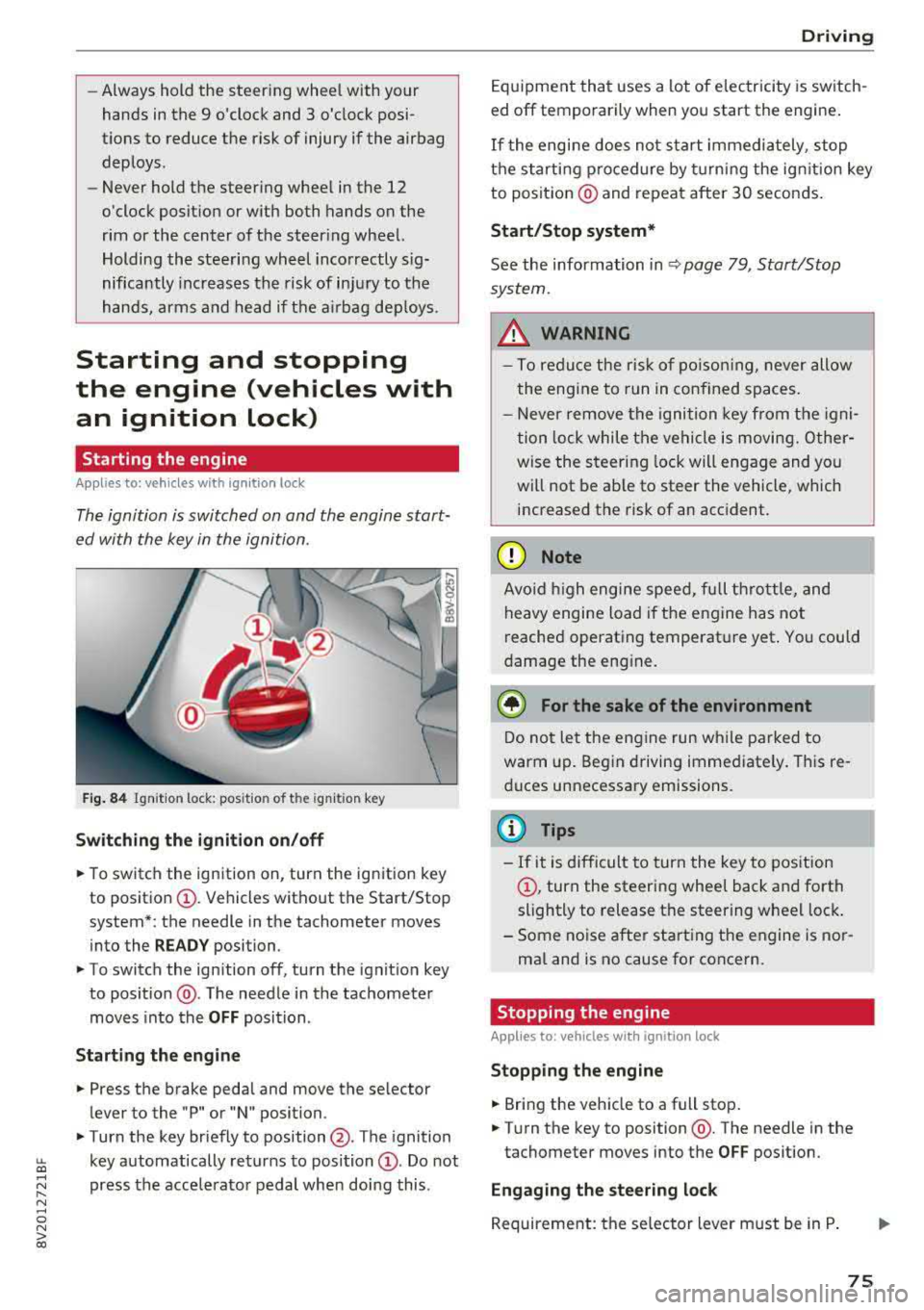
Fig. 84 Ignit io n lock: posit io n of the ignit io n key
Switching the ignition on /off
• To switch the ign ition on, turn the ign ition key
to posit io n
CI) . Vehicles without the Start/Stop
system*: the needle in the tachometer moves
into the
READY position.
• To switch the ign ition off, turn the ignit io n key
to posit ion @. The needle in the tachometer
moves into the
OFF position .
Starting the engine
• Press the brake pedal and move the se lector
lever to the "P" or "N" position.
• Turn the key briefly to position @. The ignition
~ key automatically returns to position CI) . Do not
~ press the acce lerato r pedal when doing this .
N ..... 0 N > co
Drivi ng
Equipment that uses a lot of e lectricity is switch
ed off temporarily when you start the engine .
If the engi ne does not start immediately , stop
the starting p rocedure by turning the ign it ion key
to posit ion @ and repeat after 30 seconds .
Start/Stop system*
See the information in Q page 79 , Start/Stop
system.
_&. WARNING
- T o redu ce the r is k of po iso ning, never allow
t he engi ne to run in confined sp aces.
- Never remove the ignition key from the ig ni
t ion lock while the vehicle is moving. Other
wise the steer ing lock will engage and yo u
will not be ab le to steer the vehicle, which
increased the risk of an acc ident.
(D Note
Avo id high engine s peed, fu ll th rottle, and
heavy engine load i f th e e ngine has not
reached operating temperat ure yet . You could
damage the eng ine .
@ For the sake of the environment
Do not let the engine run w hile parked to
warm up. Beg in driving immediate ly . Th is re
d uces unnecessary emissions.
@ Tips
- If it is d ifficult to turn the key to pos ition
CI) , turn the steering wheel back and forth
slightly to release t he steering whee l lock .
- S ome noise after start ing the e ngine is no r
ma l and is no cause for co ncern.
Stopping the engine
Applies to: vehicles wi th ignition lock
Stopping the engine
• Bring the vehicle to a full stop .
• Turn the key to position @. The needle in the
tachometer moves into the
OFF pos ition.
Engaging the steering lock
Requireme nt: the se lector lever must be in P .
75
Page 78 of 404
Driving
,.. Remove the ignition key in position @
9 page 76, fig. 85 9 ,&..
,.. Turn the steering wheel until you hear the
steering wheel lock.
The locked steering helps prevent vehicle theft.
A WARNING
- Never turn off the engine before the vehicle
has come to a complete stop. The full func
tion of the brake booster and the power
steering is not guaranteed. You must use more force to turn or brake . Because you
cannot steer and brake as you usually
would, this co uld lead to accidents and seri-
. . . ous mJunes .
-Never remove the ignit ion key from the ign i
t ion loc k while the vehicle is moving. Other
wise, the steering lock could suddenly en
gage and you would not be able to steer the
vehicle.
- If you leave the veh icle, switch the ignit ion
off and take the vehicle key with you. Other
wise, the engine could be started or electri
cal equipment such as the power windows
could be operated. This can lead to serious
injury.
- For safety reasons, always park the vehicle
with the selector lever in the P position.
Otherwise, there is the risk that the vehicle
could roll unintentionally .
(D Note
If the engine has been under heavy load for
an extended period of t ime, heat builds up in
the engine compartment after the engine is
switched off and there is a risk of damaging
the engine . For this reason, let the engine run
for at idle
for approximately two minutes be
fore shutting it
off.
@ Tips
For up to 10 minutes after stopping the en
gine, the radiator fan may turn on again auto
matically or it may continue to run (even if
the ignition is sw itched
off) for the following
reasons:
76
- The coolant temperature is increasing due
to trapped heat.
- If the engine is warm and the engine com
partment also heats up from strong sun
light.
Starting and stopping
the engine (vehicles with
convenience key)
Starting the engine
App lies to : vehicles wit h co nvenience key
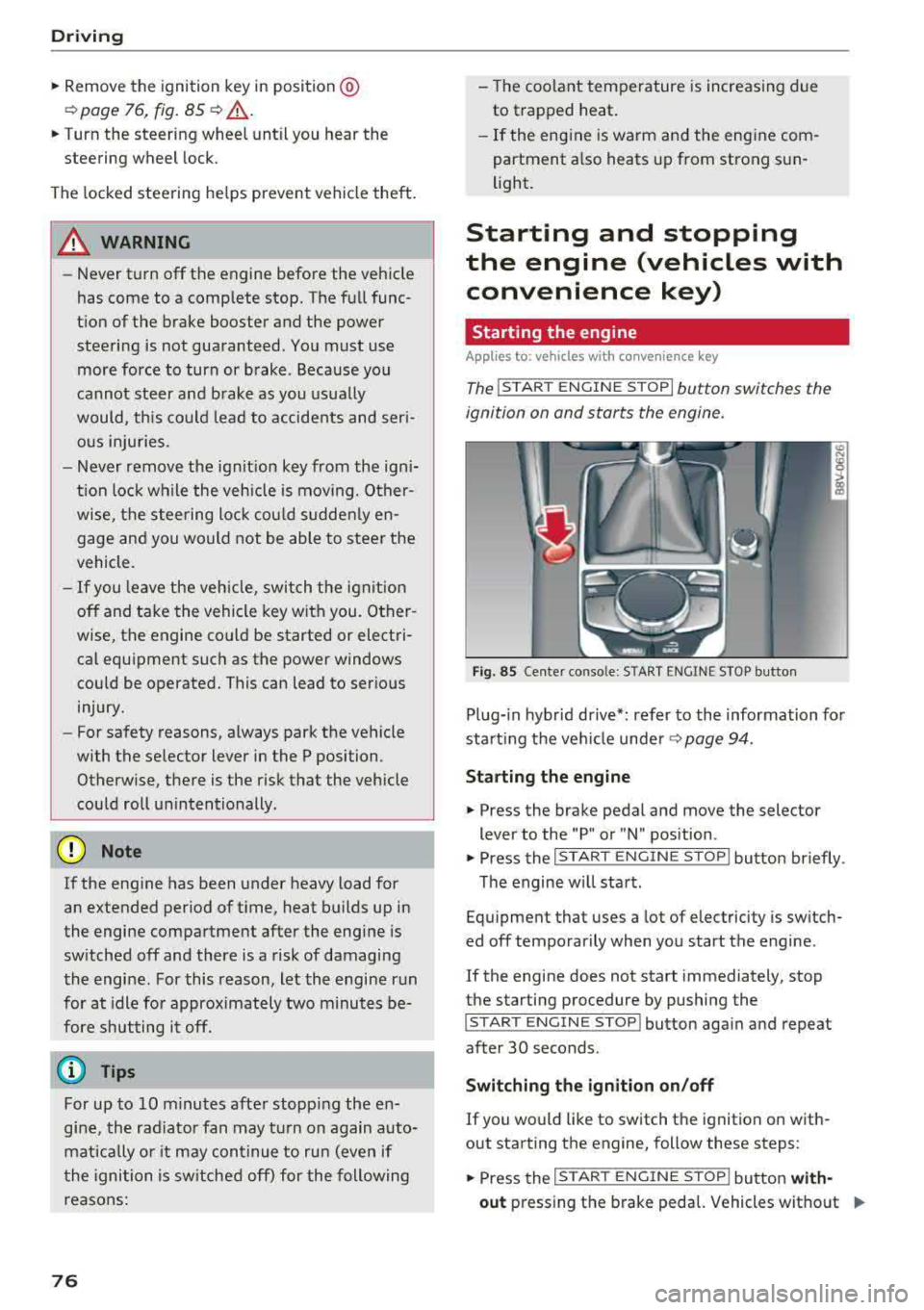
The I START ENGINE STOP I button switches the
ignition on and starts the engine.
Fig. 85 Center conso le: STAR T ENGINE ST OP button
Plug-in hybrid drive*: refer to the information for
start ing the veh icle under
9 page 94.
Starting the engine
.,. Press the brake pedal and move the selector
lever to the "P" or "N" position .
.,. Press the I START ENGIN E STOP I button briefly .
The engine will start.
Equipment that uses a lot of electricity is switch
ed
off temporarily when you start the engine .
If the engine does not start immediately, stop
the starting procedure by pushing the
I START ENGINE STOP! button again and repeat
after 30 seconds .
Switching the ignition on/off
If you would like to switch the ignition on with
out starting the engine, follow these steps:
.,. Press the I ST AR T ENGINE ST OP ! button with-
out
pressing the brake pedal. Vehicles without .,,.