phone AUDI A3 SEDAN 2018 Repair Manual
[x] Cancel search | Manufacturer: AUDI, Model Year: 2018, Model line: A3 SEDAN, Model: AUDI A3 SEDAN 2018Pages: 404, PDF Size: 62.3 MB
Page 246 of 404
System settings
wait for the sig nal t one (bee p) to say a new
command.
Volume : you can a djust th e vol ume of th e
p romp ts by turning the con tro l k no b.
Individual speech training (on ly when the v ehi
cle is s ta ti onary): yo u ca n ad apt the vo ice recog
ni tion sy ste m to your voic e or pro nunciati on in
or der to im prove the sys tem's a bili ty to re co gni ze
your speec h. Indivi dua l speech train ing is com
p rised of 20 s peech ent ries t hat consist o f com
mands and sequences of numbers . You can de
lete the p rogrammed voice t rain ing with the
Re
set individual speech training
function.
Display brightness
You can a djust the brigh tness o f the Info tain
ment system disp lay by t urning the cont ro l knob.
Factory settings
D epe ndi ng on t he ve hicle eq uipme nt, th e fo llow
i ng fu nctio ns ca n b e rese t to factory se ttings :
-Sound settings
- Radio
- Media settings
- Jukebox *
- Directory
-Telephone
- Bluetooth and Wi-Fi*
- Navigation settings*
- Navigation and online memory *
- Speech dialog system*
- Message settings *
-Apps*
- Tool tips
- Audi connect*
- Audi smartphone interface *
You can select the des ired functions individually
or all at once with the option
Select all entries .
Select and confirm Restore factory settings .
(D Tips
-Make s ure that n ot on ly t he settings we re
d eleted but also the stored data, if ap plica
b le.
- Pleas e note t hat the vo ice reco gnit io n sys
te m* is not availab le in Cabr io lets .
244
Connection manager
Introduction
The connection manager gives you an overview
of your conn ected devic es and th eir network sta
tus .
Settings Conne -ction manager I
-====- ,.· • Prima hone: MyPhone .,.
c M yPhone
• Second ary phone :
• Data conn ection :
• MM I connect App :
• Audi smartphone:
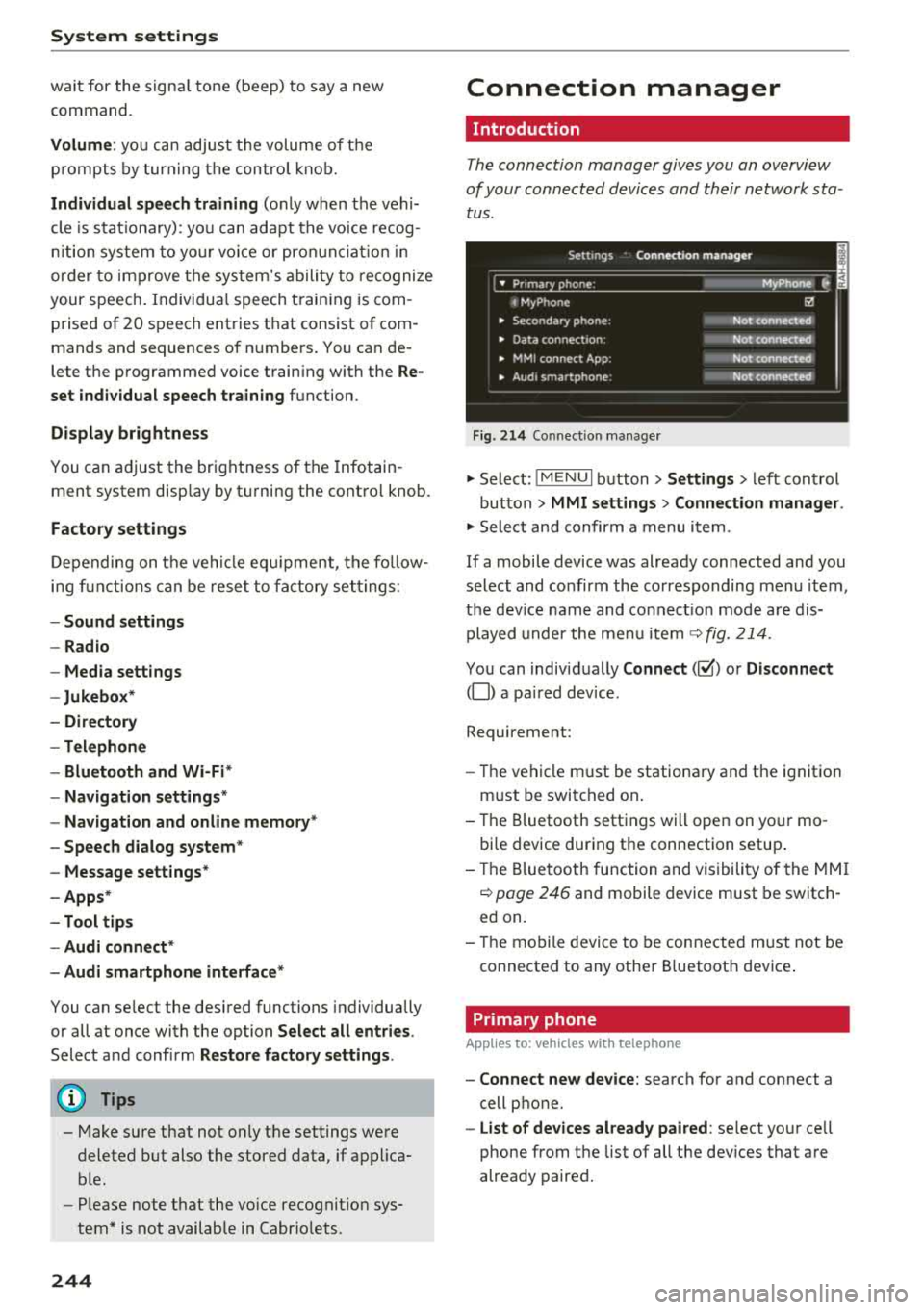
Fig. 214 Co nnec tion man ag er
Ii'!
Not connected
Not
conn.,ct.,d
Not connected
Not
conn..cted
"' Select : !ME NUI bu tton> Settings > left con trol
bu tton >
MMI settings > Connection manager .
"'Sele ct a nd confirm a menu item.
If a mobile device was already connected and you
select and co nfirm the co rresponding menu item,
t h e dev ice name and co nnect ion mode a re dis
p layed under the menu i tem
r:!;> fig. 214 .
You can indiv id ually Connect (~ ) or Disconnect
(0) a pa ired device .
Requirement:
- The ve hicl e m ust be statio na ry and the ignit io n
m ust be switc hed on .
- Th e Bluetooth sett ings will open on yo ur mo
bi le device dur ing the connection setup .
- T he Blue tooth func tion and v is ibili ty of the MMI
c:!;> page 24 6 and mobile device must be switc h
ed on.
- T he mo bile device to be con nected m ust not be
connected to any othe r Bluetoot h dev ice .
Primary phone
App lies to: vehicles wit h telepho ne
- Connect new device: search for and connect a
cell p hone.
- List of devices already paired : select yo ur cell
phone from the list of all the dev ices that a re
already paired.
Page 247 of 404
u. 00 ... N l' N ... 0 N > 00
Secondary phone
Applies to: vehicles with telephone
-Connect new device : search for and connec t a
c e ll phone.
- List of devices already paired : selec t your cell
p hone fro m the lis t of all the devices t hat are
al re ad y p aired.
Data connection
Applies to vehicles with Audi connect (Infotainment)
- T he data conne ct ion is made using the em bed
ded SIM car d
ll i=>page 190. You do not need to
adjust a ny a ddit io n al sett ings.
{Ll) Note
Always follow t he inf ormat ion foun d in i=> @ in
Wi-Fi hotspot on page 195 .
MMI connect app
Applies to vehicles with Audi connect (Infotainment)
Requirement: the Audi MMI connect app m ust
be installed and open on your mobile device.
- Connect new device : search for and connect a
mobile device (s uch as a smartp hone) .
-List of devices already paired : selec t your mo
bile device from the list of a ll the devices that
are already paire d.
Audio player
Applies to vehicles with Bluetooth or Wi-Fi audio player
Bluetooth player*
Requirement: the Bluetooth funct ion and v is ibili
ty must be sw itched on in the MMI
i=> page 246
and on the B luetoot h aud io player.
- Connect new device : press the control knob.
Se lect
Bluetooth audio player . Search fo r and
connect a mobile device .
-List of devices already paired : select a Bl ue
tooth device from the list of a ll the devices that
are already paire d.
ll SIM card inst alle d in t he v eh icle at the fa ctory.
System settings
Wi-Fi audio player*
R eq uiremen t: th e W i-Fi h otspo t* on the M MI
i=> page 195 an d on yo ur Wi -Fi audio playe r must
be switched o n.
-Connect new device: press the co ntrol knob.
Se arch for and conne ct a W i-Fi ca pabl e dev ice.
- Disconnect Wi-Fi audio player: de activate t he
W i-Fi on you r W i-Fi capa ble dev ice. The devi ce
w ill be au tom atic a lly removed from the lis t.
@ Note
Alway s follo w the inf ormat ion foun d in i=> @ in
W i-F i h ots pot on p age 195.
Directory
Applies to: vehicles with telephone
Display contacts from a cell phone (or an addi
tiona l cell phone).
Requirement: no ce ll phones can be connec ted to
the MMI using the
Handsfree pro file.
- Connect new device: search for and connect a
new ce ll phone .
-List of devices already paired : select yo ur cell
phone from t he list of all the cell phones that
are a lready paired .
Audi smartphone
Applies to: vehicles with Audi smartphone interface
-Connect yo ur cell phone to the A udi music in
t erface
i=> page 230 using a USB adap ter
i=> page 22 9, fig. 2 06.
- Sel ect your cell p ho ne from t he list of cell
p ho nes th at h ave already bee n con nec ted.
Additional options
D epen ding on the sele cted fun ct ion, yo u ca n use
t h e righ t contro l bu tton to access the ava ila bl e
additional options in t he connection mana ger .
.,.
245
Page 248 of 404
System settings
Delete Bluetooth device*
The se lecte d cell p ho ne/mo bile dev ice is dis con
nected from t he M MI and is removed from the
list of all devices that are alrea dy paire d.
Show Bluetooth profiles*
You can Connect or Disconnect the Handsfree ,
Me ssages *, Dire ctory /contacts
an d Bluetooth
audio player
pro files sep arately.
Bluetooth settings*
- Bluetooth :
select and confirm a set ting for the
B luetoot h connec tion v is ibility . Select
Visible
fo r th e MM I to be vis ib le to o ther dev ices. Se
l ec t
Invisible fo r th e M MI to not be v is ible t o
othe r devi ce s. H oweve r, it is still possib le to es
tab lish a Bl uetoo th con nection with pai red de
vices when the v is ibi lity is switched off. Se lect
Off to t urn visibi lity off . Then a B luetooth con
nect ion is not possible .
-Bluetooth audio player : when this function is
switc hed
on ~' the Bluetooth audio player is
available as a so urce in t he
Media menu .
-Bluetooth name : the MMI B luetooth name (for
example "AUDI MMI") is d isp layed and ca n be
c h anged.
Online settings*
- Data usage counter :
the amount of data pack
ets that a re sent a nd received throug h the MMI
is d isp layed. You can reset the data usage infor
mation to zero using the
Reset data counter
option.
- Network status : the mobile netwo rk p rovider
fo r data se rvice as well as the netwo rk status
are disp layed .
Wi-Fi settings*
See ¢ page 195, Wi -Fi hotspot.
Storing as a default telephone
Applies to: vehicles with telephone
Requir emen t: a cell phone must be connected to
t he MM I
¢page 17 7.
As soon as t he cell phone is i n range and the
B lue tooth func tion on the ce ll phone and in the
MM I is swi tched o n, this ce ll phone is g iven pr io r
ity ove r th e ot her Blue tooth devices and is c on-
246
necte d dir ectly to the M MI. The connec ted ce ll
p hone is d is pl ayed first in t he dev ice li st .
Network settings*
- Login :
you can chose an automatic log in to
your cell p ho ne servi ce pro vider 's ne twor k, or
you can ch oose a
manual log in from t he list of
avai la bl e netwo rks .
-Network selection : availabl e netwo rks in t he
presen t loca tion can be sele cte d unde r network
select io n. This f unction is on ly avai la bl e for the
Manual log in setting.
Apple CarPlay sound settings/ Android Auto
sound settings
Applies to: vehicles with Audi smartphone interface
See q page 24 7.
About Apple CarPlay/ About Android Auto
Applies to: vehicles with Audi smartphone interface
Here you w ill find l ega l informa tion regarding
t h e use o f A pple Car Play o r And ro id Aut o and in
fo rmat ion a bout device -s p eci fic d ata exch ange.
Delete Apple CarPlay device/Delete Android
Auto device
Applies to: vehicles with Audi smartphone interface
Require ment: yo ur cell phone must not be con
n ect ed to the Au di music interf ace wi th a USB
adap ter.
Se lec t:
Audi smartphone > a dev ice from t he lis t
> r igh t con trol b utto n.
To remove your cell p ho ne from the list, se lect
and co nfirm
Delete Apple CarPlay device or De
lete Android Auto device .
System update
"'Select : !ME NUI bu tton> Settings > left control
bu tton >
System maintenance.
- System update :
slide the storage device with
t he update da ta into the a pprop ria te drive
¢ page 224 . Selec t and conf irm the dr ive>
Start update . The length of the p rocess de
pe nds on the s ize of the upd ate.
- Reset driver installation: the selected media
dr iver p ackage is rese t to t he se ttings a t the
t im e of delivery .
Page 250 of 404
System settings
Adjusting the system volume
.,. Select : I MENU I button> Sound> left control
button.
Telephone
Applies to: vehicles with telephone
Mute telephone: messages and ringtones are set
to mute.
Ringtone : see c::> page 188, Ringtone and volume
settings .
Ringtone volume:
you can adjust the volume of
the selected ringtone by turning the contro l
knob.
Message volume: you can adjust the volume of
the notification for an incoming text message by
turning the control knob.
Microphone input level : you can adjust the call
volume during a phone call by turning the control
knob.
Navigation
Applies to: vehicles with navigation system
Voice guidance: see c::>page 210.
Voice guidance during phone call: see
c::> page 210.
Voice guidance volume: you can adjust the vo ice
gu idance volume by turning the control knob.
Or:
you can adjust the vo ice guidance volume during
active route guidance by turning the On/Off
knob .
Entertainment fader : the volume of audio play
back can be temporarily lowered when the park
ing system or vo ice gu idance is active .
Voice recognition system
Applies to: vehicles with voice recognition system
Command display : see c::> page 243.
Short dialog : see c::> page 243.
Volume : see c::> page 243 .
Individual speech training : see c::> page 243.
1> Not availa ble in all vehicl es.
248
Parking aid*
You can adjust the volum e of the signal tone by
turning the control knob.
-Adjusting the Front volume: select and con
firm
High , Medium or Low .
- Adjusting
the Rear volume : select and confirm
High , Medium or Low .
MMI touch*
Turn the control knob to adjus t the volume of the
spoken prompts from the
MMI touch* .
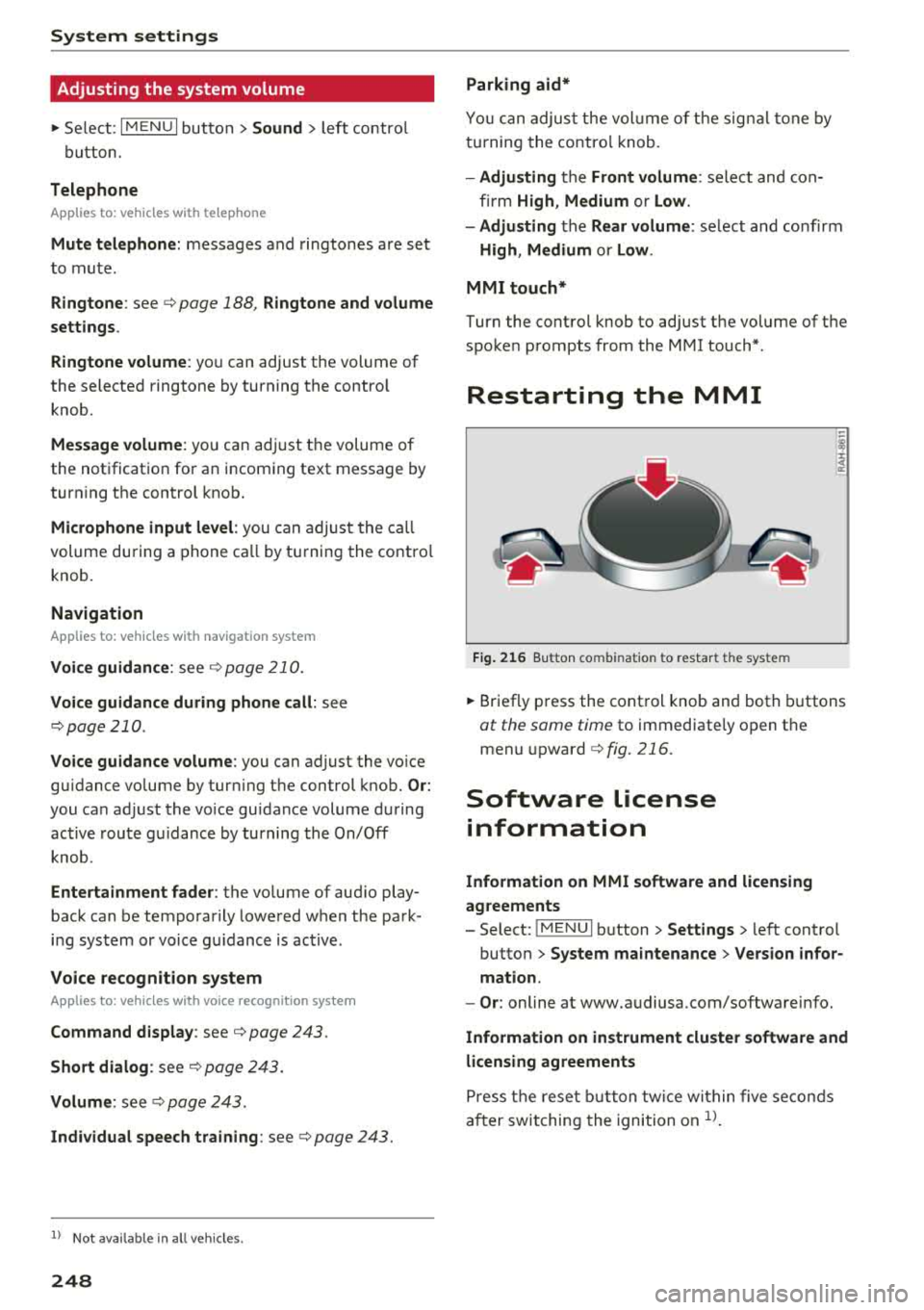
Restarting the MMI
Fig. 216 Button co mbinatio n t o restar t th e sys te m
.,. Briefly press the control knob and both buttons
at the same time to immediately open the
menu upward
c::> fig. 216.
Software license
information
Information on MMI software and licensing
agreements
- Select: ~
I M~E=N~U~ I button >Settings > left control
button>
System maintenance > Version infor
mation.
- Or : online at www.audiusa.com/softwareinfo.
Information on instrument cluster software and
licensing agreements
Press the reset button twice within five seconds
after switching the ignition on
ll.
Page 251 of 404
u. 00 .-< N l' N .-< 0 N > 00
Driving safety
Basics
Safe driving habits
Please remember -safety first!
The individual safety features of your vehicle can
work together as a system to help protect you
and your passengers in a wide range of accidents.
These features cannot work as a system if they
are not always correctly adjusted and correctly
used .
This chapter contains important informat ion,
tips, instructions and warnings that you need to
read and observe for your own safety, the safety
of your passengers and others . We have summar
iz ed here what you need to know about safety
belts, airbags, child restraints as well as child
safety. Your safety is for us
priority number 1. Al
ways observe the information and warnings in
this section -for your own safety as well as that
of your passengers.
The informa tion in t his section applies to all
model versions of your vehicle. Some of the fea
tures described in this sections may be standard
eq uip ment on some models, or may be optional
equ ipment on others. If you are not sure, ask
your author ized Audi dealer.
A WARNING
-Always make sure that you follow the in
struct ions and heed the WARNINGS in this
Manual. It is in your interest and in the in
terest of your passengers .
-
-Always keep the complete Owner's Litera
ture in your Audi when you lend or sell yo ur
vehicle so that this important information
w ill always be available to the driver and
passengers.
-Always keep the Owner's literature handy so
that you can find it easily if you have ques
tions .
Driving safety
Important things to do before driving
Safety is everybody 's job ! Vehicle and occupant
safety always depends on the informed and care
ful driver .
For your safety and the safety of your passen
gers,
before driving always:
.. Make sure that a ll lights and signals are operat
ing correctly.
.. Make sure tha t the tire pressure is correct .
.. Make sure that all w indows are clean and afford
good vis ibility to the outs ide.
.. Secure all luggage and othe r items ca refully
c::> page 63, c::> page 63 .
.. Make sure that nothing can interfere with the
peda ls .
.. Adjust front seat, head restraint and mirrors
correct ly for your height.
.. Instruct passengers to adjust the head re
straints according to their height.
.. Make sure to use the right child restraint cor
rectly to protect children
c::> page 294, Child
safety .
.. Sit properly in your seat and make sure t hat
your passengers do the same
c::> page 59, Front
seats .
.. Fasten your safety belt and wear it properly. Al
so instruct your passengers to fasten their safe
ty belts properly
c::> page 260.
What impairs driving safety?
Safe driving is directly related to the condition of
the vehicle , the driver as well as the driver 's abili
ty to concentrate on the road without being dis
tracted.
The driver is responsible for the safety of the ve
hicle and a ll of its occupants. If your ability to
drive is impa ired, safety risks for everybody in the
vehicle increase and you a lso become a hazard to
everyone else on the road
c::> &_ . Therefore:
.. Do not let yourse lf be distracted by passengers
or by using a cellular telephone .
.. NEVER drive when your driving abi lity is im
pa ired (by med ications, alcohol, drugs, etc .) .
.. Observe all traffic laws, rules of the road and
speed lim its and plain common sense .
.,.
249
Page 276 of 404
Airbag syste m
-Never hold the steering whee l at the 12
o'clock pos it ion or w ith your han ds any
where inside the steering wheel or on the steering wheel hub. Holding t he steering
wheel the wrong way increases the risk of severe injury to the arms, hands, and head if
the d river a irbag deploys.
A WARNING
Objects between you and the a irbag w il l in
crease the risk of inj ury in a crash by interfer
ing w ith the way the airbag unfo lds and/or by
being pushed into you as the airbag inflates .
- Always make sure nothing is in the front air-
bag deployment zone that could be str uck
by the airbag when it inflates.
-
- Objects in the zone of a deploying airbag
can become projectiles when the airbag de
ploys and cause serious persona l injury .
- Never hold th ings in your hands or on your
lap when the vehicle is in use.
- Never place accessor ies or other objec ts
(s uch as c up ho lders, telephone brackets,
note pads, navigation systems, or things
that are large, heavy, o r bulky) on the doors;
never attach then to the doors or the wind
shield; never place them over or near or at
tach them to the area marked
,,AIRBAG" on
the steering wheel, instrument panel or the seat backrests; never p lace them between
these a reas and yo u or any other person in
the vehicle.
- Never attach objects to the w indshield
above the passenger front airbag, s uch as
accessory GPS navigation uni ts or mus ic
players . S uch objects could ca use serio us in
jury in a collision, especially when the air bags inflate.
- Never recline the front passenger seat to transport objects . Items can also move into
the deployment area of the side a irbags or
the front a irbag during breaking o r in a sud
den maneuver. Objects near the airbags can
fly dangerous ly through the passenger com
partment and cause injury, particularly
when the seat is reclined and the airbags in
flate.
274
A WARNING
A person on the front passenger seat, espe
cially infants and small ch ildren, wi ll receive
serious in juries and can even be k illed by be
ing too close to the airbag when it inflates .
- Although the Advanced Airbag System in your veh icle is designed to turn off the front
passenger airbag if an infant o r a small child
is on the fron t passenger sea t, nobody can
absolu tely guarantee tha t deployment un
de r these specia l condi tions is impossible in
all conceivable situations that may happen
during the useful life of yo ur vehicle.
- The Advanced Airbag System can dep loy in
accordance with the
,. low risk" option for 3-
and 6-year-old children under the U.S. Fed
eral Standard if a child w ith electrical capac
itance greater than the combined capac i
tance of a typical one-year o ld infant re
strained in one of the forward facing or rea r
ward-facing chi ld seats with which yo ur ve
hicle was certified is on the front passenger
seat and the o ther conditions for airbag de-
ployment are me t.
- Accident s tatisti cs have shown th at children
are generally safer in the rear seat are a than
in the front seat ing pos ition.
- For their own s afety, all ch ildren, especi ally
12 years and younger, should alw ays ride in
the back proper ly restrained for their age
and size .
Advanced front airbag system
-
Your vehicle is equipped with a front Advanced
Airbag System in compliance with United States
Federal Motor Vehicle Safety Standard 208, as
well as Canada Motor Veh icle Safety Standard
(CMVSS) 208 as applicable at the t ime your vehi
cle was manufactu red .
The front Advanced A irbag System supplements
the safety belts to provide add itiona l protect ion
for the driver 's and front passenger's heads and
upper bod ies in fronta l crashes. The a irbags in
flate only in frontal impacts when the vehicle de-
ce le ra tion is high e no ugh.
II>-
Page 282 of 404
Airbag syste m
A WARNING
A child in a rearward-facing child seat instal
led o n the front passenger seat will be ser i
ously injured and can be k ille d if the front air
bag in flate s - even with an Advanced Airbag
System.
- The inflating a irbag w ill hit the child seat or
infant carrier w ith great force and will
smash the ch ild seat and child against the
backrest, cente r arm rest, door or roof.
- Always install rear-facing child seats on the
rea r seat.
- If you must install a rearward fac ing ch ild
seat on the front passenger seat because of
exceptional c ircumstances and the
PASSEN
GER AIR BAG OFF
light does not come on
and stay on, immediately insta ll the rear
facing child seat in a rear seating position and have the airbag system inspected by
your Audi dealer.
A WARNING
-
-
Objects between you and the a irbag w ill in
crease the risk of in jury in a crash by interfer
ing w ith the way the airbag unfolds or by be
ing pushed into you as the a irbag inflates.
- Never hold th ings in your hands or on your
lap when the vehicle is in use .
- Never transport items on or in the area of
the fron t passenger seat . Objects could
move into the area of the front airbags du r
ing bra king or other sudden maneuve rs and
become dangerous projec tiles that c an
ca use serious pe rsonal injury if the a irbags
inflate.
- Never pl ace or attach accessor ies or o ther
objects (such as cup ho lders, te lephone
brackets, large, heavy or bulky objects) on
the doors, over or nea r the area marked
"AIRBAG" on the steering wheel, instru
ment pane l, seat backrests or between
those areas and yourself. These objects could cause injury in a crash, especially
when the airbags infla te.
- Never recline the front passenger's seat to
transport objects . Items can also move into
the a rea of the side airbag o r the front a ir-
280
bag du ring brak ing o r in a sudden maneu
ver. Objects near the airbags can become pro jecti les and cause injury, part icularly
when the seat is reclined .
- Never p lace or transport objects on the
front passenger seat. Objects on the front passenger seat could cause the capacitive
sensor in the seat to signal to ai rbag system
that the seat is occ upied by a person when it
in fact is no t, or that the pe rson on the seat
is he avie r th an he or she act ually is. The
change in electric capacitan ce beca use of
such objects can cause the passenge r front
airbag to be turne d on when it should be
off, or can cause the airbag to work in a way
that is different from the way it would have
wo rked without objects on the seat.
- Always make sure that there is noth ing on
the front passenger seat that will cause the
capacitive passenger detection system in
the sea t to signal to the Airbag System that
the seat is occup ied by a person when it is
not, or to signal that it is occupied by some
one who is heavier th an the person actu ally
si tting on the sea t. The presence of an o b
ject could ca use the passenger front air bag
to be turned on when it should be off, or
could cause the airbag to work in a way that is diffe rent from the way it would have
worked without the object on the seat.
A WARNING
The fine dust created when airbags deploy can
cause breathing prob lems for people with a
h istory of asthma or othe r breath ing cond i
tions .
- To reduce the r isk of breathing p roblems ,
those wi th asthma o r other respiratory con
ditions sho uld get fresh a ir rig ht away by
getting out of the vehi cle or opening win
dows or doors.
- If you are in a co llision in which airbags de
ploy, w ash yo ur hands and f ace with m ild
soap and water be fore eating.
- Be ca refu l not to get the dust into your eyes,
or into any cuts or scratches.
- If the residue sho uld get into your eyes,
flush them w ith wate r.
Page 286 of 404
Airbag syste m
seat into its rearmost position in the seat's
fore and aft adjustment range, as far away
from the airbag as possible. The backrest must be adjusted to an upright posit ion .
Make sure that the
P A SSEN GER AIR BAG
OFF
light comes on and stays on all the t ime
whenever the ignition is sw itched on.
A WARNING
- If the PASSENGER AIR BAG OFF light does
not go o ut w hen an ad ult is sitting on the
front passenger seat after taking the steps
described above, make sure the adu lt is
properly seated and restrained at one of the
rear seating positions .
- Have the airbag system inspected by your
Audi dealer before transporting anyone on
the front passenger seat .
(D Tips
If the capacitive passenge r detection system
determines that the front passenger seat is
empty, the fronta l airbag on the passenger
side w ill be turned off, and the
PA SSE NGER
AIR BAG OFF light will stay on.
Repair , care and disposal of the airbags
Parts of the a irbag system are installed at many
d ifferent places on your Aud i. Install ing , remov
ing, servic ing or repa iring a part in an area of the
ve hicle can damage a pa rt of an airbag system
and p revent that system from working properly
in a co llision .
There are some important th ings you have to
know to make sure that the effect iveness of the
system w ill not be impaired and th at discarded
components do not cause injury or pollute the
environment .
A WARNING
Improper care, servicing and repair proce
dures can increase the r isk of personal injury
and death by preventing an airbag from de
ploying when needed or dep loying an airbag
unexpectedly:
284
-
- Never cover, obstruct, or change the steer
ing wheel horn pad or airbag cover or the in
strument panel or modify them in any way.
- Never attach any objects such as cup ho lders
or telephone mountings to the surfaces cov
ering the a irbag un its .
- For cleaning the horn pad or instrument panel, use only a soft, dry cloth or one mois
tened w it h plai n water . Solvents or cleaners
could damage the airbag cover or change
the st iffness or strength of the material so
that the ai rbag cannot deploy and p rotect
p roperly.
- Never repair, ad just, o r change any parts of
the airbag system.
- All work on the steer ing wheel, inst rument
pa nel, front seats o r electr ica l system ( in
cl uding the insta llation of a udio eq uipment,
cell ular te lephones and CB radios, etc.)
m ust be performed by a qualified techn ician
who has the training and specia l equipment
necessary.
- For any work on the airbag system, we
strong ly recommend that you see yo ur a u
thorized A udi dealer or qualified workshop .
- Never modify the front b umper or parts of
the vehicle body.
-Always make sure that the side airbag can inf late wit hout interference:
- Never install seat covers or replacement upholstery ove r the front seatbacks that
have not bee n specifica lly approved by
A udi .
- Never use additional seat c ushi ons that
cover the areas where the side airbags in
flate.
- Damage to the orig inal seat cove rs or to
t h e seam in the area of the s ide a irbag
module mus t always be repai red immedi
ate ly by an authorized Aud i dealer.
- The airba g sys tem can deploy o nly on ce. Af
t er an airbag has been dep loyed, i t m ust be
replaced with new replaceme nt parts de
signed and approved especia lly for your
Aud i mode l version . Rep lacement of com
plete airbag systems or airbag components
must be performed by qua lified workshops
only . Make sure t hat any airbag service
Page 292 of 404
Airbag system
-Damage to the original seat covers or to
the seam in the area of the side airbag module must always be repaired immedi
ately by an authorized Audi dealer .
- Objects between you and the airbag can in
crease the risk of injury in an accident by in
terfering with the way the airbag unfolds or by being pushed into you as the a irbag in
flates.
- Never place or attach accessories or other
objects (such as cup holders, telephone
brackets, or even large, bulky objects) on
the doors, over or near the area marked
"AIRBAG" on the seat backrests .
- Such objects and accessories can become
dangerous projectiles and cause injury
when the supplemental s ide airbag de
ploys.
- Never carry any objects or pets in the de
ployment space between them and the
airbags or allow chi ldren or other passen
gers to travel in this posit ion.
- Always use the built-in coat hooks only for
lightweight clothing . Never leave any heavy
or sharp-edged objects in the pockets that
may interfere with side airbag deployment
and can cause personal injury in an accident .
- Always prevent the side airbags from being
damaged by heavy objects knocking against
or hitting the sides of the seatbacks.
- T he airbag system can only be triggered
once .
If the airbag has been triggered, the
system must be replaced by an authorized
Audi dealership.
- Damage (cracks, deep scratches etc.) to the
original seat covers or to the seam in the
area of the side airbag modu le must always
be repaired immediately by an authorized
Audi dealer.
-If children are seated improper ly, their risk
of injury increases in the case of an acc ident
¢ page 2 94, Child safety.
-Never attempt to modify any components of
the a irbag system in any way.
-In a side collision, side airbags w ill not func
t ion properly if sensors cannot correctly
measure increasing air pressure inside the
290
doors when air escapes through larger, un
closed openings in the door panel.
- Never drive with inte rior door trim panels
r emoved.
- Never dr ive when parts have been re
moved from the inside door panel and the
openings they leave have not been proper
l y closed.
- Never drive when loudspeakers in the
doors have been removed unless the
speaker holes have been properly closed.
- Always make certain that openings are
cove red or filled if additional speakers or
other equipment is installed in the inside
door panels .
- Always have work on the doors done by an
authorized Aud i dealer or qualified work
shop .
Side curtain airbags
Description of side curtain airbags
Applies to: vehicles with side curtain airbags
The side curtain airbag sys tem can provide sup
plemental protection to properly restrained oc
cupants .
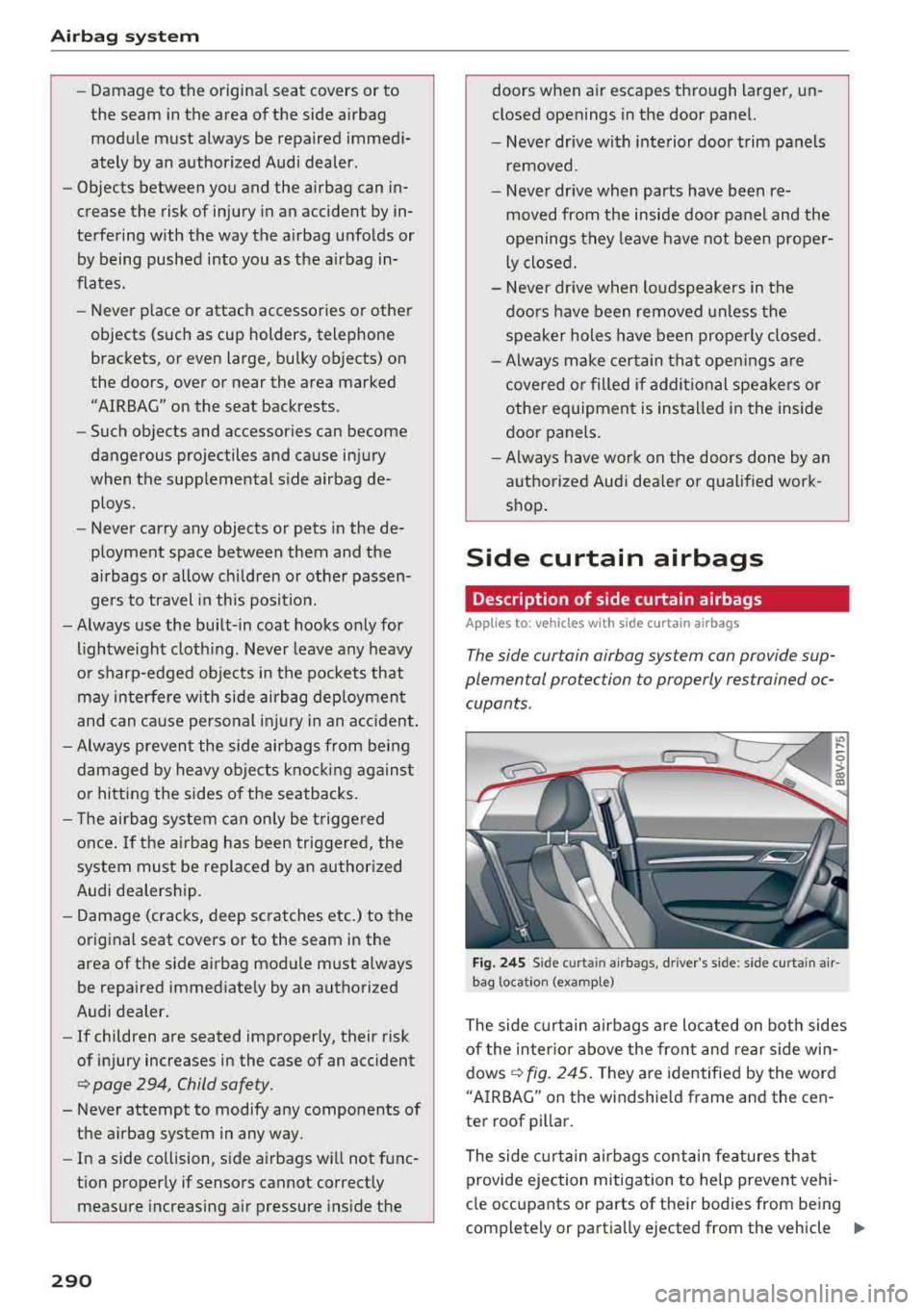
Fig. 24S Sid e curt ain air b ags , driver's s ide: s ide curt ain air
bag location (example)
The side curtain airbags are located on both sides
of the inter ior above the front and rear side win
dows ¢
fig. 245. They are identified by the word
"A IRBAG" on the windshie ld frame and the cen
ter roof pillar.
The side curtain airbags contain features that
provide ejection mitigation to help prevent vehi-
cle occupants or parts of their bodies from being completely or partia lly ejected from the vehicle
II>
Page 318 of 404
Checking and Filling
~ After the fuel pump has switched off, wait five seconds before removing it to allow the rest of
the fuel to finish dripping into the fuel tank.
~ Turn the fue l cap clockwise until you hear it
lock.
~ Close the fuel filler door and then press on the
left side until it latches .
The correct fuel type for your vehicle can be
found on a label located on the inside of the fuel
filler door. For additional information on fuel,
see
Qpage 314 .
For the tank capacity in your vehicle, refer to the
Technical Data
Qpage 382.
To reduce the risk of fuel leaking out or vapors
escaping, make sure that the fuel tank is closed
correctly. Otherwise
thP ¢..iff indicator light will
turn on.
If the centra l locking system malfunctions, the
fuel filler door may emergency release
Qpage317.
A WARNING
An improper fueling procedure and improper
handling of fuel can lead to explosions, fires,
severe burns and other injuries.
-Do not smoke and keep away from open
flames.
-The ignition must be switched off when re
fueling.
-Cell phones, radio devices and other radio
equipment should always be switched off
when refueling. Electromagnetic rays could cause sparks and start a fire.
-If you do not insert the fuel pump nozzle all
the way into the filler tube, then fuel can
leak out. Spilled fuel can ignite and start a
fire.
-Never get into the vehicle when refueling. If
there is an exceptional situation where the
vehicle must be entered, close the door and
touch a metal surface before touching the
fuel pump nozzle again. This will reduce the
risk of electrostatic discharge that can cause
flying sparks. Sparks can start a fire when
refueling.
316
A WARNING
We recommend that you do not transport any
fuel containers in the vehicle. Fuel could leak
out of the container and ignite, especially dur
ing an accident. This can cause explosions,
fires and injuries.
-If you must transport fuel in a fuel contain
er, please note the following:
-Always place a fuel container on the
ground before filling. Never fill the fuel
container with fuel while it is in or on the
vehicle. Electrostatic charge can occur
while refueling and the fuel vapors could
ignite .
-For fuel containers made of metal, the
fuel pump nozzle must always maintain
contact with the container to reduce the
risk of static charge.
-Insert the fuel pump nozzle as far as pos
sible into the filler opening while refuel
ing.
-Follow legal requirements when using,
storing and transporting fuel containers.
-Make sure that the fuel container meets
the industry standards, for example ANSI
or ASTM F852-86.
@ Note
-Remove fuel that has overflowed onto any
vehicle components immediately to reduce
the risk of damage to the vehicle.
-Never drive until the fuel tank is completely
empty. The irregular supply of fuel that re
sults from that can cause engine misfires.
Uncombusted fuel will enter the exhaust
system and increase the risk of damage to
the catalytic converter.
@I For the sake of the environment
Do not overfill the fuel tank, otherwise fuel
can leak out when the vehicle is warming up.
© Tips
The fuel filler door on your vehicle does not lock if you lock the vehicle from the inside us-
ing the central locking switch.
II>-