mmi AUDI A4 2013 Owner's Manual
[x] Cancel search | Manufacturer: AUDI, Model Year: 2013, Model line: A4, Model: AUDI A4 2013Pages: 302, PDF Size: 75.61 MB
Page 118 of 302

116 Park assist
Park assist
Parking system
Applies to vehicles: with pa rking system
Different park assist systems may be used for
parking or maneuvering, depending on the
vehicle's features.
Parking system (rear)*:
For the parking system (rear), the acoustic
park assist system is installed in the rear of
the vehicle
¢ page 116.
The rear parking assist system uses ultrason ic
sensors to determine the distance of the vehi
cle from a detected obstacle. There are a total
of four sensors located on the rear bumper
(two in the middle and two on the sides).
Parking system (rear, with rear view
camera)*:
For the parking system (rear, with rear view
camera),
the rear acoustic park assist system
is integrated in the rear of the vehicle and the
rear view camera is integrated in the rear lid
¢page 119.
The parking system (rear, with rear view cam
era)
uses ultrasonic sensors to determine the
distance of the vehicle from a detected obsta
cle . There are a total of four sensors located
on the rear bumper (two in the middle and
two on the sides).
Parking system (rear)
Rear acoustic park assist
App lies to vehicles: with parking system (rear)
The rear acoustic park assist warns you of ob
stacles or objects behind your car.
Description
The rear acoustic parking ass ist system deter
mines the distance of the vehicle from an ob
stacle using ultrasonic sensors. There are 4
sensors in the rear bumper.
The range at which the senso rs start to meas
ure is
about :
To the side 2 ft (0.60 m)
Center rear 5.2 ft (1.60 m)
Activation
Acoustic parking assist is activated automati
ca lly when
reverse gear is engaged. A brief
tone confirms that the system is activated.
Warning tones
Distance warning is given by warn ing tones
which are generated by the rear signal genera
tor. The volume and the pitch of the warning
tones can be adjusted in the MMI*
¢page 117.
Reversing
Distance warning when reversing starts when
an obstacle is detected in the range of the
parking assist system . As the distance de
creases, the time interval between the audible
tones becomes shorter.
When the distance is less than 1ft (0.30 m),
the tone becomes continuous. At this point
you should stop backing up .
Please note that low objects already signalled
by a warning can disappear from the system's
detection range and will not continue to be
signalled .
If the distance to an obstacle remains the
same, the volume of the distance warning is
gradua lly reduced after about 4 seconds (this
does not apply in the continous tone range).
Approaching another obstacle will resu lt in
the distance warning sounding at the normal
volume again.
Malfunctions in the system
If a warning tone is audible for about five sec
onds when you turn on the ignition , there is a
malfunction in the system. Have the problem
corrected by your authorized Audi dealer.
Keep the sensors in the rear bumper clean and
free from ice so that the acoustic park assist
system can function properly.
Page 119 of 302
_& WARNING
-Sensors have dead spaces in which ob
jects cannot be detected. Be especially
alert for small children and animals,
since they are not always detected by the
sensors.
- The acoustic park ing system is not a sub
st itute for the driver 's own caut ion and
alertness. U ltimate responsibi lity always
remains with the driver during parking
and simi lar maneuvers . Always watch
where you are driving.
- You should always adjust the vo lume and
frequency of the warning tones so that
yo u can easily hear the acoustic distance
warning even if the radio is p laying, the
air-cond itioner blower is on High or there
is a high level of outside noise .
- Check the settings whenever anyone else has driven the vehicle before you.
(D Note
-Remember that low obstacles for wh ich
a warn ing has already been iss ued may
"dive" below the system's sensing zone if
the veh icle is being backed up closer. In
th is case, the warn ing sound shutting off
does
not i ndicate that you have cleared
the obstacle . Instead, impact is immi
nent.
- Objects such as trailer hitches, chains,
narrow posts or fences covered by a th in
l ayer of paint may not always be detect
ed by the system. They can still damage
your vehicle without warning.
@ Tips
Keep the sensors in the rear bumper clean
and free of snow and ice so that the acous
tic parking assist system can function
properly.
Par k ass ist 11 7
Adjusting the warning tones
Applies to vehicles: with parking system (rear)
The warning tones can be adjusted in the
MM!*.
.. Select: I CAR ! function button > Parking sys
tem .
Or
.. Select:
I CAR I function button > Car sy s
t e m s*
control button > Dr iver a ssist > Pa rk
ing a id .
- Rear volum e -
rear sensor volume
-Rear fre quenc y -rear sensor frequency
-Mus ic volume whi le par king -when the
parking system is switched on, the volume
of the active audio source is lowered.
The newly ad justed value is briefly heard from
the signal generator. The settings are auto
matically stored and assigned to the master
key with remote control.
Parking system (rear,
with rear view camera)
Introduction
Applies to vehicles: with parking system (rear, with rear
v iew camera}
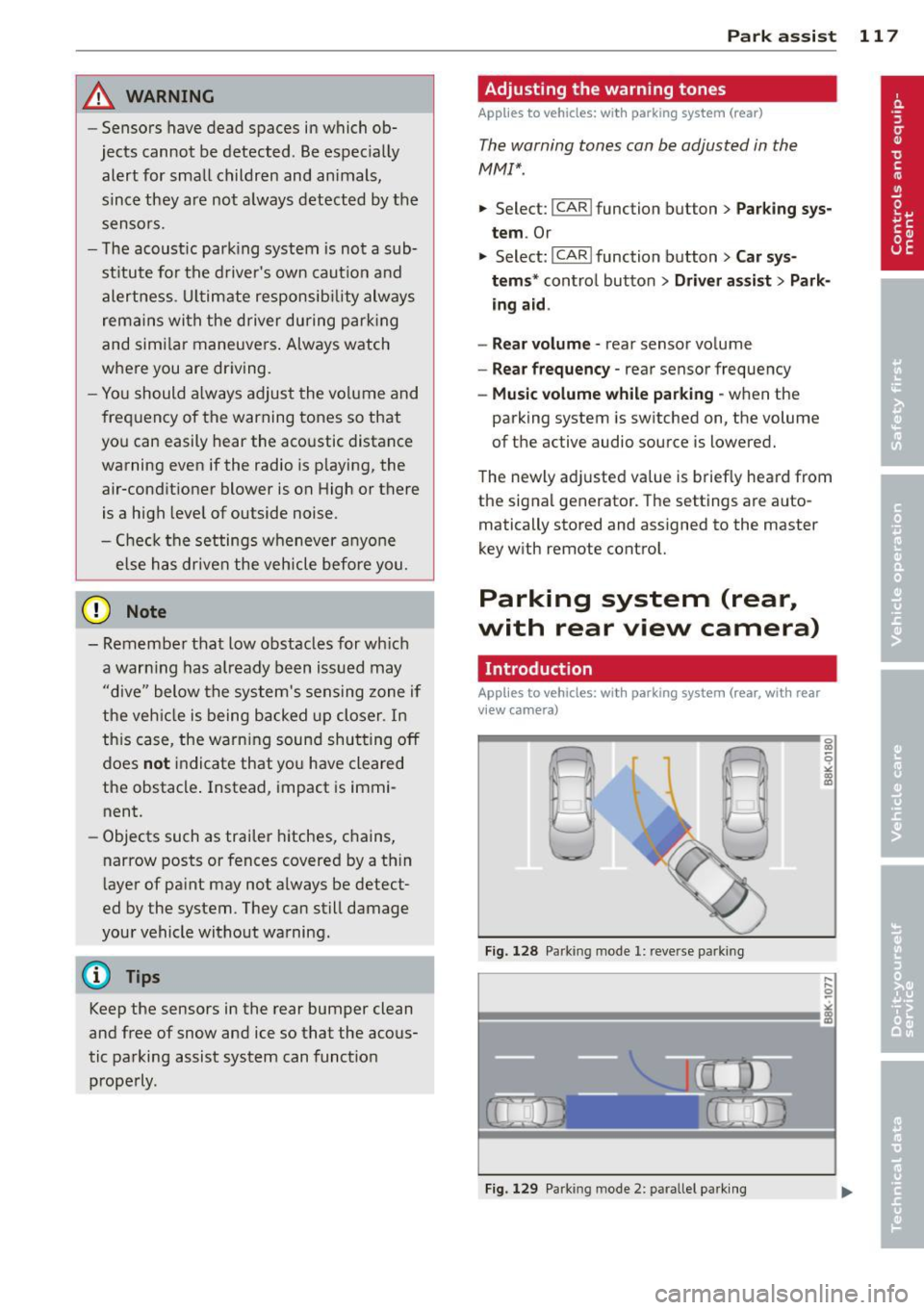
Fig. 128 Parking mode 1: reve rse parking
Fig. 129 Park ing mode 2: parallel park ing
Page 120 of 302

118 Park ass is t
Vehicles with the parking system are equipped
with a rear view c am era in addition to the
acoustic parking system.
You can choose between two modes to assist
you with park ing. For example, you can use
"parking mode 1" when parking in a parking
space or garage
c:> fig . 128. When you want to
park parallel to the edge of the street, select
"park ing mode 2"
c:> fig. 129.
The rear acoustic park assist system is inte
grated in the rear of the vehicle and the rear
view camera is integrated in the rear lid
c:>page 119.
A WARNING
- T he rear view camera has blind spots, in
wh ich objects ca nnot be detected . Be es
pecially careful to check for small ch il
dre n and an imals before back ing up .
Small ch ild ren and anima ls w ill not al
ways be detected by the sensors .
General Information
Applies to vehicles: with parking system (rear, with rear
view camera)
Fig . 130 Cove red area (!) and u ncovered a rea @ of the
rea r view ca mera
• 0
F ig . 131 Tr unk lid: Location of the rea r view camera
"'
"' "'
~
Sensors a re loca ted in the rear b umpe rs. If
these detect an obstacle, audible and visual s ignals warn you . The range at which the sen
sors begin to measure is approx imately:
To the side
2 ft (0 .60 m)
Center rear 5.2 ft (1.60 m)
Distance warn ing when reversing starts whe n
an obstacle is detected in the range of the parking assist system . As the d istance de
creases, the time interval between the audible
tones becomes shorter.
When the distance is less than 1ft
(0 .30 m),
t h e tone becomes continuous. At t his point
you should stop backing up.
If the distance to an obstacle stays the same,
the volume of the dista nce signal chime is
gradually reduced after about 4 seconds (does
not affect the contin uous signa l tone) . Ap
proaching another obstacle will cause the d is
tance signal to sound agai n at the normal vo l
ume.
R ea r v iew camera coverage area
T he M MI display shows the area covered by
the rear view camera
c:> fig. 130 (D . Objects
that are not in the area covered @are not
shown on the MMI display .
We recommend that you practice parking with
the rear view camera in a traffic-free location
or parking lot to become familiar with the sys
tem, the or ientation lines, and the ir function.
When doing this, there should be good light and weathe r cond itions.
In the MMI display, objects or vehicles appear
closer or further away if:
- you are driving in reverse gear from a leve l
surface onto an incline , or a downward
slope,
- you are driving in reverse gear toward pro
trud ing ob jects,
- the vehicle is car ry ing too much load in the
rear.
Page 121 of 302
The accuracy of the orientation lines and blue
surfaces diminis hes if:
- the rear view camera does not prov ide a re li
able image, for examp le, in poor vis ibility
conditions or if the lens is dirty,
- the image on the screen is not visible due to
sun g lare and reflection .
Caring for th e rear view came ra lens
The rear view camera is located above the rear
license plate b racket . Fo r the pa rking assist to
ope rate, the lens
,=:, fig. 131 must be kept
clean:
- Dampen the lens with a househo ld alcohol
based glass cleane r, and clean the lens with
a dry cloth
,=:, CD.
- Remove s now with a hand brush and ice
prefe rably with a de-icing spray
,=:, (D .
A WARNING
- T he pa rking aid cannot repla ce the dr iv
er's attention . The driver a lone is respon
sible for parking and similar driving ma
neuvers .
- Always keep your eyes on the vehicle's
su rroundings, using the rear view mirror
as well.
- Do not a llow yourse lf to be d istracted
from traffic by the rear view camera pic
tures.
- If the position and the installation ang le
of the camera has changed, fo r example,
after a rear end collision, do not continue
to use the system for safety reasons. Have it checked by a qua lified dealership.
(D Note
- Low obstacles already signaled by a
warning can disappear from the system's
detection range as they are approached
and will not continue to be signaled . Ob
jects such as barrier cha ins, trailer draw
bars, thin pa inted ve rtical po les o r fe n
ces may not be detected by t he system,
pos ing risk of damage .
- Never use warm or hot water to remove
s n ow or ice from the rear view camera
.
P ark a ssis t 119
lens -dange r of crack format ion on the
lens !
- When cleani ng the lens, never use prod
ucts that a re ab rasive.
Switching on/off
Applies to vehicles: with parking system (rear, with rear
view camera)
The rear view camera switches on automati
cally together with the acoustic park assist
when you put the vehicle in reverse.
Switching on
"' Put the veh icle in reverse gear, the acoust ic
parking system with rear view camera is ac
tivated automat ica lly. Act ivat ion of the
acoust ic par king system is confirmed by a
brief ac knowledgement sou nd.
Switching off
"' Drive faster than 9 mph (15 km/h) , or
"' take the vehicle out of reverse gear . The
acoust ic park ing system is immediate ly de
activated, and the rea r view came ra p icture
is deact ivated a utomat ically afte r a pe riod
o f abo ut 1 5 seconds , or
"' switch off the ignition.
T he de lay in deact ivat ing the camera prov ides
an unin terrup ted view beh ind the ve hicle es
pe cially when mane uver ing in tig ht park ing
spaces and prevents the picture from t urning
off th e ev ery time you shift out of reverse .
If the wa rning mess age ap pears in the dis play
but not the rea r view came ra p icture, read and
confirm the warni ng message . T he acoustic
distance signal is always active .
If you press a fu nction button on the M MI
control console, the rea r view came ra p icture
disappears . The rear view camera picture reap
pears the next time yo u pa rk.
Fur the r in forma tion on the warning mess age
and the MMI con tro l conso le can be found in
the MMI instruction book let.
Ill-
Page 122 of 302
120 Park ass is t
@ Tips
- The rear view camera picture is avai lable
as soon as the MMI Display or the MMI is
switched on, or the start-up phase is
completed.
- Keep the sensors in the rear bumper and the rear view camera lens clean and free
of snow and ice, so that the parking sys
tem can work properly . Please follow the
additional notes on
~ page 122.
Reverse Park ing
App lies to vehicles: with parking system (rear, wit h rear
view came ra)
Parking mod e 1 can be used when parking in
a garage or parking space.
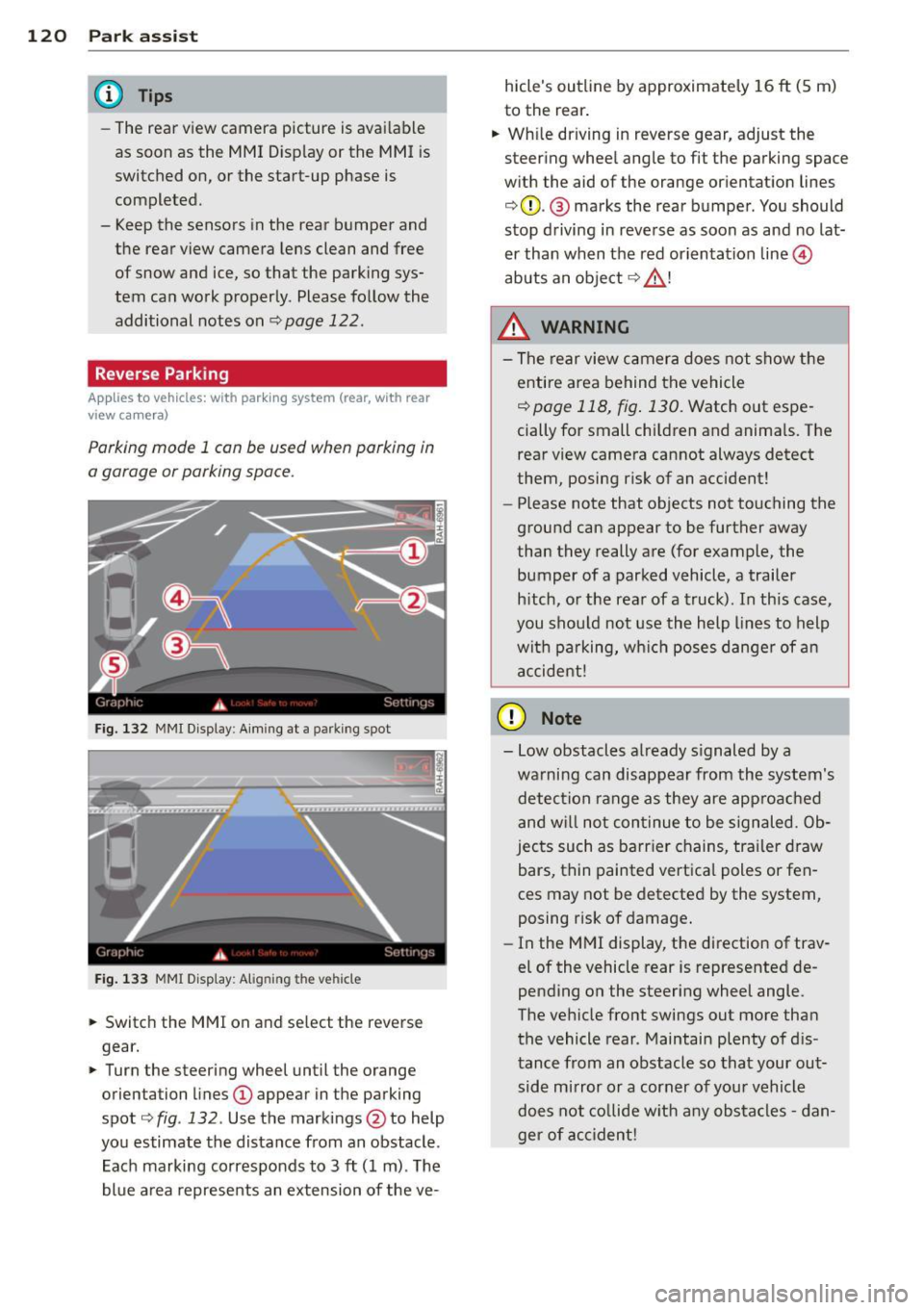
F ig. 132 MMI Display : Aim ing at a p arkin g spot
Fig . 133 MMI Disp lay: Ali gning th e vehi cle
"' Switch the MMI on and se lect the reverse
gear.
"' Turn the steering wheel until the orange
orienta tion lines
(D appear in the parking
spot ¢
fig. 132 . Use the mark ings @to help
yo u estimate the distance from an obstacle .
Each marking corresponds to 3
ft (1 m) . T he
blue a rea represents an extension of the ve- hicle's outline by approximate
ly 16
ft (5 m)
to the rear .
"' Wh ile driving in reverse gear, adjust the
steering whee l angle to fit the parking space
w ith the aid of the orange or ientation lines
¢ 0 . @ marks the rear bumper . You should
stop d riving in reve rse as soon as and no lat
er than when the red orientation line©
abuts an object ¢ _&. !
_& WARNING
-The rear view c amera does not show t he
e ntire area behind t he vehicle
¢ page 118, fig . 130. Watch out espe
cially for small children and anima ls. The
rear view camera cannot always detect
them, posing risk of an accident!
- Please note that objects not touching the
ground can appear to be further away
than they really a re (for example, the
bumper of a parked vehicle , a trailer
h itch, o r the rear of a truck). In this case,
you shou ld not use the h elp lines to help
wit h pa rking, wh ich poses danger of an
a ccident!
(D Note
- Low obstacles a lready s ignaled by a
wa rning can disappear from th e system's
detec tion range as they are approac hed
and w ill not con tinue to be signaled. Ob
jec ts such as barr ier chains, tr ailer draw
bars, thin painted vertica l poles or fen
ces may not be detecte d by the system,
posing risk of damage.
- In the MMI display, t he direction of trav
el of the vehicle rear is represented de
pending on the steering wheel angle.
The ve hicle fro nt swings out more tha n
the vehicle rear . Maintain plenty of d is
tance from an obstacle so that your out side mirror o r a corner of you r vehicle
does not co llide w it h any obs ta cl es -d an
ger of ac cident!
Page 123 of 302
Parallel Parking
Applies to vehicles: with parking system (rear, with rear
view ca mera)
Use parking mode 2 to help you pork on the
edge of o street.
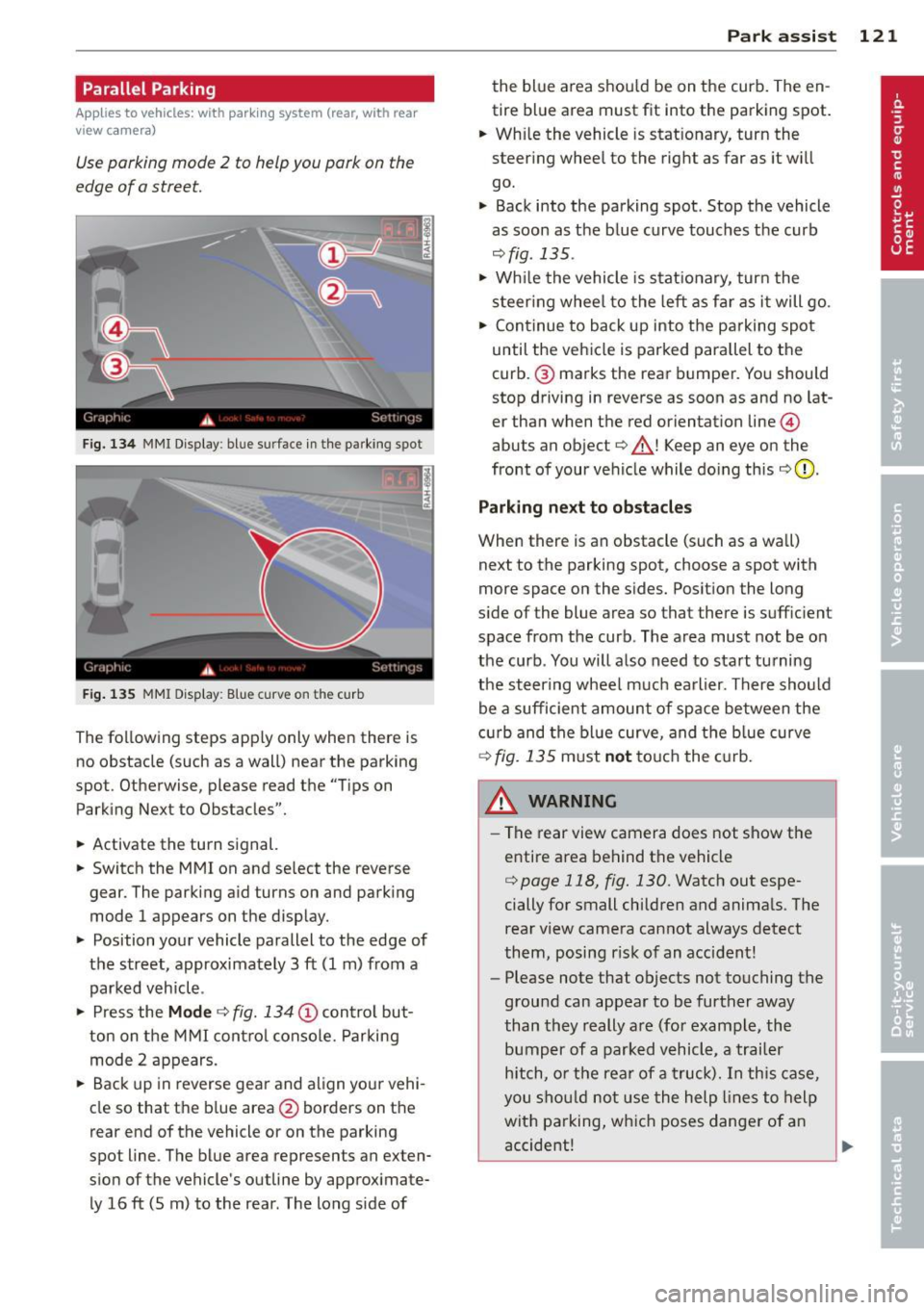
F ig. 134 MMI Display : bl ue s urface in the park ing spot
Fig. 135 MMI Display: Blue curve on t he cur b
The following steps apply only when there is
no obstacle (such as a wall) near the parking
spot. Otherwise, please read the "Tips on
Parking Next to Obstacles".
• Activate the turn signal.
• Switch the MM I on and se lect the reverse
gear. The parking aid turns on and parking
mode 1 appears on the display.
• Position your vehicle parallel to the edge of
the street, approximately 3 ft (1 m) from a parked vehicle .
• Press the
Mode ¢ fig. 134 (D control but
ton on the MMI control console. Parking
mode 2 appears.
• Back up in reverse gear and align your vehi
cle so that the blue area
@ borders on the
rear end of the vehicle o r on the parking
spot line . The blue area represents an exten
sion of the vehicle's outline by approximate ly 16 ft (5 m) to the rear . The long s ide of
Park assist 121
the blue area shou ld be on the curb. The en
tire blue area must fit into the parking spot.
• Wh ile the vehicle is stat ionary, turn the
steer ing whee l to the right as far as it wi ll
go.
• Back into the parking spot . Stop the vehicle
as soon as the blue curve touches the curb
¢ fig . 135 .
• Wh ile the vehicle is stationary, turn the
steering wheel to the left as far as it will go.
• Continue to back up into the parking spot
until the vehicle is parked parallel to the
curb .@ marks the rear bumper. You should
stop driving in reverse as soon as and no lat
er than when the red orientation line@
abuts an object¢_& ! Keep an eye on the
front of your vehicle while doing this
¢ 0 .
Parking next to obstacles
When there is an obstacle (such as a wall)
next to the parking spot, choose a spot with
more space on the sides. Posit ion the long
s ide of the blue area so that there is suff ic ient
space from the curb. The area must not be on
the curb . You will also need to start tu rning
the steering wheel much earlier. There should
be a sufficient amount of space between the
c urb and the blue curve, and the blue curve
¢ fig. 135 must not touch the curb.
&_ WARNING
- The rear view camera does not show the
entire area behind the vehicle
¢ page 118, fig. 130. Watch out espe
cially for small children and animals. The
rear view camera cannot always detect
them, posing risk of an accident!
- Please note that objects not touching the
ground can appear to be further away
than they really are (for example, the
bumper of a parked vehicle, a trailer
hitch, or the rear of a truck). In this case,
you should not use the help lines to help
with parking, which poses danger of an
accident!
.__ _____________ _J ...
Page 124 of 302
122 Park assist
In the MMI display, the direction of travel
of the vehicle rear is represented depending on the steering wheel angle. The vehi
cle front swings out more than the vehicle
rear. Maintain plenty of distance from an
obstacle so that your outside mirror or a
corner of your vehicle does not collide with
any obstacles -danger of accident!
@ Tips
The left or right orientation lines and sur
faces will be displayed, depending on the turn signal being used.
Adjusting the display and warning tones
Applies to vehicles: with parking system (rear, with rear
view camera)
The display and warning tones are adjusted in
the radio or MM!*.
"' Select: I CARI function button > Parking sys·
tern.
Or
"' Select: ~I C~A~RI function button > Car sys
tems*
control button > Driver assist > Park·
ing aid.
Display
- Off -when the parking system is switched
off, only audible signals are given.
- On -when the parking system is switched
on, the picture from the rear view camera is
displayed.
Warning tones
- Rear volume -
rear sensor volume
-Rear frequency -rear sensor frequency
-Music volume while parking -when the
parking system is switched on, the volume
of the active audio source is lowered.
The newly adjusted value is briefly heard from
the signal generator. The settings are auto
matically stored and assigned to the remote
control key.
A WARNING
- Always make sure that the volume and
frequency of the warning tones is adjust
ed so that you can easily hear the acous
tic distance signal even if the radio is
playing, the air-conditioner blower is on
High or there is a high level of outside
noise.
- Check the settings whenever someone
else has driven the vehicle before you.
@ Tips
- The warning tones can also be adjusted
directly from the rear view camera im
age. Simply press the Settings* control
button.
- Changed settings are activated when
parking assist is switched on again.
Error messages
Applies to vehicles: with parking system (rear, with rear
view camera)
-
If a warning tone is audible for about five sec
onds when you turn on the ignition, there is a
malfunction in the system. Have the problem
corrected by your authorized Audi dealer.
Keep the sensors in the rear bumper clean and
free from ice so that the acoustic park assist system can function properly.
Page 125 of 302

Homelink®
Universal remote
control
Description
Applies to vehicles: with Home link
The HomeLink universal remote control con
be programmed with the remote control for
devices that ore already present.
With Home Link, you can control devices such
as the garage door, secu rity systems, ho use
lights , etc. comfortably from the inside of you
vehicle .
H omelink makes it poss ible for you to rep lace
three different remote controls from dev ices
i n your home with one universal remo te. Th is
featu re works for most garage door and exte
rior door motor signals. Programming the in
d ividual remote control for your remote con
trol takes p lace near the center of the radiator
grille. There is a control module attached at
this location .
A one-t ime programm ing of the sensor must
be performed before you are able to use sys
tems with Homelink. If the system does not activate after performing the one-t ime pro
gramming, check whether the system uses a rolling code ¢
page 126 for vehicles without
the MMI*.
,& WARNING
-
-Never use the Homelink ® transmi tter
with any garage door opener that does have not the sa fety stop and reverse fea
ture as requ ired by federa l safety stand
ards. Th is includes any garage door open
er mode l manufactured before April 1,
1982.
- A garage door opener which cannot de
tect an object, signaling the door to stop
and reverse does not meet current feder
al safety standards . Us ing
a garage door
opener without these features increases
risk of serious injury or death.
Homelink ® 123
-For safety reasons never re lease the
parking brake or start the eng ine while
anyone is standing in front of the vehicle .
- A garage door or an estate gate may
sometimes be set in motion when the Homelink ® remote control is being pro
grammed. If the device is repeatedly ac
tivated, th is can overstrain motor and
damage its e lectrical components -an
overheated mo to r i s
a fire hazard!
- To avoid possib le injuries or property
damage, please always make abso lutely
certain that no person s or objects are lo
cated in the range of motion of any
equ ipment being operated .
(D Tips
-If you would like more information on
Homelink ®, where to purchase the
Home link ® compatib le products, or
would like to purchase the Homelink ®
Home Lighting Package, please ca ll toll
free: l-800-355-3515.
- For Declaration of Compliance to United
States FCC and Industry Canada reg ula
tions¢
page 283.
- For security reasons, we recommend that
you clear the programmed b uttons be
fore selling the veh icle.
Operation
App lies to vehicles : with Homeli nk
~~''' r ·O : O ·) 1111
~
®
Fig . 1 36 Head li ner: controls
Req uirement : The buttons must be program-
med
<:!)page 124 or ¢page 125. ..,_
Page 126 of 302
124 Homelink®
• To open the garage door, press the pro
grammed button. The LED @will light up or
flash.
• To close the garage door, press the button
again.
@ Tips
To open the garage door, press the button, but do not press it for longer ten seconds
or the Homelink module will switch to
programming mode.
Programming the transmitter (version
A)
Appl ies to vehicles : wit h Home li nk
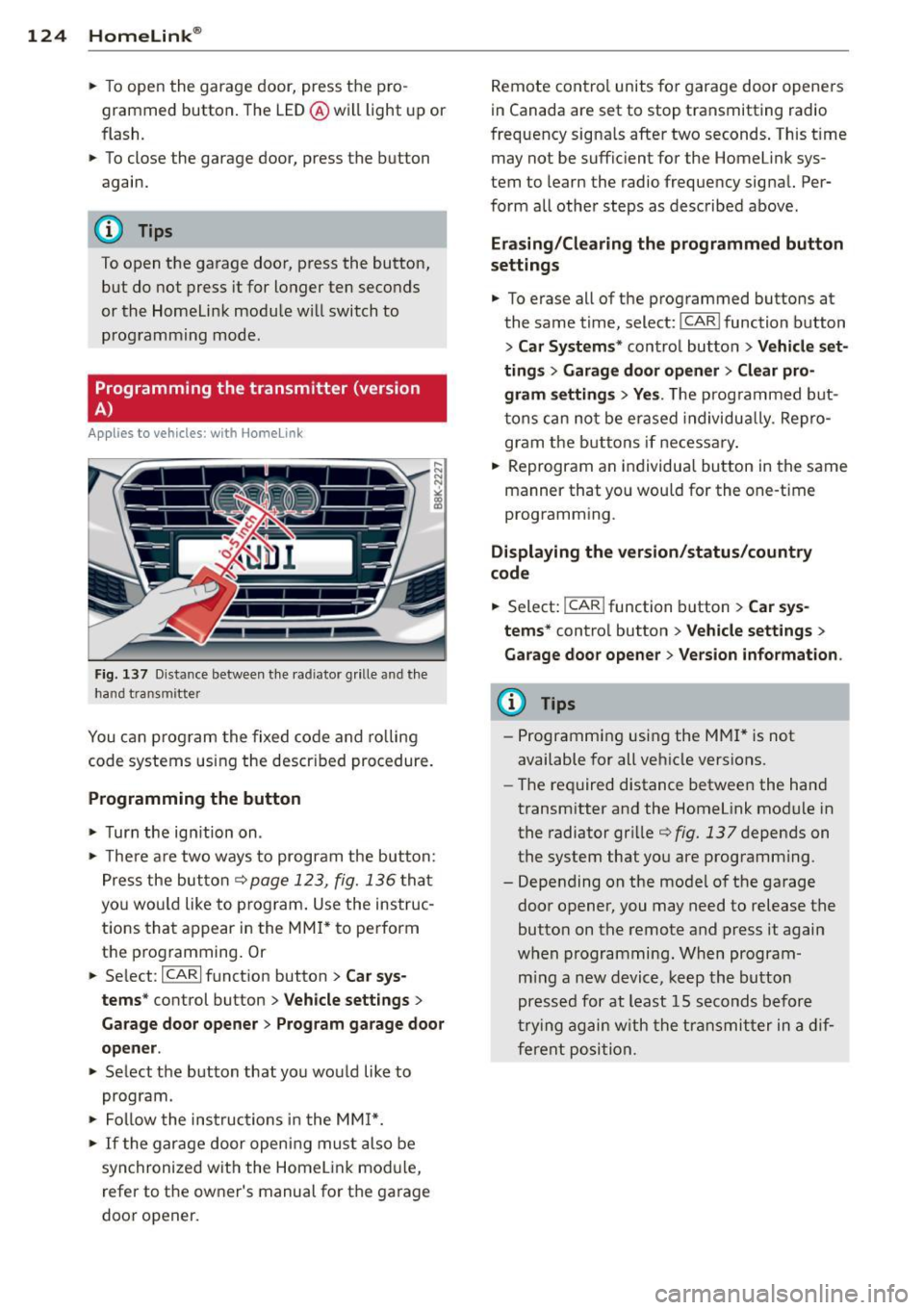
Fig. 137 Distance between the radia tor grille and the
hand transmitter
You can program the fixed code and rolling
code systems using the described procedure.
Programming the button
• Turn the ignition on .
• There are two ways to program the button:
Press the button¢ page
123, fig. 136 that
you would like to program. Use the instruc
tions that appear in the MMI* to perform
the programming. Or
• Select:
I CARI function button > Car sys
tems*
control button > Vehicle settings >
Garage door opener> Program garage door
opener .
• Select the button that you would like to
program.
• Follow the instructions in the
MMI*.
• If the garage door opening must also be
synchronized with the Homelink module,
refer to the owner's manual for the garage
door opener. Remote
control units for garage door openers
in Canada are set to stop transmitting radio
frequency signals after two seconds. This time
may not be sufficient for the Home link sys
tem to learn the radio frequency signal. Per·
form all other steps as described above .
Erasing/Clearing the programmed button
settings
• To erase all of the programmed buttons at
the same time, select:
I CAR I function button
> Car Systems" control button > Vehicle set
tings
> Garage door opener> Clear pro
gram settings > Yes.
The programmed but
tons can not be erased individually . Repro
gram the buttons if necessary.
• Reprogram an individual button in the same
manner that you would for the one-time
programming .
Displaying the version/status/country
code
• Select: I CAR ! function button > Car sys·
terns*
control button > Vehicle settings >
Garage door opener> Version information .
(D Tips
-Programming using the MMI* is not
available for all vehicle versions.
- The required distance between the hand
transmitter and the Homelink module in
the radiator grille ¢fig.
137 depends on
the system that you are programming .
- Depending on the model of the garage
door opener, you may need to release the
button on the remote and press it again
when programming. When program
ming a new device, keep the button
pressed for at least 15 seconds before
trying again with the transmitter in a dif
ferent position.
Page 127 of 302
Programming the transmitter (version
B)
Applies to vehicles: with Horne link
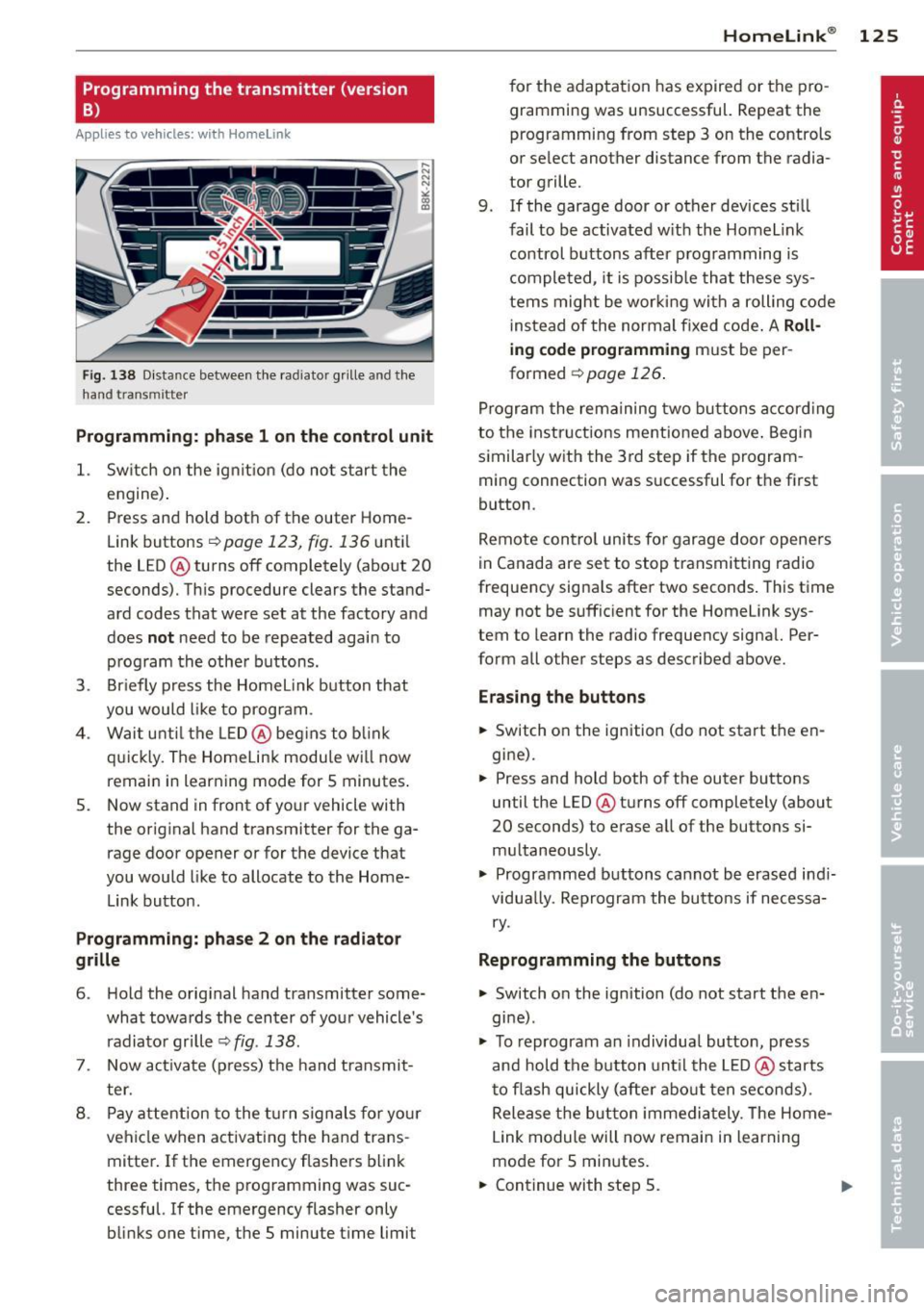
Fig. 1 38 D istance between t he rad ia tor grill e and t he
hand transmitte r
Programming: phase 1 on the control unit
1. Sw itch on the ig nit io n (d o n ot start the
e ngine ).
2. P ress and hold bot h of the outer Home
Link buttons
r=> page 123, fig. 136 unt il
the LED @ turns off completely (about
20
seconds). Th is procedure clears the stand
ard codes that were set at the factory and
does
not need to be repeated agai n to
p rog ram th e othe r buttons.
3. Briefly press the Homelink button that
you would like to prog ram .
4 . Wai t until the LED@ beg ins to blink
q ui ckly. The Home Lin k modu le wi ll now
remai n in learning mode for
5 minutes .
5. Now stand in front of your vehicle with
the original hand transmitter for the ga rage door opener o r for the device that
you would like to allocate to the Home
Link button.
Programming: pha se 2 on the radiator
grille
6 . Hold the o rig inal hand transmitter some
what towa rds the center o f you r vehicle 's
radiato r gr ille
r=> fig . 138 .
7. Now activate (p ress) t he hand transmit
ter.
8 . Pay a ttention to the t urn sign als for yo ur
vehicle when activating the ha nd trans
mitter . If t he emergency flashers b link
three times, the programming was suc
cessful. If the emergency flasher only
bli nks one time, the 5 minute t ime limit
Homelink ® 125
for the adaptat ion has expired or the pro
gram ming was unsuccessful. Repeat the
programming from step 3 on the controls
o r se lect another distance from the radia
tor grille.
9. If the garage door or other devices sti ll
fail to be activated w it h the Homelink
control buttons after p rogramming is
comple ted, it is possib le tha t these sys
tems might be wor king with a roll ing code
ins tead of the normal fixed code .
A Roll
ing code programming must be per
formed
r=> page 126 .
Program the rema ining tw o b uttons a ccord ing
to the instructions mentioned above . Beg in
similar ly w ith the 3rd step if the program
m ing connection was successful for t he first
button .
Remote con trol units fo r garage door opene rs
in Canada are set to stop transmitting radio
frequency signa ls after two seconds . This time
may not be suffic ient for the Homelink sys
tem to learn the radio frequency signa l. Per
form all other steps as described above.
Erasing the buttons
.,. Switch o n the ignition (do not start the en
gi ne).
.,. Press and hold both of the outer buttons
until the LED @ turns off completely (about
20 seconds) to erase all of the buttons si
m ultaneously .
.,. Programmed buttons cannot be erased ind i
vidua lly. Reprogram the buttons if necessa
ry .
Reprogramming the buttons
.,. Switch on the ignition (do not start the en
gine) .
.,. To reprogram an individua l butto n, press
and hold the button unt il the LED @ starts
to f lash quickly (after abo ut ten seconds) .
Release t he bu tton imme dia tely. The Home
L ink module will now remain in learning
mo de for 5 minutes.
.,. Continue with step 5.