mmi AUDI A4 2013 Owner's Guide
[x] Cancel search | Manufacturer: AUDI, Model Year: 2013, Model line: A4, Model: AUDI A4 2013Pages: 302, PDF Size: 75.61 MB
Page 128 of 302
126 Hom eli nk®
-The required distance between the hand
transmitter and the HomeLink module in
the radiator grille
c:> fig. 138 depends on
the system that you are programming.
- Depend ing on the model of the garage
door opener, you may need to release the
button on the remote and press it again
when programming . When program
ming a new dev ice, keep the button
pressed for at least 15 seconds befo re
trying again with the transmitter in a dif
ferent pos it ion. Wa tch out fo r the emer
gency flasher during that time .
Programming the rolling code
Applies to vehicles: with Home link
Additionally, a rolling code programming for
the HomeLink universal remote control is re
quired for some systems .
Identifying the rolling code
.. Press the prev ious ly programmed Homelink
button aga in and hold i t down .
.. Look at the LED@ c:>
page 123, fig. 136 . If
the LED b links quickly , the features, s uch as
the garage door opener, are equipped with
the rolling code .
.. Program the roll ing code as fo llows:
Act ivating the g arage door opener motor
unit
.. Locate the sett ing button on the garage
door opener motor unit . The exact location
and co lor of the button may vary depending
on the garage door opener manufacturer .
.. Press the sett ing button on the garage door
opener motor unit (usually th is w ill act ivate
a "sett ing light d isp lay" on the motor unit).
Now you w ill have about
30 second s time to
perform the HomeL ink button programming
on the cont ro ls.
Programming on the controls
.. Press the Home L ink button that was already
programmed and hold for two seconds . ..
To end ro lling code programm ing, press and
hold the Home link button for two seconds
aga in .
.. The Homelink button may need to be press
ed a third t ime to end the adjus tment proce
dure for some garage door openers .
After the controls have been programmed, the garage door opener should recogni ze the
Homelink signal and operate when the Home
Li nk button is pressed . Now you may program
the other buttons as needed .
(D Tips
-Programming the rolling code can be
performed quicker and more easily with
the help of a second person .
- If d iff iculties should arise when pro
gramming the rolling code, consult the
operating instructions for the garage
door opener or o ther dev ices for po ssible
solutions.
Page 171 of 302
-Model Manufactured on or
after
Graco Snugride September 25, 2007
Peg Perego Primo V i- September 25, 200 7
aggio SIP I MUN00US
Subpart C -Forward-facing and
con vertible child r estra ints
Model Manufactured on or
after
Britax Roundabout September 25, 2007
E9L02xx
Cosco Touriva 02519 December 1, 1999
Cosco Summit Deluxe September 25, 2007
High Back Booster
22-262
Cosco High Back September 25, 2007
Booster 22-209
Evenflo Tribute V September 25, 2007
379xxxx
Evenflo Medallion December 1, 1999
254
Evenflo Generations September 25, 200 7
352xxxx
Graco ComfortSport September 25, 2007
Graco Toddler Safety September 25, 2007
Seat Step 2
Graco Platinum Cargo September 25, 2007
A WARNING
T o reduce the risk of serious injury, make
sure that the
PASSENGER AIR BAG O FF
light comes on and stays on whenever a
child restraint is installed on the front pas
senger seat and the ignition is switched
on.
- Take the child restraint off the fro nt pas
senger seat and install it properly at one of the rea r seat positions if the
PASSEN
GER AIR BAG OFF
light does not stay on.
- Have the airbag system inspected by
your authorized Aud i dealer immediate
ly.
Child Sa fet y 169
'
(D Tips
The child seats listed in categories A to C
have been statically tested by A udi on ly for
the Advanced A irbag function.
Important safety instructions for using
child safety seats
Correct use of child safety seats substantially
reduces the risk of injury in an accident!
As the dr iver, you are responsib le for the safe
ty of everybody in the vehicle, especially ch il
dren:
... Always use the right chi ld safety seat for
each child and always use it properly
¢page 172 .
... Always carefully fo llow the child safety seat
manufacturer's instruct ions on how to route
the safety belt properly through the child
safety seat.
... When usi ng the veh icle safety belt to ins tall
a child safety se at, you m ust first activate
the convertib le locking retractor on the
safety belt to prevent the child safety seat
from moving
¢ page 176.
... Push the ch ild safety seat down with your
full weight to get the safety be lt really tight
so that the seat cannot move forwa rd or
sideways mo re than one inch (2 .5 cm) .
... If a strap o r tethe r is be ing used to tie the
child safety seat to the fron t passenger
s eat , make sure tha t it is not so tight that it
causes the weight-sensing mat to measure
more weight than is act ually on the seat.
... Sec ure unused safety belts on the rear seat
¢ page 171.
Always remember : Even tho ugh yo ur vehicle is
equipped with an Advanced Airbag system, all c h il dren, especially those 12 years and young
er, shou ld always r ide in the back seat proper -
ly restra ined for the ir age and size. .,_ •
•
Page 194 of 302

192 Intelligent technology
Energy management
Starting ability is optimized
Energy management controls the distribution
of electrical energy and thus optimizes the
availability of electrical energy for starting
the engine.
If a vehicle with a conventional energy system
is not driven for a long period of time, the bat
tery is d ischarged by idling current consumers
(e.g. immobilizer). In ce rtain circumstances it
can result i n there bei ng insuff ic ient ene rgy
avai lab le to start the engine .
Intell igent energy management in your vehi
cle hand les the d ist ribu tion of elect rical ener
gy. Starting ab ility is mar ked ly imp roved and
the life of the battery is extended .
Basically , energy management consists of
batt ery diagno sis , idling curr ent manag e
ment
a nd dynami c energy man agement .
Battery diagnosis
Battery d iagnosis continuously determ ines
the state of the battery . Sensors determ ine
battery vo ltage, battery current and battery
temperature . This dete rm ines the current
sta te of charge and the power of the ba ttery.
Idling current management
Idling current management reduces energy
consumption wh ile the vehicle is stand ing .
W ith the ignition switched off, it cont ro ls the
ene rgy s upply to the va rio us e lectrica l compo
nents . Data from battery diagnosis is consid
e red.
Depending on the battery's state of charge,
i nd ividua l consumers are grad ually t urned off
to p revent ex cess ive d isc harge of the ba ttery
and thus mainta in start ing capability.
Dynamic energy management
While the vehicle is be ing dr iven , dynamic en
e rgy management dist ributes t he energy gen
e rated accordi ng to the needs of the individu
a l componen ts.
It reg ulates consump tion, so
that more electrical ene rgy is not being used than
is being generated and ensures an opti
mal state of charge for the battery.
(D Tips
- But even energy man ageme nt canno t
negate the limi ts of physics . Conside r
that the powe r and life of a battery are
limited .
- If start ing ability is threatened, the indi
cator light (•) appears ~
page 17.
What you should know
The highest priority is given to maintaining
starting capability .
The b attery is severe ly taxed in short -d istance
driv ing, in ci ty traff ic and during t he cold time
of yea r. Ab undant electrical energy is re
quired, but on ly a little is generated . It is also
critical if the engine is not r unning and electri
ca l components are turned on . In this in
stance ene rgy is be ing consumed but none is
being generated .
It is in precisely these s ituations that you will
notice energy management active ly reg ulat
ing the d istribution of energy.
Vehicle stand s for an e xtended period
If you do not drive your vehicle over a period
of several days or weeks, e lectrica l compo
nents are gradually cut back or sw itched off.
This reduces energy consumption and ma in
ta ins start ing capability over a longer pe riod .
Some of the convenience functions may not
operate, such as the interior lights or the
power seat adjustme nt. The convenience
f unc tions wi ll be available again when yo u
swi tch on the igni tion and sta rt the eng ine .
With the engine turned off
If you listen to the radio, for examp le, w it h
the engine t urned off or use other MMI func
t ions, t he battery is be ing discharged.
If starting capability is jeopardized due to en
ergy consump tion, the following warning ap-
pears in the MM I display: .,,.
Page 211 of 302
-Always read and heed all WARNINGS and
other information
¢page 202.
Exhaust tail pipes
Road salt and other corros ive materia ls will
damage the mater ial in the exhaust tail pipes
if they are not cleaned regularly . Do not clean
the ta il p ipes with wheel cleaner, paint pol ish,
chrome po lish or other abrasive cleaners.
C lea n the ta il p ipes wi th car ca re p rod ucts
that are s uitabl e for s tain less stee l.
Your authorized Audi dealer can provide clean i n g p roducts t hat have been tested and ap
p roved fo r you r vehi cle.
Care of interior
Infotainment components
The Radio/MMI* display may be cleaned with
a soft cloth and commerc ially-avai lab le "LCD
cleane r" . The cloth should be coated l ightly
wh en the clean ing solution when cleani ng the
d isp lay.
The
MMI* contro ls must be cleaned first with
a br ush so that dirt does not e nte r the un it o r
ente r betwee n th e bu ttons and the hous ing.
Then w ip ing t he con tro ls w ith a cloth damp
e ned wi th dish de tergent and water is recom
mended .
(D Note
- To avoid sc ratch ing the disp lay, yo u
s ho ul d neve r clea n it dry.
- To prevent damage, ma ke s ure fl uids do
n ot en ter the co ntrols.
Aluminum trim
Use only neutral-pH products to remove spots
and deposits from alum inum surfaces.
C hrome ca re products and alkaline cleaners
will attack alum in um s urfaces and can dam
age them over time.
Cleaning and protec tion 209
A WARNING
A lways read and heed all WARNINGS and
other information
¢page 202.
Fabrics and fabric coverings
Fabr ics and fabric cover ings (e.g. seats, door
trim pa ne ls, etc.) shou ld be cleaned at regular
i n tervals w it h a vac uum cleaner. This removes
s ur face di rt particles which cou ld become em
bedded in the fabri c throug h use. Ste am
cleaners sho uld not be used, beca use the
steam tends to p ush the dirt deeper into the
fabric and lock it there .
Normal cleaning
Generally, we recommend using a soft sponge
o r a lint -free microfibe r clo th to the clean fab
ric. Br ushes shou ld only be used for carpets
and floor mats, since other fabric surfaces
could be harmed by br ushes.
Norma l su rface s tains c an be cleaned using a
commerc ially availab le foam cleaner . Spread
the foam on the s urface of t he fabric with a
soft sponge and work it in gently. Do not satu
rate the fabric. T hen pat the foam dry us ing
absorbe nt, dry cloths (e.g. m icrofiber cloth)
and vacuum it after it has dried completely.
Cleaning stains
Stains caused by beverages (e .g. coffee, fr uit
juice, etc.) can be treated with a mild deter
gent solution. Apply the detergent sol ution
with a spo nge. In the case of stubborn stains,
a detergent paste can be applied directly to
the stain and worked into the fabric. After
wards, use copious amounts of clean water to
remove the rem aining de terge nt. Apply the
w at er wit h a d am p clot h or sponge a nd pat
the fabric dry with an abso rbent, dry clot h.
Stains from choco late or makeup should have
de terge nt pa ste rubbed i nto them. After
w ards, remove the soa p with wa te r (damp
sponge).
Alcohol can be used to treat stains from grease, o il, lipstic k or a ballpoin t pen. Melted .,.
•
•
Page 226 of 302
224 Checking and filling
Checking the engine oil level
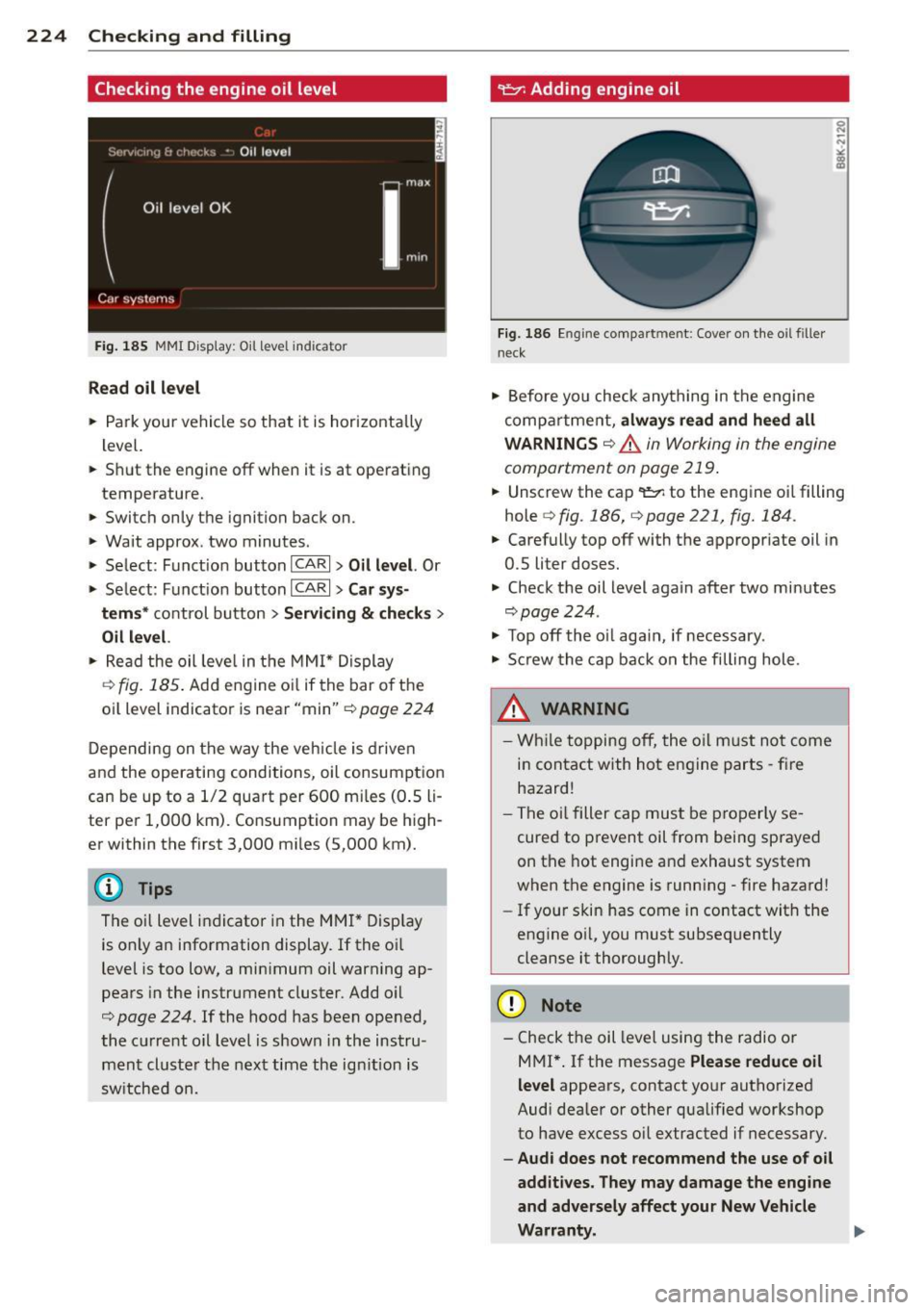
Fig . 185 MMI Disp lay : O il le ve l indic ator
Read oil level
• Park your vehicle so that it is horizontally
level.
.. Shut the engine off when it is at operating
temperature.
.. Switch only the ignition back on.
• Wait approx . two minutes .
> Select: Funct ion button ICARI > Oil level. Or
> Se lect : Funct ion button ICARI > Car sys-
tems *
control button > Servicing & checks >
Oil level.
• Read the oil leve l in the MMI* Display
~fig. 185. Add eng ine oi l if the bar o f the
oil level indicator is near "min"
c::> page 224
Depending on the way the vehicle is driven
and the operating conditions, oil consumption
can be up to a 1/2 quart per 600 mi les (0 .5 li
ter per 1,000 km). Consumption may be high
er within the first 3,000 mi les (5,000 km).
The o il level indicator in the MMI* Display
is only an information display. If the o il
level is too low, a min imum oil warning ap
pears in the instrument cluster. Add o il
c::> page 224. If the hood has been opened,
the current oil level is shown in the instru
ment cluste r the next time the ign ition is
switched on.
~ Adding engine oil
Fig. 186 En g in e compart ment: Cover on the oil filler
neck
• Before yo u check anything in the engine
compa rtme nt,
always read and heed all
WARNINGS
c::> .A in Working in the engine
compartment on page 219 .
.. Unscrew the cap
q fig .186, qpage221, fig.184 .
.. Carefully top off with the appropriate oil in
0.5 liter doses.
.. Check the oil level again after two minutes
qpage224.
• To p off the o il aga in, if necessary.
• Screw the cap back on the filling hole.
.8_ WARNING
- While topping off, the oil must not come
in contact with hot engine parts - fire
hazard!
- The oil filter cap must be properly se
cured to prevent oil from being sprayed
on the hot engine and exhaust system
when the engine is running - fire hazard!
- If your skin has come in contact with the
engine oi l, you must subsequently
cleanse it thoroughly.
(D Note
- Check the oil level using the radio or
M Ml*.
If the message Please reduce oil
level
appears, contact your authorized
Audi dealer or other qualified workshop
to have excess oil extracted if necessary.
- Audi does not recommend the use of oil
additives. They may damage the engine
and adversely affect your New Vehicle
Warranty . .,..
Page 256 of 302
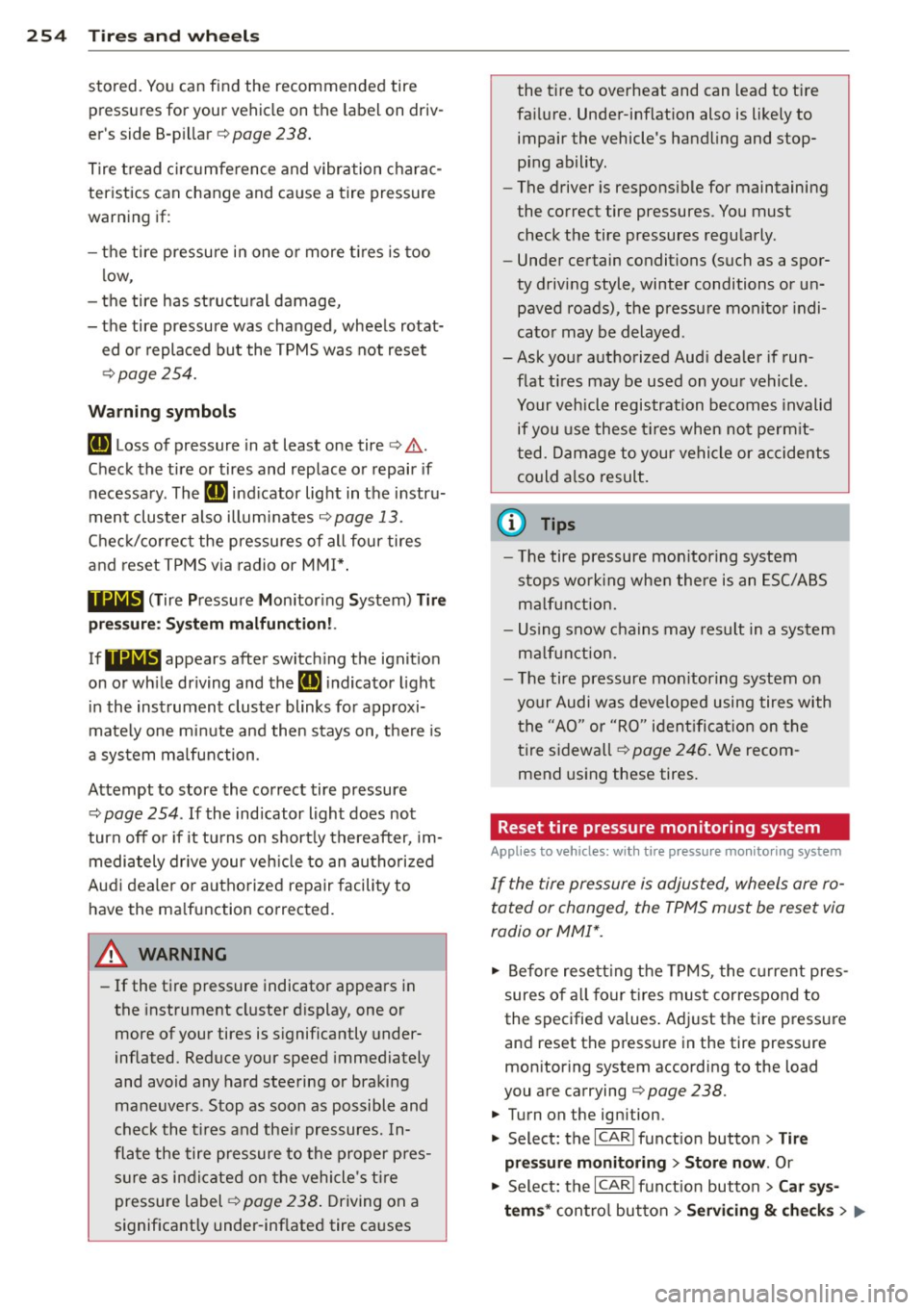
254 Tire s and wheel s
stored. You can find the recommended tire
pressures for your vehicle on the label on driv
er 's side 8-p illar
c> page 238.
Tire tread c ircumference and vibration charac
teristics can change and ca use a tire pressure
warning if :
- the tire pressure in one or more t ires is too
low,
- the tire has st ructu ral damage,
- the tire pressure was changed, wheels rotat-
ed o r replaced but the TPMS was not reset
c>page254.
Warning s ymbols
[DJ Loss of pressure in at least one tire c> .&..
Check the tire or tires and replace o r repair if
n ecessary. The
[DJ ind icator light in the instru
ment cluster also illuminates
c> page 13.
Chec k/correc t the pressures of all four tires
and reset TPMS via radio or
MMI* .
1181&1 (T ire Pressure Monitor ing System) Tire
pr essur e: Sy st e m malfuncti on !.
If!JHJL, appears after switching the ignition
on or wh ile driving and the
[DJ indicator light
i n the instrument cluster blinks for approxi
mately one mi nute and then stays on, the re is
a system ma lfunction .
Attempt to store the correct tire pressure
¢
page 254. If the ind icator light does not
turn
off or if it tu rns o n short ly thereafter, im
mediately drive your veh icle to an autho riz ed
Aud i dea le r or autho rized repair facility to
have the ma lfunction corrected.
A WARNING
- If the tire pressure indicator appears in
the instrument cl uster display, one or
more of your tires is significantly under
inflated. Reduce your speed immediately
and avoid any hard stee ring or braki ng
maneuvers. Stop as soon as possible and
check the t ires and the ir pressures. In
flate the tire pres sure to the proper p res
s u re as in dic ated on the vehicle 's t ire
pressure label ¢
page 238. Driving on a
significantly under-inf lated tire ca uses the tire to overheat and can
lead to tire
fa ilure. Under-inflation also is likely to
impair the vehicle's handling and stop
ping ability.
- The driver is responsible for maintaining
the correct tire pressures. You must
check the tire pressures regu larly .
- Under certain conditions (such as a spor
ty driving style, winter conditions or un paved roads), the pressure monitor indi
cato r may be delayed .
-Ask your authorized Aud i dea ler if run
flat t ires may be used on you r vehicle.
Your vehicle registration becomes invalid
if you use these t ires when not perm it
ted. Damage to your vehicle or accidents
could a lso result.
(D Tips
- The tire pressure mon itoring system
stops work ing whe n there is an ESC/ABS
m alfu nction.
- Us ing snow chains may result in a system
ma lf u nction.
- The tire pressure mon itoring system on
your Audi was deve loped using tires with
t he "AO" or "R O" ident ifi cat ion on the
tire s idewa ll
c> page 246 . We recom
mend using these tires.
Reset tire pressure monitoring system
Appl ies to vehicles: wit h tire p ressu re mo nito rin g system
If the tire pressure is adjusted, wheels are ro
tated or changed, the TPMS must be reset via
radio or MMI*.
.. Before resett ing the TPMS, the current pres
sures of a ll four tires must correspond to
the specified values . Ad just the tire p ressu re
and reset the pressure in the tire pressure
mon ito ring system according to the load
you are carrying
i=>page 238.
.. Turn on the ignition.
.. Select: the
ICARI funct ion button > Tire
pressur e monitoring
> Stor e now . Or
.,. Select: the
ICARI funct ion button> Car sy s
tem s*
cont ro l button > Servi cing & che ck s > .,.
Page 267 of 302

Fuses and bulbs
Fuses
Replacing a fuse
Fuses that have blown will have metal strips
that have burned through.
Fig. 20 9 Left cockp it : fuse panel cover
The fuses are located at the front left and
r igh t of the cockpit and behi nd the trim on
the right side of the luggage compartment .
.. Turn off the ign it ion a nd the affected elec-
t rical consumers .
.. Check the following table to see which fuse
belongs to the consume r .
.. Remove the appropriate cover¢
fig. 209 or
¢page 218, fig. 180 .
.. To remove the purple plastic cl ip if necessa
ry
ll, hold onto it at the small s ide and pull
it out of the fuse panel¢
page 265,
fig. 210 .
.. Remove the clamp from the rear side of the
fuse cover ¢
fig. 209 .
.. Remove the fuse using the clamp and re
pla ce the blown fuse w ith an identical new
one.
& WARNING , -
Do not repair f uses and never replace a
blown fuse w ith one that has a higher amp
rating. This can cause damage to the e lec
trical system and a fire.
11 You can dis pos e of the plastic clip after removing it.
Fu se s and bulb s 265
(D Note
If a new fuse burns out again after short ly
have you have insta lled it, have the electri
ca l system checked by your authorized
Audi dealer .
{!) Tips
-The following table does not list fuse lo
cat ions that are not used .
- Some of the equipment items listed are
opt ional or only available on certa in
mode l configurations.
Left cockpit fuse assignment
Fi g. 21 0 Left cockpit: fuse panel wit h plastic clip
No. Consumer
Amps
Fuse panel @(black)
1 Dynamic steering 5
2 ES C control module 5
A/C system pressure sensor,
electromechanical parking
3
brake, Homelink, automatic
5 dimming interior rear view
mirror, air quality/outside
ai r sensor, ESC button
Page 269 of 302
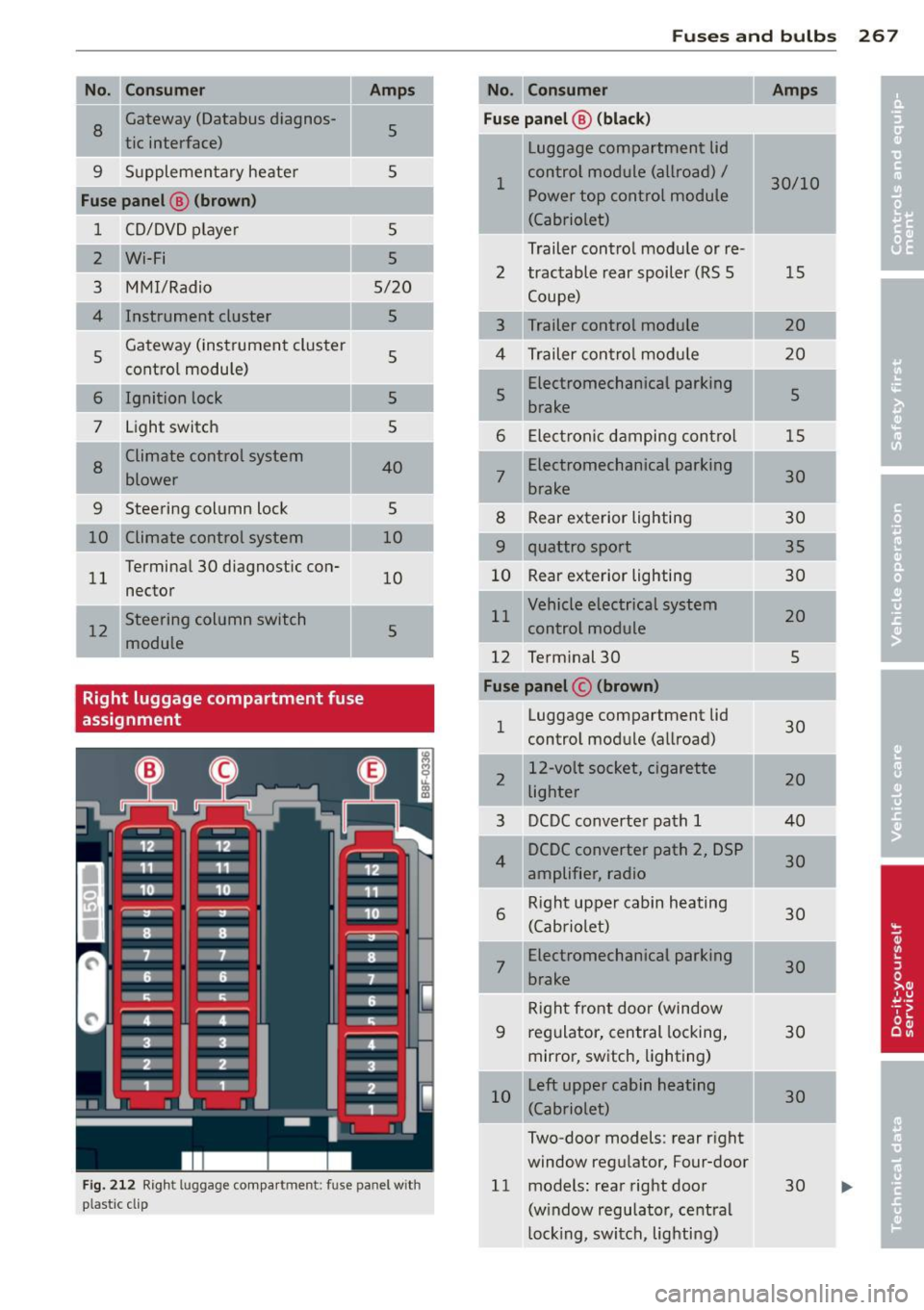
--No. Consumer Amps
I a
Gateway (Databus diagnos-
5 tic interface)
I
9 Supplementary heater
Fuse panel ® (brown )
1 CD/DVD playe r
2
Wi-Fi
3 MMI/Radio
4 Instrument cluster
5 Gateway (instrument cluster
control module)
6 Ignition lock
7 Light switch
8
Climate cont
rol system
blower
9 Steering column lock
10 Climate control system
11 Termina
l 30 diagnostic con-
nector
-
12 Steering column switch
module
Right luggage compartment fuse
assignment
5
5
5
5/20
5
5
5
5
40
5
10
10
5
F ig . 2 12 R igh t lu ggage compar tmen t: fu se pan el w ith
pla stic cl ip
-
Fu se s and bulb s 267
No . Consumer Amps
Fuse panel @ (blac k)
Luggage compartment lid
1 control module (all
road) /
30/10
Power top control module
(Cabriolet)
Trailer con trol modu le or re-
2 tractable rear spoiler (RS 5 15
Coupe)
3 Trailer control module 20
4 Trailer contro l modu le 20
5 Electromechanical parking
5
brake
6 E lectron ic damping con trol 15
7
Electromechanical parking
30
brake
8 R ear exterior lighting 30
9 quattro sport
35
10 Rear exterior lighting
30
11 Vehicle electrical system
20
con trol module
12 Term inal 30
5
Fuse panel © (brown )
1 Luggage compartment lid
30
control module (allroad)
-.
2 12-volt
socket, cigarette
20
lighter
3 DCDC converte
r path 1 40
4 DCDC converter path
2, DSP
30
amplifie r, radio
6
Right upper cabin heating
30
(Cabriolet)
7
Electromechanical parking
30
brake
R ig ht front door (window
9 regulator, central locking,
30
mirror, switch, lighting)
10 L
eft upper cabin heating
30
(Cabriole t)
Two-door models : rear r ight
window regu lator, Four-door
11 models : rear right door
30
(w indow regulato r, ce ntra l
l ock ing, switch , lighti ng)
Page 270 of 302
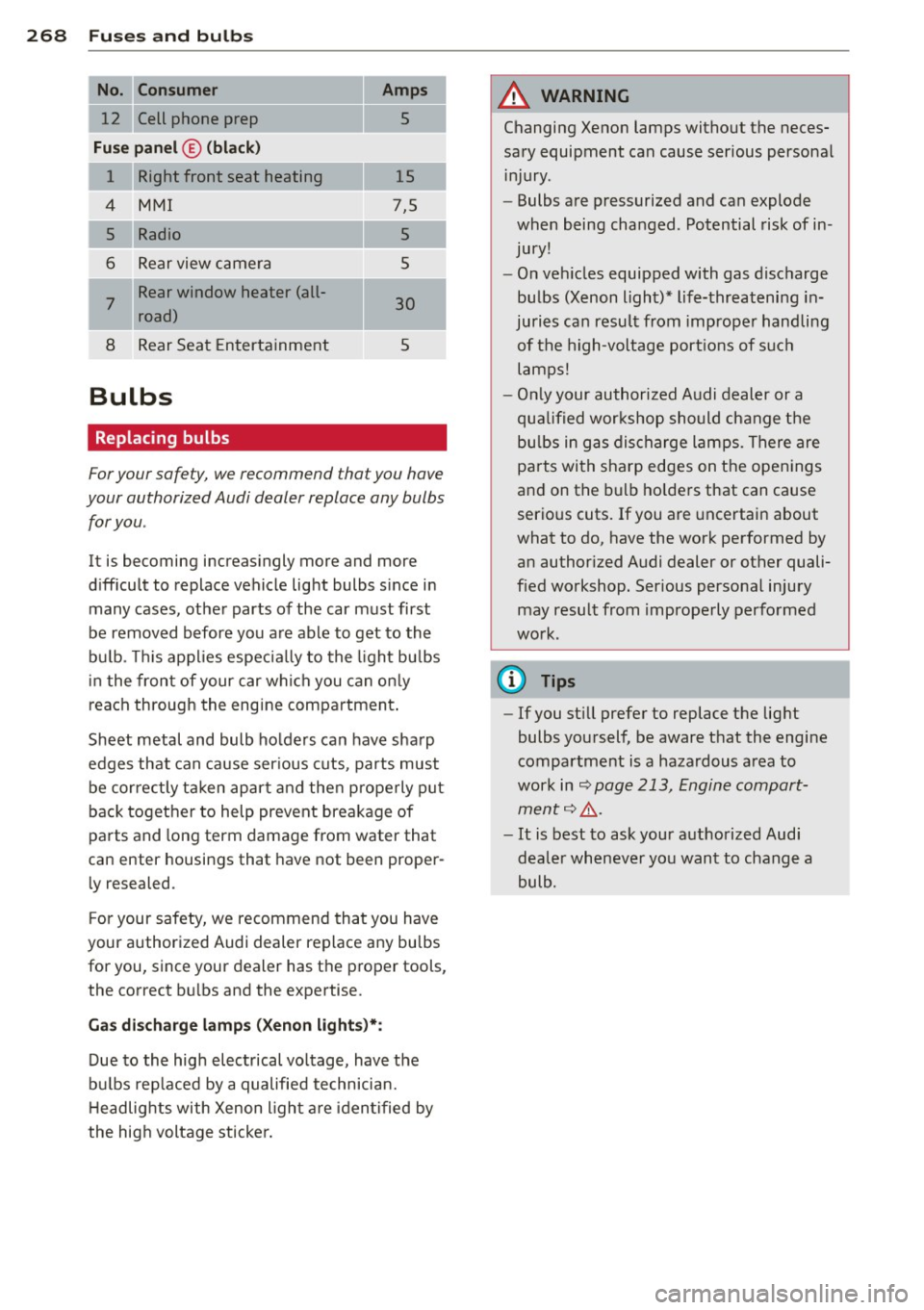
268 Fuses and bulbs
--No. Consumer Amps
12 Cell phone prep 5
-
Fuse panel© (black)
1 Right front seat heating 15
4 MMI 7,5
5
Radio 5
6 Rear view camera 5
7
Rear window heater (all·
30 road)
8 Rear Seat Entertainment 5
Bulbs
Replacing bulbs
For your safety, we recommend that you have
your authorized Audi dealer replace any bulbs for you.
It is becoming increasingly more and more
difficult to replace vehicle light bulbs since in many cases, other parts of the car must first
be removed before you are able to get to the
bu lb. Thi s applies especially to the light bu lbs
in the front of your car which you can only
reach through the engine compartment .
Sheet metal and bulb holders can have sharp
edges that can cause ser ious cuts, parts must
be correctly taken apart and then properly put
back together to help prevent breakage of
parts and long term damage from water that
can enter housings that have not been proper·
ly resealed.
F or your safety, we recommend that you have
your author ized Audi dealer replace any bulbs
for you, since your dealer has the proper tools,
the correct bu lbs and the expertise.
Ga s discharge lamps (Xenon lights}*:
Due to the high electrical vo ltage, have the
bu lbs rep laced by a qualified technician.
H eadlights with Xenon l ight are identified by
the high voltage sticker.
A WARNING
Changing Xenon lamps without the neces
sary equipment can cause serious personal
in jury.
- Bulbs are pressurized and can explode
when being changed. Potential risk of in
jury!
- On vehicles equipped with gas discharge
bulbs (Xenon light)* life-threatening in
juries can result from improper handling
of the high-voltage portions of such
lamps!
- Only your authorized Audi dealer or a
qualified workshop should change the
bu lbs in gas discharge lamps. There are
pa rts with sharp edges on the openings
and on the bulb holders that can cause
serious cuts. If you are uncertain about
what to do, have the work performed by
an author ized Audi dealer or other quali
fied workshop. Ser ious personal injury
may result from improperly performed
work.
(D Tips
- If you st ill prefer to replace the light
bulbs yourself, be aware that the engine
compartment is a hazardous area to
work in
9 page 213, Engine compart
ment
9 Lr:,. .
-It is best to ask your authorized Audi
dealer whenever you want to change a
bulb.
Page 289 of 302
_______________________________ ___:I~n ~d ~e:.::x 287
Changin g engine oi l
Chass is 225
U ndercoat ing ............ .... .. .. . 208
Checking
Eng ine coolant level ........ . .. .. .. .
226
Checking tire pressure .............. . 241
Ch ild restraints
D anger of usin g child restraints in the
front seat . . . . . . . . . . . . . . . . . . . . . . . .
146
Where can I get additional information
about child restraints and their use? ..
184
Child restraint system anchors . .. ... .. 180
Ch ild safety .. ............. .... .. ... 166
Convertible locking retractor . . . . . . . . . 176
Important safety instructions for using
ch ild safety seats .... ... .. .. .. .. .. .
169
Impo rtant th ings to know when driv in g
wi th children ............ .... .. ...
166
Insta lling a chi ld res traint using the
L A TCH system ............ .. .. .. .. .
18 1
Mounting and releasing the ancho rage
hook .... .. .. ............. .. .. ...
18 1
Tether anchors . . . . . . . . . . . . . . . . . . . . 182
Tether straps . . . . . . . . . . . . . . . . . . . . . 182
Child safety loc ks
Power windows .......... .. .. .. ....
42
Rear doors ... ........... .. .. ...... 42
Child safety seats .......... .... .. .. . 172
Booster seats ................ .. .. . 17 4
Convertible child seats .... .. .. .. .. .
173
Convertible locking retractor .. .. .. .. . 176
Danger of using child restra ints in the
front seat . . . . . . . . . . . . . . . . . . . . . . . .
146
How do I properly install a child safety
seat in my vehicle? ........ .. .. .. .. .
169
Infant seats . . . . . . . . . . . . . . . . . . . . . . 172
Installing ............ ...... .... .. 176
LATC H system ......... ...... .... .. 18 1
Saf ety inst ruc tions ........ .. .. .. .. . 169
Unused safety belts on the rear seat 17 1
Ch ild seats
L ower ancho rages ........... .. ....
18 1
Cigarette lighter . . . . . . . . . . . . . . . . . . . . . 63
Cleaning
Alcantara® (syn thetic suede) .. .. .. .. .
212
En gine compartment .............. . 213
Exhaust tail pipes ............... .. . 209
Fabr ics and fabric coverings ......... 209
Instrument panel ... . .......... .. .. 210
Interior ... .. .. .. .. . .. .......... .. 209
Leather . . . . . . . . . . . . . . . . . . . . . . . . . . 211
Matte finish paint ................. 204
MMI display/controls ... ......... ... 209
Plastic and vinyl .. .. . .. .. .. ... ... .. 206
Plastic parts ..... .. .. .. .. ......... 210
Safety belts ... .. .. . .............. 21 2
Trim strips .. .. .. .... ........... .. 206
Cleaning and protection . .. .......... . 202
Climate controls ..... . .. .......... .. . 76
Climate control system
Au tom atic recir culat ion ......... .. .. .
79
Supplementary heater ............... 79
synchronizing . . . . . . . . . . . . . . . . . . . . . . 79
Clock .. ... ... .. .... .. .. ...... ... .. . 12
Closing
Power w indows ................... .
42
Sliding/tilting sunroof ............... 44
Sunshade ....... .. . .. ......... ... . 44
Closing/opening
at the lock cylinder .. ........... .... .
38
by remote control ............. .. .. . 35
with the centra l locking sw itch ........
36
with the conven ience key . .......... .. 36
Cold tire inflation pressure .......... .. 238
Coming home ... .. .... ........... .. . 48
Compact spare tire .................. 256
also refer to Spare tire ....... ... .. .. 256
Compartments . . . . . . . . . . . . . . . . . . . . . . 66
Compass in the mirror ... ......... ... . 56
Compliance . . . . . . . . . . . . . . . . . . . . . . . . 283
Consumer Information . . . . . . . . . . 135, 280
Contacting NHTSA .... .. ......... ... 135
Convenience key
Ind icator lights .. ................. .
84
Starting engine (START ENGINE STOP
button) . .. .. .. .. .. . .. .. ..... ..... .
83
Stopping the engine (START ENGINE
STOP button) . . . . . . . . . . . . . . . . . . . . . .
84
Switching on ignition ............... . 83
un locking/loc king ............. ..... 36
Convenience opening/clos ing .......... 43
Convertible child safety seats ......... 173
•
•