instrument cluster AUDI A4 2015 User Guide
[x] Cancel search | Manufacturer: AUDI, Model Year: 2015, Model line: A4, Model: AUDI A4 2015Pages: 304, PDF Size: 74.86 MB
Page 28 of 304
26 Driver information d isplay
The values in the single -trip or the total-trip
memory can a ll be reset to zero at the same
time under
Reset in the menu.
I n addition, you can determine what informa
tion from the trip computer should be shown
in the instrument cluster d isplay. If one of the
p ieces of driver information is turned
Off, that
driver information will not be shown in the
display. The information will continue to be
calculated by the trip computer and can be
turned back
On at any time .
@ Tips
-This function is not available on all
vehicles.
- The dr iving information in the efficiency
program is also reset to zero with the
s ingle-trip memory.
Gearshift Indicator
App lies to vehicles: with manua l transmission and gear
shift indicator
This indicator can help conserve fuel.
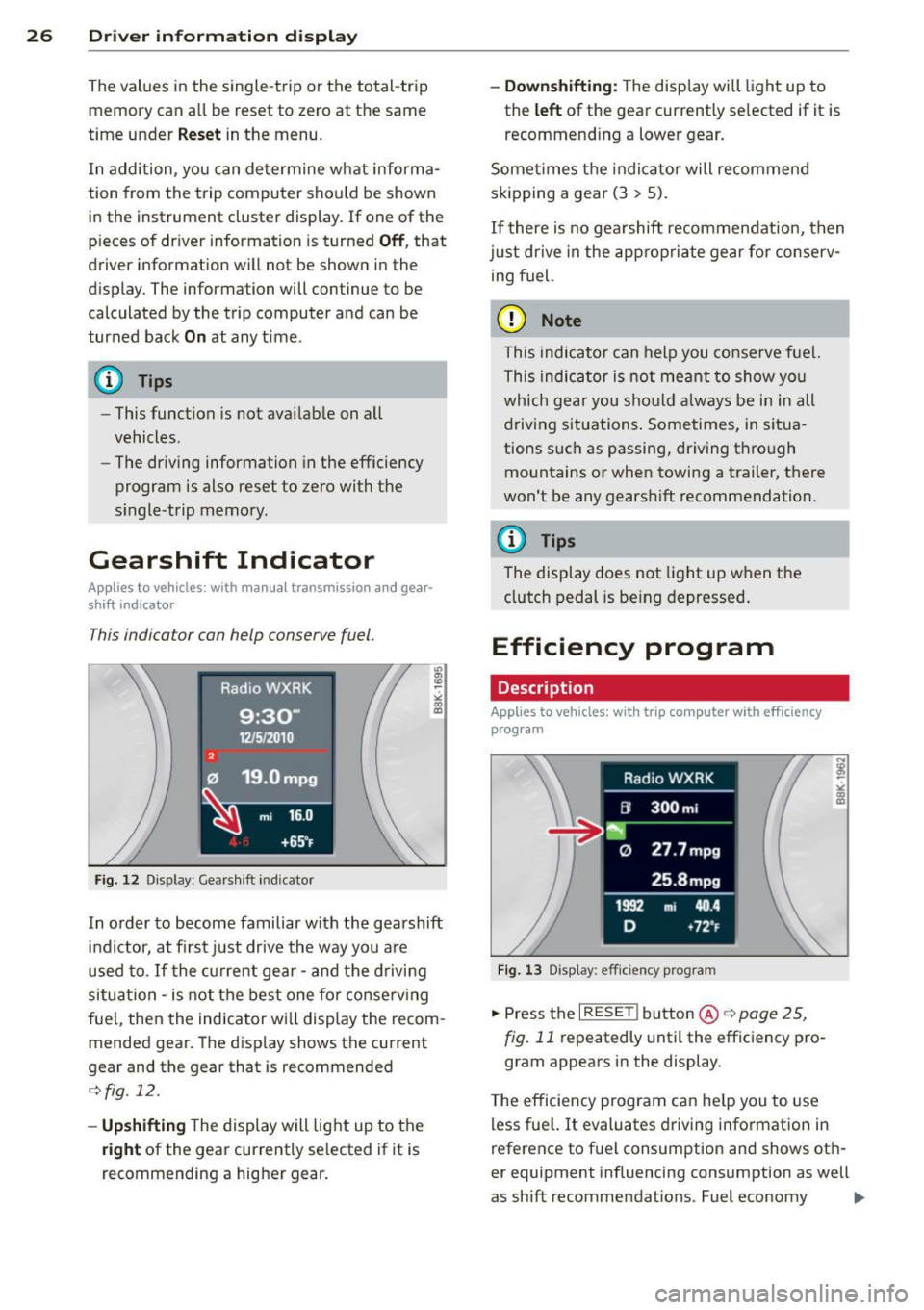
F ig. 12 Disp lay : Gea rs hift indicator
In order to become familiar with the gearshift
indictor, at first just drive the way you are
used to. If the current gear -and the driving
situa tion -is not the best one for conserving
fuel, then the indicator will display the recom
mended gear. The display shows the current
gear and the gear that is recommended
¢ fig. 12.
- Upshifting The display will light up to the
right of the gear currently se lected if it is
recommending a higher gear.
-Downshifting: The display will light up to
the
left of the gear currently selected if it is
recommend ing a lower gear.
Sometimes the indicator will recommend
skipping a gear (3
> S).
If there is no gearshift recommendation, then
j us t drive in the appropriate gear for conserv
ing fuel.
(D Note
This indicator can help you conserve fuel.
This indicator is not meant to show you
which gear you should always be in in all
driving situations . Sometimes, in situa
tions such as passing, driving through
mountains or when towing a trailer, there
won't be any gearshift recommendation.
@ Tips
The display does not light up when the
clutch pedal is being depressed.
Efficiency program
Description
Applies to vehicles: with trip computer with efficiency
program
Fig. 13 Display: efficie ncy prog ra m
.. Press the I RESE T! button @~ page 25,
fig.
11 repeatedly until the efficiency pro
gram appears in the display .
T he efficiency program can help you to use
less fue l. It evaluates driving information in
reference to fuel consumption and shows oth
er equipment influencing consumption as well
as shift recommendat ions . Fuel economy
ll>
Page 31 of 304
M N
~ co
rl I.O
"' rl
"' rl
Resetting the service interval display
Your authorized Audi dealer w ill rese t the cor
responding service schedule after performing
the appropriate service on your vehicle. Yo u
also have the possibility to reset the oil
change schedule after having performed an
oil change according to Audi specifications.
Select
I CAR I function button > Service interval
display > Reset oil change interval
or !CARI
function button > Car systems* control but
ton
> Servicing & checks > Reset oil change
interval.
0 Note
- Only reset the oil change d isplay when
you have completed an oil change.
-If you disconnect the battery terminals,
no calculat ions can be made for the serv
ic e interval display during this tim e and
no service rem inder will appear. Remem
ber that observing the proper service in
terva ls is vitally important to extending
the life of your vehicle, particularly the
engine, and maintaining its va lue. Even if
the mileage dr iven is low, the max imum
period of one year from one serv ice to
the next must not be exceeded .
(D Tips
The informat ion in the Service Reminder
remains stored even when the vehicle bat
tery is disconnected.
On-Board Diagnostic
system (OBD)
Malfunction Indicator Lamp (MIL)
The Malfunction Indicator Lamp (MIL) ¢..ift in
the instrument cluster is part of the On-Board
Diagnostic (OBD II) system.
The warning/indicator light illuminates when
the ignition is switched on and goes out after
the engine starts and the idle has stabilized .
This indicates that the MIL is work ing proper
l y.
Driver information display 29
If the light does not go out after the engine
is started, or illuminates while you are driv
ing , a malfunction may exist in the engine sys
tem.
If the light illuminates, the catalytic con
verter could be damaged.
Continue d rivin g
with reduced power (avoid
ing su sta ined high speeds and/or rapid accel
erations) and have the cond ition corrected.
Contact your authorized Audi dealer.
If the light illuminates, the electronic speed
li miter may also be malfunct ioning. For more
information
c;,page 30, Electronic speed
limiter.
An improperly closed fuel filler cap may also
cause the MIL light to illuminate
c:;, page 210.
On-Board Diagnostics
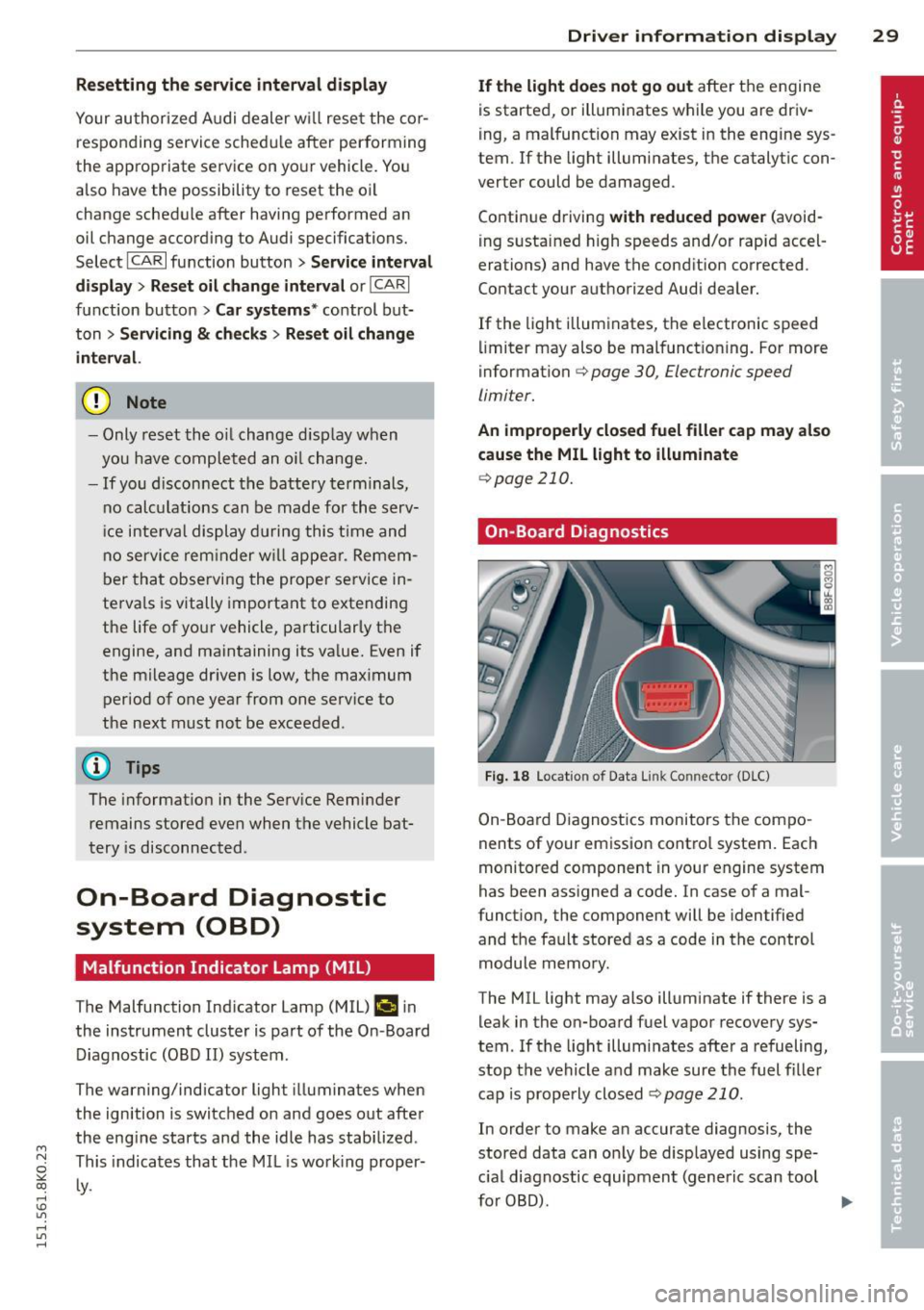
Fig. 18 Location of Data Link Connector (D LC)
On-Board Diagnostics monitors the compo
nents of your emission contro l system . Each
monitored component in your engine system
has been assigned a code. In case of a mal
function, the component will be identified
and the fault stored as a code in the control
module memo ry .
The MIL light may also illuminate if there is a
leak in the on-board fuel vapor recovery sys
tem. If the light illumi nates afte r a refueling,
stop the vehicle and make sure the fuel filler
cap is properly closed
¢ page 210.
In order to make an accurate diagnosis, the
stored data can on ly be displayed using spe
c ial diagnostic equipment (generic scan tool
for 080). .,.
Page 35 of 304
keys. Unguarded access to the keys pro
vides children the opportunity to start
the engine and/or activate veh icle sys
tems such as the power windows etc. Un supervised operation of any vehicle sys
tem by ch ildren can result in serious in
jury.
- Do not remove the key from the ignition
lock until the vehicle has come to a com
plete stop. Otherw ise the steering col
umn lock cou ld suddenly engage -caus
ing the risk of an accident.
(D Tips
- The operation of the remote contro l key
can be temporarily disrupted by interfer
ence from transmit ters in the vici nity of
the vehicle working in the same frequen
cy range (e .g . a ce ll phone, radio equip
ment).
- Fo r security reasons, replacement keys
are on ly available from authorized A udi
dealer.
- For Declaration of Compliance to United
States FCC and Industry Canada regula
tions¢
page 286.
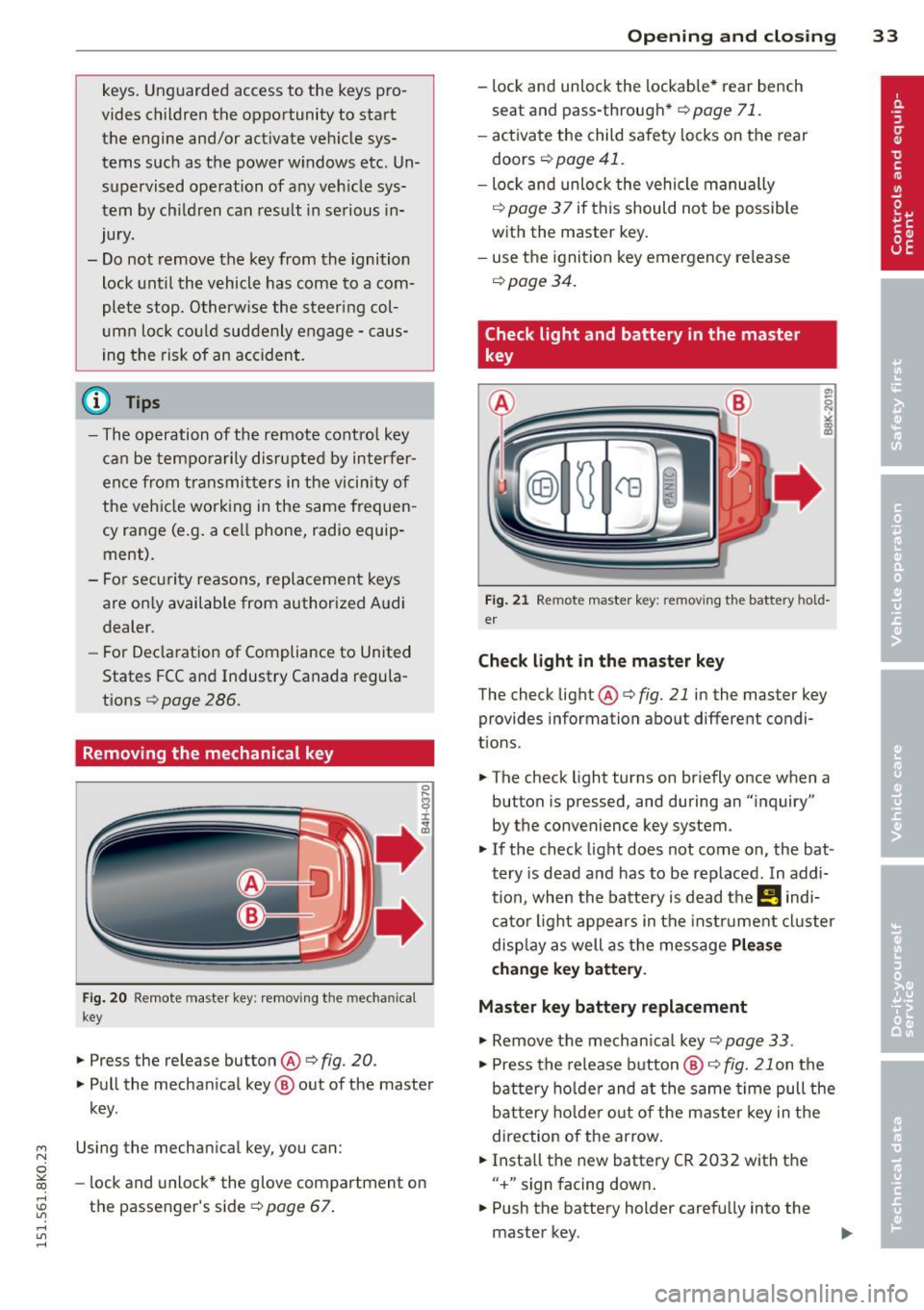
Removing the mechanical key
Fi g. 20 Remote master key: removing the mechanical
key
.,. Press the release button@¢ fig. 20.
.,. Pull the mechan ical key @ out of the master
key.
~ Using the mechanical key, you can:
~ co -lock and unlock* the glove compartment on
rl :5: the passenger's side 9 page 67.
rl l/1 rl
Op enin g an d clos ing 33
- lock and unlock the lockable * rear bench
seat and pass-through*
r=;, page 71.
- activate the child safety locks on the rear
doors
r=;, page 41.
- lock and unlock the vehicle manua lly
r=;, page 3 7 if this should not be possible
with the master key.
- use the ignition key emergency release
r=:> page 34.
Check light and battery in the master
key
Fig . 21 Remote master key: removing the battery hold
er
Che ck light in the ma ster ke y
The check light @ r=:> fig. 21 in the master key
provides information about different condi
t ions .
.,. The check light turns on briefly once when a
button is pressed, and during an "inquiry"
by the convenience key system .
.,. If the check light does not come on, the bat
tery is dead and has to be replaced. In addi
tion, when the battery is dead the
!I indi
cator light appears in the instrument cluster
disp lay as well as the message
Plea se
c hange k ey batt ery.
Master key battery replacement
"'Remove the mechan ical key r=;, page 33 .
"' Press the release button @ i=:> fig. 21 on the
battery ho lder and at the same time pull the
bat tery ho lder out o f the maste r key in the
direction of the arrow.
.,. Insta ll the new battery CR 2032 with the
" + " sign facing down .
.,. Push the battery holder carefu lly into the
master key.
Page 47 of 304
M N
~ co
rl I.O
"' rl
"' rl
Valet parking
Applies to vehicles: with fold ing and lockable rear seat
backs
The valet parking feature protects the lug
gage comportment from unauthorized ac
cess.
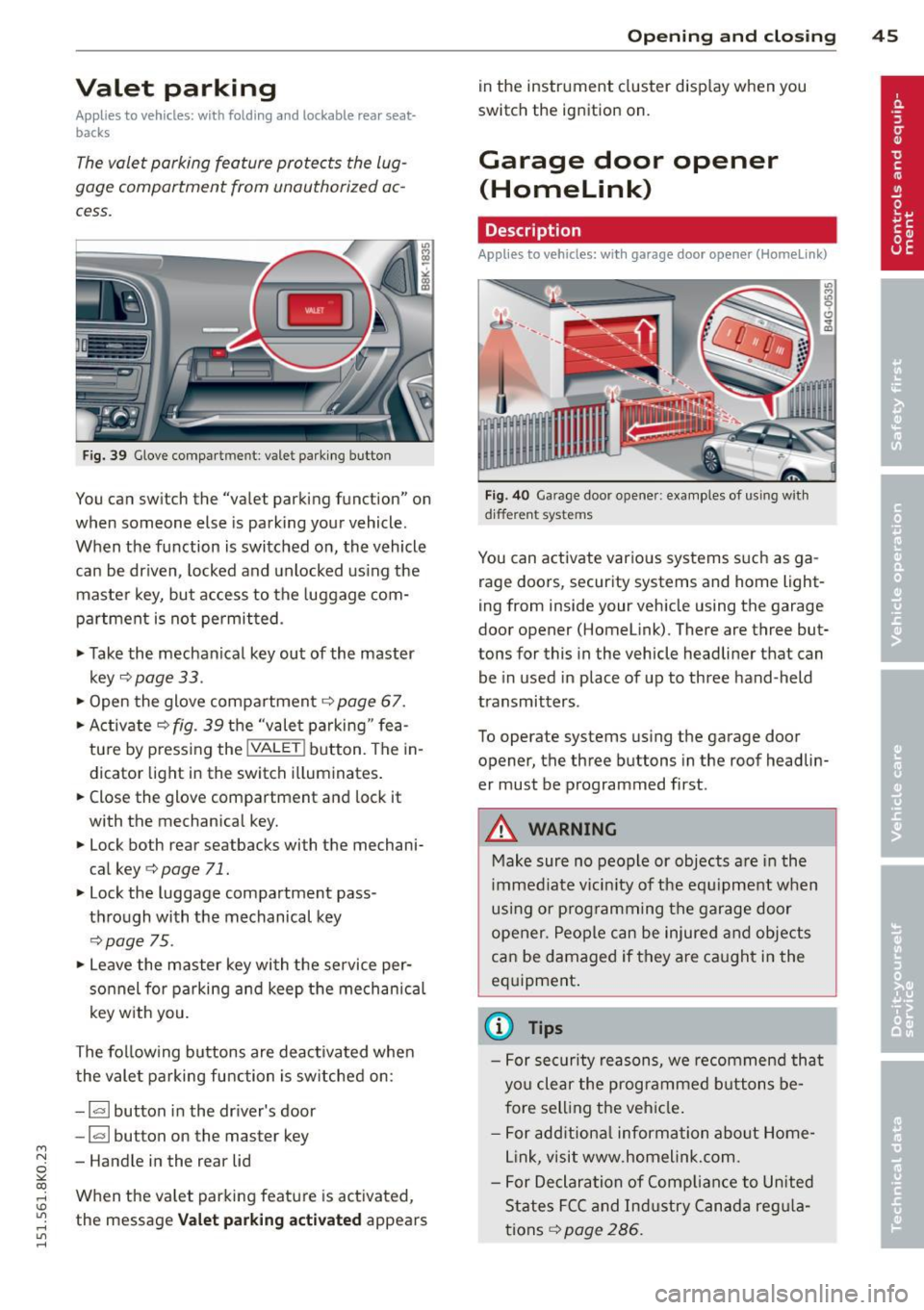
Fig. 39 Glove compa rtment: valet parking button
You can switch the "valet parking function" on
when someone else is parking your vehicle.
When the function is switched on, the vehicle
can be driven, locked and unlocked us ing the
maste r key, but access to the luggage com
partment is not permitted .
• Take the mechanical key out of the master
key
c;, page 33 .
• Open the glove compartment c;, page 67.
• Activate
c;, fig. 39 the "valet parking " fea
tu re by press ing the
! VALET ! button. The in
dicator light in the switch i lluminates.
• Close the glove compartment and lock it
with the mechanical key.
• Lock both rear seatbacks with the mechani
cal key
c;, page 71.
• Lock the luggage compartment pass
through with the mechanical key
c;, poge 75.
• Leave the master key with the service per
sonnel for parking and keep the mechanica l
key w ith you.
The fol low ing buttons are deac tivated when
the valet parking function is sw itched on:
- I a I button in the driver's door
-la l button on the master key
- Handle in the rear lid
When the va let parking feature is activated ,
the message
Vale t p arking act ivat ed appears
Op enin g an d clos ing 45
in the instrument cluster display when you
switch the ignition on.
Garage door opener
(Homelink)
Description
App lies to vehicles: wit h garage door opener (Homelink)
Fig. 40 Garage door opener: examples of using with
d ifferent systems
You can activate various systems s uch as ga
rage doors, security systems and home light
ing from inside your vehicle using the garage
door opener (Homelink). There are three but
tons for this in the vehicle headliner that can
be in used in place of up to three hand-held
transmitters .
To operate systems using the garage door
opener, the three buttons in the roof headlin
er must be programmed first.
A WARNING
Make sure no people or objects are in the
i mmediate vicin ity of the equ ipment when
using or p rogramming the garage door
opener. People can be injured and objects
can be damaged if they are ca ught in the
eq uipment .
(D Tips
-For security reasons, we recommend that
you clear the programmed b uttons be
fore sell ing the vehicle .
- For add itiona l information about Home
L ink, visit www.homelink.com.
- For Declaration of Comp lian ce to United
States FCC and Ind ustry Canada reg ula
tions
c;, page 286.
Page 52 of 304
50 Clear vis ion
@ Tips
- The light sensor* for headlight control is
located in the rear view m irror mount.
You should therefore not apply any st ick
ers to the windsh ield in this area in order
to prevent malfunctions or failures.
- Some exterior lighting functions can be
adjusted
c> page 50.
- When you remove your key from the igni
tion while the vehicle's lights are turned
on, a buzzer sounds as long as the driv
er's door is open .
- In cool or damp weather, the ins ide of
the headlights, turn signals and tail lights can fog over due to the tempera
ture difference between the inside and
outside. They will clea r shor tly after
switching them on. This does not affect
the service life of the lighting.
- In the even t of a light sensor malfunc
tion, the driver is no tified in the instru
ment cluster disp lay¢
page 22.
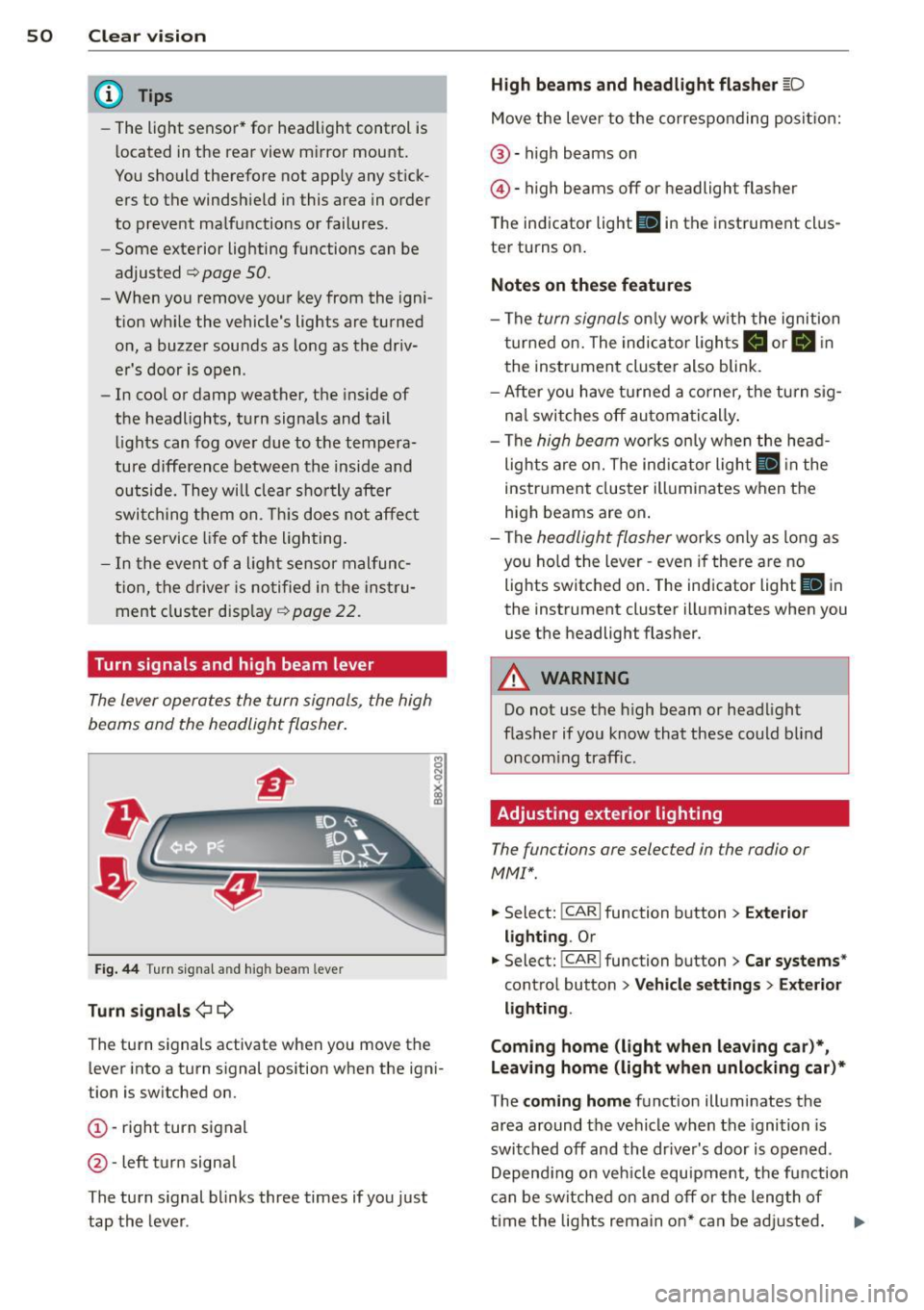
Turn signals and high beam lever
The lever operates the turn signals, the high
beams and the headlight flasher .
Fig. 44 Tu rn s ig na l and hig h beam lever
Turn sign als ¢i ¢
The turn signals activate when you move the
l ever into a turn s ignal pos ition when the ign i
tion is switched on.
(D -right turn signal
@-left tur n signa l
The turn s ignal blinks three times if you just
tap the lever .
High be ams and headlight flasher [D
Move the lever to the correspon ding posit io n:
@ -high beams on
@ -high beams off or headlight flasher
The indicator light
ii in the instrument cl us
te r turns on .
Notes on thes e features
-The turn signals on ly wor k w ith the ignition
t ur ned on. The indicator ligh ts
Ct or a in
the instrument cluster also blink.
- After you have turned a co rner, the turn s ig
na l switches off au toma tically .
- The
high beam works on ly w hen the head
lights a re on. The ind icator ligh t
II in the
instrument cluster illuminates when the
high beams are on .
- The
headlight flasher works o nly as long as
you ho ld the lever -even if there a re no
lights switched on . The indicator light
II in
the instrument cluster illuminates when you
use the headlight flasher.
A WARNING
--
Do not use the h igh beam or headlight
flasher if you know that these could blind
oncom ing traffic.
Adjusting exterior lighting
The functions ore selected in the radio or
MMI" .
.,. Select: !CARI function button> Exte rior
light ing .
Or
.,. Select: !CARI function button > Car systems *
control button > Vehicle s etting s> Exterior
lighting .
Coming home (light when leav ing car }*,
Leav ing home (light when unlocking car )*
The coming home function illuminates the
area around the vehicle when the ignition is
switched off and th e dr ive r's door is open ed.
Depend ing on veh icle equ ipment, the function
can be switched on and off or the length of
time the lig hts remain on* can be ad justed . ..,.
Page 89 of 304
M N
~ co
rl I.O
"' rl
"' rl
Shift to N or P to start engine
This message appears when attempting to
start the engine if the selector lever for the
automatic transmission is not in the P or N
position. The engine can only be started with
the selector in these positions .
!!I Is the key in the vehicle?
This message appears if the master key is re
moved from the vehicle with the engine run
ning.
If the master key is no longer in the ve
hicle, you cannot switch on the ignition after
stopping the engine and you also cannot start
the engine again. Moreover, you cannot lock
the vehicle from the outside with the key.
Shift to P otherwise vehicle can roll away.
Doors do not lock if lever is not in P.
This message appears for safety reasons
along with a warning signal.
It appears if the
selector lever for the automatic transmission
is not in the P position when switching off the
ignition. Move the selector lever to the P posi
tion, otherwise the vehicle is not secured
against rolling away. You also cannot lock the
vehicle using the locking button* on the door
handle or using the remote key.
Convenience key defective! Use ignition lock
This message appears if the engine must be
started or stopped using the ignition key and
not the
I START ENGINE STOP! button.
On the road 87
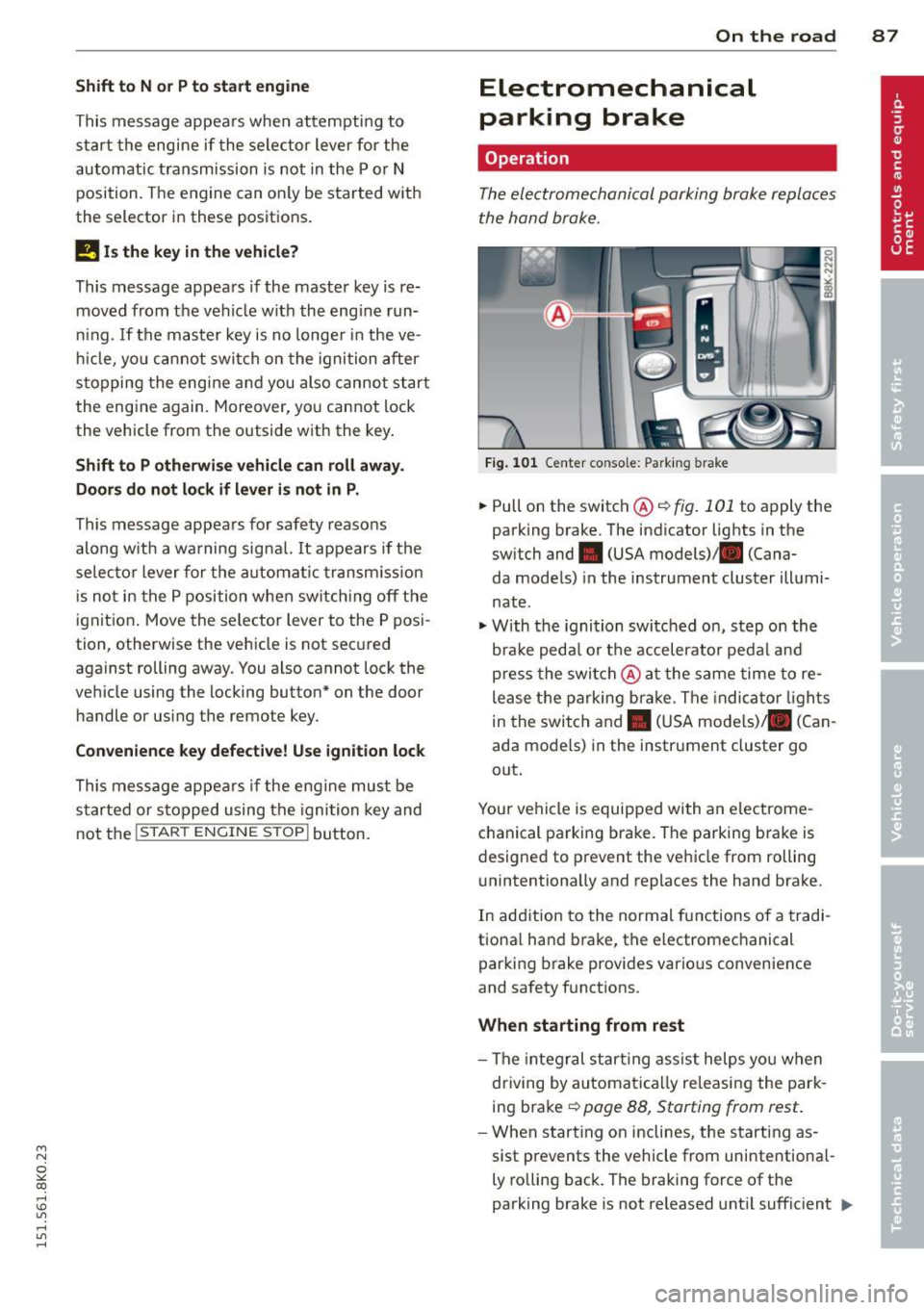
Electromechanical
parking brake
Operation
The electromechanical parking broke replaces
the hand broke.
Fig. 101 Center co nsole: Parking b rake
.,. Pull on the switch@¢ fig. 101 to apply the
parking brake. The indicator lights in the
switch and • (USA models) . (Cana-
da models) in the instrument cluster illumi
nate .
"'With the ignition switched on, step on the
brake pedal or the accelerator pedal and
press the switch @at the same time to re
lease the parking brake. The indicator lights
in the switch and. (USA models)/ . (Can
ada models) in the instrument cluster go
out.
Your vehicle is equipped with an electrome
chanical parking brake. The parking brake is
designed to prevent the vehicle from rolling unintentionally and replaces the hand brake.
In addition to the normal functions of a tradi
tional hand brake, the electromechanical
parking brake provides various convenience
and safety functions .
When starting from rest
- The integral starting assist helps you when
driving by automatically releasing the park
ing brake ¢
page 88, Starting from rest.
-When starting on inclines , the starting as-
sist prevents the vehicle from unintentional-
ly rolling back. The braking force of the
parking brake is not released until sufficient
111>
Page 96 of 304
94 Transmi ssion
vehicle to accelerate without a noticeable in
terruption in traction.
tiptronic tran smission
In the tiptronic transmission, power is trans
ferred by a torq ue converter.
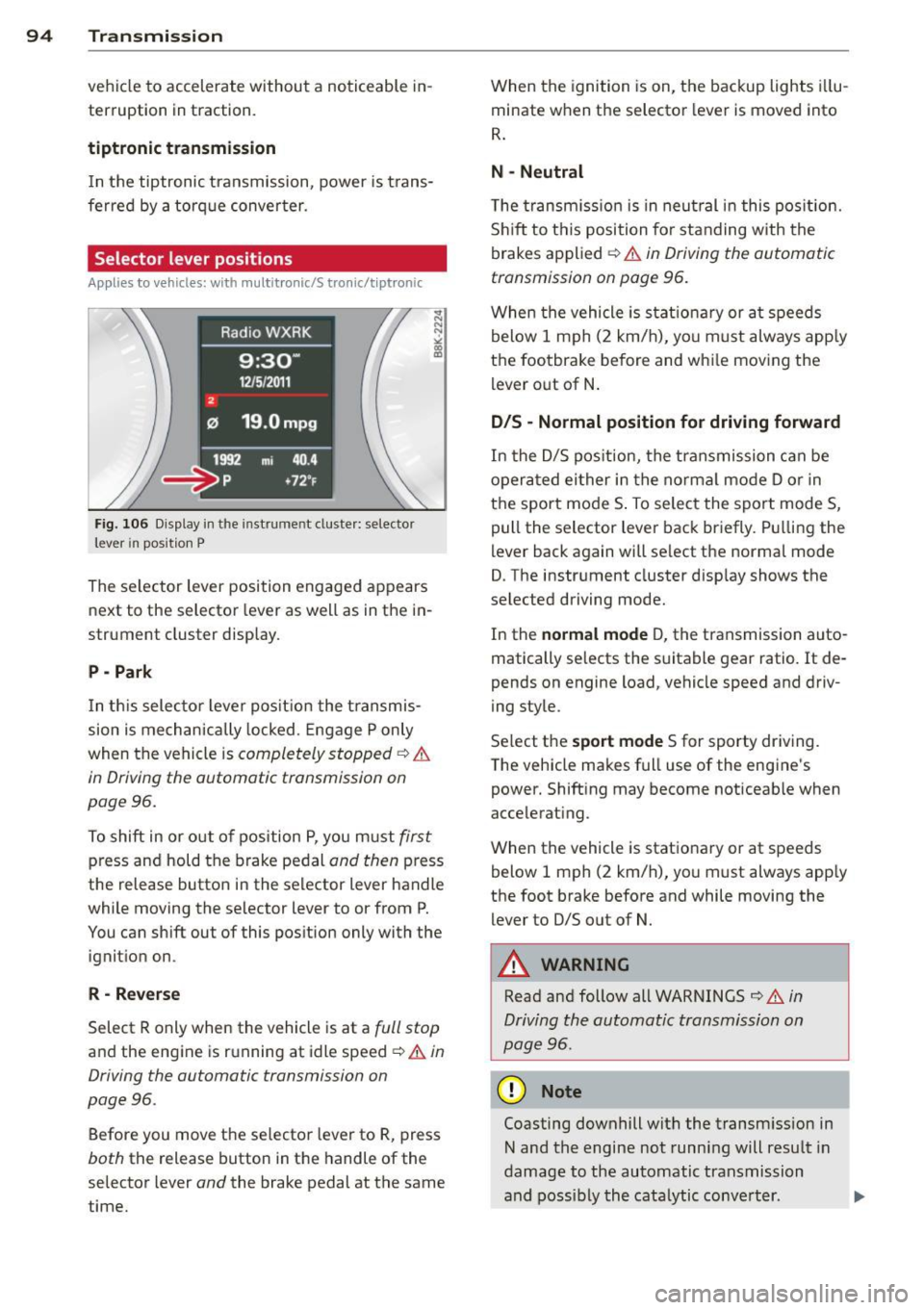
Selector lever positions
Applies to vehicles: with multitronic/5 tronic/tiptronic
Fig. 106 D isplay in the instrume nt duste r: selector
lever in position P
The se lector lever position engaged appears
next to the selector lever as well as in the in
strument cluster display.
P - Park
In th is selector lever pos it ion the transmis
sion is mechanically locked. Engage P only
when the vehicle is
completely stopped ¢ &
in Driving the automatic transmission on
page 96.
To shift in or o ut of pos ition P, you must first
press and hold the brake pedal and then press
the release button in the selector lever handle
while moving the se lector lever to or from P.
You can shift out of this position only with the ignition on .
R-Re verse
Select R only when the vehicle is at a full stop
and the engine is running at idle speed ¢ & in
Driving the automatic transmission on
page 96.
Before you move the selector lever to R, press
both the release button in the handle of the
selector lever
and the brake pedal at the same
time. When the
ignition is on, the backup lights i llu
minate when the selector lever is moved into
R .
N -Neutral
The transm iss io n is in neut ral i n this pos ition.
S hi ft to this position fo r standing with the
brakes applied ¢
& in Driving the automatic
transmission on page 96.
When the vehicle is stat ionary or a t speeds
below 1 mph (2 km/h), yo u must always app ly
the footbrake before and whi le moving the
lever o ut of N .
D/S - Normal position for driving forward
In the D/S pos ition, the transmission can be
opera ted ei ther in the norma l mode D or in
the sport mode S . To select the sport mode S,
pull the selector lever back briefly. P ulling the
lever back again will se lect the normal mode
D. The instrument cluster disp lay shows the
selected driving mode.
In the
normal mode D, the transmission auto
matically selects the suitable gear ratio.
It de
pends on engine load, vehicle speed and driv
ing style.
Se lect the
s port mode S for sporty dr iving.
T he vehicle makes full use of the engine's
power. Shift ing may become noticeable when
acce lerating.
When the vehicle is stationary or at speeds below 1 mph (2 km/h), you must always app ly
the foot brake before and while moving the lever to D/S out of N.
A WARNING
Read and follow all WARNINGS ¢ .& in
Driving the automatic transmission on
page 96 .
(D Note
Coasting downhill with the transm ission in
N and the engine not running will result in
damage to the automatic transmission
and possibly the cata lytic conve rter. .,..
Page 97 of 304
M N
~ co
rl I.O
"' rl
"' rl
@ Tips
-On vehicles with drive select*, you can
adjust the sporty shift characteristics in
the
Dynamic driving mode.Swill appear
i n the instrument cluster display instead
ofD.
- If you accidentally select N while driv ing,
take your foot off the acce lerator pedal
i mmediately and wait for the engine to
s low down to idle before selecting D/S.
- If there is a power failure , the selector
l ever will not move out of t he P position .
The eme rgency release can be used if
th is happens ~
page 100.
Automatic Shift Lock (ASL)
Applies to vehicles: with multitronic/5 tronic/tiptron ic
The Automatic Shift Lock safeguards you
against accidentally shifting into a forward or
the reverse gear and causing the vehicle to
move unintentionally.
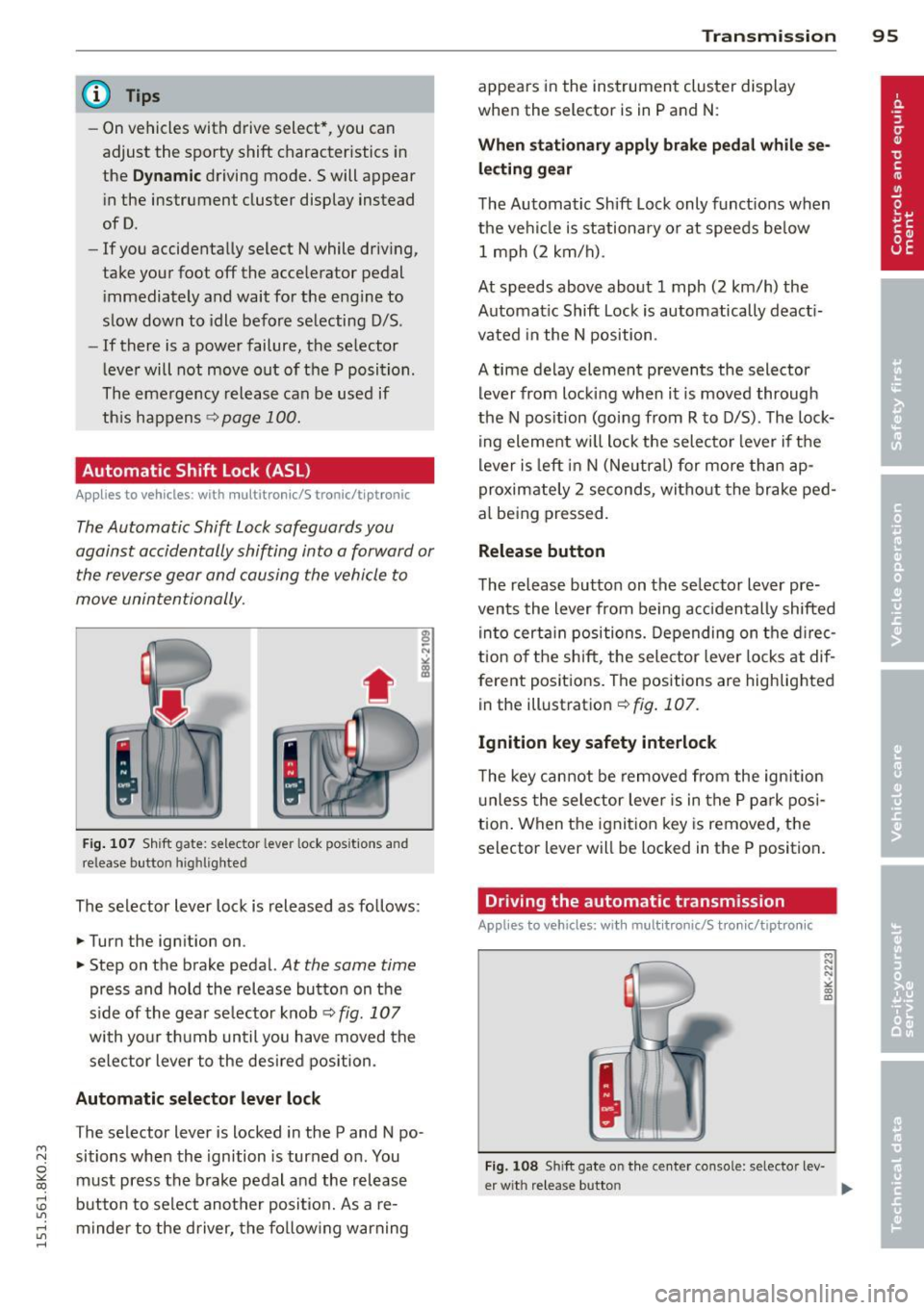
F ig. 10 7 Sh ift gate: selecto r lever lock posit io ns and
release butto n highlighted
The selector lever lock is released as fo llows:
... Turn the ign ition on .
... Step on t he brake pedal.
At the same time
press and hold the release button on the
side of the gea r se lector knob ¢
fig. 107
with yo ur t hu mb until you have moved the
sele ctor lever to the des ired position .
Automatic selector lever lock
The selector lever is locked in the P and N po·
sitions when the ignition is turned on . You
must press the brake pedal and the release
button to select another posi tion. As a re·
m inder to the driver, the fo llow ing warning
Transm ission 95
appears in the ins trument cluster display
whe n the selector is in P and N:
When stationary appl y brake pedal while se
lec ting gear
The Automatic Shift Lock only funct ions when
the ve hicl e is stationary or at speeds be low
1 m ph (2 km/h) .
At speeds above about 1 mph (2 km/h) the
Automat ic Shift Lock is automatically deact i
vated in the N position .
A time delay element prevents the selector lever from lock ing when it is moved through
the N pos ition (going from R to D/S) . The lock
ing element w ill lock t he selec to r l ever if the
lever is left in N (Neutr al) for more than ap
proximate ly 2 seconds, wi tho ut the brake ped
al being pressed.
Release button
The release button on the se lector lever pre
vents the lever from be ing acciden tally shifted
in to certa in positions. Depending on the d irec
t ion of the shift, the sele ctor leve r locks at dif
ferent positions. The positions are highlig hted
in the illust ration¢
fig . 107.
Ignition key safety interlock
T he key cannot be removed from the ign ition
u nless the selector lever is in the P par k posi
tion . When the ignit ion key is removed, the
selector lever will be loc ked in the P position .
Driving the automatic transmission
Applies to vehicles; with mult itronic/S tronic/tiptronic
Fig. 108 Sh ift gate on the ce nter console: selector lev-
er w it h re lease butto n ..,_
Page 101 of 304
"' N
0 ::.,: co ,...., \!) ..,.,
,...., ..,., ,....,
A WARNING 1=
Please note that the drive wheels can spin
if kick-down is used on a smooth slippery
road - there is a risk of skidding.
Launch Control Program
App lies to vehicles: with S tronic
The Launch Control Program provides the
best acceleration possible when starting from
a stop .
Requirement : The engine must be at operat
ing temperature and the steering wheel must
not be turned .
~ Sedan: Press the l.e OFFI button ¢ page 187
while the engine is running . The II indica
tor light illuminates in the instrument clus
ter and
Stabilization cont ro l ( ES C): S port .
Warning! R estrict ed s tabilit y
appears in the
driver information system display.
~ all road: Press the l.e O FF I but to n
¢
page 187 while the engine is running.
T he
II indicator light illuminates in the in
strument cluster and
Stabilization control
( ES C): Off ro ad. W arning! Restri cted stabil
it y
appears in the driver information system
display.
~ Move the selector lever to the D/S pos ition
to select sport mode (S) or select the
dy
namic
driving mode in drive select*
¢ page 116.
~ Press the bra ke peda l st rongly wit h your left
foot and hold it dow n for at least 1 second.
~ At the same time, press the accelerator ped
al down complete ly with your right foot un
ti l the engine reaches and maintains a high
RPM .
~ Remove your foot from the brake pedal
within S seconds¢.& .
A WARNING
-Always adapt your driving to the traffic
flow .
- Only use the Launch Control Program when road and traffic condit ions allow it
and other dr ivers will not be endangered
-
Tran sm iss ion 99
or annoyed by your driving and the vehi
cle's acceleration.
- Please note that the driving wheels can
spin and the vehicle can break away
when sport mode/offroad mode is
sw itched on, especially when the road is
slippery.
- Once you have accelerated, you shou ld
sw itch sport mode/offroad mode off by
press ing the
I~ O FFI button .
(l) Tips
- The transmission temperature may in
crease s ignificantly after using the
Launch Control Program. If that hap-
pens, the program may not be availab le
for a few m inutes .
It will be ava ilable
again after a cool-down per iod.
- When accelerating using the Launch
Cont ro l program, a ll vehicle parts are
subjec t to heavy loads. This can result in
increase d wear.
Transmission malfunction
Applies to vehicles: with multitronic/S tronic/tiptronic
[il Transmission : Pre ss brake pedal and se
lect gear again.
Press the br ake peda l and select the desired
selector lever posi tion again. You ca n then
continue driving .
[il Transmi ssion overh eating : Pl ea se drive
con servatively .
The transm iss ion temperature has increased
s ignificantly due to the sporty d riving manner.
D rive in a less sporty ma nner until the tem
perature re turns to the normal range and the
i ndica tor ligh t switches o f.
[O] Transmission malfunction : You can con
tinu e driving
There is a system malfunction i n the transmis
s io n. You may cont inue d rivi ng . Drive to your
authorized Aud i dea le r or qualified repa ir fa
c ili ty soon to have the ma lfunction corrected. ..,.
Page 106 of 304
104 Audi adaptive cruise control and braking guard
Switching on and off
Applies to vehicles: with Audi adaptive cruise control
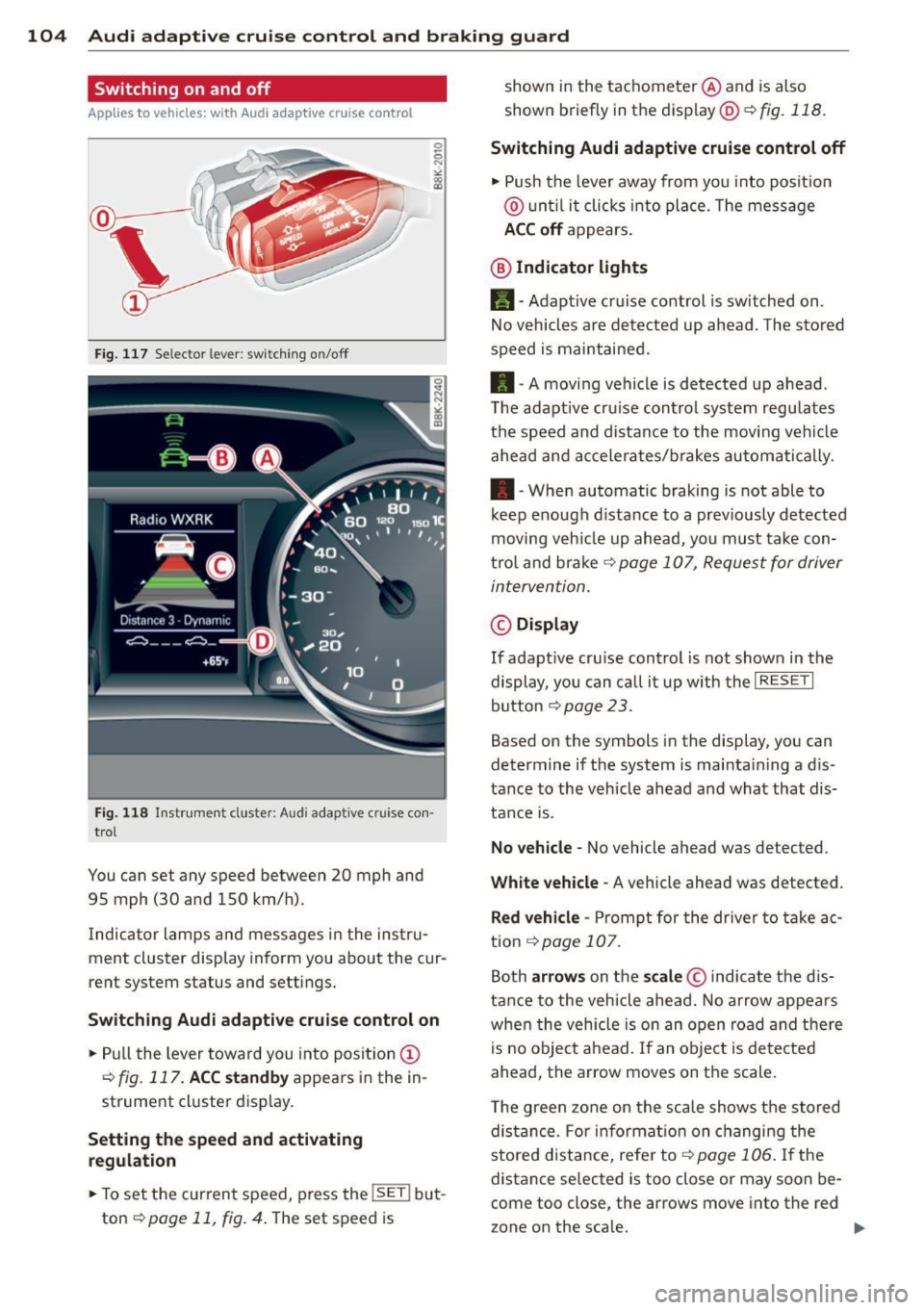
Fig. 117 Se lec tor lever: switching on/off
Fig. 118 Instrument clus te r: A udi adap tive c ru ise co n·
trol
You can set any speed between 20 mph and
95 mph (30 and 150 km/h).
Indicator lamps and messages in the instru·
ment cluster display inform you about the cur·
rent system status and settings.
Switching Audi adaptive cruise control on
• Pull the lever toward you into position (D
¢fig. 117. ACC standby appears in the in ·
strument cluster display.
Setting the speed and activating
regulation
.. To set the current speed , press the !SE T! but·
ton
¢ page 11, fig . 4. The set speed is shown in
the tachometer @and is also
shown briefly in the display@¢
fig. 118.
Switching Audi adaptive cruise control off
• Push the lever away from you into position
@ until it clicks into place. The message
ACC off appears.
@ Indicator lights
11 · Adaptive cruise control is sw itched on.
No vehicles are detected up ahead. The stored
speed is maintained.
• · A moving vehicle is detected up ahead .
T he adaptive cru ise control system regulates
the speed and distance to the moving vehicle
ahead and accelerates/brakes automatically .
• · When automatic braking is not able to
keep enough distance to a previously detected
moving veh icle up ahead, you must take con·
trol and brake
¢ page 107, Request for driver
intervention.
© Display
If adapt ive cru ise control is not shown in the
display, you can call it up w ith the
I RESET I
button ¢ page 2 3 .
Based on the symbols in the display, you can
determine if the system is maintain ing a d is ·
tance to the vehicle ahead and what that dis
tance is.
No vehicle· No vehicle ahead was detected .
White vehicle -A vehicle ahead was detected .
Red vehicle -Prompt for the driver to take ac
tion
,=;, page 107.
Both arrows on the scale © indicate the dis·
tance to the vehicle ahead. No arrow appears
when the vehicle is on an open road and there
is no object ahead. If an object is detected
ahead, the arrow moves on the scale .
T he green zone on the scale shows the stored
distance. For information on changing the
stored distance, refer tor=;,
page 106 . If the
distance se lected is too close or may soon be·
come too close , the arrows move into the red
zone on the sca le. .,.