park assist AUDI A4 2015 User Guide
[x] Cancel search | Manufacturer: AUDI, Model Year: 2015, Model line: A4, Model: AUDI A4 2015Pages: 304, PDF Size: 74.86 MB
Page 99 of 304
"" N
0 ::.,: co ,...., \!) 1.1'1 ,...., 1.1'1 ,....,
-Do not ride the brakes or press the brake
pedal too often or too long when driving
down a hill. Constant braking causes the
brakes to overheat and substantially re
duces braking performance, increases
braking distance or causes complete fail
ure of the brake system.
- To prevent the vehicle from rolling back
when stopping on inclines, always hold it
in place with the brake pedal or parking
brake.
- Never hold the vehicle on an incline with
a slipping clutch. The clutch opens auto
matically when it becomes too hot from
the overload. An indicator lamp
mJ illu
minates and a driver message appears
¢ page 99 when the clutch is overload
ed .
- If the engine must remain running, never
have any driving position engaged when
checking under the hood. Make sure the
selector lever has securely engaged and
is locked in P with the parking brake set
¢ page 212. Otherwise, any increase in
engine speed may set the vehicle in mo
tion, even with the parking brake ap plied .
0 Note
-S tronic- and tiptronic transmission:
When stopping on an incline, do not try
to hold the vehicle in place by pressing
the accelerator pedal while a driving gear
is selected. This can cause the transmis
sion to overheat and can damage it. Acti
vate the parking brake or press the brake
pedal to prevent the vehicle from rolling.
- S tronic- and tiptronic transmission: Al
lowing the vehicle to roll when the en
gine is stopped and the selector lever is in N will damage the transmission be
cause it is not lubricated under those cir
cumstances .
(D Tips
For safety reasons, the parking brake is re
leased automatically only when the driv
er's safety belt is engaged in the buckle.
Transmission 97
Hill descent control
App lies to vehicles : wi th mult itronic/ S tro nic/tiptro nic
The hill descent control system assists the
driver when driving down declines .
Hill descent control is activated when these
lector lever is in D/S and you press the brake
pedal. The transmission automatically selects
a gear that is suitable for the incline. Hill de scent control tries to maintain the speed ach
ieved at the time of braking, within physical
and technical limitations. It may still be nec
essary to adjust the speed with the brakes.
Hill descent control switches off once the de
cline levels out or you press the accelerator
pedal.
On vehicles with the cruise control system*
¢ page 91 , hill descent control is also activat
ed when the speed is set.
.&_ WARNING
-
Hill descent control cannot overcome
physical limitations, so it may not be able
to maintain a constant speed under all
conditions. Always be ready to apply the brakes .
Page 120 of 304
118 Park assist
Park assist
Parking system
Applies to vehicles: with pa rking system
Different park assist systems may be used for
parking or maneuvering, depending on the
vehicle's features.
Parking system (rear)*:
For the parking system (rear), the acoustic
park assist system is installed in the rear of
the vehicle
¢ page 118.
The rear parking assist system uses ultrason ic
sensors to determine the distance of the vehi
cle from a detected obstacle. There are a tota l
of four sensors located on the rear bumper
(two in the m iddle and two on the sides).
Parking system (rear, with rear view
camera)*:
For the parking system (rear, with rear view
camera),
the rear acoust ic park assist system
is integrated in the rear of the vehicle and the
rear view camera is integrated in the rear lid
¢page 121.
The parking system (rear, with rear view cam
era)
uses ultrasonic sensors to determine the
distance of the vehicle from a detected obsta
cle . There are a total of four sensors located
on the rear bumper (two in the middle and
two on the sides).
_& WARNING
Make sure the sensors are not covered by
stickers, deposits or any other obstruc
tions as it may impair the sensor function.
For information on cleaning, refer to
qpage 202.
Parking system (rear)
Rear acoustic park assist
Applies to vehicles: with parking system (rear)
The rear acoustic park assist warns you of ob
stacles or objects behind your car .
Description
The rear acoustic parking assist system deter
mines the distance of the vehicle from an ob
stacle using ultrasonic sensors. There are 4
sensors in the rear bumper.
The range at which the sensors start to meas
ure is
about:
To the sid e 2 ft (0 .60 m)
Center rear 5.2 ft (1.60 m)
Activation
Acoustic parking assist is activated automati
ca lly when
reverse gear is engaged. A brief
tone confirms that the system is activated.
Warning tones
Distance warning is given by warn ing tones
wh ich are generated by the rear signa l genera
tor. The volume and the pitch of th e warning
tones can be adjusted in the MMI*
¢page 119.
Reversing
Distance warning when reversing starts when
an obstacle is detected in the range of the
parking assist system . As the distance de
creases, the time interval between the a udible
tones becomes shorter.
When the distance is less than 1ft (0.30 m),
the tone becomes continuous. At this point
you should stop backing up .
Please note that low objects already signalled
by a war ning can disappear from the system's
detection range and will not continue to be
signalled .
If the distance to an obstacle remains the
same, the vo lume of the distance warning is
gradually reduced after about 4 seconds (this
does not apply in the continous tone range).
ll-
Page 121 of 304
"" N
0 ::.,: co ,...., \!) 1.1'1 ,...., 1.1'1 ,....,
Approaching another obstacle will result in
the distance warning sounding at the normal
volume aga in.
Malfunction s in the s ystem
If a war ning tone is audible for about five sec
onds when you turn on the ignit ion, there is a
mal function in the system. Have the problem
corrected by your authorized Audi dealer.
Keep t he sensors in the rear bumper clean and
free from ice so t hat the acoustic park assist
system can function properly.
A WARNING
- Sensors have dead spaces in which ob
jects cannot be detected. Be especially
alert for small children and animals ,
since they are not always detected by the
sensors.
- The acoust ic park ing system is not a sub
st itute for the d river's own caut io n and
alertness . Ultimate responsib ility always
remains with the driver during park ing
and simi lar maneuvers. Always watch
where you are dr iving .
- You should always adjust the volume and
frequency of the warning tones so that
yo u can easily hear the a co ustic distance
warning even if the radio is p laying, the
air-conditioner blower is on High or there
is a high leve l of outside noise.
- Check the settings whenever anyone
else has driven the vehicle before you.
- Remember that low obstacles for wh ich
-
a war ning has a lready been issued may
"dive" below the system's sensing zone if
the veh icle is being backed up closer . In
th is case, the warn ing sound shutt ing off
does
not i ndi cate that you have cleared
the obs tacle. Instead, impact is immi
nent .
- Objec ts such as trai ler hitches, c hains,
narrow posts or fences covered by a thin
l ayer of paint may not a lways be detect -
Park a ssis t 119
ed by the sys tem . They can still damage
your vehicle without warning.
(0 Tips
Keep the senso rs in the rear b umpe r clean
and free of snow and ice so that the acous
tic parking assist system can function proper ly .
Adjusting the warning tones
App lies to vehicles : wit h parking system (rear)
The warning tones con be adjusted in the
MM!*.
.,. Sele ct: !CAR ! func tion button > Parking sys
tem. Or
.,. Select:
!CAR ! function button > Car sy stem s*
contro l button > Dri ver a ssi st> Parking a id.
- Rear volume -
rear sensor vo lume
- Rear frequency -rear senso r frequency
- Mu sic volume while parking -when the
pa rking system is sw itched on, the volume
of the active audio source is lowered.
The newly adjusted value is briefly heard from
the signal generato r. The sett ings are auto
matically sto red and assigned to the master
key w ith remote contro l.
Page 122 of 304
120 Park assist
Parking system (rear,
with rear view camera)
Introduction
Applies to vehicles: with parking system (rear, with rea r
view camera)
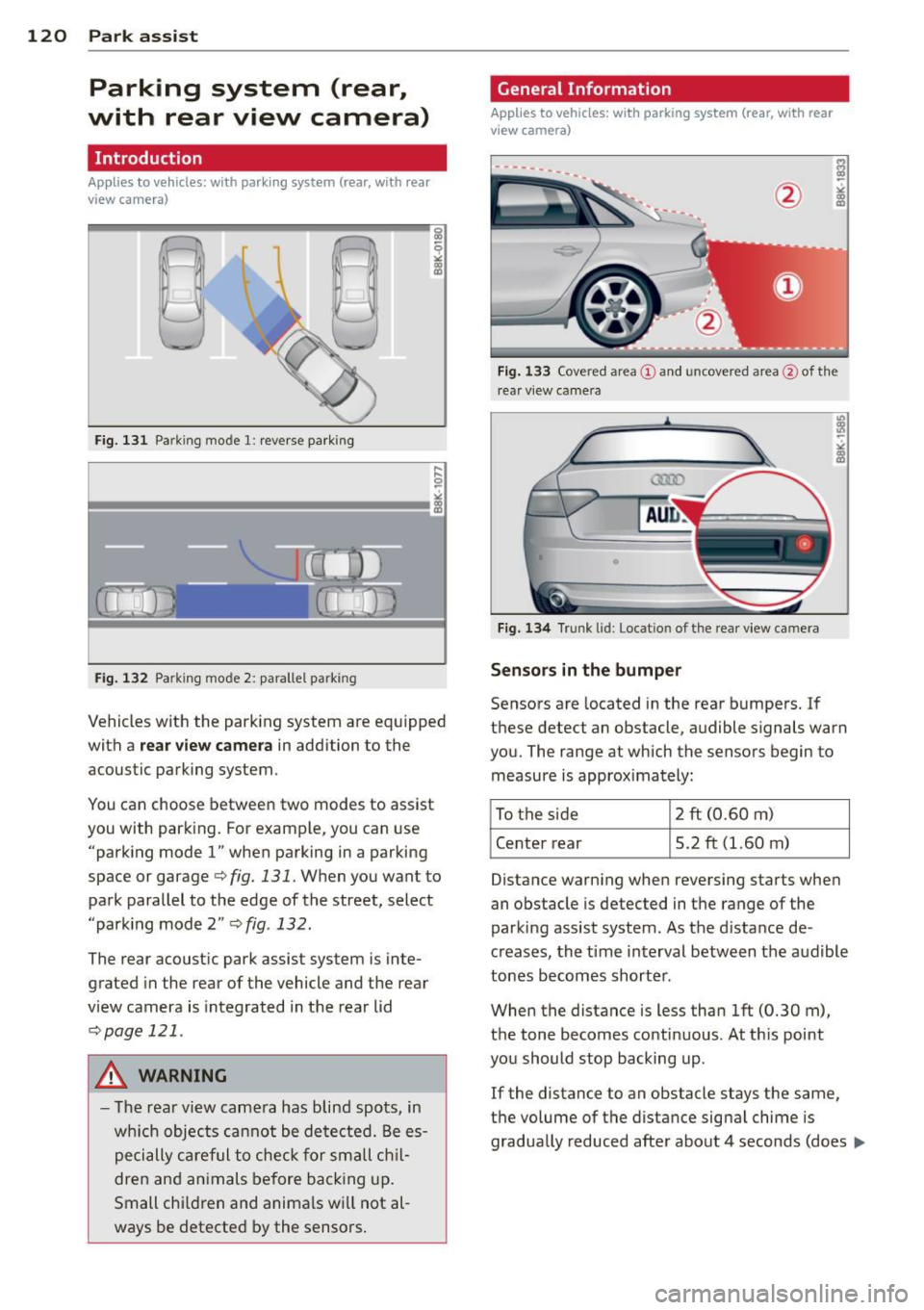
Fig. 131 Parking mode 1: reverse parking
Fig . 132 Parking mode 2: parallel park ing
Vehicles with the parking system are equipped
with a
rear view camera in addition to the
acoustic parking system.
You can choose between two modes to assist
you with parking. For example, you can use "parking mode
l" when parking in a parking
space or garage¢
fig. 131. When you want to
park parallel to the edge of the street, select
"parking mode 2"
¢ fig . 132.
The rear acoustic park assist system is inte
grated in the rear of the vehicle and the rear
view camera is integrated in the rear lid
¢page 121 .
A WARNING
-The rear view camera has blind spots, in
wh ich objects cannot be detected. Be es
pecially careful to check for small chil
dren and animals before backing up.
Small chi ldren and animals wi ll not al
ways be detected by the sensors.
General Information
Applies to vehicles: with parking system (rear, with rear
view camera)
Fig. 133 Covered area @ and uncove red area @of th e
rear view came ra
0
Fig. 134 Trunk l id: Locat io n of the rear view ca mera
Sensors in the bumper
Sensors are located in the rear bumpers. If
these detect an obstacle, audible signals warn
you. The range at which the sensors begin to measure is approximately:
To the side 2 ft
(0.60
m)
Center rear 5.2 ft (1.60 m)
Distance warning when reversing starts when
an obstacle is detected in the range of the
parking assist system . As the d istance de
creases, the time interval between the audible
tones becomes shorter .
When the distance is less than 1ft (0.30 m),
the tone becomes continuous . At this point
you should stop backing up .
If the distance to an obstacle stays the same,
the volume of the distance signal chime is
gradually reduced after about 4 seconds (does ..,.
Page 123 of 304
'"" N
0 ::.,: co ,...., \!) 1.1'1 ,...., 1.1'1 ,....,
not affect the continuous signal tone). Ap
proaching another obstacle will cause the dis
tance signa l to sound again at the normal
volume.
R ear view came ra co verage area
The MM I d isplay shows the area covered by
the rear view camera <=:>
fig. 133 (D . Objects
that are not in the area covered @are not
shown on the MMI display.
We recommend that you p ractice parking with
the rear view camera in a traffic -free location
or parking lot to become familiar with the sys
tem, the orientation lines, and their function.
When do ing th is, there shou ld be good light
and weather conditions.
In t he MMI disp lay, objects or vehicles appear
closer or further away if:
- yo u are driving in reverse gear from a level
surface onto an incline, or a downward
s lope,
- you are driving in reverse gear toward pro
truding objects,
- the vehicle is carrying too much load in the
rear .
The accuracy of the or ientat ion lines and blue
surfaces d imin ishes if:
- the rear view camera does not prov ide a reli
able image, for examp le, in poor visibility
condit ions or if the lens is dirty,
- the image on the screen is not visible due to
sun g lare and reflect ion.
Caring for the rear view came ra lens
The rear view camera is located above the rear
license plate bracket . Fo r the parking assist to
operate, the lens <=:>
fig. 134 must be kept
clean:
- Dampen the lens with a household alcoho l
based glass cleaner, and clean the lens with
a dry cloth <=:>
CD.
- Remove snow with a hand brush and ice
preferably with a de -icing spray
c::> (D .
Park a ssis t 12 1
A WARNING
-The parking aid cannot replace the driv
er's attent ion. The dr iver alone is respon
sible for park ing and similar driving ma
neuvers .
-Always keep your eyes on the vehicle 's
surroundings, us ing the rea r view m irror
as well.
- Do not allow yourself to be dist racted
from traffic by the rear view camera p ic
tures.
- If the position and the installation angle
of the camera has changed, for examp le,
after a rear end collision, do not conti nue
to use the system for s afety re asons .
H ave it checked by a qualified dea le rship.
CJ) Note
- Low obstacles a lready s ignaled by a
wa rning can disappear from the system's
detect ion range as they are app ro ached
and w ill not continue to be signaled. Ob
jects such as barrier chains, trailer d raw
bars, thin painted vertica l poles or fen
ces may not be detected by the system,
posing risk of damage.
- Never use warm or hot water to remove
snow or ice from the rear view camera
lens -danger of crack format ion on the
lens!
- When cleaning the lens, never use prod
ucts that are abrasive .
Switching on/off
Applies to vehicles: wit h parking system (rear, wit h rear
v iew camera)
The rear view camera switches on automati
cally together with the acoustic pork assist when you put the vehicle in reverse.
Switching on
.,. Put the ve hicle in reverse gear, the acoust ic
parking system wi th rear view camera is ac
tivated a utomatica lly. Activation of the
acoust ic parking system is confirmed by a
brief acknowledgement sound . ..,_
Page 124 of 304
122 Park ass is t
Sw it c hing off
.,. Drive faster than 9 mph (15 km/h), or
.,. take the vehicle out of reverse gear. The
acoustic parking system is immediately de
activated, and the rear view camera picture
is deactivated automatically after a per iod
of about 15 seconds, or
.,. switch off the ignition.
The delay in deactivating the camera provides an uninterrupted view behind the vehicle es
pec ially when maneuvering in tight parking
spaces and prevents the picture from turning
off the every time you sh ift out of reverse .
If the warning message appears in the display but not the rear view camera picture, read and
confirm the warning message. The acoustic
d istance signal is always active .
If you press a function button on the MMI
control console, the rear view camera picture
d isappears. The rear view camera picture reap
pears the next time you park.
Further information on the warn ing message
and the MMI control console can be found in
the MMI instruction booklet .
A WARNING
-Only use the rearview camera to assist
you if it shows a good, clea r picture. For
example, the image may be affected by
the sun sh in ing into the lens, dir t on the
lens or if there is a defect .
- Use the rearview camera only with the
rear lid completely closed. Make sure any
objects you may have mounted on the
rear lid do not block the rearview cam
era .
(D Tips
-The rear v iew camera picture is ava ila b le
as soon as the MM I Display or the MM I is
switched on, or the start-up phase is
completed.
- The sensors must be kept clean and free
of snow and ice for the park assist to op
erate. -
Yo u can change the vo lume and pitch of
the s ignals as we ll as the disp lay
¢ page 124 .
-What appea rs in the disp lay is time-de
layed.
· Reverse Parking
Applies to vehicles: with parking system (rear, with rear
v iew camera}
Parking mode 1 can be used when parking in
a garage or parking space.
F ig . 1 35 MMI Disp lay : A im ing a t a park ing spo t
Fig. 136 MMr Disp lay : A lig nin g the ve hicle
.,. Switch the MMI on and select the reverse
gea r.
.,. Turn the stee ring wheel u ntil the ora nge ori
entation lines(!) appea r in the pa rking spot
c:> fig . 135. Use the markings @to help you
estimate the distance from an obstacle.
E ach marking corresponds to 3 ft (1 m). The
blue area represents an extens ion of the ve
hicle's outline by approximately 16 ft (5 m)
to the rear.
.,. Wh ile driving in reverse gear, adjust the
steer ing whee l angle to fit the parking spac e
w ith the aid of the orange or ien tat ion lines
c:> (D .@ marks the rear b umpe r. You should
stop driving in reve rse as soon as and no .,.
Page 125 of 304
M N
~ co
rl I.O
"' rl
"' rl
later than when the red orientation line©
abuts an object¢,&.!
A WARNING
- The rear view camera does not show the
entire area behind the vehicle
¢
page 120, fig. 133. Watch out espe
c ially for small children and animals. The
rear view camera cannot always detect
them, posing risk of an accident!
- Please note that objects not touch ing the
ground can appear to be further away
than they really are (for example, the
bumper of a parked vehicle, a trailer
hitch, or the rear of a truck). In this case,
yo u should not use the help lines to he lp
with parking, which poses danger of an
accident!
{[) Note
-Low obstacles already signaled by a
warning can disappear from the system's
detection range as they are approached
and will not continue to be signaled. Ob
j ects such as barrier chains, trailer draw
bars, thin pa inted vertical poles or fen
ces may not be detected by the system, posing risk of damage.
- In the MMI display, the direction of trav
el of the vehicle rear is represented de
pending on the steering wheel angle.
The vehicle front swings out more than
the vehicle rear. Maintain plenty of dis
tance from an obstacle so that your out
s ide mirror or a corner of your vehicle
does not collide with any obstacles -dan
ger of accident!
Park assist 123
Parallel Parking
Applies to vehicles: with parking system (rear, with rear
v iew camera)
Use parking mode 2 to help you park on the
edge of a street.
Fig. 137 MMI Display: blue surface in the parking spot
Fig. 138 MMI Display: Blue curve on the curb
The following steps apply only when there is
no obstacle (such as a wall) near the parking
spot. Otherwise, please read the "Tips on Parking Next to Obstacles"¢
page 124.
.,.. Activate the t urn signa l.
.,.. Position your vehicle parallel to the edge of
the street, approximately 3
ft (1 m) from a
parked vehicle.
.,.. Switch the MMI on and select the reverse
gear. The parking aid turns on and parking
mode 1 appears on the display .
.,.. Press the
Mode ¢ fig. 13 7 (!) control button
on the MMI contro l conso le. Parking mode 2
appears .
.,.. Back up in reverse gear and align your vehi
cle so that the blue area @borders on the
rear end of the vehicle or on the parking
spot line. The blue area represents an exten
sion of the vehicle's outline by approximate-
ly 16
ft (5 m) to the rear. The long side of liJJ,
Page 126 of 304
124 Park assis t
the b lue area should be on the curb. The en
ti re b lue area must fit into the parking spot.
• While the vehicle is stationary, turn the
steering wheel to the right as far as it will
go.
• Back into the park ing spot . Stop the vehicle
as soon as the blue curve touches the curb
¢ fig . 138.
• While the vehicle is stationa ry, turn the
steering wheel to t he left as far as i t wi ll go.
• Conti nue to bac k up into the park ing spot
unti l the vehicle is pa rked parallel to the
c ur b.® marks the rear bumper . You sho uld
stop dr iving in reverse as soon as and no lat
er than when the red orientation line@
abuts an object¢,&! Keep an eye on the
front of your veh icle wh ile doing this
c> (D .
Pa rking ne xt to obstacle s
When there is an obstacle (such as a wall)
next to the parking spot, choose a spot w ith
more space on the sides. Pos ition the long
side of the blue area so that there is sufficient
space from the curb . T he area must not be on
the curb . Yo u will also need to start turn ing
the steer ing whee l much ear lie r. T he re s hou ld
be a suff ic ient amoun t of sp ace between the
curb and the b lue curve, and the blue c urve
¢
fig . 138 must not touch the curb .
8_ WARNING
-The rea r view came ra does not show the
entire area beh ind the veh icle
¢
page 120, fig. 133. Watch o ut espe
cially for small children and an imals. The
rear view camera cannot a lways detect
them, pos ing risk of a n accide nt!
- Please note that objects not touch ing the
ground can appear to be further away
than they really are (for examp le, the
bumper of a pa rked vehicle, a t railer
hit ch, or the rear of a t ru ck ). In this case,
yo u shoul d no t use the help li nes to he lp
with par king, which poses danger of an
acc ident!
(D Note
In the M MI dis p lay, the direction of travel
of the vehicle rear is represented depend
i ng on the steering wheel angle . The vehi
cle front swings out more than the vehicle
rear. Mainta in plenty of dista nce from an
obstacle so that your outs ide mir ro r or a
corner of you r vehicle does not coll ide with
any obstacles - dange r of accide nt!
(D Tips
The left o r right orie ntation lines and su r
faces will be disp layed, depending on t he
t u rn s ignal being used .
Adjusting the display and warning tones
Applies to vehicles: with parking system (rear, with rear
view camera)
The display and warning tones are adjus ted in
the radio or MMI*.
.. Select: !CAR I function button> Parking sys
tem .
Or
--.. Select: !C AR I func tion but ton> Car systems "
control butto n> Driver assist > Parking aid .
Di splay
- Off -when the parking system is switched
on, on ly aud ib le signals are given .
-On -when the par king system is switched
on, the picture from the rear view camera is
disp layed.
Warning tones
- Rear volum e -
rear sensor vo lume
- Rear frequency -rear senso r frequency
- Music volume whil e parking -when the
parking system is sw itched on, the volume
of the active audio sour ce is lowered.
The newly ad justed value is briefly heard from
the sig nal generato r. The sett ings are auto
matically stored and assigned to the remote
control key. ..,
Page 127 of 304
"' N
0 ::.,: co ,...., \!) ..,.,
,...., ..,., ,....,
A WARNING ,~
- Always make sure that the volume and
frequency of the warning tones is adjust
ed so that you can easily hear the acous
tic distance signal even if the radio is playing, the air-conditioner blower is on
High or there is a high level of outside
noise.
- Check the settings whenever someone
else has driven the vehicle before you.
@ Tips
-The warning tones can also be adjusted
directly from the rear view camera im
age. Simply press the Settings* control
button.
- Changed settings are activated when
parking assist is switched on again.
Error messages
App lies to vehicles: with pa rk in g system (rea r, with rea r
view camera)
If a warning tone is audible for about five sec
onds when you turn on the ignition, there is a
malfunction in the system . Have the problem
corrected by your authorized Audi dealer.
Keep the sensors in the rear bumper clean and
free from ice so that the acoustic park assist
system can function properly.
Park assist 125
Page 222 of 304
220 Check ing and filling
Do not fill coolant above the "MAX" mark. Ex
cess coolant will be forced out through the pressure re lief valve in the cap when the en
g ine becomes hot.
A WARNING
- The coo ling system is under pressure and
can get very hot. Reduce the risk of
scalding from hot coolant by following
these steps.
- Turn
off the engine and a llow it to cool
down.
- Protect your face, hands and arms from
escaping fluid and steam by covering
the cap with a large, thick rag.
- Turn the cap slowly and very carefully in a co unte r-clockwise d irection while
apply ing light, downward press ure on
the top of the cap.
- To avoid being burned, do not spi ll an
tifreeze or coolant on the exhaust sys
tem or hot engine parts. Under certa in
conditions, the ethylene glyco l in en
g ine coolant can ca tch f ire.
- Antifreeze is poisonous. Always store an
t ifreeze in its original container and we ll
o ut of the reac h of children.
- If you drain the coolant, it must be
caught and safely stored in a p roper con
ta iner clear ly ma rked "poison".
(D Note
- Do not add coolant if the expansion tan k
i s empty. A ir could enter the cooling sys
tem and damage the eng ine. If this is
the case, do not continue driving. Seek professional assistance.
- Coolant po llutes the e nv ironment and
could cause an engine fire. Excess coo l
ant will be forced ou t through the pres
su re rel ief v alve in the ca p when the en
gine becomes hot .
- If, in an emergen cy, only water can be
added, the correct ratio be twee n wa te r
and antifr eeze¢
page 218 must be re
stored as soon as possib le .
{® For the sake of the environment
D rained coo lant should not be reused . A l
ways d ispose of used coolant whi le observ
i ng a ll environmental regulations.
Radiator fan
The radiator fan switches on automatically by
itself
T he rad iator fan is driven by the engine v ia the
V-belt. The viscous clutch regulates the spee d
of the fan acco rding to the temperature of the
coolant.
An a uxiliary electric radiator fan* sw itches on
and
off depending on coolant temperature
and othe r vehicle ope rat ing condit ions .
A ft er yo u sw itch the eng ine
off, the aux iliary
f an can continue running for up to 10 m inutes
- even wit h the ignition
off. It can even switc h
on again later by itself¢.&. , if
- t he temper ature of the engine coo lant rises
due to the heat build -up from the engine in
the engine compa rtment, or
- the engine compa rtment heats up because
the vehicle is parked in intense sunlig ht.
A WARNING ~
- To reduce the risk of perso na l inj ury nev -
er touch the radiator fan.
- The a uxiliary electric fan is tempe rat ure
contro lled and can sw itch on sud denly
even when the engine is not running.
- The a uxiliary radiator fan switches on a u
tomatically when the engine coo lant
reac hes a certa in temperature and will
continue to ru n until the coolant temper
ature drops.