tow AUDI A4 2016 User Guide
[x] Cancel search | Manufacturer: AUDI, Model Year: 2016, Model line: A4, Model: AUDI A4 2016Pages: 278, PDF Size: 70.26 MB
Page 80 of 278
Warm and cold
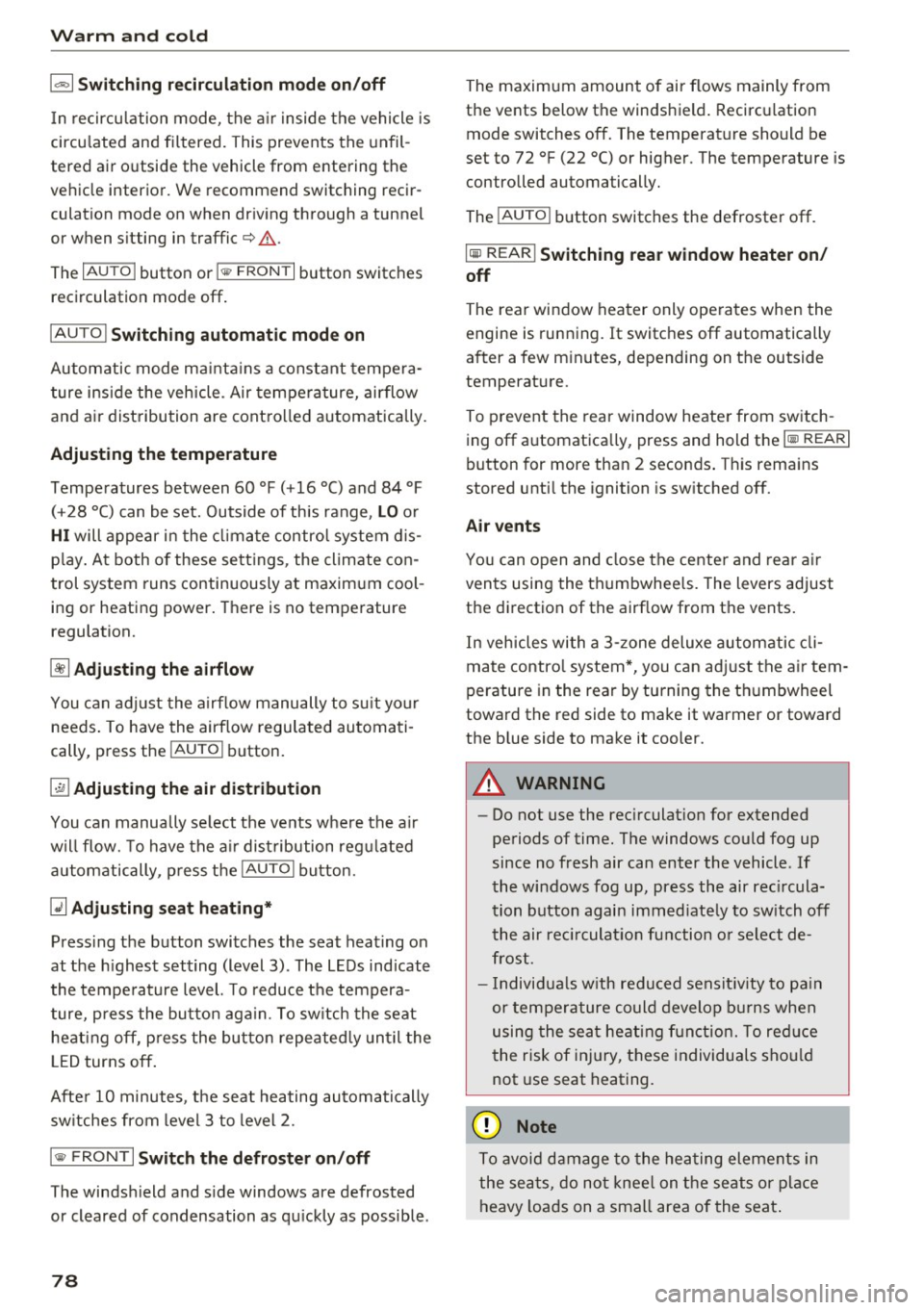
1- 1 Swit ch ing recir cu la tion m ode on /off
In recirculation mode, the a ir inside the vehicle is
circu lated and filtered. This prevents the unfil
tered air outside the vehicle from entering the
ve hicle interior. We recommend switching recir
culation mode on when driving through a tunnel
or when sitting in traffic¢.&,.
The
IAUTOI button or l
IAUTO I Switching aut omatic mode on
Automatic mode ma inta ins a constant tempe ra
ture inside the veh icle . Air temperature, airflow
and air distribution are controlled automatically.
Adjusting th e tempe rature
Temperatures between 60 °f (+16 °C) and 84 °f
( + 28 °C) can be set. Outside of this range,
LO or
HI will appear in the cl imate control system dis
p lay. At both of these settings, the climate con
trol system runs continuously at maximum cool
ing or heating power. There is no temperature
regulation.
~ A dj usting the airflow
You can adjust the airf low manually to s uit your
needs. To have the airflow regulated automati
cally, press the
IAU TO I button.
~ Adjusting the air distribution
You can manually select the vents where the air
will flow. To have the a ir dist ribution reg ulated
automatically , press the
IAU TO I button.
QJ Adju sting seat h eating *
Pressing the button switches the seat heat ing on
at the h ighest setting (level 3) . The LEDs indicate
the temperature level. To reduce the tempera
ture, p ress the button aga in. To sw itch the seat
heating off, p ress the butto n repeated ly unt il the
L ED turns off.
After 10 minutes, the seat heating automatically
sw itches from level 3 to level 2.
I @ FRONT I Switch the d efroster on /off
The windsh ield and s ide windows are defrosted
or cleared of condensation as qu ickly as possible .
78
The maximum amount of air flows mainly from
the vents below the windshield . Recirculation
mode switches off. The temperature should be
set to 72 °f (22 °C) or higher. The temperature is
controlled automatically.
The
! AU TOI button switches the defroster off.
lliil R EAR I Switching rear window heater on /
off
The rear window heater only operates when the
engine is running.
It switches off automatically
after a few minutes, depending on the outside
temperature.
To prevent the rear window heater from switch
i ng off automatica lly, press and hold the
loo REARI
button for more than 2 seconds . This remains
stored unti l the ignition is sw itched off.
Air vents
You can open and close the cente r and rear a ir
vents using the thumbwheels. The levers adjust
the direction of the airf low from the vents.
In veh icles with a 3-zone deluxe automatic cli
mate contro l system*, you can adjust the a ir tem
perature in the rear by turning the th umbwheel
toward the red side to make it warmer or toward
the blue side to make it cooler.
A WARNING
- Do not use the rec irculat ion for extended
periods of time. The windows could fog up
since no fresh air can enter the vehicle. If
the windows fog up, press the air rec ircula
tion button again immed iate ly to sw itch off
the air rec irculat io n function o r select de
frost.
- Individua ls w ith redu ced sensit iv ity to pa in
or temperature could develop b urns when
using the seat heating f unction. To red uce
the risk of inj ury, these individuals sho uld
not use seat heating.
(D Note
To avoid damage to the heating elements in
the seats, do no t knee l on the seats o r place
heavy loads on a small area of the seat .
-
Page 91 of 278
-For reasons of safety, cruise control should
not be used in the city, in stop-and-go traf
fic, on twisting roads and when road condi
t ions are poor (such as ice, fog, gravel,
heavy ra in and hydroplan ing) -risk of acci
dent .
- Turn
off the cruise control temporar ily when
enter ing turn lanes, h ighway exit lanes o r in
construction zones.
- Please note that inadvertently "rest ing"
your foot on the accelerator pedal causes
the cruise control not to brake. This is be
cause the cruise cont rol is overridden by the
dr iver's acceleration.
- If a brake system ma lf u nction such as over
heating occu rs when the c ruise contro l sys
tem is switched on, the braking function in
the system may be switched
off . The other
cruise contro l functions remain active as
long as the indicator light
[lj;(i )~i~ (US mod
els)/ .. (Canadian models) is on .
(D Tips
-Vehicles with manual transmission: You can
attain the set speed only if the gear that is
currently engaged will allow it, or if it does
not tax the engine and allows it to run
smooth ly. Therefore sh ift into a higher or
lower gear in a timely ma nner.
- The brake lights illuminate as soon as the
brakes apply automatically .
Changing speed
.,. To inc rease/decrease the speed in increments,
tap the lever in the
0 10 direction r:!> page 88,
fig. 102.
.,. To inc rease/decrease the speed qu ickly , ho ld
the leve r in the
0 10 direction until the de
si red speed is displayed .
You can a lso press the accelerator pedal down to
increase yo ur speed, e.g. if you want to pass
someone . The speed you saved earlier wi ll re -
,.... sume as soon as you let
off of the acce lerator N
~ pedal.
co
I f, however, you exceed your saved speed by
6 mph
( 1 0 km/h) for longer than 5 minutes, the
D riv ing
cruise contro l wi ll be turned off temporarily. The
green symbol in the display turns white. The
saved speed remains t he same.
Presetting your speed
You can preset your desired speed while the vehi
cle is not moving.
.,. Switch on the ign ition.
.,. Pull lever into position
(D r:!> page 88, fig . 102.
.,. Press the lever in the 0 or 0 direction to in-
crease or decrease your speed.
.,. Release the lever to save that speed.
This function makes it possible, for example, to save the speed you want before driving on the
highway . Once on the highway, activate the
cruise contro l by pull ing the lever toward
(D .
Switching off
Temporar y de acti vation
.,. Press the brake pedal, or
.,. Manual transmission: Keep the clutch pedal
pressed down
longer, or
.,. Press the lever into position @ (not clicked into
place)
~ page 88, fig. 102, or
.,. Dr ive fo r longer than 5 m inutes a t more than
6 mph (1 0 km/h) above the s to red speed.
Switching off completely
.,. Press lever into posit ion @ (clicked into p lace),
or
.,. Switch the ignit ion
off .
T he speed you saved will be retained if the cruise
control has been switched off temporarily . To re
s u me the saved speed , let up on the bra ke or
cl utch pedal and pull the lever to position
(D .
Switch ing the ignition off erases the saved speed .
A WARNING
--
You should only return to the saved speed if it
i s not too fast for the current t raffic condi
tions -ris k of an accident!
89
Page 99 of 278
.... N
0
""' CX)
.... I.Cl U"I
.... I.Cl ....
Selector lever emergency release
Applies to vehicles: with multitronic/5 tronic/tiptronic
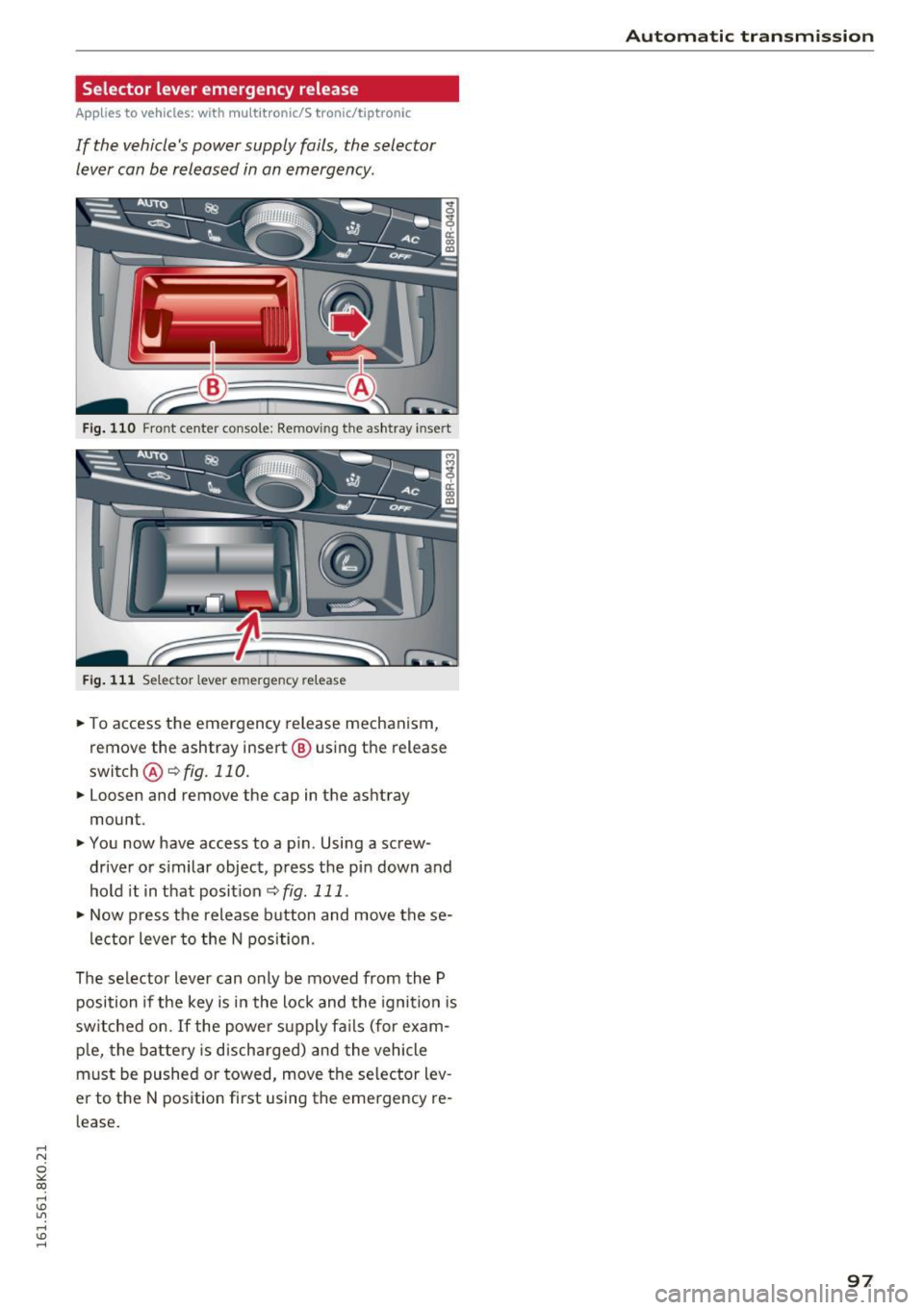
If the vehicle's power supply fails, the selector
lever can be released in an emergency.
Fig. 110 Front center console: Remov ing the ashtray insert
Fig. 111 Selector lever emergency release
~ To access the emergency release mechanism,
remove the ashtray insert@ using the release
switch @~fig.110.
~ Loosen and remove the cap in the ashtray
mount .
~ You now have access to a pin. Using a screw
driver or s imilar object, press the pin down and
hold it in that position
~ fig. 111 .
~ Now p ress the release button and move the se-
lector lever to the N position .
The selector lever can only be moved from the P
position if the key is in the lock and the ignition is
sw itched on. If the power supply fails (for exam
p le, the battery is discharged) and the vehicle
must be pushed or towed, move the se lector lev
e r to the N position first using the emergency re
l ease .
Automatic transmission
97
Page 100 of 278
Audi adaptive cruise control and braking guard
Audi adaptive cruise
control and braking
guard
Introduction
Applies to vehicles: with Audi adaptive cruise contro l
The adaptive cruise control system assists the
driver by regulating vehicle speed and helping to
maintain a set distance to the veh icle ahead ,
within the limits of the system. If the system de
tects a moving vehicle up ahead, adaptive cruise
control can brake and then accelerate your vehi
cle. This helps to make driving more comfortable
on long highway stretches.
The braking guard system can warn you about an
impending collision and initiate braking maneu
vers
c::> page 104.
Adaptive cruise control and braking guard have
technical limitations that you must know, so
please read th is section carefully, understand
how the system works and use them properly at
all times.
General information
General information
Applies to veh icles: with Audi adaptive cruise control
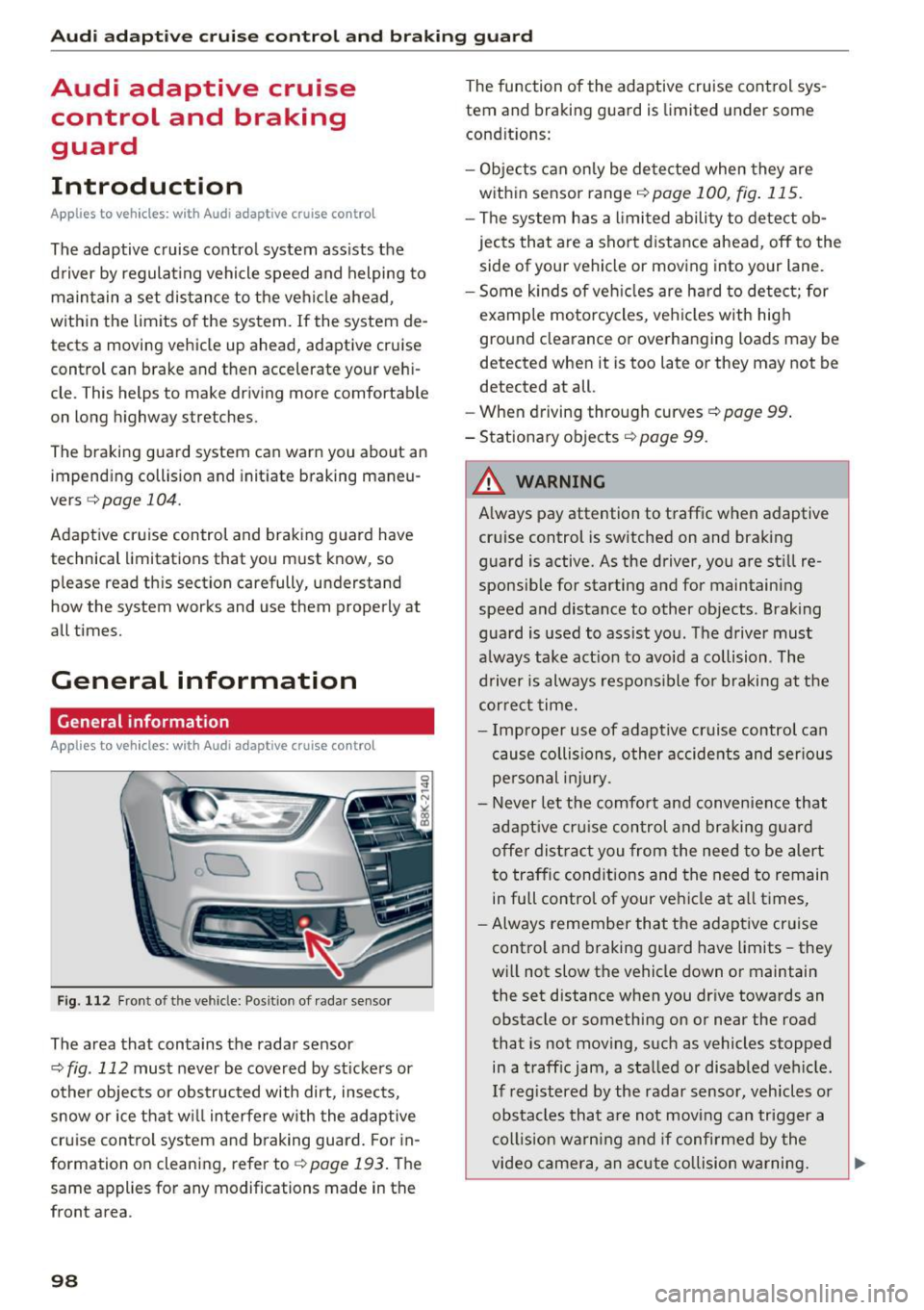
Fig. 112 Front of t he veh icle: Posit ion of radar sensor
The area that contains the radar sensor
c::> fig . 112 must never be covered by st ickers or
other objects or obstructed with dirt, insects,
snow or ice that w ill interfere w ith the adaptive
cruise control system and braking guard. For in
formation on cleaning, refer to
c::> page 193. The
same appl ies for any modifications made in the
front area .
98
The function of the adaptive cruise control sys
tem and braking guard is limited under some
condit ions:
- Objects can only be detected when they are
within sensor range
<:!) page 100, fig . 115.
-The system has a limited ability to detect ob
jects that are a short distance ahead, off to the
side of your vehicle or moving into your lane.
- Some k inds of veh icles are hard to detect; for
example motorcycles, veh icles with high
ground clearance or overhanging loads may be
detected when it is too late or they may not be
detected at all.
- When driving through curves
c:::> page 99.
- Stationary objects
i::!) page 99 .
& WARNING
-Always pay attention to traffic when adaptive
cruise control is switched on and braking
guard is active. As the driver, you are still re
sponsible for starting and for maintaining
speed and distance to other objects . Braking
guard is used to assist you . The driver must
always take act ion to avoid a collision . The
driver is always responsible for braking at the
cor rect time.
- Improper use of adaptive cruise contro l can
cause collisions, other accidents and serious
personal injury.
- Never let the comfort and convenience that
adapt ive cr uise control and braking guard
offe r distract you from the need to be alert
to traffic conditions and the need to remain
in full control of your ve hicle at all times,
- Always remember that the adaptive cruise
control and braking guard have limits -they
will not slow the vehicle down or maintain
the set distance when you dr ive towards an
obstacle or something on or near the road
that is not moving, such as vehicles stopped
in a traff ic jam, a stalled or disabled veh icle.
If registered by the radar sensor, veh icles o r
obstacles that are not moving can trigger a
coll ision warning and if confirmed by the
video camera, an acute collision warning. ..,
Page 103 of 278
..... N
0 ::..:: co .....
You can set any speed between 20 mph and 95
mph (30 and 150 km/h).
I ndicator lamps and messages in the instrumen t
clus ter display inform you about the current sys
tem status and settings.
Switching Audi adaptive cruise control on
" Pull the lever toward you into position@
¢fig. 116. ACC standb y appears in the i nstru
ment cluster d isp lay.
Setting the speed and activating regulation
" To set the current speed, press the !SET ! button
¢page 11, fig. 4. The set speed is shown in the
tachometer @ and is also shown b riefly in the
display @¢
fig. 117.
Switching Audi adaptive c ruise control off
" Push the lever away from you into position @
unt il it clicks into place. The message
ACC off
appears.
@ Indic ato r lig hts
II -Adaptive cru ise control is sw itched on. No
vehicles are detected up ahead. The stored speed is ma inta ined.
• -A moving vehicle is detected up ahead . The
adaptive cruise control system regulates the
speed and distance to the moving vehicle ahead
and accelerates/brakes automatically.
• -When automatic braking is not ab le to keep
enough distance to a previous ly detected moving
ve hicle up ahead, you must take contro l and
brake ¢
page 103, Request for driver interven
tion.
© Di splay
If adaptive cruise control is not shown in the dis
p lay, you can call it up with the
I RESE T! button
¢page 23.
Based on the symbo ls in the display, you can de
termine if the system is ma inta ining a distance to
the vehicle ahead and what that distance is .
No vehicle -No vehicle a head was detected .
White vehicle -A vehicle ahead was dete cted.
Red vehicle -Prompt for the driver to take act ion
¢page 103.
Both arrows on t he sc ale © indica te the d istance
to the vehicle ahead. No arrow appe ars when the
vehicle is on an open road and there is no object
ahead . If an object is detected ahead, the arrow
moves on the sca le .
T he green zone o n the scale shows the stored dis
tance . For info rmation on changing the stored
distance, refer to¢
page 102. If the distance se
lected is too close or may soon become too close,
the arrows move into the red zone on the scale.
A WARNING
Improper use of the adapt ive cruise control
ca n cause collisions, other accidents and ser i
ous persona l injuries.
- Pressing t he
!SET! button when driving at
speeds be low 20 mph (30 km/h), will auto
mat ica lly acce le rate t he ve hicle to 20 mph
(30 km/h), wh ic h is the minim um speed
that ca n be set.
(D Tips
- If you switch the ig nit ion or the adaptive
cruise cont rol off, the set speed is erased
from the system memo ry.
- The e lectronic stabilization control (ESC)
and the anti-slip-regulation (ASR) are auto
matically turned on when the adaptive
cruise cont rol is t urned on. Both systems
c annot be turned off if the ada ptive cru ise
cont rol is tu rned on.
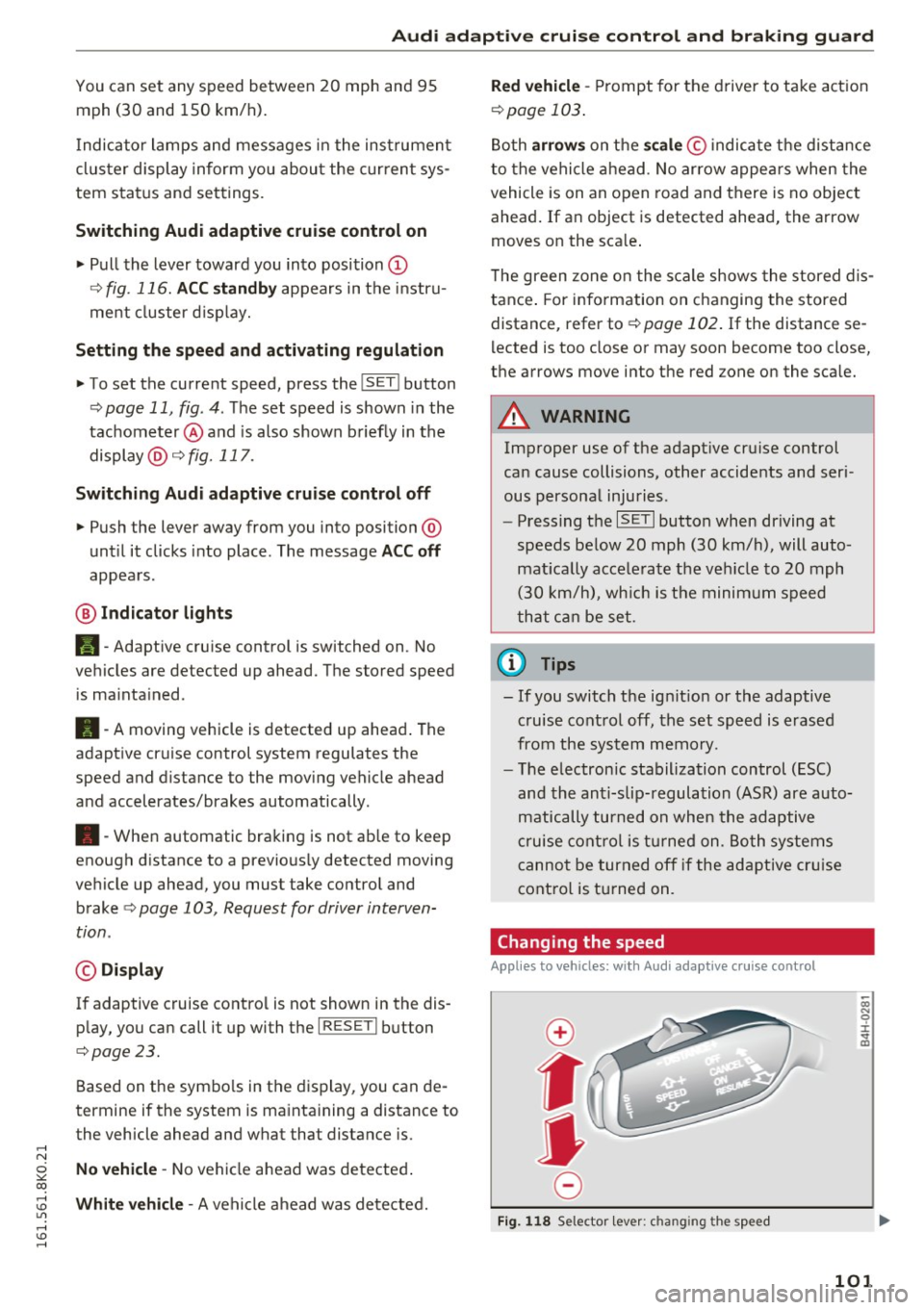
Changing the speed
Appl ies to vehicles: with Aud i adapt ive cru ise control
0
f
•
0
Fig . 1 18 Selector leve r: changing the speed
-
;;; N 0 ± '<1 m
101
Page 109 of 278

,....,
N
0
""' CX) ,....,
I.Cl U"I ,....,
I.Cl ,....,
Audi side assist Side assist
Description
App lies to vehicles: with Audi side assist
Fig. 123 Sensor dete ction rang e
Fig. 124 Display o n the exterio r mirror
Side assist helps you monitor your blind spot and
traffic behind your vehicle . Within the limits of
the system , it warns you about vehicles that are
coming closer or that are traveling with you with
in sensor range ©
r=;, fig. 123: if a lane change is
classified as critical, the display @ in the exter ior
mirror
r:¢> fig . 124 turns on .
The display in the left exterior mirror provides as
sistance when making a lane change to the left,
while the d isp lay in the right exterior mirror pro
vides assistance when making a lane change to
the right .
Information stage
As long as you do not activate the turn signal,
side assist
informs you about vehicles that are
detected and class ified as critica l. The disp lay in
the respective mirro r turns on , but is dim .
Aud i side assist
The display remains dim intentionally in the in
formation stage so that your view toward the
front is not disturbed.
Warning stage
If you activate the turn signal , side assist warns
you about vehicles that are detected and classi
fied as critical. The display in the respect ive mir
ror blinks bright ly. If this happens, check traffic
by glancing in the rearview mirror and ove r you r
shoulder
c::, .&. in General informa tion on
page 108.
{!) Tips
- You can adjust the brightness of the display
@ c::, page 109.
-Please refer to the instructions for towing a
trailer located in
c::, page 108.
107
Page 110 of 278

Audi side assist
General information
Applies to veh icles: w ith Aud i s ide ass ist
®
@
©
F ig . 125 Driving s ituations
I AU DI
•
Fig. 126 Rear of the veh icle: pos it ion of the sensors
Side assist functions at speeds above approxi
mately 19 mph (30 km/h).
@ Vehicles that are approaching
In certain cases, a vehicle will be classified as
critical for a lane change even if it is still some
what far away. The faster a veh icle approaches,
the sooner the display in the exterior mirror w il l
turn on.
@ Vehicles traveling with you
Vehicles traveling with you are indicated in the
exterior mirror if they are classified as critical for
a lane change. All vehicles detected by side assist
108
are indicated by the time they enter your "blind
spot", at the latest .
© Vehicles left behind
If you slow ly pass a vehicle that side assist has
de tected (the diffe rence in speed between the
vehicle and your vehicle is less than 9 mph
(15 km/h)), the display in the exterior mirror
turns on as soon as the vehicle enters your blind
spot .
The display wi ll not turn on if you quickly pass a
vehicle that side assist has detected (the differ ence in speed between the vehicle and your vehi
cle is greater than 9 mph (15 km/h)) .
Functional limitations
The radar sensors are designed to detect the left
and right adjacent lanes when the road lanes are
the normal width . In certain situations, the dis
play in the exterior mirror may turn on even
though there is no vehicle located in the area
that is crit ical for a lane change. For example:
- if the lanes are narrow or if your are driving on
the edge of your lane. If this is the case, the
system may have detected the vehicle in anoth
er lane that is
not adjacent to your current lane.
- if you are driv ing through a curve. Side assist
may react to a vehicle that is one lane over
from the adjacent lane .
- if side assist reacts to other objects (such as
high or displaced guard rails) .
- In poor weather conditions. The side ass ist
functions are limited.
Do not cover the radar sensors
c:> fig. 126 with
stickers, deposits, bicycle wheels or other ob
j ects, because this w ill affect the function . Do not
use side assist when towing a trailer. For infor
mation on cleaning, refer to
c:> page 193.
A WARNING
- Always pay attention to traff ic and to the
area around your vehicle. Side assist cannot
replace a driver's attention . The driver alone
is always responsible for lane changes and
-
similar driving maneuvers . IJ>-
Page 112 of 278

Audi side assist
(D Tips
-Si de assist is not active w hile you are mak
i ng t he a dju stment .
- You r settings are automatic ally store d an d
assi gned to t he remote co ntrol key being
u sed.
Driver messages
App lies to veh icles: w ith Audi side assist
If s ide ass ist switches off by itself, the LED in the
button turns off a nd a message will appear in the
i n str ument cluster d isp lay :
Aud i side assist unavailable: Sensors blocked
T he rada r senso rs ' vision is affe cted . Do not cove r
the area in front of the sensors wit h bike wheels,
sticke rs, dirt o r other objects. Clean the area in
front of the sensors, if necessary
c> page 108,
fig. 126.
Audi side assist : Currently unavailable
S ide assist c an no t be swi tc h ed on tem pora ril y be
c a use there is a mal func tio n (fo r ex am ple, the
bat tery ch arge level may be too low) .
Audi side assist: System fault!
The system cannot guarantee that it wi ll detect
ve hicles co rrectly and it is swi tched off . The sen
sors have bee n disp lace d or are fa ulty . Have the
sys tem chec ked by a n aut hori zed Audi de aler or
a uthor ized Audi Se rvice F acility soon.
Audi side assist: Unavailable when towing
Side assist sw itches off automatica lly when a fac
tory-installed trailer hitch is connected to the
electr ica l co nnector on the trailer. The re is no
gua rantee the system will sw itch off when usi ng
a retrofi tte d t raile r hi tc h. D o not use s ide ass is t
w hen towing a trailer.
110
Page 118 of 278

Parking System
The rear acoustic park assist system is integrated
in the rear of the vehicle and the rear view cam
era is integrated in the rear lid
~ page 117.
A WARNING
-
-The rear view camera has blind spots, in
wh ich objects cannot be detected. Be espe
c ially careful to check fo r small children and
animals before back ing up. Small children
and animals w ill not always be detected by
the se nsor s.
General Information
Applies to vehicles: with park ing system (rear, wit h rear view
camera)
F ig . 1 32 Covered area(!) and uncovered area@of th e rear
v iew camera
• 0
F ig . 133 Trunk lid: Locat ion of the rear view came ra
Sensors in the bumper
Sensors are located in the rear bumpers . If these
detect an obstacle, audible s ignals warn you . The
range a t which t he sensors beg in to measu re is
approx ima tely:
To the side 2 ft (0.60
m)
Center rear 5.
2 ft (1.60 m)
Distance warning when reversing starts when an
obstacle is detected in the range of the pa rking
116
assist system. As the distan ce decreases, t he
time interval between the audib le tones becomes
sho rter.
When the distance is less than 1ft (0.30 m), the
tone becomes cont inuo us. At th is point you
shou ld stop backing up .
If the distance to an obstacle stays t he sa me, the
vo lume of the dis tan ce signal chime is g radua lly
reduced after a bout
4 seconds (does not a ffect
the continuous signal tone). Approaching anoth
er obstacle will cause the distance s ignal to
sound again at the normal volume.
Rear view camera coverage area
The MMI display shows t he area cove red by the
rear view camera
¢fig . 132 (!). Objects that are
not in the a rea covered @are not shown on the
MMI display.
We recommend tha t you prac tic e parking wit h
the rear view camera in a traffic -free location or
parking lot to become familiar with the system,
the orientat ion lines, and their function. When
do ing this, there should be good light and weath
er condit ions.
In the MMI display, objects or vehicles appear closer or further away if:
- you a re dr iv ing in reve rse gear from a level s ur
face onto an incline, or a downward slope,
- you a re dr iving in reve rse gear tow ard prot rud
ing objects,
- t he vehicle is car rying too much load in the
rear.
The acc uracy of the or ie ntation lines and blue
s ur faces dim inishes if:
- the rear v iew camera does not provide a reliab le
image, fo r example, in poor visib ility co ndi tions
or if the le ns is dirty,
- the image on the screen is not v isible due to
sun glare and reflectio n.
Caring fo r the rear v iew camera lens
The rear view camera is located above the rear li
cense plate bracket. For the parking assist to op-
erate, the lens¢
fig. 133 must be kept clea n: .,..
Page 125 of 278
..... N
0 :,,:: co ..... ,J:> Lil
..... ,J:> .....
For detailed information on how to adjust the
driver's seat, see
¢ page 60.
A WARNING
Drivers who are unbelted, out of position or
too close to the airbag can be seriously in
jured by an airbag as it unfolds. To help re
duce the risk of serious personal injury:
- Always adjust the driver's seat and the
steering wheel so that there are at least 10 inches (25 cm) between your breastbone
and the steering wheel.
- Always hold the steering wheel on the out
side of the steering wheel rim with your
hands at the 9 o'clock and 3 o'clock posi
tions to help reduce the r isk of personal in
jury if the driver's airbag inflates.
- Never hold the steering wheel at the
12 o'clock position or with your hands at
other positions inside the steering wheel
rim or on the steering wheel hub. Holding
the steering wheel the wrong way can cause
serious injuries to the hands, arms and head
if the driver's airbag deploys.
- Pointing the steering wheel toward your
face decreases the ability of the supplemen
tal driver's airbag to protect you in a colli sion.
- Always sit in an upright position and never lean against or place any part of your body
too close to the area where the airbags are located .
- Before driving, always adjust the front seats
and head restraints properly and make sure
that all passengers are properly restrained.
- Never adjust the seats while the vehicle is
moving . Your seat may move unexpectedly
and you could lose control of the vehicle .
- Never drive with the backrest reclined or
tilted far back! The farther the backrests are
tilted back, the greater the risk of injury due
to incorrect positioning of the safety belt
and improper seating position.
- Children must a lways ride in child safety
seats¢
page 158 . Special precautions ap
ply when installing a child safety seat on the
front passenger seat ¢
page 138 .
Driving safety
Proper seating position for the front
passenger
The proper front passenger seating position is
important for safe, relaxed driving.
For your own safety and to reduce the risk of in
jury in the event of an acc ident, we recommend
that you adjust the seat for the front passenger
to the following position:
" Move the front passenger seat back as far as
possible . There must be a minimum of 10 in
ches (25 cm) between the breastbone and the
instrument panel¢.&, .
"Adjust the angle of the seatback so that it is in
an upright position and your back comes in full
contact with it whenever the vehicle is moving.
" Applies to vehicles with adjustable head re
straints : Adjust the head restraint so the upper
edge is as even as possible with the top of your
head . If that is not possible, try to adjust the
head restraint so that it is as close to this posi
tion as possible .
" Keep both feet flat on the floor in front of the
front passenger seat.
" Fasten and wear safety belts correctly
¢page 133.
For detailed information on how to adjust the
front passenge r's seat, see ¢
page 59.
A WARNING ~
Front seat passengers who are unbelted, out
of position or too close to the airbag can be
seriously injured or killed by the airbag as it unfolds. To help reduce the risk of serious
personal injury:
- Passengers must always sit in an upright po
sition and never lean against or place any
part of their body too close to the area
where the airbags are located .
- Passengers who are unbelted, out of posi
tion or too close to the airbag can be seri
ously injured by an airbag as it unfolds with
great force in the blink of an eye.
-Always make sure that there are at least 10 inches (25 cm) between the front passen
ger's breastbone and the instrument panel.
123