Sensors AUDI A4 2017 User Guide
[x] Cancel search | Manufacturer: AUDI, Model Year: 2017, Model line: A4, Model: AUDI A4 2017Pages: 386, PDF Size: 96.32 MB
Page 121 of 386
_& WARNING
The exit warning system is subject to limita
tions and cannot warn you before every im
pending collision:
- If the vehicle is too wide for the parking
space and covered by the neighboring
vehicles.
- Approaching objects or people such as cy
cl ists o r skateboarders may not be detected
under certain circumstances.
- The system does not react to stationary ob
jects.
- The view of the radar sensors may be im
paired by leaves, snow, heavy spray or d irt.
Clean the area in front of the sensors
r:!vpage 116, fig. 112.
(D Note
Also read this information ¢0 in General in
formation on page 117.
@ Tips
- The ex it warning system is switched on and
off through the side assist¢
page 117.
-The display brightness for the exit warning
system cannot be adjusted.
- The system is not available when towing a
trailer.
Rear cross-traffic assist
A ppl ies to: vehicl es with rear cross-traffic assist
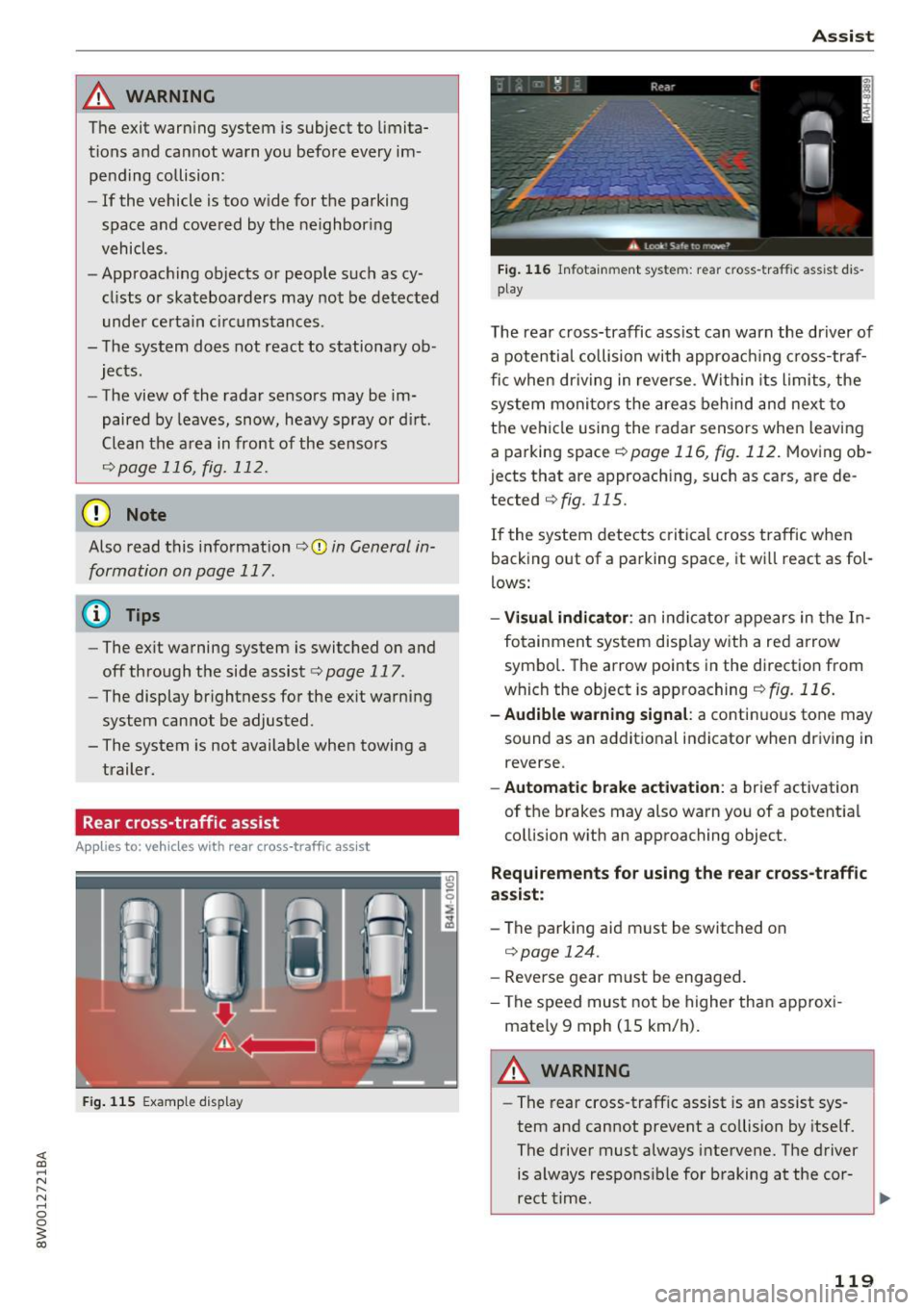
Fig. 115 Example display
Assist
Fig. 116 Infotainment system: rear c ross -tra ffic assist dis
play
The rear cross-traffic ass ist can warn the driver of
a potential collision with approach ing cross-traf
fic when driving in reve rse. Within its limits, the
system monitors the areas behind and next to
the vehicle using the radar sensors when leaving
a parking space
r:!vpage 116, fig. 112. Moving ob
j ects that are approaching, such as cars, are de
tected
¢ fig. 115.
If the system detects critical cross traffic when
backing out of a parking space, it wi ll react as fol
lows:
- Visual indicator : an indicator appears in the In
fotainment system disp lay with a red arrow
symbo l. The arrow points in the direction from
which the object is approaching
¢fig. 116.
-Audible warning signal: a continuous tone may
sound as an additional indicator when driving in
reverse.
- Automatic brake activation : a brief activation
of the brakes may also warn you of a potent ial
collision with an approaching object.
Requirements for using the rear cross-traffic
assist :
-The parking aid m ust be switched on
¢page 124.
-Reverse gear m ust be engaged.
- The speed must not be higher than approxi-
mate ly 9 mph (15 km/h).
A WARNING
- The rear cross-traffic assist is an assist sys
tem and cannot prevent a co llision by itself.
The driver must always intervene. The driver
is always responsible for braking at the cor-
rect time .
~
119
Page 122 of 386
Ass is t
- Please note that the rear cross-traffic assist
may act ivate the brakes unexpectedly. Se
cure any cargo that you are transporting to
reduce the risk of damage or injury .
- An additional brake act ivat ion may be tr ig
gered within 20 seconds after an automat ic
brake activation.
- If there is an acoustic warning signa l from
the rear cross-traff ic assist, then the park
ing system may not warn you of detected
obstacles under certa in circumstances .
- The view of the radar sensors may be im paired by leaves, snow, heavy spray or d irt.
Clean the a rea in front of the sensors
~ page 116, fig . 112.
A WARNING
T he rear cross-t raff ic assist is s ubject to lim i
t at ions and cannot warn you before every im
pending collision:
- If the vehicle is too w ide fo r the pa rki ng
spa ce and covered by the ne ighbor ing
vehicles.
- People , such as cyclis ts, jogge rs, in line skat
ers and pedestrians, may not be detected
under certain circ umstances.
- If you are in a par allel par king sp ace.
(D Note
Also read this info rmation ~ CD in General in
formation on page 117.
(0 Tips
- You can cancel the automatic brake activa
tion with increasing braking force if you ap
ply the bra kes yourself or accele rate cons id
e rab ly.
- In some s ituations, rea r cross-traffic ass ist
may warn you even if t here is no cross traffi c
i n a critic al are a, for examp le w hen ba cking
i nto a parking space or maneuver ing.
- T he rea r cross -traffic ass ist also switches off
whe n you swi tch off the ESC.
- T he rea r cross traffic assist switches on and
off thro ugh the p arking aid<:?
page 12 4.
- T he system is not ava ilable when towing a
trailer.
120
' Messages
Applies to: vehicles with Audi side assist
A message appea rs in the ins trument cluster dis
play if the side ass ist sw itches off automat ica lly.
@j Audi side assist: currently unavailable . Sen
sor vi sion re stricted due to surroundings. See
owner' s manual
@j Audi side ass ist and ex it warning: currently
unav ailable . Sensor vi sion restricted due to sur
rounding s
The radar sensors ' vision is affected . The area in
front of the sensors must not be covered by bike
racks, stickers, leaves, snow or any other objects .
Clean the area in front of the sensors, if necessa
r y
<:? page 116, fig . 112.
@j Audi side ass ist: currently unavailable . See
owner's manual
@j Audi side ass ist and exit warning: currently
unavailable. See owne r's manual
Side assist ca nnot be switched on at this time be
cause ther e is a malfunction (for example, the
battery charge level may be too low).
@j Audi side as sist: malfunction! Plea se contact
Service
@j Audi side assi st and exit warning: malfunc
tion! Plea se contact Service
The system cannot guarantee that it will detect
vehicles correct ly and it has sw itched off. The
senso rs have been moved or are fa ulty . Have the
system checked by an authori zed Aud i dea ler o r
a uthorized Aud i Serv ice Facility soon.
@j Audi side assi st: unavailable in towing mode
@j Audi side ass ist and ex it warning: currently
unavailable. Towing mode
Side assist switches off automatically when the electrical connector in the factory-installed trail
er hitch is connected . There is no guarantee the
system will sw itch off when using a retrofitted
trailer hitch . Do not use side assist and the ex it
warning when tow ing a tra ile r.
Ill Rea r parking aid: obstacl e detection res trict-
ed ..,.
Page 123 of 386
<( a, .... N ,....
N .... 0 0
3 a,
The rear cross-traffi c assist is not ava ila ble . E i
ther the ESC is switched off, or the radar sensors may be covered by a b ike rack, stickers, leaves,
snow or other objects. Switch the ESC on, or
clean the area in front of the sensors if necessary
c> page 116, fig. 112 . If this message cont inues
to be d isplayed, d rive immed iate ly to an au thor
iz ed A udi dealer o r autho rized Audi Servi ce Fac ili
ty to have t he malfunc tion repa ired.
Audi drive select
Introduction
Applies to: vehicles with Audi drive select
Drive se lect makes it possible to experience dif
fe rent types of vehicle settings in one vehicle.
The dr ive r can se lect
Comfort , Auto a nd Dynamic
modes in the I nfota inme nt system to switch be
tween , fo r exa mple, a sporty and a co mfo rtable
d riving mo de. Settings ca n be ad justed to your
p e rs o nal pr efe ren ces in
Individual m ode. This
makes it poss ible to comb ine settings su ch as a
sporty eng ine setting w ith smooth stee ring.
Descript ion
Applies to: vehicles with Audi drive select
The fo llow ing systems, among other things, are
i nfluenced by drive select:
Engine and automatic transmission
D epending on the mode, the en gine and auto
mat ic transmission respond more quickly o r in a
mo re balanced ma nner to accelerator pe dal
movements . In the spo rty
Dynamic mode, the
transmission shifts at higher speed ranges.
Steering
The power s teering adapts. Ind irect s teer ing t hat
moves easi ly as in
comfort mode is espec ia lly
suited to long drives on highways . The
dynamic
mode p rovides sporty, d irect steering.
The fo llow ing applies to vehicles wi th dynam ic
steer ing* : the stee ring rat io chan ges base d on
ve hicle speed in or der to ma inta in optim um
steer ing effort for the drive r at all times. This
sets the steer ing to be less sensitive at higher
speeds i n order to prov ide improved vehicle con-
Assist
t ro l. At r educed spee ds, steeri ng is more direct in
o rder to kee p the steering effort as minima l as
poss ib le when the drive r is maneuvering t he vehi
cle. Dynam ic steer ing* also p rovides more re
spons ive steering performance at low and aver
age speeds .
Suspension control*
The ada ptive dampers * use sensors to reco rd in
f ormat ion regard ing steering movements, b rak
ing and accele ration operations by the dr iver,
road s urface, driving speed, and load. This makes
it possible to adapt damping to the d riv in g situa
t io n virtu ally in rea l ti me . Wi th drive select, you
can ad just th e adap tiv e dam pers to sporty
(Dy
nami c),
comfo rtable (Comfort ) or balan ced (Au
to ).
Cornering light*
T he co rne ring light adapts the high beams to the
direction of the curve de pending on the speed .
T he pivo ting ac tion and the lighting also a dapt to
t h e mode.
Adaptive cruise cont rol (ACC)*
The behavio r whe n accelerati ng ca n be adjusted
from comfortable to s porty, depending on the
dr ive selec t mode . Adap tive cruise control also
r espon ds to the dr iv ing behav ior of t he vehicle
ahea d in a m ore conse rv a tive or sporty m an ner.
Engine sound*
The eng ine sound adapts to the c urrent mode
and can be subtle to sporty .
(D Tips
The S selector leve r posit ion automatically en
gages whe n the
Dynamic mode is select ed.
121
Page 126 of 386
Parking systems
Parking systems
General information
A ppl ies to: ve hicles w ith a rea r parking sys te m /pa rking sys
tem p lus/rearv iew camera/peripheral ca meras
Depending on your vehicle's equipment , various
parking aids will help you when parking and ma
neuvering.
The
rear parking system is an audible parking aid
that warns you of obstacles
behind the vehicle
¢ page 125.
Parking system plus assists you when parking by
using audio and visual signals to indicate objects
detected in
front of and behind the vehicle
¢ page 125.
The rearview camera shows the area behind the
vehicle in the Infotainment display . The lines in
the rearview camera image help you to park or
maneuver ¢
page 126. The parking system plus
functions are also available
¢page 125.
The peripheral cameras give various views to
help you when parking or maneuvering
¢ page 128 . fhe parking system plus functions
are also available
¢ page 125.
A WARNING
- Always look for traffic and check the area
around your vehicle by looking at it directly
as well. The parking system cannot replace
the driver 's attention. The driver is always
responsible when entering or leaving a park
ing space and during similar maneuvers.
- Please note that some surfaces, such as
clothing, are not detected by the system.
-
- Sensors and cameras have blind spots in
which people and objects cannot be detect ed . Be especially cautious of small children
and animals .
- Always keep your eyes on the vehicle's sur
roundings, using the rearview mirror as
well .
- The sensors can be displaced by impacts or
damage to the radiator grille, bumper,
wheel housing and the underbody . The park
ing system may be impaired as a result.
Have an authorized Audi dealer or author-
124
ized Audi Service Facility check their func
tion .
(D Note
-Some objects are not detected or displayed
by the system under certain circumstances:
- Objects such as barrier chains, trailer draw
bars, vertical poles or fences
- Objects above the sensors such as wall ex
tensions
- Objects with certain surfaces or structures
such as chain link fences or powder snow
- If you continue driving closer to a low ob
ject, it may disappear from the sensor range. Note that you will no longer be
warned about th is obstacle .
- Keep enough distance from the curb to
avoid damage to the rims.
(D Tips
-The system may provide a warning even
though there are no obstacles in the cover
age area in some situations, such as :
- certain road surfaces or when there is tall
grass.
- external ultrasonic sources such as from
cleaning vehicles .
- in heavy rain, snow, or thick vehicle ex
haust.
- We recommend that you practice parking in
a traffic-free location or parking lot to be
come familiar with the system . When doing
this, there should be good light and weath
er conditions.
- You can change the volume of the signals
and the display ¢
page 131.
-Please refer to the instructions for trailer
towing in
¢page 132.
- What appears in the infotainment display is
somewhat time-delayed.
- Th e sensors must be kept clean and free of
snow and ice for park assist to operate.
Page 127 of 386
Rear parking system
Description
Applies to: vehicles with rear parking system
The rear parking system is an audible parking
aid .
Descr iption
There is a sensor in the rear bumper cover. If
these detect an obstacle, audible signals warn
you .
Make sure the sensors are not covered by stick
ers, deposits or any other obstructions as it may
impair the function of the system . For informa
tion on cleaning, refer to
c:> page 337.
The range at which the sensors begin to measure
is approximately:
side 3 ft (0 .90 m)
rear
center 5.2
ft (1.60 m)
The closer you get to the obstacle, the shorter
the interval between the audible signals . A con
tinuous tone sounds when the obstacle is less
than approximately 1 foot (0.30 meters) away.
Do not continue backing up
c:::> &. in General infor
mation on page 124,
c:> Q) in General information
on page
124!
If the distance to an obstacle remains constant,
the volume of the distance warning lowers down
to mute after a few seconds (this does not apply
in the continuous tone range). If the obstacle
comes closer before the system mutes, the tone
sounds again. If the obstacle moves farther away
before the system mutes, a tone will not sound.
Pay attention to the vehicle's surround ings when
you start to drive.
Activating
The rear parking assist activates automatically
when the reverse gear is engaged. You will hear a
brief confirmation tone.
Parking systems
Parking system plus
Description
Applies to: veh icles w ith park ing system plus
Parking system plus provides audio and visual
signals when parking.
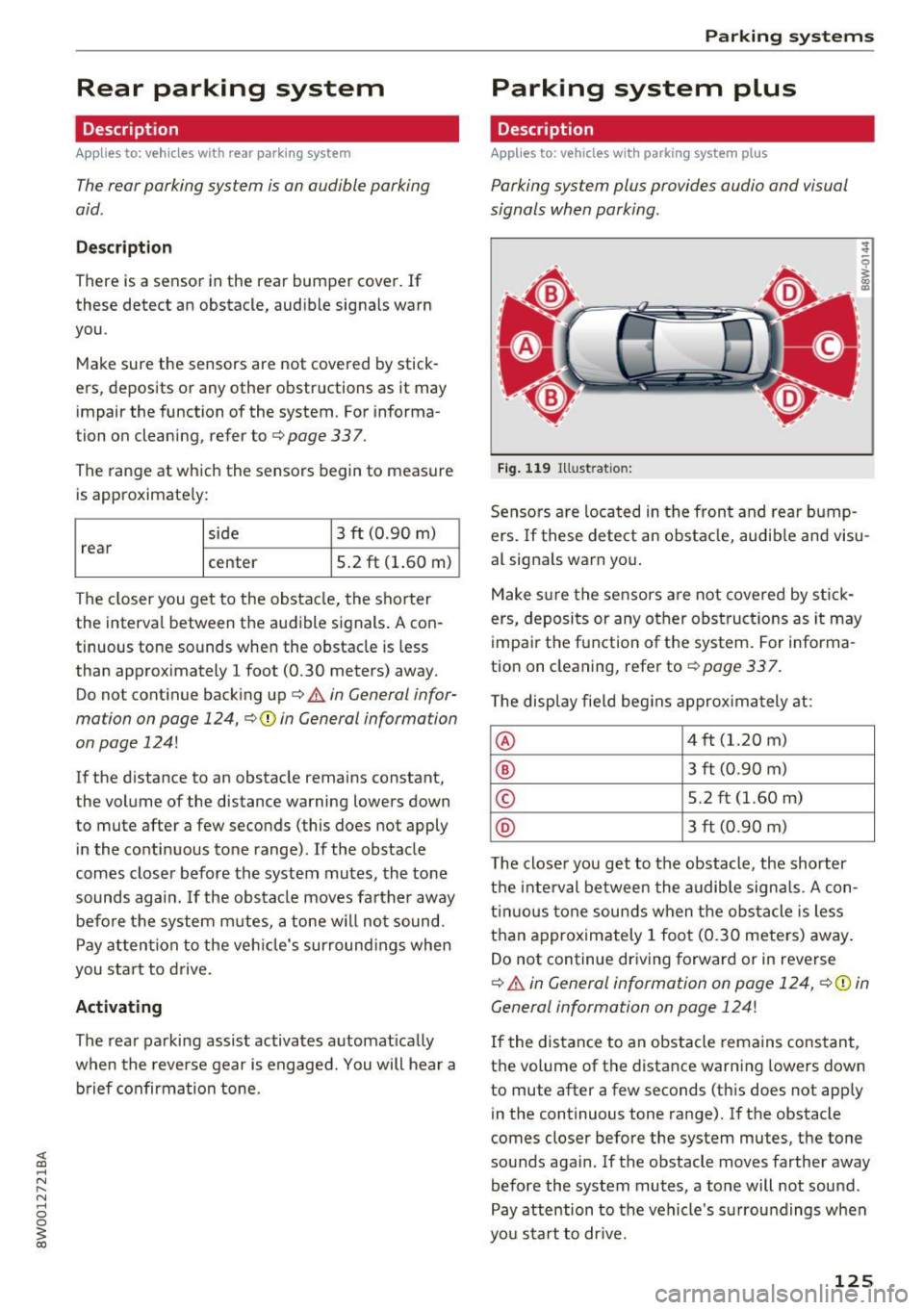
Fig. 119 Illustration:
Sensors are located in the front and rear bump
ers. If these detect an obstacle, audib le and visu
al signals warn you.
Make sure the sensors are not covered by stick
ers, deposits or any other obstructions as it may
impair the function of the system. For informa
tion on cleaning, refer to
c:::>page 337.
The display field begins approximately at:
® 4 ft (1.20 m)
® 3 ft (0.90 m)
© 5.2 ft (1.60 m)
@ 3 ft (0.90 m)
T he close r you get to the obstacle, the shorter
the interval between the audible signals . A con
tinuous tone sounds when the obstacle is less
than approximately 1 foot (0.30 meters) away.
Do not continue driving forward or in reverse
c:::> &. in General information on page 124, c:>(i) in
General information on page 124!
If the distance to an obstacle remains constant,
the volume of the distance warning lowers down
to mute after a few seconds (this does not apply
in the continuous tone range).
If the obstacle
comes closer before the system mutes, the tone
sounds again .
If the obstacle moves farther away
before the system mutes, a tone will not sound.
Pay attention to the vehicle's surroundings when
you start to drive.
125
Page 134 of 386

Parking sy stem s
The new ly selected level is demonstrated briefly
by the sound generator .
View * -switch betwee n an optical d isp lay
(Graphi c) and camera image (Camera ) in the
right area o f the disp lay .
Tr ail er view * -show trailer view
Auto . front /rear camer a change * -the view be
h ind the veh icle
( Rear mode) is displayed auto
mat ica lly when you shift into reverse gear . The
view in front of the vehicle
( Fr ont mode) is d is
p layed automatically whe n you shift into t he for
ward gea rs. When first activating in a forwar d
gear with the P"'~ button, the front s ide v iew is
disp lay ed
(Co rner view (front) mode).
If yo u do not se t the./, th e view behind the vehi
cle
( Re ar mode) is a lways d isplayed and it does
not switch to the
F ront mode when a forward
gear is selected .
{D Tips
-Seve ral menus can be accessed w ith the
right contro l button only when the park ing
aid is active.
- T he volume settings are a utomat ica lly stor
ed and ass igned to the remote cont ro l key
that is being used.
Error messages
Applies to: vehicles with a rear parking system/parking sys
tem plus/rearview camera/peripheral cameras
Ill Rear parking aid : malfunction! Ob stacle s
c annot be d etected
Ill Front parking aid : malfunction! Obstacles
cann ot be d etected
Ill Parking aid: mal funct ion! Obstacles cannot
be d etected
When one of these messages appears, there is a
system ma lf u nction. The LED in the P
11.A. button a l
so blinks when switching it on. The relevant mes
sage only appears again when you manua lly act i
vate the parking aid w it h the button .
Ill Rear pa rki ng a id: obstacle detect ion restrict·
ed
132
The rear cross -traffic ass ist* is not ava ilable
¢ page 119 , Rear cross-traffic assist. Either the
ESC is switched off, or the radar sensors may be
covered by a b ike rack, st ickers, leaves, snow or
other objects . Switch the ESC on, or clean the
area in front of the sensors if necessary
¢ page 116, fig. 112 . If this message continues
to be displayed, dr ive immediately to a n author
iz ed Audi dealer or author ized A udi Se rvice Fa cili
ty to have the m alfu nction repaired.
Parking system plus*
If a sensor or speaker is faulty, the J¼ symbol
will appear in front of/behind the vehicle in the
Infotai nment system d isplay. If a rear sensor is
faulty, only obstacles that are in areas @and @
a re show n
¢page 125, fig. 119 . If a front senso r
is fau lty, only obsta cles tha t are in a reas © and
@ are shown.
Peripheral cameras*
There is a system malfunction if the % symbol
appears and the co rresponding area of the dis
play is show n in bl ack. The c amera is not wo rking
i n th is area.
D rive to an author ized A udi dealer or autho riz ed
A udi Se rvice Facil ity immed iate ly to have the
malfu nction cor rec ted .
Trailer hitch
Applies to: vehicles with a rear parking system/parking sys
tem plus/rearview camera/peripheral cameras and trailer hitch
When the trailer soc ket is in use, th e parking sys
tem rear sensors are not act ivated when you sh ift
i nto reverse gear or when you press the p,,1, but
ton . Th is resu lts in the following restrict ions .
Rear parking system*
There is no distance warning.
Park ing system plus*
There is no distan ce warn ing for the rear. The
front senso rs remain activated. The visu al display
switches to trailer mode . ..,.
Page 135 of 386

<( a, .... N ,....
N .... 0 0
3 a,
Rearview camera* /Peripheral cameras*
There is no distance warning for the rear. The
front sensors remain activated. The visual display
switches to trailer mode. The rearview camera
image will not show the orientation lines and the
blue surfaces.
Trailer hitches that are not installed at the
factory may cause the parking system to mal
function or they may restrict its function. Parking
systems
133
Page 253 of 386
<( a, .... N ..... N .... 0 0
3 a,
The shoulder belt should lie as close to the center
of the collar bone as possib le and should fit well
on the bod y ¢
A in Safety belt position on
page 249.
.. Push
the loop- around fittings up ¢ fig . 21 8@ ,
or
.. squeeze to gether the@ button, and push the
loop-around fittings
do wn@ .
.. Pull the belt to make sure that the upper at
tachment is p roperly engaged .
A WARNING
Always read and heed all WARNINGS and oth
er important informat ion¢
page 247.
With the front seats, the height adjustment
of the seat can also be used to adjust the po
sition of the safety belts.
Improperly worn safety belts
Incorrectly positioned safety belts can cause se
vere injuries.
Wearing safety belts improperly can cause seri
ous injury or death. Safety belts can only work
when they are correctly pos itioned on the body .
Improper seating positions reduce the effect ive
n ess of safety be lts and will even inc rease the
ris k of injury and death by mov ing the safety bel t
to cr it ica l areas of the body. Imp roper seating
positions also increase the risk of serious inj ury
and death when an airbag deploys and strikes an
occ upant who is not in the co rrect seat ing posi
tion. A driver is respons ible for the safety of all
vehicle occupants and espec ia lly for children.
Therefore:
.. Never permit anyone to ass ume an incorrect
s itting position in the veh icle wh ile traveling
¢ &, .
A WARNING
Improperly worn safety belts i ncrease the risk
of serious personal injury and death wheneve r
a vehicle is be ing used.
S afet y be lts
- Always make sure that all veh icle occupants
are correctly restrained and stay in a correct
seating position whenever the vehicle is be
ing used.
- Always read and heed all WARNINGS and
other important informat ion¢
page 247.
Belt tensioner
How safety belt pretensioners work
Reversible safety belt pr etensioners
T he safety belts on the front seats are equ ipped
wi th reve rsible safe ty belt pretensioners. The fol
l owing func tions a re available when the dr iver's/
front passenge r's safety belts are fastened:
- I n ce rtain driving situations, the safety bel ts
may tig hten w it h a reve rsib le tensioning func
t ion
¢ page 107 .
-The s afe ty be lts may also tighten with thi s re-
versible tens ion ing f unct ion in m inor collisions.
Pyrotechnic safety belt pretens ioners
All safety belts except for the safety belt in the
center seat position of the rea r seat are equipped
with safety belt pretensioners. The sys tem is acti
va ted by sensors in front, side and rear-end co lli
s ions of great severity and in a rollover. Th is
t ightens the belt and takes up belt slack¢&.
in
Service and disposal of safety belt pretensioner
on page 252.
Taking up the slack helps to re
duce forward occupant movement during a co lli
s io n.
(!) Tips
The pyrotechn ic safety belt pretensioners can
on ly be act ivated once.
- The safety belt pretensione rs do not deploy
in minor frontal, side and rear-end colli
sions.
- When the pyrotechn ic safety belt preten
sioners are activated, a fine dust is released.
Th is is normal and is not caused by a fire in
the vehicle .
- The relevant safety requirements must be
observed when the vehicle or components
of the sys tem are scrapped. An authorized
Audi dealer or qua lified wor kshop is fami lia r .,.
251
Page 263 of 386

switched on and turns the airbag indicator light
on when a malfunction in the one of the system
components is detected
c::> page 265. Because
the front passenger seat contains important
parts of the Advanced Airbag System, you must
take care to prevent it from being damaged .
Damage to the seat may p revent the Advanced
Airbag System for the front passenger seat from
doing its job in a crash.
The f ront Ad vanc ed Airb ag Sy stem con sist s
of the following:
- Crash sensors in the front of the vehicle that
measu re vehicle accelerat ion/ decelerat ion to
provide information to the Advanced Airbag
System about the severity of the crash.
- An electronic cont rol unit, with integrated
c rash sensors for front and side impacts. The
contro l unit "decides" whether to fire the front
airbags based on the information received from
the crash sensors . The contro l unit also "de
cides" whether the safety be lt pretensioners
should be activated .
- An Advanced Airbag with gas generator and
contro l valve for the driver ins ide the steer ing
wheel hub.
- An Advanced Airbag with gas generator and
contro l valve inside the instrument panel for
the front passenger.
- A capac itive passenger detect ion system under
neath the front passenger seat cover. This sys
tem measures the electrical capac itance of the
person in the seat . The information registered
i s sent conti nuously to the electron ic cont rol
unit to regulate deployment of the front Ad
vanced Airbag on the passenge r side.
- An airbag monitoring system and indicator
li ght
mi n the instrument cluster.
- A sensor in each front seat registers the dis
tance between the respective seat and the
stee ring wheel or instrument panel. The info r
mation reg istered is sent contin uous ly to the
electronic control unit to regulate deployment
of the front Adv a need Airbags.
- T he
PASSE NGER AIR BAG OFF~; ON @ light
; comes on in the headliner
c:> page 265,
~ fig. 222 and te lls you the status of the Ad-
8 vanced Airbag on the passenger side. 0
3
-A sensor in the safety belt latch for the driver
and for the front seat passenger that senses
whether that safety be lt is latched or not and
transmits this information to the electronic control un it.
A WARNING ,.__
Damage to the front passenger seat can pre
vent the front airbag from working properly .
- Improper repair or disassembly of the front
passenger and driver seat will prevent the
Advanced Airbag System from funct ion ing
p roperly.
- Repairs to the front passenger seat must be
pe rformed by qualified and properly trained
wo rkshop personne l.
- Never remove the front passenger or driver
seat from the vehicle .
- Never remove the upholstery from the front
passe nger seat.
- Never d isassemble or remove parts from the
seat or disconnect w ires from it.
- Never carry sharp objects in your pockets or
put them on the seat. The capacit ive pas
senger detect ion mat in the front passenger
seat will not function p roperly if it is punc
tured.
- Never carry things on your lap or carry ob
jects on the front passenge r seat. Such ob
jects ca n infl uence the capacitance reg is
tered by the capacitive passenger detection
system, so that incorrect information is pro
vided to the airbag control unit.
- Never store items unde r the front passenger
seat . Parts of the Advanced Airbag System
under the passenger seat could be dam
aged, preventing them and the airbag sys
tem from working properly.
- Never p lace seat covers or replacement up
holstery that have not been specifically ap
proved by Audi on the front seats.
- Seat covers can prevent the Advanced A ir
bag System from recognizing child re
stra ints or occupants on the front passenger
seat and prevent the side airbag in the seat
backrest from deploying properly .
- If a seat heater has been retrofitted or oth- erwise added to the front passenger seat ,
~
261
Page 267 of 386

-If the residue should get into your eyes,
flush them with water.
Monitoring the
Advanced Airbag System
Airbag monitoring indicator light
Two separate indicators monitor the function of
the Advanced Airbag System: the
E,I light and
the
PA SSEN GER AIR BAG OFF ~; ON @ light.
The Advanced Airbag System as we ll as the side
a irbags and side curtain airbags with eject io n
mitigation feat ures (incl uding the e lectronic con
trol unit, sensors and system wiring) are all
monitored continuously to ma ke sure that they
are functioning properly whenever the ign ition is
on . Every t ime you turn on the ign ition, the air
bag system indi cator light
m will come on for a
few seconds (function check) .
The s yste m must b e in spect ed wh en th e
indicato r light
El:
- does no t come on when the igni tion is sw itched
on
- doe s not go out a few seconds after you have
switched on the ign ition, or
- comes on while driving
I f an airbag system malfunction is detected , the
indicator light wi ll come o n to serve as a constant
reminder to have the system inspected immedi
ately .
I f a malfunction occurs that turns the front air
bag on the pass enger side off, the
PA SSENGER
AIR BAG OFF~;
light will come on and stay on
whenever the ignition is on.
A WARNING
An airbag system that is not funct ioning prop
erly cannot provide supplemental protection
in a frontal crash .
-If the airbag indicato r light c> page 33
comes when the vehicle is be ing used , have
t he system inspected immed iate ly by yo ur
authori zed Audi dealer.
It is possible that
the a irbag will inf late when it is not s up
posed to, or will not infla te whe n it shou ld .
Airb ag sys tem
PASSENGER AIR BAG OFF '1; ON @ light
Fig. 222 Sect io n fro m th e he adliner : PASS ENGER AIR BAG
O FF ~; ON
@ lig ht
T he PASSENGER AIR BAG OFF~; ON @ light is
located in t he headliner
c> fig . 222.
T he PASS ENGER AIR BAG OFF~; light will come
o n and stay on to tell you when the fron t Ad
vanced Airbag on the passenger s ide has been
turned off by t he e lectron ic control unit . If the
bulb for the
PASSENGER AIR BAG OFF~; ON @
light b urns out, the a irbag ind icator light m w ill
come on to signal a malfunction in the Advanced
Airbag System. Although the burned-out bu lb
will not change the way the front pa ssenger's
frontal a irbag works , it w ill no longer be possible
to use the
PASSENGER AIR BAG OFF~; ON @
ligh t to make su re that the airbag on/off status is
correct fo r the oc cupan t on the front passenge r
seat. Have the airbag system inspected immedi
ately by your authorized Audi dealer.
The PASSENGER AIR BAG OFF~; ON @ light
will blink for about
S s econd s when :
- the capacit ive passenger detection system,
which switc hes the front seat passenger's fron
tal Advanced Airbag o n and off, detects a
change in the status of the front passe nger
seat.
As soon as the
PASSENGER AIR BAG OFF~; ON
@ light s tops blin king, always make sure that the
airbag status (on or off) as shown by the ligh t is
proper fo r the age, size and e lec trica l ca pa citance
of the person occ upying the front passenger
seat . Always make su re that the safety be lt for
th e front passenger seat is prop erly fast ened .
The PASSENGER AIR BAG OFF~;/ PASSENGER
AIR BAG ON
@ light will show the st atu s of the ..,.
265