Sensors AUDI A4 2017 Owners Manual
[x] Cancel search | Manufacturer: AUDI, Model Year: 2017, Model line: A4, Model: AUDI A4 2017Pages: 386, PDF Size: 96.32 MB
Page 39 of 386
Opening and closing
Central Locking
Description
You can lock and unlock the veh icle centrally . You
have the following choices:
- Remote control key¢
page 40,
-Sensors in the door handles * ¢ page 40
- Lock cylinder on the driver's door¢ page 42,
or
- Interior central locking switch ¢
page 41.
Turn signals
The turn s ignals flash twice when you unlock the
veh icle and flash once when you lock the veh icle.
If they do not flash, then one of the doors, the
rear lid or the hood is not closed.
Automatic locking (Auto Lock)
The Auto Lock funct ion locks all doors and the
luggage compartment lid once the speed has ex
ceeded approximately 9 mph (15 km/h).
The vehicle can be unlocked if the opening func
tion in the central locking system sw itch is used
or one of the door handles is pulled.
In the event of a crash with airbag deployment,
the doors will a lso automat ically unlock to allow
access to the vehicle.
Selective door unlocking
The doors and luggage compartment lid will lock
when they close . You can set in the Infotainment
system whether
only the driver's door or the en
tire vehicle should be unlocked when unlocking
¢page 41.
Unintentionally locking yourself out
The following conditions prevent you from lock
ing your remote control key in the vehicle:
- If the driver's door is open, the vehicle cannot
be locked by pressing the~ button on the re
mote control key or by touching the locking
<( a:i sensor* on a door . .... N ,....
N .... 0 0
3 a,
Opening and closing
- When locking using the~ button in the central
locking switch, the vehicle will not lock if a door
is open ¢
page 41.
-On vehicles with a convenience key*, the lug
gage compartment lid unlocks again after clos
ing if the most recently used key is in the lug
gage compartment. The emergency flashers blink four times.
Do not lock your vehicle with the remote control
key or convenience key* until all doors and the
luggage compartment lid are closed. This helps
to prevent you from locking yourself out acciden
tally .
A WARNING
-
-When you lock your vehicle from outs ide,
nobody -espec ially children -should rema in
inside the vehicle. Remember, when you
lock the vehicle from the outside the win
dows cannot be opened from the inside .
- When you leave the vehicle, always take the
ignition key with you. This will prevent pas
sengers (children, for examp le) from acci
dentally being locked in the vehicle should
they accidentally press the power locking
switch in the doors.
- Do not leave children inside the vehicle un
supervised. In an emergency it would be im
possible to open the doors from the outside
without the key.
(D Tips
- Do not leave valuables unattended in the ve
hicle. A locked vehicle is not a safe!
- The LED in the driver's door rail blinks when
you lock the vehicle. If the LED lights up for
approximately 30 seconds after locking,
there is a malfunction in the central locking
system . Have the problem repaired by an
authorized Audi dealer or authorized Audi
Service Facility.
37
Page 52 of 386
Lights and Vision
Lights and Vision
Exterior lighting
Switching the lights on and off
--- --------...... ~
Fig. 45 Instrument panel : lig ht sw it c h with all we ath er
li gh ts
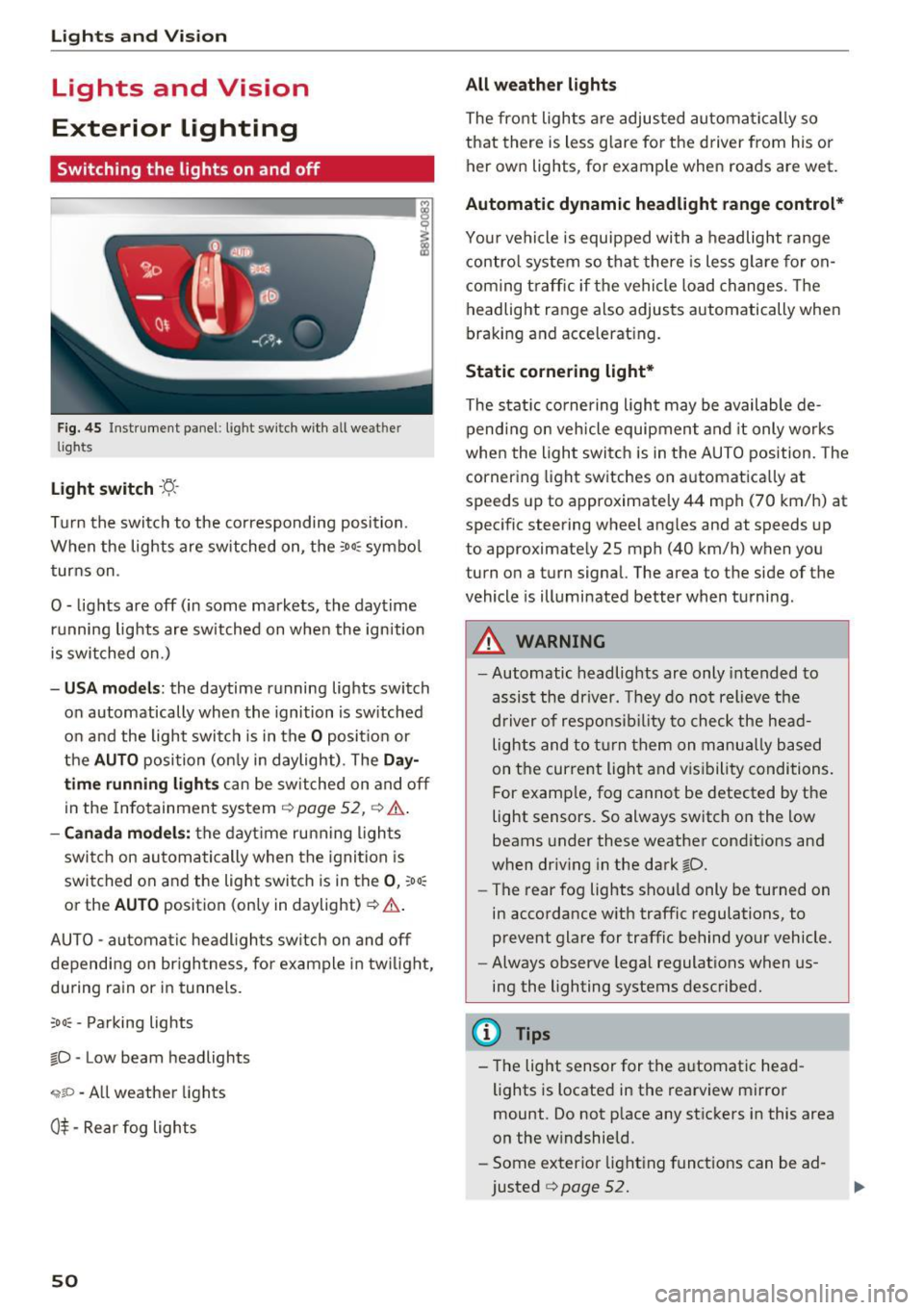
Light switch ·t:/.. ·
I
Tu rn the switch to the corresponding posi tion .
When the lights are sw itched on, the
:o o:c symbo l
turns on .
0 - lights are off (in some markets, the daytime running lights are switched on when the ignition
is switched on.)
- USA mode ls: the daytime running lights switch
on automatically when the ignition is sw itched
on and the light switch is in the
O posit ion or
the
AUTO position (on ly in daylight) . The Da y
time running lights can be switched on and off
in the Infotainment system ¢
page 52, ¢ .&..
-Canada mo del s: the dayt ime ru nning ligh ts
switch on au tomatically when the igni tion is
switched on and the light swi tch is in the
0 , :oo:
or the AU TO position (only in daylight) ¢ .&. .
AUTO -automa tic headl igh ts switch on and off
depending on br igh tness , for example in tw ilight,
du ring rain or in tunne ls.
;o o: -Pa rking lights
~D -Low beam headlights
,;;iiP -All weather lights
0$ -Rear fog lights
50
All weather lights
The front lights a re adjusted au toma tically so
that there is less g lare fo r the d river from his o r
her ow n lights , fo r example when roads are wet .
Automatic dynamic headlight range control*
Your vehicle is equipped with a headlight range
contro l system so that there is les s glare fo r on
com ing t raff ic if the vehicle load changes . Th e
headlight range also adjusts automatically when
braking and accelerat ing.
Static cornering light *
The static co rnering light may be available de
pend ing on veh icle equipment and it only works
whe n the light swi tc h is in the AUTO position. The
cornering light switches on automatica lly at
spe eds up to approximately 44 mph (70 km/h) at
spec ific steering wheel ang les and at speeds up
to approximate ly 25 mph (40 km/h) when you
turn on a turn signal. The a rea to the side of the
vehicle is illuminated better when turni ng.
_& WARNING
- Automatic headlights are only intended to
assis t the driver. They do not relieve the
d river of respo nsib ility to chec k the he ad
lights and to t urn them on m anu ally based
on t he cur re nt ligh t and v is ib ility condi tions.
F or e xamp le, fog cannot be detected by t he
light sensors . So always switch on the low
beams under these weather condit ions and
when dr iv ing in the dark
~D.
- The rear fog lights sho uld only be turned on
in accordance w ith traffic regulations, to
prevent glare for traffic behind your vehicle.
- Always observe lega l regulat ions when us
ing the lighting systems desc ribed.
(D Tips
- The lig ht sensor for the a utomat ic head
lights is located in the rearview mi rror
mount. Do not p lace any st ic kers in this area
on the w indshield.
- Some exter ior light ing funct io ns can be ad
justed
¢ page 52.
Page 99 of 386
also start driving again automatically under cer
tain conditions
c!;> page 100.
In traffic jams or slow-moving traffic, congestion
assist can assist the driver¢
page 104 .
Which functions can be controlled?
When you switch adaptive cruise control on, you
can set the current speed as the "control speed "
c!;> page 98, Switching on/off.
When driving, you can stop cruise control
c!;> page 100 or change the speed ¢ page 99 at
any time .
You can also set the dist ance to the vehicle d riv
ing ahead and set the driving mode of the adap
tive cruise control¢
page 101 .
General information
Appl ies to: ve hicles with Audi adaptive cruise co ntro l
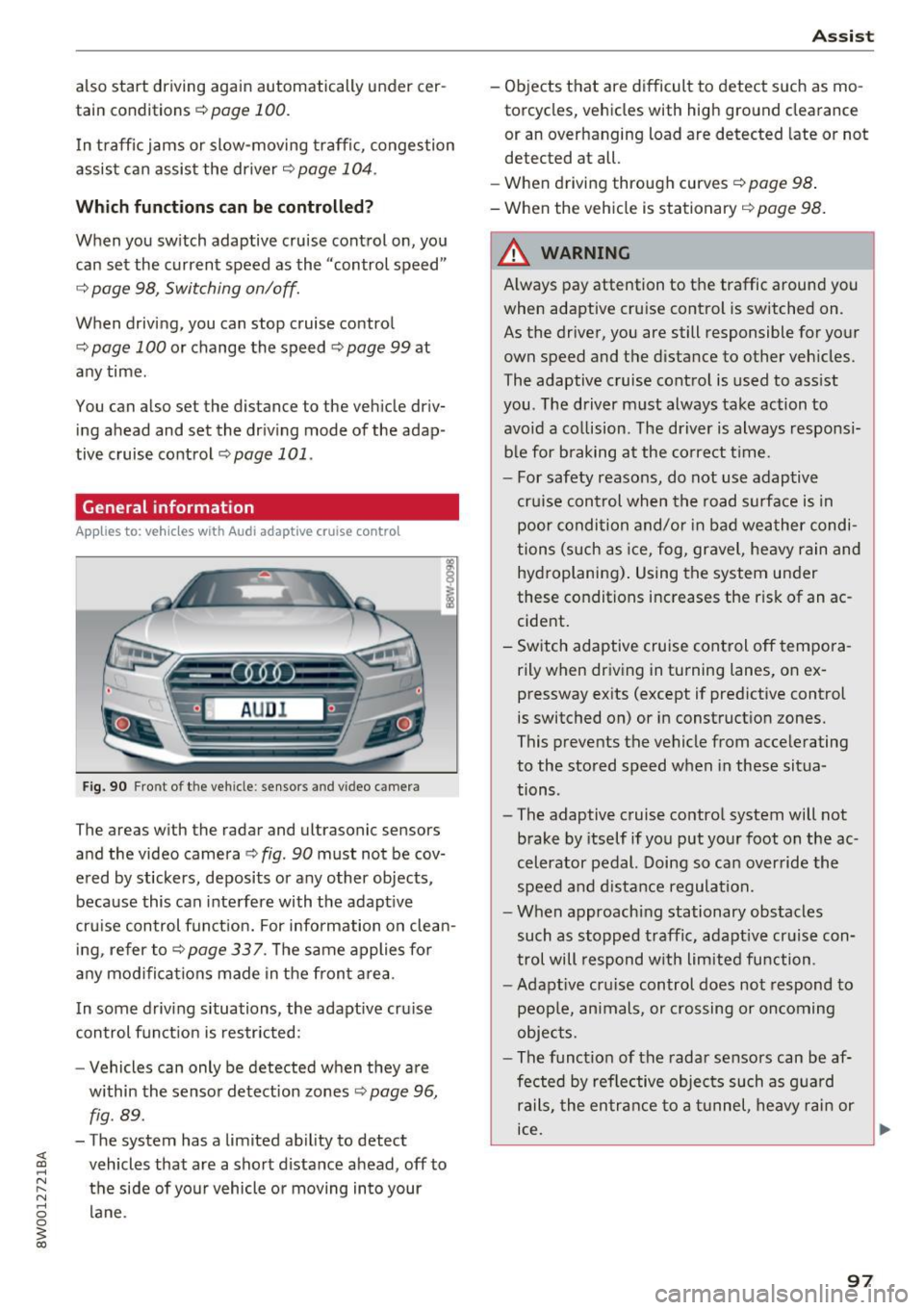
Fig. 90 Fro nt o f th e ve hicle : sensor s and video c amer a
The areas wi th the radar and ul trasonic senso rs
and the video camera¢
fig. 90 must not be cov
ered by stickers, deposits or any other objects ,
because this can interfere with the adaptive
cruise control function. For information on clean ing, refer to¢
page 337. The same applies for
any modifications made in the front area .
In some driving situations , the adaptive cruise
control function is restricted:
- Vehicle s can only be detected when they are
within the sensor detection zones
¢ page 96,
fig . 89 .
-The system has a limited ability to detect
vehicles that are a short distance ahead, off to
the side of your vehicle or moving into your lane .
Assist
-Objects that are difficult to detect such as mo
torcycles, v ehicles with high ground clearance
or an overhanging load are detected late or not
detected at all.
- When driving through curv es
c!;> pag e 98.
- When the vehicle is stationary ¢ page 98.
A WARNING
Always pay attention to the traffic around you
when adaptive cruise control is switched on .
As the driver, you are still responsible for your
own speed and the distance to other vehicles.
The adaptive cruise control is used to assist
you . The driver must always take action to
avoid a collision . The driver is always responsi
ble for braking at the correct time .
- For safety reasons, do not use adaptive
cruise control when the road surface is in poor condition and/or in bad weather condi
tions (such as ice, fog, gravel, heavy rain and
hydroplaning). Using the system under
these conditions increases the risk of an ac cident.
- Switch adaptive cruise control off tempora rily when driving in turning lanes, on ex
pressway exits (except if predictive control
is switched on) or in construction zones.
This prevents the vehicle from accelerating
to the stored speed when in these situa
tions .
- The adaptive cruise control system will not
brake by itself if you put your foot on the ac
celerator pedal. Doing so can override the
speed and distance regulation.
- When approaching stationary obstacles
such as stopped traffic, adaptive cruise con
trol will respond with limited function .
-Adaptive cruise control does not respond to
people, animals, or crossing or oncoming
objects.
- The function of the radar sensors can be af
fected by reflective objects such as guard
rails, the entrance to a tunnel, heavy rain or
ice.
~
97
Page 100 of 386
Assist
(D Note
The sensors can be displaced by impacts or
damage to the bumper , whee l housing and
underbody. This can impair the adaptive
cruise control. Have an authorized Audi dea ler
or authorized Audi Service Fac ility check their
function .
In curves
Applies to: vehicles with Audi adaptive cruise control
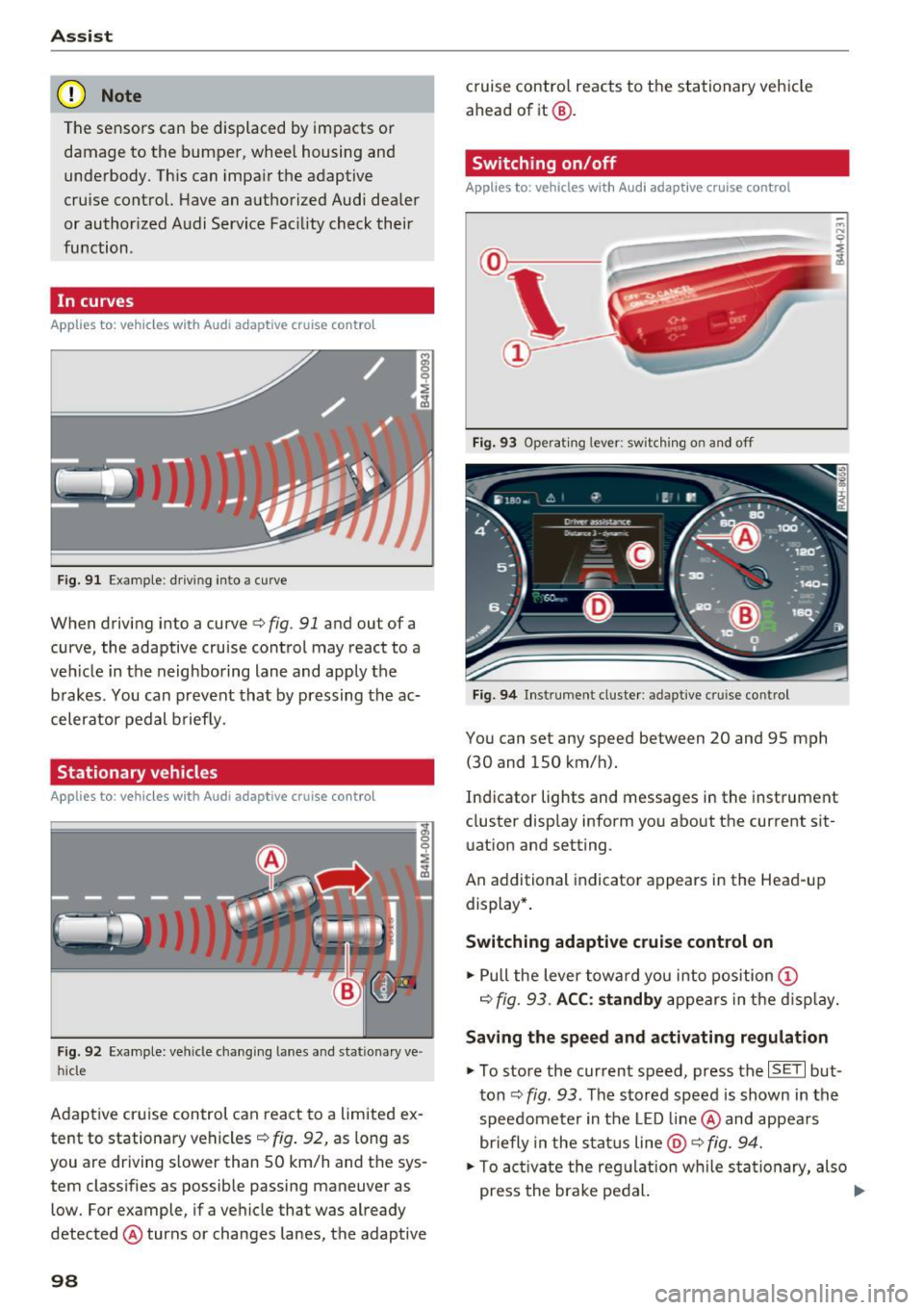
Fig . 9 1 Exa mple: drivin g in to a curve
When driving into a curve<=> fig. 91 and ou t of a
curve, the adaptive cruise control may react to a
veh icle in the neighboring lane and apply the
brakes . You can prevent that by pressing the ac
celerator pedal b rief ly.
Stationary vehicles
Applies to : vehicles with Aud i adaptive cruise contro l
Fig. 92 Example: vehicl e chang ing lane s and sta tiona ry ve
hi cle
Adaptive cruise control can react to a limited ex
tent to stationary vehicles
c:> fig . 92, as long as
you are driving slow er than SO km/h and the sys
tem classifies as possible passing maneuver as
low . For example, if a vehicle that was already
detected @turns or changes lanes, the adaptive
98
cruise contro l reacts to the stationary vehicle
ahead of it@ .
Switching on/off
Applies to: vehicles with Audi adaptive cruise control
Fig. 93 Operating lever : sw itc hin g on and off
Fig. 94 Inst rument cluster : adap tive cr uise cont rol
You can set any speed between 20 and 9S mph
(30 and lSO km/h).
Indicator lights and messages in the instrument
cluster display inform you about the cu rrent sit
uation and setting .
An add itional indicator appears in the Head-up
display *.
Switching adaptive cruise control on
.. Pull the lever toward you into position (D
c=> fig. 93. ACC: standby appears in the display.
Saving the speed and activating regulation
.. To store the current speed, press the ISE TI but
ton
c:> fig . 93 . The stored speed is shown in the
speedometer in the LED line@ and appears
briefly in the status line
@ c:> fig. 94.
.. To activate the regulation while sta tionary, also
press the brake pedal. .,.
Page 108 of 386
Assist
Messages
Applies to: vehicles with Audi adaptive cruise control
II ACC with Conge stion assist: unavailable. See
owner 's manual
Th e system c annot guarantee that it w ill detec t
ve hicl es co rre ctly and it h as swit ched
off. T he ra
dar senso rs have s hifted o r are faul ty . D rive to an
authorized Audi dealer or authorized Audi Se rvice
Facility immediately to have t he mal function cor
rected.
II ACC with Congestion assist: currently un
available. Sensor v ision restricted due to sur
roundings. See owner 's manual
T hi s message appears if the radar sensor view is
obs truc ted, for example by leaves, snow, heavy
spray or dirt. C lean the sensors ~
page 97,
fig . 90.
IIJ ACC with Congestion assist : currently un
available. Gradient too steep
T he road exceeds the maximu m possib le grade
for safe ope ra tion. The systems c annot be swi tch
e d on.
IIJ ACC with Congestion assist: only available in
D, Sor M
Select the D/S o r M selector lever position .
Bl ACC with Congestion assist: currently un·
a vailable . Parking brake applied
The systems sw itch off if yo u set the pa rk in g
brake. The systems a re availab le again after you
release the pa rking brake .
IIJ ACC with Congestion assist : currently un
available. Stabilization control (ESC ) input
This message appea rs if the Ele ct ro nic St abiliza
tion Cont rol (ESC) is ta king a ction to s tabilize the
ve hicl e. The sys tems sw itch
o ff in this s cenar io.
IIJ ACC with Congestion assist: manual control!
This message appea rs if the veh icle rolls bac k
when starting on a slight incl ine , even thoug h the
sys tems are ac tive . P ress the b rake pedal to pre
ve nt the vehicle from rolling o r sta rting to move.
106
ilJ ACC with Congestion a ssist: currently un
available. Downhill assist activated
Y ou canno t activ ate the sys te m when hill hold as
s ist is active.
tei ACC with Congestion assist: manual control!
This message appears if the driver does not take
over steering after multiple driver i ntervention
r equests and the system sw itches
o ff . The veh icle
brakes un til it is sta tionary .
tei Congestion assist: unava ilable . See owner's
manual
The system can no longer ensu re that the vehicle
will stay in t he lane and switches
off. Have your
vehicle checked by an authorized Audi dealer o r
aut horize d Aud i Serv ice Facility if the ma lf u nc
t ion is continuous .
II Congestion assist: Please take over steering!
This message app ears as soon as t he system
stops detect ing steering act iv ity when the system
li mits a re reached . Always keep your hands o n
t h e steer ing whee l so you can be ready to steer at
any t ime.
@ Conge stion assist: currently unavailable.
Please fasten seat belt
The system swi tches off when the drive r's safety
b elt is unfas tene d.
II ACC: efficiency as sist not available in thi s
country
The adaptation to speed lim its and rou tes ahead
i s not available in this co unt ry .
ii ACC: efficiency assist currently unavailable .
See owner's manual
The adaptation to speed lim its and routes ahead
switches off at speed limits under 20 mph
(30 km/h).
The message can also appear if the adaptation to speed limits and routes ahead has a temporary
failure. Have your vehicle checked by an a uthor
i zed Audi dealer or author ized Audi Se rvice Facili
ty if the malfunction is cont inuous.
Distance warning: malfunction! Please contact
Service
...
Page 109 of 386
<( a, .... N ,....
N .... 0 0
3 a,
The system cannot guarantee that it will detect
vehicles correctly and it has switched off. The ra
da r senso rs have sh ifted o r are faulty . Drive to an
author iz ed Audi dealer or author iz ed Audi Se rvice
Faci lity immediately to have the malfunction cor
rected .
Distance warning : currently una vailable . Sensor
v iew restricted due to surroundings. See own
er's manual
This message appears if the radar sensor view is
obstructed, for example by leaves, snow, heavy
spray or dirt . C lean the sensors ¢
page 97,
fig. 90 .
Distance warning: currently unavailable. See
owner 's manu al
This message appea rs if the sys tem has a tempo
rary fai lure. If this occ urs mult iple times, d rive to
an authorized Audi dealer or authorized A udi
Service Facility immediately to have the malfunc
tion corrected.
ACC: Please fa sten seat belt
The system is no t comp lete ly available if the d riv
e r' s sea t belt is u nfastened .
Stationary object ahead
This message appears if you would like to switch
the system o n and there is a stationary object di
rect ly in front of your vehicle.
Door open
The system is no t availab le when the door is
open .
Audi pre sense
Introduction
Applies to: ve hicles with Audi pre sense
W ith in the lim its of the system, t he pre sense
f u nctions can init iate measures in part icularly
dangerous sit uat ions to protect t he ve hicle pas
sengers and ot her road users.
- Because different veh icle systems such as the
ESC are i nterconnected , the
pre sense b asic in
t roduces p reempt ive safety meas ures for the
Assist
passengers i f an unstable driving si tuation is
detected.
- The
pre sen se front system uses the data from
the adaptive cruise contro l* radar sensors and
the camera to ca lculate the probability of a co l
lision . With in the lim its of the system, an im
pending co llision with vehicles can be detected
in both urba n and rural speed ranges. In t his
case, the system warns the driver visua lly,
acoust ica lly and w ith a jerk on the brakes if nec
essary. If needed, i t can in itiate a partia l o r fu ll
dece lerat ion to reduce the collision speed or to
avoid the collision under certa in circumstances.
I n conjunction with pre sense basic/rear, the
front safety belts are a lso reve rsibly tens ioned
when needed . The pre sense front is a lso active
when adaptive cruise control* is sw itched off.
- Pre sense rear contains pre sense basic func
tions. It uses the data from the side assist* ra
dar sensors and ca lculates within the limits of
the system the probability of a rear end colli
sion with t he vehicle behind you. Pre sense rear
is also act ive when side assist* is sw itched off .
- Within the limits of the system,
pre sense city
uses the camera data and can detect an im
pe nding collision with vehicles and pedestrians.
I n th is case , the system warns the driver visua l
ly , acous tic ally and wit h a jerk on the b rakes if
necessary. If needed, it c an initi ate a full dece l
erat io n to reduce the collis io n speed or to avoid
the collision under certain circumstances . In
conjunction with pre sense basic/rear, the front
safety belts are a lso reversibly tens ioned when
needed .
A WARNING
-
Read the genera l information on¢.&. in Gen -
eral information on page
97, c::> .&. in General
information on page 117 .
@ Tips
-Certa in pre sense funct ions sw itch off when
dr iving in reverse.
- The pre sense funct ions may not be availa
ble if there is a malfunct ion in the ESC sys
tem or t he a irbag control module .
107
Page 111 of 386
<( a, .... N ,....
N .... 0 0
3 a,
increasing force within the limits of the
system
l)_ This reduces the vehicle speed in the
event of a collision. At low vehicle speeds, pre
sense front can initiate a complete deceleration
shortly before a collision with a vehicle driving
ahead
1>. If pre sense front determines that you
are not braking strongly enough when a collision
is imminent, it can increase the braking force .
The following functions trigger in conjunction
with pre sense basic/rear at corresponding vehi
cle speeds :
- Reversible tensioning of the front safety belts.
- Closing the windows and sunroof*.
- Inflating the side bolsters* in the seat backrest
and seat surface.
Audi drive select*: the reversible belt tensioner,
the closing of the windows and sunroof* as well
as the inflating of the side bolste rs* on the seat
backrest and seat surface are not active depend
ing on the mode selected .
Collision avoidance assist
Collision avoidance assist helps you to steer the
vehicle around an obstacle in a critical situation.
If you avoid an obstacle after the acute warning,
then the collision avoidance supports you by ap plying slight steering adjustment to correct your
steering wheel angle as long as you are actively
steering. Collision avoidance assist is available at
speeds between approximately 20 mph (30 km/
h) and 90 mph (150 km/h).
Turn assist
When starting to drive and up to speeds of maxi
mum 6 mph (10 km/h), the turn assist uses a
braking intervention to prevent your vehicle from
colliding with an oncoming vehicle when turning left or right (available in certain countries) . The
braking intervention causes your vehicle to stay
in its lane.
.8, WARNING
-Pre sense front cannot overcome the laws of
physics.
It is a system designed to assist and
1) This is not availa ble in some co untries.
Assist
it cannot prevent a collision in every circum
stance. The driver must always intervene.
The driver is always responsible for braking
at the correct time. Do not let the increased
safety provided tempt you into taking risks .
This could increase your risk of a collis ion.
- The system can deploy incorrectly due to
system-specific limits.
- Please note that the sensors and the camera
do not always detect all objects or lane
markings . This increases the risk of an acci
dent.
- Pre sense front does not react to people, an
imals or objects that are crossing the vehi
cle 's path or that are difficult to detect
c> &..
in General information on page 97.
-Reflective objects such as guard rails or the
entrance to a tunnel, heavy rain and ice can
affect the function of the radar sensors and
the system's ability to detect a collision risk.
(D Note
The sensors can be displaced by impacts or
damage to the bumper, wheel housing and
underbody. Pre sense front can be impaired
by this. Have an authorized Audi dealer or au
thorized Audi Service Facility check their func
tion.
(D Tips
- You can cancel the braking with increasing
force that is initiated by the system by brak
ing yourself, by accelerating noticeably or
by swerving.
- Keep in mind that pre sense front can brake
unexpectedly. Always secure any cargo or
objects that you are transporting to reduce
the risk of damage or injury.
- Certain pre sense front functions are switch
ed off when the ESC is limited or switched
off
c> page 135 .
109
Page 112 of 386
Assist
Audi pre sense rear
Description
App lies to: ve hicles w ith Audi side assist
If the risk of a collision is detected, the following
functions can trigger:
- Reversible tensioning of the front safety belts
at the corresponding speeds .
- Closing the windows and sunroof*.
- Inflating the side bolsters* in the seat backrest
and seat surface.
- Switching on the emergency flashers with in-
creased frequency
l ).
The message Audi pre sense. ~ page 108,
fig. 104 will warn you about the danger.
Aud i drive select*: the function is not active de
pending on the mode selected.
A WARNING
- To reduce the risk of an accident, please
note that the side assist* radar sensors do
not always detect every object.
- Pre sense rear does not react to people, ani
mals or objects that are crossing the vehi
cle's path or that are difficult to detect.
- Reflective objects such as guard rails, heavy
rain and ice can impair the function of the
radar sensors and the ability to detect a col
lision risk .
(D Note
The radar sensors can be displaced by impacts
or damage to the bumper, wheel housing and
underbody. Pre sense rear can be impaired by
this . Have an authorized Audi dealer or au
thorized Audi Service Facil ity check their func
tion.
(0 Tips
- The pre sense rear functions switch off
when towing a trailer.
- The pre sense rear functions may also
switch off if there is a malfunction in the
side assist* system.
1> This is not ava ilab le in some co untri es.
110
Audi pre sense city
' Description
App lies to : vehicles wit h Audi pre sense city
Within the limits of the system, pre sense city
can warn you of impending collisions with
vehicles and pedestrians and initiate the applica
ble braking maneuver if needed. Pre sense city is
active at a speed of 6 mph (9 km/h) and higher.
A pedestrian warning can occur at speeds up to 50 mph (85 km/h), and vehicle warnings can oc
cur at speeds up to 155 mph (250 km/h). A pre
sense city braking maneuver is possible at speeds
up to 50 mph (85 km/h).
Warnings
App lies to: vehicles wit h Aud i pre sense city
The system recognizes various dangerous situa
tions. The
early warning occurs when:
- a vehicle driving ahead brakes sudden ly,
- your own vehicle approaches a sign ificantly
slower vehicle or stationary vehicle in the direc
tion of travel.
- a pedestrian is standing in the lane or is moving
into the lane.
When this warning occurs, it may only be possi
ble to avo id a collision by swerving or braking
strongly. The message
Audi pre sense.
~ page 108, fig. 104 and a warning tone will
warn you about the danger.
Additionally, a jerk on the brakes may occur as an
acute warning when there is an impend ing colli
sion . If you do not react to the acute warning, pre
sense city can brake to the point of complete de
ce leration within the limits of the system. This
reduces the vehicle speed in the event of a colli
sion. The message
Audi pre sense. also ap
pears.
The following functions are triggered in conjunc
tion with pre sense basic/rear:
- Reversible tensioning of the front safety belts .
- Closing the windows and sunroof*. ..,
Page 114 of 386
Assist
sensors and the area around the camera
~ page 97, fig. 90 or~ page 116, fig . 112.
Ill Audi pre sense: malfunction! Please contact
Service
This message appears when the pre sense func
tion is affected. For examp le, this could be
caused by a faulty sensor. Dr ive to an authorized
Aud i dealer or a utho rized Aud i Serv ice Facility im
mediately to have the malfunction cor rected.
Ill Audi pre sense: currently restricted. Towing
mode
Pre sense rear and the pre sense city braking in
tervent ions sw itch off automatically when the
electrical connector in the factory-installed trail
er hitch is connected. There is no gua rantee the
f unct ions will swi tch off when using a re trofitted
trai ler hitch .
Ill Audi pre sense: currently restricted
This message appears if the ESC is restr icted or
sw itched off, for example.
Ill Audi pre sense: currently restricted. See
owner's manual
This message appears when there is a temporary
fa ilur e in a subsystem, such as the ESC. If this
message appears repeated ly, dr ive to an author
ized Audi dealer or authorized Audi Se rvice Facili
ty to have the malfunction corrected .
Ii] Audi pre sense: emergency braking system
off
This message appears if the pre sense functions
are switched off through the Infotainment sys
tem or if th e system is not ready.
Audi active Lane assist
Description
Applies to: veh icles w ith Audi active lane assist
Active lane assist (lane departure warning) de
tects lane ma rker lines withi n the l imits of the
system using a camera in the windshield. If you
are approaching a detected lane marker line and it appears likely that you will leave the lane, the
system will warn you w ith corrective stee ring .
You can override this steering at any time . If you
112
pass over a line, the steering wheel will vibrate
lightly. In order for this warning vibration to oc
cur, it must first be switched on in the Infotain
ment system. Active lane ass ist is ready for oper
a tion when the lane marker line is detected on at
least one side of the vehicle .
T he system is des igned for driving on express
ways and highways and therefore on ly activates
a t speeds above approximately 40 mph (65 km/
h) .
Applies to vehicles with s ide ass ist*: if you acti
vate a turn signa l when active lane assist is ready
a nd it classifies a lane change as critical bec ause
of veh icles traveling a longside you or approach
i ng you, there will be noticeable corrective steer
i ng shortly before you leave the lane. This will at
tempt to keep your vehicle in the lane.
Applies to vehicles without side assist* : the sys
tem does not warn when it is ready if you act ivate
the turn signal before crossing the lane marker
lin e. In this case, it assumes that you are chang
in g lanes intent ionally.
Applies to vehicles with adaptive cruise contro l*:
there is no corrective steer ing or warnings if the
system recognizes a distinct passing maneuver.
If the conditions are met, congestion assist
switches on at speeds under approximately
40 mph (65 km/h)
¢page 104.
_& WARNING
-The system warns the driver that the vehicle
is leaving the lane using correct ive steering.
The driver is always responsible for keeping
the vehicle within the lane.
- The system can help you keep the vehicle in
the lane, but it does not drive by itself. Al
ways keep your hands on the steering
wheel.
- Corrective steering may not occur in certain
situations, such as during heavy braking .
- There may be cases where the camera does
not recognize all lane marker lines. Correc
tive steering can only take place on the side
of the vehicle where lane marker lines are
detected.
Page 119 of 386

<( a, .... N ..... N .... 0 0
3 a,
are indicated, at the latest, by the time they en
ter your "blind spot".
© Vehicles you are passing
If you slowly pass a vehicle that side assist has
detected (the difference in speed between the
veh icle and your vehicle is less than approximate
ly 9 mph (15 km/h)), the display in the exterior
mirror turns on as soon as the vehicle enters your
blind spot.
The display will not turn on if you quickly pass a
vehicle that side assist has detected (the differ
ence in speed is greater than approximately 9 mph (15 km/h)).
Functional limitations
The radar sensors are designed to detect the left
and right adjacent lanes when the road lanes are
the normal width. In some situations, the display
in the exterior mirror may turn on even though
there is no vehicle located in the area that is criti
cal for a lane change. For example:
- If the lanes are narrow or if your are driving on
the edge of your lane. If this is the case, the system may have detected a vehicle in another
lane that is
not adjacent to your current lane.
- If you are driving through a curve. Side assist
may react to a vehicle that is in the same lane
or one lane over from the adjacent lane.
- If side assist reacts to other objects (such as
roadside structures like guard rails).
- In poor weather conditions . The side assist
functions are limited.
Do not cover the radar sensors ¢
fig. 112 with
stickers, deposits, bicycle racks or other objects,
because this will impair their function. Do not
use side assist when towing a trailer. For infor
mation on cleaning, refer to¢
page 33 7.
A WARNING
- Always pay attention to traffic and to the
area around your vehicle. Side assist cannot
replace a driver's attention. The driver alone
is a lways responsible for lane changes and
similar driving maneuvers.
Assist
-In some situations, the system may not
function or its function may be limited. For
example:
- If vehicles are approaching or being left
behind very quickly. The display may not
turn on in time.
- In poor weather conditions such as heavy
rain, snow or heavy m ist.
- On very wide lanes, in tight curves, or if
there is a rise in the road surface. Vehicles
in the adjacent lane may not be detected
because they are outside of the sensor
range.
(D Note
The sensors can be displaced by impacts or
damage to the bumper, wheel housing and
underbody. This can adversely affect the sys
tem. Have an authorized Audi dealer or au
thorized Audi Service Facility check their func
tion.
(D Tips
If the window glass in the driver's door or
front passenger's door has been tinted, the
display in the exterior mirror may be incor
rect.
Switching on and off
App lies to : vehicles wi th Audi sid e ass ist
The system can be switched on/off in the Info
tainment system.
If the system is activated, the displays in the ex
terior m irrors will turn on briefly when the igni
tion is switched on.
.,. Select in the Infotainment system:
I MENU ! but
ton
> Vehicle > left control button > Driver as
sist
> Audi side assist. Off switches the system
off.
(D Tips
When you switch side assist on or off, the exit
warning system activates or deactivates
¢ page 118.
117