battery AUDI A4 2017 User Guide
[x] Cancel search | Manufacturer: AUDI, Model Year: 2017, Model line: A4, Model: AUDI A4 2017Pages: 386, PDF Size: 96.32 MB
Page 82 of 386
Driving
Engine automatically r esta rt s
The standard Start/Stop mode will be canceled
during a stop phase in the follow ing situations.
The engine restarts without any action by the driver .
- The vehicle rolls, for examp le while on a slope.
- The inter io r temperatu re differs from the tem-
perature se lected in the A/C system.
- The w indshield is being defrosted.
- The brake pedal is pressed several t imes in a
row .
- The battery charge level becomes too low .
- Power consumption is high .
The engine can turn off again when the condi
tions for Start/Stop mode are met .
Ignition is swit ched off aut omaticall y
To prevent the battery from dra ining, the ignition
will sw itch off
aut omati cally under the following
conditions:
- T he Sta rt/Stop system has stopped the engine.
- The vehicle must be stationary .
- You left the veh icle and the engine was not re-
started within approximately 30 seconds.
If this happens, you will see the message
I gni
tion turn s off automatically in the instrument
cluster and the activated low beams are replaced
by the parking light. The parking lights will
sw itch off after approximately 30 minutes or
when you lock the vehicle .
The ignition also switches off when you lock the
veh icle from the outs ide dur ing a stop phase.
If the Start/Stop system has not turned off the
engine or if you have sw itched the Start/Stop sys
tem off manually, the ignition will not be auto
mat ically switched off and the engine w ill cont in
ue to run~& .
.&, WARNING
To red uce the risk of poisoning, neve r allow
t he engine to r un in confined spaces.
80
-
@ Tips
-If you leave the ve hicle with the D/S or R se
lector lever position engaged, the parking
brake is automatically set.
- If you select the D or N selector lever posi
tion after shifting into reverse, the vehicle must be driven faster than 6 mph (10 km/h)
in order for the engine to switch off again.
Manually switching the Start/Stop system
off/on
App lies to: vehicles wit h Start -Stop system
If you do not wish to use the system, you can
switch it off manually.
- -
. !.. r' '!. .:-,/'"~ ~
tJ .,. -,J
-----::::I
F ig . 81 Cen te r conso le: S tart/Stop system butto n
..
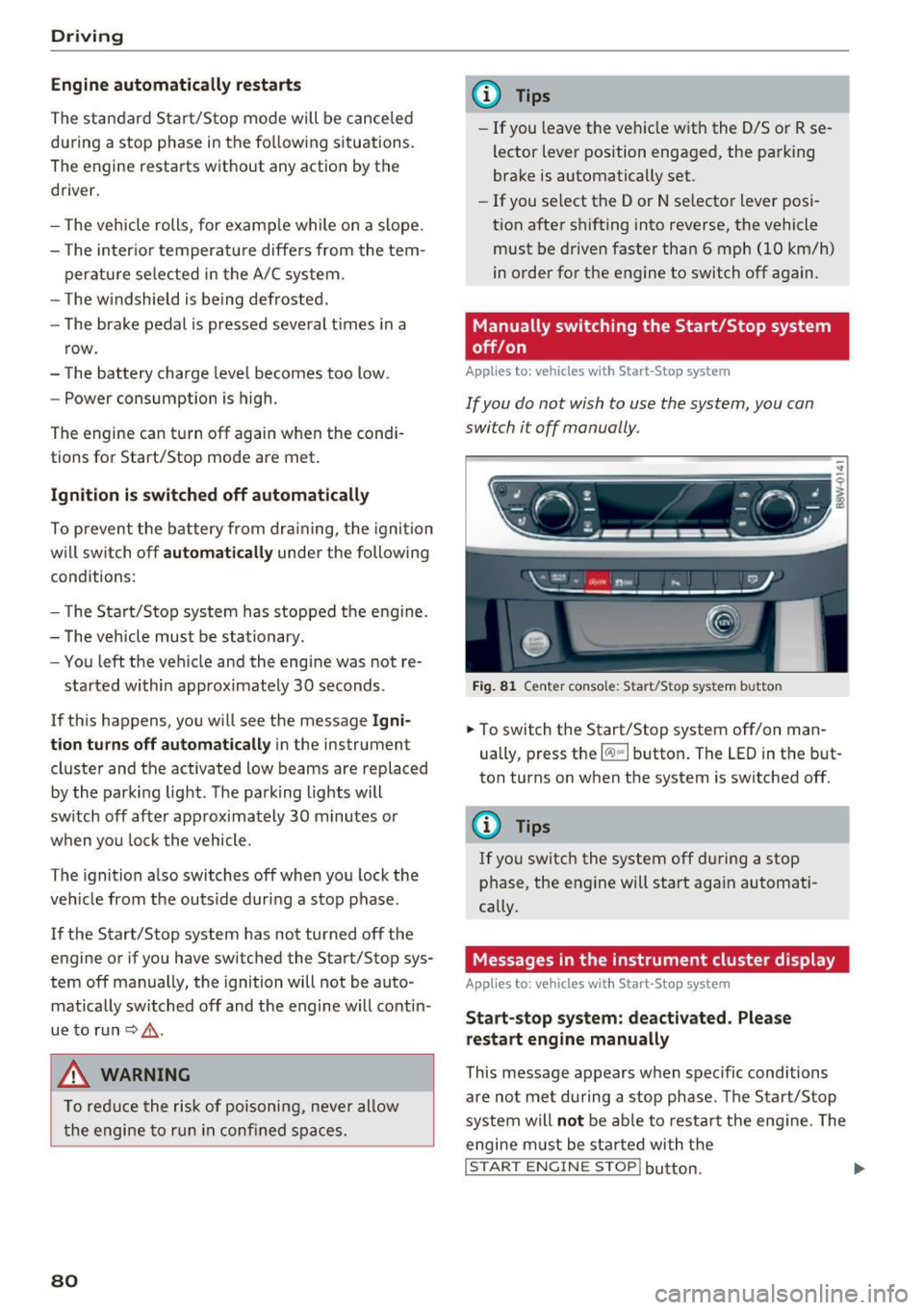
.,. To switch the Start/Stop system off/on man
ually, press the
l (A) "'I button . The LED in the but
ton turns on when the system is switched off.
(l} Tips
If you switch the system off during a stop
phase, the engine will start again automati
cally.
Messages in the instrument cluster display
App lies to: vehicles wit h Start-Stop system
St art- stop system: de activated . Please
restart engin e manually
This message appears when spec ific conditions
a re not met during a stop phase . The S tart/Stop
system will
not be ab le to res tart the eng ine . The
engine m ust be sta rted with t he
I STAR T ENGINE STOP! button. ....
Page 122 of 386
Ass is t
- Please note that the rear cross-traffic assist
may act ivate the brakes unexpectedly. Se
cure any cargo that you are transporting to
reduce the risk of damage or injury .
- An additional brake act ivat ion may be tr ig
gered within 20 seconds after an automat ic
brake activation.
- If there is an acoustic warning signa l from
the rear cross-traff ic assist, then the park
ing system may not warn you of detected
obstacles under certa in circumstances .
- The view of the radar sensors may be im paired by leaves, snow, heavy spray or d irt.
Clean the a rea in front of the sensors
~ page 116, fig . 112.
A WARNING
T he rear cross-t raff ic assist is s ubject to lim i
t at ions and cannot warn you before every im
pending collision:
- If the vehicle is too w ide fo r the pa rki ng
spa ce and covered by the ne ighbor ing
vehicles.
- People , such as cyclis ts, jogge rs, in line skat
ers and pedestrians, may not be detected
under certain circ umstances.
- If you are in a par allel par king sp ace.
(D Note
Also read this info rmation ~ CD in General in
formation on page 117.
(0 Tips
- You can cancel the automatic brake activa
tion with increasing braking force if you ap
ply the bra kes yourself or accele rate cons id
e rab ly.
- In some s ituations, rea r cross-traffic ass ist
may warn you even if t here is no cross traffi c
i n a critic al are a, for examp le w hen ba cking
i nto a parking space or maneuver ing.
- T he rea r cross -traffic ass ist also switches off
whe n you swi tch off the ESC.
- T he rea r cross traffic assist switches on and
off thro ugh the p arking aid<:?
page 12 4.
- T he system is not ava ilable when towing a
trailer.
120
' Messages
Applies to: vehicles with Audi side assist
A message appea rs in the ins trument cluster dis
play if the side ass ist sw itches off automat ica lly.
@j Audi side assist: currently unavailable . Sen
sor vi sion re stricted due to surroundings. See
owner' s manual
@j Audi side ass ist and ex it warning: currently
unav ailable . Sensor vi sion restricted due to sur
rounding s
The radar sensors ' vision is affected . The area in
front of the sensors must not be covered by bike
racks, stickers, leaves, snow or any other objects .
Clean the area in front of the sensors, if necessa
r y
<:? page 116, fig . 112.
@j Audi side ass ist: currently unavailable . See
owner's manual
@j Audi side ass ist and exit warning: currently
unavailable. See owne r's manual
Side assist ca nnot be switched on at this time be
cause ther e is a malfunction (for example, the
battery charge level may be too low).
@j Audi side as sist: malfunction! Plea se contact
Service
@j Audi side assi st and exit warning: malfunc
tion! Plea se contact Service
The system cannot guarantee that it will detect
vehicles correct ly and it has sw itched off. The
senso rs have been moved or are fa ulty . Have the
system checked by an authori zed Aud i dea ler o r
a uthorized Aud i Serv ice Facility soon.
@j Audi side assi st: unavailable in towing mode
@j Audi side ass ist and ex it warning: currently
unavailable. Towing mode
Side assist switches off automatically when the electrical connector in the factory-installed trail
er hitch is connected . There is no guarantee the
system will sw itch off when using a retrofitted
trailer hitch . Do not use side assist and the ex it
warning when tow ing a tra ile r.
Ill Rea r parking aid: obstacl e detection res trict-
ed ..,.
Page 140 of 386

Intelligent Technology
Snow chains
If there are snow chain laws, snow chains must
also be used on vehicles with a ll wheel drive
¢ page 332, Snow chains.
Replacing tires
For vehi cles w ith all whee l dr ive, only whee ls with
the same rolling circumferen ce shou ld be used .
Avoid using tires w ith different tread depths
¢ page 324, New tires or wheels .
Offroad vehicle?
Your Audi is not an offroad vehicle - the re is not
e nough g ro und clea rance. For this reason, avo id
d iffi cult terrain .
_& WARNING
-Also, in vehicles with all wheel drive, adapt
yo ur driving style to the current road and
t raffic conditions . Do not let the increased
sa fety provided tempt you into tak ing risks,
because th is increases the r isk of an acci
dent.
- The brak ing ability of your vehicle is limited
to the traction of the wheels. In this way, it
is not diffe rent from a two whee l dr ive vehi
cle . Do not be tempted to accelerate to a
high spee d when t he road is slippe ry, be
ca use this increases the risk of an accident.
- Note that on wet streets, the front wheels
can "hy droplane" if dr iving at speeds that
are too hig h. Unlike front whee l drive
vehicles, the eng ine does no t r ev highe r su d
denly when the vehicle begins hydroplaning .
For this reason, pay attention to the road
condit ions regar dless of you r speed to re
duce the r isk o f an accident.
Energy management
The starting ability is optimized
The energy management system manages the
electrical energy distribution and optimizes the
availability of electrical energy for starting the
engine.
When a ve hicle w ith a co nventional e nergy sys
tem is not driven for a long time, the battery is
138
dra ined by equipment (for examp le, the immobi l
izer) . In certain circ umstances, there could may
not be enough ene rgy to sta rt the eng ine.
Yo ur vehicle is equipped wi th an inte lligen t ener
gy management system for dist ributing elec trici
ty. This significant ly improves the starting ability
and increases the batte ry life.
The ene rgy management sys tem Is m ade up of
batte ry diagnosis , standby current manage
ment
and dynamic ene rgy management .
Battery diagnosis
The ba ttery diagnos is determines the batte ry
c ha rge level. The sensor s de ter mine the batte ry
vo ltage, the batte ry cu rrent, and the batte ry
tempera ture. The current cha rge level and the
perfo rmance of the battery a re determined base d
on this .
Idling current management
The idling cur rent m an age ment decreases the
energy used while parked . With the engine
switched off, it manages the energy distrib ution
to the different e lectr ica l components. Data from
the battery d iagnosis is taken into account for
th is.
Depend ing on the battery charge leve l, electrical
equipment is switched off one item after the oth
er, to prevent the battery from drain ing and to
maintain the sta rting ability.
Dynamic energy management
W hile driv ing, dynam ic energy man agement dis
tributes the appropr iate amo unt of energy to the
electrica l eq uipment. It contro ls t he battery
charge level so that mo re energy is not used then
i s be ing generated in order to maintain an opti
mal battery c harge level.
(D Tips
- Energy management cannot overcome the
laws of physics. Note that the charge level
and length of the battery life are limited.
- When the sta rting ability is endangered, the
(•) indicator light t urns on¢
page 31 .
Page 141 of 386
<( a, .... N ,....
N .... 0 0
3 a,
What you should know
Maintaining the starting ability is the highest
priority.
A lot of stress is placed on the battery when driv
ing short distances, in traffic, and at cold times
of the year . A lot of energy is used but little is
generated. It is also critical when the engine is not runn ing but elect rical equipment is switched
on. I n this case, ene rgy is used but none is gener
ated.
In s ituations l ike this, energy management will
actively regu late the distribution of ene rgy.
Long pe riods without use
If you do not drive your vehicle for several days or
weeks, e lectrical equipment is gradually scaled
back or switched off . This reduces energy use and
ensu res the veh icle w ill be able to start afte r long
pe riods of time. Some convenie nce functions,
such a s in te rior lighting or powe r seat adjust
men t, may not be available under certa in c ircu m
stances . These convenience functions will be
ava ilable again once you switch the ign ition on
and start the engine .
With the engine switched off
The ba tte ry will d rai n if you use Infota inment
functions s uch as listen ing to the rad io whi le the
engine is switched off .
I f t he vehi cle's ability to start may be impaired by
the energy use, a mess age will appear in the In
fotainment system disp lay . The message indi
cates that the system will sw itch off automatica l
l y soon . If you would like to continue using the
f u nctions, yo u m ust start the eng ine.
With the engine running
A lthough elec trical energy is gene ra ted wh ile
d riving, the ba ttery can drain . This can happen
when little energy is generated, and m uch is used
and the charge leve l of the battery is not optima l.
To restore the ba lance o f energy, components
that requ ire large amo unts of energy a re tempo
rari ly sca led back or switched off. Heating sys
tems in particu lar require a great deal of energy .
If you notice, for example, that the seat heating *
Intelligent Technology
or rear window defogger is not work ing, t hen it
has been temporarily limited o r switched off.
These systems are availab le aga in as soon as the
energy supply has been restored .
In add ition, yo u may notice tha t the idle speed
has slig htly increased. That is normal and no
ca use for concern . Due to the increased id ling
speed, the additional required energy will be generated and the battery will be charged .
Notice about data
recorded by the Event
Data Recorder and
vehicle control modules
E v ent Data R eco rder
This vehicle is eq uipped with an Event Data Re
corder ( EDR) . The ma in purpose of an EDR is to
record, in certain crash or near crash-like situa
t ions, such as an airbag deployme nt or hitt ing a
road obstacle, data that w ill ass ist in understand
ing how a vehicle 's systems performed . T he EDR
is des igned to record data related to vehicle dy
nam ics and safety systems for a short per io d of
t ime, typ ic all y 30 seconds or less . T he ED R in this
vehicle is designed to record such data as:
- How va rious systems in your vehicle were oper
ating;
- Whethe r or not the d rive r and passenger safety
be lts were buckled/fas tened;
- How far (if at all) the driver was depressing the
accelerator and/or bra ke pedal; a nd ,
- How fast the vehicle was traveling .
These data can help p rovide a bette r understand
ing of the circumstances in w hich crashes and in
juries occur . NOTE: EDR data are recorded by your
vehicle on ly if a non-tr ivial crash situation occurs ;
no data are reco rded by the EDR un der no rmal
driv ing cond itions and no persona l da ta (e.g.,
name, ge nder, age, and cr ash location) are re
corded. However, ot her parties, such as law en
forcement, co uld combine the EDR data with the
type of perso nally identifying data routinely ac
quired d uring a crash investigation .
T o read d ata recorded by an EDR, special eq uip
ment is required, and access to the vehicle or the ..,.
139
Page 144 of 386

Multi Media Interface
@ Tips
The MMI switches off automatically if the en
gine is not running and the battery is low .
Infotainment system
display
Switching on and off
- Switching on and off manually: press the Fc;J
button @¢page 8, fig . 2.
When the MMI is switched on and the display is
switched off, you can operate certain functions
using the MMI On/Off knob with joystick function
¢page 141 .
Information on display images
The display version depends on vehicle equip
ment.
Fig. 141 Display v ersion A
Fig. 142 Display version B
Addit ional content (such as album cover and map
material) is shown on display version B, if appli
cable
CD ¢ fig. 142. Because the other content
shown on the displays is nearly identical between
the two versions, this manual will primarily de
scribe display version A .
142
Operating the MMI
Selecting and confirming a function
Fig. 143 Operating the control knob
Selecting and confirming a function in a
menu /list
.,.. Selecting the function: turn the control knob
CD¢ fig. 143 to the desired function (such as
selecting a frequency).
.,.. Confirming a selection: press the control knob
@ ¢fig. 143.
Returning to functions at higher levels
.,.. Press the I BACKI button (i) ¢ page 141,
fig. 139.
Opening the main menu /menu
Fig. 144 Main men u
Page 214 of 386

Media
q page 218. The copied video files are stored in
the media center under the
Videos category.
Playing the Jukebox
Requirement: the Jukebox must contain audio/
video fi les
c;> page 211, Adding files to the Juke
box .
The Jukebox is accessed and operated through
the MMI
© c;> page 217, fig. 196.
Displaying Jukebox memory capacity
Select: right control button > Jukebo x memory
ca pacity .
Information about the Jukebox memory
capacity and the numbe r of stored tracks is dis
p layed.
Deleting tracks from the Jukebox1>
Requirement: the Jukebox must contain audio/
video files.
- Delet ing an ent ry: select an entry from the
Jukebox media center. Se lect: right contro l but
ton >
Delete from jukebo x> This entry or En
tire list .
-The status of the de leting process is shown in
the MMI. Jukebox playback stops during the de leting process and starts again automatically
once the deletion is complete .
(0 Note
Do not import aud io/video files when the en
gine is turned off because this will drain the
veh icle battery.
(D Tips
- Tracks from aud io CDs cannot be imported
to the Jukebox for legal reasons .
- Files that have already been imported are
automat ically recognized and cannot be
copied to the Jukebox again.
- It is not possible to play audio/v ideo f iles*
i n the CD/DVD* drive while importing them.
- The Jukebox does not provide an export
function due to lega l reasons.
- Files or tracks without add it iona l stored in
formation are listed as
Unknown . Audi rec-
1> Not in th e Now playing view.
212
ommends adding additional information
(such as 103 tags) to a udio fi les .
- Rese t the
Jukebox to the factory defau lt
settings when sell ing yo ur vehicle
¢page 230.
Bluetooth audio player
App lies to : vehicles wi th Blue to oth
With the Bluetooth audio player, you can play
music wirelessly from your 8/uetooth-capable
device (such as a cell phone) through the MMI.
Requirement: the vehicle m ust be stationary and
the Bluetooth function on your Bluetooth device
and the
Bluetooth audio player ¢ page 231 in
the MMI must both be sw itched on.
- Connecting a Bluetooth device: press the
!MEDIA ! button. Press the left control button
until the sources overview is disp layed. Select
and confirm
Bluetooth player@¢ page 217,
fig . 197.
- If ne cessa ry, select and confirm, Not connected
> Connect Bluetooth audio player . The Blue
tooth device search starts. Follow the instruc
tions i n the MMI.
- Select and confirm the des ired Bluetooth de
vice from the list. The MMI generates a PIN for
the connection.
- Select and confirm
Yes .
-Enter the PIN for connecting on your Bluetooth
dev ice.
Or : if the PIN is already displayed on
your Bluetooth device, confi rm it in the Blue
tooth device and in the MMI. The time allowed
for entering the PIN is lim ited to approximately
30 seconds.
The media is started and operated through the
mobile device o r th e MMI, depending on the de
vice being used.
(D Tips
- Check fo r any connection requests on your
Bluetooth device.
- You only have to pair your device one time.
Bl ue tooth devices that are already paired
Page 217 of 386

-Audi AG simply makes the access to online
media services possible through the MMI
and does not take any respons ibility for the
contents of the online media services.
- Always read the chapter
c;, page 178, Audi
connect (Infotainment ) information .
-Depending on the mobile device being used,
interruptions in media playback can occur.
To avoid interruptions when using a mobile
device, do not lock the screen on your mo
bile device and keep the
Audi MMI connect
app in the foreground .
- Contact your authorized Audi dealer or au
thorized Audi Service Facility for additional
information about online media .
Multimedia connections
USB adapter for Audi music interface
You con connect your mobile devices (such as o
smortphone or MP3 player) to the Audi music in
terface and charge them using o special
USB
adopt er.
Fig. 194 Audi USB adapt ers
CD USB adapter for devices with a micro USB con
nect ion
@ USB adapter for devices with an Apple Light
ning connection
@ USB adapter for devices with an Apple Dock
connector
You can purchase the USB adapter from an au
thor ized Audi dealer or at spec ialty stores .
Use the USB adapter for the
Audi music interface
,=;,page 215.
Media
(D Note
Handle the USB adapter carefully . Do not al
l ow it to be pinched .
Audi music interface
Connect your mobil e devices to the Audi music
interfac e in order to operate them through the
MMI and charge the battery.
Fig. 195 Conn ect ing mob ile device s
The Audi music interface is located under the
armrest in the center console @,=;,
page 8, fig. 2.
-Connecting a mobile device using a USB
adapter:
connect the applicable USB adapter @
c;, fig. 195 to the port on the Audi music inter
face @ and then connect the adapter to the
mobile device
CD (such as an iPod).
- Charging a mobile device using a USB adapter :
when you connect a mobile device to the Audi
mus ic interface @ using the applicable USB
adapter @,=;,
fig. 195 , the battery will auto
matically charge .
-Disconnecting a mobile device from the Audi
music interface :
remove the USB adapter@
c;, fig. 195 from the Aud i music interface .
-Disconnecting mobile devices with an Apple
Dock connector :
remove the Apple Dock con
nector from the Apple device with the release
tabs pressed in@ ¢poge
215 , fig. 194.
The media are started and operated through the
mobile device or the MMI, depending on the de
vice being used ¢
page 217.
Connecting two mobile devices : if two mobile
dev ices (for example iPod and smartphone) are
connected at the same time , then both devices
can be used as playback sources.
IJl.
215
Page 227 of 386

<( a, .... N ,....
N .... 0 0
3 a,
Problem
Audi music interface :
the porta-
ble audio device is not recognized
as a source.
Audi music interface : the audio
playback through the iPod/
iPhone/iPad is malfunctioning.
Audi music interface : contents
that are changed on a mobile de-
vice connected to the Audi music
interface are not displayed in the
media center ..
AUX input: there is stat ic when
connecting and disconnecting the
AUX connection cable.
Bluetooth audio player* /Wi-Fi
audio player *:
aud io playback in-
terference.
Jukebox*: tracks on the imported
playlist are grayed out.
Jukebox*: i mported tracks cannot
be played or found.
Wi-Fi audio player *: multiple de-
vices are connected to the Wi-Fi
hotspot. A media player (such as a
smartphone) appears as the
source and cannot be changed.
Online media *: connection failed
between the MMI and the
Audi
MMI connect
app.
Wi-Fi audio player* /Online me-
dia *:
audio playback interference.
Media
Solution
For many ce ll phones or mobile devices, playback is not possible
when the battery level is too low (less than 5% of its capacity).
The mobile de-vice will only be recognized as a source in the MMI
after connecting if the battery charge is sufficient.
The
Bluetooth audio player f unction is switched on. Switch this
function off
c:> page 231 when you a re not using the Bluetooth
audio player.
Reset the Media settings to the facto ry defau lt settings
c:>page 230.
When connecting a nd disconnecting, the External audio player
source is already selected. Before connecting or disconnecting the
mobile device, either mute the device (refer to
c:> page 233) or
sw itch to a different audio source (for example
c:> page 204, Open-
ing the radio function).
Only one interface should be act ively used at a time to ensure
problem-free playback.
When importing playlists, a ll of the fi les themselves must be im-
ported.
If yo u cannot find impor ted tracks in the media center, they may
not be supported. Only copy supported files
c:> page 223 to the
Jukebox.
Close the
Audi MMI connect app on the connected dev ices (for ex-
ample, smartphones) that are not being used as the Wi-Fi audio
p laye r*. Likewise, close the UPnP server apps or the media pe rm is-
sions on the integrated UPnP/DLNA server. Connect the desired
device as a Wi-Fi audio pla yer*
c:> page 213.
To establish a connection to the MMI, the MMI connection switch
must be switched on in the
Audi MMI connect app status screen.
Malfunctions can occur during audio playback if the
Hotspot and
client a)
c:> page 177 Wi-Fi mode setting was selected. For p layback
without interference, Audi recommends the
Hotspot setting for
Wi-Fi mode.
225
Page 230 of 386

Audi smartphone interface
Troubleshooting
Applies to: vehicles with Audi smartphone interface
Problem Solution
Audi smartphone interface
can-Check the charge level of your smartphone battery.
not be opened. Check the USB cable and use a different one if necessary.
Check if Android Auto or Apple CarPlay is available in your country.
Check if the Android Auto app is installed on your smartphone .
Connecting the smartphone to Check if you
are ursing the correct USB adapter and if the USB
the MMI failed. adapter is connected correctly to your smartphone and the Aud i
music interface
¢ page 215.
Check if Apple CarPlay is activated on your smartphone .
Check in the Android Auto app if Android Auto permits new
vehicles .
T he smartphone is not automati- Check if you are ursing the correct USB adapter and if the USB
cally detected. adapter is connected correctly to your smartphone and the Audi
music interface
¢ page 215.
Check if the requirements needed to connect a smartphone have
been met.
228
Page 271 of 386
-For safety reasons in severe accidents, the
alternator and starter are separated from
the vehicle battery with a pyrotechn ic circuit
interrupter.
- Work on the pyrotechnic circ uit interrupt
er must only be performed by a qualified
technicians who have the experience, in
formation and special tools necessary to
perform the work safely.
- If the vehicle or the circuit interrupter is
scrapped, all app licab le safety precautions
must be followed .
@) For the sake of the environment
Undeployed airbag modu les a nd pretension
ers might be classified as Perch lorate Materi
al -special handling may apply, see
www.dtsc .ca.gov/hazardouswaste/perchlo
rate. When the vehicle or parts of the re
straint system including airbag modules and
safety belts with pretensioners are scrapped,
all applicable laws and regulations must be
observed. Your authorized Audi dealer is fa
m iliar with these requi rements a nd we recom
mend t hat you have you r dealer perform this
service for you.
Other things that can affect Advanced
Airbag performance
Changing the vehicle's suspension system can
change the way that the Advanced Airbag System
performs in a crash . For example, using tire-r im
comb inat ions not approved by Audi, lowering the
ve hicl e, chang ing the stiffness of the suspens io n,
in clud ing the spr ings, suspens ion str uts, shock
absorbers et c. can change the forces that are
measured by the airbag sensors and sent to the
e lectronic contro l unit. Some suspension changes
can, for example, increase the force levels meas
ured by the sensors and make the airbag system
deploy in crashes in wh ich it would not deploy if
the changes had not been made. Other ki nds of
changes may reduce the fo rce levels meas ured by
the sensors and prevent the airbag from deploy
in g when i t should .
Airbag sys tem
A WARNING
-Changing the vehicle's suspension including
use of unapproved tire-rim combinations can
change Advanced Airbag performance and in
crease the risk of serious persona l injury in a
crash.
- Never install suspension components that
do not have the same pe rformance charac
teristics as the components o rigina lly ins tal
led on your vehicle.
- Never use tire-rim combinations t hat have
not been approved by Audi.
Knee airbags
Description of knee airbags
The knee airbag system can provide supplemen
tal protection to prop erly restrained front sea t
occupants.
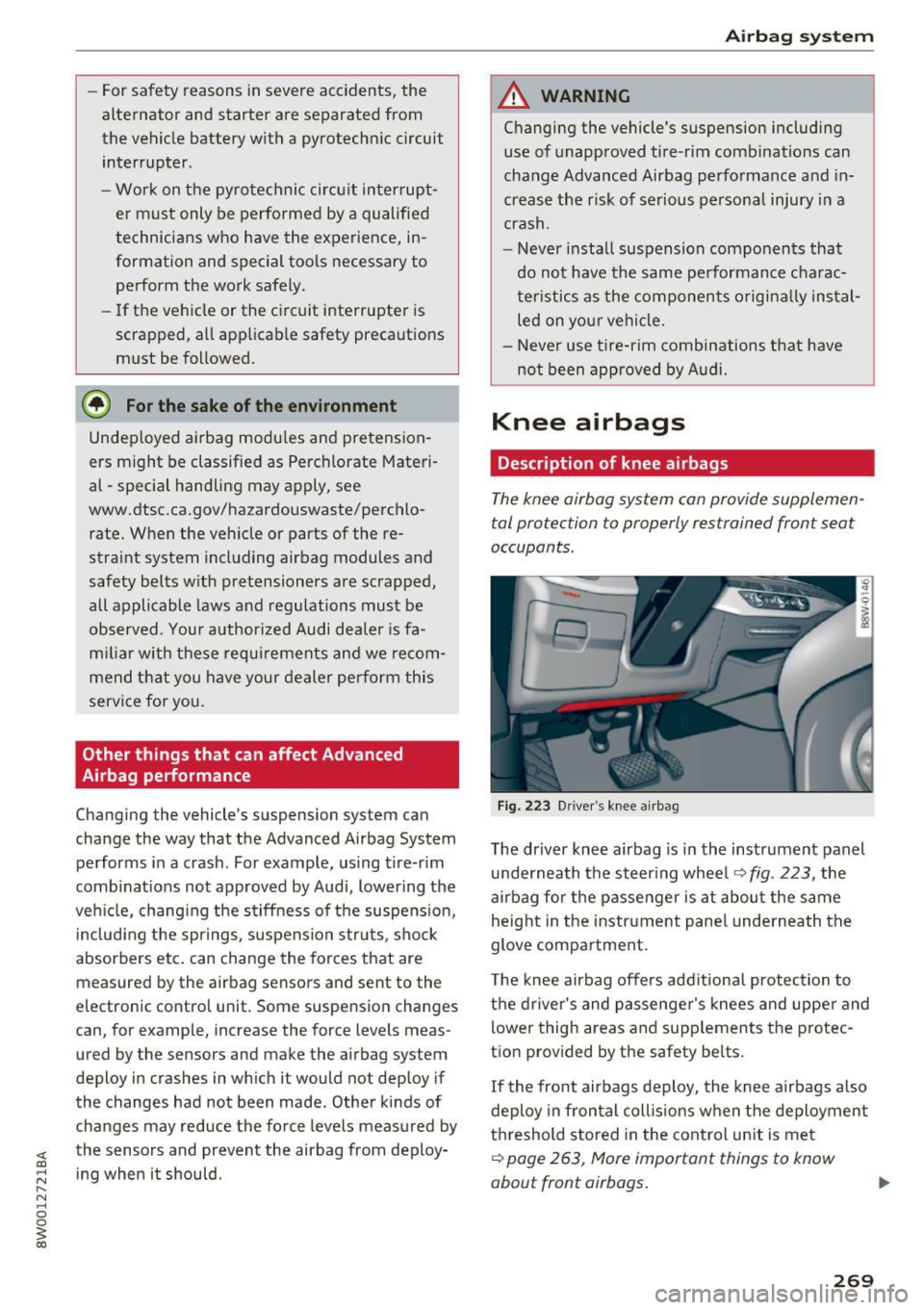
F ig. 223 D river 's knee a irbag
The driver knee airbag is in the instrument panel
u nderneath the steering whee l
~fig. 223, the
airbag fo r the p asse nger is at about the same
height in the instr ument pane l underneath the
glove compa rtment.
T he knee airbag offers add itiona l protection to
the driver's and passenge r's knees and uppe r and
lower thigh areas and supp lements the protec
tion provided by the safety be lts .
If the front airbags deploy, the knee airbags a lso
deploy in fron tal coll is ions when the deploymen t
threshold stored in the cont rol un it is me t
~ page 263, More important things to know
about front airbags.
269