reset AUDI A4 2017 User Guide
[x] Cancel search | Manufacturer: AUDI, Model Year: 2017, Model line: A4, Model: AUDI A4 2017Pages: 386, PDF Size: 96.32 MB
Page 183 of 386

<( a, .... N ,....
N .... 0 0
3 a,
Audi connect vehicle control
Introduction
Applies to vehicles with Aud i connect vehicle control
W ith the Audi connect vehicle contro l serv ices l) ,
you can access various information or use ind iv id
ua l functions i n the
Audi MMI connect app or in
myAudi .
Aud i connect vehicle control includes the follow
in g services:
- Locking/ unloc king
¢ page 182 .
-Vehi cle sta tus report ¢ page 182.
- P ark ing loc ati on ¢ page 18 2.
- Geofencing Aler t ¢page 183.
- Speed Alert ¢ page 183.
- Valet Alert ¢ page 183 .
- Stolen Vehicle Locator ¢page 183.
(D Note
Accessing spe cific data or controllin g func
t ions remotely depen ds on t he c harge level of
the vehicle batte ry. There fore, these func
tions on ly have limited ava ilab ility after
sw itchi ng off th e ignition .
(D Tips
- The serv ices are p rovided through a SI M
ca rd insta lled in the vehicle . The cost of the
ca ll an d data con nections is included in the
pr ice for the s ervices . S er vices a re provided
ass umin g tha t the cell p ho ne ne two rk re
q uir e d fo r the i nstalled SIM c ard is function
in g a nd re ad y to ope rat e. The av ail ab le serv
ic es se t b y Au di AG are only availa ble within
t h e cell phone ne twor k cove rage area fo r
the cell p hone se rvice provide r se lected by
A udi AG .
- Fo r more information o n Aud i connect, a lso
v is it
www.audiusa .com/help/audi-connect.
l) I n pre parat io n at the time of p rinting. T he ava ilab ilit y of
th e serv ices offe red depends o n th e co untry an d may
c ha ng e over tim e.
Audi connect veh icle control
Setup
Applies to vehicles with Audi connect veh icle control
To use Aud i connec t ve hicl e con trol se rvices 1l,
p lea se note the fo llow ing:
Requirements
- You mus t regis ter an d ver ify yo ur iden tit y o n
www .audi. com/myaudi .
-You mus t en te r the ve hicle code given o n your
re mote con trol key i n the Infotain ment sy stem.
- Your mob ile dev ices must b e co mpa tible.
- The
Audi MMI connect app must be i nstalled
and ope n on yo ur mobile device .
- You must be logged into your myAudi accou nt
in th e
Audi MMI connect app and your vehicle
must b e selecte d.
Entering the vehicle code
Requirement: the ignition must be sw itched on .
Se lect:
I M ENU I but ton > Audi connect > if neces
sa ry,
Display available functions > right control
button >
Audi connect user management > Key
user > Set key user.
- En ter the user name for your ve rifie d myAudi
acco unt an d ente r the ve hicle code .
- Sele ct and confirm
Log in . You a re now set as
the pr imary user .
License subscription
The v alid ity and exp iration date of your licenses
are di sp la ye d. Wh en
Warning before license ex
pires
is a ctivat ed, a mess age w ill be disp laye d
warni ng you that yo ur license is abou t to expi re.
Se lect:
I M ENU I but to n > Audi connect > Display
available functions >
right contro l button > Li
cense subscription.
Resetting the primary user
Requireme nt: the primary user m ust be set and
t h e igni tion must be switche d on . .,.
181
Page 184 of 386

Audi connect vehicl e control
Select: !MENU ! button> Audi connect > right
control button >
Aud i connect u ser manage ment
> Key user > Reset ke y user.
Warning lev els
Req uirement: the pr imary use r mus t have set one
or more warning levels . Secondary users can only
see if a warning level is active or not.
Select:
! M ENU ! button> Audi conn ect> right
control b utton >
Alert s.
A WARNING
Also read and follow the instructions regard
ing traffic safety¢
page 141.
(D) Tips
-Store the vehicle code in a secure pla ce. It
may be necessary to re-ente r the veh icle
code .
- Pay at tention to upper- and lowe r-case le t
ters when enter ing the ve hicle code.
- The vehicle code loc ks after m ultip le fai led
ent ry attemp ts. Contact an author ized A udi
dealer or authorized Audi Service Fac ility to
request a new vehicle code .
@ Tips
-If a primary user was set fo r your vehicle,
the message
One or more Audi connect
s e rv ices currentl y act ive. Fo r mor e infor
mation, p lease refer to the owne r's manual
or the Audi con nect menu.
appears every
time after the ignition is switched off .
- If you do not know the primary user of the
vehicle, reset it in the Infotainment system
¢ page 181, Resetting the primary user.
You can reg ister and verify your identity as
the new primary user on
www .audi.com /
myaudi.
If you did not receive the code re
quired for this, co ntact your authorized Audi
dealer or authori zed Audi Servi ce Fac ility.
Locking/unlocking
Applies to vehicles with Audi connect vehicle control
You can lock and un lock your vehicle using this
servi ce.
182
Requir ement
- Thi s requires the 4 -d igi t PI N that you specified
during the verification on
www.audi.com /
myaudi.
- The vehicle m ust be stationa ry.
- The ignition must be switched off.
Vehicle status report
Applies to vehicles with Audi connect vehicle control
The Dr ive r Information System collects data un
der certai n conditions and sends it to a server.
When data is stored, you can access values such
as these using the service :
- Remaining range,
- Fuel tank leve l,
- If the veh icle doors are open/closed or locked/
un locked,
- Mi leage ,
- Next service,
- Warning messages,
- Park ing l ights on/off,
For additional information on the Driver Informa
tion System, refer to¢
page 16, Driver Informa
tion System .
A WARNING
Do not ignore messages and warning or ind i
cator lights that turn on in the vehicle be
cause of the info rmation in the status report.
This could lead to break downs in on the road, a ccidents and ser ious injuries.
Parking location
Applies to vehicles with Audi connect vehicle control
The veh icle collects data unde r ce rta in cond it io ns
and sends it to a serve r.
When data is stored, you ca n access values such
as these using the se rvice :
- Vehicle location display,
- Display of one's own location,
- Route to you r vehicle .
Page 206 of 386
Radio
Radio
Opening the radio
function
The radio supports the FM, AM and SiriusXM"
(satellite radio) bands . Using the HD Radio re
ceiver also allows you to receive radio stations
on the FM and AM bands in digital format.
I·, i ' ,\.,
•-I . <)l
'
0 • 899 WIBI fM Hill 1•,'
J
89 9 WIBI r M HD4 fO) G-
Ht)Q WIH I fM HIJ<, !'.',
90.3
~
@n
Fig. 184 FM stat ion list (HD Radio FM)
Radi o: Sir iusXM i
----- R __ -ad - ,o _ _ I_D_ r,1 ·-------- N-0-S-, g- n_ a_ l __ , ~
~ 000 ~
I " 001 Prev iew NoSignal
J 002 Hits 1
003 20 on 20 N0S1gna l -
____ 0_Q_4 ___ 4_0~ _
.,. Press the I RADIO I button .
After opening the radio, the last opened station
list is disp layed .
Selecting a station: select and confirm a station
from the station list . FM/ AM stations that can be
received by digital radio are marked with the HD
radio symbol
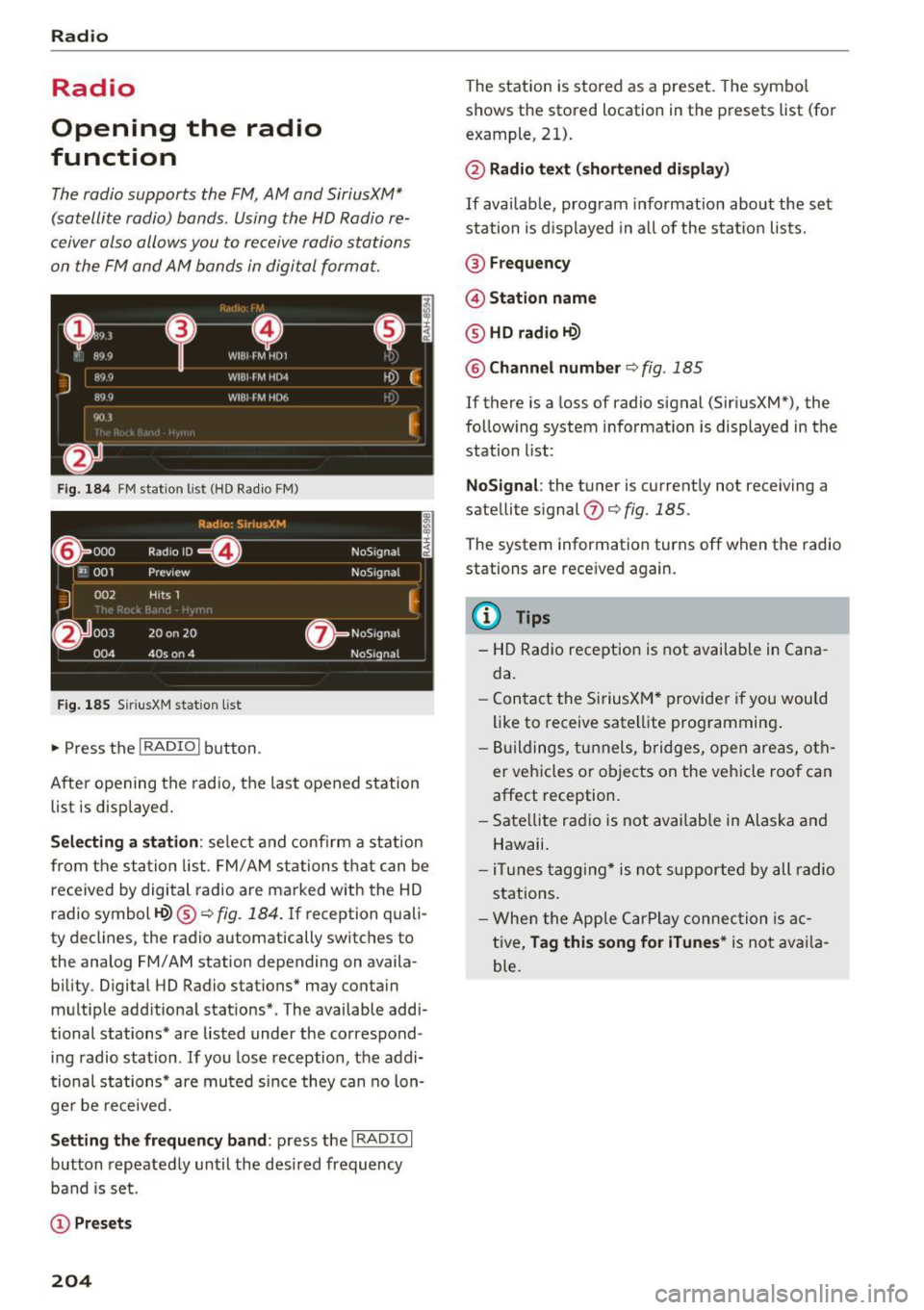
H?) ® ¢fig. 184 . If reception quali
ty decl ines, the radio automatically switches to
the analog FM/AM station depending on availa bility. Digital HD Radio stations* may conta in
multiple add itional stations* . The available addi
tional stations* are listed under the correspond
ing radio station . If you lose reception, the addi
tional stations* are muted s ince they can no lon
ger be received.
Setting the frequency band : press the I RADIO I
button repeatedly until the desired frequency
band is set.
(D Presets
204
The station is stored as a preset. The symbo l
shows the stored location in the presets list (for
example, 21).
@ Radio text (shortened display)
If available, program information about the set
station is d is played in a ll of the station lists.
@ Frequency
@ Station name
® HD radio H?)
@ Channel number Q fig. 185
If there is a loss of radio signal (SiriusXM*), the
following system informat ion is displayed in the
station list:
NoSignal : the tuner is currently not receiving a
satellite signal
(J) ¢ fig. 185 .
The system information turns off when the radio
stations are rece ived again.
@ Tips
- HD Radio reception is not available in Cana
da.
- Contact the SiriusXM* provider if you would
like to
receive satellite programming .
- Buildings, tunnels, bridges, open areas, oth
er vehicles o r objects on the vehicle roof can
affect reception.
- Satellite radio is not availab le in Alaska and
Hawaii.
- iTunes tagging* is not supported by all radio
stations.
- When the Apple CarPlay connection is ac
tive,
Tag this song for iTunes * is not availa
ble.
Page 209 of 386
Radio menu
Fig. 1 89 Examp le of t he radio menu
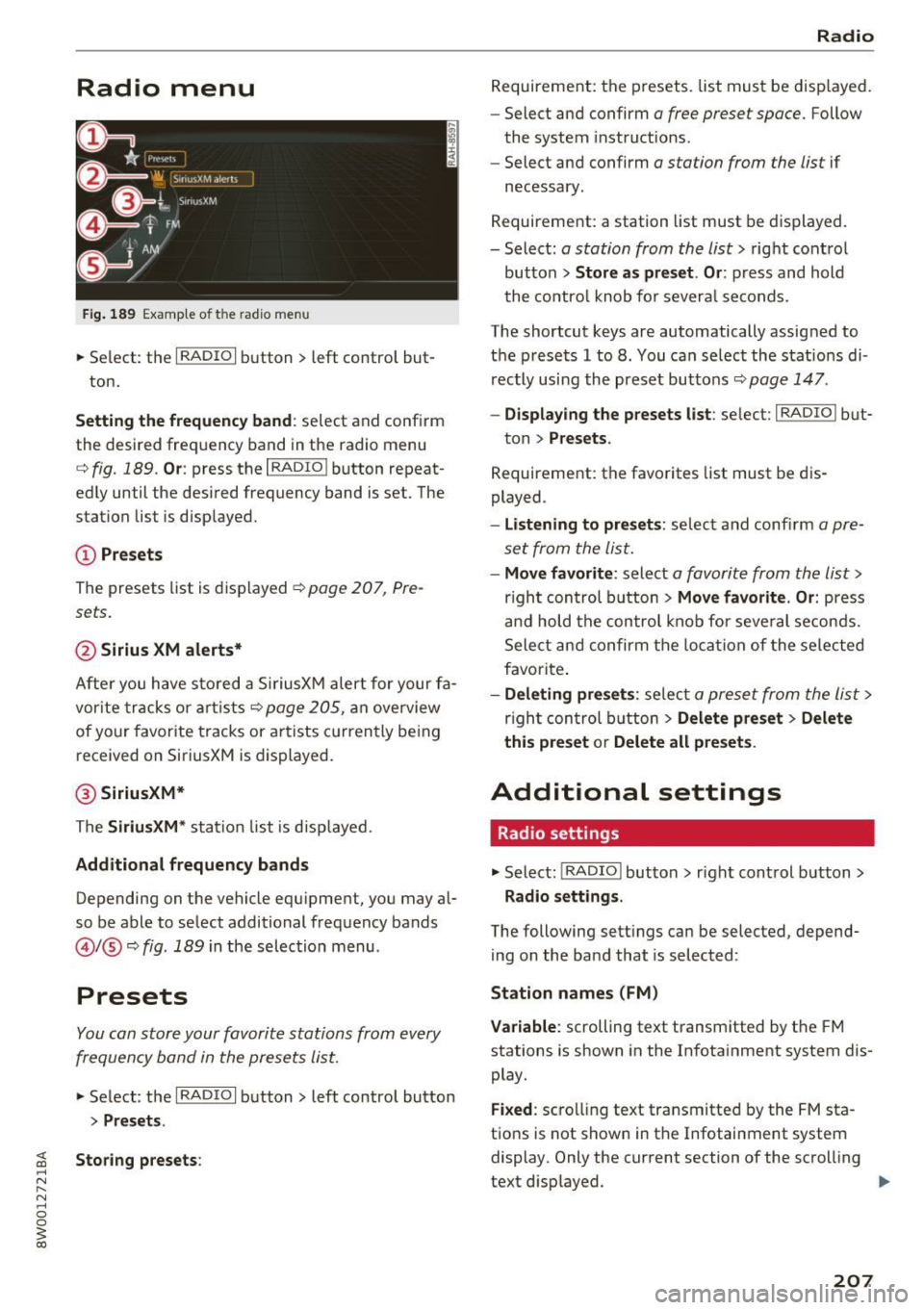
.,. Se lect: the I RADIO I button > left control but-
ton.
Setting the frequenc y band : select and confirm
the desired freq uency band in the radio menu
c::> fig. 189 . Or: press the I RADIO I button repeat
ed ly until the desired frequency band is set. The
station list is disp layed.
CD Pr esets
The presets list is displayed~ page 207, Pre
sets.
@ Sirius XM alerts*
After you have s to red a Si riusXM alert for your fa
vor ite tracks or a rtists
c::> page 205, an overview
of your favor ite tracks or a rtists c urrently be ing
received on SiriusXM is displayed.
@ SiriusXM*
The Siriu sXM * station list is disp layed.
Additional frequency bands
Depending on the vehicle equipment, you may a l
so be able to select additional frequency bands
@l @c::> fig. 189 in the selec tion menu .
Presets
You can store your favorite stations from every
frequency band in the presets list.
.,. Select : the I RADIO I button > left control button
> Presets.
Storing presets :
Radio
Requirement: the presets. list must be disp layed.
- Select and confirm
a free preset space. Follow
the system instruct ions .
- Select and confirm
a station from the list if
necessary .
Requirement: a station list must be d isplayed.
- Select:
a station from the list> right contro l
button >
Store as preset . Or : press and hold
the contro l knob fo r severa l se conds.
The shortcut keys are automatically assig ned to
the prese ts 1 to 8. You can se lect the stat io ns di
rectly using the preset butto ns
c::> page 147.
- Displ aying the presets li st: se lect: I RADIO I but-
ton >
Presets .
Requirement: the favorites list must be dis
played .
-Listening to preset s: select and confi rm a pre
set from the list.
- Move favorite : select a favorite from the list>
right con trol button > Move favorite . Or : press
an d hold the control knob for seve ral se con ds.
Select an d confirm t he loca tion of the selected
f a vorite .
-Deleting pre set s: selec t a preset from the list >
righ t con trol b utton > Delete preset > Delete
this preset
o r Delete all preset s.
Additional settings
Radio settings
.,. Select: !RADIO I button> r ight cont rol button>
Radio settings .
The following sett ings can be selected, depend
ing on the band that is selected :
Station name s (FM)
Variable:
scrolling text transm itted by the FM
stations is shown in the In fotainment system dis
play .
Fixed : scro lli ng text transmitted by the FM sta
tions is not shown in the Infotainment system
display. Only the current section of the scroll ing
text d isplayed. .,_
207
Page 210 of 386
Radio
FM/AM HD Radio *
You can switch HD R ad io recept ion on or off.
Channel sorting (Si riusXM *)
You can set the station sorting for SiriusXM sta
tion lists* by:
- Channel n umber : the stations are sorted in as
cending order according to their station num
ber .
-Channe l name : the stations are listed in alpha
betical order .
-First categor y, the n channel number : the sta
tions are sorted by their category and then by
their channel numbers .
-First categor y, then channel name : the sta
tions are sorted by their category and then by
their channel names.
C ateg ory filter (Sirius XM*)
The stations shown in the station list can be fi l
tered by your personal preferences and by pro
gram type . The program categor ies that you can
select depend on what is offered by your provid
er . Select the
All categor ie s option to deactivate
all filter options and disp lay all ava ilable stations
i n the sate llite station list.
Additional station information
When the function is switched on~ and the sta
tions or presets list is open, the display will
sw itch to the
Additional stat io n i nform ation
view after approximate ly five seconds
Troubleshooting
Problem Solution
¢ page 206. Depending on availability, in forma
tion about the set station (such as station name,
artist and station logo) is disp layed in this view .
Preferred picture vi ew *
You can set your preferred s creen view fo r the
Additional station inf ormation disp lay
¢ page 206 .
-Station logo: the station logo is displayed de
pend ing on availability.
- Cov er art : the album cove r is d isp layed depend-
ing on availability.
Gracenote online data base *
Requirement: the MMI must be co nnected to the
Internet . The
C ov er art opt ion m ust be selected
¢ page 208, Pref erred pictur e view *.
When the function is switched on~, the album
cover or genre cover for the song that is p lay ing
i s loaded from the Gracenote online database,
depending on ava ilability.
Subscription status (SiriusXM }*
This opt ion is available when your subscr ipt ion is
a bout to expire or has alre ady expired . The expi
ration date for your license is displayed.
Call to Siriu sXM* : the contact information for
your sate llite rad io provider is displayed . To call
your satellite rad io provider using the MMI , press
Call to Siriu sXM*.
A station with poo r reception is no longer Store the stat io n as a preset in advance . Access the p reset
displayed in the station l ist once you t
hroug h the presets list on
¢page 207.
swit ch to a d ifferen t station.
208
Page 211 of 386

<( a, .... N ,....
N .... 0 0
3 a,
Media
Introduction
There are various media drives and connections
avai lable in the MMI. For example, you can play
audio/video files* from the Jukebox* or connect
your mobile device to the Audi mus ic interface*
and operate it through the MMI.
Notes
General information
Media and format restrictions:
the MMI (includ
ing the SD card reader and the USB storage de
vice connection*) was tested with a variety of products and media on the market. However,
there may be cases where individual devices or media and audio/video files* may not be recog
nized, may play only w ith restrictions or may not
play at all.
Digital Rights Management: please note that
the audio/video files* are subject to copyright
protection .
The media drives do not play fi les that are pro
tected by ORM and that are ident ified with the
symbol
l'.D .
Data security: never store important data on SD
cards, the Jukebox*, CDs/DVDs or mobile devices .
Audi AG is not responsible for damaged or lost
files and media .
Loading times : the more files/fo lders/play lists
that are on a storage medium, the longer it will
take to load the audio/video files* . Audi recom
mends using storage media that only contain au
dio/video files*. To decrease the t i me it takes to
load audio/v ideo files*, create subfolders (for ex
ample, fo r the art ist or album). The loading time
will also increase when importing fi les.
Additional information : when playing, audio
files are automatically displayed w ith any add i
tional information that is stored (such as the ar
tist, track and album cover). If this information is
not available o n the storage medium, the MMI
will check the Grace note metadata database .
Media
However, in some cases, the additional informa
tion may not be displayed.
Restricted functionality : reset the Media set
tings
t o the factory default settings if functional
ity is restr icted ¢
page 230.
If functionality is restricted, reset the Jukebox*
to the factory default settings¢ page 230.
For information about the propert ies of support
ed media and fi le formats, refer to ¢
page 223.
(D Note
You are responsible for all precaut ions taken
for data protection, anti-virus protect ion and
protection against loss of data on mobile de
v ices that are used to acc ess the Internet
through the Wi-Fi hotspot.
CD/DVD operation
CD/DVD and format restrictions:
the functionali
ty of individual storage media may be limited due
to the variety of blank CDs/DVDs availab le and
the various capacities. Audio CDs or video DVDs
with copy protection, CDs/DVDs that do not con
form to the standard and mult isess ion CDs may
have limited playback or may not play at all . Audi
recommends finaliz ing t he recording process
whe n creat ing mult isess ion CDs. Mult isession is
not supported for DVDs .
Using CDs /DVDs, the CD drive or the DVD drive :
to ensure correct, high-quality playback and to
prevent damage to the drive or disc reading er
ro rs, always store CDs/DVDs in a protective
s leeve and do not expose them to direct sunlight.
Do
not use:
- Damaged, dirty or scratched CDs/DVDs
- Single CDs/DVDs (3 inch/8 cm diameter)
- CD/DVDs that are not round
- CDs/DVDs w ith labels
- Protective rings
- Cleaning CDs
Thermal protection switch: CD/DVD playback
may be temporarily unavailable if outside tem-
peratures are extremely hot or cold. A thermal
llo-
209
Page 218 of 386

Media
You can connect mobile devices using the analog
AUX port .
-Connecting a mobile device to the AUX input:
connect the cable®<=> fig. 195 to the AUX in
put ® on the Audi music interface and then to
the mobile device@ (such as an MP3 player or
smartphone).
- Disconnecting a mobile device from the AUX
input :
remove the cable S@ <=> fig. 195 from
the AUX input@<=>fig.
195 .
-Operating: select and confirm the External au
dio player @source
<=> page 217, fig. 196. The
media are started and operated through the
mobile device@<=>fig.
195.
A WARNING
Driving requires your complete and undivided
attention. As the driver, you have complete
responsibility for safety in traffic. Never oper
ate mobile devices while driving, because this
increases the risk of an accident .
@ Note
-Remove the connector from the Audi music
interface carefully so it is not damaged.
- Use a USB extension cable to connect devi
ces that have an integrated USB connector
(such as a USB stick) to prevent damage to
your USB device and the Audi music inter
face.
- Extremely high or low temperatures that
can occur inside vehicles can damage mobile
devices and/or impair their performance .
Never leave mobile devices in the vehicle in
extremely high or low temperatures.
@ Tips
-Do not use an additional adapter or USB ex
tension cable to connect mobile devices to
the Audi music interface that already have a
cable or that must be connected with a USB
adapter( <=>
page 215). This may impair the
functionality.
1 > A pp lies only to MTP devic e s. Doe s no t a ppl y to A pple de vi
ces and U SB m ass s torage d evic es.
216
-You can purchase the AUX connector cable
from an authorized Audi dealer or at spe
cialty stores.
- Functionality is not guaranteed for mobile
devices that do not conform to the USB 2.0
specification .
- USB hubs are not supported.
- Some versions of the iPod such as the iPod
shuffle cannot be connected to the USB
adapter for devices with Apple Dock connec
tor. Connect these devices using a AUX con
nector cable.
- Changed content on a mobile device
ll that
is connected to the Audi music interface
may not be displayed in the media center.
In this case, reset the
Media settings back
to
Factory settings <=> page 230.
-Video playback through the Audi music in
terface is only supported if the connected
device is recognized as a USB storage device
(for example a USB stick). Apple devices and
MTP devices (such as smartphones) are not
recognized as USB storage devices.
- iPod/iPhone/iPad malfunctions also affect
the operation of the MMI. Reset your iPod/
iPhone/iPad if this happens.
- For important information on operating
your iPod/iPhone/iPad , refer to the user
guide for that device. Audi recommends up
dating the iPod/iPhone/iPad software to the
latest version.
- For more information about the Audi music
interface and supported devices, check the
Audi database for mobile devices at
www.audiusa.com/bluetooth or contact an
authorized Audi dealer or authorized Audi
Service Facility.
Page 224 of 386

Media
Audio track1l
You can manually set the a udio trac k (langu age
and audio format). The language and aud io for
mat options depend on the v ideo DVD.
Subtitles1l
You can set s ubt it les for playback manua lly . T he
lang uages ava ilable depend on t he DV D.
Aspect
Aud i recomme nds the Automatic setting for the
p icture format . You can set the picture format
depending on the active fi le o r sou rce (fo r exam
p le video file*, DVD*).
Picture for-
Description
mat
Automatic
T he MM I detects the p icture for-
mat of the source and disp lays the
i mage in the optim um ratio. Black
bars may appea r on the s ides of
the display, depending on the
source format and the Infotain-
ment system disp lay that is instal-
led.
Zoom The im age is enlarged to fill the
entire Infotainment system dis -
p lay . Switch the function off if the
image is disto rted.
Cinema-Use t his setting for films in c inema
s cope format 21:9. Black ba rs are show n
in t he upper and lower edges o f the
I nfo tainment system display.
l ) Depe nding o n th e DVD , thi s may not be possib le d uring
p layba ck.
222
Picture for· Description
mat
Or iginal
The image is d isp layed in the ratio
of the source format. Select this opt ion if the image is distorted o r a
section of the image is cut off
when
Auto is se lected .
4:3 The image is f ixed in t he 4 :3 pie -
ture format. Blac k bars are shown
on the sides of the Infota inment
system d isplay .
16:9 The image is f ixed in the 16:9 p ie-
ture format . Black bars are s hown
in the upper and lower e dges of the
Infotainment system d isplay.
{!) Tips
- Not all video DVDs have parenta l cont rol.
- The secur ity levels fo r the
Parental control
are based on the US standar ds from the Mo
t ion Picture Associat ion of Ame rica (MPAA) .
Note that the age levels for v ideo DVDs in
E uropean countries may differ.
- Password entry fo r
Parental control will be
locked for approximately one m inute if you
enter the incorrect password th ree t imes in
a row . T he passwo rd can only be reset by an
au thorized Audi dealer.
Page 227 of 386

<( a, .... N ,....
N .... 0 0
3 a,
Problem
Audi music interface :
the porta-
ble audio device is not recognized
as a source.
Audi music interface : the audio
playback through the iPod/
iPhone/iPad is malfunctioning.
Audi music interface : contents
that are changed on a mobile de-
vice connected to the Audi music
interface are not displayed in the
media center ..
AUX input: there is stat ic when
connecting and disconnecting the
AUX connection cable.
Bluetooth audio player* /Wi-Fi
audio player *:
aud io playback in-
terference.
Jukebox*: tracks on the imported
playlist are grayed out.
Jukebox*: i mported tracks cannot
be played or found.
Wi-Fi audio player *: multiple de-
vices are connected to the Wi-Fi
hotspot. A media player (such as a
smartphone) appears as the
source and cannot be changed.
Online media *: connection failed
between the MMI and the
Audi
MMI connect
app.
Wi-Fi audio player* /Online me-
dia *:
audio playback interference.
Media
Solution
For many ce ll phones or mobile devices, playback is not possible
when the battery level is too low (less than 5% of its capacity).
The mobile de-vice will only be recognized as a source in the MMI
after connecting if the battery charge is sufficient.
The
Bluetooth audio player f unction is switched on. Switch this
function off
c:> page 231 when you a re not using the Bluetooth
audio player.
Reset the Media settings to the facto ry defau lt settings
c:>page 230.
When connecting a nd disconnecting, the External audio player
source is already selected. Before connecting or disconnecting the
mobile device, either mute the device (refer to
c:> page 233) or
sw itch to a different audio source (for example
c:> page 204, Open-
ing the radio function).
Only one interface should be act ively used at a time to ensure
problem-free playback.
When importing playlists, a ll of the fi les themselves must be im-
ported.
If yo u cannot find impor ted tracks in the media center, they may
not be supported. Only copy supported files
c:> page 223 to the
Jukebox.
Close the
Audi MMI connect app on the connected dev ices (for ex-
ample, smartphones) that are not being used as the Wi-Fi audio
p laye r*. Likewise, close the UPnP server apps or the media pe rm is-
sions on the integrated UPnP/DLNA server. Connect the desired
device as a Wi-Fi audio pla yer*
c:> page 213.
To establish a connection to the MMI, the MMI connection switch
must be switched on in the
Audi MMI connect app status screen.
Malfunctions can occur during audio playback if the
Hotspot and
client a)
c:> page 177 Wi-Fi mode setting was selected. For p layback
without interference, Audi recommends the
Hotspot setting for
Wi-Fi mode.
225
Page 228 of 386

Media
Problem Solution
Audi music inte rface :
contents Reset the Media settings to the factory default settings
that are changed on a mobile de-
c:> page230 .
vice connected to the Audi music
interface are not displayed in the
med ia center ..
Bluetooth audio player *: interfer-
Playback interference can occur when using the Bluetooth audio
ence with track d isp lay and aud io player if a music player app from a third party provider is open .
playback. Audi recommends using the integrated media player on your Blue-
tooth device (such as a smartphone).
• > Not a vailab le in all vehicl es.
226