reset AUDI A4 2017 Owner's Manual
[x] Cancel search | Manufacturer: AUDI, Model Year: 2017, Model line: A4, Model: AUDI A4 2017Pages: 386, PDF Size: 96.32 MB
Page 232 of 386
System settings
Speech training (only when the vehicle is station
ary): you can adapt the voice recognition system
to your voice or pronunciation in order to improve
the system's ability to recogni ze your speech. In
dividual training is comprised of 20 speech en
tr ies that consist of commands and sequences of
numbers . You ca n delete the programmed voice
training with the
Reset individual speech train·
ing
function.
Display brightness
Display brightness:
you can adjust the bright
ness of the Infotainment system display by turn
ing the control knob .
Factory settings
The follow ing functions can be reset to the facto
ry default settings :
-Sound settings
- Radio
- Media settings
-Jukebox*
- Directory
- Telephone
- Bluetooth and Wi-Fi*
- Navigation settings *
- Navigation and online memory*
- Speech dialog system*
- Message settings*
- Shortcut keys
- Apps *
- Tool tips
- Audi connect*
- Audi smartphone interface*
You can select the des ired functions individually
or all at once with the option
Select all entries .
Select and confirm Restore factory settings.
@ Tips
-Make sure that not only the settings were
deleted but also the stored data, if applica
ble.
- If you reset the
Navigation and online
memory *, Apps * or Audi connect*
to the
factory default settings, the system auto
matically restarts after approximately 20
seconds . The Infotainment system display
230
will be black for several minutes when re
starting.
Connection manager
Introduction
The connection manager gives you an overview
of your connected devices and their network sta tus .
Settings Conne-ction manager I
===---- · MyPhone (, • Phone :
t MyPhone
• Second telephone:
• Data conn ection :
• MM I connect App :
• Audio player: !ill
Not connectl!d
Audi connect SI.. .
Not connected
Not connected
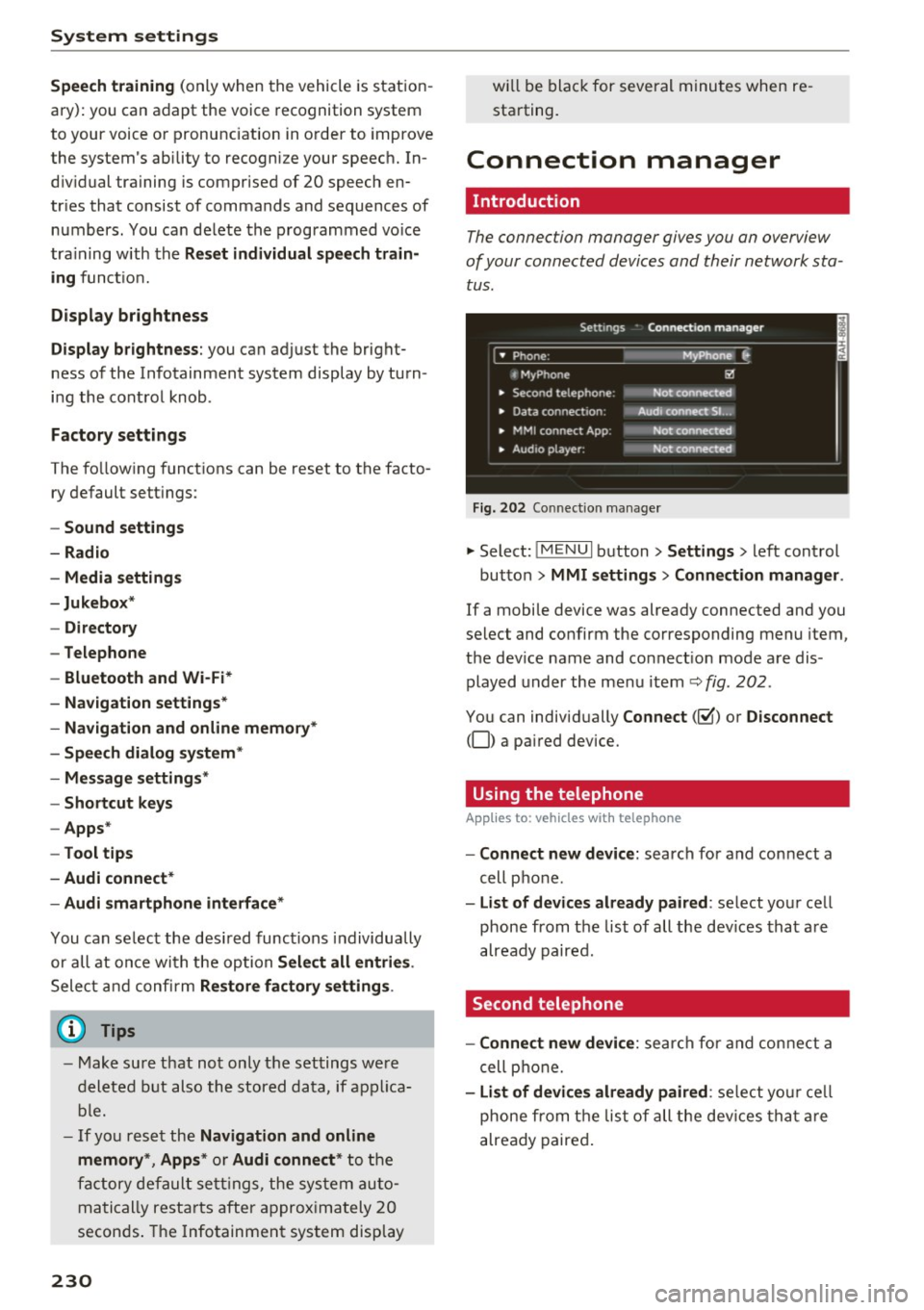
Fig. 202 Co nnect ion manager
.,. Select: !MENUI button> Settings> left control
button>
MMI settings > Connection manager.
If a mobile device was already connected and you
select and confirm the corresponding menu item,
the dev ice name and connect ion mode are dis
played under the menu item
Q fig. 202.
You can individually Connect(~) or Disconnect
(0) a pa ired device.
Using the telephone
App lies to: vehicles wit h telepho ne
- Connect new device: search for and connect a
cell phone .
-List of devices already paired: select your cell
phone from the list of all the dev ices that are
already paired.
Second telephone
- Connect new device:
search for and connect a
cell phone.
-List of devices already paired : select your cell
phone from the list of all the devices that are
already paired.
Page 234 of 386

System settings
-Bluetooth audio player : when this func tion is
switched on~, the Bluetooth audio player is
available as a so urce in t he
Media menu.
- Bluetooth name : the MMI B luetooth name (for
example ,,AUDI M MI 2015") is displayed and
can be changed.
Online settings*
- Data u sage counter :
the amoun t of d ata pac k
ets tha t are sent a nd received throug h the MM I
is d isp layed. You can reset the data usage infor
mation to zero using the
Reset data counter
option.
- Network status : the mobile netwo rk p rovider
fo r data se rvice as well as the netwo rk status
are disp laye d.
Wi-Fi options*
Refer to 9 page 1 77, Wi -Fi hotspo t.
Storing as a default telephone
Applies to: vehicles with telephone
Re qui remen t: a cell phone must be connec ted to
t he MMI
9page 160.
As soon as t he cell phone is i n range and the
Blue tooth func tion on the ce ll phone and in the
MM I is swi tched on, this ce ll phone is g iven pr ior
ity ove r th e other Blu et ooth devices and is con
ne cte d dire ct ly to the M MI. T he conn ecte d cell
p ho ne i s d ispl aye d first in the device list.
Network settings*
- Login :
you can chose an Automatic log in to
yo ur cell phone serv ic e prov ider's netwo rk, o r
yo u can c hoose a
Manual login from the lis t of
available networ ks.
- Network selection : networ ks avai lab le in t he
c ur rent lo ca ti on can be se le ct ed unde r ne twor k
sele ction. T his func tion is only av ailable for th e
Manual login se tting .
CarPlay sound settings/ Android Auto sound
settings
Applies to: vehicles with Audi smartphone interface
Refer to 9page 233.
232
About Apple CarPlay/ About Android Auto
Applies to: vehicles with Audi smartphone interface
Here you w ill find leg al inform ation reg arding
t h e use of Apple Car Play o r Andro id A uto and in
fo rmat ion about devi ce -specific data exc han ge.
Delete CarPlay device/Delete Android Auto
device
Applies to: vehicles with Audi smartphone interface
-Req uiremen t: your cell phone mu st not be con
nected to the A udi music inte rface with a USB
ada pte r.
- To remove you r ce ll p hone from the list o f all
cell phones that are a lrea dy paire d, select an d
confirm
Delete CarPlay device or Delete An
droid Auto device .
(D Tips
Some SIM card s do not a llow the SIM PIN
qu eries to be sw itche d
off.
System update
.,. Select : !ME NUI button> Settings > left control
button >
System maintenance.
- System update :
slide the sto ra g e device with
t he upda te da ta into the a pprop ria te drive
<=:> page 21 0. Se lect and confi rm the dr ive >
Start update . The length of the process de
pends on the size of the update.
- Reset driver installation: the selecte d media
driver package is reset to t he settings at the
tim e of delivery .
-Ve rsion information : information on the MMI
so ftware version and the navigation database*
software versi on is d is pl ayed. The
Software in
formation
function also prov ides i nformat io n
on the softwa re co nta ined in the M MI an d the
li censing agr eement .
Page 236 of 386
System settings
(D Tips
Volumes that are too h igh o r too low are a u
tomatically a djuste d to a set leve l w hen the
MM I is switched on .
Adjusting the system volume
.,. Se lect : I MENU I button > Sound > left contro l
button .
Telephone
Applies to: vehicles w ith telephone
Mute telephone: messages and ringtones are set
to mute.
Ringtone : refe r to ¢ page 170, Ringtone and
volume settings .
Ringtone volume :
you ca n adjust the volume of
the se le cte d r ing to ne by turning the con tro l
knob.
Me ssage volume : you ca n ad just t he volume of
the not ifi cat io n for an in comi ng tex t me ssage by
tur ning t he con trol kno b.
Microphone sensitivity: you ca n ad just the ca ll
volume du ring a phone ca ll by tu rning the co ntro l
knob.
Navigation
Applies to: vehicles with navigation system
Voice guidance: refer to ¢ page 196 .
Voice guidance during phone call: refer to
¢ page 196.
Voice guidance volume : you can ad just the vo ice
gu idance volume by tur ning the control knob .
Or:
you can ad just the vo ice gui dance volume during
active route g uidance by turning the On/Off
knob.
Enterta inment fader : the volume of au dio play
bac k can be tempo rarily lowe red w hen the pa rk
ing system or voice g uidance is active .
Voice recognition system
Applies to: vehicles with voice recognition system
Command display : the display o f poss ible co m
mands du ring voice input can be switc he d on or
off .
234
Short dialog : you can disp lay a sho rter form of
the p rompts.
Volume: you can adju st t he v olum e of the
prom pts by t urning the con trol knob .
Speech training (only w hen th e vehi cle is sta tion
a ry): yo u can adapt the vo ice recog nition sys tem
t o yo ur voic e or pro nunc iati on in o rd er t o i mpro ve
th e sys tem's ability to re co g ni ze yo ur s peech . In
dividua l train in g i s comprised of 20 speech en
tries that cons ist of commands and seque nces of
numbe rs. You can delete the programme d voice
training with the
Reset individual speech train
ing
function .
Parking system*
You can adjus t the vol ume o f the signa l tone by
turnin g the contro l knob.
- Adjusting th e Front volume : select and co n
fi rm
High , Medium or Low .
- Adjusting
th e Rear volume : sele ct and confirm
High , Medium or Low .
MMI touch*
You can adjus t the vol ume o f the prompts fo r the
MM I touch* by t urnin g the cont rol knob .
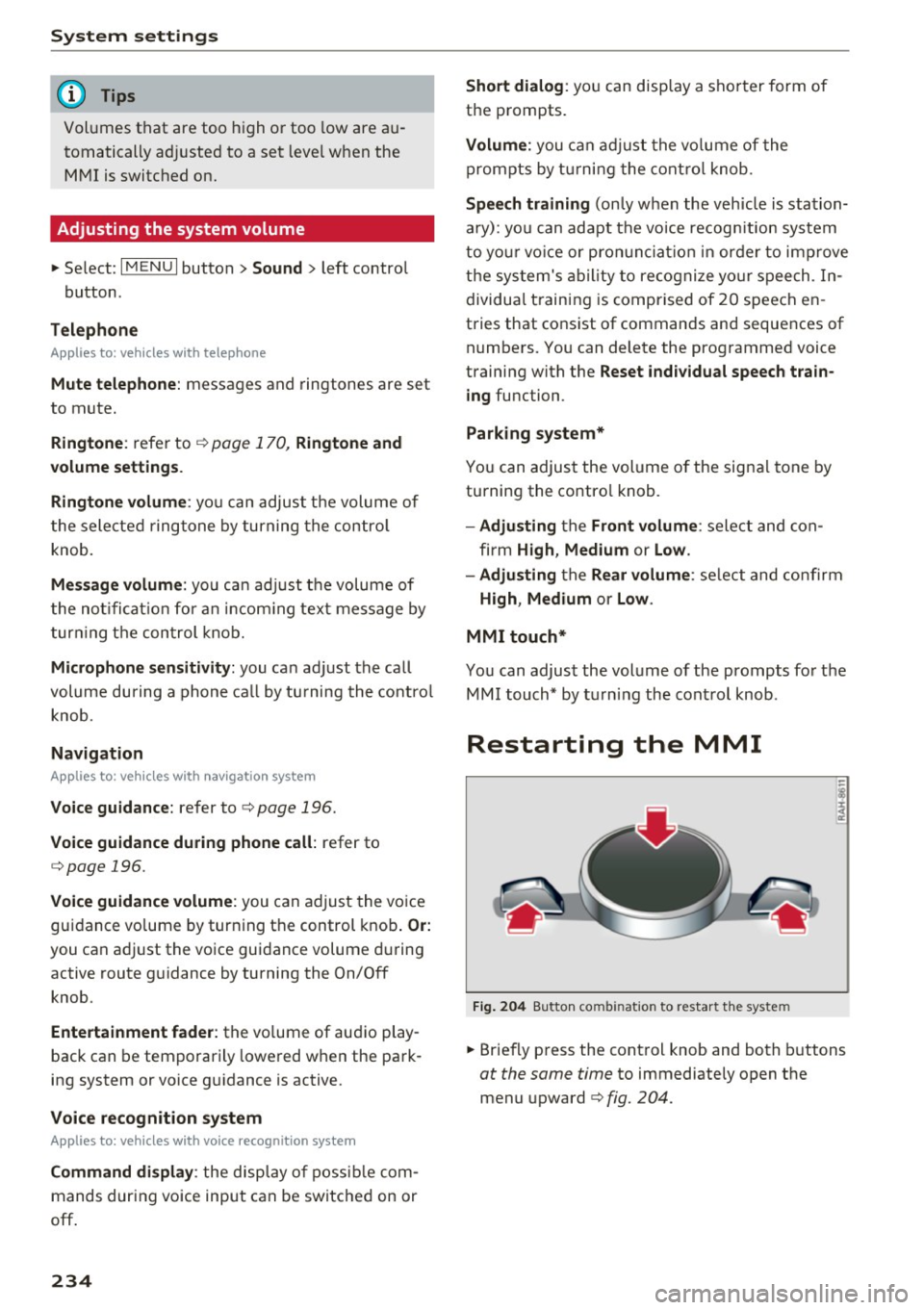
Restarting the MMI
Fig. 204 Bu tton co mbin at io n to restart t he syste m
.,. Briefly p ress the cont rol knob and both buttons
at the same time to immediately open the
menu upward ¢
fig. 204.
Page 237 of 386
<( a, .... N ,....
N .... 0 0
Software license information
Information on the software contained in the
MMI and the license agreement.
- Se lect: I MENU I button > Settings > left control
button
> System maintenance > Vers ion infor
mation .
- Or:
on line at www .audi.com/softwareinfo .
Information on the software contained in the
Head-up display and the license agreement .
-Press and hold the button for the Head-up dis
play @longer than five seconds after switching
on the ignition~
page 8, fig. 1.
- To close the i nfo rmation w indow, press a but
ton on the multif unction steeri ng wheel or a
button to open a menu on t he M MI control
panel.
Information on the software contained in the
instrument cluster and the license agreement .
Press the reset button twice with in f ive seconds
of switching the ignition on.
1>
3 1) Not availab le in all ve hicles. a,
System settings
235
Page 318 of 386
Check ing and F illing
Windshield washer
system
.........
w •
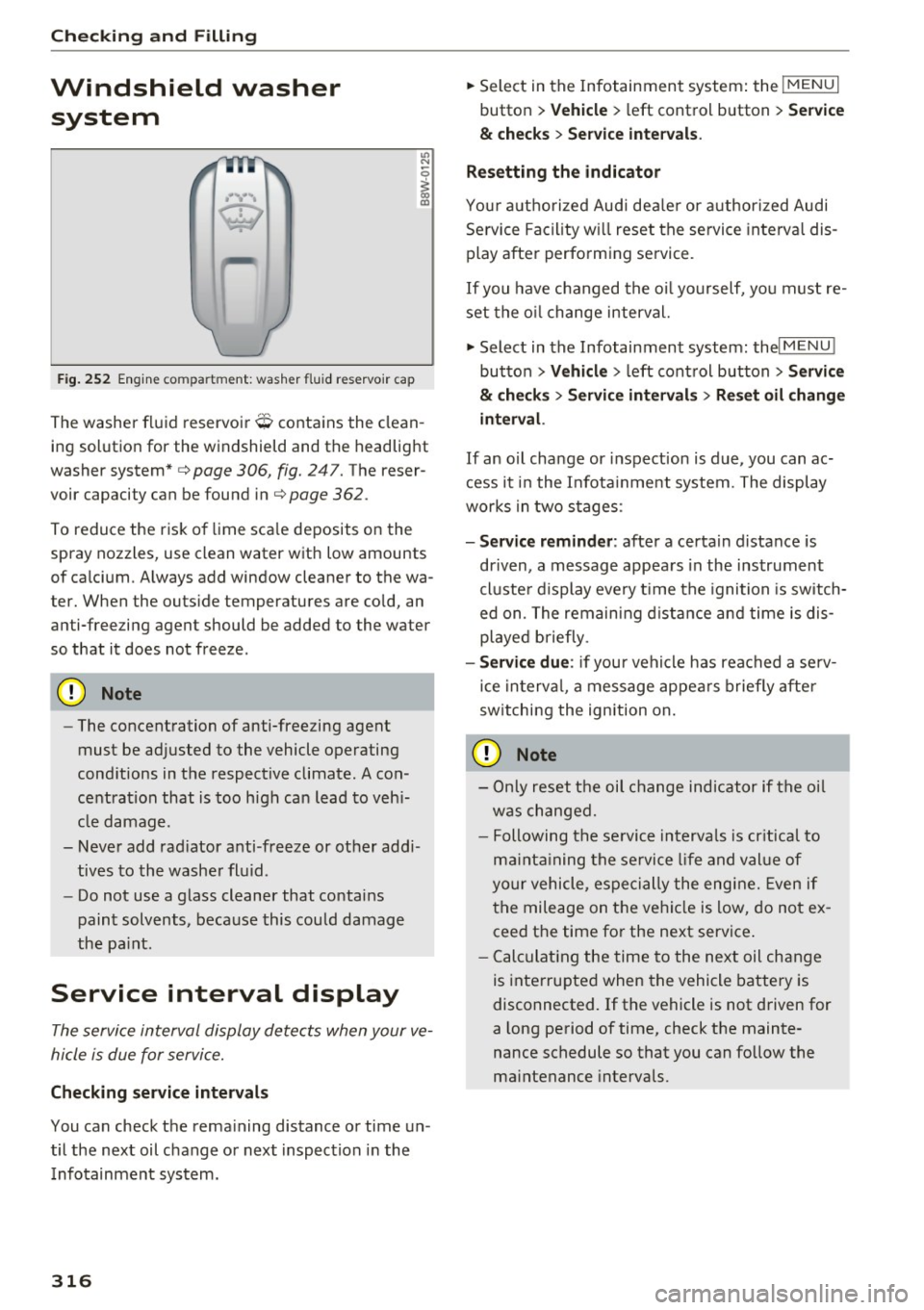
F ig. 252 Engin e comp artm ent : wash er fluid r ese rvoir cap
"' N
0
~ 00 m
The washer fluid reservoir O contains the clean
ing solution for the windshield and the headlight
washer system* c>
page 306, fig. 24 7. The reser
voir capacity can be found inc>
page 362 .
To reduce the risk of lime sca le deposits on the
spray nozzles, use clean water with low amounts
of calci um. Always add window cleaner to the wa
t er. When the outside temper atures are co ld, an
anti-free zing agent should be added to the water
so that it does not freeze .
Cl) Note
-The concentration of anti-free zing agent
must be adjusted to the vehicle operating
conditions in the respective climate. A con
centration that is too high can lead to veh i
cle damage .
- Never add rad iator anti -freeze or other addi
tives to the washer fluid .
- Do not use a glass cleaner that contains
paint solvents, beca use this could damage
the pa int.
Service interval display
The service interval display detects when your ve
hicle is due for service.
Checking se rv ice intervals
You can check the rema ining distance or time un
til the next oil change or next inspection i n the
I nfotainment system .
316
.. Select in the Infotainment system : the !MENUI
button > V ehicle > left control button > Se rvice
& che cks > Ser vice inte rvals .
Resettin g the indicator
You r authorized Audi dea le r or authorized Audi
Se rvice Facility w ill reset the se rvice interval dis
play after performing service.
If you have changed the oi l yourself, yo u must re
set the o il change interval.
.. Select in the Infotainment system: thel
M ENU !
button > Vehicle > left control button > Ser vic e
& check s > Service int erv al s > Re set oil chang e
int erva l.
If an o il cha nge or inspection is due, you can ac
cess it i n the Infota inment system. The display
works in two stages :
-Se rv ice re mind er: after a certain distance is
dr iven, a message appears in the instrument
cluste r display eve ry t ime the ignition is switch
ed on. The remaining d istance and time is dis
played briefly .
-Serv ic e due : if your vehicle has reached a se rv
ice in terva l, a message appears briefly after
sw itching the ignition on.
(D Note
- Only reset the oil change indicator if the oi l
was changed.
- Following the se rvice interva ls is cr itical to
ma inta ining the se rvice l ife and val ue of
yo ur vehicle, especially the engine. Even if
the mileage on the vehi cle is low, do not ex
ceed the time for the next service .
- Calc ulat ing the time to the next oil change
is interrupted when the vehicle battery is
disconnected.
If the vehicle is not driven for
a long period of time, check the mainte
nance schedule so that you can fo llow the
maintenance intervals .
Page 378 of 386
Index
Parking system
Trai ler hitch . . . . . . . . . . . . . . . . . . . . . . . . 132
also refer to Parking systems . . . . . . 125, 126
P a rking systems . . . . . . . . . . . . . . . . . . . . . . 124
M alf unct ion . . . . . . . . . . . . . . . . . . . . . . . . 13 2
P a rking system p lus . . . . . . . . . . . . . . . . . . 125
P eripheral cameras . . . . . . . . . . . . . . . . . . 128
Pe riphe ral display . . . . . . . . . . . . . . . . . . . 125
Rea r parking system . . . . . . . . . . . . . . . . . 125
Rearview camera . . . . . . . . . . . . . . . . . . . . 126
Sett ings . . . . . . . . . . . . . . . . . . . . . . . . . . . 131
Particu late filter (Diesel) . . . . . . . . . . . . . . . 303
Pa rts replaceme nt . . . . . . . . . . . . . . . . . . . . 365
Pass-throug h . . . . . . . . . . . . . . . . . . . . . . . . . 66
P ASSEN GER AIR BAG ligh t . . . . . . . . . . . . . . 265
Paths (Owner's Manual) . . . . . . . . . . . . . . . . 143
Pause (audio/video file) . . . . . . . . . . . . . . . . 217
P e d als . . . . . . . . . . . . . . . . . . . . . . . . . . . . . . 241
Peripheral display . . . . . . . . . . . . . . . . . . . . . 125
Pe rsonal ro ute assistance . . . . . . . . . . . . . . 193
Pe rsonal W i-F i hotspot . . . . . . . . . . . . . . . . . 172
Phone book
refer to Contacts . . . . . . . . . . . . . . . . . . . . 168
P hys ica l pr inc iples of a frontal collision . . . 246
P icture format (v ideo) . . . . . . . . . . . . . . . . . 220
P layback (med ia) .................. ... 217
Pl aylis t . . . . . . . . . . . . . . . . . . . . . . . . . . . . . 220
Point of interes t . . . . . . . . . . . . . . . . . . . . . . 190
Point of interest search . . . . . . . . . . . . . . . . 190
also refer to Point of inte rest . . . . . . . . . . 190
P olishing . . . . . . . . . . . . . . . . . . . . . . . . . . . . 339
Pollutant fi lter (climate control system) . . . . 68
Power window Chi ld safety lock . . . . . . . . . . . . . . . . . . . . . . 45
Convenience opening/closing . . . . . . . . . . . 46
P ower wi ndows
M alf u nct ion . . . . . . . . . . . . . . . . . . . . . . . . . 46
Predict ive efficiency assist . . . . . . . . . . . . . . . 95
Pregnant women Special cons iderations when wear ing a safe-
ty belt . . . . . . . . . . . . . . . . . . . . . . . . . . . . . 250
P reheating . . . . . . . . . . . . . . . . . . . . . . . . . . . 76
Pre sense . . . . . . . . . . . . . . . . . . . . . . . . 107, 108
City . . . . . . . . . . . . . . . . . . . . . . . . . . . . . . . 110
Collision avo idance ass ist . . . . . . . . . . . . . 108
D river mess ages . . . . . . . . . . . . . . . . . . . . . 1 11
376 Front . .
. . . . . . . . . . . . . . . . . . . . . . . . . . . . 108
Rear . . . . . . . . . . . . . . . . . . . . . . . . . . . . . . 110
Settings . . . . . . . . . . . . . . . . . . . . . . . . . . . 111
Turn assist . . . . . . . . . . . . . . . . . . . . . . . . . 108
Prese nta tion mode . . . . . . . . . . . . . . . . . . . . 195
P resets list
refer to Favorites . . . . . . . . . . . . . . . . . . . . 207
Presets (radio) . . . . . . . . . . . . . . . . . . . . . . . 207
Progra m guide
Radio . ... .. .. .. .. .. ... . .. .... ... .. 205
P rogramming bu ttons (multifunction stee ring
whee l) . . . . . . . . . . . . . . . . . . . . . . . . . . . . . . . 14
Prompt
refer to Command (voice recognition sys-
tem) . . . . . . . . . . . . . . . . . . . . . . . . . . . . . . 152
Proper occ upant seat ing positions . . . . . . . 237
P roper safety be lt pos ition . . . . . . . . . . . . . . 249
Proper seating position Front passenger . . . . . . . . . . . . . . . . . . . . . 238
Occupants ........ ... ..... .......... 237
Rear passe ngers . . . . . . . . . . . . . . . . . . . . . 239
Protecting . . . . . . . . . . . . . . . . . . . . . . . . . . . 339
Q
quatt ro (all whee l drive) .... . .. .... ... .. 137
Se lective wheel torque cont rol . . . . . . . . . 134
Quest ion
Wh at h appens to unbe lted o ccupan ts? 246
R
Radio ...... .. .. .. .. .. .. ........... .. 204
Addi tional station informatio n . . . . . . . . . 206
P resets . . . . . . . . . . . . . . . . . . . . . . . . . . . . 20 7
Radio text . . . . . . . . . . . . . . . . . . . . . . . . . . 205
Station list . . . . . . . . . . . . . . . . . . . . . . . . . 204
Rain/ light sensor
Hea dlights . . . . . . . . . . . . . . . . . . . . . . . . . . SO
Ind icator light . . . . . . . . . . . . . . . . . . . . . . . 36
Intermit ten t mode (winds hield wipers) . . . 56
Raising the vehicle . . . . . . . . . . . . . . . . . . . . 359
Random playback . . . . . . . . . . . . . . . . . . . . . 220
Range ( tank leve l) . . . . . . . . . . . . . . . . . . . . . . 16
Reading lig hts . . . . . . . . . . . . . . . . . . . . . . . . . 53
Rear fog lights . . . . . . . . . . . . . . . . . . . . . . . . SO
Page 379 of 386
<( a, .... N ,....
N .... 0 0
3 a,
Rear lid
Escape latch . . . . . . . . . . . . . . . . . . . . . . . . 343
also refer to Luggage compartment lid . . . 43
Rear Seat Entertainment preparation
refer to Audi Entertainment mobile
Rear seats 217
Folding . . . . . . . . . . . . . . . . . . . . . . . . . . . . . 65
Rearview camera
refer to Parking systems . . . . . . . . . . 125, 126
Rear window defogger . . . . . . . . . . . . . . . . . . 70
Reception area . . . . . . . . . . . . . . . . . . . . . . . 204
Recirculation mode (climate control system) 70
Recuperation . . . . . . . . . . . . . . . . . . . . . . . . . 16
Refueling . . . . . . . . . . . . . . . . . . . . . . . . . . . . 298
Fuel filler door emergency release . . . . . . 300
Fuel tank capacity . . . . . . . . . . . . . . . . . . . 362
Opening the fuel filler door . . . . . . . . . . . . 298
Remote control Garage door opener (Homelink) . . . . . . . . . 48
also refer to Remote control key . . . . . . . . 38
Remote control key . . . . . . . . . . . . . . . . . . . . 38
LED . . . . . . . . . . . . . . . . . . . . . . . . . . . . . . . . 39
Personali zation . . . . . . . . . . . . . . . . . . . . . . 38
Replacing the battery . . . . . . . . . . . . . . . . .
39
Unlocking/locking . . . . . . . . . . . . . . . . . . . . 40
Remote locking/unlocking
Audi connect Vehicle control . . . . . . . . . . . 182
Removing the caps (wheel bolts) . . . . . . . . . 346
Repair manuals . . . . . . . . . . . . . . . . . . . . . . . 363
Repairs Airbag system . . . . . . . . . . . . . . . . . . . . . . 268
Replacement key . . . . . . . . . . . . . . . . . . . . . . 38
Replacing Light bulbs . . . . . . . . . . . . . . . . . . . . . . . . . 355
Reporting Safety Defects . . . . . . . . . . . 243, 244
Reset
refer to Restart (MMI) . . . . . . . . . . . . . . . . 234
Reset button (trip odometer) . . . . . . . . . . . . 12
Resetting the trip odometer . . . . . . . . . . . . . 12
Res idual heat (climate control system) . . . . . 71
Restart
(MMI) . . . . . . . . . . . . . . . . . . . . . . . . 234
Retractor . . . . . . . . . . . . . . . . . . . . . . . . . . . . 248
Reverse gear . . . . . . . . . . . . . . . . . . . . . . . . . . 83
Rewinding (audio/video file) . . . . . . . . . . . . 217
Right control button. . . . . . . . . . . . . . . . . . . . 13
Index
Rims . . . . . . . . . . . . . . . . . . . . . . . . . . . . . . . 331
Cleaning . . . . . . . . . . . . . . . . . . . . . . . . . . . 339
Ringtone settings . . . . . . . . . . . . . . . . . . . . . 170
Road noise compensation . . . . . . . . . . . . . . 233
Roaming
refer to Data connection . . . . . . . . . . . . . . 178
Roof Emergency closing . . . . . . . . . . . . . . . . . . . . 47
Roof rack . . . . . . . . . . . . . . . . . . . . . . . . . . . . . 66
Roof load . . . . . . . . . . . . . . . . . . . . . . . . . . . 66
Route criteria . . . . . . . . . . . . . . . . . . . . . . . . 196
Route guidance
refer to Navigation . . . . . . . . . . . . . . . . . . . 187
Running direction (tires) . . . . . . . . . . . . . . . 348
s
Safe driving habits
Safety 236
Airbag system . . . . . . . . . . . . . . . . . . . . . . 253
Be lts . . . . . . . . . . . . . . . . . . . . . . . . . . . . . . 245
Cargo .... .. .. .. .. ............... .. 242
Correct seating position . . . . . . . . . . . . . . 23 7
Pedal area . . . . . . . . . . . . . . . . . . . . . . . . . . 241
Safety be lt height adjustment . . . . . . . . . . . 250
Safety belt position . . . . . . . . . . . . . . . . . . . 249
Safety belt height adjustment . . . . . . . . . 250
Safety belts worn by pregnant women . . . 250
Safety belt pretensioner Service and disposal . . . . . . . . . . . . . . . . . . 252
Safety belts . . . . . . . . . . . . . . . . . . . . . . 245, 248
Cleaning . . . . . . . . . . . . . . . . . . . . . . . . . . . 339
Danger to passengers who do not wear a
safety belt . . . . . . . . . . . . . . . . . . . . . . . . . 246
Fastening . . . . . . . . . . . . . . . . . . . . . . . . . . 248
Improperly worn . . . . . . . . . . . . . . . . . . . . 251
Indicator light . . . . . . . . . . . . . . . . . . . . . . . 31
Not worn . . . . . . . . . . . . . . . . . . . . . . . . . . 246
Safety belt pos it ion . . . . . . . . . . . . . . . . . . 249
Safety instructions . . . . . . . . . . . . . . . . . . . 247
Securing child safety seats . . . . . . . . . . . . 288
Special considerations for pregnant wom- en . . . . . . . . . . . . . . . . . . . . . . . . . . . . . . . . 250
Unfastening . . . . . . . . . . . . . . . . . . . . . . . . 250
Warning/indicator light . . . . . . . . . . . . . . 245
Worn properly . . . . . . . . . . . . . . . . . . . . . . 247
Safety belt warning light . . . . . . . . . . . . . . . 245
377