window AUDI A4 2017 User Guide
[x] Cancel search | Manufacturer: AUDI, Model Year: 2017, Model line: A4, Model: AUDI A4 2017Pages: 386, PDF Size: 96.32 MB
Page 84 of 386

Driving
A WARNING
-Always switch th e ignit ion off and take the
vehicle key with you when leav ing the veh i
cle, eve n for a short per iod of t ime . This ap
plies particularly when chi ld ren remain in
the ve hicle. Othe rwi se, children coul d sta rt
the engine, re le ase the p arki ng bra ke o r op
er ate ele ctrica l equipmen t such as power
windows, which increases the risk of an acci
dent.
- When the vehicle is loc ke d , no one -particu
larly not children -sho uld rema in in the ve
hicle . Locked doors make it more difficult
f or eme rgency workers to get into the vehi
cle, which p uts lives at risk.
Starting from a stop
The hold assist function ensures that the parking
brake releases automatically when the vehicle
starts moving .
Stopping and setting the parking brake
" Pull th@(®) switch to s@t th @ parking bra k@ .
Starting and automat ically releasing the
parking brake
" When you pr ess t he accelerator pedal, the
par king b rake is autom atically released and
yo ur vehicle begins to move.
T he parki ng b rake c an be set if you must s top the
ve hicl e at a stop lig ht or in t raff ic. Th e ve hicle
does not have to be he ld with the brake pedal.
The parking brake e liminates the tendency to
creep when a selector lever position is engaged .
The par king b rake releases automatica lly and the
ve hicle beg ins to move as soon as you press the
accelerator pedal as usual.
Starting on hills
When starting on hills, hill start assist prevents
the vehicle from un intent iona lly rolling back. The
braking force of the parking brake does not re
lease until the wheels bu ild up enoug h driving
force.
82
(D Tips
Fo r safety reasons, the par king brake only re
l eases automatically when the drive r's door is
closed.
Starting to drive with a trailer
To prevent rolling back unintentionally on a hill,
do the following:
.. Keep the(®} switch pulled and press the acce l
erator pedal. The parking brake remains set
and prevents the ve hicle from roll ing backwar d.
.. You can release the<®> switch once you a re sure
that you are giv ing enough driv ing force to the
wheels by pressing the accelerator pedal.
Depend ing on the weight of t he rig (vehicle and
trailer) and the steepness of the incline, you may
r oll backward as you start.
Emergency braking function
In the event that the standard brake system fails
or locks up.
.. To brake your veh icle in an eme rgency, pull the
<® > switch and ho ld it pulled.
.. As soon as you re lease the <®> switch or acceler-
ate, the braking stops.
P ulli ng and ho ld ing the C®l switch wh ile driving
the ve hicle activates the eme rgency brak ing func
tion. The ve hicle brakes at all four wheels by acti
vat ing the braking hydraulics . T he braking effect
i s sim ila r to mak ing a n emergency stop .
Q &
To reduce the risk of act ivat ing the emergency
braking by m istake, an audib le warning tone
(buzzer) sounds w hen the C®l switch is pulled.
Emergency b raking s tops as soon as th e<®>
switch is re leas ed or the ac celerator p eda l is
presse d.
A WARNING
Eme rgen cy braking sho uld only be used i n an
emergency, when the normal brake pedal has
failed or the brake peda l is obst ructed. Using
the park ing bra ke for emergency b raking w ill
~
Page 110 of 386
Ass is t
- Note that the reversible belt tensioner on
the front passenger's side deactivates when
the front passenger's a irbag is deactivated.
- Switch the pre sense off when you are not
using public streets or when loading the ve
hicle onto a vehicle carrier, train, ship or
other type of transportation. This can pre
vent an undes ired intervention from the pre
sense system .
Audi pre sense basic
Description
Applies to: vehicles with Aud i pre sense basic
The pre sense basic functions are activated at a
speed of approximately 20 mph (30 km/h) or
h igher.
The fo llowing functions can be triggered unde r
certain conditions within the limits of the sys
tem:
- Tensioning of the safety belts (for example,
during heavy braking): the front sa fety belts
have reversible belt tensioners . If a collision
does not occur, the safety belts loosen slightly
and are ready to trigger again.
- The emergency flashers activate
1) , the win
dows and the sunroof* close (for example when
under- or oversteering) : the clos ing process for
the windows and the sunroof* in itiates.
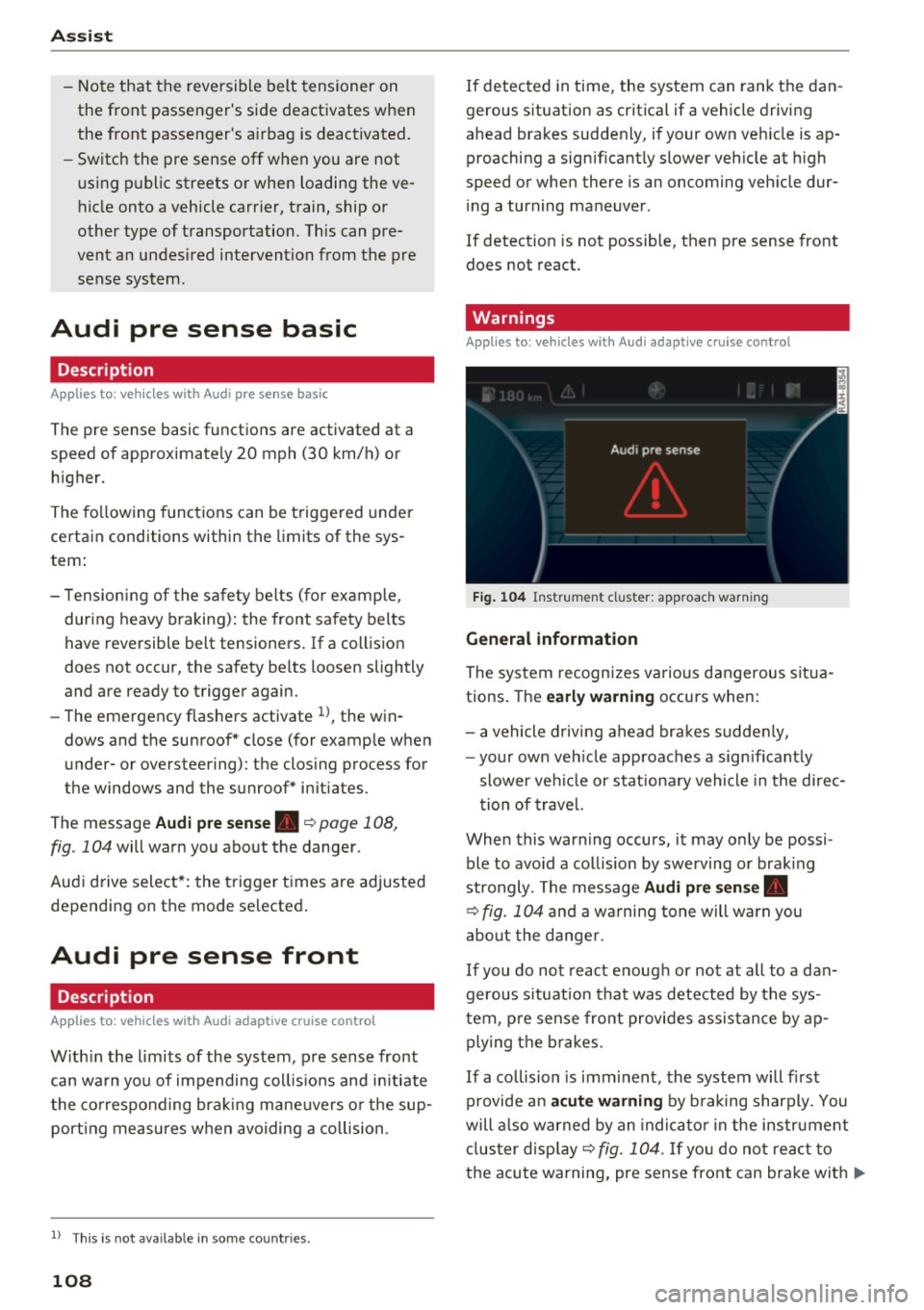
The message
Audi pre sen se. ~ page 108,
fig. 104 will warn you abo ut the danger.
Aud i drive select*: the trigger times are adjusted
depending on the mode selected .
Audi pre sense front
Description
Applies to: vehicles with Audi adapt ive cruise control
W ith in the lim its of the system, pre sense front
can wa rn you of impending coll is ions and initiate
the co rresponding brak ing mane uvers o r the sup
port ing measures when avoiding a collision .
1> This is not ava ilab le in some co untri es.
108
If detected in time, the system can rank the dan
gerous situation as critical if a vehicle driving
ahead brakes suddenly, if your own veh icle is ap
proaching a significant ly slower veh icle at h igh
speed or when there is an oncoming veh icle dur
i ng a turning maneuver .
If detection is not possible, then pre sense front
does not react.
Warnings
Applies to: vehicles with Audi adapt ive cru ise control
F ig . 104 Instrument cl uster : approach warning
G eneral information
The system recognizes various dangerous situa
tions. The
early w arning occurs when:
- a vehicle d riving ahead bra kes sudde nly,
- your own veh icle approaches a sign ificant ly
slower ve hicle or stationa ry vehicle in the direc
tion of trave l.
When this warn ing occurs, it may o nly be possi
ble to avo id a collision by swerving or braking
strongly. The message
Audi pre sen se.
~ fig. 104 and a wa rning tone will warn you
abo ut the dange r.
If you do not react enough or no t at all to a dan
gerous s ituation that was detected by the sys
tem, p re sense front provides assis tance by ap
ply ing the b rakes .
If a collision is imminent, the system will fi rst
provide an
a cute warning by b raking sharply. You
will a lso warned by an indica to r in the instrument
cl us ter disp lay ~
fig. 104. If yo u do not react to
the acute warning, pre sense front can brake with
IJ>-
Page 111 of 386
<( a, .... N ,....
N .... 0 0
3 a,
increasing force within the limits of the
system
l)_ This reduces the vehicle speed in the
event of a collision. At low vehicle speeds, pre
sense front can initiate a complete deceleration
shortly before a collision with a vehicle driving
ahead
1>. If pre sense front determines that you
are not braking strongly enough when a collision
is imminent, it can increase the braking force .
The following functions trigger in conjunction
with pre sense basic/rear at corresponding vehi
cle speeds :
- Reversible tensioning of the front safety belts.
- Closing the windows and sunroof*.
- Inflating the side bolsters* in the seat backrest
and seat surface.
Audi drive select*: the reversible belt tensioner,
the closing of the windows and sunroof* as well
as the inflating of the side bolste rs* on the seat
backrest and seat surface are not active depend
ing on the mode selected .
Collision avoidance assist
Collision avoidance assist helps you to steer the
vehicle around an obstacle in a critical situation.
If you avoid an obstacle after the acute warning,
then the collision avoidance supports you by ap plying slight steering adjustment to correct your
steering wheel angle as long as you are actively
steering. Collision avoidance assist is available at
speeds between approximately 20 mph (30 km/
h) and 90 mph (150 km/h).
Turn assist
When starting to drive and up to speeds of maxi
mum 6 mph (10 km/h), the turn assist uses a
braking intervention to prevent your vehicle from
colliding with an oncoming vehicle when turning left or right (available in certain countries) . The
braking intervention causes your vehicle to stay
in its lane.
.8, WARNING
-Pre sense front cannot overcome the laws of
physics.
It is a system designed to assist and
1) This is not availa ble in some co untries.
Assist
it cannot prevent a collision in every circum
stance. The driver must always intervene.
The driver is always responsible for braking
at the correct time. Do not let the increased
safety provided tempt you into taking risks .
This could increase your risk of a collis ion.
- The system can deploy incorrectly due to
system-specific limits.
- Please note that the sensors and the camera
do not always detect all objects or lane
markings . This increases the risk of an acci
dent.
- Pre sense front does not react to people, an
imals or objects that are crossing the vehi
cle 's path or that are difficult to detect
c> &..
in General information on page 97.
-Reflective objects such as guard rails or the
entrance to a tunnel, heavy rain and ice can
affect the function of the radar sensors and
the system's ability to detect a collision risk.
(D Note
The sensors can be displaced by impacts or
damage to the bumper, wheel housing and
underbody. Pre sense front can be impaired
by this. Have an authorized Audi dealer or au
thorized Audi Service Facility check their func
tion.
(D Tips
- You can cancel the braking with increasing
force that is initiated by the system by brak
ing yourself, by accelerating noticeably or
by swerving.
- Keep in mind that pre sense front can brake
unexpectedly. Always secure any cargo or
objects that you are transporting to reduce
the risk of damage or injury.
- Certain pre sense front functions are switch
ed off when the ESC is limited or switched
off
c> page 135 .
109
Page 112 of 386
Assist
Audi pre sense rear
Description
App lies to: ve hicles w ith Audi side assist
If the risk of a collision is detected, the following
functions can trigger:
- Reversible tensioning of the front safety belts
at the corresponding speeds .
- Closing the windows and sunroof*.
- Inflating the side bolsters* in the seat backrest
and seat surface.
- Switching on the emergency flashers with in-
creased frequency
l ).
The message Audi pre sense. ~ page 108,
fig. 104 will warn you about the danger.
Aud i drive select*: the function is not active de
pending on the mode selected.
A WARNING
- To reduce the risk of an accident, please
note that the side assist* radar sensors do
not always detect every object.
- Pre sense rear does not react to people, ani
mals or objects that are crossing the vehi
cle's path or that are difficult to detect.
- Reflective objects such as guard rails, heavy
rain and ice can impair the function of the
radar sensors and the ability to detect a col
lision risk .
(D Note
The radar sensors can be displaced by impacts
or damage to the bumper, wheel housing and
underbody. Pre sense rear can be impaired by
this . Have an authorized Audi dealer or au
thorized Audi Service Facil ity check their func
tion.
(0 Tips
- The pre sense rear functions switch off
when towing a trailer.
- The pre sense rear functions may also
switch off if there is a malfunction in the
side assist* system.
1> This is not ava ilab le in some co untri es.
110
Audi pre sense city
' Description
App lies to : vehicles wit h Audi pre sense city
Within the limits of the system, pre sense city
can warn you of impending collisions with
vehicles and pedestrians and initiate the applica
ble braking maneuver if needed. Pre sense city is
active at a speed of 6 mph (9 km/h) and higher.
A pedestrian warning can occur at speeds up to 50 mph (85 km/h), and vehicle warnings can oc
cur at speeds up to 155 mph (250 km/h). A pre
sense city braking maneuver is possible at speeds
up to 50 mph (85 km/h).
Warnings
App lies to: vehicles wit h Aud i pre sense city
The system recognizes various dangerous situa
tions. The
early warning occurs when:
- a vehicle driving ahead brakes sudden ly,
- your own vehicle approaches a sign ificantly
slower vehicle or stationary vehicle in the direc
tion of travel.
- a pedestrian is standing in the lane or is moving
into the lane.
When this warning occurs, it may only be possi
ble to avo id a collision by swerving or braking
strongly. The message
Audi pre sense.
~ page 108, fig. 104 and a warning tone will
warn you about the danger.
Additionally, a jerk on the brakes may occur as an
acute warning when there is an impend ing colli
sion . If you do not react to the acute warning, pre
sense city can brake to the point of complete de
ce leration within the limits of the system. This
reduces the vehicle speed in the event of a colli
sion. The message
Audi pre sense. also ap
pears.
The following functions are triggered in conjunc
tion with pre sense basic/rear:
- Reversible tensioning of the front safety belts .
- Closing the windows and sunroof*. ..,
Page 113 of 386
<( a, .... N ,....
N .... 0 0
3 a,
-Inflating the side bolsters* in the seat backrest
and s eat surfac e.
Aud i drive select*: the function is not active de
pending on the mode selected.
A WARNING -,..___
-Pre sense city cannot overcome the laws of
physics. It is a system designed to assist and
it cannot prevent a collision in every circum
stance. The driver must always intervene.
The driver is always responsible for braking at the correct time . Do not let the increased
safety provided tempt you into taking risks.
This could increase your risk of a collision .
- The system can deploy incorrectly due to
system-specific limits.
- To reduce the risk of an accident, please
note that the camera does not always detect
every object .
- Pre sense city does not react to animals,
crossing or oncoming vehicles, objects such
as bars, railings or railcars, and objects that
are difficult to detect~&.
in General infor
mation on page 97.
A WARNING
Pre sense city may be restricted or not availa
ble in the following example situations:
- in heavy fog, rain, spray or snow.
- when there are visual obstructions, such as
glare, reflections or var iations in light.
- when it is dark .
- if the camera window or the windshield is
dirty, iced over, damaged or covered .
- when driving on snow, ice or loose ground .
- on sharp curves.
- if the ESC was restricted or switched off .
- when towing a trailer.
- when the driver's seat belt is unfastened.
- up to ten seconds after sw itching on the ig-
nition.
1 ) Thi s is no t avail able in some c oun tries.
Assist
(D Note
Impacts or damage to the camera mount on
the windshield can displace the sensor . Pre
sense city can be impaired by this. Have an au
thorized Audi dealer or authorized Audi Serv
ice Facility check their function .
(i) Tips
-You can cancel the system braking interven
tion if you accelerate considerably or swerve
away .
- Keep in mind that pre sense city can brake
unexpectedly. Always secure any cargo or
objects that you are transporting to reduce
the risk of damage or injury.
- When there is a malfunction in the camera,
the pre sense city functions also switch off.
Settings in the
Infotainment system
Applies to: vehicles with Aud i pre sense
.,. Select in the Infotainment system: I MEN U! but
ton
> Vehicle > left control button > Driver as
s ist > Audi pre sense.
Audi pre sense-
switch On/Off. You can switch
the pre sense functions on and off with th is.
If the system is switched off, it switches on again
automatically once the ignition is switched on
again
l ).
Early warning1
) -the early warning can be
switched off or the pre sense city/front warning
point
( Early /Mediu m/La te) can be set .
Driver messages
Applies to: vehicles with Aud i pre sense
fll Audi pre sense currently restricted. Restrict
ed sensor vision due to surroundings. See own
er's manual
This message appears if the radar sensor and
camera view is obstructed, for example by leaves,
snow, heavy spray or dirt . If necessary , clean the .,..
111
Page 115 of 386

-Other road structures or objects could possi
bly be identified unintentionally as lane
marker lines. As a result, corrective steering
may be unexpected or may not occur .
- The camera view can be restr icted, for ex
amp le by vehicles driving ahead or by rain,
snow, heavy spray or light shining into the
camera. This can result in act ive lane assist
not detecting the lane marke r lines or de
t ecting them incorrectly.
- In certa in situations where v is ibility is low,
th e vehicle may swi tc h from an "early" to
" la te" steering co rrection .
- Under certa in conditions s uch as ruts in the
road, an inclined roadway o r crosswinds, the
c o rrective steering a lone m ay not be eno ugh
to keep the vehicle i n the middle of the lane .
- For safe ty re asons, active la ne as sis t m ust
not be used when the re are poor road and/
o r weathe r cond itions such as slippery
roads, fog, grave l, heavy rain, snow and the
potent ial for hydroplaning . Using active lane
assist under these conditions may increase
the risk of a crash.
Switching on and off
App lies to: veh icles with Audi active lane assist
Fig. 10 5 Turn s ig n al lever: b utton for ac tive lane ass is t
F ig. 106 Winds hield: ca mera window for act ive lane ass is t
A ss ist
.,. Press the r=;, fig . 105 button to switch the sys
tem on and off. The indicator light in the in
strument cluster turns on or off .
Analog instru- Audi virtual Meaning on
ment cluster cockpit /Head- the corre-
up display* sponding s ide
Green li ne(s) Green line(s) Active lane as-
(left or rig ht) (left or r ight) sist is activat-
-J '/ ed and ready
to provide
warnings .
-Red line Active lane as-
(left or r ight) sist warns you
'/ be fore leaving
a lane. In addi -
tion, the steer-
i ng whee l vi-
bra tes light ly.
Yellow line(s) Gray
Li ne(s) Active lane as-
(left or right) (left or r ight) sist is activat-
-J ed, but is not
r eady to give
warning
If the system is switched on but is not ready to
provide warn ings, one of the following could be
t h e cause:
- There is no lane marker line .
- The relevant lane marker lines are not detected
(for examp le , markings in a construction zone
or because they a re obst ructed by snow, dirt,
wate r o r li ght ing).
- The vehicle speed is be low the activation speed
of approximately 40 mph (65 km/h).
- The lane is narrower than approximately 8 feet
(2 .5 m) or w ider than approximately 15 feet
(4.5 m) .
-The curve is too narrow.
- The driver 's hands are not on the steering
wheel.
@ Tips
- Make sure the camera window c::> fig. 106 is
not covered by stickers or anything else. For
information on cleaning, refer to
c::> page 33 7.
113
Page 116 of 386

Assist
-In certain countries: if the system is switch
ed on, it will remain operable each time the ig nition is switched on.
Lane assist display in the instrument
cluster
A pp lies to: ve hicles with Audi active lane a ssist
F ig . 107 Instrument cl uster (multi -color d isplay): active
lane assist is switched on and rea dy to provide warnings
Fig . 108 Inst rument cluster (monochrome display): active
lane assist is sw itched on
You can open up the Driver assist display for the
active lane ass ist using the mult ifunction steer
ing wheel buttons
r:::> page 12.
An additiona l indicator appears in the Head -up
d isp lay* .
Multi-Color Display
Refer tor:::> fig. 107
114
Driver assist display Meaning on the corre-
in the instrument sponding side
cluster
Green line(s) Active lane assist is acti-
(left or right) vated and ready to pro-
vide warnings .
Red line Active lane assist warns
(left or right)
you before leaving a lane.
In addit ion, the steering
wheel vibrates lightly.
Gray line(s) Active lane assist is acti-
(left or right)
vated, but is not ready to
give warning
Monochrome display
Refer to r:::> fig. 108
Driver assist display Meaning on the corre-
in the instrument
sponding side
cluster
Light gray line(s) Active lane assist is acti-
(left or right) vated and ready to pro-
vide warnings.
Blinking line(s)
Active lane assist warns
(left or right)
you before leaving a lane.
In addition, the steering
wheel vibrates lightly.
Dark gray line(s) Active lane assist is act i-
(left or right) vated, but is not ready to
. . give warning
Messages in the instrument cluster display
If the active lane assist sw itches off automatical
ly , the indicator light in the display turns off and
one of the follo wing messages appears:
rl1 Audi active lane assist: currently unavaila
ble . Camera view restricted due to surround
ings. See owner's manual
This message appears if the camera is unable to
detect the lines. This could happen if:
- The camera window
¢page 113, fig. 106 is
dirty or covered in ice. Clean this area on the
windshield
r:::> page 337 .
-The camera fie ld of view is fogged over. Wait
until the fog has cleared before switching the
active lane assist on aga in.
Page 119 of 386

<( a, .... N ..... N .... 0 0
3 a,
are indicated, at the latest, by the time they en
ter your "blind spot".
© Vehicles you are passing
If you slowly pass a vehicle that side assist has
detected (the difference in speed between the
veh icle and your vehicle is less than approximate
ly 9 mph (15 km/h)), the display in the exterior
mirror turns on as soon as the vehicle enters your
blind spot.
The display will not turn on if you quickly pass a
vehicle that side assist has detected (the differ
ence in speed is greater than approximately 9 mph (15 km/h)).
Functional limitations
The radar sensors are designed to detect the left
and right adjacent lanes when the road lanes are
the normal width. In some situations, the display
in the exterior mirror may turn on even though
there is no vehicle located in the area that is criti
cal for a lane change. For example:
- If the lanes are narrow or if your are driving on
the edge of your lane. If this is the case, the system may have detected a vehicle in another
lane that is
not adjacent to your current lane.
- If you are driving through a curve. Side assist
may react to a vehicle that is in the same lane
or one lane over from the adjacent lane.
- If side assist reacts to other objects (such as
roadside structures like guard rails).
- In poor weather conditions . The side assist
functions are limited.
Do not cover the radar sensors ¢
fig. 112 with
stickers, deposits, bicycle racks or other objects,
because this will impair their function. Do not
use side assist when towing a trailer. For infor
mation on cleaning, refer to¢
page 33 7.
A WARNING
- Always pay attention to traffic and to the
area around your vehicle. Side assist cannot
replace a driver's attention. The driver alone
is a lways responsible for lane changes and
similar driving maneuvers.
Assist
-In some situations, the system may not
function or its function may be limited. For
example:
- If vehicles are approaching or being left
behind very quickly. The display may not
turn on in time.
- In poor weather conditions such as heavy
rain, snow or heavy m ist.
- On very wide lanes, in tight curves, or if
there is a rise in the road surface. Vehicles
in the adjacent lane may not be detected
because they are outside of the sensor
range.
(D Note
The sensors can be displaced by impacts or
damage to the bumper, wheel housing and
underbody. This can adversely affect the sys
tem. Have an authorized Audi dealer or au
thorized Audi Service Facility check their func
tion.
(D Tips
If the window glass in the driver's door or
front passenger's door has been tinted, the
display in the exterior mirror may be incor
rect.
Switching on and off
App lies to : vehicles wi th Audi sid e ass ist
The system can be switched on/off in the Info
tainment system.
If the system is activated, the displays in the ex
terior m irrors will turn on briefly when the igni
tion is switched on.
.,. Select in the Infotainment system:
I MENU ! but
ton
> Vehicle > left control button > Driver as
sist
> Audi side assist. Off switches the system
off.
(D Tips
When you switch side assist on or off, the exit
warning system activates or deactivates
¢ page 118.
117
Page 141 of 386
<( a, .... N ,....
N .... 0 0
3 a,
What you should know
Maintaining the starting ability is the highest
priority.
A lot of stress is placed on the battery when driv
ing short distances, in traffic, and at cold times
of the year . A lot of energy is used but little is
generated. It is also critical when the engine is not runn ing but elect rical equipment is switched
on. I n this case, ene rgy is used but none is gener
ated.
In s ituations l ike this, energy management will
actively regu late the distribution of ene rgy.
Long pe riods without use
If you do not drive your vehicle for several days or
weeks, e lectrical equipment is gradually scaled
back or switched off . This reduces energy use and
ensu res the veh icle w ill be able to start afte r long
pe riods of time. Some convenie nce functions,
such a s in te rior lighting or powe r seat adjust
men t, may not be available under certa in c ircu m
stances . These convenience functions will be
ava ilable again once you switch the ign ition on
and start the engine .
With the engine switched off
The ba tte ry will d rai n if you use Infota inment
functions s uch as listen ing to the rad io whi le the
engine is switched off .
I f t he vehi cle's ability to start may be impaired by
the energy use, a mess age will appear in the In
fotainment system disp lay . The message indi
cates that the system will sw itch off automatica l
l y soon . If you would like to continue using the
f u nctions, yo u m ust start the eng ine.
With the engine running
A lthough elec trical energy is gene ra ted wh ile
d riving, the ba ttery can drain . This can happen
when little energy is generated, and m uch is used
and the charge leve l of the battery is not optima l.
To restore the ba lance o f energy, components
that requ ire large amo unts of energy a re tempo
rari ly sca led back or switched off. Heating sys
tems in particu lar require a great deal of energy .
If you notice, for example, that the seat heating *
Intelligent Technology
or rear window defogger is not work ing, t hen it
has been temporarily limited o r switched off.
These systems are availab le aga in as soon as the
energy supply has been restored .
In add ition, yo u may notice tha t the idle speed
has slig htly increased. That is normal and no
ca use for concern . Due to the increased id ling
speed, the additional required energy will be generated and the battery will be charged .
Notice about data
recorded by the Event
Data Recorder and
vehicle control modules
E v ent Data R eco rder
This vehicle is eq uipped with an Event Data Re
corder ( EDR) . The ma in purpose of an EDR is to
record, in certain crash or near crash-like situa
t ions, such as an airbag deployme nt or hitt ing a
road obstacle, data that w ill ass ist in understand
ing how a vehicle 's systems performed . T he EDR
is des igned to record data related to vehicle dy
nam ics and safety systems for a short per io d of
t ime, typ ic all y 30 seconds or less . T he ED R in this
vehicle is designed to record such data as:
- How va rious systems in your vehicle were oper
ating;
- Whethe r or not the d rive r and passenger safety
be lts were buckled/fas tened;
- How far (if at all) the driver was depressing the
accelerator and/or bra ke pedal; a nd ,
- How fast the vehicle was traveling .
These data can help p rovide a bette r understand
ing of the circumstances in w hich crashes and in
juries occur . NOTE: EDR data are recorded by your
vehicle on ly if a non-tr ivial crash situation occurs ;
no data are reco rded by the EDR un der no rmal
driv ing cond itions and no persona l da ta (e.g.,
name, ge nder, age, and cr ash location) are re
corded. However, ot her parties, such as law en
forcement, co uld combine the EDR data with the
type of perso nally identifying data routinely ac
quired d uring a crash investigation .
T o read d ata recorded by an EDR, special eq uip
ment is required, and access to the vehicle or the ..,.
139
Page 225 of 386

<( a, ..... N ,....
N ..... 0 0
3 a,
Media
Supported media and file formats
Overview
The Jukebox*, SD card reader and th e USB storage d evice* connection support the follo wing audio/vid
e o file prop erti es :
Supported
media
File system
Metadata
Format
File exten-
s ion
Playlists
Character is-
tic s
Number of
Files Audio files
Video files*
SD/SDHC /SDXC/MMC memory cards : with a capacity up to 12 8 GB
DVD drive : audio C Ds ( up to 80 min.) with CD tex t (art ist, album, song)*, CD-ROMs w ith
a capac ity up to 700 MB; DV D±R/RW; DVD video; DVD a udio wit h aud io tracks that are
compatib le w it h a DVD v ideo playe r
Audi music interface : mobile dev ices q page 215 such a s iPods and MTP players, US B
stor age devices in "U SB Devi ce Subclass 1 and 6" tha t conform to USB 2.0 : U SB sticks,
U SB MP3 p layers (Plug -and -Play capable), exte rna l USB flash drives and ha rd drives
Memory cards : exFAT, FAT, FAT32, NTFS
USB mass storage d evice : FAT, FAT32, NTFS
USB mass storage devic e partition s (primary /logical* ): two per US B connec tion
CD /DVD file systems : 1S0966 0, Joliet, UDF
Album cove r: GIF, JPG, PNG with max.
800x800 px. The album cover from the
med ium or from Gracenote* is disp layed,
depending on availability.
MPEG Windows MPEG
FL AC M
PEG 1/2 MPEG4 AVC
Windows Media
1/2 Media 2/4 (H.264) Video 9
Layer 3 Audio 9
and 10
. mp3 .wma .m4a; .flac .mpg; .mp4; .wmv;
.m4b; .mpeg .
m4v; .asfs
.aac .mov;
.avi
.M3 U; .PLS; .WPL; . M3U8; .ASX
up to maximum 320 kbit/s and 48 kHz up to maximum 2,000 kb it/s and
48 kHz sampling frequencies sampling 720xS76 px. at maximum 2Sfps
frequen-
cy
DVD dri ve* : max . 1,000 files per medium
Jukebo x*: approximately 10 GB memory capacity; max. 3,000 files can be imported
USB mass sto rage device and memory ca rds : max. 10,000 files per medium; max.
1,000 files per playlist/folder
may differ for aud io files with var iable b it
rate.
- The media drives do not support th e W in
dows Media Audio 9 Voice format. -
Special characters (s uch as those in 103 tag
information) display differently depend ing
on the system language a nd cannot always
be guaranteed.
-
For compressing MP3 files, Audi recom
mends a bit rate of at least 160 kb it/s. The
display showing the rema ining play t ime
223