infotainment AUDI A4 2017 Owner's Manual
[x] Cancel search | Manufacturer: AUDI, Model Year: 2017, Model line: A4, Model: AUDI A4 2017Pages: 386, PDF Size: 96.32 MB
Page 65 of 386
-Only remove the head restraints from the
rear seats when it is necessary for installing
a child seat¢
page 2 77, Child safety. In
stall the head restra int aga in immediately
once the child seat is removed. D riving w ith
the head restra ints removed o r not in the
upr ight position in creases the risk of ser io us
lnJUry.
Memory function
Description
Applies to: vehicles with memory function
Using the memory funct ion, you can quickly and
eas ily store a personal seat profile for the driver
and recall the settings later. The memory func
tion is controlled by the remo te control key and
the memory bu ttons in the drive r's door.
The driver's seat profile is stored again and as
signed to t he remote contro l key each time the
ve hicle is locked . Whe n you open the door, the
seat profi le is automat ically reca lled. If two peo
p le use t he vehi cle, it i s recomme nded that each
person always uses "their own" remote cont ro l
key.
Up to 2 seat prof iles can be stored in the memory
bu tto ns in the dr iver's door. O nce they are sto r
ed, these sea t profiles can be sele cted at any
time .
The fo llow ing settings are stored :
Remote con-Memory but-
trot key ton
Driver Dr iver
Seat X X
Both exterior
X X mirrors*
Remote control key
Applies to: vehicles with memory function
The driver's sea t profile can be assigned to the
remo te control key when the vehicle is locked .
.. Se lect in the Infotainment system: !MENUI b ut
ton
> Vehicle > left contro l bu tto n > Vehicle
Seats and storag e
setting s > Seats > Driver 's seat > Store set
ting s on remo te control key.
(D Tips
If you do not wish to have t he seat profi le for
another drive r assigned to the remote cont rol
key, switch the memory fu nction off in t he In
fotainment system.
Memory buttons
Applies to: vehicles with memo ry function
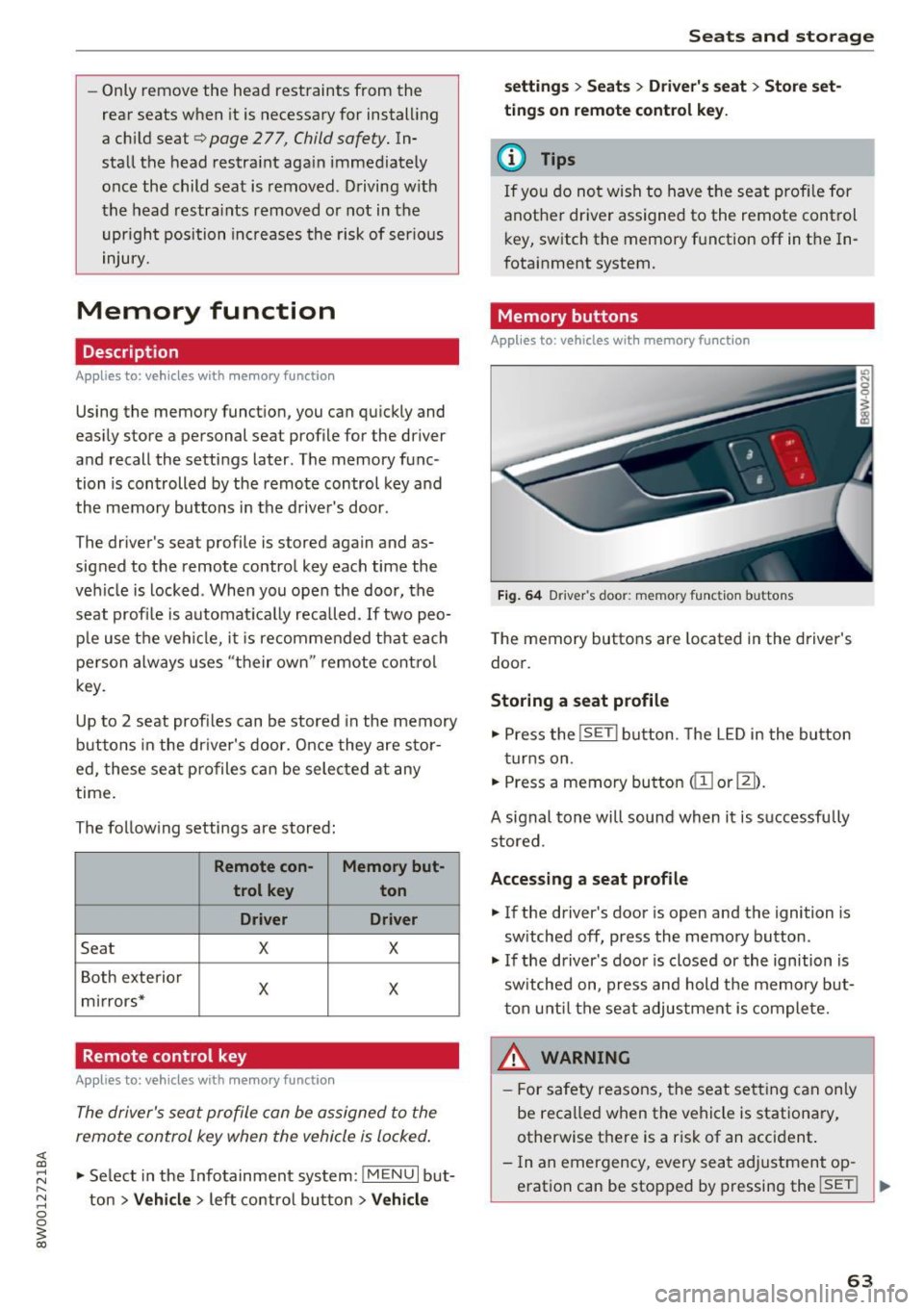
Fig. 64 Drive r's door : memory function buttons
The memory butto ns are located in the driver's
doo r.
Storing a seat profile
.. Press the !SET I button. The LED in the button
t ur ns on .
.. Press a memory bu tton
dil or~).
A signal tone will sound when it is s uccessfu lly
stored.
Accessing a seat profile
.. If the driver's door is open and the ignition is
sw itched off, press the memory button .
.. If the driver's door is closed or the ignition is
sw itched on, press and hold the memory but
t on u nti l the seat adjustment is com plete.
,&_ WARNING
- F or s afety reasons, the seat se tting can on ly
be reca lled when the vehicle is stationa ry,
otherwise t here is a risk of an accident.
- In an emergency, every sea t ad justment op
eration can be stopped by pressing the
!SET ! ..,.
63
Page 73 of 386

To keep the rear window defogger on continuously, press the
Qi!) REAR button longer than 3 sec
onds. Th is is stored until the ignition is sw itched
off.
SYNC
Synchronizat ion
Use the rocker switch ® to select the fu nct ion .
When synchronization is switched on, the set
tings for the driver's side are applied to the front
passenger's side and the rear (except for seat
heating/ventilation*). When the settings on the
front passenger's s ide or in the rear are changed,
the synchronization is automatically sw itched off
and
3-zone appears in the display .
SET REAR
function
Use the rocker switch ® to select the funct ion.
When the function is switched on, you can adjust
all settings for the rear using the climate control
system controls in the cockpit . The rear climate
control system controls can not be operated at
the same time. This function switches off a uto
matically after a certain period of time or after
l eav ing the menu.
Air vents
You can open or close the center and rear vents in
the cockpit and the vents in the rear center con
sole using the ridged thumbwheels. The levers
adjust the direction of the airflow from the vents.
The wide ve nt is opened and closed using the
rocker switch ®·
Residual heat
You can activate the residual heat funct ion when
the ignition is switched off by pressing the knob
(D. The res idual heat from the coolant is used to
h eat the vehicle inte rior. The residual heat fu nc
tion switches off automatically after about 15
minutes .
A WARNING
-You should not use the recirculation mode
for an extended period of time since no
fresh a ir is drawn in. With the air-condition
ing switched off, the windows can fog up,
wh ic h increases the r isk of an accident.
Warm and cold
-Individuals with reduced sensit ivity to pain
or temperature could develop burns when
using the seat heating function. To reduce
the risk of injury, these individuals should
not use seat heating.
(D Note
To avoid damage to the heating elements in
the seats, do not knee l on the seats or place
heavy loads on a small area of the seat.
Basic settings
The climate control system basic settings are ac
cessed in the Infotainment system.
.,. Select in the Infotainment system: I MENU ! but
ton
> Vehicle > left control button > Air condi
tioning
Automatic recirculation
When switched on, automatic rec irculat ion con
trols the recircu lation mode automatically . You
must press the@
MAX button if fog forms on
the windows.
Automatic auxiliary heater*
T he auxi liary heater he lps to warm the vehicle in
terior more quickly.
Steering wheel heating
Applies to: veh icles w ith stee ring w hee l heat ing
The steering wheel rim can be heated.
Fi g. 75 Steering whee l: steer ing whee l heating button
.,. Press the button to sw itch the steering wheel
heating on and off~-The message
Steering
wheel heating: on /Steering wheel heating: off
appears in the instrument cluster displa y. IJ,,
71
Page 95 of 386

Assist Electronic speed limiter
Your vehicle may be factory equipped with t ires
that are rated for a maximum speed of 130 mph (210 km/h). This is less than the maximum speed
of your vehicle. To reduce the risk of sudden tire
failure and loss of control if the vehicle is operat
ed at excessive speeds, your vehicle also has an
electronic speed limiter . The electronic speed
limiter prevents your vehicle from going faster
than the t ire speed rating. For mo re information
¢page 317.
If the engine control unit receives faulty vehicle
road speed s ignals, the Malfunction Indicator
L amp (M IL)
¢..ij will illuminate. If this occurs,
contact the nearest autho rized Audi dealer for
assistance.
_& WARNING
Always observe the posted speed limits and
adjust you r speed to suit prevailing road, traf
fic and weather condit ions. Never drive your
vehicle faster than the max imum speed rating
of the tires installed.
Speed warning system
Introduction
Applies to: vehicles with speed warning system
The speed warning system helps you to stay un
der a specified maximum speed. -
The
speed warning system warns you if you are
exceeding the maximum speed that you have
stored . You will hear a warning tone when yo ur
speed exceeds the sto red va lue by approximate ly
3 mp h (3 km/h). The indi cator light also tur ns on
in the instrument cluster display
Eel (USA mod
e ls)/
Hll (Canada mode ls) as well as the message
Manually set speed limit XXX mph (km /h ) ex
c eeded .
The ind icator light [01 / (OJ turns off
when the speed decreases below the stored max
imum speed.
Sett ing a threshold is recommended if you would
like to be reminded when you reach a certain
maximum speed. Situations where you may want
A ss ist
to do so include driving in a co untry with a gener
al speed limit or if there is a specified maximum
speed for winte r tires.
(D Tips
Regardless of t he speed warning system, you
s h ou ld always monitor your speed using the
speedometer and make s ure yo u are fo llow ing
the lega l speed limit.
Setting the warning threshold
Appl ies to : vehicles with speed warni ng system
You can set, change and delete the warning
threshold in the Infotainment system.
.,. Sele ct in the Infotai nment system: I MENU ! but
ton
> Vehicle > left control b utton > Driver as
sistance
> Speed warning > Manu al.
You can set a ny thresho ld between 20 mp h
(30 km/h) and lS0 mph (240 km/h) . Settings
can eac h be adjusted in increments of 5 mph (10
km/h).
Cruise control system
Switching on
Applies to: vehicles with cruise control system
The cruise control system makes it possible to
drive at a constant speed starting at 15 mph (20kmlh).
0
f
~
0
Fig. 88 Operating lever: cru ise control system
.,. To switch t he system on, pull the lever into po
sition
(D ¢ fig. 88.
.,. Drive at the speed to be maintained.
.,. To store the speed, press the button @.
93
Page 98 of 386

Ass is t
A WARNING
Pay att ention to traffic a nd the area ar ound
yo ur vehicle wh en th e effici ency assist is
switched on . The dr iver is always respon sible
for correctly assess ing the traffic situation .
@ Tips
- The wording of the message may vary de
pending on the driving mode set in dr ive se
l ect*
r::::> page 121 and the current selector
l eve r pos ition . No messages a re displayed
whe n in the S selector leve r pos ition or in
d ynami c mode.
- When a route is planned using the naviga
tion system*, then the message fee d is
b ased on this rou te. W ithout rou te g uid
ance, the system uses an assumed ro ute for
the message feed.
- T here will not be a message for every si tua
tion ahead, for examp le if there is not
eno ugh distance remaining to react to the
situation.
- No messages are displayed when at s peeds
under 20 mph (30 km/h) .
Settings in the Infotainment system
A ppl ies to: ve hicles w ith predi ctive e fficiency assist
.. In the Infotainment system, select: I MENU I
button > Vehicle > left contro l button > Driver
assist
> Effi ciency assist .
Predictive messages are shown when this f unc
tion is sw itched on.
{D) Tips
No p redictive messages are shown on veh icles
w ithout a navigation system.
96
Audi adaptive cruise
control
Description
App lies to : vehicles wi th Audi adap tive c ru ise con trol
Fi g. 89 Detect io n range
The adaptive cru ise cont rol system is a comb ina
tion of speed and dis tance regu lation.
It ass ists
t h e d river by bo th regu lating the speed and
maintain ing a d is ta nce to the vehicle driv ing
ahead, within the limits of the system. If the sys
tem detects a vehicle d riving ahead, the adaptive
cruise contro l can brake and accelerate yo ur vehi
cle. T his makes driving more comfo rtable both
o n long st retches of hig hway and in stop-and-go
traffic .
What can adaptive cruise control do?
The adaptive cru ise control system uses video, ra
dar, ultrasound and navigat ion data . Vehicles
driv ing ahead can be recognized up to 650 feet
(200 m) away .
Pred ictive functions offer the drive r additional
comfort and contr ibute to the reduct ion in fuel
consumption a nd CO2 em issions
r::::> page 102.
On open roads with no traffic, it functions like a
cruise contro l system. The stored speed is main
ta ined . When approaching a vehicle d riving
ahead, the adaptive cruise contro l system auto
matically brakes to match that vehicle's speed
and then maintains the set dis tance. As soon as
the system do es not detect a vehicle dr iv ing
ahea d, adaptive cruise cont rol accelerates up to
t h e s to red spee d.
In stop-a nd-go traffic, adap tive cruise control can
brake until the veh icle is sta tionary a nd then can .,.
Page 104 of 386

Assist
-Your settings are automatically stored and
assigned to the remote control key being
used.
Setting the driving program
A pp lies to: ve hicles w ith Audi adaptive cruise co ntro l
Depending on the selected driving program and
distance, driving behavior when accelerating will
vary from dynamic to comfortable.
Setting the driving program on vehicles
without drive select*
1>-In the Infotainment system, select: I MENU !>
Vehicle > left control button > Driv er assist >
Audi adaptive cruise control > Driving pro
gram > comfort, standard or dynamic .
Setting the driving mode on vehicles with
drive select*
Refer tor=;;, page 122 .
(D Tips
Your sett ings are automatically stored and as
signed to the remote control key being used.
Request for driver intervention
App lies to: ve hicles w ith Aud i ad aptive cruise co ntro l
Fig . 99 Instrument cluster: request for driver interve ntion
The request for driver intervent ion instructs you
to take over if the adaptive cruise contro l bra king
function is not able to mainta in a sufficient dis
tance to the vehicle driving ahead
c::> fig. 99.
l) Thi s is not ava ilab le in som e coun tri es .
102
Predictive control
(efficiency assist)
Description
App lies to: vehicles wit h Audi adap tive c ruise control and p re
dic tive efficiency ass ist
Fig. 100 In stru men t cl uster: p redict ive contro l
General information
The predict ive control 1> uses the map informa
tion from the navigation system in order to react
proactively when driving. Information from the
camera -based traffic sign recognition* is also ap
plied to recognize traffic signs
c::> page 24. When
coming up to areas with speed limits or changes
in the course of the road (such as curves, inter
sections or traffic c ircles), the system brakes au
tomatically and then accelerates back up to the
set speed .
When adaptive cruise control is switched off, the
system only provides notifications without con
trolled interventions
c::> page 95.
The driver can override the predictive contro l at
any time by pressing the accelerator or brake
pedal. If the system changes the veh icle speed to
adapt to speed limits, you can change the speed
using the lever
c::>page 99 , fig . 95.
Always switch off the predictive control in
the following situations:
-When increased attention is needed from the
driver .
- In poor weather conditions such as snow or
heavy rain .
- When driving on roads in poor cond ition.
Page 106 of 386

Assist Switching predictive control on and off
Applies to: ve hicles w ith Aud i adapt ive cruise co ntro l and pre
di ctive eff iciency assist
• Select in the Infotainment system: I MENU I but
ton
> Vehicle > left control button > Driver as
sist
> Audi adaptive cruise control.
Set speed limit
When th is function is sw itched on, the system re
sponds to the speed limits. This can also be done
with at tolerance, if desired . In this scenar io, you
may fall below or exceed the set speed in
favor of
increased efficiency.
Adaptation to route ahead
When this function is sw itched on, the adapta
tion to the route ahead (such as a reduction in
speed at curves) activates.
Congestion assist
Description
A pp lies to: ve hicles with Aud i adapt ive cruise co ntrol
Congestion assist supports the driver when driv
ing in traffic jams or in heavy traffic.
Fig. 101 Turn signal lever: congestion ass ist button
Fig . 102 Inst rument cluster: congestion assist
104
In a speed range under 40 mph (65 km/h), con
gestion assist can he lp to keep the vehicle within
a lane calculated by the system. Within the limits
of the system, the system controls the steering
automat ica lly when adaptive cruise contro l is
switched on. Since congest ion assist is only a n
ass ist system, the driver must always keep his or
her hands on the steering wheel and be ready to
stee r. The driver can override the control at any
time by actively steering.
The system is designed for driving on express
ways and highways .
Switching congestion assist on and off
• Press the <=) fig . 101 button to switch the sys
tem on and off.
• To turn the system off completely, select in the
Infotainment system:
I MENU I button> Vehicle
> left control button > Driver assist > Conges
tion assist .
If congestion assist was deactivated through the
Infotainment system, you can continue operating
the active lane assist using the
Q fig. 101 button
Q page 113. The congestion assist functions are
no longer available.
Requirements for using congestion assist:
-Congestion assist must be switched o n in the
Infota inment system.
- Adaptive cru ise control must be switched on
and active ¢
page 98.
Always switch off congestion assist in the
following situations:
-When increased attention is needed from the
driver .
- In poor weather conditions such as snow or
heavy ra in.
- When driving on roads in poor cond ition.
- In construction zones.
- In city driving.
Congestion assist availability:
When you are in the Driver assist view in the in
strument cluster display, the indicator light turns
on
iii and the message Congestion assist availa
ble
appears if a traffic jam situation was detect-
ed. You can open up the
Driver assist display .,.
Page 107 of 386
using the multifunction steering wheel buttons
¢
page 12. To activate congestion assist, you
must press the¢
fig. 101 button and switch on
the adaptive cruise control¢
page 98.
Indicator lights
11'1 and•-congestion assist is switched on .
Veh icles driving ahead were detected. Your vehi
cle adapts while driving
¢ fig. 102 .
•-Congestion ass ist switches off if the dr iver
does not take ove r stee ring after multip le driver
intervention requests . The system brakes the ve
hicle until it is stationary .
.&_ WARNING
Always keep your hands on the steering whee l
so you can be ready to steer at any time. The
driver is always responsib le for staying in a
lane and for assessing traffic situations cor
rectly . Read and follow the warnings on¢.&
in General information on page 97 . Never use
conge stion assist in the following si tuations
or yo u will increase t he ris k of an a cci den t.
- Drivi ng offroad or on unpaved roads. Con-
gestio n assist is only designed for use on
paved roads.
- In city dr ivi ng or in co nst ru ct ion zones.
- On curving stretches of road .
- In narrow lanes.
- In unclear traffic situations s uch as at inter-
sections or toll stations.
@ Tips
You are not necessarily g uided to the center
of yo ur lane.
A ss ist
Distance indicator and
distance warning
Description
Applies to: vehicles with Audi adaptive cruise control
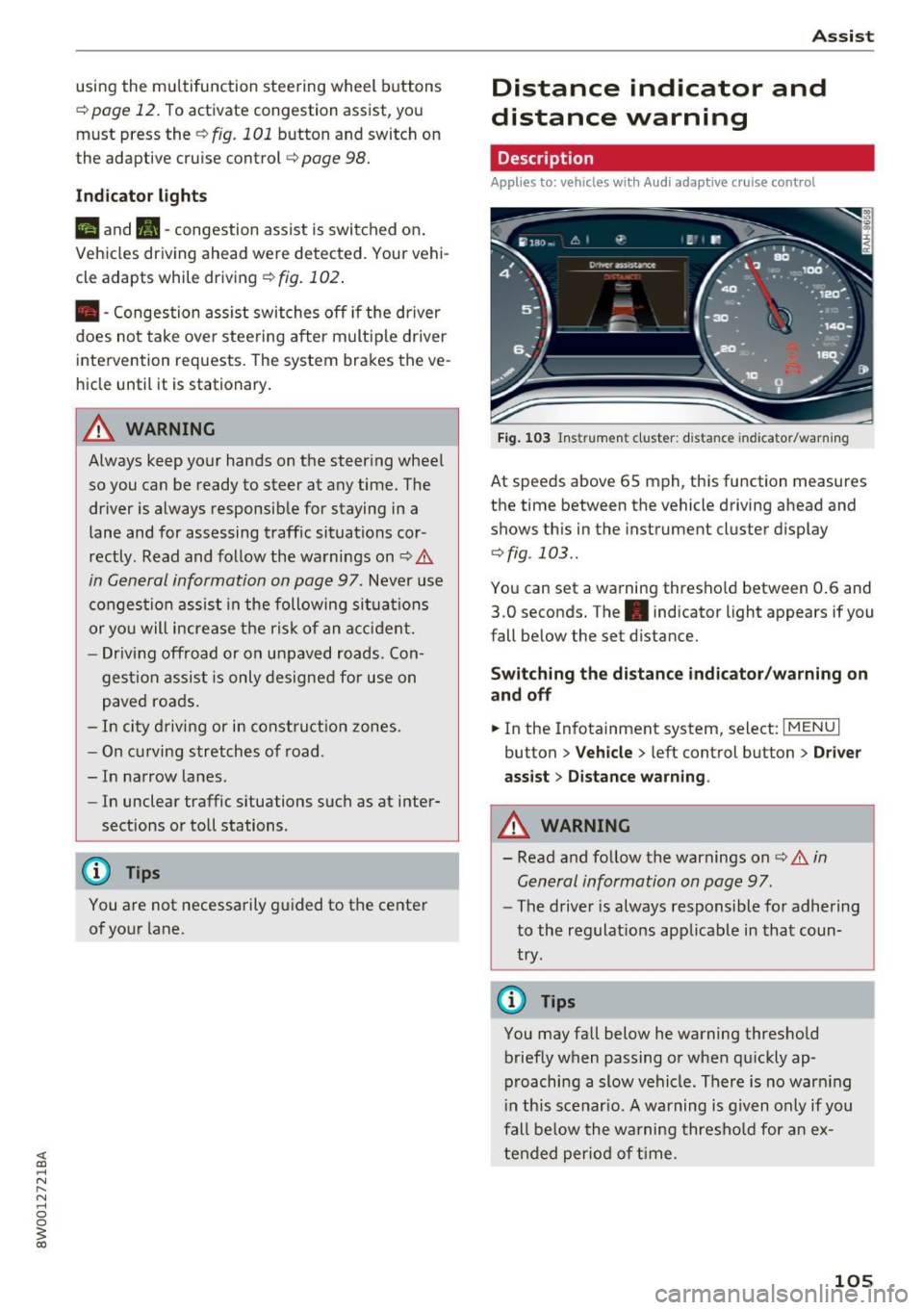
Fig . 1 03 Instrumen t cl uster: dist ance indicato r/warn ing
At speeds above 65 mph , this function measures
the time between the vehicle driving ahead and
shows th is in the instrument cluster display
¢ fig . 103 ..
You can set a wa rning thresho ld between 0 .6 and
3.0 seconds. The . indicator light appears if you
fall be low the set d istance.
Switching the distance indicator /warning on
and off
.. In the Infotainment system, select: I MENU I
button > Veh icle > left control button > Driver
ass ist> Distan ce warning .
.&_ WARNING
-
- Read and fo llow the warnings on¢.& in
General information on page
97.
-
- The drive r is always responsible fo r adhering
to the regulat ions app licab le in that coun
try .
@ Tips
You may fall below he warning thresho ld
briefly when passing or when q uickly ap
p roaching a slow vehicle. There is no war ning
i n this scenar io. A warning is g iven only if you
fall be low the warning thresho ld for a n ex
tended per io d of t ime.
105
Page 113 of 386
<( a, .... N ,....
N .... 0 0
3 a,
-Inflating the side bolsters* in the seat backrest
and s eat surfac e.
Aud i drive select*: the function is not active de
pending on the mode selected.
A WARNING -,..___
-Pre sense city cannot overcome the laws of
physics. It is a system designed to assist and
it cannot prevent a collision in every circum
stance. The driver must always intervene.
The driver is always responsible for braking at the correct time . Do not let the increased
safety provided tempt you into taking risks.
This could increase your risk of a collision .
- The system can deploy incorrectly due to
system-specific limits.
- To reduce the risk of an accident, please
note that the camera does not always detect
every object .
- Pre sense city does not react to animals,
crossing or oncoming vehicles, objects such
as bars, railings or railcars, and objects that
are difficult to detect~&.
in General infor
mation on page 97.
A WARNING
Pre sense city may be restricted or not availa
ble in the following example situations:
- in heavy fog, rain, spray or snow.
- when there are visual obstructions, such as
glare, reflections or var iations in light.
- when it is dark .
- if the camera window or the windshield is
dirty, iced over, damaged or covered .
- when driving on snow, ice or loose ground .
- on sharp curves.
- if the ESC was restricted or switched off .
- when towing a trailer.
- when the driver's seat belt is unfastened.
- up to ten seconds after sw itching on the ig-
nition.
1 ) Thi s is no t avail able in some c oun tries.
Assist
(D Note
Impacts or damage to the camera mount on
the windshield can displace the sensor . Pre
sense city can be impaired by this. Have an au
thorized Audi dealer or authorized Audi Serv
ice Facility check their function .
(i) Tips
-You can cancel the system braking interven
tion if you accelerate considerably or swerve
away .
- Keep in mind that pre sense city can brake
unexpectedly. Always secure any cargo or
objects that you are transporting to reduce
the risk of damage or injury.
- When there is a malfunction in the camera,
the pre sense city functions also switch off.
Settings in the
Infotainment system
Applies to: vehicles with Aud i pre sense
.,. Select in the Infotainment system: I MEN U! but
ton
> Vehicle > left control button > Driver as
s ist > Audi pre sense.
Audi pre sense-
switch On/Off. You can switch
the pre sense functions on and off with th is.
If the system is switched off, it switches on again
automatically once the ignition is switched on
again
l ).
Early warning1
) -the early warning can be
switched off or the pre sense city/front warning
point
( Early /Mediu m/La te) can be set .
Driver messages
Applies to: vehicles with Aud i pre sense
fll Audi pre sense currently restricted. Restrict
ed sensor vision due to surroundings. See own
er's manual
This message appears if the radar sensor and
camera view is obstructed, for example by leaves,
snow, heavy spray or dirt . If necessary , clean the .,..
111
Page 114 of 386
Assist
sensors and the area around the camera
~ page 97, fig. 90 or~ page 116, fig . 112.
Ill Audi pre sense: malfunction! Please contact
Service
This message appears when the pre sense func
tion is affected. For examp le, this could be
caused by a faulty sensor. Dr ive to an authorized
Aud i dealer or a utho rized Aud i Serv ice Facility im
mediately to have the malfunction cor rected.
Ill Audi pre sense: currently restricted. Towing
mode
Pre sense rear and the pre sense city braking in
tervent ions sw itch off automatically when the
electrical connector in the factory-installed trail
er hitch is connected. There is no gua rantee the
f unct ions will swi tch off when using a re trofitted
trai ler hitch .
Ill Audi pre sense: currently restricted
This message appears if the ESC is restr icted or
sw itched off, for example.
Ill Audi pre sense: currently restricted. See
owner's manual
This message appears when there is a temporary
fa ilur e in a subsystem, such as the ESC. If this
message appears repeated ly, dr ive to an author
ized Audi dealer or authorized Audi Se rvice Facili
ty to have the malfunction corrected .
Ii] Audi pre sense: emergency braking system
off
This message appears if the pre sense functions
are switched off through the Infotainment sys
tem or if th e system is not ready.
Audi active Lane assist
Description
Applies to: veh icles w ith Audi active lane assist
Active lane assist (lane departure warning) de
tects lane ma rker lines withi n the l imits of the
system using a camera in the windshield. If you
are approaching a detected lane marker line and it appears likely that you will leave the lane, the
system will warn you w ith corrective stee ring .
You can override this steering at any time . If you
112
pass over a line, the steering wheel will vibrate
lightly. In order for this warning vibration to oc
cur, it must first be switched on in the Infotain
ment system. Active lane ass ist is ready for oper
a tion when the lane marker line is detected on at
least one side of the vehicle .
T he system is des igned for driving on express
ways and highways and therefore on ly activates
a t speeds above approximately 40 mph (65 km/
h) .
Applies to vehicles with s ide ass ist*: if you acti
vate a turn signa l when active lane assist is ready
a nd it classifies a lane change as critical bec ause
of veh icles traveling a longside you or approach
i ng you, there will be noticeable corrective steer
i ng shortly before you leave the lane. This will at
tempt to keep your vehicle in the lane.
Applies to vehicles without side assist* : the sys
tem does not warn when it is ready if you act ivate
the turn signal before crossing the lane marker
lin e. In this case, it assumes that you are chang
in g lanes intent ionally.
Applies to vehicles with adaptive cruise contro l*:
there is no corrective steer ing or warnings if the
system recognizes a distinct passing maneuver.
If the conditions are met, congestion assist
switches on at speeds under approximately
40 mph (65 km/h)
¢page 104.
_& WARNING
-The system warns the driver that the vehicle
is leaving the lane using correct ive steering.
The driver is always responsible for keeping
the vehicle within the lane.
- The system can help you keep the vehicle in
the lane, but it does not drive by itself. Al
ways keep your hands on the steering
wheel.
- Corrective steering may not occur in certain
situations, such as during heavy braking .
- There may be cases where the camera does
not recognize all lane marker lines. Correc
tive steering can only take place on the side
of the vehicle where lane marker lines are
detected.
Page 117 of 386

-Th e system has been unable to detect the lanes
for an extended period of time due to road con
ditions . Sw itch act ive lane assist back on when
the lines are more visible .
rm Audi active lane assist: currently unavaila
ble. See owner's manual
There is a temporary active lane assist malfunc
tion . Try sw itching the active lane assist on again
later .
• Audi active lane assist: malfunction! See
owner's manual
Drive to an authorized Aud i dealer or authorized
Audi Service Facility immediately to have the
malfunction corrected.
rm Audi active lane assist: Please take over
steering!
This message appears if you are not steering by
yourself. Active lane assist is activated, but is not ready to give warning
Adjusting the steering time and vibration
warning
Applies to: vehicles with Audi active lane assist
You can adjust individual active lane assist set
tings in the Infotainment system .
... Select in the Infotainment system: !MENUI but
ton
>Ve hicle > left control button > Driver as
sist
> Audi active lane assist .
Steering time Early:
in this setting, the correct ive steering hap
pens continuously to help keep the vehicle in the
center of the lane.
Late: in this setting, the system provides correc
tive steering just before a vehicle whee l goes over
a detected lane marker line.
Vibration warning
You can switch the additional vibration warning
in the steering wheel on or
off.
A WARNING
-
With the vibration warning switched off,
there will also be no visual warning in the in-
Assist
strument cluster disp lay when crossing a lane
marker line.
(D Tips
In certain countries: your settings are stored
automatica lly and assigned to the remote
control key in use.
Audi side assist
Description
Applies to: vehicles with Audi side assist
Fig. 109 Sensor detection range
Fig. 110 Disp lay on th e exterio r m irror
Side assist (lane change assist) helps you mon itor
your blind spot and traffic behind your vehicle .
Within its lim its, the system warns you about
vehicles that are coming closer or that are travel
ing within your sensor range
(D <=?fig. 109. If a
lane change is classified as critical, the display@
turns on in the exterio r mirror
<=? fig. 110 .
The display in the left exterior mirror p rovides as
s istanc e when making a lane change to the left,
wh ile th e display in the rig ht exterior m irro r pro
vides ass istance when making a lane change to
the right. ..,.
115