ignition AUDI A4 2017 Workshop Manual
[x] Cancel search | Manufacturer: AUDI, Model Year: 2017, Model line: A4, Model: AUDI A4 2017Pages: 386, PDF Size: 96.32 MB
Page 184 of 386

Audi connect vehicl e control
Select: !MENU ! button> Audi connect > right
control button >
Aud i connect u ser manage ment
> Key user > Reset ke y user.
Warning lev els
Req uirement: the pr imary use r mus t have set one
or more warning levels . Secondary users can only
see if a warning level is active or not.
Select:
! M ENU ! button> Audi conn ect> right
control b utton >
Alert s.
A WARNING
Also read and follow the instructions regard
ing traffic safety¢
page 141.
(D) Tips
-Store the vehicle code in a secure pla ce. It
may be necessary to re-ente r the veh icle
code .
- Pay at tention to upper- and lowe r-case le t
ters when enter ing the ve hicle code.
- The vehicle code loc ks after m ultip le fai led
ent ry attemp ts. Contact an author ized A udi
dealer or authorized Audi Service Fac ility to
request a new vehicle code .
@ Tips
-If a primary user was set fo r your vehicle,
the message
One or more Audi connect
s e rv ices currentl y act ive. Fo r mor e infor
mation, p lease refer to the owne r's manual
or the Audi con nect menu.
appears every
time after the ignition is switched off .
- If you do not know the primary user of the
vehicle, reset it in the Infotainment system
¢ page 181, Resetting the primary user.
You can reg ister and verify your identity as
the new primary user on
www .audi.com /
myaudi.
If you did not receive the code re
quired for this, co ntact your authorized Audi
dealer or authori zed Audi Servi ce Fac ility.
Locking/unlocking
Applies to vehicles with Audi connect vehicle control
You can lock and un lock your vehicle using this
servi ce.
182
Requir ement
- Thi s requires the 4 -d igi t PI N that you specified
during the verification on
www.audi.com /
myaudi.
- The vehicle m ust be stationa ry.
- The ignition must be switched off.
Vehicle status report
Applies to vehicles with Audi connect vehicle control
The Dr ive r Information System collects data un
der certai n conditions and sends it to a server.
When data is stored, you can access values such
as these using the service :
- Remaining range,
- Fuel tank leve l,
- If the veh icle doors are open/closed or locked/
un locked,
- Mi leage ,
- Next service,
- Warning messages,
- Park ing l ights on/off,
For additional information on the Driver Informa
tion System, refer to¢
page 16, Driver Informa
tion System .
A WARNING
Do not ignore messages and warning or ind i
cator lights that turn on in the vehicle be
cause of the info rmation in the status report.
This could lead to break downs in on the road, a ccidents and ser ious injuries.
Parking location
Applies to vehicles with Audi connect vehicle control
The veh icle collects data unde r ce rta in cond it io ns
and sends it to a serve r.
When data is stored, you ca n access values such
as these using the se rvice :
- Vehicle location display,
- Display of one's own location,
- Route to you r vehicle .
Page 185 of 386

If your mobile device also has a navigation func
tion, you can navigate to your last known parking locat ion .
F or example, you have the option to show the
route to your vehicle and to send the correspond
ing locations .
@ Tips
-The new parking location cannot be dete r
mined with this service if the vehicle is
moved after shutting the vehicle off and
without switching the ign ition on and off
again, for example when being towed or if
the veh icle is stolen.
- If the vehicle is moved and shut off again
us ing the second key, for example, the new
parking locat ion is transm itted to the server
after switching the ignition off.
Geofencing Alert
Applies to vehicles with Audi connect vehicle control
You can set approved and forbidden zones for
your vehicle using this service . If your vehicle
leaves an approved zone or ente rs a forbidden
zone, you will be notified by a push not ificat ion
and/or an e -ma il. You can set up to five zones
and a lso ass ign t ime limits.
Requirement
- You must be ver ified as the primary user of your
vehicle on myAudi.
(D Tips
You can set on my Audi if you would like to be notified via push not ificat ions a nd/or e-ma il.
Speed Alert
Applies to vehicles with Audi connect vehicle control
You can set up to two speed limits for your veh i
cle us ing th is serv ice . If your vehicle exceeds a set
speed limit, you will be notified by a push not ifi
cation and/or e-mail.
;;!; Requirement .... N
~ - You must be ver ified as the primary user of your ....
8 vehicle on myAudi.
3
{!) Tips
You can set on myAud i if you would like to be
notif ied v ia p ush notifications and/or e-mail.
Valet Alert
Applies to vehicles with Audi connect vehicle control
If you give your vehicle over to a parking service,
you can set a zone and a speed limit using the
Audi MMI conne ct app . If the vehicle leaves the
zone or the exceeds the speed lim it, you will be
notified by a push notification and/or e-mail.
R equirement
- You must be verified as the primary user of your
veh icle on myAud i.
(D Tips
You can set on myAud i if you would like to be
notified via p ush notifications and/or e-mail.
Stolen Vehicle Locator
Applies to vehicles with Audi connect vehicle control
This service helps you to track your vehicle if it is
stolen.
Proceed as fo llows if there is a theft:
.,. Contact the police. You receive a Case ID .
.,. Call the service hotline and give your Case ID.
The serv ice hotline will forward the estab lished
data to the police .
(D Tips
You receive the Audi Service hotline number
when you purchase your vehicle.
183
Page 186 of 386
Audi connect emergen cy c all and servi ce
Audi connect emergency
call and service
Introduction
Applies to: ve hicles w ith Audi co nnect e merge ncy call a nd
service
Audi connect emergency ca ll and service includes
the following services:
- Emergency call¢
page 184.
- Online roads ide assistance~ page 185.
-Audi Service enquiry~ page 186.
@ Tips
-The services are provided through a SIM
card installed in the vehicle. The cost of the
ca ll and data connections is included in the
p rice for the se rvices. Services a re provided
assuming tha t the cell phone netwo rk re
qui red for the ins talled SIM c ard is fun ct ion
i ng and rea dy to operate . The available serv
i ces set by Aud i AG are only available within
the cell phone network cove rage area fo r
the cell phone service provider se lected by
Audi AG.
- You can read about the data that is trans
mitted at
www .audiusa .com /help/audi
connect .
-These serv ices cannot be deactivated using
the sett ings in the Infotainment system.
Emergency call
Description
Applies to: vehicles with Aud i connect emergency call and
service
You can request help whe n in an emergency or
dangerous situation using the emergency ca ll
f u nction
l) An emergency call is a combinat ion of
data transmission a nd a p ho ne c all. The da ta
tr ansmission from your veh icle forwar ds impor
tant information to the Audi emergency call cen
ter, such as the vehicle and position data.
1l Th e availab ility of the services offered depe nds on t he
c ountry and may change ove r time .
184
Making an emergency call
App lies to: vehicles with A udi connect emergency call and
serv ice
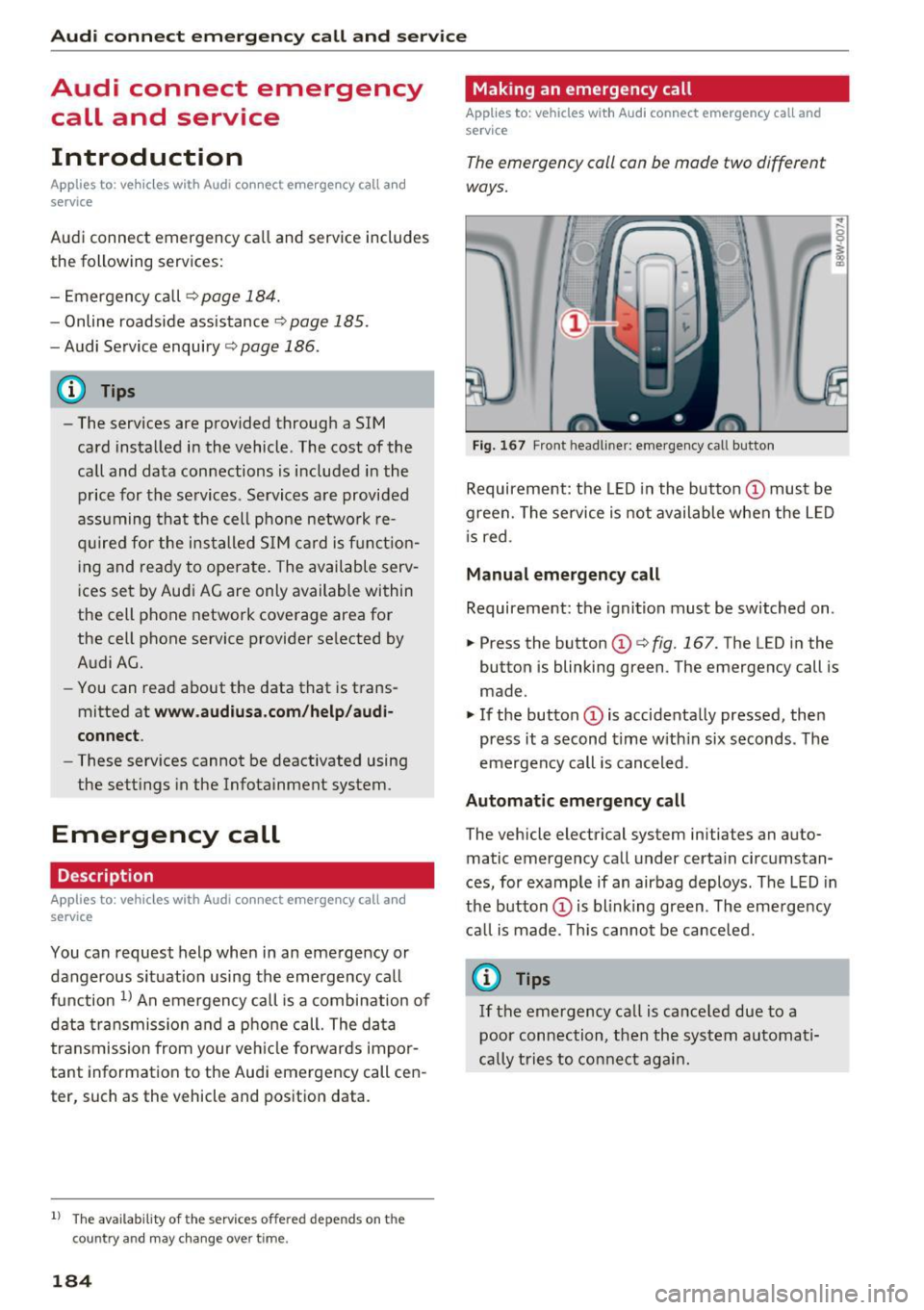
The emergency call can be made two different
ways.
Fi g. 1 67 Front head liner: emergency call butto n
Requireme nt: the LED in the button @must be
green. The se rvice is not available when the L ED
i s red.
Manual emergency call
Requireme nt: the ignition must be switched on.
.,. Press the button (D
¢fig. 167. The LED in the
button is blinking green. The emergency call is
made.
.. If the button (Dis accidenta lly pressed, then
press it a second time w ith in six seconds . The
emergency call is canceled .
Automatic emergency call
The vehicle electrical system initiates an auto
matic emergency call under certain circ umstan
ces, for example if an airbag deploys. The LED in
the button (Dis blink ing green. The eme rge ncy
ca ll is made. This cannot be canceled.
{!) Tips
If the emergency call is ca nce led due to a
poor conn ection, then th e system au toma ti
cally tries to con nect ag ain .
Page 195 of 386

Personal route
assistance
Applies to: vehicles with nav igation system
Your MMI can learn your frequently driven routes
and, depending on the current vehicle position,
suggest route guidance (for example, your daily commute to work and back).
Fig. 173 Examp le : persona l rou te d is pl ay
Fig . 174 In formation on perso nal route
.. Press the I NAV/MAPI repeatedly until the Enter
destination
menu is displayed ¢ page 187,
fig . 169 .
.. Select : right contro l button > Personal route
assistance .
When the function is switched on(~), the MMI
records the frequently-driven routes regardless
of whether a destination was entered and reached or not.
As long as route guidance is not act ive , your per
sonal routes are listed in the
Enter destination
menu under the home address and indicated with
the symbol
(D ¢ fig. 173. When personal route
assistance is sw itched on, this symbol is dis
played in the Infota inment system display status
line.
The distance to the destination and the calculat
ed arrival time are also displayed for your person
al routes . Without start ing route guidance, your
MMI monitors the traffic conditions for you r per-
Navigation
sonal routes and shows possible traffic incidents
for the possible routes to be driven in the Info
ta inment system display@¢
fig. 173.
A message will be displayed if there is a large
traffic incident (more than 15 minute delay) re
gardless of which menu is selected ¢
fig. 174.
Se lect and confirm one of the following options:
- Start route guidance : the MMI starts the route
guidance for the personal route displayed and
searches for a faster route if available.
- Ignore this route and this message : the dis
p layed destination with all applicable personal
routes is no longer factored into the current
trip. No more messages are shown for the dis
played destination. The displayed destination
with all applicable personal routes will be fac
tored into the trip again only after stopping the
veh icle and switching the ignition on again .
-Ignore all messages : all personal routes are no
longer factored into the current trip. No more
messages a re displayed . Messages for personal
routes when there is increased traff ic w ill ap
pear again after the vehicle is s top ped and the
ign ition is switched on again.
As soon as you switch off personal route assis
tance, the symbol turns off and your trips are no
longer recorded . Tr ips that were already stored
remain stored.
Deleting recorded routes :
-Select: !M ENU I button> Settings> left control
button >
MMI settings > Factory settings .
-Select: Navigation and online memory > Re·
store factory settings ¢
page 230.
{!) Tips
-Persona l routes are learned based on the ve
hicle position. The route is prioritized ac
cording to how frequently you drive to a
destination .
- A maximum of three personal routes are
disp layed in the
Enter destination menu.
Based on the current vehicle position, the
traffic situation for the route that is most
likely to be driven out of the three routes
w ill always be monitored.
193
Page 203 of 386
Selecting the online map upd ate
- Se lect an update package from the list(~) @
~fig. 182 .
-Confirm you r se lection with the I BACK I button
and go back to the selection.
- T he number and amo unt of data fo r the select
ed upda te pac kage a re now displayed in the In
f ota inment system.
Starting the download
- Se lect and confirm Start downlo ad .
- Confirm the secur ity prompt by selecting S tart
down load
again.
The update packages begin to down load and the
status of the download progress is shown in the
Infotainment system display .
Install ation of online map upd ates
The downloaded map materia l installs after you
stop your vehicle. The new update packages in
stall only after you switch off the ignition . After
restarting the MMI, the Infota inment system dis
play ind icates if the updates installed successful
l y .
- Confirm the successful update with
OK .
The new map materia l can now be used for navi
gation.
@ Tips
- The amount of available on line map up
dates in the vehicle is lim ited . To update
more regions, use the map update via SD
card at
my.aud iusa.com .
-Always read the chapter ~ page 178, Audi
connect (Infotainment) information.
Accessing traffic
information
Traffic information (TMC)
Applies to: vehicles with navigation system
~ Press the I NAV/MAPI button repeated ly until
<( the map is disp layed. a,
;::; ~ Se lect : left control button > Traffic me ssages . ,....
N .... 0 0
3 a,
Navigation
An overview of all the traffic messages is dis
played in the Infotainment system . Traffic inci
dents on your route are shown in the upper sec
t ion of the list, sorted according to distance.
- Displaying all traffic mes sage s for a street /
highwa y:
select and confirm the [ill symbol. A
list of all the traff ic messages for the selected
street/highway is displayed.
- Opening a detailed view of traffic info rmation :
select and confirm the traffic information from
the list.
-Displ aying the sele cted tr affic information on
the map :
select the right control button >
Show on map . The shaded line shows the
street and the length of the traffic jam.
- Displ aying the n ext traffic info rmat ion on the
map :
press the control knob.
Traffic inf ormation display
Colored warn ing symbol s:
traffic incidents o n
you r route are shown in the upper section of the
list and are sorted according to d istance.
Warning symbol s with .=>: avoided t raff ic inci
dents .
Grayed out warning symbol s: traffic incidents
that are not o n your ro ute. They a re sorted ac
cording to road type (expressway, h ighway, other
road), country and name.
(D Tips
- Cr itica l t raff ic information, s uch as w arn
ings about wrong -way drivers, is automa ti
cally disp layed . To hide the traffic informa
tion, press the
I BACK ! button or the control
knob.
- TM C traffic reports are not available in Can
ada. For more informat ion, please contact
Sirius Canada.
201
Page 229 of 386

<( a, .... N ,....
N .... 0 0
3 a,
Audi smartphone interface
Setup
App lies to: ve hicles with Audi smartpho ne interface
You can connect your smartphone to the MMI us
ing the Audi smartphone interface . Certain con
tent on your smartphone is adapted to the Info
tainment system display while driving and can
be operated through the MMI control panel.
Requir ement:
The vehicle must be stat ionary and the ignition
must be switched on .
iPhone generation 5 or higher with Lightning
connector and iOS 7.1.2 operating system or h igher
O r:
Smartphone with Android Auto app and Android
5 .0 Loll ipop operating system or higher
.,. Connect your smar tphone to the Audi music in
te rface
c;, page 215 using a USB adapter
¢page 215, fig. 194 .
.. Se lect and confirm A cti vate Apple CarPl ay or
Acti vate And roid Auto no w.
.. Follow the system instruct ions .
.,. Pay attention to any add itional system prompts
on your smartphone if applicable.
If you chose not to use Apple CarP lay or Andro id
Auto when connecting your smartphone for the
first time, you can start the Audi smartphone in
terface later on using the connection ma nager.
.. Se lect: I
MENU I button > Audi smartphone in-
terfa ce
> Change to conn ecti on manager .
.. Connect your smar tphone to the Audi music in
terface using a USB adapter
c;,page 215,
fig . 194.
Aud i smartphon e int erfac e
.. In the Connection manage r¢ page 230, you
can select your smartphone under
Aud i sm art
phone
in the list of devices already connected
c;,page 231 .
.. Follow the system instructions.
(D Tips
- The functions that can be used depend on
the operating system version and the soft
ware version of the app being used.
- If the connected smartphone has voice con trol, you can operate your smartphone using
the external voice recognition system
c;,page 159.
-The menu language shown in the MMI is
based on the settings in your smartphone.
- The time d isplayed in the MMI is based on
the settings in your smartphone.
- Severa l MMI functions are not availab le
w hen Apple CarPlay or Andro id Auto is ac
tive .
- When the Apple CarPlay connection is ac
tive,
Tag th is song for iTun es* is not ava ila
ble ,;;;) page 205 .
Operating
Opening a menu
Apple CarPl ay :
you can go back to the Apple Car
Play main menu regardless of the selected menu
item by pressing and holding the !BACKI button .
Android Auto : to go back to the Andro id Auto
menu bar, push the control knob down.
Opening a menu item
Se lect and confirm a menu item us ing the M MI
contro l pane l.
227
Page 237 of 386
<( a, .... N ,....
N .... 0 0
Software license information
Information on the software contained in the
MMI and the license agreement.
- Se lect: I MENU I button > Settings > left control
button
> System maintenance > Vers ion infor
mation .
- Or:
on line at www .audi.com/softwareinfo .
Information on the software contained in the
Head-up display and the license agreement .
-Press and hold the button for the Head-up dis
play @longer than five seconds after switching
on the ignition~
page 8, fig. 1.
- To close the i nfo rmation w indow, press a but
ton on the multif unction steeri ng wheel or a
button to open a menu on t he M MI control
panel.
Information on the software contained in the
instrument cluster and the license agreement .
Press the reset button twice with in f ive seconds
of switching the ignition on.
1>
3 1) Not availab le in all ve hicles. a,
System settings
235
Page 257 of 386
<( a, .... N ,....
N .... 0 0
3 a,
about children and Advanced Airbags
¢ page 2 77.
E ven though yo ur vehicle is equipped with an Ad
vanced Airbag System, make certain that all chil
dren, especially those 12 years and younger, al
ways ride in the back seat properly restrained for
their age and size. The airbag on the passenger
side makes the front seat a potentially dangerous place for a child to ride. The front seat is not the
safest place for a child in a forward-facing child
safety seat .
It can be a very dangerous place for
a n infant or a child in a rearward-fac ing seat.
T he Advanced Airbag System in your veh icle has
been certified to comply with the requirements
of United States Federal Motor Vehicle Safety
Standa rd (FMVSS) 208, as well as Canada Motor
Veh icle Safety Standa rd (CMVSS) 208 as applica
b le a t the time your veh icle was m an ufact ured.
Accord ing to requirements, the front Advanced
Airbag System on the passenger side has been
certified for "suppression" for infants of about 12 month old and younger and for "low risk de
ployment" for children aged 3 to 6 years old (as
defined in the standard) .
T he
PASSENGER AIR BAG OFF ~ ; light in the
headliner tells you when the front Advanced Air
bag on the passenger side has been turned off by
the electronic control unit.
Each time yo u turn on the ignition, the
PASSEN
GER AIR BAG OFF ~; ON
@ light will come on
for a few seconds and:
- PASSENGER AIR BAG OFF~; will come on if
the front passenger seat is not occupied
- PASSENGER AIR BAG OFF~; will come on if
the e lectrica l capacitance measured by the ca
pacitive passenger detection system for the
front passenger seat equa ls the comb ined ca
pacitance of an infant up to about one year of
age and one of the rearward-facing or forward
facing child restra ints listed i n Federa l Moto r
Vehicle Safety Standard ( FMVSS) 208 with
wh ich the Advanced Airbag System i n your veh i
cl e was certified . Fo r a listing of the child re
straints that were used to ce rtify you r vehicle 's
compliance with the Safety Standard
¢ page 279 .
Airb ag sys tem
-PAS SENGER AIR BAG OFF~; will come on if
there is a small chi ld or child restraint on the
front passenger seat
- PASSENGER AIR BAG ON@ will come on if the
front passenger seat is occupied by an ad ult as
registered by the capacit ive passenger detec
tion system
¢ page 265, Monitoring the Ad
vanced Airbag System .
The PASSENGER AIR BAG OFF~; light comes on
when e lectrical capacitance registered on the
front passenger seat is equal to or less than the
combined capacitance of a typical 1 year-old in
fant and one of the rearward-facing or forward
facing child restrai nts listed in Federal Motor Ve
hicle Safety Standard ( FMVSS) 208 with wh ich
the Advan ced Airbag System in yo ur vehicle was
ce rtified.
If the total electr ical capacitance reg istered on
t h e front passenger seat is mo re than that of a
typ ical 1 year -old ch ild but less than the weight
of a sm all adult, the front air bag on the passen
ger side can deploy (the
PASSENGER AIR BAG
OFF ~;
light does not come on) .
If the
PASSENGER AIR BAG OFF~; light does
not come on, the front airbag on the p assenger
s ide has not been turned off by the electronic
contro l unit and can deploy if the contro l unit
senses an impact that meets the conditions stor
ed in its memory .
For example , the airbag may deploy if :
-a small c hild that is heav ier than a typ ica l 1
year -o ld child is on the front passenger se at
(regardless o f whethe r the child is in one o f the
child sa fe ty seats listed
¢ page 2 79), o r
- a child who has outgrown c hild rest raints is on
t he front passenge r seat .
If the front passenge r airbag is t urned off, the
PASSENGER AIR BAG OFF~; light comes on i n
t h e headliner a nd stays o n.
If the front passenger a irbag deploys, the Feder
al Standard requi res the airbag to meet the "low
r isk " dep loymen t criteria to redu ce the r isk of in
j u ry through interaction w it h t he airbag. "Low
risk" deployment oc curs in those crashes that
take place at lowe r decelerations as defined in
Ill>
255
Page 265 of 386

_& WARNING
To reduce the risk of injury when an airbag in
flates, always wear safety belts properly.
- If you are unrestrained, lean ing forward, sit
t ing s ideways or out of pos ition in anyway,
your risk of injury is much h igher.
- You will also receive serious injur ies and
could even be killed if you are up aga inst the
airbag or too close to it when it inflates -
even with an Advanced Airbag
¢page 253.
More important things to know about front
a irbags
F ig. 221 Inflated front airbags
0 0 M
-..:, ... m
Safety belts are important to help keep front
seat occupants in the p roper seated position so
that a irbags can unfold properly and provide sup
p lemental protection in a frontal collision.
The front airbags are designed to provide addi
tional protection for the chest a nd face of the
d river and the front seat passenger when:
- safety belts are worn properly
- the seats have been positioned so that the oc-
cupant is properly seated as far as possible
from the airbag
- and the head restraints have been properly ad-
justed
Because airbags inflate in the blink of an eye with
great force, things you have on your lap or have placed on the seat could become dangerous pro
jectiles, and be pushed into you if the airbag in
flates .
~ When an a irbag deploys, fine dust is released.
8 This is normal and is not caused by a fire in the
~ vehicle. Th is dust is made up mostly of a powder
co
Airb ag sys tem
used to lubricate the airbags as they deploy. It
could irritate skin.
It is important to remember that wh ile the sup
plementa l airbag system is designed to red uce
the likelihood of serio us injuries, other injur ies,
for example swelling, bruising and minor abra s ions, can also happen when airbags inflate. Air
bags do not protect the arms or the lower parts
of the body. Front airbags supplement the three
point safety belts on ly in some frontal collisions
in which the vehicle deceleration is high e nough
to deploy the airbags .
Fron t airb ags will not depl oy:
- if the ignition is switched off when a crash oc-
curs
- in side collisions
- in rear-end collisions
- in rollovers
- when t he crash deceleration measured by the
airbag system is less than the m in imum thresh
old needed for airbag dep loyment as registe red
by the electronic control unit
Th e front passenger airbag also will not
deplo y:
- when the front passenger seat is not occupied,
- when the e lectr ica l ca pacitance measured by
the capacitive passenger detection system for
the front passenger seat indicates that the pas
senger s ide frontal a irbag must be switched off
by the electronic control unit (the
PASSENGER
AIR BAG OFF
11,;; light ¢ page 265 comes on
and stays on).
A WARNING
-Sitt ing in the wrong position can increase the
risk of ser ious injury in crashes.
- To reduce the risk of injury when the airbags
inflate, the drive r and passengers must al
ways sit in an up right posit ion, must not
lea n aga ins t or place any part of their body
too close to the area where the airbags are
located.
- Occupants who are unbelted, out of posi tion
or too close to the airbag c an be serio usly
inj ured by an airbag as it unfolds with great
force in the blink of an eye¢
page 254. ~
263
Page 267 of 386

-If the residue should get into your eyes,
flush them with water.
Monitoring the
Advanced Airbag System
Airbag monitoring indicator light
Two separate indicators monitor the function of
the Advanced Airbag System: the
E,I light and
the
PA SSEN GER AIR BAG OFF ~; ON @ light.
The Advanced Airbag System as we ll as the side
a irbags and side curtain airbags with eject io n
mitigation feat ures (incl uding the e lectronic con
trol unit, sensors and system wiring) are all
monitored continuously to ma ke sure that they
are functioning properly whenever the ign ition is
on . Every t ime you turn on the ign ition, the air
bag system indi cator light
m will come on for a
few seconds (function check) .
The s yste m must b e in spect ed wh en th e
indicato r light
El:
- does no t come on when the igni tion is sw itched
on
- doe s not go out a few seconds after you have
switched on the ign ition, or
- comes on while driving
I f an airbag system malfunction is detected , the
indicator light wi ll come o n to serve as a constant
reminder to have the system inspected immedi
ately .
I f a malfunction occurs that turns the front air
bag on the pass enger side off, the
PA SSENGER
AIR BAG OFF~;
light will come on and stay on
whenever the ignition is on.
A WARNING
An airbag system that is not funct ioning prop
erly cannot provide supplemental protection
in a frontal crash .
-If the airbag indicato r light c> page 33
comes when the vehicle is be ing used , have
t he system inspected immed iate ly by yo ur
authori zed Audi dealer.
It is possible that
the a irbag will inf late when it is not s up
posed to, or will not infla te whe n it shou ld .
Airb ag sys tem
PASSENGER AIR BAG OFF '1; ON @ light
Fig. 222 Sect io n fro m th e he adliner : PASS ENGER AIR BAG
O FF ~; ON
@ lig ht
T he PASSENGER AIR BAG OFF~; ON @ light is
located in t he headliner
c> fig . 222.
T he PASS ENGER AIR BAG OFF~; light will come
o n and stay on to tell you when the fron t Ad
vanced Airbag on the passenger s ide has been
turned off by t he e lectron ic control unit . If the
bulb for the
PASSENGER AIR BAG OFF~; ON @
light b urns out, the a irbag ind icator light m w ill
come on to signal a malfunction in the Advanced
Airbag System. Although the burned-out bu lb
will not change the way the front pa ssenger's
frontal a irbag works , it w ill no longer be possible
to use the
PASSENGER AIR BAG OFF~; ON @
ligh t to make su re that the airbag on/off status is
correct fo r the oc cupan t on the front passenge r
seat. Have the airbag system inspected immedi
ately by your authorized Audi dealer.
The PASSENGER AIR BAG OFF~; ON @ light
will blink for about
S s econd s when :
- the capacit ive passenger detection system,
which switc hes the front seat passenger's fron
tal Advanced Airbag o n and off, detects a
change in the status of the front passe nger
seat.
As soon as the
PASSENGER AIR BAG OFF~; ON
@ light s tops blin king, always make sure that the
airbag status (on or off) as shown by the ligh t is
proper fo r the age, size and e lec trica l ca pa citance
of the person occ upying the front passenger
seat . Always make su re that the safety be lt for
th e front passenger seat is prop erly fast ened .
The PASSENGER AIR BAG OFF~;/ PASSENGER
AIR BAG ON
@ light will show the st atu s of the ..,.
265